light MERCEDES-BENZ GLA-Class 2017 X156 Repair Manual
[x] Cancel search | Manufacturer: MERCEDES-BENZ, Model Year: 2017, Model line: GLA-Class, Model: MERCEDES-BENZ GLA-Class 2017 X156Pages: 390, PDF Size: 8.37 MB
Page 129 of 390
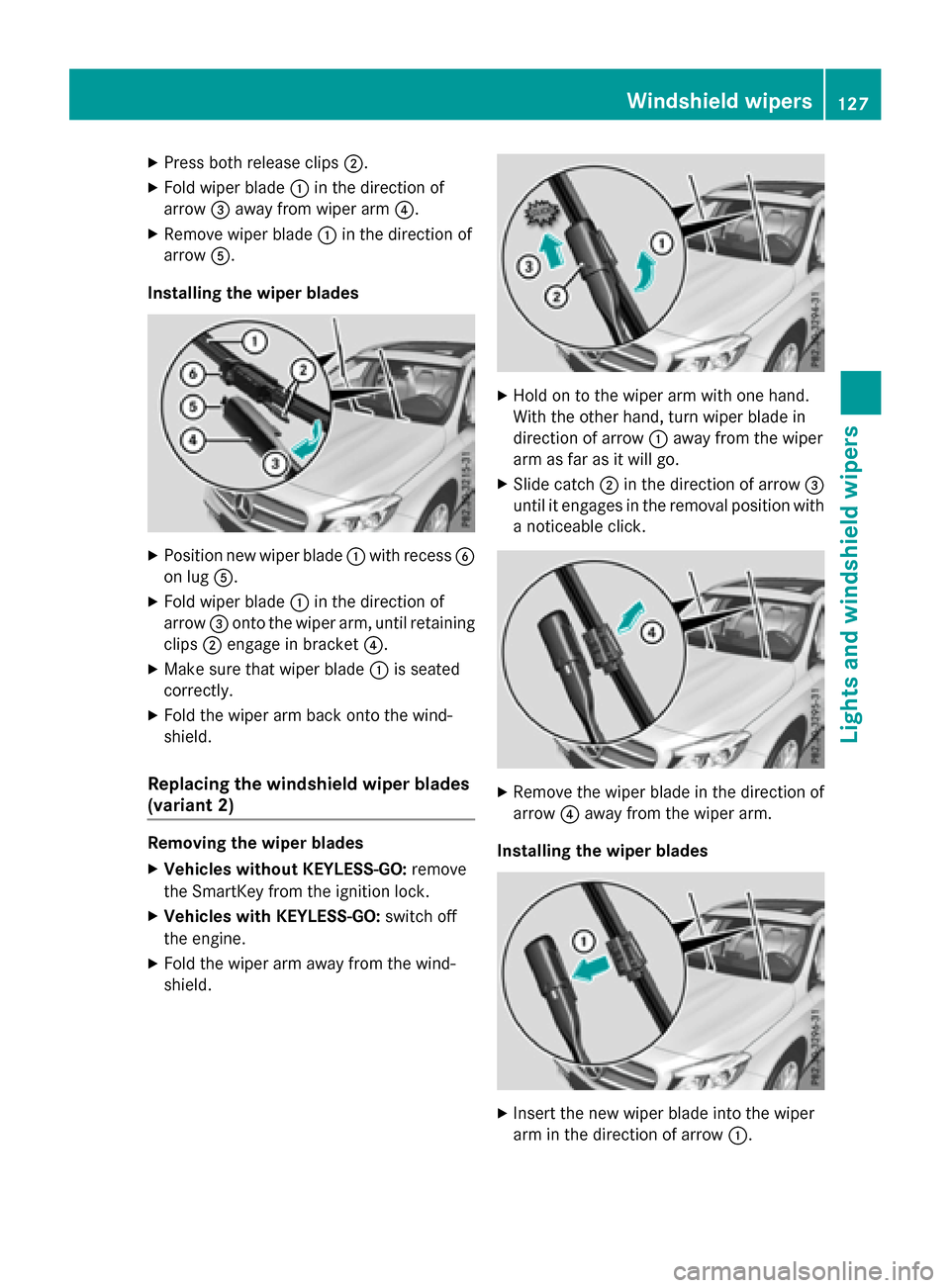
XPress both release clips;.
XFold wiper blade:in the direction of
arrow =away from wiper arm ?.
XRemove wiper blade:in the direction of
arrow A.
Installing the wiper blades
XPosition new wiper blade :with recess B
on lug A.
XFold wiper blade :in the direction of
arrow =onto the wiper arm, until retaining
clips ;engage in bracket ?.
XMake sure that wiper blade :is seated
correctly.
XFold the wiper arm back onto the wind-
shield.
Replacing the windshield wiper blades
(variant 2)
Removing the wiper blades
XVehicles without KEYLESS-GO: remove
the SmartKey from the ignition lock.
XVehicles with KEYLESS-GO: switch off
the engine.
XFold the wiper arm away from the wind-
shield.
XHold on to the wiper arm with one hand.
With the other hand, turn wiper blade in
direction of arrow :away from the wiper
arm as far as it will go.
XSlide catch ;in the direction of arrow =
until it engages in the removal position with
a noticeable click.
XRemove the wiper blade in the direction of
arrow ?away from the wiper arm.
Installing the wiper blades
XInsert the new wiper blade into the wiper
arm in the direction of arrow :.
Windshield wipers127
Lights and windshield wipers
Z
Page 130 of 390
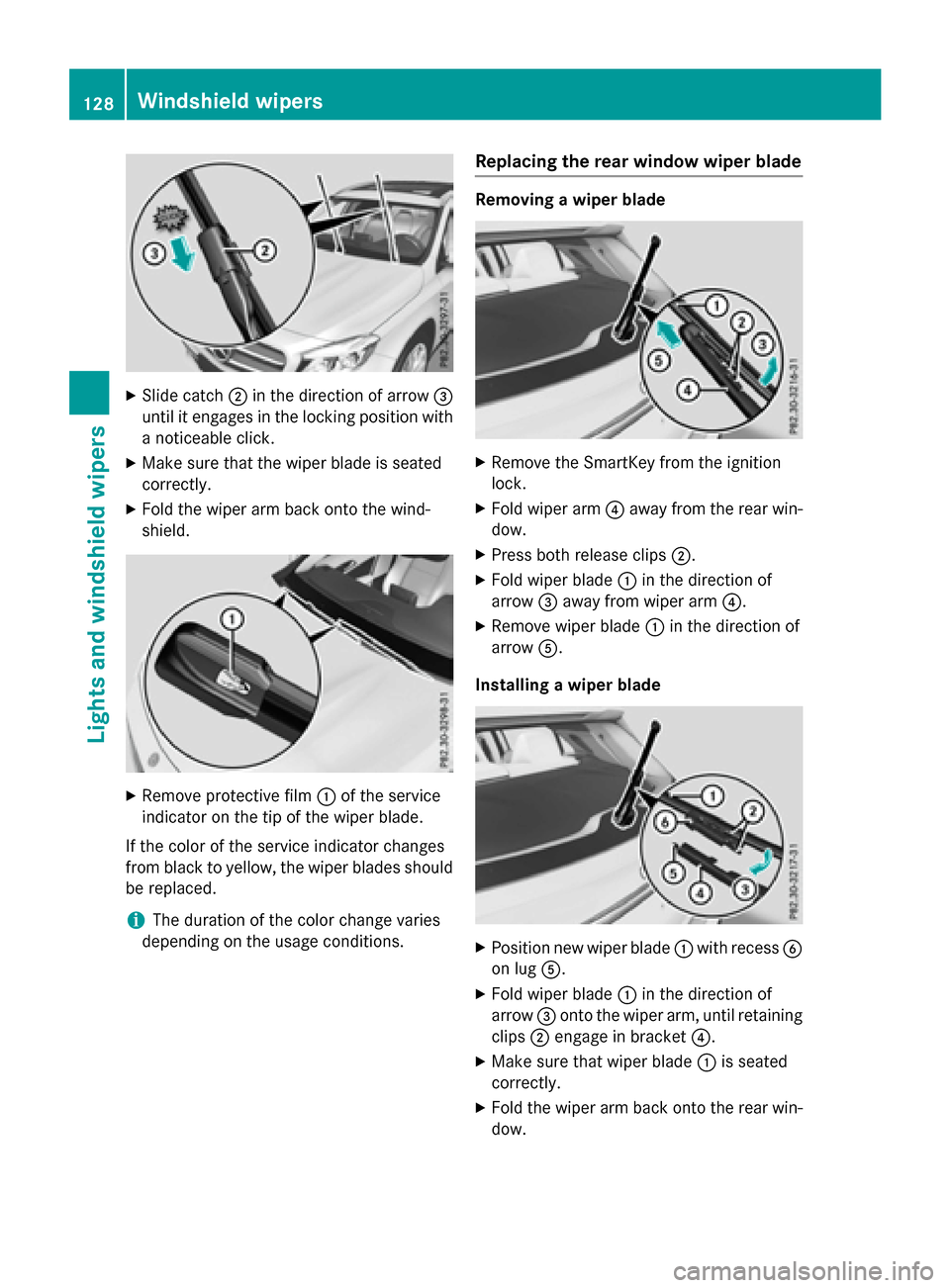
XSlide catch;in the direction of arrow =
until it engages in the locking position with a noticeable click.
XMake sure that the wiper blade is seated
correctly.
XFold the wiper arm back onto the wind-
shield.
XRemove protective film :of the service
indicator on the tip of the wiper blade.
If the color of the service indicator changes
from black to yellow, the wiper blades should
be replaced.
iThe duration of the color change varies
depending on the usage conditions.
Replacing the rear window wiper blade
Removing a wiper blade
XRemove the SmartKey from the ignition
lock.
XFold wiper arm ?away from the rear win-
dow.
XPress both release clips ;.
XFold wiper blade:in the direction of
arrow =away from wiper arm ?.
XRemove wiper blade:in the direction of
arrow A.
Installing a wiper blade
XPosition new wiper blade :with recess B
on lug A.
XFold wiper blade :in the direction of
arrow =onto the wiper arm, until retaining
clips ;engage in bracket ?.
XMake sure that wiper blade :is seated
correctly.
XFold the wiper arm back onto the rear win-
dow.
128Windshield wipers
Lights and windshield wipers
Page 131 of 390
Problems with the windshield wipers
ProblemPossible causes/consequences andMSolutions
The windshield wipers
are jammed.Leaves or snow, for example, may be obstructing the windshield
wiper movement. The wiper motor has been deactivated.
XFor safety reasons, you should remove the SmartKey from the
ignition lock.
XRemove the cause of the obstruction.
XSwitch the windshield wipers back on.
The windshield wipers
fail completely.The windshield wiper drive is malfunctioning.
XSelect another wiper speed on the combination switch.
XHave the windshield wipers checked at a qualified specialist
workshop.
The windshield washer
fluid from the spray
nozzles no longer hits
the center of the wind-
shield.The spray nozzles are misaligned.
XHave the spray nozzles adjusted at a qualified specialist work-
shop.
Windshield wipers129
Lights and windshield wipers
Z
Page 138 of 390
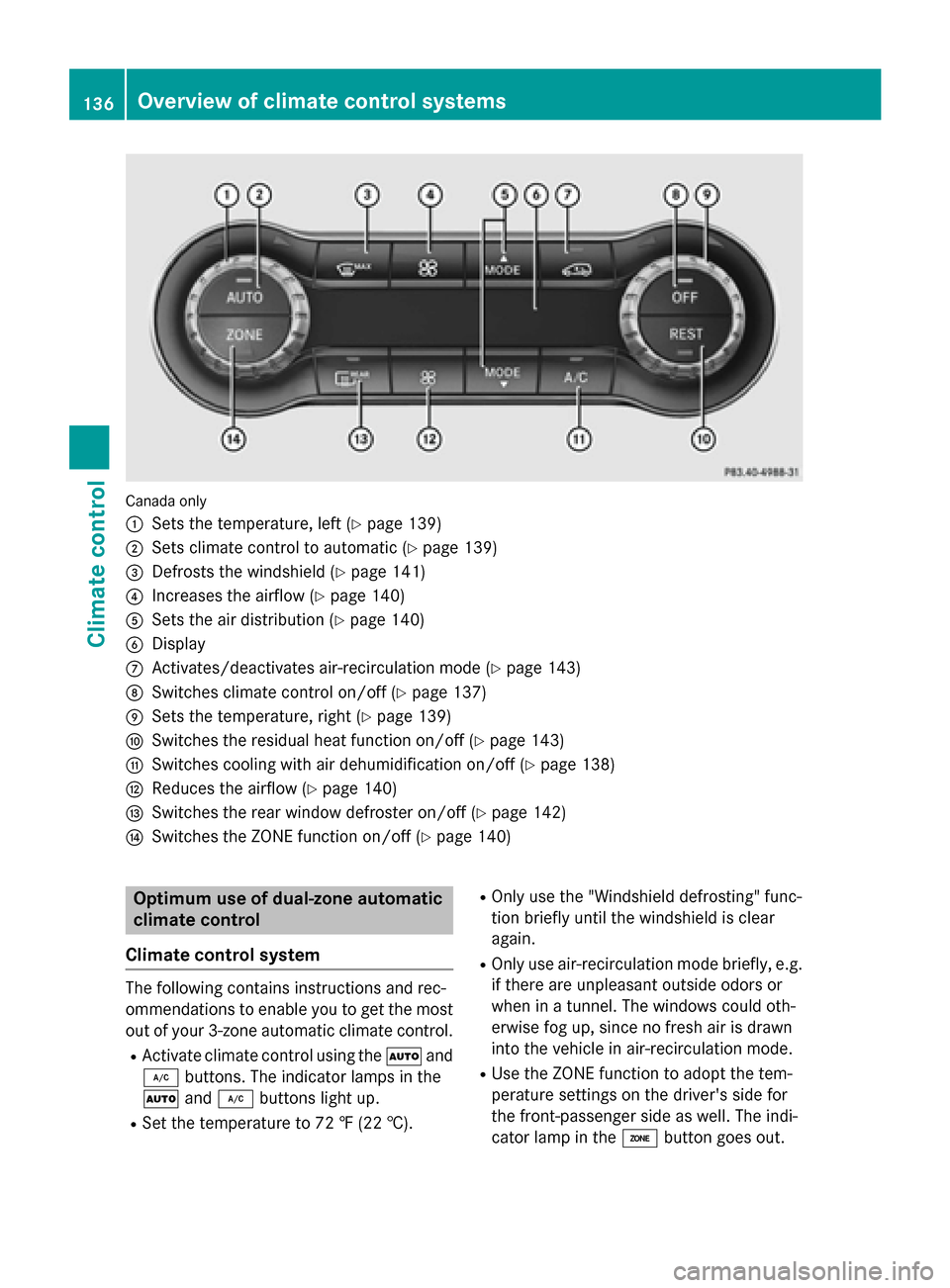
Canada only
:
Sets the temperature, left (Ypage 139)
;Sets climate control to automatic (Ypage 139)
=Defrosts the windshield (Ypage 141)
?Increases the airflow (Ypage 140)
ASets the air distribution (Ypage 140)
BDisplay
CActivates/deactivates air-recirculation mode (Ypage 143)
DSwitches climate control on/off (Ypage 137)
ESets the temperature, right (Ypage 139)
FSwitches the residual heat function on/off (Ypage 143)
GSwitches cooling with air dehumidification on/off (Ypage 138)
HReduces the airflow (Ypage 140)
ISwitches the rear window defroster on/off (Ypage 142)
JSwitches the ZONE function on/off (Ypage 140)
Optimum use of dual-zone automatic
climate control
Climate control system
The following contains instructions and rec-
ommendations to enable you to get the most
out of your 3-zone automatic climate control.
RActivate climate control using the Ãand
¿ buttons. The indicator lamps in the
à and¿ buttons light up.
RSet the temperature to 72 ‡ (22 †).
ROnly use the "Windshield defrosting" func-
tion briefly until the windshield is clear
again.
ROnly use air-recirculation mode briefly, e.g.
if there are unpleasant outside odors or
when in a tunnel. The windows could oth-
erwise fog up, since no fresh air is drawn
into the vehicle in air-recirculation mode.
RUse the ZONE function to adopt the tem-
perature settings on the driver's side for
the front-passenger side as well. The indi-
cator lamp in the ábutton goes out.
136Overview of climate control systems
Climate control
Page 139 of 390
RUse the residual heat function if you want to
heat or ventilate the vehicle interior when
the ignition is switched off. The residual
heat function can only be activated or deac-
tivated with the ignition switched off.
RIf you change the settings of the climate
control system, the climate status display
appears for approximately three seconds
at the bottom of the screen in the Audio/
COMAND display (see separate operating
instructions). You will see the current set-
tings of the various climate control func-
tions.
DYNAMIC SELECT button (except
Mercedes-AMG vehicles)
You can choose between various drive pro-
grams with the DYNAMIC SELECT button
(
Ypage 157).
If you have selected drive program E:
Rwhen heating, the electrical heater booster
is deactivated and in the warming-up phase
heat output is reduced
Rthe rear window defroster running time is
reduced
Depending on the configuration, the climate
settings can also be influenced in drive pro-
gram I.
If you have selected drive program Cor S, the
climate settings are not affected.
ECO start/stop function
During automatic engine switch-off, the cli-
mate control system only operates at a
reduced capacity. If you require the full cli-
mate control output, you can switch off the
ECO start/stop function by pressing the ECO
button (
Ypage 155).
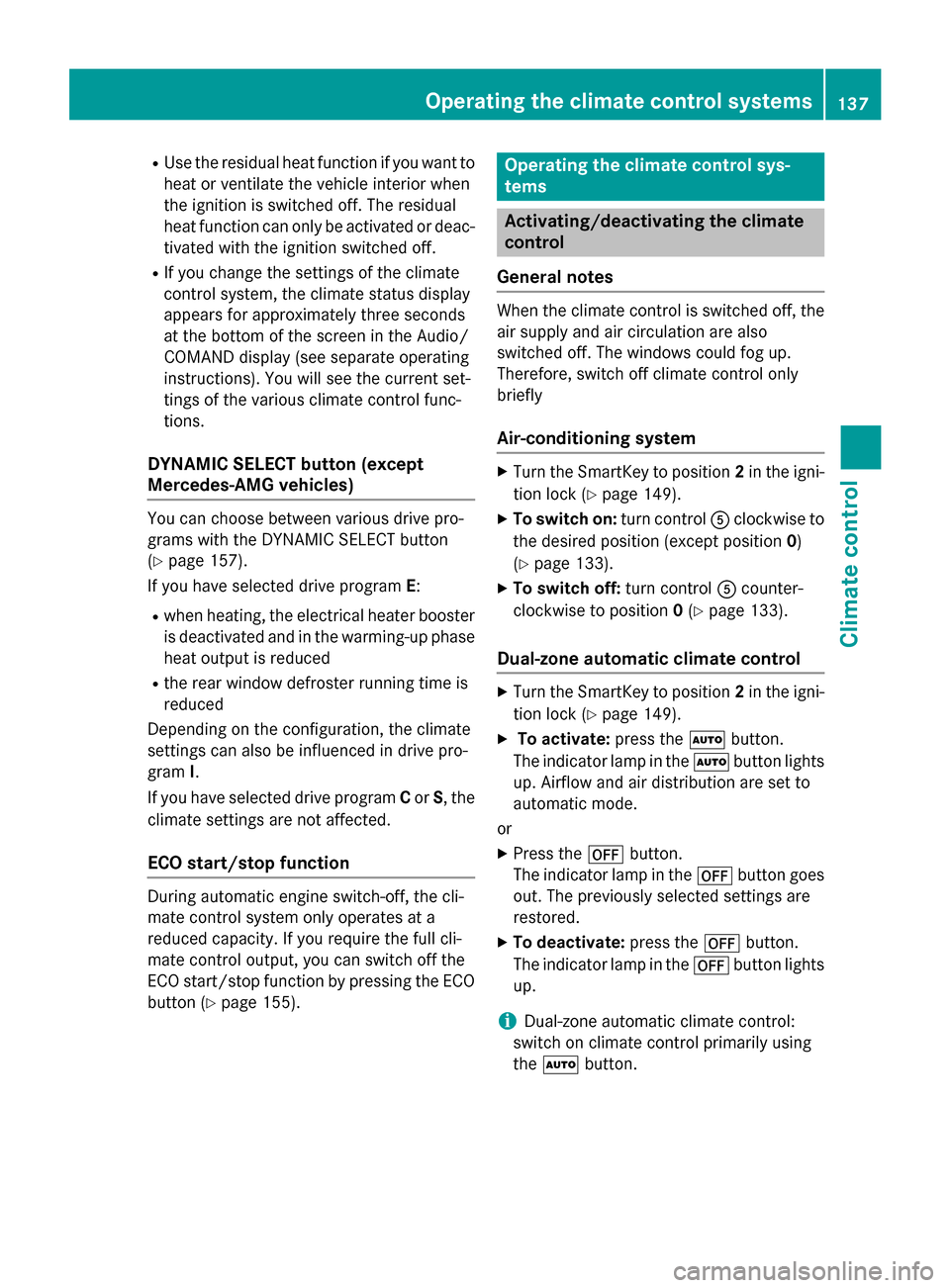
Operating the climate control sys-
tems
Activating/deactivating the climate
control
General notes
When the climate control is switched off, the
air supply and air circulation are also
switched off. The windows could fog up.
Therefore, switch off climate control only
briefly
Air-conditioning system
XTurn the SmartKey to position 2in the igni-
tion lock (
Ypage 149).
XTo switch on: turn controlAclockwise to
the desired position (except position 0)
(
Ypage 133).
XTo switch off: turn controlAcounter-
clockwise to position 0(
Ypage 133).
Dual-zone automatic climate control
XTurn the SmartKey to position 2in the igni-
tion lock (
Ypage 149).
XTo activate: press theÃbutton.
The indicator lamp in the Ãbutton lights
up. Airflow and air distribution are set to
automatic mode.
or
XPress the ^button.
The indicator lamp in the ^button goes
out. The previously selected settings are
restored.
XTo deactivate: press the^button.
The indicator lamp in the ^button lights
up.
iDual-zone automatic climate control:
switch on climate control primarily using
the à button.
Operating the climate control systems137
Climate control
Page 140 of 390
Switching cooling with air dehumidi-
fication on/off
General notes
If you deactivate the "Cooling with air-dehu-
midification" function, the air inside the vehi- cle will not be cooled. The air inside the vehi-
cle will also not be dehumidified. The win-
dows can fog up more quickly. Therefore, only
deactivate the "Cooling with air-dehumidifi-
cation" function briefly.
The "Cooling with air dehumidification" func-
tion is only available when the engine is run-
ning. The air inside the vehicle is cooled and
dehumidified according to the temperature
selected.
Condensation may drip from the underside of
the vehicle when it is in cooling mode. This is
normal and not a sign that there is a malfunc- tion.
Switching on/off
XTo activate: press the¿button.
The indicator lamp in the ¿button lights
up.
XTo deactivate: press the¿button.
The indicator lamp in the ¿button goes
out. The "Cooling with air dehumidification" function has a delayed switch-off feature.
138Operating the climate control systems
Climate control
Page 141 of 390
Problems with the "Cooling with air dehumidification" function
ProblemPossible causes/consequences andMSolutions
The indicator lamp in
the¿ button
flashes three times or
remains off. The "Cool-
ing with air dehumidifi-
cation" function cannot
be switched on.Cooling with air dehumidification has been deactivated due to a
malfunction.
XVisit a qualified specialist workshop.
Setting climate control to automatic
General notes
The automatic function is only available in
conjunction with dual-zone automatic climate
control.
In automatic mode, the set temperature is
maintained automatically at a constant level.
The system automatically regulates the tem-
perature of the dispensed air, the airflow and
the air distribution.
The automatic mode functions optimally
when the "Cooling with air dehumidification"
function is activated. If necessary, cooling
with air dehumidification can be deactivated.
If you deactivate the "Cooling with air-dehu-
midification" function, the air inside the vehi-
cle will not be cooled. The air inside the vehi-
cle will also not be dehumidified. The win-
dows can fog up more quickly. Therefore, only
deactivate the "Cooling with air-dehumidifi-
cation" function briefly.
Setting climate control to automatic
XTurn the SmartKey to position 2in the igni-
tion lock (
Ypage 149).
XSet the desired temperature.
XTo activate: press theÃbutton.
The indicator lamp in the Ãbutton lights
up. Automatic air distribution and airflow
are activated.
XTo switch to manual mode: press the
É orË button.
or
XPress the KorI button.
The indicator lamp in the Ãbutton goes
out. Automatic air distribution and airflow
are deactivated.
Setting the temperature
Air-conditioning system
You can set the temperature for the entire
vehicle. The set temperature is automatically
maintained at a constant level.
XTurn the SmartKey to position 2in the igni-
tion lock (
Ypage 149).
XTo increase/reduce: turn control:
clockwise or counter-clockwise
(
Ypage 133). Only change the temperature
setting in small increments. Start at 72 ‡
(22 †).
Dual-zone automatic climate control
Different temperatures can be set for the
driver's and front-passenger sides. The set
temperature is automatically maintained at a
constant level.
XTurn the SmartKey to position 2in the igni-
tion lock (
Ypage 149).
XTo increase/reduce: turn thumbwheel:
or E to the left or right (
Ypage 135). Only
Operating the climate control systems139
Climate control
Page 142 of 390
change the temperature setting in small
increments. Start at 72 ‡ (22 †).
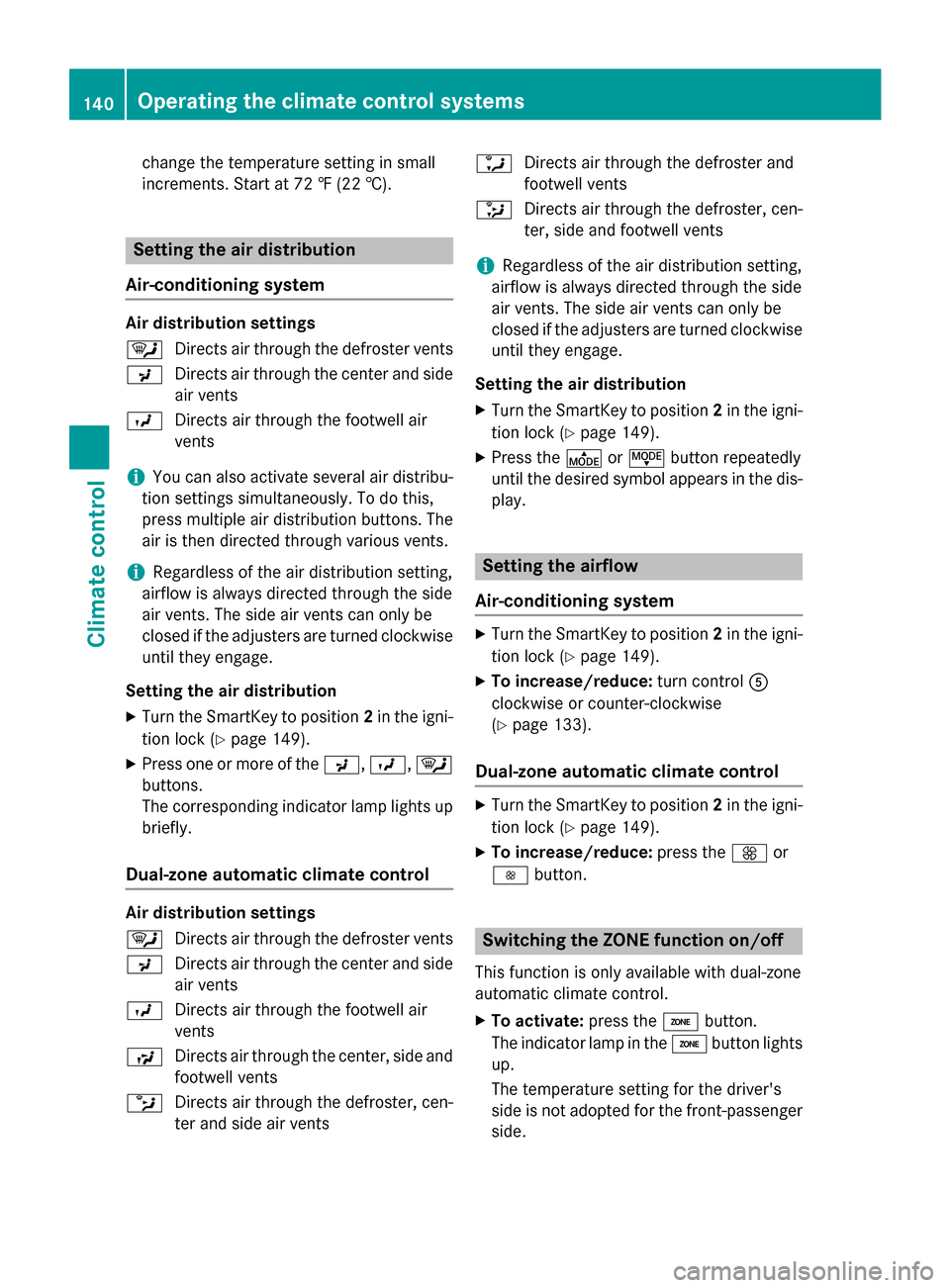
Setting the air distribution
Air-conditioning system
Air distribution settings
¯ Directs air through the defroster vents
P Directs air through the center and side
air vents
O Directs air through the footwell air
vents
iYou can also activate several air distribu-
tion settings simultaneously. To do this,
press multiple air distribution buttons. The
air is then directed through various vents.
iRegardless of the air distribution setting,
airflow is always directed through the side
air vents. The side air vents can only be
closed if the adjusters are turned clockwise until they engage.
Setting the air distribution
XTurn the SmartKey to position 2in the igni-
tion lock (
Ypage 149).
XPress one or more of the P,O,¯
buttons.
The corresponding indicator lamp lights up
briefly.
Dual-zone automatic climate control
Air distribution settings
¯ Directs air through the defroster vents
P Directs air through the center and side
air vents
O Directs air through the footwell air
vents
S Directs air through the center, side and
footwell vents
b Directs air through the defroster, cen-
ter and side air vents a
Directs air through the defroster and
footwell vents
_ Directs air through the defroster, cen-
ter, side and footwell vents
iRegardless of the air distribution setting,
airflow is always directed through the side
air vents. The side air vents can only be
closed if the adjusters are turned clockwise until they engage.
Setting the air distribution
XTurn the SmartKey to position 2in the igni-
tion lock (
Ypage 149).
XPress the ÉorË button repeatedly
until the desired symbol appears in the dis-
play.
Setting the airflow
Air-conditioning system
XTurn the SmartKey to position 2in the igni-
tion lock (
Ypage 149).
XTo increase/reduce: turn controlA
clockwise or counter-clockwise
(
Ypage 133).
Dual-zone automatic climate control
XTurn the SmartKey to position 2in the igni-
tion lock (
Ypage 149).
XTo increase/reduce: press theKor
I button.
Switching the ZONE function on/off
This function is only available with dual-zone
automatic climate control.
XTo activate: press theábutton.
The indicator lamp in the ábutton lights
up.
The temperature setting for the driver's
side is not adopted for the front-passenger
side.
140Operating the climate control systems
Climate control
Page 143 of 390
XTo deactivate:press theábutton.
The indicator lamp in the ábutton goes
out.
The temperature setting for the driver's
side is adopted for the front-passenger
side.
Defrosting the windshield
General notes
You can use this function to defrost the wind-
shield or to defrost the inside of the wind-
shield and the side windows.
iYou should only select the "Windshield
defrosting" function until the windshield is
clear again.
Activating/deactivating the defrosting
function for the windshield
XTurn the SmartKey to position 2in the igni-
tion lock (
Ypage 149).
XTo activate: press the¬button.
The indicator lamp in the ¬button lights
up.
The climate control system switches to the
following functions:
Rhigh airflow
Rhigh temperature
Rair distribution to the windshield and
front side windows
Rair-recirculation mode off
iThe "Windshield defrosting" function
automatically sets the blower output to the optimum defrosting effect. As a result, the
airflow may increase or decrease automat-
ically after the ¬button is pressed.
iYou can adjust the blower output man-
ually while the "Windshield defrosting"
function is in operation:
RAir-conditioning system: turn airflow
control Acounter-clockwise or clock-
wise (
Ypage 133).
RDual-zone automatic climate control:
press the óorô button.
XTo deactivate: press the¬button.
The indicator lamp in the ¬button goes
out. The previously selected settings are
restored. Air-recirculation mode remains
deactivated.
or
XDual-zone climate control: press the Ã
button.
The indicator lamp in the ¬button goes
out. Airflow and air distribution are set to
automatic mode.
or
XAir-conditioning system: turn temperature
control :counter-clockwise or clockwise
(
Ypage 133).
Dual-zone automatic climate control: turn
temperature control :orE counter-
clockwise or clockwise (
Ypage 135).
MAX COOL maximum cooling
The MAX COOL function is only available in
vehicles for the USA.
MAX COOL is only operational when the
engine is running.
XTo activate: press theÙbutton.
The indicator lamp in the button lights up.
XTo deactivate: press theÙbutton.
The indicator lamp goes out. The previously selected settings are restored.
When you activate MAX COOL, climate con-
trol switches to the following functions:
Rmaximum cooling
Rmaximum airflow
Rair-recirculation mode on
Operating the climate control systems141
Climate control
Page 144 of 390
Defrosting thewindows
Windows fogged up on th einside
Air-conditionin gsyste m
XActivat eth e¿ "Coolin gwit hair dehu-
midification "function .
XIf thewindows continue to fo gup, activat e
th e¬ "Windshield defrosting" function .
iYou should only selectthis setting until
th ewindshield is clear again .
Dual-zone automati cclimat econtro l
XActivateth e¿ "Coolin gwit hair dehu-
midification "function .
XActivateautomatic mode Ã.
XIf thewindows continue to fo gup, activat e
th e¬ "Windshield defrosting" function .
iYou should only selectthis setting until
th ewindshield is clear again .
Windows fogged up on th eoutsid e
XActivat eth ewindshield wipers .
XSetth eair distribution to PorO.
iYou should only selec tthis setting until
th ewindshield is clear again .
Rearwindow defroster
General notes
The rea rwindow defroster has ahig hcurren t
draw. You should therefore switch it of fas
soo nas th erea rwindow is clear .Otherwise ,
th erea rwindow defroster switches of fauto-
matically after severa lminutes.
If th ebattery voltage is to olow, th erea rwin -
dow defroster may switch off.
Switchin gon/of f
XTurnth eSmartKey to position 2in th eigni-
tion loc k (
Ypage 149).
XPress th e¤ button.
The indicator lamp in th e¤ buttonlights
up or goe sout .
142Operating the climate control systems
Climate control