sensor MERCEDES-BENZ GLA SUV 2013 User Guide
[x] Cancel search | Manufacturer: MERCEDES-BENZ, Model Year: 2013, Model line: GLA SUV, Model: MERCEDES-BENZ GLA SUV 2013Pages: 401, PDF Size: 11.9 MB
Page 77 of 401
Always pay careful attention to the traffic sit-
uation; do not rely on the distance warning
function alone.
Function X To activate/deactivate: activate or deac-
tivate the distance warning function in the
on-board computer (Y page 244).
When the distance warning function is deac-
tivated, the æsymbol appears in the mul-
tifunction display in the assistance graphic
display.
The distance warning function can help you to minimise the risk of a collision with a vehicle
ahead or reduce the effects of such a colli-
sion. If the distance warning function detects
that there is a risk of a collision, you will be
warned visually and acoustically. Without
your intervention, the distance warning func- tion cannot prevent a collision.
The distance warning function issues a warn-
ing at speeds:
R of around 30 km/h or more, if, over several
seconds, the distance maintained to the
vehicle travelling in front is insufficient. The · distance warning lamp then lights up
in the instrument cluster.
R of around 7 km/h or higher, if you very
quickly approach a vehicle in front. An
intermittent warning tone will then sound,
and the ·distance warning lamp will
light up in the instrument cluster.
X Brake immediately in order to increase the
distance from the vehicle in front.
or
X Take evasive action provided it is safe to do
so.
Due to the nature of the system, particularly
complicated but non-critical driving condi-
tions may also cause the system to display a
warning.
With the help of the radar sensor system, the distance warning function can detect obsta-
cles that are in the path of your vehicle for an
extended period of time. Up to a speed of about 70 km/h, the distance
warning function can also react to stationaryobstacles, such as stopped or parked vehi-
cles.
If you approach an obstacle and the distance
warning function detects a risk of a collision,
the system will alert you both visually and
acoustically.
In particular, the detection of obstacles can
be impaired in the case of:
R dirt on the sensors or obscured sensors
R snow or heavy rain
R interference by other radar sources
R strong radar reflections, for example, in
multi-storey car parks
R a narrow vehicle travelling in front, e.g. a
motorcycle
R a vehicle travelling in front on a different
line
R new vehicles or after a service on the COL-
LISION PREVENTION ASSIST PLUS system
Please observe the information in the sec-
tion on running-in the vehicle
(Y page 158).
Following damage to the front end of the vehi- cle, have the configuration and operation of
the radar sensor checked at a qualified spe-
cialist workshop. This also applies to colli-
sions at slow speeds where there is no visible
damage to the front of the vehicle.
Adaptive Brake Assist i
Observe the "Important safety notes" sec-
tion for driving safety systems (Y page 72). G
WARNING
Adaptive Brake Assist cannot always clearly
identify objects and complex traffic situa-
tions.
In such cases, Adaptive Brake Assist may:
R intervene unnecessarily
R not intervene
There is a risk of an accident. 74
Driving safety systemsSafety
Page 78 of 401
Always pay careful attention to the traffic sit-
uation and be ready to brake. Terminate the
intervention in a non-critical driving situation. G
WARNING
Adaptive Brake Assist does not react:
R to people or animals
R to oncoming vehicles
R to crossing traffic
R to stationary obstacles
R when cornering
As a result, Adaptive Brake Assist may not
intervene in all critical conditions. There is a
risk of an accident.
Always pay careful attention to the traffic sit- uation and be ready to brake.
Due to the nature of the system, particularly
complicated but non-critical driving condi-
tions may also cause Brake Assist to inter-
vene.
Adaptive Brake Assist aids you in braking dur-
ing hazardous situations at speeds above
7 km/h and uses the radar sensor system to
evaluate the traffic situation.
With the help of a sensor system, adaptive
Brake Assist can detect obstacles that are in the path of your vehicle for an extended
period of time.
If you approach an obstacle and adaptive
Brake Assist has detected a risk of collision,
adaptive Brake Assist calculates the braking
force necessary to avoid a collision. If you
apply the brakes forcefully, adaptive Brake
Assist will automatically increase the braking force to a level suitable for the traffic condi-
tions.
X Keep the brake pedal depressed until the
emergency braking situation is over.
ABS prevents the wheels from locking. The brakes will work normally again if:
R you release the brake pedal
R there is no longer any danger of a collision
R no obstacle is detected in front of your
vehicle
Adaptive Brake Assist is then deactivated.
Vehicles with PRE-SAFE ®
:if adaptive Brake
Assist requires particularly high brake pres-
sure, preventive passenger protection meas-
ures (PRE-SAFE ®
) are deployed simultane-
ously.
Up to vehicle speeds of around 250 km/h,
adaptive Brake Assist is capable of reacting to
moving objects that have already been rec-
ognised as such at least once over the period of observation. Adaptive Brake Assist does
not react to stationary obstacles.
If adaptive Brake Assist is not available due to a malfunction in the radar sensor system, thebrake system remains available with full
brake boosting effect and BAS.
In particular, the detection of obstacles can
be impaired if there is:
R dirt on the sensors or obscured sensors
R snow or heavy rain
R interference by other radar sources
R strong radar reflections, for example, in
multi-storey car parks
R a narrow vehicle travelling in front, e.g. a
motorcycle
R a vehicle travelling in front on a different
line
R new vehicles or after a service on the COL-
LISION PREVENTION ASSIST PLUS system
Please observe the information in the sec-
tion on running-in the vehicle
(Y page 158).
Following damage to the front end of the vehi-
cle, have the configuration and operation of
the radar sensor checked at a qualified spe-
cialist workshop. This also applies to colli-
sions at slow speeds where there is no visible
damage to the front of the vehicle. Driving safety systems
75Safety Z
Page 79 of 401
COLLISION PREVENTION ASSIST PLUS
General notes
COLLISION PREVENTION ASSIST PLUS is
only available on vehicles with DISTRONIC.
COLLISION PREVENTION ASSIST PLUS
extends the functionality of COLLISION PRE-
VENTION ASSIST with an automatic braking
function. COLLISION PREVENTION ASSIST
PLUS can help you to minimise the risk of a
front-end collision with a vehicle ahead or
reduce the effects of such a collision. If COL-
LISION PREVENTION ASSIST PLUS detects
that there is a risk of a collision, you will be
warned visually and acoustically. In critical
situations COLLISION PREVENTION ASSIST
PLUS also initiates automatic braking.
Function X To activate/deactivate: activate or deac-
tivate COLLISION PREVENTION ASSIST
PLUS in the on-board computer
(Y page 244).
If COLLISION PREVENTION ASSIST PLUS is
deactivated, the æsymbol appears in the
assistance graphics display.
If the driver's seat belt is fastened, COLLI-
SION PREVENTION ASSIST PLUS can brake
automatically within a speed range of
between 7 km/h and 200 km/h.
COLLISION PREVENTION ASSIST PLUS can
also react to stationary obstacles with auto-
matic braking within a speed range of
between 7 km/h and 30 km/h.
Vehicles with PRE-SAFE ®
:if the automatic
braking function of COLLISION PREVENTION
ASSIST PLUS intervenes powerfully, preven-
tive passenger protection measures (PRE-
SAFE ®
) are deployed simultaneously.
In particular, the detection of obstacles can
be impaired in the case of:
R dirt on the sensors or obscured sensors
R snow or heavy rain
R interference by other radar sources R
strong radar reflections, for example, in
multi-storey car parks
R a narrow vehicle travelling in front, e.g. a
motorcycle
R a vehicle travelling in front on a different
line
R new vehicles or after a service on the COL-
LISION PREVENTION ASSIST PLUS system
Please observe the information in the sec-
tion on running-in the vehicle
(Y page 158).
Following damage to the front end of the vehi-
cle, have the configuration and operation of
the radar sensor checked at a qualified spe-
cialist workshop. This also applies to colli-
sions at slow speeds where there is no visible
damage to the front of the vehicle. Adaptive brake lamps
The adaptive brake lights warn following traf- fic in an emergency braking situation:
R by means of flashing brake lamps
R the hazard warning lamps are activated
If you brake sharply from a speed of more
than 50 km/h or if braking is assisted by BAS
or BAS PLUS, the brake lamps flash rapidly. In
this way, traffic travelling behind you is
warned in an even more noticeable manner.
If you brake sharply from a speed of more
than 70 km/h to a standstill, the hazard warn- ing lamps are activated automatically. If the
brakes are applied again, the brake lamps
light up continuously. The hazard warning
lamps switch off automatically if you travel
faster than 10 km/h. You can also switch off
the hazard warning lamps using the hazard
warning button (Y page 123). ESP
®
(Electronic Stability Program)
General notes i
Observe the "Important safety notes" sec-
tion (Y page 72). 76
Driving safety systemsSafety
Page 85 of 401
if the vehicle is jacked up on one side, for
example.
Priming X
Make sure that:
R the doors are closed
R the tailgate is closed
Only then is the tow-away protection
primed.
X Lock the vehicle with the key.
Tow-away protection is primed after
approximately 60 seconds.
Deactivating X
Unlock the vehicle with the key.
or X Insert the key into the ignition lock.
Tow-away protection is switched off auto-
matically.
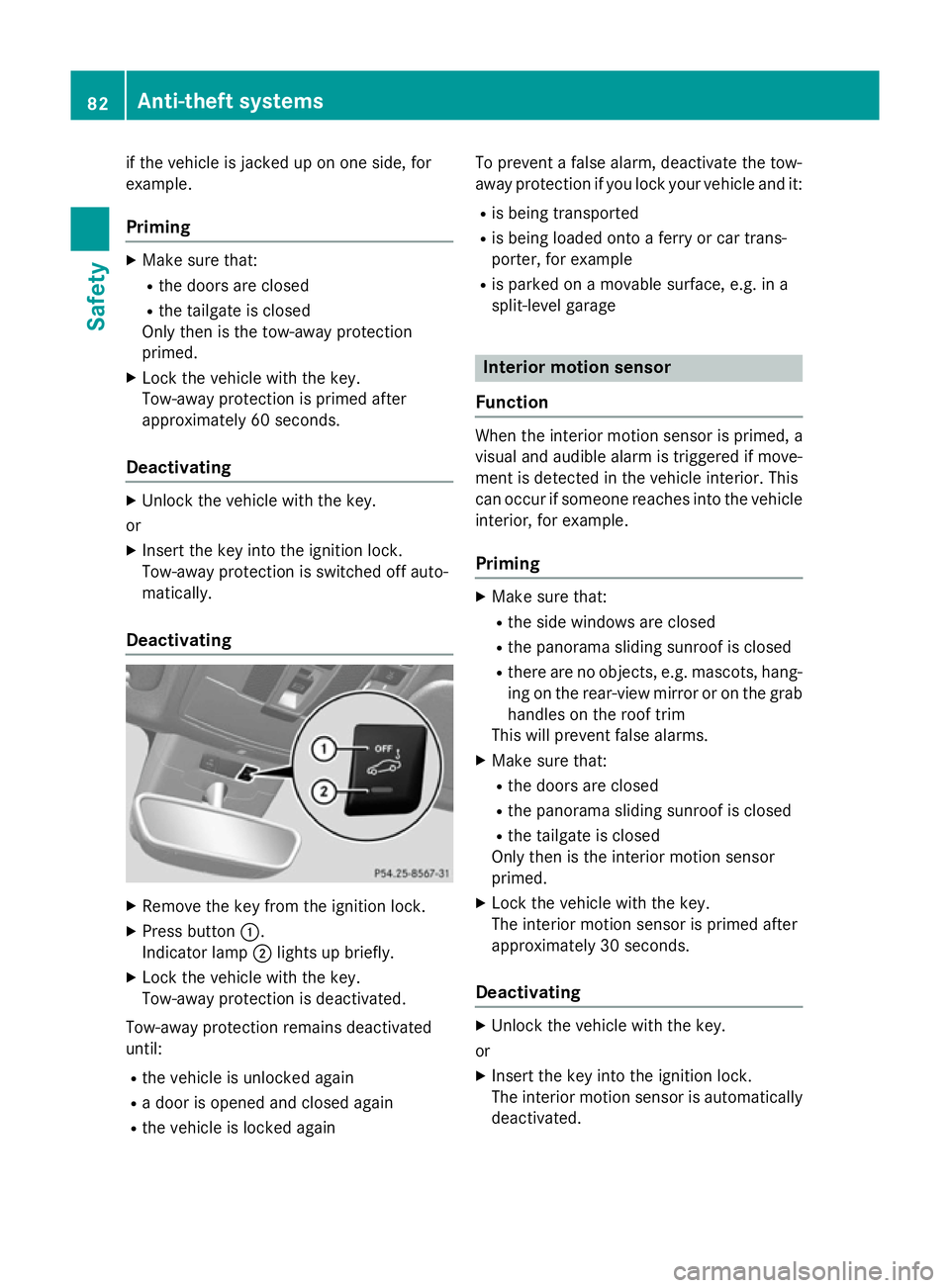
Deactivating X
Remove the key from the ignition lock.
X Press button :.
Indicator lamp ;lights up briefly.
X Lock the vehicle with the key.
Tow-away protection is deactivated.
Tow-away protection remains deactivated
until:
R the vehicle is unlocked again
R a door is opened and closed again
R the vehicle is locked again To prevent a false alarm, deactivate the tow-
away protection if you lock your vehicle and it:
R is being transported
R is being loaded onto a ferry or car trans-
porter, for example
R is parked on a movable surface, e.g. in a
split-level garage Interior motion sensor
Function When the interior motion sensor is primed, a
visual and audible alarm is triggered if move-
ment is detected in the vehicle interior. This
can occur if someone reaches into the vehicle interior, for example.
Priming X
Make sure that:
R the side windows are closed
R the panorama sliding sunroof is closed
R there are no objects, e.g. mascots, hang-
ing on the rear-view mirror or on the grab handles on the roof trim
This will prevent false alarms.
X Make sure that:
R the doors are closed
R the panorama sliding sunroof is closed
R the tailgate is closed
Only then is the interior motion sensor
primed.
X Lock the vehicle with the key.
The interior motion sensor is primed after
approximately 30 seconds.
Deactivating X
Unlock the vehicle with the key.
or X Insert the key into the ignition lock.
The interior motion sensor is automatically
deactivated. 82
Anti-theft systemsSafety
Page 86 of 401
Deactivating
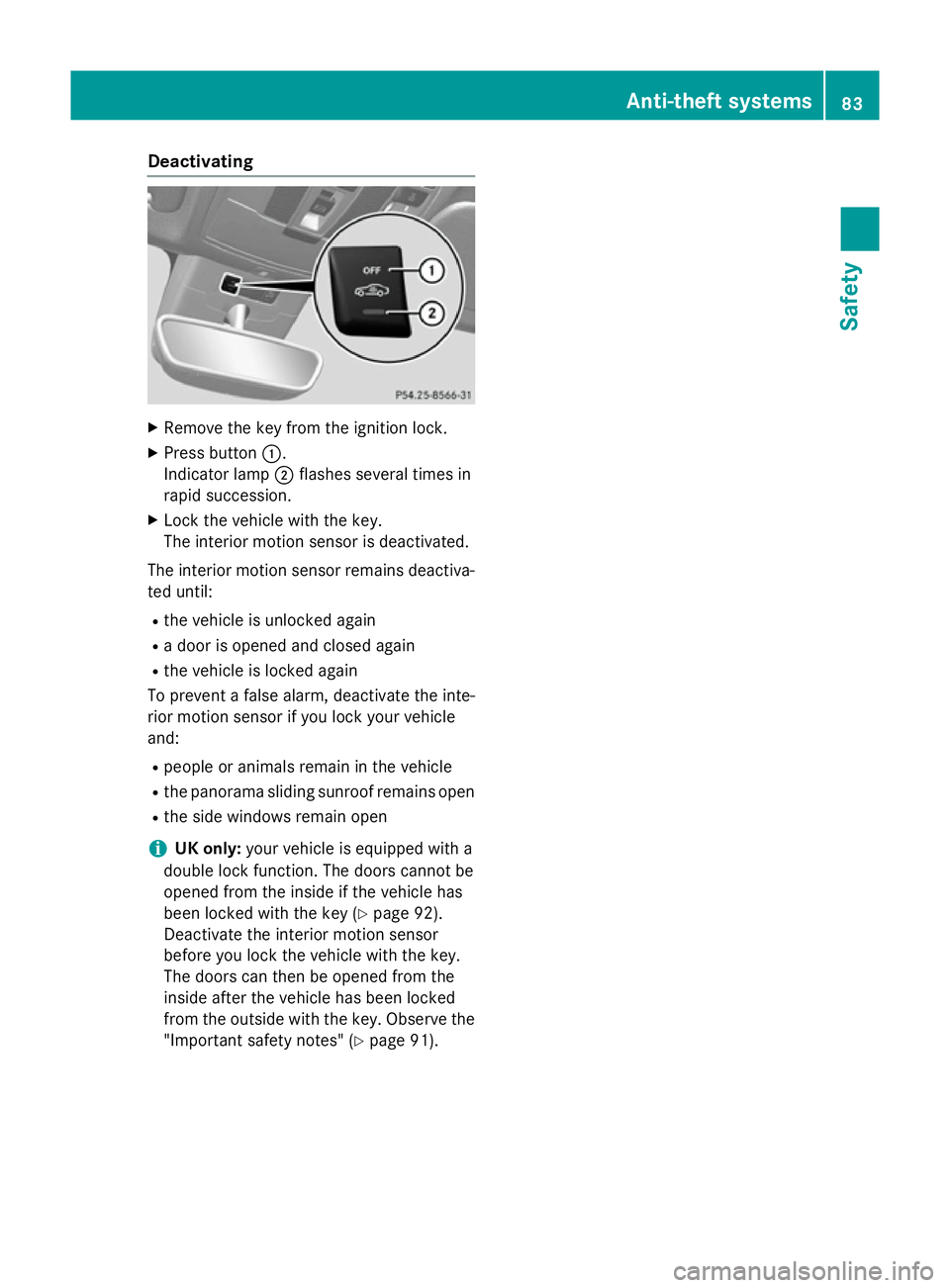
X
Remove the key from the ignition lock.
X Press button :.
Indicator lamp ;flashes several times in
rapid succession.
X Lock the vehicle with the key.
The interior motion sensor is deactivated.
The interior motion sensor remains deactiva-
ted until:
R the vehicle is unlocked again
R a door is opened and closed again
R the vehicle is locked again
To prevent a false alarm, deactivate the inte-
rior motion sensor if you lock your vehicle
and:
R people or animals remain in the vehicle
R the panorama sliding sunroof remains open
R the side windows remain open
i UK only:
your vehicle is equipped with a
double lock function. The doors cannot be
opened from the inside if the vehicle has
been locked with the key (Y page 92).
Deactivate the interior motion sensor
before you lock the vehicle with the key.
The doors can then be opened from the
inside after the vehicle has been locked
from the outside with the key. Observe the
"Important safety notes" (Y page 91). Anti-theft syste
ms
83Safety Z
Page 89 of 401
Useful information
i This Owner's Manual describes all mod-
els, series and optional equipment for your
vehicle that were available at the time of
going to press. National variations are pos- sible. Note that your vehicle may not be
equipped with all of the functions descri-
bed. This is also the case for systems and
functions relevant to safety.
i Read the information on qualified special-
ist workshops: (Y page 25). Key
Important safety notes
G
WARNING
If children are left unsupervised in the vehicle, they could:
R open doors, thereby endangering other per-
sons or road users
R get out and be struck by oncoming traffic
R operate vehicle equipment and become
trapped, for example
In addition, the children could also set the
vehicle in motion, for example, if they:
R release the parking brake
R shift the automatic transmission out of park
position P or shift manual transmission into
neutral
R start the engine
There is a risk of an accident and injury.
When leaving the vehicle, always take the key with you and lock the vehicle. Never leave
children and animals unattended in the vehi-
cle. Keep the keys out of the reach of children. G
WARNING
If persons (particularly children) are exposed
to heat or cold for a prolonged period, there is a risk of serious or even fatal injuries. Never
leave persons (particularly children) unatten-
ded in the vehicle. G
WARNING
If you attach heavy or large objects to the key, the key could be unintentionally turned in the
ignition lock. This could cause the engine to
be switched off. There is a risk of an accident.
Do not attach any heavy or large objects to the
key. Remove any bulky keyrings before insert-
ing the key into the ignition lock.
! Keep the key away from strong magnetic
fields. Otherwise, the remote control func-
tion could be affected.
Strong magnetic fields can occur in the
vicinity of powerful electrical installations.
Do not keep the key: R with electronic devices, e.g. a mobile
phone or another key
R with metallic objects, e.g. coins or metal
film
R inside metallic objects, e.g. a metal case
United Kingdom only: G
WARNING
When the double locks are activated, the
doors can no longer be opened from the
inside. People in the vehicle can no longer get out, e.g. in hazardous situations. There is a
risk of injury.
Therefore, do not leave any people unsuper-
vised in the vehicle, particularly children, eld-
erly people or people in need of special assis-
tance. Do not activate the double lock when
people are in the vehicle.
If the vehicle has been locked with the key,
the double lock function is activated as stand-
ard. It is then not possible to open the doors
from inside the vehicle. You can deactivate
the double lock function by deactivating the
interior motion sensor (Y page 82). The doors
can then be opened from the inside after the vehicle has been locked from the outside. You
can open the rear doors from inside the vehi-
cle if they are not secured by the child-proof
locks (Y page 71). The anti-theft alarm system 86
KeyOpening and closing
Page 95 of 401
the double lock function by deactivating the
interior motion sensor (Y page 82). The doors
can then be opened from the inside after the vehicle has been locked from the outside. You
can open the rear doors from inside the vehi- cle if they are not secured by the child-proof
locks (Y page 71). The anti-theft alarm system
is triggered if the door is opened from the
inside. Switch off the alarm . Unlocking and opening the doors
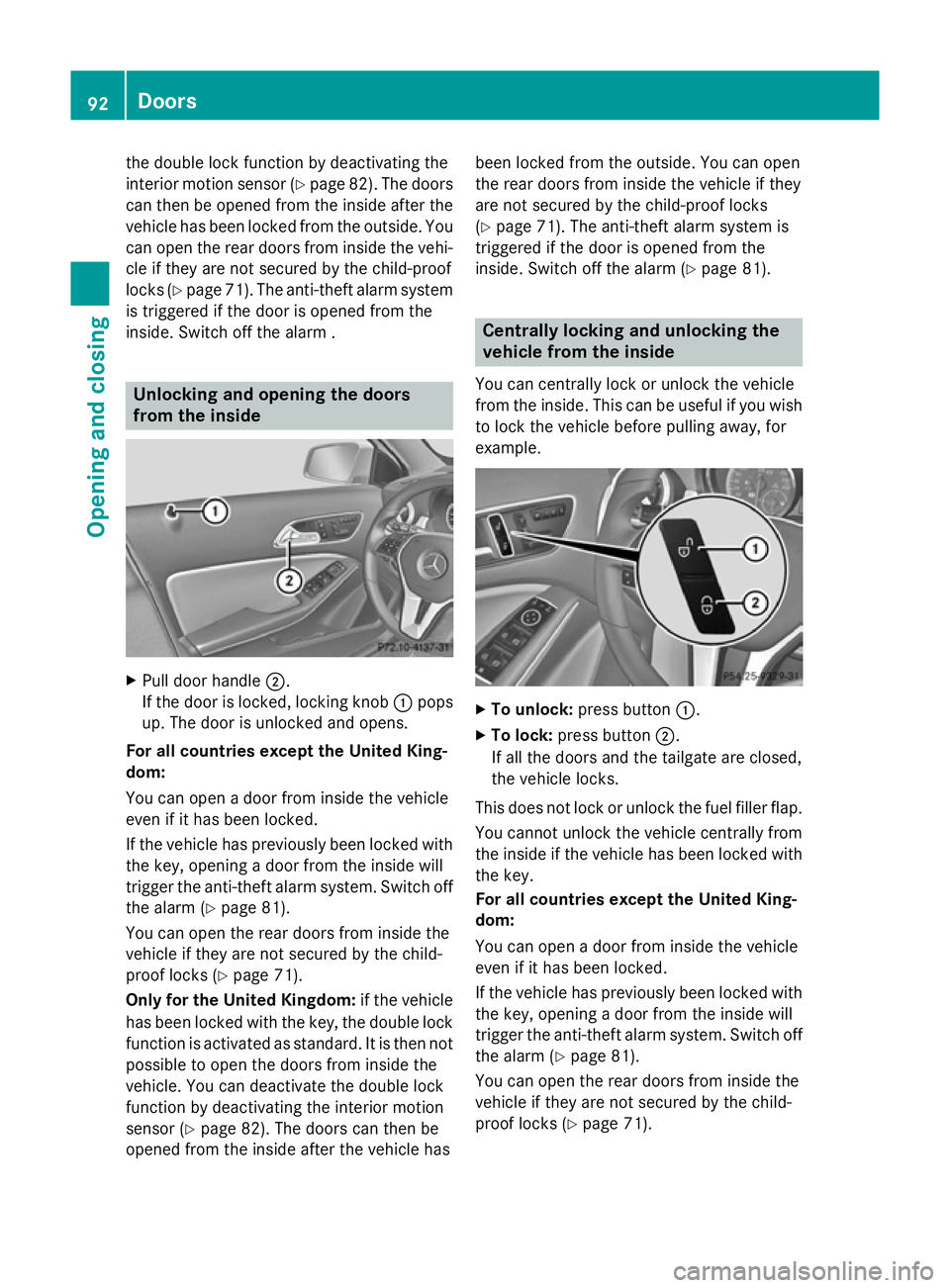
from the inside
X
Pull door handle ;.
If the door is locked, locking knob :pops
up. The door is unlocked and opens.
For all countries except the United King-
dom:
You can open a door from inside the vehicle
even if it has been locked.
If the vehicle has previously been locked with
the key, opening a door from the inside will
trigger the anti-theft alarm system. Switch off
the alarm (Y page 81).
You can open the rear doors from inside the
vehicle if they are not secured by the child-
proof locks (Y page 71).
Only for the United Kingdom: if the vehicle
has been locked with the key, the double lock
function is activated as standard. It is then not
possible to open the doors from inside the
vehicle. You can deactivate the double lock
function by deactivating the interior motion
sensor (Y page 82). The doors can then be
opened from the inside after the vehicle has been locked from the outside. You can open
the rear doors from inside the vehicle if they
are not secured by the child-proof locks
(Y
page 71). The anti-theft alarm system is
triggered if the door is opened from the
inside. Switch off the alarm (Y page 81). Centrally locking and unlocking the
vehicle from the inside
You can centrally lock or unlock the vehicle
from the inside. This can be useful if you wish to lock the vehicle before pulling away, for
example. X
To unlock: press button :.
X To lock: press button ;.
If all the doors and the tailgate are closed,
the vehicle locks.
This does not lock or unlock the fuel filler flap. You cannot unlock the vehicle centrally from
the inside if the vehicle has been locked with
the key.
For all countries except the United King-
dom:
You can open a door from inside the vehicle
even if it has been locked.
If the vehicle has previously been locked with the key, opening a door from the inside will
trigger the anti-theft alarm system. Switch off
the alarm (Y page 81).
You can open the rear doors from inside the
vehicle if they are not secured by the child-
proof locks (Y page 71).92
DoorsOpening an
d closing
Page 96 of 401
When a locked door is opened from inside the
vehicle, the previous unlocking process will
be observed if the vehicle has been:
R locked with the locking button for the cen-
tral locking or
R locked automatically
Tthe vehicle will be fully unlocked if it had
previously been fully unlocked. Only the door which has been opened form the inside is
unlocked if only the driver's door had been
previously unlocked.
Only for the United Kingdom: if the vehicle
has been locked with the key, the double lock function is activated as standard. It is then not
possible to open the doors from inside the
vehicle. You can deactivate the double lock
function by deactivating the interior motion
sensor (Y page 82). The doors can then be
opened from the inside after the vehicle has
been locked from the outside. You can open
the rear doors from inside the vehicle if they
are not secured by the child-proof locks
(Y page 71). The anti-theft alarm system is
triggered if the door is opened from the
inside. Switch off the alarm (Y page 81).
When a locked door is opened from inside the vehicle, the previous unlocking process will
be observed if the vehicle has been:
R locked with the locking button for the cen-
tral locking or
R locked automatically
Tthe vehicle will be fully unlocked if it had
previously been fully unlocked. Only the door which has been opened form the inside is
unlocked if only the driver's door had been
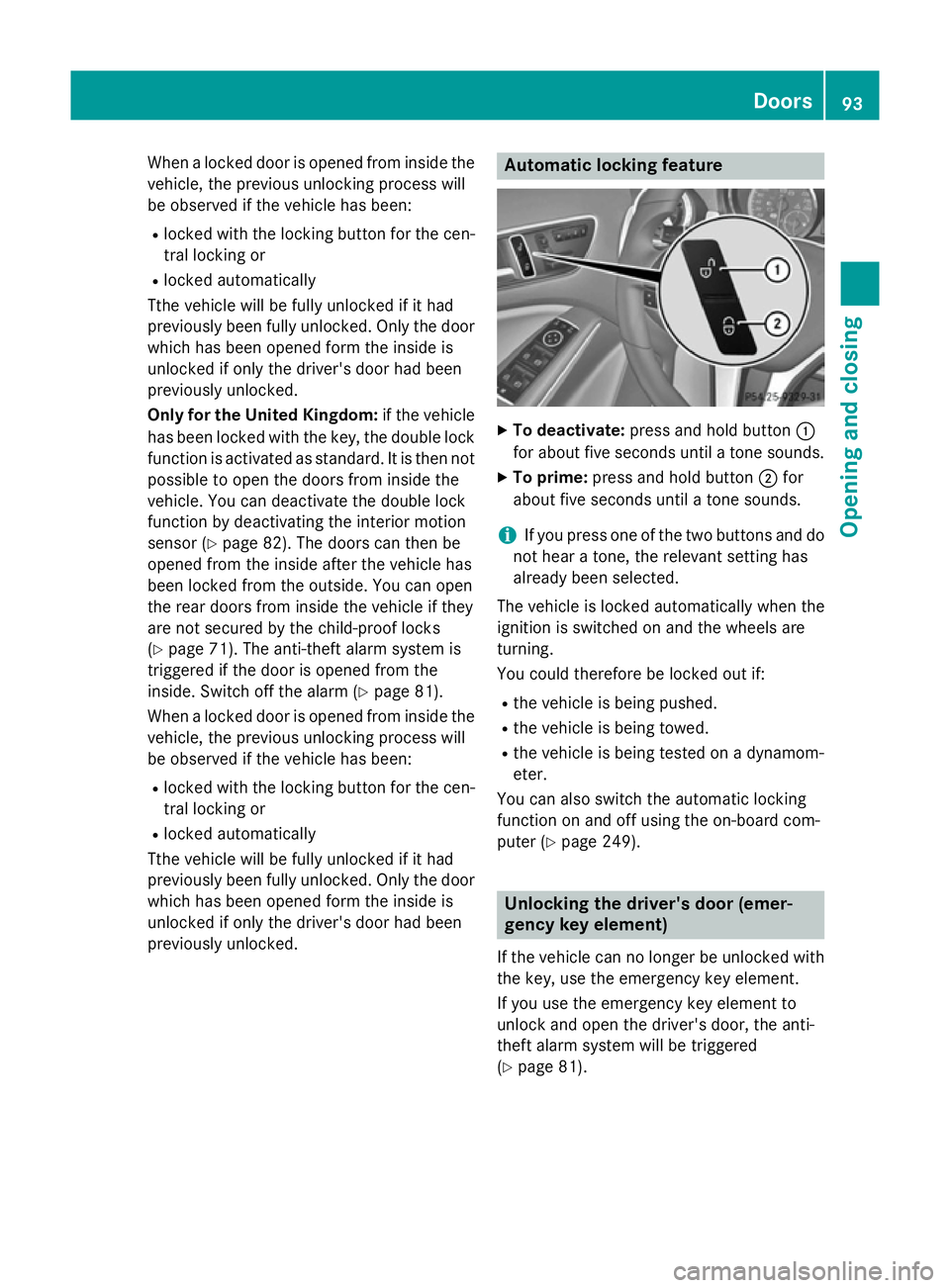
previously unlocked. Automatic locking feature
X
To deactivate: press and hold button :
for about five seconds until a tone sounds.
X To prime: press and hold button ;for
about five seconds until a tone sounds.
i If you press one of the two buttons and do
not hear a tone, the relevant setting has
already been selected.
The vehicle is locked automatically when the
ignition is switched on and the wheels are
turning.
You could therefore be locked out if:
R the vehicle is being pushed.
R the vehicle is being towed.
R the vehicle is being tested on a dynamom-
eter.
You can also switch the automatic locking
function on and off using the on-board com-
puter (Y page 249). Unlocking the driver's door (emer-
gency key element)
If the vehicle can no longer be unlocked with
the key, use the emergency key element.
If you use the emergency key element to
unlock and open the driver's door, the anti-
theft alarm system will be triggered
(Y page 81). Doors
93Opening and closing Z
Page 106 of 401
speeds. The noise level in the vehicle inte-
rior is reduced as a result.
At low speeds it raises again automatically.
i You can continue to operate the sliding
sunroof after switching off the engine or
removing the key. This function remains
active for five minutes or until you open a
front door.
i The sliding sunroof cannot be opened if a
roof carrier is fitted. In order to allow ven-
tilation of the vehicle interior, you can raise the sliding sunroof.
If contact is made with a roof carrier
approved by Mercedes-Benz, the sliding
sunroof lowers slightly but remains raised
at the rear .
Rain-closing feature when the engine is
switched off The rain-closing feature is only available for
vehicles with a rain sensor.
When the key is in position 0in the ignition
lock or is removed, the sliding sunroof closes
automatically:
R if it starts to rain.
R at extreme outside temperatures.
R after six hours.
R if there is a malfunction in the power sup-
ply.
The sliding sunroof remains raised at the rear
in order to allow ventilation of the vehicle
interior.
i If the sliding sunroof is obstructed when
being closed by the rain-closing feature, it
opens again slightly. The rain-closing fea-
ture is then deactivated.
The sliding sunroof does not close if: R it is raised at the rear.
R it is blocked.
R no rain is falling on the area of the wind-
screen being monitored by the rain sensor, e.g. because the vehicle is under a bridge. Rain-closing feature when driving The raised sliding sunroof automatically low-
ers at the rear when driving if it starts to rain.
The sliding sunroof is lowered depending on:
R the road speed and
R the intensity of the rain
You can manually cancel the automatic clos-
ing procedure. Press or pull the 3switch
in any direction.
To raise the sliding sunroof again, press the
3 switch in direction :. The rain-closing
feature remains activated. Operating the roller sunblinds for the
sliding sunroof
Important safety notes G
WARNING
When opening or closing the roller sunblind
parts of the body could be trapped between
the roller sunblind and the frame or sliding
sunroof. There is a risk of injury.
When opening or closing make sure that no
parts of the body are in the sweep of the roller sunblind.
If someone is trapped:
R release the switch immediately or
R during automatic operation, press the
switch briefly in any direction
The opening/closing process is stopped.
The roller sunblinds shield the vehicle interior from sunlight. The two roller sunblinds can
only be opened and closed together when the sliding sunroof is closed.
Roller sunblinds reversing feature The roller sunblinds are equipped with an
automatic reversing feature. If a solid object
blocks or restricts a roller sunblind during the
automatic closing process, the roller sunblind
opens again automatically. However, the
automatic reversing feature is only an aid, not Panorama sliding sunroof
103Opening and closing Z
Page 119 of 401
i
Make sure that the exterior mirrors are
always folded out fully while driving. They
could otherwise vibrate.
i If you are driving faster than 47 km/h, you
can no longer fold in the exterior mirrors.
Resetting the exterior mirrors If the battery has been disconnected or com-
pletely discharged, the exterior mirrors must
be reset. The exterior mirrors will otherwise
not fold in when you select the "Fold in mir-
rors when locking" function in the on-board
computer (Y page 250).
X Turn the key to position 1in the ignition
lock (Y page 159).
X Briefly press button :.
Folding the exterior mirrors in/out
automatically If the "Fold in mirrors when locking" function
is activated in the on-board computer
(Y page 250):
R the exterior mirrors fold in automatically as
soon as you lock the vehicle from the out-
side
R the exterior mirrors fold out again automat-
ically as soon as you unlock the vehicle and
then open the driver's or front-passenger
door.
i If the exterior mirrors have been folded in
manually, they do not fold out.
Exterior mirror pushed out of position If an exterior mirror has been pushed out of
position (forwards or backwards), proceed as
follows:
X Vehicles without electrically folding
exterior mirrors: move the exterior mirror
into the correct position manually.
X Vehicles with electrically folding exte-
rior mirrors: press and hold mirror-folding button (Y
page 115) until you hear a click
and then the mirror engage in position.
The mirror housing is engaged again and
you can adjust the exterior mirrors as usual
(Y page 115). Automatic anti-dazzle mirrors
The "Automatic anti-dazzle mirrors" function
is only available if the vehicle is equipped with
the "Mirror package".
The rear-view mirror and the exterior mirror
on the driver's side automatically go into anti- dazzle mode if:
R the ignition is switched on and
R incident light from headlamps strikes the
sensor in the rear-view mirror
The mirrors do not go into anti-dazzle mode if reverse gear is engaged or if the interior light-
ing is switched on. Parking position of the exterior mirror
on the front-passenger side
General notes The "Parking position for the exterior mirror
on the front-passenger side" function is only
available if the vehicle is equipped with the
"Memory package".
Setting and storing the parking position Using reverse gear
You can set the front-passenger side exterior
mirror so that you can see the rear wheel on
that side as soon as you engage reverse gear. You can store this position. 116
MirrorsSeats, steering wheel and mirrors