interior lights MERCEDES-BENZ GLA SUV 2013 Owners Manual
[x] Cancel search | Manufacturer: MERCEDES-BENZ, Model Year: 2013, Model line: GLA SUV, Model: MERCEDES-BENZ GLA SUV 2013Pages: 401, PDF Size: 11.9 MB
Page 8 of 401
Assistance display (on-board com-
puter)
.................................................. 243
Assistance menu (on-board com-
puter) .................................................. 243
ASSYST PLUS
Displaying a service message ........ 322
Hiding a service message .............. 322
Notes ............................................ .321
Resetting the service interval dis-
play ................................................ 322
Service message ............................ 321
Special service requirements ......... 322
ATA (Anti-Theft Alarm system)
Activating/deactivating ................... 81
Function .......................................... .81
Interior motion sensor .....................82
Switching off the alarm .................... 81
Tow-away protectio n ........................81
ATTENTION ASSIST
Activating/deactivating ................. 244
Display message ............................ 275
Function/notes ............................ .220
Audio menu (on-board computer) .... 240
Authorised workshop
see Qualified specialist workshop
AUTO lights
Display message ............................ 271
see Lights
Automatic engine start (ECO start/
stop function) ................................... .163
Automatic engine switch-off (ECO
start/stop function) .......................... 162
Automatic front-passenger front
airbag deactivation system
Display message ............................ 267
Operation ......................................... 52
Problems ......................................... 56
System self-test ............................... 54
Automatic headlamp mode .............. 121
Automatic transmission
Accelerator pedal position ............. 170
Automatic drive program .............. .172
Changing gear ............................... 170
DIRECT SELECT lever ..................... 167
Drive program displa y.................... 168
Driving tips .................................... 170
Emergency running mode .............. 175 Engaging drive position .................. 169
Engaging neutral ............................ 169
Engaging park position (AMG vehi-
cles) ............................................... 169
Engaging reverse gear ................... 169
Engaging the park position ............ 168
Holding the vehicle stationary on
uphill gradients .............................. 170
Kickdown ....................................... 170
Manual drive progra m.................... 172
Overview ........................................ 167
Problem (fault) ............................... 175
Program selector button ................ 171
Pulling away ................................... 160
Selector lever ................................ 169
Starting the engine ........................ 160
Steering wheel gearshift paddle s... 171
Trailer towing ................................. 171
Transmission position dis-
play ........................................ 168, 169
Transmission positions .................. 169
Automatic transmission emer-
gency running mode ......................... 175
Auxiliary heating
Activating/deactivating ................. 150
Activating/deactivating (on the
centre console ).............................. 151
Display message ............................ 286
Important safety notes .................. 150
Problem (display message) ............ 154
Remote control .............................. 151
Setting ........................................... 249
Setting the departure time ............. 152
Auxiliary ventilation
Activating/deactivating ................. 150
Activating/deactivating (on the
centre console ).............................. 151
Problem (display message) ............ 154
Remote control .............................. 151
Axle load, permissible (trailer tow-
ing) ...................................................... 394 B
Bag hook ............................................ 306
Ball coupling
Folding in ....................................... 229
Folding out ..................................... 228 Index
5
Page 11 of 401
Cornering lamps
Changing bulbs .............................. 130
Cornering light function
Display message ............................ 268
Function/notes ............................ .124
Crash-responsive emergency light-
ing ....................................................... 128
Cruise control
Activation conditions ..................... 189
Cruise control lever ....................... 189
Deactivating ................................... 190
Display message ............................ 278
Driving system ............................... 188
Important safety notes .................. 188
LIM indicator lamp ......................... 189
Selecting ........................................ 189
Setting a speed .............................. 190
Storing and maintaining current
speed ............................................. 189
Cup holder
Centre console .............................. 308
Important safety notes .................. 308
Rear compartment ......................... 309 D
Data see Technical data
Daytime driving lights
Display message ............................ 271
Switching on/off (on-board com-
puter) ............................................. 246
Switching on/off (switch) .............. 121
Declarations of conformity ................. 24
Delayed switch-off
Exterior lighting (on-board com-
puter) ............................................. 247
Interior lighting .............................. 248
Diagnostics connection ......................24
Diesel .................................................. 387
Digital speedometer .........................238
Dipped-beam headlamps
Changing bulbs .............................. 130
Display message ............................ 268
Setting for driving abroad (sym-
metrical) ........................................ 120
Setting for driving on the right/
left ................................................. 247 Switching on/off ........................... 121
DIRECT SELECT lever
see Automatic transmission
Display (cleaning instructions) ........328
Display message
Driving systems ............................ .275
Display messages
ASSYST PLUS ................................ 321
Calling up (on-board computer) ..... 254
Engine ............................................ 272
General information ....................... 254
Hiding (on-board computer) ........... 254
Key ................................................ 287
Lights ............................................. 268
Safety systems .............................. 255
Tyres .............................................. 280
Vehicle .......................................... .282
Distance recorder
see Trip meter
Distance warning function
Activating/deactivating ................. 244
Function/notes ................................ 73
Warning lamp ................................. 297
DISTRONIC PLUS
Activation conditions ..................... 195
Cruise control lever ....................... 194
Deactivating ................................... 198
Display message ............................ 277
Displays in the multifunction dis-
play................................................ 199
Driving tips .................................... 199
Function/note s............................. 193
Important safety notes .................. 193
Selecting ........................................ 195
Setting the specified minimum
distance ......................................... 197
Warning lamp ................................. 297
Door
Automatic locking (on-board com-
puter) ............................................. 249
Automatic locking (switch) ............... 93
Central locking/unlocking (key) ...... 87
Control panel ................................... 39
Display message ............................ 285
Emergency locking ........................... 94
Emergency unlocking ....................... 93
Important safety notes .................... 91
Opening (from the inside) ................ 92 8
Index
Page 16 of 401
Starting the engine ........................ 160
Key positions (ignition lock) ............ 159
Kickdown
Driving tips .................................... 170
Manual drive progra m.................... 174
Kneebag ............................................... 50 L
Lamps see Warning and indicator lamps
Lane Keeping Assist
Activating/deactivating ................. 245
Display message ............................ 276
Function/information .................... 224
Lane package ..................................... 222
Lap time (RACETIMER) ...................... 251
Lashing eyelets ................................. 306
Licence plate lamp (display mes-
sage) ................................................... 270
Light sensor (display message) ....... 271
Lighting
see Lights
Lights
Activating/deactivating the Intel-
ligent Light System ........................ 247
Activating/deactivating the inte-
rior lighting delayed switch-off ....... 248
Active light function ....................... 124
Automatic headlamp mode ............ 121
Cornering light function ................. 124
Dipped-beam headlamp s............... 121
Display message ............................ 268
Driving abroad ............................... 120
Foglamps ....................................... 121
Foglamps (extended range) ........... 125
Hazard warning lamps ................... 123
Headlamp flashe r........................... 123
Headlamp range ............................ 122
Light switch ................................... 120
Main-beam headlamp s................... 123
Motorway mode ............................. 124
Off-road lights ................................ 125
Parking lamps ................................ 122
Rear foglamp ................................. 122
Setting the ambient lighting
brightness (on-board computer) .... 247
Side lamps ..................................... 122 Switching the daytime driving
lights on/off (on-board com-
puter) ............................................. 246
Switching the daytime driving
lights on/off (switch) ..................... 121
Switching the exterior lighting
delayed switch-off on/off (on-
board computer) ............................ 247
Switching the surround lighting
on/off (on-board computer) .......... 247
Turn signals ................................... 123
see Interior lighting
see Replacing bulbs
LIM indicator lamp
Cruise control ................................ 189
DISTRONIC PLUS ........................... 194
Variable SPEEDTRONIC ................. 191
Limiting the speed
see SPEEDTRONIC
Loading guidelines ............................ 300
Locking
see Central locking
Locking (doors)
Automatic ........................................ 93
Emergency locking ........................... 94
From inside (central locking but-
ton) .................................................. 92
Locking centrally
see Central locking
Locking verification signal (on-
board computer) ............................... 249
Luggage compartment enlarge-
ment ................................................... 304
Important safety notes .................. 304
Notes on use ................................. 305
Luggage compartment floor
Important safety notes .................. 307
opening/closing ............................ 307
stowage well, under ....................... 307
Luggage net ....................................... 303
Lumbar support
Adjusting the 4-way lumbar sup-
port ................................................ 112 M
M+S tyres ........................................... 354 Index
13
Page 55 of 401
Operation
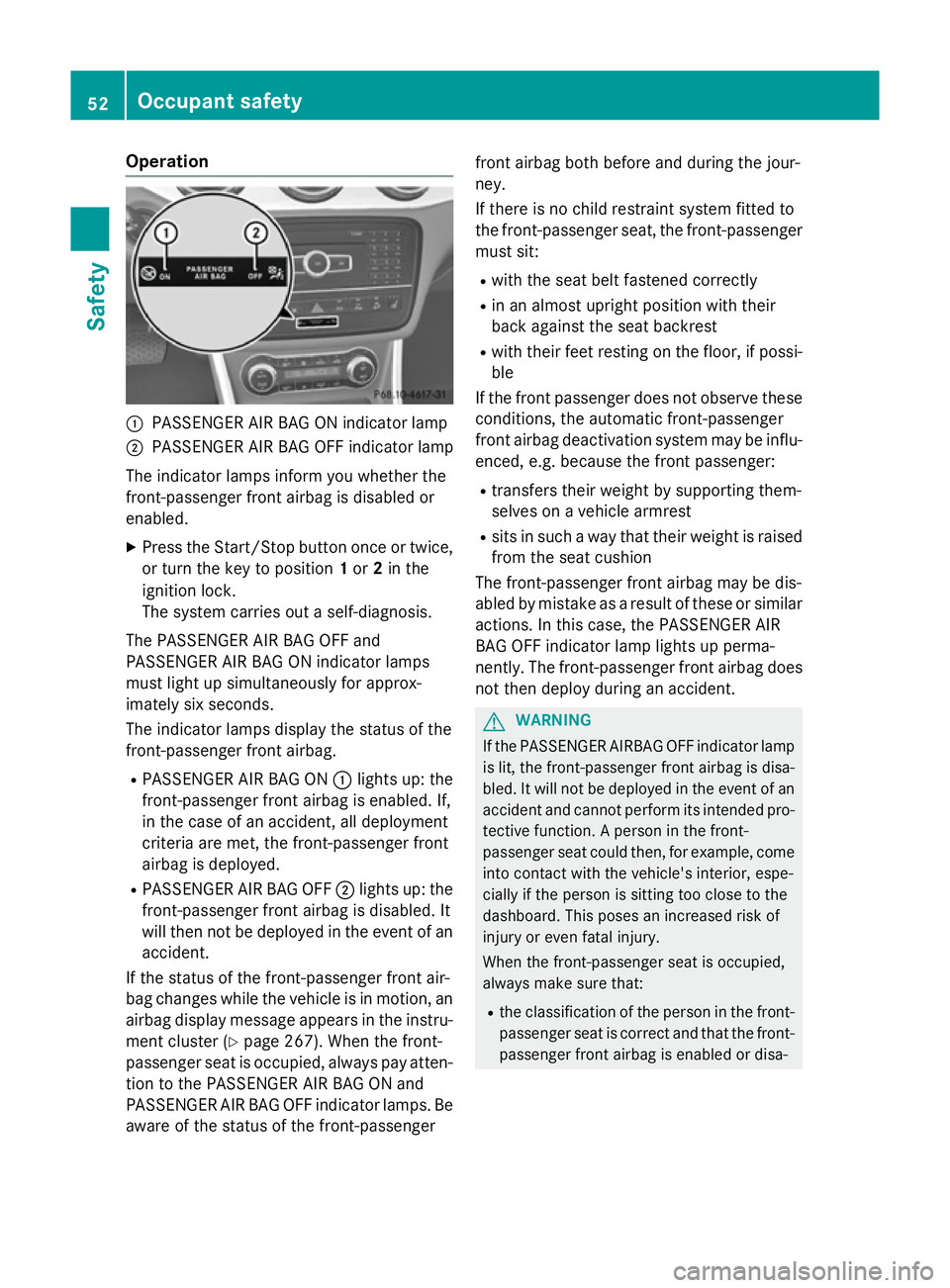
:
PASSENGER AIR BAG ON indicator lamp
; PASSENGER AIR BAG OFF indicator lamp
The indicator lamps inform you whether the
front-passenger front airbag is disabled or
enabled.
X Press the Start/Stop button once or twice,
or turn the key to position 1or 2in the
ignition lock.
The system carries out a self-diagnosis.
The PASSENGER AIR BAG OFF and
PASSENGER AIR BAG ON indicator lamps
must light up simultaneously for approx-
imately six seconds.
The indicator lamps display the status of the
front-passenger front airbag.
R PASSENGER AIR BAG ON :lights up: the
front-passenger front airbag is enabled. If,
in the case of an accident, all deployment
criteria are met, the front-passenger front
airbag is deployed.
R PASSENGER AIR BAG OFF ;lights up: the
front-passenger front airbag is disabled. It
will then not be deployed in the event of an accident.
If the status of the front-passenger front air-
bag changes while the vehicle is in motion, an
airbag display message appears in the instru-
ment cluster (Y page 267). When the front-
passenger seat is occupied, always pay atten-
tion to the PASSENGER AIR BAG ON and
PASSENGER AIR BAG OFF indicator lamps. Be aware of the status of the front-passenger front airbag both before and during the jour-
ney.
If there is no child restraint system fitted to
the front-passenger seat, the front-passenger
must sit:
R with the seat belt fastened correctly
R in an almost upright position with their
back against the seat backrest
R with their feet resting on the floor, if possi-
ble
If the front passenger does not observe these
conditions, the automatic front-passenger
front airbag deactivation system may be influ- enced, e.g. because the front passenger:
R transfers their weight by supporting them-
selves on a vehicle armrest
R sits in such a way that their weight is raised
from the seat cushion
The front-passenger front airbag may be dis-
abled by mistake as a result of these or similar
actions. In this case, the PASSENGER AIR
BAG OFF indicator lamp lights up perma-
nently. The front-passenger front airbag does not then deploy during an accident. G
WARNING
If the PASSENGER AIRBAG OFF indicator lamp is lit, the front-passenger front airbag is disa-
bled. It will not be deployed in the event of an
accident and cannot perform its intended pro-
tective function. A person in the front-
passenger seat could then, for example, come
into contact with the vehicle's interior, espe-
cially if the person is sitting too close to the
dashboard. This poses an increased risk of
injury or even fatal injury.
When the front-passenger seat is occupied,
always make sure that:
R the classification of the person in the front-
passenger seat is correct and that the front-
passenger front airbag is enabled or disa- 52
Occupant safetySafety
Page 57 of 401
or small adult), either the PASSENGER AIR
BAG ON or PASSENGER AIR BAG OFF indi- cator lamp lights up and remains lit after
the system self-test depending on the
result of the classification.
- if the PASSENGER AIR BAG ON indicator
lamp lights up, move the front-passenger seat as far back as possible. Alterna-
tively, a person with a small build can sit on a rear seat.
- if the PASSENGER AIR BAG OFF indicator
lamp is lit, a person with a smaller build
should not use the front-passenger seat.
R the front-passenger seat is occupied by an
adult or a person with a build correspond-
ing to that of an adult, the PASSENGER AIR BAG ON indicator lamp lights up after the
system self-test and remains lit. This indi-
cates that the front-passenger front airbag
is enabled.
If children are travelling in the vehicle, be sure to observe the notes on "Children in the vehi-
cle" (Y page 59).
If the automatic front-passenger front airbag
deactivation system is malfunctioning, the
red 6 restraint system warning lamp in
the instrument cluster and the PASSENGER
AIR BAG OFF indicator lamp light up simulta-
neously. The front-passenger front airbag is
disabled in this case and does not deploy dur- ing an accident. Have the system checked as
soon as possible by qualified technicians.
Consult a Mercedes-Benz Service Centre. The
front-passenger seat should only be repaired at a Mercedes-Benz Service Centre.
If the front-passenger seat, the seat cover or the seat cushion is damaged, have the nec-
essary repair work carried out at a Mercedes- Benz Service Centre.
For safety reasons, Mercedes-Benz recom-
mends that you only use a child restraint sys-
tem which has been tested and approved by
Mercedes-Benz in combination with the auto- matic front-passenger front airbag deactiva-
tion system. System self-test G
DANGER
If both the PASSENGER AIR BAG OFF and
PASSENGER AIR BAG ON indicator lamps do
not light up during the system self-test, the
system is malfunctioning. The front-
passenger front airbag might be triggered
unintentionally or might not be triggered at all in the event of an accident with high deceler-
ation. This poses an increased risk of injury or even fatal injury.
In this case the front-passenger seat may notbe used. Do not install a child restraint system
on the front-passenger seat. Have the auto-
matic front-passenger front airbag deactiva-
tion system checked and repaired immedi-
ately at a qualified specialist workshop. G
WARNING
If the PASSENGER AIRBAG OFF indicator lamp remains lit after the system self-test, the
front-passenger front airbag is disabled. It willnot be deployed in the event of an accident. In
this case, the front-passenger front airbag
cannot perform its intended protective func-
tion, e.g. when a person is seated in the front- passenger seat.
That person could, for example, come into
contact with the vehicle's interior, especially
if the person is sitting too close to the dash-
board. This poses an increased risk of injury or even fatal injury.
When the front-passenger seat is occupied,
always ensure that:
R the classification of the person in the front-
passenger seat is correct and the front-
passenger front airbag is enabled or disa-
bled in accordance with the person in the
front-passenger seat.
R the person is seated properly with a cor-
rectly fastened seat belt.
R the front-passenger seat has been moved
as far back as possible.
If the PASSENGER AIR BAG OFF indicator
lamp remains lit when it should not, the front- 54
Occupant safetySafety
Page 85 of 401
if the vehicle is jacked up on one side, for
example.
Priming X
Make sure that:
R the doors are closed
R the tailgate is closed
Only then is the tow-away protection
primed.
X Lock the vehicle with the key.
Tow-away protection is primed after
approximately 60 seconds.
Deactivating X
Unlock the vehicle with the key.
or X Insert the key into the ignition lock.
Tow-away protection is switched off auto-
matically.
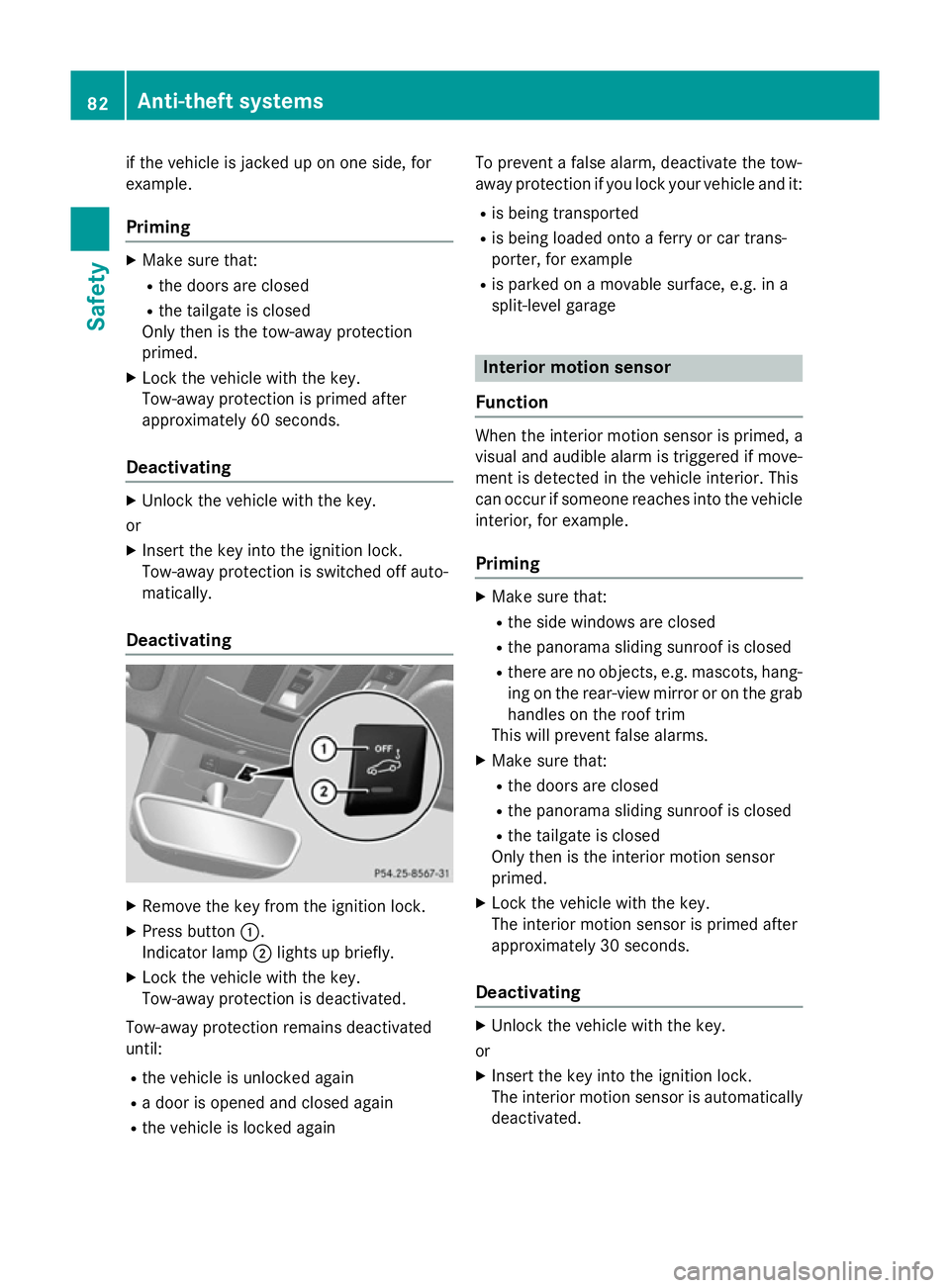
Deactivating X
Remove the key from the ignition lock.
X Press button :.
Indicator lamp ;lights up briefly.
X Lock the vehicle with the key.
Tow-away protection is deactivated.
Tow-away protection remains deactivated
until:
R the vehicle is unlocked again
R a door is opened and closed again
R the vehicle is locked again To prevent a false alarm, deactivate the tow-
away protection if you lock your vehicle and it:
R is being transported
R is being loaded onto a ferry or car trans-
porter, for example
R is parked on a movable surface, e.g. in a
split-level garage Interior motion sensor
Function When the interior motion sensor is primed, a
visual and audible alarm is triggered if move-
ment is detected in the vehicle interior. This
can occur if someone reaches into the vehicle interior, for example.
Priming X
Make sure that:
R the side windows are closed
R the panorama sliding sunroof is closed
R there are no objects, e.g. mascots, hang-
ing on the rear-view mirror or on the grab handles on the roof trim
This will prevent false alarms.
X Make sure that:
R the doors are closed
R the panorama sliding sunroof is closed
R the tailgate is closed
Only then is the interior motion sensor
primed.
X Lock the vehicle with the key.
The interior motion sensor is primed after
approximately 30 seconds.
Deactivating X
Unlock the vehicle with the key.
or X Insert the key into the ignition lock.
The interior motion sensor is automatically
deactivated. 82
Anti-theft systemsSafety
Page 122 of 401
Useful information
............................120
Exterior lighting ................................ 120
Interior lighting ................................. 127
Replacing bulbs ................................. 128
Windscreen wipers ...........................132 119Lights and windscreen wipers
Page 130 of 401
Interior lighting
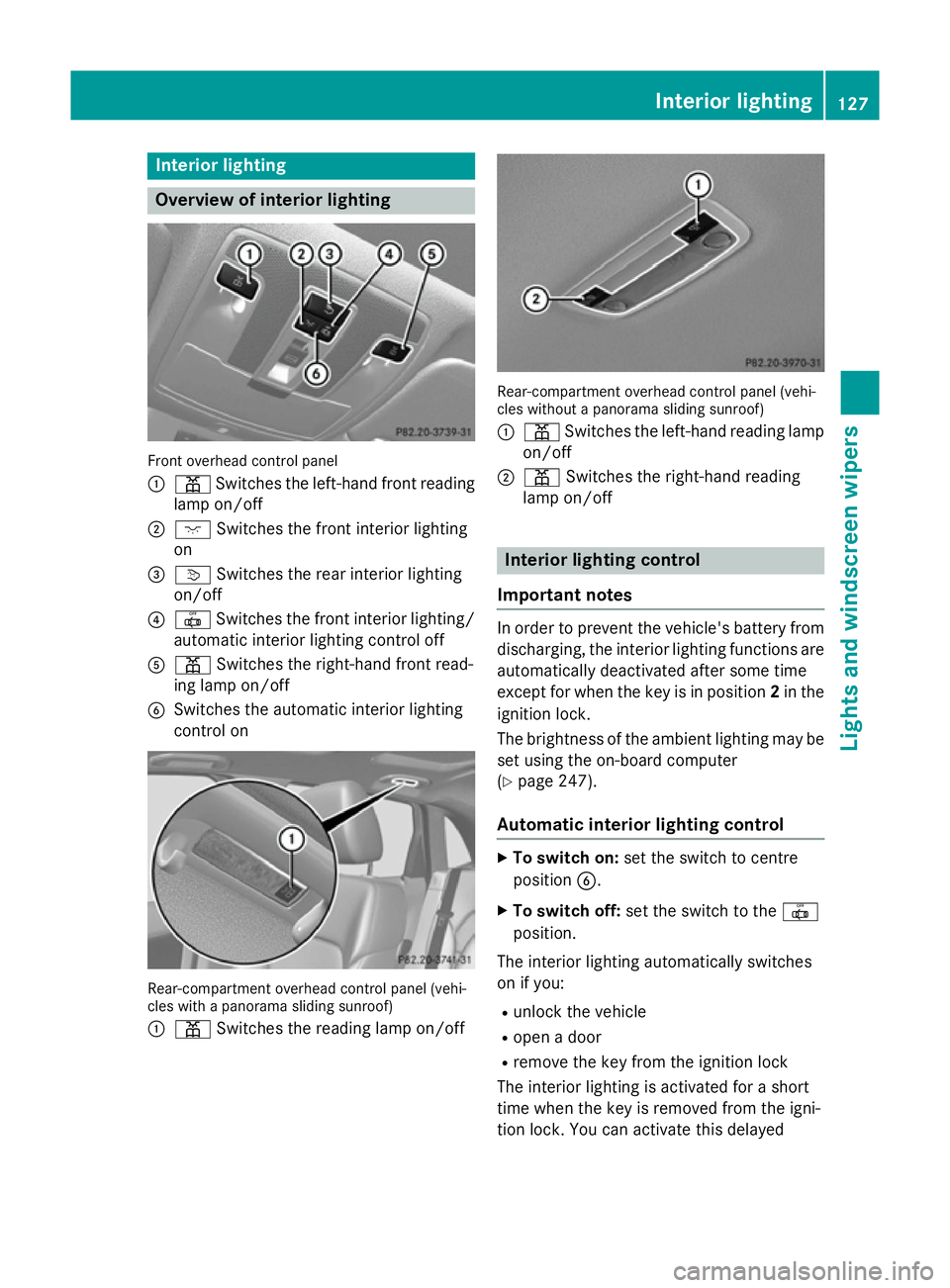
Overview of interior lighting
Front overhead control panel
:
p Switches the left-hand front reading
lamp on/off
; c Switches the front interior lighting
on
= v Switches the rear interior lighting
on/off
? | Switches the front interior lighting/
automatic interior lighting control off
A p Switches the right-hand front read-
ing lamp on/off
B Switches the automatic interior lighting
control on Rear-compartment overhead control panel (vehi-
cles with a panorama sliding sunroof)
: p Switches the reading lamp on/off Rear-compartment overhead control panel (vehi-
cles without a panorama sliding sunroof)
: p Switches the left-hand reading lamp
on/off
; p Switches the right-hand reading
lamp on/off Interior lighting control
Important notes In order to prevent the vehicle's battery from
discharging, the interior lighting functions are automatically deactivated after some time
except for when the key is in position 2in the
ignition lock.
The brightness of the ambient lighting may be set using the on-board computer
(Y page 247).
Automatic interior lighting control X
To switch on: set the switch to centre
position B.
X To switch off: set the switch to the |
position.
The interior lighting automatically switches
on if you:
R unlock the vehicle
R open a door
R remove the key from the ignition lock
The interior lighting is activated for a short
time when the key is removed from the igni-
tion lock. You can activate this delayed Interior lighting
127Lights and windscreen wipers Z
Page 131 of 401
switch-off using the on-board computer
(Y
page 248).
Manual interior lighting control X
To switch the front interior lighting on:
set the switch to the cposition.
X To switch off the interior lighting: set the
switch to the |position or (if the door is
closed) to the centre position.
X To switch the rear interior lighting on/
off: press the ubutton.
X To switch the reading lamps on/off:
press the pbutton. Crash-responsive emergency lighting
The interior lighting is activated automatically
if the vehicle is involved in an accident.
X To switch off the crash-responsive
emergency lighting: press the hazard
warning lamp button.
or X Lock and then unlock the vehicle using the
key. Replacing bulbs
Important safety notes
Xenon bulbs G
DANGER
Xenon bulbs are under high voltage. You can
get an electric shock if you remove the cover
of the xenon bulb and touch the electrical
contacts. There is a risk of fatal injury.
Never touch the parts or the electrical con-
tacts of the xenon bulb. Always have work on the xenon bulbs carried out at a qualified spe- cialist workshop.
If your vehicle is equipped with xenon bulbs,
you can recognise this by the following: the
cone of light from the xenon bulbs moves
from the top to the bottom and back again when you start the engine. For this to be
observed, the lights must be switched on
before the engine is started.
Bulbs and lamps are an important aspect of
vehicle safety. You must therefore make sure
that these function correctly at all times.
Have the headlamp setting checked regularly.
Other bulbs G
WARNING
Bulbs, lamps and plug connectors can
become very hot during use. When replacing a bulb, you could burn yourself on these com-
ponents. There is a risk of injury.
Allow these components to cool down before replacing the bulb.
Do not use a bulb that has been dropped or if
its glass tube has been scratched.
The bulb may explode if:
R you touch it
R it is hot
R you drop it
R you scratch it
Only operate bulbs in enclosed lamps
designed for that purpose. Only fit spare
bulbs of the same type and the specified volt- age.
Marks on the glass tube reduce the service
life of the bulbs. Do not touch the glass tube
with your bare hands. If necessary, clean the
glass tube when cold with alcohol or spirit and
rub it off with a lint-free cloth.
Protect bulbs from moisture during opera-
tion. Do not allow bulbs to come into contact
with liquids.
There are bulbs other than the xenon bulbs
that you cannot replace yourself. Replace
only the bulbs listed (Y page 129). Have the
bulbs that you cannot replace yourself
replaced at a qualified specialist workshop.
If you require assistance replacing bulbs, con- sult a qualified specialist workshop. 128
Replacing bulbsLights and windscreen wipers
Page 145 of 401
R
Use the ZONE function to adopt the tem-
perature settings on the driver's side for
the front-passenger side as well. The indi-
cator lamp in the ábutton goes out.
R Use the residual heat function if you want to
heat or ventilate the vehicle interior when
the ignition is switched off. The residual
heat function can only be activated or deac- tivated with the ignition switched off.
R Vehicles with COMAND Online: if you
change the settings of the climate control
system, the climate status display appears for three seconds at the bottom of the
screen in the COMAND display. See also
the separate COMAND Online operating
instructions. You will see the current set-
tings of the various climate control func-
tions.
ECO start/stop function During automatic engine switch-off, the cli-
mate control only operates at a reduced capa- city. If you require the full climate control out-
put, you can switch off the ECO start/stop
function by pressing the ECO button
(Y page 163). Operating the climate control system
Switching climate control on/off
General notes When the climate control is switched off, the
air supply and air circulation are also
switched off. The windows could mist up.
Therefore, only switch off climate control
briefly. Air-conditioning system X
Turn the key to position 2in the ignition
lock (Y page 159).
X To switch on: turn controlAclockwise to
the desired position (except position 0)
(Y page 139).
X To switch off: turn controlAanti-clock-
wise to position 0(Y page 139).
THERMOTRONIC automatic climate
control X
Turn the key to position 2in the ignition
lock (Y page 159).
X To activate: press theÃbutton.
The indicator lamp in the Ãbutton lights
up. Airflow and air distribution are set to
automatic mode.
or
X Press the ^button.
The indicator lamp in the ^button goes
out. The previous settings are reactivated.
X To deactivate: press the^button.
The indicator lamp in the ^button lights
up.
i THERMOTRONIC automatic climate con-
trol: switch on climate control primarily
using the Ãbutton. Activating/deactivating the cooling
with air dehumidification function
General notes If you deactivate the "Cooling with air-dehu-
midification" function, the air inside the vehi-
cle will not be cooled. The air inside the vehi- cle will also not be dehumidified. The win-
dows can mist up more quickly. Therefore,
only deactivate the "Cooling with air-dehu-
midification" function briefly.
The "Cooling with air dehumidification" func-
tion is only available when the engine is run-
ning. The air inside the vehicle is cooled and 142
Operating the climate control systemClimate control