remote control MERCEDES-BENZ GLA SUV 2013 Owners Manual
[x] Cancel search | Manufacturer: MERCEDES-BENZ, Model Year: 2013, Model line: GLA SUV, Model: MERCEDES-BENZ GLA SUV 2013Pages: 401, PDF Size: 11.9 MB
Page 8 of 401
Assistance display (on-board com-
puter)
.................................................. 243
Assistance menu (on-board com-
puter) .................................................. 243
ASSYST PLUS
Displaying a service message ........ 322
Hiding a service message .............. 322
Notes ............................................ .321
Resetting the service interval dis-
play ................................................ 322
Service message ............................ 321
Special service requirements ......... 322
ATA (Anti-Theft Alarm system)
Activating/deactivating ................... 81
Function .......................................... .81
Interior motion sensor .....................82
Switching off the alarm .................... 81
Tow-away protectio n ........................81
ATTENTION ASSIST
Activating/deactivating ................. 244
Display message ............................ 275
Function/notes ............................ .220
Audio menu (on-board computer) .... 240
Authorised workshop
see Qualified specialist workshop
AUTO lights
Display message ............................ 271
see Lights
Automatic engine start (ECO start/
stop function) ................................... .163
Automatic engine switch-off (ECO
start/stop function) .......................... 162
Automatic front-passenger front
airbag deactivation system
Display message ............................ 267
Operation ......................................... 52
Problems ......................................... 56
System self-test ............................... 54
Automatic headlamp mode .............. 121
Automatic transmission
Accelerator pedal position ............. 170
Automatic drive program .............. .172
Changing gear ............................... 170
DIRECT SELECT lever ..................... 167
Drive program displa y.................... 168
Driving tips .................................... 170
Emergency running mode .............. 175 Engaging drive position .................. 169
Engaging neutral ............................ 169
Engaging park position (AMG vehi-
cles) ............................................... 169
Engaging reverse gear ................... 169
Engaging the park position ............ 168
Holding the vehicle stationary on
uphill gradients .............................. 170
Kickdown ....................................... 170
Manual drive progra m.................... 172
Overview ........................................ 167
Problem (fault) ............................... 175
Program selector button ................ 171
Pulling away ................................... 160
Selector lever ................................ 169
Starting the engine ........................ 160
Steering wheel gearshift paddle s... 171
Trailer towing ................................. 171
Transmission position dis-
play ........................................ 168, 169
Transmission positions .................. 169
Automatic transmission emer-
gency running mode ......................... 175
Auxiliary heating
Activating/deactivating ................. 150
Activating/deactivating (on the
centre console ).............................. 151
Display message ............................ 286
Important safety notes .................. 150
Problem (display message) ............ 154
Remote control .............................. 151
Setting ........................................... 249
Setting the departure time ............. 152
Auxiliary ventilation
Activating/deactivating ................. 150
Activating/deactivating (on the
centre console ).............................. 151
Problem (display message) ............ 154
Remote control .............................. 151
Axle load, permissible (trailer tow-
ing) ...................................................... 394 B
Bag hook ............................................ 306
Ball coupling
Folding in ....................................... 229
Folding out ..................................... 228 Index
5
Page 19 of 401
Pulling away
Automatic transmission ................. 160
Manual transmission ......................1 60
Trailer ............................................ 161 Q
Qualified specialist workshop ........... 25R
RACE START (AMG vehicles) ............. 202
RACETIMER (on-board computer) .... 251
Radar sensor system
Activating/deactivating ................. 249
Display message ............................ 275
Radio
Selecting a station ......................... 240
see separate operating instructions
Radio-based vehicle components
Declaration of conformity ................ 24
Rain closing feature (panorama
sliding sunroof) ................................. 103
Reading lamp ..................................... 127
Rear bench seat
Folding the backrest forwards/
back ............................................... 304
Rear compartment
Setting the air vents ..................... .156
Rear foglamp
Changing bulbs .............................. 131
Display message ............................ 270
Switching on/off ........................... 122
Rear lamps
see Lights
Rear seat
Adjusting the angle of the backr-
ests ................................................ 305
Rear shelf .......................................... .306
Rear window heating
Problem (fault) ............................... 148
Switching on/off ........................... 147
Rear window wiper
Replacing the wiper blade .............. 134
Switching on/off ........................... 133
Rear-compartment seat belt sta-
tus indicator ........................................ 48 Rear-view mirror
Anti-dazzle mode (automatic) ....... .116
Dipping (manual) ........................... 115
Refuelling
Fuel gauge ....................................... 32
Important safety notes .................. 175
Notes for AMG vehicles ................. 386
Refuelling process ......................... 176
see Fuel
Remote control
Auxiliary heating/ventilation .......... 151
Changing the batteries (auxiliary
heating) ......................................... 153
Replacing bulbs
Important safety notes .................. 128
Overview of bulb types .................. 129
Removing/replacing the cover
(front wheel arch) .......................... 129
Replacing the battery (auxiliary
heating remote control) .................... 153
Reserve (fuel tank)
see Fuel
Reserve fuel
Display message ............................ 274
Warning lamp ................................. 295
Residual heat (climate control) ........149
Restraint system
Introduction ..................................... 42
Warning lamp ................................. 294
Warning lamp (function) ................... 43
Rev counter ........................................ 235
Reverse gear
Engaging (manual transmission) .... 167
Reverse gear (selector lever) ........... 169
Reversing camera
Cleaning instructions ..................... 327
Function/notes ............................ .215
Switching on/off ........................... 216
Reversing feature
Panorama sliding sunroof .............. 102
Roller sunblinds ............................ .103
Side windows ................................... 98
Tailgate ............................................ 95
Reversing lamp
Changing bulbs .............................. 131
Reversing lamps
Display message ............................ 270 16
Index
Page 89 of 401
Useful information
i This Owner's Manual describes all mod-
els, series and optional equipment for your
vehicle that were available at the time of
going to press. National variations are pos- sible. Note that your vehicle may not be
equipped with all of the functions descri-
bed. This is also the case for systems and
functions relevant to safety.
i Read the information on qualified special-
ist workshops: (Y page 25). Key
Important safety notes
G
WARNING
If children are left unsupervised in the vehicle, they could:
R open doors, thereby endangering other per-
sons or road users
R get out and be struck by oncoming traffic
R operate vehicle equipment and become
trapped, for example
In addition, the children could also set the
vehicle in motion, for example, if they:
R release the parking brake
R shift the automatic transmission out of park
position P or shift manual transmission into
neutral
R start the engine
There is a risk of an accident and injury.
When leaving the vehicle, always take the key with you and lock the vehicle. Never leave
children and animals unattended in the vehi-
cle. Keep the keys out of the reach of children. G
WARNING
If persons (particularly children) are exposed
to heat or cold for a prolonged period, there is a risk of serious or even fatal injuries. Never
leave persons (particularly children) unatten-
ded in the vehicle. G
WARNING
If you attach heavy or large objects to the key, the key could be unintentionally turned in the
ignition lock. This could cause the engine to
be switched off. There is a risk of an accident.
Do not attach any heavy or large objects to the
key. Remove any bulky keyrings before insert-
ing the key into the ignition lock.
! Keep the key away from strong magnetic
fields. Otherwise, the remote control func-
tion could be affected.
Strong magnetic fields can occur in the
vicinity of powerful electrical installations.
Do not keep the key: R with electronic devices, e.g. a mobile
phone or another key
R with metallic objects, e.g. coins or metal
film
R inside metallic objects, e.g. a metal case
United Kingdom only: G
WARNING
When the double locks are activated, the
doors can no longer be opened from the
inside. People in the vehicle can no longer get out, e.g. in hazardous situations. There is a
risk of injury.
Therefore, do not leave any people unsuper-
vised in the vehicle, particularly children, eld-
erly people or people in need of special assis-
tance. Do not activate the double lock when
people are in the vehicle.
If the vehicle has been locked with the key,
the double lock function is activated as stand-
ard. It is then not possible to open the doors
from inside the vehicle. You can deactivate
the double lock function by deactivating the
interior motion sensor (Y page 82). The doors
can then be opened from the inside after the vehicle has been locked from the outside. You
can open the rear doors from inside the vehi-
cle if they are not secured by the child-proof
locks (Y page 71). The anti-theft alarm system 86
KeyOpening and closing
Page 93 of 401
Problems with the key
Problem
Possible causes/consequences and
M
MSolutions You cannot lock or
unlock the vehicle
using the key. The key battery is discharged or nearly discharged.
X Try again to lock/unlock the vehicle using the remote control
function of the key. Point the tip of the key at the driver's door
handle from close range and press the %/& button.
If this does not work: X Check the key battery and replace it if necessary (Y page 89).
X Lock (Y page 93) or unlock (Y page 94) the vehicle using the
emergency key element. There is interference from a powerful source of radio waves.
X Try again to lock/unlock the vehicle using the remote control
function of the key. Point the tip of the key at the driver's door
handle from close range and press the %/& button. The key is faulty.
X Lock (Y page 93) or unlock (Y page 94) the vehicle using the
emergency key element.
X Have the key checked at a qualified specialist workshop. You have lost a key. X
Have the key deactivated at a qualified specialist workshop.
X Report the loss immediately to the vehicle insurers.
X If necessary, have the locks changed as well. You have lost the emer-
gency key element. X
Report the loss immediately to the vehicle insurers.
X If necessary, have the locks changed as well. 90
KeyOpening and closing
Page 153 of 401
Auxiliary heating/ventilation
Important safety notes G
DANGER
If the exhaust pipe is blocked or sufficient
ventilation is not possible, toxic exhaust
fumes can enter the vehicle, especially car-
bon monoxide. This is the case, e.g. in
enclosed spaces, or if the vehicle is stuck in
snow. There is a risk of fatal injuries.
You should switch off the auxiliary heating in
enclosed spaces which do not have an extrac- tion system, e.g. a garage. If the vehicle is
stuck in snow and you must leave the auxiliary
heating running, keep the exhaust pipe and
the area around the vehicle clear of snow. To guarantee a sufficient supply of fresh air, open
a window on the side of the vehicle away from the wind. G
WARNING
When the auxiliary heating is switched on,
parts of the vehicle can become very hot.
Flammable materials such as leaves, grass or twigs may ignite if they come into contact
with:
R hot parts of the exhaust system
R the exhaust gas itself
There is a risk of fire.
When the auxiliary heating is switched on,
make sure that:
R no flammable materials come into contact
with hot vehicle components
R the exhaust gas can escape from the
exhaust pipe unhindered
R the exhaust gas does not come into contact
with flammable materials.
The auxiliary heating and the exhaust gas out-
let are situated in front of the right-hand front
wheel.
! Operating the auxiliary heating/ventila-
tion draws on the vehicle battery. After you
have heated or ventilated the vehicle a maximum of two times, drive for a longer
distance.
i Switch the auxiliary heating on regularly
once a month for about ten minutes.
The auxiliary heating heats the air in the vehi-
cle interior to the set temperature. This
occurs without using the heat of the running
engine. The auxiliary heating is operated
directly using the vehicle's fuel. For this rea-
son, the fuel tank must be at least ¼ full to
ensure that the auxiliary heating functions.
The auxiliary heating/ventilation automati-
cally adjusts to changes in temperature and
weather conditions. For this reason, the aux- iliary heating could switch from ventilation
mode to heating mode or from heating mode to ventilation mode.
The auxiliary heating switches off when the
engine is switched off. The auxiliary ventila-
tion switches off when you turn the key to key
position 2(Y page 159).
The auxiliary heating switches off automati-
cally after 30 minutes.
You cannot use the auxiliary ventilation to
cool the vehicle interior to a temperature
lower than the outside temperature.
Before switching on X
Turn the key to position 2in the ignition
lock (Y page 159).
X Set the desired temperature.
Auxiliary heating or ventilation can also be
switched on if the manually set climate con-
trol is activated. Optimum comfort can be
attained when the system is set to automatic
mode. Set the temperature to 22 †.
The auxiliary heating/ventilation can be acti-
vated or deactivated using the remote control or the button on the centre console.
The on-board computer can be used to spec-ify up to three departure times, one of which
may be preselected (Y page 249).150
Operating the climate control systemClimate cont
rol
Page 154 of 401
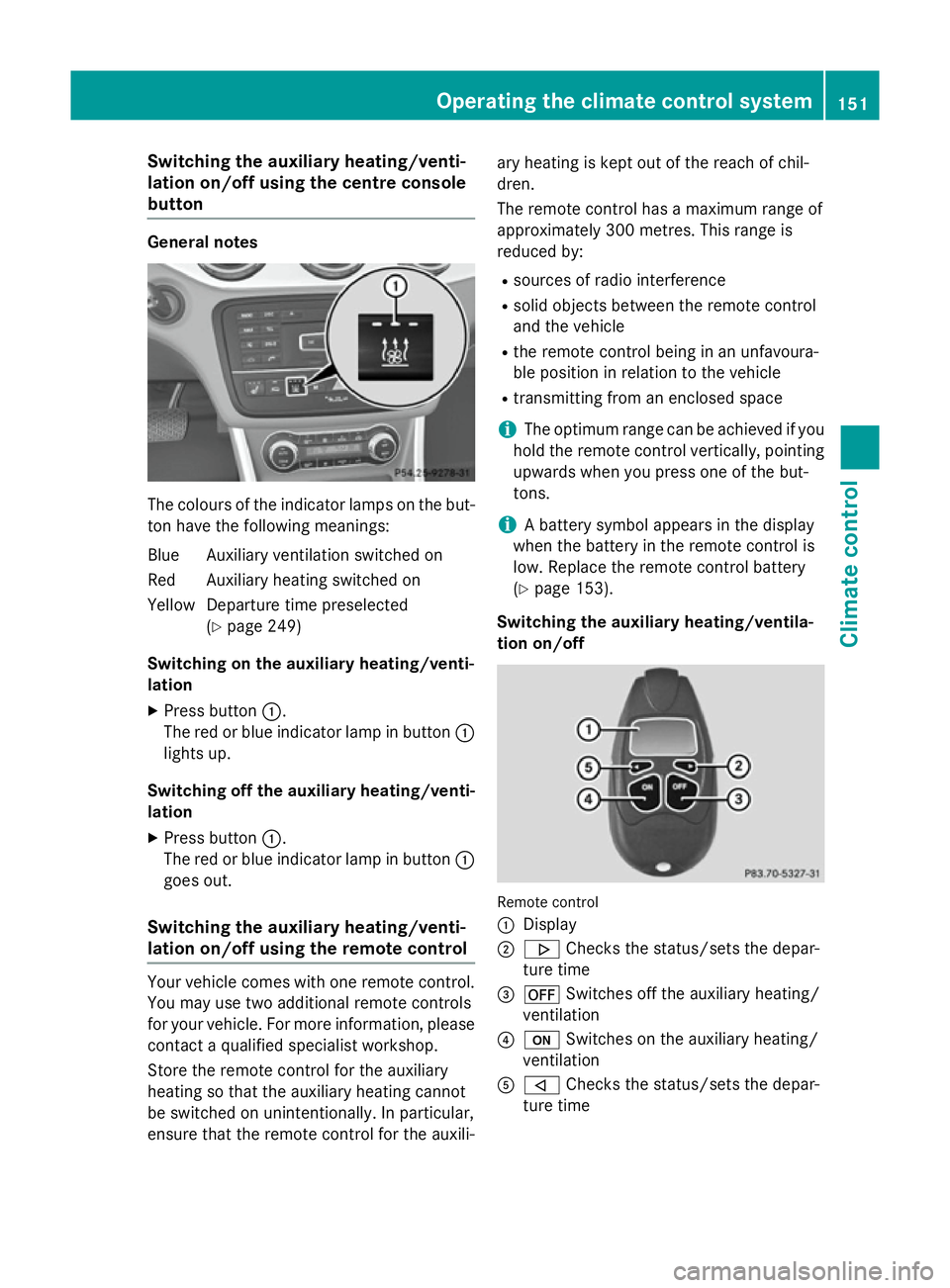
Switching the auxiliary heating/venti-
lation on/off using the centre console
button General notes
The colours of the indicator lamps on the but-
ton have the following meanings:
Blue Auxiliary ventilation switched on
Red Auxiliary heating switched on
Yellow Departure time preselected (Ypage 249)
Switching on the auxiliary heating/venti-
lation
X Press button :.
The red or blue indicator lamp in button :
lights up.
Switching off the auxiliary heating/venti- lation
X Press button :.
The red or blue indicator lamp in button :
goes out.
Switching the auxiliary heating/venti-
lation on/off using the remote control Your vehicle comes with one remote control.
You may use two additional remote controls
for your vehicle. For more information, please contact a qualified specialist workshop.
Store the remote control for the auxiliary
heating so that the auxiliary heating cannot
be switched on unintentionally. In particular,
ensure that the remote control for the auxili- ary heating is kept out of the reach of chil-
dren.
The remote control has a maximum range of
approximately 300 metres. This range is
reduced by:
R sources of radio interference
R solid objects between the remote control
and the vehicle
R the remote control being in an unfavoura-
ble position in relation to the vehicle
R transmitting from an enclosed space
i The optimum range can be achieved if you
hold the remote control vertically, pointing upwards when you press one of the but-
tons.
i A battery symbol appears in the display
when the battery in the remote control is
low. Replace the remote control battery
(Y page 153).
Switching the auxiliary heating/ventila-
tion on/off Remote control
:
Display
; . Checks the status/sets the depar-
ture time
= ^ Switches off the auxiliary heating/
ventilation
? u Switches on the auxiliary heating/
ventilation
A , Checks the status/sets the depar-
ture time Operating the climate control system
151Climate control Z
Page 155 of 401
X
To activate: press theubutton.
ON
ON is shown in the remote control display.
X To switch off: press the^button.
OFF
OFF is shown in the remote control display.
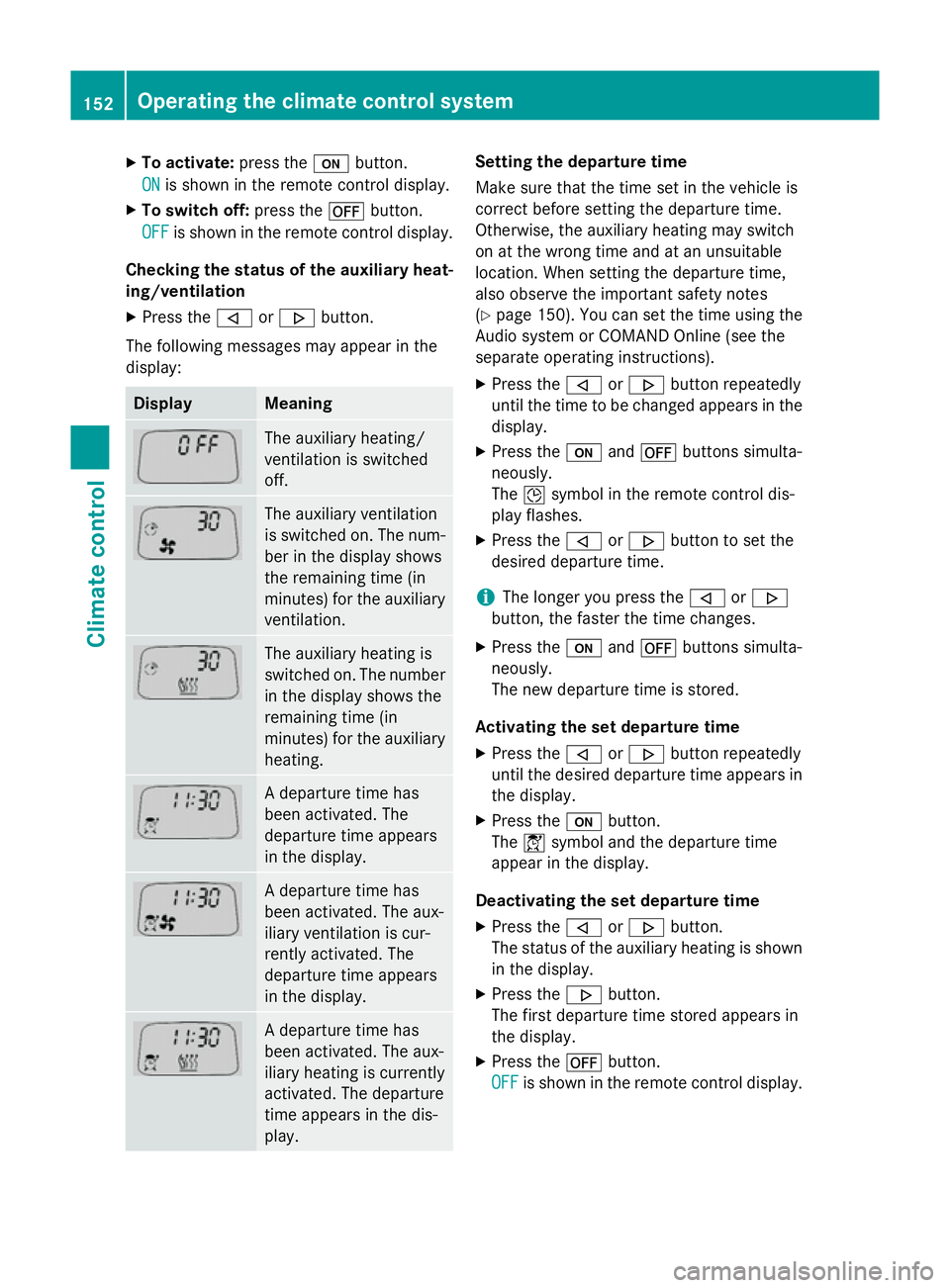
Checking the status of the auxiliary heat- ing/ventilation
X Press the ,or. button.
The following messages may appear in the
display: Display Meaning
The auxiliary heating/
ventilation is switched
off.
The auxiliary ventilation
is switched on. The num-
ber in the display shows
the remaining time (in
minutes) for the auxiliary
ventilation. The auxiliary heating is
switched on. The number
in the display shows the
remaining time (in
minutes) for the auxiliary heating. A departure time has
been activated. The
departure time appears
in the display.
A departure time has
been activated. The aux-
iliary ventilation is cur-
rently activated. The
departure time appears
in the display.
A departure time has
been activated. The aux-
iliary heating is currently
activated. The departure
time appears in the dis-
play. Setting the departure time
Make sure that the time set in the vehicle is
correct before setting the departure time.
Otherwise, the auxiliary heating may switch
on at the wrong time and at an unsuitable
location. When setting the departure time,
also observe the important safety notes
(Y
page 150). You can set the time using the
Audio system or COMAND Online (see the
separate operating instructions).
X Press the ,or. button repeatedly
until the time to be changed appears in the
display.
X Press the uand^ buttons simulta-
neously.
The Îsymbol in the remote control dis-
play flashes.
X Press the ,or. button to set the
desired departure time.
i The longer you press the
,or.
button, the faster the time changes.
X Press the uand^ buttons simulta-
neously.
The new departure time is stored.
Activating the set departure time X Press the ,or. button repeatedly
until the desired departure time appears in
the display.
X Press the ubutton.
The Ísymbol and the departure time
appear in the display.
Deactivating the set departure time
X Press the ,or. button.
The status of the auxiliary heating is shown in the display.
X Press the .button.
The first departure time stored appears in
the display.
X Press the ^button.
OFF OFF is shown in the remote control display. 152
Operating the climate control systemClimate control
Page 156 of 401
Replacing the remote control battery
G
WARNING
Batteries contain toxic and corrosive substan- ces. If batteries are swallowed, it can result in
severe health problems. There is a risk of fatal injury.
Keep batteries out of the reach of children. If
a battery is swallowed, seek medical attention immediately. H
Environmental note Batteries contain pollutants.
It is illegal to dispose of them with the household rubbish.
They must be collected sep-
arately and disposed of in anenvironmentally responsible
recycling system. Dispose of batteries in an
environmentally responsible
manner. Take discharged
batteries to a qualified spe-
cialist workshop or to a col-
lection point for used batter-
ies.
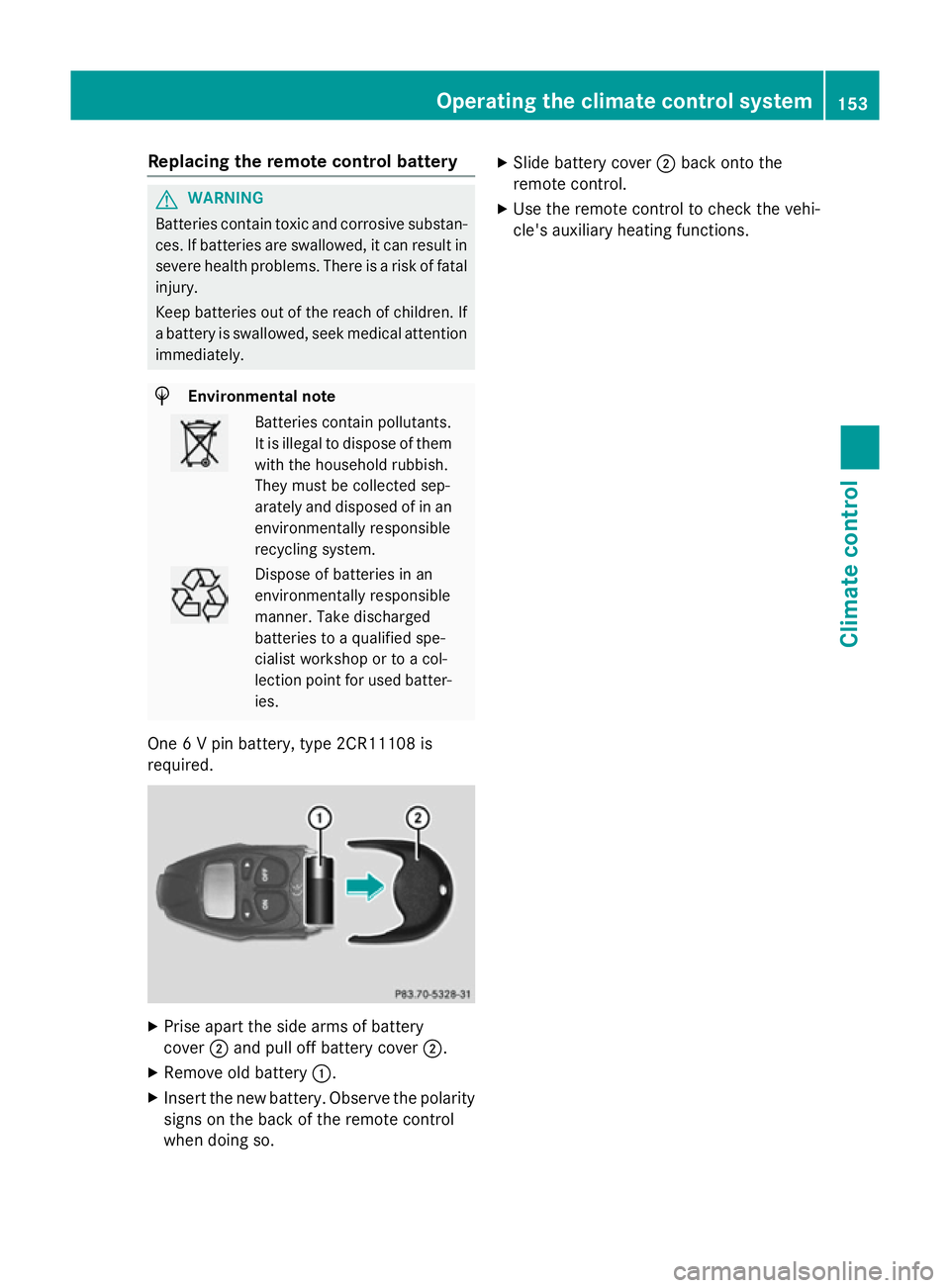
One 6 V pin battery, type 2CR11108 is
required. X
Prise apart the side arms of battery
cover ;and pull off battery cover ;.
X Remove old battery :.
X Insert the new battery. Observe the polarity
signs on the back of the remote control
when doing so. X
Slide battery cover ;back onto the
remote control.
X Use the remote control to check the vehi-
cle's auxiliary heating functions. Operating the climate control system
153Climate control Z
Page 157 of 401
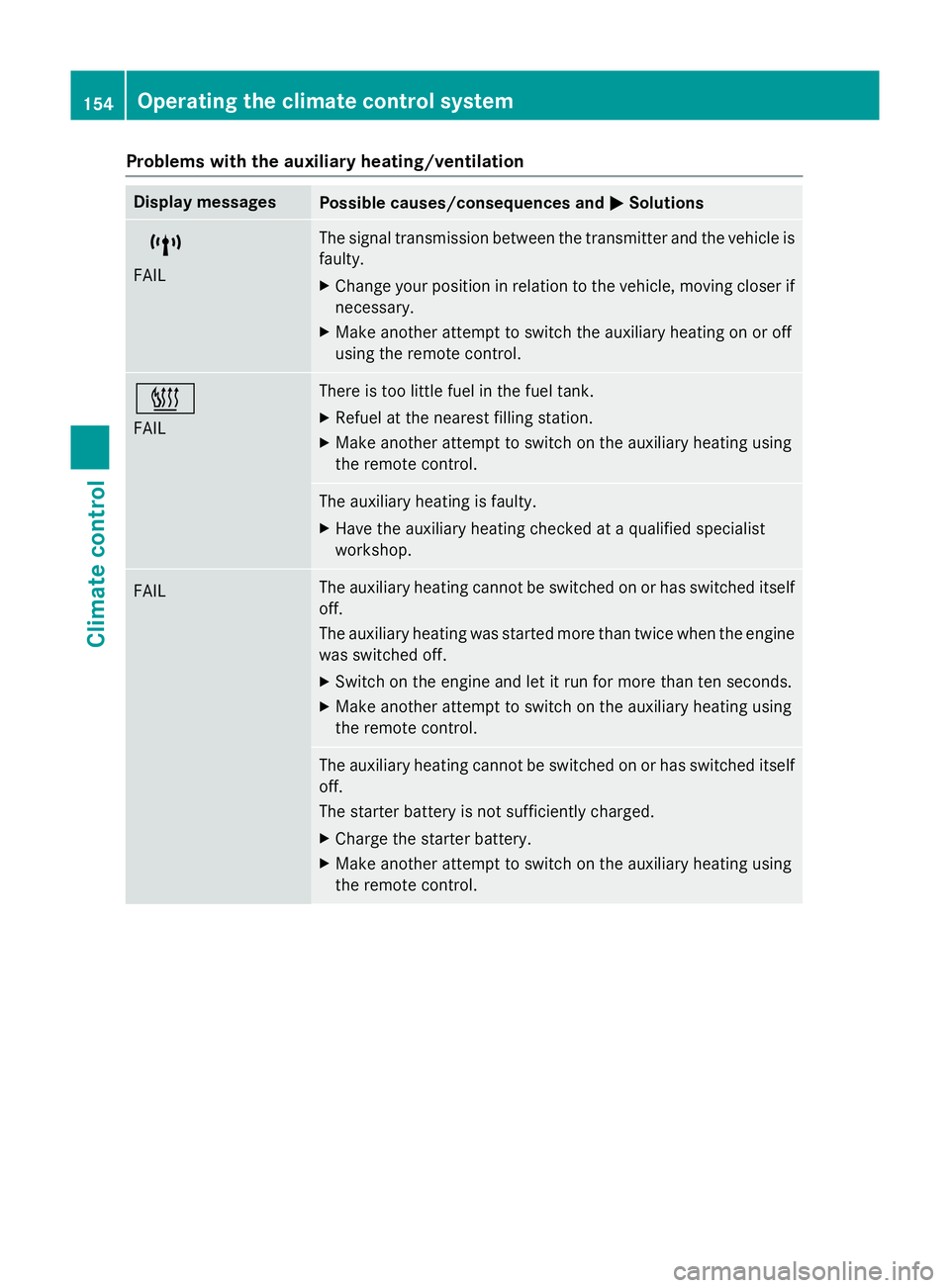
Problems with the auxiliary heating/ventilation
Display messages
Possible causes/consequences and
M
MSolutions $
FAIL The signal transmission between the transmitter and the vehicle is
faulty.
X Change your position in relation to the vehicle, moving closer if
necessary.
X Make another attempt to switch the auxiliary heating on or off
using the remote control. ©
FAIL There is too little fuel in the fuel tank.
X Refuel at the nearest filling station.
X Make another attempt to switch on the auxiliary heating using
the remote control. The auxiliary heating is faulty.
X Have the auxiliary heating checked at a qualified specialist
workshop. FAIL The auxiliary heating cannot be switched on or has switched itself
off.
The auxiliary heating was started more than twice when the engine
was switched off.
X Switch on the engine and let it run for more than ten seconds.
X Make another attempt to switch on the auxiliary heating using
the remote control. The auxiliary heating cannot be switched on or has switched itself
off.
The starter battery is not sufficiently charged.
X Charge the starter battery.
X Make another attempt to switch on the auxiliary heating using
the remote control. 154
Operating the climate control systemClimate control
Page 158 of 401
Display messages
Possible causes/consequences and
M
MSolutions The auxiliary heating cannot be switched on or has switched itself
off.
There is too little fuel in the fuel tank.
X Refuel at the nearest filling station.
X Make another attempt to switch on the auxiliary heating using
the remote control. The auxiliary heating cannot be switched on or has switched itself
off.
The auxiliary heating is faulty.
X Have the auxiliary heating checked at a qualified specialist
workshop. Adjusting the air vents
Important safety notes
G
WARNING
Very hot or very cold air can flow from the air vents. This could result in burns or frostbite in the immediate vicinity of the air vents. There
is a risk of injury.
Make sure that all vehicle occupants always
maintain a sufficient distance to the air out-
lets. If necessary, redirect the airflow to
another area of the vehicle interior.
In order to ensure the direct flow of fresh air
through the air vents into the vehicle interior,
please observe the following notes:
R keep the air inlet between the windscreen
and the bonnet free of blockages, such as
ice, snow or leaves.
R never cover the vents or ventilation grilles
in the vehicle interior.
i Move the adjusters for the air vents ver-
tically or horizontally, to set the direction of the airflow.
i Optimal climate control function is ach-
ieved by opening the air vents fully and set-
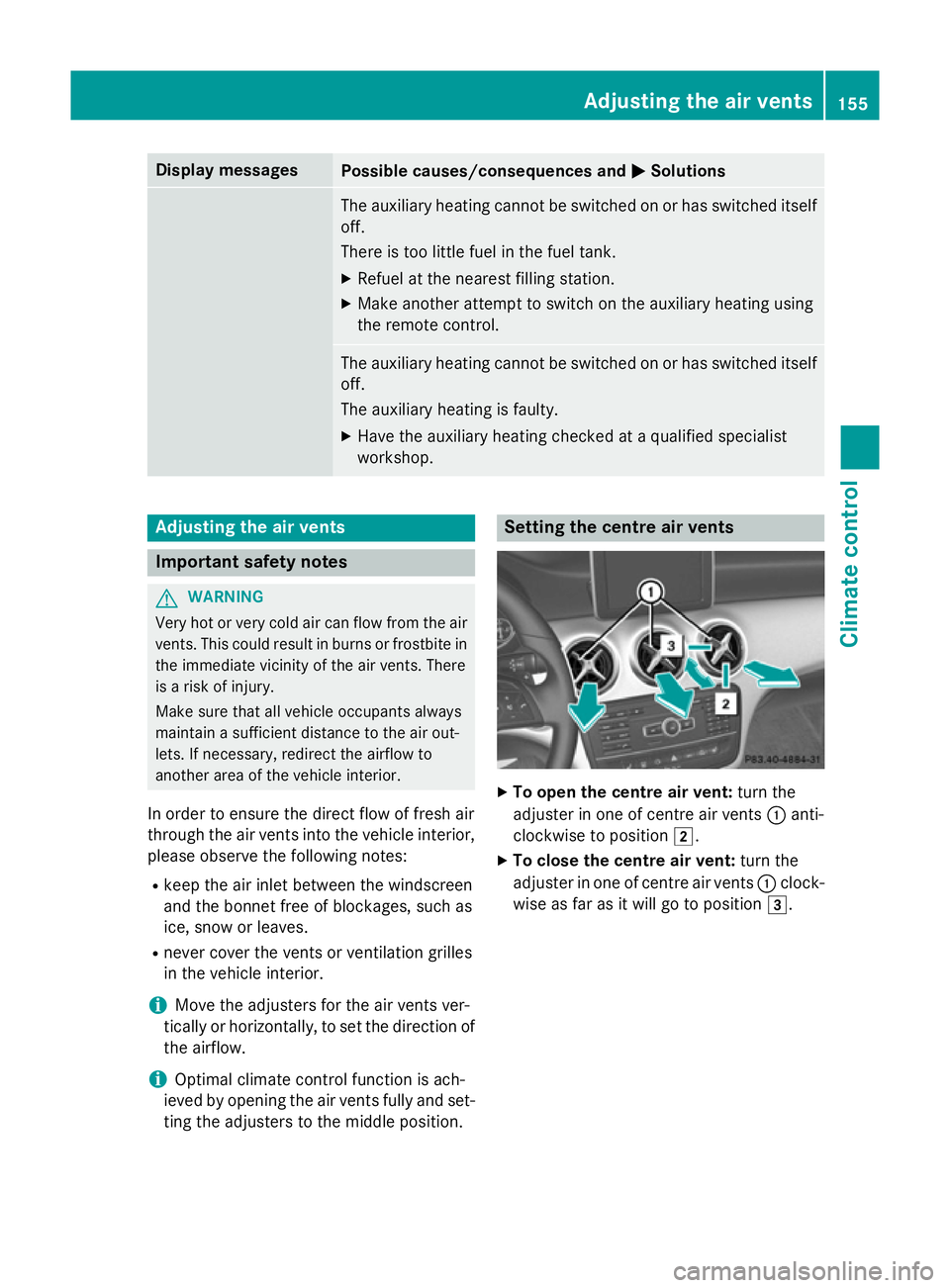
ting the adjusters to the middle position. Setting the centre air vents
X
To open the centre air vent: turn the
adjuster in one of centre air vents :anti-
clockwise to position 2.
X To close the centre air vent: turn the
adjuster in one of centre air vents :clock-
wise as far as it will go to position 3. Adjusting the air vents
155Climate control Z