trip computer MERCEDES-BENZ GLA SUV 2013 Owners Manual
[x] Cancel search | Manufacturer: MERCEDES-BENZ, Model Year: 2013, Model line: GLA SUV, Model: MERCEDES-BENZ GLA SUV 2013Pages: 401, PDF Size: 11.9 MB
Page 11 of 401
Cornering lamps
Changing bulbs .............................. 130
Cornering light function
Display message ............................ 268
Function/notes ............................ .124
Crash-responsive emergency light-
ing ....................................................... 128
Cruise control
Activation conditions ..................... 189
Cruise control lever ....................... 189
Deactivating ................................... 190
Display message ............................ 278
Driving system ............................... 188
Important safety notes .................. 188
LIM indicator lamp ......................... 189
Selecting ........................................ 189
Setting a speed .............................. 190
Storing and maintaining current
speed ............................................. 189
Cup holder
Centre console .............................. 308
Important safety notes .................. 308
Rear compartment ......................... 309 D
Data see Technical data
Daytime driving lights
Display message ............................ 271
Switching on/off (on-board com-
puter) ............................................. 246
Switching on/off (switch) .............. 121
Declarations of conformity ................. 24
Delayed switch-off
Exterior lighting (on-board com-
puter) ............................................. 247
Interior lighting .............................. 248
Diagnostics connection ......................24
Diesel .................................................. 387
Digital speedometer .........................238
Dipped-beam headlamps
Changing bulbs .............................. 130
Display message ............................ 268
Setting for driving abroad (sym-
metrical) ........................................ 120
Setting for driving on the right/
left ................................................. 247 Switching on/off ........................... 121
DIRECT SELECT lever
see Automatic transmission
Display (cleaning instructions) ........328
Display message
Driving systems ............................ .275
Display messages
ASSYST PLUS ................................ 321
Calling up (on-board computer) ..... 254
Engine ............................................ 272
General information ....................... 254
Hiding (on-board computer) ........... 254
Key ................................................ 287
Lights ............................................. 268
Safety systems .............................. 255
Tyres .............................................. 280
Vehicle .......................................... .282
Distance recorder
see Trip meter
Distance warning function
Activating/deactivating ................. 244
Function/notes ................................ 73
Warning lamp ................................. 297
DISTRONIC PLUS
Activation conditions ..................... 195
Cruise control lever ....................... 194
Deactivating ................................... 198
Display message ............................ 277
Displays in the multifunction dis-
play................................................ 199
Driving tips .................................... 199
Function/note s............................. 193
Important safety notes .................. 193
Selecting ........................................ 195
Setting the specified minimum
distance ......................................... 197
Warning lamp ................................. 297
Door
Automatic locking (on-board com-
puter) ............................................. 249
Automatic locking (switch) ............... 93
Central locking/unlocking (key) ...... 87
Control panel ................................... 39
Display message ............................ 285
Emergency locking ........................... 94
Emergency unlocking ....................... 93
Important safety notes .................... 91
Opening (from the inside) ................ 92 8
Index
Page 17 of 401
Main-beam headlamps
Changing bulbs .............................. 130
Display message ............................ 270
Switching on/off ........................... 123
Manual transmission
Engaging reverse gear ................... 167
Gear lever ...................................... 166
Pulling away ................................... 160
Shift recommendation ................... 167
Shifting to neutral ......................... .167
Starting the engine ........................ 160
Matt finish (cleaning instructions) .. 325
Media Interface
see Separate operating instructions
Memory card (audio) ......................... 241
Memory function ............................... 117
Mercedes-Benz Service Centre
see Qualified specialist workshop
Message memory (on-board com-
puter) ................................................. .254
Messages
see Display messages
Mirrors
see Exterior mirrors
see Rear-view mirror
see Vanity mirror (in sun visor)
Mobile phone
Frequencies ................................... 382
Installation ..................................... 382
Menu (on-board computer) ............ 241
Notes/placing in the bracket ......... 312
Transmission output (maximum) .... 382
Mobile telephone
Pre-installed bracket ..................... .313
Modifying the programming (key) ..... 87
MOExtended tyres .............................334
Motorway mode ................................ 124
MP3
Operating ....................................... 241
see Separate operating instructions
Multifunction display
Function/notes ............................ .236
Permanent display ......................... 246
Multifunction steering wheel
Operating the on-board computer .. 235
Overview .......................................... 35 N
Navigation Menu (on-board computer) ............ 239
see separate operating instructions
Notes on running in a new vehicle .. 158 O
Occupant safety Automatic measures after an acci-
dent ................................................. 59
Children in the vehicle ..................... 59
Important safety notes .................... 43
Pets in the vehicle ........................... 71
PRE-SAFE® (anticipatory occu-
pant protection) ............................... 59
Odometer .......................................... .237
see Total distance recorder
see Trip meter
Off-road driving
Approach/departure angle ............ 393
Checklist after driving off-road ...... 186
Checklist before driving off-road .... 186
General information ....................... 185
Important safety notes .................. 185
Maximum gradient climbing abil-
ity ................................................. .393
Maximum water depth ................... 392
Travelling uphill .............................. 187
Off-road lights ................................... .125
Off-road program ............................... 205
Off-road system
DSR ............................................... 204
Off road drive program .................. 205
Off-road 4ETS .................................. 77
Off-road ABS ................................... .73
Off-road ESP® ................................. 80
Oil
see Engine oil
On-board computer
AMG menu .....................................2 51
Assistance menu ........................... 243
Audio menu ................................... 240
Convenience submenu .................. 250
Display messages .......................... 254
Displaying a service message ....... .322
DISTRONIC PLUS ........................... 199 14
Index
Page 18 of 401
Factory setting submenu ............... 251
Heating submenu ........................... 249
Important safety notes .................. 234
Instrument cluster submenu .......... 246
Light submenu ............................... 246
Menu overview .............................. 237
Message memory .......................... 254
Navigation menu ............................ 239
Operating video DVD ..................... 241
Operation ....................................... 235
RACETIMER ................................... 251
Service menu ................................
.245
Settings menu ............................... 245
Standard displa y............................ 237
Telephone menu ............................ 241
Trip menu ...................................... 237
Vehicle submenu ........................... 248
Opening and closing the side trim
panels ................................................. 131
Operating instructions
Vehicle equipment ........................... 23
Operating safety
Declaration of conformity ................ 24
Important safety note ...................... 23
Operating system
see On-board computer
Outside temperature display ........... 235
Overhead control panel ...................... 38
Override feature
Rear side window s........................... 71 P
Paint code .......................................... 384
Paintwork (cleaning instructions) ... 325
Panic alarm .......................................... 42
Panorama sliding sunroof
Important safety information ......... 101
Opening/closing ............................ 102
Opening/closing the roller sun-
blind ............................................... 104
Problem (malfunction) ................... 105
Rain closing feature ....................... 103
Resetting ....................................... 104
Parking ............................................... 179
Important safety notes .................. 179
Parking brake ................................ 180 Position of exterior mirror, front-
passenger side ............................... 116
Reversing camera .......................... 215
see Active Parking Assist
see PARKTRONIC
Parking aid
Active Parking Assist ..................... 210
see Exterior mirrors
see PARKTRONIC
Parking assistance
see PARKTRONIC
Parking brake
Display message ............................ 258
Electric parking brake .................... 180
Warning lamp ................................. 294
Parking lamps
Display message ............................ 270
Switching on/of f........................... 122
PARKTRONIC
Deactivating/activating ................. 208
Driving system ............................... 206
Function/note s............................. 206
Important safety notes .................. 206
Problem (fault) ............................... 210
Sensor rang e................................. 207
Trailer towing ................................. 209
Warning display ............................. 207
PASSENGER AIR BAG
Indicator lamps ................................ 43
PASSENGER AIR BAG indicator
lamp
Problem (malfunction) ................... 267
Petrol .................................................. 385
Pets in the vehicle ............................... 71
Plastic trim (cleaning instruc-
tions) .................................................. 328
Power windows
see Side windows
PRE-SAFE® (anticipatory occupant
protection)
Operation ......................................... 59
PRE-SAFE® (preventive occupant
safety system)
Display message ............................ 263
Program selector button .................. 171
Protection of the environment
General notes .................................. 22 Index
15
Page 22 of 401
Rediallin
g....................................... 242
Rejecting/ending a call ................. 242
Telephone compartment ................ 302
Temperature
Coolant .......................................... 234
Coolant (on-board computer) ......... 251
Engine oil (on-board computer) ...... 251
Outside temperature ...................... 235
Setting (climate control )................ 144
TEMPOMAT
Function/note s............................. 188
Theft-deterrent system
ATA (Anti-Theft Alarm system) ......... 81
Immobiliser ...................................... 81
Through-loading ................................ 303
Time
see Separate Owner's manual
Timing (RACETIMER) ......................... 251
TIREFIT kit .......................................... 335
Top Tether ............................................ 62
Tow-away protection
Activating ......................................... 82
Deactivating ..................................... 82
Function ........................................... 81
Tow-starting
Emergency engine starting ............ 348
Fitting the towing eye .................... 346
Important safety notes .................. 344
Removing the towing eye ............... 346
Towing
Important safety notes .................. 344
Notes for 4MATIC vehicles ............ 347
Towing a trailer
Active Parking Assist ..................... 215
Axle load, permissibl e.................... 394
Bulb failure indicator for LED
lamps ............................................. 230
ESP® (Electronic Stability Pro-
gram) ............................................... 80
Pulling away with a traile r.............. 161
Trailer tow hitch display message .. 286
Towing away
Fitting the towing eye .................... 346
Removing the towing eye ............... 346
With both axles on the ground ....... 347
With front axle raised ..................... 346
Trailer coupling
see Towing a trailer Trailer towing
7-pin connecto r............................. 230
Blind Spot Assist ............................ 224
Cleaning the trailer tow hitch ......... 327
Coupling up a traile r...................... 229
Decoupling a trailer ....................... 229
Driving tips .................................... 225
Folding in the ball coupling ............ 229
Folding out the ball coupling .......... 228
Important safety notes .................. 225
Lights display message .................. 269
Mounting dimensions .................... 393
Parktronic ...................................... 209
Power supply ................................. 230
Trailer load s................................... 394
Transmission
see Automatic transmission
see Manual transmission
Transmission position display
(DIRECT SELECT lever) ...................... 168
Transporting the vehicle .................. 347
Travelling uphill
Brow of hill ..................................... 188
Driving downhill ............................. 188
Maximum gradient-climbing capa-
bility ............................................... 188
Trim pieces (cleaning instruc-
tions) .................................................. 328
Trip computer (on-board com-
puter) .................................................. 237
Trip meter
Calling up ....................................... 237
Resetting (on-board computer) ...... 238
Turn signals
Changing bulbs (front) ................... 130
Changing bulbs (rear) .................... 131
Switching on/of f........................... 123
Two-way radio
Frequencies ................................... 382
Installation ..................................... 382
Transmission output (maximum) .... 382
Type identification plate
see Vehicle identification plate
Tyre pressure
Calling up (on-board computer) ..... 358
Display message ............................ 280
Important safety notes .................. 358
Not reached (TIREFIT) .................... 337 Index
19
Page 239 of 401
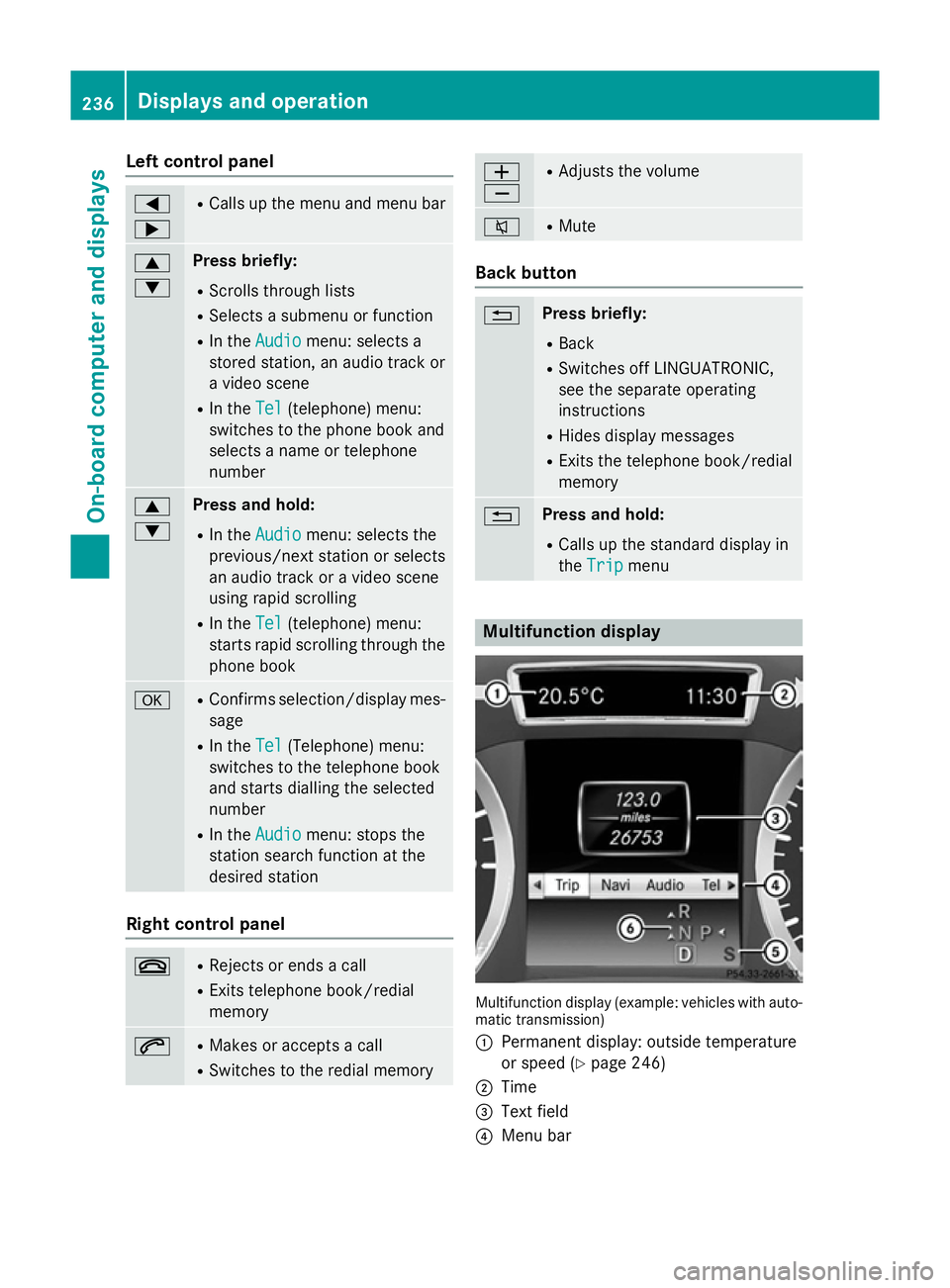
Left control panel
=
; R
Calls up the menu and menu bar 9
: Press briefly:
R Scrolls through lists
R Selects a submenu or function
R In the Audio Audio menu: selects a
stored station, an audio track or
a video scene
R In the Tel
Tel (telephone) menu:
switches to the phone book and
selects a name or telephone
number 9
: Press and hold:
R In the Audio Audio menu: selects the
previous/next station or selects
an audio track or a video scene
using rapid scrolling
R In the Tel
Tel (telephone) menu:
starts rapid scrolling through the
phone book a R
Confirms selection/display mes-
sage
R In the Tel Tel(Telephone) menu:
switches to the telephone book
and starts dialling the selected
number
R In the Audio Audio menu: stops the
station search function at the
desired station Right control panel
~ R
Rejects or ends a call
R Exits telephone book/redial
memory 6 R
Makes or accepts a call
R Switches to the redial memory W
X R
Adjusts the volume 8 R
Mute Back button
% Press briefly:
R Back
R Switches off LINGUATRONIC,
see the separate operating
instructions
R Hides display messages
R Exits the telephone book/redial
memory % Press and hold:
R Calls up the standard display in
the Trip Trip menu Multifunction display
Multifunction display (example: vehicles with auto-
matic transmission)
: Permanent display: outside temperature
or speed (Y page 246)
; Time
= Text field
? Menu bar 236
Displays and operationOn-board computer and displays
Page 240 of 401
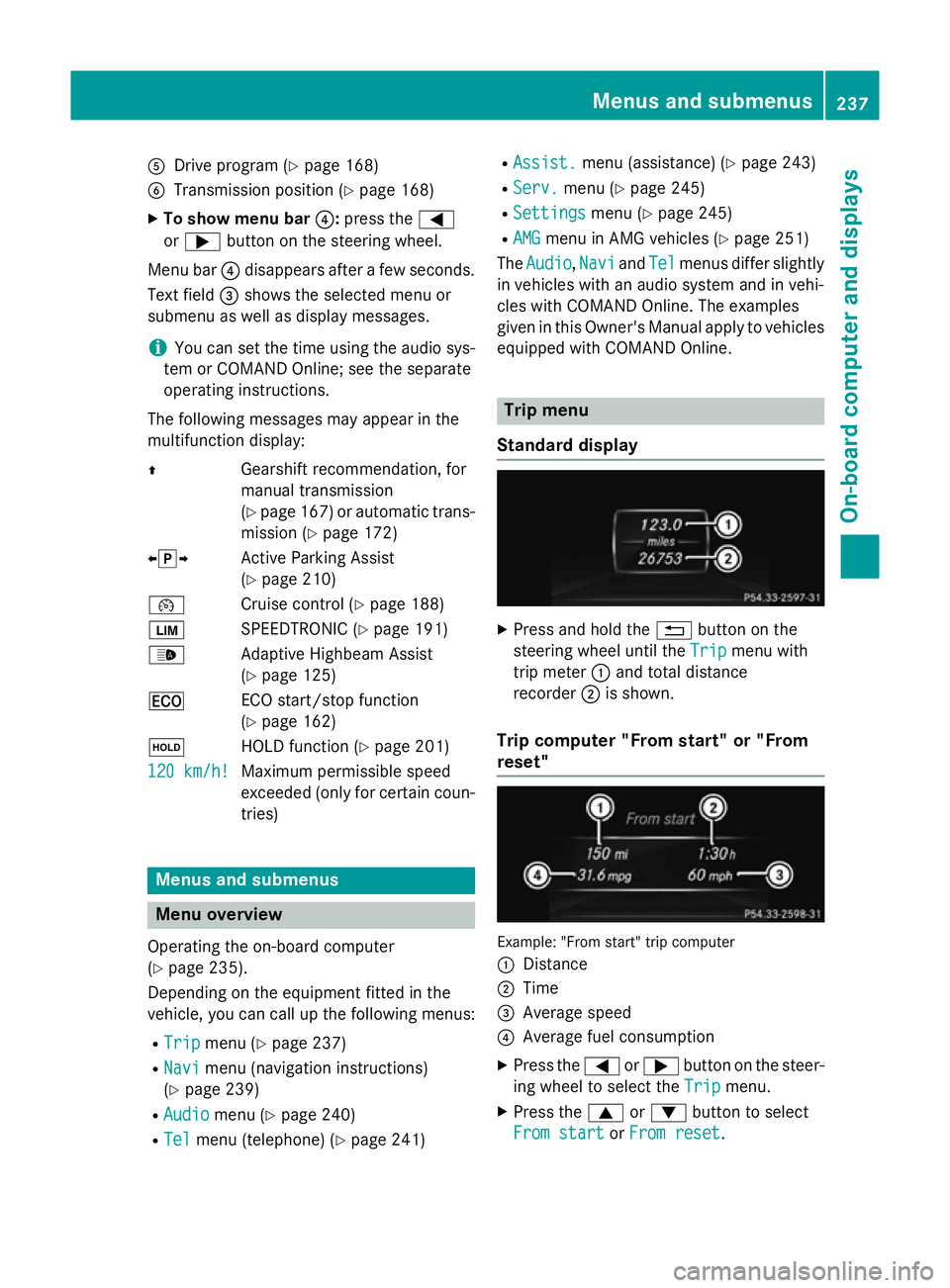
A
Drive program (Y page 168)
B Transmission position (Y page 168)
X To show menu bar ?:press the =
or ; button on the steering wheel.
Menu bar ?disappears after a few seconds.
Text field =shows the selected menu or
submenu as well as display messages.
i You can set the time using the audio sys-
tem or COMAND Online; see the separate
operating instructions.
The following messages may appear in the
multifunction display:
Z Gearshift recommendation, for
manual transmission
(Ypage 167 )or automatic trans-
mission (Y page 172)
XjY Active Parking Assist
(Ypage 210)
¯ Cruise control (Y page 188)
È SPEEDTRONIC (Y page 191)
_ Adaptive Highbeam Assist
(Ypage 125)
¤ ECO start/stop function
(Ypage 162)
ë HOLD function (Y page 201)
120 km/h!
120 km/h! Maximum permissible speed
exceeded (only for certain coun-
tries) Menus and submenus
Menu overview
Operating the on-board computer
(Y page 235).
Depending on the equipment fitted in the
vehicle, you can call up the following menus:
R Trip Trip menu (Y page 237)
R Navi
Navi menu (navigation instructions)
(Y page 239)
R Audio
Audio menu (Y page 240)
R Tel Tel menu (telephone) (Y page 241)R
Assist. Assist. menu (assistance) (Y page 243)
R Serv.
Serv. menu (Y page 245)
R Settings
Settings menu (Ypage 245)
R AMG
AMG menu in AMG vehicles (Y page 251)
The Audio
Audio, Navi
NaviandTel
Tel menus differ slightly
in vehicles with an audio system and in vehi-
cles with COMAND Online. The examples
given in this Owner's Manual apply to vehicles
equipped with COMAND Online. Trip menu
Standard display X
Press and hold the %button on the
steering wheel until the Trip Tripmenu with
trip meter :and total distance
recorder ;is shown.
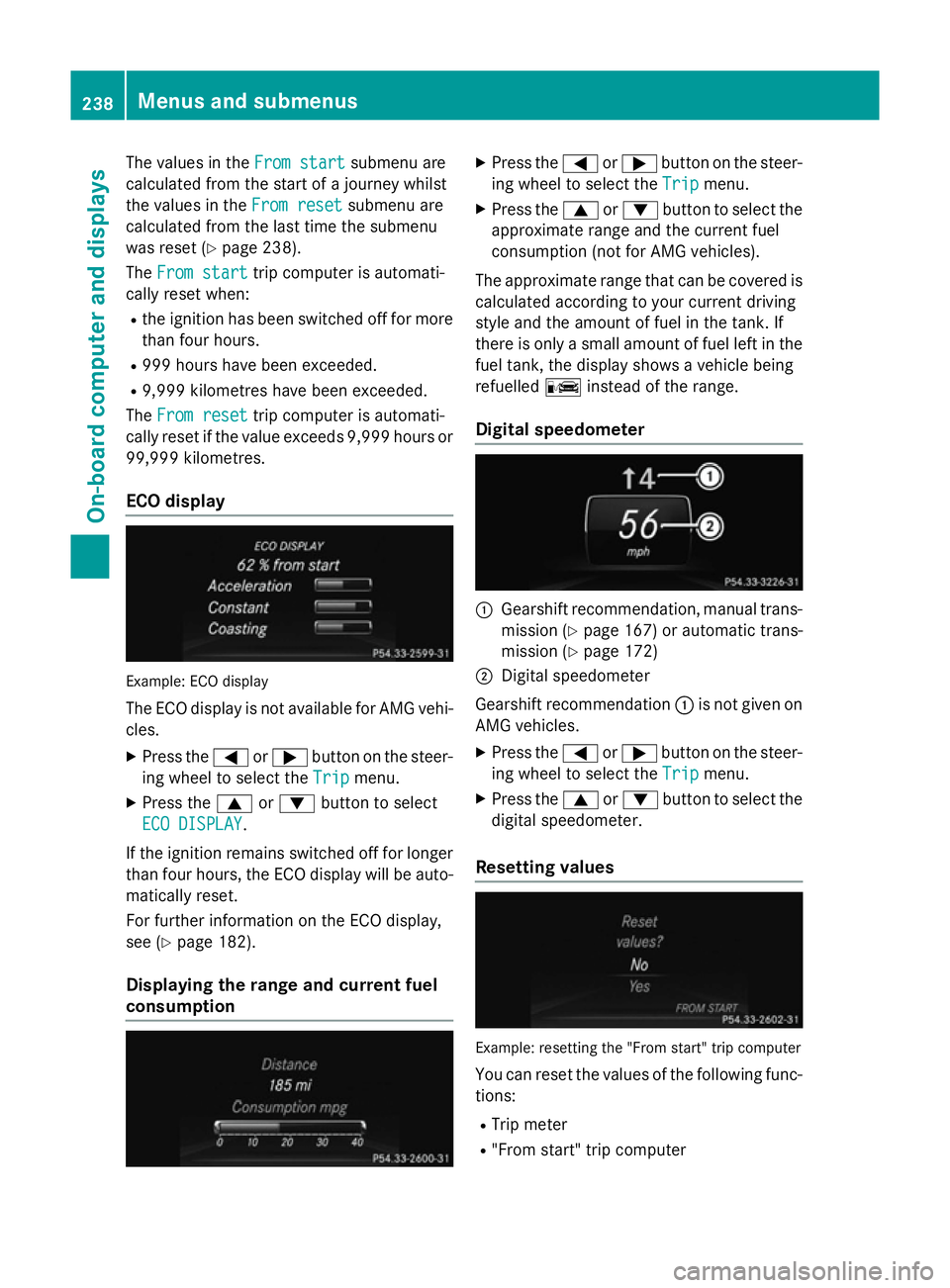
Trip computer "From start" or "From
reset" Example: "From start" trip computer
:
Distance
; Time
= Average speed
? Average fuel consumption
X Press the =or; button on the steer-
ing wheel to select the Trip Tripmenu.
X Press the 9or: button to select
From start
From start orFrom reset
From reset. Menus and submenus
237On-board computer and displays Z
Page 241 of 401
The values in the
From start
From startsubmenu are
calculated from the start of a journey whilst
the values in the From reset
From resetsubmenu are
calculated from the last time the submenu
was reset (Y page 238).
The From start
From start trip computer is automati-
cally reset when:
R the ignition has been switched off for more
than four hours.
R 999 hours have been exceeded.
R 9,999 kilometres have been exceeded.
The From reset
From reset trip computer is automati-
cally reset if the value exceeds 9,999 hours or 99,999 kilometres.
ECO display Example: ECO display
The ECO display is not available for AMG vehi-
cles.
X Press the =or; button on the steer-
ing wheel to select the Trip
Trip menu.
X Press the 9or: button to select
ECO DISPLAY
ECO DISPLAY.
If the ignition remains switched off for longer
than four hours, the ECO display will be auto- matically reset.
For further information on the ECO display,
see (Y page 182).
Displaying the range and current fuel
consumption X
Press the =or; button on the steer-
ing wheel to select the Trip Tripmenu.
X Press the 9or: button to select the
approximate range and the current fuel
consumption (not for AMG vehicles).
The approximate range that can be covered is
calculated according to your current driving
style and the amount of fuel in the tank. If
there is only a small amount of fuel left in the
fuel tank, the display shows a vehicle being
refuelled Cinstead of the range.
Digital speedometer :
Gearshift recommendation, manual trans-
mission (Y page 167) or automatic trans-
mission (Y page 172)
; Digital speedometer
Gearshift recommendation :is not given on
AMG vehicles.
X Press the =or; button on the steer-
ing wheel to select the Trip
Tripmenu.
X Press the 9or: button to select the
digital speedometer.
Resetting values Example: resetting the "From start" trip computer
You can reset the values of the following func-
tions:
R Trip meter
R "From start" trip computer 238
Menus and submenusOn-board computer and displays
Page 242 of 401
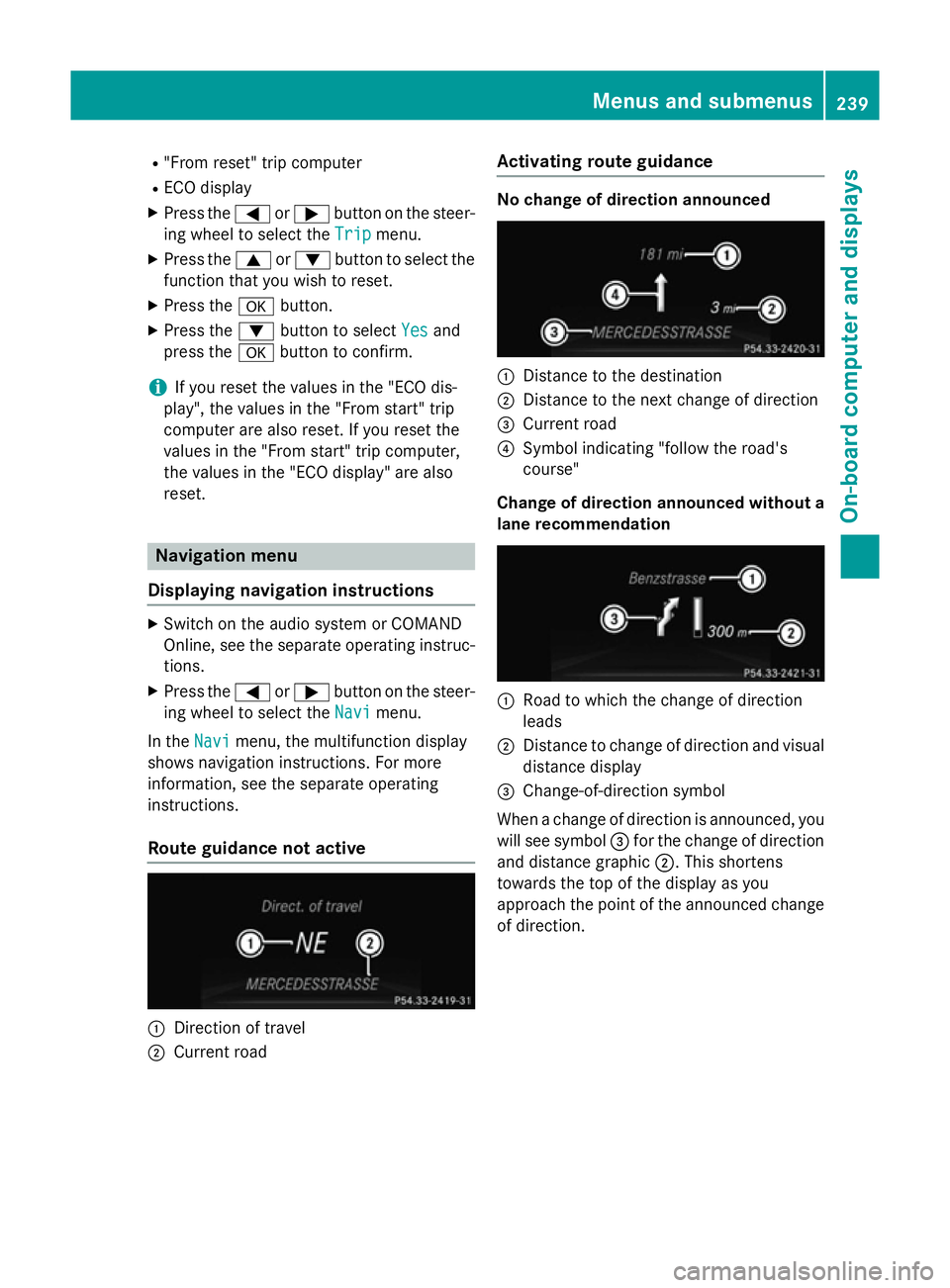
R
"From reset" trip computer
R ECO display
X Press the =or; button on the steer-
ing wheel to select the Trip
Tripmenu.
X Press the 9or: button to select the
function that you wish to reset.
X Press the abutton.
X Press the :button to select Yes
Yesand
press the abutton to confirm.
i If you reset the values in the "ECO dis-
play", the values in the "From start" trip
computer are also reset. If you reset the
values in the "From start" trip computer,
the values in the "ECO display" are also
reset. Navigation menu
Displaying navigation instructions X
Switch on the audio system or COMAND
Online, see the separate operating instruc-
tions.
X Press the =or; button on the steer-
ing wheel to select the Navi
Navi menu.
In the Navi Navimenu, the multifunction display
shows navigation instructions. For more
information, see the separate operating
instructions.
Route guidance not active :
Direction of travel
; Current road Activating route guidance No change of direction announced
:
Distance to the destination
; Distance to the next change of direction
= Current road
? Symbol indicating "follow the road's
course"
Change of direction announced without a lane recommendation :
Road to which the change of direction
leads
; Distance to change of direction and visual
distance display
= Change-of-direction symbol
When a change of direction is announced, you
will see symbol =for the change of direction
and distance graphic ;. This shortens
towards the top of the display as you
approach the point of the announced change
of direction. Menus and submenus
239On-board computer and displays Z
Page 249 of 401
Instrument cluster
Selecting the unit of measurement for dis-
tance
You can determine whether the multifunction display shows some messages in miles or kil-
ometres.
X Press the =or; button on the steer-
ing wheel to select the Settings
Settings menu.
X Press the :or9 button to select the
Instrument cluster
Instrument cluster submenu.
X Press ato confirm.
X Press the :or9 button to select the
Display unit Speed-/odometer
Display unit Speed-/odometer func-
tion.
You will see the selected setting: km kmor
miles
miles.
X Press the abutton to save the setting.
The selected unit of measurement for dis-
tance applies to:
R the digital speedometer in the Trip
Tripmenu
R the total distance recorder and the trip
meter
R the trip computer
R the current consumption and the range
R navigation instructions in the Navi
Navi menu
R cruise control
R SPEEDTRONIC
R DISTRONIC PLUS
R ASSYST PLUS service interval display
Switching the additional speedometer
on/off
The Dig. speedometer [mph]
Dig. speedometer [mph] orDig. Dig.
speedometer [km/h]
speedometer [km/h] function (vehicles for
the United Kingdom) allows you to choose
whether the multifunction display in the sta-
tus area always shows the speed in mph
mph or in
km/h
km/h instead of the outside temperature.
X Press the =or; button on the steer-
ing wheel to select the Settings
Settingsmenu.
X Press the :or9 button to select the
Instrument cluster
Instrument cluster submenu.
X Press ato confirm. X
Press the :or9 button to select the
Dig. speedometer [mph]
Dig. speedometer [mph] orDig.
Dig.
speedometer [km/h]
speedometer [km/h] (United Kingdom)
function.
You will see the selected setting: on
on oroff off .
X Press the abutton to save the setting.
Selecting the permanent display function
You can determine whether the multifunction display permanently shows your speed or the
outside temperature.
X Press the =or; button on the steer-
ing wheel to select the Settings
Settingsmenu.
X Press the :or9 button to select the
Instrument cluster
Instrument cluster submenu.
X Press ato confirm.
X Press the :or9 button to select the
Permanent display
Permanent display function.
You will see the selected setting outside
outside
temperature
temperature orDig. speedometer
Dig. speedometer
[mph]
[mph]/Dig. speedometer [km/h] Dig. speedometer [km/h] (vehi-
cles for the United Kingdom).
X Press the abutton to save the setting.
i The speed is displayed in mph or in km/h
(United Kingdom).
Lights Switching the daytime driving lights
on/off
The
Daytime driving lights Daytime driving lights function can
only be switched on with the engine turned
off.
X Press the =or; button on the steer-
ing wheel to select the Settings Settingsmenu.
X Press the :or9 button to select the
Lights
Lights submenu.
X Press ato confirm.
X Press the :or9 button to select the
Daytime driving lights
Daytime driving lights function.
If the Daytime driving lights
Daytime driving lights function
has been switched on, the cone of light and 246
Menus and submenusOn-board computer and displays