bonnet MERCEDES-BENZ GLA SUV 2017 Owners Manual
[x] Cancel search | Manufacturer: MERCEDES-BENZ, Model Year: 2017, Model line: GLA SUV, Model: MERCEDES-BENZ GLA SUV 2017Pages: 369, PDF Size: 7.56 MB
Page 9 of 369
Automatic transmission emer-
gency running mode
.........................163
Auxiliary heating
Activating/deactivating ................. 138
Activating/deactivating (on the
centre console ).............................. 138
Remote control .............................. 138
Setting ........................................... 230
Auxiliary heating/ventilation
Display message ............................ 262
Important safety notes .................. 137
Problem (display message) ............ 141
Setting the departure time ............. 139
Auxiliary ventilation
Activating/deactivating ................. 138
Activating/deactivating (on the
centre console ).............................. 138
Remote control .............................. 138
Axle load, permissible (trailer tow-
ing) ...................................................... 359 B
Back button ....................................... 278
Bag hook ............................................ 293
Ball coupling
Folding in ....................................... 215
Folding in/out ................................ 214
Folding out ..................................... 214
BAS (Brake Assist System) ................. 69
Basic settings
see Settings
Battery (key)
Checking .......................................... 82
Important safety notes .................... 82
Replacing ......................................... 82
Battery (vehicle)
Charging ........................................ 324
Display message ............................ 250
Important safety notes .................. 322
Jump starting ................................. 325
Belt
see Seat belts
Belt tensioner
Activation ......................................... 53
Belt warning ......................................... 46 Blind Spot Assist
Activating/deactivating (on-
board computer) ............................ 227
Display message ............................ 253
Notes/function .............................. 209
Trailer towing ................................. 210
Blower
see Climate control
Bluetooth ®
Searching for a mobile phone ........ 281
Searching for a mobile phone
(device manager) ........................... 282
See also Digital Owner's Manua l... 277
Telephony ...................................... 280
Bonnet
Active bonnet (pedestrian protec-tion) ............................................... 302
Closing ........................................... 304
Display message ............................ 261
Important safety notes .................. 302
Opening ......................................... 303
Boot
Important safety notes .................... 94
Opening (automatically from out-
side) ................................................. 95
Opening (from outside the vehi-
cle, HANDS-FREE ACCESS) ........ 91, 95
Opening automatically from
inside ............................................... 96
Boot lid
see Tailgate
Boot load (maximum) ........................ 358
Brake
EBD .................................................. 75
Brake Assist
see BAS (Brake Assist System)
Brake assistance
see BAS (Brake Assist System)
Brake fluid
Display message ............................ 241
Notes ............................................. 356
Brake force distribution
see EBD (electronic brake force
distribution)
Brake lamp
Replacing bulb s............................. 123
Brake lamps
Adaptive ........................................... 71 6
Index
Page 20 of 369
Applying or releasing manuall
y...... 168
Display message ............................ 237
Electric parking brake .................... 167
Emergency braking ........................ 169
General information ....................... 167
Releasing automaticall y................. 168
Warning lamp ................................. 272
Parking lamps
Display message ............................ 247
Switching on/of f........................... 117
Parking Pilot
Cancelling ...................................... 200
Detecting parking spaces .............. 196
Display Message ............................ 253
Exiting a parking space .................. 199
Function/note s............................. 196
Important safety notes .................. 196
Parking .......................................... 197
Towing a trailer .............................. 196
PASSENGER AIR BAG
Display message ............................ 244
Indicator lamps ................................ 42
Problems (malfunctions) ................ 244
Pedestrian protection
see Bonnet
Petrol .................................................. 353
Pets in the vehicle ............................... 67
Phone book
See also Digital Owner's Manua l... 277
Plastic trim (cleaning instruc-
tions) .................................................. 312
Power windows
see Side windows
PRE-SAFE ®
(anticipatory occupant
protection)
Operation ......................................... 55
PRE-SAFE ®
(preventive occupant
safety system)
Display message ............................ 241
Protection against theft
ATA (Anti-Theft Alarm system) ......... 76
Immobiliser ...................................... 76
Interior motion sensor ..................... 77
Tow-away protection ........................ 76
Protection of the environment
General notes .................................. 26 Pulling away
Automatic transmission ................. 146
General notes ................................ 146
Hill start assist ............................... 147
Manual transmission ...................... 146
Trailer ............................................ 147 Q
QR code Mercedes-Benz Guide App ................. 1
Rescue card ..................................... 30
Qualified specialist workshop ........... 30 R
RACE START important safety notes ................... 188
RACE START (Mercedes-AMG vehi-
cles) .................................................... 188
RACE TIMER (on-board computer,
Mercedes-AMG vehicles) .................. 232
Radio
Selecting a station ......................... 223
see separate operating instructions
Radio mode
See also Digital Owner's Manua l... 277
Radio-based vehicle components
Declaration of conformity ................ 27
Rain closing feature (panorama
sliding sunroof) ................................. 103
Reading lamp ..................................... 119
Rear bench seat
Folding the backrest forwards/
back ............................................... 292
Rear compartment
Setting the air vents ...................... 142
Rear foglamp
Changing the bulb .......................... 123
Display message ............................ 247
Switching on/of f........................... 117
Rear lamps
see Lights
Rear seat
Adjusting the angle of the backr-
ests ................................................ 293
Rear shelf ........................................... 294 Index
17
Page 35 of 369
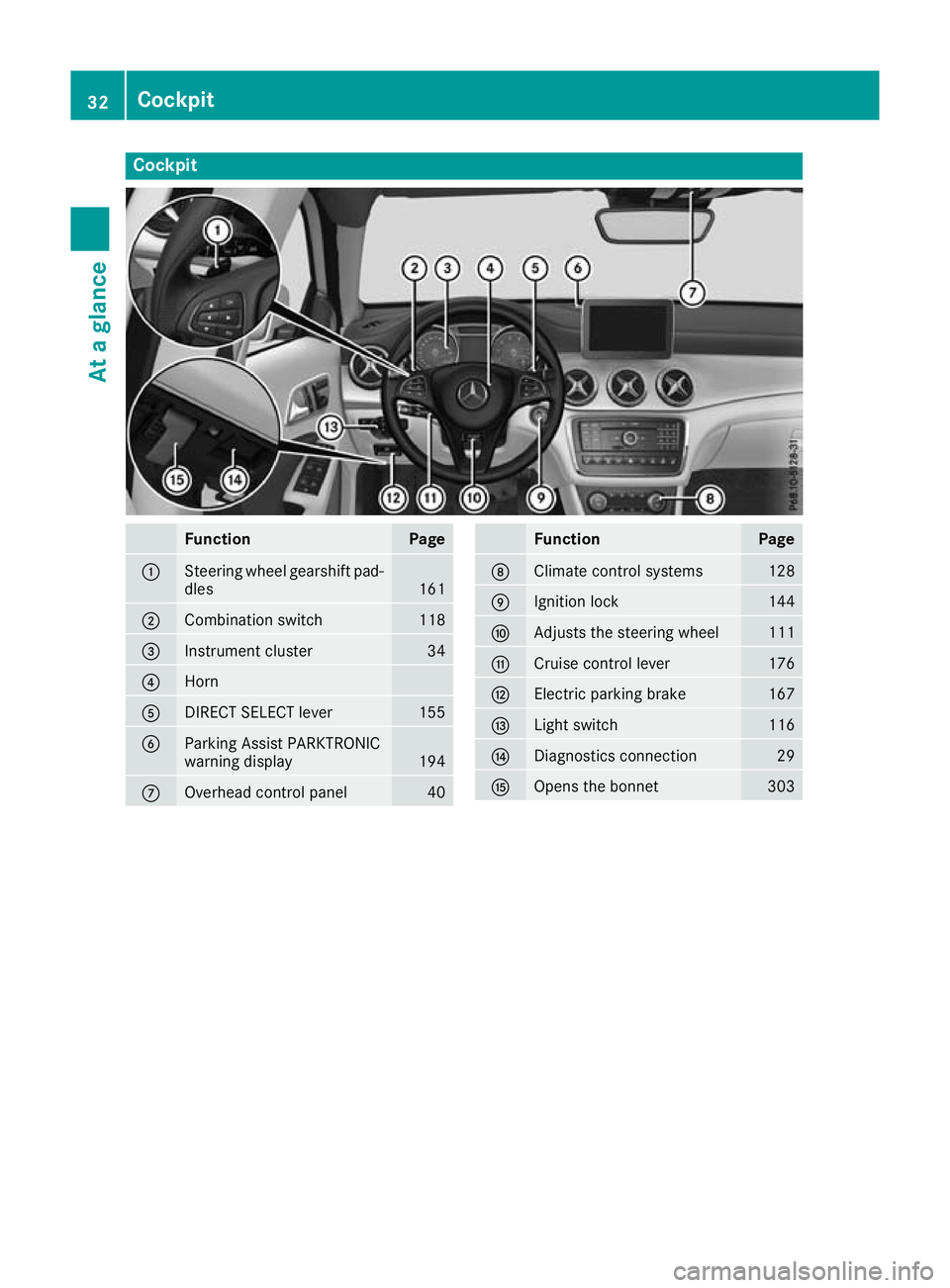
Cockpit
Function Page
:
Steering wheel gearshift pad-
dles 161
;
Combination switch 118
=
Instrument cluster 34
?
Horn
A
DIRECT SELECT lever 155
B
Parking Assist PARKTRONIC
warning display
194
C
Overhead control panel 40 Function Page
D
Climate control systems 128
E
Ignition lock 144
F
Adjusts the steering wheel 111
G
Cruise control lever 176
H
Electric parking brake 167
I
Light switch 116
J
Diagnostics connection 29
K
Opens the bonnet 30332
CockpitAt a glance
Page 36 of 369
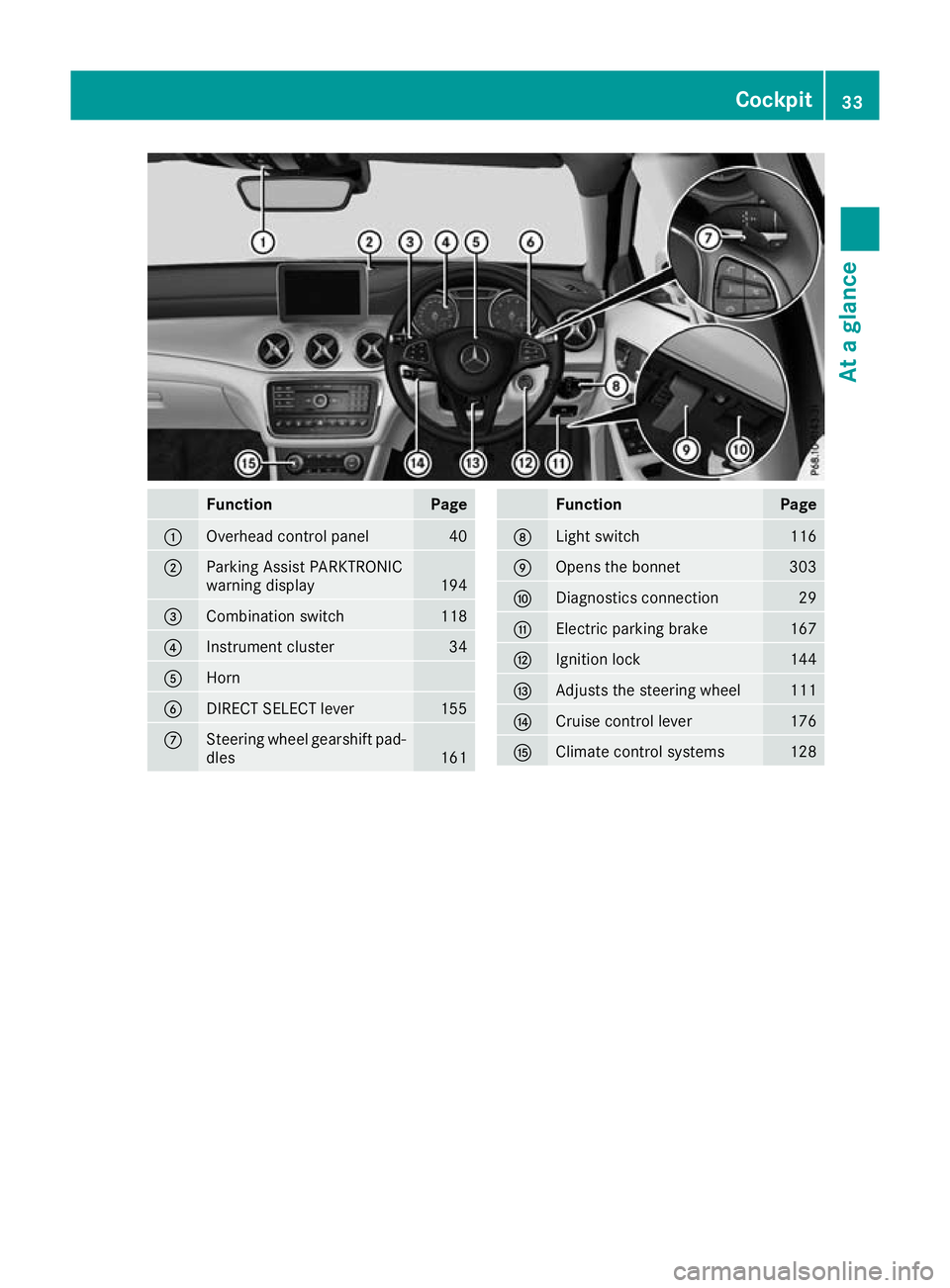
Function Page
:
Overhead control panel 40
;
Parking Assist PARKTRONIC
warning display
194
=
Combination switch 118
?
Instrument cluster 34
A
Horn
B
DIRECT SELECT lever 155
C
Steering wheel gearshift pad-
dles 161 Function Page
D
Light switch 116
E
Opens the bonnet 303
F
Diagnostics connection 29
G
Electric parking brake 167
H
Ignition lock 144
I
Adjusts the steering wheel 111
J
Cruise control lever 176
K
Climate control systems 128Cockpit
33At a glance
Page 79 of 369
Protection against theft
Immobiliser
The immobiliser prevents your vehicle from
being started without the correct key.
X To activate with the key: remove the key
from the ignition lock.
X To activate with KEYLESS-GO start func-
tion or KEYLESS-GO:
switch the ignition off
and open the driver's door.
X To deactivate: switch on the ignition.
When leaving the vehicle, always take the key
with you and lock the vehicle. Anyone can start
the engine if a valid key has been left inside the
vehicle.
i The immobiliser is always deactivated when
you start the engine. ATA (Anti-Theft Alarm system)
X
To prime: lock the vehicle with the key or
KEYLESS-GO.
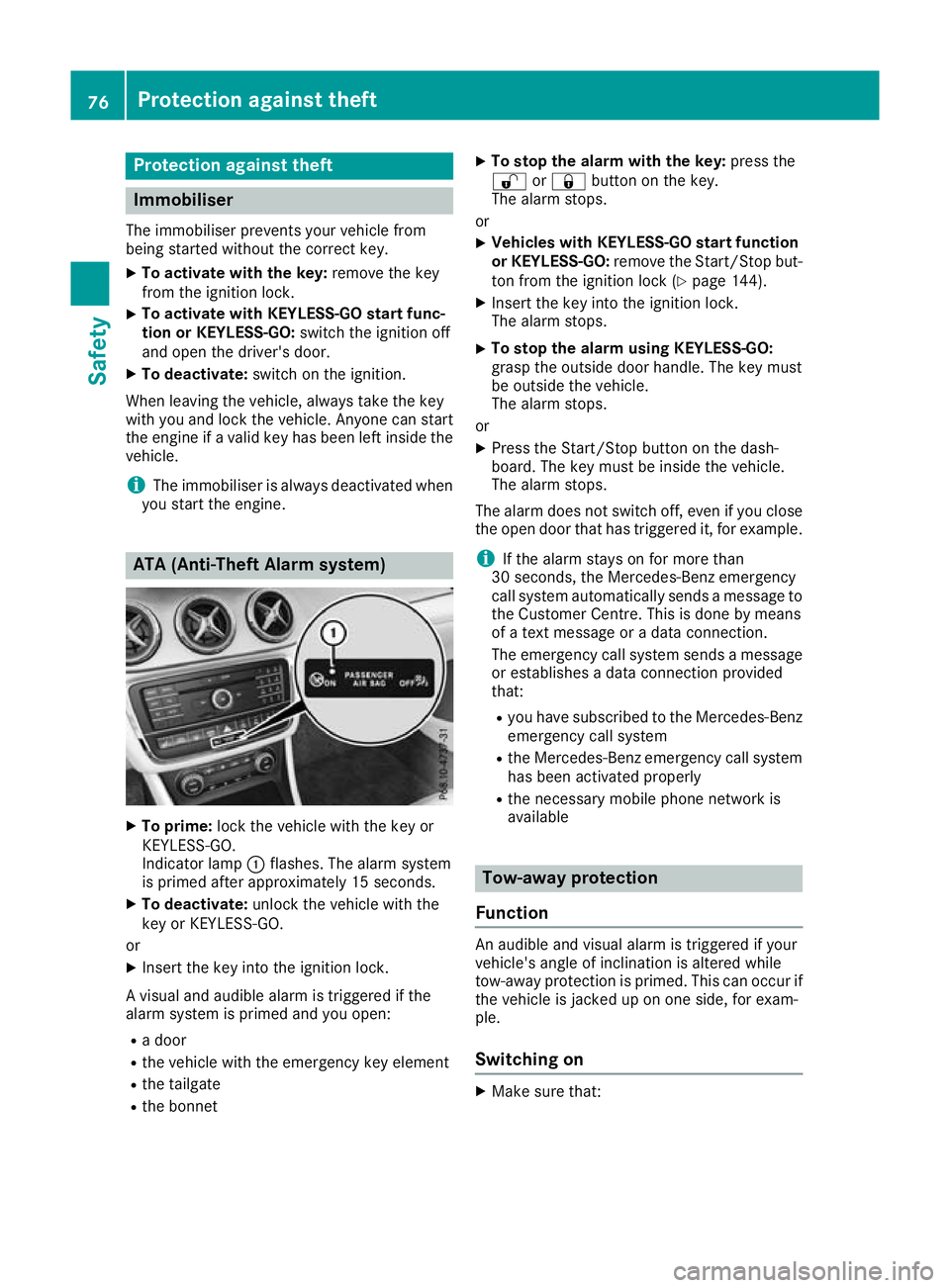
Indicator lamp :flashes. The alarm system
is primed after approximately 15 seconds.
X To deactivate: unlock the vehicle with the
key or KEYLESS-GO.
or X Insert the key into the ignition lock.
A visual and audible alarm is triggered if the
alarm system is primed and you open: R a door
R the vehicle with the emergency key element
R the tailgate
R the bonnet X
To stop the alarm with the key: press the
% or& button on the key.
The alarm stops.
or X Vehicles with KEYLESS-GO start function
or KEYLESS-GO: remove the Start/Stop but-
ton from the ignition lock (Y page 144).
X Insert the key into the ignition lock.
The alarm stops.
X To stop the alarm using KEYLESS-GO:
grasp the outside door handle. The key must
be outside the vehicle.
The alarm stops.
or X Press the Start/Stop button on the dash-
board. The key must be inside the vehicle.
The alarm stops.
The alarm does not switch off, even if you close the open door that has triggered it, for example.
i If the alarm stays on for more than
30 seconds, the Mercedes‑Benz emergency
call system automatically sends a message to
the Customer Centre. This is done by means
of a text message or a data connection.
The emergency call system sends a message or establishes a data connection provided
that:
R you have subscribed to the Mercedes ‑Benz
emergency call system
R the Mercedes‑Benz emergency call system
has been activated properly
R the necessary mobile phone network is
available Tow-away protection
Function An audible and visual alarm is triggered if your
vehicle's angle of inclination is altered while
tow-away protection is primed. This can occur if
the vehicle is jacked up on one side, for exam-
ple.
Switching on X
Make sure that: 76
Protection against theftSafety
Page 125 of 369
Dipped-beam headlamps (halogen
headlamps)
X
Remove the cover in the front wheel arch
(Y page 121).
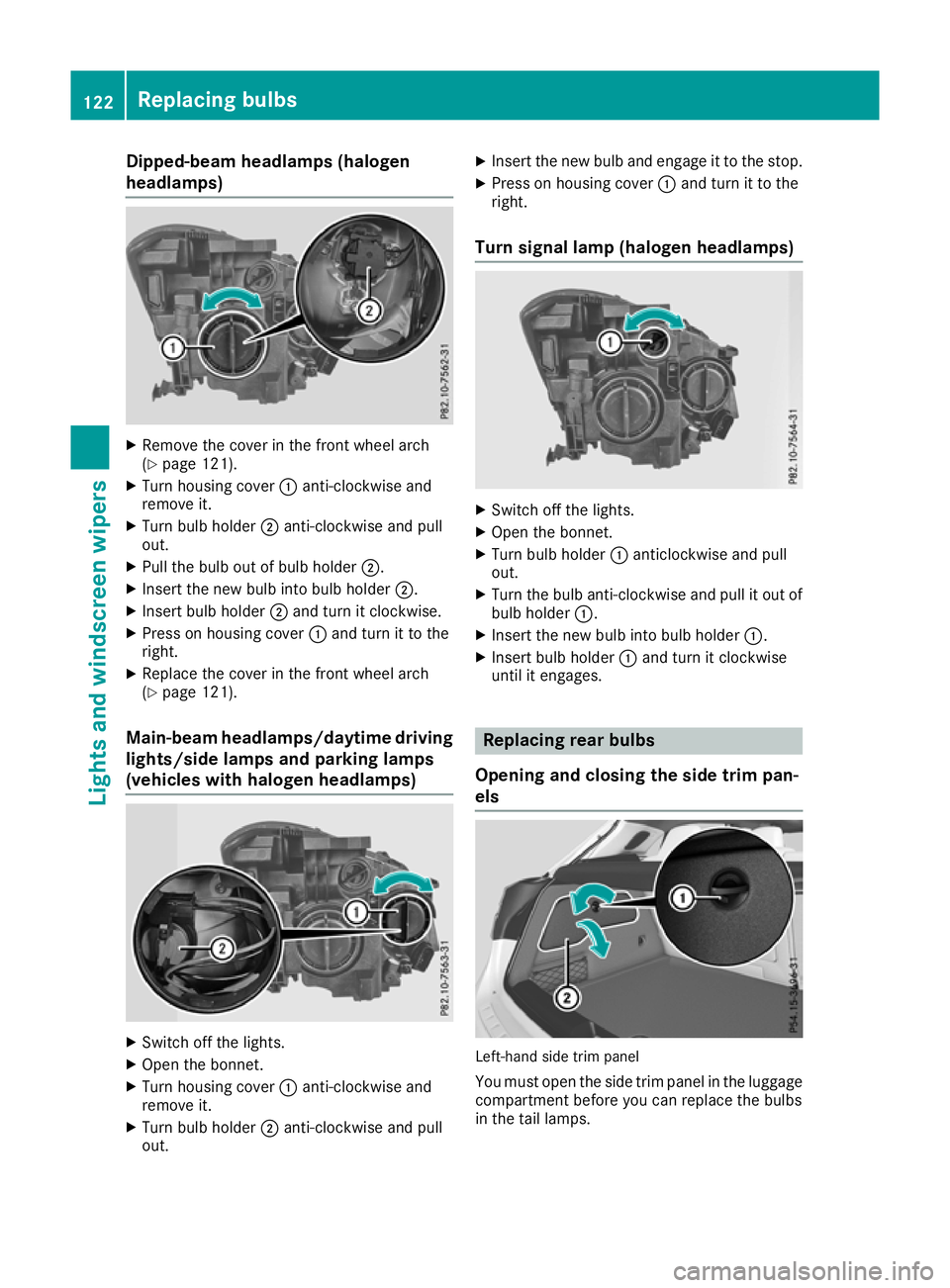
X Turn housing cover :anti-clockwise and
remove it.
X Turn bulb holder ;anti-clockwise and pull
out.
X Pull the bulb out of bulb holder ;.
X Insert the new bulb into bulb holder ;.
X Insert bulb holder ;and turn it clockwise.
X Press on housing cover :and turn it to the
right.
X Replace the cover in the front wheel arch
(Y page 121).
Main-beam headlamps/daytime driving lights/side lamps and parking lamps
(vehicles with halogen headlamps) X
Switch off the lights.
X Open the bonnet.
X Turn housing cover :anti-clockwise and
remove it.
X Turn bulb holder ;anti-clockwise and pull
out. X
Insert the new bulb and engage it to the stop.
X Press on housing cover :and turn it to the
right.
Turn signal lamp (halogen headlamps) X
Switch off the lights.
X Open the bonnet.
X Turn bulb holder :anticlockwise and pull
out.
X Turn the bulb anti-clockwise and pull it out of
bulb holder :.
X Insert the new bulb into bulb holder :.
X Insert bulb holder :and turn it clockwise
until it engages. Replacing rear bulbs
Opening and closing the side trim pan-
els Left-hand side trim panel
You must open the side trim panel in the luggage
compartment before you can replace the bulbs
in the tail lamps. 122
Replacing bulbsLigh
ts and windscreen wipers
Page 128 of 369
Replacing the wiper blades
Important safety notes G
WARNING
If the windscreen wipers begin to move while
you are changing the wiper blades, you can be trapped by the wiper arm. There is a risk of
injury.
Always switch off the windscreen wipers and
ignition before changing the wiper blades.
! To avoid damaging the windscreen wiper
blades, make sure that you touch only the
wiper arm of the windscreen wiper.
! Never open the bonnet/tailgate if a wiper
arm is folded away from the windscreen/rear
window.
Never fold a windscreen wiper arm without a
wiper blade back onto the windscreen/rear
window.
Hold the windscreen wiper arm firmly when
you change the wiper blade. If you release the
wiper arm without a wiper blade and it falls
onto the windscreen/rear window, the wind-
screen/rear window may be damaged by the
force of the impact.
Mercedes-Benz recommends that you have
the wiper blades changed at a qualified spe-
cialist workshop.
Replacing the windscreen wiper blades Removing the wiper blades
X Vehicles without KEYLESS-GO or KEY-
LESS-GO start function:
remove the key
from the ignition lock.
X Vehicles with KEYLESS-GO or KEYLESS-
GO start function:
switch off the engine.
X Fold the wiper arm away from the windscreen. X
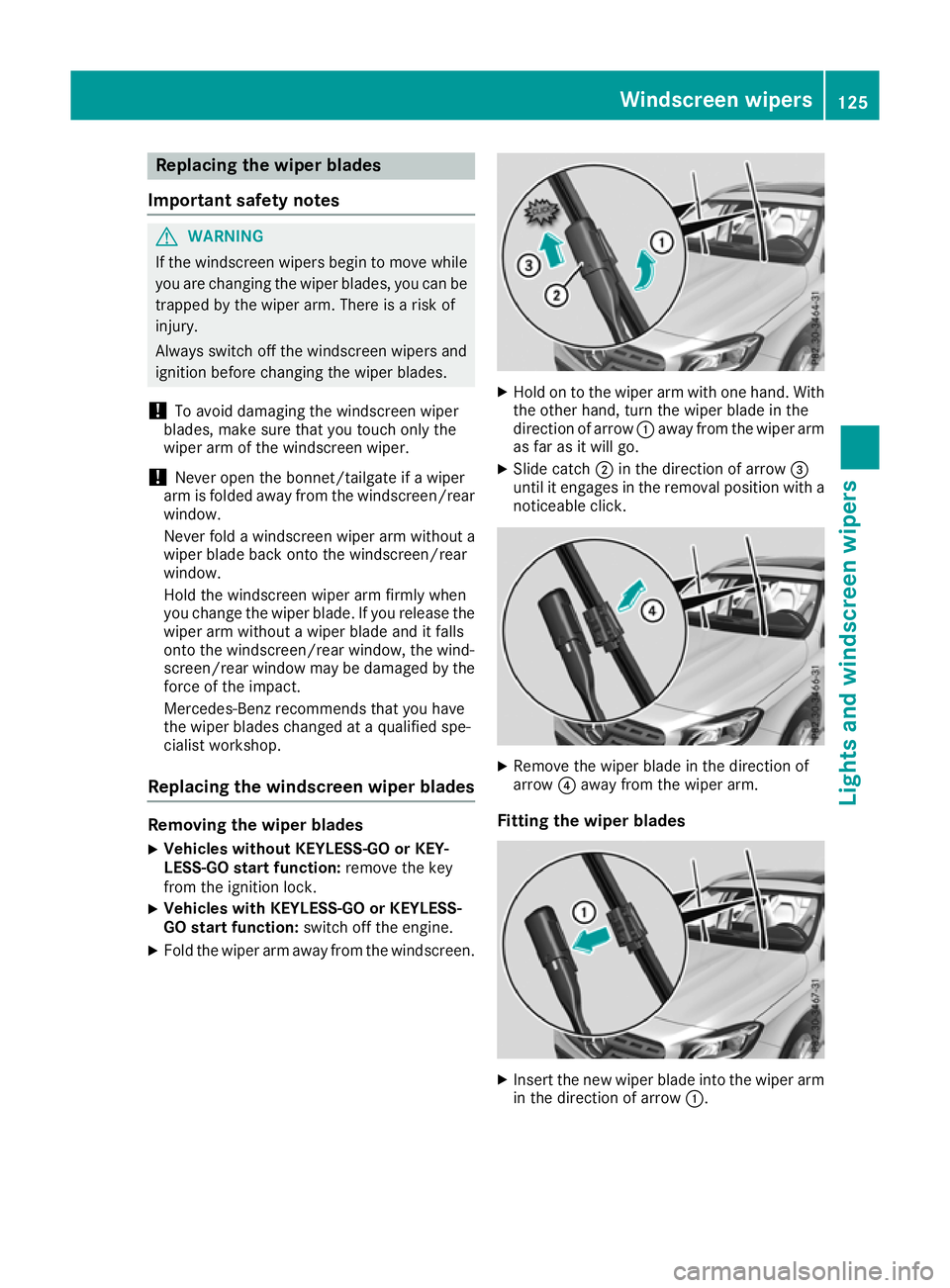
Hold on to the wiper arm with one hand. With
the other hand, turn the wiper blade in the
direction of arrow :away from the wiper arm
as far as it will go.
X Slide catch ;in the direction of arrow =
until it engages in the removal position with a noticeable click. X
Remove the wiper blade in the direction of
arrow ?away from the wiper arm.
Fitting the wiper blades X
Insert the new wiper blade into the wiper arm
in the direction of arrow :. Windscreen wipers
125Lights and windscreen wipers Z
Page 144 of 369
Problems with the auxiliary heating/ventilation
Problem
Possible causes/consequences and
M
MSolutions FAIL¨ The signal transmission between the transmitter and the vehicle is
faulty.
X
Change your position in relation to the vehicle, moving closer if
necessary.
X Make another attempt to switch the auxiliary heating/ventilation on
or off using the remote control. FAIL The auxiliary heating cannot be switched on or has switched itself off.
The starter battery is not sufficiently charged.
X Charge the starter battery.
X Make another attempt to switch on the auxiliary heating/ventilation
using the remote control. The auxiliary heating cannot be switched on or has switched itself off.
The fuel tank content is below the reserve fuel level.
X Refuel at the nearest filling station.
X Make another attempt to switch on the auxiliary heating using the
remote control. The auxiliary heating/ventilation cannot be switched on or has
switched itself off.
The auxiliary heating/ventilation is malfunctioning.
X Have the auxiliary heating/ventilation checked at a qualified spe-
cialist workshop. Air vents
Important safety notes
G
WARNING
Very hot or very cold air can flow from the air vents. This could result in burns or frostbite in the immediate vicinity of the air vents. There
is a risk of injury.
Make sure that all vehicle occupants always
maintain a sufficient distance to the air out-
lets. If necessary, redirect the airflow to
another area of the vehicle interior. In order to ensure the direct flow of fresh air
through the air vents into the vehicle interior,
please observe the following notes:
R keep the air inlet between the windscreen and
the bonnet free of blockages, such as ice,
snow or leaves
R never cover the vents or ventilation grilles in
the vehicle interior
i Optimal climate control function is achieved
by opening the air vents fully and setting the
adjusters to the middle position. Air vents
141Climate control Z
Page 151 of 369
Hill start assist is not active if:
R you are pulling away on a level road or a
downhill gradient
R the transmission is in position ion vehicles
with automatic transmission
R the electric parking brake is applied
R ESP ®
is malfunctioning
Further information on holding the vehicle sta-
tionary on uphill gradients (Y page 158).ECO start/stop function
Introduction The ECO start/stop function switches the
engine off automatically if the vehicle is stopped
under certain conditions.
When the vehicle pulls away again, the engine
starts automatically. The ECO start/stop func-
tion thereby helps you to reduce the fuel con-
sumption and emissions of your vehicle.
Important safety notes G
WARNING
If the engine is switched off automatically and you exit the vehicle, the engine is restarted
automatically. The vehicle may begin moving. There is a risk of accident and injury.
If you wish to exit the vehicle, always turn off
the ignition and secure the vehicle against
rolling away.
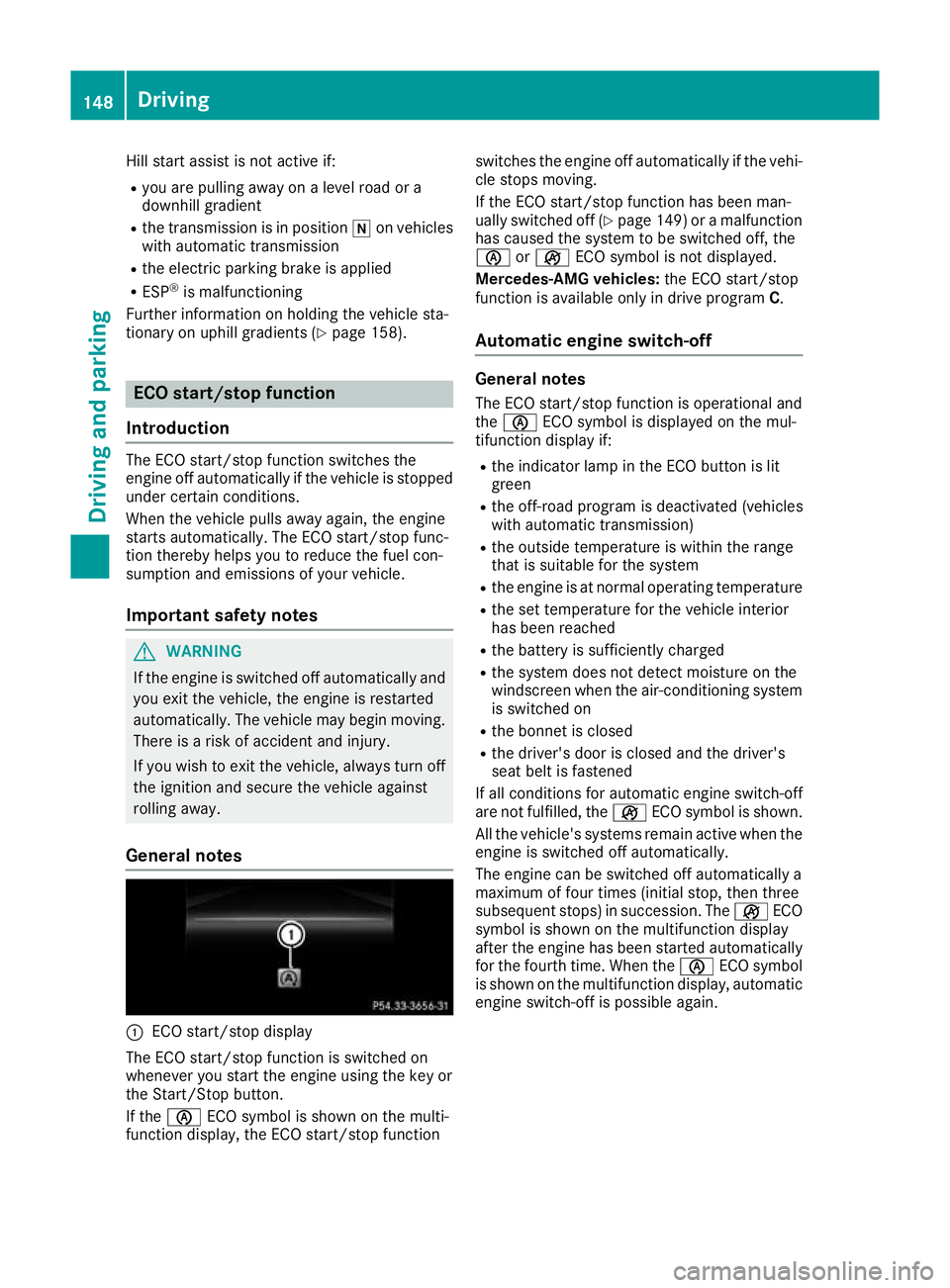
General notes :
ECO start/stop display
The ECO start/stop function is switched on
whenever you start the engine using the key or
the Start/Stop button.
If the è ECO symbol is shown on the multi-
function display, the ECO start/stop function switches the engine off automatically if the vehi-
cle stops moving.
If the ECO start/stop function has been man-
ually switched off (Y page 149)or a malfunction
has caused the system to be switched off, the
è orç ECO symbol is not displayed.
Mercedes-AMG vehicles: the ECO start/stop
function is available only in drive program C.
Automatic engine switch-off General notes
The ECO start/stop function is operational and
the è ECO symbol is displayed on the mul-
tifunction display if:
R the indicator lamp in the ECO button is lit
green
R the off-road program is deactivated (vehicles
with automatic transmission)
R the outside temperature is within the range
that is suitable for the system
R the engine is at normal operating temperature
R the set temperature for the vehicle interior
has been reached
R the battery is sufficiently charged
R the system does not detect moisture on the
windscreen when the air-conditioning system
is switched on
R the bonnet is closed
R the driver's door is closed and the driver's
seat belt is fastened
If all conditions for automatic engine switch-off
are not fulfilled, the çECO symbol is shown.
All the vehicle's systems remain active when the engine is switched off automatically.
The engine can be switched off automatically a
maximum of four times (initial stop, then three
subsequent stops) in succession. The çECO
symbol is shown on the multifunction display
after the engine has been started automatically
for the fourth time. When the èECO symbol
is shown on the multifunction display, automatic engine switch-off is possible again. 148
DrivingDriving and parking
Page 191 of 369
Start-off assist enables optimum acceleration
from a standstill. For this, a suitably high-grip
road surface is required; the tyres and vehicle
must also be in good condition.
Do not activate start-off assist on public roads.
Observe the safety notes on driving safety sys-
tems (Y page 68).
Be sure to read the safety notes and information on ESP ®
(Y page 72).
Activating start-off assist X
Deactivate ESP ®
(Y page 227).
X Turn the steering wheel to the straight-ahead
position.
X Depress the brake pedal hard with your left
foot and keep it depressed.
X Shift the transmission to position D.
X Use the DYNAMIC SELECT button to select
the Sdrive program (Y page 151).
X Quickly depress the accelerator pedal fully.
X Take your foot off the brake, but keep the
accelerator pedal depressed.
The vehicle pulls away at maximum acceler-
ation.
i Activate ESP ®
as soon as the acceleration
process has ended. ESP ®
will otherwise not
be able to stabilise the vehicle if the vehicle
starts to skid or a wheel starts to spin.
Cancelling start-off assist
X Remove your foot from the accelerator pedal.
X Reactivate ESP ®
. RACE START (Mercedes-AMG vehi-
cles)
Important safety notes i
RACE START must not be used on normal
roads. RACE START must be activated and
used only on dedicated race circuits, not on
public roads.
i RACE START is only available in
Mercedes‑AMG vehicles. G
WARNING
If you use RACE START, individual tyres may
get into a spin and the vehicle could skid.
Depending on the selected ESP ®
mode, there is an increased risk of skidding and having an
accident. Make sure that no persons, animals
or obstacles are within range of the vehicle.
RACE START enables optimum acceleration
from a standing start. For this, a suitably high-
grip surface is required; the tyres and vehicle
must also be in good condition.
i Observe the safety notes on driving safety
systems (Y page 68).
Be sure to read the safety notes and informa- tion on ESP ®
(Y page 72).
Activation conditions You can activate RACE START if:
R the doors, the bonnet and the boot lid are
closed
R the engine is running and the transmission,
traction control and engine are at operating
temperature
R the steering wheel is in the straight-ahead
position
R the vehicle is stationary and the brake pedal is
depressed (left foot)
R the transmission is in position h
R drive program S,S+ orRACE is selected
(Y page 152)
Activating RACE START X
Depress the brake pedal with your left foot
and keep it depressed.
X Pull and hold both steering wheel gearshift
paddles.
X The RACE START Confirm: Paddle UP RACE START Confirm: Paddle UP
Cancel: Paddle DOWN
Cancel: Paddle DOWN message appears in
the multifunction display.
X Release both steering wheel gearshift pad-
dles.
i If the activation conditions are no longer ful-
filled, RACE START is cancelled. The RACE RACE
START not possible See Owner's Man‐
START not possible See Owner's Man‐
ual ual message appears in the multifunction
display. 188
Driving systemsDriving and parking