remote control MERCEDES-BENZ GLA SUV 2017 Owners Manual
[x] Cancel search | Manufacturer: MERCEDES-BENZ, Model Year: 2017, Model line: GLA SUV, Model: MERCEDES-BENZ GLA SUV 2017Pages: 369, PDF Size: 7.56 MB
Page 9 of 369
Automatic transmission emer-
gency running mode
.........................163
Auxiliary heating
Activating/deactivating ................. 138
Activating/deactivating (on the
centre console ).............................. 138
Remote control .............................. 138
Setting ........................................... 230
Auxiliary heating/ventilation
Display message ............................ 262
Important safety notes .................. 137
Problem (display message) ............ 141
Setting the departure time ............. 139
Auxiliary ventilation
Activating/deactivating ................. 138
Activating/deactivating (on the
centre console ).............................. 138
Remote control .............................. 138
Axle load, permissible (trailer tow-
ing) ...................................................... 359 B
Back button ....................................... 278
Bag hook ............................................ 293
Ball coupling
Folding in ....................................... 215
Folding in/out ................................ 214
Folding out ..................................... 214
BAS (Brake Assist System) ................. 69
Basic settings
see Settings
Battery (key)
Checking .......................................... 82
Important safety notes .................... 82
Replacing ......................................... 82
Battery (vehicle)
Charging ........................................ 324
Display message ............................ 250
Important safety notes .................. 322
Jump starting ................................. 325
Belt
see Seat belts
Belt tensioner
Activation ......................................... 53
Belt warning ......................................... 46 Blind Spot Assist
Activating/deactivating (on-
board computer) ............................ 227
Display message ............................ 253
Notes/function .............................. 209
Trailer towing ................................. 210
Blower
see Climate control
Bluetooth ®
Searching for a mobile phone ........ 281
Searching for a mobile phone
(device manager) ........................... 282
See also Digital Owner's Manua l... 277
Telephony ...................................... 280
Bonnet
Active bonnet (pedestrian protec-tion) ............................................... 302
Closing ........................................... 304
Display message ............................ 261
Important safety notes .................. 302
Opening ......................................... 303
Boot
Important safety notes .................... 94
Opening (automatically from out-
side) ................................................. 95
Opening (from outside the vehi-
cle, HANDS-FREE ACCESS) ........ 91, 95
Opening automatically from
inside ............................................... 96
Boot lid
see Tailgate
Boot load (maximum) ........................ 358
Brake
EBD .................................................. 75
Brake Assist
see BAS (Brake Assist System)
Brake assistance
see BAS (Brake Assist System)
Brake fluid
Display message ............................ 241
Notes ............................................. 356
Brake force distribution
see EBD (electronic brake force
distribution)
Brake lamp
Replacing bulb s............................. 123
Brake lamps
Adaptive ........................................... 71 6
Index
Page 21 of 369
Rear window heating
Problem (fault) ............................... 135
Switching on/off ........................... 135
Rear window wiper
Replacing the wiper blad e.............. 126
Switching on/of f........................... 124
Rear-compartment seat belt sta-
tus indicator ........................................ 46
Rear-view mirror
Anti-dazzle mode (automatic) ........ 113
Dipping (manual) ........................... 112
Reflective safety vest ....................... 315
Refuelling
Fuel gaug e....................................... 34
Important safety notes .................. 163
Notes for Mercedes‑ AMG vehi-
cles ................................................ 354
Refuelling process ......................... 164
see Fuel
Remote control
Auxiliary heating/ventilation .......... 138
Changing the batteries (auxiliary
heating) ......................................... 140
Replacing bulbs
Brake lamp .................................... 123
Dipped-beam headlamp s............... 122
Fitting/removing the cover (front
wheel arch) .................................... 121
Important safety notes .................. 120
Main-beam headlamp s................... 122
Overview of bulb types .................. 121
Rear fog lamp ................................ 123
Turn signals (front) ......................... 122
Turn signals (rear) .......................... 123
Replacing the battery (auxiliary
heating remote control) .................... 140
Rescue card ......................................... 30
Reserve (fuel tank)
see Fuel
Reserve fuel
Display message ............................ 251
Warning lamp ................................. 272
Residual heat (climate control) ........ 137
Restraint system
Display message ............................ 243
Introduction ..................................... 41
Warning lamp ................................. 272 Warning lamp (function) ................... 42
Rev counter ........................................ 217
Reverse gear
Engaging (manual transmission) .... 153
Reverse gear (selector lever) ........... 156
Reversing camera
"Reverse parking" function ............ 202
Cleaning instructions ..................... 311
Coupling up a trailer function ........ 203
Display in the multimedia system .. 201
Function/note s............................. 200
General notes ................................ 200
Switching on/of f........................... 201
Reversing feature
Side windows ................................... 98
Tailgate ............................................ 89
Reversing function
Roller sunblind ............................... 103
Reversing lamps
Display message ............................ 247
Roller sunblind
Panorama sliding sunroo f.............. 103
Roof carrier ........................................ 296
Roof lining and carpets (cleaning
instructions) ...................................... 314
Roof load (maximum) ........................ 358
Route guidance
See also Digital Owner's Manua l... 277 S
Safety Children in the vehicle ..................... 56
see Occupant safety
Safety net
Attaching ....................................... 294
Important safety information ......... 294
Safety system
see Driving safety systems
SD card
Inserting ........................................ 286
Inserting/removing ........................ 286
Removing ....................................... 286
SD memory card
See also Digital Owner's Manua l... 277
Seat
Adjusting (Performance Seat) ........ 110
Correct driver's seat position ........ 106 18
Index
Page 82 of 369
Key
Important safety notes
G
WARNING
If children are left unsupervised in the vehicle, they could:
R open doors, thereby endangering other per-
sons or road users
R get out and be struck by oncoming traffic
R operate vehicle equipment and become
trapped, for example
In addition, the children could also set the
vehicle in motion, for example, if they:
R release the parking brake
R shift the automatic transmission out of park
position P or shift manual transmission into
neutral
R start the engine
There is a risk of an accident and injury.
When leaving the vehicle, always take the key with you and lock the vehicle. Never leave
children and animals unattended in the vehi-
cle. Keep the keys out of the reach of children. G
WARNING
If you attach heavy or large objects to the key, the key could be unintentionally turned in the
ignition lock. This could cause the engine to
be switched off. There is a risk of an accident.
Do not attach any heavy or large objects to the
key. Remove any bulky keyrings before insert-
ing the key into the ignition lock.
! Keep the key away from strong magnetic
fields. Otherwise, the remote control function could be affected.
Strong magnetic fields can occur in the vicin-
ity of powerful electrical installations.
Do not keep the key: R with electronic devices, e.g. a mobile phone
or another key
R with metallic objects, e.g. coins or metal foil
R inside metallic objects, e.g. a metal case
Vehicles with KEYLESS-GO start function: do
not keep the key in the luggage compartment. Otherwise, the key may not be detected, e.g.
when starting the engine using the Start/Stop
button.
United Kingdom only: G
WARNING
When the double locks are activated, the
doors can no longer be opened from the
inside. People in the vehicle can no longer get out, e.g. in hazardous situations. There is a
risk of injury.
Therefore, do not leave any people unsuper-
vised in the vehicle, particularly children, eld-
erly people or people in need of special assis-
tance. Do not activate the double lock when
people are in the vehicle.
If the vehicle has been locked from the outside, the double lock function is activated as stand-
ard. It is then not possible to open the doors
from inside the vehicle. You can deactivate the
double lock function by deactivating the interior
motion sensor (Y page 78). The doors can then
be opened from the inside after the vehicle has
been locked from the outside. You can open the rear doors from inside the vehicle if they are not
secured by the child-proof locks (Y page 67).
The anti-theft alarm system is triggered if the
door is opened from the inside. Switch off the
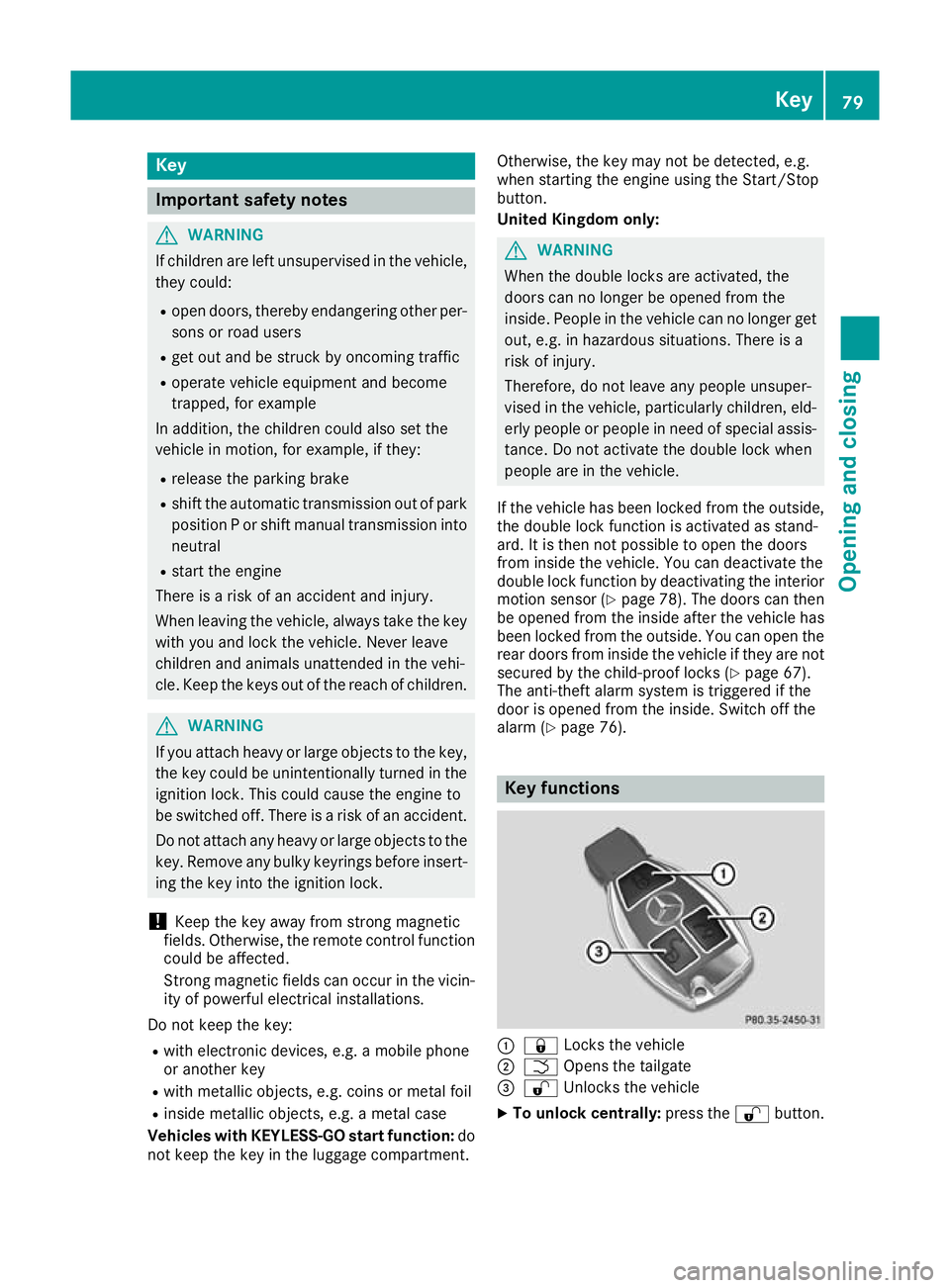
alarm (Y page 76). Key functions
:
& Locks the vehicle
; F Opens the tailgate
= % Unlocks the vehicle
X To unlock centrally: press the%button. Key
79Opening and closing Z
Page 83 of 369
If you do not open the vehicle within approx-
imately 40 seconds of unlocking:
R the vehicle locks again
R protection against theft is reactivated
X To lock: press the &button.
The key centrally locks/unlocks:
R the doors
R the tailgate
R the fuel filler flap
During unlocking, the turn signals flash once.
During locking, they flash three times.
When the locator lighting is activated via the
multimedia system, it lights up when it is dark
after the vehicle is unlocked with the remote
control; see the separate operating instructions.
You can also set an audible signal to confirm
that the vehicle has been locked. The audible
signal can be activated or deactivated using the
on-board computer (Y page 229).
X To open the tailgate automatically from
outside the vehicle: press and hold theF
button until the tailgate opens (Y page 95).
Vehicles with KEYLESS-GO or KEYLESS-GO
start function: X To close the tailgate automatically from
outside the vehicle:
if the key is located in
the immediate vicinity of the vehicle, press
the F button on the key (Y page 90).
When the tailgate closes, you can then
release the button. KEYLESS-GO
General notes Bear in mind that the engine can be started by
any of the vehicle occupants if there is a key in
the vehicle.
Locking and unlocking You can start, lock or unlock the vehicle using
KEYLESS-GO. To do this, you need to carry the
key with you. You can combine the KEYLESS-GO
functions with the functions of a conventional
key. Unlock the vehicle using KEYLESS-GO, for
instance, and lock it using the &button on
the key.
The driver's door and the door on which the
handle is used must both be closed. The key must be outside the vehicle. When locking or
unlocking with KEYLESS-GO, the distance
between the key and the corresponding door
handle must not be greater than one metre.
A check that periodically establishes a radio
connection between the vehicle and the key
determines whether a valid key is in or in the
direct vicinity of the vehicle. This occurs, for
example:
R while starting the engine
R while driving
R when the external door handles are touched
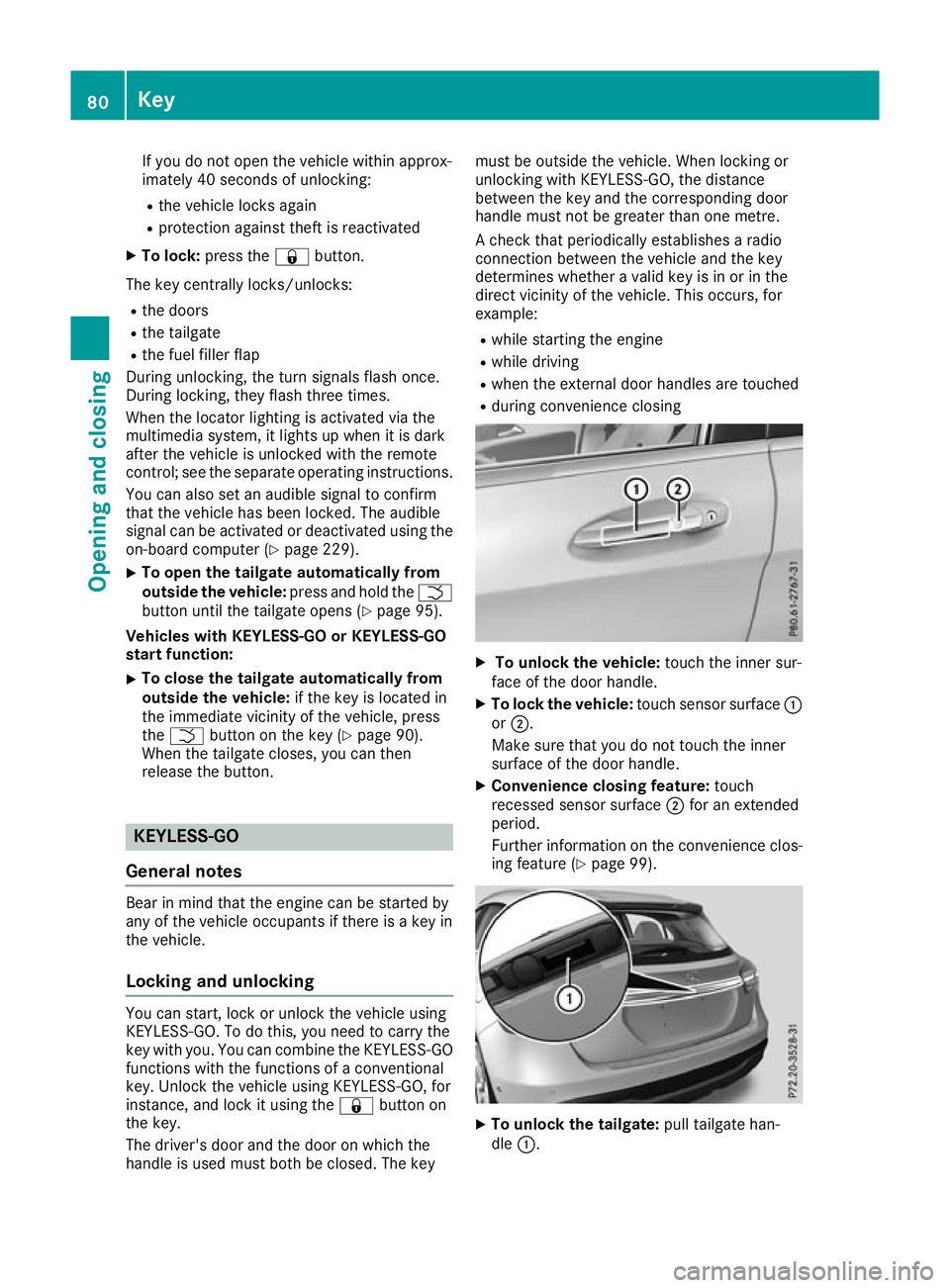
R during convenience closing X
To unlock the vehicle: touch the inner sur-
face of the door handle.
X To lock the vehicle: touch sensor surface :
or ;.
Make sure that you do not touch the inner
surface of the door handle.
X Convenience closing feature: touch
recessed sensor surface ;for an extended
period.
Further information on the convenience clos-
ing feature (Y page 99). X
To unlock the tailgate: pull tailgate han-
dle :. 80
KeyOpening and closing
Page 87 of 369
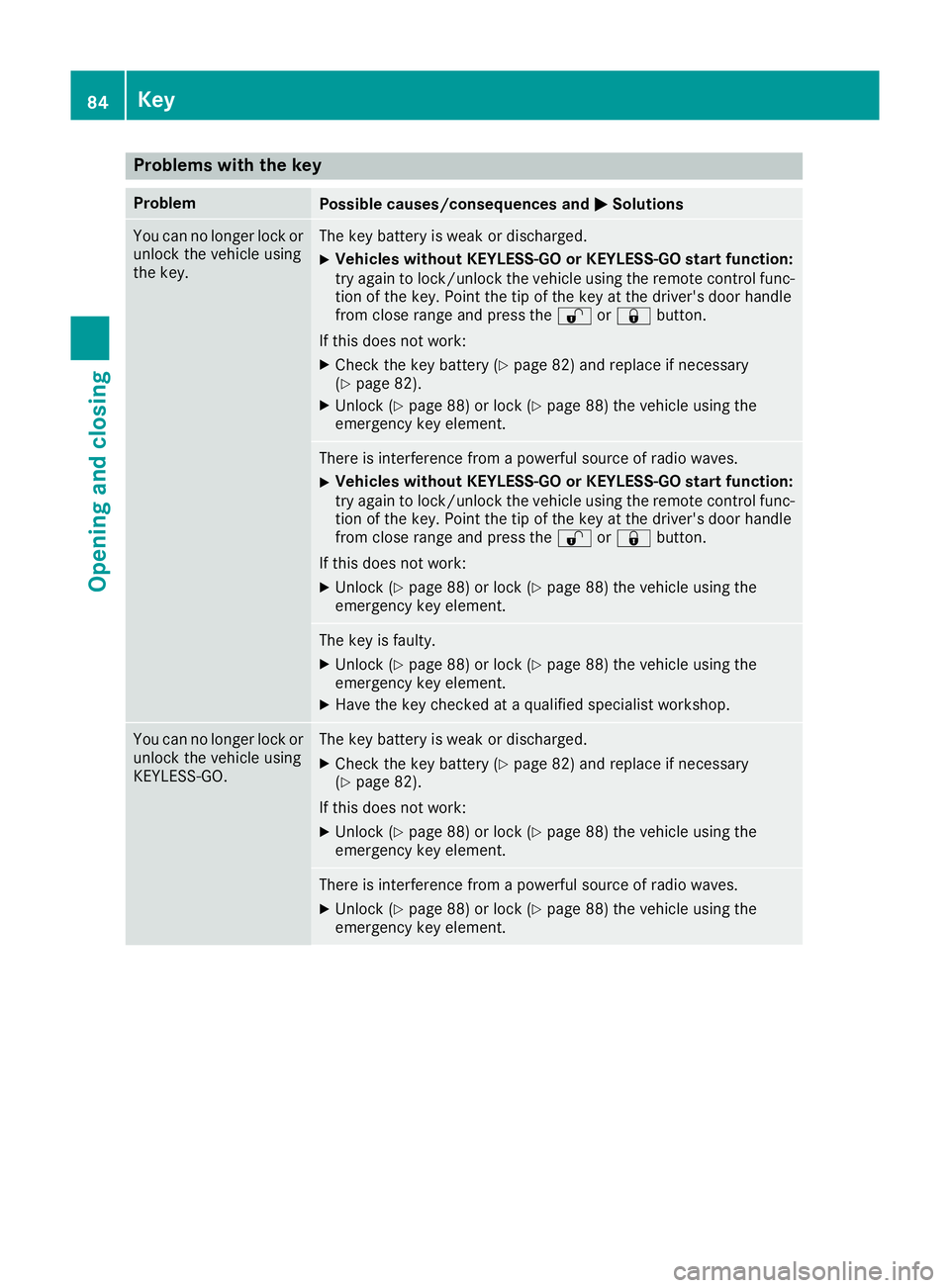
Problems with the key
Problem
Possible causes/consequences and
M
MSolutions You can no longer lock or
unlock the vehicle using
the key. The key battery is weak or discharged.
X Vehicles without KEYLESS-GO or KEYLESS-GO start function:
try again to lock/unlock the vehicle using the remote control func- tion of the key. Point the tip of the key at the driver's door handle
from close range and press the %or& button.
If this does not work: X Check the key battery (Y page 82) and replace if necessary
(Y page 82).
X Unlock (Y page 88) or lock (Y page 88) the vehicle using the
emergency key element. There is interference from a powerful source of radio waves.
X Vehicles without KEYLESS-GO or KEYLESS-GO start function:
try again to lock/unlock the vehicle using the remote control func-
tion of the key. Point the tip of the key at the driver's door handle
from close range and press the %or& button.
If this does not work:
X Unlock (Y page 88) or lock (Y page 88) the vehicle using the
emergency key element. The key is faulty.
X Unlock (Y page 88) or lock (Y page 88) the vehicle using the
emergency key element.
X Have the key checked at a qualified specialist workshop. You can no longer lock or
unlock the vehicle using
KEYLESS-GO. The key battery is weak or discharged.
X Check the key battery (Y page 82) and replace if necessary
(Y page 82).
If this does not work: X Unlock (Y page 88) or lock (Y page 88) the vehicle using the
emergency key element. There is interference from a powerful source of radio waves.
X Unlock (Y page 88) or lock (Y page 88) the vehicle using the
emergency key element. 84
KeyOpening and closing
Page 88 of 369
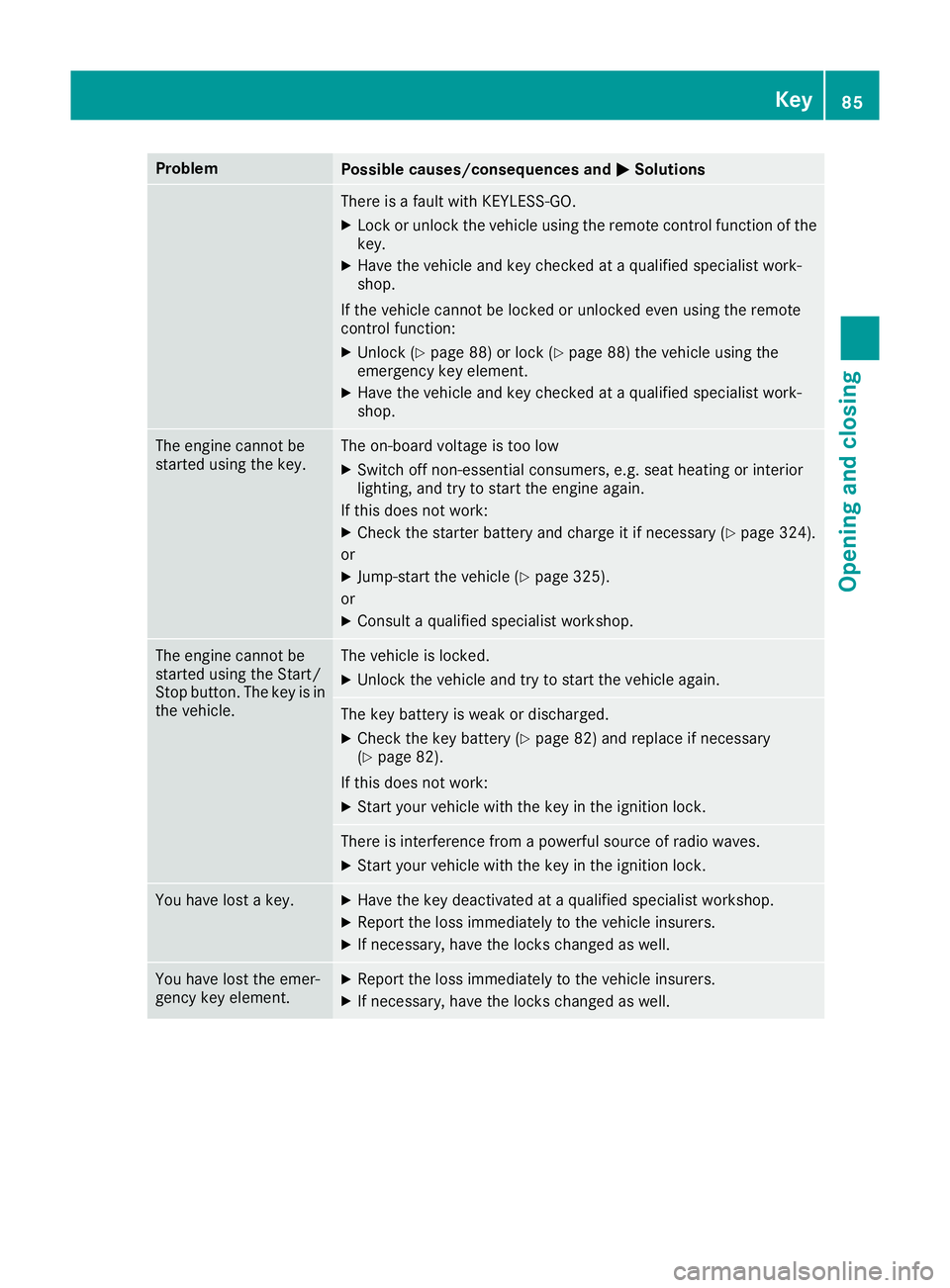
Problem
Possible causes/consequences and
M
MSolutions There is a fault with KEYLESS-GO.
X Lock or unlock the vehicle using the remote control function of the
key.
X Have the vehicle and key checked at a qualified specialist work-
shop.
If the vehicle cannot be locked or unlocked even using the remote
control function: X Unlock (Y page 88) or lock (Y page 88) the vehicle using the
emergency key element.
X Have the vehicle and key checked at a qualified specialist work-
shop. The engine cannot be
started using the key. The on-board voltage is too low
X Switch off non-essential consumers, e.g. seat heating or interior
lighting, and try to start the engine again.
If this does not work:
X Check the starter battery and charge it if necessary (Y page 324).
or
X Jump-start the vehicle (Y page 325).
or
X Consult a qualified specialist workshop. The engine cannot be
started using the Start/
Stop button. The key is in
the vehicle. The vehicle is locked.
X Unlock the vehicle and try to start the vehicle again. The key battery is weak or discharged.
X Check the key battery (Y page 82) and replace if necessary
(Y page 82).
If this does not work: X Start your vehicle with the key in the ignition lock. There is interference from a powerful source of radio waves.
X Start your vehicle with the key in the ignition lock. You have lost a key. X
Have the key deactivated at a qualified specialist workshop.
X Report the loss immediately to the vehicle insurers.
X If necessary, have the locks changed as well. You have lost the emer-
gency key element. X
Report the loss immediately to the vehicle insurers.
X If necessary, have the locks changed as well. Key
85Opening and closing Z
Page 97 of 369
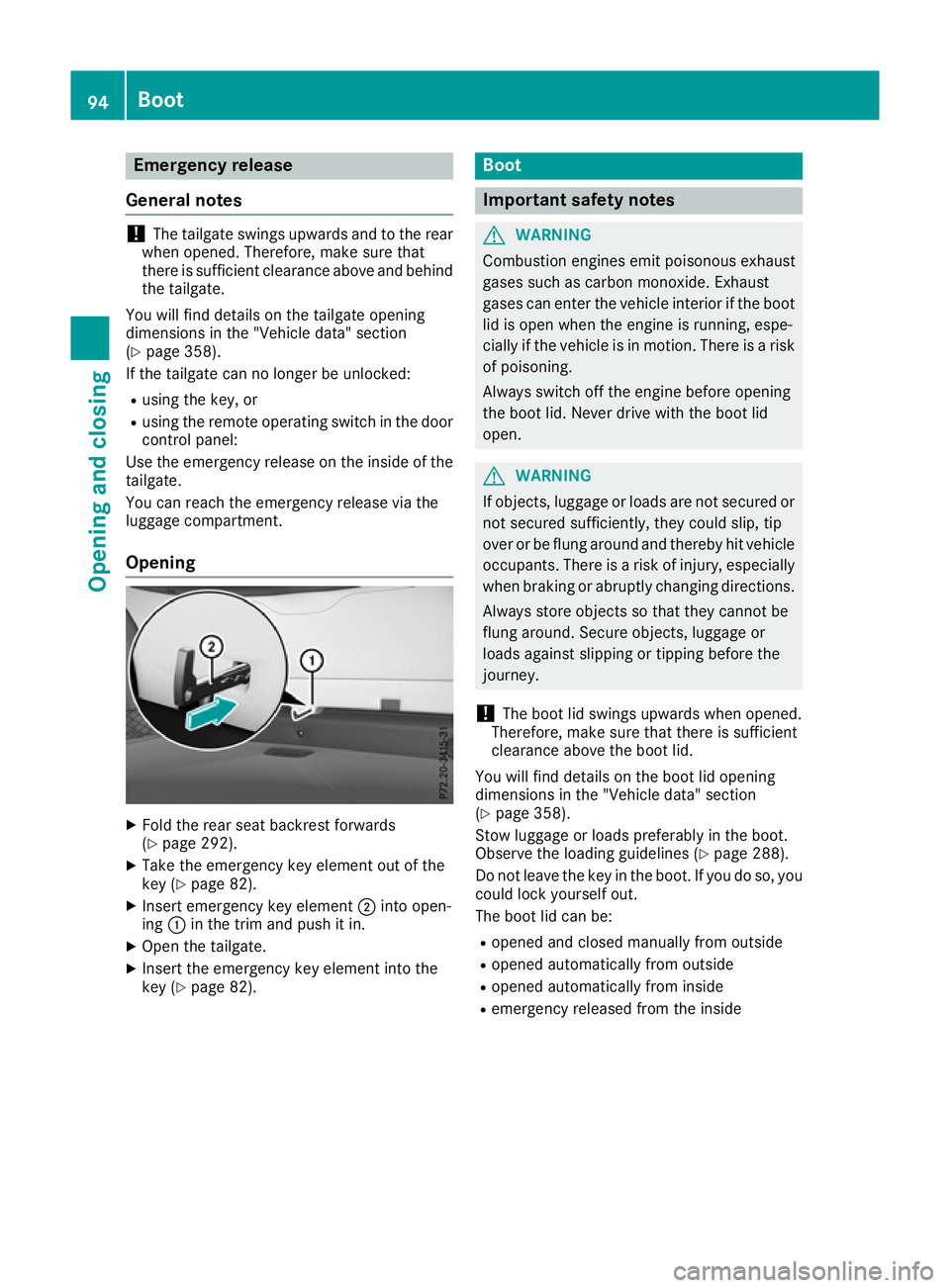
Emergency release
General notes !
The tailgate swings upwards and to the rear
when opened. Therefore, make sure that
there is sufficient clearance above and behind
the tailgate.
You will find details on the tailgate opening
dimensions in the "Vehicle data" section
(Y page 358).
If the tailgate can no longer be unlocked:
R using the key, or
R using the remote operating switch in the door
control panel:
Use the emergency release on the inside of the tailgate.
You can reach the emergency release via the
luggage compartment.
Opening X
Fold the rear seat backrest forwards
(Y page 292).
X Take the emergency key element out of the
key (Y page 82).
X Insert emergency key element ;into open-
ing :in the trim and push it in.
X Open the tailgate.
X Insert the emergency key element into the
key (Y page 82). Boot
Important safety notes
G
WARNING
Combustion engines emit poisonous exhaust
gases such as carbon monoxide. Exhaust
gases can enter the vehicle interior if the boot
lid is open when the engine is running, espe-
cially if the vehicle is in motion. There is a risk of poisoning.
Always switch off the engine before opening
the boot lid. Never drive with the boot lid
open. G
WARNING
If objects, luggage or loads are not secured or not secured sufficiently, they could slip, tip
over or be flung around and thereby hit vehicle
occupants. There is a risk of injury, especially when braking or abruptly changing directions.
Always store objects so that they cannot be
flung around. Secure objects, luggage or
loads against slipping or tipping before the
journey.
! The boot lid swings upwards when opened.
Therefore, make sure that there is sufficient
clearance above the boot lid.
You will find details on the boot lid opening
dimensions in the "Vehicle data" section
(Y page 358).
Stow luggage or loads preferably in the boot.
Observe the loading guidelines (Y page 288).
Do not leave the key in the boot. If you do so, you
could lock yourself out.
The boot lid can be:
R opened and closed manually from outside
R opened automatically from outside
R opened automatically from inside
R emergency released from the inside 94
BootOpening and closing
Page 100 of 369
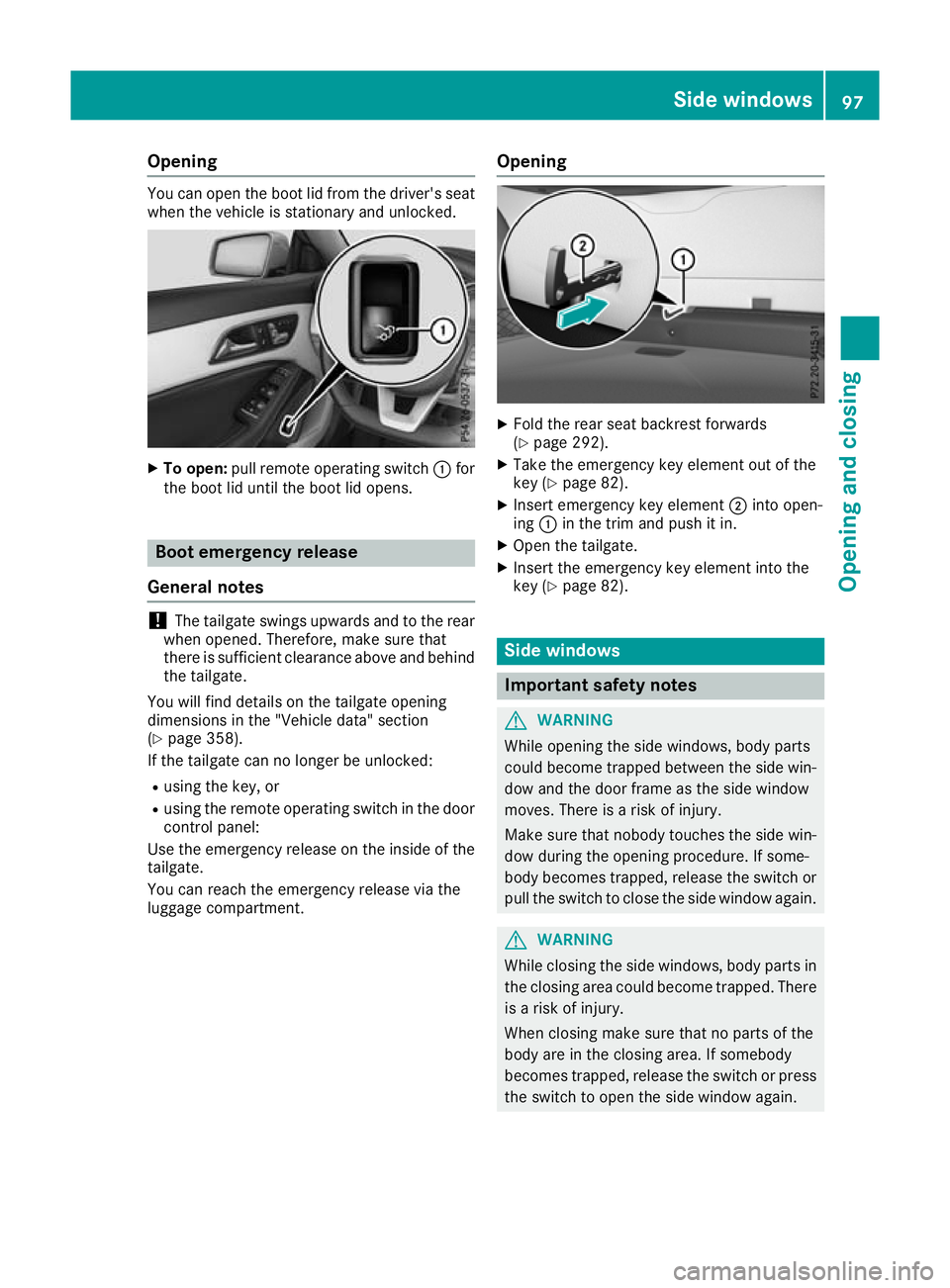
Opening
You can open the boot lid from the driver's seat
when the vehicle is stationary and unlocked. X
To open: pull remote operating switch :for
the boot lid until the boot lid opens. Boot emergency release
General notes !
The tailgate swings upwards and to the rear
when opened. Therefore, make sure that
there is sufficient clearance above and behind
the tailgate.
You will find details on the tailgate opening
dimensions in the "Vehicle data" section
(Y page 358).
If the tailgate can no longer be unlocked:
R using the key, or
R using the remote operating switch in the door
control panel:
Use the emergency release on the inside of the tailgate.
You can reach the emergency release via the
luggage compartment. Opening X
Fold the rear seat backrest forwards
(Y page 292).
X Take the emergency key element out of the
key (Y page 82).
X Insert emergency key element ;into open-
ing :in the trim and push it in.
X Open the tailgate.
X Insert the emergency key element into the
key (Y page 82). Side windows
Important safety notes
G
WARNING
While opening the side windows, body parts
could become trapped between the side win- dow and the door frame as the side window
moves. There is a risk of injury.
Make sure that nobody touches the side win-
dow during the opening procedure. If some-
body becomes trapped, release the switch or pull the switch to close the side window again. G
WARNING
While closing the side windows, body parts in the closing area could become trapped. There is a risk of injury.
When closing make sure that no parts of the
body are in the closing area. If somebody
becomes trapped, release the switch or press
the switch to open the side window again. Side windows
97Opening and closing Z
Page 141 of 369
Switch the auxiliary heating on regularly – once
a month – for about ten minutes.
The auxiliary heating timer function calculates
the switch-on time according to the outside
temperature so that the vehicle is preheated by the departure time. When the departure time is
reached, the auxiliary heating continues to heat for a further five minutes and then switches off.
The auxiliary heating heats the air in the vehicle interior to the set temperature. This occurs with-out using the heat of the running engine. The
auxiliary heating is operated directly using the
vehicle's fuel. For this reason, the fuel tank must
be at least Õfull to ensure that the auxiliary
heating functions.
The auxiliary heating/ventilation automatically
adjusts to changes in temperature and weather conditions. For this reason, the auxiliary heating
could switch from ventilation mode to heating
mode or from heating mode to ventilation mode.
The auxiliary heating switches off when the
engine is switched off. The auxiliary ventilation
switches off when you turn the key to key posi-
tion 2(Ypage 144).
The auxiliary heating switches off automatically
after 50 minutes.
You cannot use the auxiliary ventilation to cool
the vehicle interior to a temperature lower than
the outside temperature.
Before switching on X
Turn the key to position 2in the ignition lock
(Y page 144).
X Set the desired temperature.
Auxiliary heating or ventilation can also be
switched on if the manually set climate control is
activated. Optimum comfort is attained by set-
ting the system to automatic mode. Set the tem-
perature to 22 †.
The auxiliary heating or auxiliary ventilation can be switched on/off using the button on the
centre console or the remote control.
The on-board computer can be used to specify
up to three departure times, one of which may
be preselected (Y page 230). Switching the auxiliary heating/venti-
lation on or off using the button on the
centre console General notes
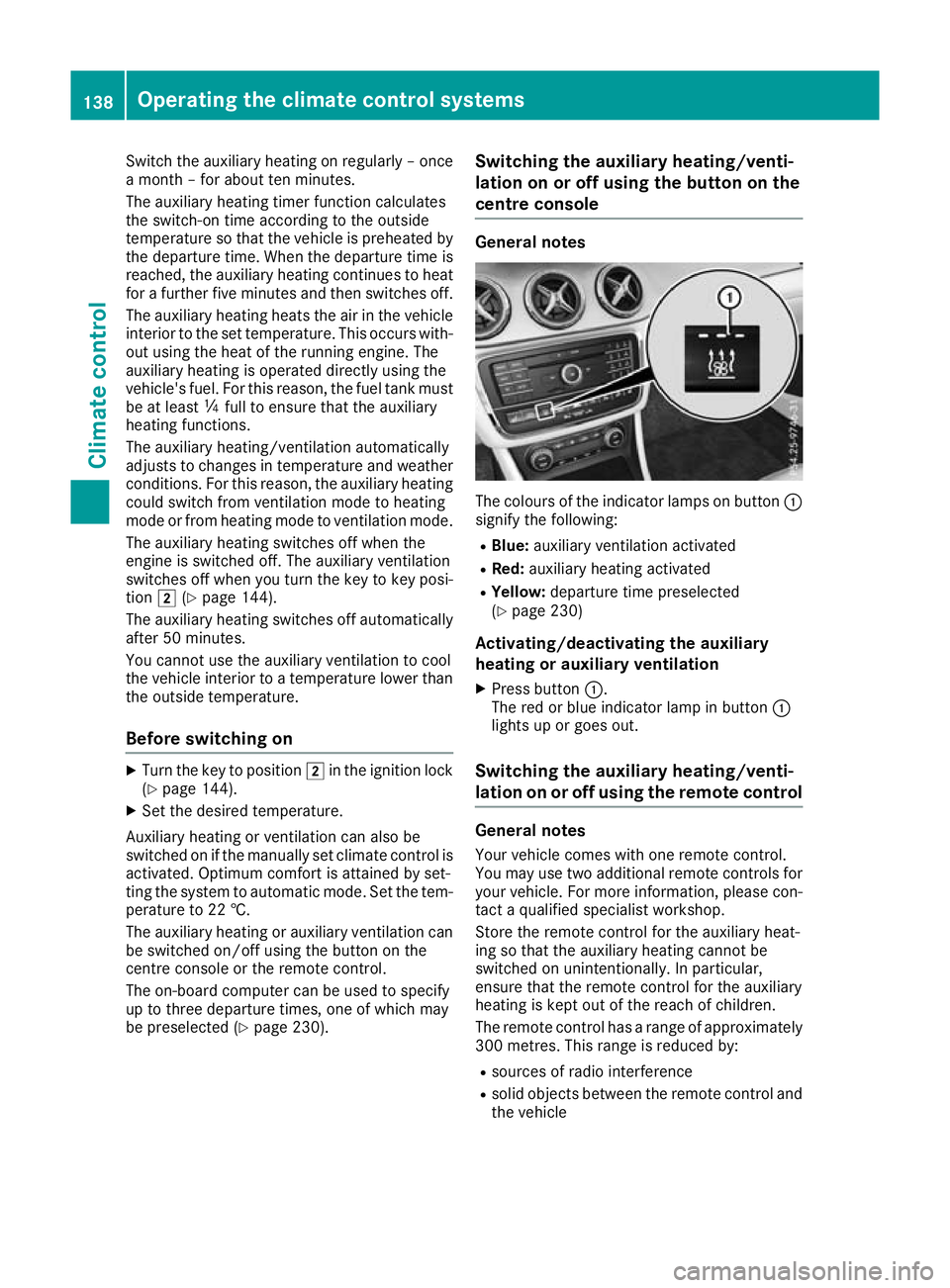
The colours of the indicator lamps on button
:
signify the following:
R Blue: auxiliary ventilation activated
R Red: auxiliary heating activated
R Yellow: departure time preselected
(Y page 230)
Activating/deactivating the auxiliary
heating or auxiliary ventilation
X Press button :.
The red or blue indicator lamp in button :
lights up or goes out.
Switching the auxiliary heating/venti-
lation on or off using the remote control General notes
Your vehicle comes with one remote control.
You may use two additional remote controls for
your vehicle. For more information, please con-
tact a qualified specialist workshop.
Store the remote control for the auxiliary heat-
ing so that the auxiliary heating cannot be
switched on unintentionally. In particular,
ensure that the remote control for the auxiliary
heating is kept out of the reach of children.
The remote control has a range of approximately
300 metre s. Thisrange is reduced by:
R sources of radio interference
R solid objects between the remote control and
the vehicle 138
Operating the climate control systemsClimate control
Page 142 of 369
R
the remote control being in an unfavourable
position in relation to the vehicle
R transmitting from an enclosed space
If the remote control battery is low, the battery
symbol on the left of the display is shown as
empty. Replace the remote control battery and
observe the important safety notes when doing so (Y page 140).
Activating/deactivating the auxiliary
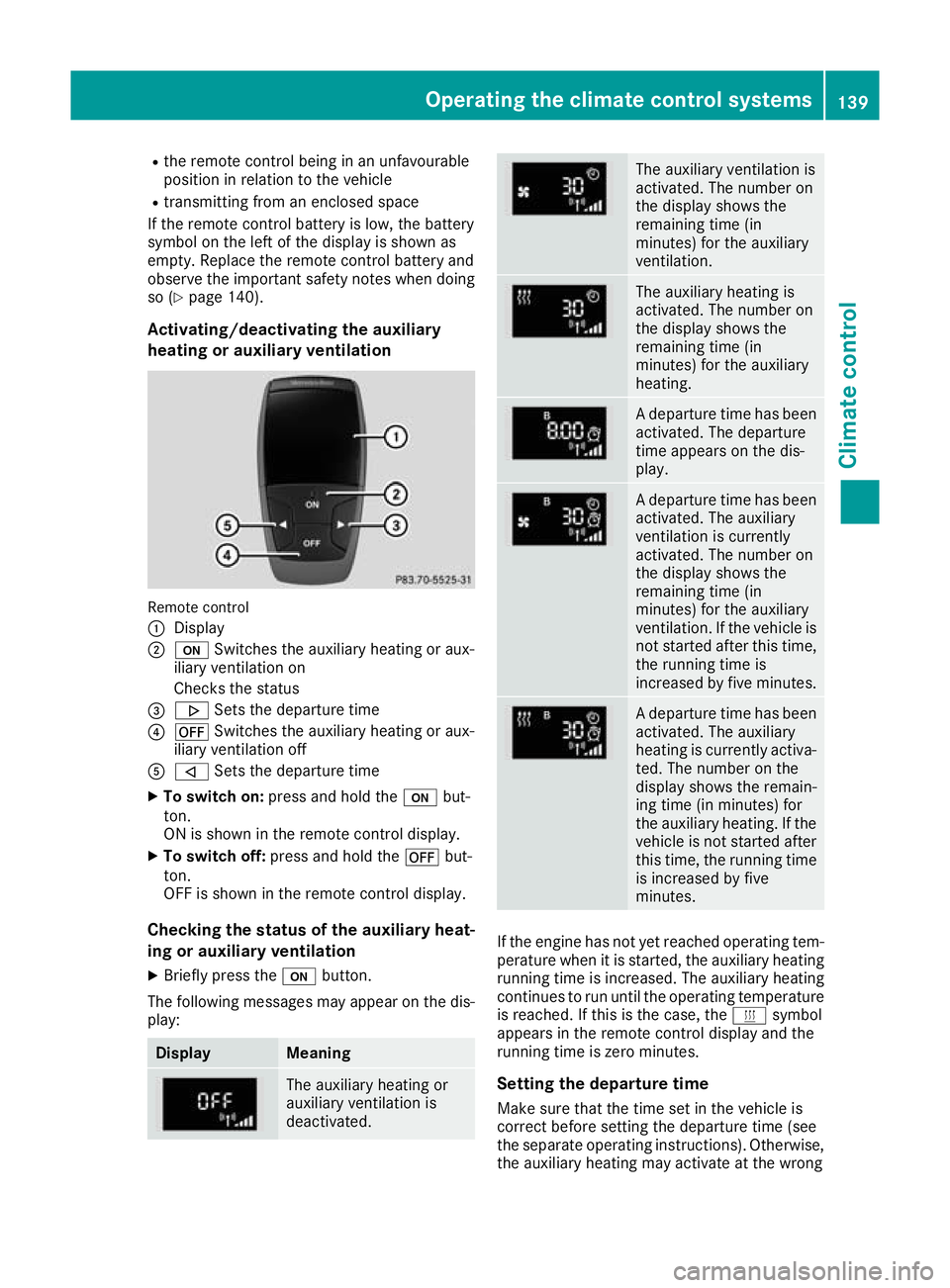
heating or auxiliary ventilation Remote control
:
Display
; u Switches the auxiliary heating or aux-
iliary ventilation on
Checks the status
= . Sets the departure time
? ^ Switches the auxiliary heating or aux-
iliary ventilation off
A , Sets the departure time
X To switch on: press and hold the ubut-
ton.
ON is shown in the remote control display.
X To switch off: press and hold the ^but-
ton.
OFF is shown in the remote control display.
Checking the status of the auxiliary heat-
ing or auxiliary ventilation
X Briefly press the ubutton.
The following messages may appear on the dis- play: Display Meaning
The auxiliary heating or
auxiliary ventilation is
deactivated. The auxiliary ventilation is
activated. The number on
the display shows the
remaining time (in
minutes) for the auxiliary
ventilation.
The auxiliary heating is
activated. The number on
the display shows the
remaining time (in
minutes) for the auxiliary
heating.
A departure time has been
activated. The departure
time appears on the dis-
play. A departure time has been
activated. The auxiliary
ventilation is currently
activated. The number on
the display shows the
remaining time (in
minutes) for the auxiliary
ventilation. If the vehicle is
not started after this time, the running time is
increased by five minutes. A departure time has been
activated. The auxiliary
heating is currently activa-
ted. The number on the
display shows the remain-
ing time (in minutes) for
the auxiliary heating. If the
vehicle is not started after this time, the running time
is increased by five
minutes. If the engine has not yet reached operating tem-
perature when it is started, the auxiliary heating running time is increased. The auxiliary heating
continues to run until the operating temperature
is reached. If this is the case, the ysymbol
appears in the remote control display and the
running time is zero minutes.
Setting the departure time
Make sure that the time set in the vehicle is
correct before setting the departure time (see
the separate operating instructions). Otherwise, the auxiliary heating may activate at the wrong Operating the climate control systems
139Climate control Z