traction control MERCEDES-BENZ GLA SUV 2017 Owners Manual
[x] Cancel search | Manufacturer: MERCEDES-BENZ, Model Year: 2017, Model line: GLA SUV, Model: MERCEDES-BENZ GLA SUV 2017Pages: 369, PDF Size: 7.56 MB
Page 7 of 369
1, 2, 3 ...
4ETS (Electronic Traction System) see ETS/4ETS (Electronic Trac-
tion System)
4MATIC
Display message ............................ 261
4MATIC (permanent four-wheel
drive) .................................................. 190
12 V socket
see Sockets
360° camera
Function/notes .............................2 04A
ABS (Anti-lock Braking System) Display message ............................ 235
Function/notes ................................ 68
Important safety notes .................... 68
Warning lamp ................................. 267
Acceleration
see Kickdown
Accident
Automatic measures after an acci-
dent ................................................. 56
Activating media mode
General notes ................................ 286
Activating/deactivating air-recir-
culation mode ................................... .135
Activating/deactivating cooling
with air dehumidification ................. 132
Active Brake Assist
Activating or deactivating .............. 227
Display message ............................ 241
Function/notes ................................ 69
ADAPTIVE BRAKE ................................. 75
Adaptive brake lights .......................... 71
Adaptive Damping System
Function/notes ............................ .191
Adaptive Highbeam Assist
Display message ............................ 248
Function/notes ............................ .118
Switching on/off ........................... 119
Additional speedometer ................... 228
Additives (engine oil) ........................ 356
Address book
See also Digital Owner's Manual ... 277 Adjusting the headlamp range
......... 117
Adjusting the volume
Multimedia system ........................ 278
Air conditioning
General notes ................................ 128
Air filter (white display message) .... 251
Air pressure
see Tyre pressure
Air vents
Important safety notes .................. 141
Rear ............................................... 142
Setting the centre air vents ........... 142
Setting the side air vents .............. .142
Air-conditioning system
see Climate control
Airbag
Automatic front-passenger front
airbag deactivatio n.......................... 49
Introduction ..................................... 46
PASSENGER AIR BAG indicator
lamps ............................................... 42
Airbags
Display message ............................ 244
Front airbag (driver, front
passenger) ....................................... 47
Important safety guidelines ............. 46
Kneebag ........................................... 48
Sidebag ............................................ 48
Triggering ......................................... 53
Windowba g...................................... 49
Alarm
ATA (Anti-Theft Alarm system )......... 76
Switching off (ATA) .......................... 76
Switching the function on/off
(ATA) ................................................ 76
Alarm system
see ATA (Anti-Theft Alarm system)
AMG
Performance Seat .......................... 110
RIDE CONTROL sports suspen-
sion ................................................ 189
AMG menu (on-board computer) ..... 231
AMG Performance exhaust sys-
tem ..................................................... 150
AMG RIDE CONTROL
General Information ....................... 189
Anti-glare film .................................... 3014
Index
Page 14 of 369
Emergency key
Unlocking the driver's door .............. 88
Emergency key element
Function/notes ................................ 81
Inserting .......................................... 82
Locking vehicle ................................ 88
Removing ........................................ .82
Emergency release
Driver's door .................................... 88
Emergency spare wheel
General notes ................................ 348
Important safety notes .................. 348
Removing ...................................... .348
Emergency unlocking
Vehicle ............................................. 88
Engine
Display message ............................ 249
ECO start/stop function ................ 148
Engine number ............................... 352
Jump-starting ................................. 325
Running irregularl y......................... 150
Starting (important safety notes )... 145
Starting problems .......................... 150
Starting the engine with the key .... 146
Starting with the Start/Stop but-
ton ................................................. 146
Stopping ........................................ 166
Tow-starting (vehicle) ..................... 331
Warning lamp (engine diagnos-
tics) ............................................... 272
Engine electronics
Notes ............................................. 350
Problem (fault) ............................... 150
Engine oil
Additives ........................................ 356
Checking the oil level ..................... 304
Checking the oil level using the
dipstick .......................................... 304
Display message ............................ 250
Filling capacity ............................... 356
Notes about oil grade s................... 355
Notes on oil level/consumption .... 304
Temperature (on-board computer, Mercedes-AMG vehicles) ............... 231
Topping up ..................................... 305
Engine oil additives
see Additives (engine oil) Entering an address
See also Digital Owner's Manua l... 277
Environmental protection
Returning an end-of-life vehicle ....... 26
ESC (Electronic Stability Control)
see ESP ®
(Electronic Stability Program)
ESP ®
(Electronic Stability Pro-
gram)
Activating/deactivating (on-
board computer) ............................ 266
AMG menu (on-board computer) ... 232
Characteristics ................................. 72
Deactivating/activating (button
in Mercedes-AMG vehicles) ............. 73
Deactivating/activating (except
Mercedes‑ AMG vehicles) ................. 73
Deactivating/activating (on-
board computer, except
Mercedes-AMG vehicles) ............... 227
Display message ............................ 235
Function/note s................................ 72
General notes .................................. 72
Important safety guidelines ............. 72
Trailer stabilisation .......................... 75
Warning lamp ................................. 269
ETS/4ETS (Electronic Traction Sys-
tem) ...................................................... 72
Exhaust
see Exhaust pipe
Exhaust pipe
Cleaning ......................................... 312
Exterior lighting
Cleaning ......................................... 311
see Lights
Exterior mirrors
Adjusting ....................................... 112
Anti-dazzle mode (automatic) ........ 113
Folding in when locking (on-boardcomputer) ...................................... 231
Folding in/out (automatically )....... 113
Folding in/out (electrically) ........... 113
Out of position (troubleshooting) ... 113
Parking position ............................. 114
Resetting ....................................... 113
Storing settings (memory func-
tion) ............................................... 115 Index
11
Page 75 of 369
brakes are applied again, the brake lamps light
up continuously. The hazard warning lamps
switch off automatically if you travel faster than
10 km/ h.You can also switch off the hazard
warning lamps using the hazard warning button (Y page 118). ESP
®
(Electronic Stability Program)
General notes i
Observe the "Important safety notes" sec-
tion (Y page 68).
ESP ®
monitors driving stability and traction, i.e.
power transmission between the tyres and the
road surface.
If ESP ®
detects that the vehicle is deviating from
the direction desired by the driver, one or more
wheels are braked to stabilise the vehicle. The
engine output is also modified to keep the vehi- cle on the desired course within physical limits.
ESP ®
assists the driver when pulling away on
wet or slippery roads. ESP ®
can also stabilise
the vehicle during braking.
ETS/4ETS (Electronic Traction System) i
Observe the "Important safety notes" sec-
tion (Y page 68).
ETS traction control is part of ESP ®
. On vehicles
with 4MATIC, 4ETS is part of ESP ®
.
Traction control brakes the drive wheels indi-
vidually if they spin. This enables you to pull
away and accelerate on slippery surfaces, e.g. if the road surface is slippery on one side. In addi-
tion, more drive torque is transferred to the
wheel or wheels with traction.
Traction control remains active if you deactivate
ESP ®
.
Off-road 4ETS (Electronic Traction Sys-
tem) A 4ETS system specifically suited to off-road
terrain is activated automatically once the off-
road program is activated (Y page 192).
Important safety notes i
Observe the "Important safety notes" sec-
tion (Y page 68). G
WARNING
If ESP ®
is malfunctioning, ESP ®
is unable to
stabilise the vehicle. In addition, other driving
safety systems are switched off. This increa-
ses the risk of skidding and an accident.
Drive on carefully. Have ESP ®
checked at a
qualified specialist workshop.
Vehicles without 4MATIC: when towing your
vehicle with the front axle raised, it is important
that you observe the notes on ESP ®
(Y page 329).
If the å ESP®
OFF warning lamp lights up
continuously, ESP ®
is deactivated.
If the ÷ ESP®
warning lamp and the å
warning lamp are lit continuously, ESP ®
is not
available due to a malfunction.
Read the information on warning lamps
(Y page 269) and display messages that may be
shown in the instrument cluster (Y page 235).
Use only wheels with the recommended tyre
sizes. Only then will ESP ®
function properly.
Characteristics of ESP ® General information
If the ÷ ESP warning lamp goes out before
you begin the journey, ESP ®
is automatically
active.
If ESP ®
intervenes, the ÷ESP®
warning lamp
flashes on the instrument cluster.
If ESP ®
intervenes:
X Do not deactivate ESP ®
under any circum-
stances.
X When pulling away, depress the accelerator
pedal only as far as is necessary.
X Adapt your driving style to suit the prevailing
road and weather conditions.
ECO start/stop function
The ECO start/stop function switches the
engine off automatically if the vehicle stops
moving. When pulling away again, the engine
starts automatically. ESP ®
remains in its previ-
ously selected status. Example:if ESP®
was
deactivated before the engine was switched off,
ESP ®
remains deactivated when the engine is
switched on again. 72
Driving safety systemsSafety
Page 76 of 369
Activating/deactivating ESP
®
(except
Mercedes ‑AMG vehicles) Important safety notes
i Observe the "Important safety notes" sec-
tion (Y page 68).
You can select between the following ESP ®
sta-
tuses:
R ESP ®
is activated
R ESP ®
is deactivated. G
WARNING
If you deactivate ESP ®
, ESP ®
no longer sta-
bilises the vehicle. There is an increased risk
of skidding and an accident.
Only deactivate ESP ®
in the situations descri-
bed in the following.
The spinning of the wheels results in a cut for
better traction on loose surfaces.
It may be best to deactivate ESP ®
in the follow-
ing situations:
R when snow chains are used
R in deep snow
R on sand or gravel
i Activate ESP ®
as soon as the situations
described above no longer apply. ESP ®
will
otherwise not be able to stabilise the vehicle
if the vehicle starts to skid or a wheel starts to
spin.
Deactivating/activating ESP ®
You can deactivate or activate ESP ®
via the on-
board computer(Y page 227) .
ESP ®
deactivated:
The å ESP®
OFF warning lamp on the instru-
ment cluster lights up.
ESP ®
activated:
The å ESP®
OFF warning lamp on the instru-
ment cluster goes out.
Characteristics when ESP ®
is deactivated
If ESP ®
is deactivated and one or more wheels
start to spin, the ÷ESP®
warning lamp in the
instrument cluster flashes. In such situations,
ESP ®
will not stabilise the vehicle. If you deactivate ESP
®
:
R ESP ®
no longer improves driving stability
R engine torque is no longer limited and the
drive wheels may start to spin
R traction control is still activated
R Active Brake Assist is not available; it is not
activated even if you brake firmly with assis-
tance from ESP ®
R PRE-SAFE ®
is not available; it is not activated
even if you brake firmly with assistance from
ESP ®
R STEER CONTROL is no longer active
R ESP ®
still provides support when you brake
firmly
Deactivating/activating ESP ®
(Mercedes ‑AMG vehicles) Important safety notes
i Observe the "Important safety notes" sec-
tion (Y page 68).
You can select between the following ESP ®
sta-
tuses:
R ESP ®
is activated
R SPORT handling mode is activated
R ESP ®
is deactivated
ESP ®
is activated every time the engine is star-
ted, regardless of whether ESP ®
was deactiva-
ted before the engine was switched off. G
WARNING
When SPORT handling mode is activated,
there is a greater risk of skidding and acci-
dents.
Only activate SPORT handling mode in the sit- uations described in the following. G
WARNING
If you deactivate ESP ®
, ESP ®
no longer sta-
bilises the vehicle. There is an increased risk
of skidding and an accident.
Only deactivate ESP ®
in the situations descri-
bed in the following. Driving safety systems
73Safety Z
Page 77 of 369
In the following situations, it may be better to
activate SPORT handling mode or deactivate
ESP ®
:
R when snow chains are used
R in deep snow
R on sand or gravel
R on specially designated roads when the vehi-
cle's own oversteering and understeering
characteristics are desired
Driving in SPORT handling mode or without
ESP ®
requires a highly qualified and experi-
enced driver.
i Activate ESP ®
as soon as the situations
described above no longer apply. ESP ®
will
otherwise not be able to stabilise the vehicle
if the vehicle starts to skid or a wheel starts to
spin.
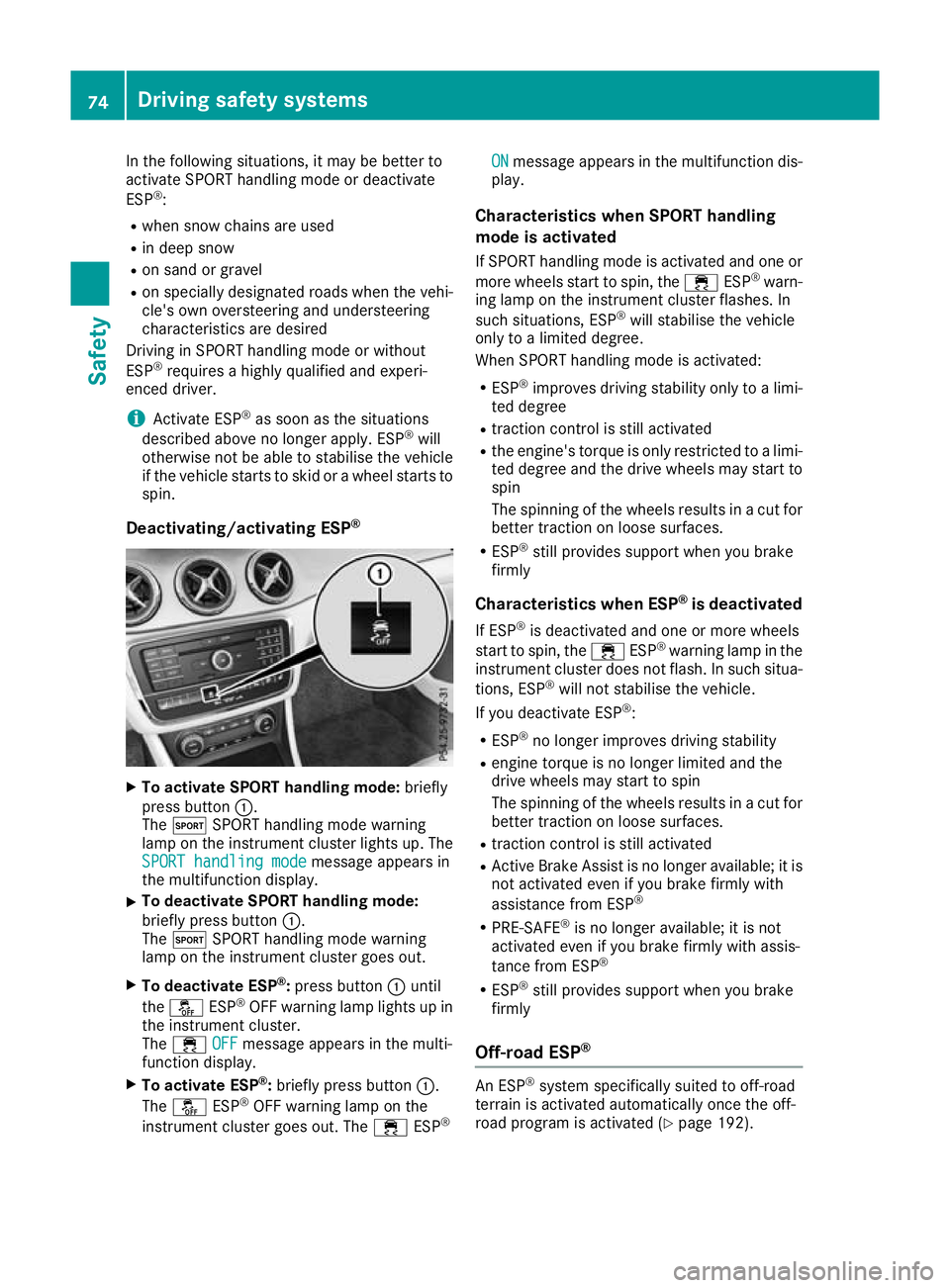
Deactivating/activating ESP ®X
To activate SPORT handling mode: briefly
press button :.
The M SPORT handling mode warning
lamp on the instrument cluster lights up. The
SPORT handling mode SPORT handling mode message appears in
the multifunction display.
X To deactivate SPORT handling mode:
briefly press button
:.
The M SPORT handling mode warning
lamp on the instrument cluster goes out.
X To deactivate ESP ®
:press button :until
the å ESP®
OFF warning lamp lights up in
the instrument cluster.
The ÷ OFF
OFF message appears in the multi-
function display.
X To activate ESP ®
:briefly press button :.
The å ESP®
OFF warning lamp on the
instrument cluster goes out. The ÷ESP® ON
ON message appears in the multifunction dis-
play.
Characteristics when SPORT handling
mode is activated
If SPORT handling mode is activated and one or more wheels start to spin, the ÷ESP®
warn-
ing lamp on the instrument cluster flashes. In
such situations, ESP ®
will stabilise the vehicle
only to a limited degree.
When SPORT handling mode is activated:
R ESP ®
improves driving stability only to a limi-
ted degree
R traction control is still activated
R the engine's torque is only restricted to a limi-
ted degree and the drive wheels may start to spin
The spinning of the wheels results in a cut for better traction on loose surfaces.
R ESP ®
still provides support when you brake
firmly
Characteristics when ESP ®
is deactivated
If ESP ®
is deactivated and one or more wheels
start to spin, the ÷ESP®
warning lamp in the
instrument cluster does not flash. In such situa-
tions, ESP ®
will not stabilise the vehicle.
If you deactivate ESP ®
:
R ESP ®
no longer improves driving stability
R engine torque is no longer limited and the
drive wheels may start to spin
The spinning of the wheels results in a cut for
better traction on loose surfaces.
R traction control is still activated
R Active Brake Assist is no longer available; it is
not activated even if you brake firmly with
assistance from ESP ®
R PRE-SAFE ®
is no longer available; it is not
activated even if you brake firmly with assis-
tance from ESP ®
R ESP ®
still provides support when you brake
firmly
Off-road ESP ® An ESP
®
system specifically suited to off-road
terrain is activated automatically once the off-
road program is activated (Y page 192).74
Driving safety systemsSafety
Page 78 of 369
Off-road ESP
®
intervenes with a delay if there is
oversteering or understeering, thus improving
traction.
ESP ®
trailer stabilisation General notes
If your vehicle/trailer combination begins to
lurch, ESP ®
assists you in this situation. ESP ®
slows the vehicle down by braking and limiting
the engine output until the vehicle/trailer com- bination has stabilised.
Important safety notes G
WARNING
If road and weather conditions are poor,
trailer stabilisation will not be able to prevent the vehicle/trailer combination from swerv-
ing. Trailers with a high centre of gravity can
tip over before ESP ®
can detect this. There is
a risk of an accident.
Always adapt your driving style to the prevail-
ing road and weather conditions.
If your vehicle/trailer combination begins to
lurch, you can only stabilise the vehicle/trailer
combination by depressing the brake firmly.
ESP ®
trailer stabilisation is active above speeds
of approximately 65 km/h.
ESP ®
trailer stabilisation does not work if ESP ®
is deactivated or disabled because of a malfunc- tion. EBD (electronic brake force distribu-
tion)
General information EBD monitors and controls the brake pressure
on the rear wheels to improve driving stability
while braking.
Important safety notes i
Observe the "Important safety notes" sec-
tion (Y page 68). G
WARNING
If EBD is malfunctioning, the rear wheels can
lock, e.g. under full braking. This increases the risk of skidding and an accident.
You should therefore adapt your driving style
to the different handling characteristics. Have the brake system checked at a qualified spe-
cialist workshop.
Please observe the information on warning and
indicator lamps (Y page 267)
(Y page 267) as well as on display messages
(Y page 237). ADAPTIVE BRAKE
ADAPTIVE BRAKE enhances braking safety and
offers increased braking comfort. In addition to
the braking function, ADAPTIVE BRAKE also has the HOLD function (Y page 186) and hill start
assist (Y page 147). STEER CONTROL
General information STEER CONTROL helps you by transmitting a
noticeable steering force to the steering wheel
in the direction required for vehicle stabilisation.
This steering support is provided in particular if:
R both right wheels or both left wheels are on a
wet or slippery road surface when you brake
R the vehicle begins to skid
Important safety notes i
Read the "Important safety notes" section
(Y page 68).
No steering support is provided from STEER
CONTROL, if:
R ESP ®
is malfunctioning
R the steering is malfunctioning
If ESP ®
is malfunctioning, you will be assisted
further by the electrical power steering. Driving safety systems
75Safety Z
Page 184 of 369
with a visual and acoustic warning. There is a
risk of an accident.
Apply the brakes yourself in these situations
and try to take evasive action.
! When Distance Pilot DISTRONIC or the
HOLD function is activated, the vehicle
brakes automatically in certain situations.
To avoid damage to the vehicle, deactivate
Distance Pilot DISTRONIC and the HOLD
function in the following or similar situations:
R when towing away
R in a car wash
If you fail to adapt your driving style, Distance
Pilot DISTRONIC can neither reduce the risk of
an accident nor override the laws of physics.
Distance Pilot DISTRONIC cannot take into
account road, weather or traffic conditions. Dis-
tance Pilot DISTRONIC is only an aid. You are
responsible for the distance to the vehicle in
front, for vehicle speed, for braking in good time
and for staying in lane.
Do not use Distance Pilot DISTRONIC:
R in road and traffic conditions that do not allow
you to maintain a constant speed, e.g. in
heavy traffic or on winding roads.
R on smooth or slippery roads. Braking or accel-
erating can cause the drive wheels to lose
traction and the vehicle could then skid.
R in poor visibility, e.g. due to fog, heavy rain or
snow.
Distance Pilot DISTRONIC may not detect nar-
row vehicles driving in front, e.g. motorcycles, or
vehicles driving on a different line.
In particular, the detection of obstacles can be
impaired in the following situations:
R dirt on the sensors or obscured sensors
R snow or heavy rain
R interference by other radar sources
R strong radar reflections, e.g. in multi-storey
car parks
If Distance Pilot DISTRONIC no longer detects a vehicle in front, Distance Pilot DISTRONIC may
unexpectedly accelerate to the speed stored. This speed can:
R be too high for a filter lane or a slip road
R be so high on the right lane that you pass
vehicles driving in the left lane
R be so high in the left lane that you pass vehi-
cles driving in the right lane
If a new driver takes over, advise the new driver
of the speed stored.
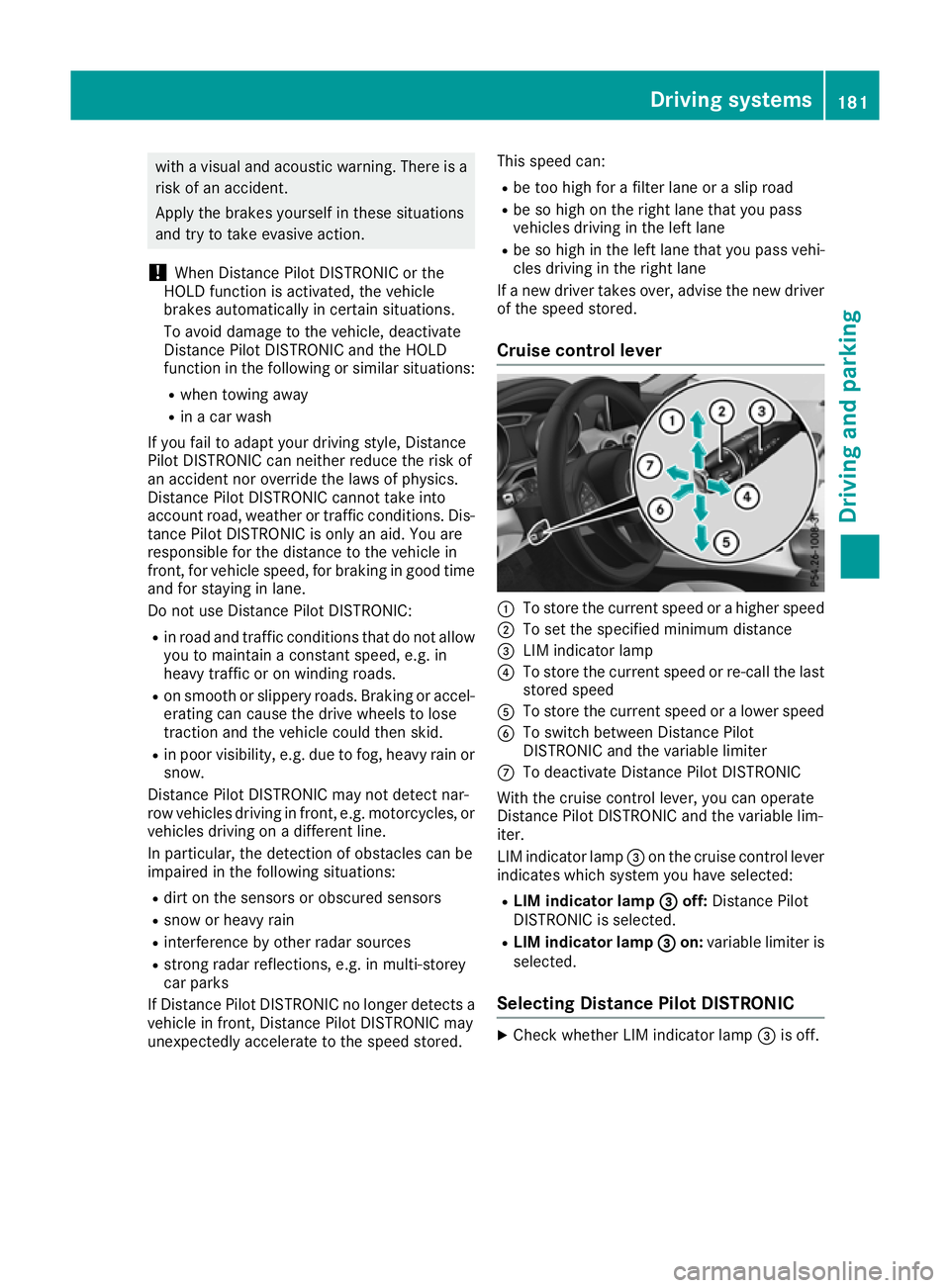
Cruise control lever :
To store the current speed or a higher speed
; To set the specified minimum distance
= LIM indicator lamp
? To store the current speed or re-call the last
stored speed
A To store the current speed or a lower speed
B To switch between Distance Pilot
DISTRONIC and the variable limiter
C To deactivate Distance Pilot DISTRONIC
With the cruise control lever, you can operate
Distance Pilot DISTRONIC and the variable lim-
iter.
LIM indicator lamp =on the cruise control lever
indicates which system you have selected:
R LIM indicator lamp = =off: Distance Pilot
DISTRONIC is selected.
R LIM indicator lamp = =on: variable limiter is
selected.
Selecting Distance Pilot DISTRONIC X
Check whether LIM indicator lamp =is off. Driving systems
181Driving and parking Z
Page 191 of 369
Start-off assist enables optimum acceleration
from a standstill. For this, a suitably high-grip
road surface is required; the tyres and vehicle
must also be in good condition.
Do not activate start-off assist on public roads.
Observe the safety notes on driving safety sys-
tems (Y page 68).
Be sure to read the safety notes and information on ESP ®
(Y page 72).
Activating start-off assist X
Deactivate ESP ®
(Y page 227).
X Turn the steering wheel to the straight-ahead
position.
X Depress the brake pedal hard with your left
foot and keep it depressed.
X Shift the transmission to position D.
X Use the DYNAMIC SELECT button to select
the Sdrive program (Y page 151).
X Quickly depress the accelerator pedal fully.
X Take your foot off the brake, but keep the
accelerator pedal depressed.
The vehicle pulls away at maximum acceler-
ation.
i Activate ESP ®
as soon as the acceleration
process has ended. ESP ®
will otherwise not
be able to stabilise the vehicle if the vehicle
starts to skid or a wheel starts to spin.
Cancelling start-off assist
X Remove your foot from the accelerator pedal.
X Reactivate ESP ®
. RACE START (Mercedes-AMG vehi-
cles)
Important safety notes i
RACE START must not be used on normal
roads. RACE START must be activated and
used only on dedicated race circuits, not on
public roads.
i RACE START is only available in
Mercedes‑AMG vehicles. G
WARNING
If you use RACE START, individual tyres may
get into a spin and the vehicle could skid.
Depending on the selected ESP ®
mode, there is an increased risk of skidding and having an
accident. Make sure that no persons, animals
or obstacles are within range of the vehicle.
RACE START enables optimum acceleration
from a standing start. For this, a suitably high-
grip surface is required; the tyres and vehicle
must also be in good condition.
i Observe the safety notes on driving safety
systems (Y page 68).
Be sure to read the safety notes and informa- tion on ESP ®
(Y page 72).
Activation conditions You can activate RACE START if:
R the doors, the bonnet and the boot lid are
closed
R the engine is running and the transmission,
traction control and engine are at operating
temperature
R the steering wheel is in the straight-ahead
position
R the vehicle is stationary and the brake pedal is
depressed (left foot)
R the transmission is in position h
R drive program S,S+ orRACE is selected
(Y page 152)
Activating RACE START X
Depress the brake pedal with your left foot
and keep it depressed.
X Pull and hold both steering wheel gearshift
paddles.
X The RACE START Confirm: Paddle UP RACE START Confirm: Paddle UP
Cancel: Paddle DOWN
Cancel: Paddle DOWN message appears in
the multifunction display.
X Release both steering wheel gearshift pad-
dles.
i If the activation conditions are no longer ful-
filled, RACE START is cancelled. The RACE RACE
START not possible See Owner's Man‐
START not possible See Owner's Man‐
ual ual message appears in the multifunction
display. 188
Driving systemsDriving and parking
Page 193 of 369
The
AMG Ride Control COMFORT
AMG Ride Control COMFORT message
appears in the multifunction display. 4MATIC
! Never tow the vehicle with one axle raised.
This may damage the differential. Damage of
this sort is not covered by the Mercedes-Benz
implied warranty. All wheels must remain
either on the ground or be fully raised.
Observe the instructions for towing the vehi-
cle with all wheels in full contact with the
ground.
4MATIC, together with ESP ®
, improves the trac-
tion of your vehicle whenever a drive wheel
spins due to insufficient grip.
If you fail to adapt your driving style, 4MATIC can neither reduce the risk of an accident nor over-
ride the laws of physics. 4MATIC cannot take
account of road, weather and traffic conditions.
4MATIC is only an aid. You are responsible for
the distance to the vehicle in front, for vehicle
speed, for braking in good time and for staying in
lane.
If a drive wheel spins due to insufficient grip:
R when pulling away, only depress the acceler-
ator pedal as far as is necessary.
R accelerate less when driving.
i In wintry driving conditions, the maximum
effect of 4MATIC can only be achieved if you
use winter tyres (M+S tyres), with snow
chains if necessary. DSR
General notes i
DSR (Downhill Speed Regulation) is only
available for vehicles with the ON&OFFROAD
package.
DSR is an aid to assist you when driving down-
hill. It keeps the speed of travel at the speed
selected on the on-board computer. The steeper
the downhill gradient, the greater the DSR brak-
ing effect on the vehicle. When driving on flat
stretches of road or on an uphill gradient, the
DSR braking effect is minimal or non-existent.
DSR controls the vehicle’s speed when it is acti- vated and the transmission is in position h,k
or i. By accelerating or braking, you can always drive at a higher or a lower speed than
that set on the on-board computer.
Important safety notes G
WARNING
If the speed driven and the set speed deviate and you activate DSR on a slippery road sur-
face, the wheels may lose traction. This
increases the risk of skidding and having an
accident.
Before switching DSR on, please take into
consideration the road surface and the differ-
ence between driving speed and the set
speed.
If you fail to adapt your driving style, DSR can
neither reduce the risk of accident nor override the laws of physics. DSR cannot take account ofroad, weather and traffic conditions. DSR is only
an aid. You are responsible for the distance to
the vehicle in front, for vehicle speed, for brak-
ing in good time and for staying in lane.
You are always responsible for keeping control
of the vehicle and for assessing whether the
downhill gradient can be managed. DSR may not
always be able to keep to the set speed, depend-
ing on road surface and tyre conditions. Select a set speed suitable for the prevailing conditions
and when necessary, apply the brakes manually.
Further information about "Driving off-road"
(Y page 173).
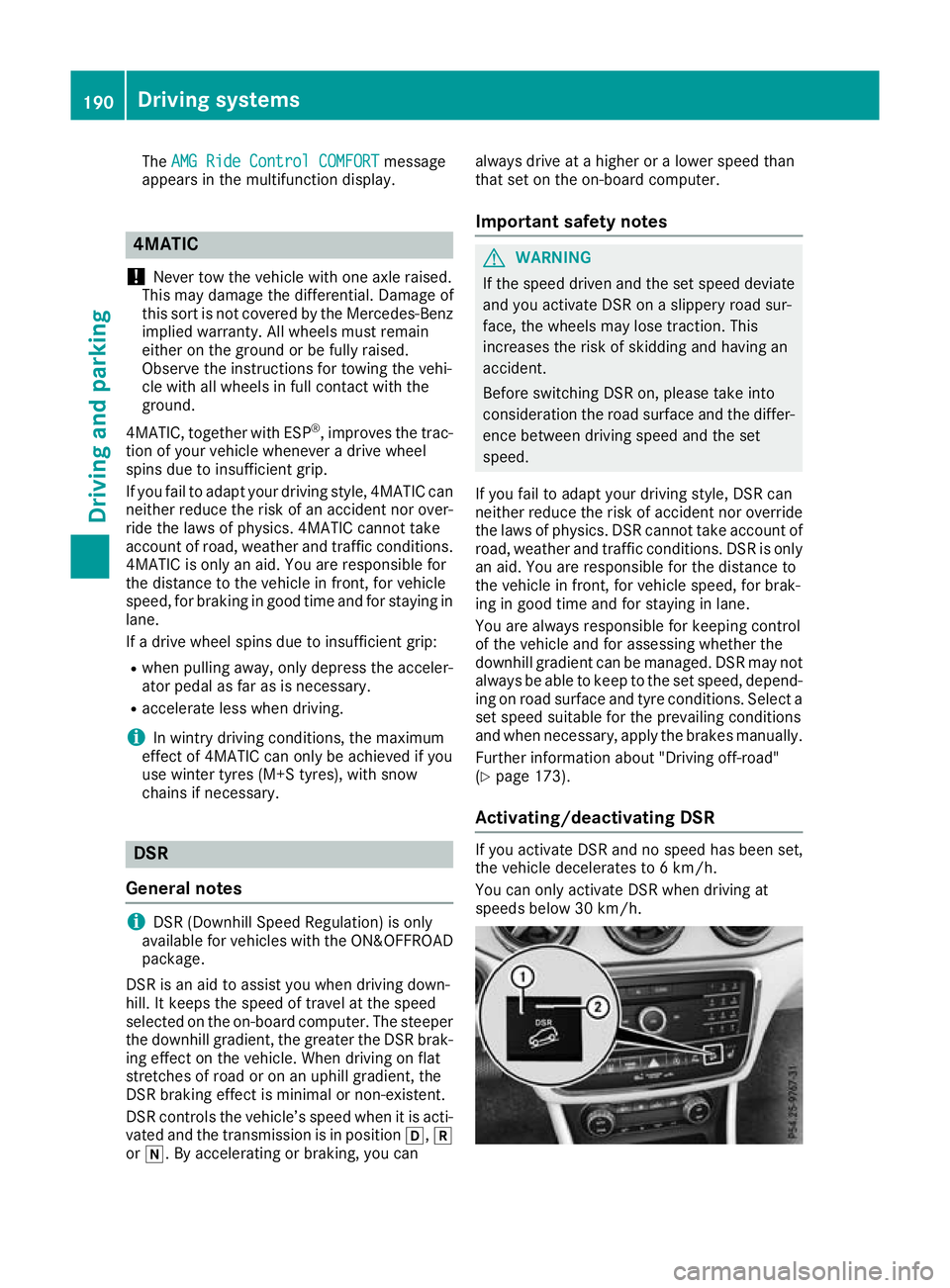
Activating/deactivating DSR If you activate DSR and no speed has been set,
the vehicle decelerates to 6 km/h.
You can only activate DSR when driving at
speeds below 30 km/h.190
Driving systemsDriving and parking
Page 260 of 369
Display messages
Possible causes/consequences and
M
MSolutions Check tyre(s)
Check tyre(s) The tyre pressure in one or more tyres has dropped significantly. The
wheel position appears in the multifunction display.
A warning tone also sounds.
G WARNING
Underinflated tyres pose the following risks:
R the tyres may burst, especially as the load and vehicle speed
increase
R the tyres may wear excessively and/or unevenly, which may greatly
impair tyre traction
R the driving characteristics, as well as steering and braking, may be
greatly impaired
There is a risk of an accident.
X Stop the vehicle without making any sudden steering or braking
manoeuvres. Pay attention to the traffic conditions as you do so.
X Secure the vehicle against rolling away (Y page 166).
X Check the tyres and, if necessary, follow the instructions for a flat
tyre (Y page 317).
X Check the tyre pressure (Y page 340).
X If necessary, correct the tyre pressure. Warning tyre defect Warning tyre defect The tyre pressure in one or more tyres has dropped suddenly. The
wheel position appears in the multifunction display.
G WARNING
If you drive with a flat tyre, there is a risk of the following hazards: R a flat tyre impairs the ability to steer or brake the vehicle
R you could lose control of the vehicle
R continued driving with a flat tyre will cause excessive heat build-up
and possibly a fire
There is a risk of an accident.
X Stop the vehicle without making any sudden steering or braking
manoeuvres. Pay attention to the traffic conditions as you do so.
X Secure the vehicle against rolling away (Y page 166).
X Check the tyres and, if necessary, follow the instructions for a flat
tyre (Y page 317). Tyre Tyre
press.
press. monitor
monitor
currently unavaila‐
currently unavaila‐
ble ble No signals can be received from the tyre pressure sensors due to
strong RF interference. The tyre pressure monitor is temporarily mal-
functioning.
X Drive on.
The tyre pressure monitor starts automatically as soon as the cause
has been rectified. Display
messages
257On-board computer and displays Z