tailgate MERCEDES-BENZ GLA SUV 2018 User Guide
[x] Cancel search | Manufacturer: MERCEDES-BENZ, Model Year: 2018, Model line: GLA SUV, Model: MERCEDES-BENZ GLA SUV 2018Pages: 338, PDF Size: 5.59 MB
Page 81 of 338
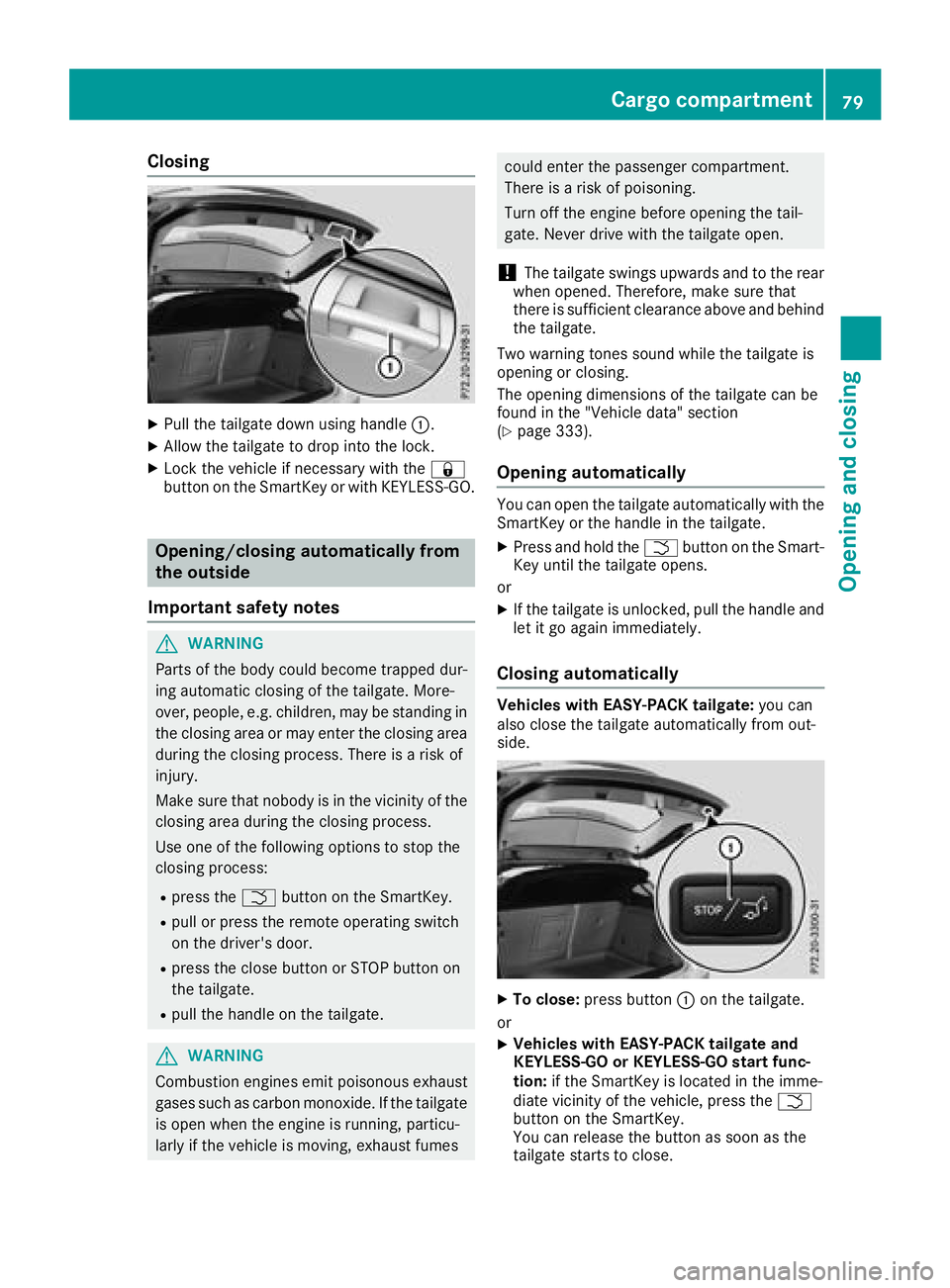
Closing
XPull the tailgate down using handle:.
XAllow the tailgate to drop into the lock.
XLock the vehicle if necessary with the &
button on the SmartKey or with KEYLESS-GO.
Opening/closing automatically from
the outside
Important safety notes
GWARNING
Parts of the body could become trapped dur-
ing automatic closing of the tailgate. More-
over, people, e.g. children, may be standing in the closing area or may enter the closing area
during the closing process. There is a risk of
injury.
Make sure that nobody is in the vicinity of the
closing area during the closing process.
Use one of the following options to stop the
closing process:
Rpress the Fbutton on the SmartKey.
Rpull or press the remote operating switch
on the driver's door.
Rpress the close button or STOP button on
the tailgate.
Rpull the handle on the tailgate.
GWARNING
Combustion engines emit poisonous exhaust
gases such as carbon monoxide. If the tailgate is open when the engine is running, particu-
larly if the vehicle is moving, exhaust fumes
could enter the passenger compartment.
There is a risk of poisoning.
Turn off the engine before opening the tail-
gate. Never drive with the tailgate open.
!The tailgate swings upwards and to the rear
when opened. Therefore, make sure that
there is sufficient clearance above and behind
the tailgate.
Two warning tones sound while the tailgate is
opening or closing.
The opening dimensions of the tailgate can be
found in the "Vehicle data" section
(
Ypage 333).
Opening automatically
You can open the tailgate automatically with the
SmartKey or the handle in the tailgate.
XPress and hold the Fbutton on the Smart-
Key until the tailgate opens.
or
XIf the tailgate is unlocked, pull the handle and
let it go again immediately.
Closing automatically
Vehicles with EASY-PACK tailgate: you can
also close the tailgate automatically from out-
side.
XTo close: press button :on the tailgate.
or
XVehicles with EASY-PACK tailgate and
KEYLESS-GO or KEYLESS-GO start func-
tion: if the SmartKey is located in the imme-
diate vicinity of the vehicle, press the F
button on the SmartKey.
You can release the button as soon as the
tailgate starts to close.
Cargo compartment79
Opening and closing
Z
Page 82 of 338
XTo stop the closing process: press but-
ton :on the tailgate again.
or
XPull the handle in the tailgate.
or
XPress the Fbutton on the SmartKey until
the tailgate stops.
or
XPress or pull the remote operating switch on
the driver's door.
HANDS-FREE ACCESS
Important safety notes
GWARNING
The vehicle exhaust system can become very
hot. If you use HANDS-FREE ACCESS, you
could burn yourself by touching the exhaust
system. There is a risk of injury. Always
ensure that you make the kicking movement
only within the detection range of the sensors.
!If the SmartKey is within the rear detection
range of KEYLESS-GO, the following situa-
tions, for example, could lead to the uninten-
tional opening of the tailgate:
Rwhen using an automatic car wash
Rwhen using a power washer
Make sure that the SmartKey is at least 10 ft
(3 m) away from the vehicle.
iYou can also deactivate KEYLESS-GO. Fur-
ther information on deactivating and activat-
ing KEYLESS-GO (
Ypage 70).
General notes
With KEYLESS-GO and HANDS-FREE ACCESS,
you can open or close the tailgate or stop the
procedure without using your hands. This is use- ful if you have your hands full. To do this, make
a kicking movement under the bumper with your
foot.
Observe the following points:
RCarry your KEYLESS-GO key about your per-
son. The SmartKey must be at the rear of the vehicle in the detection range of KEYLESS-
GO.
RWhen making the kicking movement, make
sure that you are standing firmly on the
ground and that there is sufficient clearance
to the rear of the vehicle. You could otherwise
lose your balance, for example on ice.
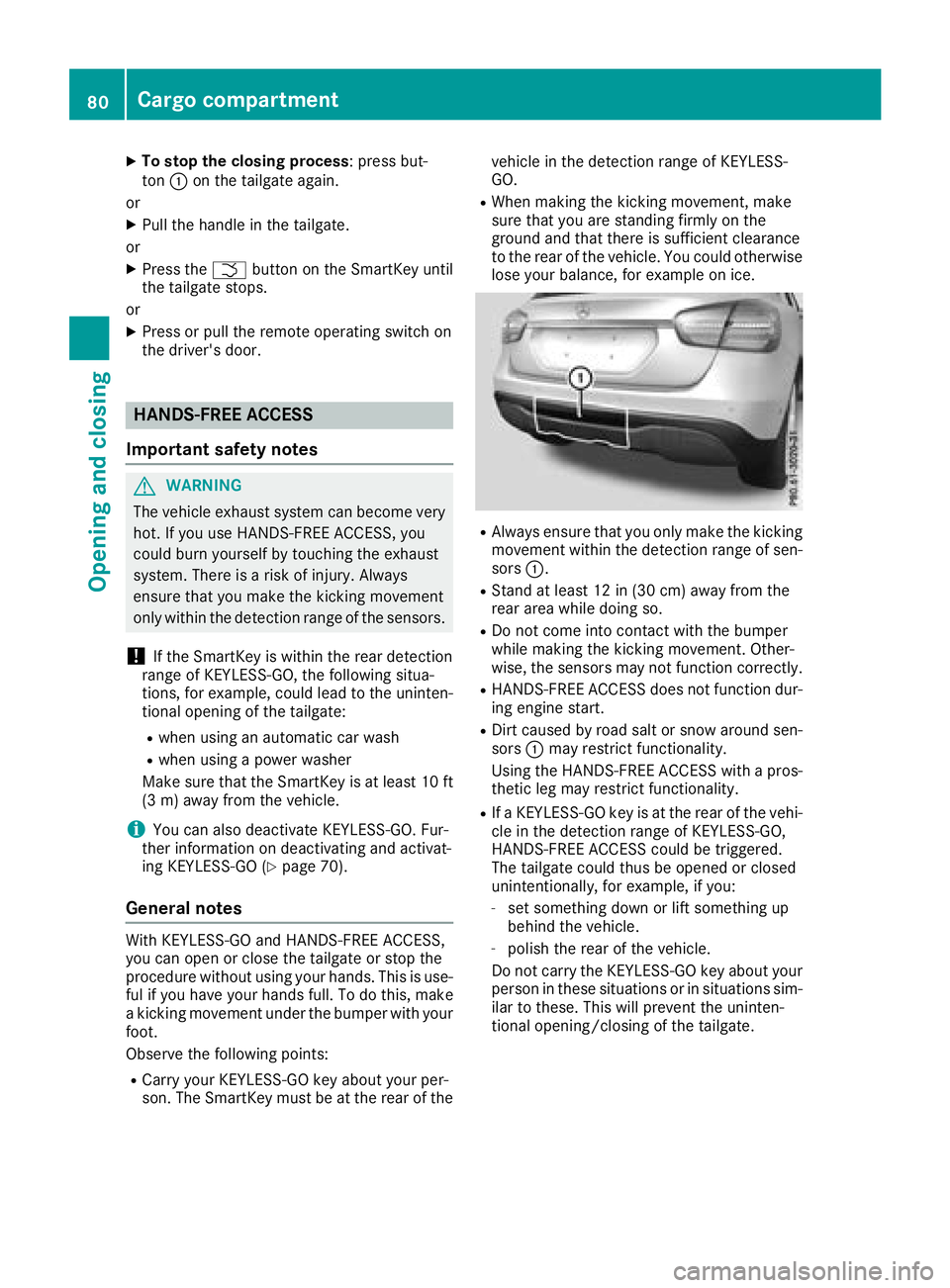
RAlways ensure that you only make the kicking
movement within the detection range of sen-
sors :.
RStand at least 12 in (30 cm) away from the
rear area while doing so.
RDo not come into contact with the bumper
while making the kicking movement. Other-
wise, the sensors may not function correctly.
RHANDS-FREE ACCESS does not function dur-
ing engine start.
RDirt caused by road salt or snow around sen-
sors:may restrict functionality.
Using the HANDS-FREE ACCESS with a pros-
thetic leg may restrict functionality.
RIf a KEYLESS-GO key is at the rear of the vehi-
cle in the detection range of KEYLESS-GO,
HANDS-FREE ACCESS could be triggered.
The tailgate could thus be opened or closed
unintentionally, for example, if you:
-set something down or lift something up
behind the vehicle.
-polish the rear of the vehicle.
Do not carry the KEYLESS-GO key about your person in these situations or in situations sim-
ilar to these. This will prevent the uninten-
tional opening/closing of the tailgate.
80Cargo compartment
Opening and closing
Page 83 of 338
Operation
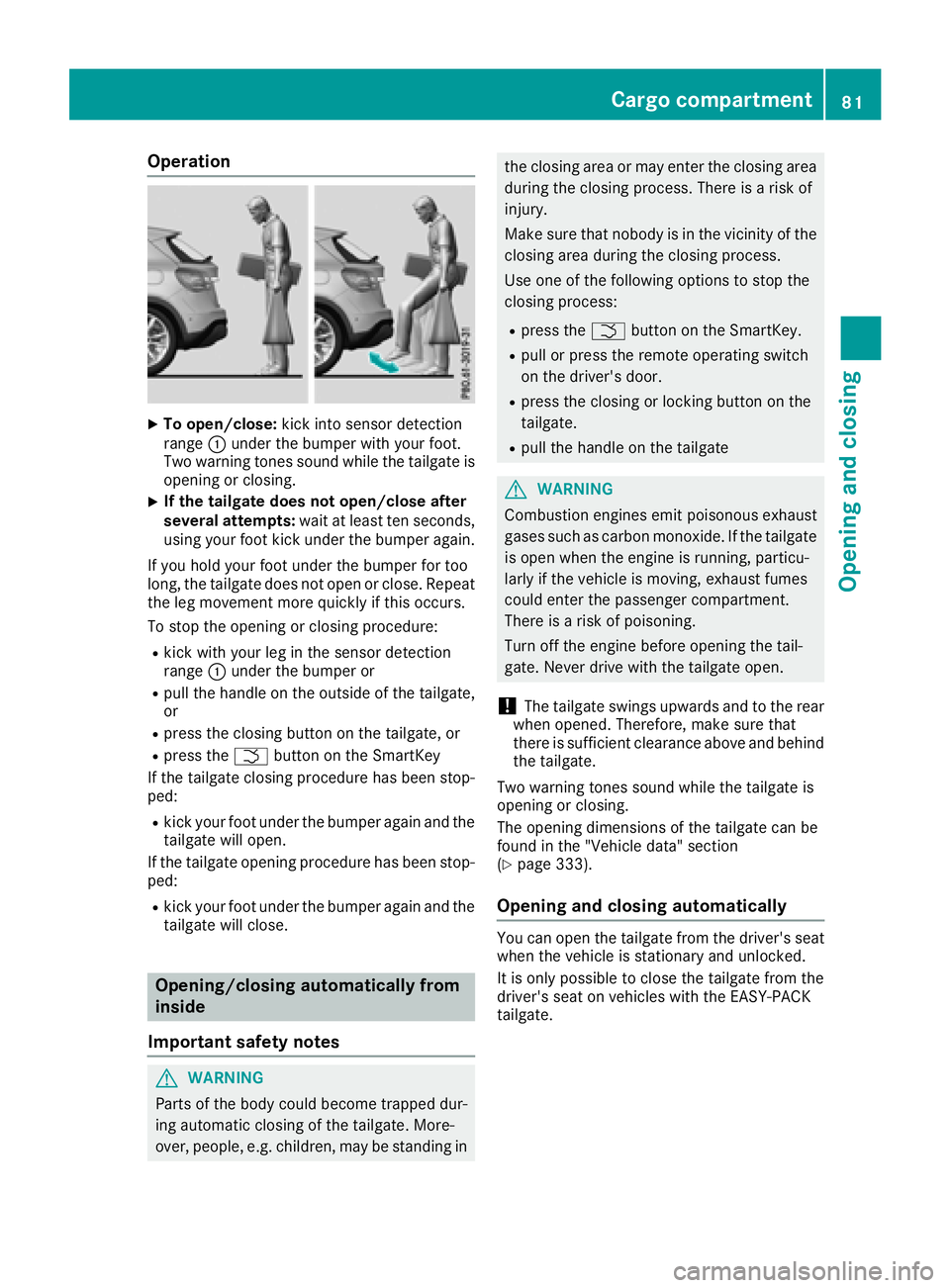
XTo open/close:kick into sensor detection
range :under the bumper with your foot.
Two warning tones sound while the tailgate is
opening or closing.
XIf the tailgate does not open/close after
several attempts: wait at least ten seconds,
using your foot kick under the bumper again.
If you hold your foot under the bumper for too
long, the tailgate does not open or close. Repeat
the leg movement more quickly if this occurs.
To stop the opening or closing procedure:
Rkick with your leg in the sensor detection
range :under the bumper or
Rpull the handle on the outside of the tailgate,
or
Rpress the closing button on the tailgate, or
Rpress the Fbutton on the SmartKey
If the tailgate closing procedure has been stop-
ped:
Rkick your foot under the bumper again and the tailgate will open.
If the tailgate opening procedure has been stop-
ped:
Rkick your foot under the bumper again and the
tailgate will close.
Opening/closing automatically from
inside
Important safety notes
GWARNING
Parts of the body could become trapped dur-
ing automatic closing of the tailgate. More-
over, people, e.g. children, may be standing in
the closing area or may enter the closing area
during the closing process. There is a risk of
injury.
Make sure that nobody is in the vicinity of the
closing area during the closing process.
Use one of the following options to stop the
closing process:
Rpress the Fbutton on the SmartKey.
Rpull or press the remote operating switch
on the driver's door.
Rpress the closing or locking button on the
tailgate.
Rpull the handle on the tailgate
GWARNING
Combustion engines emit poisonous exhaust
gases such as carbon monoxide. If the tailgate
is open when the engine is running, particu-
larly if the vehicle is moving, exhaust fumes
could enter the passenger compartment.
There is a risk of poisoning.
Turn off the engine before opening the tail-
gate. Never drive with the tailgate open.
!The tailgate swings upwards and to the rear
when opened. Therefore, make sure that
there is sufficient clearance above and behind
the tailgate.
Two warning tones sound while the tailgate is
opening or closing.
The opening dimensions of the tailgate can be
found in the "Vehicle data" section
(
Ypage 333).
Opening and closing automatically
You can open the tailgate from the driver's seat
when the vehicle is stationary and unlocked.
It is only possible to close the tailgate from the
driver's seat on vehicles with the EASY-PACK
tailgate.
Cargo compartment81
Opening and closing
Z
Page 84 of 338
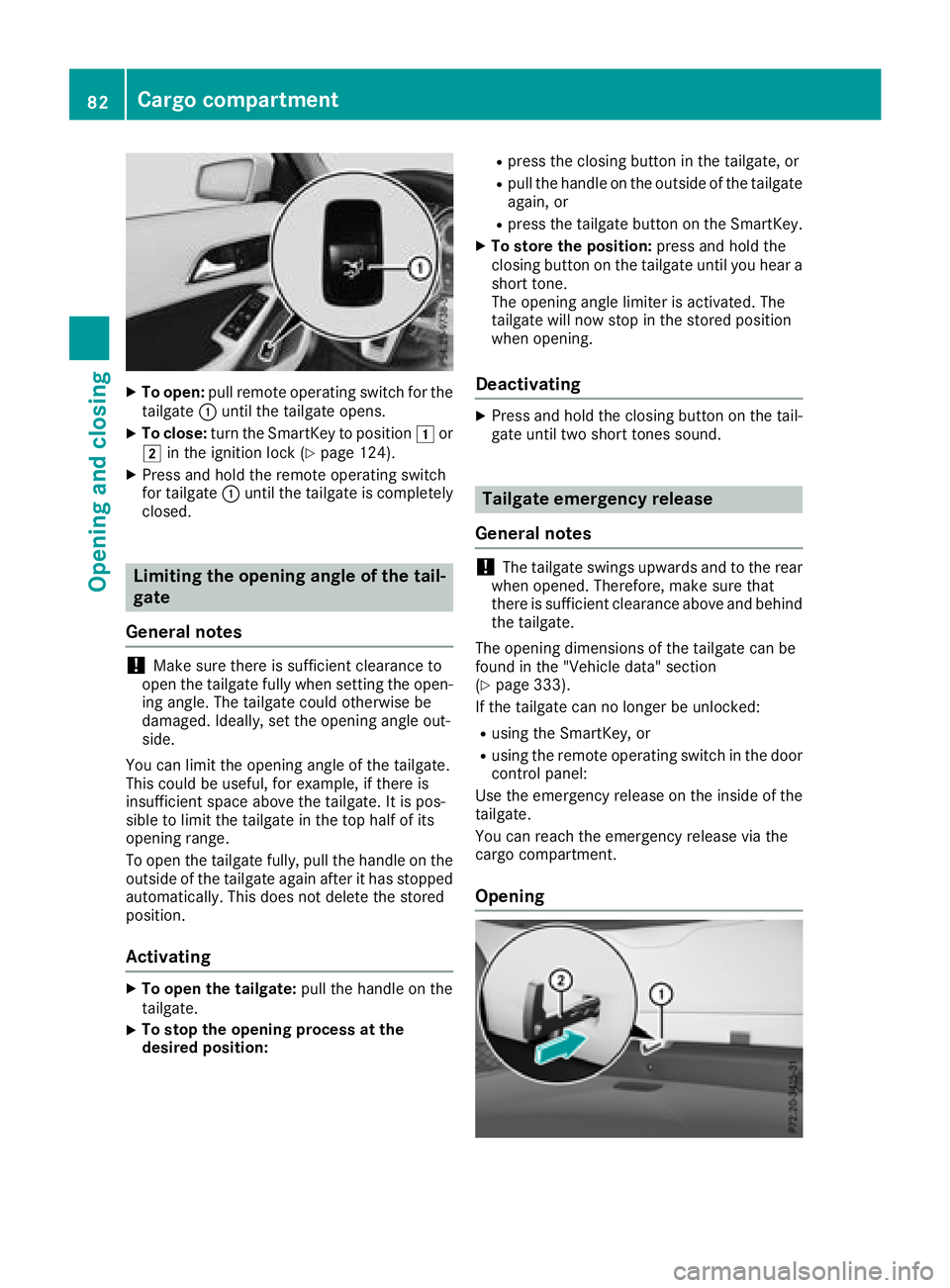
XTo open:pull remote operating switch for the
tailgate :until the tailgate opens.
XTo close: turn the SmartKey to position 1or
2 in the ignition lock (Ypage 124).
XPress and hold the remote operating switch
for tailgate :until the tailgate is completely
closed.
Limiting the opening angle of the tail-
gate
General notes
!Make sure there is sufficient clearance to
open the tailgate fully when setting the open-
ing angle. The tailgate could otherwise be
damaged. Ideally, set the opening angle out-
side.
You can limit the opening angle of the tailgate.
This could be useful, for example, if there is
insufficient space above the tailgate. It is pos-
sible to limit the tailgate in the top half of its
opening range.
To open the tailgate fully, pull the handle on the
outside of the tailgate again after it has stopped
automatically. This does not delete the stored
position.
Activating
XTo open the tailgate: pull the handle on the
tailgate.
XTo stop the opening process at the
desired position:
Rpress the closing button in the tailgate, or
Rpull the handle on the outside of the tailgate
again, or
Rpress the tailgate button on the SmartKey.
XTo store the position: press and hold the
closing button on the tailgate until you hear a
short tone.
The opening angle limiter is activated. The
tailgate will now stop in the stored position
when opening.
Deactivating
XPress and hold the closing button on the tail-
gate until two short tones sound.
Tailgate emergency release
General notes
!The tailgate swings upwards and to the rear
when opened. Therefore, make sure that
there is sufficient clearance above and behind
the tailgate.
The opening dimensions of the tailgate can be
found in the "Vehicle data" section
(
Ypage 333).
If the tailgate can no longer be unlocked:
Rusing the SmartKey, or
Rusing the remote operating switch in the door control panel:
Use the emergency release on the inside of the
tailgate.
You can reach the emergency release via the
cargo compartment.
Opening
82Cargo compartment
Opening and closing
Page 85 of 338
XFold the rear seat backrest forwards
(Ypage 251).
XTake the mechanical key out of the SmartKey
(Ypage 71).
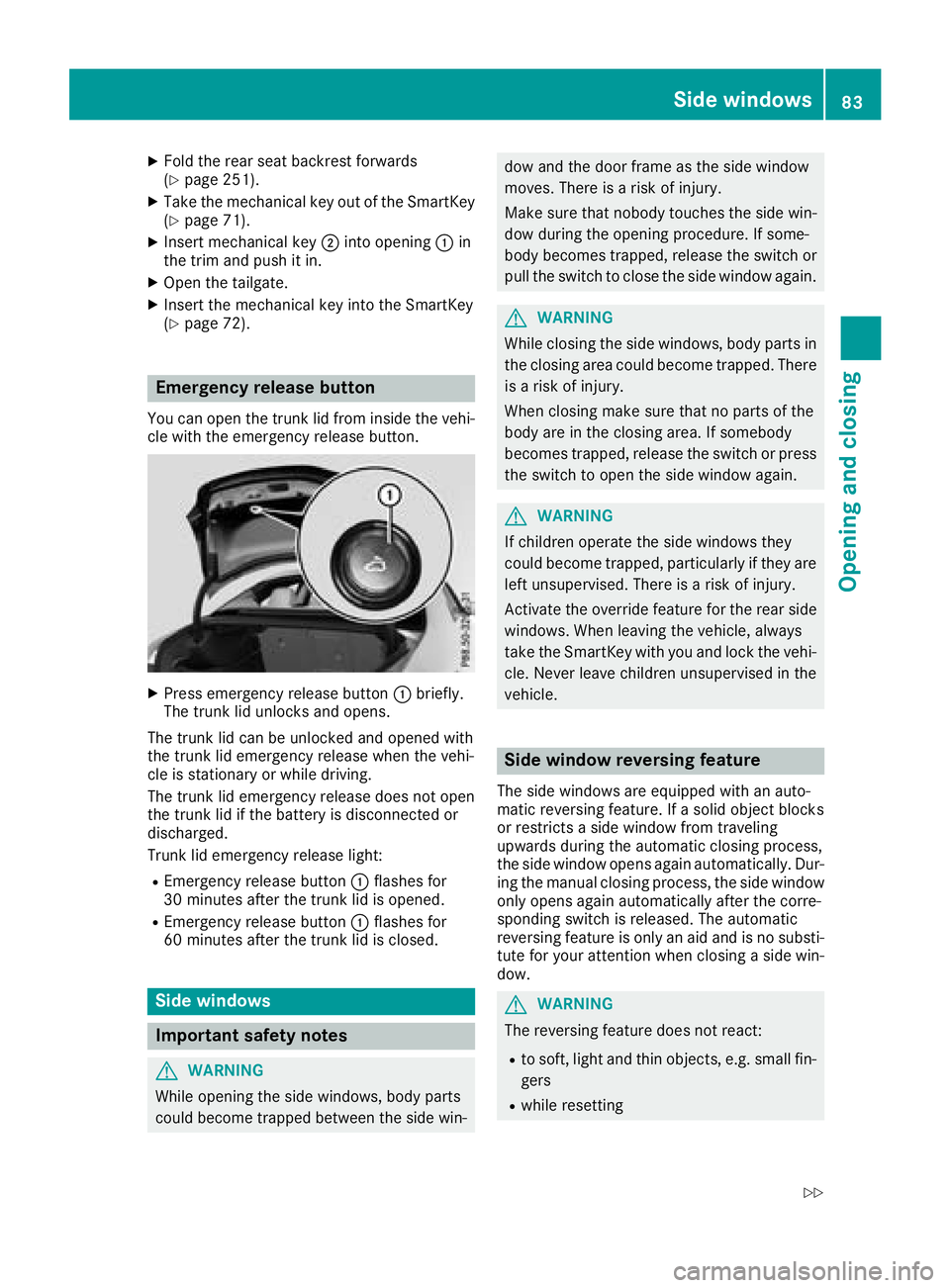
XInsert mechanical key;into opening :in
the trim and push it in.
XOpen the tailgate.
XInsert the mechanical key into the SmartKey
(Ypage 72).
Emergency release button
You can open the trunk lid from inside the vehi-
cle with the emergency release button.
XPress emergency release button :briefly.
The trunk lid unlocks and opens.
The trunk lid can be unlocked and opened with
the trunk lid emergency release when the vehi-
cle is stationary or while driving.
The trunk lid emergency release does not open
the trunk lid if the battery is disconnected or
discharged.
Trunk lid emergency release light:
REmergency release button :flashes for
30 minutes after the trunk lid is opened.
REmergency release button :flashes for
60 minutes after the trunk lid is closed.
Side windows
Important safety notes
GWARNING
While opening the side windows, body parts
could become trapped between the side win-
dow and the door frame as the side window
moves. There is a risk of injury.
Make sure that nobody touches the side win- dow during the opening procedure. If some-
body becomes trapped, release the switch or
pull the switch to close the side window again.
GWARNING
While closing the side windows, body parts in
the closing area could become trapped. There is a risk of injury.
When closing make sure that no parts of the
body are in the closing area. If somebody
becomes trapped, release the switch or press
the switch to open the side window again.
GWARNING
If children operate the side windows they
could become trapped, particularly if they are left unsupervised. There is a risk of injury.
Activate the override feature for the rear side
windows. When leaving the vehicle, always
take the SmartKey with you and lock the vehi-
cle. Never leave children unsupervised in the
vehicle.
Side window reversing feature
The side windows are equipped with an auto-
matic reversing feature. If a solid object blocks
or restricts a side window from traveling
upwards during the automatic closing process,
the side window opens again automatically. Dur-
ing the manual closing process, the side windowonly opens again automatically after the corre-
sponding switch is released. The automatic
reversing feature is only an aid and is no substi-
tute for your attention when closing a side win-
dow.
GWARNING
The reversing feature does not react:
Rto soft, light and thin objects, e.g. small fin-
gers
Rwhile resetting
Side windows83
Opening and closing
Z
Page 109 of 338
XInsert the new bulb and engage it to the stop.
XPress on housing cover:and turn it to the
right.
Turn signals (halogen headlamps)
XSwitch off the lights.
XOpen the hood.
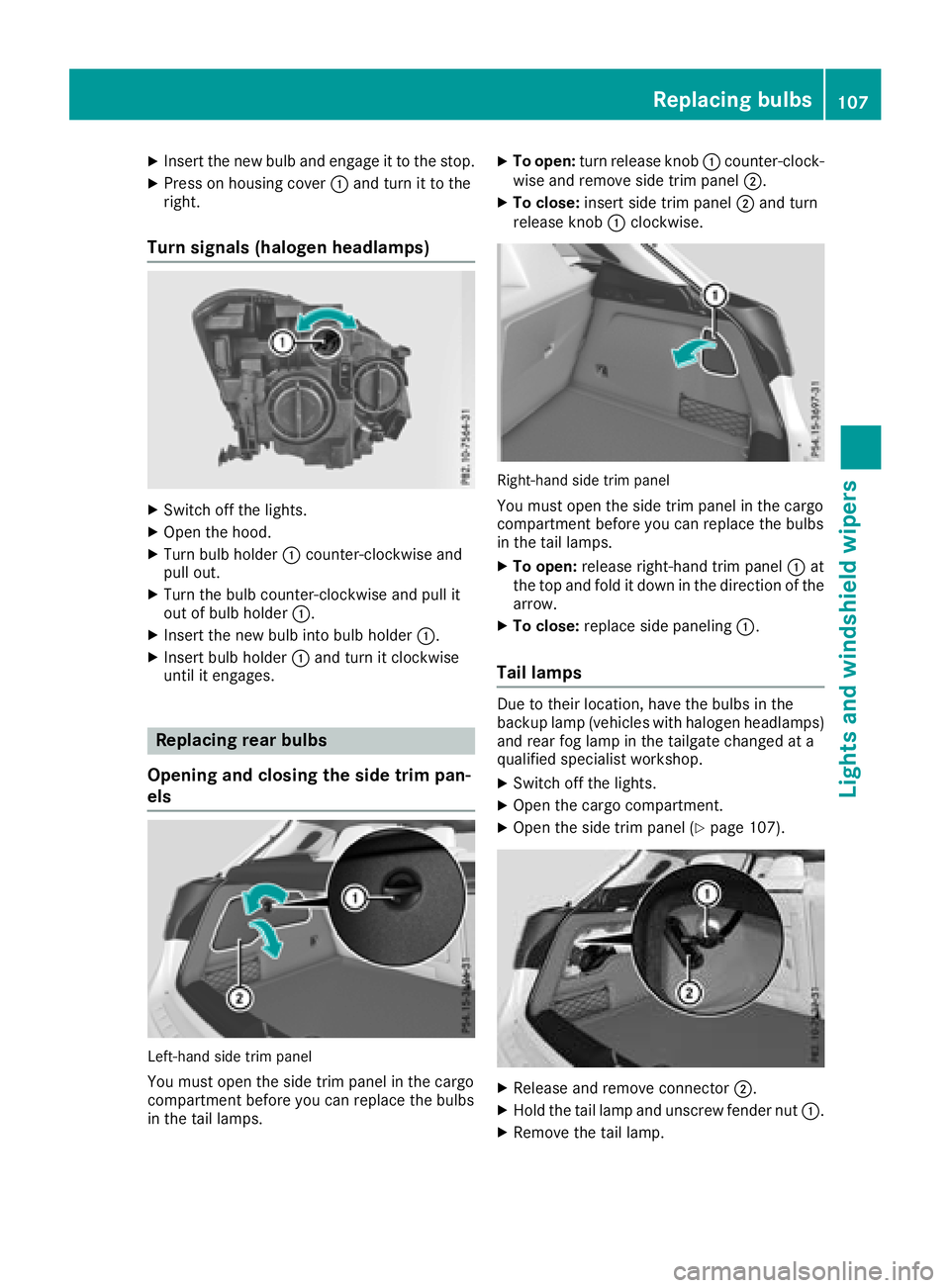
XTurn bulb holder :counter-clockwise and
pull out.
XTurn the bulb counter-clockwise and pull it
out of bulb holder :.
XInsert the new bulb into bulb holder :.
XInsert bulb holder:and turn it clockwise
until it engages.
Replacing rear bulbs
Opening and closing the side trim pan-
els
Left-hand side trim panel
You must open the side trim panel in the cargo
compartment before you can replace the bulbs
in the tail lamps.
XTo open: turn release knob :counter-clock-
wise and remove side trim panel ;.
XTo close:insert side trim panel ;and turn
release knob :clockwise.
Right-hand side trim panel
You must open the side trim panel in the cargo
compartment before you can replace the bulbs
in the tail lamps.
XTo open: release right-hand trim panel :at
the top and fold it down in the direction of the
arrow.
XTo close: replace side paneling :.
Tail lamps
Due to their location, have the bulbs in the
backup lamp (vehicles with halogen headlamps)
and rear fog lamp in the tailgate changed at a
qualified specialist workshop.
XSwitch off the lights.
XOpen the cargo compartment.
XOpen the side trim panel (Ypage 107).
XRelease and remove connector ;.
XHold the tail lamp and unscrew fender nut :.
XRemove the tail lamp.
Replacing bulbs107
Lights and windshield wipers
Z
Page 111 of 338
For this reason, you should always switch off
the windshield wipers in dry weather.
Vehicles with a rain sensor: in the ÄorÅ
position, the appropriate wiping frequency is
automatically set according to the intensity of
the rain. In the Åposition, the rain sensor is
more sensitive than in the Äposition, caus-
ing the windshield wiper to wipe more fre-
quently.
If the wiper blades are worn, the windshield will
no longer be wiped properly. This could prevent
you from observing the traffic conditions.
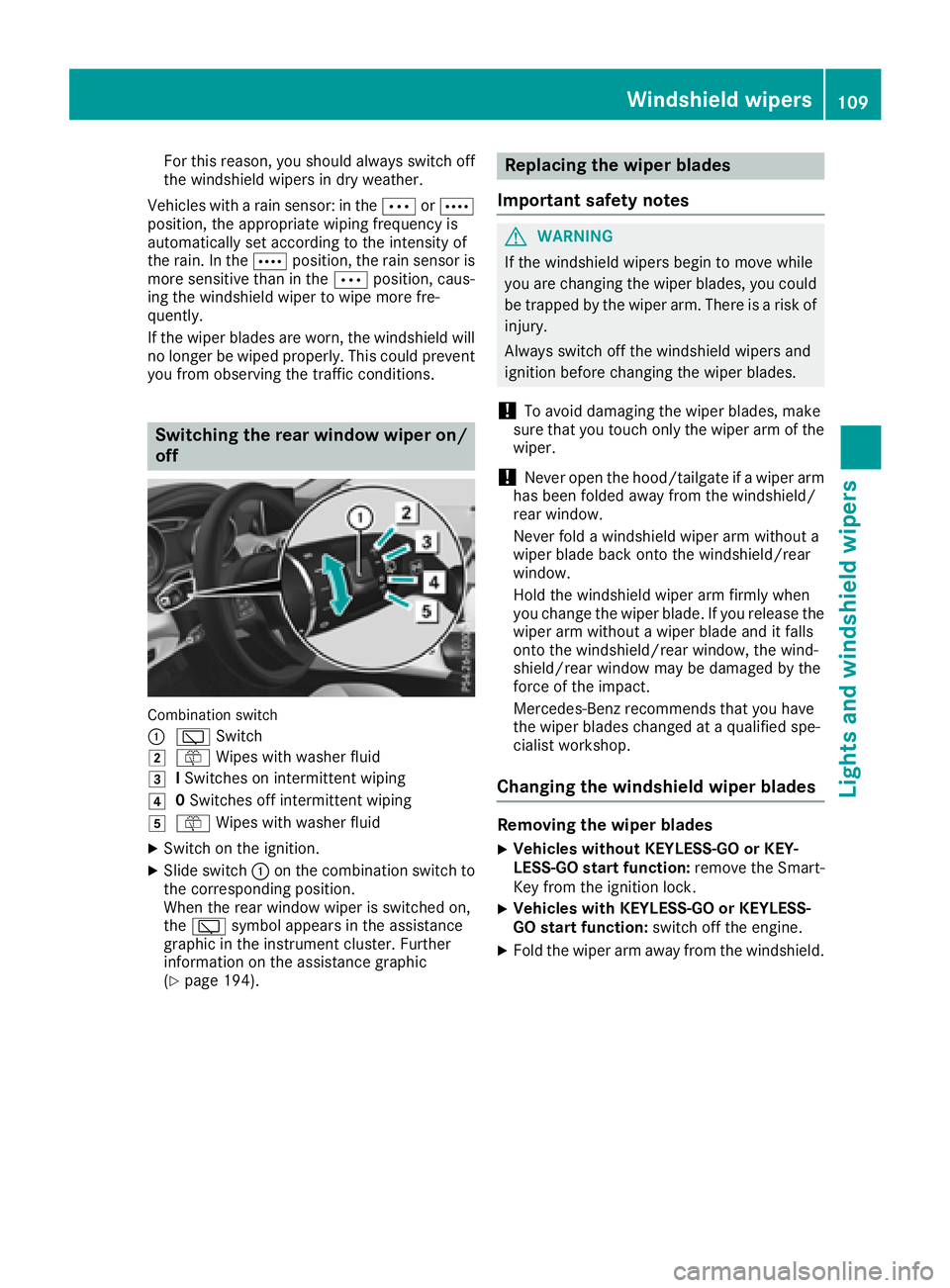
Switching the rear window wiper on/
off
Combination switch
:
è Switch
2ôWipes with washer fluid
3ISwitches on intermittent wiping
40 Switches off intermittent wiping
5ô Wipes with washer fluid
XSwitch on the ignition.
XSlide switch :on the combination switch to
the corresponding position.
When the rear window wiper is switched on,
the è symbol appears in the assistance
graphic in the instrument cluster. Further
information on the assistance graphic
(
Ypage 194).
Replacing the wiper blades
Important safety notes
GWARNING
If the windshield wipers begin to move while
you are changing the wiper blades, you could be trapped by the wiper arm. There is a risk of
injury.
Always switch off the windshield wipers and
ignition before changing the wiper blades.
!To avoid damaging the wiper blades, make
sure that you touch only the wiper arm of the
wiper.
!Never open the hood/tailgate if a wiper arm
has been folded away from the windshield/
rear window.
Never fold a windshield wiper arm without a
wiper blade back onto the windshield/rear
window.
Hold the windshield wiper arm firmly when
you change the wiper blade. If you release the
wiper arm without a wiper blade and it falls
onto the windshield/rear window, the wind-
shield/rear window may be damaged by the
force of the impact.
Mercedes-Benz recommends that you have
the wiper blades changed at a qualified spe-
cialist workshop.
Changing the windshield wiper blades
Removing the wiper blades
XVehicles without KEYLESS-GO or KEY-
LESS-GO start function: remove the Smart-
Key from the ignition lock.
XVehicles with KEYLESS-GO or KEYLESS-
GO start function: switch off the engine.
XFold the wiper arm away from the windshield.
Windshield wipers109
Lights and windshield wipers
Z
Page 177 of 338
useful, for example when you recognize thatit is
already possible topull out of the parking space.
Canceling Parking Pilot
XStop the movement of the multifunction
steering wheel or steer yourself.
Parking Pilot iscanceled immediately. The
Parking
PilotCanceledmessage appears
in the multifunction display.
or
XPress the PARKTRONIC button (Ypage 170).
Parking Assist PARKTRONIC is switched off
and Parking Pilot isimmediately canceled.
The Parking Pilot Canceled
message
appears inthe multifunction display.
Parking Pilot iscanceled automatically when:
Rthe electr icparking brake isengaged
Rtransmission position jisselected
Rparking using Parking Pilot isno longer pos-
sible
Ryou are driving faster than 6 mph (10 km/h)
Ra wheel spins, ESP®intervenes or fails. In
such cases the ÷warning lamp lights up in
the instrument cluster
A warning tone sounds. The parking symbol dis-
appears and the multifunction display shows the
Parking Pilot Canceled
message.
When Parking Pilot is canceled, you must steer
and brake again yourself.
If a system malfunction occurs, the vehicle is
braked to a standstill. To drive on, depress the
accelerator again.
Rear view camera
General notes
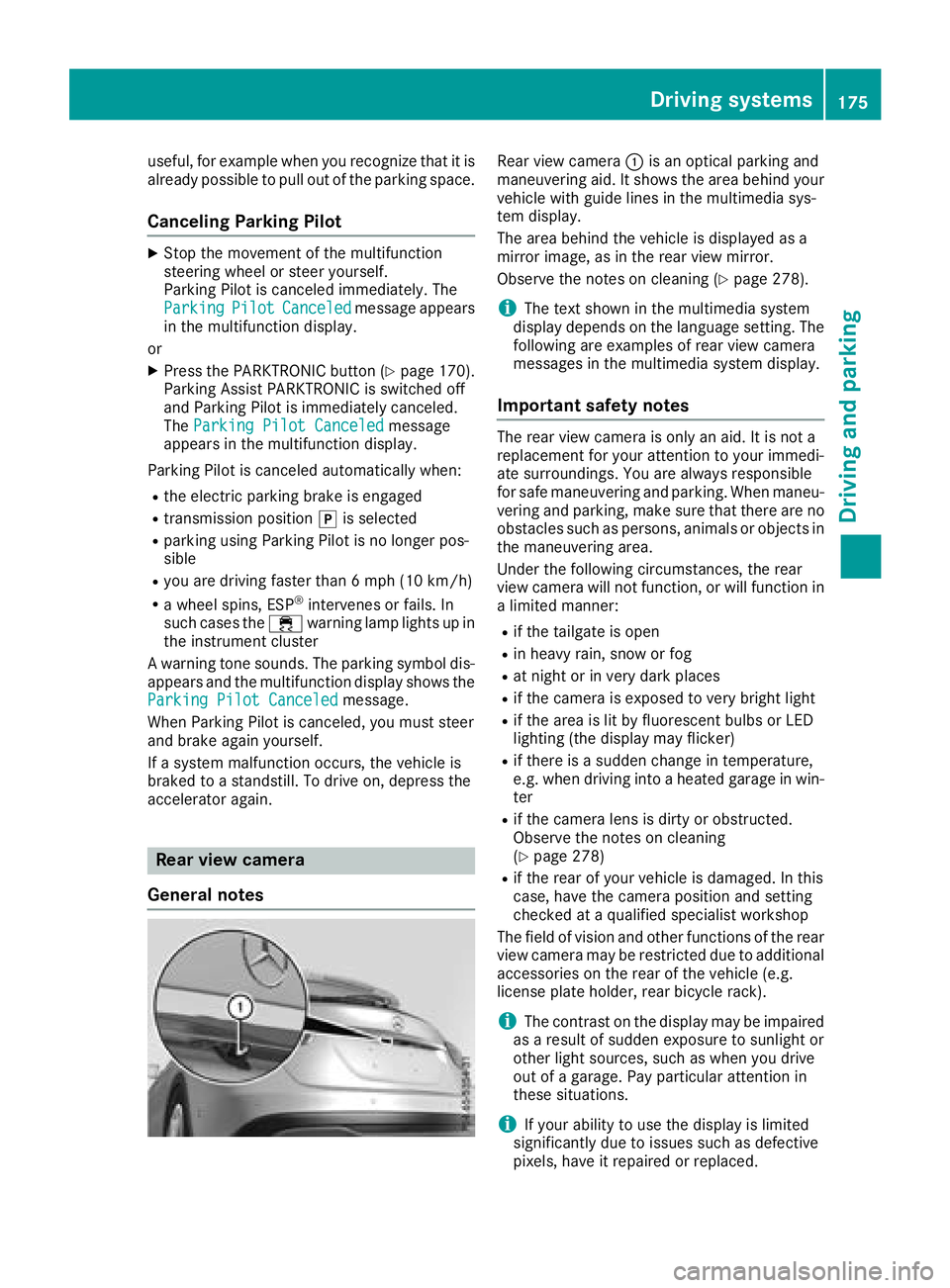
Rear view camera :is an optical parking and
maneuvering aid. It shows the area behind your
vehicle with guide lines in the multimedia sys-
tem display.
The area behind the vehicle is displayed as a
mirror image, as in the rear view mirror.
Observe the notes on cleaning (
Ypage 278).
iThe text shown in the multimedia system
display depends on the language setting. The
following are examples of rear view camera
messages in the multimedia system display.
Important safety notes
The rear view camera is only an aid. It is not a
replacement for your attention to your immedi-
ate surroundings. You are always responsible
for safe maneuvering and parking. When maneu-
vering and parking, make sure that there are no
obstacles such as persons, animals or objects in the maneuvering area.
Under the following circumstances, the rear
view camera will not function, or will function in
a limited manner:
Rif the tailgate is open
Rin heavy rain, snow or fog
Rat night or in very dark places
Rif the camera is exposed to very bright light
Rif the area is lit by fluorescent bulbs or LED
lighting (the display may flicker)
Rif there is a sudden change in temperature,
e.g. when driving into a heated garage in win- ter
Rif the camera lens is dirty or obstructed.
Observe the notes on cleaning
(
Ypage 278)
Rif the rear of your vehicle is damaged. In this
case, have the camera position and setting
checked at a qualified specialist workshop
The field of vision and other functions of the rear
view camera may be restricted due to additional
accessories on the rear of the vehicle (e.g.
license plate holder, rear bicycle rack).
iThe contrast on the display may be impaired
as a result of sudden exposure to sunlight or
other light sources, such as when you drive
out of a garage. Pay particular att ention in
t
hese situations.
iIf your ability to use the display is limited
significantly due to issues such as defective
pixels, have it repaired or replaced.
Driving systems175
Driving and parking
Z
Page 181 of 338
RTop view and picture from the rear view cam-
era (130° viewing angle)
RTop view and picture from the front camera
(without displaying the maximum steering
wheel angle)
RTop view and enlarged rear view
RTop view and enlarged front view
RTop view and rear-view images from the exte-
rior mirror cameras (rear wheel view)
RTop view and forward-view images from the
exterior mirror cameras (front wheel view)
When the function is active and you shift the
transmission from position hork toi, you
see the previous view in the COMAND display.
The dynamic guidelines are hidden.
When you shift between transmission positions
h and k, you see the previously selected front
or rear view.
Important safety notes
The 360° camera is only an aid. It is not a
replacement for your attention to your immedi-
ate surroundings. You are always responsible
for safe maneuvering and parking. Make sure
that there are no persons, animals or objects in
the maneuvering area when you are maneuver-
ing or parking.
The 360° camera may show a distorted view of
obstacles, show them incorrectly or not at all. It
cannot show objects in the following areas:
Runder the front bumper
Rvery close to the front bumper
Rvery close to the rear bumper
Runder the rear bumper
Rin close range above the handle on the trunk
lid
Rvery close to the exterior mirrors
You are always responsible for safety, and must
always pay attention to your surroundings when parking and maneuvering. This applies to the
areas behind, in front of and beside the vehicle.
You could otherwise endanger yourself and oth-
ers.
The 360° camera will not function or will func-
tion in a limited manner:
Rif the doors are open
Rif the exterior mirrors are folded in
Rif the tailgate is open
Rin heavy rain, snow or fog
Rat night or in very dark places
Rif the cameras are exposed to very bright light
Rif the area is lit by fluorescent bulbs or LED
lighting (the display may flicker)
Rif there is a sudden change in temperature,
e.g. when driving into a heated garage in win-
ter
Rif the camera lenses are dirty or covered
Rif the vehicle components are damaged in
which the cameras are fitted. In this event,
have the camera position and setting checked
at a qualified specialist workshop
Do not use the 360° camera in this case. You
can otherwise injure others or cause damage to
objects or the vehicle.
Activation conditions
The 360° camera image can be displayed if:
Ryour vehicle is equipped with a 360° camera
RCOMAND is switched on; see the digital
COMAND operating instructions
Rthe 360° Camerafunction is activated
Switching on the 360° camera
XPress and hold the Øbutton on the center
console for longer than two seconds; see the
digital COMAND operating instructions.
The following appears depending on whether
gear hork is selected:
Rfull screen display with the image from the
front camera
Rfull screen display with the image from the
rear view camera
Activating the 360° camera with
COMAND
XPress the Øbutton; see the digital
COMAND operating instructions.
XSelect Systemby turning cVdthe COMAND
controller and press Wto confirm.
XSelect 360°Cameraand press Wto confirm.
The following appears depending on whether
gear hork is selected:
Ra split screen with top view and the image
from the front camera or
Ra split screen with top view and the image
from the rear view camera
Driving systems179
Driving and parking
Z
Page 226 of 338
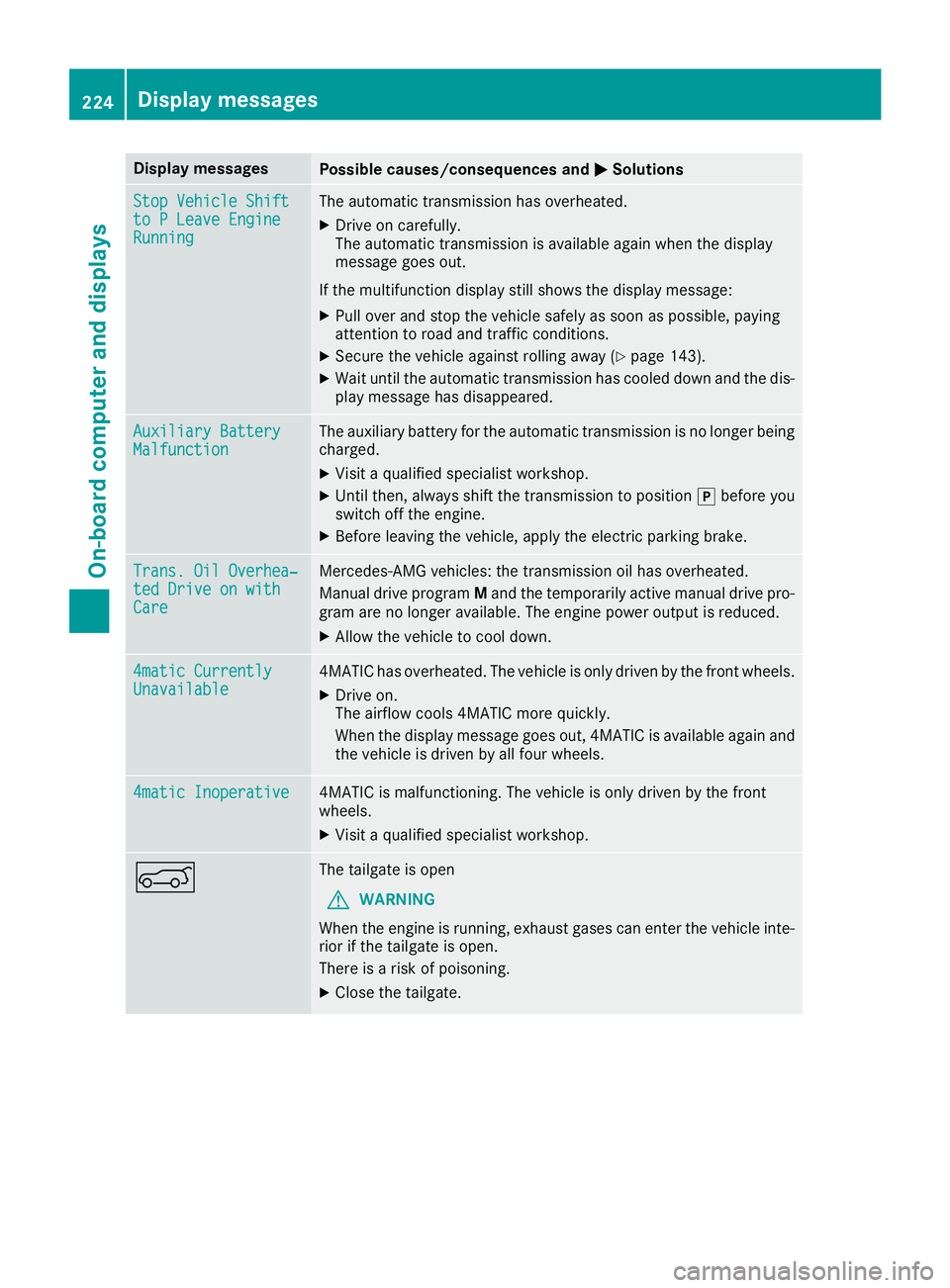
Display messagesPossible causes/consequences andMSolutions
StopVehicl eShiftto PLeave EngineRunnin g
The automatic transmission has overheated.
XDrive on carefully.
The automatic transmission is available again when th edisplay
message goe sout .
If th emultifunction display still shows th edisplay message :
XPull overand stop th evehicl esafely as soo nas possible, payin g
attention to roa dand traffic conditions.
XSecur eth evehicl eagainst rollin gaway (Ypage 143).
XWait until th eautomatic transmission has cooled down and th edis-
play message has disappeared.
Auxiliary Batter yMalfunctionThe auxiliary battery for th eautomatic transmission is no longer bein g
charged.
XVisit aqualified specialist workshop .
XUntilthen ,always shift th etransmission to position jbefore you
switch off th eengine.
XBefor eleaving th evehicle, apply th eelectric parking brake.
Trans. Oil Overhea‐ted Drive on wit hCare
Mercedes-AMG vehicles: th etransmission oil has overheated.
Manual drive progra mM and th etemporarily active manual drive pro -
gra mare no longer available. The engin epowe routput is reduced.
XAllow th evehicl eto cool down .
4matic CurrentlyUnavailable4MATIC has overheated. The vehicl eis only driven by th efron twheels.
XDrive on .
The airflow cools 4MATIC mor equickly.
Whe nth edisplay message goe sout ,4MATIC is available again and
th evehicl eis driven by all fou rwheels.
4matic Inoperative4MATIC is malfunctioning .The vehicl eis only driven by th efron t
wheels.
XVisit aqualified specialist workshop .
AThe tailgateis open
GWARNIN G
Whe nth eengin eis running, exhaust gase scan ente rth evehicl einte-
rio rif th etailgat eis open .
There is aris kof poisoning .
XCloseth etailgate.
224Display messages
On-board computer and displays