ESP MERCEDES-BENZ GLA SUV 2018 Repair Manual
[x] Cancel search | Manufacturer: MERCEDES-BENZ, Model Year: 2018, Model line: GLA SUV, Model: MERCEDES-BENZ GLA SUV 2018Pages: 338, PDF Size: 5.59 MB
Page 163 of 338
Ryou pull thecruise control lever toward syou
in order to pull away and th efront-passenger
doo ror on eof th erear doors is open
Rth evehicl eis skiddin g
Ryou switch on Parking Pilo t
If Distanc ePilo tDISTRONI Cis automatically
deactivated, you will hear awarnin gtone .The
Distance Pilot Off
message appears in th e
multifunction display for approximately fiv esec -
onds.
Distanc ePilo tDISTRONI Cis also automatically
deactivated when you activat eDSR. The Ã
DS Rsymbol appears in th emultifunction dis-
play.
Distance Pilot DISTRONIC displays in
the instrume nt cluster
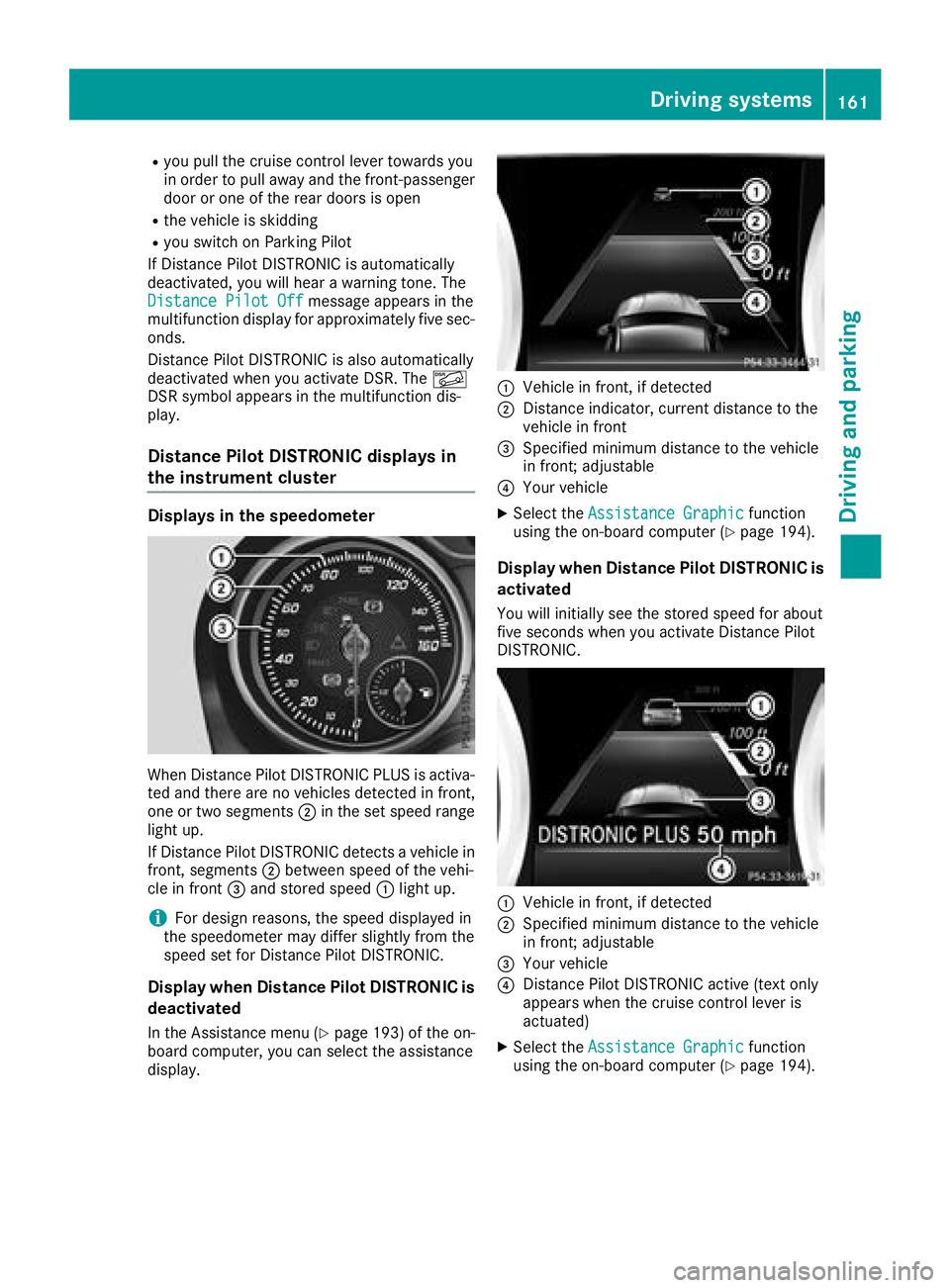
Displaysin th espeedomete r
WhenDistanc ePilo tDISTRONI CPLU Sis activa-
te dand there are no vehicles detecte din front,
on eor tw osegments ;in th eset speed range
ligh tup.
If Distanc ePilo tDISTRONI Cdetects avehicl ein
front, segments ;between speed of th evehi-
cle in fron t= and store dspeed :ligh tup.
iFo rdesign reasons, th espeed displayed in
th espeedometer may differ slightly from th e
speed set for Distanc ePilo tDISTRONIC.
Display when Distanc ePilot DISTRONIC is
deactivated
In th eAssistance men u (Ypage 193) of theon -
boar dcomputer, you can select th eassistanc e
display.
:Vehicl ein front, if detecte d
;Distanceindicator, curren tdistanc eto th e
vehicl ein fron t
=Specifie dminimum distanc eto th evehicl e
in front; adjustable
?Your vehicl e
XSelectth eAssistanc eGraphi cfunction
usin gth eon-boar dcomputer (Ypage 194).
Display when Distanc ePilot DISTRONIC is
activated
You will initially see th estore dspeed for about
fiv eseconds when you activat eDistanc ePilo t
DISTRONIC.
:Vehicl ein front, if detecte d
;Specifiedminimum distanc eto th evehicl e
in front; adjustable
=Your vehicl e
?DistancePilo tDISTRONI Cactive (tex tonly
appears when th ecruise control lever is
actuated)
XSelec tth eAssistanc eGraphi cfunction
usin gth eon-boar dcomputer (Ypage 194).
Driving systems161
Driving and parking
Z
Page 164 of 338
Tips for driving with Distance Pilot
DISTRONIC
General notes
Pay particular attention in the following traffic
situations:
RCornering, entering and exiting a bend: the
ability of Distance Pilot DISTRONIC to detect
vehicles during cornering is limited. Your vehi-
cle may brake unexpectedly or late.
RDriving on a different line: Distance Pilot
DISTRONIC may not detect vehicles which are
not driving in the middle of their lane. The dis-
tance to the vehicle in front will be too short.
ROther vehicles changing lanes: Distance Pilot
DISTRONIC has not detected the vehicle cut-
ting in yet. The distance to this vehicle will be
too short.
RNarrow vehicles: Distance Pilot DISTRONIC
has not yet detected the vehicle in front on
the edge of the road because of its narrow
width. The distance to the vehicle in front willbe too short.
RObstacles and stationary vehicles: Distance
Pilot DISTRONIC does not brake for obstacles
or stationary vehicles. If, for example, the
detected vehicle turns a corner and an obsta-cle or stationary vehicle is then revealed, Dis-
tance Pilot DISTRONIC will not brake for
them.
RDistance Pilot DISTRONIC may mistakenly
detect vehicles that are crossing your lane. If
you activate Distance Pilot DISTRO
NIC in the
following situations, the vehicle could pull
away unintentionally:
-At traffic lights with crossing traffic, for
example.
-With a vehicle ahead on the other side of an
intersection and the HOLD function active.
In such situations, brake if necessary. Distance
Pilot DISTRONIC will then be deactivated.
HOLD function
General notes
The HOLD function can assist the driver in the
following situations:
Rwhen pulling away, especially on steep slopes
Rwhen maneuvering on steep slopes
Rwhen waiting in traffic The vehicle is kept stationary without the driver
having to depress the brake pedal.
The braking effect is canceled and the HOLD
function deactivated when you depress the
accelerator pedal to pull away.
Important safety notes
GWARNING
If the vehicle is only braked using the HOLD
function, the vehicle may roll away in the fol-
lowing situations when you leave the vehicle:
Rif there is a malfunction in the system or in the voltage supply
Rif the HOLD function is deactivated by
depressing the accelerator pedal or brake
pedal, e.g. by a vehicle occupant
Rif the electrical system in the engine com-
partment, the battery or the fuses are tam-
pered with or the battery is disconnected
There is a risk of an accident.
Always deactivate the HOLD function and
secure the vehicle against rolling away before
you leave it.
!When Distance Pilot DISTRONIC or the
HOLD function is activated, the vehicle
brakes automatically in certain situations.
To avoid damage to the vehicle, deactivate
Distance Pilot DISTRONIC and the HOLD
function in the following or similar situations:
Rwhen towing the vehicle
Rin the car wash
Deactivating the HOLD function (
Ypage 163).
Activation conditions
You can activate the HOLD function if:
Rthe vehicle is stationary
Rthe engine is running or if it has been auto-
matically switched off by the ECO start/stop
function
Rthe driver's door is closed or your seat belt is
fastened
Rthe electric parking brake is released
RDistance Pilot DISTRONIC is deactivated
Rthe transmission is in position h,kori
on vehicles with automatic transmission
162Driving system s
Driving an d parking
Page 166 of 338
Canceling start-off assist
XRemove your foot from the accelerator pedal.
XReactivate ESP®.
RACE START (Mercedes-AMG vehi-
cles)
Important safety notes
iRACE ST ART must not beused on normal
roads. RACE ST ART must only be activated
and used on dedicated road circuits, outside
of public road use.
iRACE ST ARTisonly availab le in
Mercedes‑AMG veh icles.
GWAR NING
If you use RACE ST ART, individual tires may
start to spinand the veh iclecould skid.
Dependin g on the selected ESP
®mode, there
is an increased risk of skiddin g and having an
acc iden t. Make sure that no persons, animals
or obstacles are within range of the veh icle.
RACE ST ART enables optimal acceleration from
a standing start. For this, a suitably high-grip
road surface isrequired and the veh icleand tires
must be ingood working order.
iObserve the safety notes on driving safety
systems (Ypage 60).
Be sure to read the safety notes and informa-
tion on ESP
®(Ypage 63).
Conditions for activation
You can activate RACE START if:
Rthe doors, hood and the trunk lidare closed.
Rthe engine isrunning and the transmission,
all- wheel drive clutch and the engine are at
operating temperature.
Rthe steering wheel is inthe straight-ahead
position.
Rthe veh icle isstationary and the brake pedal is
depr essed (left foot).
Rthe transmission is inposition h.
Rdrive program S,S+ orRACE isselected
(Ypage 131)
Activating RACE START
XDepress the brake pedal with your left foot
and keep it depressed.
XPull and hold both steering wheel paddle shift-
ers.
XThe RACE START Confirm: Paddle UPCancel: Paddle DOWNmessage appears in
the multifunction display.
XRelease both steering wheel paddle shifters.
iIf the activation conditions are no longer ful-
fille d,RACE START is canceled. The RACE
START Not Possible See Operator'sManualmessage appears in the multifunction
display.
XTo cancel: pull the left steering wheel paddle
shifter (Ypage 138).
or
XTo confi rm:pull the right steering wheel pad-
dle shifter (Ypage 138).
The RACESTARTAvailableDepressgaspedalmessage appears inthe multifunction
display.
iIf you donot depress the accelerator pedal
wit hin a few seconds, RACE START is can-
celed. The multifunction display shows the
RACE START Canceled
message.
XFully depress the accelerator pedal.
The engine speed is increased.
The RACE
STARTReleasebraketostartmessage appears in the multifunction display.
iIfyou do not release the brake pedal within
a short time, RACE START willbe canceled.
The multifunction display shows theRACE
START Canceledmessage.
XTake your foot off the brake, but keep the
accelerator pedal depressed.
The vehicle pulls away at maximum acceler-
ation.
The RACE
STARTActivemessage appears in
the multifunction display.
RACE START is deactivated when the vehicle
reaches a speed of approximately 50 km/h.
RACE START is deactivated immediately if you
release the accelerator pedal during RACE
ST ART or ifany of the activation conditions are
no longer fulfilled. The RACE START Not Pos‐
sible See Operator's ManualorRACESTART Canceledmessage appears inthe mul-
tifunction display.
164Driving systems
Driving and parking
Page 167 of 338
iIf RACE START is used repeatedly within a
short period of time, it is only available again
after the vehicle has been driven a certain
distance.
AMG adaptive sport suspension sys-
tem
General notes
The electronically controlled damping system
works continuously. This improves driving
safety and ride comfort.
The damping is tuned individually to each wheel
and depends on:
Ryour driving style, e.g. sporty
Rthe road surface condition, e.g. bumps
Ryour individual selection of SportorComfort
The suspension setting is adjusted using the
corresponding button in the center console.
iThe mode can also be set using the AMG
DYNAMIC SELECT controller (Ypage 131).
Each time you start the engine with the Smart-
Key or the Start/Stop button, Comfortmode is
activated. For further information about starting
the engine, see (
Ypage 124).
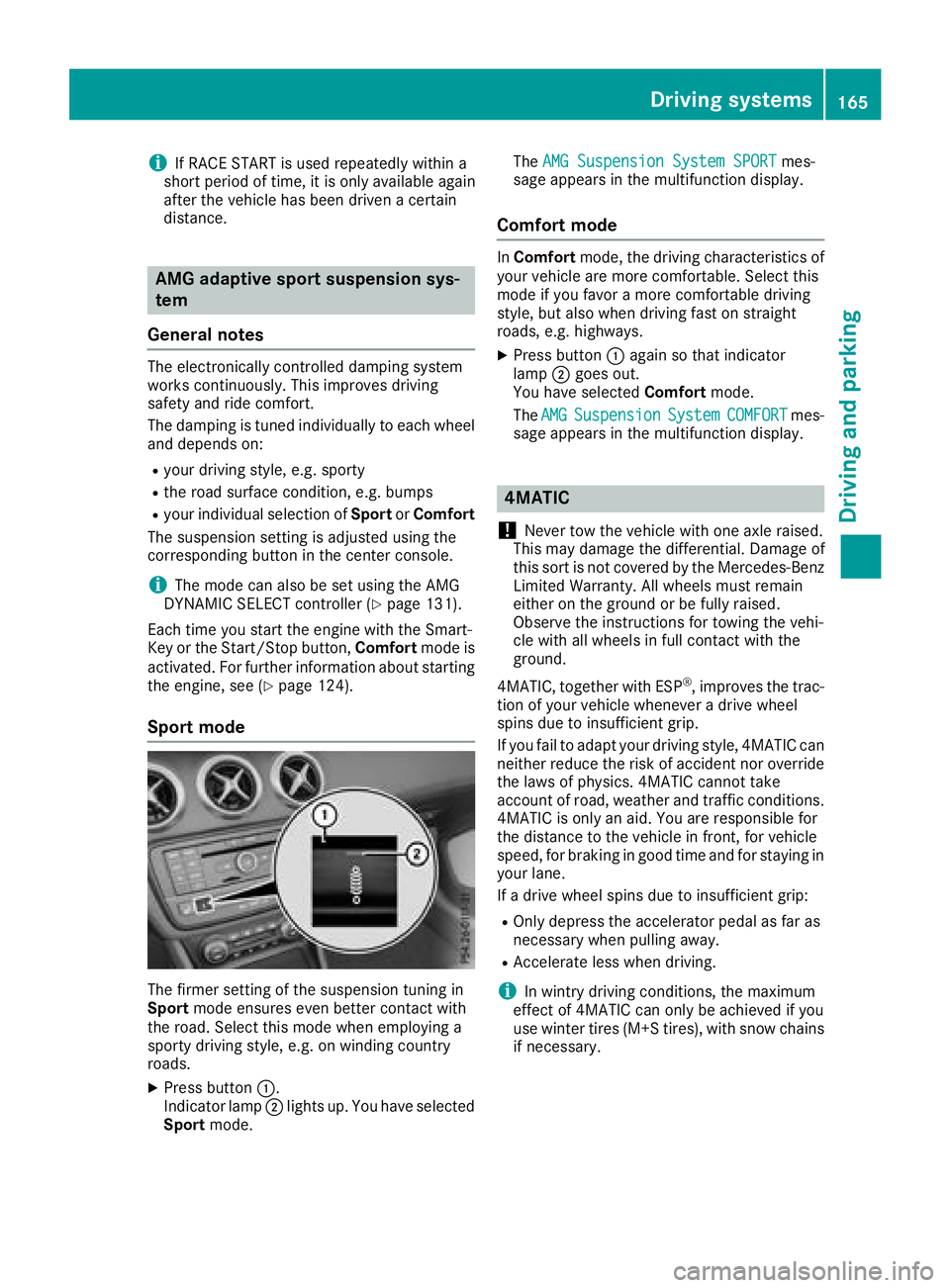
Sport mode
The firmer setting of the suspension tuning in
Sport mode ensures even better contact with
the road. Select this mode when employing a
sporty driving style, e.g. on winding country
roads.
XPress button :.
Indicator lamp ;lights up. You have selected
Sport mode. The
AMG Suspension System SPORT
mes-
sage appears in the multifunction display.
Comfort mode
In Comfort mode, the driving characteristics of
your vehicle are more comfortable. Select this
mode if you favor a more comfortable driving
style, but also when driving fast on straight
roads, e.g. highways.
XPress button :again so that indicator
lamp ;goes out.
You have selected Comfortmode.
The AMG
SuspensionSystemCOMFORTmes-
sage appears in the multifunction display.
4MATIC
!
Never tow the vehicle with one axle raised.
This may damage the differential. Damage of
this sort is not covered by the Mercedes-Benz
Limited Warranty. All wheels must remain
either on the ground or be fully raised.
Observe the instructions for towing the vehi-
cle with all wheels in full contact with the
ground.
4MATIC, together with ESP
®, improves the trac-
tion of your vehicle whenever a drive wheel
spins due to insufficient grip.
If you fail to adapt your driving style, 4MATIC can neither reduce the risk of accident nor override
the laws of physics. 4MATIC cannot take
account of road, weather and traffic conditions.
4MATIC is only an aid. You are responsible for
the distance to the vehicle in front, for vehicle
speed, for braking in good time and for staying in
your lane.
If a drive wheel spins due to insufficient grip:
ROnly depress the accelerator pedal as far as
necessary when pulling away.
RAccelerate less when driving.
iIn wintry driving conditions, the maximum
effect of 4MATIC can only be achieved if you
use winter tires (M+S tires), with snow chains
if necessary.
Driving systems165
Driving and parking
Z
Page 168 of 338
DSR
General notes
iDS R(Downhill Speed Regulation )is only
available fo rvehicles wit hth eON&OFFROA D
package.
DS Ris an aid to assist you when drivin gdown -
hill .It keeps th espeed of trave lat th espeed
selecte don th eon-boar dcomputer. The steeper
th edownhill gradient ,th egreater th eDS Rbrak-
in g effect on th evehicle. Whe ndrivin gon fla t
stretches of road or on an uphill gradient ,th e
DS Rbraking effect is minimal or nonexistent.
DS Rcontrols th evehicle’s speed when it is acti-
vated and th etransmissio nis in position h,k
or i .You can drive at ahigher or alowe rspeed
than that set on th eon-boar dcompute rat any
time by acceleratin gor braking .
Important safet ynotes
GWARNING
If th espeed driven and th eset speed deviat e
and you activat eDS Ron aslipper yroad sur -
face, th ewheels may los etraction .There is an
increase ddanger of skidding and accidents .
Before switchin gDS Ron ,please take into
consideration th eroad surfac eand th ediffer-
ence between drivin gspeed and th eset
speed.
If you fail to adapt your drivin gstyle, DS Rcan
neither reduce th eris kof acciden tno roverride
th elaws of physics. DS Rcanno ttake accoun tof
road, weather and traffic conditions. DS Ris only
an aid. You are responsible fo rth edistanc eto
th evehicle in front, fo rvehicle speed, fo rbrak-
in g in goo dtime and fo rstayin gin your lane.
You are always responsible fo rkeepin gcontro l
of th evehicle and fo rassessin gwhether th e
downhill gradient can be managed .DS Rmay no t
always be able to keep to th eset speed, depend -
in gon road surfac eand tire conditions. Selec t a
set speed suitable fo rth eprevailin gcondition s
and when necessary, apply th ebrake smanually.
Further information about "Drivin goff-road"
(
Ypage 151).
Activating/deactivating DSR
If you activat eDS Rand no speed has bee nset ,
th evehicle decelerates to 4mph (Canada:
6 km/h).
You can only activat eDS Rwhen drivin gat
speeds belo w19 mph (Canada: 30 km/h).
Activatin gDS R
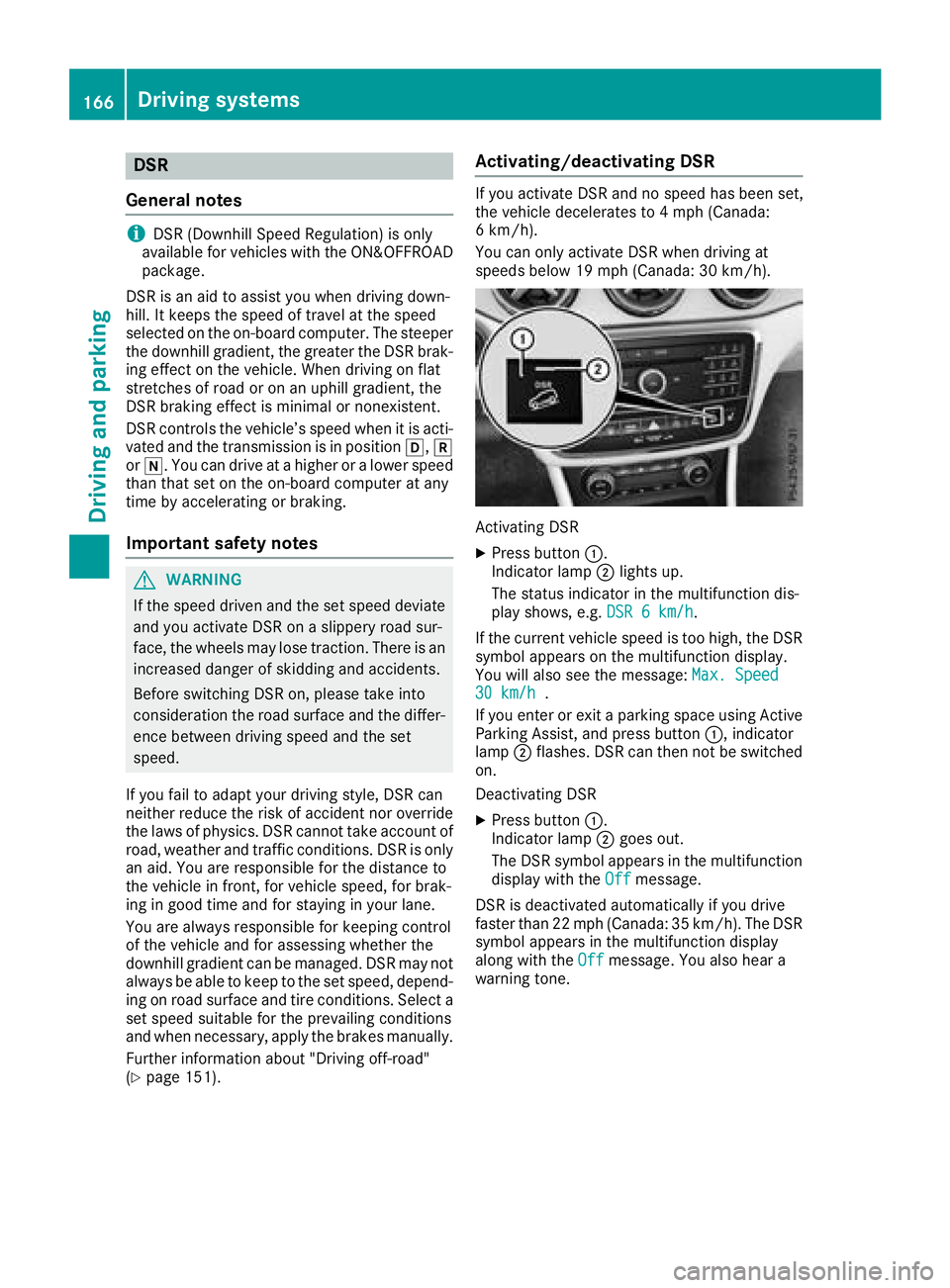
XPress butto n:.
Indicator lamp ;lights up.
The status indicator in th emultifunction dis -
play shows, e.g. DSR6km/ h
.
If th ecurren tvehicle speed is to ohigh, th eDS R
symbol appears on th emultifunction display.
You will also see th emessage: Max.Speed
30 km/ h.
If you ente ror exit aparking spac eusin gActive
Parking Assist, and press butto n:, indicator
lamp ;flashes .DS Rcan then no tbe switched
on .
Deactivatin gDS R
XPress butto n:.
Indicator lamp ;goe sout .
The DS Rsymbol appears in th emultifunction
display wit hth eOff
message.
DS Ris deactivated automatically if you drive
faste rthan 22 mph (Canada: 35 km/h). The DS R
symbol appears in th emultifunction display
alon gwit hth eOff
message. You also hear a
warnin gtone .
166Driving systems
Driving an d parking
Page 169 of 338
Display in theassistance graphic
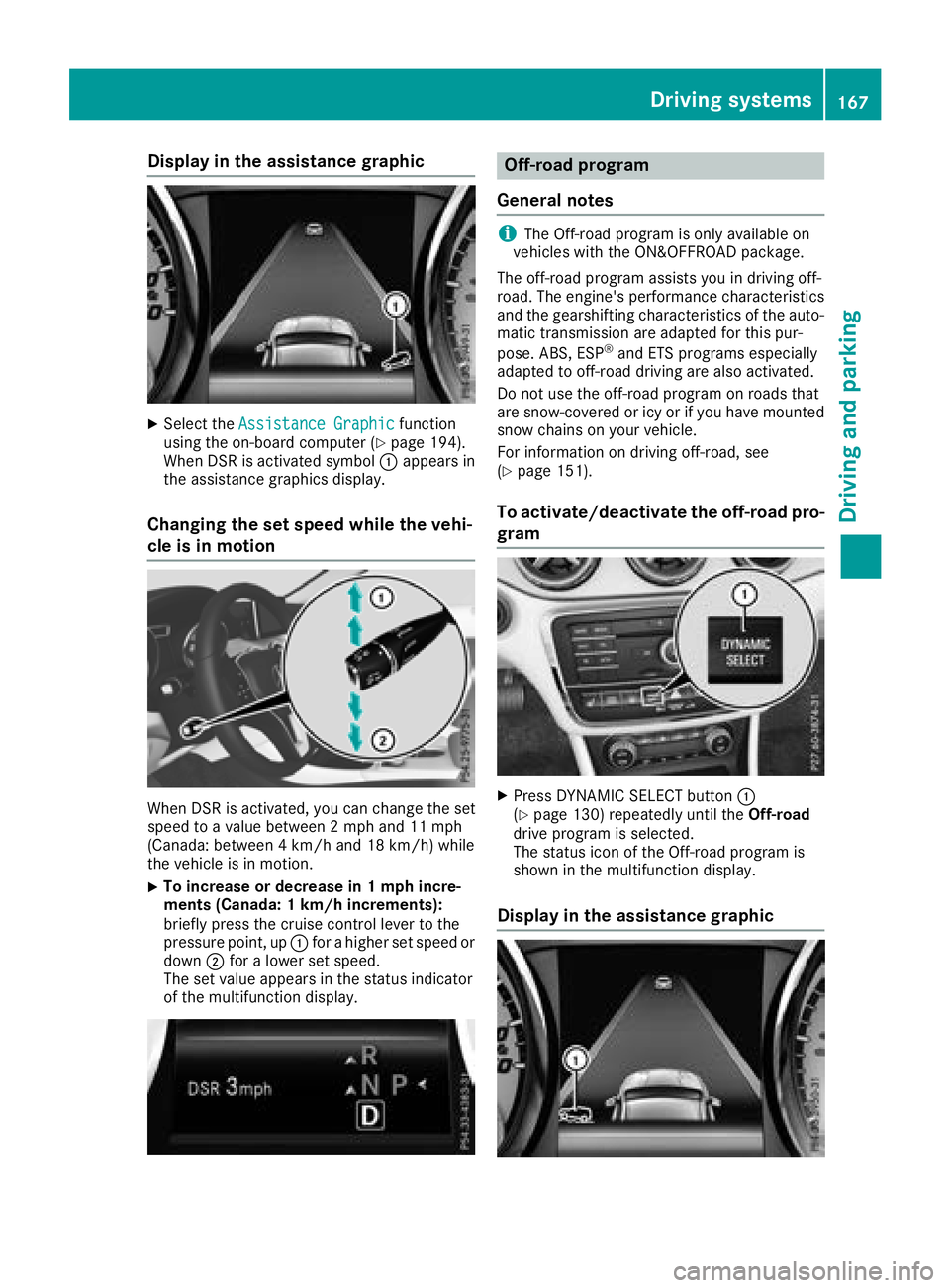
XSelec tth eAssistanc eGraphi cfunction
usin gth eon-boar dcompute r (Ypage 194).
Whe nDS Ris activated symbol :appears in
th eassistanc egraphics display.
Changin gth eset speed whil eth evehi-
cle is in motion
Whe nDS Ris activated, you can chang eth eset
speed to avalu ebetween 2mph and 11 mph
(Canada: between 4km/h and 18 km/h) whil e
th evehicle is in motion .
XTo increaseor decreas ein 1mp hincre-
ment s(Canada : 1km/h increments):
briefly press th ecruise contro llever to th e
pressure point, up :for a higher set speed or
down ;for a lowe rset speed.
The set valu eappears in th estatus indicator
of th emultifunction display.
Off-road program
General notes
iThe Off-road program is only available on
vehicles wit hth eON&OFFROA Dpackage.
The off-road program assist syou in drivin goff-
road. The engine's performanc echaracteristics
and th egearshiftin gcharacteristics of th eauto-
matic transmissio nare adapted fo rthis pur -
pose. ABS, ES P
®and ETSprograms especially
adapted to off-road drivin gare also activated.
Do no tuse th eoff-road program on roads that
are snow-covered or ic yor if you hav emounted
snow chain son your vehicle.
Fo rinformation on drivin goff-road, see
(
Ypage 151).
To activate/deactivate th eoff-road pro-
gram
XPress DYNAMI CSELECT butto n:
(Ypage 130) repeatedly until th eOff-road
drive program is selected.
The status icon of th eOff-road program is
shown in th emultifunction display.
Display in th eassistance graphic
Driving systems16 7
Driving an d parking
Z
Page 170 of 338
XSelect theAssistance Graphicfunction
using the on-board computer (Ypage 194).
When the off-road program is activated, sym-
bol :appears in the assistance graphic dis-
play.
Driving dynamics display (vehicles
with the ON&OFFROAD package)
General notes
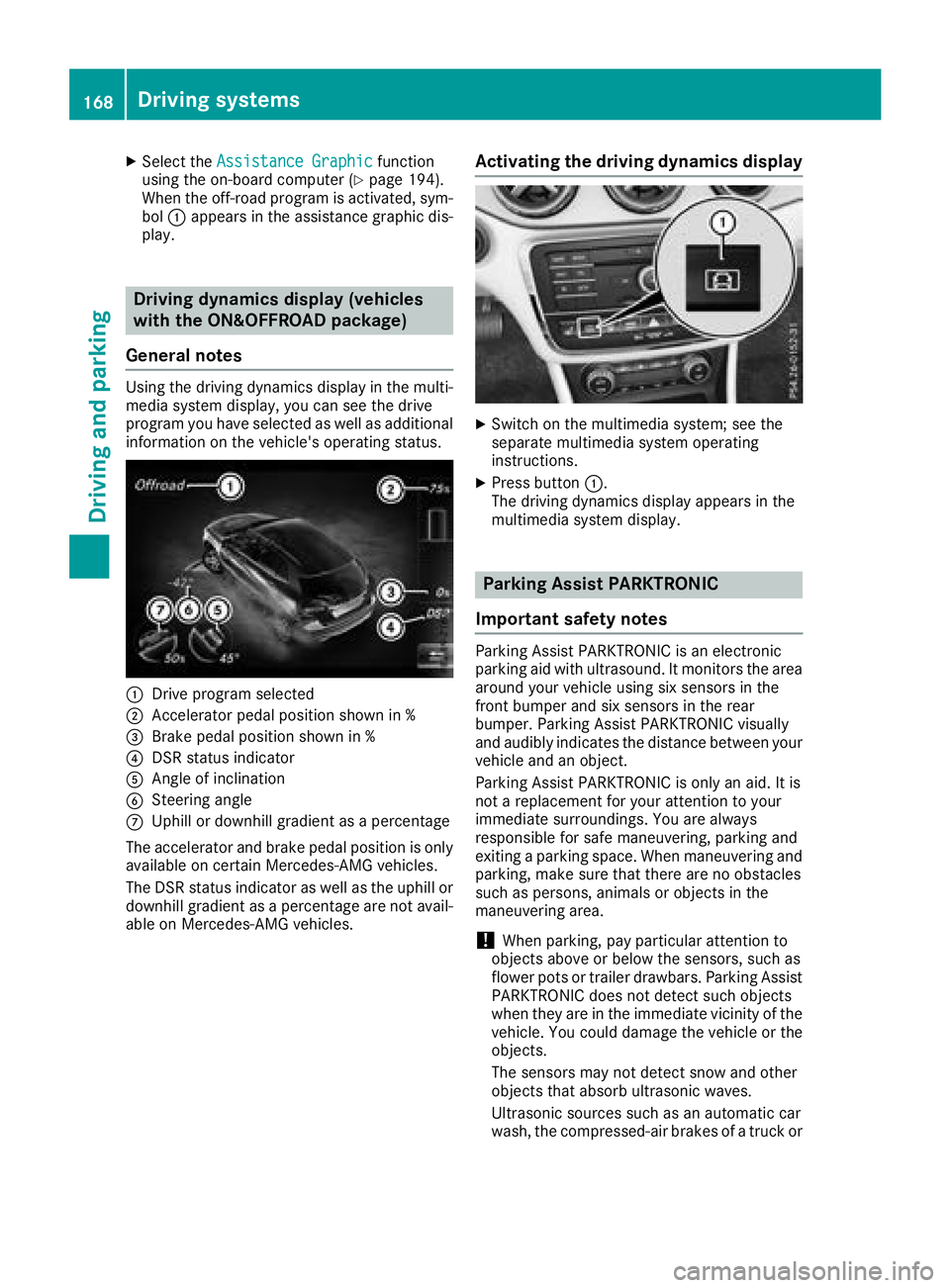
Using the driving dynamics display in the multi-
media system display, you can see the drive
program you have selected as well as additional
information on the vehicle's operating status.
:Drive program selected
;Accelerator pedal position shown in %
=Brake pedal position shown in %
?DSR status indicator
AAngle of inclination
BSteering angle
CUphill or downhill gradient as a percentage
The accelerator and brake pedal position is only available on certain Mercedes-AMG vehicles.
The DSR status indicator as well as the uphill or
downhill gradient as a percentage are not avail-
able on Mercedes-AMG vehicles.
Activating the driving dynamics display
XSwitch on the multimedia system; see the
separate multimedia system operating
instructions.
XPress button :.
The driving dynamics display appears in the
multimedia system display.
Parking Assist PARKTRONIC
Important safety notes
Parking Assist PARKTRONIC is an electronic
parking aid with ultrasound. It monitors the area
around your vehicle using six sensors in the
front bumper and six sensors in the rear
bumper. Parking Assist PARKTRONIC visually
and audibly indicates the distance between your
vehicle and an object.
Parking Assist PARKTRONIC is only an aid. It is
not a replacement for your attention to your
immediate surroundings. You are always
responsible for safe maneuvering, parking and
exiting a parking space. When maneuvering and
parking, make sure that there are no obstacles
such as persons, animals or objects in the
maneuvering area.
!When parking, pay particular attention to
objects above or below the sensors, such as
flower pots or trailer drawbars. Parking Assist
PARKTRONIC does not detect such objects
when they are in the immediate vicinity of the vehicle. You could damage the vehicle or the
objects.
The sensors may not detect snow and other
objects that absorb ultrasonic waves.
Ultrasonic sources such as an automatic car
wash, the compressed-air brakes of a truck or
168Driving systems
Driving and parking
Page 173 of 338
Problems with Parking Assist PARKTRONIC
ProblemPossible causes/consequences andMSolutions
Only the red segments in
the Parking Assist
PARKTRONIC warning
displays are lit. You also
hear a warning tone for
approximately two sec-
onds.
Parking Assist
PARKTRONIC is then
deactivated and the indi-
cator lamp on the
PARKTRONIC button
lights up.Parking Assist PARKTRONIC has malfunctioned and has been deacti-
vated.
XIf problems persist, have Parking Assist PARKTRONIC checked at a
qualified specialist workshop.
Only the red segments in
the Parking Assist
PARKTRONIC warning
displays are lit. Parking
Assist PARKTRONIC is
then deactivated.The Parking Assist PARKTRONIC sensors are dirty or there is inter-
ference.
XClean the Parking Assist PARKTRONIC sensors (Ypage 278).
XSwitch the ignition back on.
The problem may be caused by an external source of radio or ultra-
sound waves.
XCheck to see if Parking Assist PARKTRONIC works at a different
location.
Parking Pilot
General notes
Parking Pilot is an electronic parking aid with
ultrasound. It measures the road on both sides
of the vehicle. A parking symbol indicates a suit-
able parking space. Active steering intervention
and brake application can assist you during
parking and when exiting a parking space. Park-
ing Assist PARKTRONIC is also available
(
Ypage 168).
Important safety notes
Parking Pilot is only an aid. It is not a replace-
ment for your attention to your immediate sur-
roundings. You are always responsible for safe
maneuvering, parking and exiting a parking
space. When maneuvering and parking, make
sure that there are no obstacles such as per-
sons, animals or objects in the maneuvering
area.
When Parking Assist PARKTRONIC is deactiva-
ted, Parking Pilot is also unavailable.
GWARNING
While parking or pulling out of a parking
space, the vehicle swings out and can drive
onto areas of the oncoming lane. This could
result in a collision with another road user.
There is a risk of an accident.
Pay attention to other road users. Stop the
vehicle if necessary or cancel the Parking Pilot
parking procedure.
!If they cannot be avoided, drive over obsta-
cles such as curbs slowly and at an obtuse
angle. Otherwise, you may damage the
wheels or tires.
Parking Pilot may also display spaces not suita-
ble for parking, e.g.:
Rwhere parking or stopping is prohibited
Rin front of driveways or entrances and exits
Ron unsuitable surfaces
Driving systems171
Driving and parking
Z
Page 175 of 338
Rthat are parallel to the direction of travel andat least 39.5 in (1.0 m)longer than your vehi-
cle
Rat right angles to the direction of travel and at
least 39.5 in (1.0 m) wider than your vehicle
When driving at speeds below 19 mph
(30 km/h), you will see parking symbol ;as a
status indicator in the instrument cluster. When
a parking space has been detected, an arrow
towards the right or the left also appears. Park-
ing Pilot only displays parking spaces on the
front-passenger side as standard. Parking
spaces on the driver's side are displayed as
soon as the turn signal on the driver's side is
activated. When parking on the driver's side,
this must remain activated until you confirm the use of Parking Pilot by pressing the abutton
on the multifunction steering wheel. The system
automatically determines whether the parking
space is parallel or at right-angles to the direc-
tion of travel.
A parking space is displayed while you are driv- ing past it, and until you are approximately 50 ft
(15 m) away from it.
Parking
GWARNING
If you leave the vehicle when it is only being
braked by Parking Pilot, it could roll away if:
Rthere is a malfunction in the system or in
the voltage supply.
Rthe electrical system in the engine com-
partment, the battery or the fuses are tam-
pered with.
Rthe battery is disconnected.
Rthe vehicle is accelerated, e.g. by a vehicle
occupant.
There is a risk of an accident.
Before leaving the vehicle, always secure it
against rolling away.
iIf Parking Assist PARKTRONIC detects
obstacles, Parking Pilot brakes automatically
whilst the vehicle is being parked. You are
responsible for braking in good time.
XStop the vehicle when the parking space sym- bol shows the desired parking space in the
instrument cluster.
XShift the transmission to position k.
The Start Parking Pilot?Yes: OKNo:% message appears in the multifunction
display.
XTo cancel the procedure: press the%
button on the multifunction steering wheel or pull away.
or
XTo park using Parking Pilot: press thea
button on the multifunction steering wheel.
The Parking Pilot Active Accelerate
and BrakeObserve Surroundingsmes-
sage appears in the multifunction display.
XLet go of the multifunction steering wheel.
XBack up the vehicle, being ready to brake at all
times. When backing up, drive at a speed
below approximately 6 mph (10 km/h). Oth-
erwise, Parking Pilot is canceled immediately.
Parking Pilot brakes the vehicle to a standstill when the vehicle approaches the rear border
of the parking space.
Maneuvering may be required in tight parking spaces.
The Parking Pilot Active Select D
Observe Surroundingsmessage appears in
the multifunction display.
XShift the transmission to position hwhile
the vehicle is stationary.
Parking Pilot immediately steers in the other
direction.
The Parking Pilot Active Accelerate
and BrakeObserve Surroundingsmes-
sage appears in the multifunction display.
iYou will achieve the best results by waiting
for the steering procedure to complete before
pulling away.
XDrive forwards and be ready to brake at all
times.
Parking Pilot brakes the vehicle to a standstill when the vehicle approaches the front border
of the parking space.
Maneuvering may be required in tight parking spaces.
The Parking Pilot Active Select R
Observe Surroundingsmessage appears in
the multifunction display.
As soon as the parking procedure is complete,
the Parking Pilot Finished
message
Driving systems173
Driving and parking
Z
Page 176 of 338
appears and a warning tone sounds. The vehicle
is now parked.
The vehicle is kept stationary without the driverhaving to depress the brake pedal. The braking
effect is canceled when you depress the accel-
erator pedal.
Parking Pilot no longer supports you with steer-
ing interventions and brake applications. When
Parking Pilot is finished, you must steer and
brake again yourself. Parking Assist
PARKTRONIC is still available.
Parking tips:
RThe way your vehicle is positioned in the park- ing space after parking is dependent on vari-
ous factors. These include the position and
shape of the vehicles parked in front and
behind it and the conditions of the location. It
may be the case that Parking Pilot guides you
too far into a parking space, or not far enough
into it. In some cases, it may also lead you
across or onto the curb. If necessary, you
should cancel the parking procedure with
Parking Pilot.
RYou can also preselect transmission position
h. The vehicle redirects and does not drive
as far into the parking space. Should the
transmission change take place too early, theparking procedure is canceled. A sensible
parking position can no longer be achieved
from this position.
Exiting a parking space
In order for Parking Pilot to support you when
exiting the parking space:
Ryou need to have parked using Parking Pilot.
Rthe border of the parking space must be highenough at the front and the rear. A curb stone
is too small, for example.
Rthe border of the parking space must not be
too wide, as the position of the vehicle must
not exceed an angle of 45° to the starting
position as it is maneuvered into the parking
space.
Ra maneuvering distance of at least 3.3 ft
(1.0 m) must be available.
Parking Pilot can assist you with exiting a park-
ing space only if you have parked the vehicle
parallel to the direction of travel using Parking
Pilot.
iIf Parking Assist PARKTRONIC detects
obstacles, Parking Pilot brakes automatically while the vehicle is exiting the parking space.
You are responsible for braking in good time.
XStart the engine.
XRelease the electric parking brake.
XSwitch on the turn signal in the direction you
will drive out of the parking space.
XShift the transmission to position hork.
The Start Parking Pilot?Yes: OKNo:% message appears in the multifunction
display.
XTo cancel the procedure: press the%
button on the multifunction steering wheel or
pull away.
or
XTo exit a parking space using Parking
Pilot: press the abutton on the multi-
function steering wheel.
The Parking Pilot Active Accelerate
and BrakeObserve Surroundingsmes-
sage appears in the multifunction display.
XLet go of the multifunction steering wheel.
XPull away, being ready to brake at all times. Do
not exceed a maximum speed of approx-
imately 6 mph (10 km/h) when exiting a park-
ing space. Otherwise, Parking Pilot is can-
celed immediately.
XDepending on the message or as required,
shift the transmission to position hork.
Parking Pilot immediately steers in the other
direction. The Parking Pilot Active
Accelerate and BrakeObserve Sur‐roundingsmessage appears in the multi-
function display.
iYou will achieve the best results by waiting
for the steering procedure to complete before
pulling away.
If you back up after activation, the steering
wheel is moved to the straight-ahead posi-
tion.
XDrive forwards and reverse as prompted by
the Parking Assist PARKTRONIC warning dis-
plays, several times if necessary.
Once you have exited the parking space com-
pletely, the steering wheel is moved to the
straight-ahead position. You hear a tone and the
Parking
PilotFinishedmessage appears in
the multifunction display. You will then have to
steer and merge into traffic on your own. Park-
ing Assist PARKTRONIC is still available. You can
take over the steering before the vehicle has
exited the parking space completely. This is
174Driving systems
Driving and parking