climate settings MERCEDES-BENZ GLA SUV 2018 Owner's Manual
[x] Cancel search | Manufacturer: MERCEDES-BENZ, Model Year: 2018, Model line: GLA SUV, Model: MERCEDES-BENZ GLA SUV 2018Pages: 338, PDF Size: 5.59 MB
Page 14 of 338
H
Handling control systemsee ESP®(Electronic Stability Program)
HANDS-FREE ACCESS ..........................80
Hazard warning lamps
Display message ............................ 225
Switching on/off ........................... 103
Head restraints
Adjusting .........................................9 3
Adjusting (manually) ........................ 94
Adjusting (rear) ................................ 94
Headlamps
Fogging up .....................................1 04
see Automatic headlamp mode
Heating
see Climate control
High beam flasher .............................1 03
High-beam headlamps
Display message ............................ 212
Replacing bulbs .............................1 06
Switching on/off ........................... 103
Hill start assist .................................. 127
HOLD function
Activating ....................................... 163
Activation conditions ..................... 162
Deactivating ................................... 163
Display message ............................ 216
Function/notes .............................1 62
Home address
see also Digital Operator's Man-
ual ..................................................2 39
Hood
Closing ...........................................2 70
Display message ............................ 225
Important safety notes .................. 269
Opening ......................................... 269
Horn ...................................................... 31
Hydroplaning ..................................... 150
I
Ignition key
see SmartKey
Ignition lock
see Key positions
Immobilizer .......................................... 67 Indicator lamp
Replacing bulbs (rear) .................... 107
Indicator lamps
see Warning and indicator lamps
Indicators
see Turn signals
Instrument cluster
Overview .......................................... 32
Settings ......................................... 195
Warning and indicator lamps ........... 32
Instrument cluster lighting .............. 185
Interior lighting
Control ...........................................1 04
Overview ........................................ 104
Reading lamp ................................. 104
iPod
®
see also Digital Operator's Man-
ual ..................................................2 39
J
Jack
Storage location ............................ 283
Using ............................................. 321
Jump starting (engine) ......................291
K
Key positions
Start/Stop button .......................... 124
KEYLESS-GO
Convenience closing feature ............ 85
Deactivation ..................................... 70
Locking ............................................ 70
Unlocking ......................................... 70
Kickdown
Driving tips ....................................1 36
Manual gearshifting ....................... 140
Knee bag .............................................. 45
L
Lamps
see Warning and indicator lamps
Lane detection (automatic)
see Lane Keeping Assist
Lane Keeping Assist
Activating/deactivating (on-
board computer) ............................ 195
12Index
Page 19 of 338
High-beam headlamps ................... 106
Important safety notes .................. 105
Installing/removing the cover
(front wheel arch) .......................... 106
Low-beam headlamps .................... 106
Overview of bulb types .................. 105
Rear fog lamp ................................ 107
Turn signals (front) ......................... 107
Turn signals (rear) .......................... 107
Rescue card ......................................... 28
Reserve (fuel tank)
see Fuel
Reserve fuel
Display message ............................ 215
Warning lamp ................................. 234
see Fuel
Residual heat (climate control) ........ 121
Restraint system
Display message ............................ 207
Introduction ..................................... 39
Warning lamp ................................. 234
Warning lamp (function) ................... 40
Reverse gear (selector lever) ........... 134
Reversing feature
Roller sunblind ................................. 89
Side windows ................................... 83
Tailgate ............................................ 78
Roadside Assistance (breakdown) .... 26
Roller sunblind
Panorama roof with power tilt/
sliding panel ..................................... 88
Roof carrier ........................................ 253
Roof lining and carpets (cleaning
guidelines) ......................................... 281
Roof load (maximum) ........................ 333
Route guidance
see also Digital Operator's Man-
ual .................................................. 239
S
SafetyChildren in the vehicle ..................... 53
see Occupant safety
Safety system
see Driving safety systems
SD card
Inserting ........................................ 245 Inserting/removing ........................ 245
Removing ....................................... 245
SD memory card
see also Digital Operator's Man-
ual .................................................. 239
Search & Send
see also Digital Operator's Man-
ual .................................................. 239
Seat
Correct driver's seat position ........... 91
Seat belts
Adjusting the height ......................... 43
Cleaning ......................................... 280
Correct usage .................................. 42
Fastening ......................................... 43
Important safety guidelines ............. 41
Introduction ..................................... 40
Releasing ......................................... 43
Warning lamp ................................. 227
Warning lamp (function) ................... 43
Seats
Adjusting (electrically) ..................... 93
Adjusting (manually) ........................ 92
Adjusting (Performance Seat) .......... 95
Adjusting the 4-way lumbar sup-
port .................................................. 95
Adjusting the head restraint ............ 93
Cleaning the cover ......................... 280
Folding the backrest (rear com-
partment) forwards/back .............. 251
Important safety notes .................... 91
Seat heating problem ...................... 96
Storing settings (memory func-
tion) ............................................... 100
Switching seat heating on/off ......... 95
Section
Cargo compartment ......................... 77
Securing cargo .................................. 252
Selecting a gear
see Automatic transmission
Selector lever
Cleaning ......................................... 280
Sensors (cleaning instructions) ....... 278
Service menu (on-board com-
puter) .................................................. 195
Service message
see ASSYST PLUS
Index17
Page 114 of 338
Overview of climate control systems
General notes
Observe the settings recommended on the fol-
lowing pages. The windows could otherwise fog
up.
To prevent the windows from fogging up:
Rswitch off climate control only briefly
Rswitch on air-recirculation mode only briefly
Rswitch on the cooling with air dehumidifica-
tion function
Rswitch on the defrost windshield function
briefly, if required
The air-conditioning system or dual-zone auto-
matic climate control regulates the temperature and the humidity of the vehicle interior and fil-
ters undesirable substances from the air.
The air-conditioning system or dual-zone auto-
matic climate control can only be operated
when the engine is running. Optimum operation
is only achieved with the side windows and pan- orama roof with power tilt/sliding panel closed.
If you start the engine using your smartphone,
the last selected climate control setting is reac-
tivated (
Ypage 84).
The residual heat function can only be activated
or deactivated with the ignition switched off
(
Ypage 121). Always keep the ventilation flaps behind the
side trim panel in the cargo compartment clear
(
Ypage 107). Otherwise the vehicle will not be
ventilated correctly.
iVentilate the vehicle for a brief period during
warm weather, e.g. using the convenience
opening feature (
Ypage 84). This will speed
up the cooling process and the desired inte-
rior temperature will be reached more
quickly.
iThe integrated filter filters out most parti-
cles of dust and soot and completely filters
out pollen. It also reduces gaseous pollutants
and odors. A clogged filter reduces the
amount of air supplied to the vehicle interior.
For this reason, you should always observe
the interval for replacing the filter, which is
specified in the Maintenance Booklet. As it
depends on environmental conditions, e.g.
heavy air pollution, the interval may be
shorter than stated in the Maintenance Book-
let.
iIt is possible that under certain circumstan-
ces the residual heat function may be activa-
ted automatically an hour after the SmartKey
has been removed in order to dry the aut
o-
matic climate control. The vehicle is then ven-
tilated for 30 minutes.
112Overview of climate control systems
Climate control
Page 116 of 338
BSwitches cooling with air dehumidification on/off (Ypage 117)
CSwitches the rear window defroster on/off (Ypage 120)
Notes on using the air-conditioning
system
Air-conditioning system
Below, you can find a number of notes and rec-
ommendations to help you use the air-condi-
tioning system optimally.
RSwitch on the air-conditioning system by turn- ing control knob Aclockwise to the desired
position (except position 0).
RSet the temperature to 72 ‡ (22 †).
RRecommendation for avoiding misted
windows at low exterior temperatures or
in rain: switch on the ¿cooling with dehu-
midification function (
Ypage 117).
Set air distribution to ¯and if possible
switch off PandO (
Ypage 118).
Deactivate air-recirculation mode e
(
Ypage 121).
Set airflow control Ato a setting between 3
and 6(
Ypage 119).
RRecommendation for rapid cooling or
heating of the vehicle interior: briefly set
airflow control Ato a setting between 3and
6 (
Ypage 119).
RRecommendation for a constant vehicle
interior temperature: set airflow controlA
to a setting between 1and 3(
Ypage 119).
RRecommendation for air distribution in
winter: select the Oand¯ settings
(
Ypage 118).
Recommendation for air distribution in
summer: select the PorP and¯
settings (
Ypage 118).
ROnly use the "Windshield defrosting" function
briefly until the windshield is clear again.
ROnly use air-recirculation mode briefly, e.g. if
there are unpleasant outside odors or when in
a tu
nnel. The windows could otherwise fog up,
since no fresh air is drawn into the vehicle in
air-recirculation mode.
RIf you change the settings of the climate con-
trol system, the climate status display
appears for approximately three seconds at
the bottom of the screen on the multimedia
system display; see Digital Operator's Man-
ual. You will see the current settings of the
various climate control functions.
DYNAMIC SELECT button (except
Mercedes-AMG vehicles)
You can choose between various drive programs
with the DYNAMIC SELECT button
(
Ypage 130).
If you have selected drive program E:
Rwhen heating, the electrical heater booster is
deactivated and in the warming-up phase
heat output is reduced
Rthe rear window defroster running time is
reduced
Depending on the configuration, climate set-
tings may also be influenced in the drive pro-
gram I.
If you have selected drive program Cor S, cli-
mate settings are not influenced.
ECO start/stop function
During automatic engine switch-off, the climate
control system only operates at a reduced capa-
city. If you require the full climate control output,
you can switch off the ECO start/stop function
by pressing the ECO button (
Ypage 129).
114Overview of climate control systems
Climate control
Page 118 of 338
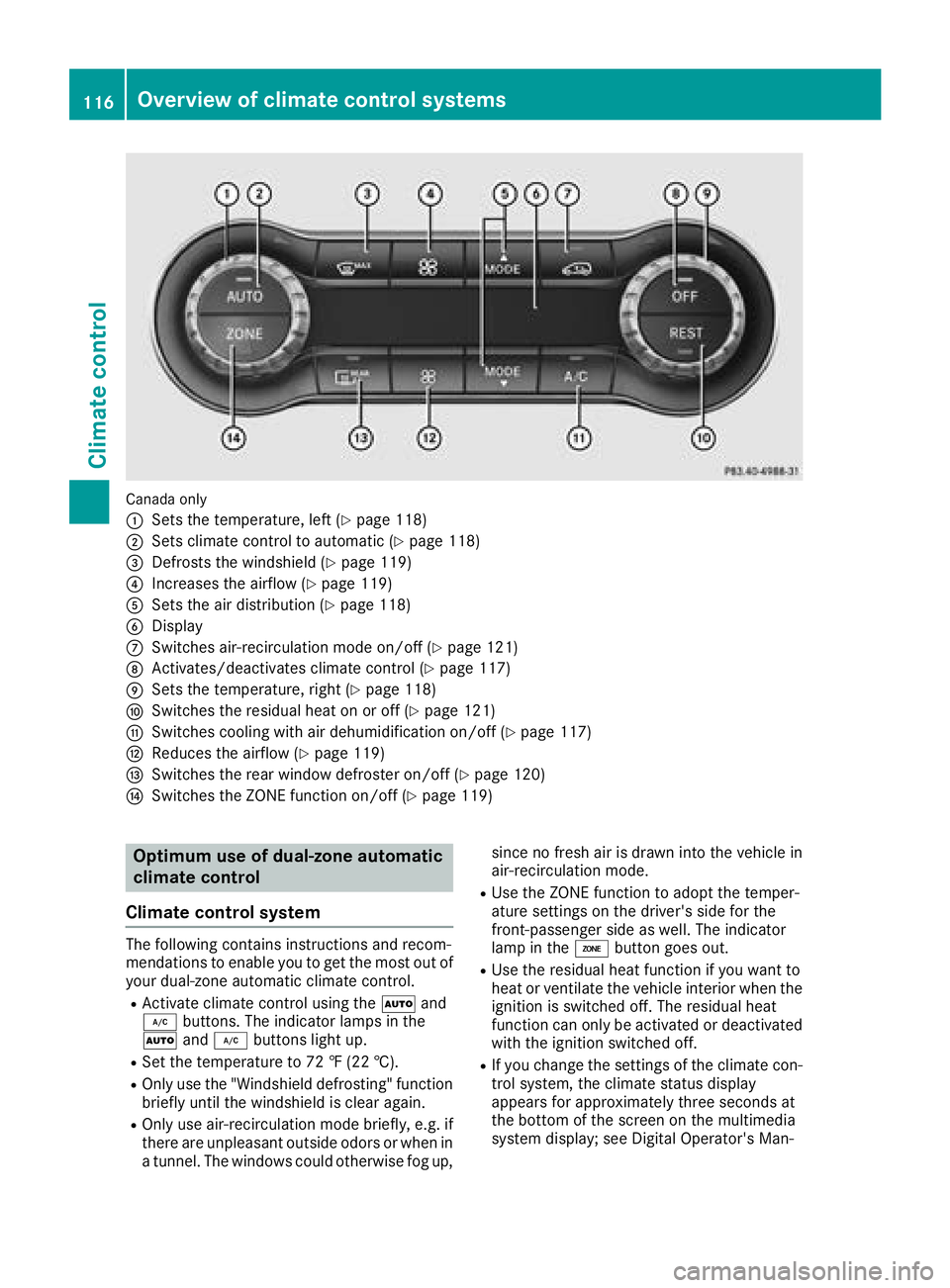
Canada only
:
Sets the temperature, left (Ypage 118)
;Sets climate control to automatic (Ypage 118)
=Defrosts the windshield (Ypage 119)
?Increases the airflow (Ypage 119)
ASets the air distribution (Ypage 118)
BDisplay
CSwitches air-recirculation mode on/off (Ypage 121)
DActivates/deactivates climate control (Ypage 117)
ESets the temperature, right (Ypage 118)
FSwitches the residual heat on or off (Ypage 121)
GSwitches cooling with air dehumidification on/off (Ypage 117)
HReduces the airflow (Ypage 119)
ISwitches the rear window defroster on/off (Ypage 120)
JSwitches the ZONE function on/off (Ypage 119)
Optimum use of dual-zone automatic
climate control
Climate control system
The following contains instructions and recom-
mendations to enable you to get the most out of
your dual-zone automatic climate control.
RActivate climate control using the Ãand
¿ buttons. The indicator lamps in the
à and¿ buttons light up.
RSet the temperature to 72 ‡ (22 †).
ROnly use the "Windshield defrosting" function
briefly until the windshield is clear again.
ROnly use air-recirculation mode briefly, e.g. if
there are unpleasant outside odors or when in
a tunnel. The windows could otherwise fog up, since no fresh air is drawn into the vehicle in
air-recirculation mode.
RUse the ZONE function to adopt the temper-
ature settings on the driver's side for the
front-passenger side as well. The indicator
lamp in the
ábutton goes out.
RUse the residual heat function if you want to
heat or ventilate the vehicle interior when the
ignition is switched off. The residual heat
function can only be activated or deactivated
with the ignition switched off.
RIf you change the settings of the climate con-
trol system, the climate status display
appears for approximately three seconds at
the bottom of the screen on the multimedia
system display; see Digital Operator's Man-
116Overview of climate control systems
Climate control
Page 119 of 338
ual. Youwillsee the current settings of the
various climate control functions.
DYNAMIC SELECT button (except
Mercedes-AMG vehicles)
You can choose between various drive programs
wit h the DYNAM IC SELECT button
(
Ypage 130).
If you have selected drive program E:
Rwhen heating, the electrical heater booster is
deactivated and inthe warming-up phase
heat output isreduced
Rthe rear window defroster running time is
reduced
Dependin g on the configuration, climate set-
tings may also beinfluenced inthe drive pro-
gram I.
If you have selected drive program Cor S,cli-
mate settings are not influenced.
ECO start/stop function
During automat icengine switch-off, the climate
control system only operates at a reduced capa-
city. Ifyou require the full climate control output,
you can switch off the ECO start /stop function
by pressing the ECO button (
Ypage 129).
Operating the climate control sys-
tems
Activating/deactivating climate con-
trol
General notes
When the climate control is switched off, the air
supply and air circulation are also switched off.
The wind ows could fog up. Therefore, switch off
clim ate control only brie fly
Air-conditioning system
XTurn theSmartKey to position 2inthe igni-
tion lock (Ypage 124).
XTo switch on: turn controlAclock wiseto
the desired position (except position 0)
(
Ypage 113).
XTo switch off: turn controlAcounter-clock-
wise to position 0(Ypage 113).
Dual-zone automatic climate control
XTurn the SmartKey to position 2inthe igni-
tion lock (Ypage 124).
XTo activate: press theÃbutton.
The indicator lamp inthe à button lights
up. Airflow and air distribution are set to auto-
mat icmode.
or
XPress the ^button.
The indicator lamp inthe ^ button goes
out. The previously selected settings are
restored.
XTo deactivate: press the^button.
The indicator lamp inthe ^ button lights
up.
iDual-zone automatic climate control: switch
on clim ate control primarily using the Ã
button.
Switching cooling with air dehumidi-
fication on/off
General notes
If you deactivate the "Cooling with air-dehumid-
ification" function, the air inside the vehicle will
not becooled. The air inside the vehicle willalso
not be dehumidif ied. The windows can fog up
more quickly. Therefore, only deactivate the
"Cooling with air-dehumidif ication" function
briefly.
The "Cooling with air dehumidif ication" function
is only availab lewhen the engine isrunning. The
air inside the vehicle iscooled and dehumidif ied
according to the temperature selected.
Condensation may drip from the underside of
the vehicle when it is in cooling mode. This is
normal and not a sign that there is a malfunc-
tion.
Activating/deactivating
XPress the ¿button.
The indicator lamp inthe ¿ button lights
up or goes out.
The indicator lamp inthe button indicates that
the respective function isactivated. The
"Cooling with air dehumidif ication" function
has a delayed switch-off feature.
Operating the climate control systems117
Climate control
Page 120 of 338

Problems with the "Cooling with air dehumidification" function
ProblemPossible causes/consequences andMSolutions
The indicator lamp in the
¿button flashes
three times or remains
off. The "Cooling with air
dehumidification" func-
tion cannot be switched
on.Cooling with air dehumidification has been deactivated due to a mal-
function.
XVisit a qualified specialist workshop.
Setting climate control to automatic
General notes
The automatic climate control function is only
available in conjunction with dual-zone auto-
matic climate control.
In automatic mode, the set temperature is main-
tained automatically at a constant level. The
system automatically regulates the temperature
of the dispensed air, the airflow and the air dis-
tribution.
The "Cooling with air dehumidification" function
is activated automatically in automatic mode.
Setting climate control to automatic
XTurn the SmartKey to position ;in the igni-
tion lock (Ypage 124).
XSet the desired temperature.
XTo activate: press theÃbutton.
The indicator lamp in the Ãbutton lights
up. Automatic air distribution and airflow are
activated.
XTo switch to manual mode: press theÉ
or Ë button.
or
XPress the KorI button.
The indicator lamp in the Ãbutton goes
out. Automatic air distribution and airflow are
deactivated.
Setting the temperature
Air-conditioning system
You can set the temperature for the entire vehi- cle. The set temperature is automatically main-
tained at a constant level.
XTurn the SmartKey to position 2in the ignition
lock (Ypage 124).
XTo increase or reduce: turn control:coun-
ter-clockwise or clockwise (Ypage 113). Only
change the temperature setting in small
increments. Start at 72 ‡ (22 †).
Dual-zone automatic climate control
Different temperatures can be set for the driv-
er's and front-passenger sides. The set temper-
ature is automatically maintained at a constant
level.
XTurn the SmartKey to position 2in the ignition
lock (Ypage 124).
XTo increase or decrease: turn control:or
E counter-clockwise or clockwise
(
Ypage 115). Only change the temperature
setting in small increments. Start at 72 ‡
(22 †).
Setting the air distribution
Air-conditioning system
Air distribution settings
¯ Directs air through the defroster vents
P Directs air through the center and side air
vents
O Directs air through the footwell air vents
118Operating the climate control systems
Climate control
Page 121 of 338
iYou can also activate several air distribution
settings simultaneously. To do this, press
multiple air distribution buttons. The air is
then directed through various vents.
iRegardless of the air distribution setting,
airflow is always directed through the side air
vents. The side air vents can only be closed if
the adjusters are turned clockwise until they
engage.
Setting the air distribution
XTurn the SmartKey to position 2in the igni-
tion lock (Ypage 124).
XPress one or more of the P,O, ¯
buttons.
The corresponding indicator lamp lights up
briefly.
Dual-zone automatic climate control
Air distribution settings
¯ Directs air through the defroster vents
P Directs air through the center and side air
vents
O Directs air through the footwell air vents
S Directs air through the center, side and
footwell vents
b Directs air through the defroster, center
and side air vents
a Directs air through the defroster and
footwell vents
_ Directs air through the defroster, center,
side and footwell vents
iRegardless of the air distribution setting,
airflow is always directed through the side air
vents. The side air vents can only be closed if
the adjusters are turned clockwise until they
engage.
Setting the air distribution
XTurn the SmartKey to position 2in the igni-
tion lock (Ypage 124).
XPress the ÉorË button repeatedly
until the desired symbol appears in the dis-
play.
Setting the airflow
Air-conditioning system
XTurn the SmartKey to position 2in the igni-
tion lock (Ypage 124).
XTo increase or reduce: turn controlAcoun-
ter-clockwise or clockwise (Ypage 113).
Dual-zone automatic climate control
XTurn the SmartKey to position 2in the igni-
tion lock (Ypage 124).
XTo increase or reduce: press theKor
I button.
Switching the ZONE function on/off
This function is only available with dual-zone
automatic climate control.
XTo activate: press theábutton.
The indicator lamp in the ábutton lights
up.
The temperature setting for the driver's side
is not adopted for the front-passenger side.
XTo deactivate: press theábutton.
The indicator lamp in the ábutton goes
out.
The temperature setting for the driver's side
is adopted for the front-passenger side.
Defrosting the windshield
General notes
You can use this function to defrost the wind-
shield or to clear a fogged up windshield and
side windows.
iYou should only select the "Windshield
defrosting" function until the windshield is
clear again.
Switching the "Windshield defrosting"
function on or off
XTurn the SmartKey to position 2in the igni-
tion lock (Ypage 124).
XTo activate: press the¬button.
The indicator lamp in the ¬button lights
up.
Operating the climate control systems119
Climate control
Page 122 of 338
The climate control system switches to the
following functions:
Rhigh airflow
Rhigh temperature
Rair distribution to the windshield and front
side windows
Rair-recirculation mode off
iThe "Windshield defrosting" function auto-
matically sets the blower level to the optimum
defrosting effect. As a result, the airflow may
increase or decrease automatically after the
¬ button is pressed.
iYou can adjust the blower level manually
while the "Windshield defrosting" function is
in operation:
RAir-conditioning system: turn airflow con-
trol Acounter-clockwise or clockwise
(
Ypage 113).
RDual-zone automatic climate control: press
the ó orô button.
XTo deactivate: press the¬button.
The indicator lamp in the ¬button goes
out. The previously selected settings are
restored. Air-recirculation mode remains
deactivated.
or
XDual-zone climate control: press the Ã
button.
The indicator lamp in the ¬button goes
out. Airflow and air distribution are set to
automatic mode.
or
XAir-conditioning system: turn temperature
control :counter-clockwise or clockwise
(
Ypage 113).
Dual-zone automatic climate control: turn
temperature control :orE counter-clock-
wise or clockwise (
Ypage 115).
MAX COOL maximum cooling
The MAX COOL function is only available in vehi-
cles for the USA.
MAX COOL is only operational when the engine
is running.
XTo activate: press theÙbutton.
The indicator lamp in the button lights up.
XTo deactivate: press theÙbutton.
The indicator lamp goes out. The previously
selected settings are restored.
When you activate MAX COOL, climate control
switches to the following functions:
Rmaximum cooling
Rmaximum airflow
Rair-recirculation mode on
Defrosting the windows
Windows fogged up on the inside
Air-conditioning system
XActivate the ¿"Cooling with air dehumid-
ification" function.
XIf the windows continue to fog up, activate the
¬ "Windshield defrosting" function.
iYou should only select this setting until the
windshield is clear again.
Dual-zone automatic climate control
XActivate the ¿"Cooling with air dehumid-
ification" function.
XActivate automatic mode Ã.
XIf the windows continue to fog up, activate the
¬ "Windshield defrosting" function.
iYou should only select this setting until the
windshield is clear again.
Windows fogged up on the outside
XActivate the windshield wipers.
XSet the air distribution to PorO.
iYou should only select this setting until the
windshield is clear again.
Rear window defroster
General notes
The rear window defroster has a high current
draw. You should therefore switch it off as soon
as the rear window is clear. Otherwise, the rear window defroster switches off automatically
after several minutes.
120Operating the climate control systems
Climate control
Page 139 of 338
Rthe availability of the ECO start/stop function
Rthe climate control
Information about configuring drive program I
with the multimedia system can be found in the
Digital Operator's Manual.
iTo permanently select the gears in drive
program Iusing the steering wheel paddle
shifters, select the M(manual) setting for the
drive.
Offroad drive program
The Off-road drive program is characterized by
the following:
Rthe vehicle exhibits optimal driving charac-
teristics on easily negotiable off-road terrain.
Drive program E (Economy)
Drive program Eis characterized by the follow-
ing:
Rcomfort-oriented engine settings.
Roptimal fuel consumption resulting from the
automatic transmission shifting up sooner.
Rthe vehicle pulls away more gently in forward
and reverse gears, unless the accelerator
pedal is depressed fully.
Rthe vehicle has improved driving stability, for
example on slippery road surfaces.
Rthe automatic transmission shifting up
sooner. This results in the vehicle being driven
at lower engine speeds and the wheels being
less likely to spin.
Rgliding mode is activated automatically when
engine-internal conditions are fulfi lled and
the accelerator is not depressed. At the same
time the transmission’s clutch opens and the
vehicle rolls freely using its kinetic energy. As
a result great distances can be completed
without the engine brake and fuel consump-
tion reduced.
iThe availability of gliding mode depends on
various factors, including the following:
Rthe engine and transmission temperature
Rthe downhill gradient
Rthe vehicle speed
Rperforming regular adaptation functions
When you depress the brake pedal, gliding
mode is deactivated, depending on pedal
pressure. When you activate cruise control or Distance
Pilot DISTRONIC, gliding mode is not availa-
ble.
Mercedes-AMG vehicles
Drive program I (Individual)
In drive program Ithe following properties of the
drive program can be selected:
Rthe drive (engine management)
Rthe transmission management
Rthe suspension (vehicles with AMG adaptive
sport suspension system)
RESP®
Information about configuring drive program I
with the multimedia system can be found in the Digital Operator's Manual.
Drive program C (Comfort)
Drive program Cis characterized by the follow-
ing:
Rthe vehicle delivers comfortable, economical
handling characteristics.
Rthe vehicle pulls away more gently in forward
and reverse gears, unless the accelerator
pedal is depressed fully.
Rthe vehicle has improved driving stability, for
example on slippery road surfaces.
Roptimal fuel consumption resulting from the
automatic transmission shifting up sooner.
The vehicle is driven in the low engine speed
range and the wheels are less likely to spin.
Rgliding mode is available.
Rthe ECO start/stop function is available.
Drive program S (Sport)
Drive program Sis characterized by the follow-
ing:
Rthe vehicle exhibits sporty driving character-
istics.
Rthe automatic transmission shifts up later.
The fuel consumption possibly being higher
as a result of the later automatic transmission shift points.
Rthe suspension exhibits stiff springing and
damping settings (vehicles with AIR adaptive
sport suspension system).
Rgliding mode is not available.
Rthe ECO start/stop function is not available.
Automatic transmission137
Driving an d parking
Z