mirror MERCEDES-BENZ GLA SUV 2020 Owner's Guide
[x] Cancel search | Manufacturer: MERCEDES-BENZ, Model Year: 2020, Model line: GLA SUV, Model: MERCEDES-BENZ GLA SUV 2020Pages: 346, PDF Size: 51.22 MB
Page 187 of 346
still
detects increasing lapsesinconcen tra-
tion, youwillbewarned againafter 15minutes
at the earliest. Thiswillonly happen ifATTEN-
TION ASSISTstill detects typicalindicators of
fatigue orincreasing lapsesinconcen tration.
Vehicles withtheCOMAND multimedia
system: ifawarning isoutput inthe multi-
function display,aservice stationsearchis
performed inthe multimedia system.Youcan
select aservice stationandnavigation tothis
service stationwillthen begin. Thisfunction
can beactivated ordeactivated inthe multi-
media system; seetheDigital Operator's Man-
ual . Lane
Tracking package
General notes The
Lane Tracking packageconsistsofBlind
Spot Assist (Ypage 185)andLane Keeping
Assist (Ypage 186).
Blind SpotAssis t General
notes
Blind SpotAssist monitors theareas oneither
side ofthe vehicle thatarenot visible tothe
driver withtwolateral, rear-facing radarsen-
sors. Awarning displayin the exterior mirrors
draws yourattent iontovehicles detected in
the monitored area.Ifyou then switch onthe
corresponding turnsignal tochange lane,you
will also receive anoptical andaudiblewarn-
ing.
Blind SpotAssist supports youfrom aspeed of
approximately 20mph (30km/h).
Importa ntsafety notes G
WARNING
Blind SpotAssist doesnotreact to:
R vehicles overtaken tooclosely onthe side,
placing theminthe blind spotarea
R vehicles whichapproach withalarge
speed differential andovertake yourvehi-
cle
As aresult, BlindSpotAssist maynotgive
warnings insuch situations. Thereisarisk
of an accident. Always
observe thetraffic conditions care-
fully ,and maintain asafe lateral distance.
Blind SpotAssist isonly anaid. Itmay failto
detect somevehicles andisno substitute for
attent ivedriving. Alwaysensurethatthere is
sufficient distancetothe side forother road
users andobstacles.
i USA
only:
This device hasbeen approved bythe FCC
as a"Vehicul arRada rSystem". Theradar
sensor isintended foruse inan automotive
radar system only.Removing, tampering
with, oraltering thedevice willvoid anywar-
ranties, andisnot permitted bythe FCC. Do
not tamper with,alter, oruse inany non-
approved way.
Any unauthorized modificationtothis device
could voidtheuser’s authority tooperate
the equip ment.
Rada rsenso rs
The radar sensors forBlind SpotAssist are
integrated intotherear bumper. Makesure
that thebumpers arefree from dirt,iceor
slush. Thesensors mustnotbecovered, for
example bycycle racks oroverhanging loads.
Following asevere impact orinthe event of
damage tothe bumpers, havethefunction of
the radar sensors checked ataqual ified spe-
cialist workshop. BlindSpotAssist maynolon-
ger work properly.
Monitoring rangeofthe senso rs
In particular, thedetection ofobstacles canbe
impaired if:
R there isdirt onthe sensors oranything else
covering thesensors
R there ispoor visibil ity,e.g. due tofog, heavy
rain orsnow
R anarrow vehicle traveling infront ,e.g. a
motorbike orbicycle
R the road hasvery wide lanes
R the road hasnarrow lanes
R you arenot driving inthe middle ofthe lane
R there arebarriers orother roadboundarie s
Vehicles inthe monitoring rangearethen not
indicated.
Blind SpotAssist monitors thearea upto10 ft
(3 m) behind yourvehicle anddirectly nextto
it. Driving
systems
185Drivingandparking Z
Page 188 of 346
If
the lanes arenarrow, vehiclesdriving inthe
lane beyond thelane next toyou rvehicle may
be indicated ,especia llyifthe vehicle sare not
driving inthe middl eof their lane. Thismay be
the case ifthe vehicle sare driving onthe inner
side oftheir lane.
Due tothe nature ofthe system:
R warnings maybeissu edinerror when driv-
ing close tocrash barriersor simil arsolid
lane borders.
R warnings maybeinterrupted whenyouare
driving alongsideparticul arlylong vehicle s,
such astrucks, foraprolonged time.
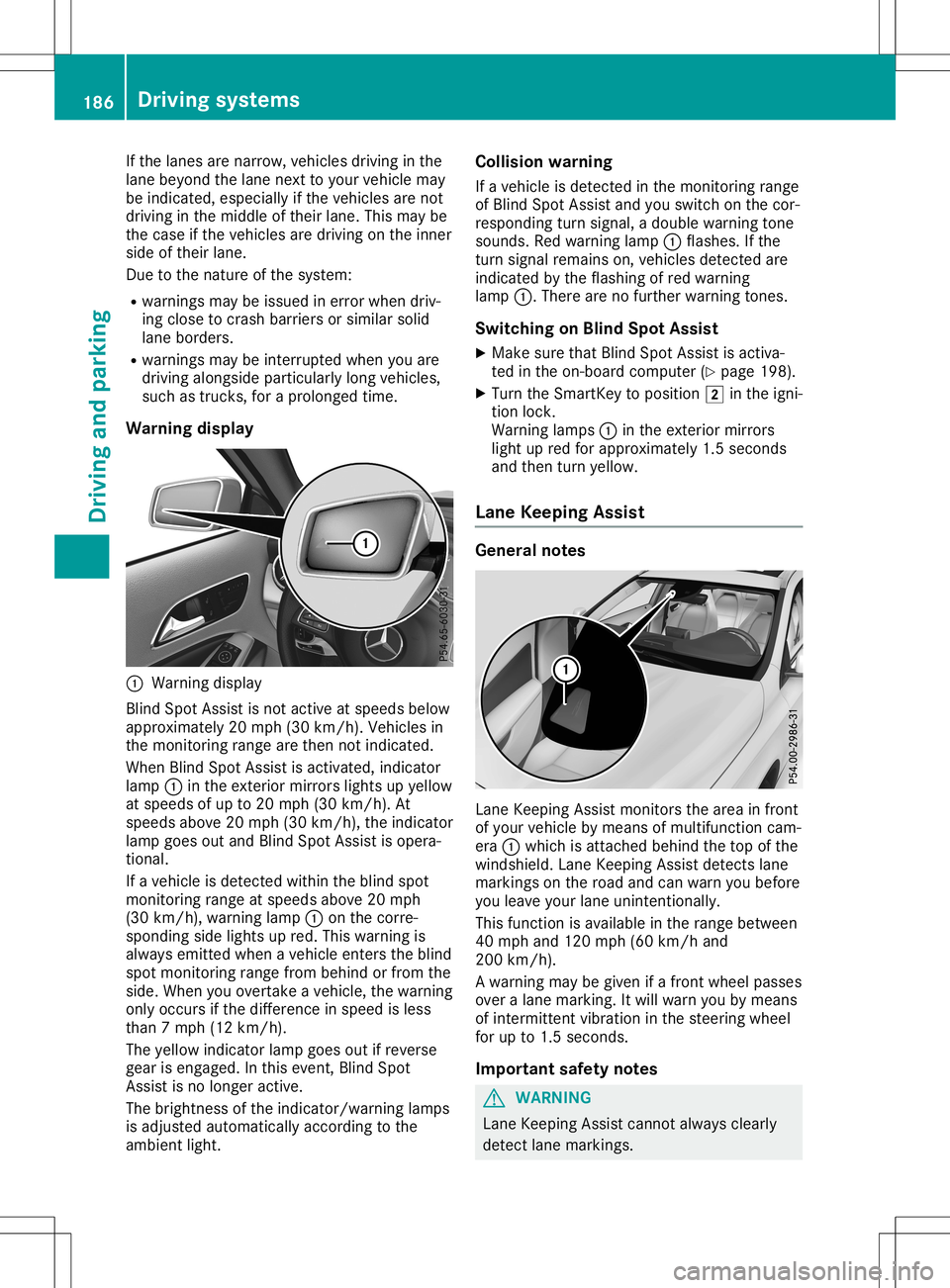
Warning display 0043
Warning display
Blind SpotAssist isnot active atspeed sbelow
appro ximately 20mph (30km/h). Vehiclesin
the monitoring rangearethen notindicated .
When BlindSpotAssist isactivated, indicator
lamp 0043inthe exterior mirrorslightsupyellow
at speed sof up to20 mph (30km/h ).At
speed sabove 20mph (30km/h), theindicator
lamp goesoutand Blind SpotAssist isopera -
tional.
If avehicle isdetected withintheblind spot
monitoring rangeatspeed sabove 20mph
(30 km/h), warning lamp0043onthe corre-
sponding sidelights upred. This warning is
alw ays emitted whenavehicle enterstheblind
spot monitoring rangefrombehind orfrom the
side. When youovertake avehicle ,the warning
only occurs ifthe difference inspeed isless
than 7mph (12km/h ).
The yellow indicator lampgoesoutifreverse
gear isengaged .In this event, BlindSpot
Assist isno longer active.
The brightness ofthe indicator/wa rninglamps
is adjusted automaticallyaccording tothe
ambi entlight. Col
lision warning
If avehicle isdetected inthe monitoring range
of Blind SpotAssist andyouswitch onthe cor-
respondi ngturn signal ,a doub lewarning tone
sounds. Redwarning lamp0043flashe s.Ifthe
turn signal remains on,vehicle sdetected are
indicated bythe flashi ngofred warning
lamp 0043.There arenofurther warning tones.
Swi tching onBlind SpotAssist
X Make surethatBlind SpotAssist isactiva-
ted inthe on-board computer (Ypage 198).
X Turn theSmartKey topositio n0048 inthe igni-
tion lock.
Warning lamps0043 inthe exterior mirrors
light upred forappro ximately 1.5seconds
and then turnyellow.
Lane Keeping Assist Gene
ralnotes Lane
Keepi ngAssist monitors thearea infront
of you rvehicle bymeans ofmultifu nctioncam-
era 0043which isattached behindthetop ofthe
windshi eld.Lane Keepi ngAssist detects lane
markings onthe road andcanwarn youbefore
you leaveyou rlane unintentionally .
This function isavai lablein the range betwee n
40 mph and120 mph (60km/h and
200 km/h).
A warning maybegiven ifafront wheel passes
over alane marking. Itwil lwarn youbymeans
of intermittent vibrationin the steering wheel
for upto1.5 seconds .
Important safetynotes G
WARNING
Lane Keepi ngAssist cannot always clearl y
detect lanemarkings. 186
Drivi
ngsystemsDrivi ngand parking
Page 202 of 346
X
Press 0076toconf irm.
X Press the0064 or0063 button toselect the
Automatic DoorLock Automatic
DoorLockfunction.
If the Automatic DoorLock Automatic
DoorLockfunctionis
switched on,the multifunc tiondisplay
shows thedoors inorange.
X Press the0076 button tosave thesetting.
If you activat ethe Automatic DoorLock Automatic
DoorLock
funct ion,thevehicle iscent rally locked above
a speed ofaround 9mph (15km/ h).
For furth erinfor mationonthe automa ticlock-
ing feature ,see (Ypage 76).
Ac tivati ng/deac tivati ngthe acoustic
lo cki ng veri ficatio nsig nal
If yo uswi tch onthe Acou stic Lock Acou
stic Lockfuncti on,
an acou sticsignal sounds whenyo ulock the
vehi cle.
X Pres sthe 0059 or0065 button onthe steer -
ing whe elto sel ect the Sett . Sett
.menu .
X Pres sthe 0064 or0063 button tosel ect the
Vehi cle Vehi
clesubmenu .
X Pres s0076 toconfir m.
X Pres sthe 0064 or0063 button tosel ect the
Acou stic Lock Acou
stic Lockfuncti on.
If the Acou stic Lock Acou
stic Lockfuncti onisacti vate d,
the multifunction displa yshow sthe 0037
sy mbol inora nge.
X Pres sthe 0076 button tosav ethe setting .
Co mfort Sw
itchin gthe fold-in mirrors whenlock-
ing feature on/o ff
Thi sfuncti onisonly availab lein Ca nada .
Thi sfuncti onisonly availab lewhe nthe vehi cle
is equ ipped with the electrica lfol d-in functi on.
Whe nyo uacti vate theAuto .Mirr orFold ‐ Auto
.Mirr orFold ‐
ing ing
functi on,the exteri ormirro rsare folded in
whe nthe vehi cleislocke d.Ifyo uunl ock the
vehi cleand then openthe driver's orfront-
pa sseng erdoo r,the exteri ormirro rsfoldou t
ag ain.
If yo uhav eswi tched onthe Auto .Mirr or Auto
.Mirr or
Fold ing Fold
ingfuncti onand youfol din the exteri or
mirro rsusi ng the button onthe door
(Y page 99), they willnot foldou tau toma ti-
cal ly.The exteri ormirro rscan then onlybefol-
ded outusi ng the button onthe door. X
Pres sthe 0059 or0065 button onthe steer -
ing whe elto sel ect the Sett . Sett
.menu .
X Pres sthe 0064 or0063 button tosel ect the
Conv enience Conv
eniencesubmenu .
X Pres s0076 toconfir m.
X Pres sthe 0064 or0063 button tosel ect the
Auto .Mirr orFold ing Auto
.Mirr orFold ingfuncti on.
If the Auto .Mirr orFold ing Auto
.Mirr orFold ingfuncti onis
swi tched on,the multifunction displa y
show sthe exteri ormirro rin ora nge.
X Pres sthe 0076 button tosav ethe setting .
Ac tivati ng/deac tivati ngthe EASY-
ENTRY /EXIT feature G
WARNI
NG
Whe nthe EASY-ENTR Y/EXITfeature adjusts
the steer ingwhe eland thedriver's seat,yo u
and other vehicleoccup ants–pa rticu larly
chil dren–cou ldbeco metrap ped.The reisa
risk ofinjur y.
Whi lethe EASY-ENTR Y/EXITfeature ismak-
ing adjustme nts,make surethat noone has
any bodypa rts inthe swe epofthe seatand
the steer ingwhe el.
If some bodybeco mestrapped:
R pre ssone ofthe memo ryfuncti onpos i-
tion buttons, or
R pre ssone ofthe memo ryfuncti onmem-
ory buttons, or
R move theswitch forsteer ingwhe el
ad justme ntinthe oppositedir ectio nto
that inwhi chthe steer ingwhe elismovi ng
The adjustme ntproce ssisstopp ed.
X Pres sthe 0059 or0065 button onthe steer -
ing whe elto sel ect the Sett ings Sett
ings menu .
X Pres sthe 0064 or0063 button tosel ect the
Conv enie nce Conv
enie ncesubmenu .
X Pres s0076 toconfir m.
X Pres sthe 0064 or0063 button tosel ect the
Easy Entry/Exit Easy
Entry/Exitfuncti on.
If the Easy Entry/Exit Easy
Entry/Exitfuncti onisacti va-
ted, themultifunction displa yshow sthe
steer ingwhe elin ora nge.
X Pres sthe 0076 button tosav ethe setting .
i Ple
ase note: the setting selected forthe
acou sticlocki ngveri fication signal mus t 200
Men
usand subme nusOn-board computer anddispl ays
Page 261 of 346
The
cup holder andtherubber matunderneath
can beremoved forcleaning. Cleanthemwith
clean, lukewarm wateronly.
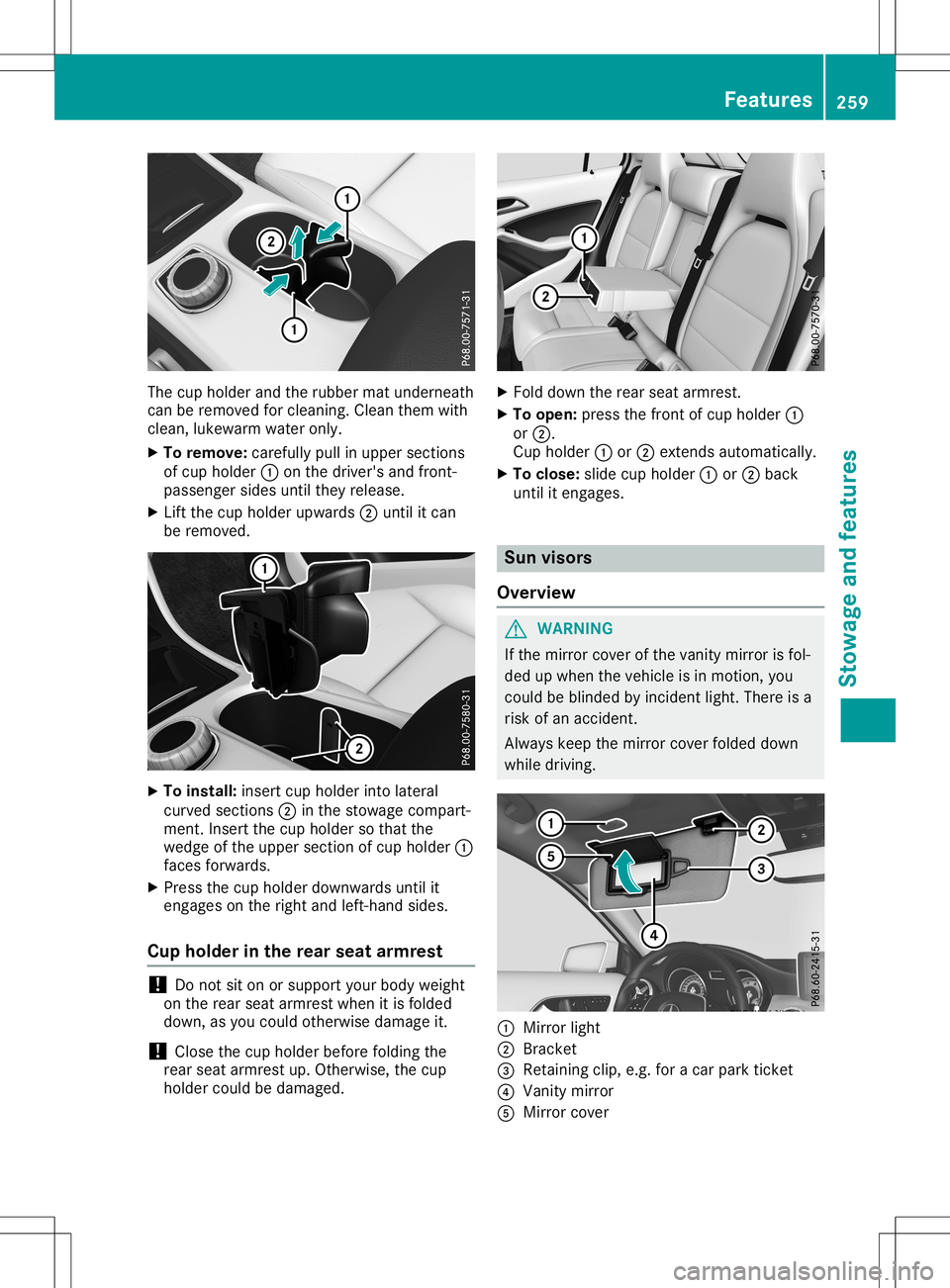
X To remove: carefullypullinupper section s
of cup holder 0043onthe driver's andfront -
passenger sidesuntiltheyrelease.
X Lift the cup holder upwards 0044until itcan
be removed. X
To install: insertcupholder intolateral
curved sections0044 inthe stowage compart-
ment .Insert thecup holder sothat the
wedge ofthe upper section ofcup holder 0043
faces forwards.
X Press thecup holder downwards untilit
engages onthe right andleft-hand sides.
Cup holder inthe rear seat armrest !
Do
not siton orsupport yourbody weight
on the rear seat armrest whenitis folded
down, asyou could otherwise damageit.
! Close
thecup holder before folding the
rear seat armrest up.Otherwise, thecup
holder couldbedamaged. X
Fold down therear seat armrest.
X To open: pressthefront ofcup holder 0043
or 0044.
Cup holder 0043or0044 exten dsautomatically.
X To close: slidecupholder 0043or0044 back
until itengages. Sun
visors
Overview G
WARNIN
G
If the mirror coverofthe vanity mirror isfol-
ded upwhen thevehicle isin motion ,you
could beblinded byincident light.There isa
risk ofan accident .
Always keepthemirror coverfolded down
while driving. 0043
Mirror light
0044 Brack et
0087 Retaining clip,e.g.foracar park ticket
0085 Vanity mirror
0083 Mirror cover Featur
es
259Stowage andfeatu res Z
Page 262 of 346
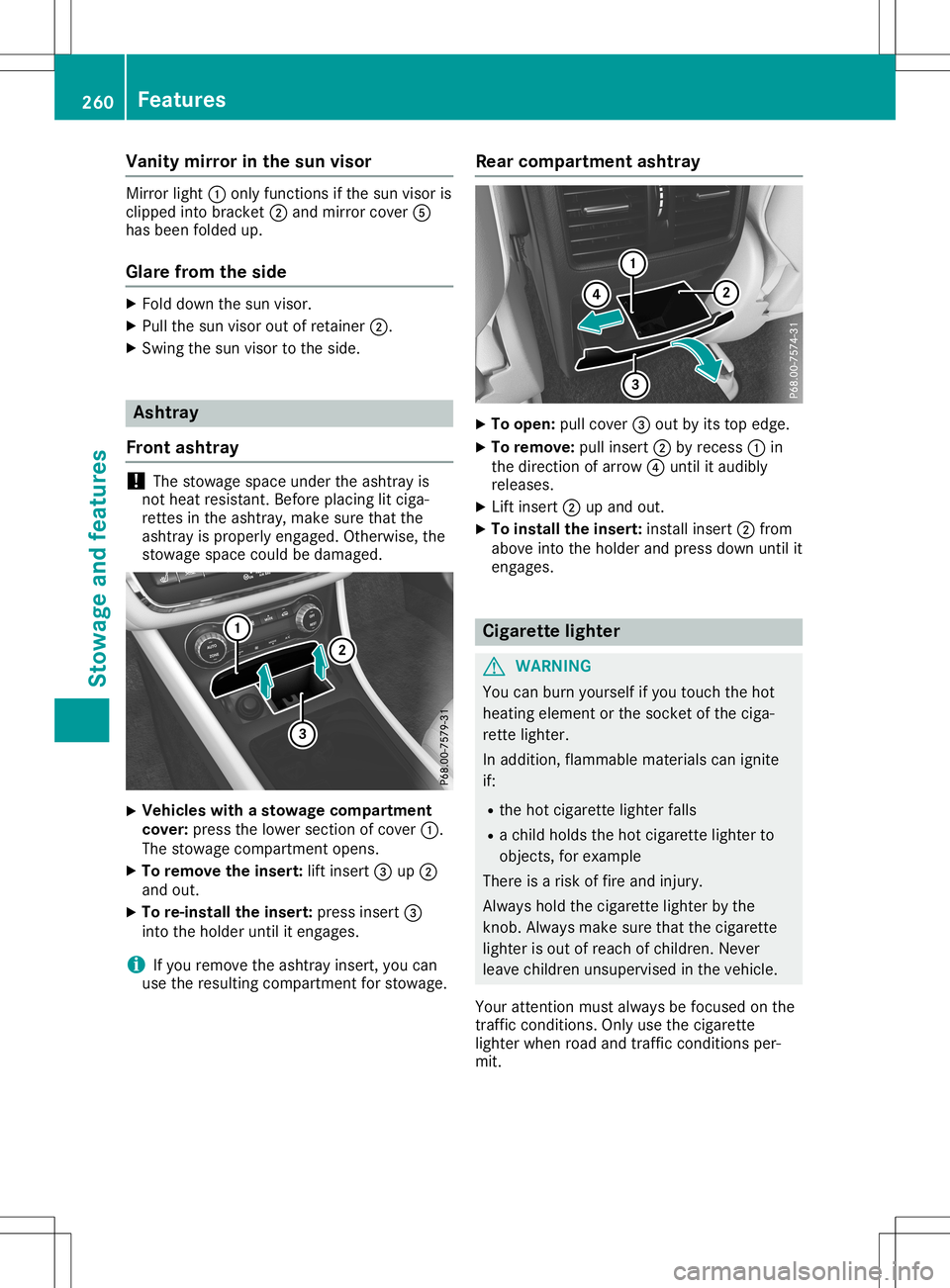
Vani
tymirro rin the sun viso r Mi
rror light 0043onlyfunc tions ifthe sunvis oris
cli pp ed into bracket 0044and mirror cove r0083
ha sbe en foldedup .
Gla refrom theside X
Fol ddo wn the sunvis or.
X Pu llthe sunvis oroutof reta iner0044.
X Swi ngthe sunvis ortothe side . As
htray
Fro ntashtray !
The
stow agespa ceund erthe ashtra yis
not heatres istant. Beforeplaci ng lit cig a-
rette sin the ashtra y,make sure tha tthe
as htra yis pro perly enga ged.Othe rwise, the
stow agespa cecou ldbe dama ged . X
Vehi
cles with asto wage compartmen t
co ver:pre ssthe lowe rsecti onofcove r0043.
The stow agecomp artmentopens.
X To remo vethe inse rt: lift ins ert 0087up0044
and out.
X To re-i nstall the inse rt: pre ssins ert 0087
into theholderunti lit enga ges.
i If
yo urem ove theashtra yins ert, youcan
us ethe resulting comp artmentforstow age. Rear
compartmen tashtray X
To ope n:pullcove r0087 outby its top edge.
X To remo ve:pu llins ert 0044byrece ss0043 in
the directi onofarr ow 0085unti lit au dibly
rel eases .
X Lif tins ert 0044upand out.
X To instal lthe inse rt: installins ert 0044from
ab ove into theholderand pressdown unti lit
enga ges. Ci
gare ttelighte r G
WAR
NING
Yo ucan burn yoursel fif yo utou chthe hot
hea ting eleme ntor the socke tof the ciga-
rette lighte r.
In additio n,flamma ble ma teri alscan ignite
if:
R the hot cigare tte lighte rfal ls
R achi ldhol dsthe hot cigare tte lighte rto
ob jects, forexa mpl e
The reisaris kof fireand injury.
Alw ayshol dthe cigare tte lighte rby the
knob. Alwaysma kesure tha tthe cigare tte
li ghte ris ou tof rea chofchi ldren. Never
le ave children unsupervi sed inthe vehicle.
Yo ur atte ntionmu stalwa ysbe focu sedonthe
traf ficcond itions. Onlyus ethe cigare tte
li ghte rwh en roa dand trafficcond itions per-
mit. 26
0 Fe
aturesSto wag ean dfe ature s
Page 271 of 346
You
canspecif yup toten areas simult ane-
ously. Differe ntset tings are possible foreach
area.
USA only: theseset tings can becalled up
under "Owner sOnlin e"athtt p:/ /
www.mbusa. com.
Alt ern ative ly,you can trigger anMB Infocall
and inform thecust omer servicerepre senta-
tiv ethat youwish toact ivate geofencing.
Curren tlyinac tiveareas canbeact ivate dby
tex tmessag e.
Tr iggering thevehicle alarm With
thisfunc tion,you can trigger thevehic le's
panic alarm viatextmessag e.An alarm
sounds andtheexterior lightingflashes .
Depen dingonthe setting,the panic alarm
lasts fiveorten seco nds. After wards, the
alarm switchesoff. Gar
age door opener
Genera lnotes The
Hom eLink®
garage dooropene rint egrat ed
in the rear- view mirrorallows youtooperat e
up tothr ee diffe rentdoor andgate syste ms.
Use theintegrat edgarage dooropene ronly on
garage doorsthat:
R have safetysto pand rever sefeat ures and
R meet currentU.S.feder alsafet ystan dards
Onc eprogr amed, theintegrat edgarage door
opene rin the rear- view mirrorwill assume the
func tion ofthe garage doorsyste m'sremo te
con trol. Please alsoread theoperat inginst ruc-
tion sfor the garage doorsyste m.
When programmin gagarage dooropene r,
park thevehic leoutsid ethe garage. Donot
leave theengin erunn ingwhile programmin g.
Cert aingarage doordrives areincompat ible
with theintegrat edgarage dooropene r.Ifyou
have difficultyprogr aming theintegrat ed
garage dooropene r,con tacta Merc edes- Benz
Ser vice Cent er. Alt
ern ative ly,you can callthefollowin gtele-
phon eassist anceserv ices:
R USA: Mercedes- BenzCustom erAss istan ce
Cent erat1-800 -FOR-ME RCedes
R Canad a:Custom erSer vice at
1- 800 -387- 010 0
R Hom eLink®
hot line 1-800 -355- 351 5(free of
char ge)
More informat iononHom eLink®
and/ orcom -
patible productsisalso available onlineat
htt p:/ /www.h omelink.com.
Not eson the declar ationofcon form ity
(Y page 27).
USA :FCC ID:CB2H MIHL4
Canada: IC:279 B-HMI HL4
Imp ortant safet ynotes G
WARN
ING
When youoperat eor progr amthe door with
the integrat edgarage dooropene r,person s
in the rang eof move mentof the door may
becom etrapped orbe struck bythe door.
There isarisk ofinjury.
When usingtheintegrat edgarage door
opene r,always makesurethatnobo dyis
within therang eof move mentof the door. G
DANGER
Combust ionengin esemit poison ous
exhaust gasessuchascarbo nmon oxide.
Inh aling theseexhaust gasesishazar dous to
health andcanresult inpoison ing.There isa
risk offatal injury. Theref ore,neverleave the
engin erunn inganenc losed space without
adequate ventilat ion.
Progr amming Progr
amming thebut tons
Pay attent ion tothe "Impor tantsafet ynot es"
(Y page 269). Featu
res
269Stowage andfeatures Z
Page 272 of 346
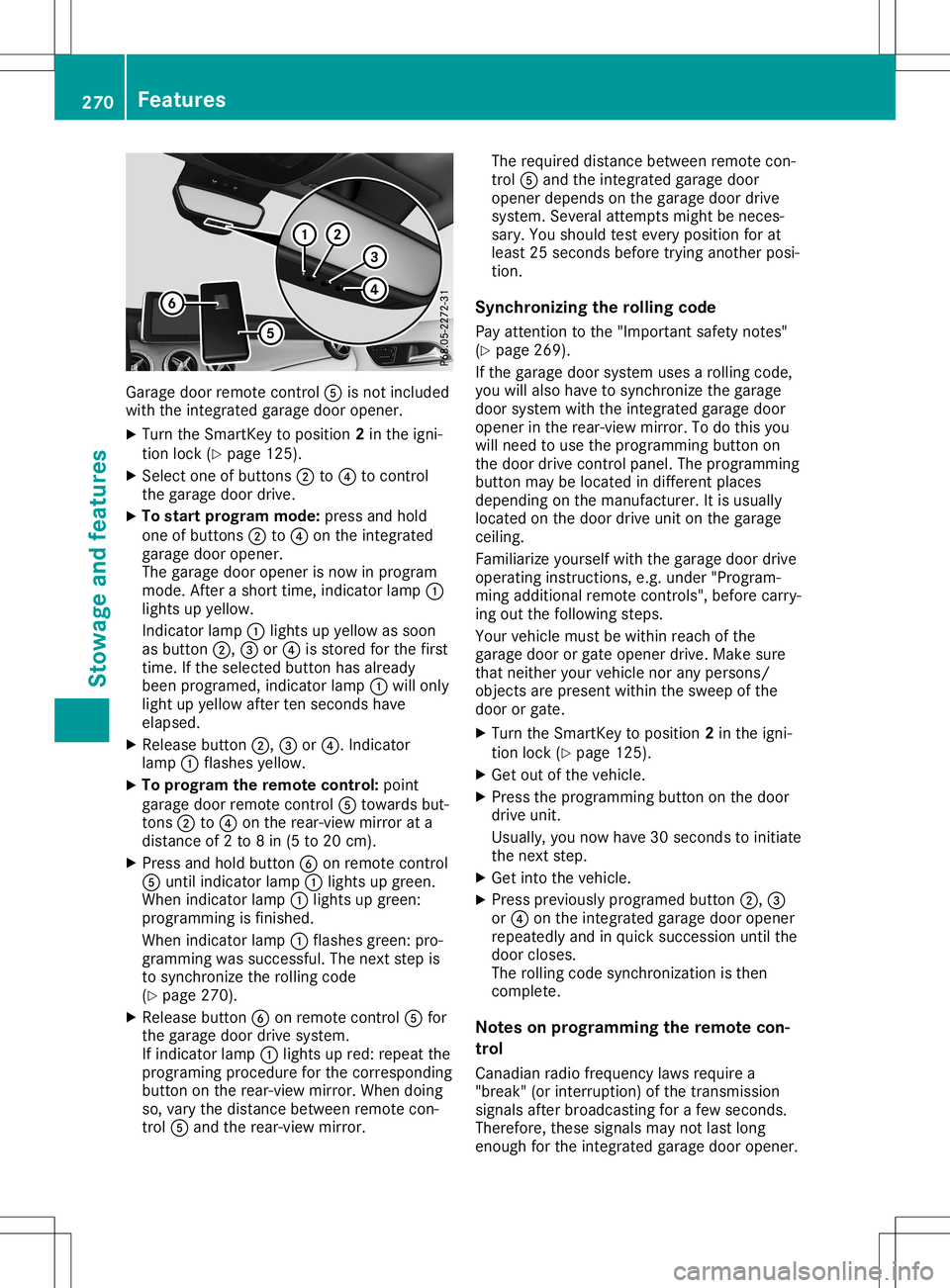
Garage
doorremotecon trol 0083 isno tinc luded
with theint egr atedgarag edoor opener.
X Turn theSm artKey toposit ion2in theign i-
tio nloc k(Y page 125).
X Sel ect oneof butt ons0044 to0085 tocon trol
th egarag edoor drive.
X To star tpr ogr am mod e:pres sand hold
on eof butt ons0044 to0085 ontheint egr ated
garag edoor opener.
The garag edoor openerisno win pro gram
mode .Af tera shor ttim e,ind icat orlamp 0043
light sup yellow.
In dicat orlamp 0043light sup yellow assoon
as butt on0044, 0087or0085 isstore dfor thefir st
tim e.Ifth eselec tedbutt onhas alread y
been program ed,indicat orlamp 0043will only
light upyellow aftertensec onds have
elapse d.
X Release button0044, 0087or0085. Indicat or
lamp 0043flas hes yellow.
X To progr am therem otecont rol:poin t
garag edoor remotecon trol 0083 towards but-
to ns 0044 to0085 ontherear -view mirror ata
dist anceof 2to 8in (5 to 20 cm).
X Pre ssand hold button0084 onrem otecon trol
0083 untilind icat orlamp 0043light sup gre en.
When indicat orlamp 0043light sup gre en:
pro gram mingis fin ishe d.
When indicat orlamp 0043flas hes green: pro-
gram mingwas successful. Thenextst ep is
to syn chron ize theroll ing cod e
(Y page 270).
X Release button0084 onrem otecon trol 0083 for
th egarag edoor drivesyst em.
If ind icat orlamp 0043light sup red: repeatthe
pro gram ingproced ure forthecor respon ding
butt onon therear -view mirror.When doing
so, varyth edist ancebet ween remotecon -
tr ol 0083 and therear -view mirror. The
requi reddistancebet ween remotecon -
tr ol 0083 and theint egr atedgarag edoor
open erdepen dson thegarag edoor drive
syst em. Several attempt smigh tbe nec es-
sary. Youshoul dte st ever yposit ionforat
least 25sec onds befo retrying another posi-
tio n.
Synch ronizin gth eroll ing code
Pay attent ion tothe"Imp ortant safe tyno tes"
(Y page 269).
If th egarag edoor systemuses aroll ing cod e,
you willalso have tosyn chron ize thegarag e
door systemwith theint egr atedgarag edoor
open erintherear -view mirror.To do this you
will needto use thepro gram mingbutt onon
th edoor drivecon trol pane l.The program ming
butt onmay belocate din diff eren tplace s
depen dingon theman ufacturer. Itis usually
loc ate don thedoor driveunit onthegarag e
cei ling .
Fam iliariz eyours elfwith thegarag edoor drive
oper atingins truct ions,e.g .unde r"Pro gram -
min gaddit ionalrem otecon trols", beforecar ry-
ing out thefoll owin gst eps.
Your vehicle must bewith inreac hof the
garag edoor orgat eopen erdriv e.Mak esure
th at nei ther your vehicle norany pers ons/
obj ect sare pres entwith inthesweep ofthe
door orgat e.
X Turn theSm artKey toposit ion2in theign i-
tio nloc k(Y page 125).
X Get outoftheveh icle.
X Pre ssthepro gram mingbutt ononthedoor
driv eunit .
Usually, younowhave 30sec onds toinit iate
th enex tst ep.
X Get intoth eveh icle.
X Pre ssprev iously program edbutt on0044, 0087
or 0085 ontheint egr atedgarag edoor opener
repe atedly and inquick succession untilth e
door closes.
The rolling cod esyn chron izat ion isthen
com plete.
Not eson progr ammin gth erem otecon-
tr ol
Canadi anradio frequen cylaws requirea
"break "(or interr upti on)of thetrans miss ion
sign alsafterbro adcas tingfor afew seconds.
Ther efore, these signalsmay notlast long
eno ugh fortheint egr atedgarag edoor opener. 270
Feat
uresSt owage andfeatures
Page 273 of 346
The
signal isnot detect edduring program-
ming. Comparable withCanadian law,some
U.S. garage dooropeners alsofeature a
"break".
Proceed asfollows:
R ifyou liveinCanada
R ifyou have difficulties programming the
garage dooropener (regardless ofwhere
you live) asyou follow theprogramming
steps.
X Press andhold oneofbutton s0044 to0085 on
the integr atedgarage dooropener.
Aft erashort time,indicator lamp0043lights
up yellow.
X Release thebutton .
Indicat orlamp 0043flashes yellow.
X Press button 0084ofgarage doorremote con-
trol 0083for two seconds, thenrelease itfor
two seconds.
X Press button 0084again fortwo seconds.
X Repeat thissequence onbutton 0084of
remote control0083 until indicator lamp0043
lights upgreen.
When indicator lamp0043lights upgreen:
programming isfinished.
When indicator lamp0043flashes green:pro-
gramming wassuccessful. Thenext step is
to synchron izethe rolling code.
X Release button0084ofremote control0083 of
the garage doordrive.
If indicator lamp0043lights upred: repeat the
programming processforthe correspon ding
button onthe rear-view mirror.Whendoing
so, vary thedistance between remotecon-
trol 0083and therear-view mirror.
The required distance between remotecon-
trol 0083and theintegr atedgarage door
opener depends onthe garage doordrive
system. Severalattemptsmight beneces-
sary. Youshould testevery position forat
least 25seconds beforetryinganother posi-
tion.
Problems whenprogramming
If you areexperienc ingproblems programming
the integr atedgarage dooropener onthe rear-
view mirror, takenoteof the following instruc-
tions:
R Check thetrans mitterfrequency usedby
garage doordrive remote control0083 and
whether itis supported. Thetrans mitterfre- quency
canusuall ybe found onthe back of
remote control0083 for the garage doordrive.
The integr atedgarage dooropener iscom-
patible withdevices thathave units which
operate inthe frequency rangeof280 to
433 MHz.
R Replace thebatteries ingarage doorremote
cont rol0083. This increases thelikelihood that
garage doorremote control0083 will trans mit
a stron gand precise signaltothe integr ated
garage dooropener.
R When programming, holdremote control0083
at varying distances andangles frombut-
ton s0044 to0085 which youareprogramming.
Try various anglesatadistance between
2and 8inches (5to20cm) oratthe same
angle butatvarying distances .
R Ifanother remotecontrol0083 isavailab lefor
the same garage doordrive, repeat the
same programming stepswiththisremote
cont rol0083. Before performin gthese steps,
make surethatnew batteries havebeen
installed ingarage doordrive remote control
0083.
R Note thatsome remote controlsonly trans -
mit foralimited amount oftime (theindica-
tor lamp onthe remote controlgoes out).
Press button 0084onremote control0083 again
before transmission ends.
R Align theanten nacable ofthe garage door
opener unit.Thiscanimprove signalrecep-
tion/ transmission.
Opening/clo singthegara gedoor Aft
erithas been programmed, theintegr ated
garage dooropener performs thefunct ionof
the garage doorsystem remote control.Please
also read theoperating instructions forthe
garage doorsystem.
X Turn theSmart Keytoposition 2in the igni-
tion lock (Ypage 125).
X Press button 0044,0087or0085 which youhave
programmed tooperate thegarage door.
Garage doorsystem withafixed code: indi-
cator lamp0043lights upgreen.
Garage doorsystem witharolling code:indi-
cator lamp0043flashes green.
The trans mitterwill trans mitasignal aslong
as the button ispressed. Thetrans mission Featur
es
271Stowage andfeatu res Z
Page 274 of 346
is
halted afteramaxim umoften seco nds
and indic atorlamp 0043light sup yellow.
X Press button0044, 0087or0085 again ifnec es-
sary.
Clear ingthemem ory Make
surethatyouclear thememo ryof the
int egrat edgarage dooropenerbefor esellin g
the vehic le.
X Turn theSmar tKey toposit ion2in the igni-
tion lock (Ypage 125).
X Press andhold buttons 0044and 0085.
The indic atorlamp initially lightsup yellow
and thengreen .
X Release buttons 0044and 0085.
The memo ryof the integrat edgarage door
open erinthe rear- view mirroriscleare d. Comp
ass
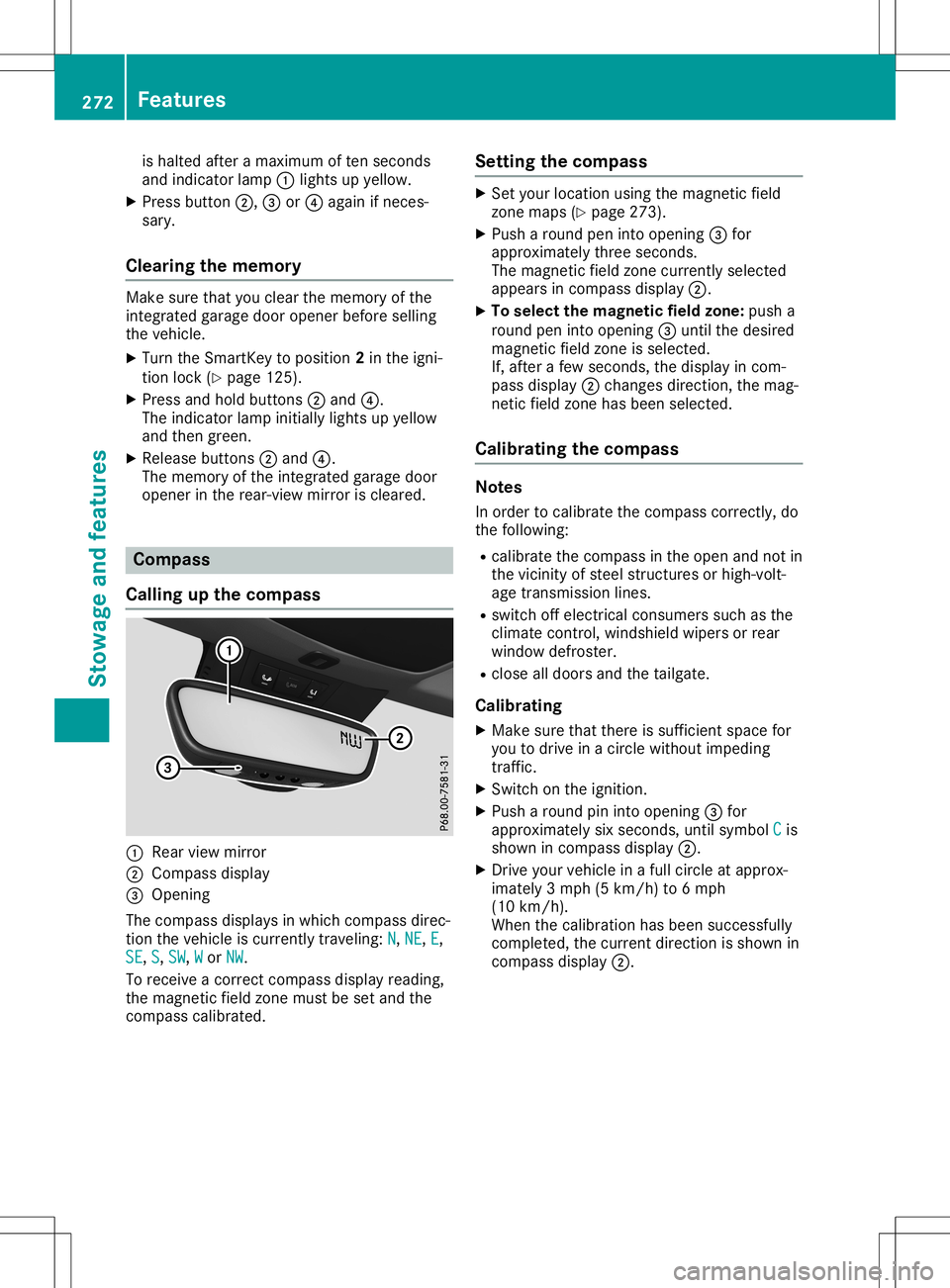
Calling upthecomp ass 0043
Rear viewmirror
0044 Compass display
0087 Open ing
The com pass displays inwhich compass direc-
tion thevehic leiscurr entlytravelin g:N N,
NE NE,
E E,
SE SE,
S S,
SW SW,
W W
or NW NW.
To rec eive acor rectcom pass display reading,
the magn eticfield zonemust beset and the
com pass calibrat ed. Sett
ingthecomp ass X
Set your locationusing themagn eticfield
zon emaps (Ypage 273).
X Push aroun dpen intoopen ing0087for
approx imatelythr ee seco nds.
The magn eticfield zonecurr entlyselec ted
appears incom pass display 0044.
X To select thema gnetic fieldzone: pusha
roun dpen intoopen ing0087untilthe desire d
magn eticfield zoneis selec ted.
If, aft erafew seco nds,the display incom -
pass display 0044chan gesdirec tion,the mag-
net icfield zonehas been selected.
Calibr ating thecomp ass Not
es
In order tocalibrat ethe com pass correctly, do
the followin g:
R calibrat ethe com pass inthe open andnotin
the vicin ityofste elstr uct ures orhigh- volt-
age transm ission lines.
R switc hoff elect ricalconsumer ssuch asthe
climat econ trol, windsh ieldwipers orrear
window defroster.
R clos eall doors andthetailgat e.
Calibr ating
X Make surethatthereissuffic ientspace for
you todrive inacirc lewitho utimpedin g
tr affic .
X Swit chon the ignit ion.
X Push aroun dpin intoopen ing0087for
approx imatelysix seco nds,unt ilsymbol C C
is
shown incom pass display 0044.
X Dr ive your vehic lein afull circ leat approx -
imate ly3mph (5km /h) to6mph
(10 km/h).
When thecalibrat ionhas been successfully
com plete d,the curr entdirec tionisshown in
com pass display 0044. 272
Featu
resStowage andfeatures
Page 285 of 346
Alw
ayssw itch offthe windsh ield wipe rs and
the igniti onbefore cleani ng the windsh ield
or wipe rbl ad es.
! Onl
yfol dthe windsh ield wipe rs aw ay from
the windsh ield wh en ver tica l.Othe rwise, you
wi llda ma gethe hood.
! Do
not usedry cloths, abrasive pro ducts,
sol vents orcle ani ng agents conta ining sol-
vents tocle an the inside of the windo ws.Do
not touchthe insides ofthe windo wswith
ha rd objects, e.g.an ice scra peror ring .
The reisothe rwisearis kof dama ging the
wi ndo ws.
! Cl
ea nthe water drainage cha nnel sof the
wi ndsh ield and therearwi ndo wat reg ular
inte rvals.Dep ositssuch asleav es, petal s
and pollen ma yund ercerta incirc umstances
pre vent water from draining away.Thi scan
le ad tocorr osion dama geand dama geto
el ectro niccomp onents.
X Clea nthe inside and outside ofthe windo ws
wi th ada mp clothand acle ani ng pro duct
tha tis reco mme ndedand appro ved by
Mer cedes-B enz.
Cl ean ingwi per blades G
WA
RNING
Yo ucou ldbe come trappedby the wind-
shi eld wi pe rs ifthey startmovi ngwhile
cle ani ng the windsh ield or wipe rbl ad es.
The reisaris kof inju ry.
Alw ayssw itch offthe windsh ield wipe rs and
the igniti onbefore cleani ng the windsh ield
or wipe rbl ad es.
! Onl
yfol dthe windsh ield wipe rs aw ay from
the windsh ield wh en ver tica l.Othe rwise, you
wi llda ma gethe hood.
! Do
not pullthe wipe rbl ad e. Othe rwise, the
wi pe rbl ad ecou ldbe dama ged .
! Do
not clean wipe rbl ad es too ofte nand
do not rubthem toohard. Othe rwise, the
gra phitecoa ting couldbe dama ged .Thi s
cou ldcau sewipe rnoi se.
! Hol
dthe wipe rar m sec urelywh en folding
ba ck. The windsh ield cou ldbe dama ged if
the wipe rar m sma cksagainst itsu dd enl y. X
Fol dthe windsh ield wipe rar ms away from
the windsh ield .
X Ca ref ully cle an the wipe rbl ad es with a
da mp cloth.
X Fol dthe windsh ield wipe rar ms back again
be fore switch ingonthe igniti on.
Cl ean ingthe exteri orlighti ng !
Onl
yus ecle ani ng agents orcle ani ng
clo ths thatar esu ita ble for plas tic lenses .
Ca ustic, irrita nt or othe rwiseuns uitab le
cle ani ng agents orcle ani ng cloths could
scra tchordama gethe exte riorlighti ngplas -
tic lenses .
X Clea nthe plas tic lenses ofthe exte riorlights
wi th awe tspo nge and amil dcle ani ng
ag ent, e.g.Mer cedes-B enzcarshampo oor
cle ani ng cloths.
Cl ean ingthe mirro rturn sign als !
Onl
yus ecle ani ng agents orcle ani ng
clo ths thatar esu ita ble for plas tic lenses .
Unsu itable cle ani ng agents orcle ani ng
clo ths couldscra tchordama gethe plas tic
le nses ofthe mirror turn signa ls.
X Clea nthe plas tic lenses ofthe mirror turn
si gna lsin the exte riormir ror hou sing using a
we tspo nge and mildcle ani ng agent, e.g.
Mer cedes-B enzcarshampo oor cle ani ng
clo ths.
Cl ean ingthe sens ors !
If
yo ucle an the sens orswith apo we r
wa she r,ma kesure tha tyo ukee padi sta nce
of at leas t11.8 in(30 cm)be twe enthe vehi-
cle and thepowe rwa she rnozzl e.Info rma -
tio nab ou tthe corr ectdista nce isavaila bl e
from theequipme ntma nuf actu rer. Care
283Mai ntenan ceand care Z