phone MERCEDES-BENZ GLA SUV 2020 Owner's Guide
[x] Cancel search | Manufacturer: MERCEDES-BENZ, Model Year: 2020, Model line: GLA SUV, Model: MERCEDES-BENZ GLA SUV 2020Pages: 346, PDF Size: 51.22 MB
Page 264 of 346
The
system isavailabl eif:
R ithas been activated andisoperational
R the correspon dingmobile phonenetwork is
availabl efor trans mittingdata tothe Cus-
tomer Center
R aservice subscription isavailabl e
R the start erbattery issufficient lycharged
i Deter mining thelocation ofthe vehicle on
a map isonly possible if:
R GPS reception isavailabl e
R the vehicle position canbeforwarded to
the Customer AssistanceCenter
The Mercedes meconnec tsystem To
adjust thevolume duringacall, proceed as
follows:
X Press the0081 or0082 button onthe multi-
funct ionsteerin gwheel.
or X Use themultimedia system'svolumecon-
trol.
The system offersvarious services, e.g.:
R Automat icand manual emergenc ycall
R Roadside Assistancecall
R MB Info call
USA only: youcan find inform ationanda
description ofall availabl efeatures under
"Owners Online"athtt p:// www.mbusa.com.
System self-test Aft
eryou have switched onthe ignition, the
system carriesoutaself-diagnosis.
A malfunct ioninthe system hasbeen detec-
ted ifone ofthe following occurs:
R The indicator lampinthe SOS button does
not come onduring thesystem self-test.
R The indicator lampinthe 0052 Roadside
Assist ancecallbutton doesnotlight updur-
ing self-diagnosis ofthe system.
R The indicator lampinthe 00D9 MBInfo call
button doesnotlight upduring self-diagno-
sis ofthe system. R
The indicator lampinone ormore ofthe fol-
lowing buttonscont inues tolight upred
after thesystem self-diagnosis:
- SOS button
- 0052 Roadside Assistancecallbutton
- 00D9 MBInfo callbutton
R Aft erthe system self-diagnosis, theInoper‐ Inoper‐
ative ative
orService NotActivated Service
NotActivated mes-
sage appears inthe multifunct iondisplay .
If amalfunct ionisindicated asoutlined above,
the system maynotoperate asexpect ed.In
the event ofan emergenc y,help willhave to
be summoned byother means.
Have thesystem checkedatthe nearest
Mercedes- BenzServic eCenter orcont actthe
following servicehotlines:
R USA: Mercedes- BenzCustomer Assistance
Center at1-8 00-FOR-ME RCedes
(1-80 0-367-6372 )or 1-86 6-990-9007
R Canada: Customer Serviceat
1-88 8-923-8367
Emergency call Import
antsafety notes G
WARNING
It can bedangerous toremain inthe vehicle,
even ifyou have pressed theSOS button in
an emergenc yif:
R you seesmoke insideoroutside ofthe
vehicle, e.g.ifthere isafire after anacci-
dent
R the vehicle ison adangerous sectionof
road
R the vehicle isnot visible orcann oteasily
be seen byother roadusers, particularly
when darkorinpoor visibility conditions
There isarisk ofan accident andinjury.
Leave thevehicle immediately inthis orsim-
ilar situations assoon asitis safe todo so.
Move toasafe location alongwithother
vehicle occupant s.In such situations, secure
the vehicle inaccordanc ewith national regu-
lations, e.g. with awarning triangle.
A license agreement mustbeinplace inorder
to activate theMercedes meconn ectservice.
Make surethatyour system isactivated and 262
Featur
esStowage andfeatu res
Page 265 of 346
operational.
Toregister, pressthe00D9 MB
Info callbutton .If any ofthe steps mentioned
are not carried out,thesystem maynotbe
activated.
If you have questions abouttheactivation ,
cont actone ofthe following telephone hot-
lines:
R USA: Mercedes-B enzCustomer Assistance
Center at1-80 0-FOR-MERCedes
(1-80 0-367-6372)or1-86 6-990-9007
R Canada: Customer Serviceat
1-88 8-923-8367
General notes
An emergenc ycall isdialed automatically ifan
air bag orEmergen cyTensionin gDevice istrig-
gered.
i You
cann otend anautomatically triggered
emergenc ycall yourself.
An emergenc ycall can also beinitiated man-
ually .
As soon asthe emergenc ycall has been initi-
ated, theindicator lampinthe SOS button
flashes. Themultifunct iondisplay showsthe
Connecting Call Connecting
Callmessage.
The audio output ismuted.
Once theconn ection hasbeen made, the
Call Connected Call
Connected messageappearsinthe mul-
tifunc tiondisplay .
All important informationonthe emergenc yis
transm itted,forexample:
R Current location ofthe vehicle (asdeter-
mined bythe GPS system)
R Vehicle identificat ionnumber
R Infor mation onthe severity ofthe accident
Short lyafter theemergenc ycall has been initi-
ated, avoice connection isautomatically
established betweentheCustomer Assistance
Center andthevehicle occupant s.
R Ifthe vehicle occupant sare responsive, the
Mercedes-B enzCustomer AssistanceCenter
attempt sto get more informat iononthe
emergenc y.
R Ifthere isno response fromthevehicle
occupant s,an ambulance isimmediately
sent tothe vehicle
If no voice connection canbeestablished to
the Mercedes-B enzCustomer AssistanceCen-
ter, thesystem hasbeen unable toinitiate an
emergenc ycall. This
canoccur, forexample, ifthe relevant
mobile phonenetwork isnot availa ble.The
indicator lampinthe SOS button flashes con-
tinuously.
The Call Failed Call
Failed message appearsinthe
multifunct iondisplay andmust beconf irmed.
In this case, summon assistance byother
means.
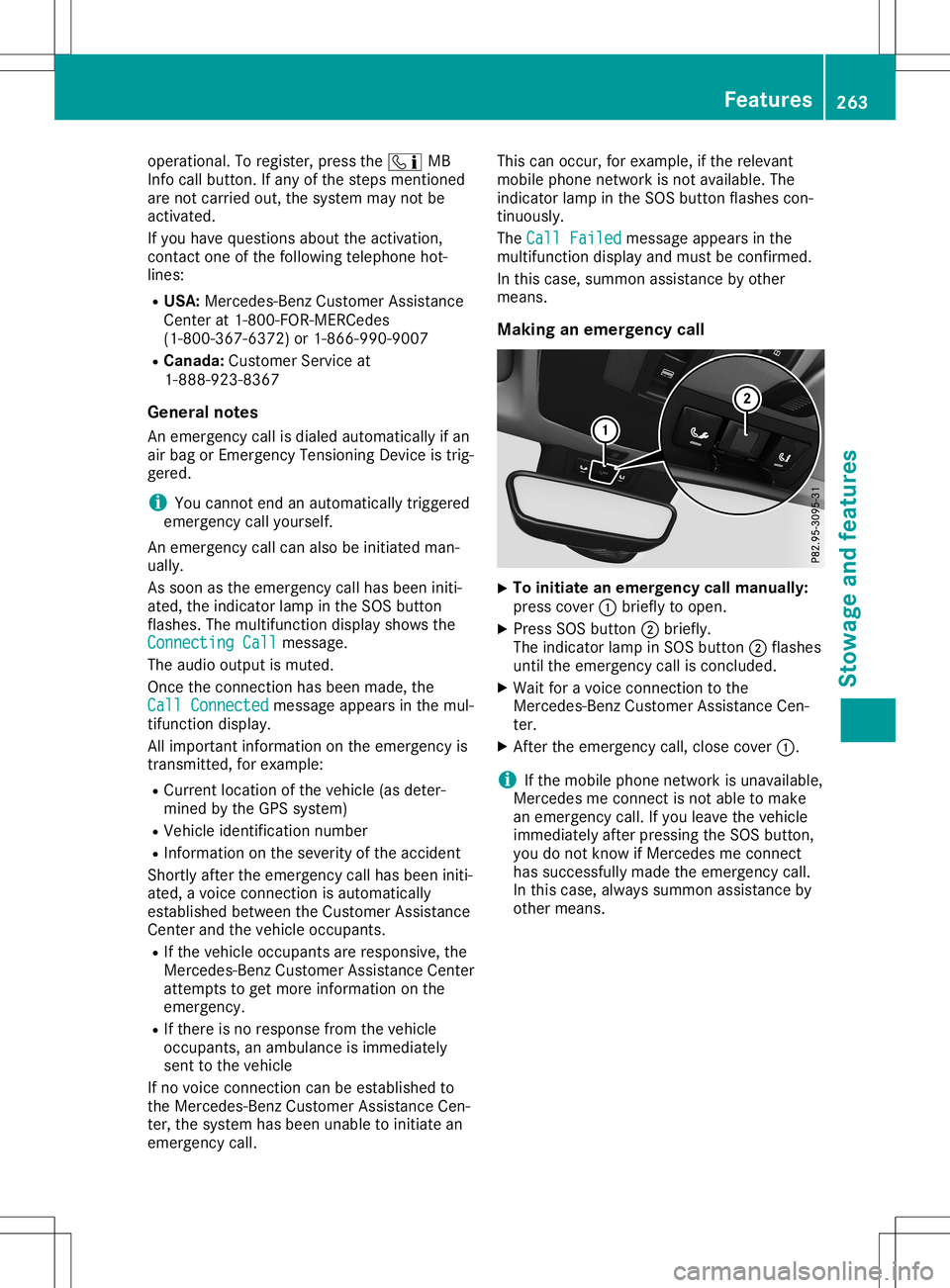
Making anemergency call X
To
initiate anemergency callmanua lly:
press cover 0043briefly toopen.
X Press SOSbutton 0044briefly.
The indicator lampinSOS button 0044flashes
until theemergenc ycall isconc luded.
X Wait foravoice connection tothe
Mercedes-B enzCustomer AssistanceCen-
ter.
X Aft erthe emergenc ycall, close cover 0043.
i If
the mobile phonenetwork isunavailabl e,
Mercedes meconn ectisnot able tomake
an emergenc ycall. Ifyou leave thevehicle
immediately afterpressing theSOS button ,
you donot know ifMercedes meconn ect
has successfully madetheemergenc ycall.
In this case, alwayssummon assistance by
other means. Featur
es
263Stowage andfeatu res Z
Page 267 of 346
If
amobil ephone network andGPS reception
are avai lable,the system transfers datatothe
Mercedes-Benz Customer Assistance Center,
for example :
R Curre ntlocation ofthe vehicle
R Vehicle identifica tionnumber
i The
displ ayofthe multimed iasystem indi-
cates thatacall isactive. During thecall,
you can change tothe naviga tionmenu by
pressing theNAVI button onthe multimed ia
system, forexample .
Voice outputis not avai lable.
A voice connection isestabl ishedbetween the
Mercedes-Benz Customer Assistance Center
and thevehicle occupants.
You receive information aboutopera tingyour
vehicle ,abou tthe nearest Mercedes-Benz Ser-
vice Center andabou tother productsand
services fromMercedes-Benz.
USA only: youcan find further information on
the Mercedes meconnect systemunder"Own-
ers Online" athttp://www.mbusa .com.
i The system hasnotbeen ableto initiate an
MB Info call, if:
R the indicator lampinMB Info callbut-
ton 0043isflashi ngcontinuously .
R no voice connection tothe Mercedes-
Benz Customer Assistance Centerhas
been establ ished.
This canoccur ifthe releva ntmobil ephone
network isnot avai lable,for example .
The Call Failed Call
Failed message appearsinthe
multifu nctiondisplay.
X To end acall: press the0076 button onthe
multifu nctionsteering wheel.
or X Press thecorresponding multimediasystem
button forending aphone call.
Call priority When
service callsareactive, e.g.Roadside
Assistance orMB Info calls ,an emergency call
can stillbeinitiated .In this case, anemer-
gency callwilltake priori tyand override all
other active calls.
The indicator lampofthe respective button
flashe suntil thecall isended. An
emergency callcan only beterminated by
the Mercedes-Benz Customer Assistance Cen-
ter.
All other callscanbeended bypressing:
R the 0076 button onthe multifu nctionsteer-
ing wheel
R the corresponding buttoninthe multime dia
system toend thevoice call
i When
acall isinitiated ,the audiosystem
is muted. Themobil ephone isno longer
connected tothe multime diasystem. How-
ever, ifyou want touse yourmobil ephone,
do soonly when thevehicle isstationary
and inasafe location.
Do wnl oading destination sin COMA ND Dow
nloadin gdestination s
Download ingdestinations givesyouaccess to
a datab asewith over 15mill ion points ofinter-
est (POIs). Thesecanbedownlo adedonthe
naviga tionsystem inyou rvehicle .If you know
the destination, theaddre sscan bedownlo a-
ded. Alternatively ,you can obtain thelocation
of Points ofInterest (POIs)/important destina-
tions inthe vicinity.
Furthermore, youcan downlo adroutes withup
to 20 way points.
You areprompted toconfirm routeguidance
to the addre ssentered.
The system calculatestheroute andsubse -
quently startstheroute guidance withthe
addre ssentered.
i If
you select No No,
the addre sscan besaved
in the addre ssbook.
i The
Destination Downloadfunctionis
avai lableifthe releva ntmobil ephone net-
work isavai lableand data transfer ispossi-
ble.
i The
Destination Downloadfunctioncan
only beused ifthe vehicle isequi pped with
a naviga tionsystem.
Route Assistance
This service ispart ofthe Mercedes mecon-
nect PLUS Package andcannot beobtained
sepa rately .
i You
canalso usetheRou teAssistance
function ifyou rvehicle isnot equi pped with
a naviga tionsystem. Fe
atur es
265Stowag eand features Z
Page 269 of 346
USA
only: alternatively, thevehicle canbe
opened via:
R the Intern et,under the"Owners Online"sec-
tion
R telephone applications (e.g.foriPhone ®
,
Android ®
)
To do this, youwillneed youridentification
number andpassword .
i Vehicle
remoteopening isonly possible if
the corresponding mobilephonenetwork is
accessible.
Vehicle remoteclosing The
vehicle valetlocking featurecanbeused
when youhave forgotten tolock thevehicle
and youarenolonger nearby.
The vehicle canthen belocked bythe
Mercedes-Benz CustomerAssistance Center.
The vehicle canbeimmediately locked
remotely uptofour days after theignition was
last switched off.After thistime, valetlocking
may bedelay edby15 to60 minutes. After
30 days thevehicle cannolonger belocked
remotely.
X Contact thefollowi ngservice hotlines:
R USA: Mercedes-Benz CustomerAssis-
tance Center at1-800 -FOR-MERCedes
(1-800- 367-6372)or1-866 -990-9007
R Canada: Customer Serviceat
1-888 -923-8367
You willbeasked foryour password .
The next time youareinside thevehicle and
you switch onthe ignition, theDoors Locked Doors
Locked
Remotely Remotely
messagewillappea ron the multi-
function display.
USA only: alternatively, thevehicle canbe
locked via:
R the Intern et,under the"Owners Online"sec-
tion
R telephone applications (e.g.foriPhone ®
,
Android ®
)
To do this, youwillneed youridentification
number andpassword .
i The
vehicle valetlocking featureisavail a-
ble when therelevant mobilephonenetwork
is avail able anddata connec tionispossible .Stolen
vehiclerecove ryservice If
your vehicle hasbeen stolen:
X Notify thepolice.
The police willissue anumbered incident
report.
X This number willbeforwarded tothe
Mercedes-Benz CustomerAssistance Center
together withyour PIN.
The Mercedes-Benz CustomerAssistance
Center thentriestolocate thesystem. The
Mercedes-Benz CustomerAssistance Center
cont acts youand thelocal lawenforcement
agency ifthe vehicle islocated.
However, onlythelaw enforcement agency
is informed ofthe location ofthe vehicle.
i If
the anti-theft alarm system isactivated
for longer than30seconds, Mercedes me
connec tautomaticall ynotifies the
Mercedes-Benz CustomerAssistance Cen-
ter.
Vehicle HealthCheck With
theVehicle HealthCheck, theCustomer
Assistance Centercanprovide improved sup-
port forproblems withyour vehicle. Duringan
existing call,vehicle dataistransferred tothe
Customer Assistance Center.Thecustomer
service representative canusethereceived
data todecide whatkindofassistance is
required .You arethen, forexample, guidedto
the nearest Mercedes-Benz ServiceCenteror
a recovery vehicleiscalled.
If vehicle dataneeds tobe transferred during
an MB Info calloraRoad sideAssistance call,
this isinitiated bythe Customer Assistance
Center. Youwillsee theRoadside Assis‐ Roadside
Assis‐
tance Connected tance
Connected messageonthe multimedia
system display.Ifthe vehicle remote malfunc-
tion diagnosis canbestarted, theRequest Request
for vehicle diagnosis received. for
vehicle diagnosis received.
Start vehicle diagnosis? Start
vehicle diagnosis? message
appea rsinthe displa y.
X Confirm themessage withYes Yes.
X When theVehicle diagnosis: Please Vehicle
diagnosis: Please
start ignition start
ignition messageappears,turn
the SmartKey toposition 2in the ignition
lock (Ypage 125).
X When thePlease followtheinstruc‐ Please
followtheinstruc‐
tions received byphone andmove tions
received byphone andmove
your vehicle toasafe position your
vehicle toasafe position mes- Features
267Stowageandfeatur es Z
Page 270 of 346
sage
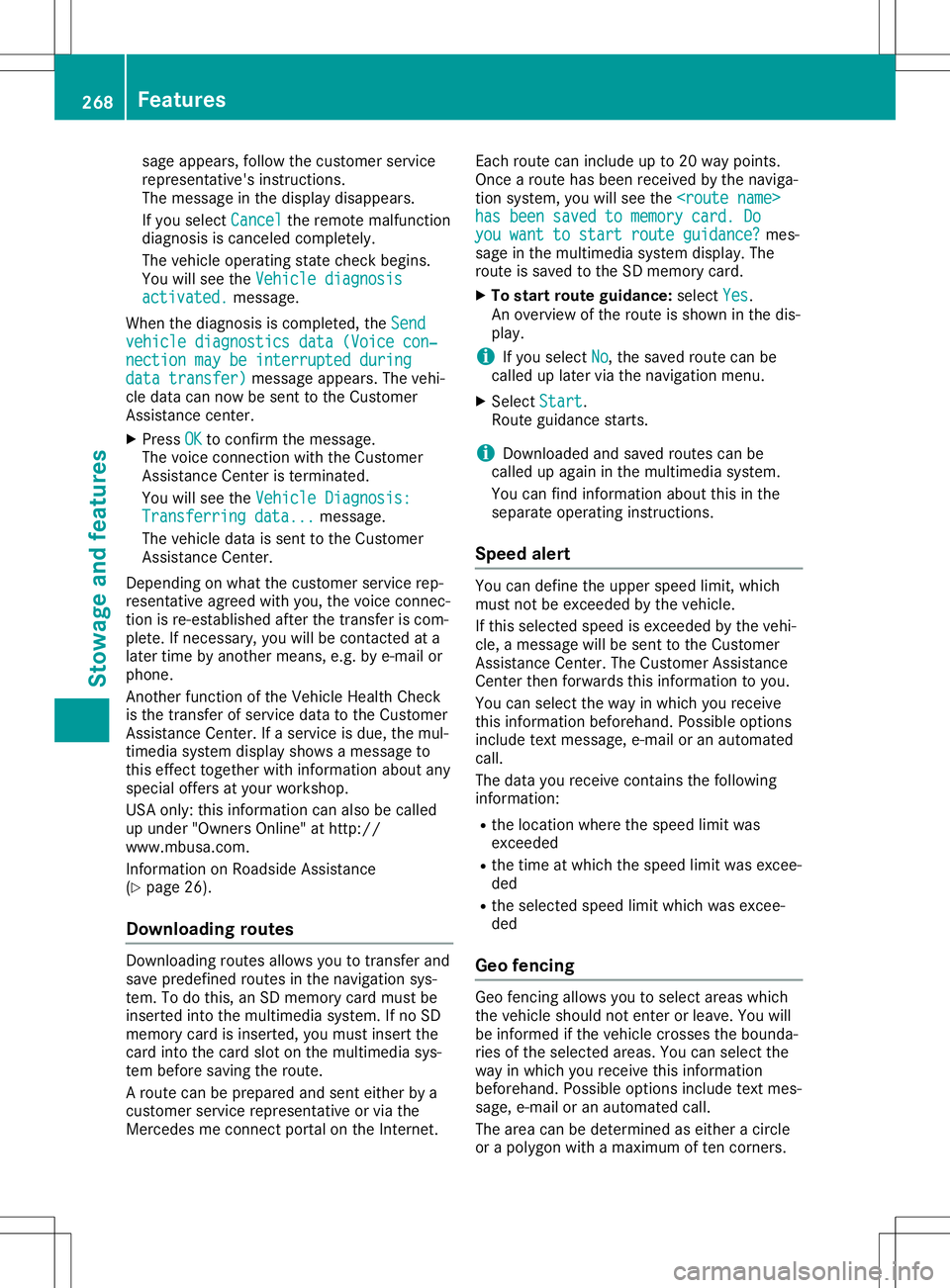
appea rs,follow thecustomer service
representative's instructions.
The message inthe displa ydisapp ears.
If you select Cancel Cancel
theremote malfunction
diagnosis iscanceled completely.
The vehicle operating statecheck begins.
You willsee theVehicle diagnosis Vehicle
diagnosis
activated. activated.
message.
When thediagnosis iscompleted, theSend Send
vehicle diagnostics data(Voice con‐ vehicle
diagnostics data(Voice con‐
nection maybeinterrupted during nection
maybeinterrupted during
data transfer) data
transfer) messageappears.The vehi-
cle data cannow besent tothe Customer
Assistance center.
X Press OK OK
toconfirm themessage.
The voice connection withtheCustomer
Assistance Centeristerminated.
You willsee theVehicle Diagnosis: Vehicle
Diagnosis:
Transferring data... Transferring
data...message.
The vehicle dataissent tothe Customer
Assistance Center.
Depending onwhat thecustomer servicerep-
resentative agreedwithyou,thevoice connec-
tion isre-established afterthetransfer iscom-
plete. Ifnecessary, youwillbecont acted ata
later timebyanother means,e.g.bye-mail or
phone.
Anot herfunction ofthe Vehicle HealthCheck
is the transfer ofservice datatothe Customer
Assistance Center.Ifaservice isdue, themul-
timedia systemdisplayshows amessage to
this effect together withinformation aboutany
special offersatyour workshop.
USA only: thisinformation canalso becalled
up under "Owners Online"athttp: //
www.mbusa .com.
Information onRoad sideAssistance
(Y page 26).
Dow nloading routes Downloading
routesallowsyou totransfer and
save predefined routesinthe navigation sys-
tem. Todo this, anSD memory cardmust be
inserted intothemultimedia system.Ifno SD
memory cardisinserted, youmust insert the
card intothecard slotonthe multimedia sys-
tem before savingtheroute.
A route canbeprepared andsent either bya
customer servicerepresentative orvia the
Mercedes meconn ectportal onthe Intern et. Each
route caninclude upto20 way points.
Once aroute hasbeen received bythe naviga-
tion system, youwillsee the
has been saved tomemory card.Do has
been saved tomemory card.Do
you want tostart routeguidance? you
want tostart routeguidance? mes-
sage inthe multimedia systemdisplay.The
route issaved tothe SDmemory card.
X To start route guidance: selectYes Yes.
An overview ofthe route isshown inthe dis-
play .
i If
you select No No,
the saved routecanbe
called uplater viathe navigation menu.
X Select Start Start.
Route guidancestarts.
i Downloaded
andsaved routes canbe
called upagai nin the multimedia system.
You canfind information aboutthisinthe
separate operating instructions.
Speed alert You
candefine theupper speed limit,which
must notbeexceeded bythe vehicle.
If this selected speedisexceeded bythe vehi-
cle, amessage willbesent tothe Customer
Assistance Center.TheCustomer Assistance
Center thenforwards thisinformation toyou.
You canselect theway inwhich youreceive
this information beforehand. Possibleoptions
include textmessage, e-mailoran automated
call.
The data youreceive contains thefollowi ng
information:
R the location wherethespeed limitwas
exceeded
R the time atwhich thespeed limitwasexcee-
ded
R the selected speedlimitwhich wasexcee-
ded
Geo fenci ng Geo
fencing allowsyou toselect areaswhich
the vehicle shouldnotenter orleave. Youwill
be informed ifthe vehicle crosses thebounda-
ries ofthe selected areas.Youcanselect the
way inwhich youreceive thisinformation
beforehand. Possibleoptionsincludetextmes-
sage, e-mail oran automated call.
The area canbedetermined aseither acircle
or apolyg onwith amaximum often corners. 268
FeaturesStowage
andfeatur es
Page 316 of 346
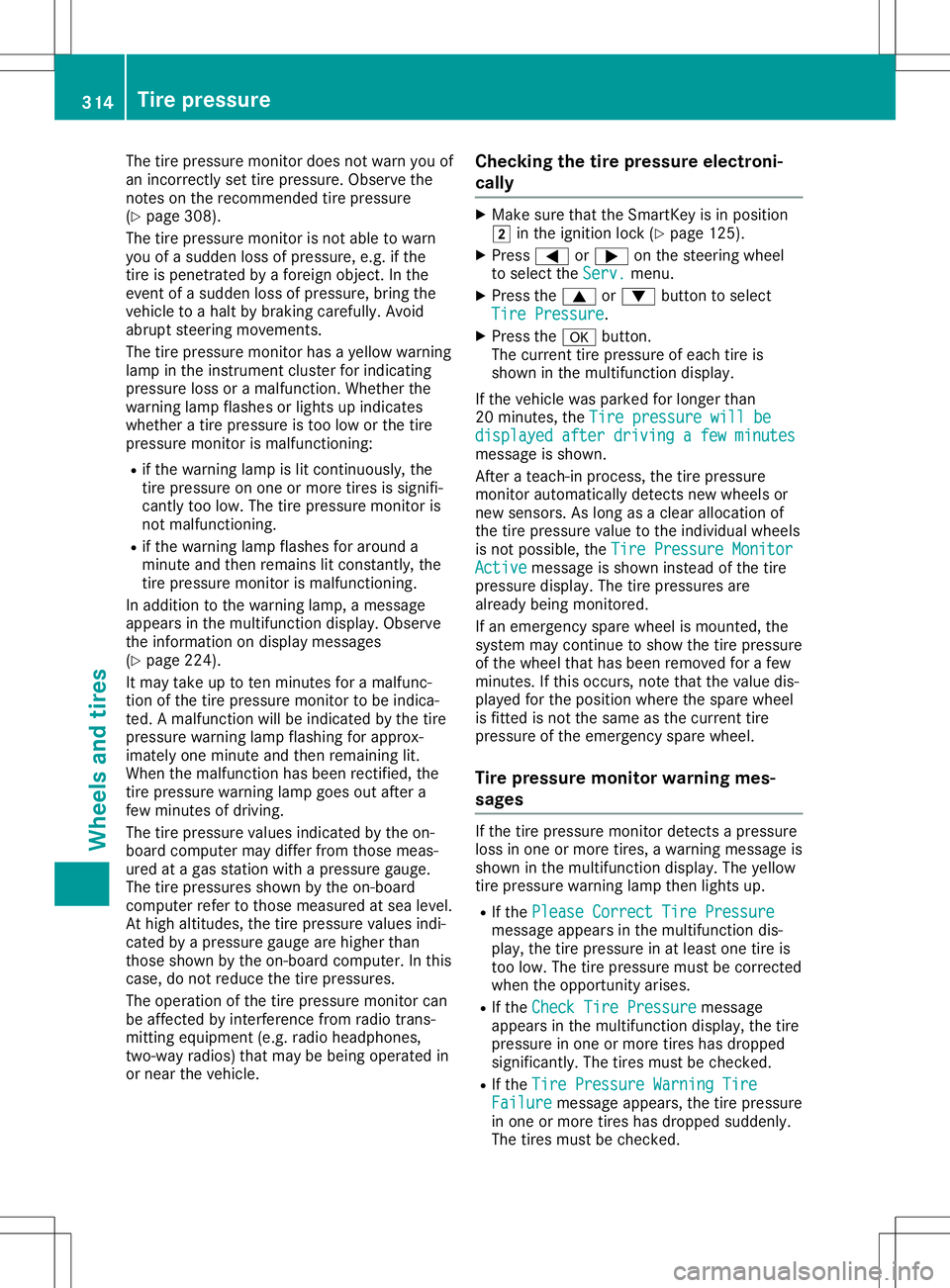
The
tirepressure monitordoes notwarn youof
an incorr ectlysettire pressure. Observethe
not eson the recomm endedtirepressure
(Y page 308).
The tirepressure monitorisnot able towarn
you ofasudden lossofpressure, e.g.ifthe
tire ispenetr atedbyaforeign object.In the
event ofasudden lossofpressure, bringthe
vehicle toahalt bybraking carefully. Avoid
abrupt steeringmovemen ts.
The tirepressure monitorhas ayellow warning
lamp inthe instr ument cluster forindicatin g
pressure lossoramalfunct ion.Whether the
warning lampflashes orlights upindicates
whether atire pressure istoo low orthe tire
pressure monitorismalfunct ioning:
R ifthe warning lampislit cont inuously, the
tire pressure onone ormore tiresissignifi-
cant lytoo low. Thetirepressure monitoris
not malfunct ioning.
R ifthe warning lampflashes foraround a
minute andthen remains litconst antly, the
tire pressure monitorismalfunct ioning.
In addition tothe warning lamp,amessage
appears inthe multifunct iondisplay .Observe
the inform ationondisplay messages
(Y page 224).
It may take uptoten minutes foramalfunc-
tion ofthe tire pressure monitortobe indica-
ted. Amalfunct ionwill beindicated bythe tire
pressure warninglampflashing forapprox-
imately oneminute andthen remaining lit.
When themalfunct ionhas been rectified, the
tire pressure warninglampgoesoutafter a
few minutes ofdriving.
The tirepressure valuesindicated bythe on-
board computer maydiffer fromthose meas-
ured atagas station withapressure gauge.
The tirepressures shownbythe on-board
computer refertothose measured atsea level.
At high altitudes, thetire pressure valuesindi-
cated byapressure gaugearehigher than
those shown bythe on-board computer. Inthis
case, donot reduce thetire pressures.
The operation ofthe tire pressure monitorcan
be affect edbyinter ferenc efrom radio trans-
mitt ingequipment (e.g.radio headphones,
two-way radios)thatmay bebeing operated in
or near thevehicle. Checking
thetire pressur eelectroni-
cally X
Make surethattheSmart Keyisin position
0048 inthe ignition lock(Ypage 125).
X Press 0059or0065 onthe steerin gwheel
to select theServ. Serv.
menu.
X Press the0063 or0064 button toselect
Tire Pressure Tire
Pressure.
X Press the0076 button .
The current tirepressure ofeach tireis
shown inthe multifunct iondisplay .
If the vehicle wasparked forlonger than
20 minutes, theTire pressure willbe Tire
pressure willbe
displayed afterdriving afew minutes displayed
afterdriving afew minutes
message isshown.
Aft erateach- inprocess, thetire pressure
monit orautomatically detectsnew wheels or
new sensors. Aslong asaclear allocation of
the tire pressure valuetothe individual wheels
is not possible, theTire Pressure Monitor Tire
Pressure Monitor
Active Active
message isshown instead ofthe tire
pressure display.The tirepressures are
already beingmonitored.
If an emergenc yspare wheel ismounted, the
system maycontinue toshow thetire pressure
of the wheel thathasbeen removed forafew
minutes. Ifthis occurs, notethat thevalue dis-
played forthe position wherethespare wheel
is fitt ed isnot thesame asthe current tire
pressure ofthe emergenc yspare wheel.
Tire pressur emonitor warning mes-
sages If
the tire pressure monitordetect sa pressure
loss inone ormore tires,awarning message is
shown inthe multifunct iondisplay .The yellow
tire pressure warninglampthenlights up.
R Ifthe Please Correct TirePressure Please
Correct TirePressure
message appearsinthe multifunct iondis-
play, thetire pressure inat least onetireis
too low. Thetirepressure mustbecorrec ted
when theopportunit yarises.
R Ifthe Check TirePressure Check
TirePressure message
appears inthe multifunct iondisplay ,the tire
pressure inone ormore tireshasdropped
significant ly.The tires must becheck ed.
R Ifthe Tire Pressure WarningTire Tire
Pressure WarningTire
Failure Failure
message appears,thetire pressure
in one ormore tireshasdropped suddenly.
The tires must becheck ed. 314
Tir
epr essureWheels andtires
Page 336 of 346
The
maximum transmission output(PEAK)at
the base ofthe anten namust notexceed the
following values: Frequency
band Maximu
m
tra nsmission
outpu t Short
wave
3 -54 MHz 100
W 4
m waveband
74 -88 MHz 30
W 2
m waveband
144 -174 MHz 50
W Trunked
radiosystem/
Tetra
380 -460 MHz 10
W 70
cm waveband
400 -460 MHz 35
W Mobile
commun ications
(2G/3G/4G) 10
W The
following canbeused inthe vehicle with-
out restr iction s:
R RF trans mitterswith amaximum transmis-
sion output ofup to100 mW
R RF trans mitterswith trans mitterfrequencies
in the 380 -410 MHz frequency bandanda
maximum transmission outputofup to2W
(trunk edradio system/Tet ra)
R Mobile phones (2G/3G/4G)
There isno restr iction foranten napositions on
the outside ofthe vehicle forthe following fre-
quency bands:
R Trunked radiosystem/Tet ra
R 70 cm waveband
R 2G/3G/4 G Identification
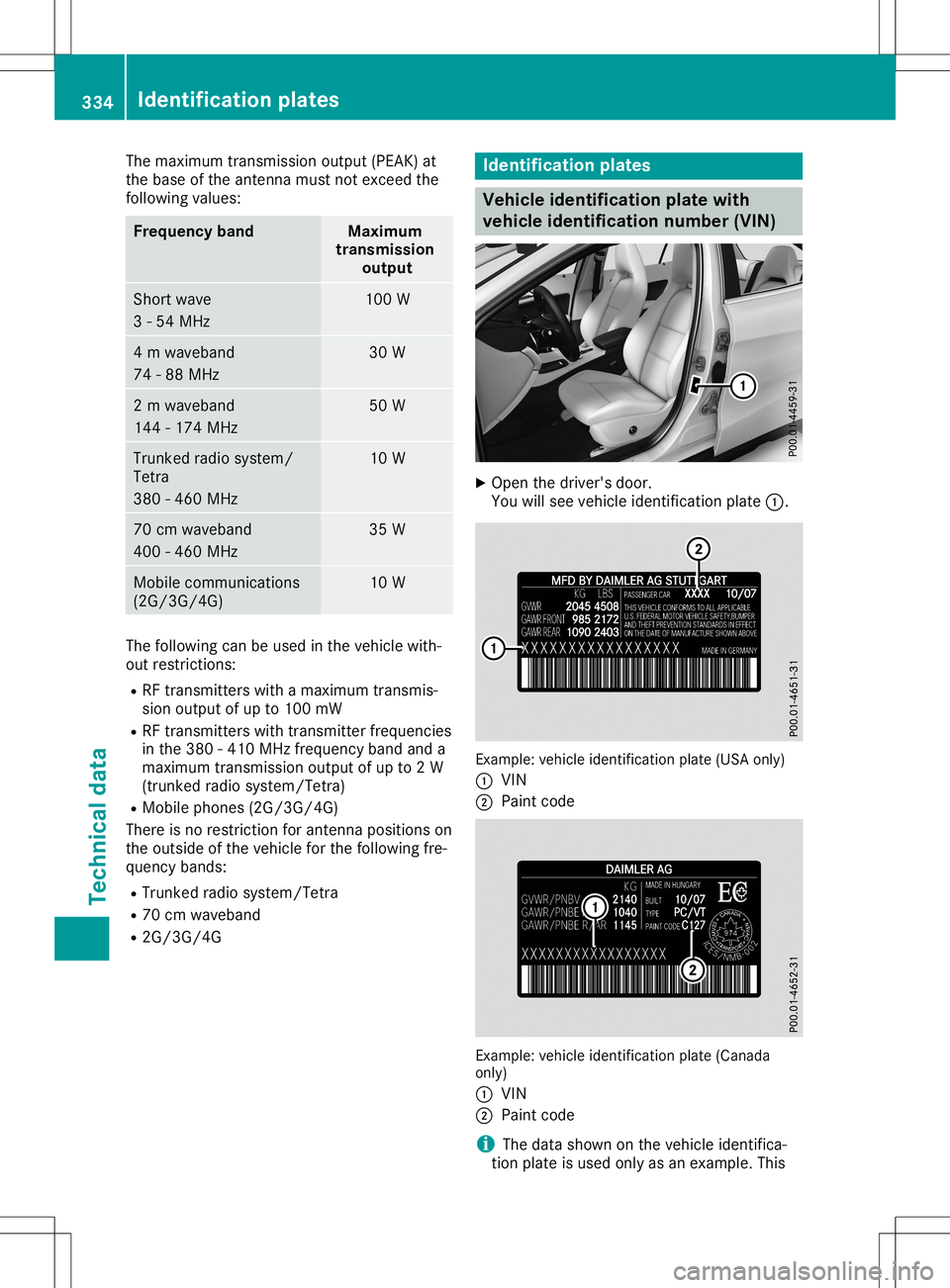
plates Vehicle
identification platewith
vehicle identification number(VIN) X
Open thedriver's door.
You willsee vehicle identific ationplate0043. Example:
vehicleidentific ationplate(USA only)
0043 VIN
0044 Paint code Example:
vehicleidentific ationplate(Canada
only)
0043 VIN
0044 Paint code
i The
data shown onthe vehicle identific a-
tion plate isused onlyasan example. This 334
Identification
platesTechnical data