buttons MERCEDES-BENZ GLB SUV 2019 User Guide
[x] Cancel search | Manufacturer: MERCEDES-BENZ, Model Year: 2019, Model line: GLB SUV, Model: MERCEDES-BENZ GLB SUV 2019Pages: 689, PDF Size: 11.39 MB
Page 222 of 689
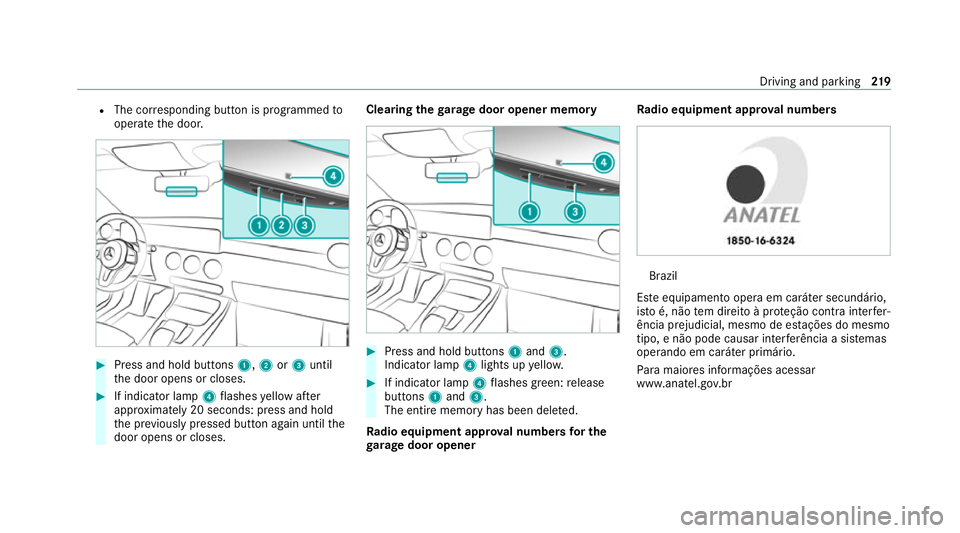
R
The cor responding button is programmed to
operate the door. #
Press and hold buttons 1,2or3 until
th e door opens or closes. #
If indicator lamp 4flashes yellow af ter
appr oximately 20 seconds: press and hold
th e pr eviously pressed button again until the
door opens or closes. Clearing
thega rage door opener memo ry #
Press and hold buttons 1and 3.
Indicator lamp 4lights up yello w. #
If indicator lamp 4flashes green: release
buttons 1and 3.
The entire memo ryhas been dele ted.
Ra dio equipment appr oval numbers for the
ga rage door opener Ra
dio equipment appr oval numbers Brazil
Es te equipamento opera em caráter secundário,
is to é, não tem direito à pr oteção contra inter fer‐
ência prejudicial, mesmo de es tações do mesmo
tipo, e não pode causar inter ferê ncia a si stemas
operando em caráter primário.
Pa ra maio res informações acessar
www.anatel.go v.br Driving and parking
219
Page 240 of 689
R
Ifth e typical outline of a pedestrian cann ot
be distinguished from the bac kground.
R If a pedestrian is not de tected as su ch, e.g.
due tospecial clo thing or other objects.
R On bends with a tight radius.
% The Active Brake Assi stsensors adjust auto‐
matically while a cer tain dis tance is being
driven af terth eve hicle has been delivered.
Ac tive Brake Assi stis una vailable or only
partially available during this teach-in period. Setting
Active Brake Assi st Re
quirements:
R The ignition is switched on.
Multimedia sy stem:
4 © 5
Settings 5
Assistance
5 Active Brake Assist
The following settings are available:
R Early
R Medium
R Late #
Select a setting.
The setting is retained when the engine is
next star ted.
Deactivating Active Brake Assi st
% It is recommended that you alw ays lea ve
Ac tive Brake Assi stactivated. #
Select Off.
The dis tance warning function, the autono‐
mous braking function and the Evasive Steer‐
ing Assist are deactivated.
When theve hicle is next star ted, the middle
setting is automatically selected.
% IfAc tive Brake Assi stis deactivated, the
æ symbol appears inthest atus bar of the
multifunction displa y. Fu
nction of Adaptive Brake Lights Ad
aptive Brake Lights warnfollowing traf fic in an
emergency braking situation wi th thefo llowing
actions:
R Byflashing the brake lamps
R By activating the hazard warning lights If
th eve hicle is braked sharply from speeds
abo ve50 km/h, the brake lamps flash rapidl y.
This pr ovides traf fic tr avelling behind you with an
ev en more noticeable warning.
If th eve hicle is tr avelling at speeds of more than
70 km/h at the beginning of the brake applica‐
tion, the hazard warning lights switch on once
th eve hicle is stationar y.When you pull away
again, the hazard warning lights will switch off
automatically at appr oximately 10km/h. Yo u
can also switch off the hazard warning lights
using the hazard warning button. Cruise control and limiter
Fu
nction of cruise control
Cruise cont rolre gulates the speed totheva lue
selec tedby the driver.
If yo u accelerate toove rtake, forex ample, the
st ored speed is not dele ted. If youre mo veyour
fo ot from the accelera tor pedal af terov ertaking,
cruise control will resume speed regulation back
to thestored speed.
Cruise contro l is operated using the cor respond‐
ing steering wheel buttons. You can store any Driving and parking
237
Page 242 of 689
The
variable limiter is operated using the cor re‐
sponding steering wheel buttons. You can store
any speed abo ve20 km/h up tothe maximum
speed or up tothe set winter tyre limit. You can
also per form settings while theve hicle is station‐
ary if theve hicle has been star ted.
If yo ufa ilto adapt your driving style, the limiter
can neither reduce therisk of an accident nor
ove rride the la wsof ph ysics. It cannot take into
account road, weather or traf fic conditions. The
limiter is only an aid. The driver is responsible
fo rth e dis tance totheve hicle in front, forve hi‐
cle speed, for braking in good time and forst ay‐
ing in lane.
Mercedes‑AMG vehicles: the limiter is available
up toa maximum speed of 250 km/h.
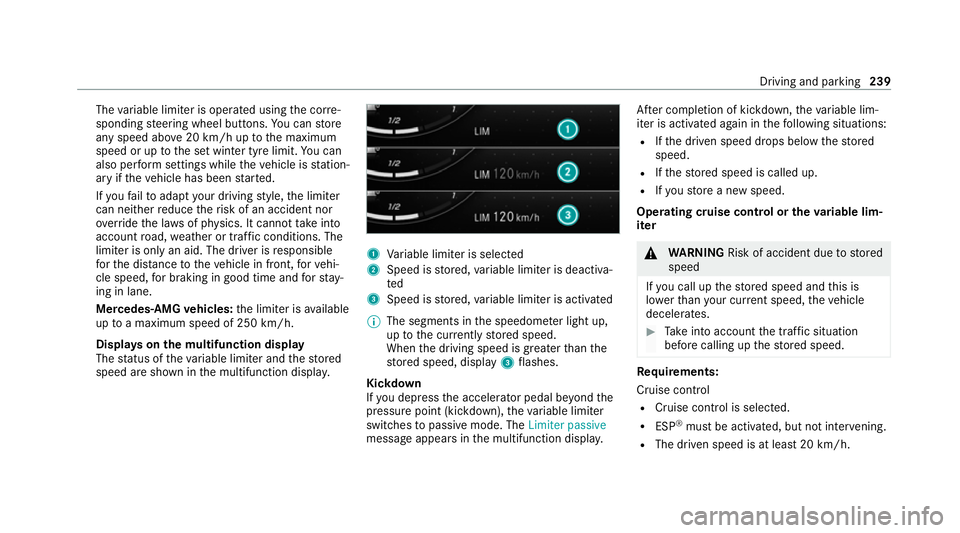
Displ ays on the multifunction display
The status of theva riable limiter and thestored
speed are shown in the multifunction displa y. 1
Variable limiter is selec ted
2 Speed is stored, variable limiter is deactiva‐
ted
3 Speed is stored, variable limiter is activated
% The segments in the speedome ter light up,
up tothe cur rently stored speed.
When the driving speed is greater than the
st ored speed, display 3flashes.
Kickd own
If yo u depress the accelerator pedal be yond the
pressure point (kickdown), theva riable limiter
swit ches topassive mode. The Limiter passive
message appears in the multifunction displa y.Af
ter completion of kickdown, theva riable lim‐
iter is activated again in thefo llowing situations:
R Ifth e driven speed drops below thestored
speed.
R Ifth estored speed is called up.
R Ifyo ustore a new speed.
Operating cruise control or theva riable lim‐
iter &
WARNING Risk of accident due tostored
speed
If yo u call up thestored speed and this is
lo we rth an your cur rent speed, theve hicle
decelerates. #
Take into account the tra ffic situation
before calling up thestored speed. Re
quirements:
Cruise control
R Cruise control is selected.
R ESP ®
must be activated, but not inter vening.
R The driven speed is at least 20 km/h. Driving and pa
rking 239
Page 332 of 689
Overview and operation
Overview of
the MBUX multimedia sy stem &
WARNING Risk of di stra ction from infor‐
mation sy stems and communications
equipment
If yo u operate information and communica‐
tion equipment integ rated in theve hicle
when driving, you will be distracted from the
traf fic situation. This could also cause youto
lose control of theve hicle. #
Only operate this equipment when the
traf fic situation permits. #
Ifyo u cannot be sure of this, stop the
ve hicle whilst paying attention toroad
and traf fic conditions and ope rate the
equipment with theve hicle stationar y. Yo
u must obse rveth e legal requirements forthe
country in whi chyou are cur rently driving when
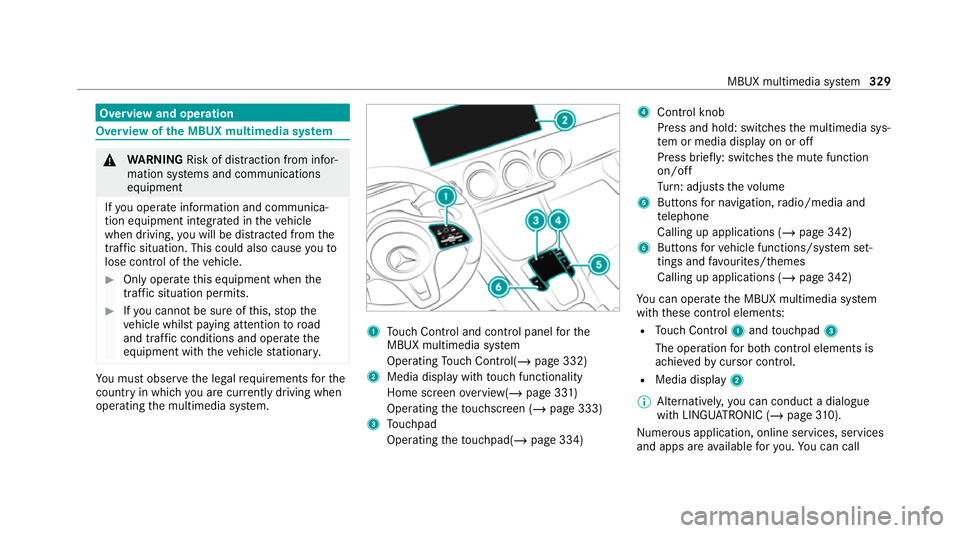
operating the multimedia sy stem. 1
Touch Control and cont rol panel forthe
MBUX multimedia sy stem
Operating Touch Control(/ page 332)
2 Media displ aywith touch functionality
Home sc reen ove rview(/ page 331)
Operating theto uchsc reen (/ page 333)
3 Touchpad
Operating theto uchpad( /page 334) 4
Control knob
Press and hold: swit ches the multimedia sys‐
te m or media display on or off
Press brief ly: switches the mute function
on/off
Tu rn: adjusts thevo lume
5 Buttons for navigation, radio/media and
te lephone
Calling up applications (/ page 342)
6 Buttons forve hicle functions/sy stem set‐
tings and favo urites/ themes
Calling up applications (/ page 342)
Yo u can operate the MBUX multimedia sy stem
with these control elements:
R Touch Control 1and touchpad 3
The operation for bo thcontrol elements is
achie vedby cursor control.
R Media displ ay2
% Alternati vely, you can conduct a dialogue
with LINGU ATRO NIC (/ page310).
Nu merous application, online services, services
and apps are available foryo u. You can call MBUX multimedia sy
stem 329
Page 333 of 689
th
ese up using the home screen or using buttons
5 and 6next totheto uchpad.
Yo u can co nveniently call up and add favo urites
using theß rocker switch on thesteering
wheel or using theß button next tothe
to uchpad. Quic k-access in the home screen and
in the applications ser vetoselect functions
more quickl y.
If yo u use the learn function of the multimedia
sy stem, you will recei vesuggestions during oper‐
ation of the most probable navigation destina‐
tions, radio stations and con tacts. The configu‐
ra tion of the suggestions take s place in your pro‐
fi le. You can co mpileyour profile from various
ve hicle settings and settings of the multimedia
sy stem. You can create themes forva rious driv‐
ing situations in the home screen as well as
using theß rocker switch or theß but‐
to n.
The Notifications Centre collects incoming notifi‐
cations, e.g. about an available software update.
Depending on the type of notification it of fers
va rious actions. You can call up the Notifications
Centre on the home screen and in the applica‐
tion menus. Wi
th th eglobal sear chintheve hicle you can
sear chon-board across many categories as well
as online in the Internet. You can use theglobal
sear chinthe home screen and in the notifica‐
tions.
Anti-theft pr otection
This device is equipped with tech nical pr ovisions
to protect it against theft. More de tailed informa‐
tion about anti-theft pr otection can be obtained
at a qualified specialist workshop. Note
s onthe media display Obser
vethe no tes on caring forth e interior
(/ page 499).
Au tomatic temperature-cont rolled switch-
off feature: ifth ete mp erature is too high, the
brightness is initially reduced automatically. The
media display may then switch off comple tely for
a while.
% Ifyo u are wearing polarised sun glasses, it
may be dif ficult toread the multimedia sys‐
te m displa y. 330
MBUX multimedia sy stem
Page 346 of 689
#
Touch and hold an application on the
to uchsc reen until symbols appear. #
Tap on = or; and mo vethe applica‐
tion in the menu. #
Tap on ø. Profile
Note
s on profiles &
WARNING Risk of becoming trapped
du ring adjustment of the driver's seat
af te r calling up a driver profile
Selecting a profile may trigger an adju stment
of the driver's seat tothe position sa ved
under the profile. You or other vehicle occu‐
pants could be injured in the process. #
Make sure that when the position of
driver's seat is being adjus ted using the
multimedia sy stem, no people or body
parts are in the seat's range of mo ve‐
ment. If
th ere is a risk of someone becoming trap‐
ped, stop the adjustment process immedi‐
ately: #
a)Tapth ewa rning message on the
media displa y.
or #
b) Press a memory position button or a
seat adjustment switch on the driver's
door.
The adjustment process is stopped. The driver's seat is equipped with an anti-entrap‐
ment feature.
If th e driver's door is open, the driver's seat will
not be set af ter calling up the driver's profile.
Overview of profiles
Using the multimedia sy stem up toseven pro‐
fi les can be created in theve hicle.
Profiles store your personal vehicle settings and
settings forth e multimedia sy stem.
If th eve hicle is used byseveral drivers, the
driver can select their profile before the journe y,
without changing the settings of other drivers. Yo
u can select the profile:
R When entering (/ page 346)
R Using the home screen (/ page 331)
The profile settings are activated as soon as a
profile is selected.
% Ifyo u call up your profile when driving then
th e driver's seat position will not be adjus‐
te d.
Yo u can cancel the setting process with the
fo llowing actions:
R Tap on thePositioning seat and steering
wheel. Please tap to cancel. warning on
th e media displa y.
R Press one of the seat operating buttons
in the driver's door.
Profile content
Depending on theve hicle equipment, thefo llow‐
ing settings can be stored in your profile, for
ex ample:
R Driver's seat memory
R Radio (including station list) MBUX multimedia sy
stem 343
Page 348 of 689
Selecting profile options
Multimedia sy
stem:
4 © 5
f Profiles #
Select Äfor a profile. #
Toedit a profile: selectEdit profile . #
Select an avatar. #
Chan gethe name, if necessar y.#
Select Save. #
Toconfigure suggestions: selectSugges-
tions settings (/page 349). #
Toreset favo urites or themes: select
Reset favourites to factory settings orReset
themes to factory settings. #
Select Yes. #
Toreset a profile: selectReset profile to
factory settings. #
Select Yes. #
Todel ete a profile: selectDelete profile . #
Select Yes.
% The guest profile cannot be dele ted. Pr
otecting profile content
To protect your profile content and settings you
can crea tea PIN in the Mercedes me por talfor
yo ur profile. When PIN pr otection is active, you
ha ve toenter the PIN toselect your profile. #
Select Protect content . #
Select Mercedes me portal.
The br owser opens and you are trans ferred
to the Mercedes me por tal.
Selecting a profile
Multimedia sy stem:
4 © 5
f Profiles
% You can cancel the setting process with the
fo llowing actions:
R Tap on thePositioning seat and steering
wheel. Please tap to cancel. warning on
th e media displa y.
R Press one of the seat operating buttons
in the driver's door. #
Select a profile. #
Press thea button toconfirm the mes‐
sage.
The profile is loaded and activated. %
Alternatively, the profile can already be
selected when theve hicle is entered
(/ page 346).
Synchronising a profile
Re quirements:
R You ha vea Mercedes me user account.
R The vehicle is connected with your Mercedes
me user account.
R The personalisation service is activated on
Mercedes me connect.
Multimedia sy stem:
4 © 5
f Profiles
5 General settings
Synchronisation enables thefo llowing:
R You can configure theve hicle settings using
th e Mercedes me app.
R The profile on Mercedes me connect and the
profile in theve hicle are aligned (profile man‐
agement). #
Activate Synchronise profiles automatically.
The profiles in theve hicle are automatically
synchronised with the profiles on Mercedes MBUX multimedia sy
stem 345
Page 410 of 689
R
Cause of the tra ffic incident, e.g. con‐
st ru ction work
R Warning message (highligh tedre d) #
Toselect a traf fic incident symbol: select
q orr. #
Toselect a map section: tap on the
to uchsc reen.
or #
Press theTo uch Control or theto uchpad. #
Movethe map. #
Toreturn tothe navigation map: tapon
G.
or #
Press theG button on theTo uch Control
or on theto uchpad.
Swit ching the traf fic information display on
Multimedia sy stem:
4 © 5
Navigation 5
Z #
Activate Traffic.
The display button is acti vated. Ac
tivating Incidents, Free Flow and Delay #
Select Advanced. #
Select View. #
Select Map elements. #
IntheTRAFFIC category,activate theTraffic
incidents, Free-flowing traffic andDelay
entri es.
The display buttons are activated.
If tra ffic information has been recei ved, then
tra ffic incidents such as roadwor ks,ro ad
bloc ks, local area reports (e.g. fog) and warn‐
ing messages are displa yed.
The tra ffic delay is displa yedfo rth e cur rent
ro ute. Traf fic del ays lasting one minute or
longer are take n into conside ration.
Showing local area messages
Multimedia sy stem:
4 © 5
Navigation 5
¡ 5
Traffic #
Select Area announcements .
Local area messages are shown, forex ample
fo g or heavy rain. #
Select a local area message.
The de tails are displa yed. Car-to-X-Communication
Car-to-X-Communication
overview
The following requ irements apply for using Car-
to -X-Communication:
R The vehicle is equipped with a multimedia
sy stem featuring navigation and a communi‐
cation module with an activated, integ rated
SIM card.
R Car-to -X-Communication is acti vated.
% Car-to-X-Communication is available in
selec ted count ries.
The communication module automatically es tab‐
lishes an Internet connection once the ignition is
switched on. If there are any hazard warnings,
th ey will be pr ovided shortly thereaf ter.Depend‐
ing on the mobile phone connection, the pr ovi‐
sion take s place from within a second up to
about a minute. MBUX multimedia sy
stem 407
Page 413 of 689
Ac
tivating route guidance with augmented
re ality &
WARNING Risk of accident and inju ry
caused byinaccurate positioning of addi‐
tional information
The additional information indicated with the
augmen tedre ality display can be incor rectly
positioned in the camera image. Forth is rea‐
son, the camera image cann otreplace the
need toobser vethe actual driving situation. #
Maintain the actual driving situation in
view for all driving manoeuvres , e.g.
when turning and when changing lanes. Re
quirements:
R Route guidance is active. Multimedia sy
stem:
4 © 5
Navigation #
Ifth e de tailed junction view appears during
ro ute guidance, tap on the camera symbol.
The display button is activated. The camera
image is shown in the media display depend‐
ing on the situation.
The camera image will be shown ins tead of
th e navigation map before a turning manoeu‐
vre and will show the additional information. #
Toreturn tothe navigation map: tapon
th e camera symbol again.
The display button is off.
Showing stre et names forro ute guidance
with augmented reality
Re quirements:
R Augmented reality is activated (/ page410). Mul
timedia sy stem:
4 © 5
Navigation 5
Z
5 Advanced 5
Augmented Reality #
Activate Street names andHouse numbers.
The display buttons are acti vated. During
ro ute guidance, stre et names and house
numbe rsare shown as additional information
in the video image.
Switching on display of traf fic lights with
augmented reality forro ute guidance
Re quirements:
R Augmented reality is activated (/ page410).
R The Traffi c light zoom option is switched on.
When theve hicle is standing in firs t position at a
junction, the camera image will show an
enlar ged tra ffic lights displa y.
% When theve hicle pulls away the navigation
map is shown again. 41 0
MBUX multimedia sy stem
Page 447 of 689
Multimedia sy
stem:
4 © 5
Mercedes me & Apps
5 Smartphone 5
Apple CarPlay
5 Start Apple CarPlay #
Alternative: If an Apple CarPlay ®
application
is active (e.g. when music is being pla yed or
ro ute guidance is active), you can call up the
active application using the|, zor
% application buttons (/ page 342).
% Control using the application buttons can be
switched on or off (/ page444).
Ac cepting/rejecting the data pr otection reg‐
ulations
Fo rth e initial start of the application: a message
with the data pr otection pr ovisions appears. #
Select Accept & start .
Exiting Apple CarPlay ®#
Press theò button.
% Apple CarPlay ®
starts automatically when
th e iPhone ®
is connected with the sy stem
using a cable. If Apple CarPlay ®
wa s not dis‐
pla yed in thefo re ground be fore disconnect‐ ing,
the application starts in the bac kground
when reconnected. You can call up Apple
CarPlay ®
in the main menu.
Calling up Apple CarPlay ®
to ne settings
Multimedia sy stem:
4 © 5
Mercedes me & Apps
5 Smartphone 5
Apple CarPlay 5
Z #
Select sound settings.
Setting control of the application but tons
(Apple CarPlay ®
)
Multimedia sy stem:
4 © 5
Mercedes me & Apps
5 Smartphone 5
Apple CarPlay 5
Z
5 General #
Toswitch on Control via application buttons :
activate the display button. #
Toswitch off Control via application buttons :
deactivate the display button.
Ending Apple CarPlay ® #
Toend the connection of Apple Car‐
Play ®
(with cable): disconnectthe connec‐ tion via
the connecting cable between the
mobile phone and multimedia sy stem.
% Mercedes-Benz recommends disconnecting
th e connecting cable only when theve hicle
is stationar y. Android
Auto Android
Autoove rview &
WARNING Risk of di stra ction from infor‐
mation sy stems and communications
equipment
If yo u operate information and communica‐
tion equipment integ rated in theve hicle
when driving, you will be distracted from the
traf fic situation. This could also cause youto
lose control of theve hicle. #
Only operate this equipment when the
traf fic situation permits. #
Ifyo u cannot be sure of this, stop the
ve hicle whilst paying attention toroad
and traf fic conditions and ope rate the
equipment with theve hicle stationar y. 444
MBUX multimedia sy stem