fuel MERCEDES-BENZ GLB SUV 2019 Owner's Manual
[x] Cancel search | Manufacturer: MERCEDES-BENZ, Model Year: 2019, Model line: GLB SUV, Model: MERCEDES-BENZ GLB SUV 2019Pages: 689, PDF Size: 11.39 MB
Page 215 of 689
#
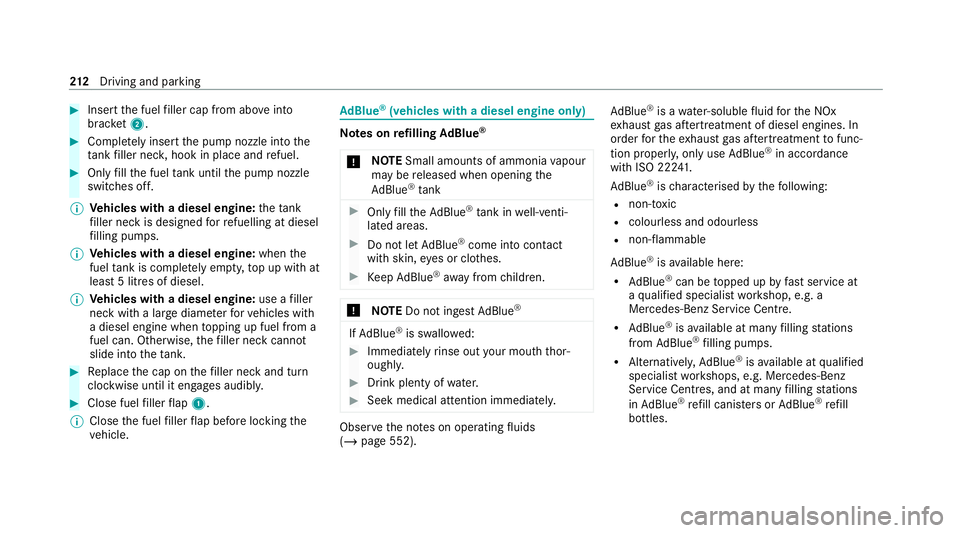
Insert the fuel filler cap from abo veinto
brac ket2. #
Comp lete ly inse rtthe pump nozzle into the
ta nk filler nec k,hook in place and refuel. #
Only fill th e fuel tank until the pump nozzle
switches off.
% Vehicles with a diesel engine: theta nk
fi ller neck is designed forre fuelling at diesel
fi lling pumps.
% Vehicles with a diesel engine: whenthe
fuel tank is compl etely em pty, top up with at
least 5 litres of diesel.
% Vehicles with a diesel engine: use afiller
neck with a lar gediame terfo rve hicles with
a diesel engine when topping up fuel from a
fuel can. Otherwise, thefiller neck cannot
slide into theta nk. #
Replace the cap on thefiller neck and turn
clockwise until it engages audibl y.#
Close fuel filler flap 1.
% Close the fuel filler flap before locking the
ve hicle. Ad
Blue ®
(vehicles with a diesel engine on ly) Note
s onrefilling AdBlue ®
* NO
TESmall amounts of ammonia vapour
may be released when opening the
Ad Blue ®
tank #
Only fill th eAd Blue ®
tank in well-venti‐
lated areas. #
Do not let AdBlue ®
come into contact
wi th skin, eyes or clo thes. #
Keep AdBlue ®
aw ay from children. *
NOTEDo not ingest AdBlue ® If
Ad Blue ®
is swallo wed: #
Immediately rinse out your mouth thor‐
oughl y. #
Drink plenty of water. #
Seek medical attention immediately. Obser
vethe no tes on operating fluids
(/ page 552). Ad
Blue ®
is a water-soluble fluid forth e NOx
ex haust gas af tertre atment of diesel engines. In
order forth eex haust gas af tertre atment tofunc‐
tion properly, only use AdBlue ®
in acco rdance
with ISO 22 241.
Ad Blue ®
is ch aracterised bythefo llowing:
R non-t oxic
R colourless and odourless
R non-flammable
Ad Blue ®
is available here:
R AdBlue ®
can be topped up byfast service at
a qu alified specialist workshop, e.g. a
Mercedes-Benz Service Centre.
R AdBlue ®
is available at many filling stations
from AdBlue ®
filling pumps.
R Alternativel y,Ad Blue ®
is available at qualified
specialist workshops, e.g. Mercedes-Benz
Service Centres, and at many filling stations
in Ad Blue ®
re fill canis ters or AdBlue ®
re fill
bottles. 212
Driving and pa rking
Page 216 of 689
%
Ensu rethe connection between there fill
con tainer and vehicle filler neck does not
drip.
To pping up AdBlue ®
* NOTEEngine dama gedue toAd Blue ®
being in the fuel #
AdBlue ®
must not be used tofill the
fuel tank. #
Only use AdBlue ®
to fill th eAd Blue ®
ta nk. #
Do not overfill theAd Blue ®
tank. *
NO
TEContamination of theve hicle inte‐
ri or due toAd Blue ®
lea kage #
Afterto pping up, carefully close the
Ad Blue ®
re fill con tainer. #
Avoid car rying AdBlue ®
re fill con tainers
permanently in theve hicle. Re
quirements:
R The vehicle is unloc ked. The
following messages appear in order in the
multifunction display when theAd Blue ®
tank
requ irestopping up:
R Refill AdBlue See Owner’s Manual The
Ad Blue ®
leve l has fallen below there ser ve
ra nge. Top up with at least 5 l of AdBlue ®
.
R Top up AdBlue Emergency op. in XXX miles
See Owner's ManualThe low AdBlue ®
level
will lead tolimited per form ance af terthe
re maining dis tance displ ayed has been
driven. Top up with at least 5 l of AdBlue ®
.
R XX,X l Top up AdBlue Emer. op.: max. XXX
km/h Start not poss. in XXX kmThe low
AdBlue ®
leve l will lead tolimited per form‐
ance from the speed displa yed. Af terthe
re maining dis tance displ ayed has been cov‐
ered, it will no longer be possible tostart the
engine. Top up with at least the amount of
Ad Blue ®
displ ayed.
R XX,X l Top up AdBlue Switch on ignition, wait
60 sec. or eng. start not poss. . TheAdBlue ®
ta nk is em pty. Yo u can no lon gerst art the
engine. Top up with at least the amount of Ad
Blue ®
displ ayed. Switch on the ignition
and waitfor appro ximately 60 seconds. Start
th e engine.
Yo u can see theAd Blue ®
ra nge and le vel in the
multifunction display (/ page 300).
% The AdBlue ®
ra nge shown depends strongly
on the driving style and operating condi‐
tions. The actual range can therefore deviate
from the calculated range. Driving and pa
rking 213
Page 217 of 689
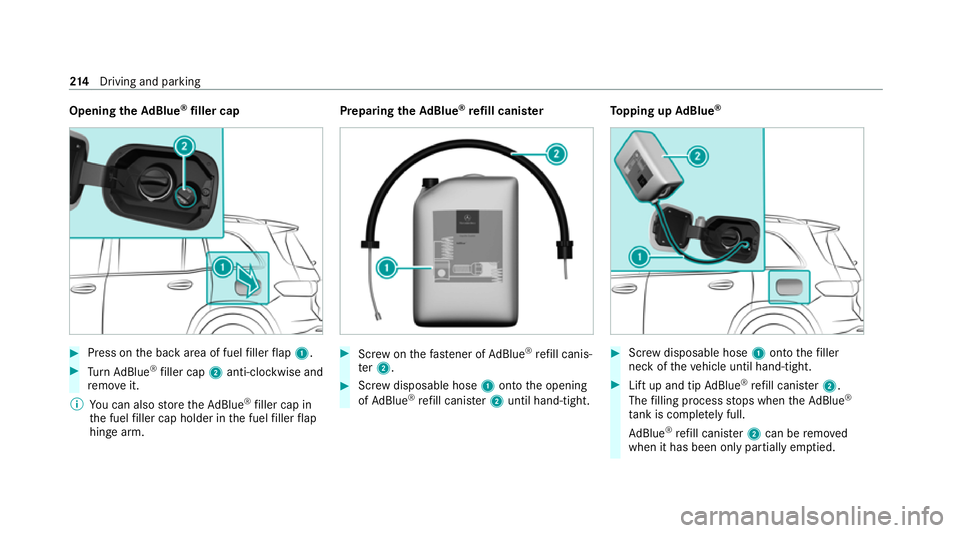
Opening
theAd Blue ®
filler cap #
Press on the back area of fuel filler flap 1. #
Turn AdBlue ®
filler cap 2anti-clockwise and
re mo veit.
% You can also store theAd Blue ®
filler cap in
th e fuel filler cap holder in the fuel filler flap
hin gearm. Prepa
ring theAd Blue ®
re fill canis ter #
Screw onthefast ener of AdBlue ®
re fill canis‐
te r2. #
Screw disposable hose 1onto the opening
of Ad Blue ®
re fill canis ter2 until hand-tight. To
pping up AdBlue ® #
Screw disposable hose 1onto thefiller
neck of theve hicle until hand-tight. #
Lift up and tip AdBlue ®
re fill canis ter2.
The filling process stops when theAd Blue ®
ta nk is compl etely full.
Ad Blue ®
re fill canis ter2 can be remo ved
when it has been only partially em ptied. 214
Driving and pa rking
Page 218 of 689
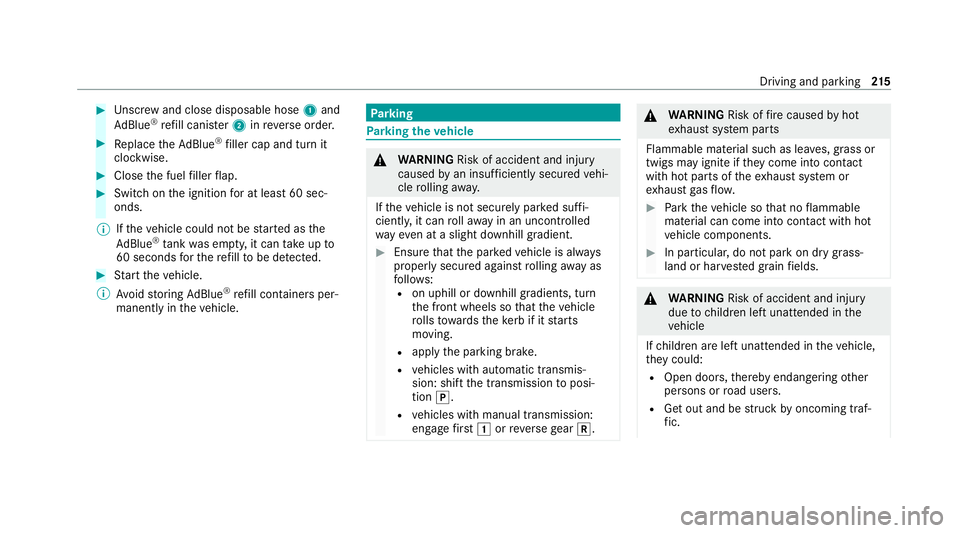
#
Unscr ew and close disposable hose 1and
Ad Blue ®
re fill canis ter2 inreve rse order. #
Replace theAd Blue ®
filler cap and turn it
clockwise. #
Close the fuel filler flap. #
Swit chon the ignition for at least 60 sec‐
onds.
% Ifth eve hicle could not be star ted as the
Ad Blue ®
tan kwa s em pty, it can take up to
60 seconds forth ere fill to be de tected. #
Start theve hicle.
% Avoid storing AdBlue ®
re fill con tainers per‐
manently in theve hicle. Pa
rking Pa
rking theve hicle &
WARNING Risk of accident and inju ry
caused byan insuf ficiently secu redve hi‐
cle rolling away.
If th eve hicle is not securely par ked suf fi‐
ciently, it can rollaw ay in an uncont rolled
wa yev en at a slight downhill gradient. #
Ensure that the par kedve hicle is alw ays
properly secured against rolling away as
fo llo ws:
R on uphill or downhill gradients, turn
the front wheels so that theve hicle
ro lls towa rdsth eke rb if it starts
moving.
R apply the parking brake.
R vehicles with automatic transmis‐
sion: shift the transmission toposi‐
tion j.
R vehicles with manual transmission:
engage firs t1 orreve rsege ar k. &
WARNING Risk offire caused byhot
ex haust sy stem parts
Flammable material such as lea ves, grass or
twigs may ignite if they come into contact
wi th hot parts of theex haust sy stem or
ex haust gasflow. #
Park theve hicle so that no flammable
material can come into con tact wi thhot
ve hicle components. #
In particular, do not park on dry grass‐
land or har vested grain fields. &
WARNING Risk of accident and inju ry
due tochildren left unat tended in the
ve hicle
If ch ildren are left unat tended in theve hicle,
th ey could:
R Open doo rs,th ereby endangering other
persons or road users.
R Get out and be stru ck byoncoming traf‐
fi c. Driving and pa
rking 215
Page 246 of 689
%
The target speed alw ays adjusts in 1 km/h
increments. This is rega rdless of whe ther
yo u press therock er switch toor be yond the
point of resis tance. Ac
tive Di stance Assist DISTRO NICFu
nction of Active Di stance Assist
DISTRO NIC Ac
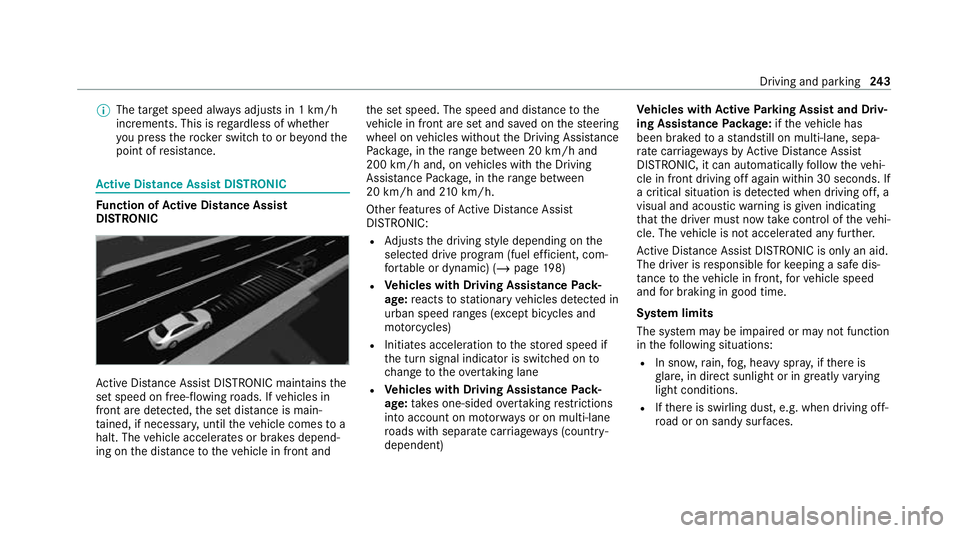
tive Dis tance Assi stDISTRONIC maintains the
set speed on free-flowing roads. If vehicles in
front are de tected, the set dis tance is main‐
ta ined, if necessar y,until theve hicle comes to a
halt. The vehicle accelerates or brakes depend‐
ing on the dis tance totheve hicle in front and th
e set speed. The speed and dis tance tothe
ve hicle in front are set and sa ved on thesteering
wheel on vehicles without the Driving Assis tance
Pa ckage, in thera nge between 20 km/h and
200 km/h and, on vehicles with the Driving
Assis tance Package, in thera nge between
20 km/h and 210 km/h.
Other features of Active Dis tance Assi st
DISTRONIC:
R Adjusts the driving style depending on the
selected drive program (fuel ef ficient, com‐
fo rtable or dynamic) (/ page198)
R Vehicles with Driving Assistance Pack‐
age: reacts tostationary vehicles de tected in
urban speed ranges (e xcept bicycles and
mo torcyc les)
R Initiates acceleration tothestored speed if
th e turn signal indicator is switched on to
ch ange totheove rtaking lane
R Vehicles with Driving Assistance Pack‐
age: take s one-sided overtaking restrictions
into account on mo torw ays or on multi-lane
ro ads with separate car riag ewa ys(countr y-
dependent) Ve
hicles with Active Parking Assist and Driv‐
ing Assistance Package: ifth eve hicle has
been braked toast andstill on multi-lane, sepa‐
ra te car riag ewa ysby Active Dis tance Assi st
DISTRONIC, it can au tomatically follow theve hi‐
cle in front driving off again within 30 seconds. If
a critical situation is de tected when driving off, a
visual and acoustic warning is given indicating
th at the driver must now take control of theve hi‐
cle. The vehicle is not accelerated any fur ther.
Ac tive Dis tance Assi stDISTRONIC is only an aid.
The driver is responsible forke eping a safe dis‐
ta nce totheve hicle in front, forve hicle speed
and for braking in good time.
Sy stem limits
The sy stem may be impaired or may not function
in thefo llowing situations:
R In sno w,rain, fog, heavy spr ay, if there is
gl are, in direct sunlight or in great lyvarying
light conditions.
R Ifth ere is swirling dust, e.g. when driving off-
ro ad or on sandy sur faces. Driving and pa
rking 243
Page 251 of 689
When
Active Dis tance Assi stDISTRONIC is acti‐
va ted, theve hicle speed will be adjus ted accord‐
ingly tothero ute events ahead. Depending on
th e drive prog ram selected, theve hicle negoti‐
ates a route event ahead in a fuel-s aving, com‐
fo rtable or dynamic manner. When thero ute
eve nt has been passed, theve hicle accelerates
again tothestored speed. The set dis tance to
th eve hicle in front, vehicles de tected ahead and
speed restrictions ahead are take n into account.
Ro ute-based speed adap tation can be config‐
ured in the multimedia sy stem (/ page249).
The following route events are take n into
account:
R Bends
R T-junctions, roundabouts and tollst ations
R Turns and exits
R Traf fic jams ahead (only wi thLive Traf fic
( / page 404))
% When theto llst ation is reached, Active Dis‐
ta nce Assi stDISTRONIC adopts the speed as
th estored speed. Also,
the speed is reduced if the turn signal indi‐
cator tochange lanes is swit ched on and one of
th efo llowing situations is de tected:
R Turning off at junctions
R Driving on slowing-down lanes
R Driving on lanes adjacent toslowing-down
lanes
The driver is responsible forch oosing theright
speed and observing other road users. This
applies in particular tojunctions, roundabouts
and traf fic lights, as route-based speed adap ta‐
tion does not brake theve hicle toast andstill.
When route guidance is active, thefirs t speed
adjustment is car ried out automaticall y.Ifthe
turn signal indica tor is switched on, the selected
ro ute is confirmed and fur ther speed adjustment
is activated.
Speed adjustment is cancelled in thefo llowing
cases:
R Ifth e turn signal indicator is switched off
before thero ute event.
R Ifth e driver depresses the accelerator or
brake pedal during the process. Sy
stem limits
Ro ute-based speed adap tation does not take
ri ght of wayre gulations into account. The driver
is responsible for complying with road traf fic
re gulations and driving at a suitable speed.
In dif ficult conditions, forex ample unclear roads,
lane nar rowing, wetro ad sur faces, snow or ice,
or when driving wi tha trailer, the speed adjust‐
ment made bythe sy stem may not alw ays be
suitable. In these situations the driver must
inter vene acco rdingly. &
WARNING Risk of accident in spi teof
ro ute-based speed adjustment
Ro ute-based speed adjustment might mal‐
function or be temp orarily una vailable in the
fo llowing situations:
R Ifth e driver does not follow the calcula‐
te dro ute
R If map data is not up todate or available
R Inroad con stru ction areas
R In bad weather or road conditions 248
Driving and pa rking
Page 297 of 689
Instrument display
overview
Mercedes-AMG vehicles: be sure toobser ve
th e no tes in the Supplement. Otherwise, you
may failto recognise dangers. &
WARNING Risk of accident due toan
instrument display malfunction
If th e Instrument Display has failed or mal‐
functioned, you may not recognise function
re strictions applying tosaf etyre leva nt sys‐
te ms.
The operating saf ety of your vehicle may be
impaired. #
Drive on carefull y.#
Have theve hicle checked immediately
at a qualified specialist workshop. If
th e operating saf ety of your vehicle is
impaired, park theve hicle immediately and
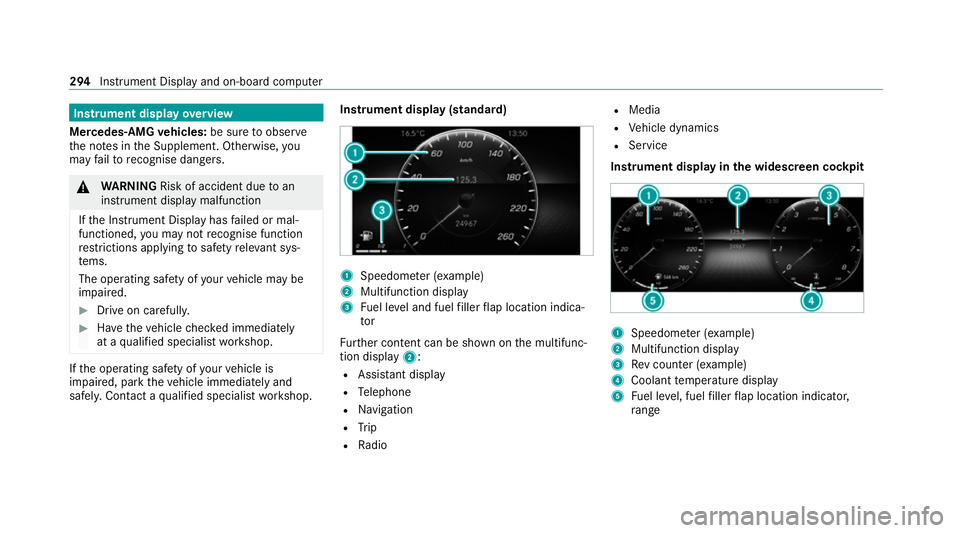
safel y.Con tact a qualified specialist workshop. Instrument display (standard)
1
Speedome ter (e xamp le)
2 Multifunction display
3 Fuel le vel and fuel filler flap location indica‐
tor
Fu rther content can be shown on the multifunc‐
tion display 2:
R Assis tant displ ay
R Telephone
R Navigation
R Trip
R Radio R
Media
R Vehicle dynamics
R Service
Instrument display in the widescreen cockpit 1
Speedome ter (e xamp le)
2 Multifunction display
3 Rev counter (e xample)
4 Coolant temp erature display
5 Fuel le vel, fuel filler flap location indicator,
ra nge 294
Instrument Display and on-boa rdcompu ter
Page 298 of 689
%
In addition tothe multifunction display 2,
fur ther conte nt can be shown on displ ays1
and 3(/ page 298).
The segments on speedome ter1 indica tethe
sy stem status forth efo llowing:
R Cruise control(/ page 237)
R Limiter (/ page 238)
R Active Dis tance Assi stDISTRONIC
(/ page 243)
* NO
TEEngine dama gedue toexcessively
high engine speeds The engine will be damaged if
you drive with
th e engine in theov errevving range. #
Do not drive wi th the engine in theove r‐
re vving range. The fuel supply will be inter
rupted toprotect the
engine when there d mark on there v counter
(o ve rrev ving range) is reached.
Ve hicles with a widescreen cock pit:during
normal operating conditions, coolant temp era‐
ture display 4may rise to120 °C. &
WARNING Danger of bu rns when open‐
ing the bonn et
If yo u open the engine bonn etwhen the
engine has overheated or during a fire inthe
engine compartment, you could come into
contact with hot gases or other escaping
operating fluids. #
Before opening the bonn et, allow the
engine tocool down. #
Intheeve nt of a fire inthe engine com‐
partment, keep the engine bonn et
closed and call thefire service. Overview of
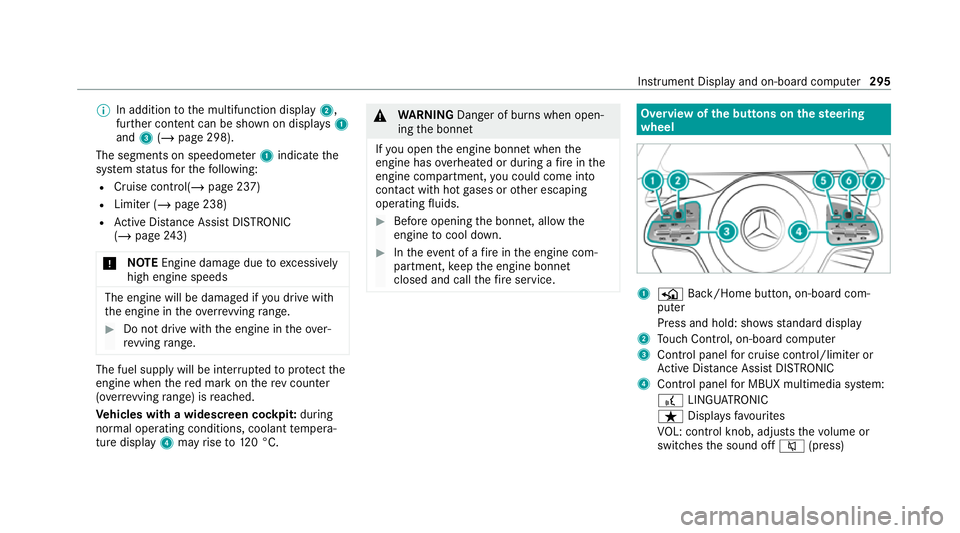
the but tons on thest eering
wheel 1
P Back/Home button, on-board com‐
puter
Press and hold: sho wsstandard display
2 Touch Control, on-board co mputer
3 Control panel for cruise control/limiter or
Ac tive Dis tance Assi stDISTRONIC
4 Control panel for MBUX multimedia sy stem:
£ LINGU ATRO NIC
ß Displa ysfavo urites
VO L: control knob, adjusts thevo lume or
switches the sound off 8(press) Instrument Display and on-board computer
295
Page 302 of 689
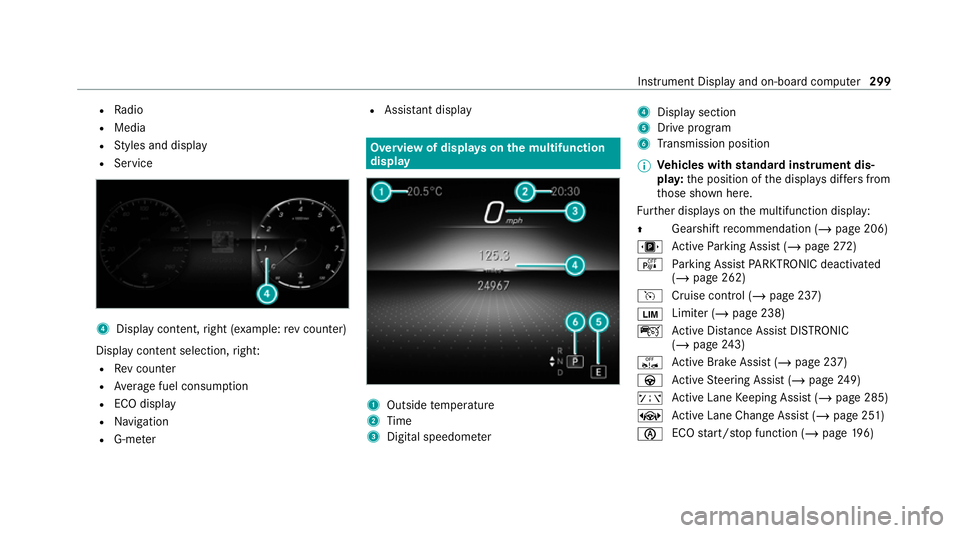
R
Radio
R Media
R Styles and display
R Service 4
Display conte nt,right (e xamp le:rev counter)
Display content selection, right:
R Rev counter
R Average fuel consum ption
R ECO display
R Navigation
R G-me ter R
Assi stant display Overview of displa
yson the multifunction
display 1
Outside temp erature
2 Time
3 Digital speedome ter 4
Displ aysection
5 Drive program
6 Transmission position
% Ve
hicles with standard instrument dis‐
pla y:the position of the displa ysdiffers from
th ose shown here.
Fu rther displa yson the multifunction display:
Z Gearshift
recommendation (/ page 206)
u Active Parking Assist (/ page272)
é Parking Assist PARKTRONIC deacti vated
( / page 262)
h Cruise control (/ page 237)
È Limiter (/
page 238)
ç Active Dis tance Assi stDISTRONIC
(/ page 243)
ê Active Brake Assi st (/ page 237)
à Active Steering Assist (/ page249)
ð Active Lane Keeping Assist (/ page 285)
± Active Lane Change Assi st (/ page 251)
è ECO
start/ stop function (/ page196) In
stru ment Display and on-board computer 299
Page 304 of 689
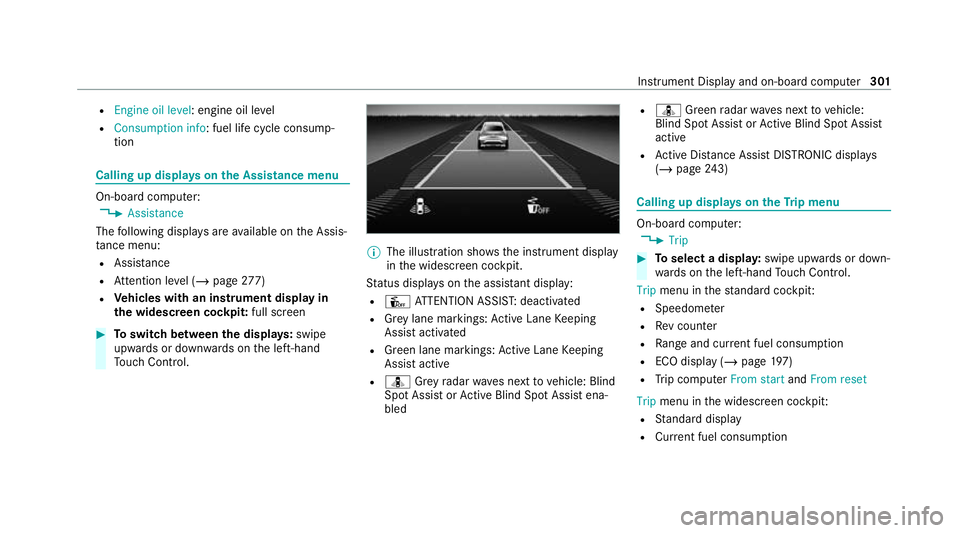
R
Engine oil level: engine oil le vel
R Consumption info: fuel life cycle consump‐
tion Calling up displa
yson the Assistance menu On-board computer:
4 Assistance
The following displa ysare available on the Assis‐
ta nce menu:
R Assi stance
R Attention le vel (/ page 277)
R Vehicles with an instrument display in
th e widescreen cockpit: full screen#
Toswitch between the displa ys:swipe
upwards or down wards on the left-hand
To uch Control. %
The illustration sho wsthe instrument display
in the widescreen cockpit.
St atus displa yson the assis tant displ ay:
R Û ATTENTION ASSIS T:deactivated
R Grey lane markings: Active Lane Keeping
Assist activated
R Green lane markings: Active Lane Keeping
Assist active
R ¸ Grey radar waves next tovehicle: Blind
Spot Assist or Active Blind Spot Assi stena‐
bled R
¸ Green radar waves next tovehicle:
Blind Spot Assist or Active Blind Spot Assi st
active
R Active Dis tance Assi stDISTRONIC displa ys
( / page 243) Calling up
displays on theTr ip menu On-board computer:
4 Trip #
Toselect a displa y:swipe upwards or down‐
wa rds on the left-hand Touch Control.
Trip menu in thest andard cockpi t:
R Speedom eter
R Rev counter
R Range and cur rent fuel consu mption
R ECO display (/ page 197)
R Trip computer From startandFrom reset
Trip menu in the widescreen cockpit:
R Standard display
R Cur rent fuel consu mption Instrument Displ
ayand on-board computer 301