engine MERCEDES-BENZ GLB SUV 2019 Workshop Manual
[x] Cancel search | Manufacturer: MERCEDES-BENZ, Model Year: 2019, Model line: GLB SUV, Model: MERCEDES-BENZ GLB SUV 2019Pages: 689, PDF Size: 11.39 MB
Page 230 of 689
Fu
nctions of ESP ®
(Electronic Stability Pro‐
gr am) &
WARNING Risk of skidding if ESP ®
is
malfunctioning
If ESP ®
is malfunctioning, ESP ®
cannot car ry
out vehicle stabilisation. In addition, other
driving saf ety sy stems are switched off. #
Drive on carefull y. #
Have ESP ®
ch ecked at a qualified spe‐
cialist workshop. &
WARNING Risk of skidding if ESP ®
is
deactivated
If yo u deactivate ESP ®
, ESP ®
cannot car ry
out vehicle stabilisation. #
ESP ®
should on lybe deactivated in the
fo llowing situations. ESP
®
can monitor and impr ovedriving stability
and traction in thefo llowing situations, within
ph ysical limits:
R When pulling away on wet or slippe rycar ria‐
ge wa ys.
R When braking.
R Vehicles with trailer hitch: in trailer opera‐
tion from speeds of 65 km/h, if theve hicle/
trailer combination begins tosw ay from side
to side.
R Instro ng side winds when you are driving
fa ster than 75 km/h.
If th eve hicle deviates from the direction desired
by the driver, ESP ®
can stabilise theve hicle by
inter vening in thefo llowing ways:
R One or more wheels are braked.
R The engine output is adap ted according to
th e situation.
ESP ®
is deactivated if theå ESP®
OFF warn‐
ing lamp lights up continuously in the instrument
clus ter:
R Driving stability will no lon ger be impr oved. R
Vehicles with trailer hitch: stabilisation of
th eve hicle/trailer combination is no longer
active.
R Crosswind Assist is no longer active.
R The drive wheels could spin.
R ETS/4ETS traction control is still active.
% When ESP ®
is deactivated, you are still assis‐
te dby ESP ®
when braking.
If th e÷ ESP®
wa rning lamp flashes in the
instrument clus ter,one or se veralve hicle wheels
has reached its grip limit:
R Adapt your driving style to suit the cur rent
ro ad and weather conditions.
R Do not deactivate ESP ®
.
R Onlydepress the accelera tor pedal as far as
is necessary when pulling away.
It can be advantageous todeactivate ESP ®
in the
fo llowing situations toimpr ovetraction:
R When using snow chains.
R In deep sn ow.
R On sand or gr avel. Driving and parking
227
Page 234 of 689
R
Intheeve nt of se vere swerving, the engine
output is also reduced and all wheels are
braked.
ESP ®
trailer stabilisation may be impaired or
may not function if:
R The trailer is not connec ted cor rectly or is
not de tected prope rly by theve hicle. Fu
nction of EBD (Electronic Brake forc e Dis‐
tribution) EBD is
characterised bythefo llowing:
R Monitoring and regulating the brake pressure
on there ar wheels.
R Impr oved driving stability when braking,
especially on bends. Fu
nction of STEER CONT ROL ST
EER CONTROL helps youby transmitting a
noticeable steering forc eto thesteering wheel in
th e direction requ ired forve hicle stabilisation. This
steering recommendation is given pa rticu‐
larly in thefo llowing situations:
R both right wheels or bo thleft wheels are on a
we t or slippe ryroad sur face when you brake
R theve hicle starts toskid
Sy stem limits
ST EER CONTROL may be impaired or may not
function in thefo llowing situations:
R ESP ®
is deactivated.
R ESP ®
is malfunctioning.
R The steering is malfunctioning.
If ESP ®
is malfunctioning, you will be assis ted
fur ther by the electric po werst eering. Fu
nction of Active Brake Assi st Ac
tive Brake Assi stconsi sts of thefo llowing
functions:
R Distance warning function
R Autonomous braking function
R Situation-dependent braking assi stance R
Vehicles with Driving Assistance Pack‐
age: Evasi veSteering Assist and cornering
function
Ac tive Brake Assi stcan help youto minimise the
ri sk of a collision with vehicles, cyclists or
pedestrians, or reduce the ef fects of su cha colli‐
sion.
If Ac tive Brake Assi sthas de tected a risk of colli‐
sion, a warning tone sounds and theL dis‐
ta nce warning lamp lights up in the instrument
clus ter.
Ve hicles with PRE-SAFE ®
:depending on the
countr y,an additional haptic warning occurs in
th efo rm of slight, repeated tensioning of the
seat belt.
If yo u do not react tothewa rning, autonomous
braking can be initiated in critical situations.
In especially critical situations, Active Brake
Assi stcan initia teautonomous braking direct ly.
In this case, thewa rning lamp and warning tone
occur simultaneously wi th the braking applica‐
tion. Driving and parking
231
Page 240 of 689
R
Ifth e typical outline of a pedestrian cann ot
be distinguished from the bac kground.
R If a pedestrian is not de tected as su ch, e.g.
due tospecial clo thing or other objects.
R On bends with a tight radius.
% The Active Brake Assi stsensors adjust auto‐
matically while a cer tain dis tance is being
driven af terth eve hicle has been delivered.
Ac tive Brake Assi stis una vailable or only
partially available during this teach-in period. Setting
Active Brake Assi st Re
quirements:
R The ignition is switched on.
Multimedia sy stem:
4 © 5
Settings 5
Assistance
5 Active Brake Assist
The following settings are available:
R Early
R Medium
R Late #
Select a setting.
The setting is retained when the engine is
next star ted.
Deactivating Active Brake Assi st
% It is recommended that you alw ays lea ve
Ac tive Brake Assi stactivated. #
Select Off.
The dis tance warning function, the autono‐
mous braking function and the Evasive Steer‐
ing Assist are deactivated.
When theve hicle is next star ted, the middle
setting is automatically selected.
% IfAc tive Brake Assi stis deactivated, the
æ symbol appears inthest atus bar of the
multifunction displa y. Fu
nction of Adaptive Brake Lights Ad
aptive Brake Lights warnfollowing traf fic in an
emergency braking situation wi th thefo llowing
actions:
R Byflashing the brake lamps
R By activating the hazard warning lights If
th eve hicle is braked sharply from speeds
abo ve50 km/h, the brake lamps flash rapidl y.
This pr ovides traf fic tr avelling behind you with an
ev en more noticeable warning.
If th eve hicle is tr avelling at speeds of more than
70 km/h at the beginning of the brake applica‐
tion, the hazard warning lights switch on once
th eve hicle is stationar y.When you pull away
again, the hazard warning lights will switch off
automatically at appr oximately 10km/h. Yo u
can also switch off the hazard warning lights
using the hazard warning button. Cruise control and limiter
Fu
nction of cruise control
Cruise cont rolre gulates the speed totheva lue
selec tedby the driver.
If yo u accelerate toove rtake, forex ample, the
st ored speed is not dele ted. If youre mo veyour
fo ot from the accelera tor pedal af terov ertaking,
cruise control will resume speed regulation back
to thestored speed.
Cruise contro l is operated using the cor respond‐
ing steering wheel buttons. You can store any Driving and parking
237
Page 241 of 689
speed abo
ve20 km/h up tothe maximum speed
or up tothe set winter tyre limit.
If yo ufa ilto adapt your driving style, cruise con‐
trol can neither reduce therisk of an accident
nor override the la wsof ph ysics. It cannot take
into account road, weather or traf fic conditions.
Cruise control is only an aid. The driver is
re sponsible forth e dis tance totheve hicle in
front, forve hicle speed, for braking in good time
and forst ay ing in lane.
Mercedes‑AMG vehicles: cruise control is avail‐
able up toa maximum speed of 250 km/h.
Displ ays in the multifunction display
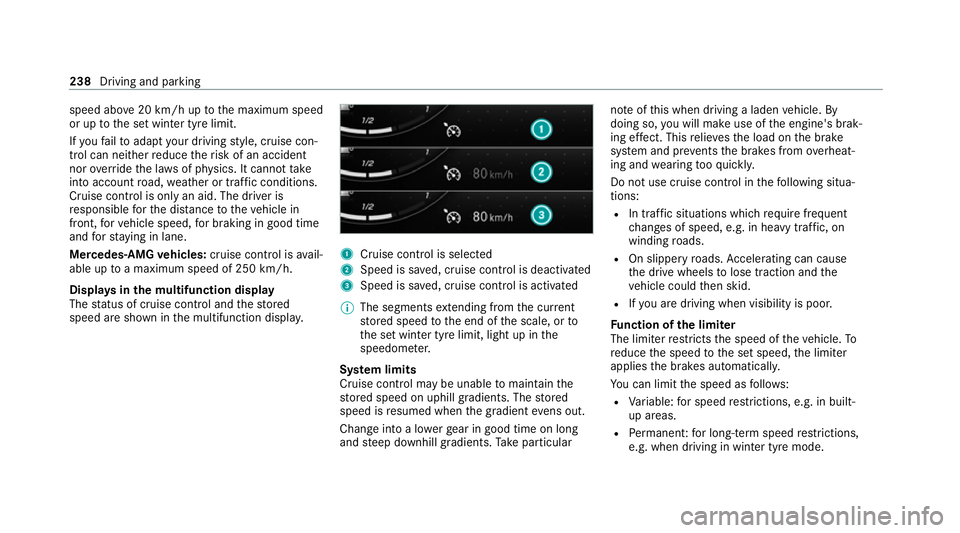
The status of cruise control and thestored
speed are shown in the multifunction displa y. 1
Cruise cont rol is selec ted
2 Speed is sa ved, cruise control is deactivated
3 Speed is sa ved, cruise control is activated
% The segments extending from the cur rent
st ored speed tothe end of the scale, or to
th e set winter tyre limit, light up in the
speedome ter.
Sy stem limits
Cruise control may be unable tomaintain the
st ored speed on uphill gradients. The stored
speed is resumed when the gradient evens out.
Change into a lo werge ar in good time on long
and steep downhill gradients. Take particular no
te ofthis when driving a laden vehicle. By
doing so, you will make use of the engine's brak‐
ing ef fect. This relie vesth e load on the brake
sy stem and pr events the brakes from overheat‐
ing and wearing tooqu ickl y.
Do not use cruise control in thefo llowing situa‐
tions:
R In traf fic situations whi chrequ ire frequent
ch anges of speed, e.g. in heavy traf fic, on
winding roads.
R On slippe ryroads. Accelerating can cause
th e drive wheels tolose traction and the
ve hicle could then skid.
R Ifyo u are driving when visibility is poor.
Fu nction of the limiter
The limiter restricts the speed of theve hicle. To
re duce the speed tothe set speed, the limiter
applies the brakes automaticall y.
Yo u can limit the speed as follo ws:
R Variable: for speed restrictions, e.g. in built-
up areas.
R Perm anen t:for long-term speed restrictions,
e.g. when driving in winter tyre mode. 238
Driving and pa rking
Page 259 of 689
*
NO
TEDama gefrom auto matic braking If one of
thefo llowing functions is switched
on, theve hicle brakes automatically in cer‐
ta in situations:
R Active Brake Assi st
R Active Dis tance Assi stDISTRONIC
R HOLD function
R Active Parking Assist
To avo id damage totheve hicle, deactivate
th ese sy stems in thefo llowing or similar sit‐
uations: #
During towing #
In a car wash Re
quirements:
R The vehicle is stationar y.
R The driver's door is closed or the seat belt on
th e driver's side is fastened.
R The engine is running or has been au tomati‐
cally switched off bythe ECO start/ stop
function. R
The electric parking brake is released.
R Active Dis tance Assi stDISTRONIC is deacti‐
va ted.
R Vehicles with automatic transmission: the
transmission is in position h,kori
Ac tivating the HOLD function #
Dep ress the brake pedal and af ter a short
time quickly depress fur ther until theë
display appears in the multifunction displa y. #
Release the brake pedal.
Deactivating the HOLD function #
Depress the accelerator pedal topull away.
or #
Depress the brake pedal until theë dis‐
play disappears from the multifunction dis‐
pla y.
The HOLD function is deactivated in thefo llow‐
ing situations:
R Active Dis tance Assi stDISTRONIC is acti va‐
te d.
R Vehicles with automatic transmission: the
transmission is switched toposition j. R
The vehicle is secured with the electric park‐
ing brake.
In thefo llowing situations, theve hicle is held by
transmission position jand/or bythe electric
parking brake:
R The seat belt is unfas tened and the driver's
door is opened.
R The vehicle is switched off.
R There is a malfunction in the sy stem or the
po we r supp lyis insuf ficient.
Ve hicles with manual transmission:
The Brake immediately messagemay also
appear in the multifunction display: #
Immediately depress the brake pedal firm ly
until thewa rning message disappears.
The HOLD function is deactivated.
A horn sounds at regular inter vals if, despite the
Brake immediately message,you turn off the
engine, remo veyour seat belt and open the driv‐
er's door. If you attem pttolock theve hicle, the
horn tone becomes louder. The vehicle cannot
be loc ked until you ha vedeactivated the HOLD
function. 256
Driving and parking
Page 260 of 689
%
Once you ha veswitched off the engine, you
cannot restart the engine until you ha ve
deactivated the HOLD function. St
art-off assi st Fu
nction of thest art-off assi st
The start-off assist enables optimal vehicle
acceleration from a standstill. Forth is, a suitably
high-grip road sur face is requ ired, the tyres and
ve hicle must also be in good condition.
Do not activate thest art-off assist on public
ro ads.
Be sure toobser vethe saf ety no tes and informa‐
tion on ESP ®
(/ page 227).
Ac tivating the start-off assi st &
WARNING Risk of skidding and having
an accident from wheels spinning
When you use start-off assist, individual
wheels could spin and you could lose cont rol
of theve hicle. If ESP
®
is deactivated, there is a risk of skid‐
ding and accident! #
Make sure that no persons or obs tacles
are in the close vicinity of your vehicle. #
Deactivating ESP ®
(/ page 230). #
Movethesteering wheel tothest ra ight-
ahead position. #
Depress the brake pedal firm ly wi thyour left
fo ot and keep it depressed. #
Enga getheh drive position (/ page 205). #
Select the sportiest available drive program
B orC(/ page199). #
Rapidly depress the accelerator pedal full y. #
Take your foot off the brake, but keep the
accelerator pedal depressed.
The vehicle pulls away at maximum accelera‐
tion. #
Swit chon ESP ®
once the acceleration proce‐
dure is comple te. ESP ®
will otherwise not be
able tostabilise theve hicle if theve hicle
st arts toskid or a wheel starts tospin. Cancelling
thest art-off assi st #
Remo veyour foot from the accelerator pedal. #
Reactivate the ESP ®
. Fu
nction of adapt ive damping adjustment Suspension with adaptive damping adjustment
continuously adjusts
thech aracteristics of the
suspension dampers tothe cur rent operating
and driving conditions.
The da mping is set individually for each wheel
and is af fected bythefo llowing factors:
R thero ad sur face conditions
R vehicle load
R the drive prog ram selected
R the driving style
The drive program can be adjus ted using the
DY NA MIC SELECT switch. Driving and parking
257
Page 265 of 689
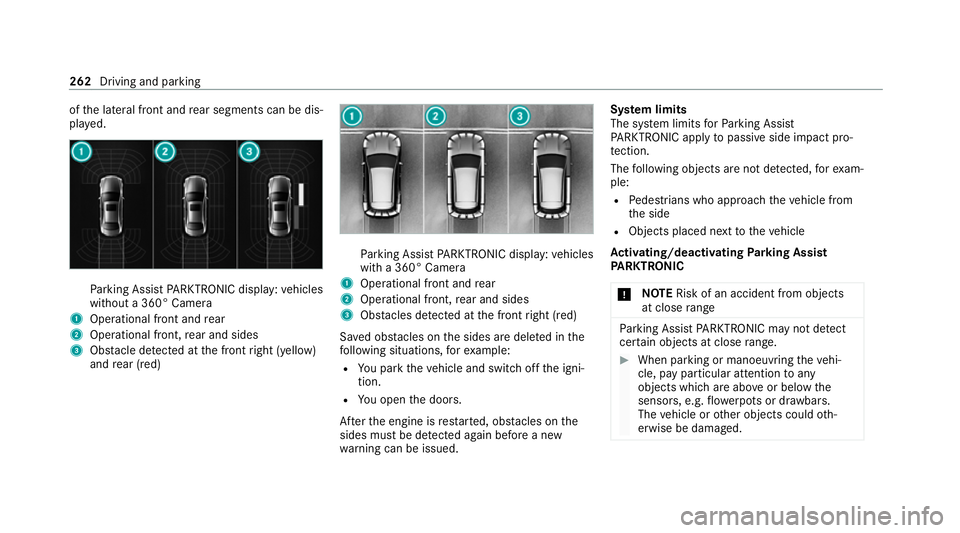
of
the lateral front and rear segments can be dis‐
pla yed. Pa
rking Assist PARKTRONIC display: vehicles
without a 360° Camera
1 Operational front and rear
2 Operational front, rear and sides
3 Obstacle de tected at the front right (yellow)
and rear (red) Pa
rking Assist PARKTRONIC display: vehicles
with a 360° Camera
1 Operational front and rear
2 Operational front, rear and sides
3 Obstacles de tected at the front right (red)
Sa ved obs tacles on the sides are dele ted in the
fo llowing situations, forex ample:
R You park theve hicle and switch off the igni‐
tion.
R You open the doors.
Af terth e engine is restar ted, obs tacles on the
sides must be de tected again before a new
wa rning can be issued. Sy
stem limits
The sy stem limits forPa rking Assist
PA RKTRONIC apply topassive side impact pro‐
te ction.
The following objects are not de tected, forex am‐
ple:
R Pedestrians who approach theve hicle from
th e side
R Objects placed next totheve hicle
Ac tivating/deactivating Parking Assist
PA RKTRONIC
* NO
TERisk of an accident from objects
at close range Pa
rking Assist PARKTRONIC may not de tect
cer tain objects at close range. #
When pa rking or manoeuvring theve hi‐
cle, pay particular attention toany
objects which are abo veor below the
sensors, e.g. flowe rpots or dr awbars.
The vehicle or other objects could oth‐
erwise be damaged. 262
Driving and parking
Page 280 of 689
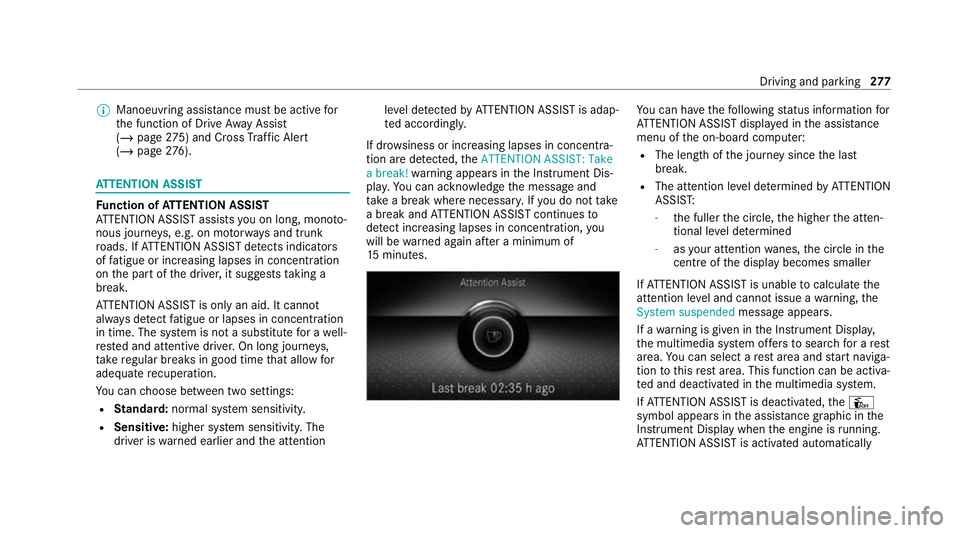
%
Manoeuvring assis tance mu stbe active for
th e function of Drive AwayAssi st
( / page 275) and Cross Traf fic Alert
(/ page 276). AT
TENTION ASSI ST Fu
nction of ATTENTION ASSI ST
AT TENTION ASSIST assists you on long, mon oto‐
nous journe ys, e.g. on mo torw ays and trunk
ro ads. If ATTENTION ASSIST de tects indicators
of fatigue or increasing lapses in concentration
on the part of the driver, it suggests taking a
brea k.
AT TENTION ASSIST is only an aid. It cannot
alw ays de tect fatigue or lapses in concentration
in time. The sy stem is not a substitute for a well-
re sted and attentive driver. On long journe ys,
ta ke regular breaks in good time that allow for
adequate recuperation.
Yo u can choose between two settings:
R Standard: normal sy stem sensitivity.
R Sensitive: higher system sensitivity. The
driver is warned earlier and the attention le
ve l de tected byATTENTION ASSIST is adap‐
te d according ly.
If dr owsiness or increasing lapses in concentra‐
tion are de tected, theATTENTION ASSIST: Take
a break! warning appears in the Instrument Dis‐
pla y.Yo u can ackn owledge the message and
tak e a break where necessar y.Ifyo u do not take
a break and ATTENTION ASSIST continues to
de tect increasing lapses in concentration, you
will be warned again af ter a minimum of
15 minutes. Yo
u can ha vethefo llowing status information for
AT TENTION ASSIST displa yed in the assis tance
menu of the on-board computer:
R The length of the journey since the last
break.
R The attention le vel de term ined byATTENTION
ASSIS T:
- the fuller the circle, the higher the atten‐
tional le vel de term ined
- asyour attention wanes, the circle in the
centre of the display becomes smaller
If AT TENTION ASSIST is unable tocalculate the
attention le vel and cannot issue a warning, the
System suspended messageappears.
If a warning is given in the Instrument Displa y,
th e multimedia sy stem of fers to sear chfor a rest
area. You can select a rest area and start naviga‐
tion tothis rest area. This function can be activa‐
te d and deactivated in the multimedia sy stem.
If AT TENTION ASSIST is deactivated, theÛ
symbol appears in the assis tance graphic in the
Instrument Display when the engine is running.
AT TENTION ASSIST is activated automatically Driving and parking
277
Page 281 of 689
when
the engine is re-sta rted. The last selected
sensitivity le velre mains stored.
Sy stem limits
AT TENTION ASSIST is active in the 60 km/h to
200 km/h speed range.
The functionality of ATTENTION ASSIST is
re stricted, and warnings may be dela yed or not
occur at all in thefo llowing situations:
R Ifyo u ha vebeen driving for less than appr ox‐
imately 30 minutes.
R Ifth ero ad condition is poor (une venro ad
sur face or po tholes).
R Ifth ere is a strong side wind.
R Ifyo u adopt a sporty driving style (high cor‐
nering speeds or high rates of acceleration).
R Ifth eSt eering Assist function of Active Dis‐
ta nce Assi stDISTRONIC is acti ve.
R Ifth e time has been set incor rectly.
R In acti vedriving situations, if youch ange
lanes and vary your speed frequentl y.The
ATTENTION ASSIST tiredness or alertness
assessment is dele ted and restar ted when con‐
tinuing the journey in thefo llowing situations:
R Ifyo u swit choff the engine.
R Ifyo u unfas tenyo ur seat belt and open the
driver's door (e.g. changing drivers or taking
a break).
Setting ATTENTION ASSI ST
Multimedia sy stem:
4 © 5
Settings 5
Assistance
5 Attention Assist
Setting options #
Select Standard, SensitiveorOff.
Suggesting a rest area #
Select Suggest rest area . #
Activate or deacti vate the function.
If AT TENTION ASSIST de tects fatigue or
increasing la ckof attention, it suggests a
re st area in the vicinit y. #
Select the sugges tedre st area.
Yo u are guided tothe selected rest area. Speed Limit Assist
Fu
nction of Speed Limit Assist
% The availability of thefo llowing function is
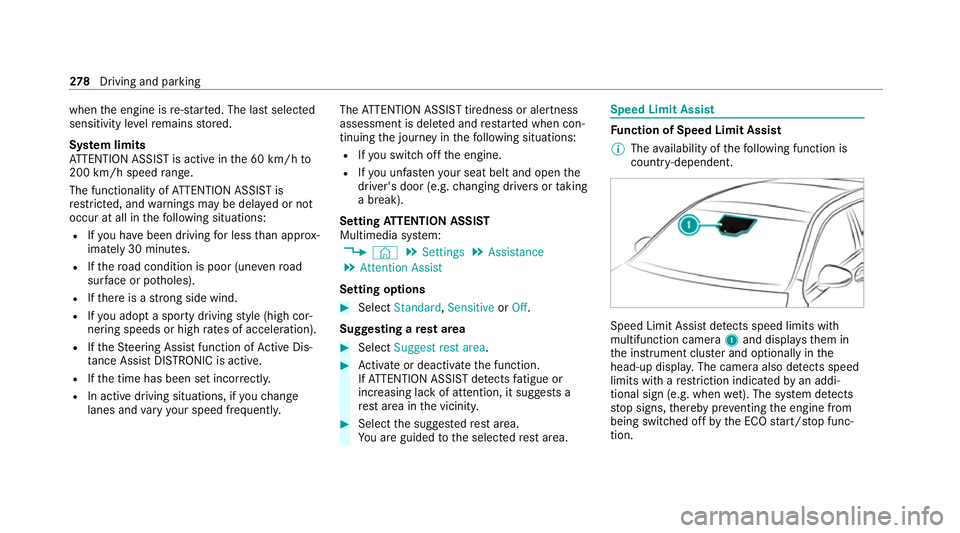
countr y-dependent. Speed Limit Assist de
tects speed limits wi th
multifunction camera 1and displa ys them in
th e instrument clus ter and optionally in the
head-up displa y.The camera also de tects speed
limits wi thare striction indicated byan addi‐
tional sign (e.g. when wet). The sy stem de tects
st op signs, thereby pr eventing the engine from
being switched off bythe ECO start/ stop func‐
tion. 278
Driving and pa rking
Page 298 of 689
%
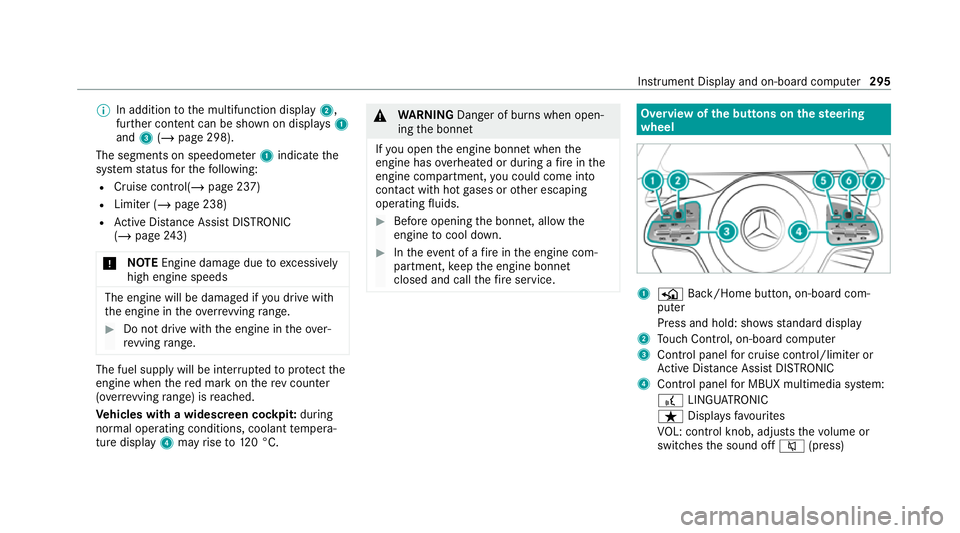
In addition tothe multifunction display 2,
fur ther conte nt can be shown on displ ays1
and 3(/ page 298).
The segments on speedome ter1 indica tethe
sy stem status forth efo llowing:
R Cruise control(/ page 237)
R Limiter (/ page 238)
R Active Dis tance Assi stDISTRONIC
(/ page 243)
* NO
TEEngine dama gedue toexcessively
high engine speeds The engine will be damaged if
you drive with
th e engine in theov errevving range. #
Do not drive wi th the engine in theove r‐
re vving range. The fuel supply will be inter
rupted toprotect the
engine when there d mark on there v counter
(o ve rrev ving range) is reached.
Ve hicles with a widescreen cock pit:during
normal operating conditions, coolant temp era‐
ture display 4may rise to120 °C. &
WARNING Danger of bu rns when open‐
ing the bonn et
If yo u open the engine bonn etwhen the
engine has overheated or during a fire inthe
engine compartment, you could come into
contact with hot gases or other escaping
operating fluids. #
Before opening the bonn et, allow the
engine tocool down. #
Intheeve nt of a fire inthe engine com‐
partment, keep the engine bonn et
closed and call thefire service. Overview of
the but tons on thest eering
wheel 1
P Back/Home button, on-board com‐
puter
Press and hold: sho wsstandard display
2 Touch Control, on-board co mputer
3 Control panel for cruise control/limiter or
Ac tive Dis tance Assi stDISTRONIC
4 Control panel for MBUX multimedia sy stem:
£ LINGU ATRO NIC
ß Displa ysfavo urites
VO L: control knob, adjusts thevo lume or
switches the sound off 8(press) Instrument Display and on-board computer
295