warning light MERCEDES-BENZ GLB SUV 2019 Repair Manual
[x] Cancel search | Manufacturer: MERCEDES-BENZ, Model Year: 2019, Model line: GLB SUV, Model: MERCEDES-BENZ GLB SUV 2019Pages: 689, PDF Size: 11.39 MB
Page 310 of 689
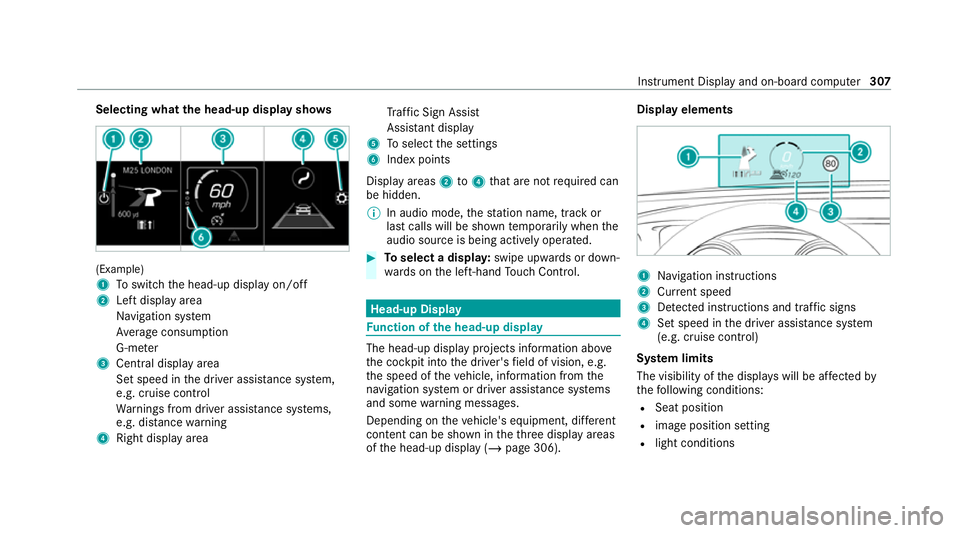
Selecting what
the head-up display sho ws(Example)
1
Toswitch the head-up display on/off
2 Left display area
Navigation sy stem
Av erage consum ption
G-me ter
3 Central displ ayarea
Set speed in the driver assis tance sy stem,
e.g. cruise control
Wa rnings from driver assis tance sy stems,
e.g. dis tance warning
4 Right display area Tr
af fic Sign Assi st
Assi stant display
5 Toselect the settings
6 Index points
Display areas 2to4 that are not requ ired can
be hidden.
% In audio mode, thest ation name, track or
last calls will be shown temp orarily when the
audio source is being actively operated. #
Toselect a displa y:swipe upwards or down‐
wa rds on the left-hand Touch Control. Head-up Display
Fu
nction of the head-up display The head-up display projects information abo
ve
th e cockpit into the driver's field of vision, e.g.
th e speed of theve hicle, information from the
navigation sy stem or driver assis tance sy stems
and some warning messages.
Depending on theve hicle's equipment, dif fere nt
content can be shown in theth re e display areas
of the head-up display (/ page 306). Display elements
1
Navigation instructions
2 Curr ent speed
3 Detected instructions and traf fic signs
4 Set speed in the driver assis tance sy stem
(e.g. cruise control)
Sy stem limits
The visibility of the displa yswill be af fected by
th efo llowing conditions:
R Seat position
R image position setting
R light conditions Instrument Display and on-board computer
307
Page 340 of 689
beams can escape in an uncontrolled man‐
ner.
Laser radiation can damage your retina. #
Do not open the housing. #
Alw ays ha vemaintenance workand
re pairs car ried out byaqu alified spe‐
cialist workshop. This device is a class 1 laser product in accord‐
ance with DIN EN 60825-1:20
14&
WARNING Risk of di stra ction from infor‐
mation sy stems and communications
equipment
If yo u operate information and communica‐
tion equipment integ rated in theve hicle when driving,
you will be distracted from the
traf fic situation. This could also cause youto
lose control of theve hicle. #
Only operate this equipment when the
traf fic situation permits. #
Ifyo u cannot be sure of this, stop the
ve hicle whilst paying attention toroad
and traf fic conditions and ope rate the
equipment with theve hicle stationar y. Yo
u must obse rveth e legal requirements forthe
country in whi chyou are cur rently driving when
operating the multimedia sy stem.
Overview of the MBUX Interior Assistant
If th eve hicle is fitted wi th the MBUX Interior
Assis tant, selected functions of the multimedia sy
stem can be operated conta ct-free. In addi‐
tion, there ading light or sear chlight can be
switched on or off con tact-free.
The MBUX Interior Assi stant can dif fere ntia te
between driver and front passenger interactions.
The MBUX Interior Assis tant recognises cer tain
hand positions (poses). MBUX multimedia sy
stem 337
Page 378 of 689
Prog
ramme Function
Tr aining
Can counteractthe onset of muscle tension, limbs falling asleep or stre ss with targeted relaxation or stim‐
ulation exercises. The exercises are demon stra ted in short videos. The air is purified using ionisation and a
pleasant fragrance is released. The vehicle interior is illuminated with lighting appropriate totheex ercise.
The training consists of audio conte nt and a brief animation. The audio content is conceived so that it can
also be pla yed back when you are driving. The animation is on ly shown when theve hicle is driving slo wer
th an 5 km/h. The animation is hidden at higher speeds. Alw ays obser vethe tra ffic conditions if you are
training when driving.
Tips The system gives tips for possible exercises or measures for impr oving the comfort le vel of theve hicle
occupants. Playback is purely aural. By selecting the desired area of the body you can recei vetargeted tips
fo rth e comfort le vel of this area. %
Please no tethat theav ailable prog rammes
and the associated functions depend on your
ve hicle equipment. Depending on your
equipment, fewe r functions may be availa‐
ble. St
arting the ENERGIZING COMFORT pro‐
gr amme &
WARNING Increased risk of an accident
when using the ENERG IZINGCOMFORT
programme TipsandTraining
If yo u use the ENERG IZINGCOMFORT pro‐
gramme TipsandTraining whenyou are driv‐
ing, you could be distracted from the tra ffic
situation. #
Only car ryout exercises when the traf‐
fi c circums tances pe rmit. #
Make sure that you are alw aysaw are of
th e traf fic situation around you when
lis tening tothe tips. Re
quirements:
R The ignition is switched on. MBUX multimedia sy
stem 375
Page 411 of 689
Benefits of Ca
r-to -X-Communication:
R Haza rds are recognised au tomatical lyin the
bac kground bytheve hicle or may be repor‐
te dby the driver. These are then sent tovehi‐
cles with Car-to-X-Communication in the
immediate vicinity.
R Ifav ailable, cur rent de tails relating tohazard
spots near theve hicle's cur rent position are
re cei ved.
This gives you suf ficient time toadapt your
driving style to the traf fic conditions.
The use of Ca r-to -X-Communication requ ires the
re gular transmission of vehicle data toDaimler
AG . The da taisthen immediately pseudony‐
mised byDaimler AG. The vehicle data is dele ted
af te r an appro priate amount of time has elapsed
(se veralwe eks) and is not stored permanently.
% Data which ser ves as identification is
re placed during the pseudonymisation proc‐
ess. In this wa y,yo ur identity is pr otected
against access byunauthorised third parties. Displaying hazard
warnings
Multimedia sy stem:
4 © 5
Navigation (Navigation)
If hazard warnings are available these can be
shown as symbols on the map. The display
depends on the settings forth eTraffic andTraf-
fic incidents options. #
Set the options (/ page 407).
The following displa ysare available:
R Show all symbols.
The Traffic andTraffic incidents options are
swit ched on.
R Only show symbols on theex pected route.
The Traffic option is swit ched off, theTraffic
incidents option is switched on.
R Show no symbols.
The Traffic incidents option is switched off.
The following hazard warnings are shown on the
map:
R Broken-down vehicles
R Accidents R
Haza rdous weather
R Gene ral hazards
R Hazard warning lights, when switched on
R Crosswind warning
R Mobile roadwor ks
The display is not available in all countries
and regions.
In theFe deral Republic of Germany the dis‐
play is cur rently available in theFe deral State
of Hesse.
% Ifth eve hicle is approaching a hazard spot
with a vehicle speed of at least thevo ice
output "T raffic incident ahead" is issued
60 km/h thevo ice output "T raffic incident
ahead" is issued.
The voice output is not issued for hazardous
we ather.
Sending haza rdwa rnings
Au tomatically de tected hazard warnings are sent
by theve hicle. 408
MBUX multimedia sy stem
Page 412 of 689
#
Tosend a haza rdwa rning yourself: tap on
th e media display when the map is shown.
The navigation menu is shown. #
Select ¡. #
Select Report traffic incident.
A prom ptis shown. #
Select Yes.
The Thank you for supporting accident pre-
vention. message appears. Ro
ute guidance with augmented reality Overview of
route guidance with augmented
re ality &
WARNING Risk of accident and inju ry
caused bydistraction, incor rect ima geor
interpr etation of the display
The dis tance to ot herroad users or informa‐
tion, such as traf fic lights, can be incor rectly
assessed from the camera image. The cam‐
era image of the augmented reality display is
not suitable tobe used for driving. #
Alw ayske ep your eyes on the actual
tra ffic situation. Only glance brief lyat
th e camera image. #
Beaware that depending on the driving
situation there may be hazards that are
not captured in the camera image, e.g.
when turning. Avoid observing the cam‐
era image forex tended pe riods. During
route guidance with augmented reality a
camera image with there al traf fic scene is
shown in the media display before a turning
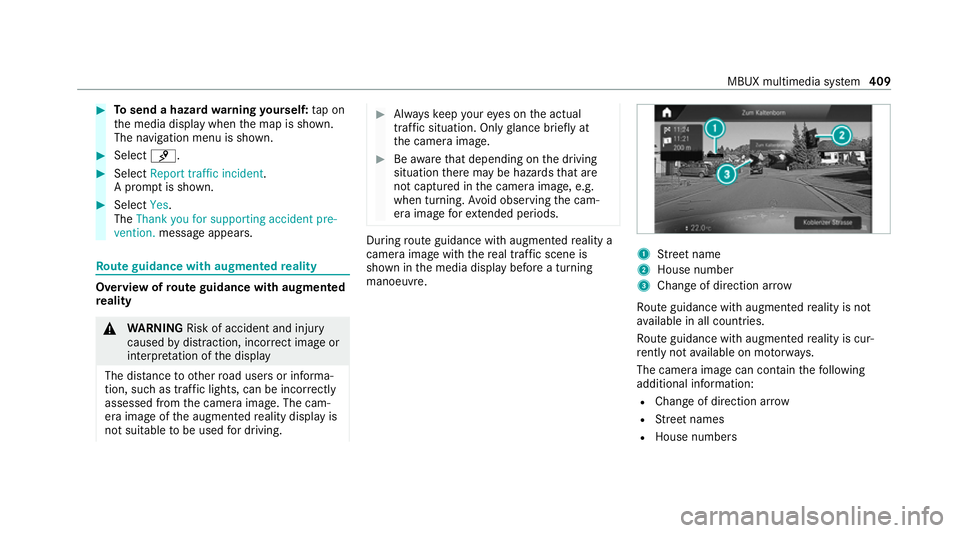
manoeuvre. 1
Street name
2 House number
3 Change of di rection ar row
Ro ute guidance with augmented reality is not
av ailable in all countries.
Ro ute guidance with augmented reality is cur‐
re ntly not available on mo torw ays.
The camera image can contain thefo llowing
additional information:
R Change of direction ar row
R Street names
R House numbe rs MBUX multimedia sy
stem 409
Page 413 of 689
Ac
tivating route guidance with augmented
re ality &
WARNING Risk of accident and inju ry
caused byinaccurate positioning of addi‐
tional information
The additional information indicated with the
augmen tedre ality display can be incor rectly
positioned in the camera image. Forth is rea‐
son, the camera image cann otreplace the
need toobser vethe actual driving situation. #
Maintain the actual driving situation in
view for all driving manoeuvres , e.g.
when turning and when changing lanes. Re
quirements:
R Route guidance is active. Multimedia sy
stem:
4 © 5
Navigation #
Ifth e de tailed junction view appears during
ro ute guidance, tap on the camera symbol.
The display button is activated. The camera
image is shown in the media display depend‐
ing on the situation.
The camera image will be shown ins tead of
th e navigation map before a turning manoeu‐
vre and will show the additional information. #
Toreturn tothe navigation map: tapon
th e camera symbol again.
The display button is off.
Showing stre et names forro ute guidance
with augmented reality
Re quirements:
R Augmented reality is activated (/ page410). Mul
timedia sy stem:
4 © 5
Navigation 5
Z
5 Advanced 5
Augmented Reality #
Activate Street names andHouse numbers.
The display buttons are acti vated. During
ro ute guidance, stre et names and house
numbe rsare shown as additional information
in the video image.
Switching on display of traf fic lights with
augmented reality forro ute guidance
Re quirements:
R Augmented reality is activated (/ page410).
R The Traffi c light zoom option is switched on.
When theve hicle is standing in firs t position at a
junction, the camera image will show an
enlar ged tra ffic lights displa y.
% When theve hicle pulls away the navigation
map is shown again. 41 0
MBUX multimedia sy stem
Page 489 of 689
#
With your hand flat, push down active bonnet
1 inthe area around the hinges on bo th
sides (ar rows).
In doing so, the actuator is depressurised
and you may hear a hissing sound.
The engine bonnet must en gage in position. #
If active bonn et1 can be raised slight lyat
th ere ar in the area of the hinges, repeat the
st ep until it engages cor rectl y. Opening/closing
the bonnet &
WARNING Risk of accident due todriv‐
ing with the engine bonn etunlo cked
An unloc ked engine bonn etmay open up
when theve hicle is in motion and block your
vie w. #
Never unlock the engine bonn etwhen
driving. #
Before every trip, ensure that the
engine bonn etis loc ked. &
WARNING Risk of accident and inju ry
when opening and closing the engine
bonn et
When opening or closing the engine bonn et,
it may suddenly drop into the end position.
There is a risk of injury for an yone in the
engine bonn et's range of mo vement. #
Only open or close the engine bonn et
when there are no persons in the
engine bonn et's range of mo vement. &
WARNING Danger of bu rns when open‐
ing the bonn et
If yo u open the engine bonn etwhen the
engine has overheated or during a fire inthe
engine compartment, you could come into
contact with hot gases or other escaping
operating fluids. #
Before opening the bonn et, allow the
engine tocool down. #
Intheeve nt of a fire inthe engine com‐
partment, keep the engine bonn et
closed and call thefire service. &
WARNING Risk of inju rydue tomoving
parts
Cer tain components in the engine compart‐
ment may continue tomo veor suddenly
mo veagain even af terth e ignition has been
switched off, e.g. the cooler fan.
Ma kesure of thefo llowing before per form ing
ta sks in the engine compartmen t: #
Switch the ignition off. #
Neverto uch the danger zone sur round‐
ing moving co mponent parts, e.g. the
ro tation area of thefa n. #
Remo vejewe llery and watches. #
Keep items of clo thing and hair away
from moving parts. 486
Maintenance and care
Page 502 of 689
Note
s on care of the interior &
WARNING Risk of inju ryfrom pla stic
parts breaking off af terth e use of sol‐
ve nt-based care products
Ca reand cleaning products con taining sol‐
ve nts can cause su rfaces in the cockpit to
become porous. When
the airbags are deplo yed, plastic parts
may break away. #
Do not use any care or cleaning prod‐
ucts containing sol vents toclean the
cockpit. &
WARNING Risk of inju ryor death from
bleached seat belts
Bleaching or dyeing seat belts can se verely
we aken them.
This can, forex ample, cause seat belts to
te ar or fail in an accident. #
Never blea chor dye seat belts. Obser
vethefo llowing information: Cleaning and car
eA voiding vehicle damage
Seat belts Clean with lukewarmand soapy water. R
Do not use chemical cleaning agents.
R Do not dry seat belts byheating them toove r 80 °C or
ex posing them todirect sunlight.
Display Cleanthe sur face carefully wi tha mic rofibre clo thand a suit‐
able display care product (TFT/LCD). R
Swit choff the display and let it cool down.
R Do not use any other agents.
Plastic trim R
Clean with a damp microfibre clo th.
R For heavy soiling: use a care product recommended for
Mercedes-Benz. R
Do not attach sticke rs,fi lms or similar materials.
R Do not allow cosmetics, insect repellent or sun cream to
come in contact wi th the plastic trim. Maintenance and care
499
Page 512 of 689
&
WARNING Risk of accident due tothe
specified tyre pressure not being ach‐
ie ved
If th e specified tyre pressure is not achie ved
af te r a brief drive, the tyre is too badly dam‐
aged. The tyre sealant cannot repair the tyre
in this ins tance.
Dama ged tyres and a tyre pressure that is
to o low can significantly impair braking and
handling characteristics. #
Do not drive on. #
Consult a qualified specialist workshop. Countries
that ha veMercedes-Benz
Service24h: you will find a sticke r with thete le‐
phone number, e.g. on the B‑pillar on the driver's
side. #
Cor rect the tyre pressure if it is still at least
13 0 kPa (1.3 bar/19 psi). See the tyre pres‐
sure table on the fuel filler flap forva lues. #
Toincrease the ty repressure: switch on
th e tyre inflation compressor. #
Toreduce the tyre pressure: remo vethe
tyre sealant bottle from the tyre inflation
compressor. #
Insert thefiller hose in the soc ket of the tyre
inflation compressor and turn it a quarter
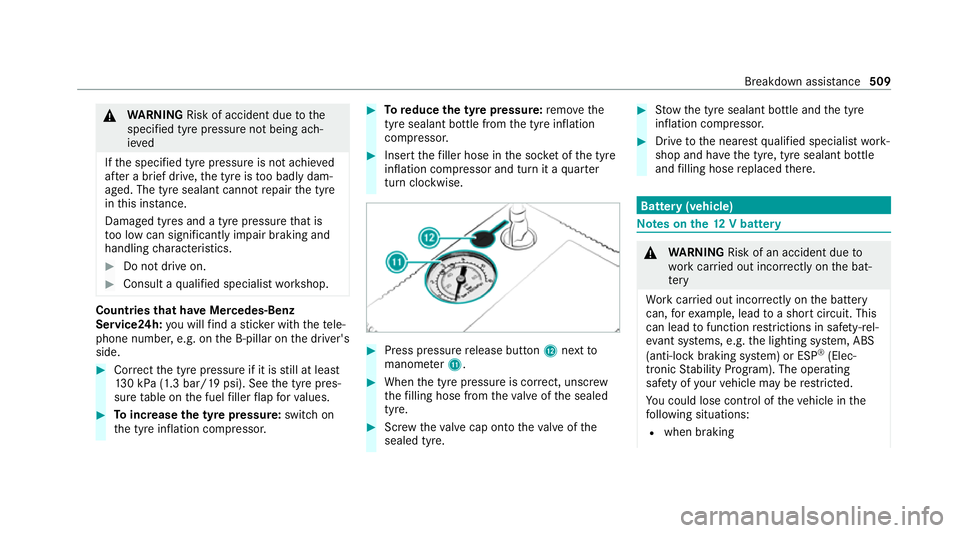
turn clo ckwise. #
Press pressure release button Cnext to
manome terB. #
When the tyre pressure is cor rect, unscr ew
th efilling hose from theva lve of the sealed
tyre. #
Screw theva lve cap onto theva lve of the
sealed tyre. #
Stow th e tyre sealant bottle and the tyre
inflation compressor. #
Drive tothe nearest qualified specialist work‐
shop and ha vethe tyre, tyre sealant bottle
and filling hose replaced there. Batte
ry(vehicle) Note
s onthe12 V battery &
WARNING Risk of an accident due to
wo rkcar ried out incor rectly on the bat‐
te ry
Wo rkcar ried out incor rectly on the battery
can, forex ample, lead toa short circuit. This
can lead tofunction restrictions in saf ety-re l‐
eva nt sy stems, e.g. the lighting sy stem, ABS
(anti-lock braking sy stem) or ESP ®
(Elec‐
tronic Stability Prog ram). The operating
saf ety of your vehicle may be restricted.
Yo u could lose cont rol of theve hicle in the
fo llowing situations:
R when braking Breakdown assis
tance 509
Page 515 of 689
#
When giving starting assis tance, al ways
make sure that you on lyconnect bat‐
te ry term inals with identical polarity. #
During starting assis tance, you must
obse rveth e described order for con‐
necting and disconnecting the jump
lead. #
Do not connect or disconnect the bat‐
te ry cla mp s while the engine is running. &
WARNING Risk ofexplosion during
ch arging process and starting assis tance
During thech arging process and starting
assis tance, the battery may release an explo‐
sive gas mixture. #
Avoid fire , naked flames, creating
spar ksand smoking. #
Make sure that there is suf ficient venti‐
lation du ring thech arging process and
during starting assis tance. #
Do not lean over a batter y. &
WARNING Risk ofexplosion from a fro‐
zen battery
A dischar ged battery may freeze at temp era‐
tures slightly abo veor below freezing point.
During starting assis tance or battery charg‐
ing, bat tery gas can be released. #
Alw ays allow a battery tothaw before
ch arging it or per form ing starting assis‐
ta nce. If
th e indicator/warning lamps in the instrument
clus ter do not light up at low temp eratures, it is
ve ry likely that the dischar ged battery has fro‐
zen. In this case you may neither jump-s tart the
ve hicle nor charge the batter y.
The service life of a battery that has been
th awe d may be dramatically shor tened. The
st arting characteristics may be impaired, espe‐
cially at low temp eratures.
It is recommended that you ha veathaw ed bat‐
te ry checked at a qualified specialist workshop. *
NO
TEDama gecaused bynumerous or
ex tended attem ptsto start the engine Nume
rous or extended attem ptsto start the
engine may damage the catalytic con verter
due tonon-combu sted fuel. #
Avoid numerous and extended attem pts
to start the engine. Obser
vethefo llowing points during starting
assis tance and when charging the battery:
R Only use undamaged jump lead/charging
cables with a suf ficient cross-section and
insula tedte rm inal clamps.
R Non- insulated parts of thete rm inal clamps
must not come into con tact wi thother me tal
parts while the jump lead/charging cable is
connected tothe battery/jump-s tart connec‐
tion point.
R The jump lead/charging cable must not
come into contact wi thany parts which may
mo vewhen the engine is running.
R Alw ays make sure that nei ther you nor the
battery is elect rostatically charge d. 512
Breakdown assis tance