dimensions MERCEDES-BENZ GLB SUV 2019 Owners Manual
[x] Cancel search | Manufacturer: MERCEDES-BENZ, Model Year: 2019, Model line: GLB SUV, Model: MERCEDES-BENZ GLB SUV 2019Pages: 689, PDF Size: 11.39 MB
Page 272 of 689
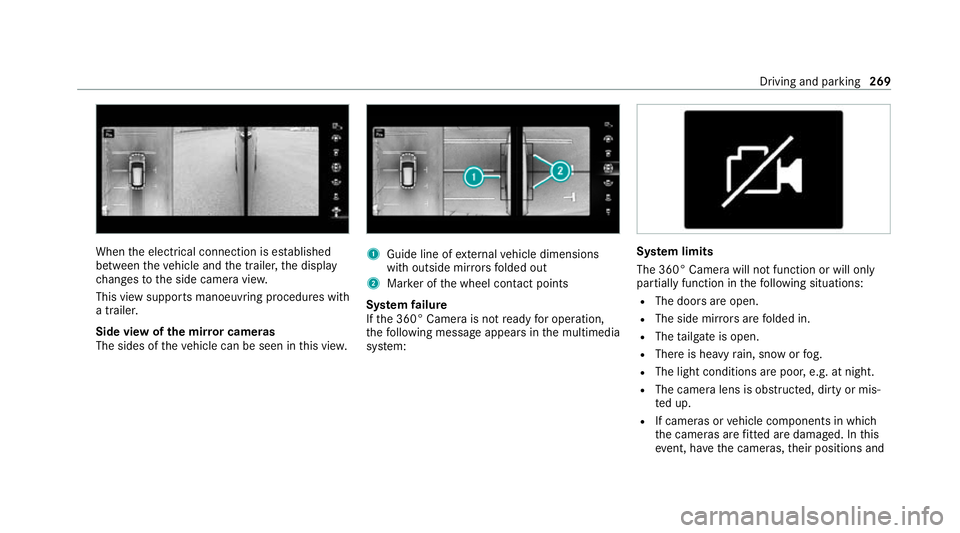
When
the electrical connection is es tablished
between theve hicle and the trailer, the display
ch anges tothe side camera vie w.
This view supports manoeuvring procedures with
a trailer.
Side view of the mir ror cameras
The sides of theve hicle can be seen in this vie w. 1
Guide line of extern al vehicle dimensions
with outside mir rors folded out
2 Marker of the wheel conta ct points
Sy stem failure
If th e 360° Camera is not ready for operation,
th efo llowing message appears in the multimedia
sy stem: Sy
stem limits
The 360° Camera will not function or will only
partially function in thefo llowing situations:
R The doors are open.
R The side mir rors are folded in.
R The tailgate is open.
R There is heavy rain, snow or fog.
R The light conditions are poor, e.g. at night.
R The camera lens is obstructed, dirty or mis‐
ted up.
R If cameras or vehicle components in which
th e cameras are fitted are dama ged. In this
eve nt, ha vethe cameras, their positions and Driving and parking
269
Page 495 of 689
*
NO
TEDama gedue tounsuitable car
wa sh #
Before driving into a car wash make
sure that the car wash is suitable for
th eve hicle dimensions. #
Ensure there is suf ficient ground clear‐
ance between the underbody and the
guide rails of the car wash. #
Ensure that the clearance width of the
car wash, in particular the width of the
guide rails, is suf ficient. To
avo id damage to yourvehicle when using a
car wash, ensure thefo llowing beforehand:
R Active Dis tance Assi stDISTRONIC and the
HOLD function are deactivated.
R the side windo wsand sliding sun roof are
comple tely closed.
R the blo werfo rth eve ntilation/heating is
switched off.
R the windscreen wiper switch is in position
g. R
theke y is at a minimum dis tance of 3 m
aw ay from theve hicle, otherwise theta ilgate
could open unin tentional ly.
R in car washes with a con veyo r sy stem: neu‐
tral iis engaged.
% In car washes with a con veyo r sy stem: if you
wo uld like tolea vetheve hicle while it is
being washed, make sure theke y is located
in theve hicle. The park position jisother‐
wise automatically engaged.
% If, af terth e car wash, youre mo vethewax
from the windscreen and wiper rubbers, this
will pr event smearing and reduce wiper
noise. Information on using a high-p
ressure cleaner &
WARNING Risk of an accident when
using high-pressure cleane rswith circu‐
lar jet nozzles
The wate r jet of a circular jet nozzle (dirt
grinder) can cause extern ally invisible dam‐
age tothe tyres or chassis parts. Components damaged in
this wa y may unex‐
pec tedly fail. #
Do not use high-pressure cleaners with
circular jet nozzles toclean theve hicle. #
Have damaged tyres or chassis parts
re placed immediatel y. To
avo id damage to yourvehicle, obser vethefo l‐
lowing when using a high-pressure cleaner:
R keep theke y at least 3 m away from theve hi‐
cle. Otherwise theta ilgate could open unin‐
te ntional ly.
R maintain a dis tance of at least 30 cm tothe
ve hicle.
R vehicles with deco rative foil: parts of your
ve hicle are co vered with a decorative foil.
Maintain a dis tance of at least 70 cm
between thefo il-c ove red parts of theve hicle
and the nozzle of the high-pressure cleaner.
Mo vethe high-pressure cleaner nozzle
around whilst cleaning. The waterte mp era‐
ture of the high-pressure cleaner must not
exc eed 60 °C. 492
Maintenance and care
Page 537 of 689
Re
start the tyre pressure loss warning sy stem in
th efo llowing situations:
R The tyre pressure has changed.
R The wheels or tyres ha vebeen changed or
newly fitted.
On-boa rdcompu ter:
4 Service 5
Tyres #
Swipe down wards on Touch Control on the
left-hand side of thesteering wheel.
The Run Flat Indicator activeRestart message
is shown in the multifunction displa y.
Re start the tyre pressure loss warning sy stem in
th efo llowing situations:
R The tyre pressure has changed.
R The wheels or tyres ha vebeen changed or
newly fitted. #
Tobegin restart, press Touch Control on the
left-hand side of thesteering wheel.
The Tyre pressure now OK? message is
shown in the multifunction displa y.#
Select Yes. #
Toconfirm restart, press Touch Control on
th e left-hand side of thesteering wheel.
The Run Flat Indicator restarted message is
shown in the multifunction displa y.
Af teryo u ha vedriven for a few minutes, the
tyre pressu reloss warning sy stem monitors
th e set tyre pressures of all the tyres.
Be sure toalso obse rveth efo llowing fur ther
re lated subjects:
R Notes on tyre pressure (/ page 525) Wheel
change Note
s on selecting, fitting and replacing
tyres Mercedes
-AMG vehicles: observeth e no tes in
th e Supplement. Otherwise, you may failto rec‐
ognise dangers.
Yo u can ask for information rega rding permit ted
wheel/tyre combinations at a Mercedes-Benz
Service Cent re. &
WARNING Risk of accident due toincor‐
re ct dimensions of wheels and tyres
If wheels and tyres of the wrong size are
used, the wheel brakes or wheel suspension
components may become damaged. #
Alw aysre place wheels and tyres with
th ose that fulfil the specifications of the
original part.
When replacing wheels, make sure tofit the
cor rect:
R Designation
R Type
When replacing tyres, make sure tofit the
cor rect:
R Designation
R Manufactu rer
R Type 534
Wheels and tyres
Page 540 of 689
R
Vehicles with a tyre pressure monitoring
sy stem: allfitted wheels mu stbe equipped
with functioning sensors forth e tyre pres‐
sure monitoring sy stem.
R Attemp eratures below 7 °C, use winter tyres
or all-season tyres mar ked M+S for all
wheels.
Wi nter tyres bearing thei snowflake
symbol in addition tothe M+S marking pro‐
vide the best possible grip in wintry road
conditions.
R For M+S tyres, only use tyres with the same
tread.
R Obser vethe maximum permissible speed for
th e M+S tyres fitted.
If th is is below theve hicle's maximum speed,
th is must be indicated byan appropriate
label in the driver's field of vision.
R Run in new tyres at moderate speeds forthe
fi rs t10 0 km.
R Replace the tyres af ter six years at the latest,
re ga rdless of wear. R
When replacing with tyres that do not
fe ature run-flat characteristics: vehicles
with MOExtended tyres are not equipped
with a TIREFIT kit at thefa ctor y.Equip the
ve hicle with a TIREFIT kit af terre placing with
tyres that do not feature run-flat characteris‐
tics, e.g. winter tyres.
% You can permanently limit the maximum
ve hicle speed for driving with winter tyres
(/ page 241).
Fo r more information on wheels and tyres, con‐
ta ct a qualified specialist workshop.
Be sure toalso obse rveth efo llowing fur ther
re lated subjects:
R Notes on tyre pressure (/ page 525)
R Tyre pressure table (/ page 526)
R Notes on the emer gency spa rewheel
(/ page 544) Note
s on inter changing wheels &
WARNING Risk of inju rythro ugh dif fer‐
ent wheel sizes
Inter changing the front and rear wheels if the
wheels or tyres ha vediffere nt dimensions
may se verely impair the driving characteris‐
tics.
The disk brakes or wheel suspension compo‐
nents may also be damaged. #
Rotate front and rear wheels on lyifthe
wheels and tyres are of the same
dimensions. Inter
changing the front and rear wheels if the
wheels or tyres ha vediffere nt dimensions can
re nder thege neral operating pe rmit in valid.
The wear pat tern s on the front and rear wheels
dif fer:
R Front wheels wear more on the shoulder of
th e tyre
R Rear wheels wear more in the cent reofthe
tyre Wheels and tyres
537
Page 547 of 689
#
Vehicles with tyre pressure loss warning
sy stem: restart the tyre pressure loss warn‐
ing sy stem (/ page 533).
Exception: the new wheel is an emer gency
spa rewheel. #
Vehicles with a tyre pressure monitoring
sy stem: restart the tyre pressure monitoring
sy stem (/ page 528).
Exception: the new wheel is an emer gency
spa rewheel.
Make sure toobser vethefo llowing fur ther rela‐
te d subjec t:
R Notes on tyre pressure (/ page 525)Emer
gency spare wheel Note
s on the emer gency spare wheel &
WARNING Risk of accident caused by
incor rect wheel and tyre dimensions
The wheel or tyre size and the tyre type of
th e emer gency spa rewheel or spare wheel
and the wheel tobe replaced may dif fer. Mounting an emer
gency spa rewheel/spare
wheel may se verely impair the driving char‐
acteristics.
To preve nt hazardous situations: #
Adapt your driving style according lyand
drive carefull y. #
Neverfit more than one emer gency
spa rewheel or spare wheel that dif fers
in size. #
Only use an emer gency spa rewheel or
spare wheel of a dif fere nt size brie fly. #
Do not switch off ESP ®
. #
Have the emer gency spa rewheel or
spare wheel of a dif fere nt size replaced
at the nearest qualified specialist work‐
shop. The new wheel must ha vethe
cor rect dimensions. Obser
vethefo llowing no tes on removing an
emergency spare wheel:
R Before stowingthe emer gency spa rewheel,
make sure there is no air left in the tyre.
If necessar y,allow the air toescape. R
Torelease air from the ty re:re mo vethe
va lve cap of the tyre.
R Press down the me tal inse rtin theva lve
using a pointed object, e.g. a pen.
R Screw theva lve cap onto theva lve.
R Stow the deflated emer gency spa rewheel in
th e emer gency spa rewheel bag in the lug‐
ga ge compa rtment (/ page545).
% Ve
hicles with adjustable load comp art‐
ment floor: alwaysstow the deflated emer‐
ge ncy spa rewheel in the lo wer position on
th e adjus table load compartment floor.
Obser vethefo llowing no tes on fitting an emer‐
ge ncy spa rewheel:
R Fitthe emer gency spa rewheel when it is
deflated (/ page542).
R Inflate the emer gency spa rewheel af terfit‐
ting it (/ page 545).
The ma ximum pe rmissible speed with an emer‐
ge ncy spa rewheel fitted is 80 km/h.
Do not fit th e emer gency spa rewheel with snow
ch ains. 544
Wheels and tyres
Page 564 of 689
Fo
rth e cor rect mixing ratio, referto the informa‐
tion on the antif reeze conta iner.
Mix thewa sher fluid with the windscreen washer
fl uid all year round. Ve
hicle data Ve
hicle dimensions The heights speci
fied may vary as a result of the
fo llowing factors:
R tyres
R load
R condition of the suspension
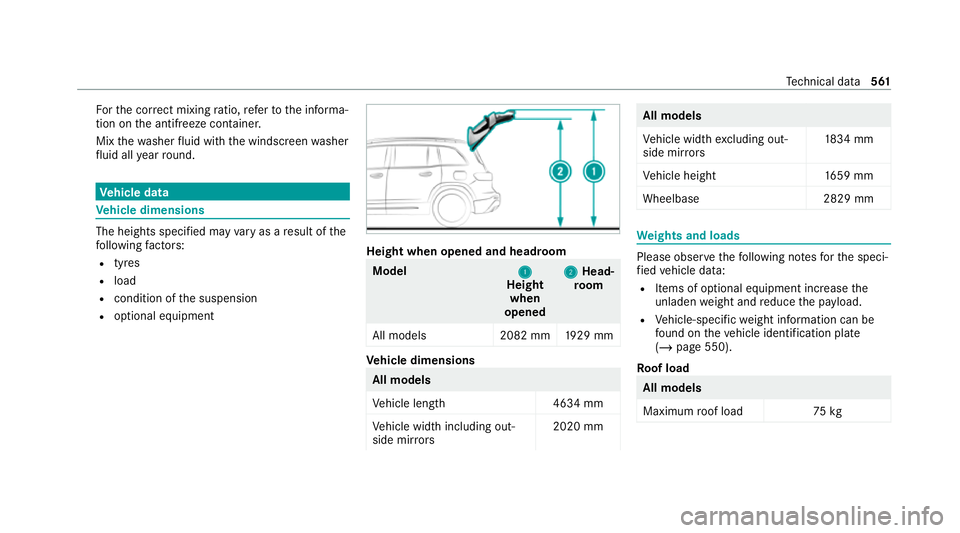
R optional equipment Height when opened and headroom
Model
1
1
Height
when
opened 2
2
Head‐
ro om
All models 2082 mm1929 mm Ve
hicle dimensions All models
Ve
hicle lengt h4 634 mm
Ve hicle width including out‐
side mir rors 2020 mm All models
Ve
hicle width excluding out‐
side mir rors 18
34 mm
Ve hicle height 1659 mm
Wheelbase 2829 mm We
ights and loads Please obser
vethefo llowing no tesfo rth e speci‐
fi ed vehicle data:
R Items of optional equipment increase the
unladen weight and reduce the pa yload.
R Vehicle-specific weight information can be
fo und on theve hicle identification plate
(/ page 550).
Ro of load All models
Maximum
roof load 75kg Te
ch nical da ta561
Page 566 of 689
Maximum
gradient climbing ability
The vehicle's gradient climbing ability depends
on thewe ight distribution in theve hicle, thete r‐
ra in conditions and thero ad sur face conditions.
The specified value applies in thefo llowing
cases:
R theve hicle is ready todrive – fuel tank full,
all fluids topped up, driver in theve hicle
R thero ad sur face conditions and thus traction
are good
A gradient climbing ability of 100% cor responds
to an incline of 45°.
Obse rveth e no tes on driving in mountainous ter‐
ra in (/ page193).
Missing values werenot yetav ailable at the time
of going topress. Model
Maximumgra‐
dient climbing ability
All models Tr
ailer hitch Gene
ral no tes on the trailer hit ch Modifications
tothe engine cooling sy stem may
be necessar y,depending on theve hicle model.
The retrofitting of a trailer hitch is only pe rmissi‐
ble if a towing capacity is specified in your vehi‐
cle documents.
Fu rther information can be obtained at a quali‐
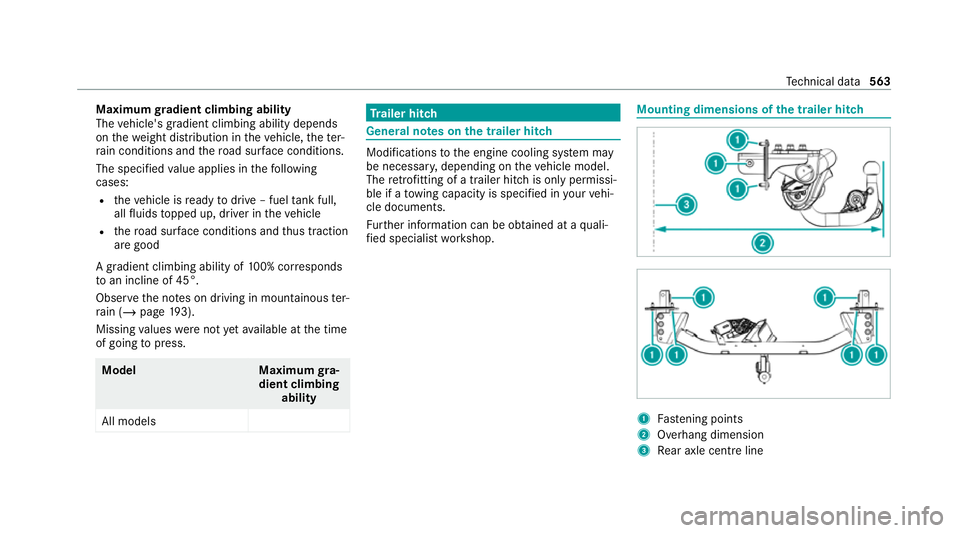
fi ed specialist workshop. Mounting dimensions of
the trailer hit ch 1
Fastening points
2 Overhang dimension
3 Rear axle centre line Te
ch nical da ta563
Page 677 of 689
St
ow age comp artments
see Loading
see Stow age compartment
St ow age space underneath the load
compa rtment floor .................................. 14 0
Suggestions ............................................. 348
Calling up ............................................ 349
Configuring .......................................... 349
Deleting ............................................... 350
Overview ............................................. 348
Re naming ............................................ 350
Sulphur content ...................................... 553
Sun visor Ope rating ............................................ .174
Sur round lighting
Switching on/off ................................. 16 3
Sur round View
see 360° Camera
Suspension Adaptive damping adjustment ............ .257
Damping characteristics ...................... 257
SV HC (substances of very high con‐
cern )............................................................ 31Switch-off delay time
Exterior ................................................ 16 3
Interior ................................................. 16 5
Switching volume adjustment on/off
Adva nced sound sy stem ......................4 82
Synchronisation function Activating/deactivating (multimedia
sy stem) ................................................ 178
Switching on/off (control panel) .......... 178
Sy stem settings
Ac tivating/deactivating PIN pr otec‐
tion ...................................................... 370
Ac tivating/deactivating voice ampli‐
fi cation torear .................................... .365
Re set function (multimedia sy stem) ....3 72
Setting the dis tance unit ..................... 369
Setting the time and date automati‐
cally ..................................................... 364
Setting the time zone .......................... 364
Setting the time/date form at .............. 364
Swit ching transmission of theve hicle
position on/off .................................... 365
Sy stem settings
see Blue tooth® see Data import/export
see Language
see Software update
see Wi-Fi T
Ta ilgate ...................................................... .92
Closing .................................................. 93
HANDS-FREE ACCESS .......................... .96
Limiting the opening angle .................... 97
Opening .................................................92
Opening dimensions ............................5 61
Un locking (emer gency key) .................... 97
Ta ilpipes (Care) ........................................ 497
Ta ke -back of end-of-life vehicles .............. 21
Pr otection of the environment ............... 21
Ta nk content
Ad Blue ®
............................................... 557
Fu el ..................................................... 556
Re ser ve(fuel) ...................................... 556
Te ch nical data
Axle load (trailer operation) ................. 565
Fa stening points (trailer hitch) .............5 63
Information .......................................... 548674
Index
Page 678 of 689
Mounting dimensions (trailer hitch) ..... 563
No tes (trailer hitch) ............................. 563
Overhang dimension (trailer hitch) ...... 563
To ngue weight .................................... .565
To wing capacity (trailer operation) ...... 564
Ve hicle identification plate .................. 550
Te lephone ........................................ 305, 425
Ac tivating functions du ring a call ........ 430
Calls wi thseveral participants ............ .430
Changing a function ............................ 427
Connecting a mobile phone (Near
Field Communication (NFC)) .............. .428
Connecting a mobile phone (Pass‐
ke y) .................................................... .426
Connecting a mobile phone (Secu re
Simple Pairing) .................................... 426
Disconnecting a mobile phone ............ 428
Importing con tacts ............................. .433
Importing contacts (o verview) ............ .432
Incoming call during an existing call .... 431
Information .......................................... 426
Inter changing mobile phones .............. 427
Locking theve hicle (mobile phone) .......88
Menu (on-board computer) .................. 305
Mobile phone voice recognition .......... 430 No
tes .................................................. 423
Operating modes ................................. 426
Re ception and transmission volume .... 429
Re placing mobile phones .................... 427
Setting theringtone ............................ 429
St arting theve hicle (mobile phone) ..... 187
Switching mobile phones (Near Field
Communication (NFC)) ........................ 428
Te lephone menu overview ...................4 25
Te lephone operation ............................ 430
Un locking theve hicle (mobile phone) ....88
Using Near Field Communication
(NFC) ................................................... 428
Vo ice commands (LINGU ATRO NIC) ...... 319
Wi reless charging (mobile phone) ........ 15 2
Te lephone number
Dialling (on-board computer) .............. .305
Te lephone operation
see Calls
Te lephony operating modes
Blue tooth ®
Te lephony .......................... 426
Te mp erature ............................................ .175
Te xt messages
Vo ice commands (LINGU ATRO NIC) .....3 24Te
xt messages
see Messages
Themes ..................................................... 346
Calling up ............................................ 347
Deleting ............................................... 348
Fa stening ............................................. 347
Modifying ............................................ 348
Moving ................................................ 348
Overview ............................................. 346
Third row of seats .................................... 131
Fo lding back the backrest on the
th ird row of seats ................................ 13 3
Fo lding the backrest on theth ird row
of seats forw ards ................................ .131
Getting in/out ...................................... 11 6
Height limit ........................................... 111
Through-loading feature
see Load compartment
see Seat
see Third rowof seats
Ti e-d owney es .......................................... 13 8
Time Manual time setting ............................. 364 Index
675
Page 680 of 689
Fo
lding the ball neck out/in ................2 88
Gene ral no tes ...................................... 563
Mounting dimensions .......................... 563
No tes .................................................. 288
Overhang dimension ........................... 563
Soc ket ................................................. 290
To ngue weight .................................... .565
To wing capacity .................................. .564
Tr ailer operation
Ac tive Blind Spot Assi st....................... 284
Ac tive Lane Keeping Assist ................. 285
Bicycle rack ......................................... 291
Coupling up/uncoupling a trailer ........ 290
Fo lding the ball neck out/in ................2 88
No tes .................................................. 288
Soc ket ................................................. 290
Tr ailer stabilisation
Fu nction/no tes ................................... 230
Tr ansfer redve hicle data
Android Auto ....................................... 446
Apple CarPl ay®
.................................... 446
Tr ansmission (problem) .......................... 208
Tr ansmission position display ...............203 Tr
anspo rting
Ve hicle .................................................5 17
Tr im element (Care) ................................ 499
Tr ip
Menu (on-board computer) .................. 301
Tr ip computer
Displaying ............................................ 301
Re setting ............................................. 302
Tr ip distance ............................................ 301
Displaying ............................................ 301
Re setting ............................................. 302
Tr ip me ter
see Trip dis tance
Tu neIn
Calling up ............................................ 465
Calling up thest ation list (category
last selec ted) .......................................4 68
Deleting stations ................................ .468
Logging out ......................................... 468
Overview ............................................. 467
Re gis tering .......................................... 468
Saving stations .................................... 468
Selecting and connecting toast ation
............................................................ .467 Selecting
stre am ................................ .468
Setting options ................................... .468
Te rm s of use ........................................4 68
Tu rn signal indicator
see Turn signal lights
Tu rn signal lights .....................................1 57
Changing bulbs (rear) .......................... 167
Switching on/off ................................. 157
Tw o-w ayradios
Fr equencies ......................................... 549
No tes on ins tallation .......................... .548
Tr ansmission output (maximum) ........ .549
Ty re inflation compressor
see TIREFIT kit
Ty re pressure ........................................... 526
Checking (ty repressure monitoring
sy stem) ............................................... 528
No tes .................................................. 525
Re starting the tyre pressure loss
wa rning sy stem ................................... 533
Re starting the tyre pressure monitor‐
ing sy stem ...........................................5 28
TIREFIT kit .......................................... .505 Index
677