fuse MERCEDES-BENZ GLB SUV 2019 Owners Manual
[x] Cancel search | Manufacturer: MERCEDES-BENZ, Model Year: 2019, Model line: GLB SUV, Model: MERCEDES-BENZ GLB SUV 2019Pages: 689, PDF Size: 11.39 MB
Page 6 of 689
Mir
rors ........................................................ 171
Operating the sun visors ............................. 174Climate control
......................................... 175
Overview of climate contro l systems ..........1 75
Operating the climate control sy stem ......... 176 Driving and pa
rking ................................. 18 5
Driving ........................................................ 185
DY NA MIC SELECT switch ............................1 98
Manual transmission .................................. 201
Au tomatic transmission .............................. 203
Fu nction of the 4MATIC .............................. 208
Re fuelling ................................................... 209
Pa rking ........................................................ 215
Driving and driving sa fety sy stems .............2 24
Tr ailer hit ch................................................ 288
Bicycle rack function .................................. 291
Ve hicle towing instructions ........................ .293 Instrument Display and on-board
comp uter.................................................. 294
Instrument display overview ...................... .294 Overview of
the buttons on thesteering
wheel ..........................................................2 95
Operating the on-board computer .............. 296
Ad justing the design of the instrument
display ........................................................ 297
Showing display conte nt onthe instru‐
ment clus ter ............................................... 298
Overview of displa yson the multifunc‐
tion display .................................................2 99
Ad justing the instrument lighting ............... 300
Menus and submenus ................................ 300
Head-up Display ......................................... 307 LINGU
ATRO NIC ........................................ 309
No tes on operating saf ety .......................... 309
Ope ration .................................................... 310
Using LINGU ATRO NIC ef fectively ................ 312
Essential voice commands .......................... 313 MBUX multimedia sy
stem ...................... 329
Overview and operation .............................. 329
Sy stem settings .......................................... 363
Fit & Healt hy............................................... 373
Na vigation ................................................... 378Te
lephone .................................................. .423
Online and Internet functions ..................... 459
Media ........................................................ .468
Ra dio .......................................................... 477
Sound ......................................................... 480 Main
tenance and care ............................. 484
ASS YST PLUS service inter val display ........ 484
Engine compartment .................................. 485
Cleaning and care ...................................... .491 Breakdown assistance
............................501
Emergency .................................................. 501
Flat tyre ...................................................... 503
Battery (vehicle) ......................................... 509
To w- starting or towing away ........................ 514
Electrical fuses ........................................... 520 Wheels and tyres
..................................... 524
No tes on noise or unusual handling char‐
acteristics .................................................. .524
No tes on regular lyinspecting wheels and
tyres .......................................................... .524 Con
tents 3
Page 523 of 689
#
Vehicles with automatic transmission
must not be tow- star ted. #
Vehicles with automatic transmission must
not be tow- star ted.
Ve hicles with manual transmission #
Obser vethe no tes on towing away
( / page 516). #
If necessa ry, allow the engine and exhaust
sy stem tocool down. #
Switch the ignition on. #
Enga gesecond gear. #
Release the electric parking brake. #
Tow- start theve hicle while the clutch pedal
is fully depressed. #
Slowly release the clutch pedal. #
Immediately shift toneutral if the engine
st arts. #
Pull over and stop theve hicle, paying atten‐
tion toroad and traf fic conditions. #
Remo vetheto w bar. #
Remo vetheto wing eye. #
Have theve hicle checked at a qualified spe‐
cialist workshop. Electrical fuses
Note
s on electrical fuses &
WARNING Risk of accident and inju ry
due to ov erloaded lines
If yo u manipulate or bridge a faulty fuse or if
yo ure place it with a fuse with a higher
amperage, the electric line could be overloa‐
ded.
This could result in a fire. #
Alw aysre place faulty fuses with speci‐
fi ed new fuses conta iningthe cor rect
amperage. *
NO
TEDama gedue toincor rect fuses Electrical components or sy
stems may be
damaged byincor rect fuses, or their func‐
tionality may be significant lyimpaired. #
Only use fuses that ha vebeen appr oved
by Mercedes-Benz and which ha vethe
cor rect fuse rating. Blown fuses mu
stbe replaced with fuses of the
same rating, which you can recognise bythe col‐
our and fuse rating. The fuse ratings and fu rther
information tobe obser ved can be found in the
fuse assignment diagram.
Fu se assignment diag ram: onthe fuse box in
th e engine compartment (/ page 521).
* NO
TEDama geor malfunctions caused
by moisture Moisture may cause dama
getothe electrical
sy stem or cause it tomalfunction. #
When the fuse box is open, make sure
th at no moisture can enter the fuse
box. #
When closing the fuse box, make sure
th at the seal of the lid is positioned cor‐
re ctly on the fuse box. 520
Breakdown assis tance
Page 524 of 689
If
th e newly inser ted fuse also blo ws, ha vethe
cause traced and rectified at a qualified special‐
ist workshop.
Ensure thefo llowing before replacing a fuse:
R The vehicle is secured against rolling away.
R All electrical consumers are switched off.
R The ignition is switched off.
The electrical fuses are located in various fuse
bo xes:
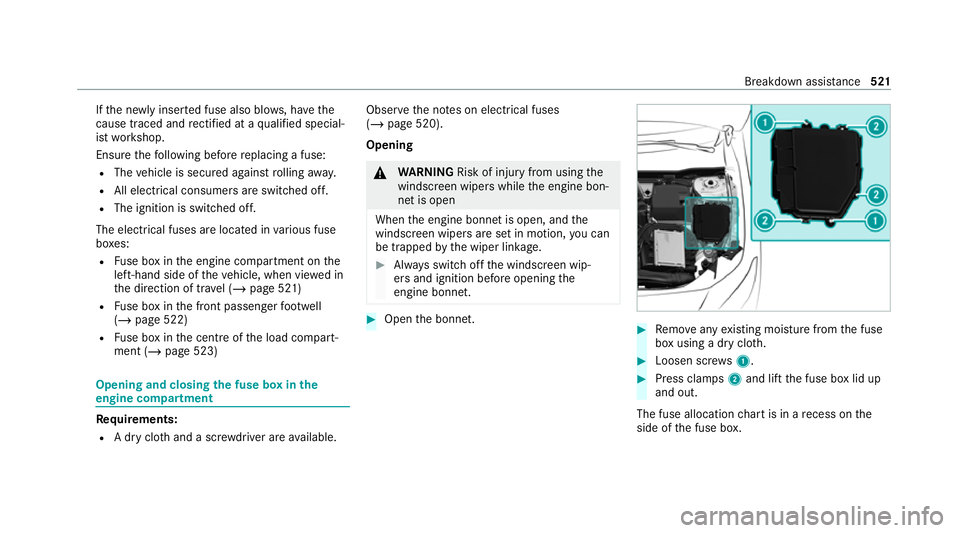
R Fuse box in the engine compartment on the
left-hand side of theve hicle, when vie wed in
th e direction of tr avel (/ page 521)
R Fuse box in the front passenger foot we ll
(/ page 522)
R Fuse box in the cent reofthe load compart‐
ment (/ page 523) Opening and closing
the fuse box in the
engine compa rtment Requ
irements:
R A dry clo thand a sc rewdriver are available. Obse
rveth e no tes on electrical fuses
(/ page 520).
Opening &
WARNING Risk of inju ryfrom using the
windscreen wipers while the engine bon‐
net is open
When the engine bonn etis open, and the
windscreen wipers are set in motion, you can
be trapped bythe wiper linkage. #
Alw ays switch off the windscreen wip‐
ers and ignition before opening the
engine bonn et. #
Open the bonn et. #
Remo veany existing moisture from the fuse
box using a dry clo th. #
Loosen scr ews1. #
Press clamps 2and lift the fuse box lid up
and out.
The fuse allocation chart is in a recess on the
side of the fuse box. Breakdown assis
tance 521
Page 525 of 689
Closing
#
Check whe ther the seal is positioned cor‐
re ctly in the lid. #
Place the lid on the fuse box. #
Make sure that clamps 2engage. #
Tighten scr ews1. #
Close the bonn et. Opening and closing
the fuse box in the front
passenger foot we ll Obser
vethe no tes on electrical fuses
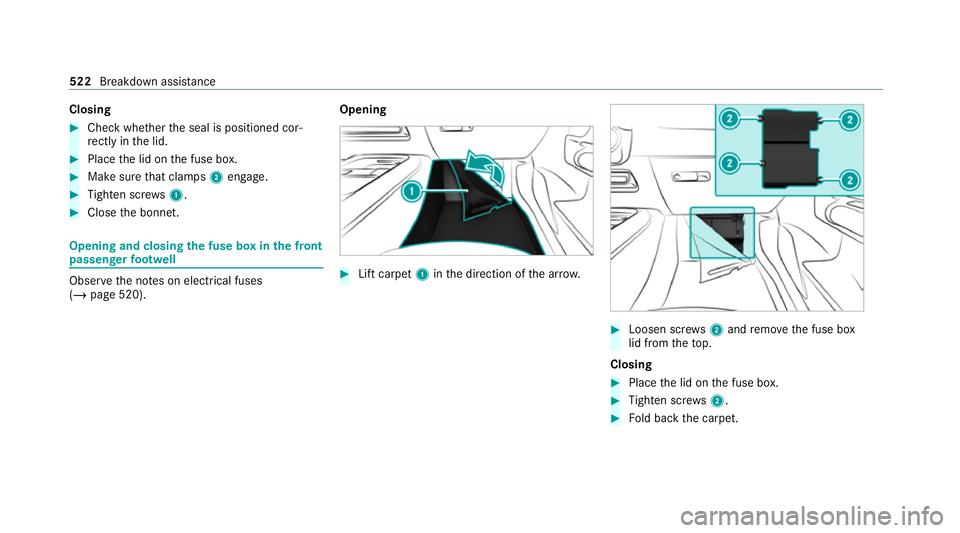
(/ page 520). Opening #
Lift carpet 1inthe direction of the ar row. #
Loosen scr ews2 and remo vethe fuse box
lid from theto p.
Closing #
Place the lid on the fuse box. #
Tighten scr ews2. #
Fold back the carpet. 522
Breakdown assis tance
Page 526 of 689
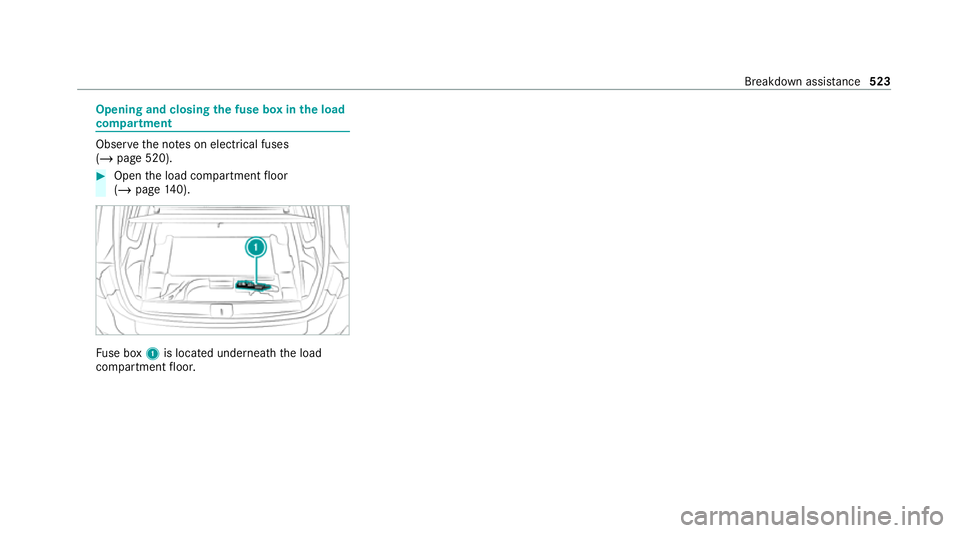
Opening and closing
the fuse box in the load
compa rtment Obse
rveth e no tes on electrical fuses
(/ page 520). #
Open the load compartment floor
(/ page 140). Fu
se box 1is located underneath the load
compartment floor. Breakdown assis
tance 523
Page 576 of 689
Lights
Display messages
Possible causes/consequences and M
MSolutions
b Left dipped beam (examp le) *T
he cor responding light source is defective. #
Drive on carefully. #
Consult a qualified specialist workshop immediatel y.
or #
Check whe ther you are permit tedto replace the light source yourself (/ page165).
% LED light bulbs: the display message forth e cor responding lamp appears only when allthe light-emitting diodes
in the lamp are faulty.
b
Malfunction See Owner's
Manual *T
heexterior lighting is malfunctioning. #
Consult a qualified specialist workshop.
* Ve hicles with a trailer hitch: a fuse may haveblown. #
Stop theve hicle in accordance with the tra ffic conditions. #
Check the fuses and replace them if necessary (/ page 520).
b
Automatic driving lights
inoperative *T
he light sensor is malfunctioning. #
Consult a qualified specialist workshop. Display messages and
warning/indicator lamps 573
Page 657 of 689
see DSR
see HOLD function
see Limiter
see
Parking Assist PARKTRONIC
see Reversing camera
see Speed Limit Assist
see Start-off assist
see Traf fic Sign Assi st
Driving tips Driving abroad (symmetrical low
beam) .................................................. 15 5
Gene ral driving tips .............................. 191
Ru nning-in no tes ..................................1 90
Dr ow siness de tection
see ATTENTION ASSIST
DSR ........................................................... 241
Ac tivating/deactivating ...................... .242
Changing theta rget speed .................. 24 2
Fu nction ............................................... 241
No tes ................................................... 24 2
Dynamic handling cont rol sy stem
see ESP ®
(Elect ronic Stability Prog ram)
DY NA MIC SELECT .................................... 19 8
Con figuring drive program I ................. 200 Displaying engine data ........................ 200
Displaying vehicle data ........................ 200
Drive program display .......................... 19 9
Drive programs .................................... 19 8
Fu nction .............................................. 19 8
Operating (DYNAMIC SELECT switch) .............................................................1 99
Selecting the drive prog ram ............... .199
DY NA MIC SELECT switch
Damping adju stment ........................... 257 E
E-mails see In-Car Of fice
E10 ............................................................ 553
Easy entry feature
Fu nction/no tes ................................... 12 3
Setting ................................................. 124
Easy exitfeature
Fu nction/no tes ................................... 12 3
Setting ................................................. 124
EBD (Electronic Brake forc e Distribu‐
tion)
Function/no tes ................................... 231 ECO display
Function .............................................. 197
Re setting ............................................. 302
ECO start/s top function ......................... 19 6
Au tomatic engine start ........................ 19 6
Au tomatic engine stop .........................1 96
Operation ............................................ 19 6
Switching off/on ................................. 197
Electric pa rking brake ............................ .221
App lying automatically ........................ .221
App lying or releasing manually ............ 223
Emer gency braking .............................. 223
Re leasing automatically ...................... .222
Electrical fuses see Fuses
Electromagnetic compatibility Declaration of conformity ......................24
Electronic Stability Prog ram
see ESP ®
(Electronic Stability Prog ram)
Emer gency
Fire extinguisher ................................. .502
Fir st-aid kit (so ftsided) ....................... 502
Overview of the help functions .............. 18
Re moving thewa rning triangle ............ 501 654
Index
Page 660 of 689
Fu
el consum ption indicator
Calling up ............................................ 201
Fu nction seat
see Door cont rol panel
Fu ses ........................................................ 520
Before replacing a fuse ........................ 520
Fu se assignment diagram ...................5 20
Fu se box in the engine compartment .. 521
Fu se box in the front passenger foot‐
we ll ...................................................... 522
Fu se box in the load compartment ...... 523
No tes .................................................. 520 G
Garage door opener Cleari ngthe memory ........................... 219
Opening or closing the door ................. 218
Programming buttons .......................... 216
Ra dio equipment appr oval numbers .... 219
Re solving problems .............................. 218
Synchronising thero lling code ............ .217
Gearshift recommendation ............ 202, 206
General operating permit number
(EU) .......................................................... .550 Genuine parts
............................................ 22
Glide mode ............................................... 206
Global sear ch
Fu nction .............................................. 354
Overview ............................................. 354
Glo vecompa rtment
Locking/unlo cking .............................. 127 H
Handbrake see Electric parking brake
Handling characteristics (unusual) ....... 524
HANDS-FREE ACCESS ................................ 96
Haza rdwa rning lights ............................ .158
Head restra int
Fr ont (adjusting mechanically) .............1 18
Re ar (adjusting) .................................... 11 9
Re ar (fitting/removing) ........................ 11 9
Head-up display ....................................... 306
Ad justing display elements (on-board
compu ter) ............................................ 306
Ad justing the brightness (on-board
computer) ............................................ 306 Fu
nction .............................................. 307
Menu (on-board compu ter) .................. 306
Operating the memory function ........... 124
Setting the position (on-board com‐
puter) .................................................. 306
Switching on/off ................................. 308
Headla mpflasher ................................... .157
Heating see Climate control
High beam Adaptive Highbeam Assist .................. .160
Ad aptive Highbeam Assist Plus ............ 161
Switching on/off ................................. 157
High-pressure cleaner (care) ................. 492
Hill Start Assist ....................................... 255
HOLD function ......................................... 255
Fu nction/no tes ................................... 255
Switching on/off ................................. 255
Home screen (media display) Overview ..............................................3 31
Hotspot Setting up (Wi-Fi) ................................. 368 Index
657