towing MERCEDES-BENZ GLC 2017 Owner's Manual
[x] Cancel search | Manufacturer: MERCEDES-BENZ, Model Year: 2017, Model line: GLC, Model: MERCEDES-BENZ GLC 2017Pages: 374, PDF Size: 8.42 MB
Page 209 of 374
You will find permissible trailer loads under
"Technical data" ( Y
page 371).
Loading a trailer R
When loading the trailer, make sure that nei-
ther the permissible gross trailer weight nor
the permissible gross vehicle weight are
exceeded. The permissible gross vehicle
weight is indicated on the identification plate
on the B-pillar on the driver's side of the vehi-
cle.
You can find the maximum permissible values
on the type plates of your vehicle and the
trailer. When calculating how much weight
the vehicle and trailer may carry, pay atten-
tion to the respective lowest values. R
The trailer drawbar load on the ball coupling
must be added to the rear axle load to avoid
exceeding the permissible gross axle weight.
The permissible gross vehicle weight is indi-
cated on the identification plate on the B-pil-
lar on the driver's side of the vehicle.
Mercedes-Benz recommends a trailer load
where the trailer drawbar noseweight accounts
for 8% to 15% of the permissible gross trailer
weight.
Additional accessories, passengers and load
reduce the permissible trailer load and nose-
weight that your vehicle can tow.
Checking the vehicle and trailer weight R
Have the towing vehicle, including the driver,
passengers and load, and completely loaded
trailer weighed on a suitable weighing
machine. This will allow you to ensure that the
weights of the towing vehicle and trailer com-
ply with the maximum permissible values. R
Check the gross axle weight rating of the front
and rear axles, the gross weight of the trailer
and trailer drawbar load. Towing a trailer 207
Driving and parking Z
Page 299 of 374
lished between the Customer Assistance Center
and the vehicle occupants. R
If the vehicle occupants respond, the
Mercedes-Benz Customer Assistance Center
attempts to get more information on the
emergency. R
If there is no response from the vehicle occu-
pants, an ambulance is immediately sent to
the vehicle.
If no voice connection can be established to the
Mercedes-Benz Customer Assistance Center,
the system has been unable to initiate an emer-
gency call.
This can occur, for example, if the relevant
mobile phone network is not available. The indi-
cator lamp in the SOS button flashes continu-
ously.
The Call Failed message appears in the mul-
tifunction display and must be confirmed.
In this case, summon assistance by other
means.
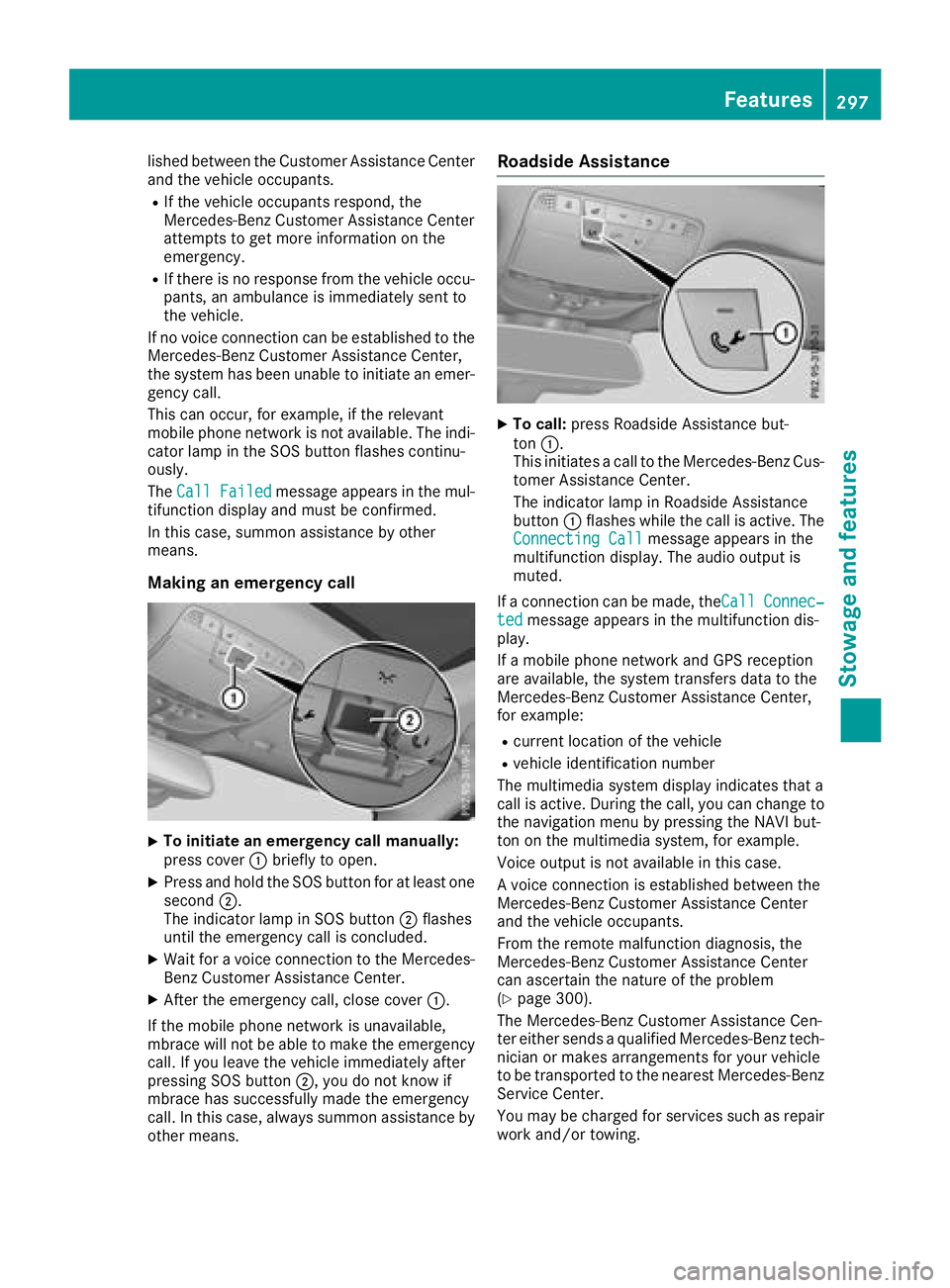
Making an emergency call
X
To initiate an emergency call manually:
press cover C briefly to open.X
Press and hold the SOS button for at least one
second D .
The indicator lamp in SOS button D flashes
until the emergency call is concluded. X
Wait for a voice connection to the Mercedes-
Benz Customer Assistance Center. X
After the emergency call, close cover C .
If the mobile phone network is unavailable,
mbrace will not be able to make the emergency
call. If you leave the vehicle immediately after
pressing SOS button D , you do not know if
mbrace has successfully made the emergency
call. In this case, always summon assistance by
other means. Roadside Assistance X
To call: press Roadside Assistance but-
ton C .
This initiates a call to the Mercedes-Benz Cus-
tomer Assistance Center.
The indicator lamp in Roadside Assistance
button C flashes while the call is active. The
Connecting Call message appears in the
multifunction display. The audio output is
muted.
If a connection can be made, the Call Connec‐
ted message appears in the multifunction dis-
play.
If a mobile phone network and GPS reception
are available, the system transfers data to the
Mercedes-Benz Customer Assistance Center,
for example: R
current location of the vehicle R
vehicle identification number
The multimedia system display indicates that a
call is active. During the call, you can change to
the navigation menu by pressing the NAVI but-
ton on the multimedia system, for example.
Voice output is not available in this case.
A voice connection is established between the
Mercedes-Benz Customer Assistance Center
and the vehicle occupants.
From the remote malfunction diagnosis, the
Mercedes-Benz Customer Assistance Center
can ascertain the nature of the problem
( Y
page 300).
The Mercedes-Benz Customer Assistance Cen-
ter either sends a qualified Mercedes-Benz tech-
nician or makes arrangements for your vehicle
to be transported to the nearest Mercedes-Benz
Service Center.
You may be charged for services such as repair
work and/or towing. Features 297
Stowage and features Z
Page 314 of 374
To avoid damage to the vehicle, deactivate
DISTRONIC PLUS and the HOLD function in
the following or similar situations: R
when towing the vehicle R
in the car wash
! Never clean your vehicle in a Touchless
Automatic Car Wash as these use special
cleaning agents. These cleaning agents can
damage the paintwork or plastic parts.
! Make sure that: R
the side windows and sliding sunroof are
closed completely R
the blower is switched off R
the windshield wiper switch is in position 0R
the 360° camera or the rear view camera is
deactivated
The vehicle may otherwise be damaged.
! If the SmartKey is within the rear detection
range of KEYLESS-GO, the following situa-
tions, for example, could lead to the uninten-
tional opening of the tailgate: R
using a car wash R
using a power washer
Make sure that the SmartKey is at least 3 m
away from the vehicle.
! If the SmartKey is within the rear detection
range of KEYLESS-GO, the following situa-
tions, for example, could lead to the uninten-
tional opening of the tailgate: R
using a car wash R
using a power washer
Make sure that the SmartKey is at least 10 ft
(3 m) away from the vehicle.
! Make sure that the automatic transmission
is in neutral position \\ when washing your
vehicle in a tow-through car wash. The vehicle
may otherwise be damaged. R
Operating with the SmartKey:
Do not remove the SmartKey from the igni-
tion lock. Do not open the driver's door
when the engine is switched off or at very
low speeds. Otherwise, when in transmis-
sion position [ or ^ , the automatic
transmission will automatically switch to
park position ] and block the wheels.R
Operating with the Start/Stop button:
Do not open the driver's door when the
engine is switched off or at very low speeds. Otherwise, when in transmission
position [ or ^ , the automatic transmis-
sion will automatically switch to park posi-
tion ] and block the wheels.
Observe the following to make sure that the
automatic transmission stays in neutral position
\\ :
Operating with the SmartKey and Start/Stop
button: X
Make sure that the ignition is switched on. X
Make sure that the vehicle is stationary. X
Depress and hold the brake pedal.
Operating with the Start/Stop button only: X
Engage park position ] .X
Release the brake pedal. X
Remove Start/Stop button from ignition lock
( Y
page 133). X
Insert the SmartKey into the ignition lock. X
Switch on the ignition. X
Depress and hold the brake pedal.
Operating with the SmartKey and Start/Stop
button: X
Shift to neutral \\ .X
Release the brake pedal. X
Release the electric parking brake, if neces-
sary. X
Switch off the ignition and leave the SmartKey
in the ignition lock.
You can wash the vehicle in an automatic car
wash from the very start.
If the vehicle is very dirty, pre-wash it before
cleaning it in an automatic car wash.
After using an automatic car wash, wipe off wax
from the windshield and the wiper blades. This
will prevent smears and reduce wiping noises
caused by residue on the windshield.
Washing by hand In some countries, washing by hand is only
allowed at specially equipped washing bays.
Observe the legal requirements in each country. X
Do not use hot water and do not wash the
vehicle in direct sunlight. X
Use a soft sponge to clean. X
Use a mild cleaning agent, such as a car
shampoo approved by Mercedes-Benz.312
Care
Maintenance and care
Page 322 of 374
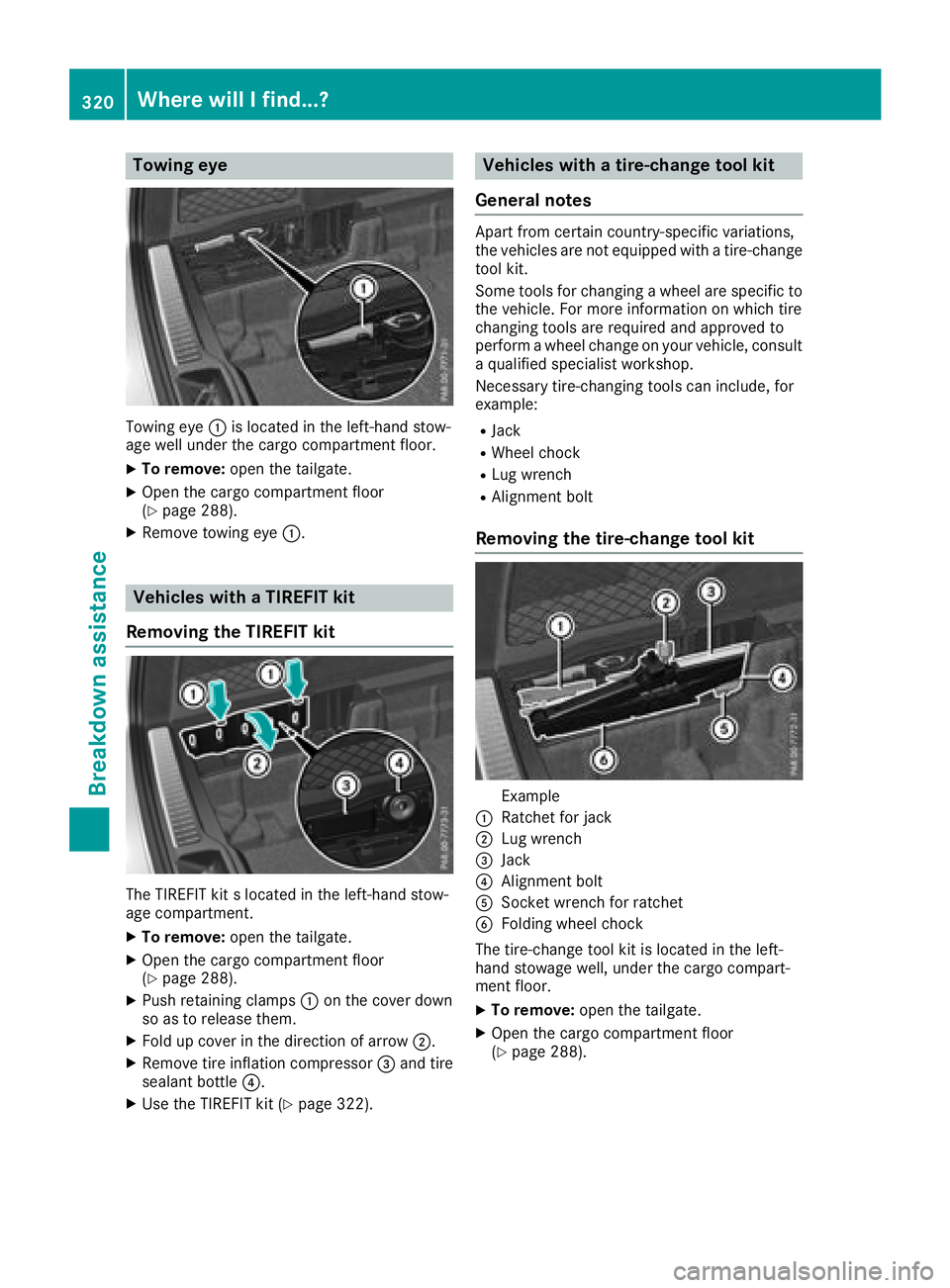
Towing eye
Towing eye C is located in the left-hand stow-
age well under the cargo compartment floor. X
To remove: open the tailgate.X
Open the cargo compartment floor
( Y
page 288).X
Remove towing eye C .
Vehicles with a TIREFIT kit
Removing the TIREFIT kit
The TIREFIT kit s located in the left-hand stow-
age compartment. X
To remove: open the tailgate.X
Open the cargo compartment floor
( Y
page 288).X
Push retaining clamps C on the cover down
so as to release them. X
Fold up cover in the direction of arrow D .X
Remove tire inflation compressor
Page 333 of 374
! Do not use the trailer tow hitch for recovery
or towing. Do not use the towing eye for
recovery. this could damage the vehicle. If in
doubt, have the vehicle recovered using a
crane.
! When towing, pull away slowly and
smoothly. If the tractive power is too high, the
vehicles could be damaged.
! Shift the automatic transmission to position
\\ and do not open the driver's or front pas-
senger's door during towing. The automatic
transmission may otherwise shift to position
] , which could damage the transmission.
! Do not tow with sling-type equipment. This
could damage the vehicle.
! The vehicle can be towed a maximum of
30 miles (50km). The towing speed of 30 mph
(50 km/h) must not be exceeded.
If the vehicle has to be towed more than
30 miles (50km), the entire vehicle must be
raised and transported.
It is better to have the vehicle transported than
to have it towed away.
If the vehicle has suffered transmission damage,
have it transported on a transporter or trailer.
The automatic transmission must be in position
\\ when the vehicle is being towed. If the auto-
matic transmission cannot be shifted to position
\\ , have the vehicle transported on a trans-
porter or trailer.
The battery must be connected and charged.
Otherwise, you: R
cannot turn the SmartKey to position H in
the ignition lock R
cannot release the electric parking brake R
cannot shift the automatic transmission to
position \\
Disarm the automatic locking feature before the
vehicle is towed ( Y
page 84). You could other-
wise be locked out when pushing or towing the
vehicle. Installing/removing the towing eye
Installing the towing eye
G WARNING
The exhaust tail pipe may be very hot. There is
a risk of burns when removing the rear cover.
Do not touch the exhaust pipe. Take particular
care when removing the rear cover.
Mercedes-AMG vehicles
All other vehicles
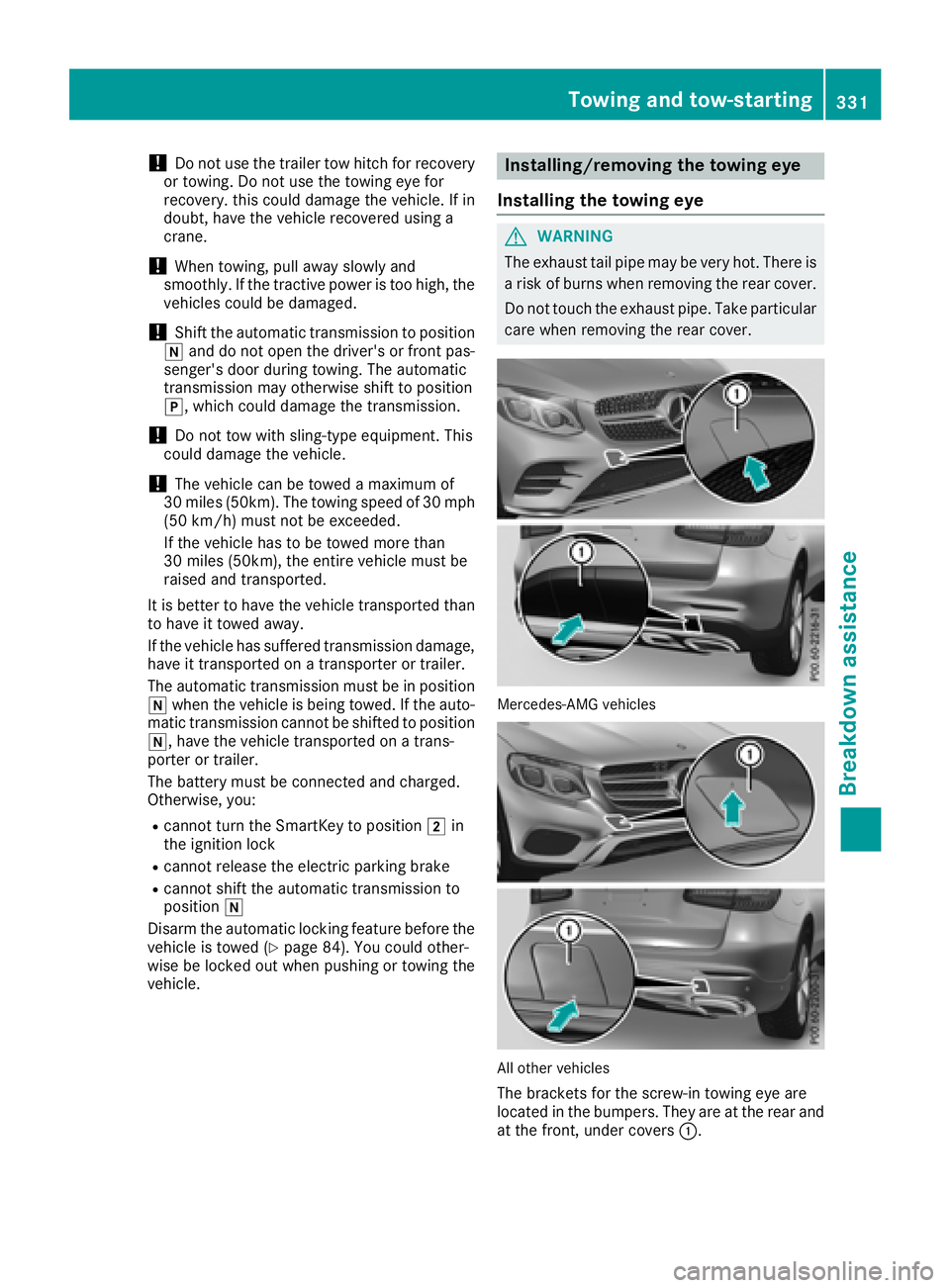
The brackets for the screw-in towing eye are
located in the bumpers. They are at the rear and
at the front, under covers C .Towing and tow-starting 331
Breakdown assistance Z
Page 334 of 374
X
Remove th e towin g eye from th e retainer
( Y
page 320).X
Mercedes-AM G vehicles: use a suitable
object, e.g. a screwdriver, to pry off cover C
on th e fron t bumper from underneath. Tak e
th e cover from th e opening , but do no t
remove it .
Press th e mar k on cover C on th e rear
bumper inward and remove .X
All other vehicles: press th e mar k on
cover C inward and remove .X
Screw in th e towin g eye clockwise as far as it
will go and tighten it .
Vehicles wit h a trailer to w hitch do no t hav e a
bracke t for th e screw-in towin g eye at th e back.
Connect th e towbar to th e trailer to w hitch
( Y
page 204).
Removing the towing eye X
Unscrew and remove th e towin g eye.X
Attac h cover C to th e bumper and press until
it engages.
Towing a vehicle with both axles on
the ground The automatic transmission automatically shifts
to position ] when you open th e driver' s or
front-passenger door or when you remove th e
SmartKey from th e ignition lock. It is essential to
observ e th e followin g steps to ensur e that th e
automatic transmission remain s in position \\
during towing. X
Mak e sur e that th e vehicl e is stationary.X
Turn th e SmartKey to position H in th e igni-
tion lock. X
Depress and hold th e brak e pedal .X
Shift th e automatic transmission to position
\\ .X
Leav e th e SmartKey in position H in th e igni-
tion lock. X
Releas e th e brak e pedal .X
Releas e th e electric parking brake.X
Switc h on th e hazard warning lamp s
( Y
page 113).
In order to signal a chang e of direction when
towin g th e vehicl e wit h th e hazard warning
lamp s switched on , use th e combination switch
as usual. In this case, only th e indicator lamp s for th e direction of travel flash. Afte r resetting
th e combination switch , th e hazard warning
lamp start s flashin g again .
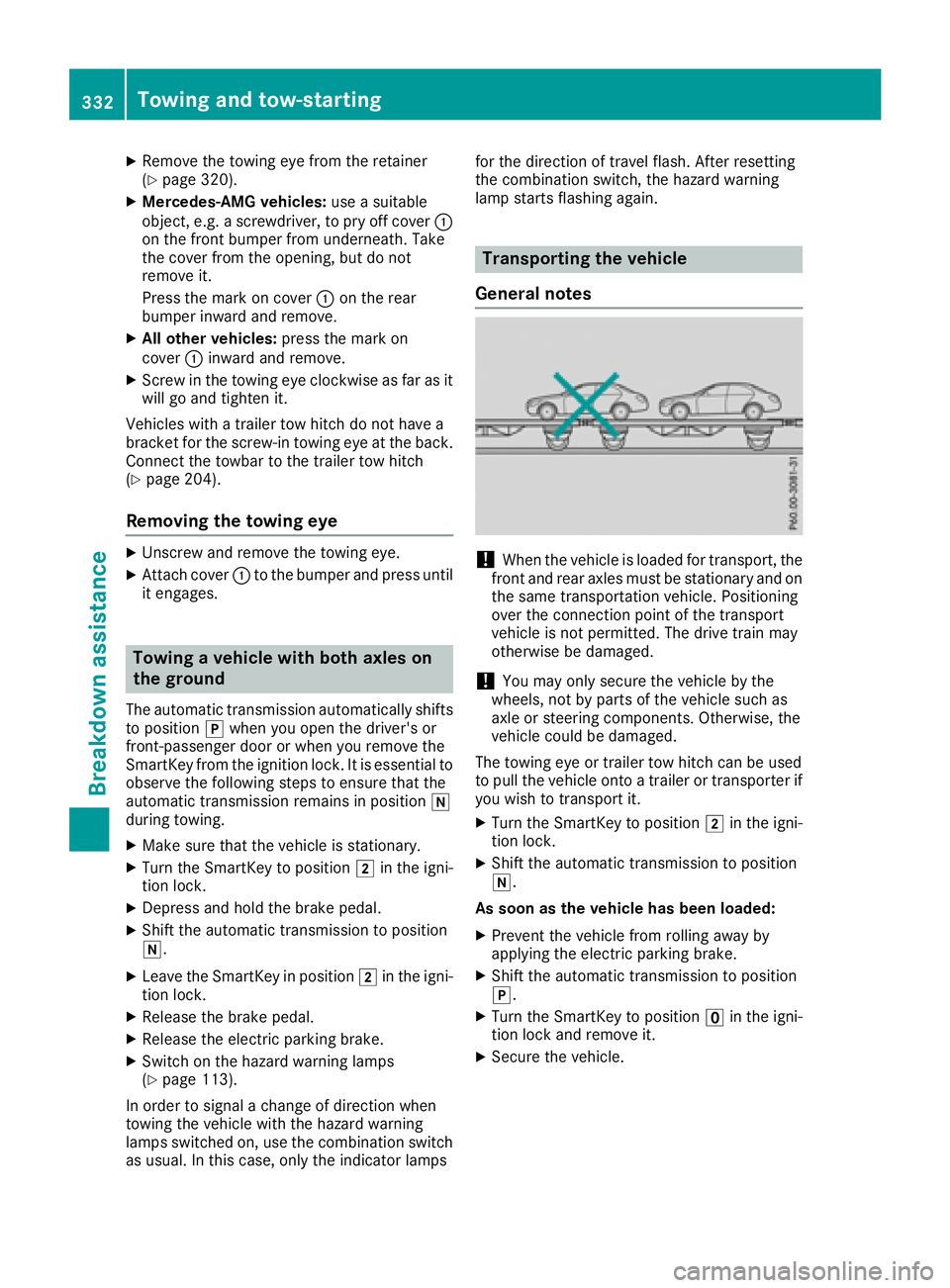
Transporting the vehicle
General notes
! When th e vehicl e is loade d for transport, th e
fron t and rear axles mus t be stationary and on
th e sam e transportation vehicle. Positioning
ove r th e connection poin t of th e transpor t
vehicl e is no t permitted. The driv e train may
otherwise be damaged.
! You may only secure th e vehicl e by th e
wheels, no t by part s of th e vehicl e suc h as
axl e or steering components. Otherwise, th e
vehicl e could be damaged.
The towin g eye or trailer to w hitch can be used
to pull th e vehicl e onto a trailer or transporte r if
you wish to transpor t it .X
Turn th e SmartKey to position H in th e igni-
tion lock. X
Shift th e automatic transmission to position
\\ .
As soon as th e vehicle ha s been loaded:X
Preven t th e vehicl e from rollin g away by
applyin g th e electric parking brake. X
Shift th e automatic transmission to position
] . X
Turn th e SmartKey to position
Page 345 of 374
same time cannot be detected by the tire pres-
sure loss warning system.
The tire pressure monitor is not able to warn you
of a sudden loss of pressure, e.g. if the tire is
penetrated by a foreign object. In the event of a
sudden loss of pressure, bring the vehicle to a
halt by braking carefully. Avoid abrupt steering
movements.
The function of the tire pressure loss warning
system is limited or delayed if: R
snow chains are mounted on your vehicle's
tires. R
road conditions are wintry. R
you are driving on sand or gravel. R
you adopt a very sporty driving style (corner-
ing at high speeds or driving with high rates of
acceleration). R
you are towing a very heavy or large trailer. R
you are driving with a heavy load (in the vehi-
cle or on the roof).
Restarting the tire pressure loss warn-
ing system Restart the tire pressure loss warning system if
you have: R
changed the tire pressure R
changed the wheels or tires R
mounted new wheels or tires X
Before restarting, make sure that the tire
pressures are set properly on all four tires for
the respective operating conditions.
The recommended tire pressure can be found
on the Tire and Loading Information placard
on the B-pillar. Additionally, a tire pressure
table is attached to the fuel filler flap. The tire
pressure loss warning system can only give
reliable warnings if you have set the correct
tire pressure. If an incorrect tire pressure is
set, these incorrect values will be monitored. X
Also observe the notes in the section on tire
pressures ( Y
page 339).X
Make sure that the SmartKey is in position H
in the ignition lock ( Y
page 132).X
Press
Page 373 of 374
Mercedes-AMG
GLC 43 4MATIC
Wheelbase
113.1 in (2873 mm)
Turning circle
39.7 ft (12.10 m)
Maximum roof load
165 lb (75 kg)
Maximum trunk
load
All other models
Vehicle length
183.3 in (4656 mm)
Vehicle width
including exterior
mirrors 82.5 in (2096 mm)
Vehicle height
65.5 in (1664 mm)
Wheelbase
113.1 in (2873 mm)
Turning circle
38.7 ft (11.80 m)
Maximum roof load
165 lb (75 kg)
Maximum trunk
load 220 lb (100 kg)
Trailer tow hitch
Trailer loads
Permissible trailer load, braked (at a
minimum gradient-climbing capability
of 12% from a standstill) Model
All models
3501 lb (1588 kg)
Maximum drawbar noseweight
! Use a drawbar noseweight as close as pos-
sible to the maximum permissible nose-
weight. Do not use a noseweight of less than
50 kg, otherwise the trailer may come loose.
Note that the payload and the rear axle load
are reduced by the actual payload.
Towing a trailer is not possible with all models.
Further information ( Y
page 203).
The drawbar load reduces the permissible over-
all load and rear axle load. The drawbar load acts from above onto the ball
head on the trailer tow hitch.
The trailer drawbar noseweight is not included in
the towing weight.
Model Permissible nose-
weight
All models
280 lbs (127 kg)
The actual noseweight may not be higher than
the value which is given. The value can be found
on the trailer tow hitch or trailer identification
plates. The lowest weight applies.
The maximum permissible trailer drawbar nose-
weight is the maximum weight with which the
trailer drawbar can be loaded. The permissible
trailer drawbar noseweight is the limit for
Mercedes-Benz-approved trailer couplings.
Gross rear axle weight rating when
towing a trailer Missing values were not available at time of
going to print.
Model Gross axle weight
rating
GLC 300 d 4MATIC
Mercedes-AMG
GLC 43 4MATIC 2822 lbs (1280 kg)
All other models
2755 lbs (1250 kg)
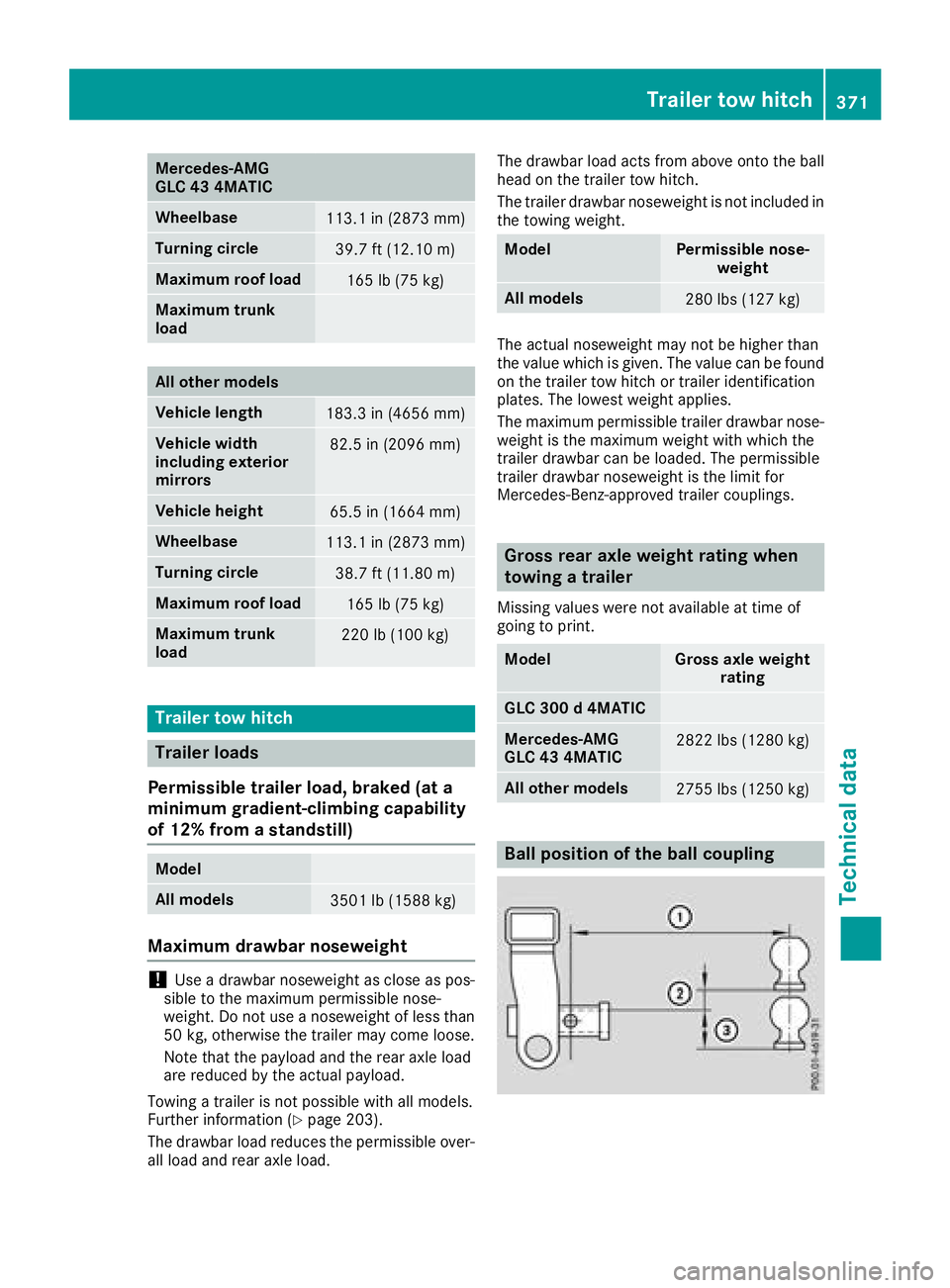
Ball position of the ball coupling Trailer tow hitch 371
Technical data Z