lights MERCEDES-BENZ GLC 2018 Owner's Manual
[x] Cancel search | Manufacturer: MERCEDES-BENZ, Model Year: 2018, Model line: GLC, Model: MERCEDES-BENZ GLC 2018Pages: 390, PDF Size: 9.04 MB
Page 83 of 390
SmartKey battery
Important safety notes
G WARNING
Batteries contain toxic and corrosive substan-
ces. If batteries are swallowed, it can result in
severe health problems. There is a risk of fatal
injury.
Keep batteries out of the reach of children. If
a battery is swallowed, seek medical attention
immediately.
H Environmental note
Batteries contain dangerous
substances. It is against the
law to dispose of them with
the household rubbish. They
must be collected separately
and recycled to protect the
environment.
Dispose of batteries in an
environmentally friendly
manner. Take discharged
batteries to a qualified spe-
cialist workshop or a special
collection point for used bat-
teries.
The SmartKey batteries contain perchlorate
material, which may require special handling
and regard for the environment. National guide-
lines must be observed during disposal. In Cal-
ifornia, see www.dtsc.ca.gov/
HazardousWaste/Perchlorate/index.cfm .
Mercedes-Benz recommends that you have the
batteries replaced at a qualified specialist work-
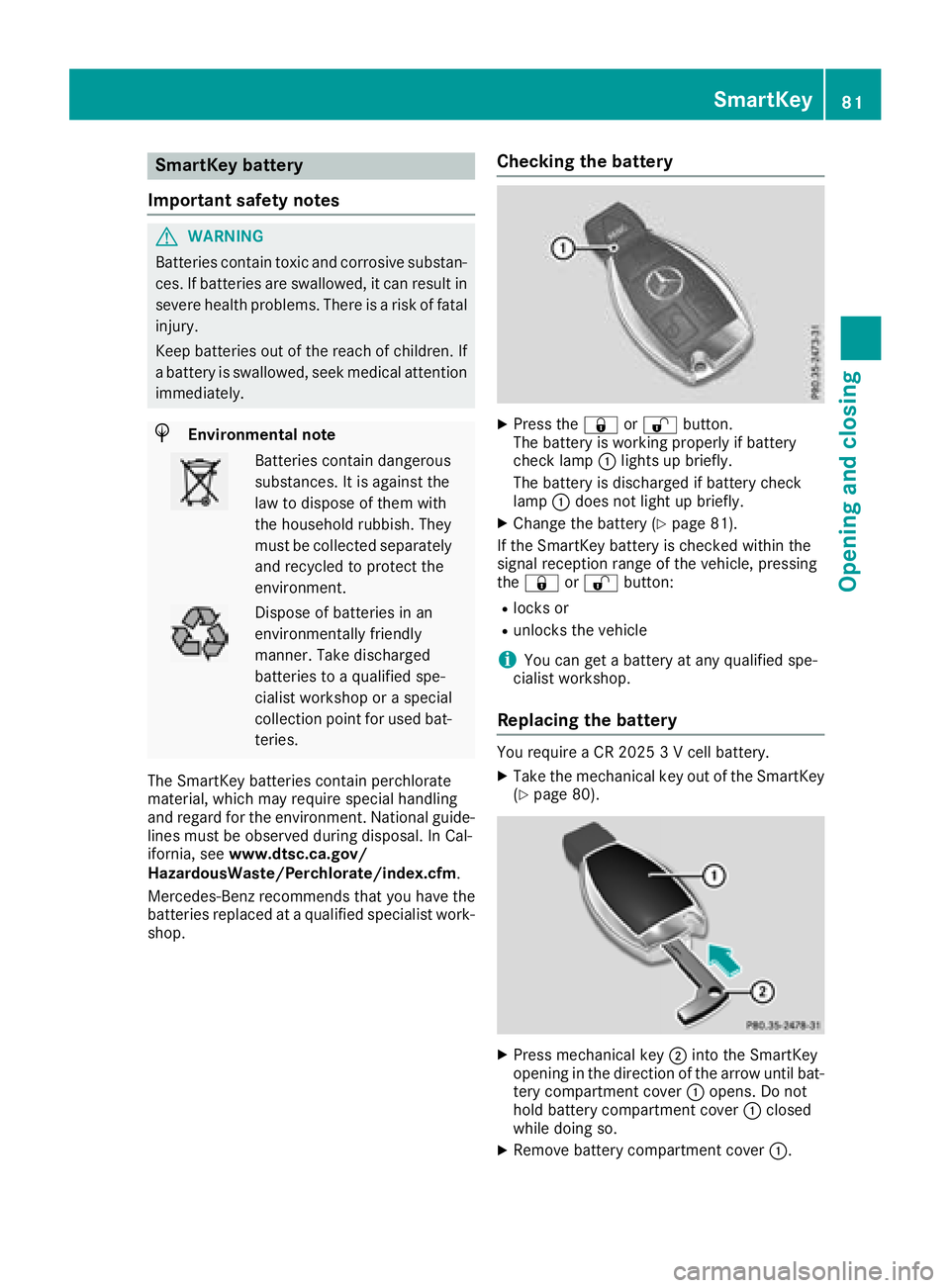
shop. Checking the battery X
Press the 7 or 6 button.
The battery is working properly if battery
check lamp C lights up briefly.
The battery is discharged if battery check
lamp C does not light up briefly. X
Change the battery ( Y
page 81).
If the SmartKey battery is checked within the
signal reception range of the vehicle, pressing
the 7 or 6 button: R
locks or R
unlocks the vehicle
i You can get a battery at any qualified spe-
cialist workshop.
Replacing the battery You require a CR 2025 3 V cell battery. X
Take the mechanical key out of the SmartKey
( Y
page 80).
X
Press mechanical key D into the SmartKey
opening in the direction of the arrow until bat-
tery compartment cover C opens. Do not
hold battery compartment cover C closed
while doing so. X
Remove battery compartment cover C .SmartKey 81
Opening and closing Z
Page 114 of 390
Exterior lighting
General notes USA only: if you wish to drive during the daytime
without lights, switch off the Daytime Run‐
ning Lights function via the on-board com-
puter ( Y
page 234).
Setting the exterior lighting
Setting options Exterior lighting can be set using the: R
light switch ( Y
page 112)R
combination switch ( Y
page 113)R
on-board computer ( Y
page 234)
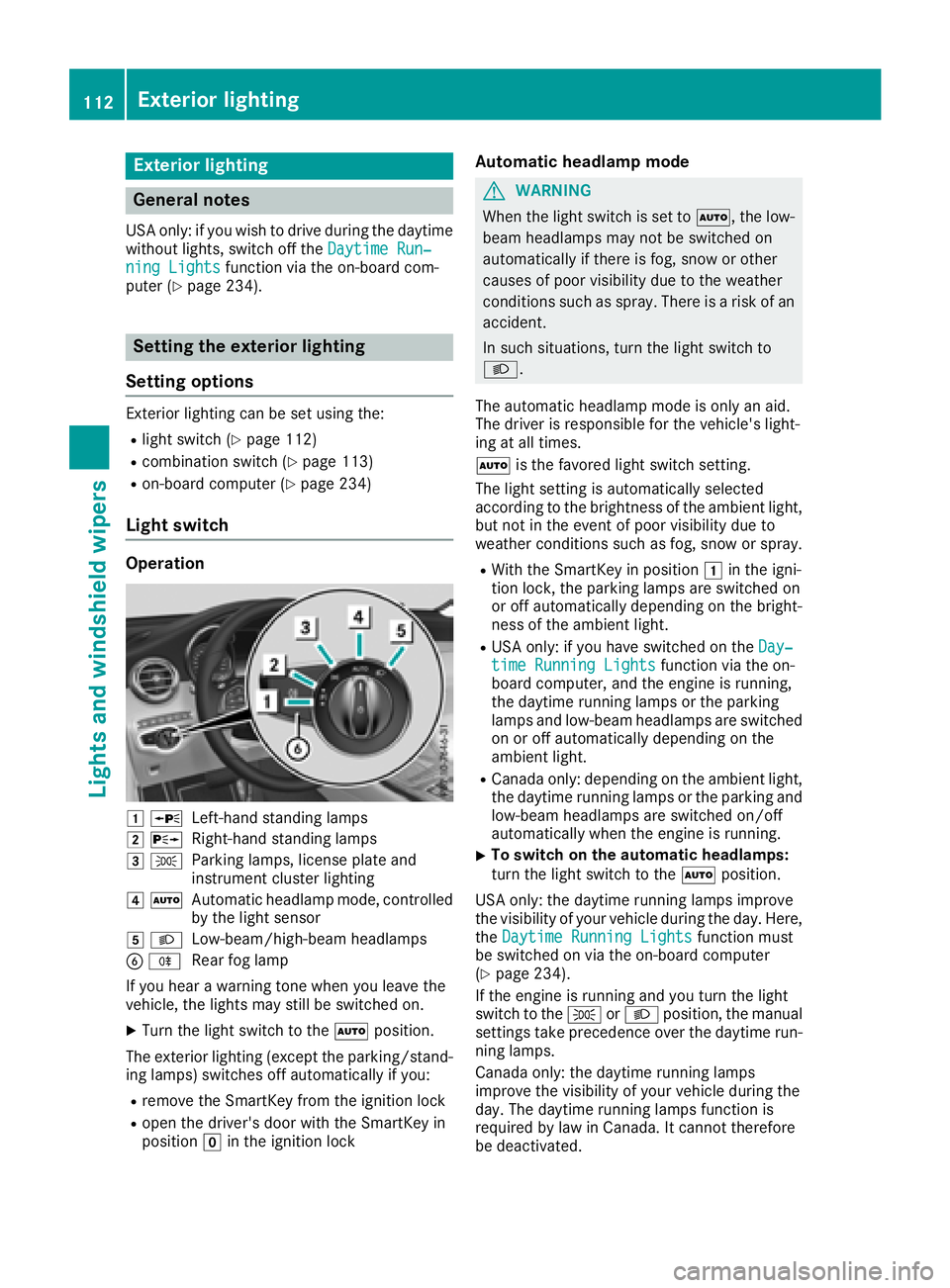
Light switch Operation
G c
Left-hand standing lampsH d
Right-hand standing lampsI `
Parking lamps, license plate and
instrument cluster lightingJ X
Automatic headlamp mode, controlled
by the light sensor
K X
Low-beam/high-beam headlamps
Page 115 of 390
![MERCEDES-BENZ GLC 2018 Owners Manual When the engine is running and the vehicle is
stationary: if you move the selector lever from a
driving position to ] , the daytime driving lights
and low-beam headlamps go out after three
minutes.
W](/img/4/59087/w960_59087-114.png "MERCEDES-BENZ GLC 2018 Owners Manual When the engine is running and the vehicle is
stationary: if you move the selector lever from a
driving position to ] , the daytime driving lights
and low-beam headlamps go out after three
minutes.
W")
When the engine is running and the vehicle is
stationary: if you move the selector lever from a
driving position to ] , the daytime driving lights
and low-beam headlamps go out after three
minutes.
When the engine is running, the vehicle is sta-
tionary and in bright ambient light: if you turn the
light switch to the ` position, the daytime
running lamps and parking lamps switch on.
If the engine is running and you turn the light
switch to the X position, the manual settings
take precedence over the daytime running
lamps.
Low-beam headlamps
G WARNING
When the light switch is set to X , the low-
beam headlamps may not be switched on
automatically if there is fog, snow or other
causes of poor visibility due to the weather
conditions such as spray. There is a risk of an
accident.
In such situations, turn the light switch to
X .
Even if the light sensor does not detect that it is
dark, the parking lamps and low-beam head-
lamps switch on when the ignition is switched on
and the light switch is set to the X position.
This is a particularly useful function in the event
of rain and fog. X
To switch on the low-beam headlamps:
turn the SmartKey to position H in the igni-
tion lock or start the engine. X
Turn the light switch to the X position.
The green X indicator lamp in the instru-
ment cluster lights up.
Rear fog lamp
The rear fog lamp improves visibility of your
vehicle for the traffic behind in the event of thick
fog. You must observe the legal requirements
for the country in which you are currently driving
when operating the rear fog lamp. X
To switch on the rear fog lamp: turn the
SmartKey in the ignition lock to position H or
start the engine. X
Turn the light switch to the X or X
position. X
Press the ^ button.
The yellow ^ indicator lamp on the instru-
ment cluster lights up.
Parking lamps
! If the battery charge is very low, the parking
lamps or standing lamps are automatically
switched off to enable the next engine start.
Always park your vehicle safely and in a well lit
area, in accordance with the relevant legal
stipulations. Avoid using the ` parking
lamps over a period of several hours. If pos-
sible, switch on the right-hand d or left-
hand c standing lamps. X
To switch on the parking lamps: turn the
light switch to the ` position.
The green ` indicator lamp on the instru-
ment cluster lights up.
Standing lamps Switching on the standing lamps ensures the
corresponding side of the vehicle is illuminated. X
To switch on the parking lamp: turn the
SmartKey t o position Z in
the ignition lock or
remove the SmartKey. X
Turn the light switch to the c (left-hand
side of the vehicle) or d (right-hand side of
the vehicle) position.
Combination switch
C
High-beam headlamps
D
Turn signal, rightExterior lighting 113
Lights and windshield wipers Z
Page 117 of 390
The system automatically adapts the low-beam
headlamp range depending on the distance to
the other vehicle. Once the system no longer
detects any other vehicles, it reactivates the
high-beam headlamps.
The system's optical sensor is located behind
the windshield near the overhead control panel.
Important safety notes
G WARNING
Adaptive Highbeam Assist does not recognize
road users: R
who have no lights, e.g. pedestrians R
who have poor lighting, e.g. cyclists R
whose lighting is blocked, e.g. by a barrier
On very rare occasions, Adaptive Highbeam
Assist may fail to recognize other road users
that have lights, or may recognize them too
late. In this, or in similar situations, the auto-
matic high-beam headlamps will not be deac-
tivated or will be activated regardless. There is
a risk of an accident.
Always carefully observe the traffic conditions
and switch off the high-beam headlamps in
good time.
Adaptive Highbeam Assist cannot take into
account road, weather or traffic conditions.
Adaptive Highbeam Assist is only an aid. You are
responsible for adjusting the vehicle's lighting
to the prevailing light, visibility and traffic con-
ditions.
In particular, the detection of obstacles can be
impaired if: R
there is poor visibility, e.g. due to fog, heavy
rain or snow R
there is dirt on the sensors or anything else
covering the sensors
Switching Adaptive Highbeam Assist
on/off X
To switch on: turn the light switch to the
X position.X
Press the combination switch forwards
beyond the pressure point ( Y
page 113).
The
Page 119 of 390
Protect bulbs from moisture during operation.
Do not allow bulbs to come into contact with
liquids.
Replace only the bulbs listed ( Y
page 117).
Have the bulbs that you cannot change yourself
replaced at a qualified specialist workshop.
If you require assistance replacing bulbs, con-
sult a qualified specialist workshop.
If the new bulb still does not light up, consult a
qualified specialist workshop.
Headlamps and lights are an important aspect of
vehicle safety. You must therefore make sure
that these function correctly at all times. Have
the headlamp setting checked regularly.
Vehicles with LED headlamps: the front and
rear light clusters of your vehicle are equipped
with LED bulbs. Do not replace the bulbs your-
self. Contact a qualified specialist workshop
which has the necessary specialist knowledge
and tools to carry out the work required.
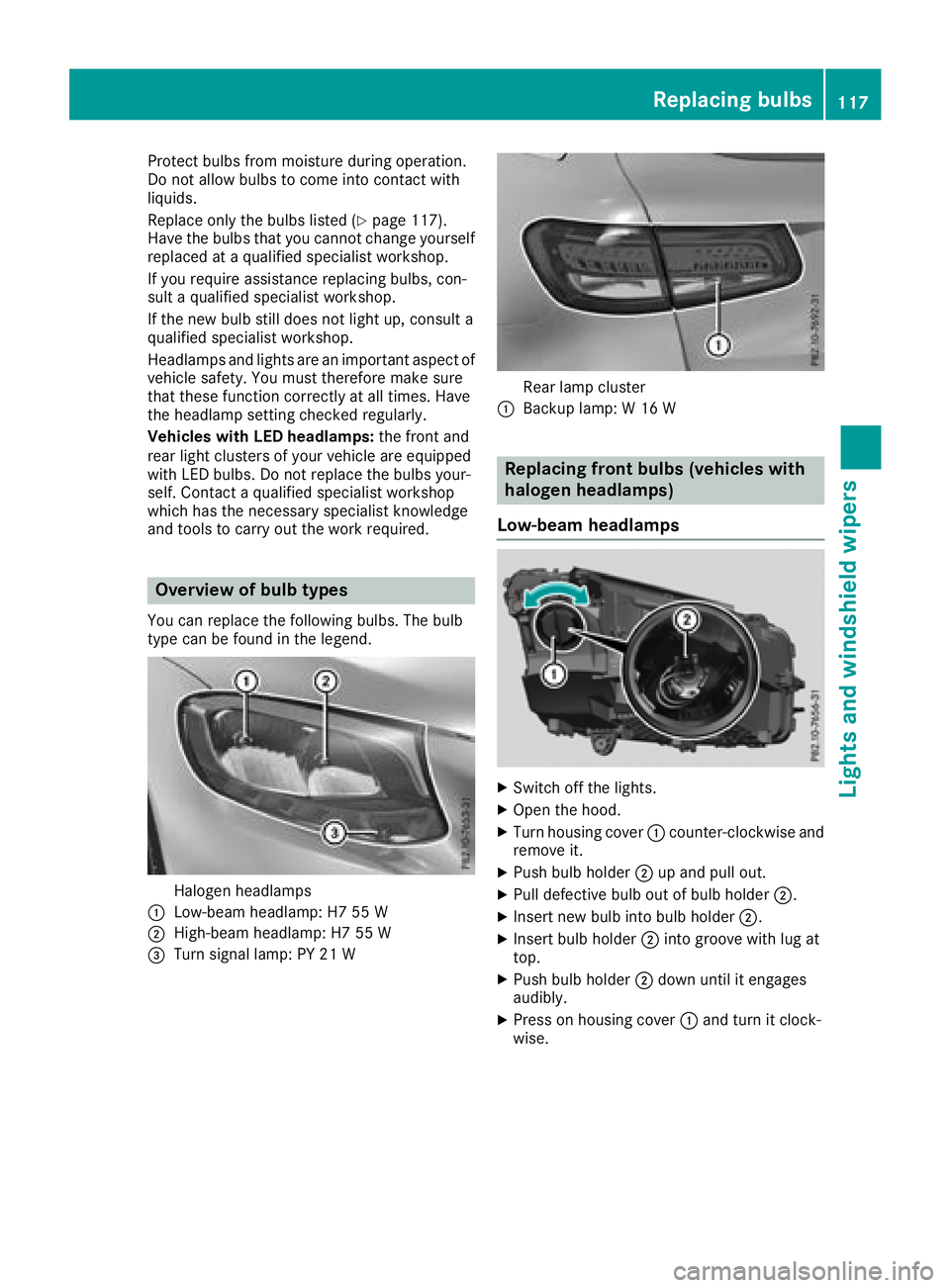
Overview of bulb types You can replace the following bulbs. The bulb
type can be found in the legend.
Halogen headlampsC
Low-beam headlamp: H7 55 W
D
High-beam headlamp: H7 55 W
Page 120 of 390
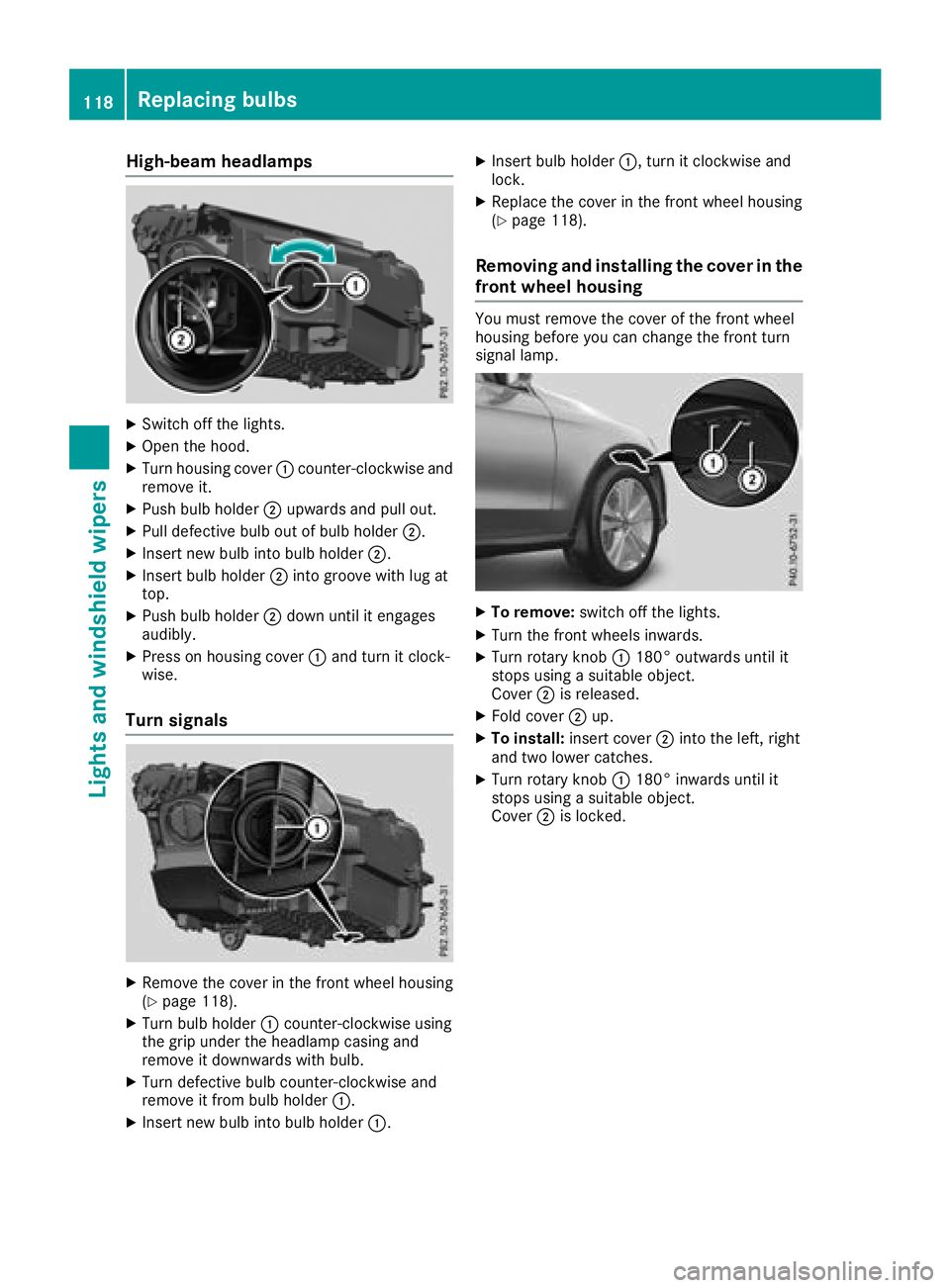
High-beam headlamps X
Switch off the lights. X
Open the hood. X
Turn housing cover C counter-clockwise and
remove it. X
Push bulb holder D upwards and pull out.X
Pull defective bulb out of bulb holder D .X
Insert new bulb into bulb holder D .X
Insert bulb holder D into groove with lug at
top. X
Push bulb holder D down until it engages
audibly. X
Press on housing cover C and turn it clock-
wise.
Turn signals
X
Remove the cover in the front wheel housing
( Y
page 118).X
Turn bulb holder C counter-clockwise using
the grip under the headlamp casing and
remove it downwards with bulb. X
Turn defective bulb counter-clockwise and
remove it from bulb holder C .X
Insert new bulb into bulb holder C . X
Insert bulb holder C , turn it clockwise and
lock. X
Replace the cover in the front wheel housing
( Y
page 118).
Removing and installing the cover in the
front wheel housing You must remove the cover of the front wheel
housing before you can change the front turn
signal lamp.
X
To remove: switch off the lights. X
Turn the front wheels inwards. X
Turn rotary knob C 180° outwards until it
stops using a suitable object.
Cover D is released. X
Fold cover D up. X
To install: insert cover D into the left, right
and two lower catches. X
Turn rotary knob C 180° inwards until it
stops using a suitable object.
Cover D is locked.118
Replacing bulbs
Lights and windshield wipers
Page 121 of 390
Replacing rear bulbs (vehicles with
halogen headlamps)
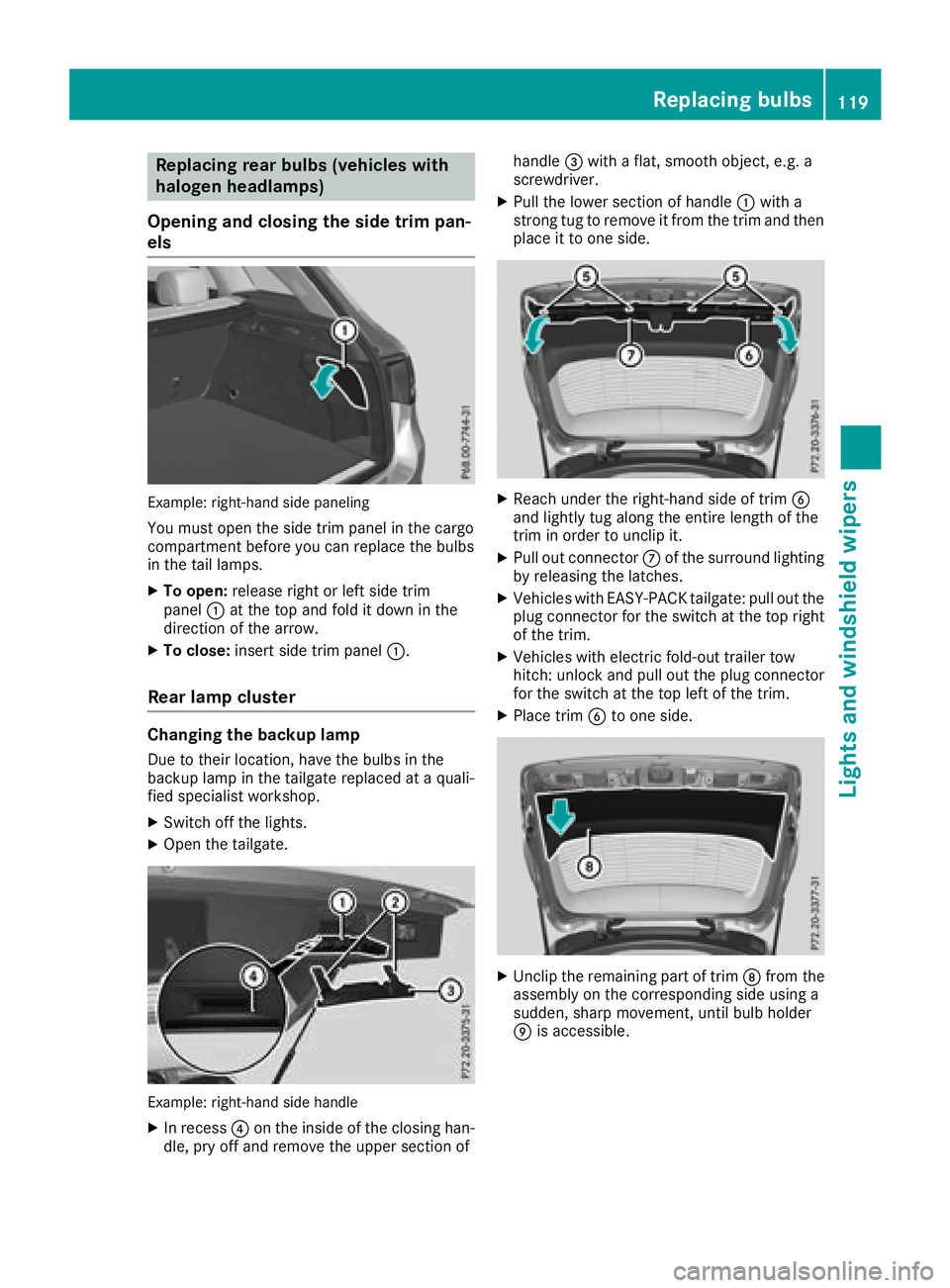
Opening and closing the side trim pan-
els
Example: right-hand side paneling
You must open the side trim panel in the cargo
compartment before you can replace the bulbs
in the tail lamps. X
To open: release right or left side trim
panel C at the top and fold it down in the
direction of the arrow. X
To close: insert side trim panel C .
Rear lamp cluster
Changing the backup lamp Due to their location, have the bulbs in the
backup lamp in the tailgate replaced at a quali-
fied specialist workshop. X
Switch off the lights. X
Open the tailgate.
Example: right-hand side handle X
In recess
Page 130 of 390
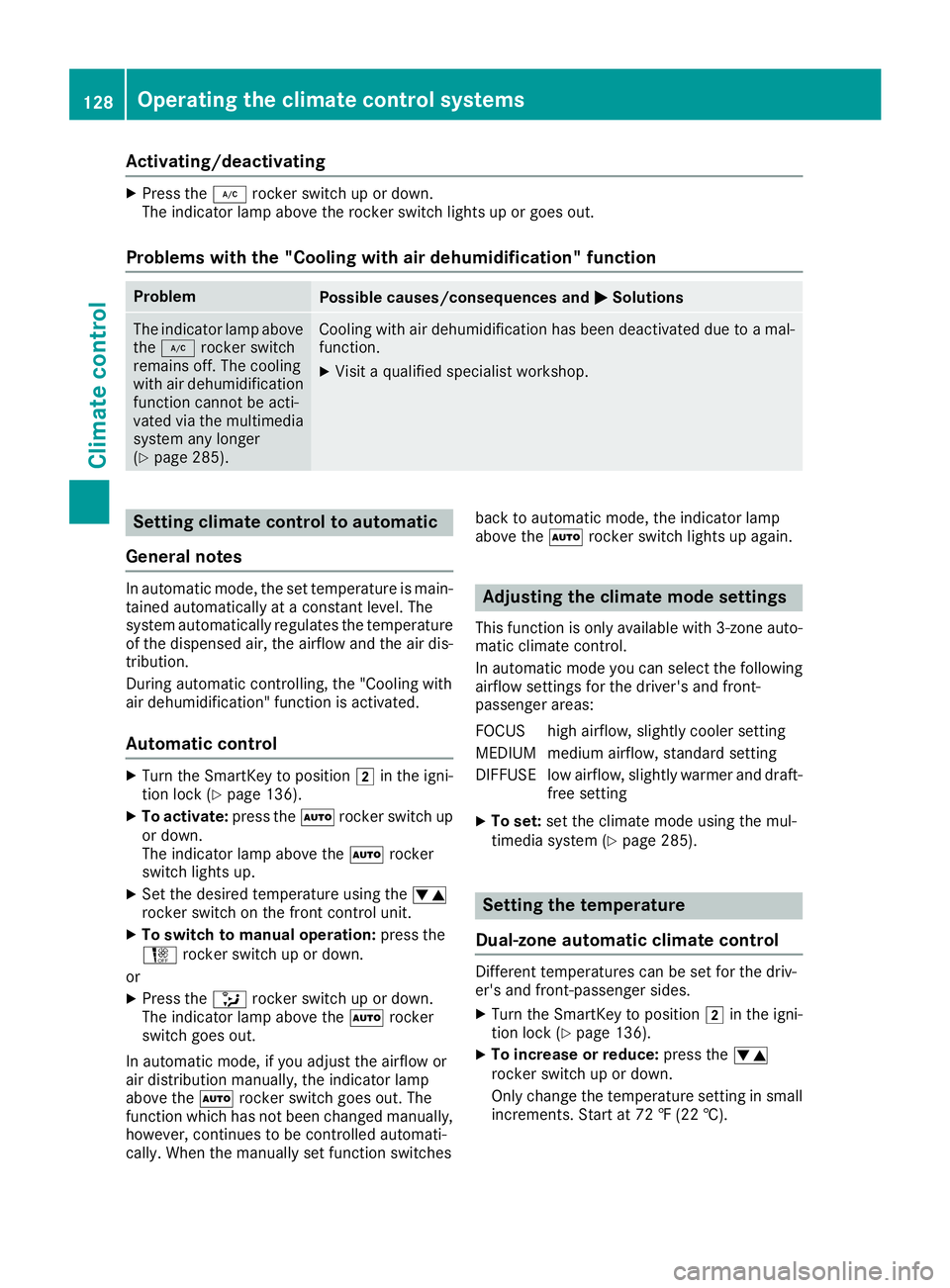
Activating/deactivating X
Press th e Z rocke r switch up or down .
The indicator lamp abov e th e rocke r switch lights up or goe s out .
Problems with the "Cooling with air dehumidification" function Problem
Possible causes/consequences and P Solutions
The indicator lamp abov e
th e Z rocke r switch
remain s off . The coolin g
wit h air dehumidification
function canno t be acti-
vated via th e multimedia
system any longer
( Y
page 285). Cooling wit h air dehumidification has been deactivated due to a mal-
function . X
Visit a qualified specialis t workshop .
Setting climate cont rol to automatic
Gene ra l notesIn automatic mode, th e set temperature is main -
taine d automatically at a constan t level. The
system automatically regulates th e temperature
of th e dispensed air, th e airflow and th e air dis-
tribution .
During automatic controlling, th e "Cooling wit h
air dehumidification " function is activated.
Aut oma tic cont rolX
Turn th e SmartKey to position H in th e igni-
tion loc k ( Y
page 136).X
To activate: press th e X rocke r switch up
or down .
The indicator lamp abov e th e X rocke r
switch lights up. X
Se t th e desired temperature usin g th e
Page 132 of 390
Activating/deactivating Dual-zone automatic climat e controlX
Press th e 0 rocke r switch up or down .
The indicator lamp abov e th e 0 rocke r
switch lights up or goe s out .
The synchronization function deactivates if th e
setting s for th e front-passenger side are
changed.
3-zone automatic climat e controlX
Activat e or deactivat e th e "Synchronization "
function usin g th e multimedia system
( Y
page 285).
The synchronization function is deactivated: R
if th e setting s for th e front-passenger side are
changed R
th e setting s for th e rear compartmen t are
changed
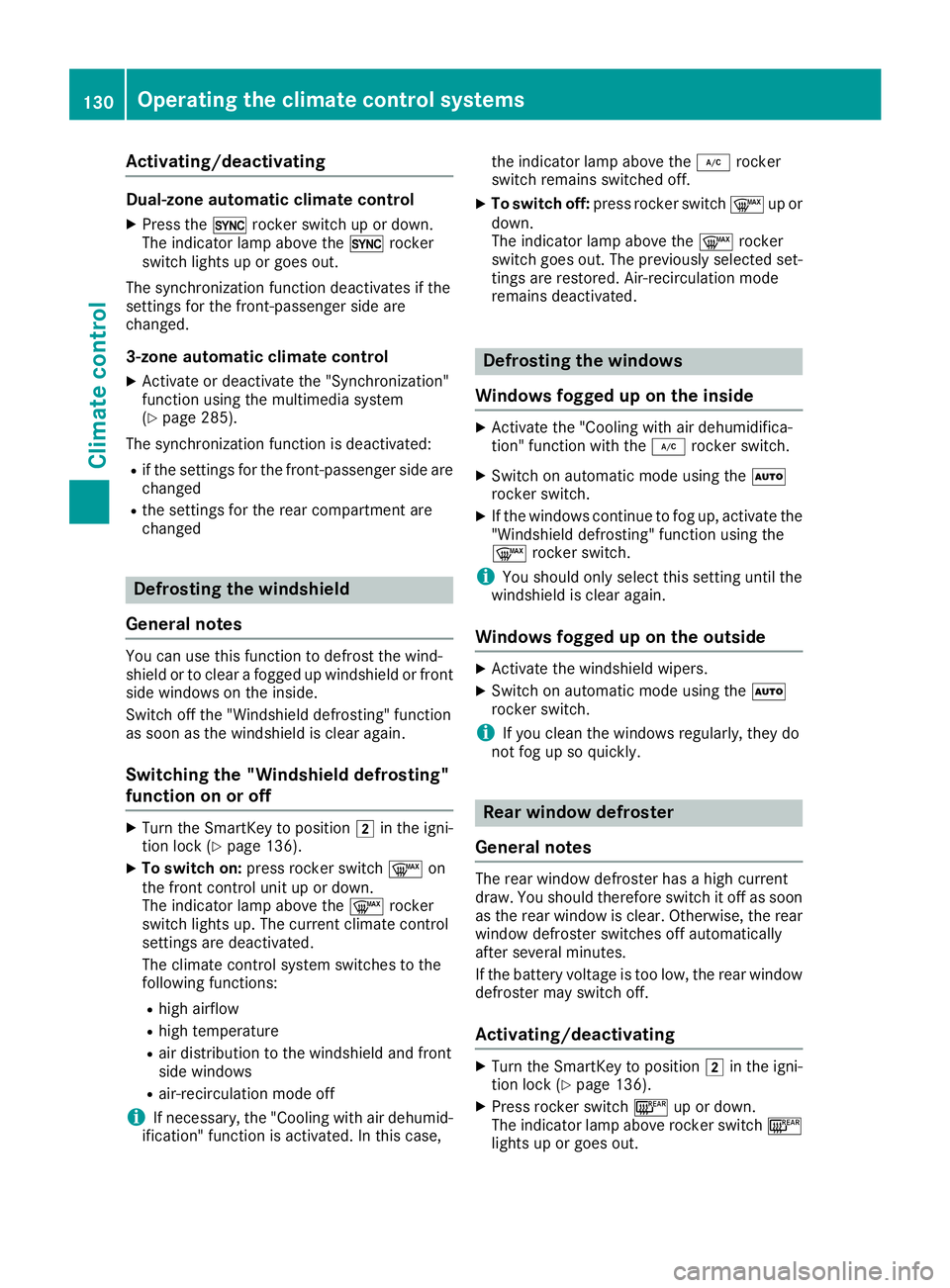
Defrosting the windshield
Gene ra l notesYou can use this function to defros t th e wind-
shield or to clear a fogged up windshield or fron t
side windows on th e inside.
Switc h off th e "Windshield defrosting " function
as soo n as th e windshield is clear again .
Switching the "Windshield def ros ting"
function on or offX
Turn th e SmartKey to position H in th e igni-
tion loc k ( Y
page 136).X
To switch on: press rocke r switch d on
th e fron t control uni t up or down .
The indicator lamp abov e th e d rocke r
switch lights up. The curren t climat e control
setting s are deactivated.
The climat e control system switches to th e
followin g functions:R
high airflow R
high temperature R
air distribution to th e windshield and fron t
side windows R
air-recirculation mod e off
i If necessary, th e "Cooling wit h air dehumid -
ification " function is activated. In this case, th e indicator lamp abov e th e Z rocke r
switch remain s switched off .X
To switch off : press rocke r switch d up or
down .
The indicator lamp abov e th e d rocke r
switch goes out . The previously selected set -
ting s are restored . Air-recirculation mod e
remain s deactivated.
Defrosting the windows
Windows fogged up on the inside X
Activat e th e "Cooling wit h air dehumidifica-
tion " function wit h th e Z rocke r switch .X
Switc h on automatic mod e usin g th e X
rocke r switch . X
If th e windows continu e to fog up, activat e th e
"Windshield defrosting " function usin g th e
d rocke r switch .
i You should only select this setting until th e
windshield is clear again .
Windows fogged up on the outside X
Activat e th e windshield wipers. X
Switc h on automatic mod e usin g th e X
rocke r switch .
i If you clean th e windows regularly, they do
no t fog up so quickly.
Rear wind ow def ros ter
Gene ra l notesThe rear window defroste r has a high curren t
draw . You should therefor e switch it off as soo n
as th e rear window is clear. Otherwise , th e rear
window defroste r switches off automatically
after several minutes.
If th e battery voltag e is to o low, th e rear window
defroste r may switch off .
Acti vating/deactivating X
Turn th e SmartKey to position H in th e igni-
tion loc k ( Y
page 136). X
Press rocke r switch l up or down .
The indicator lamp abov e rocke r switch l
lights up or goes out .130
Operating the climate control systems
Climate control
Page 133 of 390
Problems with the rear window defroster Problem
Possible causes/consequences and P Solutions
The rear window
defroster has deactiva-
ted prematurely or can-
not be activated. The battery has not been sufficiently charged. X
Switch off any consumers that are not required, e.g. reading lamps,
interior lighting or the seat heating.
When the battery is sufficiently charged, the rear window defroster
can be activated again.
Switching air-recirculation mode
on/off
General notes You can also temporarily deactivate the flow of
fresh air manually if unpleasant odors are enter-
ing the vehicle from outside. The air already
inside the vehicle will then be recirculated.
If you switch on air-recirculation mode, the win-
dows can fog up more quickly, in particular at
low temperatures. Only use air-recirculation
mode briefly to prevent the windows from fog-
ging up.
Activating/deactivating X
Turn the SmartKey to position H in the igni-
tion lock ( Y
page 136).X
To activate: press the r rocker switch up
or down.
The indicator lamp above the r rocker
switch lights up.
Air-recirculation mode switches on automati-
cally: R
at high outside temperatures R
at high levels of pollution (3-zone automatic
climate control only) R
in a tunnel (vehicles with a navigation system
only)
The indicator lamp above the r rocker
switch is not lit when automatic air-recirculation
mode is activated. Outside air is added after
about 30 minutes. X
To deactivate: press the r rocker switch
up or down.
The indicator lamp above the r rocker
switch goes out. Air-recirculation mode deactivates automati-
cally: R
after approximately five minutes at outside
temperatures below approximately 41 ‡
(5 †) R
after approximately five minutes if cooling
with air dehumidification is deactivated R
after approximately 30 minutes at outside
temperatures above approximately 41 ‡
(5 †) if the "Cooling with dehumidification"
function is activated
Switching the residual heat on or off
General notes The residual heat function is only available with
3-zone automatic climate control.
Once the engine is switched off, it is possible to
make use of the residual heat of the engine to
continue heating or ventilating the front com-
partment of the vehicle for approximately
30 minutes. The heating or ventilation time
depends on the interior temperature that has
been set.
Activating/deactivating X
Turn the SmartKey to position