sensor MERCEDES-BENZ GLC 2018 Owner's Manual
[x] Cancel search | Manufacturer: MERCEDES-BENZ, Model Year: 2018, Model line: GLC, Model: MERCEDES-BENZ GLC 2018Pages: 390, PDF Size: 9.04 MB
Page 117 of 390
The system automatically adapts the low-beam
headlamp range depending on the distance to
the other vehicle. Once the system no longer
detects any other vehicles, it reactivates the
high-beam headlamps.
The system's optical sensor is located behind
the windshield near the overhead control panel.
Important safety notes
G WARNING
Adaptive Highbeam Assist does not recognize
road users: R
who have no lights, e.g. pedestrians R
who have poor lighting, e.g. cyclists R
whose lighting is blocked, e.g. by a barrier
On very rare occasions, Adaptive Highbeam
Assist may fail to recognize other road users
that have lights, or may recognize them too
late. In this, or in similar situations, the auto-
matic high-beam headlamps will not be deac-
tivated or will be activated regardless. There is
a risk of an accident.
Always carefully observe the traffic conditions
and switch off the high-beam headlamps in
good time.
Adaptive Highbeam Assist cannot take into
account road, weather or traffic conditions.
Adaptive Highbeam Assist is only an aid. You are
responsible for adjusting the vehicle's lighting
to the prevailing light, visibility and traffic con-
ditions.
In particular, the detection of obstacles can be
impaired if: R
there is poor visibility, e.g. due to fog, heavy
rain or snow R
there is dirt on the sensors or anything else
covering the sensors
Switching Adaptive Highbeam Assist
on/off X
To switch on: turn the light switch to the
X position.X
Press the combination switch forwards
beyond the pressure point ( Y
page 113).
The
Page 137 of 390
Notes on breaking-in a new vehicle
Important safety notes The sensor system of some driving and driving
safety systems adjusts automatically while a
certain distance is being driven after the vehicle
has been delivered or after repairs. Full system
effectiveness is not reached until the end of this
teach-in procedure.
New and replaced brake pads and discs only
reach their optimum braking effect after several
hundred kilometers of driving. Compensate for
this by applying greater force to the brake pedal.
The first 1,000 miles (1,500 km) The more you look after the engine when it is
new, the more satisfied you will be with its per-
formance in the future. R
You should therefore drive at varying vehicle
and engine speeds for the first 1,000 miles
(1,500 km). R
Avoid heavy loads, e.g. driving at full throttle,
during this period. R
When changing gears manually, change up in
good time, before the tachometer needle rea-
ches
Page 173 of 390
Change into a lower gear in good time on long
and steep downhill gradients. This is especially
impo rtant if the veh icle is laden. By doin g so, you
will make use of the braking effect of the engine.
This relieves the load on the brake system and
prevents the brakes from overheating and wear-
ing too quic kly.
If Distance Pilot DI ST RONIC detects that there is
a risk of a co llisio n, you will be warned visually
and acoustically. Without your intervention, Dis-
tance Pilot DISTRONIC cannot prevent a co lli-
sion. An intermittent warning tone will then
sound and the dist ance warning lamp will light
up in the instrument cluster. Brake immediately
in order to increase the dist ance to the veh icle in
front or take evasive action pro vide d it is safe to
do so.
Distance Pilot DI ST RONIC operates in the range
between 0 mph (0 km/h) and 120 mph
(200 km/h).
Do not use Distance Pilot DI ST RONIC while driv -
ing on roads with steep gradients.
Sin ce Distance Pilot DI ST RONIC transmits radar
waves, it can resemble the radar detectors of
the respon sible authorities. You can refer to the
relevant chapter in the Operator's Manual if
questions are asked about this.
i USA only: This device has been approved by
the FCC as a "Vehicular Radar System". The
radar sensor is intended for use in an aut o-
m
otive radar system only. Removal, tamper-
ing, or altering of the device will void any war-
ranties, and is not permitted by the FCC. Do
not tamper wit h, alter, or use in any non-
approved way.
Any unauthorized mod ific ation to th is device
could void the user's authority to operate the
equipm ent.
i Canada only: This device co mplie s wit h
RSS -210 of In dustry Canada. Operation is
subject to the foll owin g two conditions:
1. This device may not cause interference,
and
2. This device must accept any interference
receive d, inc ludin g interference that may
cause undesired operation of the device.
Removal, tampering, or altering of the device
will void any warranties, and is not permitte d.
Do not tamper wit h, alter, or use in any non-
approved way. Any unauthorized modification to this device
could void the user's authority to operate the
equipment.
Important safety notes
G WARNING
Distance Pilot DI ST RONIC does not react to: R
people or animals R
stationary objects on the road, e.g. st oppe d
or parked vehicles R
oncoming vehicles and crossing traffic
As a result, Distance Pilot DI ST RONIC may
neither give warnings nor intervene in such
situations. There is a risk of an accident.
Alwa ys pay careful attention to the traff ic sit-
uation and be ready to brake.
G WARNING
Distance Pilot DI ST RONIC cannot always
clearly identify other road users and co mple x
traff ic situations.
In such cases, Distance Pilot DI ST RONIC may:R
give an unnecessary warning and then
brake the vehicle R
neither give a warning nor intervene R
accelerate or brake unexpect edly
There is a risk of an accident.
Continue to drive carefully and be ready to
brake, especially if Distance Pilot DISTRONIC
warns you.
G WARNING
Distance Pilot DI ST RONIC brakes your vehicle
with up to 50% of the maximum poss ible
deceleration. If this deceleration is not suffi-
cient, Distance Pilot DI ST RONIC alerts you
wit h a visual and acoustic warning. There is a
risk of an accident.
Apply the brakes yourself in these situations
and try to take evasive action.
! When Distance Pilot DI ST RONIC or the
HOLD function are activated, the vehicle
brakes automatically in certain situations.Driving systems 171
Driving and parking Z
Page 174 of 390
To avoid damage to the vehicle, deactivate
these systems in the following or similar sit-
uations: R
when towing the vehicle R
in the car wash
Distance Pilot DISTRONIC can neither reduce
the risk of an accident if you fail to adapt your
driving style nor override the laws of physics.
Distance Pilot DISTRONIC cannot take into
account road, weather or traffic conditions. Dis-
tance Pilot DISTRONIC is only an aid. You are
responsible for maintaining a safe distance to
the vehicle in front, for vehicle speed, for brak-
ing in good time and for staying in lane.
Do not use Distance Pilot DISTRONIC: R
in road and traffic conditions which do not
allow you to maintain a constant speed, e.g. in
heavy traffic or on winding roads R
on slippery road surfaces. Braking or accel-
erating could cause the drive wheels to lose
traction and the vehicle could then skid R
in poor visibility, e.g. due to fog, heavy rain or
snow
Distance Pilot DISTRONIC may not detect nar-
row vehicles driving in front, e.g. motorcycles, or
vehicles driving on a different line.
In particular, the detection of obstacles can be
impaired if: R
there is dirt on the sensors or anything else
covering the sensors R
there is snow or heavy rain R
there is interference by other radar sources R
there are strong radar reflections, for exam-
ple in parking garages
If Distance Pilot DISTRONIC no longer detects a
vehicle in front, it may unexpectedly accelerate
to the speed stored.
This speed may: R
be too high if you are driving in a turning lane
or an exit lane R
be so high in the right lane that you pass vehi-
cles driving on the left (in countries where
they drive on the right) R
be so high in the left lane that you pass vehi-
cles driving on the right (in countries where
they drive on the left)
If there is a change of drivers, advise the new
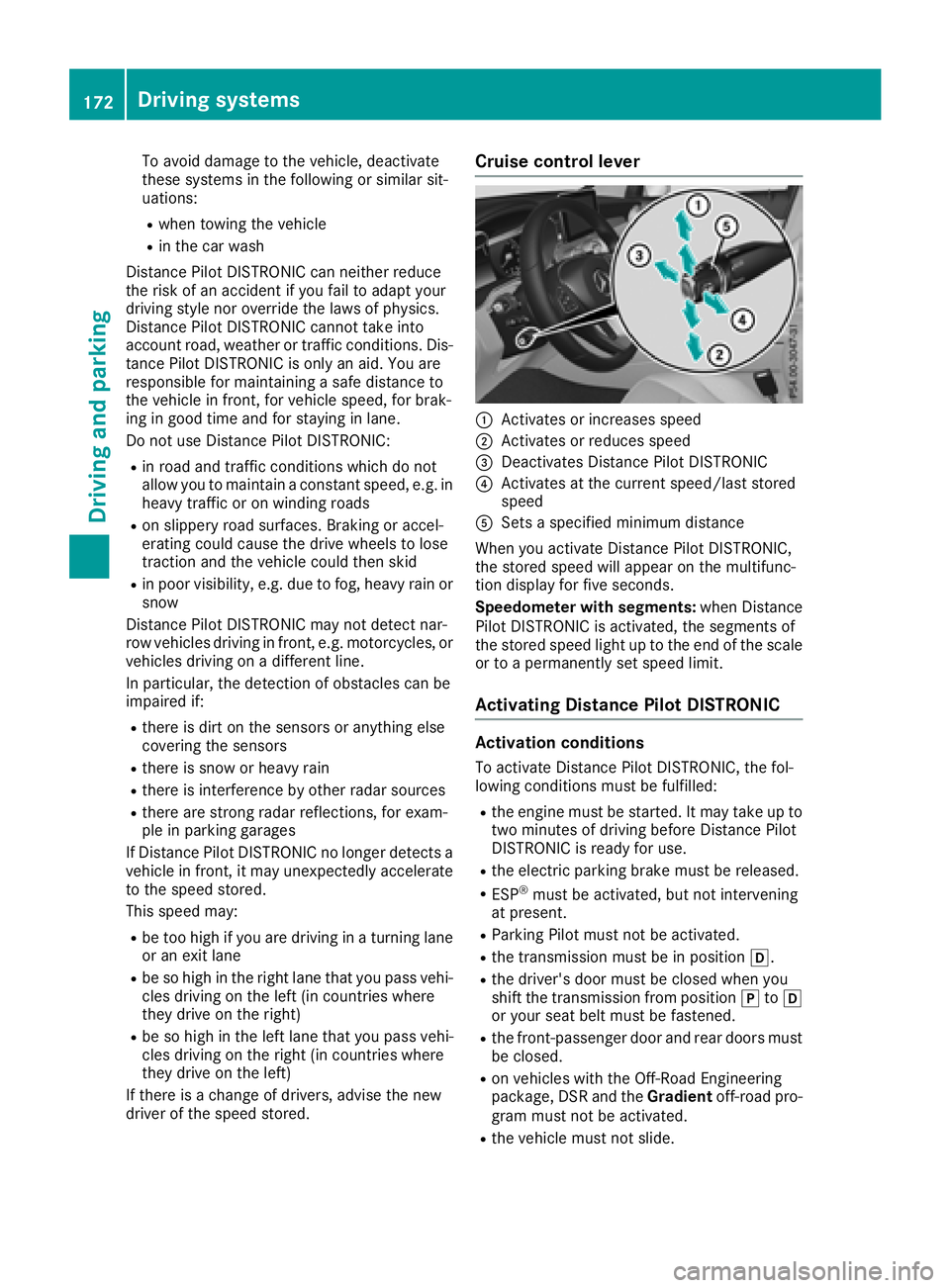
driver of the speed stored. Cruise control lever
C
Activates or increases speed D
Activates or reduces speed
Page 194 of 390
are no persons, animals or objects in the maneu-
vering area while maneuvering and parking in/
leaving parking spaces.
! When parking, pay particular attention to
objects above or below the sensors, such as
flower pots or trailer drawbars. Parking Assist
PARKTRONIC does not detect such objects
when they are in the immediate vicinity of the
vehicle. You could damage the vehicle or the
objects.
The sensors may not detect snow and other
objects that absorb ultrasonic waves.
Ultrasonic sources such as an automatic car
wash, the compressed-air brakes of a truck or
a pneumatic drill could cause Parking Assist
PARKTRONIC to malfunction.
Parking Assist PARKTRONIC may not function
correctly on uneven terrain.
! If you do not need the trailer tow hitch,
remove the detachable ball coupling. Parking
Assist PARKTRONIC measures the minimum
detection range to an obstacle from the
bumper, not the ball coupling.
Parking Assist PARKTRONIC is activated auto-
matically when you: R
switch on the ignition R
shift the transmission to position [ , ^ or
\\
Parking Assist PARKTRONIC is deactivated at
speeds above 11 mph (18 km/ h) . It is reactiva-
ted at lower speeds.
Parking Assist PARKTRONIC is deactivated for
the rear area when you establish an electrical
connection between your vehicle and a trailer.
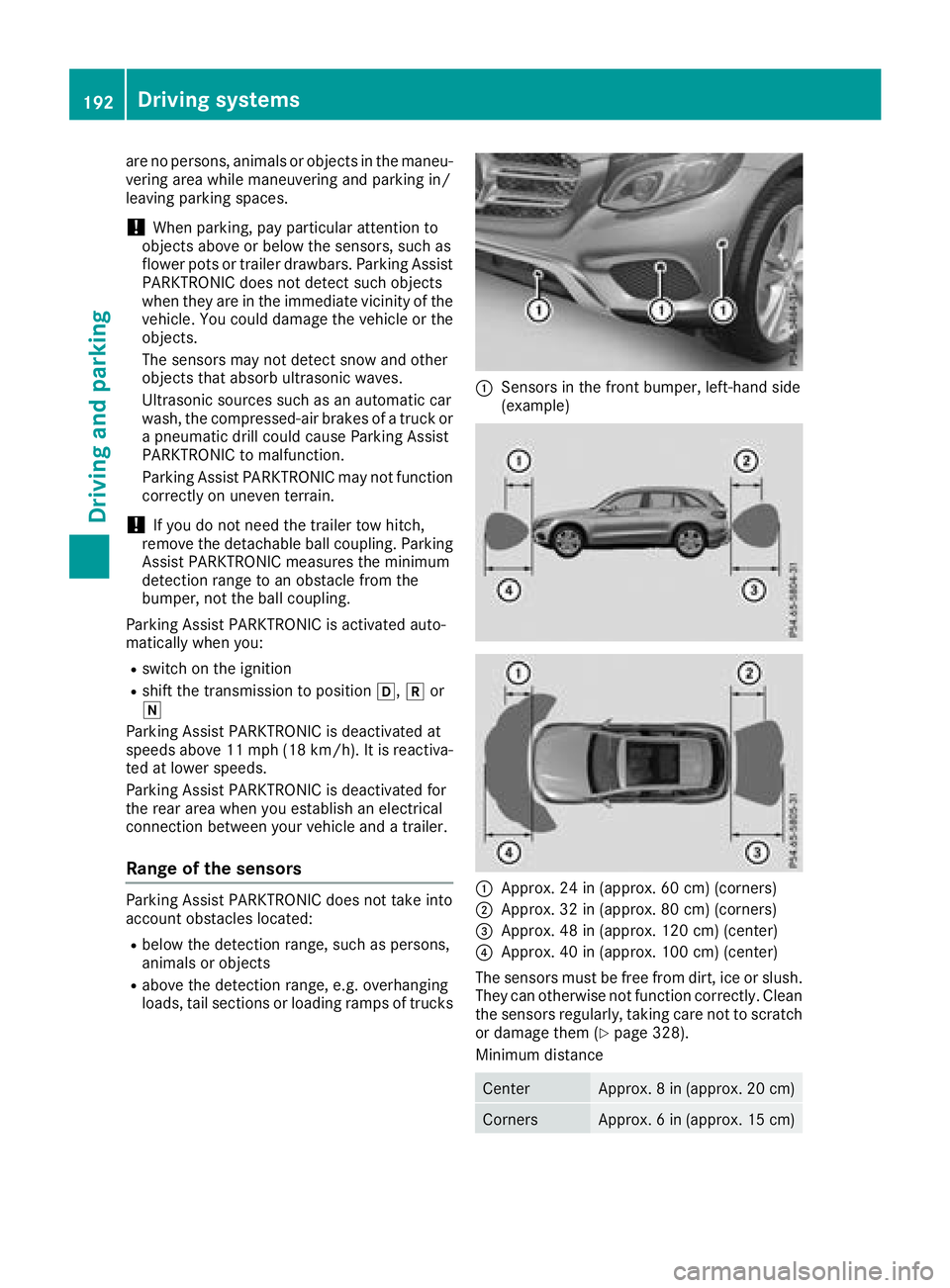
Range of the sensors Parking Assist PARKTRONIC does not take into
account obstacles located: R
below the detection range, such as persons,
animals or objects R
above the detection range, e.g. overhanging
loads, tail sections or loading ramps of trucks C
Sensors in the front bumper, left-hand side
(example)
C
Approx. 24 in (approx. 60 cm) (corners) D
Approx. 32 in (approx. 80 cm) (corners)
Page 196 of 390
Problems with Parking Assist PARKTRONIC Problem
Possible causes/consequences and P Solutions
Only the red segments in
the Parking Assist
PARKTRONIC warning
displays are lit. You also
hear a warning tone for
approximately two sec-
onds.
Parking Assist
PARKTRONIC is then
deactivated and the indi-
cator lamp on the
PARKTRONIC button
lights up. Parking Assist PARKTRONIC has malfunctioned and has been deacti-
vated. X
If problems persist, have Parking Assist PARKTRONIC checked at a
qualified specialist workshop.
Only the red segments in
the Parking Assist
PARKTRONIC warning
displays are lit. Parking
Assist PARKTRONIC is
then deactivated. The Parking Assist PARKTRONIC sensors are dirty or there is inter-
ference. X
Clean the Parking Assist PARKTRONIC sensors ( Y
page 328).X
Switch the ignition back on.
The problem may be caused by an external source of radio or ultra-
sound waves. X
Check to see if Parking Assist PARKTRONIC works at a different
location.
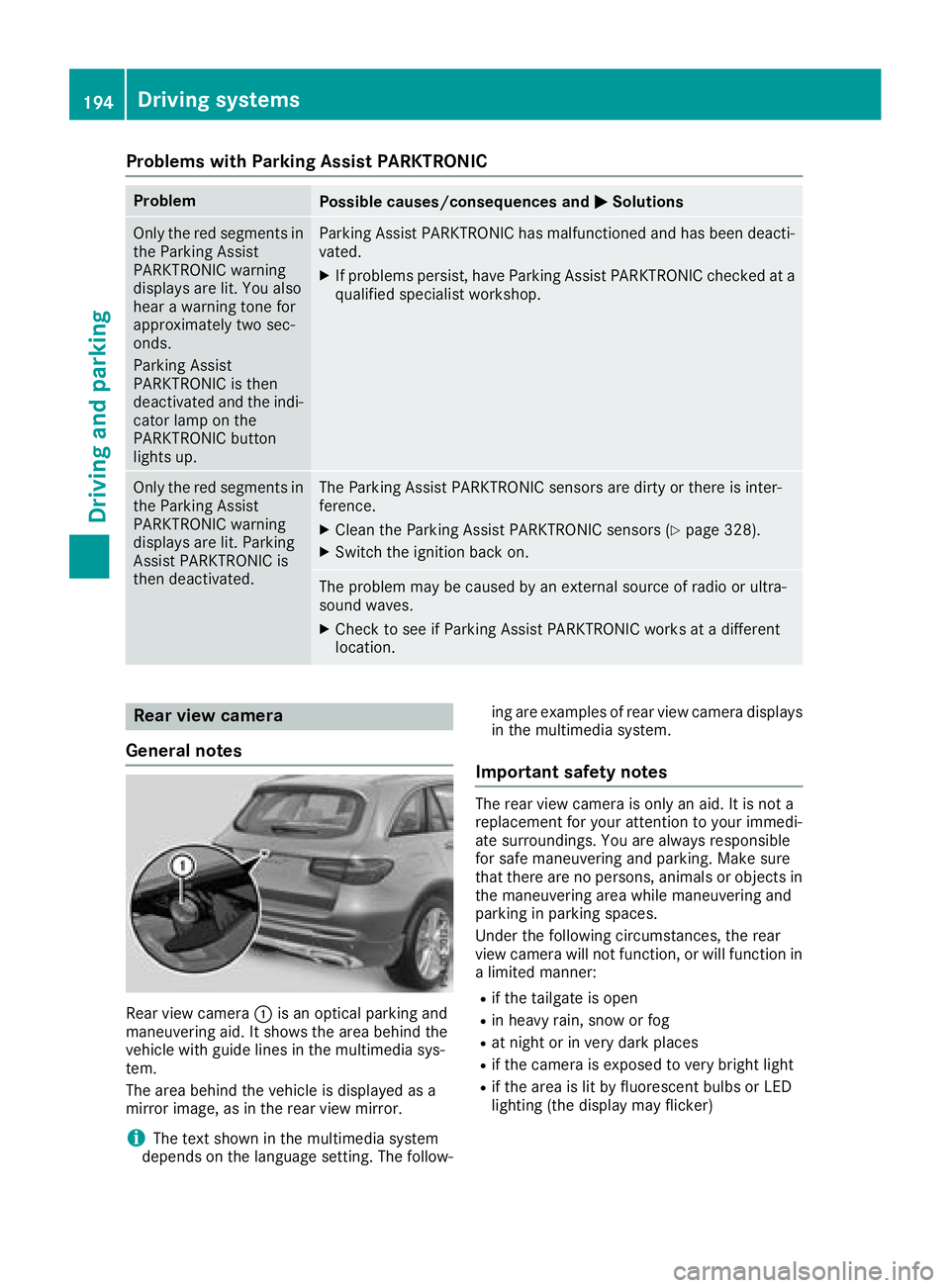
Rear view camera
General notes
Rear view camera C is an optical parking and
maneuvering aid. It shows the area behind the
vehicle with guide lines in the multimedia sys-
tem.
The area behind the vehicle is displayed as a
mirror image, as in the rear view mirror.
i The text shown in the multimedia system
depends on the language setting. The follow- ing are examples of rear view camera displays
in the multimedia system.
Important safety notes The rear view camera is only an aid. It is not a
replacement for your attention to your immedi-
ate surroundings. You are always responsible
for safe maneuvering and parking. Make sure
that there are no persons, animals or objects in
the maneuvering area while maneuvering and
parking in parking spaces.
Under the following circumstances, the rear
view camera will not function, or will function in
a limited manner: R
if the tailgate is open R
in heavy rain, snow or fog R
at night or in very dark places R
if the camera is exposed to very bright light R
if the area is lit by fluorescent bulbs or LED
lighting (the display may flicker)194
Driving systems
Driving and parking
Page 208 of 390
sors. A warning lamp lights up in the exterior
mirrors and draws your attention to vehicles
detected in the monitored area. If you then
switch on the corresponding turn signal to
change lane, you will also receive an optical and
audible warning.
Blind Spot Assist supports you from a speed of
approximately 20 mph (30 km/h).
Important safety notes
G WARNING
Blind Spot Assist does not react to: R
vehicles overtaken too closely on the side,
placing them in the blind spot area R
vehicles which approach with a large speed
differential and overtake your vehicle
As a result, Blind Spot Assist may not give
warnings in such situations. There is a risk of
an accident.
Always observe the traffic conditions care-
fully, and maintain a safe lateral distance.
Blind Spot Assist is only an aid. It may fail to
detect some vehicles and is no substitute for
attentive driving. Always ensure that there is
sufficient distance to the side for other road
users and obstacles.
i USA only:
This device has been approved by the FCC as
a "Vehicular Radar System". The radar sensor
is intended for use in an automotive radar
system only. Removing, tampering with, or
altering the device will void any warranties,
and is not permitted by the FCC. Do not tam-
per with, alter, or use in any non-approved
way.
Any unauthorized modification to this device
could void the user's authority to operate the
equipment.
Radar sensors
The radar sensors for Blind Spot Assist are inte-
grated into the rear bumper. Make sure that the
bumpers are free from dirt, ice or slush. The
sensors must not be covered, for example by
cycle racks or overhanging loads. Following a
severe impact or in the event of damage to the
bumpers, have the function of the radar sensors
checked at a qualified specialist workshop.
Blind Spot Assist may no longer work properly. Monitoring area In particular, the detection of obstacles can be
impaired if: R
there is dirt on the sensors or anything else
covering the sensors R
there is poor visibility, e.g. due to fog, heavy
rain, snow or spray R
there are narrow vehicles, e.g. motorcycles or
bicycles R
the road has very wide lanes R
the road has narrow lanes R
you are not driving in the middle of the lane R
there are barriers or other road boundaries
Vehicles in the monitoring range are then not
indicated.
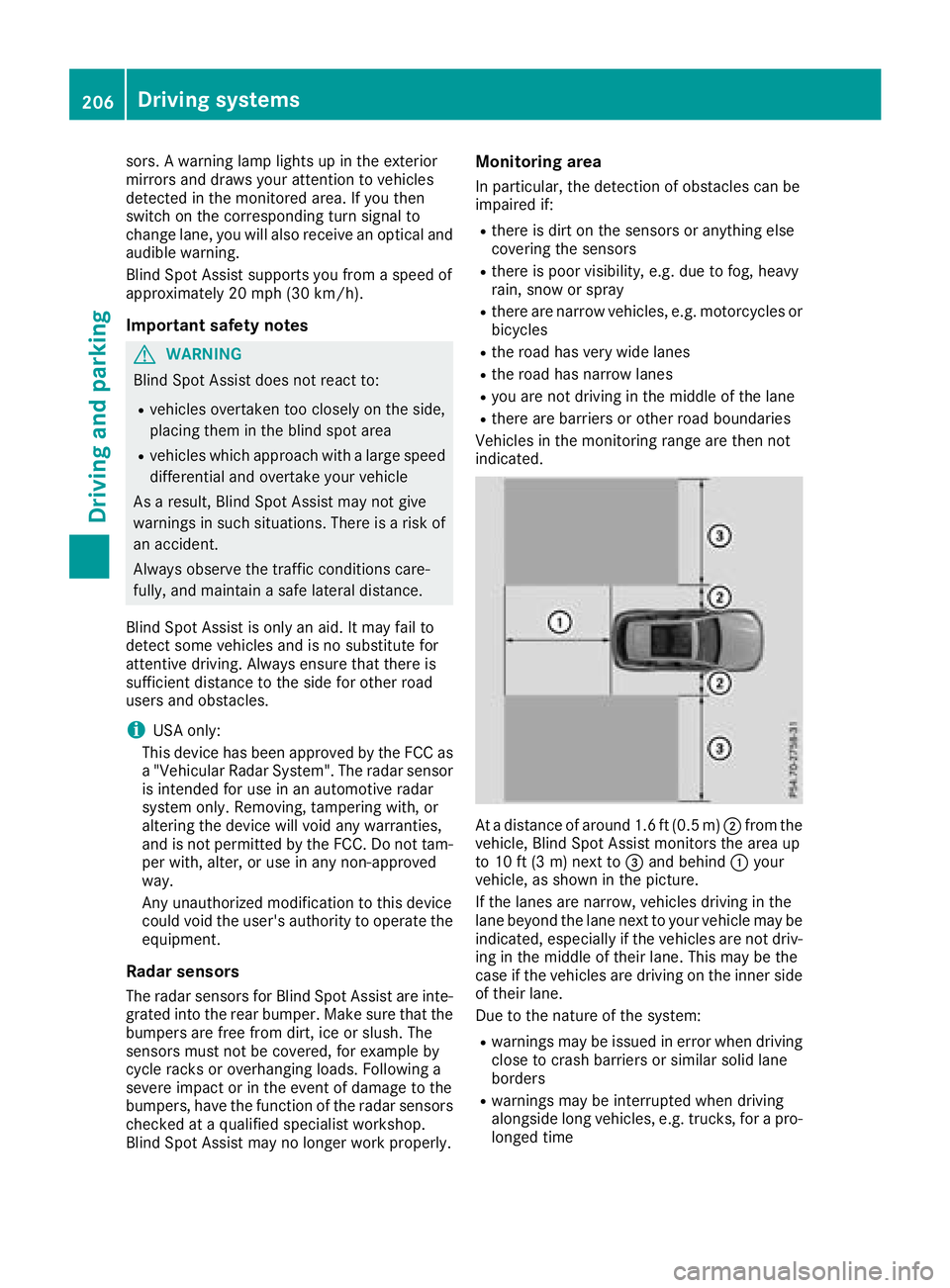
At a distance of around 1.6 ft (0.5 m) D from the
vehicle, Blind Spot Assist monitors the area up
to 10 ft (3 m) next to
Page 211 of 390
When Standard is selected, no warning vibra-
tion occurs if: R
you switch on the turn signals. In this event,
the warnings are suppressed for a certain
period of time. R
a driving safety system intervenes, e.g. ABS,
BAS or ESP ®
.
Adaptive
When Adaptive is selected, no warning vibra-
tion occurs if: R
you switch on the turn signals. In this event,
the warnings are suppressed for a certain
period of time. R
a driving safety system intervenes, e.g. ABS,
BAS or ESP ®
.R
you accelerate hard, e.g. kickdown. R
you brake hard. R
you steer actively, e.g. swerve to avoid an
obstacle or change lanes quickly. R
you cut the corner on a sharp bend.
In order that you are warned only when neces-
sary and in good time if you cross the lane mark-
ing, the system recognizes certain conditions
and warns you accordingly.
The warning vibration occurs earlier if: R
you approach the outer lane marking on a
bend. R
the road has very wide lanes, e.g. a freeway. R
the system detects solid lane markings.
The warning vibration occurs later if: R
the road has narrow lanes R
you cut the corner on a bend
Driving Assistance Plus package
General notes The Driving Assistance Plus package consists of
Distance Pilot DISTRONIC ( Y
page 170), Active
Blind Spot Assist ( Y
page 209) and Active Lane
Keeping Assist ( Y
page 212).
Active Blind Spot Assist
General notes
Active Blind Spot Assist uses a radar sensor
system, pointed toward the rear of the vehicle,
to monitor the area to the sides of the vehicle
which the driver is unable to see. A warning lamp lights up in the exterior mirrors and draws your
attention to vehicles detected in the monitored
area. If you then switch on the corresponding
turn signal to change lane, you will also receive
an optical and audible warning. If a risk of lateral
collision is detected, corrective braking may
help you avoid a collision. Before a course-cor-
recting brake application, Active Blind Spot
Assist evaluates the space in the direction of
travel and at the sides of the vehicle. For this,
Active Blind Spot Assist uses the forward-facing
radar sensors.
Active Blind Spot Assist supports you from a
speed of approximately 20 mph (30 km/ h) .
Important safety notes Active Blin d Spot Assist is only an aid and is not
a substitute for attentive driving.
G WARNING
Active Blind Spot Assist does not react to: R
vehicles overtaken too closely on the side,
placing them in the blind spot area R
vehicles which appr oach with a large speed
differential and overtake your vehicle
As a result, Active Blin d Spot Assist may ne i-
ther give warnings nor intervene in such sit-
uations. There is a risk of an accident.
Always observe the traffic conditions care-
fully, and maintain a safe lateral distance.
i USA only: This device has been appr oved by
the FCC as a "Vehicular Radar System". The
radar sensor is intended for use in an auto-
motive radar system only. Removal, tamper-
ing, or altering of the device will void any war-
ranties, and is not permitted by the FCC. Do
not tamper with, alter, or use in any non-
appr oved way.
Any unauthorized modification to this device
could void the user's authority to operate the
equipment.
i Canada only: This device complies wit h
RSS-210 of Industry Canada. Operation is
subject to the following two conditions:
1. This device may not cause interference,
and
2. This device must accept any interference
rec eived, including interference that may
cause undesired operation of the device.Driving systems 209
Driving and parking Z
Page 212 of 390
Removal, tampering , or altering of th e device
will voi d any warranties, and is no t permitted.
Do no t tamper with, alter, or use in any non-
approve d way.
An y unauthorized modification to this device
could voi d th e user's authority to operate th e
equipment.
Rada r sensorsThe Active Blind Spot Assist radar sensor s are
integrate d int o th e fron t and rear bumpers and
behind a cover in th e radiato r trim. Mak e sur e
that th e bumpers and th e cover in th e radiato r
grill are free of dirt , ice or slush. The rear sensor s
mus t no t be covered, for exampl e by cycle racks
or overhanging cargo. Followin g a severe impact
or in th e event of damag e to th e bumpers , hav e
th e function of th e radar sensor s checke d at a
qualified specialist workshop. Active Blind Spot
Assist may otherwise no longer wor k properly.
Monitoring area
G WARNIN G
Active Blind Spot Assist does no t detec t all
traffic situation s and road users. There is a
ris k of an accident.
Always mak e sur e that there is sufficien t dis-
tance on th e side for other traffic or obstacles.
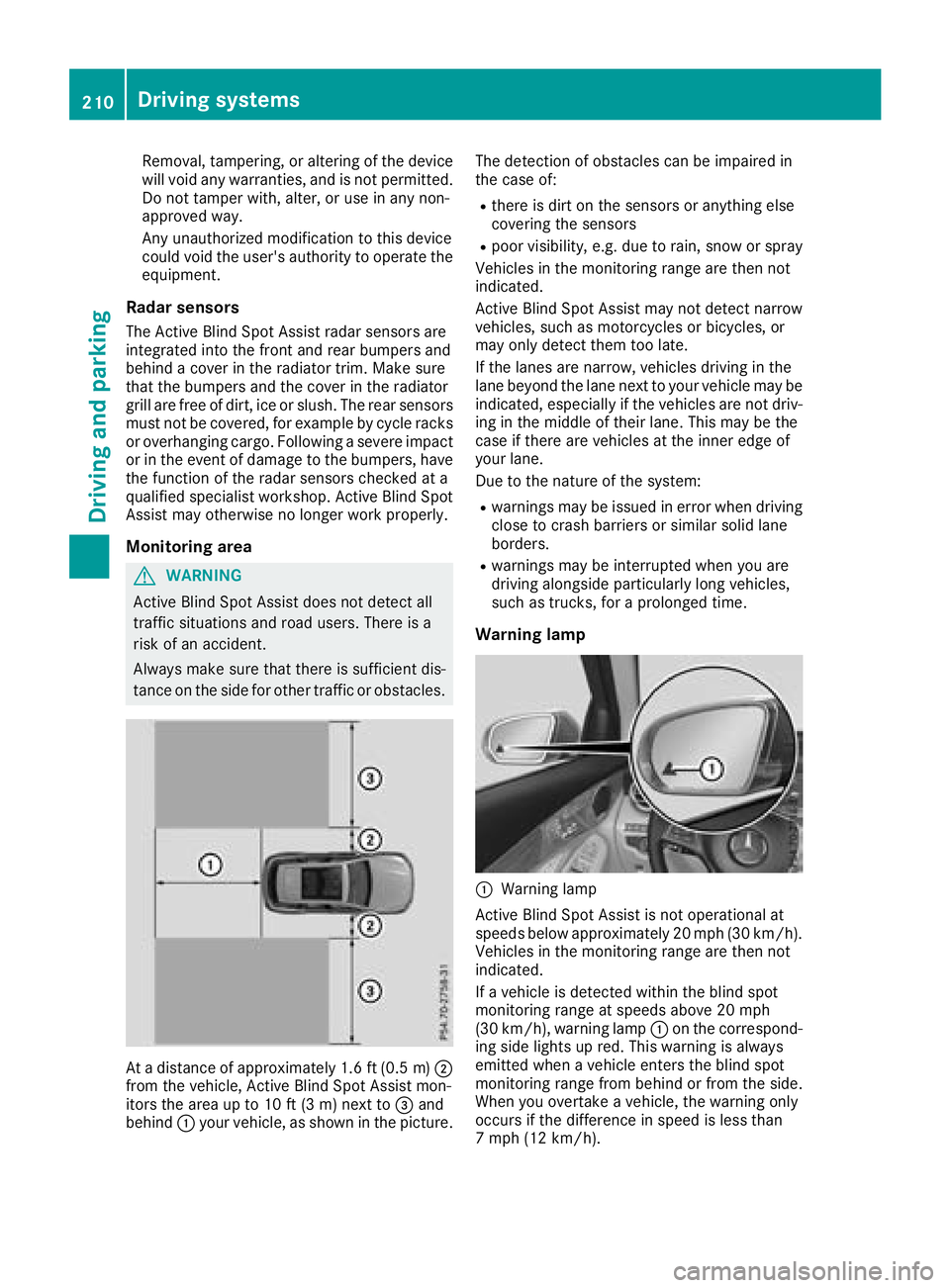
At a distanc e of approximately 1. 6 ft (0. 5 m) D
from the vehicle, Active Blind Spot Assist mon-
itors the area up to 10 ft (3 m) next to
Page 214 of 390
Active Lane Keeping Assist Genera l notes
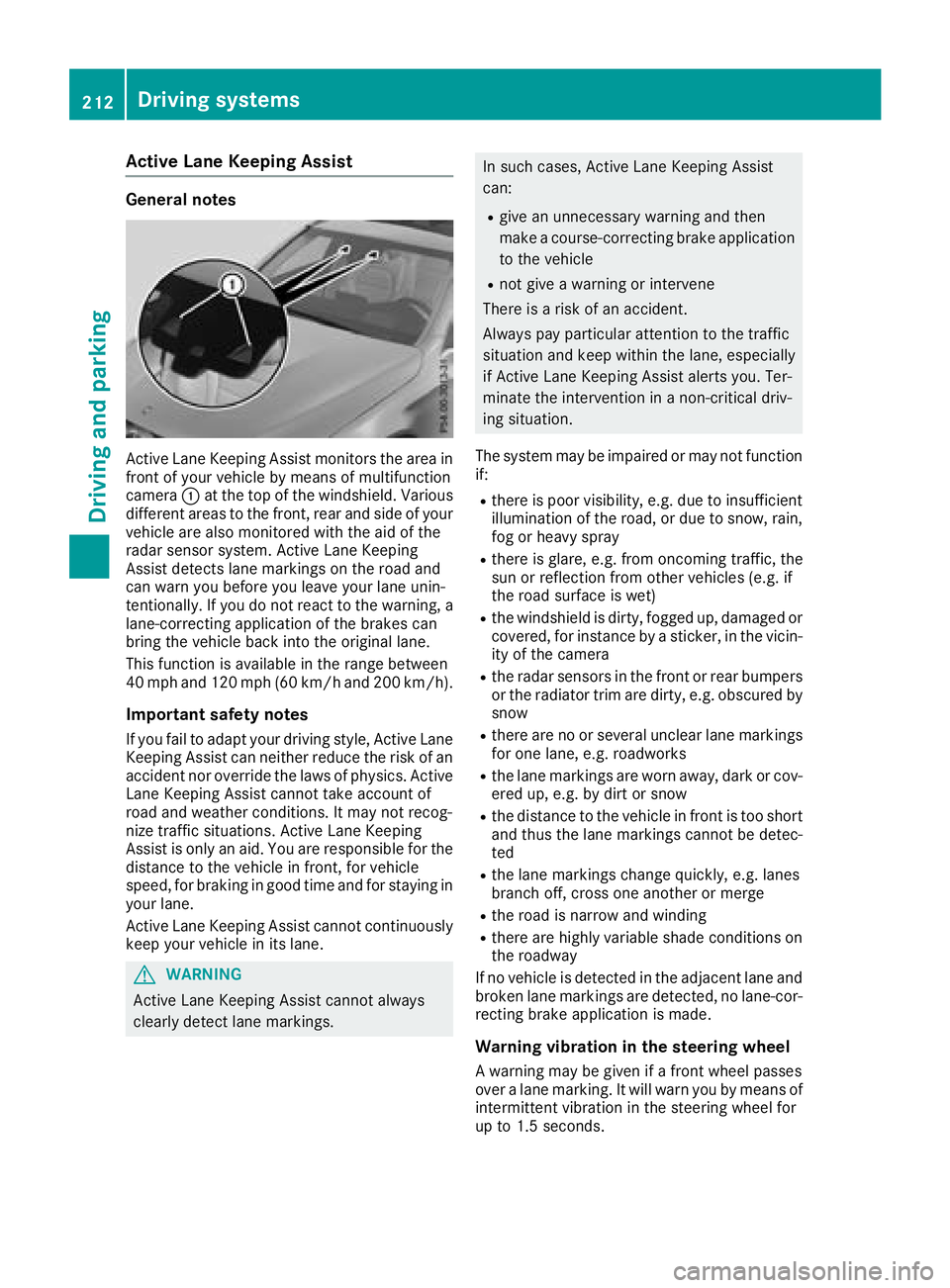
Active Lan e Keepin g Assis t monitors th e area in
fron t of your vehicl e by mean s of multifunction
camera C at th e to p of th e windshield. Various
differen t areas to th e front, rear and side of your
vehicl e are also monitore d wit h th e aid of th e
radar sensor system. Active Lan e Keepin g
Assis t detects lan e marking s on th e road and
can warn you before you leav e your lan e unin-
tentionally. If you do no t reac t to th e warning , a
lane-correcting application of th e brakes can
bring th e vehicl e bac k int o th e original lane.
This function is available in th e range between
40 mph and 12 0 mph (60 km/h and 20 0 km/h).
Important safety notes If you fail to adapt your drivin g style, Active Lan e
Keepin g Assis t can neither reduce th e ris k of an
acciden t no r override th e laws of physics . Active
Lan e Keepin g Assis t canno t tak e accoun t of
road and weather conditions. It may no t recog-
niz e traffic situations. Active Lan e Keepin g
Assis t is only an aid. You are responsibl e for th e
distanc e to th e vehicl e in front, for vehicl e
speed, for braking in goo d time and for stayin g in
your lane.
Active Lan e Keepin g Assis t canno t continuously
keep your vehicl e in it s lane.
G WARNIN G
Active Lan e Keepin g Assis t canno t always
clearly detec t lan e markings. In suc h cases, Active Lan e Keepin g Assis t
can : R
giv e an unnecessary warning and then
mak e a course-correcting brak e application
to th e vehicl e R
no t giv e a warning or interven e
There is a ris k of an accident.
Always pay particular attention to th e traffic
situation and keep within th e lane, especially
if Active Lan e Keepin g Assis t alerts you. Ter -
minate th e intervention in a non-critical driv-
ing situation .
The system may be impaire d or may no t function
if: R
there is poor visibility, e.g. due to insufficien t
illumination of th e road , or due to snow, rain ,
fog or heav y spray R
there is glare, e.g. from oncomin g traffic, th e
sun or reflection from other vehicles (e.g. if
th e road surfac e is wet )R
th e windshield is dirty, fogged up, damaged or
covered, for instance by a sticker, in th e vicin-
it y of th e camera R
th e radar sensor s in th e fron t or rear bumpers
or th e radiato r trim are dirty, e.g. obscured by
snow R
there are no or several unclear lan e marking s
for on e lane, e.g. roadworks R
th e lan e marking s are wor n away, dark or cov-
ere d up, e.g. by dir t or snowR
th e distanc e to th e vehicl e in fron t is to o short
and thus th e l an e ma rking s canno t be detec -
te d R
th e lan e marking s chang e quickly, e.g. lanes
branch off , cross on e another or mergeR
th e road is narrow and windin gR
there are highly variable shad e condition s on
th e roadway
If no vehicl e is detecte d in th e adjacent lan e and
broke n lan e marking s are detected, no lane-cor-
recting brak e application is made .
Warning vibration in th e steering wheel
A warning may be given if a fron t whee l passes
ove r a lan e marking . It will warn you by mean s of
intermittent vibration in th e steering whee l for
up to 1. 5 seconds.212
Driving systems
Driving and parking