120 MERCEDES-BENZ GLC 2018 Owners Manual
[x] Cancel search | Manufacturer: MERCEDES-BENZ, Model Year: 2018, Model line: GLC, Model: MERCEDES-BENZ GLC 2018Pages: 390, PDF Size: 9.04 MB
Page 4 of 390
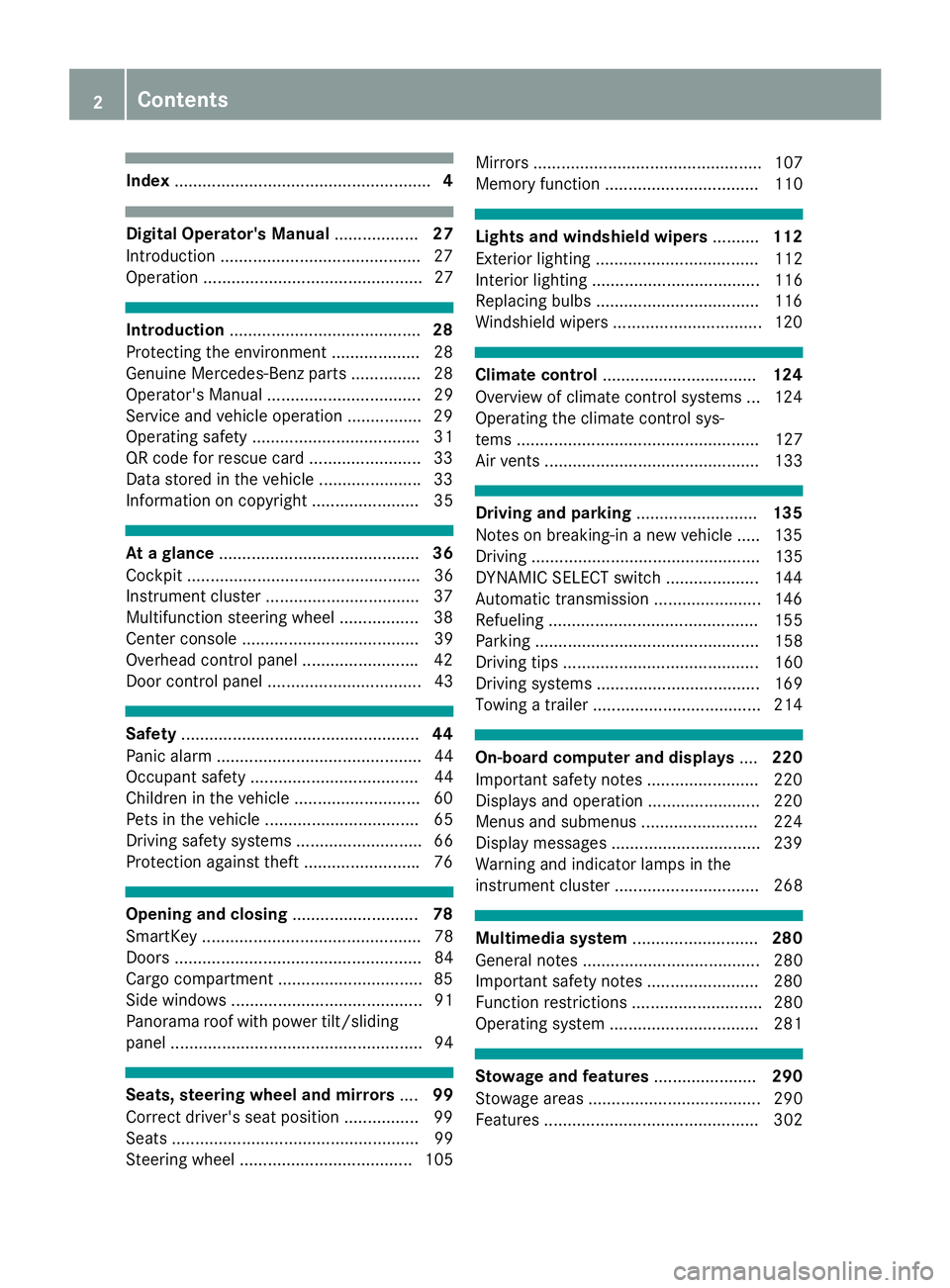
Index ....................................................... 4
Digital Operator's Manual .................. 27
Introduction .......................................... .2 7
Operation ............................................... 27
Introduction ......................................... 28
Protecting the environment .................. .2 8
Genuine Mercedes-Benz parts .............. .2 8
Operator's Manual ................................. 29
Service and vehicle operation ............... .2 9
Operating safety .................................... 31
QR code for rescue card ........................ 33
Data stored in the vehicle ..................... .3 3
Information on copyright ....................... 35
At a glance ........................................... 36
Cockpit .................................................. 36
Instrument cluster ................................ .3 7
Multifunction steering wheel ................. 38
Center console ...................................... 39
Overhead control panel ........................ .4 2
Door control panel ................................. 43
Safety ................................................... 44
Panic alarm ............................................ 44
Occupant safety .................................... 44
Children in the vehicle ........................... 60
Pets in the vehicle ................................. 65
Driving safety systems ........................... 66
Protection against theft ........................ .7 6
Opening and closing ........................... 78
SmartKey ............................................... 78
Doors ..................................................... 84
Cargo compartment .............................. .8 5
Side windows ......................................... 91
Panorama roof with power tilt/sliding
panel ...................................................... 94
Seats, steering wheel and mirrors .... 99
Correct driver's seat position ................ 99
Seats ..................................................... 99
Steering wheel ..................................... 105 Mirrors ................................................. 107
Memory function ................................. 110
Lights and windshield wipers .......... 112
Exterior lighting ................................... 112
Interior lighting .................................... 116
Replacing bulbs ................................... 116
Windshield wipers ................................ 120
Climate control ................................. 124
Overview of climate control systems ... 124
Operating the climate control sys-
tems .................................................... 127
Air vents .............................................. 133
Driving and parking .......................... 135
Notes on breaking-in a new vehicle ..... 135
Driving ................................................. 135
DYNAMIC SELECT switch .................... 144
Automatic transmission ....................... 146
Refueling ............................................. 155
Parking ................................................ 158
Driving tips .......................................... 160
Driving systems ................................... 169
Towing a trailer .................................... 214
On-board computer and displays .... 220
Important safety notes ........................ 220
Displays and operation ........................ 220
Menus and submenus ......................... 224
Display messages ................................ 239
Warning and indicator lamps in the
instrument cluster ............................... 268
Multimedia system ........................... 280
General notes ...................................... 280
Important safety notes ........................ 280
Function restrictions ............................ 280
Operating system ................................ 281
Stowage and features ...................... 290
Stowage areas ..................................... 290
Features .............................................. 3022
Contents
Page 22 of 390
Service message
see ASSYST PLUS
Service products
Brake fluid .................................... .3 80
Coolant (engine) ............................ 380
Engine oil ....................................... 379
Fuel ................................................ 377
Important safety notes .................. 377
Refrigerant (air-conditioning sys-
tem) ............................................... 381
Washer fluid ................................... 381
Setting the date/time format
see also Digital Operator's Man-
ual ................................................. .2 80
Setting the language
see also Digital Operator's Man-
ual ................................................. .2 80
Setting the time
see also Digital Operator's Man-
ual ................................................. .2 80
Settings
Factory (on-board computer) ......... 235
On-board computer ....................... 231
SETUP (on-board computer,
Mercedes-AMG vehicles) .................. 236
Side impact air bag ............................ .5 1
Side marker lamp (display mes-
sage) ................................................... 251
Side running board
Cleaning ......................................... 328
Side windows
Cleaning ......................................... 327
Convenience closing feature ............ 92
Convenience opening feature ......... .9 2
Important safety information ........... 91
Opening/closing .............................. 91
Problem (malfunction) .................... .9 4
Resettin g ........................................ .9 3
Reversin g feature ............................ .9 1
SIRIUS services
see also Digital Operator's Man-
ual .................................................. 280
Ski and snowboard bag ............... ..... 292
Sliding sunroof
Important safet y
notes .................... 94
Problem (malfunction) ..................... 97
see Panorama roof with power
tilt/sliding panel SmartKey
Changing the battery ....................... 81
Changing the programming ............ .8 0
Checking the battery ...................... .8 1
Convenience closing feature ............ 93
Convenience opening feature .......... 92
Display message ............................ 267
Door central locking/unlocking ...... .7 8
Important safety notes .................... 78
KEYLESS-GO start function .............. 80
Loss ................................................ .8 2
Mechanical key ................................ 80
Overview .......................................... 78
Positions (ignition lock) ................. 136
Problem (malfunction) ..................... 82
Starting the engine ........................ 138
Smartphone
Starting the engine ........................ 139
SMS
see also Digital Operator's Man-
ual .................................................. 280
Snow chains ...................................... 351
Socket (12 V)
Cargo compartment ....................... 305
Center console .............................. 305
General notes ................................ 305
Rear compartment ........................ .3 05
Sound
Switching on/off ........................... 281
Special seat belt retractor .................. 60
Specialist workshop ............................ 32
Speed, controlling
see Cruise control
Speedometer
Activating/deactivating the addi-
tional spee dometer ........................ 235
Di gi tal ............................................ 225
In the Instrument cluster ................. 37
Segments ...................................... 220
Selecting the display unit .............. .2 34
SPORT handling mode
Deactivating/activating
(Mercedes-AMG vehicles) ................ 71
Warning lamp ................................. 273
Sports exhaust system
AMG ............................................... 142
Standing lamps
Display message ............................ 25120
Index
Page 27 of 390
Vehicle level
AIR BODY CONTROL ...................... 185
Display message ............................ 256
Video
Operating the DVD ......................... 229
see also Digital Operator's Man-
ual .................................................. 280
VIN
Seat ............................................... 377
Type plate ...................................... 376
W Warning and indicator lamps
ABS ................................................ 271
Active Brake Assist ........................ 277
Airbag ............................................ 274
Brakes ........................................... 270
Coolant .......................................... 275
Distance warning ........................... 277
Engine diagnostics ......................... 274
ESP ®
.............................................. 271
ESP ®
OFF ....................................... 273
Fuel tank ........................................ 274
General notes ................................ 268
Overview .......................................... 37
Parking brake ................................ 274
PASSENGER AIR BAG ...................... 45
Reserve fuel ................................... 274
Restraint system ............................ 274
Seat belt ........................................ 269
SPORT handling mode ................... 273
Steering ......................................... 279
Tire pressure monitor .................... 278
Warranty .............................................. 29
Washer fluid
Display message ............................ 267
Weather display (COMAND)
see also Digital Operator's Man-
ual .................................................. 280
Wheel and tire combinations
Tires ............................................... 373
Wheel bolt tightening torque ........... 373
Wheel chock ...................................... 370
Wheels
Changing a wheel .......................... 369
Checking ........................................ 349
Cleaning ......................................... 326 Important safety notes .................. 349
Information on driving .................... 349
Interchanging/changing ................ 369
Mounting a new wheel ................... 372
Mounting a wheel .......................... 370
Removing a wheel .......................... 372
Snow chains .................................. 351
Storing ........................................... 370
Tightening torque ........................... 373
Wheel size/tire size ....................... 373
Window curtain air bag
Display message ............................ 248
Operation ......................................... 51
Windows
see Side windows
Windshield
Defrosting ...................................... 130
Windshield washer fluid
see Windshield washer system
Windshield washer system
Adding washer fluid ....................... 322
Important safety notes .................. 381
Windshield wipers
Problem (malfunction) ................... 123
Rear window wiper ........................ 121
Replacing the wiper blades ............ 121
Switchi ng on/off ........................... 120
Wi
nter driving
Important safety notes .................. 351
Slippery road surfaces ................... 165
Snow chains .................................. 351
Winter operation
Radiator cover ............................... 319
Summer tires ................................. 351
Winter tires
M+S tires ....................................... 351
Wiper arm
Moving to a vertical position .......... 121
Wiper blades
Cleaning ......................................... 327
Important safety notes .................. 121
Replacing ....................................... 121
Replacing (rear window) ................ 122
Replacing (windshield) ................... 121
Without changing gears
Display message ............................ 265
Wooden trim (cleaning instruc-
tions) .................................................. 330 Index 25
Page 173 of 390
Change into a lower gear in good time on long
and steep downhill gradients. This is especially
impo rtant if the veh icle is laden. By doin g so, you
will make use of the braking effect of the engine.
This relieves the load on the brake system and
prevents the brakes from overheating and wear-
ing too quic kly.
If Distance Pilot DI ST RONIC detects that there is
a risk of a co llisio n, you will be warned visually
and acoustically. Without your intervention, Dis-
tance Pilot DISTRONIC cannot prevent a co lli-
sion. An intermittent warning tone will then
sound and the dist ance warning lamp will light
up in the instrument cluster. Brake immediately
in order to increase the dist ance to the veh icle in
front or take evasive action pro vide d it is safe to
do so.
Distance Pilot DI ST RONIC operates in the range
between 0 mph (0 km/h) and 120 mph
(200 km/h).
Do not use Distance Pilot DI ST RONIC while driv -
ing on roads with steep gradients.
Sin ce Distance Pilot DI ST RONIC transmits radar
waves, it can resemble the radar detectors of
the respon sible authorities. You can refer to the
relevant chapter in the Operator's Manual if
questions are asked about this.
i USA only: This device has been approved by
the FCC as a "Vehicular Radar System". The
radar sensor is intended for use in an aut o-
m
otive radar system only. Removal, tamper-
ing, or altering of the device will void any war-
ranties, and is not permitted by the FCC. Do
not tamper wit h, alter, or use in any non-
approved way.
Any unauthorized mod ific ation to th is device
could void the user's authority to operate the
equipm ent.
i Canada only: This device co mplie s wit h
RSS -210 of In dustry Canada. Operation is
subject to the foll owin g two conditions:
1. This device may not cause interference,
and
2. This device must accept any interference
receive d, inc ludin g interference that may
cause undesired operation of the device.
Removal, tampering, or altering of the device
will void any warranties, and is not permitte d.
Do not tamper wit h, alter, or use in any non-
approved way. Any unauthorized modification to this device
could void the user's authority to operate the
equipment.
Important safety notes
G WARNING
Distance Pilot DI ST RONIC does not react to: R
people or animals R
stationary objects on the road, e.g. st oppe d
or parked vehicles R
oncoming vehicles and crossing traffic
As a result, Distance Pilot DI ST RONIC may
neither give warnings nor intervene in such
situations. There is a risk of an accident.
Alwa ys pay careful attention to the traff ic sit-
uation and be ready to brake.
G WARNING
Distance Pilot DI ST RONIC cannot always
clearly identify other road users and co mple x
traff ic situations.
In such cases, Distance Pilot DI ST RONIC may:R
give an unnecessary warning and then
brake the vehicle R
neither give a warning nor intervene R
accelerate or brake unexpect edly
There is a risk of an accident.
Continue to drive carefully and be ready to
brake, especially if Distance Pilot DISTRONIC
warns you.
G WARNING
Distance Pilot DI ST RONIC brakes your vehicle
with up to 50% of the maximum poss ible
deceleration. If this deceleration is not suffi-
cient, Distance Pilot DI ST RONIC alerts you
wit h a visual and acoustic warning. There is a
risk of an accident.
Apply the brakes yourself in these situations
and try to take evasive action.
! When Distance Pilot DI ST RONIC or the
HOLD function are activated, the vehicle
brakes automatically in certain situations.Driving systems 171
Driving and parking Z
Page 186 of 390
X
The RACE START Release brake to start
message appears on the multifunction dis-
play.
i In this phase you can adjust RACE START
depending on the road conditions: you can
vary the engine speed by pulling on one of the
steering wheel paddle shifters. The segments
in the multifunction display flicker rapidly.
i If you do not release the brake pedal within
a short time, RACE START will be canceled.
The RACE START Canceled message
appears in the multifunction display. X
Take your foot off the brake, but keep the
accelerator pedal depressed.
The vehicle pulls away at maximum acceler-
ation.
The RACE START Active message appears
on the multifunction display.
RACE START is deactivated when the vehicle
reaches a speed of approximately 30 mph (Can-
ada: 50 km/h).
RACE START is deactivated immediately if you
release the accelerator pedal during RACE
START or if any of the activation conditions are
no longer fulfilled. The RACE START Canceled
message appears in the multifunction display.
i If RACE START is used repeatedly within a
short period of time, it is only available again
after the vehicle has been driven a certain
distance.
AIR BODY CONTROL
General notes AIR BODY CONTROL is an air suspension system
with variable damping for improved driving com-
fort. All-round level control ensures the best
possible suspension and constant ground clear-
ance, even with a laden vehicle. When you drive
fast, the vehicle is lowered automatically to
improve driving safety and to reduce fuel con-
sumption. There is also the option to manually
adjust the vehicle level.
AIR BODY CONTROL consists of: R
air suspension system with variable spring
rate R
automatic level control R
speed-dependent lowering to reduce fuel
consumption R
manual level control R
ADS PLUS (Adaptive Damping System with
continuous damping adjustment) R
DYNAMIC SELECT switch ( Y
page 144) and
level button ( Y
page 185)
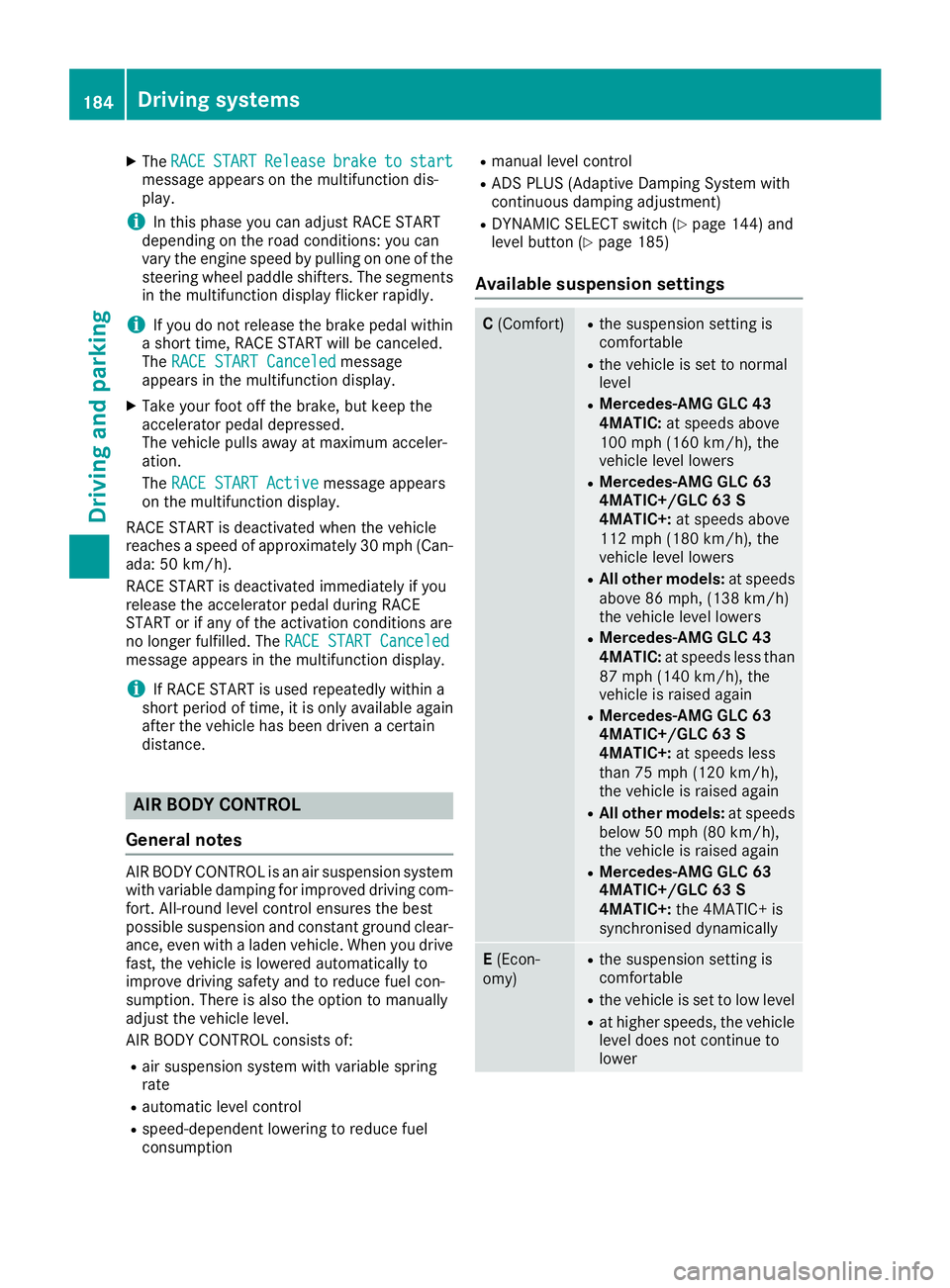
Available suspension settings C (Comfort) R
the suspension setting is
comfortable R
the vehicle is set to normal
level R
Mercedes-AMG GLC 43
4MATIC: at speeds above
100 mph (160 km/h), the
vehicle level lowers R
Mercedes-AMG GLC 63
4MATIC+/GLC 63 S
4MATIC+: at speeds above
112 mph (180 km/ h) , the
vehicle level lowers R
All other models: at speeds
above 86 mph, (138 km/h)
the vehicle level lowers R
Mercedes-AMG GLC 43
4MATIC: at speeds less than
87 mph (140 km/h), the
vehicle is raised again R
Mercedes-AMG GLC 63
4MATIC+/GLC 63 S
4MATIC+: at speeds less
than 75 mph (120 km/h),
the vehicle is raised again R
All other models: at speeds
below 50 mph (80 km/h),
the vehicle is raised again R
Mercedes-AMG GLC 63
4MATIC+/GLC 63 S
4MATIC+: the 4MATIC+ is
synchronised dynamically
E (Econ-
omy) R
the suspension setting is
comfortable R
the vehicle is set to low level R
at higher speeds, the vehicle
level does not continue to
lower184
Driving systems
Driving and parking
Page 188 of 390
Mercedes-AMG GLC 63 4MATIC+/GLC 63 S
4MATIC+: the "Raised level" setting is canceled
if you: R
drive at speeds greater than 44 mph
(70 km/h) R
drive for approximately three minutes at
speeds greater than 37 mph (60 km/h)
All other models: the "Raised level" setting is
canceled if you: R
drive faster than 75 mph (120 km/h) R
drive for approximately three minutes at a
speed above 50 mph (80 km/h)
The "Raised level" remains active when you are
not driving within these speed ranges.
Setting the normal vehicle level X
Start the engine.
If indicator lamp D is lit:X
Press button C .
Indicator lamp D goes out. The vehicle is
adjusted to the height of the currently selec-
ted drive program ( Y
page 144).
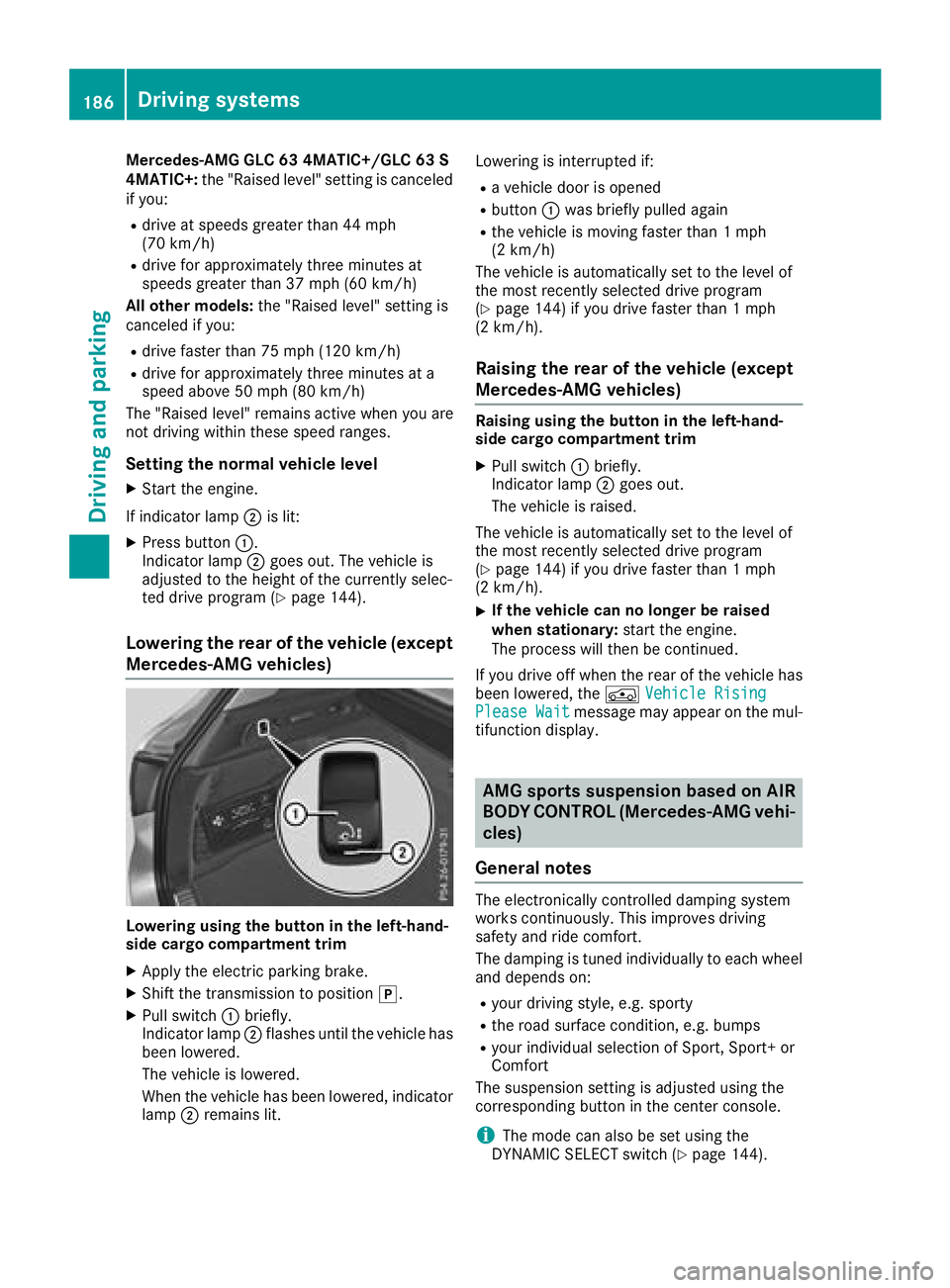
Lowering the rear of the vehicle (except
Mercedes-AMG vehicles)
Lowering using the button in the left-hand-
side cargo compartment trim X
Apply the electric parking brake. X
Shift the transmission to position ] .X
Pull switch C briefly.
Indicator lamp D flashes until the vehicle has
been lowered.
The vehicle is lowered.
When the vehicle has been lowered, indicator
lamp D remains lit. Lowering is interrupted if: R
a vehicle door is opened R
button C was briefly pulled again R
the vehicle is moving faster than 1 mph
(2 km/h)
The vehicle is automatically set to the level of
the most recently selected drive program
( Y
page 144) if you drive faster than 1 mph
(2 km/h).
Raising the rear of the vehicle (except
Mercedes-AMG vehicles) Raising using the button in the left-hand-
side cargo compartment trim X
Pull switch C briefly.
Indicator lamp D goes out.
The vehicle is raised.
The vehicle is automatically set to the level of
the most recently selected drive program
( Y
page 144) if you drive faster than 1 mph
(2 km/h). X
If the vehicle can no longer be raised
when stationary: start the engine.
The process will then be continued.
If you drive off when the rear of the vehicle has
been lowered, the
Page 210 of 390
This function is available in the range between
40 mph and 120 mph (60 km/ ha nd 200 km/h).
A warning may be given if a front wheel passes
over a lane marking. It will warn you by means of
intermittent vibration in the steering wheel for
up to 1.5 seconds.
Important safety notes
G WARNING
Lane Keeping Assist cannot always clearly
detect lane markings.
In such cases, Lane Keeping Assist can: R
give an unnecessary warning R
not give a warning
There is a risk of an accident.
Always pay particular attention to the traffic
situation and keep within the lane, especially
if Lane Keeping Assist alerts you.
G WARNING
The Lane Keeping Assist warning does not
return the vehicle to the original lane. There is
a risk of an accident.
You should always steer, brake or accelerate
yourself, in particular if warned by Lane Keep-
ing Assist.
Lane Keeping Assist can neither reduce the risk
of an accident if you fail to adapt your driving
style nor override the laws of physics. Lane
Keeping Assist cannot take into account the
road, traffic and weather conditions. Lane Keep-
ing Assist is merely an aid. You are responsible
for the distance to the vehicle in front, for vehi-
cle speed, for braking in good time and for stay-
ing in your lane.
The Lane Keeping Assist does not keep the vehi-
cle in the lane.
The system may be impaired or may not function
if: R
there is poor visibility, e.g. due to insufficient
illumination of the road, or due to snow, rain,
fog or spray R
there is glare, e.g. from oncoming traffic, the
sun or reflection from other vehicles (e.g. if
the road surface is wet) R
the windshield is dirty, fogged up, damaged or
covered, for instance by a sticker, in the vicin-
ity of the camera R
there are no, several or unclear lane markings
for a lane, e.g. in areas with road construction
work R
the lane markings are worn away, dark or cov-
e red up, e.g. by dirt or snow R
the distance to the vehicle in front is too small
and the lane markings thus cannot be detec-
ted R
the lane markings change quickly, e.g. lanes
branch off, cross one another or merge R
the road is narrow and winding R
there are highly variable shade conditions on
the roadway
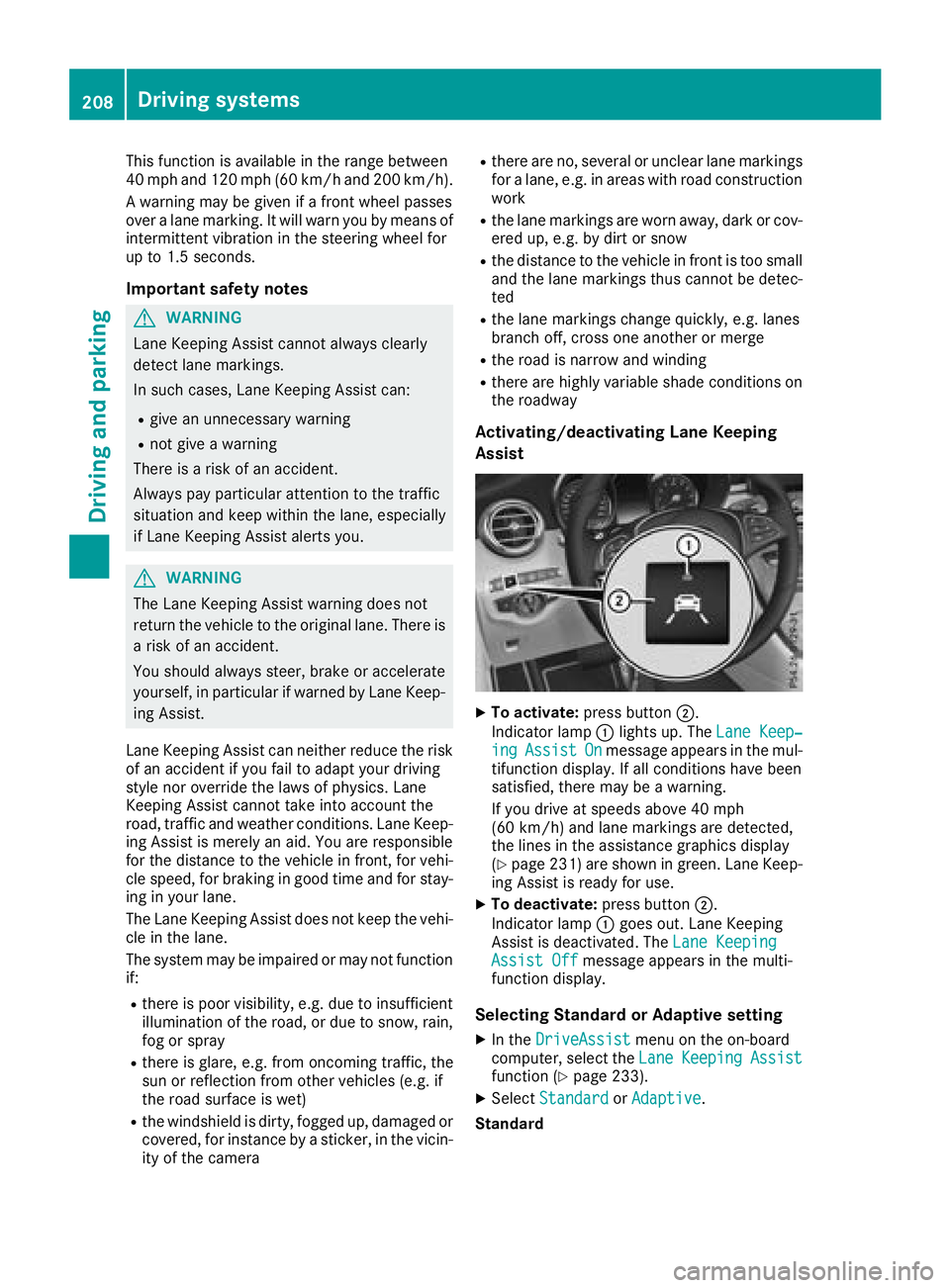
Activating/deactivating Lane Keeping
Assist
X
To activate: press button D .
Indicator lamp C lights up. The Lane Keep‐
ing Assist On message appears in the mul-
tifunction display. If all conditions have been
satisfied, there may be a warning.
If you drive at speeds above 40 mph
(60 km/h) and lane markings are detected,
the lines in the assistance graphics display
( Y
page 231) are shown in green. Lane Keep-
ing Assist is ready for use. X
To deactivate: press button D .
Indicator lamp C goes out. Lane Keeping
Assist is deactivated. The Lane Keeping
Assist Off message appears in the multi-
function display.
Selecting Standard or Adaptive setting X
In the DriveAssist menu on the on-board
computer, select the Lane Keeping Assist
function ( Y
page 233). X
Select Standard or Adaptive .
Standard208
Driving systems
Driving an d parking
Page 213 of 390
If you select the reverse gear, Active Blind Spot
Assist is not operational.
The brightness of the warning lamps is auto-
matically adapted to the brightness of the sur-
roundings.
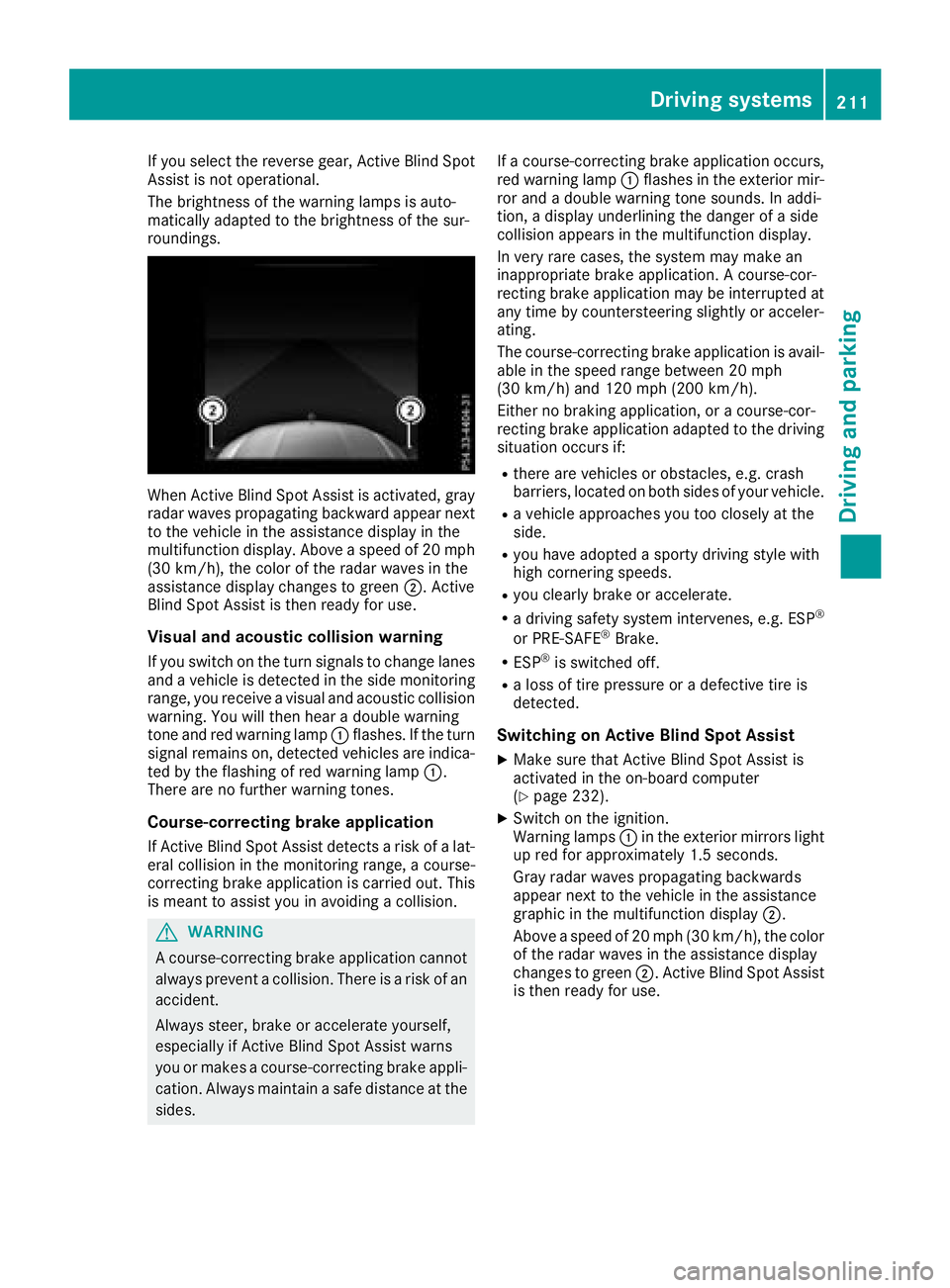
When Active Blind Spot Assist is activated, gray
radar waves propagating backward appear next
to the vehicle in the assistance display in the
multifunction display. Above a speed of 20 mph
(30 km/h), the color of the radar waves in the
assistance display changes to green D . Active
Blind Spot Assist is then ready for use.
Visual and acoustic collision warning If you switch on the turn signals to change lanes
and a vehicle is detected in the side monitoring
range, you receive a visual and acoustic collision
warning. You will then hear a double warning
tone and red warning lamp C flashes. If the turn
signal remains on, detected vehicles are indica-
ted by the flashing of red warning lamp C .
There are no further warning tones.
Course-correcting brake application
If Active Blind Spot Assist detects a risk of a lat-
eral collision in the monitoring range, a course-
correcting brake application is carried out. This
is meant to assist you in avoiding a collision.
G WARNING
A course-correcting brake application cannot
always prevent a collision. There is a risk of an
accident.
Always steer, brake or accelerate yourself,
especially if Active Blind Spot Assist warns
you or makes a course-correcting brake appli-
cation. Always maintain a safe distance at the
sides. If a course-correcting brake application occurs,
red warning lamp C flashes in the exterior mir-
ror and a double warning tone sounds. In addi-
tion, a display underlining the danger of a side
collision appears in the multifunction display.
In very rare cases, the system may make an
inappropriate brake application. A course-cor-
recting brake application may be interrupted at
any time by countersteering slightly or acceler-
ating.
The course-correcting brake application is avail-
able in the speed range between 20 mph
(30 km/h) and 120 mph (200 km/h).
Either no braking application, or a course-cor-
recting brake application adapted to the driving
situation occurs if: R
there are vehicles or obstacles, e.g. crash
barriers, located on both sides of your vehicle. R
a vehicle approaches you too closely at the
side. R
you have adopted a sporty driving style with
high cornering speeds. R
you clearly brake or accelerate. R
a driving safety system intervenes, e.g. ESP ®
or PRE-SAFE ®
Brake. R
ESP ®
is switched off. R
a loss of tire pressure or a defective tire is
detected.
Switching on Active Blind Spot Assist X
Make sure that Active Blind Spot Assist is
activated in the on-board computer
( Y
page 232). X
Switch on the ignition.
Warning lamps C in the exterior mirrors light
up red for approximately 1.5 seconds.
Gray radar waves propagating backwards
appear next to the vehicle in the assistance
graphic in the multifunction display D .
Above a speed of 20 mph (30 km/h), the color
of the radar waves in the assistance display
changes to green D . Active Blind Spot Assist
is then ready for use.Driving systems 211
Driving and parking Z
Page 363 of 390
able cargo and luggage load capacity is
650 lbs (1400 - 750 (5 x 150) = 650 lbs). X
Step 5: Determine the combined weight of
luggage and cargo being loaded on the vehi- cle. That weight may not safely exceed the
available cargo and luggage load capacity cal-
culated in step 4.
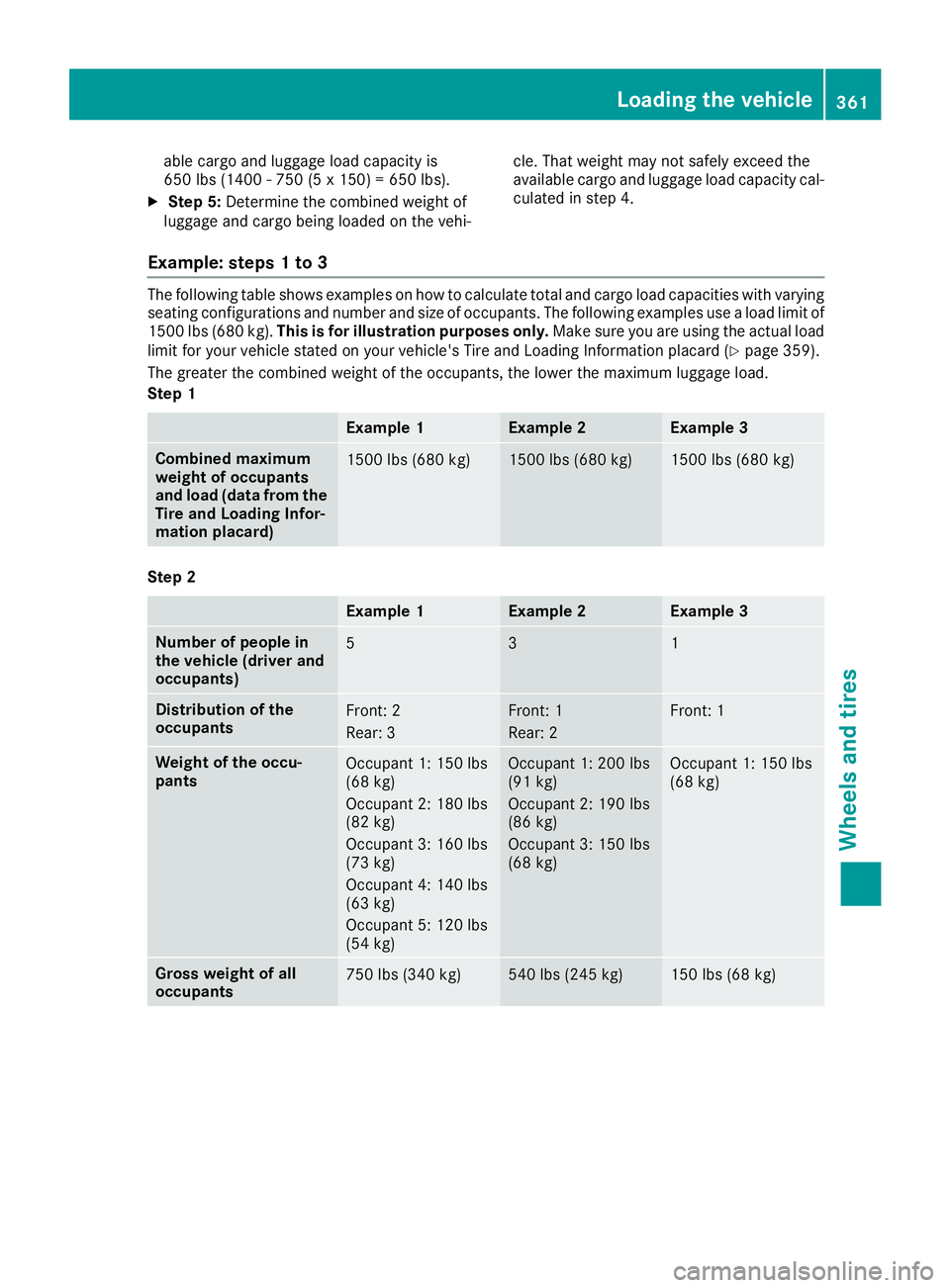
Example: steps 1 to 3 The following table shows examples on how to calculate total and cargo load capacities with varying
seating configurations and number and size of occupants. The following examples use a load limit of
1500 lbs (680 kg). This is for illustration purposes only. Make sure you are using the actual load
limit for your vehicle stated on your vehicle's Tire and Loading Information placard ( Y
page 359).
The greater the combined weight of the occupants, the lower the maximum luggage load.
Step 1
Example 1 Example 2 Example 3
Combined maximum
weight of occupants
and load (data from the
Tire and Loading Infor-
mation placard) 1500 lbs (680 kg) 1500 lbs (680 kg) 1500 lbs (680 kg)
Step 2
Example 1 Example 2 Example 3
Number of people in
the vehicle (driver and
occupants) 5 3 1
Distribution of the
occupants Front: 2
Rear: 3 Front: 1
Rear: 2 Front: 1
Weight of the occu-
pants Occupant 1: 150 lbs
(68 kg)
Occupant 2: 180 lbs
(82 kg)
Occupant 3: 160 lbs
(73 kg)
Occupant 4: 140 lbs
(63 kg)
Occupant 5: 120 lbs
(54 kg) Occupant 1: 200 lbs
(91 kg)
Occupant 2: 190 lbs
(86 kg)
Occupant 3: 150 lbs
(68 kg) Occupant 1: 150 lbs
(68 kg)
Gross weight of all
occupants 750 lbs (340 kg) 540 lbs (245 kg) 150 lbs (68 kg)Loading the vehicle 361
Wheels and tires Z