brake sensor MERCEDES-BENZ GLC 2018 Owners Manual
[x] Cancel search | Manufacturer: MERCEDES-BENZ, Model Year: 2018, Model line: GLC, Model: MERCEDES-BENZ GLC 2018Pages: 390, PDF Size: 9.04 MB
Page 19 of 390
P Paddle shifters
see Steering wheel paddle shifters
Paint code number ........................... .3 76
Paintwork (cleaning instructions) ... 326
Panic alarm .......................................... 44
Panorama roof with power tilt/
sliding panel
Important safety notes .................... 94
Operating ......................................... 95
Operating the roller sunblinds for
the sliding sunroof ........................... 96
Problem (malfunction) ..................... 97
Rain closing feature ......................... 96
Reversing feature ............................ .9 5
Parcel net .......................................... .2 98
Parking
Important safety notes .................. 158
Parking brake ................................ 159
Parking position for the exterior
mirror on the front-passenger
side ................................................ 109
Rear view camera .......................... 194
Switching off the engine ................ 158
see Parking Assist PARKTRONIC
Parking aid
see 360° camera
see Exterior mirrors
see Parking Assist PARKTRONIC
see Parking Pilot
see Rear view camera
Parking Assist
Display message ............................ 258
Parking Assist PARKTRONIC
Deactivating/activating ................. 193
Driving system ............................... 191
Function/notes ............................ .1 91
Important safety notes .................. 191
Problems (malfunctions) ................ 194
Sensor range ................................. 192
Warning display ............................. 193
Parking assistance
see Parking Assist PARKTRONIC
Parking brake
Applying automatically ................... 159
Applying or releasing manually ...... 159
Display message ............................ 242 Electric parking brake .................... 159
Emergency braking ........................ 160
General notes ................................ 159
Releasing automatically ................. 160
Warning lamp ................................. 274
Parking lamps
Switching on/off ........................... 113
Parki ng Pi lot
C anceling ....................................... 191
Detecting parking spaces .............. 188
Exiting a parking space .................. 190
Function/notes ............................. 188
Important safety notes .................. 188
Parking .......................................... 189
PASSENGER AIR BAG
Display message ............................ 249
Indicator lamps ................................ 45
Problems (malfunction) .................. 249
Perfume atomizer
Operating ....................................... 132
Problem (malfunction) ................... 133
Setting the perfume intensity
(multimedia system) ...................... 285
Vial ................................................ 132
Permanent all-wheel drive
see 4MATIC (permanent four-
wheel drive)
Pets in the vehicle ............................... 65
Phone book
see also Digital Operator's Man-
ual .................................................. 280
Plastic trim (cleaning instruc-
tions) .................................................. 329
Power washers .................................. 325
Power windows
see Side windows
PRE-SAFE ®
(anticipatory occupant
protection)
Display message ............................ 246
Operation ......................................... 58
PRE-SAFE ®
PLUS (anticipatory
occupant protection PLUS)
Operation ......................................... 59
Program
see Drive programs
Protection against theft
ATA (Anti-Theft Alarm system) ......... 77 Index 17
Page 61 of 390
PRE-SAFE ®
takes the following measures
depending on the hazardous situation detected: R
the front seat belts are pre-tensioned. R
if the vehicle skids, the side windows and the
panorama roof with power tilt/sliding panel
are closed. R
vehicles with the memory function for the
front-passenger seat: the front-passenger
seat is adjusted if it is in an unfavorable posi-
tion.
If the hazardous situation passes without result-
ing in an accident, PRE-SAFE ®
slackens the belt
pre-tensioning. All settings made by PRE-SAFE ®
can then be reversed.
If the seat belt pre-tensioning is not reduced: X
Move the seat backrest or seat back slightly
when the vehicle is stationary.
The seat belt pre-tensioning is reduced and
the locking mechanism is released.
The seat-belt adjustment is an integral part of
the PRE-SAFE ®
convenience function. Informa-
tion about the convenience function can be
found under "Belt adjustment" ( Y
page 48).
PRE-SAFE ®
PLUS (anticipatory occu-
pant protection system PLUS)
Introduction PRE-SAFE ®
PLUS is only available in vehicles
with the Driving Assistance package.
Using the radar sensor system, PRE-SAFE ®
PLUS is able to detect that a head-on or rear-end
collision is imminent. In certain hazardous sit-
uations, PRE-SAFE ®
PLUS takes pre-emptive
measures to protect the vehicle occupants.
Important safety notes The intervention of PRE-SAFE ®
PLUS cannot
prevent an imminent collision.
The driver is not warned about the intervention
of PRE-SAFE ®
PLUS.
PRE-SAFE ®
PLUS does not intervene:R
if the vehicle is backing up R
when the vehicle is towing a trailer and there
is a risk of a rear-end collision When driving, or when parking or exiting a park-
ing space with assistance from Parking Pilot,
PRE-SAFE ®
PLUS will not apply the brakes.
Function PRE-SAFE ®
PLUS intervenes in certain situa-
tions if the radar sensor system detects an
imminent head-on or rear-end collision.
PRE-SAFE ®
PLUS takes the following measures
depending on the hazardous situation detected: R
if the radar sensor system detects that a
head-on collision is imminent, the seat belts
are pre-tensioned. R
if the radar sensor system detects that a rear-
end collision is imminent: -
the brake pressure is increased if the driver
applies the brakes when the vehicle is sta-
tionary. -
the seat belts are pre-tensioned.
The PRE-SAFE ®
PLUS braking application is can-
celed: R
if the accelerator pedal is depressed when a
gear is engaged R
if the risk of a collision passes or is no longer
detected R
if Distance Pilot DISTRONIC indicates an
intention to pull away
If the hazardous situation passes without result-
ing in an accident, the original settings are
restored.
Automatic measures after an acci-
dent Immediately after an accident, the following
measures are implemented, depending on the
type and severity of the impact: R
the hazard warning lamps are switched on R
the emergency lighting is activated R
the vehicle doors are unlocked R
the front side windows are lowered R
vehicles with a memory function: the electri-
cally adjustable steering wheel is raised when
the driver's door is opened R
the engine is switched off and the fuel supply
is cut off R
vehicles with mbrace: automatic emergency
callOccupant safety 59
Safety Z
Page 69 of 390
BAS (Brake Assist System)
General information BAS operates in emergency braking situations.
If you depress the brake pedal quickly, BAS
automatically boosts the braking force, thus
shortening the stopping distance.
Important safety notes
i Observe the "Important safety notes" sec-
tion ( Y
page 66).
G WARNING
If BAS is malfunctioning, the braking distance
in an emergency braking situation is
increased. There is a risk of an accident.
In an emergency braking situation, depress
the brake pedal with full force. ABS prevents
the wheels from locking.
Braking X
Keep the brake pedal firmly depressed until
the emergency braking situation is over.
ABS prevents the wheels from locking.
The brakes will function as usual once you
release the brake pedal. BAS is deactivated.
Active Brake Assist
General information
i Observe the "Important safety notes" sec-
tion ( Y
page 66).
Active Brake Assist consists of a distance warn-
ing function with an autonomous braking func-
tion and Adaptive Brake Assist.
Active Brake Assist can help you to minimize the
risk of a collision with the vehicle traveling in
front or reduce the effects of such a collision.
If Active Brake Assist detects that there is a risk
of collision, you will be warned visually and
acoustically. If you do not react to the visual and
audible collision warning, autonomous braking
can be initiated in critical situations. If you apply
the brake yourself in a critical situation, Adap-
tive Brake Assist of the Active Brake Assist sys-
tem supports you. Important safety notes In particular, the detection of obstacles can be
impaired if: R
there is dirt on the sensors or anything else
covering the sensors R
there is snow or heavy rain R
there is interference by other radar sources R
there are strong radar reflections, for exam-
ple in parking garages R
a narrow vehicle is traveling in front, e.g. a
motorbike R
a vehicle is traveling in front on a different line R
you are driving a new vehicle or servicing on
the Active Brake Assist system has just been
carried out
Observe the important safety notes in the
"Breaking-in notes" section ( Y
page 135).
Following damage to the front end of the vehicle,
have the configuration and operation of the
radar sensor checked at a qualified specialist
workshop. This also applies to collisions at slow
speeds where there is no visible damage to the
front of the vehicle.
Activating/deactivating Active Brake Assist is automatically active after
switching on the ignition.
You can activate or deactivate Active Brake
Assist ( Y
page 232) in the on-board computer.
When deactivated, the distance warning func-
tion and the autonomous braking function are
also deactivated.
If Active Brake Assist is deactivated, the
Page 71 of 390
reacting to moving objects that have already
been detected as such at least once over the
period of observation.
Up to a speed of approximately 44 mph
(70 km/h), Adaptive Brake Assist reacts to sta-
tionary obstacles.
If adaptive Brake Assist demands particularly
high braking force, preventative passenger pro-
tection measures (PRE-SAFE ®
) are activated
simultaneously ( Y
page 58).X
Keep the brake pedal depressed until the
emergency braking situation is over.
ABS prevents the wheels from locking.
The brakes will work normally again if: R
you release the brake pedal. R
there is no longer any danger of a collision. R
no obstacle is detected in front of your vehi-
cle.
Adaptive Brake Assist is then deactivated.
Important safety notes
i Observe the "Important safety notes" sec-
tion for driving safety systems ( Y
page 66).
G WARNING
Adaptive Brake Assist cannot always clearly
identify objects and complex traffic situa-
tions.
In such cases, Adaptive Brake Assist can: R
intervene unnecessarily R
not intervene
There is a risk of an accident.
Always pay careful attention to the traffic sit-
uation and be ready to brake. Terminate the
intervention in a non-critical driving situation.
G WARNING
Adaptive Brake Assist does not react: R
to people or animals R
to oncoming vehicles R
to crossing traffic R
when cornering
As a result, the Adaptive Brake Assist may not
intervene in all critical conditions. There is a
risk of an accident. Always pay careful attention to the traffic sit-
uation and be ready to brake.
Always adapt your speed to suit the prevailing
road and traffic conditions.
Due to the nature of the system, particularly
complicated but non-critical driving conditions
may also cause Brake Assist to intervene.
If adaptive Brake Assist is not available due to a
malfunction in the radar sensor system, the
brake system remains available with full brake
boosting effect and BAS.
ESP ®
(Electronic Stability Program)
General notes
i Observe the "Important safety notes" sec-
tion ( Y
page 66).
ESP ®
monitors driving stability and traction, i.e.
power transmission between the tires and the
road surface.
If ESP ®
detects that the vehicle is deviating from
the direction desired by the driver, one or more
wheels are braked to stabilize the vehicle. The
engine output is also modified to keep the vehi-
cle on the desired course within physical limits.
ESP ®
assists the driver when pulling away on
wet or slippery roads. ESP ®
can also stabilize
the vehicle during braking.
ETS/4ETS (Electronic Traction System)
i Observe the "Important safety notes" sec-
tion ( Y
page 66).
ETS traction control is part of ESP ®
. On vehicles
with 4MATIC, 4ETS is part of ESP ®
.
Traction control brakes the drive wheels indi-
vidually if they spin. This enables you to pull
away and accelerate on slippery surfaces, for
example if the road surface is slippery on one
side. In addition, more drive torque is transfer-
red to the wheel or wheels with traction.
Traction control remains active, even if you
deactivate ESP ®
.Driving safety systems 69
Safety Z
Page 76 of 390
For Active Brake Assist with cross-traffic func-
tion to assist you when driving, the radar sensor
system and the camera system must be opera-
tional.
If the radar sensor system or the camera system
is malfunctioning, Active Brake Assist with
cross-traffic function is restricted or no longer
available. The brake system is still available with
complete brake boosting effect and BAS.
The radar sensor system and camera system
help Active Brake Assist with cross-traffic func-
tion to detect obstacles that are in the path of
your vehicle for an extended period of time.
In addition, pedestrians in the path of your vehi-
cle can be detected.
Active Brake Assist with cross-traffic function
detects pedestrians using typical characteris-
tics such as body contours and the posture of a
person standing upright.
i Observe the restrictions described in the
"Important safety notes" section
( Y
page 74).
Important safety notes
G WARNING
Active Brake Assist with cross-traffic function
will initially brake your vehicle by a partial
application of the brakes if a danger of colli-
sion is detected. There may be a collision
unless you brake yourself. Even after subse-
quent full application of the brakes a collision
cannot always be avoided, particularly when
approaching at too high a speed. There is a
risk of an accident.
Always apply the brakes yourself and try to
take evasive action, provided it is safe to do
so.
In the event of a partial application of the brakes,
the vehicle is braked with up to 50% of the full
braking pressure.
G WARNING
Active Brake Assist with cross-traffic function
cannot always clearly identify objects and
complex traffic situations. In such cases, Active Brake Assist with cross-
traffic function might: R
issue an unnecessary warning or engage R
neither give a warning nor intervene
There is a risk of an accident.
Always pay particular attention to the traffic
situation and be prepared to brake, especially
if Active Brake Assist with cross-traffic func-
tion alerts you. Terminate the intervention in a
non-critical driving situation.
G WARNING
Active Brake Assist with cross-traffic function
cannot always clearly identify people, partic-
ularly if they are moving. Active Brake Assist
with cross-traffic function cannot intervene in
these cases. There is a risk of an accident.
Always pay particular attention to the traffic
situation and be prepared to brake, especially
if Active Brake Assist with cross-traffic func-
tion alerts you.
In order to maintain the appropriate distance to
the vehicle in front and thus prevent a collision,
you must apply the brakes yourself.
G WARNING
Active Brake Assist with cross-traffic function
does not react: R
to small people, e.g. children R
to animals R
to oncoming vehicles R
when cornering
As a result, Active Brake Assist with cross-
traffic function may not warn you or engage in
all critical situations. There is a risk of an acci-
dent.
Always pay careful attention to the traffic sit-
uation and be ready to brake.
In the event of snowfall or heavy rain, the rec-
ognition can be impaired.74
Driving safety systems
Safety
Page 77 of 390
Recognition by th e radar sensor system is also
impaire d if:R
there is dirt on th e sensor s or anythin g else
covering th e sensor sR
there is interferenc e by other radar source sR
there are stron g radar reflections, for exam-
ple in parking garages R
a narrow vehicl e is traveling in front, e.g. a
motorbike R
a vehicl e is traveling in fron t on a differen t lin eR
vehicles moving quickly int o th e radar sensor
system detection range
Recognition by th e camera system is also
impaire d in th e event of:R
dirt on th e camera or if th e camera is coveredR
glar e on th e camera system, e.g. from th e sun
bein g low in th e sk yR
darkness R
or if: -
pedestrian s mov e quickly, e.g. int o th e pat h
of th e vehicl e-
th e camera system no longer recognizes a
pedestrian as a person due to special cloth -
ing or other objects -
a pedestrian is concealed by other objects -
th e typical outlin e of a pedestrian is no t
distinguishable from th e backgroun d
Followin g damag e to th e fron t en d of th e vehicle,
hav e th e configuration and operation of th e
radar sensor s checke d at a qualified specialist
workshop. This also applie s to collision s at slow
speeds wher e there is no visible damag e to th e
fron t of th e ve hicle.
Fo
llowin g damag e to th e windshield, hav e th e
configuration and operation of th e camera sys-
te m checke d at a qualified specialist workshop.
Function X
To activate or deactivate: activat e or deac -
tivat e Active Brake Assist wit h cross-traffic
function usin g th e on-board computer
( Y
page 232).
If Active Brake Assist wit h cross-traffic func-
tion is deactivated, th e
Page 78 of 390
function automatically increases the brake pres-
sure to a degree suited to the traffic situation.
Active Brake Assist with cross-traffic function
provides braking assistance in hazardous situa-
tions with vehicles in front within a speed range
between 4 mph (7 km/h) and 155 mph
(250 km/h).
Up to a speed of approximately 44 mph
(70 km/h) the Active Brake Assist with cross-
traffic function assists you with braking in haz-
ardous situations with: R
stationary obstacles in the path of the vehicle,
e.g. stopped or parked vehicles R
stationary pedestrians in the path of the vehi-
cle R
obstacles crossing your path that move in the
detection range of the sensors and are detec-
ted X
Keep the brake pedal depressed until the
emergency braking situation is over.
ABS prevents the wheels from locking.
You can prevent the intervention of Active Brake
Assist with cross-traffic function at any time by: R
depressing the accelerator pedal further. R
activating kickdown. R
releasing the brake pedal
The braking application of Active Brake Assist
with cross-traffic function is ended automati-
cally if: R
you maneuver to avoid the obstacle. R
there is no longer a risk of collision. R
an obstacle is no longer detected in front of
your vehicle.
STEER CONTROL
General information STEER CONTROL helps you by transmitting a
noticeable steering force to the steering wheel
in the direction required for vehicle stabilization.
This steering assistance is provided in particular
if: R
both right wheels or both left wheels are on a
wet or slippery road surface when you brake R
the vehicle begins to skid Important safety notes
i Observe the "Important safety notes" sec-
tion ( Y
page 66).
No steering support is provided from STEER
CONTROL, if: R
ESP ®
is deactivated R
ESP ®
is malfunctioning R
the steering is malfunctioning
If ESP ®
is malfunctioning, you will be assisted
further by the electrical power steering.
Protection against theft
Immobilizer The immobilizer prevents your vehicle from
being started without the correct SmartKey. X
To activate with the SmartKey: remove the
SmartKey from the ignition lock. X
To activate with KEYLESS-GO start-func-
tion or KEYLESS-GO: switch the ignition off
and open the driver's door. X
To deactivate: switch on the ignition.
When leaving the vehicle, always take the
SmartKey with you and lock the vehicle. Anyone
can start the engine if a valid SmartKey has been
left inside the vehicle.
i The immobilizer is always deactivated when
you start the engine.
In the event that the engine cannot be started
(yet the vehicle's battery is charged), the sys-
tem is not operational. Contact an authorized
Mercedes-Benz Center or call
1-800-FOR-MERCedes (in the USA) or
1-800-387-0100 (in Canada).76
Protection against theft
Safety
Page 137 of 390
Notes on breaking-in a new vehicle
Important safety notes The sensor system of some driving and driving
safety systems adjusts automatically while a
certain distance is being driven after the vehicle
has been delivered or after repairs. Full system
effectiveness is not reached until the end of this
teach-in procedure.
New and replaced brake pads and discs only
reach their optimum braking effect after several
hundred kilometers of driving. Compensate for
this by applying greater force to the brake pedal.
The first 1,000 miles (1,500 km) The more you look after the engine when it is
new, the more satisfied you will be with its per-
formance in the future. R
You should therefore drive at varying vehicle
and engine speeds for the first 1,000 miles
(1,500 km). R
Avoid heavy loads, e.g. driving at full throttle,
during this period. R
When changing gears manually, change up in
good time, before the tachometer needle rea-
ches
Page 173 of 390
Change into a lower gear in good time on long
and steep downhill gradients. This is especially
impo rtant if the veh icle is laden. By doin g so, you
will make use of the braking effect of the engine.
This relieves the load on the brake system and
prevents the brakes from overheating and wear-
ing too quic kly.
If Distance Pilot DI ST RONIC detects that there is
a risk of a co llisio n, you will be warned visually
and acoustically. Without your intervention, Dis-
tance Pilot DISTRONIC cannot prevent a co lli-
sion. An intermittent warning tone will then
sound and the dist ance warning lamp will light
up in the instrument cluster. Brake immediately
in order to increase the dist ance to the veh icle in
front or take evasive action pro vide d it is safe to
do so.
Distance Pilot DI ST RONIC operates in the range
between 0 mph (0 km/h) and 120 mph
(200 km/h).
Do not use Distance Pilot DI ST RONIC while driv -
ing on roads with steep gradients.
Sin ce Distance Pilot DI ST RONIC transmits radar
waves, it can resemble the radar detectors of
the respon sible authorities. You can refer to the
relevant chapter in the Operator's Manual if
questions are asked about this.
i USA only: This device has been approved by
the FCC as a "Vehicular Radar System". The
radar sensor is intended for use in an aut o-
m
otive radar system only. Removal, tamper-
ing, or altering of the device will void any war-
ranties, and is not permitted by the FCC. Do
not tamper wit h, alter, or use in any non-
approved way.
Any unauthorized mod ific ation to th is device
could void the user's authority to operate the
equipm ent.
i Canada only: This device co mplie s wit h
RSS -210 of In dustry Canada. Operation is
subject to the foll owin g two conditions:
1. This device may not cause interference,
and
2. This device must accept any interference
receive d, inc ludin g interference that may
cause undesired operation of the device.
Removal, tampering, or altering of the device
will void any warranties, and is not permitte d.
Do not tamper wit h, alter, or use in any non-
approved way. Any unauthorized modification to this device
could void the user's authority to operate the
equipment.
Important safety notes
G WARNING
Distance Pilot DI ST RONIC does not react to: R
people or animals R
stationary objects on the road, e.g. st oppe d
or parked vehicles R
oncoming vehicles and crossing traffic
As a result, Distance Pilot DI ST RONIC may
neither give warnings nor intervene in such
situations. There is a risk of an accident.
Alwa ys pay careful attention to the traff ic sit-
uation and be ready to brake.
G WARNING
Distance Pilot DI ST RONIC cannot always
clearly identify other road users and co mple x
traff ic situations.
In such cases, Distance Pilot DI ST RONIC may:R
give an unnecessary warning and then
brake the vehicle R
neither give a warning nor intervene R
accelerate or brake unexpect edly
There is a risk of an accident.
Continue to drive carefully and be ready to
brake, especially if Distance Pilot DISTRONIC
warns you.
G WARNING
Distance Pilot DI ST RONIC brakes your vehicle
with up to 50% of the maximum poss ible
deceleration. If this deceleration is not suffi-
cient, Distance Pilot DI ST RONIC alerts you
wit h a visual and acoustic warning. There is a
risk of an accident.
Apply the brakes yourself in these situations
and try to take evasive action.
! When Distance Pilot DI ST RONIC or the
HOLD function are activated, the vehicle
brakes automatically in certain situations.Driving systems 171
Driving and parking Z
Page 194 of 390
are no persons, animals or objects in the maneu-
vering area while maneuvering and parking in/
leaving parking spaces.
! When parking, pay particular attention to
objects above or below the sensors, such as
flower pots or trailer drawbars. Parking Assist
PARKTRONIC does not detect such objects
when they are in the immediate vicinity of the
vehicle. You could damage the vehicle or the
objects.
The sensors may not detect snow and other
objects that absorb ultrasonic waves.
Ultrasonic sources such as an automatic car
wash, the compressed-air brakes of a truck or
a pneumatic drill could cause Parking Assist
PARKTRONIC to malfunction.
Parking Assist PARKTRONIC may not function
correctly on uneven terrain.
! If you do not need the trailer tow hitch,
remove the detachable ball coupling. Parking
Assist PARKTRONIC measures the minimum
detection range to an obstacle from the
bumper, not the ball coupling.
Parking Assist PARKTRONIC is activated auto-
matically when you: R
switch on the ignition R
shift the transmission to position [ , ^ or
\\
Parking Assist PARKTRONIC is deactivated at
speeds above 11 mph (18 km/ h) . It is reactiva-
ted at lower speeds.
Parking Assist PARKTRONIC is deactivated for
the rear area when you establish an electrical
connection between your vehicle and a trailer.
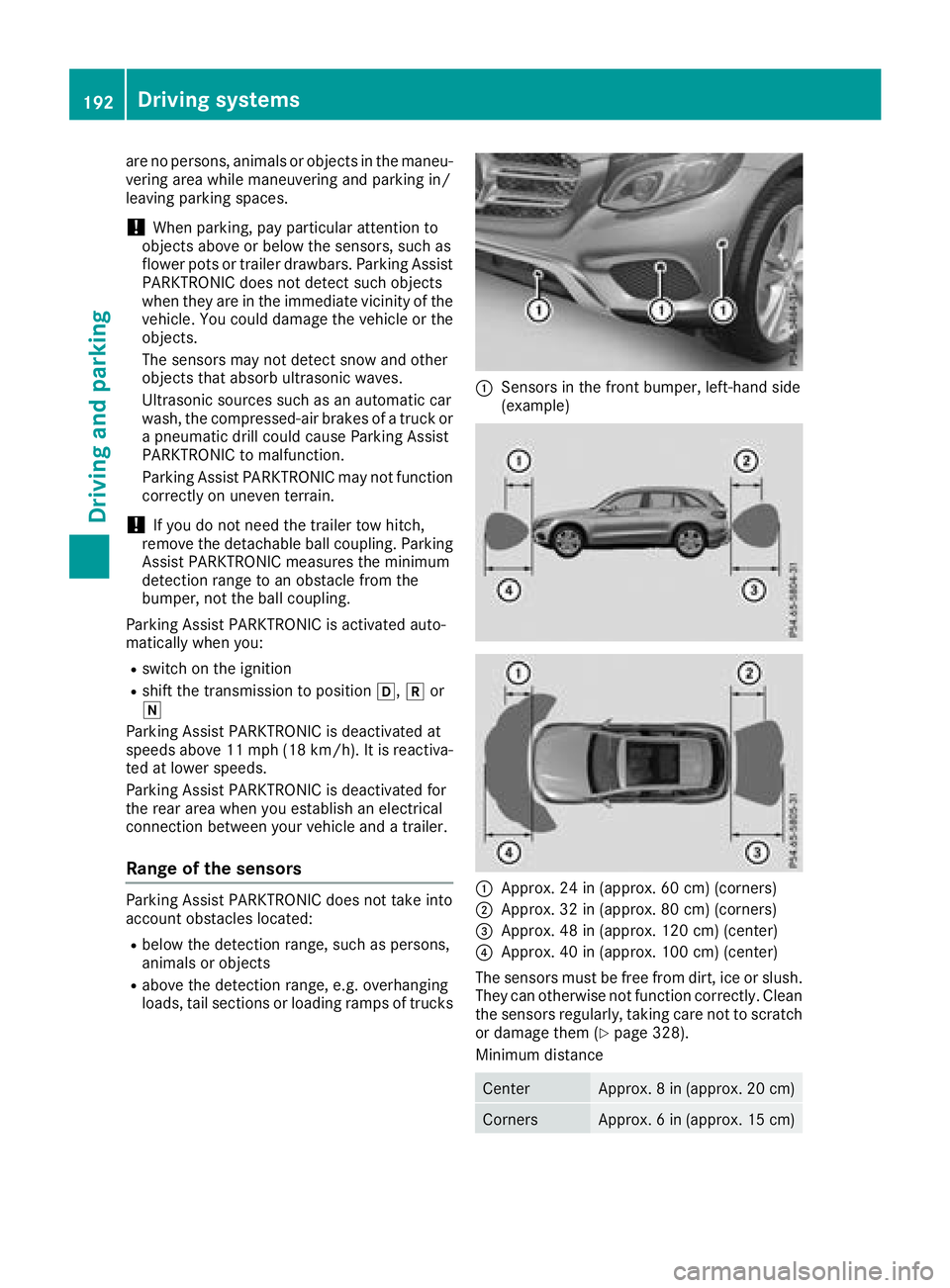
Range of the sensors Parking Assist PARKTRONIC does not take into
account obstacles located: R
below the detection range, such as persons,
animals or objects R
above the detection range, e.g. overhanging
loads, tail sections or loading ramps of trucks C
Sensors in the front bumper, left-hand side
(example)
C
Approx. 24 in (approx. 60 cm) (corners) D
Approx. 32 in (approx. 80 cm) (corners)