brakes MERCEDES-BENZ GLC 2019 User Guide
[x] Cancel search | Manufacturer: MERCEDES-BENZ, Model Year: 2019, Model line: GLC, Model: MERCEDES-BENZ GLC 2019Pages: 370, PDF Size: 19.55 MB
Page 164 of 370
Active Distance Assist DISTRONIC
General notes
Active Distance Assist DISTRONIC regulates thespeed and automatically helps you maintain thedistance from the vehicle detected in front.Vehicles are detected with the aid of the radarsensor system. Active Distance AssistDISTRONIC brakes automatically so that the setspeed is not exceeded.
Change into a lower gear in good time on longand steep downhill gradients. This is especiallyimportant if the vehicle is laden. By doing so, youwill make use of the braking effect of the engine.This relieves the load on the brake system andprevents the brakes from overheating and wear-ing too quickly.
If Active Distance Assist DISTRONIC detectsthat there is a risk of a collision with the vehiclein front, you will be warned visually and audibly.Active Distance Assist DISTRONIC cannot pre-vent a collision without your intervention. Anintermittent warning tone will then sound andthe distance warning lamp will light up in theinstrument cluster. Brake immediately in orderto increase the distance to the vehicle in front ortake evasive action provided it is safe to do so.
Active Distance Assist DISTRONIC operates inthe speed range between 0 mph(0 km/h) and120 mph (200 km/h).
Do not use Active Distance Assist DISTRONICwhile driving on roads with steep gradients.
As Active Distance Assist DISTRONIC transmitsradar waves, it can resemble the radar detectorsof the responsible authorities. You can refer tothe relevant chapter in the Operator's Manual ifquestions are asked about this.
iUSA only: This device has been approved bythe FCC as a "Vehicular Radar System". Theradar sensor is intended for use in an auto-motive radar system only. Removal, tamper-ing, or altering of the device will void any war-ranties, and is not permitted by the FCC. Donot tamper with, alter, or use in any non-approved way.
Any unauthorized modification to this devicecould void the user's authority to operate theequipment.
iCanada only: This device complies withRSS-210 of Industry Canada. Operation issubject to the following two conditions:
1. This device may not cause interference,and
2. This device must accept any interferencereceived, including interference that maycause undesired operation of the device.
Removal, tampering, or altering of the devicewill void any warranties, and is not permitted.Do not tamper with, alter, or use in any non-approved way.
Any unauthorized modification to this devicecould void the user's authority to operate theequipment.
Important safety notes
GWARNING
Active Distance Assist DISTRONIC does not
react to:
Rpeople or animals
Rstationary objects in the road, e.g. stopped
or parked vehicles
Roncoming vehicles and crossing traffic
As a result, Active Distance Assist DISTRONIC
may neither give warnings nor intervene in
such situations. There is a risk of an accident.
Always pay careful attention to the traffic sit-
uation and be ready to brake.
GWARNING
Active Distance Assist DISTRONIC cannot
always clearly identify other road users and
complex traffic situations.
In such cases, Active Distance Assist
DISTRONIC can:
Rgive an unnecessary warning and then
brake the vehicle
Rneither give a warning nor intervene
Raccelerate or brake unexpectedly
There is a risk of an accident.
Continue to drive carefully and be ready to
brake, especially if Active Distance Assist
DISTRONIC warns you.
GWARNING
Active Distance Assist DISTRONIC brakes
your vehicle with up to 50% of the maximum
162Driving systems
Driving and parking
Page 165 of 370
possible deceleration. If this deceleration is
not sufficient, Active Distance Assist
DISTRONIC alerts you with a visual and acous-
tic warning. There is a risk of an accident.
Adjust your speed in these cases and main-
tain sufficient distance. Apply the brakes
yourself and try to take evasive action.
!When Active Distance Assist DISTRONIC orthe HOLD function is activated, the vehiclebrakes automatically in certain situations.
To avoid damage to the vehicle, deactivateActive Distance Assist DISTRONIC and theHOLD function in the following or similar sit-uations:
Rwhen towing the vehicle
Rin the car wash
Active Distance Assist DISTRONIC can neitherreduce the risk of an accident if you fail to adaptyour driving style, nor override the laws of phys-ics. Active Distance Assist DISTRONIC cannottake into account road, weather or traffic con-ditions. Active Distance Assist DISTRONIC isonly an aid. You are responsible for maintaininga safe distance to the vehicle in front, for vehiclespeed, for braking in good time and for staying inlane.
Do not use Active Distance Assist DISTRONIC:
RIn road and traffic conditions which do notallow you to maintain a constant speed, e.g. inheavy traffic or on winding roads
ROn slippery road surfaces. Braking or accel-erating could cause the drive wheels to losetraction and the vehicle could then skid
RIn poor visibility, e.g. due to fog, heavy rain orsnow
Active Distance Assist DISTRONIC may notdetect narrow vehicles driving in front, e.g.motorcycles, or vehicles driving in a staggeredformation.
In particular, the detection of obstacles can beimpaired if:
RThere is dirt on the sensors or anything elsecovering the sensors
RThere is snow or heavy rain
RThere is interference by other radar sources
RThere are strong radar reflections, for exam-ple in parking garages
If Active Distance Assist DISTRONIC no longerdetects a vehicle in front, Distance Pilot
DISTRONIC may unexpectedly accelerate to thespeed stored.
This speed may:
RBe too high if you are driving in a turning laneor an exit lane
Rbe so high in the right lane that you pass vehi-cles driving on the left (in countries wherethey drive on the right)
Rbe so high in the left lane that you pass vehi-cles driving on the right (in countries wherethey drive on the left)
If there is a change of drivers, advise the newdriver of the speed stored.
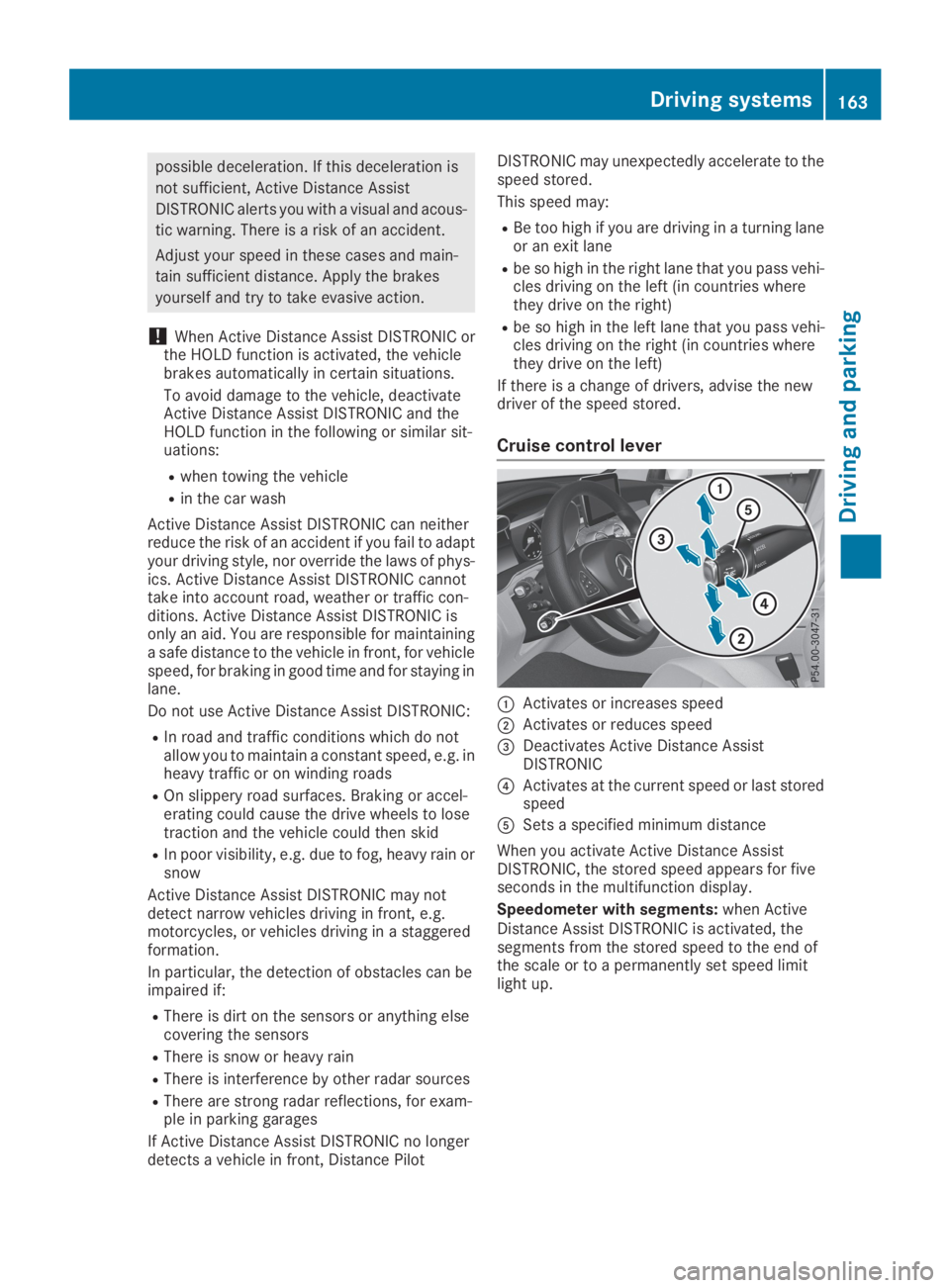
Cruise control lever
CActivates or increases speed
DActivates or reduces speed
Page 167 of 370
If Active Distance Assist DISTRONIC detects afaster-moving vehicle in front, it increases thedriving speed to the set speed.
Selecting the drive program
Active Distance Assist DISTRONIC supports asporty driving style when you have selected theSorS+, drive program (Ypage 145). Accelera-tion behind the vehicle in front or to the setspeed is then noticeably more dynamic. If youhave selected theCorEdriving program, thevehicle accelerates more gently. This setting isrecommended in stop-and-start traffic.
Changing lanes
If you change to the overtaking lane Active Dis-tance Assist DISTRONIC supports you if:
Ryou are driving faster than 45 mph (70 km/h)
Ryou switch on the appropriate turn signal
RActive Distance Assist DISTRONIC does notcurrently detect a danger of collision
If these conditions are fulfilled, your vehicle isaccelerated. Acceleration will be interrupted ifchanging lanes takes too long or if the distancebetween your vehicle and the vehicle in frontbecomes too small.
When you change lanes, Active Distance AssistDISTRONIC monitors the left lane on left-hand-drive vehicles or the right lane on right-hand-drive vehicles.
Stopping
GWARNING
If you leave the driver's seat when the vehicle
is only being braked by Active Distance Assist
DISTRONIC, it could roll away:
Rif there is a malfunction in the system or in
the voltage supply
Rif Active Distance Assist DISTRONIC is
deactivated using the cruise control lever,
for example by a vehicle occupant or from
outside the vehicle
Rif the electrical system in the engine com-
partment, the battery or the fuses are tam-
pered with
Rif the battery is disconnected
Rif the vehicle is accelerated, e.g. by a vehi-
cle occupant
There is a risk of an accident.
Always deactivate Active Distance Assist
DISTRONIC and secure the vehicle against
rolling away before you leave it.
Further information on deactivating Active Dis-tance Assist DISTRONIC (Ypage 167).
If Active Distance Assist DISTRONIC detectsthat the vehicle in front is stopping, it brakesyour vehicle until it is stationary.
Once your vehicle is stationary, it remains sta-tionary and you do not need to depress thebrake.
After a time, the electric parking brake securesthe vehicle and relieves the service brake.
Depending on the specified minimum distance,your vehicle will come to a standstill at a suffi-cient distance behind the vehicle in front. Thespecified minimum distance is set using thecontrol on the cruise control lever.
When Active Distance Assist DISTRONIC is acti-vated, the transmission is shifted automaticallyto position]if:
Rthe driver's seat belt is not fastened and thedriver's door is open
Rthe engine is switched off, unless it is auto-matically switched off by the ECO start/stopfunction
The electric parking brake is applied automati-cally if Active Distance Assist DISTRONIC isactive when the vehicle is stationary and:
Ra system malfunction occurs
Rthe power supply is insufficient
If a malfunction occurs, the transmission mayalso be shifted to position]automatically.
Setting a speed
XPush the cruise control lever upCfor ahigher speed or downDfor a lower speed.
XTo adjust the set speed in 1 mph incre-ments (1 km/h increments):briefly pushthe cruise control lever upCor downDtothe pressure point.Every time the cruise control lever is pressedupCor downDthe last speed stored isincreased or reduced.
XTo adjust the set speed in 5 mph incre-ments (10 km/h increments):briefly push
Driving systems165
Driving and parking
Z
Page 172 of 370
HOLD function
General notes
The HOLD function can assist the driver in thefollowing situations:
Rwhen pulling away, especially on steep slopes
Rwhen maneuvering on steep slopes
Rwhen waiting in traffic
The vehicle is kept stationary without the driverhaving to depress the brake pedal.
The braking effect is canceled and the HOLDfunction deactivated when you depress theaccelerator pedal to pull away.
Important safety notes
GWARNING
If the vehicle is only braked using the HOLD
function, the vehicle may roll away in the fol-
lowing situations when you leave the vehicle:
Rif there is a malfunction in the system or in
the voltage supply
Rif the HOLD function is deactivated by
depressing the accelerator pedal or brake
pedal, e.g. by a vehicle occupant
Rif the electrical system in the engine com-
partment, the battery or the fuses are tam-
pered with or the battery is disconnected
There is a risk of an accident.
Always deactivate the HOLD function and
secure the vehicle against rolling away before
you leave it.
!When DISTRONIC PLUS or the HOLD func-tion is activated, the vehicle brakes automat-ically in certain situations.
To avoid damage to the vehicle, deactivateDISTRONIC PLUS and the HOLD function inthe following or similar situations:
Rwhen towing the vehicle
Rin the car wash
Deactivating the HOLD function (Ypage 170).
Activation conditions
You can activate the HOLD function if all of thefollowing conditions are fulfilled:
Rthe vehicle is stationary.
Rthe engine is running or if it has been auto-matically switched off by the ECO start/stopfunction.
Rthe driver's door is closed or your seat belt isfastened.
Rthe electric parking brake is released.
Rthe transmission is in position[,^or\\.
RDISTRONIC PLUS is deactivated.
Activating the HOLD function
XMake sure that the activation conditions aremet.
XDepress the brake pedal.
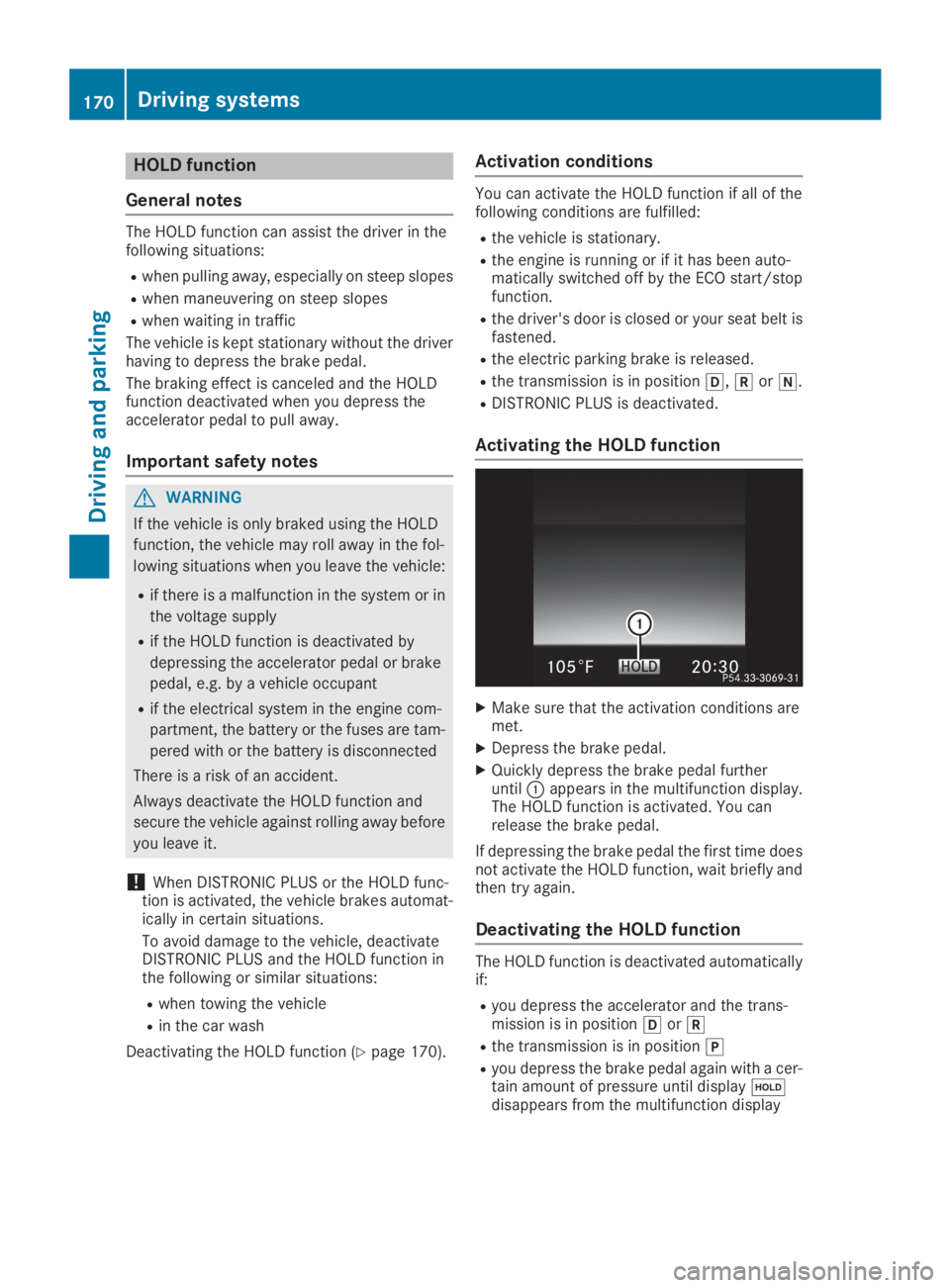
XQuickly depress the brake pedal furtheruntilCappears in the multifunction display.The HOLD function is activated. You canrelease the brake pedal.
If depressing the brake pedal the first time doesnot activate the HOLD function, wait briefly andthen try again.
Deactivating the HOLD function
The HOLD function is deactivated automaticallyif:
Ryou depress the accelerator and the trans-mission is in position[or^
Rthe transmission is in position]
Ryou depress the brake pedal again with a cer-tain amount of pressure until display
Page 180 of 370
iIf Parking Assist PARKTRONIC detectsobstacles, Active Parking Assist will brakeautomatically whilst the vehicle is parking.You are responsible for braking in good time.
XStop the vehicle when the parking space sym-bol shows the desired parking space in theinstrument cluster.
XShift the transmission to position^.TheStart Parking Assist?Start Parking Assist?Yes: OKYes: OKNo:No:8message appears in the multifunctiondisplay.
XTo cancel the procedure:press the8button on the multifunction steering wheel orpull away.
or
XTo park using Active Parking Assist:pressthevbutton on the multifunction steeringwheel.TheParkingParkingAssistAssistActiveActiveAccelerateAccelerateand Brakeand BrakeObserve SurroundingsObserve Surroundingsmes-sage appears in the multifunction display.
XLet go of the multifunction steering wheel.
XBack up the vehicle, being ready to brake at alltimes. When backing up, drive at a speedbelow approximately 6 mph (10 km/h). Oth-erwise, Active Parking Assist will be canceled.Active Parking Assist brakes the vehicle to astandstill when the vehicle approaches therear border of the parking space.
Maneuvering may be required in tight parkingspaces.
TheParking Assist Active Select DParking Assist Active Select DObserve SurroundingsObserve Surroundingsmessage appears inthe multifunction display.
XShift the transmission to position[whenthe vehicle is stationary.Active Parking Assist immediately steers inthe other direction.
TheParkingParkingAssistAssistActiveActiveAccelerateAccelerateand Brakeand BrakeObserve SurroundingsObserve Surroundingsmes-sage appears in the multifunction display.
iYou will achieve the best results by waitingfor the steering procedure to complete beforepulling away.
XDrive forwards and be ready to brake at alltimes.Active Parking Assist brakes the vehicle to astandstill when the vehicle approaches therear border of the parking space.
Maneuvering may be required in tight parkingspaces.
TheParking Assist Active Select RParking Assist Active Select RObserve SurroundingsObserve Surroundingsmessage appears inthe multifunction display.
As soon as the parking procedure is complete,theActive Parking Assist FinishedActive Parking Assist Finishedmes-sage appears and a warning tone sounds. Thevehicle is now parked.
The vehicle is kept stationary without the driverhaving to depress the brake pedal. The brakingeffect is canceled when you depress the accel-erator pedal.
Active Parking Assist no longer supports youwith steering interventions and brake applica-tions. When Active Parking Assist is finished,you must steer and brake again yourself. Park-ing Assist PARKTRONIC is still available.
Parking tips:
RThe way your vehicle is positioned in the park-ing space after parking is dependent on vari-ous factors. These include the position andshape of the vehicles parked in front andbehind it and the conditions of the location. Itmay be the case that Active Parking Assistguides you too far into a parking space, or notfar enough into it. In some cases, it may alsolead you across or onto the curb. If necessary,cancel the parking procedure with ActiveParking Assist.
RYou can also prematurely select transmissionposition[. The vehicle redirects and doesnot drive as far into the parking space. Shouldthe transmission change take place too early,the parking procedure is canceled. A sensibleparking position can no longer be achievedfrom this position.
Exiting a parking space
In order that Active Parking Assist can supportyou when exiting the parking space:
Rthe border of the parking space must be highenough at the front and the rear. A curb stoneis too small, for example.
Rthe border of the parking space must not betoo wide. Your vehicle can be maneuveredinto the parking space at a maximum angle of45° to the starting position.
Ra maneuvering distance of at least 3.3 ft(1.0 m) must be available.
Active Parking Assist can only assist you withexiting a parking space if you have parked thevehicle parallel to the direction of travel usingActive Parking Assist.
178Driving systems
Driving and parking
Page 181 of 370
iIf Parking Assist PARKTRONIC detectsobstacles, Active Parking Assist brakes auto-matically whilst the vehicle is exiting the park-ing space. You are responsible for braking ingood time.
XStart the engine.
XRelease the electric parking brake.
XSwitch on the turn signal in the direction youare pulling away.
XShift the transmission to position[or^.TheStart Parking Assist?Start Parking Assist?Yes: OKYes: OKNo:No:8message appears in the multifunctiondisplay.
XTo cancel the procedure:press the8button on the multifunction steering wheel orpull away.
or
XTo exit a parking space using Active Park-ing Assist:press thevbutton on the mul-tifunction steering wheel.TheParkingParkingAssistAssistActiveActiveAccelerateAccelerateand Brakeand BrakeObserve SurroundingsObserve Surroundingsmes-sage appears in the multifunction display.
XLet go of the multifunction steering wheel.
XPull away, being ready to brake at all times. Donot exceed a maximum speed of approx-imately 6 mph (10 km/h) when exiting a park-ing space. Otherwise, Active Parking Assistwill be canceled.
XDepending on the message or as required,shift the transmission to position[or^.Active Parking Assist immediately steers inthe other direction. TheParking AssistParking AssistActive Accelerate and BrakeActive Accelerate and BrakeObserveObserveSurroundingsSurroundingsmessage appears in the mul-tifunction display.
iYou will achieve the best results by waitingfor the steering procedure to complete beforepulling away.
If you back up after activation, the steeringwheel is moved to the straight-ahead posi-tion.
XDrive forwards and reverse as prompted byParking Assist PARKTRONIC warning dis-plays, several times if necessary.
Once you have exited the parking space com-pletely, the steering wheel is moved to thestraight-ahead position. You hear a tone and theActive Parking Assist FinishedActive Parking Assist Finishedmessageappears in the multifunction display. You willthen have to steer and merge into traffic on your
own. Parking Assist PARKTRONIC is still availa-ble. You can take over the steering before thevehicle has exited the parking space com-pletely. This is useful if you recognize that it isalready possible to pull out of the parking space.
Canceling Active Parking Assist
XStop the movement of the multifunctionsteering wheel or steer yourself.Active Parking Assist will be canceled at once.TheActive Parking Assist CanceledActive Parking Assist Canceledmessage appears in the multifunction display.
or
XPress the Parking Assist PARKTRONIC button(Ypage 181).Parking Assist PARKTRONIC is switched offand Active Parking Assist is immediately can-celed. TheActive Parking Assist Can‐Active Parking Assist Can‐celedceledmessage appears on the multifunctiondisplay.
Active Parking Assist is canceled automaticallyif:
Rthe electric parking brake is applied
Rtransmission position]is selected
Rparking using Active Parking Assist is no lon-ger possible
Ryou are driving faster than 6 mph (10 km/h)
Ra wheel spins, ESP®intervenes or fails. Insuch cases the
Page 182 of 370
Parking Assist PARKTRONIC is only an aid. It isnot a replacement for your attention to yourimmediate surroundings. You are alwaysresponsible for safe maneuvering, parking andexiting a parking space. Make sure that thereare no persons, animals or objects in the maneu-vering area while maneuvering and parking in/leaving parking spaces.
!When parking, pay particular attention toobjects above or below the sensors, such asflower pots or trailer drawbars. Parking AssistPARKTRONIC does not detect such objectswhen they are in the immediate vicinity of thevehicle. You could damage the vehicle or theobjects.
The sensors may not detect snow and otherobjects that absorb ultrasonic waves.
Ultrasonic sources such as an automatic carwash, the compressed-air brakes of a truck ora pneumatic drill could cause Parking AssistPARKTRONIC to malfunction.
Parking Assist PARKTRONIC may not functioncorrectly on uneven terrain.
!If you do not need the trailer tow hitch,remove the detachable ball coupling. ParkingAssist PARKTRONIC measures the minimumdetection range to an obstacle from thebumper, not the ball coupling.
Parking Assist PARKTRONIC is activated auto-matically when you:
Rswitch on the ignition
Rshift the transmission to position[,^or\\
Parking Assist PARKTRONIC is deactivated atspeeds above 11 mph (18 km/h). It is reactiva-ted at lower speeds.
Parking Assist PARKTRONIC is deactivated forthe rear area when you establish an electricalconnection between your vehicle and a trailer.
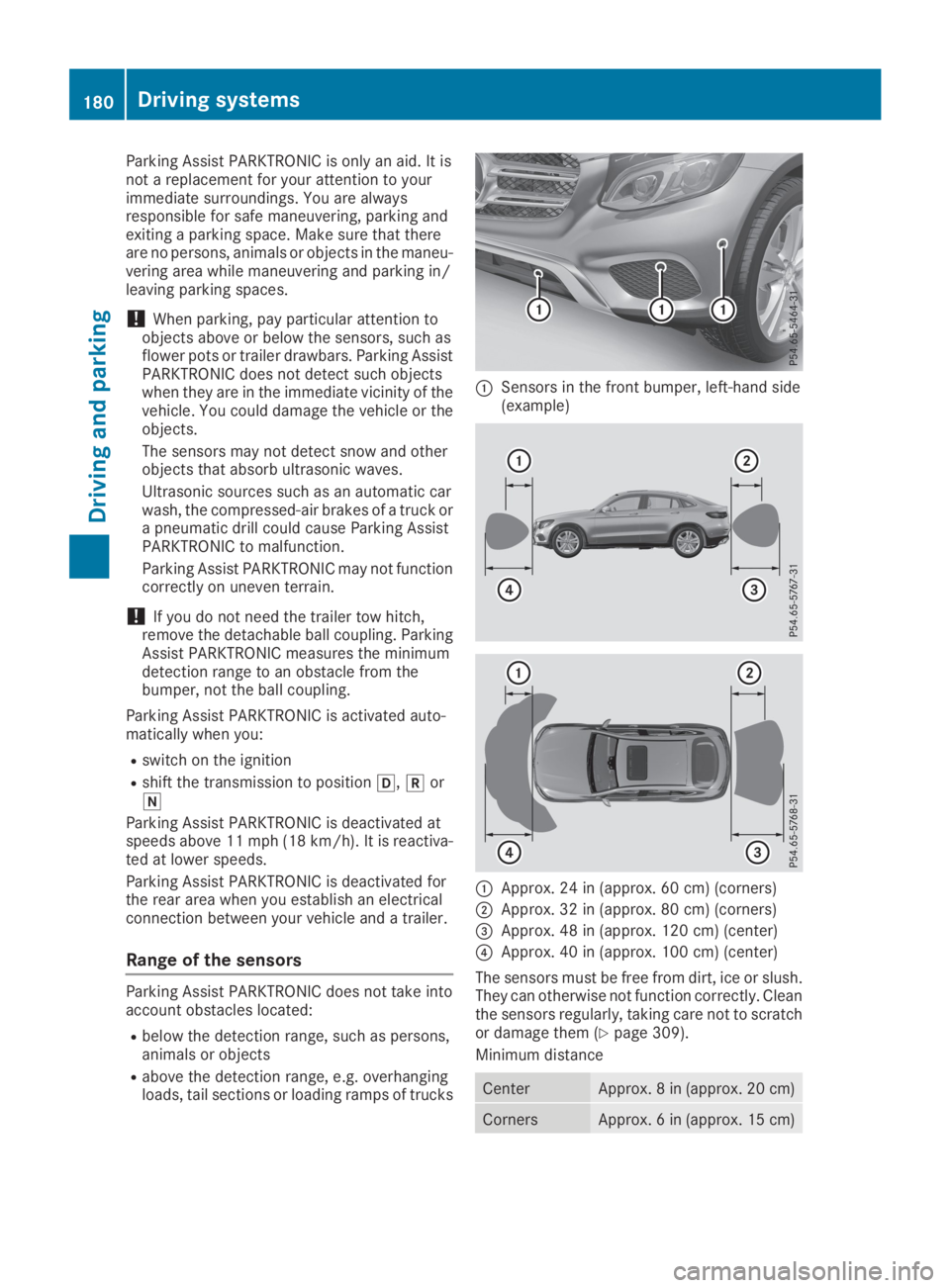
Range of the sensors
Parking Assist PARKTRONIC does not take intoaccount obstacles located:
Rbelow the detection range, such as persons,animals or objects
Rabove the detection range, e.g. overhangingloads, tail sections or loading ramps of trucks
CSensors in the front bumper, left-hand side(example)
CApprox. 24 in (approx. 60 cm) (corners)
DApprox. 32 in (approx. 80 cm) (corners)
Page 202 of 370
TowingTowingaaTrailerTrailerSeeSeeOperator'sOperator'sManualManualmessage appears in the multifunction display.
Active Lane Keeping Assist
General notes
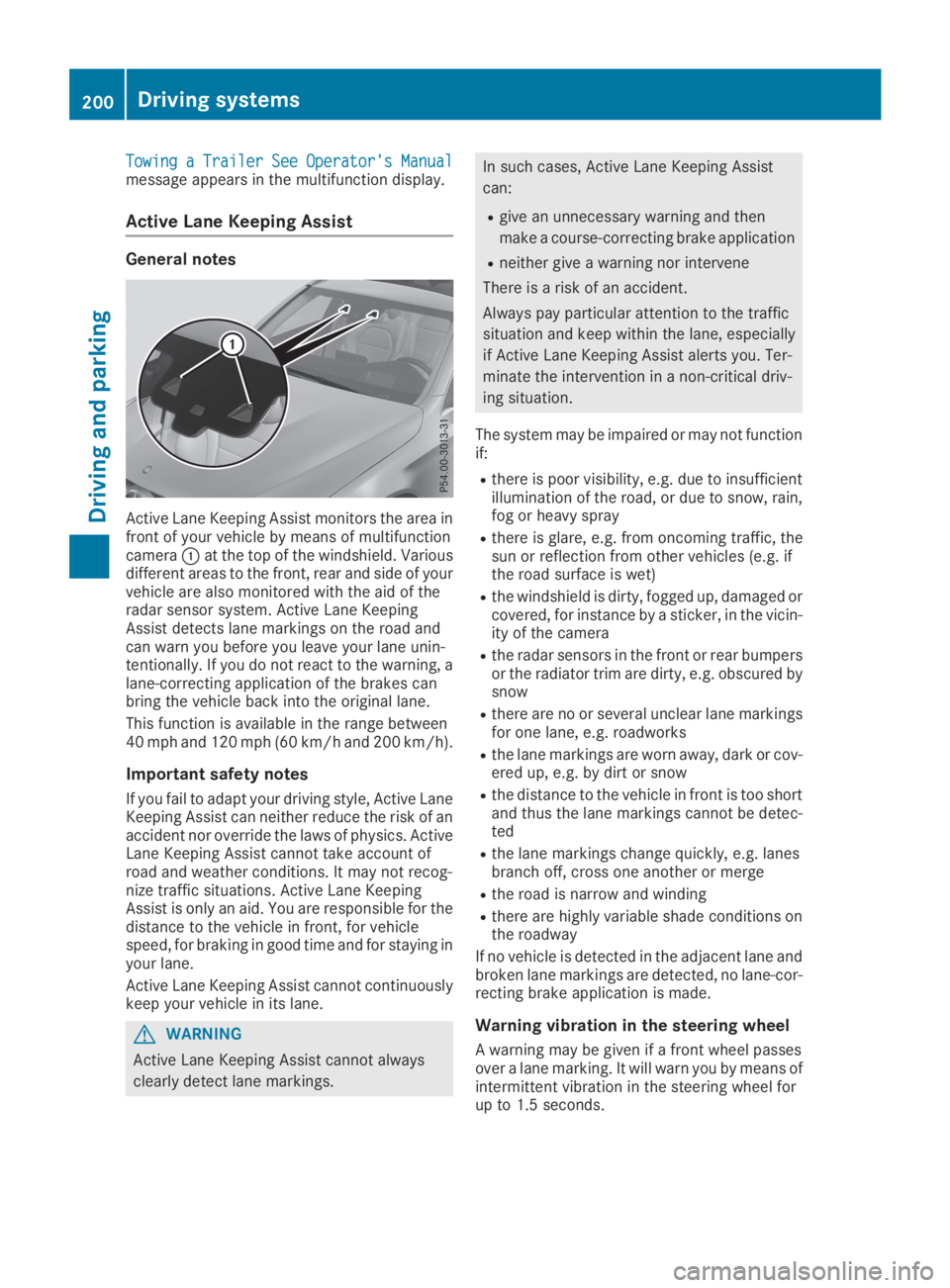
Active Lane Keeping Assist monitors the area infront of your vehicle by means of multifunctioncameraCat the top of the windshield. Variousdifferent areas to the front, rear and side of yourvehicle are also monitored with the aid of theradar sensor system. Active Lane KeepingAssist detects lane markings on the road andcan warn you before you leave your lane unin-tentionally. If you do not react to the warning, alane-correcting application of the brakes canbring the vehicle back into the original lane.
This function is available in the range between40 mph and 120 mph (60 km/h and 200 km/h).
Important safety notes
If you fail to adapt your driving style, Active LaneKeeping Assist can neither reduce the risk of anaccident nor override the laws of physics. ActiveLane Keeping Assist cannot take account ofroad and weather conditions. It may not recog-nize traffic situations. Active Lane KeepingAssist is only an aid. You are responsible for thedistance to the vehicle in front, for vehiclespeed, for braking in good time and for staying inyour lane.
Active Lane Keeping Assist cannot continuouslykeep your vehicle in its lane.
GWARNING
Active Lane Keeping Assist cannot always
clearly detect lane markings.
In such cases, Active Lane Keeping Assist
can:
Rgive an unnecessary warning and then
make a course-correcting brake application
Rneither give a warning nor intervene
There is a risk of an accident.
Always pay particular attention to the traffic
situation and keep within the lane, especially
if Active Lane Keeping Assist alerts you. Ter-
minate the intervention in a non-critical driv-
ing situation.
The system may be impaired or may not functionif:
Rthere is poor visibility, e.g. due to insufficientillumination of the road, or due to snow, rain,fog or heavy spray
Rthere is glare, e.g. from oncoming traffic, thesun or reflection from other vehicles (e.g. ifthe road surface is wet)
Rthe windshield is dirty, fogged up, damaged orcovered, for instance by a sticker, in the vicin-ity of the camera
Rthe radar sensors in the front or rear bumpersor the radiator trim are dirty, e.g. obscured bysnow
Rthere are no or several unclear lane markingsfor one lane, e.g. roadworks
Rthe lane markings are worn away, dark or cov-ered up, e.g. by dirt or snow
Rthe distance to the vehicle in front is too shortand thus the lane markings cannot be detec-ted
Rthe lane markings change quickly, e.g. lanesbranch off, cross one another or merge
Rthe road is narrow and winding
Rthere are highly variable shade conditions onthe roadway
If no vehicle is detected in the adjacent lane andbroken lane markings are detected, no lane-cor-recting brake application is made.
Warning vibration in the steering wheel
A warning may be given if a front wheel passesover a lane marking. It will warn you by means ofintermittent vibration in the steering wheel forup to 1.5 seconds.
200Driving systems
Driving and parking
Page 206 of 370
which the maximum permissible speed for vehi-cle/trailer combinations is above 60 mph(100 km/h).
When towing a trailer, your vehicle's handlingcharacteristics will be different in comparison towhen driving without a trailer and it will con-sume more fuel.
Shift to a lower gear on long and steep downhillgradients.
This also applies to:
Ractivated DISTRONIC PLUS
Ractivated cruise control
This will use the braking effect of the engine, sothat less braking will be required to maintain thespeed. This relieves the load on the brake sys-tem and prevents the brakes from overheatingand wearing too quickly. If you need additionalbraking, depress the brake pedal repeatedlyrather than continuously.
Driving tips
If the trailer swings from side to side:
XDo not accelerate.
XDo not counter-steer.
XBrake if necessary.
RMaintain a greater distance from the vehiclein front than when driving without a trailer.
RAvoid braking abruptly. If possible, brake gen-tly at first to allow the trailer to run on. Then,increase the braking force rapidly.
RThe values given for gradient-climbing capa-bilities from a standstill refer to sea level.When driving in mountainous areas, note thatthe power output of the engine and, conse-quently, the vehicle's gradient-climbing capa-bility, decreases with increasing altitude.
Installing the ball coupling
GWARNING
If the ball coupling is not correctly installed
and secured, it could come loose while driving
and endanger other road users. There is a risk
of an accident and injury.
Install and secure the ball coupling as descri-
bed in the ball coupling manufacturer's instal-
lation instructions. Make sure that the ball
coupling is correctly installed and secured
before every journey.
GWARNING
If the ball coupling is not installed and secured
correctly the trailer may come loose. There is
a risk of an accident.
Install and secure the ball coupling as descri-
bed in the ball coupling installation instruc-
tions. Make sure that the ball coupling is
installed and secured correctly before every
journey.
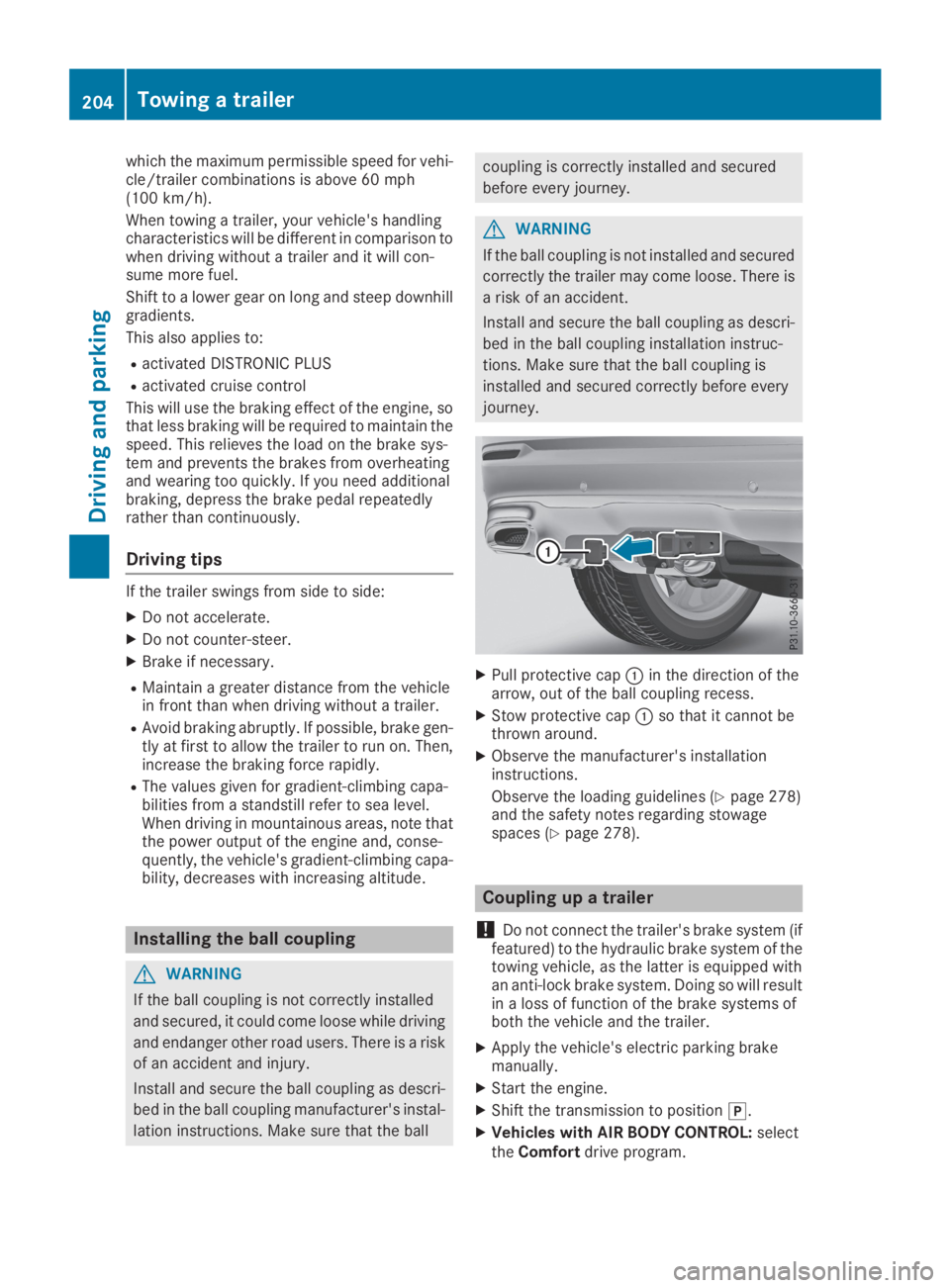
XPull protective capCin the direction of thearrow, out of the ball coupling recess.
XStow protective capCso that it cannot bethrown around.
XObserve the manufacturer's installationinstructions.
Observe the loading guidelines (Ypage 278)and the safety notes regarding stowagespaces (Ypage 278).
Coupling up a trailer
!Do not connect the trailer's brake system (iffeatured) to the hydraulic brake system of thetowing vehicle, as the latter is equipped withan anti-lock brake system. Doing so will resultin a loss of function of the brake systems ofboth the vehicle and the trailer.
XApply the vehicle's electric parking brakemanually.
XStart the engine.
XShift the transmission to position].
XVehicles with AIR BODY CONTROL:selecttheComfortdrive program.
204Towing a trailer
Driving and parking
Page 207 of 370
XSwitch off the engine.
XClose the doors and tailgate.
XCouple up the trailer.
XEstablish the electrical connection betweenthe vehicle and the trailer.
XCheck that the trailer lighting system is work-ing.
XPush the combination switch upwards/down-wards and check whether the correspondingturn signal on the trailer flashes.
A trailer that is connected is recognized onlywhen the electrical connection is establishedcorrectly and when the lighting system is work-ing properly. The function of other systems alsodepends on this, for example:
RESP®
RPARKTRONIC
RActive Parking Assist
RActive Blind Spot Assist
RActive Lane Keeping Assist
Vehicles with AIR BODY CONTROL: if you coupleup a trailer, the vehicle always remains at high-way level. Observe the following note when cou-pling up a trailer:
RUnless highway level has been set manually,the vehicle is automatically lowered to high-way level. If a speed of 5 mph (8 km/h) hasbeen reached, this may be the case.
These restrictions apply to accessories that aresupplied with power via the trailer socket in yourvehicle, e.g. a rear bicycle rack.
Observe the maximum permissible trailerdimensions (width and length).
Most U.S. states and all Canadian provincesrequire by law:
RSafety chains between the towing vehicle andthe trailer. The chains should be cross-woundunder the trailer drawbar. They must be fas-tened to the vehicle's trailer coupling, not tothe bumper or the axle.
Leave enough play in the chains to make tightcornering possible.
RA separate brake system for certain types oftrailer.
RSafety switch for braked trailers. Check thespecific legal requirements applicable to yourstate.
If the trailer becomes detached from the tow-ing vehicle, the safety feature applies thetrailer brakes.
Towing a trailer
There are several legal requirements for towinga trailer, e.g. the maximum permissible speed.Make sure that your car/trailer combinationcomplies with the local regulations:
Rin your place of residence
Rat your destination
The police and local authorities can provide reli-able information.
To accumulate driving experience and accustomyourself to the new handling characteristics,practice the following at a location where thereis no traffic:
RCornering
RStopping
RBacking up
Check the following before the journey:
RTrailer tow hitch
RSafety switch for braked trailers
RSafety chains
RElectrical connections
RLighting system
RWheels and tires
RLoad securing
Adjust the exterior mirrors so that you have aclear view of the rear section of the trailer.
If the trailer is equipped with electronically con-trolled brakes, pull away carefully in the car/trailer combination. Brake manually using thebrake controller and check whether the brakesfunction correctly.
Regularly check that the load is secure.
When towing a trailer, your vehicle's handlingcharacteristics will be different in comparisonwith when driving without a trailer.
The vehicle/trailer combination:
Ris heavier
Ris restricted in its acceleration and gradient-climbing capability
Rhas an increased braking distance
Ris affected more by strong crosswinds
Rdemands more sensitive steering
Rhas a larger turning circle
Avoid sudden steering movements.
Avoid braking abruptly. If possible, brake gentlyat first to allow the trailer to run on. Then,increase the braking force rapidly.
Towing a trailer205
Driving and parking
Z