lights MERCEDES-BENZ GLC 2019 Owner's Guide
[x] Cancel search | Manufacturer: MERCEDES-BENZ, Model Year: 2019, Model line: GLC, Model: MERCEDES-BENZ GLC 2019Pages: 370, PDF Size: 19.55 MB
Page 150 of 370
reach the red area of the tachometer. There isotherwise a risk of engine damage.
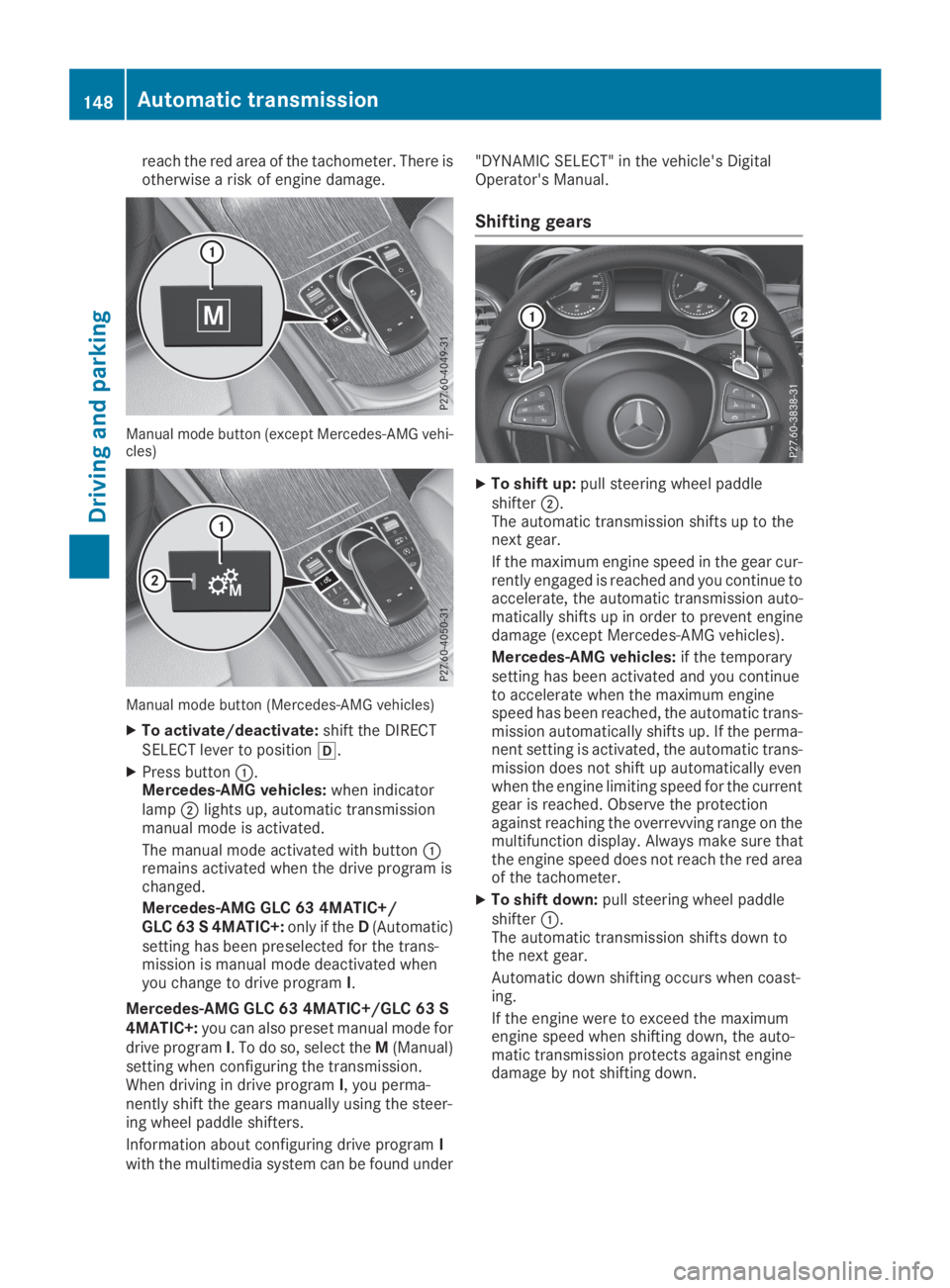
Manual mode button (except Mercedes-AMG vehi-cles)
Manual mode button (Mercedes-AMG vehicles)
XTo activate/deactivate:shift the DIRECTSELECT lever to position[.
XPress buttonC.Mercedes-AMG vehicles:when indicatorlampDlights up, automatic transmissionmanual mode is activated.
The manual mode activated with buttonCremains activated when the drive program ischanged.
Mercedes-AMG GLC 63 4MATIC+/GLC 63 S 4MATIC+:only if theD(Automatic)setting has been preselected for the trans-mission is manual mode deactivated whenyou change to drive programI.
Mercedes-AMG GLC 63 4MATIC+/GLC 63 S4MATIC+:you can also preset manual mode fordrive programI. To do so, select theM(Manual)setting when configuring the transmission.When driving in drive programI, you perma-nently shift the gears manually using the steer-ing wheel paddle shifters.
Information about configuring drive programIwith the multimedia system can be found under
"DYNAMIC SELECT" in the vehicle's DigitalOperator's Manual.
Shifting gears
XTo shift up:pull steering wheel paddleshifterD.The automatic transmission shifts up to thenext gear.
If the maximum engine speed in the gear cur-rently engaged is reached and you continue toaccelerate, the automatic transmission auto-matically shifts up in order to prevent enginedamage (except Mercedes-AMG vehicles).
Mercedes-AMG vehicles:if the temporarysetting has been activated and you continueto accelerate when the maximum enginespeed has been reached, the automatic trans-mission automatically shifts up. If the perma-nent setting is activated, the automatic trans-mission does not shift up automatically evenwhen the engine limiting speed for the currentgear is reached. Observe the protectionagainst reaching the overrevving range on themultifunction display. Always make sure thatthe engine speed does not reach the red areaof the tachometer.
XTo shift down:pull steering wheel paddleshifterC.The automatic transmission shifts down tothe next gear.
Automatic down shifting occurs when coast-ing.
If the engine were to exceed the maximumengine speed when shifting down, the auto-matic transmission protects against enginedamage by not shifting down.
148Automatic transmission
Driving and parking
Page 156 of 370
Electric parking brake
General notes
GWARNING
If you leave children unsupervised in the vehi-
cle, they could set it in motion by, for example:
Rrelease the parking brake.
Rshift the automatic transmission out of the
parking positionP.
Rstart the engine.
In addition, they may operate vehicle equip-
ment and become trapped. There is a risk of
an accident and injury.
When leaving the vehicle, always take the
SmartKey with you and lock the vehicle. Never
leave children unsupervised in the vehicle.
The function of the electric parking brake isdependent on the on-board voltage. If the on-board voltage is low or there is a malfunction inthe system, it may not be possible to apply thereleased parking brake.
XIf this happens, park the vehicle on levelground only and secure it to prevent it fromrolling away.
XShift the transmission to position].
It may not be possible to release an appliedparking brake if the on-board voltage is low orthere is a malfunction in the system. Contact aqualified specialist workshop.
The electric parking brake performs a functiontest at regular intervals while the engine isswitched off. The sounds that can be heard whilethis is occurring are normal.
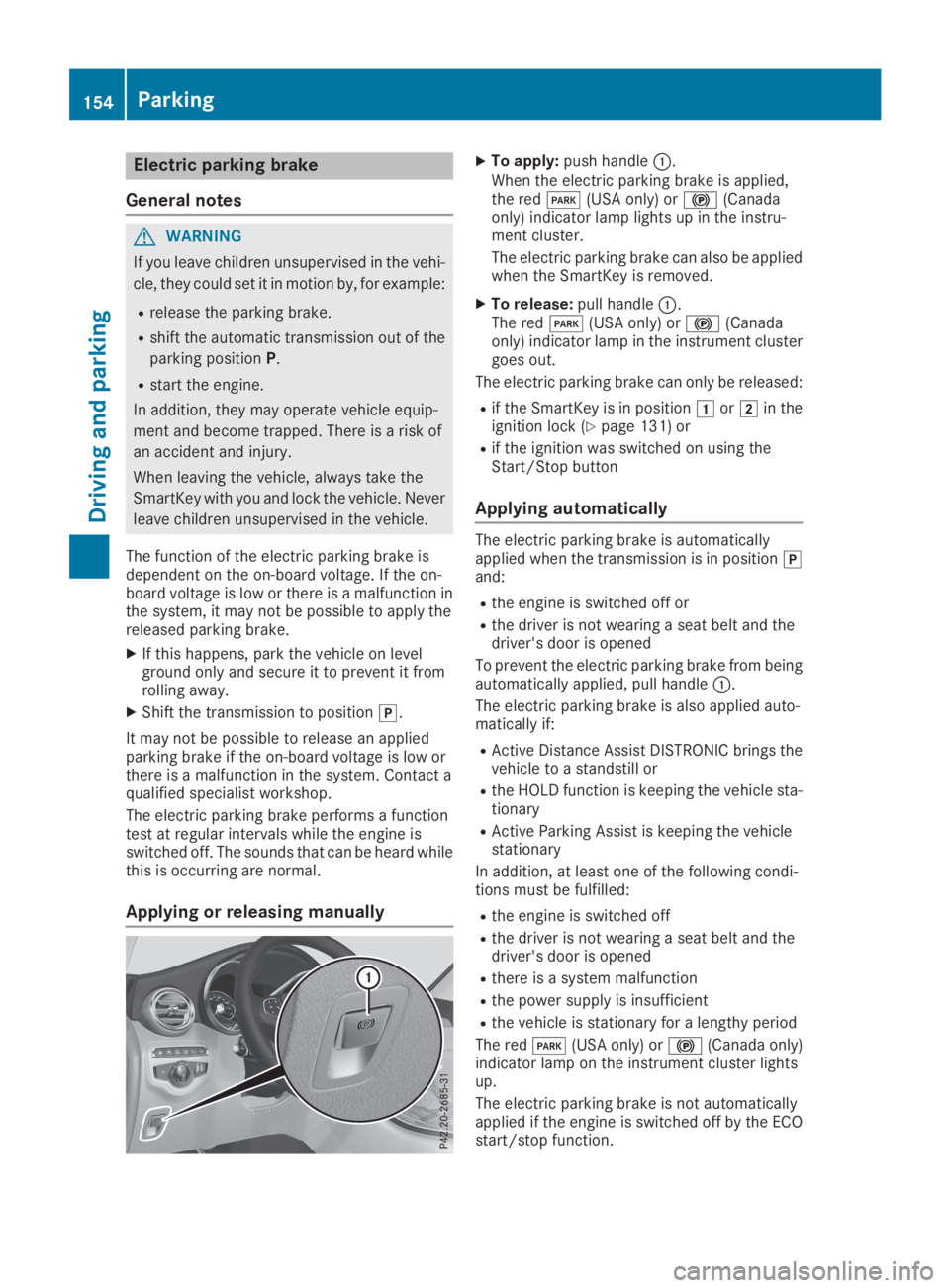
Applying or releasing manually
XTo apply:push handleC.When the electric parking brake is applied,the redI(USA only) or$(Canadaonly) indicator lamp lights up in the instru-ment cluster.
The electric parking brake can also be appliedwhen the SmartKey is removed.
XTo release:pull handleC.The redI(USA only) or$(Canadaonly) indicator lamp in the instrument clustergoes out.
The electric parking brake can only be released:
Rif the SmartKey is in positionGorHin theignition lock (Ypage 131) or
Rif the ignition was switched on using theStart/Stop button
Applying automatically
The electric parking brake is automaticallyapplied when the transmission is in position]and:
Rthe engine is switched off or
Rthe driver is not wearing a seat belt and thedriver's door is opened
To prevent the electric parking brake from beingautomatically applied, pull handleC.
The electric parking brake is also applied auto-matically if:
RActive Distance Assist DISTRONIC brings thevehicle to a standstill or
Rthe HOLD function is keeping the vehicle sta-tionary
RActive Parking Assist is keeping the vehiclestationary
In addition, at least one of the following condi-tions must be fulfilled:
Rthe engine is switched off
Rthe driver is not wearing a seat belt and thedriver's door is opened
Rthere is a system malfunction
Rthe power supply is insufficient
Rthe vehicle is stationary for a lengthy period
The redI(USA only) or$(Canada only)indicator lamp on the instrument cluster lightsup.
The electric parking brake is not automaticallyapplied if the engine is switched off by the ECOstart/stop function.
154Parking
Driving and parking
Page 160 of 370
This helps you to avoid overheating thebrakes and wearing them out excessively.
When you take advantage of engine braking, adrive wheel may not turn for some time, e.g.on a slippery road surface. This could causedamage to the drive train. This type of damageis not covered by the Mercedes-Benz war-ranty.
Heavy and light loads
GWARNING
If you rest your foot on the brake pedal while
driving, the braking system can overheat. This
increases the stopping distance and can even
cause the braking system to fail. There is a
risk of an accident.
Never use the brake pedal as a footrest. Never
depress the brake pedal and the accelerator
pedal at the same time.
!Depressing the brake pedal constantlyresults in excessive and premature wear tothe brake pads.
If the brakes have been subjected to a heavyload, do not stop the vehicle immediately. Driveon for a short while. This allows the airflow tocool the brakes more quickly.
Wet roads
If you have driven for a long time in heavy rainwithout braking, there may be a delayed reac-tion from the brakes when braking for the firsttime. This may also occur after the vehicle hasbeen washed or driven through deep water.
You have to depress the brake pedal morefirmly. Maintain a greater distance from thevehicle in front.
After driving on a wet road or having the vehiclewashed, brake firmly while paying attention tothe traffic conditions. This will warm up thebrake discs, thereby drying them more quicklyand protecting them against corrosion.
Limited braking performance on salt-
treated roads
If you drive on salted roads, a layer of salt resi-due may form on the brake discs and brakepads. This can result in a significantly longerbraking distance.
RIn order to prevent any salt build-up, apply thebrakes occasionally while paying attention tothe traffic conditions.
RCarefully depress the brake pedal and thebeginning and end of a journey.
RMaintain a greater distance to the vehicleahead.
Servicing the brakes
!The brake fluid level may be too low, if:
Rif the red brake warning lamp lights up inthe instrument cluster and
Ryou hear a warning tone while the engine isrunning
Observe additional warning messages in themultifunction display.
The brake fluid level may be too low due tobrake pad wear or leaking brake lines.
Have the brake system checked immediately.Consult a qualified specialist workshop toarrange this.
!Vehicles with 4MATIC:function or per-formance tests may only be carried out on a 2-axle dynamometer. If you wish to operate thevehicle on such a dynamometer, please con-sult a qualified specialist workshop inadvance. You could otherwise damage thedrive train or the brake system.
!Vehicles with 4MATIC:the ESP®systemoperates automatically. If the electric parkingbrake is tested on a brake dynamometer, theengine and ignition must be switched off: turnthe SmartKey in the ignition lock to position
Page 171 of 370
Rthe distance to the vehicle in front is too shortand thus the lane markings cannot be detec-ted
Rthe lane markings change quickly, e.g. lanesbranch off, cross one another or merge
Rthe road is narrow and winding
Rthere are highly variable shade conditions onthe roadway
The system is switched to passive and no longerassists you by performing steering interventionsif:
Ryou actively change lane
Ryou switch on the turn signal
Ryou take your hands off the steering wheel ordo not steer for a prolonged period of time
Once you have finished changing lanes, ActiveSteering Assist automatically reactivates.
Active Steering Assist cannot provide assis-tance:
Ron very sharp corners
Rwhen towing a trailer
Rwhen a loss of tire pressure or a defective tirehas been detected and displayed
Observe the important safety notes on ActiveDistance Assist DISTRONIC (Ypage 162).
The steering interventions are carried out with alimited steering moment. The system requiresthe driver to keep his hands on the steeringwheel and to steer himself.
If you do not steer yourself or if you take yourhands off the steering wheel for a prolongedperiod of time, the system will first alert you witha visual warning. A steering wheel symbolappears in the multifunction display. If you havestill not started to steer and have not taken holdof the steering wheel after five seconds at thelatest, a warning tone also sounds to remind youto take control of the vehicle. Active SteeringAssist is then switched to passive. Active Dis-tance Assist DISTRONIC remains active.
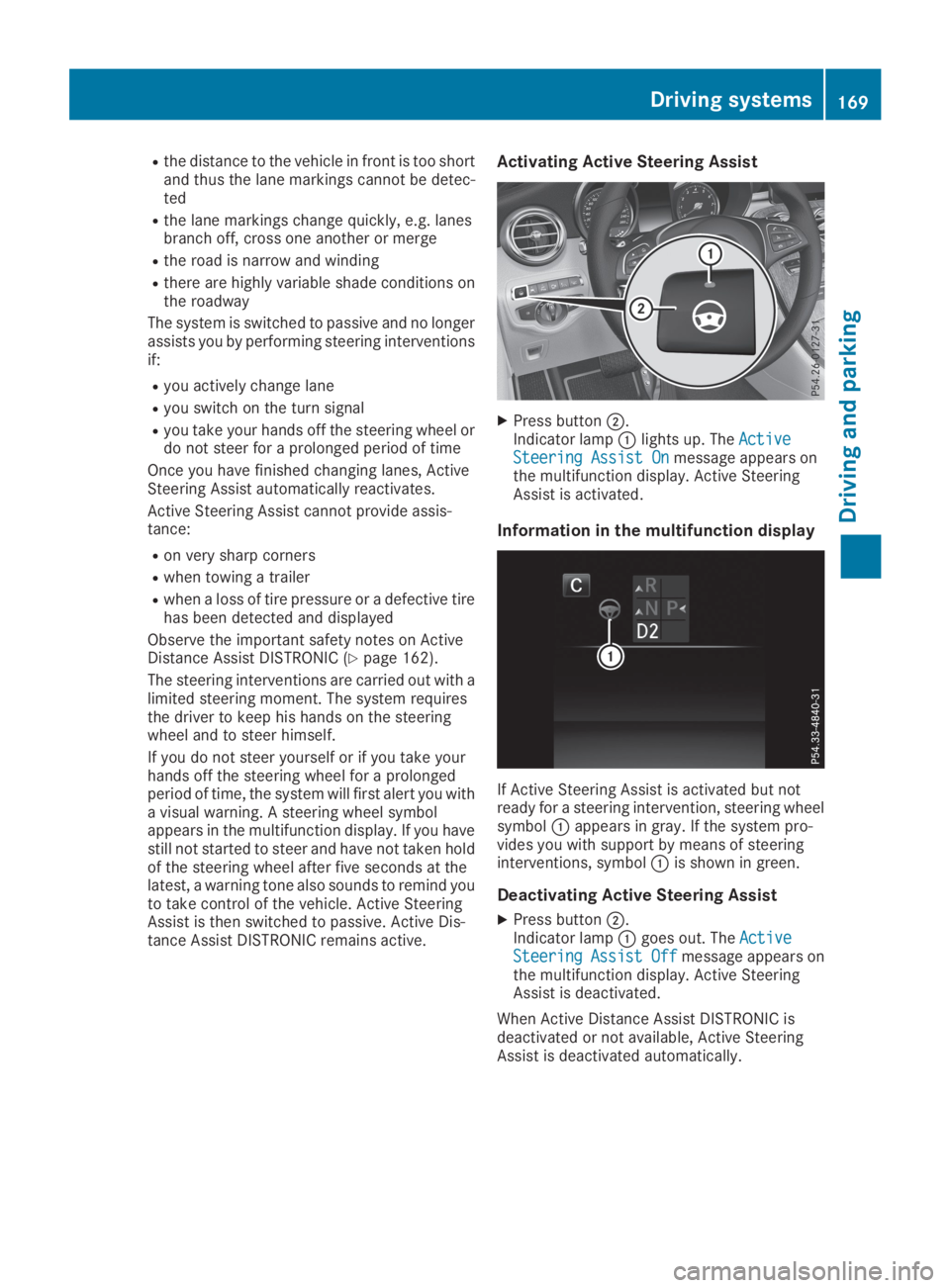
Activating Active Steering Assist
XPress buttonD.Indicator lampClights up. TheActiveActiveSteering Assist OnSteering Assist Onmessage appears onthe multifunction display. Active SteeringAssist is activated.
Information in the multifunction display
If Active Steering Assist is activated but notready for a steering intervention, steering wheelsymbolCappears in gray. If the system pro-vides you with support by means of steeringinterventions, symbolCis shown in green.
Deactivating Active Steering Assist
XPress buttonD.Indicator lampCgoes out. TheActiveActiveSteeringSteeringAssistAssistOffOffmessage appears onthe multifunction display. Active SteeringAssist is deactivated.
When Active Distance Assist DISTRONIC isdeactivated or not available, Active SteeringAssist is deactivated automatically.
Driving systems169
Driving an d parking
Z
Page 175 of 370
S(Sport)Rthe suspension setting ismore taut
Rthe vehicle is set to low level
RMercedes-AMG GLC 634MATIC+/GLC 63 S4MATIC+:the 4MATIC+ issynchronised more dynami-cally
S+(SportPlus)
Mercedes-AMG GLC63 4MATIC+/GLC63 S4MATIC+:RACE
Rthe suspension setting iseven more taut
Rthe vehicle is set to low level
RMercedes-AMG GLC 634MATIC+/GLC 63 S4MATIC+:the 4MATIC+ issynchronised more dynami-cally
Important safety notes
GWARNING
When the vehicle is being lowered, people
could become trapped if their limbs are
between the vehicle body and the wheels or
underneath the vehicle. There is a risk of
injury.
Make sure no one is underneath the vehicle or
in the immediate vicinity of the wheel arches
when the vehicle is being lowered.
iIf one of the doors is open, the vehicle is notlowered.
Vehicle level
Setting the raised vehicle level
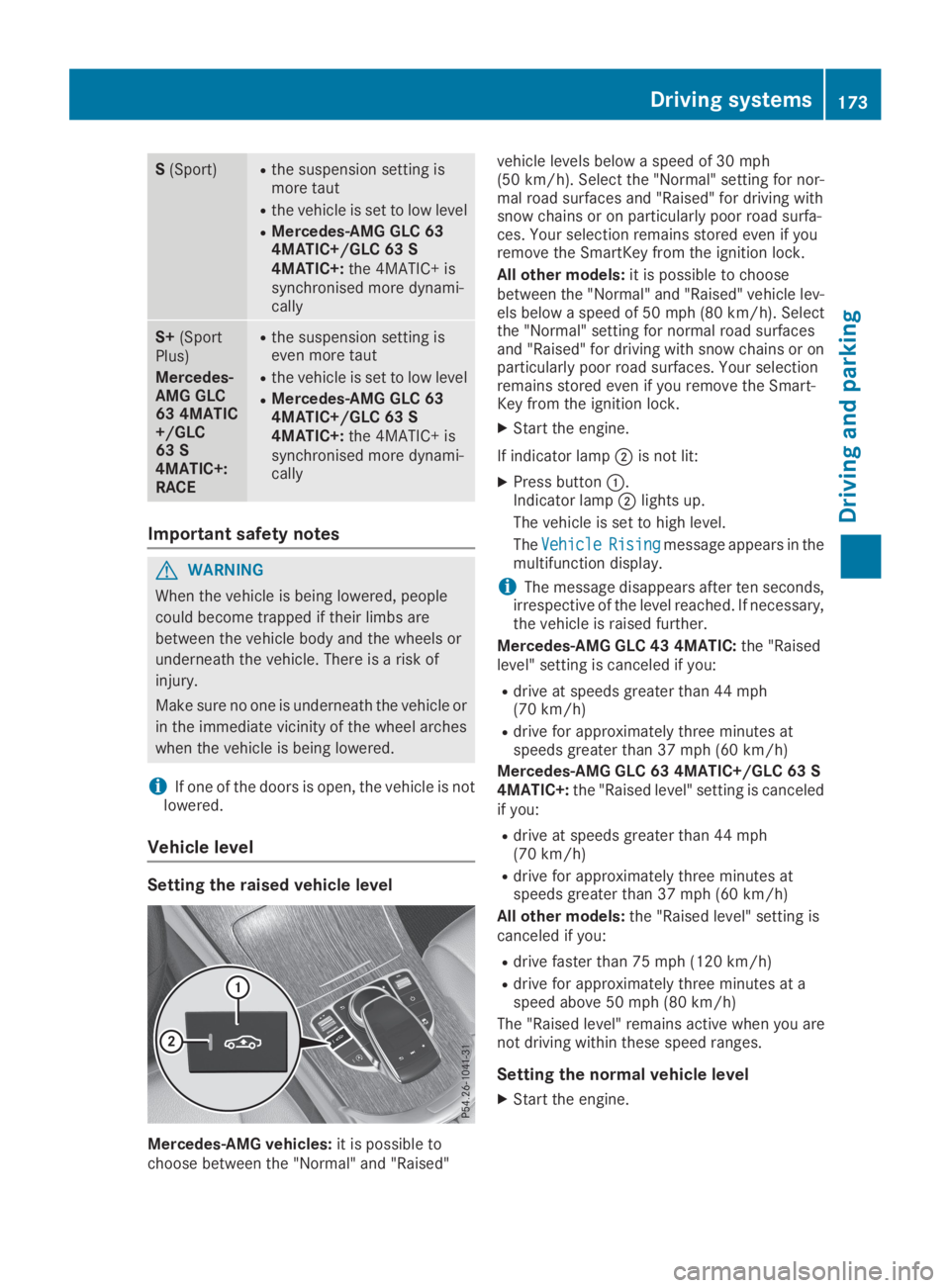
Mercedes-AMG vehicles:it is possible tochoose between the "Normal" and "Raised"
vehicle levels below a speed of 30 mph(50 km/h). Select the "Normal" setting for nor-mal road surfaces and "Raised" for driving withsnow chains or on particularly poor road surfa-ces. Your selection remains stored even if youremove the SmartKey from the ignition lock.
All other models:it is possible to choosebetween the "Normal" and "Raised" vehicle lev-els below a speed of 50 mph (80 km/h). Selectthe "Normal" setting for normal road surfacesand "Raised" for driving with snow chains or onparticularly poor road surfaces. Your selectionremains stored even if you remove the Smart-Key from the ignition lock.
XStart the engine.
If indicator lampDis not lit:
XPress buttonC.Indicator lampDlights up.
The vehicle is set to high level.
TheVehicleVehicleRisingRisingmessage appears in themultifunction display.
iThe message disappears after ten seconds,irrespective of the level reached. If necessary,the vehicle is raised further.
Mercedes-AMG GLC 43 4MATIC:the "Raisedlevel" setting is canceled if you:
Rdrive at speeds greater than 44 mph(70 km/h)
Rdrive for approximately three minutes atspeeds greater than 37 mph (60 km/h)
Mercedes-AMG GLC 63 4MATIC+/GLC 63 S4MATIC+:the "Raised level" setting is canceledif you:
Rdrive at speeds greater than 44 mph(70 km/h)
Rdrive for approximately three minutes atspeeds greater than 37 mph (60 km/h)
All other models:the "Raised level" setting iscanceled if you:
Rdrive faster than 75 mph (120 km/h)
Rdrive for approximately three minutes at aspeed above 50 mph (80 km/h)
The "Raised level" remains active when you arenot driving within these speed ranges.
Setting the normal vehicle level
XStart the engine.
Driving systems173
Driving and parking
Z
Page 184 of 370
Problems with Parking Assist PARKTRONIC
ProblemPossible causes/consequences andPPSolutions
Only the red segments inthe Parking AssistPARKTRONIC warningdisplays are lit. You alsohear a warning tone forapproximately two sec-onds.
Parking AssistPARKTRONIC is thendeactivated and the indi-cator lamp on thePARKTRONIC buttonlights up.
Parking Assist PARKTRONIC has malfunctioned and has been deacti-vated.
XIf problems persist, have Parking Assist PARKTRONIC checked at aqualified specialist workshop.
Only the red segments inthe Parking AssistPARKTRONIC warningdisplays are lit. ParkingAssist PARKTRONIC isthen deactivated.
The Parking Assist PARKTRONIC sensors are dirty or there is inter-ference.
XClean the Parking Assist PARKTRONIC sensors (Ypage 309).
XSwitch the ignition back on.
The problem may be caused by an external source of radio or ultra-sound waves.
XCheck to see if Parking Assist PARKTRONIC works at a differentlocation.
Rear view camera
General notes
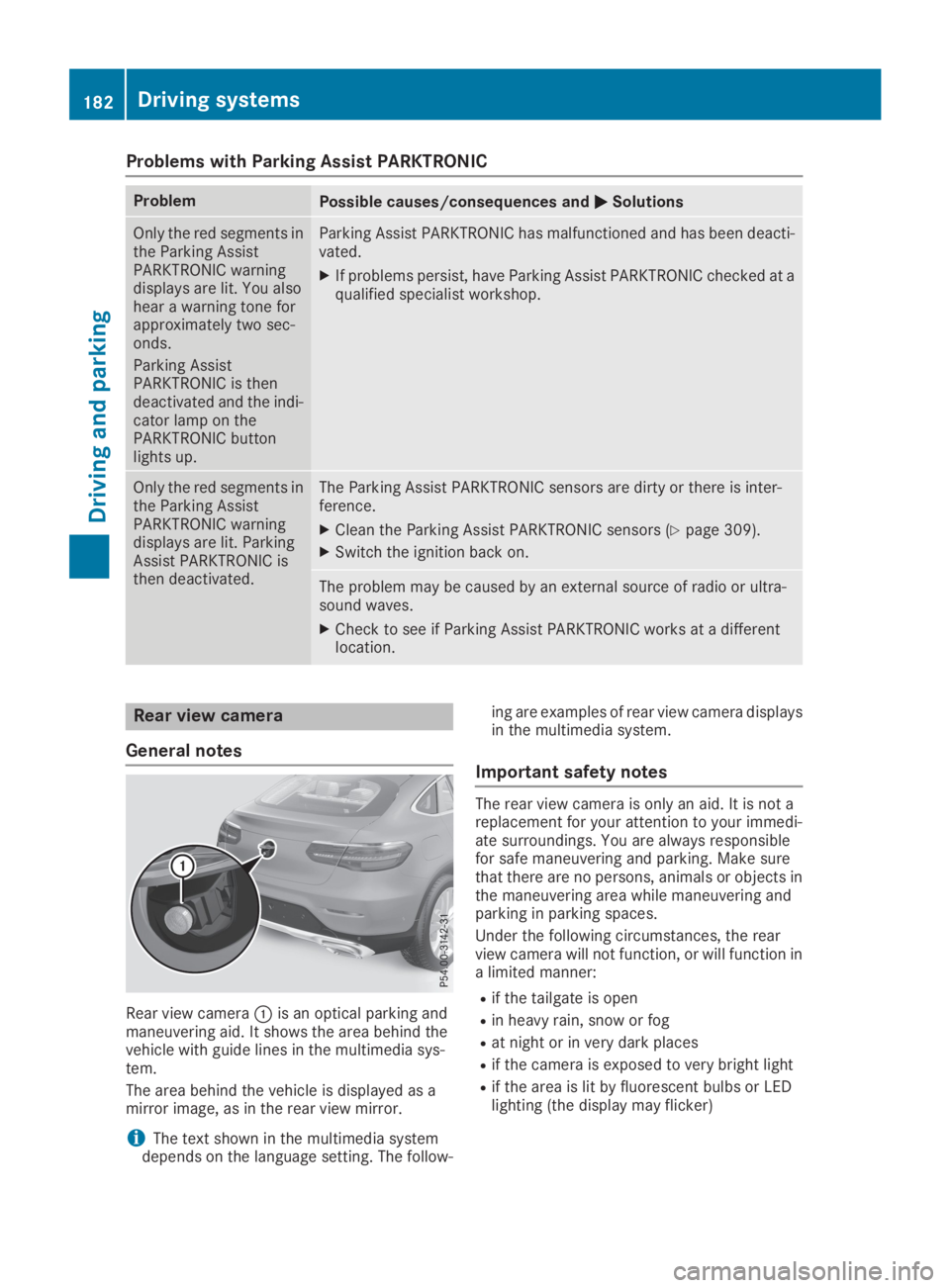
Rear view cameraCis an optical parking andmaneuvering aid. It shows the area behind thevehicle with guide lines in the multimedia sys-tem.
The area behind the vehicle is displayed as amirror image, as in the rear view mirror.
iThe text shown in the multimedia systemdepends on the language setting. The follow-
ing are examples of rear view camera displaysin the multimedia system.
Important safety notes
The rear view camera is only an aid. It is not areplacement for your attention to your immedi-ate surroundings. You are always responsiblefor safe maneuvering and parking. Make surethat there are no persons, animals or objects inthe maneuvering area while maneuvering andparking in parking spaces.
Under the following circumstances, the rearview camera will not function, or will function ina limited manner:
Rif the tailgate is open
Rin heavy rain, snow or fog
Rat night or in very dark places
Rif the camera is exposed to very bright light
Rif the area is lit by fluorescent bulbs or LEDlighting (the display may flicker)
182Driving systems
Driving and parking
Page 196 of 370
sors. A warning lamp lights up in the exteriormirrors and draws your attention to vehiclesdetected in the monitored area. If you thenswitch on the corresponding turn signal tochange lanes, you will also receive a visual warn-ing and a warning tone.
Blind Spot Assist supports you from a speed ofapproximately 20 mph (30 km/h).
Important safety notes
GWARNING
Blind Spot Assist does not react to:
Rvehicles overtaken too closely on the side,
placing them in the blind spot area
Rvehicles which approach with a large speed
differential and overtake your vehicle
As a result, Blind Spot Assist may not give
warnings in such situations. There is a risk of
an accident.
Always observe the traffic conditions care-
fully, and maintain a safe lateral distance.
Blind Spot Assist is only an aid. It may fail todetect some vehicles and is no substitute forattentive driving. Always ensure that there issufficient distance to the side for other roadusers and obstacles.
iUSA only:
This device has been approved by the FCC asa "Vehicular Radar System". The radar sensoris intended for use in an automotive radarsystem only. Removing, tampering with, oraltering the device will void any warranties,and is not permitted by the FCC. Do not tam-per with, alter, or use in any non-approvedway.
Any unauthorized modification to this devicecould void the user's authority to operate theequipment.
Radar sensors
The radar sensors for Blind Spot Assist are inte-grated into the rear bumper. Make sure that thebumpers are free from dirt, ice or slush. Thesensors must not be covered, for example bycycle racks or overhanging loads. Following asevere impact or in the event of damage to thebumpers, have the function of the radar sensorschecked at a qualified specialist workshop.Blind Spot Assist may no longer work properly.
Monitoring area
In particular, the detection of obstacles can beimpaired if:
RThere is dirt on the sensors or anything elsecovering the sensors
Rthere is poor visibility, e.g. due to fog, heavyrain, snow or spray
Rthere are narrow vehicles, e.g. motorcycles orbicycles
Rthe road has very wide lanes
Rthe road has narrow lanes
Ryou are not driving in the middle of the lane
Rthere are barriers or other road boundaries
Vehicles in the monitoring range are then notindicated.
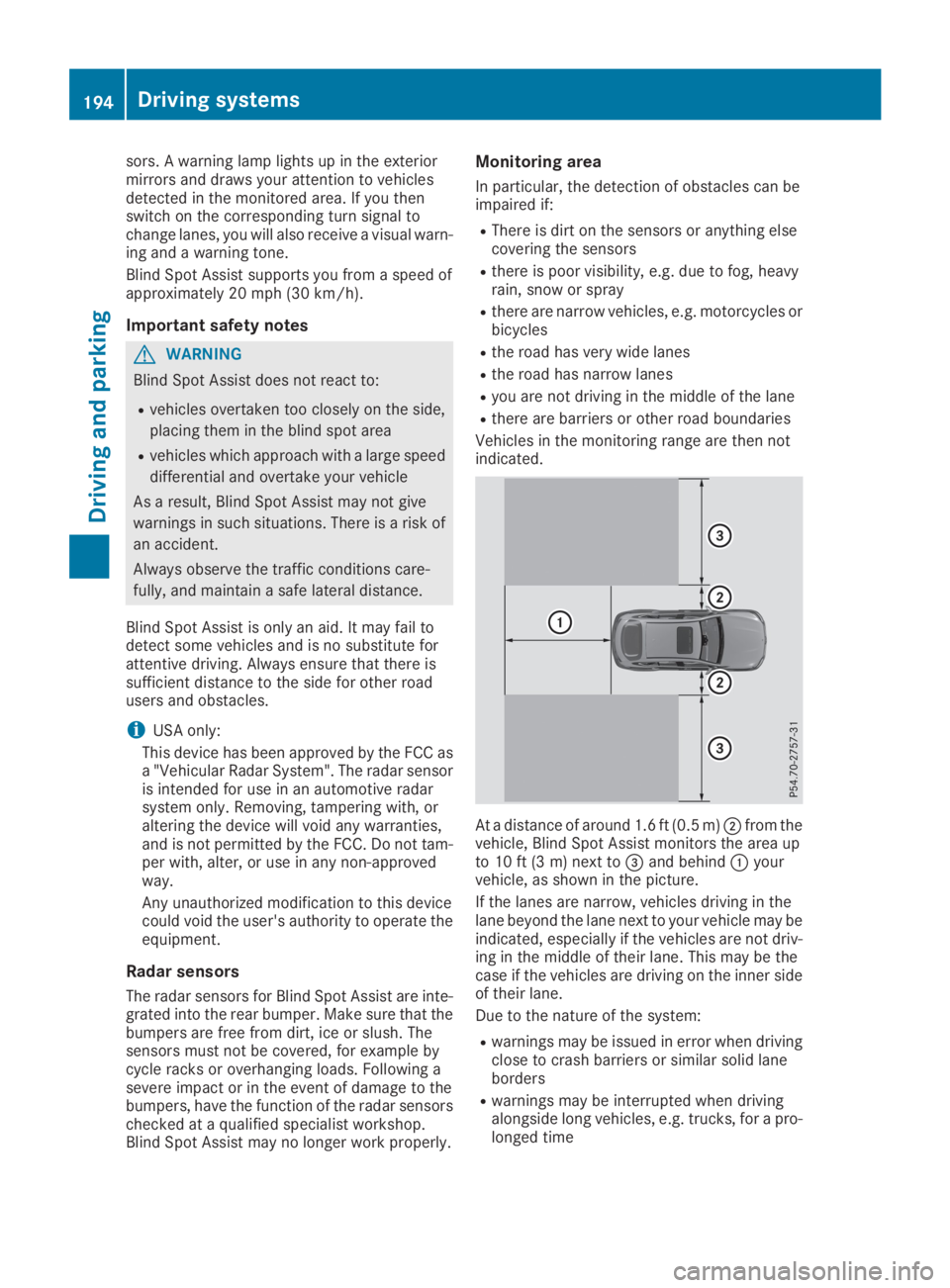
At a distance of around 1.6 ft (0.5 m)Dfrom thevehicle, Blind Spot Assist monitors the area upto 10 ft (3 m) next to
Page 197 of 370
Warning lamp
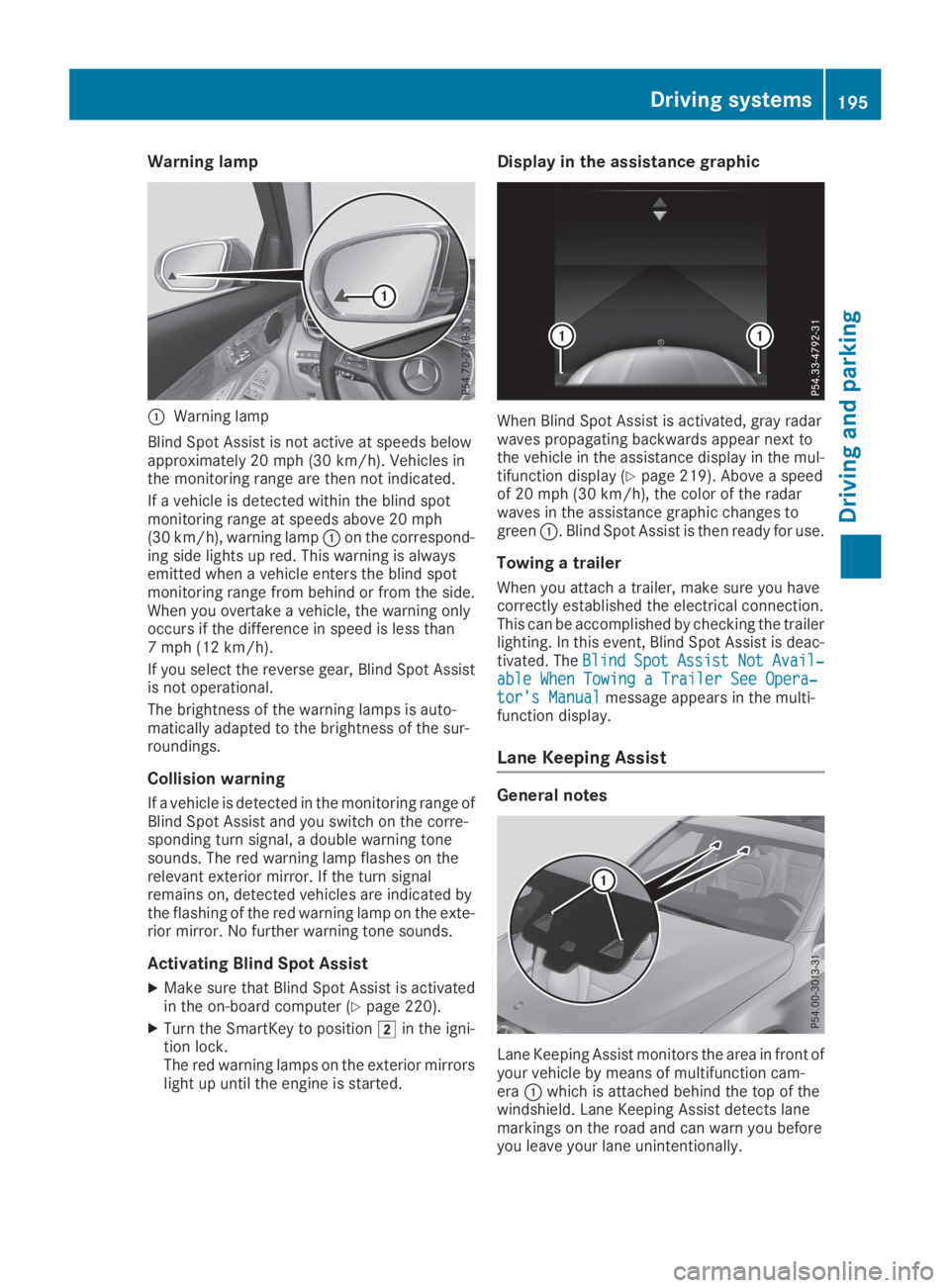
CWarning lamp
Blind Spot Assist is not active at speeds belowapproximately 20 mph (30 km/h). Vehicles inthe monitoring range are then not indicated.
If a vehicle is detected within the blind spotmonitoring range at speeds above 20 mph(30 km/h), warning lampCon the correspond-ing side lights up red. This warning is alwaysemitted when a vehicle enters the blind spotmonitoring range from behind or from the side.When you overtake a vehicle, the warning onlyoccurs if the difference in speed is less than7 mph (12 km/h).
If you select the reverse gear, Blind Spot Assistis not operational.
The brightness of the warning lamps is auto-matically adapted to the brightness of the sur-roundings.
Collision warning
If a vehicle is detected in the monitoring range ofBlind Spot Assist and you switch on the corre-sponding turn signal, a double warning tonesounds. The red warning lamp flashes on therelevant exterior mirror. If the turn signalremains on, detected vehicles are indicated bythe flashing of the red warning lamp on the exte-rior mirror. No further warning tone sounds.
Activating Blind Spot Assist
XMake sure that Blind Spot Assist is activatedin the on-board computer (Ypage 220).
XTurn the SmartKey to positionHin the igni-tion lock.The red warning lamps on the exterior mirrorslight up until the engine is started.
Display in the assistance graphic
When Blind Spot Assist is activated, gray radarwaves propagating backwards appear next tothe vehicle in the assistance display in the mul-tifunction display (Ypage 219). Above a speedof 20 mph (30 km/h), the color of the radarwaves in the assistance graphic changes togreenC. Blind Spot Assist is then ready for use.
Towing a trailer
When you attach a trailer, make sure you havecorrectly established the electrical connection.This can be accomplished by checking the trailerlighting. In this event, Blind Spot Assist is deac-tivated. TheBlindBlindSpotSpotAssistAssistNotNotAvail‐Avail‐able When Towing a Trailer See Opera‐able When Towing a Trailer See Opera‐tor's Manualtor's Manualmessage appears in the multi-function display.
Lane Keeping Assist
General notes
Lane Keeping Assist monitors the area in front ofyour vehicle by means of multifunction cam-eraCwhich is attached behind the top of thewindshield. Lane Keeping Assist detects lanemarkings on the road and can warn you beforeyou leave your lane unintentionally.
Driving systems195
Driving and parking
Z
Page 198 of 370
This function is available in the range between40 mph and 120 mph (60 km/hand 200 km/h).
A warning may be given if a front wheel passesover a lane marking. It will warn you by means ofintermittent vibration in the steering wheel forup to 1.5 seconds.
Important safety notes
GWARNING
Lane Keeping Assist cannot always clearly
detect lane markings.
In such cases, Lane Keeping Assist can:
Rgive an unnecessary warning
Rnot give a warning
There is a risk of an accident.
Always pay particular attention to the traffic
situation and keep within the lane, especially
if Lane Keeping Assist alerts you.
GWARNING
The Lane Keeping Assist warning does not
return the vehicle to the original lane. There is
a risk of an accident.
You should always steer, brake or accelerate
yourself, in particular if warned by Lane Keep-
ing Assist.
Lane Keeping Assist can neither reduce the riskof an accident if you fail to adapt your drivingstyle nor override the laws of physics. LaneKeeping Assist cannot take into account theroad, traffic and weather conditions. Lane Keep-ing Assist is merely an aid. You are responsiblefor the distance to the vehicle in front, for vehi-cle speed, for braking in good time and for stay-ing in your lane.
The Lane Keeping Assist does not keep the vehi-cle in the lane.
The system may be impaired or may not functionif:
Rthere is poor visibility, e.g. due to insufficientillumination of the road, or due to snow, rain,fog or heavy spray
Rthere is glare, e.g. from oncoming traffic, thesun or reflection from other vehicles (e.g. ifthe road surface is wet)
Rthe windshield is dirty, fogged up, damaged orcovered, for instance by a sticker, in the vicin-ity of the camera
Rthere are no or several unclear lane markingsfor one lane, e.g. roadworks
Rthe lane markings are worn away, dark or cov-ered up, e.g. by dirt or snow
Rthe distance to the vehicle in front is too shortand thus the lane markings cannot be detec-ted
Rthe lane markings change quickly, e.g. lanesbranch off, cross one another or merge
Rthe road is narrow and winding
Rthere are highly variable shade conditions onthe roadway
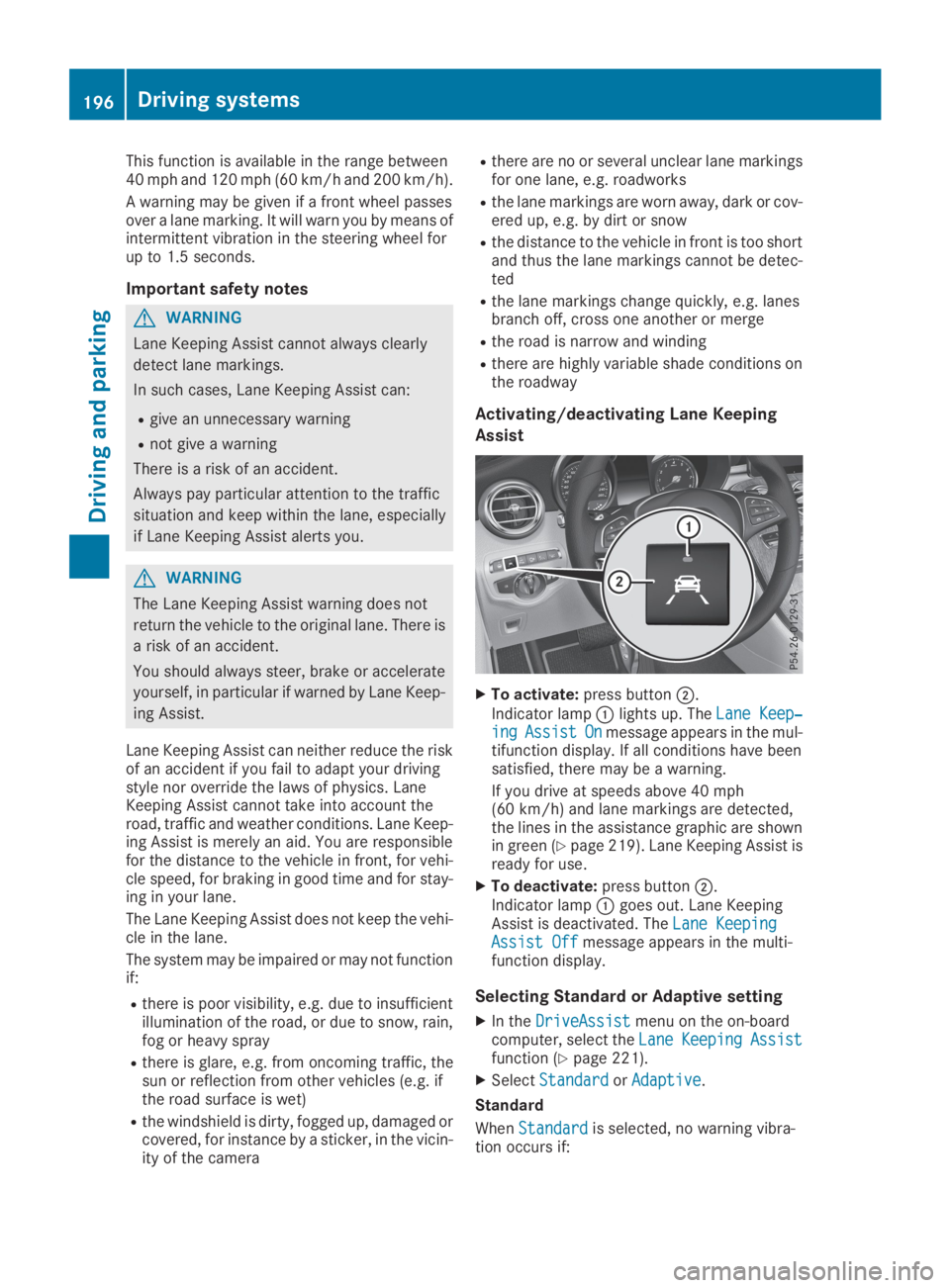
Activating/deactivating Lane Keeping
Assist
XTo activate:press buttonD.
Indicator lampClights up. TheLane Keep‐Lane Keep‐ingingAssistAssistOnOnmessage appears in the mul-tifunction display. If all conditions have beensatisfied, there may be a warning.
If you drive at speeds above 40 mph(60 km/h) and lane markings are detected,the lines in the assistance graphic are shownin green (Ypage 219). Lane Keeping Assist isready for use.
XTo deactivate:press buttonD.Indicator lampCgoes out. Lane KeepingAssist is deactivated. TheLane KeepingLane KeepingAssist OffAssist Offmessage appears in the multi-function display.
Selecting Standard or Adaptive setting
XIn theDriveAssistDriveAssistmenu on the on-boardcomputer, select theLaneLaneKeepingKeepingAssistAssistfunction (Ypage 221).
XSelectStandardStandardorAdaptiveAdaptive.
Standard
WhenStandardStandardis selected, no warning vibra-tion occurs if:
196Driving systems
Driving an d parking
Page 199 of 370
Ryou switch on the turn signals. In this event,the warnings are suppressed for a certainperiod of time.
Ra driving safety system intervenes, e.g. ABS,
BAS or ESP®.
Adaptive
WhenAdaptiveAdaptiveis selected, no warning vibra-tion occurs if:
Ryou switch on the turn signals. In this event,the warnings are suppressed for a certainperiod of time.
Ra driving safety system intervenes, e.g. ABS,
BAS or ESP®.
Ryou accelerate hard, e.g. kickdown.
Ryou brake hard.
Ryou steer actively, e.g. swerve to avoid anobstacle or change lanes quickly.
Ryou cut the corner on a sharp bend.
In order that you are warned only when neces-sary and in good time if you cross the lane mark-ing, the system detects certain conditions andwarns you accordingly.
The warning vibration occurs earlier if:
Ryou approach the outer lane marking on abend
Rthe road has very wide lanes, e.g. a freeway
Rthe system detects solid lane markings
The warning vibration occurs later if:
Rthe road has narrow lanes
Ryou cut the corner on a bend
Driving Assistance Plus package
General notes
The Driving Assistance Plus Package consists ofActive Distance Assist DISTRONIC(Ypage 162), Active Blind Spot Assist(Ypage 197) and Active Lane Keeping Assist(Ypage 200).
Active Blind Spot Assist
General notes
Active Blind Spot Assist monitors the areas oneither side of the vehicle that are not visible tothe driver with two lateral, rear-facing radar sen-sors. A warning lamp lights up in the exteriormirrors and draws your attention to vehicles
detected in the monitored area. If you thenswitch on the corresponding turn signal tochange lanes, you will also receive a visual warn-ing and hear a warning tone. If a risk of lateralcollision is detected, corrective braking mayhelp you avoid a collision. Before a course-cor-recting brake application, Active Blind SpotAssist evaluates the space in the direction oftravel and at the sides of the vehicle. For this,Active Blind Spot Assist uses the forward-facingradar sensors.
Active Blind Spot Assist supports you from aspeed of approximately 20 mph(30 km/h).
Important safety notes
Active Blind Spot Assist is only an aid and is nota substitute for attentive driving.
GWARNING
Active Blind Spot Assist does not react to:
Rvehicles overtaken too closely on the side,
placing them in the blind spot area
Rvehicles which approach with a large speed
differential and overtake your vehicle
As a result, Active Blind Spot Assist may nei-
ther give warnings nor intervene in such sit-
uations. There is a risk of an accident.
Always observe the traffic conditions care-
fully, and maintain a safe lateral distance.
iUSA only: This device has been approved bythe FCC as a "Vehicular Radar System". Theradar sensor is intended for use in an auto-motive radar system only. Removal, tamper-ing, or altering of the device will void any war-ranties, and is not permitted by the FCC. Donot tamper with, alter, or use in any non-approved way.
Any unauthorized modification to this devicecould void the user's authority to operate theequipment.
iCanada only: This device complies withRSS-210 of Industry Canada. Operation issubject to the following two conditions:
1. This device may not cause interference,and
2. This device must accept any interferencereceived, including interference that maycause undesired operation of the device.
Removal, tampering, or altering of the devicewill void any warranties, and is not permitted.
Driving systems197
Driving and pa rking
Z