ECO mode MERCEDES-BENZ GLC 2020 User Guide
[x] Cancel search | Manufacturer: MERCEDES-BENZ, Model Year: 2020, Model line: GLC, Model: MERCEDES-BENZ GLC 2020Pages: 610, PDF Size: 21.19 MB
Page 167 of 610
#
Press butt on1.
If indicat orlam p2 lights up,theEC Ostar t/
st op funct ionisactiv ated.
% Depending onthemodel andtheve hicle
eq uipment, thebutt onmayalso belocat ed
at adif fere nt positio nin thecent ercon sole. ECO
displa yfunction The
ECOdispla ysummar izesyour drivin gch ar‐
act eristic sfrom thest ar tof thejour neyto its
com pletion andassis tsyouin achie vingth e
mos teconomical driving style.
Yo ucan influen ceconsum ption bydoing thefo l‐
lo wing:
R drivin gwit hpar ticular care
R drivin gth eve hicle indrive pr ogr am ;
R obser vingthege arshif tre comme ndations The
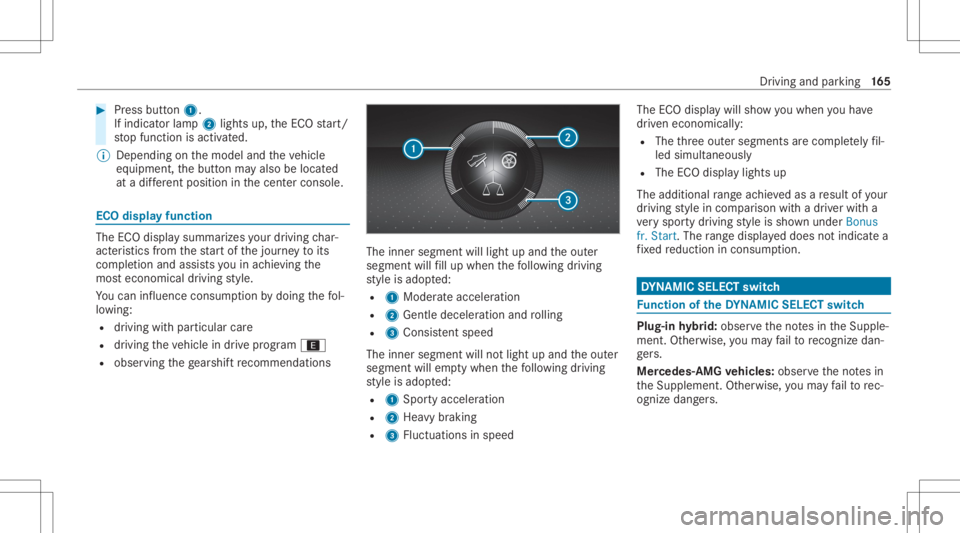
inner segment willlight upand theout er
segment willfill up when thefo llo wing drivin g
st yle is adop ted:
R 1 Moder ateaccelera tion
R 2 Gentle deceler ationandrolling
R 3 Consis tent spe ed
The inne rseg ment willno tlight upand theout er
segment willemptywhen thefo llo wing drivin g
st yle is adop ted:
R 1 Spor tyacceler ation
R 2 Hea vybraking
R 3 Fluct uations inspeed The
ECOdispla ywill showyo uwhen youha ve
dr iven econ omicall y:
R The thre eout ersegment sar ecom pletely fil‐
led simult aneousl y
R The ECOdispla ylight sup
The addition alrang eac hieve das are sult ofyour
dr ivin gst yle in com parison withadr iver wit ha
ve ry spor tydriving style is sho wnunder Bonus
fr. Start .The rang edispl ayed does notindicat ea
fi xe dre duction incon sum ption. DY
NA MIC SELECT switch Fu
nction oftheDY NA MIC SELECT switch Plug-i
nhy brid: obser vetheno tesin theSupple‐
ment .Ot her wise, youma yfa ilto recogni zedan‐
ge rs.
Mer cede s-AMG vehicl es:obse rveth eno tesin
th eSupplement .Ot her wise, youma yfa ilto rec‐
ogni zedangers. Dr
iving and parking 16
5
Page 173 of 610
Gear
shiftre comm endation Mer
cedes -AMG vehicl es:obse rveth eno tesin
th eSupplement .Ot her wise, youma yfa ilto rec‐
ogni zedangers.
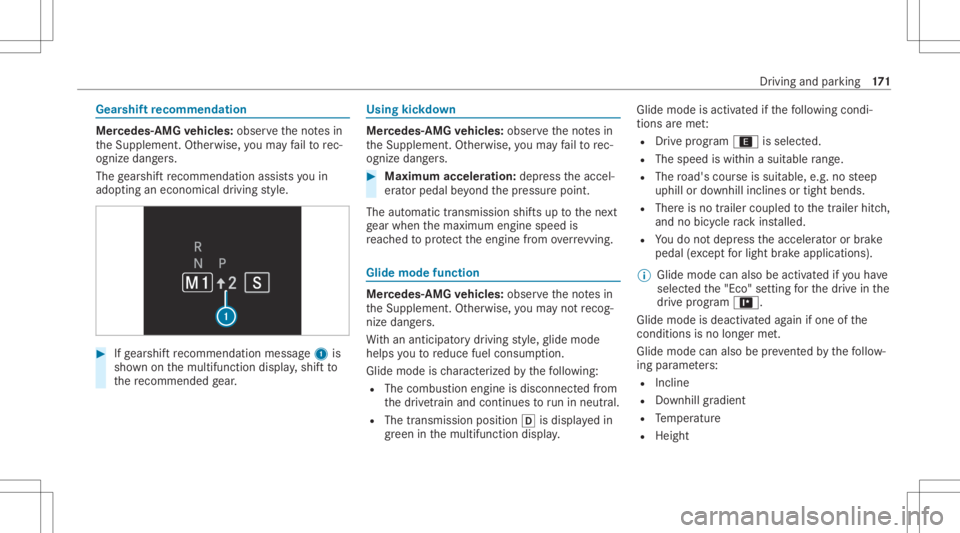
The gearshif tre comme ndation assists youin
adop tingan eco nomic aldrivin gst yle. #
Ifge arshif tre comme ndation mess age1 is
sho wnonthemultifunc tiondispla y,shif tto
th ere comme ndedgear. Using
kickdow n Mer
cede s-AMG vehicl es:obse rveth eno tesin
th eSupplement .Ot her wise, youma yfa ilto rec‐
ogni zedangers. #
Maxi mum acceler atio n:dep ress theaccel‐
er ator pedal beyond thepr essur epoint .
The automatic transmiss ionshiftsup tothene xt
ge ar when themaximum enginespeedis
re ac hed toprotect theengine from overrev ving. Glide
mode functio n Mer
cede s-AMG vehicl es:obse rveth eno tesin
th eSupplement .Ot her wise, youma yno tre cog‐
nize dangers.
Wi th an ant icip ator ydr ivin gst yle, glide mode
helps youto reduce fuelconsum ption.
Glide mode isch aract erize dby thefo llo wing:
R The com bustion engin eis disco nnect edfrom
th edr ivet ra in and continues torunin neu tral .
R The trans mis sion positio n005B isdispl ayed in
gr een inthemultifunc tiondispla y. Glide
mode isact ivat ed ifth efo llo wing condi‐
tion sar eme t:
R Drive pr og ram ; issele cted.
R The speed iswit hin asui table rang e.
R The road's courseissuit able, e.g.no steep
uphill ordownhill inclinesortight bends.
R Ther eis no trailer coupled tothetra iler hitch,
and nobicy clerack installed.
R Youdo notdepr esstheaccelera toror brak e
peda l(e xc ep tfo rlig ht brak eapp lications).
% Glide mode canalsobe activ ated ifyo uha ve
select edthe"Eco" setting forth edr ive in the
dr ive pr og ram =.
Gli de mode isdea ctivated again ifone ofthe
condi tions isno long erme t.
Gl ide mod ecan also be preve nted bythefo llo w‐
ing parame ters:
R Incline
R Downhill gradi ent
R Temp eratur e
R Height Dr
iving andparking 17
1
Page 185 of 610
%
Inthecase ofsevere batt erydisc harging,
th efunc tion forde tecting damag eon a
pa rked vehicle isaut omaticall ydeactiv ated
to facil itat eth ene xt engine star t.
Sy stem limit s
De tection maybe restrict ed inthefo llo wing sit‐
uation s:
R The vehicle isdamag edwithout impact, e.g.
if an outside mirroris torn offor thepaint is
damag edbyake y.
R Impact occur sat low speed .
R The electr icpar king brak eis no tappl ied. No
teson par king theve hicl efo ran extended
per iod If
yo ulea vetheve hicle parkedfo rlong erthan six
we eks,itma ysuf ferdama gethro ugh disus e.
The 12Vbatt eryma yalso beimpair edordam‐
ag ed byhea vydisc harging.
% Further information canbeobt ained ata
qu alif ied spec ialistwo rkshop. Plug-in
hybrid: obser vetheno teson thehigh-
vo ltag ebatt eryin theSupplement .Ot her wise,
yo uma yfa ilto recogni zedangers. St
andb ymode (ext ens ion ofthest ar terbat‐
te ry 's per iod out ofuse) St
andb ymode function
% This function isno tav ailable forall model s.
If standb ymode isact ivat ed, energyloss willbe
min imiz eddur ing ex tende dpe riods ofnon- oper‐
ation.
St andb ymode isch aract erize dby thefo llo wing:
R thest ar terbatt eryis preser ved.
R themaximum non-opera tionaltime appear s
in themedia display.
R thecon nect iontoonline services isint erru p‐
te d.
R theAT A(anti-t heftal ar m system) isno tav ail‐
able.
R theint erior motion sensor andtow- aw ay
alar mfun ction sar eno tav ailable. R
thefunc tion forde tecting damag eon a
pa rked vehicle isno tav ailable.
If th efo llo wing condition sar efulf illed, standb y
mode canbeact ivat ed ordeac tivated usin gth e
multime diasystem:
R theengine isswitc hedoff.
R theignition isswitc hedon.
Ex ceeding theve hicle's displayednon -opera ‐
tion altime maycause inconvenienc e,i.e. itcan‐
no tbe guar anteed that thest ar terbatt erywil l
re liably star tth eengine.
The star terbatt erymus tbe charge dfirs tin the
fo llo wing situat ions:
R The vehicle's non-oper ational timemustbe
ex tende d.
R The Batte ryCh arg eInsu fficie ntfor Stand by
Mod emes sage appear sin themedia display.
% Standb ymode isaut omat icallydeac tivated
when theignition isswitc hedon.
Ac tiv atin g/deac tivatin gst andb ymode (park‐
ing theve hicl efo ran extended period)
Re quirement s: Dr
iving andparking18
3
Page 207 of 610
If
ach ang ein thespeed limitisde tected and
au tomatic adoptionofspeed limitsisactiv ated,
th ene wspeed isaut omaticall yadop tedas the
st or ed speed (/page24 1).
The driven spee dis adju sted when theve hicle is
le ve lwit hth etraf fic sig nat thelat est.In the
case ofsig ns indi cati ngentr yint oan urb anarea ,
th espeed isadap tedaccor dingtothespeed
per mitt edwithin theurban area. The speed limit
displa yin theIns trument Displayis alw aysupda ‐
te dwhen theve hicle isleve lwit hth etra ffic sign .
If th er eis no speed restriction onanunlimited
st re tchof road (e.g.on afree wa y), there com‐
mend edspe edisau tomatical lyadop tedas the
st or ed speed. Thesystem uses thespeed stor ed
on anunlimit edstre tchof road asthere com‐
mend edspe ed. Ifyo udo notalt er thestor ed
speed onanunlimit edstre tchof road, there c‐
omme ndedspeedis80 mph(1 30 km/h) .
If Ac tiveDis tance AssistDIS TRONI Cha sbe en
pu tint opa ssi ve mode bypressing theaccelera ‐
to rpeda l,onl yspee dlimi tswhi charehigh er
th an these tspeed areadop ted. Ac
tiveSpe edLimi tAssi stisonl yan aid. The
dr iver isresponsible forke eping asaf edis tance
fr om theve hicle infront, forve hicle speed and
fo rbr aking ingood time. Themaximu mper missi ‐
ble spee dals odepe ndsonfact or ssu ch asthe
ro ad sur face and traf fic condi tions.
Sy stem limit s
Te mp oraryspeed restrictions (e.g.fo ra cer tain
tim eor due towe ather condition s)can notbe
pr oper lyde tected bythesy stem. Themaximum
per missible speedapplying toave hicle witha
tr ailer isno tde tected bythesy stem. Inthese sit‐
uations youmus tadj ustyo ur spee dyo urself . &
WARNIN GRisk ofacci dent dueto Active
Spe edLimi tAssi stadap tingth eve hicle's
speed
The speed adoptedby ActiveSpe edLimi t
Assi stma ybe toohigh orincor rect insome
indi vidualcase s,su ch as:
R Inthewe tor infog
R When towing atrailer #
Ensur eth at thedr iven speed complies
wit htraf fic re gulations. #
Adjus tth edr iving speed tosuit current
tr af fic and weather condition s. Fu
nction ofrout e-base dspee dadap tation %
The follo wing function iscoun try- dependen t
and onlyav ailable incon junction withth e
Dr iving Assi stanc ePa ckag e.
When ActiveDis tance AssistDIS TRONI Cis acti ‐
va ted, theve hicle speed willbeadjus tedaccor d‐
ing lyto thero uteev ent sahead. Dependingon
th edr ive pr og ram sele cted, theve hicle negoti‐
at es aro uteeve ntaheadin afue l-saving, com ‐
fo rtable ordynam icman ner.When thero ute
eve nthasbe en passe d,theve hicle acceler ates
ag ain tothestor ed speed. Thesetdis tance to
th eve hicle infront, vehicles detected aheadand
spe edrestrictions aheadar eta ke nint oacco unt.
Ro ute-based speedadap tatio ncan beconf ig‐
ur ed inthemultimedia system (/ page206). Dr
iving andparking 205
Page 209 of 610
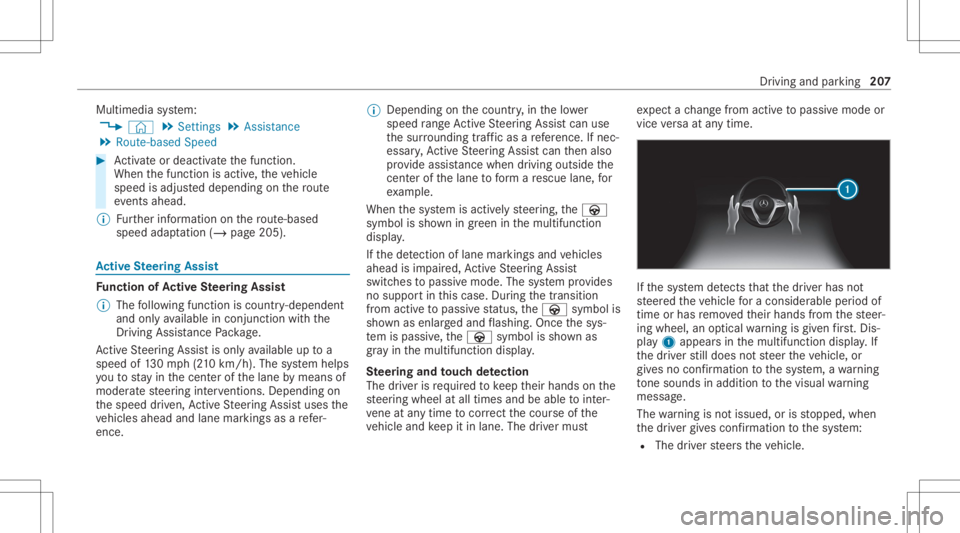
Multimedia
system:
4 © 5
Set ting s5
Assist ance
5 Route-based Speed #
Activateor deacti vate thefunc tion.
When thefunc tion isactiv e,theve hicle
speed isadjus teddependin gon thero ute
eve nts ahead.
% Further information onthero ute-based
spee dadap tatio n(/ page 205) . Ac
tiv eSte ering Assis t Fu
nction ofActiv eSte ering Assis t
% The follo wing function iscoun try- dependen t
and onlyav ailable incon junction withth e
Dr iving Assi stanc ePa ckag e.
Ac tiveSt eer ing Assis tis onl yav ailable uptoa
speed of130mp h(210 km/h) .The system helps
yo uto stay inthecent erofthelane bymeans of
moder atesteer ing interve ntio ns.Dep endingon
th espeed driven, ActiveSt eer ing Assis tuses the
ve hicles ahead andlane markings asare fer‐
ence. %
Dependi ngon thecount ry,in thelowe r
speed rang eAc tiveSt eer ing Assis tcan use
th esur round ingtraf fic as are fere nce. Ifnec‐
ess ary, Ac tiveSt eer ing Assis tcan then also
pr ov ide assis tance when drivi ng outsid eth e
cent erofthelane toform are scue lane, for
ex am ple.
When thesy stem isactiv elysteer ing, theà
symbol issho wningreen inthemultifunc tion
displa y.
If th ede tection oflane mar kings andvehicles
ahead isim pair ed,ActiveSt eer ing Assis t
switc hestopassiv emode. Thesystem prov ides
no suppor tin this case. During thetra nsit ion
fr om activ eto passiv est atus ,th eà symbol is
sho wnasenlar gedand flashin g.On ce thesy s‐
te m ispass ive, theà symbol issho wnas
gr ay inthemultifunc tiondispla y.
Ste ering and touc hde tection
The driver isrequ ired tokeep their hands onthe
st eer ing wheel atall times andbeable tointer‐
ve ne atanytime tocor rect thecour seofthe
ve hicle andkeep itin lane. Thedriver mus t ex
pect ach ang efrom active to passiv emode or
vice versaat anytim e. If
th esy stem detects that thedr iver has not
st eer edtheve hicle fora consider ableper iod of
time orhas remo vedth eir hands from thesteer‐
ing wheel, anoptical warning isgiv en firs t. Dis ‐
pl ay 1 appear sin themultifunc tiondispla y.If
th edr iver still does notst eer theve hicle, or
giv es no conf irmation tothesy stem, awa rning
to ne sou nds inad ditio nto thevisual warning
mess age.
The warning isno tissued, orisstopped, when
th edr iver giv es con firm atio nto thesy stem:
R The driver steer sth eve hicle. Dr
iving andparking 20
7
Page 232 of 610
R
The rear segm entsar ehidde nwhen driv‐
ing forw ards.
If Pa rking AssistPA RK TRONI Cis deac tiva ted,
th ewa rning displa yfa des out(/ page22 1).
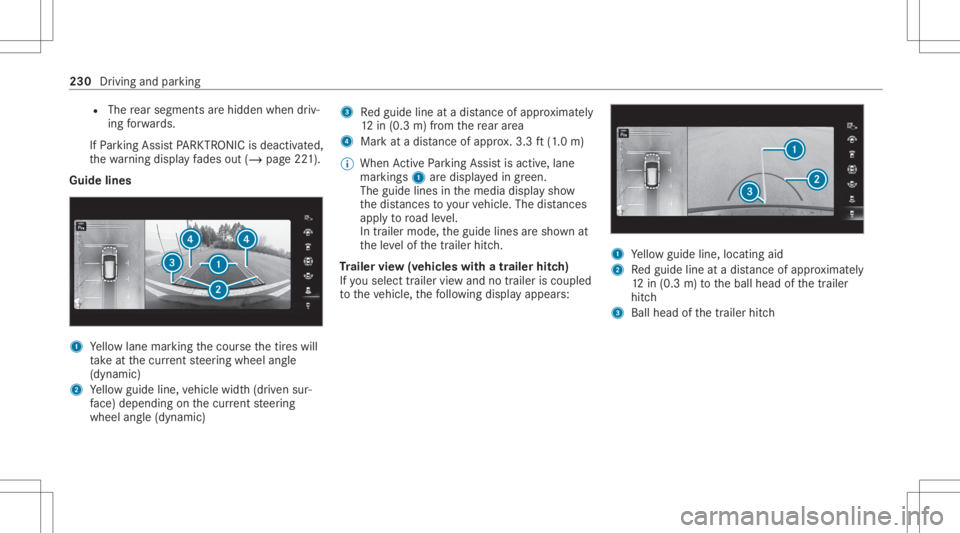
Guid elines 1
Yello wlane markingth ecour sethetir es will
ta ke atthecur rent steer ing wheel angle
(dynamic)
2 Yello wguide line,vehicle width(dr iven sur‐
fa ce) dep endi ngon thecur rent steer ing
wheel angle(dynamic) 3
Redguide lineatadis tance ofapprox imat ely
12 in(0. 3m) from there ar area
4 Markat adis tance ofapprox .3.3 ft(1.0 m)
% When ActivePa rking Assistis act ive, lane
mar kings1 aredispla yedin green.
The guide linesinthemedia displaysho w
th edis tances toyour vehicle. Thedistances
ap ply toroad leve l.
In trailer mode, theguide linesaresho wnat
th eleve lof thetrailer hitch.
Tr aile rvie w(vehic leswith atraile rhitc h)
If yo usele cttrailer viewand notrailer isco upled
to theve hicle, thefo llo wing displa yappear s: 1
Yello wguide line,locat ingaid
2 Redguide lineatadis tance ofapprox imat ely
12 in(0. 3m) totheball head ofthetra iler
hitc h
3 Ball head ofthetrailer hitch 230
Driving andparking
Page 250 of 610
#
Under nocircums tances should yo utry
to inc rease thespeed tostra ight enthe
ve hicle/tr ailercombination. #
Reduce speed anddonotcount er-ste er. #
Ifneces sary,appl yth ebr ak es. *
NO
TEDama getotheengine asare sult
of ove rheating #
Ifyo ure trof itatrai le rhi tc h, mod ifica ‐
tio ns totheengine cooling system may
be neces sary,dependin gon theve hicle
model.
When retrof itti ng atrai le rhi tc h, ob serveth e
fa stening pointson thech assis . Re
trof itti ng atrai le rhi tc his pe rm issible onlyif a
trailer loadisspec ified inyour vehicle docu‐
ments. Ifth is isno tth ecase, theve hicle isno t
appr ovedfo rtr ail er oper ation.
Fu rther information canbeobt ained ataqu ali‐
fi ed specialis two rkshop. If
th etrailer coupling isremo vable, itis essent ial
to com plywith theoper ating instruction sof the
tr ai le rcou pling manuf actu rer.
Couple anduncouple thetrailer carefull y.Ifyo u
do notcon nectth etra iler totheto wing vehicle
cor rectl y,thetrailer maybecome detach ed.
Obser vethefo llo wing noteson theto ngu e
we ight :
R Donotuse ato ngu ewe ight that exceed sor
fa lls belo wtheper missible tongu ewe ight
R Use ato ngu ewe ight asclos eas possible to
th emaximum tongu ewe ight
Do notex ceed thefo llo wing values:
R Perm issible trailerload
R Perm issible rear axle load oftheto wing vehi‐
cle
R Perm issible gross weight oftheto wing vehi‐
cle
R Perm issible gros swe ight ofthetra iler
R Maximum permissible speedofthetrailer En
sur eth efo llo wing beforest ar tin gajo ur ne y:
R The tirepr essur eon there ar axle oftheto w‐
ing vehicle issetfo ra maximu mloa d
R The lighting ofthecon nect edtrailer isoper a‐
tion al
R Vehicl eswithout LEDheadlam psorMUL‐
TIBEA MLED headlam ps:theheadlam ps
ha ve been setcor rectl y
In theeve ntofincr eased rear axle load, theve hi‐
cle/tra ilercombination mayno texc eed amaxi‐
mum speed of62 mph(1 00 km/h) forre ason s
con cerningth eoper ating permit. This also
applies incount ries inwhic hth eper missible
maximum speedforve hicle/tr ailercombinations
is abo ve62 mph(1 00 km/h). 24
8
Driving and parking
Page 282 of 610
Vo
ice comm and Colloquialexam ple Function
Random tracklist off Switchoff shuffle mode Switc
hesoffra ndo mmod e.
Wha tam Ilisteni ngto? Whichmu sic is cur rentl ypl ay ing ? The
informa tionab ou tth etra ck cur rentl ypl ay ing isread aloud. Ov
ervie wof mes sagevo ice comm ands Messag
escan becreat ed, edit edand listened to
usin gth emessag evo ice com mand s.The follo w‐ ing
listof fers jus ta sma llsel ecti onofthepossi‐
ble messag ecomm ands.Youwill recei veaddi‐
tio nal sugg estio ns ifyo usa yHel pfor mes sagin g.
Mess agevo ice comm ands Vo
ice comm and Colloquialexam ple Function
Text message to
"John Doe's mobile number" Cr
eat esate xt mes sage .All address bookname sar eav ailable.
Tex tmes sage to
to "Jane Doe"with thefoll owin g
te xt:"I am runninglate " Wr
ites ate xt mes sage totheper son ment ioned. Thecontent ofthete xt
can bespo kenimm ediate ly ifonlin evo ice con trol has been activat ed.
Read outnew textmess ages Iwould likeyou toread outthe
new textmess ages Re
ads outnewtext mes sage s.
Read outthelast text message
from
woul dlike you toread outthelast
text message from"John Doe" Re
ads outthelas tte xt mes sage from theper son ment ioned. 280
Voice Cont rolSy stem
Page 348 of 610
ing
onthese ttings fordr iving recomme nda‐
tions ,e.g. "Prepar eto tur nright".
Select navig ation announc ementsfo rdr iving
re comme ndations (/page 339) .
The map appearsin ful l-scr een mode .
The status lineshows:th edir ect ion informa‐
tion orthename ofthero ad whic his to be
tur ned intoand thedis tance tothech ang eof
dir ect ion.
R Announc emen tphase
The mult imed iasystem announ cesthe
upco mingch ang eof dir ect ion depen dingon
th ese ttings fordr iving recomme ndations ,
e.g. byann oun cing"In 600ft (200 m)atthe
end ofthest re et tur nright intoSt atio n
Ro ad".
The displa yis split intotw opar ts.The map is
displa yedon thelef t;on theright, ther eis a
de tailed imag eof theint ersect ionora3D
imag eof theupcoming chang eof dir ect ion.
R Chan ge-of-d irecti onpha se
The multimed iasystem announ cestheimmi‐
nen tch ang eof dir ect ion depen dingon the se
ttin gsfordr iving recomme ndations ,e.g. by
ann oun cing"N ow turnright".
The displa yis split intotw opar ts.
The chang eof dir ect ion take splace whenthe
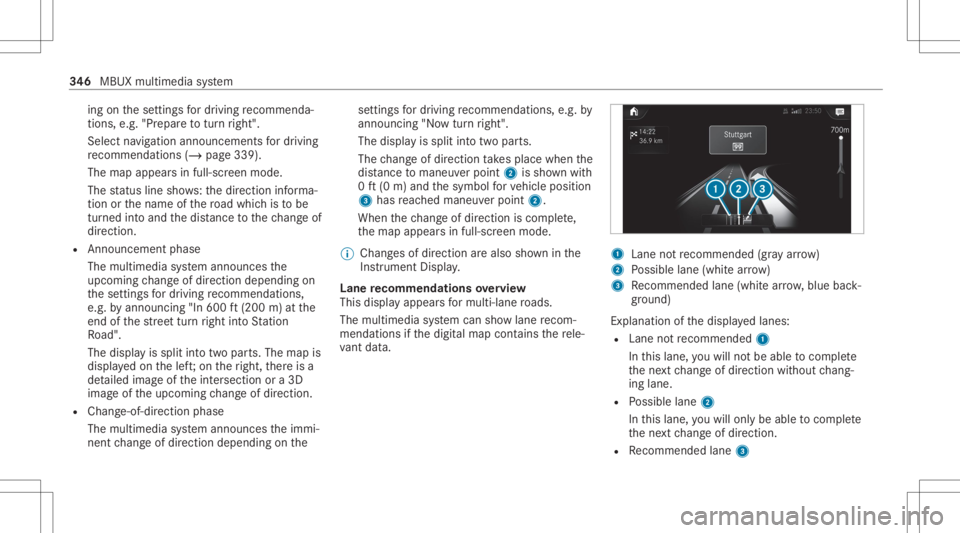
dis tance tomaneu verpoint 2issho wnwith
0 ft (0 m) and thesymbol forve hicle position
3 has reac hed maneuverpoin t2.
When thech ang eof dir ect ion iscom plete,
th emap appear sin full-scr eenmode.
% Chang esofdir ect ion arealso showninthe
Ins trument Display.
Lane recomm endationsov ervie w
This displa yappear sfo rmulti -lane roads.
The mult imed iasystem can showlane recom‐
mend ations ifth edigit almap contains there le‐
va nt data. 1
Lane notre comme nded(gray arro w)
2 Possible lane(whit ear ro w)
3 Recomme ndedlane (whit ear row ,blue back‐
gr ound)
Ex planation ofthedispla yedlanes:
R Lane notre comme nded1
In this lane, youwill notbe able tocom plet e
th ene xt chang eof dir ect ion without chang ‐
ing lane .
R Possible lane2
In this lane, youwill onlybe able tocom plet e
th ene xt chang eof dir ect ion.
R Recomme ndedlane 3 34
6
MBUX multimedia system
Page 370 of 610
Te
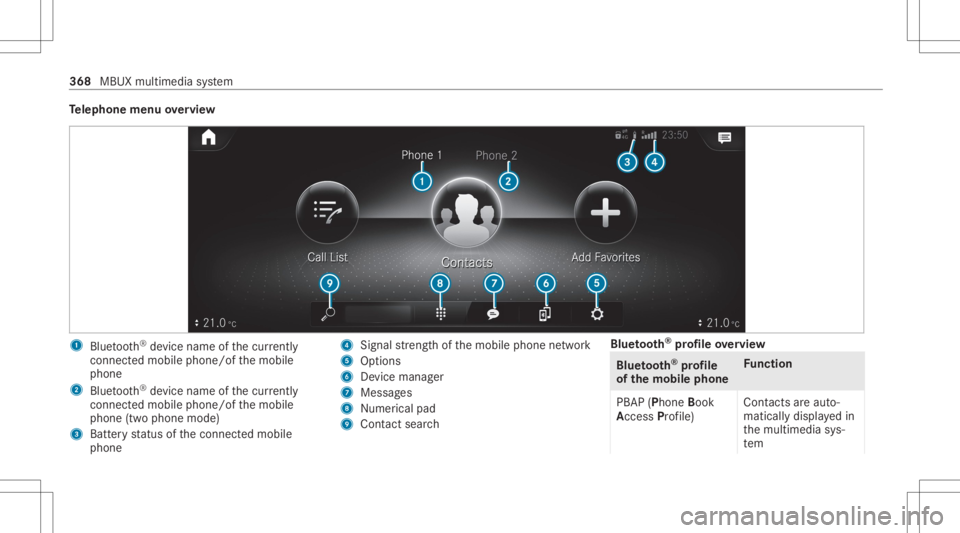
lephone menuoverview 1
Blue tooth®
de vice name ofthecur rently
conne cted mob ile pho ne/o fth emobile
phone
2 Blue tooth®
de vice name ofthecur rently
conne cted mob ile pho ne/o fth emobile
phone (twophone mode)
3 Batt eryst atus ofthecon nect edmobile
phone 4
Signal stre ngt hof themobile phonenetwork
5 Option s
6 Device manag er
7 Messag es
8 Nume rical pad
9 Contact search Blue
tooth®
pr ofile ove rview Blue
tooth®
pr ofile
of the mobi lephon eFu
nction
PB AP (Phone Book
Access Profile) Cont
actsar eaut o‐
matic allydispla yedin
th emultimedia sys‐
te m 368
MBUX multimedia system