phone MERCEDES-BENZ GLC 2021 User Guide
[x] Cancel search | Manufacturer: MERCEDES-BENZ, Model Year: 2021, Model line: GLC, Model: MERCEDES-BENZ GLC 2021Pages: 462, PDF Size: 6.46 MB
Page 243 of 462
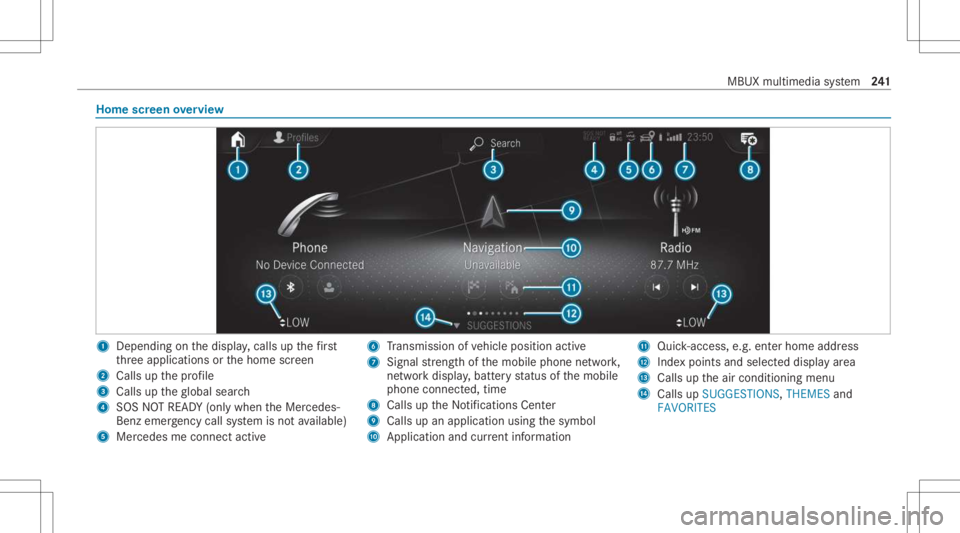
Home
screen overvie w 1
Dep endingonthedispla y,cal lsup thefirs t
th re eapplications orthehome screen
2 Calls upthepr ofile
3 Calls uptheglobal search
4 SOS NOTREAD Y(only when theMer cedes-
Benz emergency callsy stem isno tav ailable)
5 Mercedesme connectact ive 6
Trans miss ionofvehicle position active
7 Signal stre ngt hof themobile phonenetwork,
ne tworkdispl ay,batt eryst atus ofthemobile
phone connect ed,time
8 Calls uptheNo tification sCent er
9 Calls upanapplication usingthesymbol
A Applicat ionand current informa tion B
Quick-acce ss,e.g.ent erhom ead dress
C Inde xpoi nts and select eddispl ayarea
D Calls uptheair con ditionin gmenu
E Calls upSUGGES TIONS,THEMES and
FAV ORITES MBUX
multimedia system 24
1
Page 260 of 462
Te
lephone Te
lephon y No
teson telephon y &
WARNIN GRisk ofdist ra ction from oper‐
ati ng integr ated commu nication equip‐
ment whiletheve hicle isin mo tion
If yo uoper ateco mm unic ationeq uipme nt
int egrat edintheve hicle when driving, you
cou ldbe dist ra cted from thetra ffic situat ion.
This could alsocause youto lose control of
th eve hicle. #
Onlyoper ateth is eq uipmen twhen the
tr af fic situ ation per mits. #
Ifyo ucan notbe sur eof this, stop the
ve hicle whilstpa ying attention toroad
and traffic condi tions andoperate the
eq uipment withth eve hicle statio nary. &
WARNIN GRisk ofan acci dent from
ope rating mob ile comm unicati onequip ‐
ment while th eve hicle isin mo tion
Mobile communication sde vices distract the
dr iver from thetraf fic situ ation. Thiscou ld
al so cau sethedr iver tolose control of the
ve hicle. #
Asthedr iver ,onl yoper atemobile com‐
municat ionsdevices when theve hicle is
st atio nary. #
Asave hicle occupant, onlyuse mobile
communication sde vices inthear eas
int ended forth is pur pose, e.g.inthe
re ar passe nger com partment . Yo
umus tobse rveth eleg alrequ iremen tsforth e
cou ntryin whi chyouar ecur rentl ydr ivi ng when
op erati ng mob ile comm unicati onequip ment in
th eve hicle. &
WARNIN GRisk ofinju rydue toobject s
being stowe dinco rrect ly
If objects intheve hicle interior arestowe d
inc orrectly ,th ey can slide orbe throw n
ar oun dand hitvehicle occupants. Inaddi‐
tion, cupholder s,open stow agespac esand
mobi lephon ere cep tacle scanno tal wa ys
re tain all obje ctswit hin.
Ther eis arisk ofinjur y,par ticular lyin the
ev ent ofsudden braking orasudden chang e
in dir ect ion. #
Alw aysst ow object sso that they can‐
no tbe throw nar ou nd insuch situa‐
tions. #
Alw aysmak esur eth at obj ect sdo not
pr otru de from stow agespac es,parcel
ne ts or stow agene ts. #
Close theloc kable stow agespac es
bef orest ar tin gajo ur ne y. #
Alw aysst ow and securehea vy,har d,
poin ted, shar p-edg ed,fragile orbulky
objec tsinthetrunk/ cargocom part‐
ment . 258
MBUX multimedia system
Page 261 of 462
Obser
vetheadditional information onstow ing
mobile communic ationsde vice scor rectly:
R Loa ding theve hicle (/page10 2)
Blue tooth®
connect ion:
The men uvie wand theav ailable function sin the
te lephon emen uar ein par tdepen dentonthe
Blu etoo th®
pr ofile ofthecon nect edmobile
phone. Fullfunc tionality isonl yav ailable ifth e
mobil ephone supports both ofthefo llo wing
Blue tooth®
pr ofiles:
R PBAP (Phone BookAccess Profile)
- The cont acts onthemobile phoneare
sho wnautomaticall yon themultimedia
sy stem.
R MAP (Messag eAc cess Profile)
- The mob ile pho nemess agefuncti onscan
be used on themultimedia system.
Ir re spectiv eof this, Blue tooth®
audio function al‐
ity can byused withan ymob ileradio unit.
Fo rinf ormation onthera ng eof func tions ofthe
mobil era dio unit tobe con nected, see theman‐
uf actur er'soper ating instruction s. Ne
tworkco nn ectio n:
The follo wing cases canlead tothecall being
discon nectedwhile theve hicle isin mo tion:
R Youswit chintoatransm ission /recep tion
st atio n,inwhic hno com mun ication chann el
is free.
R The SIM car dused isno tcom patible withth e
ne tworkav ailable
R Amobi lephon ewit h"T winc ard" islogg ed
int oth ene tworkwit hth esecon dSIM cardat
th esame time
The multimedia system suppor tscalls inHD
Vo ice ®
forim prov ed speec hqu alit y.Arequ ire‐
men tfo rth is isthat themobile phoneandthe
mobil ephone networkpr ov ider oftheper son
yo uar ecalli ngsuppo rtHD Voice ®
.
Depe ndingon thequ alit yof thecon nect ion,the
vo ice qualit yma yfluct uate.
Fu rther information canbeobt ained from an
aut hor ized Mercedes-Ben zCent eror at:
https: //www .mercedes-benz .com/connect MBUX
multimedia system 259
Page 262 of 462
Te
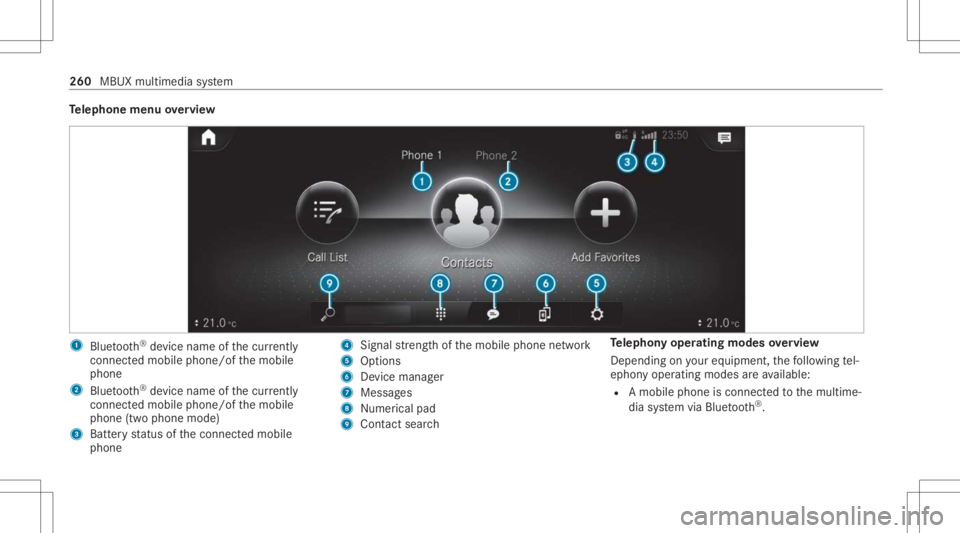
lephone menuoverview 1
Blue tooth®
de vice name ofthecur rently
conne cted mob ile pho ne/o fth emobile
phone
2 Blue tooth®
de vice name ofthecur rently
conne cted mob ile pho ne/o fth emobile
phone (twophone mode)
3 Batt eryst atus ofthecon nect edmobile
phone 4
Signal stre ngt hof themobile phonenetwork
5 Option s
6 Device manag er
7 Messag es
8 Nume rical pad
9 Contact search Te
lephon yoper ating mod esove rview
Depen dingonyour equipme nt,th efo llo wing tel‐
ephon yoper atingmodes areav ailable:
R Amobi lephon eis con nectedto themultime‐
dia system viaBlue tooth®
. 260
MBUX multimedia system
Page 263 of 462
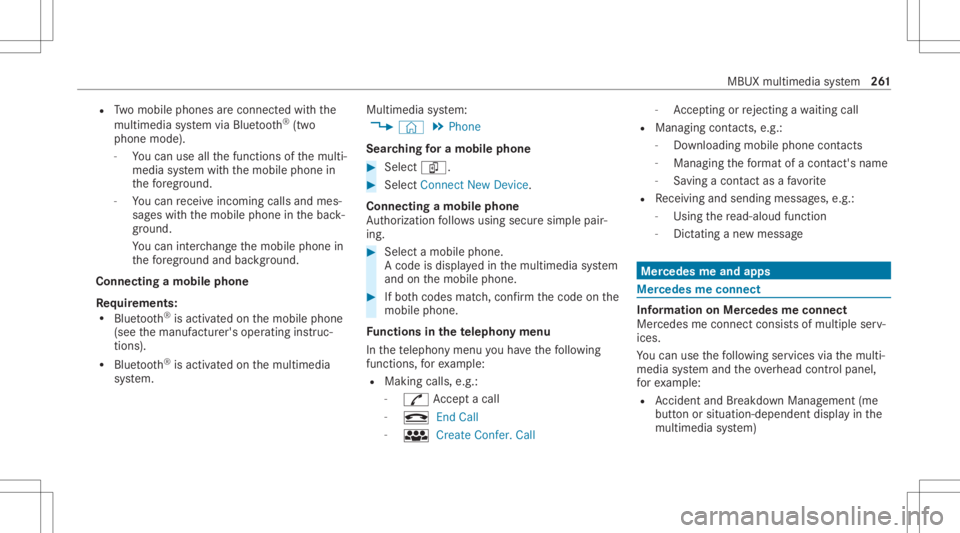
R
Twomobile phones areconn ectedwithth e
multime diasystem viaBlue tooth®
(tw o
phone mode).
- Youcan useallthefunc tionsof themulti‐
media system withth emobile phonein
th efo re ground.
- Youcan recei veinc omin gcalls andmes‐
sag eswit hth emobile phoneinthebac k‐
gr ound.
Yo ucan interch ang eth emobile phonein
th efo re ground andbackground .
Connect ingamob ilephone
Re quirement s:
R Blue tooth®
is act ivat ed on themobile phone
(see themanuf acturer'soper ating instruc‐
tion s).
R Blue tooth®
is act ivat ed on themultimedia
sy stem. Multimedia
system:
4 © 5
Phone
Sear ching fora mob ile pho ne #
Select í. #
Select Connect NewDevice.
Co nnectin gamob ile pho ne
Au thor ization follo ws usin gsec uresim ple pair‐
ing . #
Select amob ilephon e.
A co de isdispl ayed inthemultimedia system
and onthemobile phone. #
Ifbo th code smatc h,conf irm thecode onthe
mobil ephone.
Fu nctions inthete lephon ymenu
In thete lephon ymen uyo uha ve thefo llo wing
func tions,forex am ple:
R Mak ingcalls ,e.g .:
- R Accep ta cal l
- k EndCall
- i Create Confer. Call -
Accep ting orrejecti ngawa itin gcall
R Managin gcon tacts, e.g.:
- Downl oading mob ile pho necont acts
- Managi ngthefo rm atofacon tact's name
- Saving acont actasafa vo rite
R Recei ving andsend ingmess ages, e.g.:
- Usingthere ad-al oudfunction
- Dictating ane wmes sage Mer
cede sme and apps Mer
cede sme connect Inf
ormation onMer cede sme connect
Mer cedes meconnect consistsof multi pleserv‐
ices.
Yo ucan usethefo llo wing service svia themulti‐
media system and theov erhead control panel,
fo rex am ple:
R Accid ent and Brea kdo wnManag eme nt(me
bu tton orsitu ation-de pendentdispl ayinthe
multime diasystem) MBUX
multimedia system 26
1
Page 265 of 462
%
These services aresubject totech nica l
re strictions such asthemobile phonecover‐
ag e, mobil ene tworkqu alit yand theability of
th epr ocessin gsy stems tointerpr et the
tr ans ferred dat a.In some circums tances,
th is can result indela ysorthefa ilur eof the
inf ormatio nto appear inthemultimedia sys‐
te m.
Mor einf ormation aboutMer cedes meconnect
ser vices canbeobt ained intheMer cedes me
Po rtal: http s:// me. secure.m erced es-ben z.com
Data trans ferre ddur ing Mer cedes mecon‐
ne ct cal lse rvices
The datatransf erreddur ing aMer cedes mecon‐
nec tcall depends on:
R The reason forinitia tionofthecall
R The service that isselec tedin thevo ice con ‐
tr ol system
R The activ ated Mer cedes meconnect services
Yo ucan find outwh ich da ta istransf erredwhen
using theser vices inthecur rentl yva lid
Mer cedes meconnectte rm sof use and thedat a
pr otect ion information forMer cedes mecon‐ nect.
Youcan find these inyour Mer cedesme
user accoun t. Mer
cedes mecalls Ma
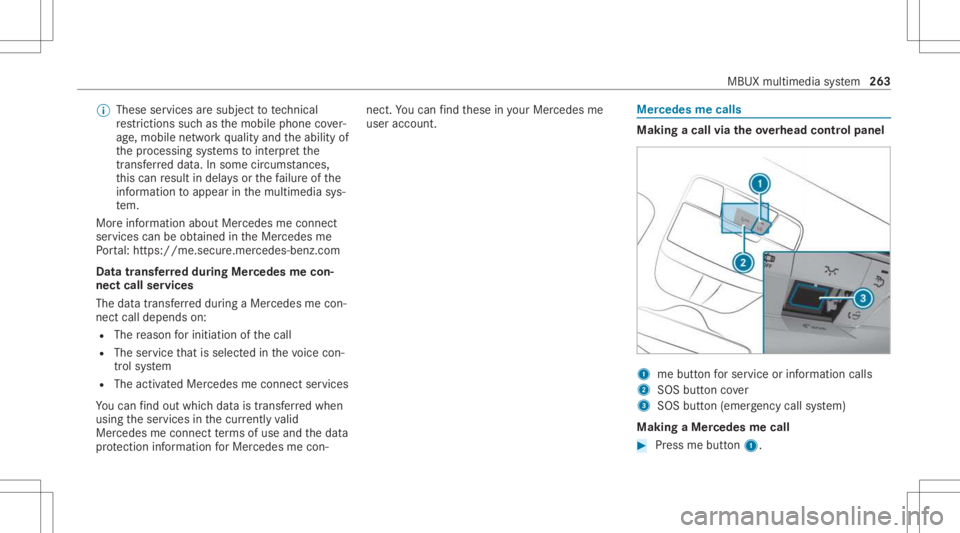
king acall viatheove rhead contr olpa nel 1
mebutt onforser vice orinformation calls
2 SOS buttoncover
3 SOS button (emerg ency callsy stem)
Making aMer cedes mecall #
Press mebutt on1. MBUX
multimedia system 263
Page 266 of 462
Making
anemer gency call #
Toopen theco verof SOS button2 ,pr ess it
br ief ly. #
Press and hold SOS button3 forat lea st
one second.
If aMer cedes mecall isactiv e,an emer gency
cal lcan still be trigg ered. This hasprior ity ove r
all other activ ecalls.
Inf ormat ionabout theMer cedes mecall
using theme button
A cal lto theMer cedes- BenzCustomer Cent er
has been initiatedvia theme butt onintheove r‐
head controlpanel orthemultimedia system
(/ page263).
Using thevo ice dialog system youacc ess the
desir edser vice:
R Accid ent and Brea kdo wnManag eme nt
R Mer cede s-Benz Customer Centerforge ner al
inf orma tionab ou tth eve hicle
Yo ucan find informa tionon thefo llo wing topics:
R Activati on ofMe rcedes meconnect
R Oper ating theve hicle R
Near estaut hor ized Mercedes-Ben zCent er
R Other products andservices from Mer cedes-
Benz
Dat ais transf erreddur ing thecon nect iontothe
Mer cedes-Ben zCus tomer Cent er(/ page265).
Call ingtheMer cedes- BenzCustomer Center
usi ng the multi mediasy stem
Re quirement s:
R Access toaGSM networkis available.
R The contract partner' sGSM networkco ver‐
ag eis available inthere spectiv ere gion.
R The ignition mustbe switc hedonsothat
ve hicle datacan betransf erredaut omati‐
cally .
Multimedia system:
4 © 5
Phone 5
g #
Call Mercedes meconnect.
Af terconf irmation, themultimedia system
sends there qu ired vehicle data.The data
tr ansf erissho wninthemedia display. Then,
youcan selectaser viceand beconn ect ed
to aspec ialistat theMer cedes- BenzCustomer
Cent er.
Call ingtheMer cedes- BenzCustomer Center
af te raut omat icac ciden tor break down
de tection
Re quirement s:
R The vehicle hasdetected anacci dent or
br ea kdo wnsitu ation.
R The vehicle isstatio nary.
R The hazar dwa rning light sar eswitc hedon.
% This function isno tav ailable inall coun tries.
The vehicle candetect acci dent orbrea kdo wn
situ ations undercer tain cir cums tances.
In theeve ntan acci dent or brea kdo wnisde tec‐
te d, theemer gency guide sho wssafetyno tesin
th emultimedia system displa y.
Af terqu itting theemer gency guide displ ayon
th emultimedia system, apr om ptappear sask ing
whe ther youwo uld liketo get suppor tfr om the
Mer cedes-Ben zCus tomer Cent er. 26
4
MBUX multime diasystem
Page 267 of 462
#
Select Call.
R The vehicle datais sent automatically
(/ page262).
R The Mercedes-Ben zCus tomer Cent er
ta ke syo ur call and orga nize sth ebr eak‐
do wn and acciden tassis tance.
Yo uma ybe charge dfo rth ese services.
% Depen dingonthese verity of theacciden t,
an aut omatic emergency callcan beiniti‐
at ed .Thi sha spr iority over all other activ e
calls.
% Inaddition, ifth eMer cedes meconnect
ser vice "Telediagnos tics"is activ e,asimilar
pr om ptcan appea raf te ra dela yin theeve nt
of abr ea kdo wn. Ifyo uar ealr eady incontact
wit hth eMer cedes- BenzCustomer Cent eror
ha ve already recei vedsuppor t,th is prom pt
can beigno redor declined.
% Ifyo uans werth epr om ptforsupp ortfr om
th eMer cedes- BenzCustomer Cent erwit h
Later, themessag ewill behidden and
appear again later.
The prom pttrig ge redby theMer cedes me
con nect service "Telediagnos tics",can either be
con firm ed ordeclined. Afterbeing
decli ned, this will notbe sho wnagain.
Ar ranging aser vice appointment viaa
Mer cedes mecall
If yo uha ve act ivat ed themaint enanc emanag e‐
ment service, releva nt vehicle datais transf erred
aut omat icallyto theMer cedes- BenzCustomer
Cent er.Yo uwill then recei veindiv idual recom‐
mend ations rega rding themaint enanc eof your
ve hicle.
Re gardless ofwhe ther youha ve conse nted to
th emaint enanc emanag ement service, themulti‐
media system reminds youaf te ra cer tain
amount oftim eth at aser viceis due. Apr om pt
appear sask ing ifyo uwo uld liketo mak ean
app ointment. #
Toarra ng easer vice appointment :select
Call .
Af teryo ur agr eem ent,th eve hicle datais
tr ansf erredand theMer cedes- BenzCus‐
to mer Cent ertake syo ur prefer redappoint‐
ment date.The information isthen sent to
yo ur desir edser viceout let. This
willcontact youto conf irm theappoint‐
ment andifneces sarycon sult about the
de tails.
% Ifyo usele ctLat erafte rth eser vice messag e
appear s,themessag eis hidden andreap‐
pear sat alat er tim e.
Tr ansf erre ddata during aMer cedes mecall
Whe nyo umak easer vicecall viaMer cedesme,
dat ais transm itted. This enables targeted advice
and asmoo thser vice.
The follo wing requ iremen tsmus tbe fulf illed for
th etransf erofthedat a:
R The ignition isswitc hedon.
R The requ ired dat atransf ertech nol ogy issu p‐
po rted bythemobile phonenetworkpr o‐
vider .
R The qualit yof themobile connect ionissuf fi‐
cie nt.
Mu lti-sta ge trans ferdepe ndsonthefo llo wing
fa ct or s:
R Reason forth einitiat ionofthecall MBUX
multimedia system 265
Page 270 of 462
Ov
ervie wof smar tphone integratio n Wi
th Smar tphoneIntegr ation, youcan usecer‐
ta in func tionson your mob ilephon evia themul‐
timedia system displa y.
Onl yone mobile phoneatatime canbeconnec ‐
te dvia Smar tphon eInt egratio nto themultime‐
dia system. Also foruse withtw ophone mode
wit hsmar tphone integr ation, onlyoneadditional
mobil ephone canbeconnect edusing Blue ‐
to oth®
wit hth emultimedia system.
The fullrang eof func tions forSmar tphone Inte‐
gr ation isonly possi blewithan Interne tconnec‐
tion. Theappropr iat eapplication mustbe down‐
loaded onthemobile phonetouse Smartphon e
In te gr ation. Themobile phonemustbe switc hed
on and conn ectedtoaUS Bpor twit hth eç
symbol onthemultimedia system using asuit a‐
ble cable.
Apps forSmar tphone Integr ation
R Mer cedes-Benz Link(impleme ntation ofthe
function using theMer cedes- BenzLinkcon‐
tr ol bo x)
R Apple CarPla y® R
Android Auto
Yo ucan star tSm artphon eIn te gr atio nusin gth e
Mercedes me&Apps menu.
Yo ucan endSm artphon eIn te gr atio nby discon ‐
nec tingth econ nect ingcable between the
mobil ephone andmultime diasystem.
% Mer cedes- Benzrecomme ndsdisconnecti ng
th econ nect ingcable onlywhen theve hicle
is statio nary.
Ov ervie wof transf erre dve hicl edata
When using Smar tphone Integr ation, certain
ve hicle datais transf erredto themobile phone.
This enables youto getth ebes tout ofselect ed
mobile phoneservices. Vehicle datais no t
dir ectl yaccessible.
The follo wing system information istra nsmit ted:
R Softwarere lease ofthemultimedia system
R System ID(anon ymized)
The transf erofthis dat ais used toalter how
con tent isdispl ayed tocor respond tothedr iving
situation . The
follo wing positiondatais transmit ted:
R Coor dinat es
R Speed
R Com pass direct ion
R Accel erati on dire ction
Thi sda ta isused bythemobile phoneto
im prove theaccur acyofthena vig ation (e.g.for
continu ation inatunnel ). Mer
cedes -Ben zeme rgency callsystem Inf
orma tion ontheMer cedes- Benzemer‐
ge ncy callsystem Yo
ur vehicle iseq uipped withth eMer cedes- Benz
emer gency callsy stem ("eCall ").This featur ecan
help save lives intheeve ntofan acci dent. eCall
in no wayre places assistance prov ided from
dialing 911.
Mer cedes-Ben zeCall onlyfunct ionsinareas
wher emobile phonecoverage isavailable from
th ewir eless service prov ider s.Insuf ficie ntnet‐
wo rkcoverage from thewir eless service prov id‐ 268
MBUXmultim ediasystem
Page 271 of 462
er
sma yre sult inan emerg encycallnotbeing
tr ansmitt ed.
eCal lis ast andar dfeatur ein your Mer cedes-
Ben zve hicle. Inorder tofunction asintended ,
th esy stem relies onthetransmission ofdat a
de tailed intheTr ans mittedDat asect ionthat fol‐
lo ws (/ pag e27 1).
To disable eCall,acus tomer mustvisit an
au thor ized Mercedes-B enzService depar tment
to deactiv ateth eve hicle's communication mod‐
ule.
Deactiv ationofthis mod ulepreve nts the
act ivat ion ofanyand allMer cedes mecon‐
nect services. Afterthe deactivatio nof
eC all,aut omati ceme rgency calland manua l
emer gency callwill notbe availab le.
The igniti onmus tbe swi tched onbef orean auto‐
matic emergency callcan bemade.
% eCallis acti vatedat thefa ct or y.
% eCall canbedeactiv ated byan aut hor ized
Mer cedes-Ben zdealer .Please note that in
th eeve ntow ner shipof theve hicle istrans‐
fe rred toano ther ow ner inits deacti vated
st at e, eCall willremain deactivated unles s th
ene wow ner visits an author ized
Mer cedes-B enzdealer shiptoreact ivat eth e
sy stem. Ov
ervie wof theMer cedes- Benzemergency
call system eCall
canhelp toreduce thetime between an
acciden tand thear riva lof emer gency service s
at thesit eof theacciden t.Ithelps locatean
acciden tsit ein places that aredif ficul tto
acc ess. However,eve nif ave hicle iseq uipped
wit heCal l,th is does notmean thesy stem isON.
As suc h,eCall doesnotre place dialing 911in the
eve ntofan acci dent.
An eme rgency callcan bemade automatical ly
( / pag e269) ormanuall y(/ page27 0) Only
mak eemer gency callsifyo uor other sar ein
need ofrescue.
Onl ymak eemerg encycallsifyo uor other sar e
in need ofrescue. Donotmak ean emerg ency
call intheeve ntofabr ea kdo wnorasimil arsit‐
ua tio n. Mes
sageson the displa y
SOS NOT READY :th eignition isno ton oreCall
no tav ailable.
Dur ing anact ive emer gency call,0053 appe ars
in thedispla y.
Yo ucan find mor einf orma tionon there gional
av ailabilit yof eCall at:ht tp s:// www .merced es-
ben z-mobi le.com /extra /eca ll/
% Ifth er eis amalfunct ionintheMer cedes-
Benz emergency callsy stem (e.g. afa ult with
th espeak er,micr ophone, airbag,SOSbut‐
to n), acor responding messageappea rsin
th emultifunc tiondispla yof theins trument
clus ter. Tr
igg ering anaut omat icMer cedes‑B enz
emer gency call Re
quirement s:
R The ignit ionisswitc hedon.
R The star terbatt eryis suf ficie ntly charge d. MBUX
multimedia system 269