key MERCEDES-BENZ GLC 2021 Owner's Guide
[x] Cancel search | Manufacturer: MERCEDES-BENZ, Model Year: 2021, Model line: GLC, Model: MERCEDES-BENZ GLC 2021Pages: 462, PDF Size: 6.46 MB
Page 145 of 462
#
Ifth eve hicle still does notst ar tand thedis‐
pla ymessag ePlace theKey inthe Marked
Space SeeOperator 'sManual alsoappear s
in themultifunc tiondispla y:star tth eve hicle
wit hth eSmar tKey inthemar kedspace
(emer gency operati on mod e)(/ page 143).
% Youcan switchoffth eengine whiledriving.
By pressing button1 forabo utthre esec‐
onds orby pressing button1 thre etimes
wit hin thre esecon ds.Besureto obser vethe
saf etyno tesunder "Driving tips"
(/ page14 6).
St arting theve hicl ewith theSm artK ey inthe
ma rked spa ce(emer gency oper ation mode)
If th eve hicle does notst ar tand thePlace the
Key inthe Marked SpaceSeeOperator 'sManual
messag eappear sin themultifunc tiondispla y,
yo ucan star tth eve hicle inemer gency operati on
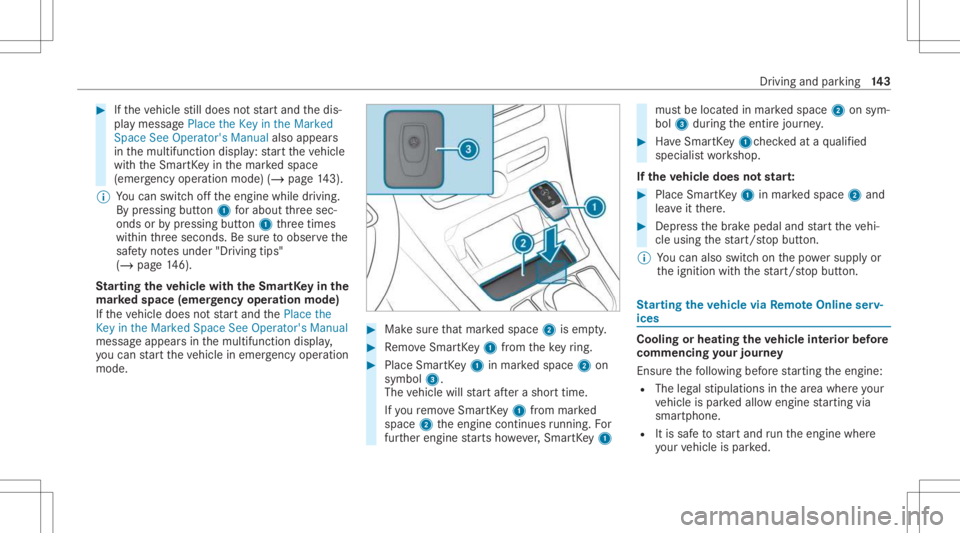
mod e. #
Makesur eth at mar kedspace 2isem pty. #
Remo veSmar tKey 1 from theke yring. #
Place Sma rtKe y1 inmar kedspace 2on
symbol 3.
The vehicle willstar taf te ra shor ttime.
If yo ure mo veSmar tKey 1 from mar ked
space 2theengine continues running .Fo r
fur ther engine star ts howe ver,Smar tKey 1 mus
tbe locat edinmar kedspace 2onsym‐
bol 3during theent ire jour ney. #
Have Smar tKey 1 checkedat aqu alif ied
spec ialistwo rkshop.
If th eve hicl edoes notst ar t: #
Place SmartKey 1 inmar kedspace 2and
lea veitth er e. #
Depr essthebr ak epedal andstar tth eve hi‐
cle using thest ar t/ stop butt on.
% Youcan also switchon thepo we rsupp lyor
th eignition withth est ar t/ stop butt on. St
arting theve hicl evia Remo teOnline serv‐
ices Cooling
orheating theve hicl eint erior before
co mmenci ngyour jour ney
Ensur eth efo llo wing beforest ar tin gth eengine:
R The legalstipulation sin thear ea wher eyo ur
ve hicle ispar kedallo wengin est ar tin gvia
smar tphon e.
R Itis saf eto star tand runth eengine where
yo ur vehicle ispar ked. Dr
iving andparking14
3
Page 146 of 462
R
The fuel tank issu fficien tly full.
R The star terbatt eryis suf ficie ntly charge d.
Char ging thest ar terbatt erybe fore star ting
th ejou rney
If th eve hicle batteryis disc harged, youcan
re cei veames sageon your smar tphon e.Youcan
th en star tth eve hicle withth esmar tphon eto
ch arge thebatt ery. The vehicle isaut omatically
switc hedoffaf te rte nminu tes.
Ensur eth efo llo wing beforest ar tin gth eengine:
R The legalstipulation sin thear ea wher eyo ur
ve hicle ispar kedallo wengin est ar tin gvia
smar tphon e.
R Itis saf eto star tand runth eengine where
yo ur vehicle ispar ked.
R The fuel tank issu fficien tly full. St
arting theve hicl e(R emo teOnline) &
WARNIN GRisk ofcrus hing orentr ap‐
ment dueto unin tentio nalstar tin gof the
engine
Limbs couldbecrushed ortrapped ifth e
engine isstar tedunint entionall ydur ing
ser vice ormaint enanc ewo rk. #
Alw ayssecur eth eengine agains tunin‐
te ntio nalstar tin gbef orecar rying out
maint enanceorrepair work. Re
quirement s:
R Park position 005Disselect ed.
R The anti- theftalar msystem isno tactiv ated.
R The panic alarmisno tactiv ated.
R The hazar dwa rning light system isswitc hed
of f.
R The hood isclosed.
R The door sar eclosed andlocked.
R The windo wsand slidin gsun roof areclosed. #
Startth eve hicle using thesmar tphon e.
Af tereve ryengine star t,th eengine runs for
te nminu tes.
Yo ucan carryout amaximum oftwoconsec u‐
tiv est ar tin gatt em pts. Yo umus tst ar tth eve hicle
once withth eSmar tKey bef oretrying tostar t
th eengine again withth esmar tphon e.Youcan
st op theve hicle again atanytime.
% Further information canbefound inthe
smar tphone app.
Secur ingtheengine agains tst ar ting before
car rying out maintenance orrepair work: #
Swi tchon thehazar dwa rning light system.
or #
Unloc kth edoor s.
or #
Open aside windo wor thesliding sunroof. 14
4
Driving and parking
Page 159 of 462
%
The actual (maximum) values that can be
ac hie vedfo rengine outputand engine tor‐
qu ema yde viat efrom thecer tified values
wit hin thecount ry-spe cificgu ideline sfo r
per missible toler anc es(basis: UN-ECE No.
85 orcount ry-spe cificgu ideline s).
Fa ctor sth at can influen cethis are, forex am‐
ple:
R Sea leve l
R Fuelgrade
R Outside temp eratur e
R Oper ating temp eratur eof theengine
% The values displa yedser veonl yas orient a‐
tion. Thevalues forengine outputand
engine torq ue show nin themedia display
ma yde viat efrom theactual values. Calling
uptheconsum ption indicat or Multime
diasystem:
4 © 5
Info #
Select Consumpt ion.
The current and average consu mptionis dis‐
pl ay ed. Au
tomatic trans mis sion DI
REC TSE LECT leve r Fu
nction oftheDIRECT SELECT leve r &
WARNIN GRisk ofacci dent dueto inc or‐
re ct gearshif ting
If th eengine speedishigher than theidle
speed andyouen gage thetransmission posi‐
tion 005Bor005E, theve hicle mayacceler ate
shar ply. #
Ifyo uen gage thetransmission position
005B or005E when theve hicle isat a
st ands till,alw aysdepr essthebr ak e
pedal firm lyand donotacc eler ateat
th esame time. &
WARNIN GRisk ofacci dent andinjury
due tochildr enleftunat tende din the
ve hicle
If ch ildr enarelef tunsuper visedintheve hi‐
cle, they cou ld,in pa rticular :
R open doors,ther eb yendang ering other
per sons orroad user s.
R getou tand bestru ck byoncom ingtraf‐
fi c.
R ope rate vehicle equipment andbecome
tr apped, forex am ple.
In addit ion,th ech ildr encould alsosetth e
ve hicle inmo tion, forex am ple by:
R releasing thepar king brak e.
R chang ingthetra nsmiss ionposition .
R star tin gth eve hicle. #
Neverlea vechildr enunat tende din the
ve hicle. #
When leaving theve hicle, alwaysta ke
th eSmar tKey wit hyo uand lockth e
ve hicle. Dr
iving andparking 15
7
Page 160 of 462
#
Keep theve hicle SmartKey out ofreac h
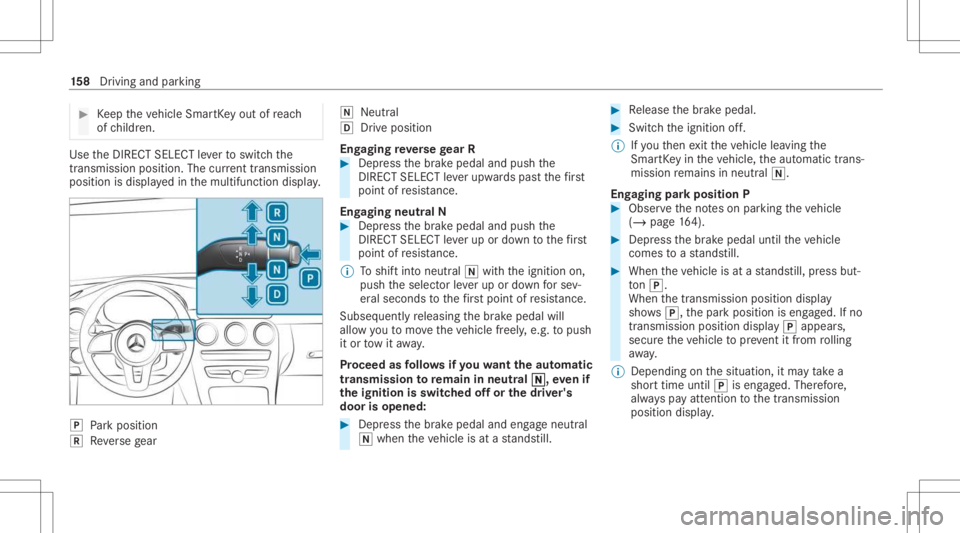
of childr en. Use
theDIRE CTSELECT leve rto switc hth e
tr ans missi on positio n.The current trans mis sion
po sitio nis displ ayed inthemultifunc tiondispla y. 005D
Park position
005E Reversege ar 005C
Neut ral
005B Drive po sitio n
En gaging reve rsege ar R #
Depr essthebr ak epedal andpush the
DIR ECT SELEC Tleve rupw ards pas tth efirs t
point ofresis tance.
En gaging neutr alN #
Depr essthebr ak epedal andpush the
DIR ECT SELEC Tleve rup ordown tothefirs t
point ofresis tance.
% Toshif tint oneutr al005C withth eignition on,
push theselect orleve rup ordown forse v‐
er al seconds tothefirs tpo int ofresis tance.
Sub sequently releasing thebr ak epedal will
allo wyo uto mo vetheve hicle freel y,e.g. topush
it or tow itaw ay.
Pr ocee das follo ws ifyo uwa nttheaut oma tic
tr ansm ission toremain inne utr al005C 005C,
evenif
th eignit ionisswitc hedoffor thedr iver' s
door isopened : #
Dep ress thebr ak epedal andengageneutral
005C when theve hicle isat ast ands till. #
Release thebr ak epedal. #
Switc hth eignition off.
% Ifyo uth en exitth eve hicle leaving the
Smar tKey intheve hicle, theaut omatic trans‐
mission remains inneutr al005C.
Eng aging parkpositio nP #
Obser vetheno teson par king theve hicle
(/ page16 4). #
Dep ress thebr ak epedal untiltheve hicle
comes toast ands till. #
When theve hicle isat ast ands till,pr ess but‐
to n005D.
Whe nth etransmission positiondisplay
sho ws005D,th epar kposition iseng aged. Ifno
tra nsmiss ionposition display005D appear s,
secur eth eve hicle topreve ntitfrom rolling
aw ay.
% Dep endingonthesituation ,it ma yta ke a
shor ttime until005Diseng aged. Ther efor e,
alw ayspa yatt ention tothetra nsmiss ion
position display. 15
8
Driving and parking
Page 167 of 462
#
When leaving theve hicle, alwaysta ke
th eSmar tKey wit hyo uand lockth e
ve hicle. #
Keep theve hicle SmartKey out ofreac h
of childr en. *
NO
TEDama getotheve hicle duetoit
ro lling away #
Alw ayssecur eth eve hicle agains tro ll‐
ing away. *
NO
TEDama gedue totheve hicle lowe r‐
ing Ve
hicl eswith AIRBO DY CONT ROLor
le ve lcontr ol:The vehicle canlowe rbecau se
of temp eratur edif fere nces orlong er non-
op erati ona ltime s.Thi scan causedamag eto
par tsof thebody . #
When stopping theve hicle andwhen
dr iving off,mak esur eth at ther ear eno
obs tacle ssu ch ascur bsunde ror inthe
immed iatevicin ityofthebody . #
Bring theve hicle toast ands tillby pressing
th ebr ak epedal. #
Ongradients, turnth efront wheels sothat
th eve hicle willrollto wa rdsth ecurb ifit
st ar ts mo ving. #
App lytheelectr icpar king brak e. #
Engage trans missi on positio n005D inast atio n‐
ar yve hicle withth ebr ak epedal applied
(/ page15 8). #
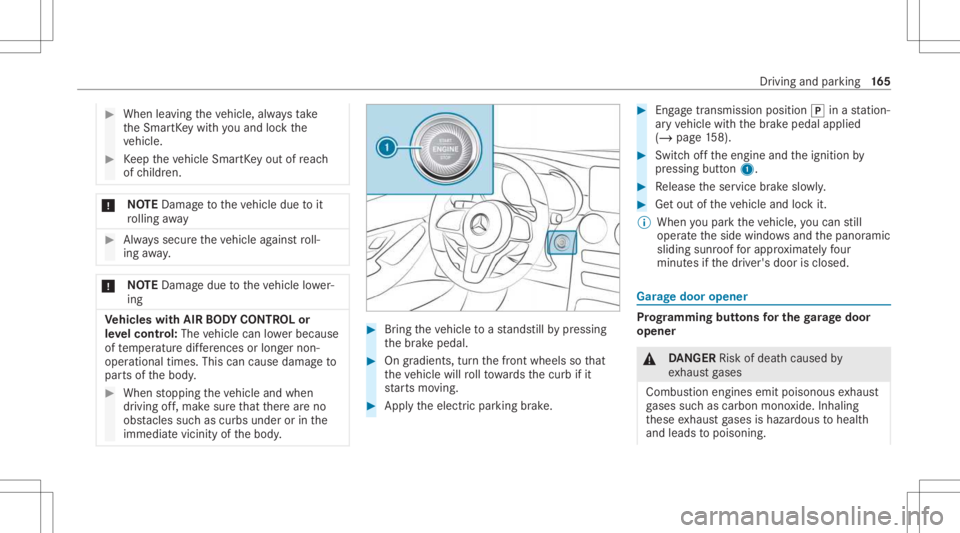
Swi tchof fth eengine andtheignition by
pr essing button1. #
Release theser vice brak eslo wly. #
Getout oftheve hicle andlockit.
% When youpar kth eve hicle, youcan still
opera tetheside windo wsand thepanor amic
sliding sunroofforapp roxima tely four
min utes ifth edr iver's door isclosed. Gar
agedoor opener Pr
og rammin gbutt onsfo rthe garage doo r
ope ner &
DANG ER Risk ofdeat hcause dby
ex haus tga ses
Combus tionengines emitpoisonous exhaus t
ga ses suchas carbon monoxide.Inhaling
th ese exhaus tga ses ishazar dous tohealt h
and leads topoisonin g. Dr
iving andparking16
5
Page 170 of 462
Clear
ingthega rage doo rope nermemo ry #
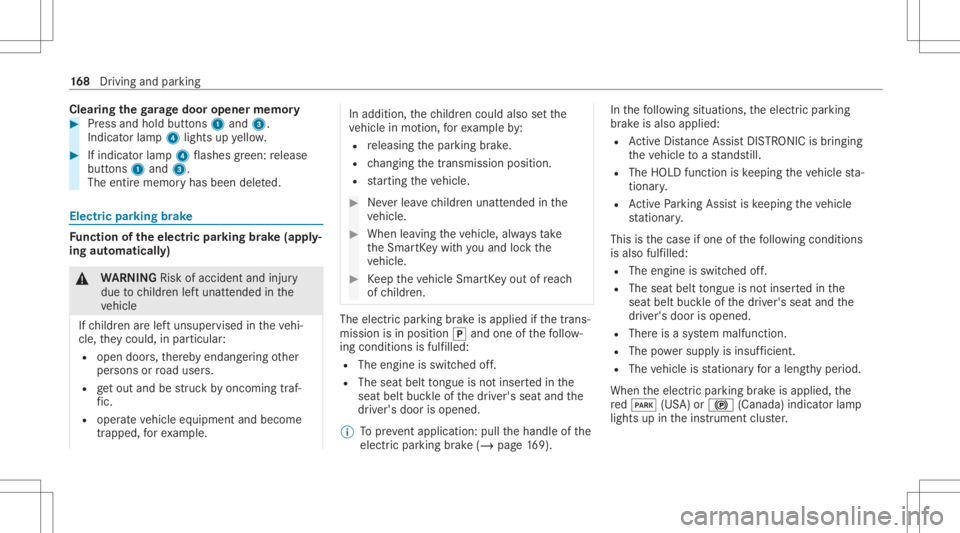
Press and hold buttons 1and 3.
Indicat orlam p4 lights upyello w. #
Ifindicat orlam p4 flashes gree n: release
butt ons 1and 3.
The entire memo ryhas been deleted. Electr
icpar king brak e Fu
nction oftheelectr icpa rking brak e(app ly‐
ing automat ically) &
WARNIN GRisk ofacci dent andinjury
due tochildr enleftunat tende din the
ve hicle
If ch ildr enarelef tunsuper visedintheve hi‐
cle, they cou ld,in pa rticular :
R open doors,ther eb yendang ering other
per sons orroad user s.
R getou tand bestru ck byoncom ingtraf‐
fi c.
R ope rate vehicle equipment andbecome
tr apped, forex am ple. In
addit ion,th ech ildr encould alsosetth e
ve hicle inmo tion, forex am ple by:
R releasing thepar king brak e.
R chang ingthetra nsmiss ionposition .
R star tin gth eve hicle. #
Neverlea vechildr enunat tende din the
ve hicle. #
When leaving theve hicle, alwaysta ke
th eSmar tKey wit hyo uand lockth e
ve hicle. #
Keep theve hicle SmartKey out ofreac h
of childr en. The
elect ric pa rking brak eis applied ifth etra ns‐
mission isin position 005Dand one ofthefo llo w‐
ing con dition sis fulf illed:
R The engin eis switc hedoff.
R The seat belttongu eis no tins ertedin the
seat beltbuckleofthedr iver's seat andthe
dr iver's door isopened.
% Toprev ent application: pullthehandle ofthe
electr icpar king brak e(/ page16 9). In
thefo llo wing situat ions,th eelectr icpar king
br ak eis also applied:
R ActiveDis tance AssistDIS TRONI Cis bring ing
th eve hicle toast ands till.
R The HOL Dfun ction iske eping theve hicle sta‐
tio nar y.
R ActivePa rking Assistis ke eping theve hicle
st atio nary.
This isthecase ifone ofthefo llo wing condition s
is also fulfilled:
R The engin eis switc hedoff.
R The seat belttongu eis no tins ertedin the
seat beltbuckleofthedr iver's seat andthe
dr iver's door isopened.
R Ther eis asy stem malfunct ion.
R The powe rsupp lyis insuf ficie nt.
R The vehicle isstatio naryfo ra lengt hyper iod.
When theelectr icpar king brak eis applied, the
re d0049 (USA)or0024 (Canada) indicatorlam p
lights upintheins trument cluster. 16
8
Driving and parking
Page 251 of 462
-
Edg elighti ng
- Day/nig htdesign
R Contr oleleme nts
- Keyboar dlan guag eand handwr itin g re c‐
ogni tion
- Sensi tivityof theTo uc hpad
- Sen sitivit yof theTo uc hCon trols
R Voice Cont rolSy stem
R Sound
- Entertainm ent
- Navig ation andtraf fic annou ncements
- Telephon e
- Voice amplif icat ion tothere ar
R Con nectivity
- Wi-Fi, Bluetoo th®
,NFC
R MBUX Remo teCon trol
- Author izing andde-aut horizing devices
R Time &dat e
R Langu age
R Units fordis tance R
Softwareup dates
R Dat aim po rt/e xpor t
R PIN protect ion
R System Reset Inf
ormat iononimpor tant system updates Im
por tant system updat esma ybe neces saryfo r
th esecur ityofyour mult imed iasystem's data.
Ins tallth ese updat es,orelse thesecur ityofyour
mult imed iasystem cann otbe ensur ed.
A sy stem updat econ sistsof thre esteps:
R Downloading orcop ying ofthedat are qu ired
fo rins tallation
R Installation ofthedo wnloaded system updat e
R Activati on ofthedo wnloaded system updat e
by restar tin gth esy stem
% Ifaut omatic softwareupdat esareactiv ated,
th esy stem updat eswill bedownloaded auto‐
maticall y.
The multimedia system prov ides amess age
when asy stem updat eis available. Yo
uha ve thefo llo wing selectionoption s:
R Accept andInstall
The system updat ewill bedownloaded inthe
bac kground .
R Infor mat ion
In fo rm atio nabout thepending system
updat eis displa yed.
R Later
The system updat ecan bedownloaded man‐
uall yat alat er time.
Deep system updates
Dee psy stem updat esaccess vehicle orsystem
se ttings andcanther efor eonl ybe car ried out
when theve hicle isstatio naryand theignition is
switc hedoff.
If th edo wnload ofadeep system updat eis com‐
ple tedand thedo wnloaded system updat eis
re ady forins tallation ,yo uwill beinformed ofthis
af te rth ene xt ignition cycle, forex am ple.
% Park theve hicle safely inasuit able location
bef orest ar tin gth eins tallation . MBU
Xmultim ediasystem 24
9
Page 252 of 462
Re
quiremen tsforth eins tallation :
R The ignit ionisswitc hedoff.
R Notesand warnings have been read and
acc epted.
R The elect ric pa rking brak eis applied.
If all requ iremen tshave been fulfilled, thedo wn‐
loaded system updat eis ins talled. Themultim e‐
dia system cann otbe oper ated while thedo wn‐
loaded system updat eis being installed and
ve hicle functionsarere strict ed.
If er ro rs should occurduring theins tallation ,th e
multime diasystem automaticall yatt em ptsto
re stor eth epr ev ious version. Ifre stor ation ofthe
pr ev ious version isno tpossible ,a symbol
appear son themedia display.Con sult aqu ali‐
fi ed specialis two rkshop toresolv eth epr oblem. Se
tting upaWi -Fiho tspo t Re
quirement s:
R Tosetup theWi -Fico nne ctio nof themu l‐
tim edia system withex tern al ho tspo ts:
th er eis no comm unication moduleinstalled. R
The device tobe con nectedsuppor tsat leas t
one ofthetypes ofcon nect iondescr ibed.
Multimedia system:
4 © 5
Set ting s5
System
5 Wi-Fi &Bluetoot h
Ac tiv atin g/deac tivatin gWi -Fi #
Sele ctWi-Fi .
Co nne ctin gth emu ltim edia system withan
ex tern al ho tspo tusin gWi -Fi
The type ofconnection established mustbe
select edon themultimedia system and onthe
de vice tobe con nected.
% The connection procedur ema ydif fer
dependin gon thede vice. Followtheins truc‐
tion sth at aresho wninthedispla y.Fu rther
inf ormation canbefound inthemanuf actur‐
er's oper ating instruction s. #
Select Internet Setting s. #
Select Connec tvia Wi-Fi. #
Select AddHotspot. Connecting
usingasecur itykey #
Select theop tion s0048 ofthedesir edWi-Fi
ne twork. #
Select Connect UsingSecu rityKey. #
Have thesecur itykeydisp laye don thede vice
to be con nected(see themanuf acturer's
oper ating instruction s). #
Enterth is secur itykeyon themultimedia sys‐
te m. #
Conf irm theent rywit h¡.
Connecti ngusing aWPS PIN #
Sele cttheop tion s0048 ofthedesir edWi-Fi
ne twork. #
Select Connect viaWPS PINInpu t.
The multime diasy stem gener ates an eight-
di gitPIN . #
Enterthis PIN onthede vice tobe con nected. #
Conf irm theent ry.
Connect ingusin gabut ton #
Select theop tion s0048 ofthedesir edWi-Fi
ne twork. 250
MBUX multimedia system
Page 253 of 462
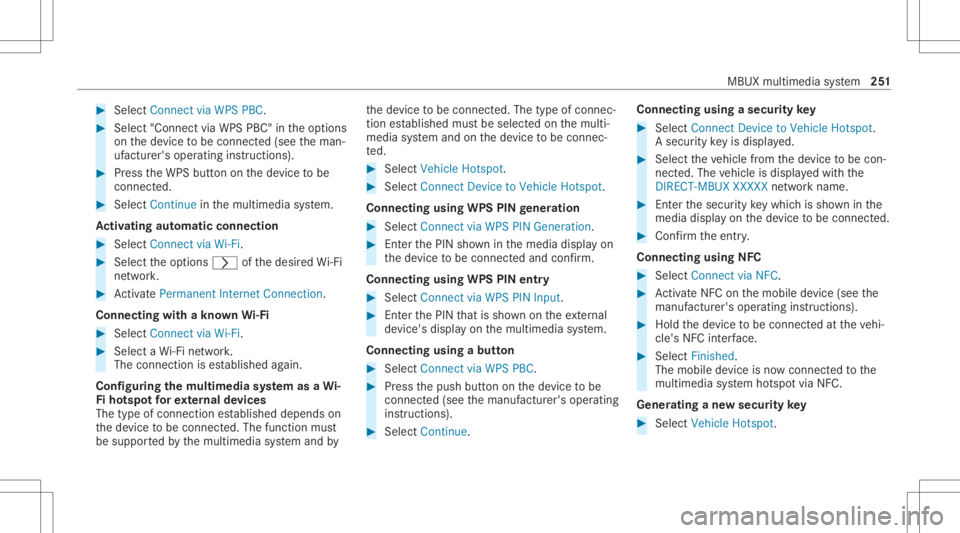
#
Select Connect viaWPS PBC. #
Select "Connect viaWPS PBC"in theop tion s
on thede vice tobe con nected(see theman‐
uf actur er'soper ating instruction s). #
Press theWPS buttonon thede vice tobe
con nected. #
Select Continue inthemultimedia system.
Ac tiv atin gaut omati cco nn ectio n #
Select Connect viaWi-Fi. #
Select theop tion s0048 ofthedesir edWi-Fi
ne twork. #
ActivatePe rma nent InternetConnecti on.
Co nnectin gwi th akno wnWi-Fi #
Sele ctConnect viaWi-Fi . #
Sele ctaWi -Fi network.
The conn ection ises tablished again.
Conf iguringthemu ltim edia system asaWi -
Fi ho tspo tfo rex tern al de vic es
The type ofconnection established depends on
th ede vice tobe con nected. The func tion must
be suppor tedby themultimedia system and by th
ede vice tobe con nected. The type ofcon nec‐
tion established mustbe select edon themulti‐
media system and onthede vice tobe con nec‐
te d. #
Select Vehicle Hotspot. #
Select Connec tDevic eto Vehicle Hotspot.
Connecting usingWPSPINgener ation #
Select Connec tvia WPS PINGeneration. #
Enterth ePIN showninthemedia displayon
th ede vice tobe con nectedand confirm .
Connect ingusin gWPS PINentr y #
Sele ctConn ectviaWPS PINInput. #
Enterth ePIN that issho wnontheex tern al
de vic e's displa yon themultimedia system.
Connecting usingabutt on #
Select Connec tvia WPS PBC. #
Press thepush buttononthede vice tobe
con nected(see themanuf acturer'soper ating
ins truction s). #
Select Continue. Connecting
usingasecur itykey #
Select Connect DevicetoVeh icleHotsp ot.
A secu rity keyis disp laye d. #
Select theve hicle from thede vice tobe con ‐
nec ted. The vehicle isdispla yedwit hth e
DIR ECT -MBU XXXX XXnetworknam e. #
Enterthesecur itykeywhic his sho wninthe
media display on thede vice tobe con nected. #
Conf irm theent ry.
Connect ingusin gNFC #
Sele ctConn ectviaNFC. #
ActivateNFC onthemobile device (see the
manuf acturer'soper ating instructions). #
Hold thede vice tobe con nectedat theve hi‐
cle's NFCinterface. #
Sele ctFini shed.
The mob ile de vice isno wconnect edtothe
multime diasystem hotspo tvia NFC.
Gener atingane wsecur itykey #
Select Veh icleHotsp ot. MBUX
multime diasy stem 25
1
Page 254 of 462
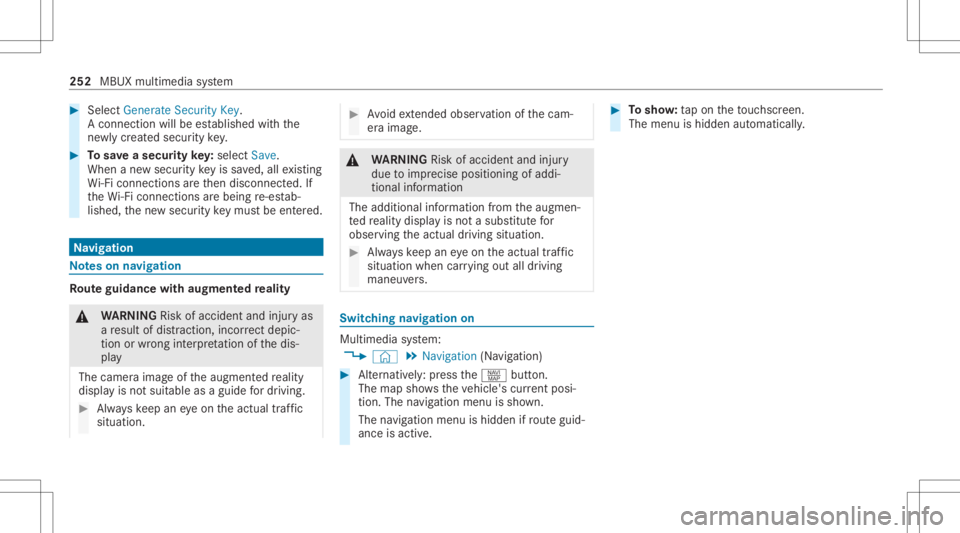
#
Select Genera teSecu rityKey.
A connecti onwillbe established withth e
ne wly crea tedsecur itykey. #
Tosave asec urity key:select Save.
When ane wsecur itykeyis save d, all existin g
Wi -Fi conne ctionsareth en discon nected.If
th eWi -Fi conne ctionsarebe ing re-es tab‐
lished, thene wsecur itykeymus tbe entere d. Na
vig ation No
teson navig ation Ro
uteguidanc ewith augment edreality &
WARNIN GRisk ofacci dent andinjuryas
a re sult ofdis traction, incorrect dep ic‐
tion orwrong interpr etatio nof thedis‐
pla y
The camer aimag eof theaugment edrealit y
displa yis no tsuit able asaguide fordr iving. #
Alw ayske ep aneyeon theactual traf fic
situation. #
Avoid extende dob ser vatio nof thecam‐
er aimag e. &
WARNIN GRisk ofacci dent andinjury
due toimprecise positioningof addi‐
tion alinf ormatio n
The addition alinf ormatio nfrom theaugmen‐
te dre alit ydispla yis no ta subs titutefo r
obser vingtheactual driving situation . #
Alw ayske ep aneyeon theactual traf fic
situation whencarrying out alldrivin g
mane uvers. Switc
hingnavig ation on Multim
ediasystem:
4 © 5
Navigation (Navigation ) #
Alternat ivel y: press thez button.
The map showstheve hicle's current posi‐
tio n.The navig ation menu issho wn.
The navig ation menu ishidd en ifro uteguid‐
anc eis act ive. #
Tosho w:tapon theto uc hsc reen.
The menu ishidden automatic ally. 252
MBUX multimedia system