display MERCEDES-BENZ GLC 2022 Owner's Guide
[x] Cancel search | Manufacturer: MERCEDES-BENZ, Model Year: 2022, Model line: GLC, Model: MERCEDES-BENZ GLC 2022Pages: 462, PDF Size: 17.07 MB
Page 204 of 462
R
The navig ation services option isavailable,
subsc ribed toand activat ed intheMer cedes
me Portal.
R The traf fic light data ser vice belongs tothe
scope ofthena vig ation services.
The current vehicle position andthedir ect ion of
tr av el aretransmit tedvia thecomm unication
module andaligned withth edat afrom thetra f‐
fi c light data ser vice prov ider .The prov ider gath‐
er sdat afrom traf fic lights whichtrans mitth eir
ch ang ingphase s.When theve hicle approaches
an intersection withne tworke dtraf fic lights,
da ta istransmit tedto theve hicle.
A se ttur nsignal leftor right and lane recom‐
mend ations during acti verouteguidan ceare
ta ke nint oacco untforth edispla y.
The service isforinf ormation purposes onlyand
is no tlink edtoanyot her vehicle functions, sys‐
te ms orcom ponents. Pleasenote that thedis‐
pla yeddat ais no tav ailable inall traf fic ar ea s
and maybe incor rect.
Ce rtain light signalsystems automaticall yadap t
th eir switc hingtimes tothecur rent traf fic situ a‐ tion.
Thiscan lead toasudden chang ein the
cou ntdo wndispl ay.
The information intheIns trument Displayis
sho wnafte rsele cting thedispla ycon tents inthe
Assi stance menu .If ano ther menu isselect ed,
th etraf fic light countdo wnisno tdi spl ayed.
Also obser vethefo llo wing informatio n:
R selec ta speed adaptedto thetra ffic, sur‐
ro und ingsand weather condition s
R obse rveactual traffic sign s
R obser veapplic abletraf fic ru les and regula‐
tions
Obser vetheno teson driving systems andyour
re sponsibili ty;yo uma yot her wise failto recog‐
nize dangers.
Sy stem limit s
The displa ydoes notappear inthefo llo wing sit‐
uation s,forex am ple:
R Ther eis no traf fic light data available.
R The timere maini nguntil thene xt green
phase isless than tenseco nds. R
Emerg encyvehicles orlocal publictranspor t
ar elocat edinthevicin ityoftheint ersect ion.
R The datatransmission from theve hicle has
been interru pted.
R Light signal systems arelocat edinacon ‐
st ru ction sitear ea orarebei ng mai ntained.
R The light signal system ismalfunct ioning.
R The subscr iption totheser vice hasexpir ed. Switc
hingthetraf fic ligh tinf orma tion dis‐
pla yon oroff Mult
imed iasystem:
4 © 5
Set ting s5
Assist ance #
Switc hTraffic LightInformation onD or
of fE. Blind
SpotAssis tand Activ eBli nd Spo t
As sist wit hex itwa rning Fu
nction ofBlind SpotAssis tand Activ e
Bli nd Spo tAs sist wit hex itwa rning
Blin dSpo tAss istand ActiveBli nd Spo tAssi st
use twolat eral, rear-facin gra dar sensor sto 202
Driving andparking
Page 214 of 462
Ra
ising there ar oftheve hicl e #
Che ckifth ebatt eryis suf ficie ntly charge d. If
nec essar y,star tth eengine. #
Pull switc h1 brief ly.
Indic ator lam p2 goes out.
The vehicle willberaised tothecur rently
sel ect edleve l.
% The vehicle isaut omaticall yse tto theleve l
of themos tre cently activedrive pr ogr am if
yo udr ive at spee dsgreat erthan 1.2 mp h
(2 km/ h)wit hth ere ar oftheve hicle low‐
er ed. The Vehicle RisingPlease Waitmes‐
sag eappea rsinthemultifunc tiondispla y.
If th eve hicle canno tbe raised: #
Ensur eth at thebatt eryis suf ficie ntly
ch arge d; ifnec essar y,star tth eengine.
The raising proces scon tinues. Re
ar vie wcamer a Fu
nction ofthere ar vie wcamer a
When youen gage reve rsege ar,th eimag efrom
th ere ar vie wcam erais sho wnonthemedia dis‐
pla y.Dyna micguide lines showthepat hth e ve
hicle willtake wit hth ecur rent steer ing ang le.
This helps youto orient yourself and toavoid
obs tacle swhe nba cking up.
The rear vie wcam erais on lyan aid. Itis no ta
subs titutefo ryo ur att entio nto thesur round ings.
The responsibili tyforsaf emaneu vering and
pa rking remains withyo u. Mak esur eth at ther e
ar eno per sons, animals orobjec tsetc., inthe
maneu vering area while ma neu vering and park‐
ing.
% Youcan open theco verof there ar vie wcam ‐
er aman ually(/ page21 8).
Th egui de lines inthemedia displaysho wthe
dis tances toyour vehicle. Thedistances dis‐
pl aye donl yapply toroad leve l.
Depe ndingon theve hicle equipment, youcan
sele ctfrom thefo llo wing views:
R Normalvie w
R Wide-ang levie w
R Trailer view
The area behin dth eve hicle isdispla yedas a
mir rorimag e,as intheinside rear vie wmir ror. Ve
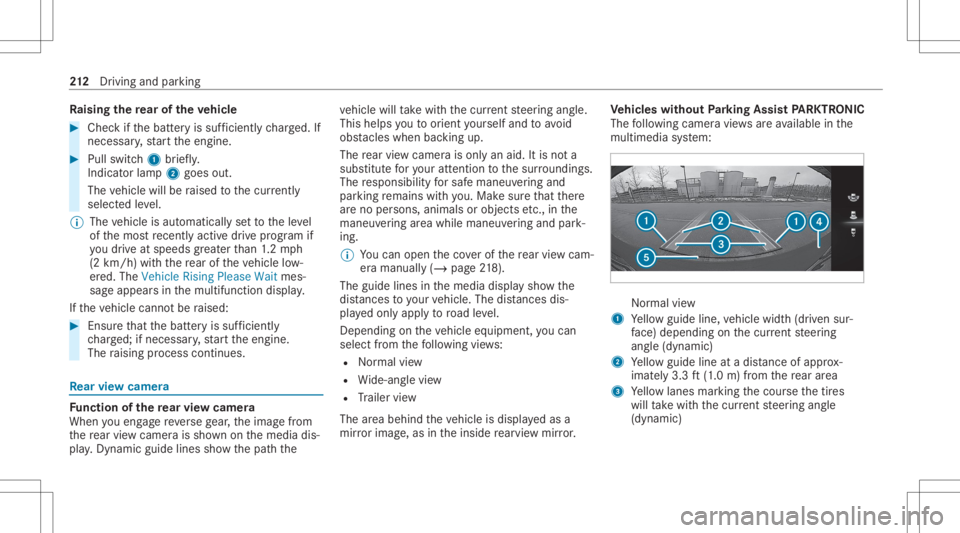
hicl eswithout Parking Assis tPA RK TRONI C
The follo wing camer avie ws areav ailable inthe
multime diasystem: Nor
mal view
1 Yello wguide line,vehicle width(dr iven sur‐
fa ce) dep endi ngon thecur rent steer ing
ang le(dynamic)
2 Yello wguide lineatadis tance ofapprox ‐
imat ely3. 3ft (1.0 m) from there ar area
3 Yello wlanes markingth ecour sethetir es
will take wit hth ecur rent steer ing ang le
(dynamic) 21
2
Driving and parking
Page 219 of 462
The
guide linesinthemedia displaysho w
th edis tances toyour vehicle. Thedistances
ap ply toroad leve l.
In trailer mode, theguide linesaresho wnat
th eleve lof thetrailer hitch.
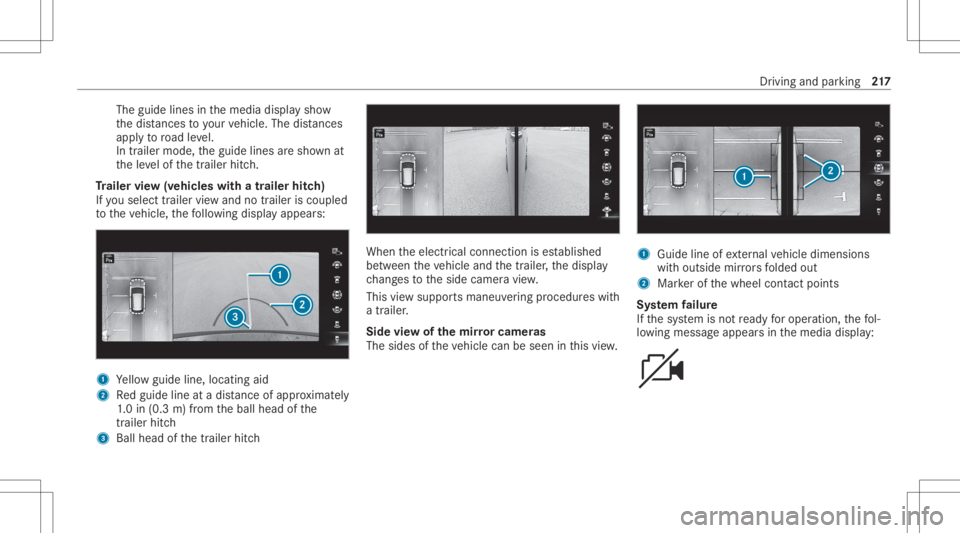
Tr aile rvie w(vehic leswith atraile rhitc h)
If yo usele cttrailer viewand notrailer isco upled
to theve hicle, thefo llo wing displa yappear s: 1
Yello wguide line,locat ingaid
2 Redguide lineatadis tance ofapprox imat ely
1. 0 in (0.3 m)from theball head ofthe
tr ai le rhi tc h
3 Ballhe ad ofthetrailer hitch When
theelectr icalconnect ionises tablished
be tween theve hicle andthetra iler ,th edispla y
ch ang estotheside camer avie w.
This viewsuppor tsmaneuv ering procedur eswit h
a trailer .
Side viewof themir rorca mer as
The side sof theve hicle canbeseen inthis vie w. 1
Guide lineofextern al vehicle dimensions
wit houtside mirrors folded out
2 Markerof thewheel contact poi nts
Sy stem failur e
If th esy stem isno tre ady foroper ation, thefo l‐
lo wing mess ageappear sin themedia display: Dr
iving andparking 217
Page 224 of 462
Sy
stem limit s
The system limits forPa rking Assist
PA RK TRONI Cappl yto passiv eside impact pro‐
te ction.
The follo wing objectsar eno tde tected, forex am‐
ple:
R Pedes trians who approachth eve hicle from
th eside
R Objec tsplaced next to theve hicle
Ac tiv atin g/deac tivatin gPa rking Assis t
PA RK TRONI C
* NO
TERisk ofan acci dent from objects
at clo serang e Pa
rking AssistPA RK TRONI Cma yno tde tect
cer tain obje ctsat clos era ng e. #
Whe npa rking ormane uvering theve hi‐
cle, paypar ticular attention toany
obj ect swhic har eabo veorbelo wthe
sensor s,e.g. flowe rpo ts or draw bar s.
The vehicle orother object scould oth‐
er wise bedamag ed. #
Vehicl eswithout AIRBO DY CONT ROL:
pr ess theé buttoninthecent ercon sole.
% Vehicl eswith AIRBO DY CONT ROL:you
can activate or deactiv atePa rking Assist
PA RK TRONI Cin themultimedia system
(/ page222).
If th eindicat orlam pin theé buttonisno tlit,
Pa rking AssistPA RK TRONI Cis act ive. Ifth eindi‐
cat orlam pis lit or theé symbol appearsin
th eins trument cluster,Pa rking Assist
PA RK TRONI Cis no tact ive.
% Parking AssistPA RK TRONI Cis aut omat ically
act ivat ed when theve hicle isstar ted.
Ac tiv atin g/deac tivatin gPa rking Assis t
PA RK TRONI Cusi ng the multime diasystem
* NO
TERisk ofan acci dent from objects
at clo serang e Pa
rking AssistPA RK TRONI Cma yno tde tect
cer tain obje ctsat clos era ng e. #
Whe npa rking ormane uvering theve hi‐
cle, paypar ticular attention toany
obj ect swhic har eabo veorbelo wthe sensor
s,e.g. flowe rpo ts or draw bar s.
The vehicle orother objects couldoth‐
er wise bedamag ed. Re
quirement s:
R The camera menuis open.
R Or:Ac tivePa rking Assistis act ive.
R Or:th ePA RK TRONI Cpop- upwin dow
appear s. #
Tap= inthemedia display.
If th eindicat orlam pis lit, Parking Assist
PA RK TRONI Cis act ive. Ifth eindicat orlam pis
no tlit or theé symbol appearsin theins tru‐
ment cluster,Pa rking AssistPA RK TRONI Cis no t
act ive.
% Parking AssistPA RK TRONI Cis aut omat ically
act ivat ed when theengine isstar ted.
Alt ernativ ely,Pa rking AssistPA RK TRONI Ccan be
act ivat ed ordeac tiva tedin thequ ick acc ess
men u. 222
Drivin gand parking
Page 225 of 462
Se
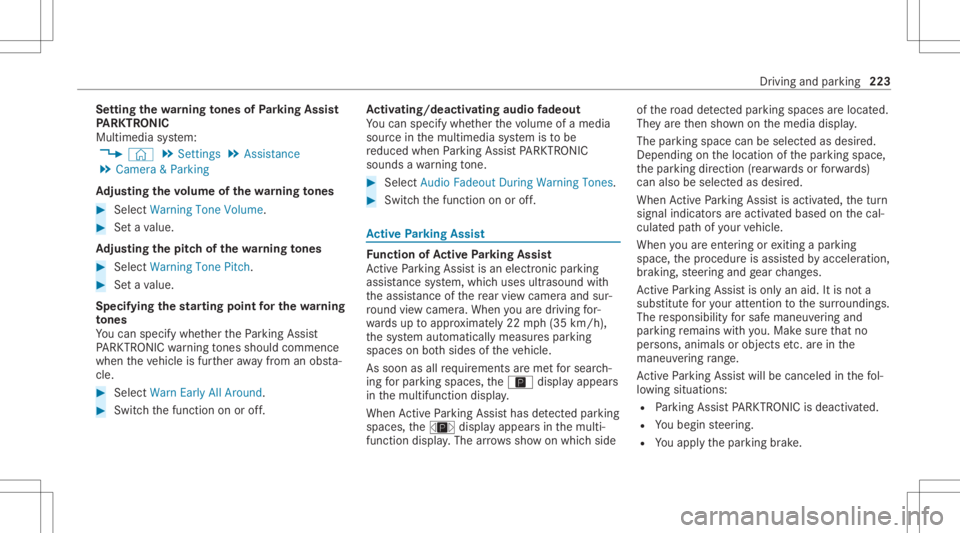
tting thewa rning tones ofParking Assis t
PA RK TRONI C
Mu ltimed iasystem:
4 © 5
Set ting s5
Assist ance
5 Camera &Parkin g
Ad jus tingthe volum eof thewa rning tones #
Select Warning ToneVolume. #
Seta va lue.
Ad jus tingthe pitchof the warning tones #
Select Warning TonePitch. #
Seta va lue.
Specif yingthest ar ting pointfo rthe warning
to nes
Yo ucan spec ifywhe ther thePa rking Assist
PA RK TRONI Cwa rning tones should comm ence
wh en theve hicle isfur ther aw ay from anobs ta‐
cle . #
Sele ctWa rnEarl yAll Arou nd. #
Swi tchth efunc tion onoroff. Ac
tiv atin g/deac tivatin gaudi ofa deo ut
Yo ucan spec ifywhe ther thevo lume ofamedia
sour ceinthemultimedia system isto be
re duced whenParking AssistPA RK TRONI C
soun dsawa rning tone. #
Select Aud ioFad eou tDuri ngWa rning Tones. #
Swi tchth efunc tion onoroff. Ac
tiv ePa rking Assis t Fu
nction ofActiv ePa rking Assis t
Ac tivePa rking Assistis an elect ronic parking
assis tance system, whic huses ultrasound with
th eassis tance ofthere ar vie wcam eraand sur‐
ro und viewcam era. When youar edr ivin gfo r‐
wa rdsup toappr oximat ely22 mph(35 km/h),
th esy stem automaticall ymeasur espar king
spaces onboth sides oftheve hicle.
As soon asall requ iremen tsareme tfo rsear ch‐
ing forpar king space s,theÇ displa yappear s
in themultifunc tiondispla y.
When ActivePa rking Assisthas detected parking
spaces ,th eÈ displa yappear sin themulti‐
func tion displa y.The arro ws sho won whic hside of
thero ad detected parking spaces arelocat ed.
The yar eth en sho wnonthemedia display.
The parking space canbeselect edasdesir ed.
Dependin gon thelocation ofthepar king space,
th epar king direct ion (rear wardsor forw ards)
can also beselec tedas desir ed.
When ActivePa rking Assistis act ivat ed, thetur n
signal indicat orsar eactiv ated based onthecal‐
culat edpat hof your vehicle.
When youar een tering orexitin gapar king
space, thepr ocedur eis assis tedby acc eleration ,
br akin g,steer ing and gear chang es.
Ac tivePa rking Assistis onl yan aid. Itis no ta
subs titutefo ryo ur att entio nto thesur round ings.
The responsibili tyforsaf emaneu vering and
pa rking remains withyo u. Mak esur eth at no
per son s,anim alsorobj ect set c. arein the
maneu vering rang e.
Ac tivePa rking Assistwill becan celed inthefo l‐
lo wing situat ions:
R Parking AssistPA RK TRONI Cis deac tiva ted.
R Youbegin steer ing.
R Youappl yth epar king brak e. Dr
iving andparking 223
Page 227 of 462
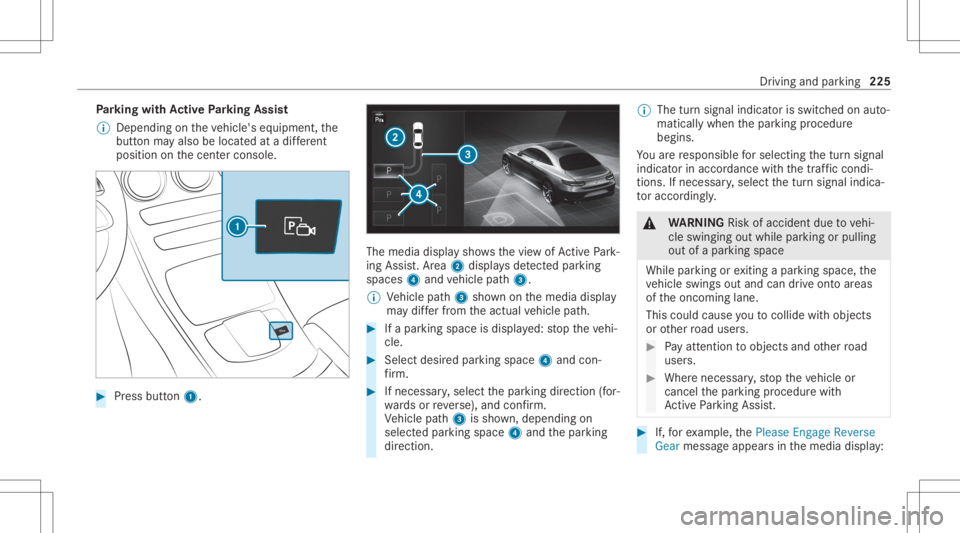
Pa
rking withAc tiv ePa rking Assis t
% Depen dingontheve hicle's equipment, the
butt onmayalso belocat edatadif fere nt
po sitio non thecent ercon sole. #
Press butt on1. The
media displaysho wsthevie wof ActivePa rk‐
ing Assist. Ar ea 2 displa ysdetected parking
spaces 4and vehicle path3.
% Vehicle path3 shownonthemedia display
ma ydif ferfr om theactual vehicle path. #
Ifapar king space isdispla yed: stop theve hi‐
cle. #
Select desiredpar king space 4and con‐
fi rm . #
Ifnecessar y,select thepar king direct ion (for‐
wa rdsor reve rse), and confirm .
Ve hicle path3 issho wn, depending on
select edpar king space 4and thepar king
dir ect ion. %
The turnsignal indicat orisswitc hedonaut o‐
maticall ywhen thepar king procedur e
begins.
Yo uar ere sponsible forsele cting thetur nsignal
indicat orinaccor dance withth etraf fic condi ‐
tions .If neces sary,select thetur nsignal indica‐
to raccor dingly. &
WARNIN GRisk ofacci dent dueto vehi‐
cle swinging outwhile parking orpulli ng
out ofapar king space
While parking orexitin gapar kingspace, the
ve hicle swings outand candrive ont oar eas
of theonc oming lane.
This could cause youto coll ide wi th object s
or other road user s. #
Payatt ention toobject sand other road
user s. #
Wher enec essar y,stop theve hicle or
cancel thepar king procedur ewit h
Ac tivePa rking Assist. #
If,forex am ple, thePlease Engage Reverse
Gear messag eappear sin themedia display: Dr
iving andparking 225
Page 228 of 462
select
thecor responding transmission posi‐
tion.
The vehicle drives intoth eselect edpar king
space.
% During thepar king procedur ewit hAc tive
Pa rking Assist, th elane marking sar edis‐
pla yedin green inthecamer aimag e.
On com pletion ofthepar king procedur e,the
Ø Parking AssistFinished, TakeContro lof
Vehicle displaymessag eappear s.Fu rther
maneuv ering mayst ill be nec essar y. #
Aftercom pletion ofthepar king procedur e,
saf eguar dth eve hicle agains tro lling away.
When requ ired bylegalrequ iremen tsor local
con dition s:tur nth ewheels towa rdsth ecurb.
% Youcan stop theve hicle andchang eth e
tr ans missi on positio ndu ring thepar king pro‐
cedur e.The system then calculat esane w
ve hicle path.Ifno newvehicle pathis availa‐
ble, thesy stem can chang eth etransmission
position again orcanc elthepar king proce‐
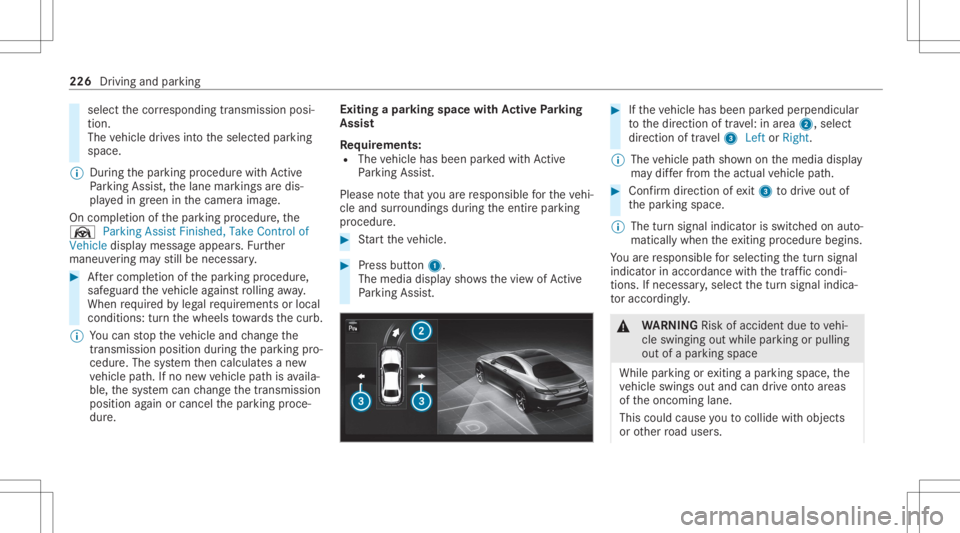
dur e. Exiting
apar king space withAc tiv ePa rking
Assis t
Re quirement s:
R The vehicle hasbeen parkedwit hAc tive
Pa rking Assist.
Please note that youar ere sponsible forth eve hi‐
cle and surround ingsdur ing theent ire par king
pr ocedur e. #
Startth eve hicle. #
Press butt on1.
The media displaysho wsthevie wof Active
Pa rking Assist. #
Ifth eve hicle hasbeen parkedper pendicular
to thedir ect ion oftra vel:in area 2, selec t
dir ect ion oftra vel3 Left orRight .
% The vehicle pathsho wnonthemedia display
ma ydif ferfr om theactual vehicle path. #
Conf irm dir ection ofexit3 todrive out of
th epar king space.
% The turnsignal indicat orisswitc hedonaut o‐
maticall ywhen theex itin gpr ocedur ebegin s.
Yo uar ere sponsible forsele cting thetur nsignal
indicat orinaccor dance withth etraf fic condi ‐
tions .If neces sary,select thetur nsignal indica‐
to raccor dingly. &
WARNIN GRisk ofacci dent dueto vehi‐
cle swinging outwhile parking orpulli ng
out ofapar king space
While parking orexitin gapar kingspace, the
ve hicle swings outand candrive ont oar eas
of theonc oming lane.
This could cause youto coll ide wi th object s
or other road user s. 226
Drivin gand parking
Page 229 of 462
#
Payatt ention toobject sand other road
user s. #
Wher enec essar y,stop theve hicle or
cancel thepar king procedur ewit h
Ac tivePa rking Assist. #
If,forex am ple, thePlease Engage Forward
Gear messag eappear sin themedia display:
select thecor responding transmission posi‐
tion.
The vehicle movesout ofthepar king space.
The turnsignal indicat orisswitc hedoffaut o‐
maticall y.
Af terth epar king space hasbeen exited, awa rn‐
ing tone and theØ ParkingAssist Finished,
Take Contr olof Vehicle messagepr om ptyouto
ta ke contr olof theve hicle.
The vehicle isno taut omatically brak ed and can
ro llaw ay.Yo uha ve toacc eler ate, brak e, steer
and chang ege ar yourself again. Ma
neuv ering assistance Fu
nction ofDrive Awa yAssis t
Dr ive Aw ayAssi stcan reduce these verity of an
impact when pulling away.If an obs tacle is
de tected inthedir ect ion oftrav el, theve hicle's
speed isbrief lyreduced toappr ox.1 mp h
(2 km/ h).Ifacr itic alsituat ionisde tected, the
É symbol appearsinthemedia display.
% Youcan cancelaninterve ntio nby Drive
Aw ayAssi stat anytim eby deactiv ating
Pa rking AssistPA RK TRONI C(/ page22 2). &
WARNIN GRisk ofacci dent caused by
limit eddetection perform anc eof Drive
Aw ayAssi st
Dr ive Aw ayAssi stcanno tal wa ys cle arly iden‐
tify obje ctsand traf fic situ ations. #
Alw ayspa ycar eful attention tothetra f‐
fi c situ ation; donotre ly on Drive Aw ay
Assi stalon e. #
Beprepar edtobrak eor sw erve as nec ‐
essar y,prov ided thetra ffic situat ion per
mitsand that itis saf eto take eva‐
siv eact ion. Dr
ive Aw ayAssi stisonl yan aid. Itis no ta sub‐
st itut efo ryo ur att entio nto thesur round ings.
The responsibili tyforsaf emaneu vering and
pa rking remains withyo u. Mak esur eth at no
per son s,anim alsorobj ect set c. arein the
maneu vering rang e.
A risk ofacollision mayar ise inthefo llo wing sit‐
uation s,forex am ple:
R Ifth eaccelera torand brak epeda lsareint er‐
ch ang ed.
R Ifan incorrect transm ission position is
eng aged.
Dr ive Aw ayAssi stisact ive under thefo llo wing
con dition s:
R IfPa rking AssistPA RK TRONI Cis act ivat ed.
R Ifyo ushif tth etra nsmiss ionposition to005E or
005B when theve hicle isstatio nary.
R Ifth ede tected obs tacle isless than appr ox.
3.3 ft(1.0 m) away. Dr
iving and parking 22
7
Page 230 of 462
R
Ifth emaneuv ering assis tance func tionis
acti vatedin themultimedia system.
Sy stem limit s
The perform anc eof Drive Aw ayAssi stislimit ed
on inclines .
When drivin gwit hatrailer ,Dr ive Aw ayAssi stis
no tav ailable.
% Alsoobse rveth esy stem limits ofParking
Ass istPA RK TRONI C(/ page21 8).
Fu nction ofCross Traf fic Aler t
% Cross Traf fic Aler tis only available forve hi‐
cles withBlind SpotAssis tor ActiveBli nd
Spo tAssi st.
Cr oss Traf fic Aler tcan warndriver sof anycr oss‐
ing traffic when backingup and mane uvering out
of apar kingspace. Theradar sensor sin the
bum peralso monit orthear ea adjacen tto the
ve hicle. Ifacr itical situation isde tected, the
L symbol appearsinthemedia displayand
th eve hicle canbebrak ed aut omatically .
If th era dar sensor sar eobs truct edbyvehicles
or other object s,de tection isno tpos sible. Cr
oss Traf fic Aler tis acti veund erthefo llo wing
con dition s:
R Ifth eve hicle isbac king upatwa lkin gpace.
R Maneuv ering assis tance isacti vated
( / pag e228).
% Also obser vetheins truction son Blind Spot
Assis tand ActiveBli nd Spo tAssi st
( / pag e202).
Sy stem limit s
Cr oss Traf fic Aler tis no tav ailable onincline s.
Cr oss Traf fic Aler tis no tav ailable whendrivin g
wit hatrailer .
Ac tiv atin g/deac tivatin gthe mane uvering
ass ista nt
Mu ltimed iasystem:
4 © 5
Set ting s5
Assist ance
5 Camera &Parkin g #
Switc hManeuverin gAssist anceonoroff.
% The maneuv ering assis tant mu stbe activ e
fo rth efunc tion ofDrive Aw ayAssi st
( / pag e22 7) and Cross Traf fic Aler t
(/ page 228) . Tr
aile rhitc h No
teson trailer operation *
NO
TEMercede s-AMG vehicles #
Obser vetheno tesin theSupplement .
Yo uco uld other wise failto recogni ze
da ngers. *
NO
TEPlug -in hybrid #
Obser vetheno tesin theSupplement .
Yo uco uld other wise failto recogni ze
da ngers. &
WARNIN GRisk ofacci dent dueto
uns uitable ballneck
If yo uins tallan unsuit ableballneck,the
tr ai le rhi tc hand there ar axle maybe ove rloa‐
ded.
This cansignif icantl yim pair thedr iving char‐
act eristic sand thetrailer maybecome loose.
Ther eis arisk offata linj ury. 228
Driving andparking
Page 235 of 462
No
teson theins trum ent disp layand on-
boar dcom puter &
WARNIN GRisk ofacci dent dueto an
In stru ment Displa ymalfu nction
If th eIns trument Displayhas failed ormal‐
func tioned,thefunc tion restrictions applying
to saf etyre leva nt systems areno tvisible.
The oper ating safetyof your vehicle maybe
im pair ed. #
Drive on car efull y. #
Have theve hicle checkedimmediat ely
at aqu alif ied spec ialistwo rkshop. &
WARNIN GRisk ofdist ra ction from infor‐
mati onsystems andcomm unication s
eq uipment
If yo uoper ateinf ormat ionand comm unic a‐
tio neq uipme ntintegratedin theve hicle
when driving, youwill bedistract ed from the
tr af fic situ ation. Thiscou ldalso cau seyouto
lose control of theve hicle. #
Onlyoper ateth is eq uipmen twhen the
tr af fic situ ation per mits. #
Ifyo ucan notbe sur eof this, stop the
ve hicle whilstpa ying attention toroad
and traffic condi tions andoperate the
eq uipment withth eve hicle statio nary. *
NO
TEMercede s-AMG vehicles #
Obser vetheno tesin theSupplement .
Yo uco uld other wise failto recogni ze
da ngers. Yo
umus tobse rveth eleg alrequ iremen tsforth e
cou ntryin whi chyouar ecur rentl ydr ivi ng when
op erati ng theon- boar dcom puter.
The on-boar dcom putersho wsonlydispla ymes‐
sag esand warnings from spec ific systems on
th emultifunc tiondispla y.Yo umus tth er efor e
ensur eth at your vehicle isalw aysre liable.
If th eoper ating safetyof your vehicle is
im pair ed,parkth eve hicle immediat elyand in
accor dance withth etraf fic condi tions.Co ntact a
qu alif ied spec ialistwo rkshop. Ins
trument Displayand on-boar dcom puter 233