key MERCEDES-BENZ GLC 2022 Owners Manual
[x] Cancel search | Manufacturer: MERCEDES-BENZ, Model Year: 2022, Model line: GLC, Model: MERCEDES-BENZ GLC 2022Pages: 462, PDF Size: 17.07 MB
Page 4 of 462
Symbols
........................................................ 5 At
agl ance ....................................................6
Coc kpit ....... ..................... ..................... ..........6
Indica torand warning lam ps(stan dar d)........ 10
Indicat orand warning lam ps(widesc reen
coc kpit) ......................................................... 12
Ov erhead controlpanel ................................ 14
Doo rop erati ng unitand seatad jus tment .....16
Emerg enciesand brea kdo wns ............ .......... 18 Digita
lOp erator' sMa nua l......................... 20
Callin gup theDigit alOper ator's Manual ...... 20 Gener
alno tes... .......................................... 22
Pr otect ing theen vironmen t... ....................... 22
Genuine Mercedes- Benzparts......................2 2
Oper ator's Manual ........................... .............2 3
Ser vice andvehicle operation ......... .............. 24
Oper ating safety...........................................2 5
Decl arati on ofconf ormity forwireless
ve hicle component s... ..................................2 6
Dia gno stics con nection ................................ 27 Qua
lified speci alistwo rkshop ....................... 28
Cor rect useof theve hicle ............................2 8
Spor tUtil ityVehicle ........................ .............. 28
No tesfo rper sons withelectr onicmedi‐
cal aids..... ........................................ ............ 29
Pr oble mswithyo ur vehicle ............... ............ 29
Re por tingsaf etydef ects ...............................3 0
Limit edWarrant y.......................................... 30
QR cod efo rre scue card... ............... .............3 1
Dat ast or ag e... ..............................................3 1
Cop yright ...................................................... 35 Occup
antsafety.... ..................................... 37
Re stra int system .............................. .............3 7
Sea tbel ts<0011001100110011001100110011001100110011001100110011001100110011
0011001100110011001100110011001100110011001100110011001100110011
0011001100110011001100110011001100110011001100110011001100110011
00110011001100110011> 39
Airb ags<0011001100110011001100110011001100110011001100110011001100110011
0011001100110011001100110011001100110011001100110011001100110011
0011001100110011001100110011001100110011001100110011001100110011
001100110011001100110011001100110011> 43
PR E-S AFE ®
sy stem ........................................5 1
Saf ely transp orting childr enintheve hi‐
cle ...... ..........................................................5 2
No teson pets intheve hicle ............ .............6 5 Opening
andclosing .................................. 66
Smar tKey <0011001100110011001100110011001100110011001100110011001100110011
0011001100110011001100110011001100110011001100110011001100110011
0011001100110011001100110011001100110011001100110011001100110011
001100110011001100110011> 66
Door s<0011001100110011001100110011001100110011001100110011001100110011
0011001100110011001100110011001100110011001100110011001100110011
0011001100110011001100110011001100110011001100110011001100110011
001100110011001100110011001100110011001100110011> 70Ca
rgocom partmen t... ..................................7 3
Sid ewi ndo ws<0011001100110011001100110011001100110011001100110011001100110011
0011001100110011001100110011001100110011001100110011001100110011
001100110011001100110011001100110011001100110011001100110011> 79
Sli ding sunroof <0011001100110011001100110011001100110011001100110011001100110011
0011001100110011001100110011001100110011001100110011001100110011
0011001100110011001100110011001100110011001100110011> 82
Ro ller sun blinds ...........................................8 6
Anti-t heftpr otect ion .....................................8 7 Seats
andstowing ..................................... 90
No teson thecor rect driver's seatpos i‐
tion <0011001100110011001100110011001100110011001100110011001100110011
001100110011001100110011001100110011001100110011> <0011001100110011001100110011001100110011001100110011001100110011
001100110011001100110011001100110011001100110011>.......90
Sea ts<0011001100110011001100110011001100110011001100110011001100110011
001100110011001100110011001100110011001100110011> <0011001100110011001100110011001100110011001100110011001100110011
001100110011001100110011001100110011001100110011>....91
St eer ing wheel ..............................................9 7
Eas yentr yand exitfeatur e...........................9 9
Memor yfunct ion........................................1 00
St ow agear eas ............................................ 102
Soc kets ........... ............................................ 116
Wi reless chargin gof themobile phone
and connect ionwithth eex terior ant enna ...118
Ins talling/ remo ving thefloor mats .............. 119 Light
andvisibili ty.................................... 121
Ext eriorlighti ng............. ..............................121
Int erior ligh ting ........................................... 126
Wi ndsh ield wipe rand windsh ield wa sher
sy stem ........................................................ 128 2
Contents
Page 34 of 462
tio
n,num berof wh eelre vo lution sor thefa s‐
te ned seatbe lts displ ay
R Ambi entcond itions, such astemp eratur e,
ra in sen sor ordis tance sens or
Ge ner ally,th euse ofthese datais temp orar y;
th ey will notbe stor ed beyond theper iod of
oper ation andwillonlybe processed within the
ve hicle itself. Controlunits oftencont ain da ta
memor iesforve hicle keys,fo rex am ple. Their
use permitsth ete mp oraryor per manent docu‐
ment ation oftech nica linf orma tionab ou tth e
ve hicle's operating stat e, com ponent loads,
main tenance requ iremen tsand tech nica lev ent s
or malfunct ions.
Depen dingontheve hicle equipment, thefo llo w‐
ing dataar estor ed:
R Oper ating status ofsystem com ponen ts,
suc has fill le ve ls, tirepr essur eor batt ery
st atus
R Malfun ction sor faults inim por tant system
com ponen ts,suc has lights orbrak es
R System react ionsin spec ialdrivin gsit ua‐
tio ns,suc has airbag deploymentor theint er‐
ve ntio nof stabilit ycon trol systems R
Information onevent sleading tovehicle
damag e
In cer tain cases ,it ma ybe requ ired tostor edat a
th at wo uld have other wise been usedonlyte m‐
por arily. This maybe thecase ifth eve hicle has
de tected amal functi on,forex am ple.
If yo uuse services, suchas repair services and
maint enanc ewo rk,st or ed oper ational dataas
we llas theve hicle identif ication number canbe
re ad out and used. Theycan beread out by
ser vice networkem ployees, suchas workshops
and manuf acturersor third par ties ,suc has
br eakdo wnservice s.The same istrue inthe
case ofwa rrant yclaim sand qualit yassur ance
meas ures.
In gener al,th ere adout isper form ed via the
leg ally prescr ibed portfo rth ediagnos ticscon‐
nect ionintheve hicle. Theoper ational datath at
ar ere ad out documen tte ch nica lst at es ofthe
ve hicle orofindividua lcom ponent sand assis tin
th ediagnosis ofmalfunct ions,compliance with
wa rrant yoblig ationsand qualit yim prove ment.
To that end ,th ese data,in par ticular information
about componen tloads, tech nica lev ent s,mal‐ func
tionsand other faults maybe transm itted
alon gwit hth eve hicle identif ication number to
th emanuf acturer.Fu rther mor e,themanuf ac‐
tur erissubject toproduct liability .Fo rth is rea‐
son themanuf actureralso uses operational data
fr om theve hicle, forex am ple, forre cal ls. The se
da ta can also be used toexamin eth ecus tom‐
er's warrant yand guar anteeclaim s.
Fa ult mem ories intheve hicle canberese tby a
ser vice outle tor atyour requ estas par tof repair
or maint enanc ewo rk.
Con venience andinfotainmen tfuncti ons
Yo ucan stor econ venie nce setting sand individ‐
ua lse ttings intheve hicle andchang eor rese t
th em atanytime.
Depen dingontheve hicle equipment, this
inc ludes thefo llo wing settings ,fo rex am ple:
R Seat andsteer ing wheel position s
R Suspension andclimat econ trol settings
R Individual settings, suchas interior lighting
Depen dingontheselect edequipment, youcan
im por tdat aint ove hicle infotainm entfunction s
yo urself . 32
General no tes
Page 58 of 462
#
When leaving theve hicle, alwaysta ke
th eSmar tKey wit hyo uand lockth e
ve hicle. #
Keep theve hicle SmartKey out ofreac h
of childr en. &
WARNIN GDang ertolife due toexpo‐
sur eto extreme heat or col din theve hi‐
cle
If people, particular lych ildr en, areex posed
to extreme temp eratur esove ran extende d
pe riod oftime, ther eis arisk ofser ious
injur yor dang ertolife. #
Neverlea veper sons, childr eninpar tic‐
ular ,unat tende din theve hicle. Ov
ervie wof suitable seatsintheve hicl efo r
ins talling ach ild restra int system Lef
t/right rear seat
Pr efer redsecur ingsystem:
® LATC H-type (ISOFIX )ch ild seat anchor ¯
Alsosecur eTo pTe ther ifpr esent
(/ page59).
Alt ernativ esecur ingsystem:
0076 Ve
hicle seatbelt
Fr ont passeng erseat
Sec uring system:
0076 Ve
hicle seatbelt
Be sureto obser ve:
R Ifth efront passeng erseat isoccupied,
ensur e,bo th bef oreand during thejour ney,
th at thest atus ofthefront passeng erairbag
is cor rect forth ecur rent situa tion
(/ page 48).
R Obse rveth eno teson aut omatic front
passeng erairbag shutoff(/ page46)
Cent errear seat
Secur ingsystem:
0076 Ve
hicle seatbelt
¯ Alsosecur eTo pTe ther ifpr esent
(/ page59). Ac
tiv atin gor deac tivatin gthe special seat
be ltre tract orofthe seat belt &
WARNIN GRisk ofinju ryor deat hif a
seat beltisunf astened while th eve hicle
is in mo tion
If th eseat beltisreleased whiletheve hicle is
in mo tion, thech ild safetyloc kis deac tiva ted
and thech ild restra int system isno long er
cor rectly secu red. The seat beltisdraw nin
sl ig htly bytheiner tiareel and cann otbe
immediat elyclosed again. #
Stop theve hicle immediat elyinaccor d‐
ance withth etraf fic condi tions. #
Activateth especial sealbeltretract or
ag ain and correctl ysecu rethech ild
re stra int system. When
enabled, thespecial seatbeltretract or
ens ures that theseat belts ofthefront
passeng erseat andrear seat sdo notslac ken
once thech ild restra int system issecur ed. 56
Occupant safety
Page 66 of 462
#
Neverlea vechildr enunat tende din the
ve hicle. #
When leaving theve hicle, alwaysta ke
th eSmar tKey wit hyo uand lockth e
ve hicle. #
Keep theve hicle SmartKey out ofreac h
of childr en. &
WARNIN GDang ertolife due toexpo‐
sur eto extreme heat or col din theve hi‐
cle
If people, particular lych ildr en, areex posed
to extreme temp eratur esove ran extende d
pe riod oftime, ther eis arisk ofser ious
injur yor dang ertolife. #
Neverlea veper sons, childr eninpar tic‐
ular ,unat tende din theve hicle. &
WARNIN GRisk ofacci dent andinjury
due tochildr enleftunat tende din the
ve hicle
If ch ildr enaretra veling intheve hicle, they
cou ld,in pa rticular :
R Open doors,ther eb yendang ering other
per sons orroad user s.
R Getout and bestru ck byoncom ingtraf‐
fi c.
R Ope rate vehicle equipment andbecome
tr apped, forex am ple. #
Alw aysactiv ateth eins talled child
saf etyloc ksifch ildr enaretra veling in
th eve hicle. #
Neverlea vechildr enunat tende din the
ve hicle. #
When leaving theve hicle, alwaysta ke
th eSmar tKey wit hyo uand lockth e
ve hicle. Ther
ear ech ild safetyloc ksforth ere ar door s
and there ar side windows. The
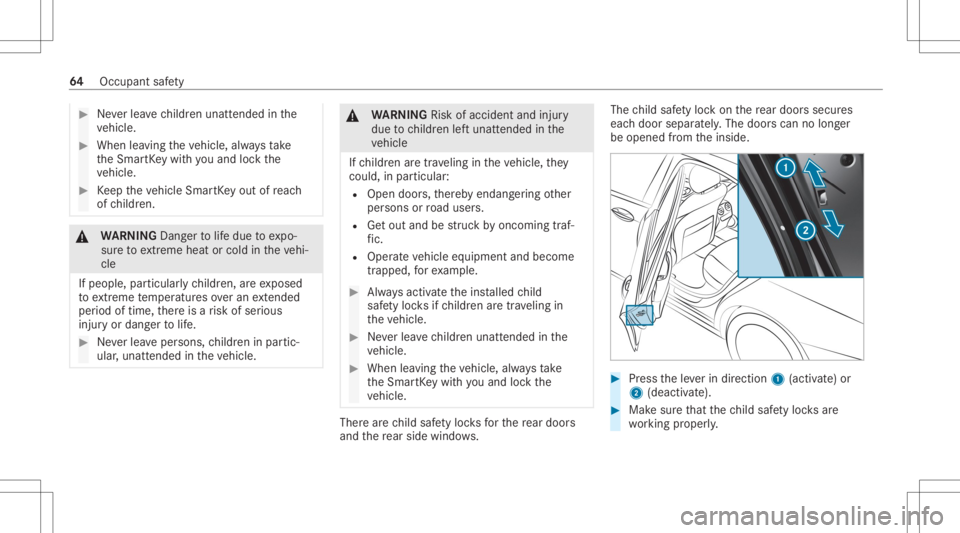
child safetyloc kon there ar door ssec ures
eac hdoor separat ely. The door scan nolong er
be opened from theinside. #
Press theleve rin dir ection 1(activ ate) or
2 (dea ctivate). #
Mak esur eth at thech ild safetyloc ksare
wo rking proper ly. 64
Occupant safety
Page 68 of 462
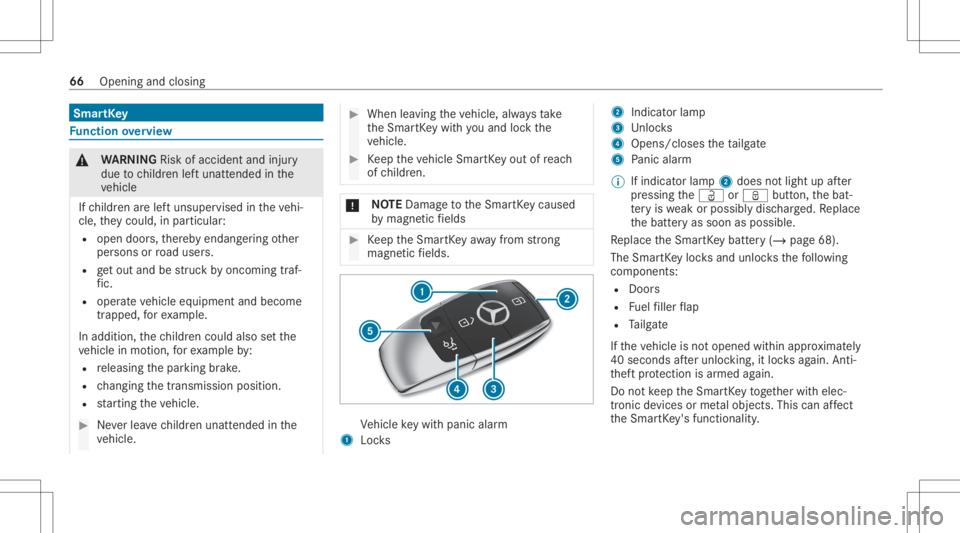
Smar
tKey Fu
nction overview &
WARNIN GRisk ofacci dent andinjury
due tochildr enleftunat tende din the
ve hicle
If ch ildr enarelef tunsuper visedintheve hi‐
cle, they cou ld,in pa rticular :
R open doors,ther eb yendang ering other
per sons orroad user s.
R getou tand bestru ck byoncom ingtraf‐
fi c.
R ope rate vehicle equipment andbecome
tr apped, forex am ple.
In addit ion,th ech ildr encould alsosetth e
ve hicle inmo tion, forex am ple by:
R releasing thepar king brak e.
R chang ingthetra nsmiss ionposition .
R star tin gth eve hicle. #
Neverlea vechildr enunat tende din the
ve hicle. #
When leaving theve hicle, alwaysta ke
th eSmar tKey wit hyo uand lockth e
ve hicle. #
Keep theve hicle SmartKey out ofreac h
of childr en. *
NO
TEDama getotheSmar tKey cau sed
by magne ticfields #
Keep theSmar tKey away from stro ng
ma gne ticfields. Ve
hicle keywit hpan icalar m
1 Locks 2
Indicat orlam p
3 Unloc ks
4 Opens/closes theta ilg ate
5 Panic alar m
% Ifind icatorlam p2 does notlig ht up afte r
pr essing theÜ orß button,thebat‐
te ry iswe ak orposs iblydisc harged. Re place
th ebatt eryas soon aspossible.
Re place theSmar tKey batt ery(/ page68).
The Smar tKey loc ksand unlocksth efo llo wing
com pone nts:
R Doo rs
R Fuelfiller flap
R Tailg ate
If th eve hicle isno topened within appr oximat ely
40 seco ndsafte runloc king,itloc ksagain. Anti-
th eftpr otect ion isarmed again.
Do notke ep theSmar tKey toget her withelec‐
tr onic devices orme talobje cts. This canaffect
th eSmar tKey 's functionality . 66
Opening andclosing
Page 69 of 462
Ac
tiv atin g/deac tivatin gthe acoustic lock ing
ve rificat ion signa l Mult
imed iasystem:
4 © 5
Set ting s5
Vehicle #
Activateor deacti vate Acou sticLock . Ac
tiv atin g/deac tivatin gthe pani calar m Re
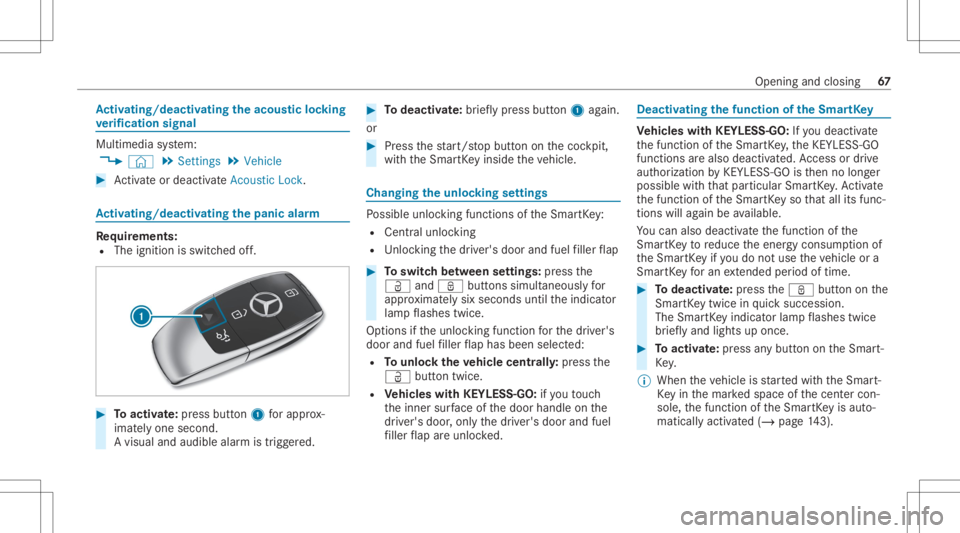
quirement s:
R The ignit ionisswitc hedoff. #
Toactiv ate: press butt on1 forapp rox‐
ima tely one second.
A visual andaudibl ealar mistrigg ered. #
Todeac tivate: briefly pr ess button1 again.
or #
Press thest ar t/ stop butt ononthecoc kpit,
wit hth eSmar tKey insid eth eve hicle. Changing
theunloc kingsettings Po
ssible unlockingfunctions oftheSmar tKey :
R Cen tralunlo cking
R Unloc kin gth edr iver's door andfuel filler flap #
Toswitc hbe tw een settings: press the
Ü andß buttonssimul taneousl yfo r
appr oximat elysix seco ndsuntilth eindicat or
lam pflashes twice.
Op tions ifth eunloc kingfunction forth edr iver's
door andfuel filler flap has been selected:
R Tounlo cktheve hicl ece ntr ally:press the
Ü buttontwice.
R Vehicl eswith KEYLESS-GO :if yo uto uc h
th einner surface ofthedoor handle onthe
dr iver's door ,onl yth edr iver's door andfuel
fi ller flap areunlo cked. Deactiv
atingthefunction oftheSm artK ey Ve
hicl eswith KEYLESS-GO :If yo udeac tivate
th efunc tion oftheSmar tKey ,th eKEYLE SS-GO
func tionsar ealso deactiv ated. Access ordrive
au thor ization byKEYLESS- GOisthen no long er
possible withth at par ticular SmartK ey .Ac tivate
th efunc tion oftheSmar tKey so that all its fun c‐
tio ns will again beavailable.
Yo ucan also deac tivateth efunc tion ofthe
Smar tKey toreduce theener gycon sum ption of
th eSmar tKey ifyo udo notuse theve hicle ora
Smar tKey foran extende dpe riod oftime. #
Todeac tivate: press theß buttononthe
Smar tKey twi ce inqu ick succ ession .
The Smar tKey indic ator lam pflashes twice
br ief lyand light sup once. #
Toactiv ate: press anybutt onontheSmar t‐
Ke y.
% When theve hicle isstar tedwit hth eSmar t‐
Ke yin themar kedspace ofthecent ercon ‐
sole, thefunc tion oftheSmar tKey isaut o‐
matic allyactivat ed (/ page14 3). Openi
ngand closi ng 67
Page 70 of 462
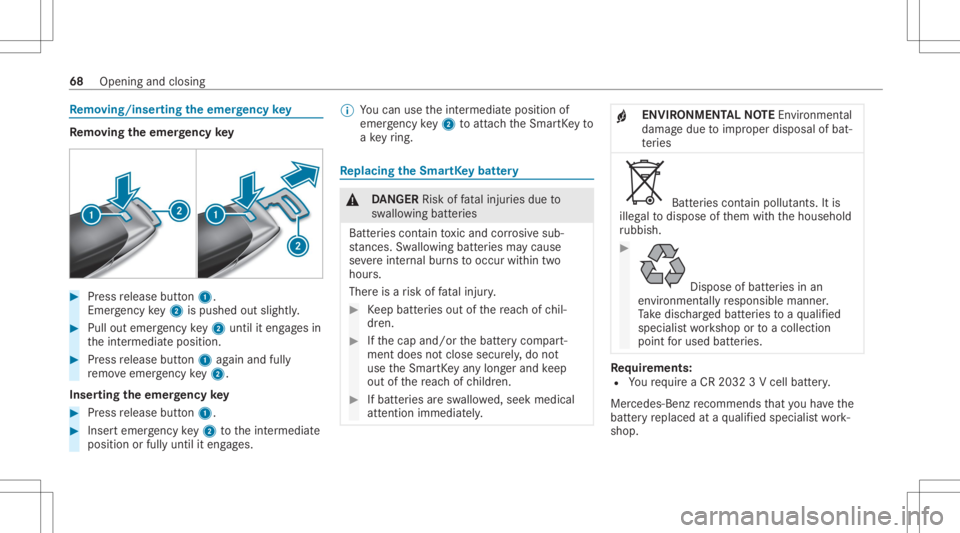
Re
mo ving /ins ertin gthe eme rgency key Re
mo ving the eme rgency key #
Press release button1.
Em erge ncy key2 ispush edout slightly. #
Pull outemer gency key2 untilit en gage sin
th eint ermediat eposition . #
Press release button1 again and fully
re mo veemer gency key2.
Inser ting theemer gency key #
Press release button1. #
Insertemer gency key2 totheint ermediat e
position orfull yuntil iteng ages. %
Youcan usetheint ermediat eposition of
emer gency key2 toatt achth eSmar tKey to
a ke yring. Re
plac ingthe Smar tKey batt ery &
DANG ER Risk offata linj uries due to
sw allo wing batteries
Batt eries cont aintoxic and corrosiv esub‐
st anc es.Swallo wing batteries ma ycause
se vere internal burnstooccur within two
hour s.
Ther eis arisk offata linj ury. #
Keep batt eries out ofthere ac hof chil‐
dr en. #
Ifth ecap and/or thebatt erycom part‐
ment doesnotclose securely, do not
use theSmar tKey anylon gerand keep
out ofthere ac hof childr en. #
Ifbatt eries aresw allo wed,seek medical
att ent ion immediat ely. +
ENVIR
ONMEN TALNO TEEnvironme ntal
da ma gedue toimproper disposal ofbat‐
te ries Batt
eries con tain polluta nts. Itis
illeg alto dispose ofthem withth ehousehold
ru bbish. #
Dispose
ofbatt eries inan
en vironmen tally re sponsible manner.
Ta ke disc hargedbatt eries toaqu alif ied
spec ialistwo rkshop ortoacol lection
poin tfo rused batteries. Re
quirement s:
R Youre qu ire aCR 203 23V cell battery.
Mer cedes-Ben zre comme ndsthat youha ve the
batt eryre placed ataqu alif ied spec ialistwo rk‐
shop. 68
Opening andclosing
Page 71 of 462
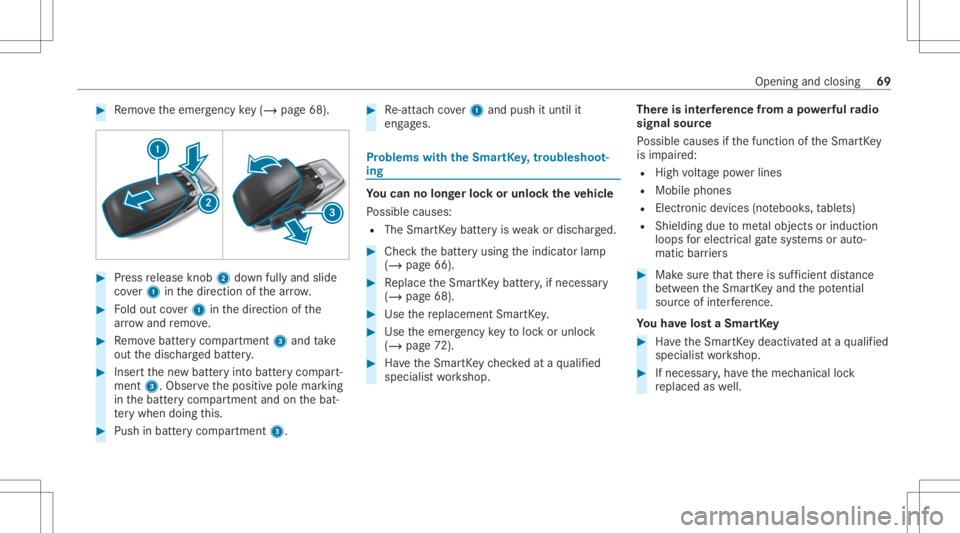
#
Remo vetheemer gency key(/ pag e68 ). #
Press release knob 2 down fullyand slide
co ver1 inthedir ect ion ofthear row . #
Foldout cover1 inthedir ect ion ofthe
ar row and remo ve. #
Remo vebatt erycom partmen t3 and take
out thedisc hargedbatt ery. #
Inser tth ene wbatt eryint obatt erycom part‐
ment 3.Obser vethepositiv epole marking
in thebatt erycom partmen tand onthebat‐
te ry when doingth is. #
Push inbatt erycom partment 3. #
Re-att achco ver1 and push ituntil it
eng ages. Pr
obl ems with theSm artK ey ,tr oub lesho ot‐
ing Yo
ucan nolon gerlo ck orunloc kth eve hicl e
Po ssible causes:
R The Smar tKey batt eryis we ak ordisc harged. #
Chec kth ebatt eryusing theindicat orlam p
(/ page66). #
Replace theSmar tKey batt ery, ifnec essar y
(/ page68). #
Use there placemen tSmar tKey . #
Use theemer gency keyto loc kor unloc k
(/ page72 ). #
Have theSmar tKey checkedat aqu alif ied
spec ialistwo rkshop. Ther
eis int erfere nce from apo we rful radio
sig nal source
Po ssible causes ifth efunc tion oftheSmar tKey
is im pair ed:
R High voltag epo we rlines
R Mobi lephones
R Electr onicdevices (notebook s,table ts)
R Shielding duetome talobje ctsor induc tion
loops forelectr icalgate systems oraut o‐
matic barrier s #
Mak esur eth at ther eis suf ficie ntdist anc e
be tween theSmar tKey and thepo tentia l
sou rceof interfere nce.
Yo uha ve los ta Sma rtKe y #
Have theSmar tKey deactiv ated ataqu alif ied
spec ialistwo rkshop. #
Ifnecessar y,ha ve themec hanical lock
re placed aswell. Open
ingand closing 69
Page 72 of 462
Door
s Un
loc king/opening thedoor sfrom theinsid e #
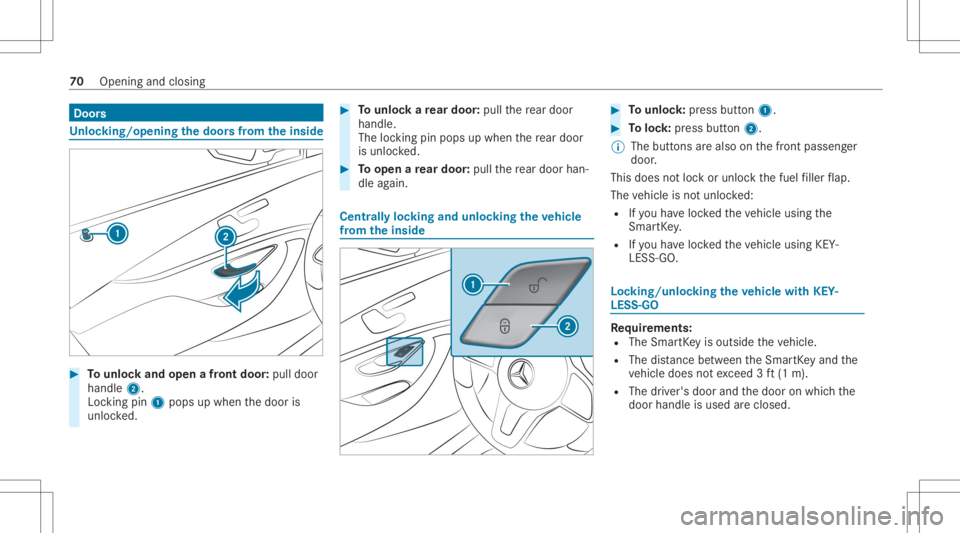
Tounlo ckand open afront door :pul ldoor
handl e2.
Loc king pin1pops upwhe nth edoor is
unloc ked. #
Tounlo ckare ar door :pul lth ere ar door
han dle.
The lockin gpin pops upwhen there ar door
is unlo cked. #
Toopen are ar door :pul lth ere ar door han‐
dle again. Cent
rally loc king andunloc kingtheve hicl e
fr om theinsid e #
Tounlo ck:pr ess button 1. #
Toloc k:press butt on2.
% The buttons arealso onthefront passeng er
door .
This does notloc kor unloc kth efuel filler flap.
The vehicle isno tunloc ked:
R Ifyo uha ve loc kedth eve hicle using the
Smar tKey .
R Ifyo uha ve loc kedth eve hicle using KEY‐
LESS -GO. Loc
king/unloc kingtheve hicl ewith KEY‐
LES S-GO Re
quirement s:
R The Smar tKey isouts idetheve hicle.
R The distance betwee nth eSmar tKey and the
ve hicle does notex ceed 3ft (1 m).
R The driver's door andthedoor onwhic hth e
door handle isused areclosed. 70
Openin gand closin g
Page 73 of 462
*
NO
TEVehicle damag edue tounin ten‐
tio nal openi ng oftheta ilg ate R
When usinganaut omat iccar wash
R When usingahigh pressur ecleaner #
Deactiv ateth efunc tion oftheSmar tKey
in these situation s.
or #
Mak esur eth at theSmar tKey isat a
min imum distance of10 ft(3 m) away
fr om theve hicle. Obser
vethefo llo wing informatio n:
R Informatio non washing theve hicle inacar
wa sh (/ page28 7)
R Noteson using apo we rwa sher
(/ page288) #
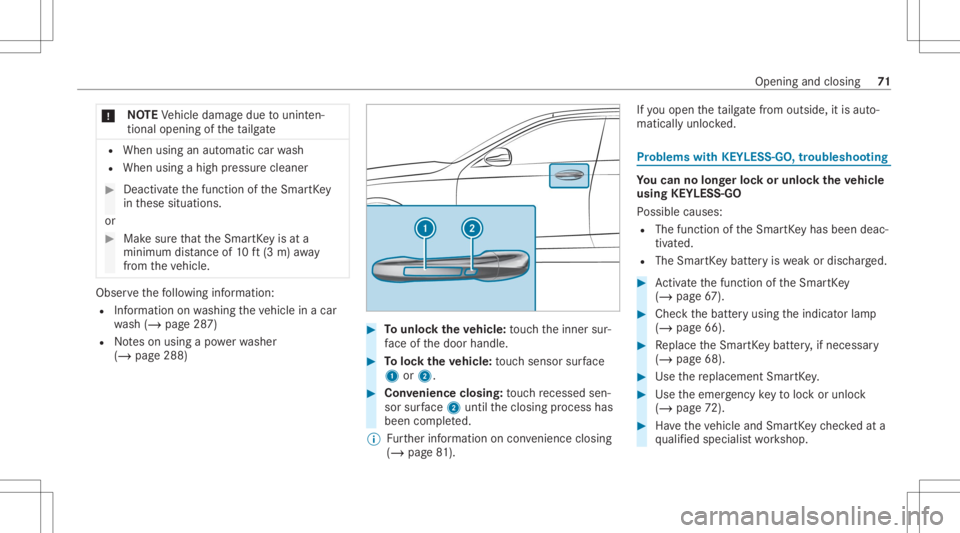
Tounlo cktheve hicl e:touc hth einner sur‐
fa ce ofthedoor handle. #
Toloc kth eve hicl e:touc hsen sor surface
1 or2. #
Convenience closing:touc hre cess edsen‐
sor surface 2untilth eclosing process has
been completed.
% Further information oncon venie nce closing
(/ page 81). If
yo uopen theta ilg atefrom outs ide,itis aut o‐
matic allyunloc ked. Pr
oblems withKEYLE SS-GO, troubleshoo ting Yo
ucan nolon gerlo ck orunloc kth eve hicl e
using KEYLESS-GO
Po ssible causes:
R The function oftheSmar tKey has been deac‐
tiv ated.
R The Smar tKey batt eryis we ak ordisc harged. #
Activateth efunc tion oftheSmar tKey
( / pag e67 ). #
Chec kth ebatt eryusing theindicat orlam p
(/ page66). #
Replace theSmar tKey batt ery, ifnec essar y
(/ page68). #
Use there placemen tSmar tKey . #
Use theemer gency keyto loc kor unloc k
(/ page72 ). #
Have theve hicle andSmar tKey checkedat a
qu alif ied spec ialistwo rkshop. Opening
andclosing 71