brake MERCEDES-BENZ GLC-Class 2016 X253 User Guide
[x] Cancel search | Manufacturer: MERCEDES-BENZ, Model Year: 2016, Model line: GLC-Class, Model: MERCEDES-BENZ GLC-Class 2016 X253Pages: 418, PDF Size: 9.23 MB
Page 25 of 418
You could jeopardize the operating safety of
your vehicle if you use parts, tires and wheels
as well as accessories relevant to safety
which have not been approved by Mercedes-
Benz. This could lead to malfunctions in
safety-relevant systems, e.g. the brake sys-
tem. Use only genuine Mercedes-Benz parts
or parts of equal quality. Only use tires,
wheels and accessories that have been spe-
cifically approved for your vehicle.
Genuine Mercedes-Benz parts are subject to
strict quality control. Every part has been spe-
cifically developed, manufactured or selected
for and adapted to Mercedes-Benz vehicles.
Only genuine Mercedes-Benz parts should
therefore be used.
More than 300,000 different genuine
Mercedes-Benz parts are available for
Mercedes-Benz models.
All authorized Mercedes-Benz Centers main-
tain a supply of genuine Mercedes-Benz parts
for necessary service and repair work. In addi-
tion, strategically located parts delivery cen-
ters provide quick and reliable parts service.
Always specify the vehicle identification num-
ber (VIN) when ordering genuine Mercedes-
Benz parts (
Ypage 408).
Operator's Manual
Vehicle equipment
This Operator's Manual describes all models
and all standard and optional equipment of
your vehicle available at the time of going to
print. Country-specific differences are possi-
ble. Bear in mind that your vehicle may not
feature all functions described here. This also
applies to safety-relevant systems and func-
tions. The equipment in your vehicle may
therefore differ from that shown in the
descriptions and illustrations.
The original purchase agreement lists all sys-
tems installed in your vehicle.
Should you have any questions concerning
equipment and operation, please consult an
authorized Mercedes-Benz Center.The Operator's Manual and Maintenance
Booklet are important documents and should
be kept in the vehicle.
Service and vehicle operation
Warranty
The implied warranty for your vehicle applies
in accordance with the warranty terms and
conditions in the Service and Warranty Infor-
mation booklet.
Your authorized Mercedes-Benz Center will
replace and repair all factory-installed parts in
accordance with the following warranty terms
and conditions:
RNew Vehicle Limited Warranty
REmission System Warranty
REmission Performance Warranty
RCalifornia, Connecticut, Maine, Massachu-
setts, New York, Pennsylvania, Rhode
Island and Vermont Emission Control Sys-
tem Warranty
RState warranty enforcement laws (lemon
laws)
Replacement parts and accessories are cov-
ered by the Mercedes-Benz Parts and Acces-
sories warranties. These are available at any
authorized Mercedes-Benz Center.
iShould you lose your Service and War-
ranty Information booklet, have an author-
ized Mercedes-Benz Center arrange for a
replacement. The new Service and War-
ranty Information booklet will be posted to
you.
Introduction23
Z
Page 30 of 418
However, NHTSA cannot become involved in
individual problems between you, your
dealer, or Mercedes-Benz USA, LLC.
To contact NHTSA, you may call the Vehicle
Safety Hotline toll-free at
1-888-327-4236(TTY: 1-800-424-9153); go
tohttp://www.safercar.gov ; or write to:
Administrator, NHTSA, 400 Seventh Street,
SW., Washington, DC 20590.
You can also obtain other information about
motor vehicle safety from
http://www.safercar.gov
Limited Warranty
!
Follow the instructions in this manual
about the proper operation of your vehicle
as well as about possible vehicle damage.
Damage to your vehicle that arises from
culpable contraventions against these
instructions is not covered either by the
Mercedes-Benz Limited Warranty or by the New or Used-Vehicle Warranty.
QR codes for the rescue card
The QR codes are secured in the fuel filler flap
and on the opposite side on the B-pillar. In the event of an accident, rescue services can use
the QR code to quickly find the appropriate
rescue card for your vehicle. The current res-
cue card contains the most important infor-
mation about your vehicle in a compact form,
e.g. the routing of the electric cables.
You can find more information under http://
portal.aftersales.i.daimler.com/public/
content/asportal/en/communication/
informationen_fuer/QRCode.html.
Data stored in the vehicle
Data recording
This vehicle is capable of recording diagnostic
information relating to vehicle operation, mal- functions, and user settings. This may include
information about the performance or status
of various systems, including but not limited
to, engine, throttle, steering or brake sys-
tems, that is stored and can be read out with
suitable devices, particularly when the vehi-
cle is serviced. The data obtained is used to
properly diagnose and service your vehicle or
to further optimize and develop vehicle func-
tions.
COMAND/mbrace
If the vehicle is equipped with COMAND or
mbrace, additional data about the vehicle’s
operation, the use of the vehicle in certain
situations, and the location of the vehicle may
be compiled through COMAND or the mbrace
system.
For additional information please refer to the
COMAND User Manual and/or the mbrace
Terms and Conditions.
Event data recorders
This vehicle is equipped with an event data
recorder (EDR). The main purpose of an EDR
is to record data that will assist in under-
standing how a vehicle’s systems performed
in certain crash or near crash-like situations,
such as during air bag deployment or when
hitting a road obstacle. The EDR is designed
to record data related to vehicle dynamics
and safety systems for a short period of time,
typically 30 seconds or less.
The EDR in this vehicle is designed to record
such data as:
Rhow various systems in your vehicle are
operating
Rwhether or not the driver and passenger
seat belts are fastened
Rhow far (if at all) the driver is depressing the
accelerator and/or brake pedal and
Rhow fast the vehicle is traveling
28Introduction
Page 34 of 418
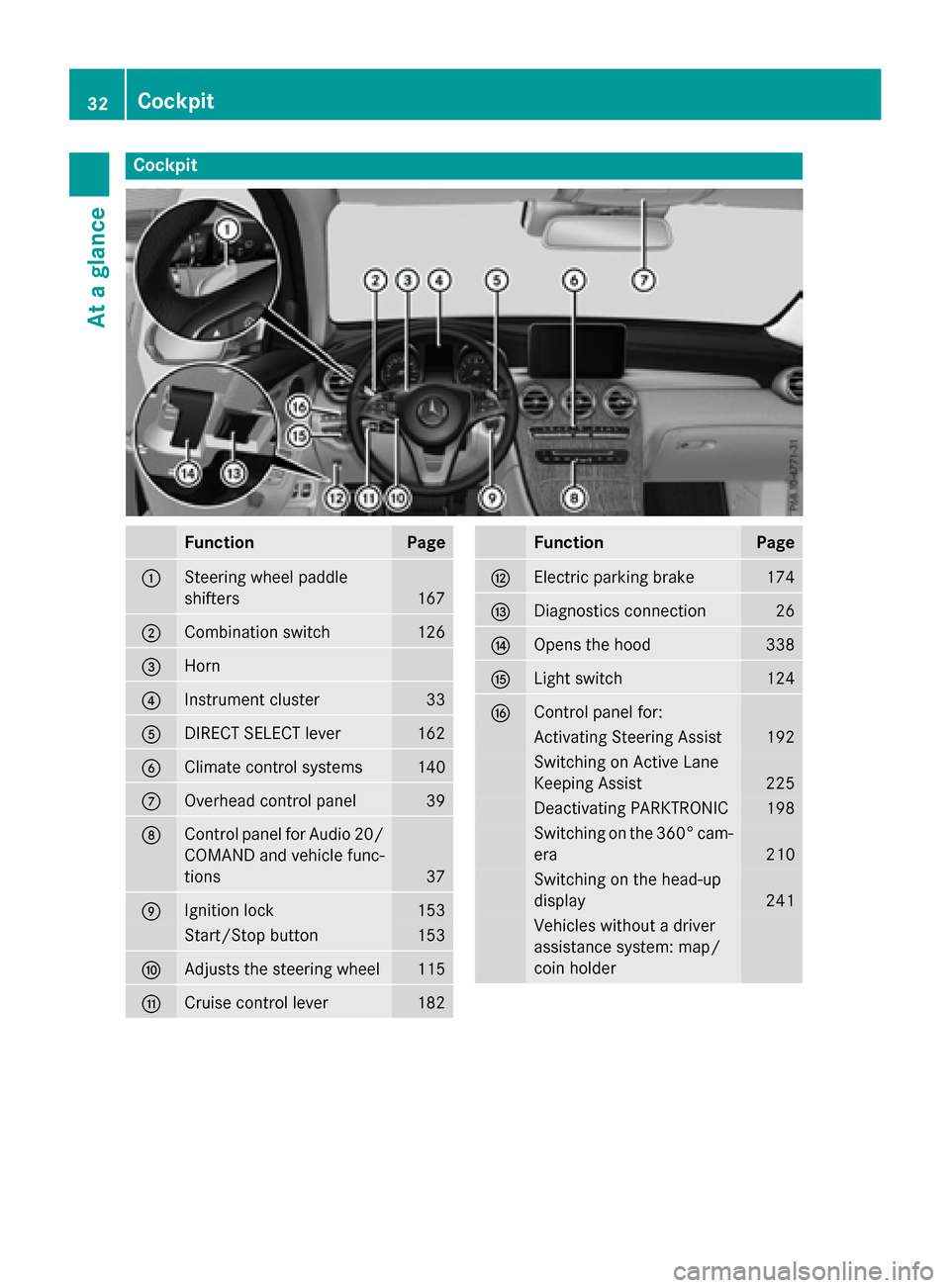
Cockpit
FunctionPage
:Steering wheel paddle
shifters
167
;Combination switch126
=Horn
?Instrument cluster33
ADIRECT SELECT lever162
BClimate control systems140
COverhead control panel39
DControl panel for Audio 20/
COMAND and vehicle func-
tions
37
EIgnition lock153
Start/Stop button153
FAdjusts the steering wheel115
GCruise control lever182
FunctionPage
HElectric parking brake174
IDiagnostics connection26
JOpens the hood338
KLight switch124
LControl panel for:
Activating Steering Assist192
Switching on Active Lane
Keeping Assist
225
Deactivating PARKTRONIC198
Switching on the 360° cam-
era
210
Switching on the head-up
display
241
Vehicles without a driver
assistance system: map/
coin holder
32Cockpit
At a glance
Page 36 of 418
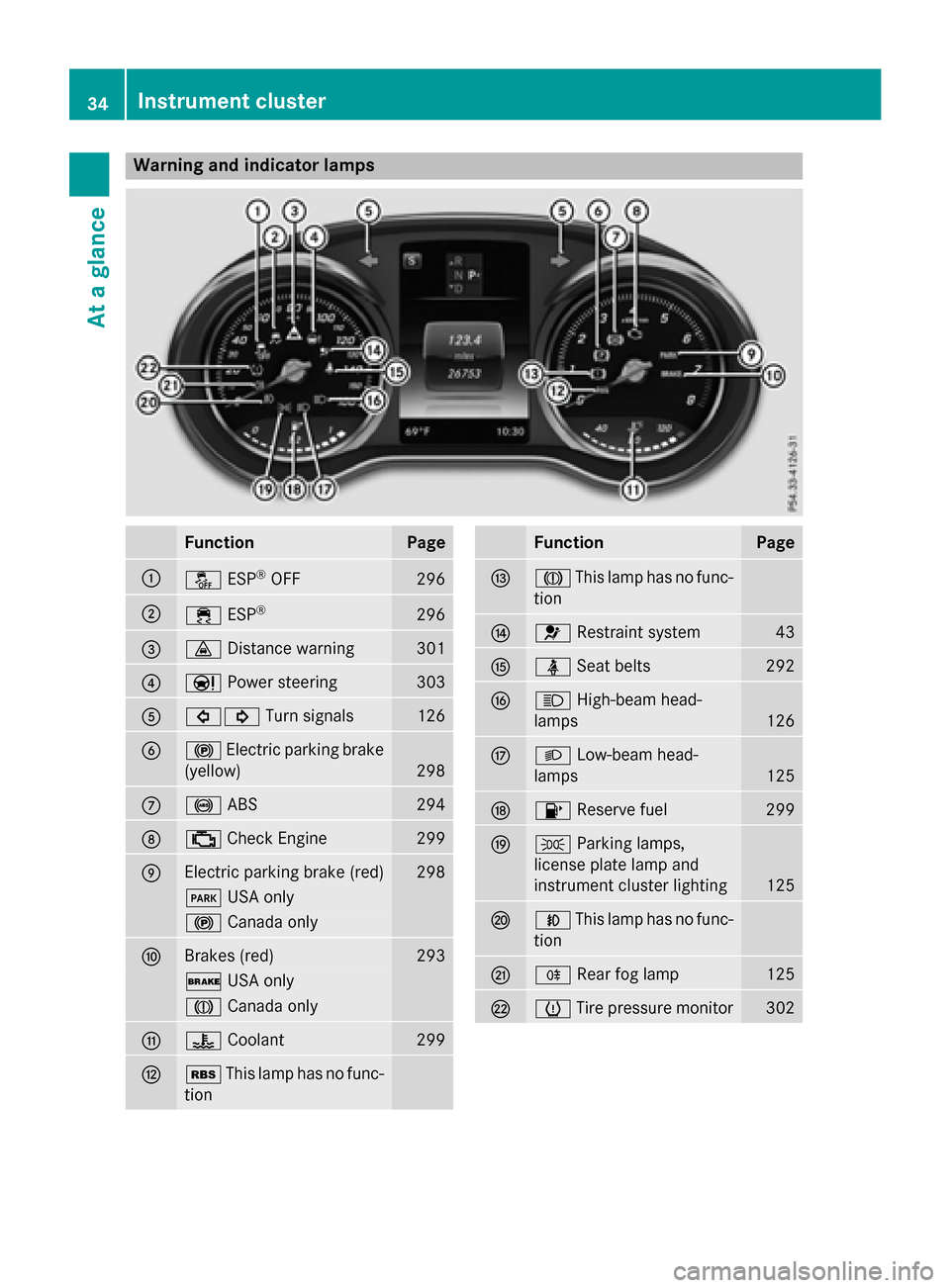
Warning and indicator lamps
FunctionPage
:åESP®OFF296
;÷ESP®296
=·Distance warning301
?ÐPower steering303
A#! Turn signals126
B!Electric parking brake
(yellow)
298
C! ABS294
D;Check Engine299
EElectric parking brake (red)298
F USA only
!Canada only
FBrakes (red)293
$USA only
JCanada only
G?Coolant299
HéThis lamp has no func-
tion
FunctionPage
IJ This lamp has no func-
tion
J6 Restraint system43
KüSeat belts292
LKHigh-beam head-
lamps
126
ML Low-beam head-
lamps
125
N8 Reserve fuel299
OTParking lamps,
license plate lamp and
instrument cluster lighting
125
PN This lamp has no func-
tion
QR Rear fog lamp125
RhTire pressure monitor302
34Instrument cluster
At a glance
Page 62 of 418
PRE-SAFE®PLUS does not intervene if the
vehicle is backing up.
When driving, or when parking or exiting a
parking space with assistance from Active
Parking Assist, PRE-SAFE
®PLUS will not
apply the brakes.
Function
PRE-SAFE®PLUS intervenes in certain situa-
tions if the radar sensor system detects an
imminent head-on or rear-end collision.
PRE-SAFE
®PLUS takes the following meas-
ures depending on the hazardous situation
detected:
Rif the radar sensor system detects that a
head-on collision is imminent, the seat
belts are pre-tensioned.
Rif the radar sensor system detects that a
rear-end collision is imminent:
-the brake pressure is increased if the
driver applies the brakes when the vehi-
cle is stationary.
-the seat belts are pre-tensioned.
The PRE-SAFE
®PLUS braking application is
canceled:
Rif the accelerator pedal is depressed when
a gear is engaged
Rif the risk of a collision passes or is no lon- ger detected
Rif DISTRONIC PLUS indicates an intention
to pull away
If the hazardous situation passes without
resulting in an accident, the original settings
are restored.
Automatic measures after an acci-
dent
Immediately after an accident, the following
measures are implemented, depending on
the type and severity of the impact:
Rthe hazard warning lamps are activated
Rthe emergency lighting is activated
Rthe vehicle doors are unlocked
Rthe front side windows are lowered
Rvehicles with a memory function: the elec-
trically adjustable steering wheel is raised
Rthe engine is switched off and the fuel sup- ply is cut off
Rvehicles with mbrace: automatic emer-
gency call
Children in the vehicle
Important safety notes
Accident statistics show that children
secured in the rear seats are safer than chil-
dren secured in the front-passenger seat. For
this reason, Mercedes-Benz strongly advises
that you install a child restraint system on a
rear seat. Children are generally better pro-
tected there.
If a child younger than twelve years old and
under 5 ft (1.50 m) in height is traveling in the
vehicle:
Ralways secure the child in a child restraint
system suitable for Mercedes-Benz vehi-
cles. The child restraint system must be
appropriate to the age, weight and size of
the child
Rbe sure to observe the instructions and
safety notes in this section in addition to
the child restraint system manufacturer's
installation instructions
Rbe sure to observe the instructions and
safety notes on the "Occupant Classifica-
tion System (OCS)" (
Ypage 51)
GWARNING
If you leave children unsupervised in the vehi-
cle, they could set it in motion by, for example:
Rrelease the parking brake.
Rshift the automatic transmission out of the
parking position P.
Rstart the engine.
60Children in the vehicle
Safety
Page 67 of 418
You can thus avoid the risks that could arise
as a result of:
Ran incorrectly categorized person in the
front-passenger seat
Rthe unintentional deactivation of the front-
passenger front air bag
Rthe unsuitable positioning of the child
restraint system, e.g. too close to the dash-
board
Rearward-facing child restraint system
If it is absolutely necessary to install a rear-
ward-facing child restraint system on the
front-passenger seat, always make sure that
the front-passenger front air bag is deactiva-
ted. Only if the PASSENGER AIR BAG OFF
indicator lamp is permanently lit (
Ypage 43)
is the front-passenger front air bag deactiva-
ted.
Always observe the child restraint system
manufacturer's installation and operating
instructions.
Forward-facing child restraint system
If it is absolutely necessary to install a
forward-facing child restraint system on the
front-passenger seat, always move the front-
passenger seat as far back as possible. Fully
retract the seat cushion length. The entire
base of the child restraint system must
always rest on the seat cushion of the front-
passenger seat. The backrest of the child
restraint system must lie as flat as possible
against the backrest of the front-passenger
seat. The child restraint system must not
touch the roof or be subjected to a load by the
head restraint. Adjust the angle of the seat
backrest and the head restraint position
accordingly. Always make sure that the shoul- der belt strap is correctly routed from the
vehicle belt outlet to the shoulder belt guide
on the child restraint system. The shoulder
belt strap must be routed forwards and down-
wards from the vehicle belt outlet. If neces-
sary, adjust the vehicle belt outlet and the
front-passenger seat accordingly. Always observe the child restraint system
manufacturer's installation and operating
instructions.
Child-proof locks
Important safety notes
GWARNING
If children are traveling in the vehicle, they
could:
Ropen doors, thus endangering other people
or road users
Rexit the vehicle and be caught by oncoming
traffic
Roperate vehicle equipment and become
trapped
There is a risk of an accident and injury.
Always activate the child-proof locks and
override feature if children are traveling in the vehicle. When leaving the vehicle, always take
the key with you and lock the vehicle. Never
leave children unattended in the vehicle.
Override feature for:
Rthe rear doors (Ypage 66)
Rthe rear side windows (Ypage 66)
GWARNING
If you leave children unsupervised in the vehi-
cle, they could set it in motion by, for example:
Rrelease the parking brake.
Rshift the automatic transmission out of the
parking position P.
Rstart the engine.
In addition, they may operate vehicle equip-
ment and become trapped. There is a risk of
an accident and injury.
When leaving the vehicle, always take the
SmartKey with you and lock the vehicle. Never
leave children unsupervised in the vehicle.
Children in the vehicle65
Safety
Z
Page 69 of 418
Never leave animals unattended in the vehi-
cle. Always secure animals properly during
the journey, e.g. use a suitable animal trans-
port box.
Driving safety systems
Overview of driving safety systems
In this section, you will find information about
the following driving safety systems:
RABS (Anti-lock Braking System)
(
Ypage 67)
RBAS ( Brake Assist System) (Ypage 68)
RBAS PLUS with Cross-Traffic Assist ( Brake
A ssist System PLUS with Cross-Traffic
Assist) (
Ypage 68)
RCOLLISION PREVENTION ASSIST PLUS
(
Ypage 70)
RESP®(Electronic StabilityProgram)
(
Ypage 73)
REBD ( Electronic Brake force Distribution)
(
Ypage 75)
RADAPTIVE BRAKE (Ypage 75)
RPRE-SAFE®Brake (Ypage 75)
RSTEER CONTROL (Ypage 78)
Important safety notes
If you fail to adapt your driving style or if you
are inattentive, the driving safety systems can
neither reduce the risk of an accident nor
override the laws of physics. Driving safety
systems are merely aids designed to assist
driving. You are responsible for the distance
to the vehicle in front, for vehicle speed and
for braking in good time. Always adapt your
driving style to suit the prevailing road,
weather and traffic conditions and maintain a
safe distance from the vehicle in front. Drive
carefully.
The driving safety systems described only
work as effectively as possible when there is
adequate contact between the tires and the road surface. Please pay special attention to
the notes on tires, recommended minimum
tire tread depths, etc. (
Ypage 374).
In wintry driving conditions, always use winter tires (M+S tires) and if necessary, snow
chains. Only in this way will the driving safety
systems described in this section work as
effectively as possible.
ABS (Anti-lock Braking System)
General information
ABS regulates brake pressure in such a way
that the wheels do not lock when you brake.
This allows you to continue steering the vehi-
cle when braking.
The ! ABS warning lamp in the instrument
cluster lights up when the ignition is switched
on. It goes out when the engine is running.
ABS works from a speed of about 5 mph
(8 km/h), regardless of road-surface condi-
tions. ABS works on slippery surfaces, even
when you only brake gently.
Important safety notes
iObserve the "Important safety notes" sec-
tion (
Ypage 67).
GWARNING
If ABS is faulty, the wheels could lock when
braking. The steerability and braking charac-
teristics may be severely impaired. Addition-
ally, further driving safety systems are deac-
tivated. There is an increased danger of skid-
ding and accidents.
Drive on carefully. Have ABS checked imme-
diately at a qualified specialist workshop.
When ABS is malfunctioning, other systems,
including driving safety systems, will also
become inoperative. Observe the information on the ABS warning lamp (
Ypage 294) and
display messages which may be shown in the
instrument cluster (
Ypage 258).
Driving safety systems67
Safety
Z
Page 70 of 418
Braking
XIf ABS intervenes:continue to depress the
brake pedal vigorously until the braking sit-
uation is over.
XTo make a full brake application:
depress the brake pedal with full force.
If ABS intervenes when braking, you will feel a
pulsing in the brake pedal.
The pulsating brake pedal can be an indica-
tion of hazardous road conditions, and func-
tions as a reminder to take extra care while
driving.
BAS (Brake Assist System)
General information
BAS operates in emergency braking situa-
tions. If you depress the brake pedal quickly,
BAS automatically boosts the braking force,
thus shortening the stopping distance.
Important safety notes
iObserve the "Important safety notes" sec-
tion (
Ypage 67).
GWARNING
If BAS is malfunctioning, the braking distance
in an emergency braking situation is
increased. There is a risk of an accident.
In an emergency braking situation, depress
the brake pedal with full force. ABS prevents
the wheels from locking.
Braking
XKeep the brake pedal firmly depressed until
the emergency braking situation is over.
ABS prevents the wheels from locking.
The brakes will function as usual once you
release the brake pedal. BAS is deactivated.
BAS PLUS (Brake Assist System
PLUS) with Cross-Traffic Assist
General information
BAS PLUS can help you to minimize the risk of
a collision with a vehicle or a pedestrian and
reduce the effects of such a collision. If BAS
PLUS detects a danger of collision, you are
assisted when braking.
iPay attention to the important safety
notes in the "Driving safety systems" sec-
tion (
Ypage 67).
BAS PLUS is only available on vehicles with
the Driving Assistance package.
For BAS PLUS to assist you when driving, the
radar sensor system and the camera system
must be operational.
With the help of a sensor system and a cam-
era system, BAS PLUS can detect obstacles:
Rthat are in the path of your vehicle for an
extended period of time
Rthat cross the path of your vehicle
In addition, pedestrians in the path of your
vehicle can be detected.
BAS PLUS detects pedestrians by using typi-
cal characteristics such as the body contours
and posture of a person standing upright.
If the radar sensor system or the camera sys-
tem is malfunctioning, BAS PLUS functions
are restricted or no longer available. The
brake system is still available with complete
brake boosting effect and BAS.
iObserve the restrictions described in the
"Important safety notes" sec-
tion“ (
Ypage 68).
Important safety notes
GWARNING
BAS PLUS cannot always clearly identify
objects and complex traffic situations.
In such cases, BAS PLUS may:
Rintervene unnecessarily
Rnot intervene
68Driving safety systems
Safety
Page 71 of 418
There is a risk of an accident.
Always pay careful attention to the traffic sit-uation and be ready to brake. Terminate the
intervention in a non-critical driving situation.
GWARNING
BAS PLUS cannot always clearly identify peo- ple, this is especially the case if they are mov-
ing. BAS PLUS cannot intervene in these
cases. There is a risk of an accident.
Always pay careful attention to the traffic sit-
uation and be ready to brake.
GWARNING
BAS PLUS does not react:
Rto small people, e.g. children
Rto animals
Rto oncoming vehicles
Rwhen cornering
As a result, BAS PLUS may not intervene in all
critical situations. There is a risk of an acci-
dent.
Always pay careful attention to the traffic sit- uation and be ready to brake.
In the event of snowfall or heavy rain, the rec-
ognition can be impaired.
Recognition by the radar sensor system is
also impaired in the event of:
Rthere is dirt on the sensors or anything elsecovering the sensors
Rthere is interference by other radar sources
Rthere are strong radar reflections, for
example in parking garages
Ra narrow vehicle traveling in front, e.g. a
motorbike
Ra vehicle traveling in front on a different line
Rvehicles quickly moving into the radar sen-
sor system detection range Recognition by the camera system is also
impaired in the event of:
Rdirt on the camera or if the camera is cov-
ered
Rthere is glare on the camera system, e.g.
from the sun being low in the sky
Rdarkness
Rif:
-pedestrians move quickly, e.g. into the
path of the vehicle
-the camera system no longer recognizes
a pedestrian as a person due to special
clothing or other objects
-a pedestrian is concealed by other
objects
-the typical outline of a person is not dis-
tinguishable from the background
Following damage to the front end of the vehi-
cle, have the configuration and operation of
the radar sensors checked at a qualified spe-
cialist workshop. This also applies to colli-
sions at low speeds where there is no visible
damage to the front of the vehicle.
Following damage to the windshield, have the
configuration and operation of the camera
system checked at a qualified specialist work-
shop.
Function
To avoid a collision, BAS PLUS calculates the
brake force necessary if:
Ryou approach an obstacle, and
RBAS PLUS has detected a risk of collision
When driving at a speed under 20 mph
(30 km/h) : if you depress the brake pedal,
BAS PLUS is activated. The increase in brake
pressure will be carried out at the last possi-
ble moment.
When driving at a speed above 20 mph
(30 km/h) : if you depress the brake pedal
sharply, BAS PLUS automatically raises the
brake pressure to a value adapted to the traf-
fic situation.
Driving safety systems69
Safety
Z
Page 72 of 418
BAS PLUS provides braking assistance in haz-
ardous situations with vehicles in front within
a speed range between 4 mph (7 km/h) and
155 mph (250 km/h).
At speeds of up to approximately 44 mph
(70 km/h), BAS PLUS can react to:
Rstationary objects in the path of your vehi-
cle, e.g. stopped or parked vehicles
Rpedestrians in the path of your vehicle
Robjects crossing your path and that are
recognized in the detection range of the
sensors
iIf BAS PLUS demands particularly high
braking force, preventative passenger pro-
tection measures (PRE-SAFE
®PLUS) are
activated simultaneously (
Ypage 59).
XKeep the brake pedal depressed until the
emergency braking situation is over.
ABS prevents the wheels from locking.
BAS PLUS is deactivated and the brakes func-
tion as usual again, if:
Ryou release the brake pedal.
Rthere is no longer a risk of collision.
Rno obstacle is detected in front of your
vehicle.
Ryou depress the accelerator pedal
Ryou activate kickdown.
COLLISION PREVENTION ASSIST
PLUS
General information
iObserve the "Important safety notes" sec-
tion (
Ypage 67).
COLLISION PREVENTION ASSIST PLUS con-
sists of a distance warning function with an
autonomous braking function and adaptive
Brake Assist.
COLLISION PREVENTION ASSIST PLUS can
help you to minimize the risk of a front-end
collision with a vehicle ahead or reduce the
effects of such a collision. If COLLISION PREVENTION ASSIST PLUS
detects that there is a risk of a collision, you
will be warned visually and acoustically. If you
do not react to the visual and audible collision
warning, autonomous braking can be initiated
in critical situations. If you apply the brake
yourself in a critical situation, the COLLISION
PREVENTION ASSIST PLUS adaptive Brake
Assist assists you.
Important safety notes
In particular, the detection of obstacles can
be impaired if:
Rthere is dirt on the sensors or anything else
covering the sensors
Rthere is snow or heavy rain
Rthere is interference by other radar sources
Rthere are strong radar reflections, for
example in parking garages
Ra narrow vehicle traveling in front, e.g. a
motorbike
Ra vehicle traveling in front on a different line
Rnew vehicles or after a service on the COL-
LISION PREVENTION ASSIST PLUS system
Observe the important safety notes in the
"Breaking-in notes" section (
Ypage 152).
Following damage to the front end of the vehi-
cle, have the configuration and operation of
the radar sensor checked at a qualified spe-
cialist workshop. This also applies to colli-
sions at low speeds where there is no visible
damage to the front of the vehicle.
Switching on/off
The COLLISION PREVENTION ASSIST PLUS is
automatically active after switching on the
ignition.
You can activate or deactivate COLLISION
PREVENTION ASSIST PLUS in the on-board
computer (
Ypage 252). When deactivated,
the distance warning function and the auton-
omous braking function are also deactivated.
70Driving safety systems
Safety