ignition MERCEDES-BENZ GLC COUPE 2016 User Guide
[x] Cancel search | Manufacturer: MERCEDES-BENZ, Model Year: 2016, Model line: GLC COUPE, Model: MERCEDES-BENZ GLC COUPE 2016Pages: 389, PDF Size: 7.34 MB
Page 74 of 389
mous braking function and Adaptive Brake
Assist.
COLLISION PREVENTION ASSIST PLUS can help you to minimise the danger of collision with thevehicle in front or reduce the effects of such a
collision.
If COLLISION PREVENTION ASSIST PLUS
detects a danger of collision, you will be warned
visually and audibly. If you do not react to the
visual and audible collision warning, autono-
mous braking can be initiated in critical situa-
tions. If you apply the brake yourself in a critical
situation, the COLLISION PREVENTION ASSIST
PLUS Adaptive Brake Assist assists you.
Important safety notes In particular, the detection of obstacles can be
impaired in the following situations:
R dirt on the sensors or obscured sensors
R snow or heavy rain
R interference by other radar sources
R strong radar reflections, for example, in multi-
storey car parks
R a narrow vehicle travelling in front, e.g. a
motorcycle
R a vehicle travelling in front on a different line
R new vehicles or after the COLLISION PRE-
VENTION ASSIST PLUS system has been serv-
iced
Observe the important safety notes in the
"Running-in notes" section (Y page 143).
Following damage to the front end of the vehicle, have the configuration and operation of the
radar sensor checked at a qualified specialist
workshop. This also applies to collisions at low
speeds where there is no visible damage to the front of the vehicle.
Activating/deactivating The COLLISION PREVENTION ASSIST PLUS is
automatically active when the ignition is
switched on.
You can activate or deactivate COLLISION PRE-
VENTION ASSIST PLUS in the on-board com-
puter (Y page 241). When the system is deac-
tivated, the distance warning function and the
autonomous braking function are also deactiva-
ted. If COLLISION PREVENTION ASSIST PLUS is
deactivated, the
æsymbol appears on the
assistance display.
Distance warning function General information
The distance warning function can help you to
minimise the risk of a rear-end collision with a
vehicle ahead or reduce the effects of such a
collision. If the distance warning function
detects a risk of collision with the vehicle in
front, you will be warned visually and audibly.
Important safety notes
i Observe the "Important safety notes" sec-
tion for driving safety systems (Y page 68). G
WARNING
The distance warning function does not react:
R to people or animals
R to oncoming vehicles
R to crossing traffic
R when cornering
Thus, the distance warning function cannot
provide a warning in all critical situations.
There is a risk of an accident.
Always pay careful attention to the traffic sit-
uation and be ready to brake. G
WARNING
The distance warning function cannot always
clearly identify objects and complex traffic
situations.
In such cases, the distance warning function
may:
R give an unnecessary warning
R not give a warning
There is a risk of an accident.
Always pay careful attention to the traffic sit-
uation; do not rely on the distance warning
function alone. Driving safety systems
71Safety Z
Page 82 of 389
The PRE-SAFE
®
Brake function can also brake
the vehicle automatically under the following
conditions:
R the driver and front passenger have their seat
belts fastened
R the vehicle speed is between approximately
7 km/h and 200 km/h
At speeds of up to approximately 70 km/h, PRE-
SAFE ®
Brake can also detect:
R stationary objects in the path of your vehicle,
e.g. stopped or parked vehicles
R pedestrians in the path of your vehicle
i If an increased danger of collision exists,
preventative passenger protection measures
(PRE-SAFE ®
) are triggered (Y page 55).
If the danger of collision with the vehicle in front remains and you do not brake, take evasive
action or accelerate quickly, the vehicle may
perform automatic emergency braking up to the
point of full brake application. Automatic full
brake application is not performed until imme-
diately prior to an imminent accident.
You can prevent the engagement of PRE-SAFE ®
Brake at any time by:
R depressing the accelerator pedal further
R activating kickdown
R releasing the brake pedal
The braking action of PRE-SAFE ®
Brake is ended
automatically if:
R you manoeuvre to avoid the obstacle
R the danger of collision has passed
R an obstacle is no longer detected in front of
your vehicle STEER CONTROL
General information STEER CONTROL helps you by transmitting a
noticeable steering force to the steering wheel
in the direction required for vehicle stabilisation.
This steering support is provided in particular if:
R both right wheels or both left wheels are on a
wet or slippery road surface when you brake
R the vehicle begins to skid Important safety notes i
Observe the "Important safety notes" sec-
tion (Y page 68).
No steering support is provided from STEER
CONTROL, if: R ESP ®
is deactivated
R ESP ®
is malfunctioning
R the steering is faulty
If ESP ®
is malfunctioning, you will be assisted
further by the electrical power steering. Protection against theft
Immobiliser
The immobiliser prevents your vehicle from
being started without the correct key.
X To activate with the key: remove the key
from the ignition lock.
X To activate with KEYLESS-GO start func-
tion or KEYLESS-GO:
switch the ignition off
and open the driver's door.
X To deactivate: switch on the ignition.
When leaving the vehicle, always take the key
with you and lock the vehicle. Anyone can start
the engine if a valid key has been left inside the vehicle.
i The immobiliser is always deactivated when
you start the engine. ATA (Anti-Theft Alarm system) Protection against theft
79Safety Z
Page 83 of 389
X
To activate: lock the vehicle with the key or
KEYLESS-GO.
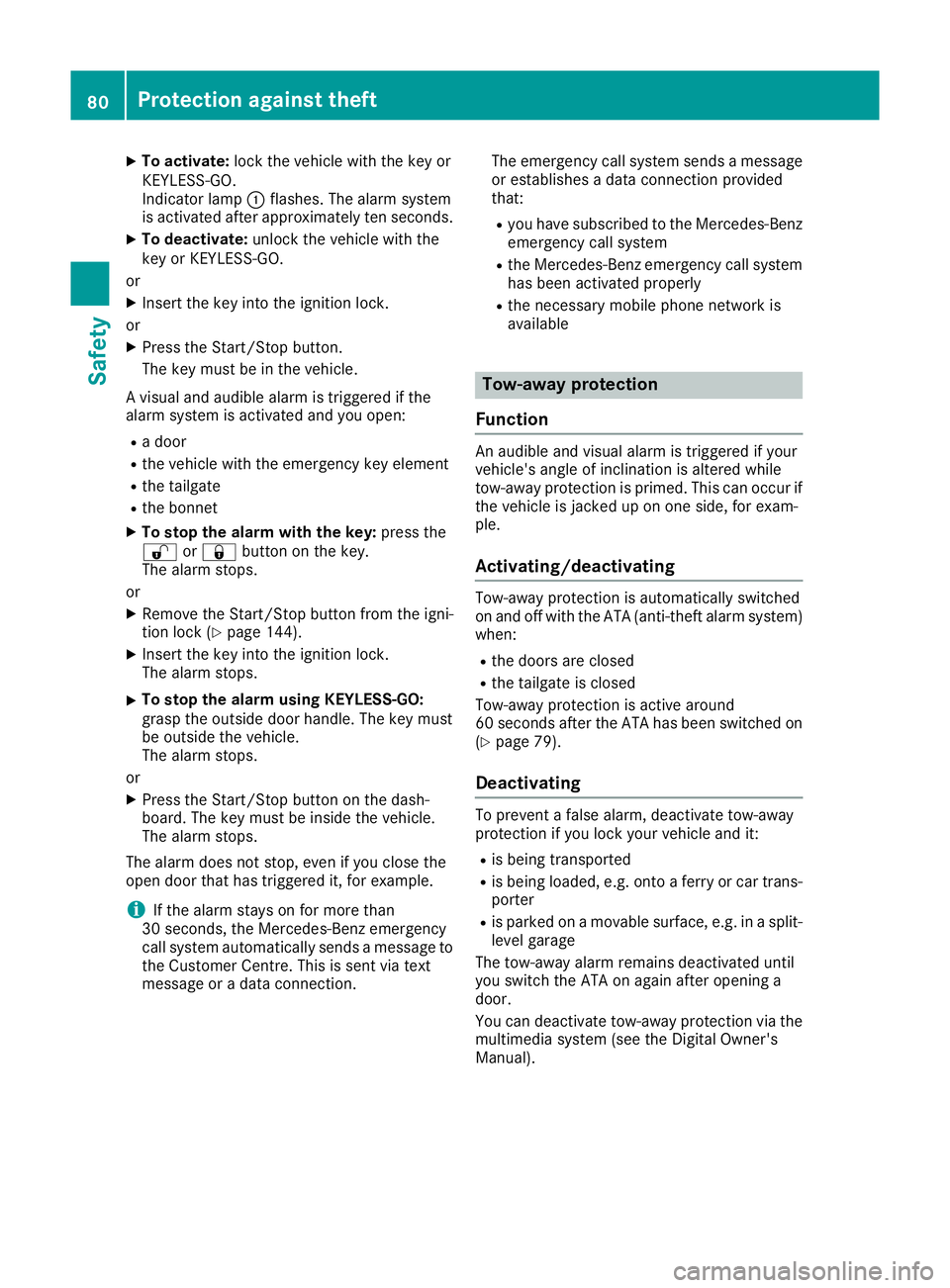
Indicator lamp :flashes. The alarm system
is activated after approximately ten seconds.
X To deactivate: unlock the vehicle with the
key or KEYLESS-GO.
or X Insert the key into the ignition lock.
or X Press the Start/Stop button.
The key must be in the vehicle.
A visual and audible alarm is triggered if the
alarm system is activated and you open:
R a door
R the vehicle with the emergency key element
R the tailgate
R the bonnet
X To stop the alarm with the key: press the
% or& button on the key.
The alarm stops.
or X Remove the Start/Stop button from the igni-
tion lock (Y page 144).
X Insert the key into the ignition lock.
The alarm stops.
X To stop the alarm using KEYLESS-GO:
grasp the outside door handle. The key must
be outside the vehicle.
The alarm stops.
or X Press the Start/Stop button on the dash-
board. The key must be inside the vehicle.
The alarm stops.
The alarm does not stop, even if you close the
open door that has triggered it, for example.
i If the alarm stays on for more than
30 seconds, the Mercedes‑Benz emergency
call system automatically sends a message to the Customer Centre. This is sent via text
message or a data connection. The emergency call system sends a message
or establishes a data connection provided
that:
R you have subscribed to the Mercedes ‑Benz
emergency call system
R the Mercedes‑Benz emergency call system
has been activated properly
R the necessary mobile phone network is
available Tow-away protection
Function An audible and visual alarm is triggered if your
vehicle's angle of inclination is altered while
tow-away protection is primed. This can occur if
the vehicle is jacked up on one side, for exam-
ple.
Activating/deactivating Tow-away protection is automatically switched
on and off with the ATA (anti-theft alarm system)
when:
R the doors are closed
R the tailgate is closed
Tow-away protection is active around
60 seconds after the ATA has been switched on (Y page 79).
Deactivating To prevent a false alarm, deactivate tow-away
protection if you lock your vehicle and it:
R is being transported
R is being loaded, e.g. onto a ferry or car trans-
porter
R is parked on a movable surface, e.g. in a split-
level garage
The tow-away alarm remains deactivated until
you switch the ATA on again after opening a
door.
You can deactivate tow-away protection via the multimedia system (see the Digital Owner's
Manual). 80
Protection against theftSafety
Page 85 of 389
Key
Important safety notes
United Kingdom only: G
WARNING
When the double locks are activated, the
doors can no longer be opened from the
inside. People in the vehicle can no longer get out, e.g. in hazardous situations. There is a
risk of injury.
Therefore, do not leave any people unsuper-
vised in the vehicle, particularly children, eld-
erly people or people in need of special assis-
tance. Do not activate the double lock when
people are in the vehicle.
If the vehicle has been locked from the outside, the double lock function is activated as stand-
ard. It is then not possible to open the doors
from inside the vehicle. You can deactivate the
double lock function by deactivating the interior
motion sensor (see Digital Owner's Manual).
The doors can then be opened from the inside
after the vehicle has been locked from the out-
side. The anti-theft alarm system is triggered if
the door is opened from the inside. Switch off
the alarm (Y page 79).
All countries: G
WARNING
If children are left unsupervised in the vehicle, they can:
R open doors and endanger other persons or
road users
R climb out and be injured by the traffic
R operate vehicle equipment and, for exam-
ple, trap themselves.
Children could also set the vehicle in motion, for example by:
R releasing the parking brake
R shifting the automatic transmission out of
park position P
R starting the engine.
There is a risk of an accident and injury.
When leaving the vehicle, always take the key
with you and lock the vehicle. Never leave children unattended in the vehicle. Always
keep the key out of reach of children. G
WARNING
If you attach heavy or large objects to the key, the key could be unintentionally turned in the
ignition lock. This could cause the engine to
be switched off. There is a risk of an accident.
Do not attach any heavy or large objects to the
key. Remove any bulky keyrings before insert-
ing the key into the ignition lock.
! Keep the key away from strong magnetic
fields. Otherwise, the remote control function could be affected.
Strong magnetic fields can occur in the vicin-
ity of powerful electrical installations.
Do not keep the key: R with electronic devices, e.g. a mobile phone
or another key
R with metallic objects, e.g. coins or metal foil
R inside metallic objects, e.g. a metal case
This can impair the key's function.
Vehicles with KEYLESS-GO start function: do
not keep the key in the luggage compartment.
Otherwise, the key may not be detected, e.g.
when starting the engine using the Start/Stop
button.
A check that periodically establishes a radio
connection between the vehicle and the key
determines whether a valid key is in or in the
direct vicinity of the vehicle. This occurs, for
example:
R during engine start
R during driving
R when using HANDS-FREE ACCESS
R when the external door handles are touched
R during convenience closing 82
KeyOpening and closing
Page 87 of 389
X
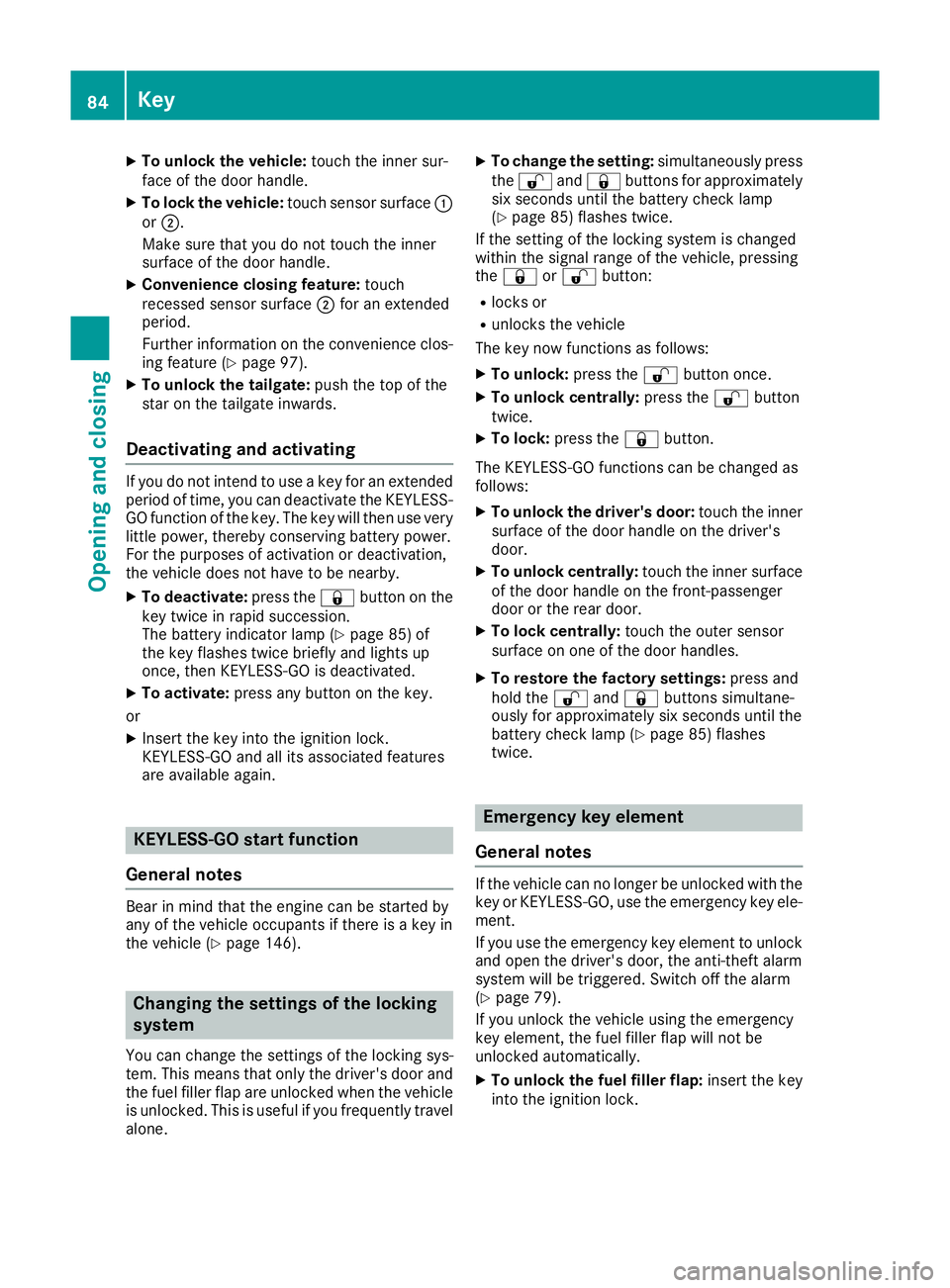
To unlock the vehicle: touch the inner sur-
face of the door handle.
X To lock the vehicle: touch sensor surface :
or ;.
Make sure that you do not touch the inner
surface of the door handle.
X Convenience closing feature: touch
recessed sensor surface ;for an extended
period.
Further information on the convenience clos-
ing feature (Y page 97).
X To unlock the tailgate: push the top of the
star on the tailgate inwards.
Deactivating and activating If you do not intend to use a key for an extended
period of time, you can deactivate the KEYLESS-
GO function of the key. The key will then use very
little power, thereby conserving battery power.
For the purposes of activation or deactivation,
the vehicle does not have to be nearby.
X To deactivate: press the&button on the
key twice in rapid succession.
The battery indicator lamp (Y page 85) of
the key flashes twice briefly and lights up
once, then KEYLESS-GO is deactivated.
X To activate: press any button on the key.
or X Insert the key into the ignition lock.
KEYLESS-GO and all its associated features
are available again. KEYLESS-GO start function
General notes Bear in mind that the engine can be started by
any of the vehicle occupants if there is a key in
the vehicle (Y page 146). Changing the settings of the locking
system
You can change the settings of the locking sys-
tem. This means that only the driver's door and
the fuel filler flap are unlocked when the vehicle is unlocked. This is useful if you frequently travel
alone. X
To change the setting: simultaneously press
the % and& buttons for approximately
six seconds until the battery check lamp
(Y page 85) flashes twice.
If the setting of the locking system is changed
within the signal range of the vehicle, pressing
the & or% button:
R locks or
R unlocks the vehicle
The key now functions as follows:
X To unlock: press the%button once.
X To unlock centrally: press the%button
twice.
X To lock: press the &button.
The KEYLESS-GO functions can be changed as
follows: X To unlock the driver's door: touch the inner
surface of the door handle on the driver's
door.
X To unlock centrally: touch the inner surface
of the door handle on the front-passenger
door or the rear door.
X To lock centrally: touch the outer sensor
surface on one of the door handles.
X To restore the factory settings: press and
hold the %and& buttons simultane-
ously for approximately six seconds until the
battery check lamp (Y page 85) flashes
twice. Emergency key element
General notes If the vehicle can no longer be unlocked with the
key or KEYLESS-GO, use the emergency key ele-
ment.
If you use the emergency key element to unlock
and open the driver's door, the anti-theft alarm
system will be triggered. Switch off the alarm
(Y page 79).
If you unlock the vehicle using the emergency
key element, the fuel filler flap will not be
unlocked automatically.
X To unlock the fuel filler flap: insert the key
into the ignition lock. 84
KeyOpening and closing
Page 90 of 389
Problem
Possible causes/consequences and
M
MSolutions You can no longer lock or
unlock the vehicle using
KEYLESS-GO. KEYLESS-GO has been deactivated.
X Reactivate KEYLESS-GO (Y page 83). The key battery is weak or discharged.
X Check the key battery (Y page 85) and replace if necessary
(Y page 85).
If this does not work: X Lock or unlock the vehicle using the emergency key element
(Y page 90). Interference from a powerful source of radio waves.
X Lock or unlock the vehicle using the emergency key element
(Y page 90). Fault with KEYLESS-GO.
X Lock or unlock the vehicle using the remote control function of the
key.
X Have the vehicle and key checked at a qualified specialist work-
shop.
If the vehicle cannot be locked or unlocked even using the remote
control function:
X Lock or unlock the vehicle using the emergency key element
(Y page 90).
X Have the vehicle and key checked at a qualified specialist work-
shop. The engine cannot be
started using the key. The on-board voltage is too low.
X Switch off non-essential consumers, e.g. seat heating or interior
lighting, and try to start the engine again.
If this does not work:
X Check the starter battery and charge it if necessary (Y page 347).
or X Jump-start the vehicle (Y page 348).
or X Consult a qualified specialist workshop. The engine cannot be
started using the Start/
Stop button. The key is in
the vehicle. The vehicle is locked.
X Unlock the vehicle and try to start the vehicle again. The key battery is weak or discharged.
X Check the key battery (Y page 85) and replace if necessary
(Y page 85).
If this does not work: X Start your vehicle with the key in the ignition lock. Interference from a powerful source of radio waves.
X Start your vehicle with the key in the ignition lock. Key
87Opening and closing Z
Page 92 of 389
X
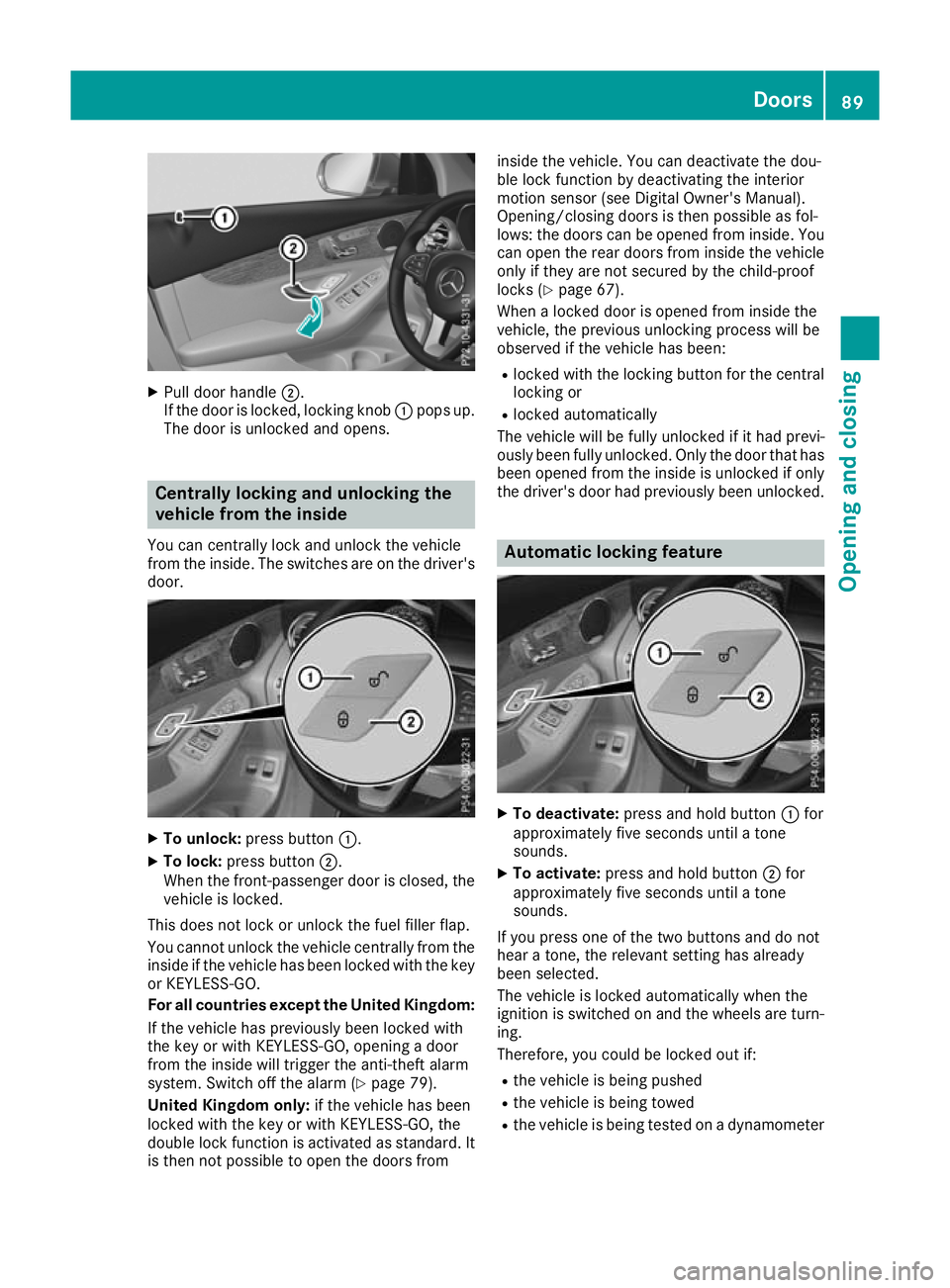
Pull door handle ;.
If the door is locked, locking knob :pops up.
The door is unlocked and opens. Centrally locking and unlocking the
vehicle from the inside
You can centrally lock and unlock the vehicle
from the inside. The switches are on the driver's door. X
To unlock: press button :.
X To lock: press button ;.
When the front-passenger door is closed, the
vehicle is locked.
This does not lock or unlock the fuel filler flap.
You cannot unlock the vehicle centrally from the
inside if the vehicle has been locked with the key or KEYLESS-GO.
For all countries except the United Kingdom:
If the vehicle has previously been locked with
the key or with KEYLESS-GO, opening a door
from the inside will trigger the anti-theft alarm
system. Switch off the alarm (Y page 79).
United Kingdom only: if the vehicle has been
locked with the key or with KEYLESS-GO, the
double lock function is activated as standard. It is then not possible to open the doors from inside the vehicle. You can deactivate the dou-
ble lock function by deactivating the interior
motion sensor (see Digital Owner's Manual).
Opening/closing doors is then possible as fol-
lows: the doors can be opened from inside. You
can open the rear doors from inside the vehicle
only if they are not secured by the child-proof
locks (Y page 67).
When a locked door is opened from inside the
vehicle, the previous unlocking process will be
observed if the vehicle has been:
R locked with the locking button for the central
locking or
R locked automatically
The vehicle will be fully unlocked if it had previ-
ously been fully unlocked. Only the door that has
been opened from the inside is unlocked if only the driver's door had previously been unlocked. Automatic locking feature
X
To deactivate: press and hold button :for
approximately five seconds until a tone
sounds.
X To activate: press and hold button ;for
approximately five seconds until a tone
sounds.
If you press one of the two buttons and do not
hear a tone, the relevant setting has already
been selected.
The vehicle is locked automatically when the
ignition is switched on and the wheels are turn-
ing.
Therefore, you could be locked out if:
R the vehicle is being pushed
R the vehicle is being towed
R the vehicle is being tested on a dynamometer Doors
89Opening and closing Z
Page 97 of 389
If the tailgate opening process has been stop-
ped:
R Kick your foot under the bumper again and
the tailgate will close. Opening and closing automatically
from the inside
Important safety notes G
WARNING
Combustion engines emit poisonous exhaust
gases such as carbon monoxide. If the tailgate is open when the engine is running, particu-
larly if the vehicle is moving, exhaust fumes
could enter the passenger compartment.
There is a risk of poisoning.
Turn off the engine before opening the tail-
gate. Never drive with the tailgate open. G
WARNING
Parts of the body could become trapped dur-
ing automatic closing of the tailgate. In addi-
tion, people may be standing in the closing
area or may enter the closing area, e.g. chil-
dren, during the closing procedure. There is a risk of injury.
Make sure that nobody is in the vicinity of theclosing area during the closing process.
Release the remote operating switch imme-
diately if somebody becomes trapped. To re-
open the tailgate pull on the remote operating
switch.
Vehicles with HANDS-FREE ACCESS:
It is also possible to stop the closing process by performing a kicking movement under the rear
bumper.
! The tailgate swings upwards and to the rear
when opened. Therefore, make sure that
there is sufficient clearance above and behind
the tailgate.
Two warning tones sound while the tailgate is
opening or closing.
The opening dimensions of the tailgate can be
found in the "Vehicle data" section
(Y page 379). Opening and closing
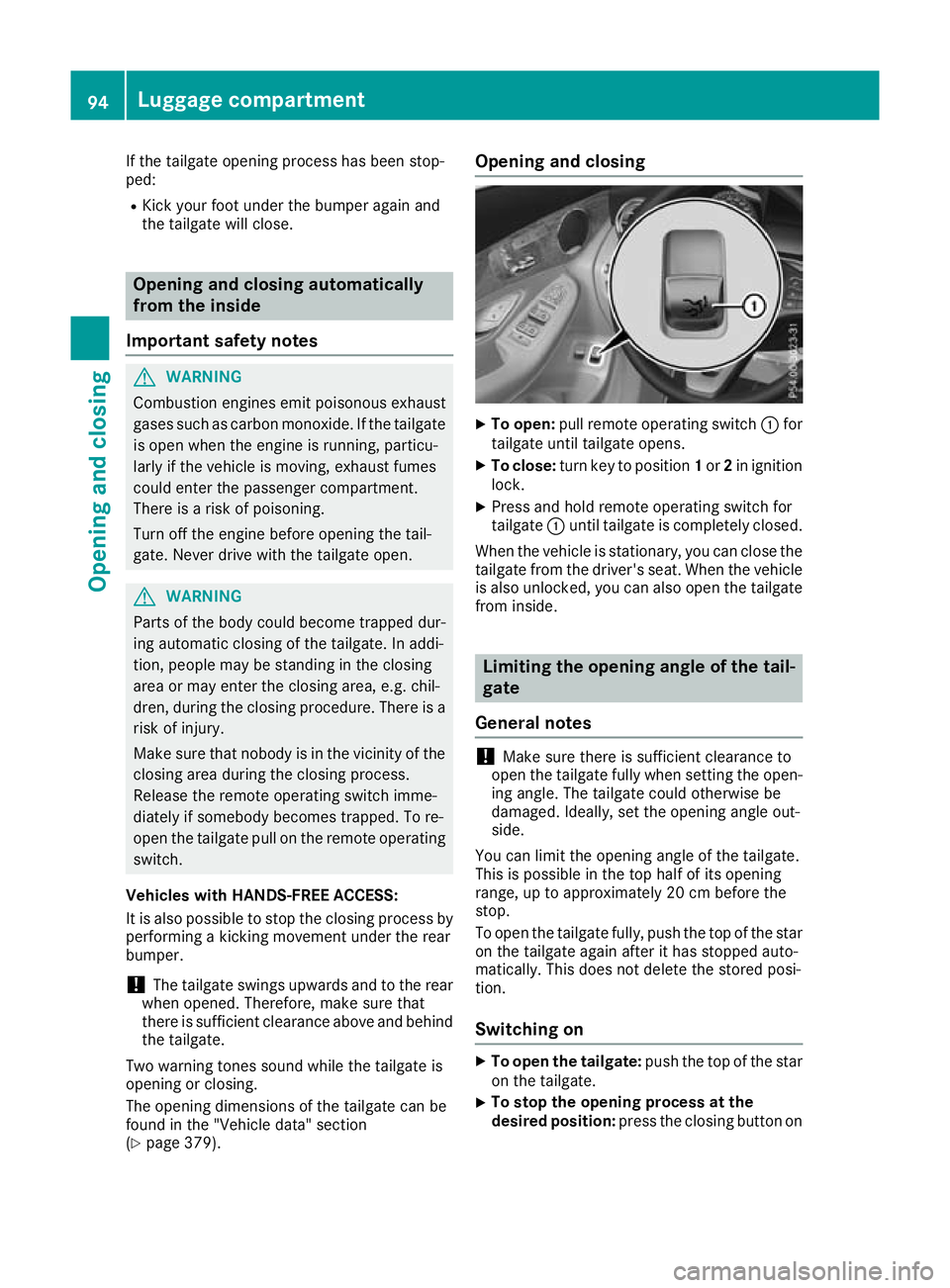
X
To open: pull remote operating switch :for
tailgate until tailgate opens.
X To close: turn key to position 1or 2in ignition
lock.
X Press and hold remote operating switch for
tailgate :until tailgate is completely closed.
When the vehicle is stationary, you can close the tailgate from the driver's seat. When the vehicle
is also unlocked, you can also open the tailgate
from inside. Limiting the opening angle of the tail-
gate
General notes !
Make sure there is sufficient clearance to
open the tailgate fully when setting the open- ing angle. The tailgate could otherwise be
damaged. Ideally, set the opening angle out-
side.
You can limit the opening angle of the tailgate.
This is possible in the top half of its opening
range, up to approximately 20 cm before the
stop.
To open the tailgate fully, push the top of the star on the tailgate again after it has stopped auto-
matically. This does not delete the stored posi-
tion.
Switching on X
To open the tailgate: push the top of the star
on the tailgate.
X To stop the opening process at the
desired position:
press the closing button on94
Luggage compartmentOpening and closing
Page 99 of 389
only opens again automatically after the corre-
sponding switch is released. The automatic
reversing feature is only an aid and is no substi-
tute for your attention when closing a side win-
dow. G
WARNING
The reversing function does not react:
R to soft, light and thin objects, e.g. small fin-
gers
R while resetting
This means that the reversing feature cannot
prevent someone being trapped in these sit-
uations. There is a risk of injury.
When closing, make sure that no parts of the
body are in the closing area. If someone
becomes trapped, press the switch to open
the side window again. Opening and closing the side win-
dows
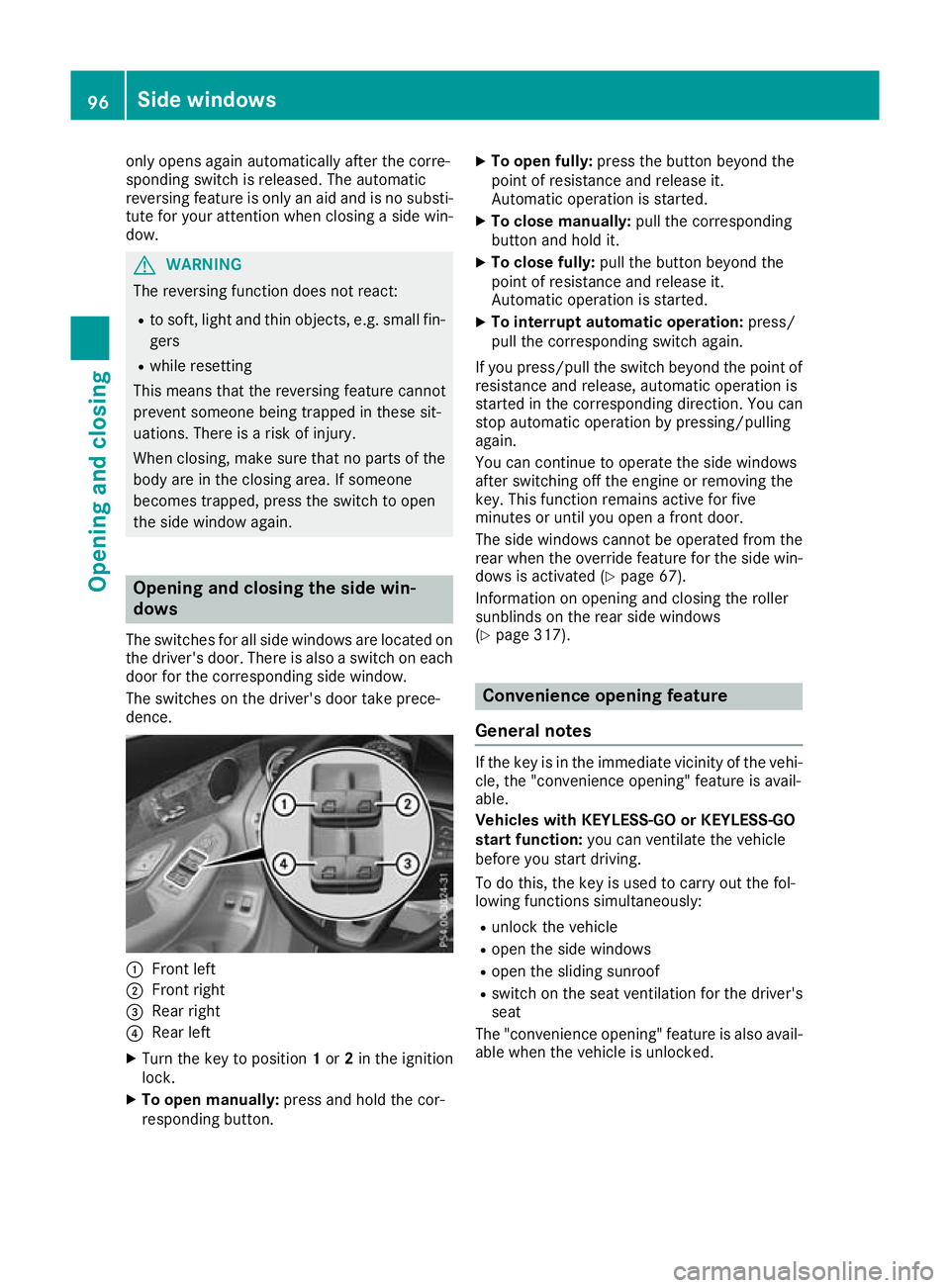
The switches for all side windows are located on
the driver's door. There is also a switch on each door for the corresponding side window.
The switches on the driver's door take prece-
dence. :
Front left
; Front right
= Rear right
? Rear left
X Turn the key to position 1or 2in the ignition
lock.
X To open manually: press and hold the cor-
responding button. X
To open fully: press the button beyond the
point of resistance and release it.
Automatic operation is started.
X To close manually: pull the corresponding
button and hold it.
X To close fully: pull the button beyond the
point of resistance and release it.
Automatic operation is started.
X To interrupt automatic operation: press/
pull the corresponding switch again.
If you press/pull the switch beyond the point of resistance and release, automatic operation is
started in the corresponding direction. You can
stop automatic operation by pressing/pulling
again.
You can continue to operate the side windows
after switching off the engine or removing the
key. This function remains active for five
minutes or until you open a front door.
The side windows cannot be operated from the
rear when the override feature for the side win-
dows is activated (Y page 67).
Information on opening and closing the roller
sunblinds on the rear side windows
(Y page 317). Convenience opening feature
General notes If the key is in the immediate vicinity of the vehi-
cle, the "convenience opening" feature is avail-
able.
Vehicles with KEYLESS-GO or KEYLESS-GO
start function: you can ventilate the vehicle
before you start driving.
To do this, the key is used to carry out the fol-
lowing functions simultaneously:
R unlock the vehicle
R open the side windows
R open the sliding sunroof
R switch on the seat ventilation for the driver's
seat
The "convenience opening" feature is also avail-
able when the vehicle is unlocked. 96
Side windowsOpening and closing
Page 100 of 389
Convenience opening feature
X
Press and hold the %button on the key
until the sliding sunroof is in the desired posi- tion.
X To interrupt convenience opening: release
the % button. Convenience closing feature
Important safety notes G
WARNING
When the convenience closing feature is oper- ating, parts of the body could become trapped
in the closing area of the side window and the
sliding sunroof. There is a risk of injury.
Observe the complete closing procedure
when the convenience closing feature is oper-
ating. When closing make sure that no parts of the body are in the closing area.
Vehicles with KEYLESS-GO or KEYLESS-GO
start function: if the key is in the immediate
vicinity of the vehicle, the "convenience closing" feature is available.
When you lock the vehicle, you can simultane-
ously:
R close the side windows
R close the sliding sunroof
Notes on the automatic reversing function for:
R the side windows (Y page 95)
R the sliding sunroof (Y page 99)
Using the key X
Press and hold the &button until the side
windows and the sliding sunroof are fully
closed.
X Make sure that all the side windows and the
sliding sunroof are closed.
X To interrupt convenience closing: release
the & button.
Using KEYLESS-GO The driver's door and the door at which the han-
dle is used must both be closed. The key must be outside the vehicle. The distance between the
key and the corresponding door handle must not
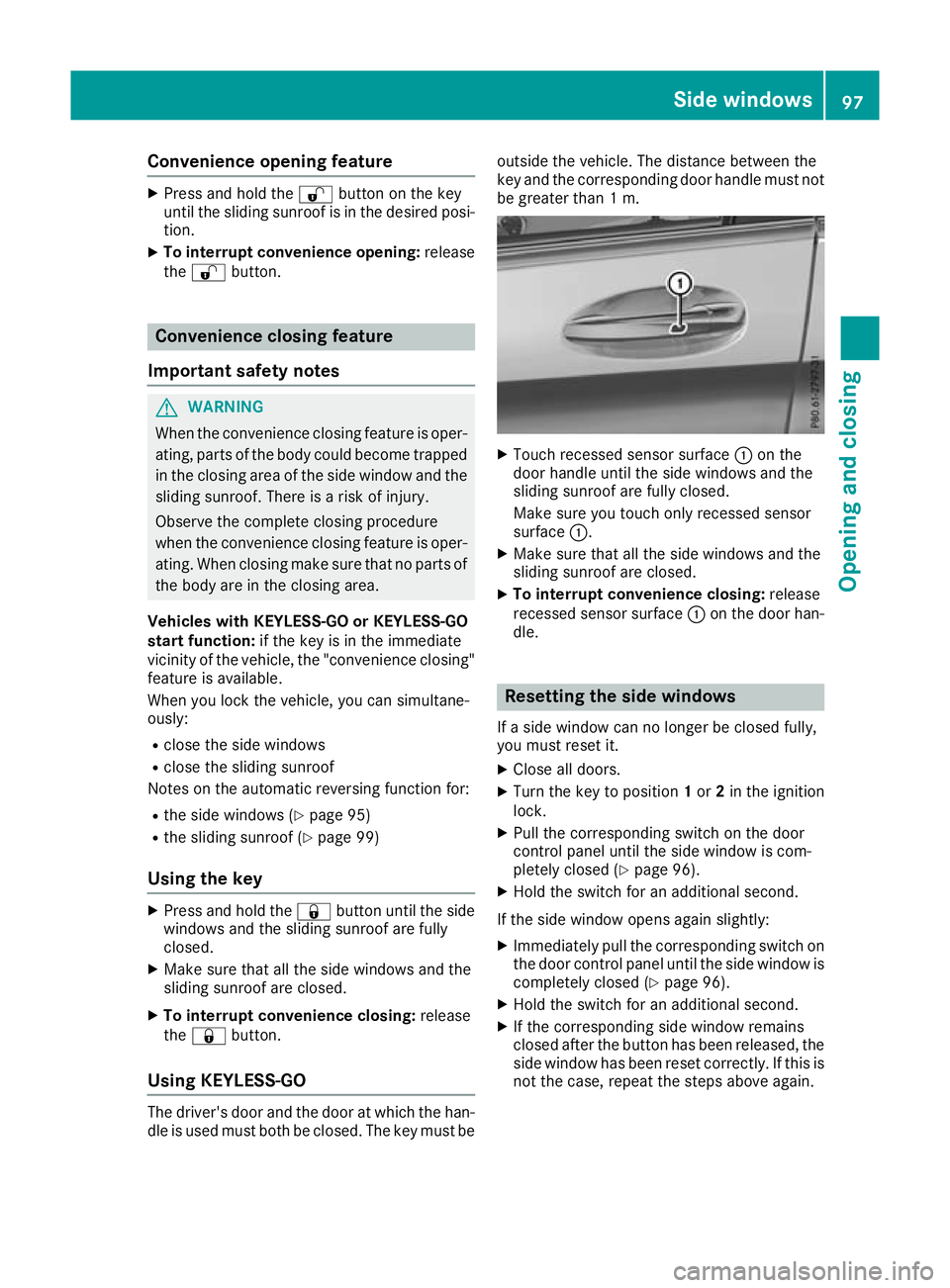
be greater than 1 m. X
Touch recessed sensor surface :on the
door handle until the side windows and the
sliding sunroof are fully closed.
Make sure you touch only recessed sensor
surface :.
X Make sure that all the side windows and the
sliding sunroof are closed.
X To interrupt convenience closing: release
recessed sensor surface :on the door han-
dle. Resetting the side windows
If a side window can no longer be closed fully,
you must reset it.
X Close all doors.
X Turn the key to position 1or 2in the ignition
lock.
X Pull the corresponding switch on the door
control panel until the side window is com-
pletely closed (Y page 96).
X Hold the switch for an additional second.
If the side window opens again slightly: X Immediately pull the corresponding switch on
the door control panel until the side window is completely closed (Y page 96).
X Hold the switch for an additional second.
X If the corresponding side window remains
closed after the button has been released, the
side window has been reset correctly. If this is
not the case, repeat the steps above again. Side windows
97Opening and closing Z