start stop button MERCEDES-BENZ GLC COUPE 2018 COMAND Manual
[x] Cancel search | Manufacturer: MERCEDES-BENZ, Model Year: 2018, Model line: GLC COUPE, Model: MERCEDES-BENZ GLC COUPE 2018Pages: 170, PDF Size: 4.1 MB
Page 6 of 170
1, 2, 3 ...
360° cameraDisplaying images ............................ 45
Opening the camera cover for
cleaning (COMAND) .........................4 5
Settings ........................................... 45
Switching on/off .............................. 45
A
Access data of the mobile phone
network provider
Deleting ......................................... 122
Editing ........................................... 122
Making entries ............................... 121
Selecting ........................................ 120
Acoustic locking confirmation
Activating/deactivating
(COMAND) ....................................... 44
Activating media mode
General notes ................................ 137
Switching on automatically ............ 138
Adding bookmarks ............................ 125
Address
Entering (navigation) ........................ 56
Address book
Adding a new contact .................... 104
Adding information to a contact .... 105
Automatically importing contacts
from the phone .............................. 107
Browsing ........................................ 103
Calling up ....................................... 103
Changing the category of an entry .. 106
Changing the display and sorting
criteria for contacts ....................... 107
Deleting contacts ........................... 107
Deleting imported contacts ........... 109
Displaying contact details .............. 104
Editing a contact ............................ 106
Entering characters ......................... 29
Importing contacts ........................ 108
Introduction ................................... 103
Making a call ................................. 105
Receiving vCards ........................... 108
Saving a contact ............................ 107
Searching for a contact ................. 103
Sending e-mails ............................. 105 Sending text messages .................. 105
Starting route guidance ................. 105
Storing a phone number as a
speed dial number ......................... 106
Voice tags ...................................... 106
Address entry menu
Navigation ........................................ 56
Adjusting the volume
COMAND ......................................... 27
Media source ................................... 27
Traffic announcements .................... 27
Alternative Route ................................ 74
Ambient lighting
Setting (COMAND) ........................... 43
Asterisk key
see Favorites button
Audio CD/DVD and MP3 mode
Bluetooth
®audio mode ................. 147
Connecting USB devices ................ 141
Data media, fil e sy
stems, formats .. 138
Gracenote®Media Database ......... 142
Inserting/removing a CD/DVD
(single drive) .................................. 140
Media interface .............................. 151
Media Register ............................... 144
Media search ................................. 143
Playback options ........................... 141
SD card .......................................... 140
Search menu ................................. 142
Selecting a track ............................ 142
Sound settings ............................... 159
Stop and playback function ........... 142
Audio mode
Menu overview .............................. 140
Automatic folding mirror function
Activating/deactivating
(COMAND) ....................................... 44
Automatic locking feature
Activating/deactivating
(COMAND) ....................................... 44
Automatic time
Switching on/off .............................. 35
Automatic volume adjustment
General information ......................... 39
Switching on/off .............................. 39
Avoiding an area .................................. 84
4Index
Page 7 of 170

B
Back button......................................... 20
Bluetooth®
Activating audio mode ................... 148
Activating/deactivating ................... 39
Audio device mode and searching
for mobile phones .......................... 151
Bluetooth
®audio menu ................. 148
Connecting a different mobile
phone .............................................. 95
Connecting audio devices .............. 148
De-authorizing (de-registering) a
device ............................................ 151
Device list ...................................... 148
Displaying connection details .......... 95
Displaying details ........................... 149
Entering the passcode ..................... 93
External authorization (audio
device) ........................................... 149
General information ......................... 39
Increasing the volume using
COMAND ....................................... 150
Interface .......................................... 90
Introduction ..................................... 90
Playback options ........................... 150
Preparation .................................... 147
Reconnecting an audio device ....... 151
Searching for a mobile phone .......... 93
Selecting a playback option ........... 150
Selecting a track ............................ 150
Starting and stopping playback ..... 149
Starting playback if the Blue-
tooth
®audio device has been
stopped ......................................... 150
Telephony ........................................ 91
Telephony notes .............................. 90
Burmester
®surround sound sys-
tem
Balance/fader ............................... 160
Calling up the sound menu ............ 159
Equalizer ........................................ 160
Equipment ..................................... 159
Surround sound ............................. 160
Buttons and controller ........................ 20
C
Call lists
Displaying details ........................... 109
Opening and selecting an entry ..... 109
Saving an entry in the address
book .............................................. 110
Calling up the compass display ......... 86
Car pool lanes ...................................... 55
Category list (music search) ............ 143
CD
Inserting ........................................ 140
Notes on discs ............................... 139
Characters
Entering (navigation) ........................ 30
Climate control
Calling up climate control
(COMAND) ....................................... 47
Calling up the climate control bar
(COMAND) ....................................... 47
COMAND ......................................... 47
Cooling with air dehumidification
(COMAND) ....................................... 49
Ionization (COMAND) ....................... 48
Overview .......................................... 46
Perfume atomizer (COMAND) .......... 48
Pre-entry climate control
(COMAND) ....................................... 48
Pre-entry climate control at
departure time (COMAND) ............... 48
Pre-entry climate control using
the key (COMAND) .......................... 48
Setting the air distribution
(COMAND) ....................................... 47
Setting the airflow (COMAND) ......... 47
Setting the climate mode
(COMAND) ....................................... 48
Setting the temperature
(COMAND) ....................................... 47
Switching ionization on/off
(COMAND) ....................................... 48
Switching on/off (COMAND) ..... 48, 49
Climate control bar
Calling up ......................................... 47
COMAND
Basic display menu .......................... 28
Basic functions ................................ 27
Components .................................... 18
Index5
Page 13 of 170
Setting the route type (short
route, fast route, dynamic route or
economic route) ............................... 54
Starting calculation .......................... 58
Route guidance
Canceling/continuing ...................... 73
Continue .......................................... 73
Freeway information ........................ 72
General notes .................................. 70
Lane recommendations ................... 71
Off-road ........................................... 75
Traffic reports .................................. 76
S
Safety notesAudio CD/DVD and MP3 mode ..... 138
Using the telephone ......................... 90
Satellite radio
Displaying information ................... 136
Overview ........................................ 133
Presets menu view ......................... 134
Registering .................................... 133
Switching to ................................... 133
SatRadio
Channel list updates ...................... 136
Memory functions .......................... 134
Music and sports alerts ................. 135
Notes ............................................. 132
Selecting a category ...................... 133
Selecting a channel ....................... 134
Tagging music tracks ..................... 135
SD card
Inserting ........................................ 140
Inserting/removing ........................ 140
Removing ....................................... 140
Searching for a gas station
When the fuel level is low ................ 65
Seat-belt adjustment function
Activating/deactivating
(COMAND) ....................................... 44
Selecting stations
Radio ............................................. 130
Sending DTMF tones ........................... 98
Setting access data
Online and Internet ........................ 120
Setting the language
COMAND ......................................... 40 Setting the night design
..................... 34
Setting the text reader speed ............ 36
Setting the volume
Telephone calls ................................ 27
Short message
see Text messages (SMS)
SIRIUS weather display
5-day forecast ................................ 161
Daily forecast ................................. 161
Detail information .......................... 162
Information chart ........................... 161
Selecting a location for the
weather forecast ............................ 162
Switching on/off ........................... 161
Weather map ................................. 164
SMS
Unread messages .......................... 113
Sound
Switching on/off .............................. 27
Sound settings
Audio ............................................. 159
Balance/fader ............................... 159
Calling up the sound menu ............ 159
Equalizer ........................................ 159
Sound system
see Burmester
®surround sound system
Speed dial
Deleting ......................................... 111
Setting up ...................................... 111
State/province
Selecting .......................................... 57
Stati
on presets (radio)
Deleting marked stations ............... 131
Stop function
Video DVD ..................................... 157
Storing stations
Radio ............................................. 131
Street name announcements
Switching on/off (COMAND) ........... 55
Switching between summer time
and standard time ............................... 35
Switching on media mode
Using the Media button ................. 137
Via the device list .......................... 138
Via the main function bar ............... 137
System settings
Automatic volume adjustment ......... 39
Index11
Page 50 of 170
XSlide6the controller repeatedly until the
climate control bar is activated.
XTo select from climate control bar ;: turn
and press the controller.
The menu for selecting the climate control
function is activated.
XTo select the climate control function: turn
and press the controller.
The selected climate control function
appears.
Settings in the climate menu
Adjusting the climate mode settings
By setting the climate mode you determine the
type of airflow. The setting is active when the air
conditioning system is set to Ã, see the vehi-
cle Operator's Manual.
XCall up the climate control menu (Ypage 47).
XTo select Climate Mode: turn and press the
controller.
XTo change the setting: turn the controller.
XTo exit the menu: press the %button.
The current airflow setting is shown in the cli-
mate control bar: DIFFUSE
,MEDIUMor FOCUS(Ypage 47).
Starting/stopping the perfume atom-
izer
The perfume atomizer makes it possible to scent
the air in individual compartments in the vehicle
interior. Further information (see the vehicle
Operator's Manual).
XCall up the climate control menu (Ypage 47).
XTo select AirFreshener: turn and press the
controller.
The setting element is active.
XTo start/stop the perfume atomizer: press
the controller.
XTo set the intensity: turn the controller when
the atomizer is switched on.
XTo exit the menu: press the %button.
Switching ionization on/off
The ionization has a cleansing effect on the air in
the vehicle interior. Further information (see the
vehicle Operator's Manual).
XCall up the climate control menu (Ypage 47).
XTo select Ionization: turn and press the
controller.
The setting element is active.
XTo switch the ionization on or off: turn the
controller.
XTo exit the menu: press the %button.
Pre-entry climate control via SmartKey
This function is available for plug-in hybrid vehi-
cles.
Before getting in, the driver's seat area or the
whole interior can be briefly warmed or ventila-
ted in advance with the air from the air vents
being pre-cooled.
XCall up the climate control menu (Ypage 47).
XTo select Pre-entry Climate Controlvia Key: turn and press the controller.
XTo switch on or off: turn the controller.
XTo exit the menu: press the %button.
Further information on pre-entry climate con-
trol; see the vehicle Operator's Manual.
Pre-entry climate control at time of
departure
You can climatize the driver's seat and the vehi-
cle interior in time for the departure time set.
XCall up the climate control menu (Ypage 47).
XTo select Pre-entry Climate Ctrl. atDepartureTime: turn and press the control-
ler.
A rotary menu appears.
XTo select the setting: turn the controller.
The menu symbol, text and image show the
selected setting.
XTo exit the menu: press the %button.
Settings in the bottom bar of the cli-
mate control menu
Activating/deactivating climate con-
trol
This setting is made in the bottom bar of the
climate control menu.
48Climate control settings
Vehicle functions
Page 52 of 170
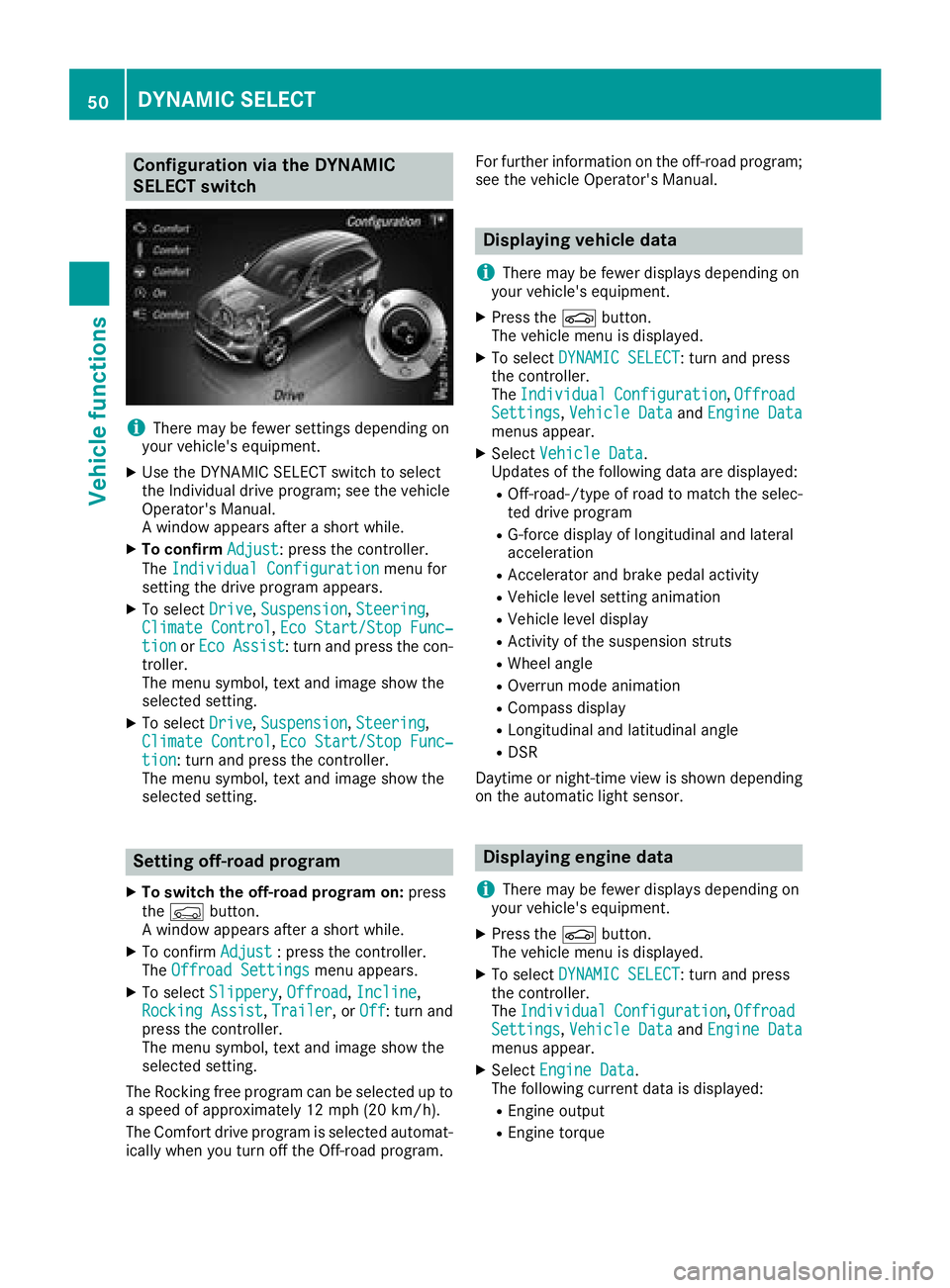
Configuration via the DYNAMIC
SELECT switch
iThere may be fewer settings depending on
your vehicle's equipment.
XUse the DYNAMIC SELECT switch to select
the Individual drive program; see the vehicle
Operator's Manual.
A window appears after a short while.
XTo confirm Adjust: press the controller.
The Individual Configuration
menu for
setting the drive program appears.
XTo select Drive,Suspension, Steering,
Climate Control, Eco Start/Stop Func‐tionor Eco Assist: turn and press the con-
troller.
The menu symbol, text and image show the
selected setting.
XTo select Drive,Suspension, Steering,
Climate Control, Eco Start/Stop Func‐tion: turn and press the controller.
The menu symbol, text and image show the
selected setting.
Setting off-road program
XTo switch the off-road program on: press
the Ç button.
A window appears after a short while.
XTo confirm Adjust: press the controller.
The Offroad Settingsmenu appears.
XTo select Slippery,Offroad, Incline,
Rocking Assist, Trailer, or Off: turn and
press the controller.
The menu symbol, text and image show the
selected setting.
The Rocking free program can be selected up to
a speed of approximately 12 mph (20 km/h).
The Comfort drive program is selected automat-
ically when you turn off the Off-road program. For further information on the off-road program;
see the vehicle Operator's Manual.
Displaying vehicle data
i
There may be fewer displays depending on
your vehicle's equipment.
XPress the Øbutton.
The vehicle menu is displayed.
XTo select DYNAMIC SELECT: turn and press
the controller.
The Individual
Configuration,OffroadSettings, Vehicle Dataand Engine Datamenus appear.
XSelect Vehicle Data.
Updates of the following data are displayed:
ROff-road-/type of road to match the selec-
ted drive program
RG-force display of longitudinal and lateral
acceleration
RAccelerator and brake pedal activity
RVehicle level setting animation
RVehicle level display
RActivity of the suspension struts
RWheel angle
ROverrun mode animation
RCompass display
RLongitudinal and latitudinal angle
RDSR
Daytime or night-time view is shown depending
on the automatic light sensor.
Displaying engine data
i
There may be fewer displays depending on
your vehicle's equipment.
XPress the Øbutton.
The vehicle menu is displayed.
XTo select DYNAMIC SELECT: turn and press
the controller.
The Individual
Configuration,OffroadSettings, Vehicle Dataand Engine Datamenus appear.
XSelect Engine Data.
The following current data is displayed:
REngine output
REngine torque
50DYNAMIC SELECT
Vehicle functions
Page 57 of 170
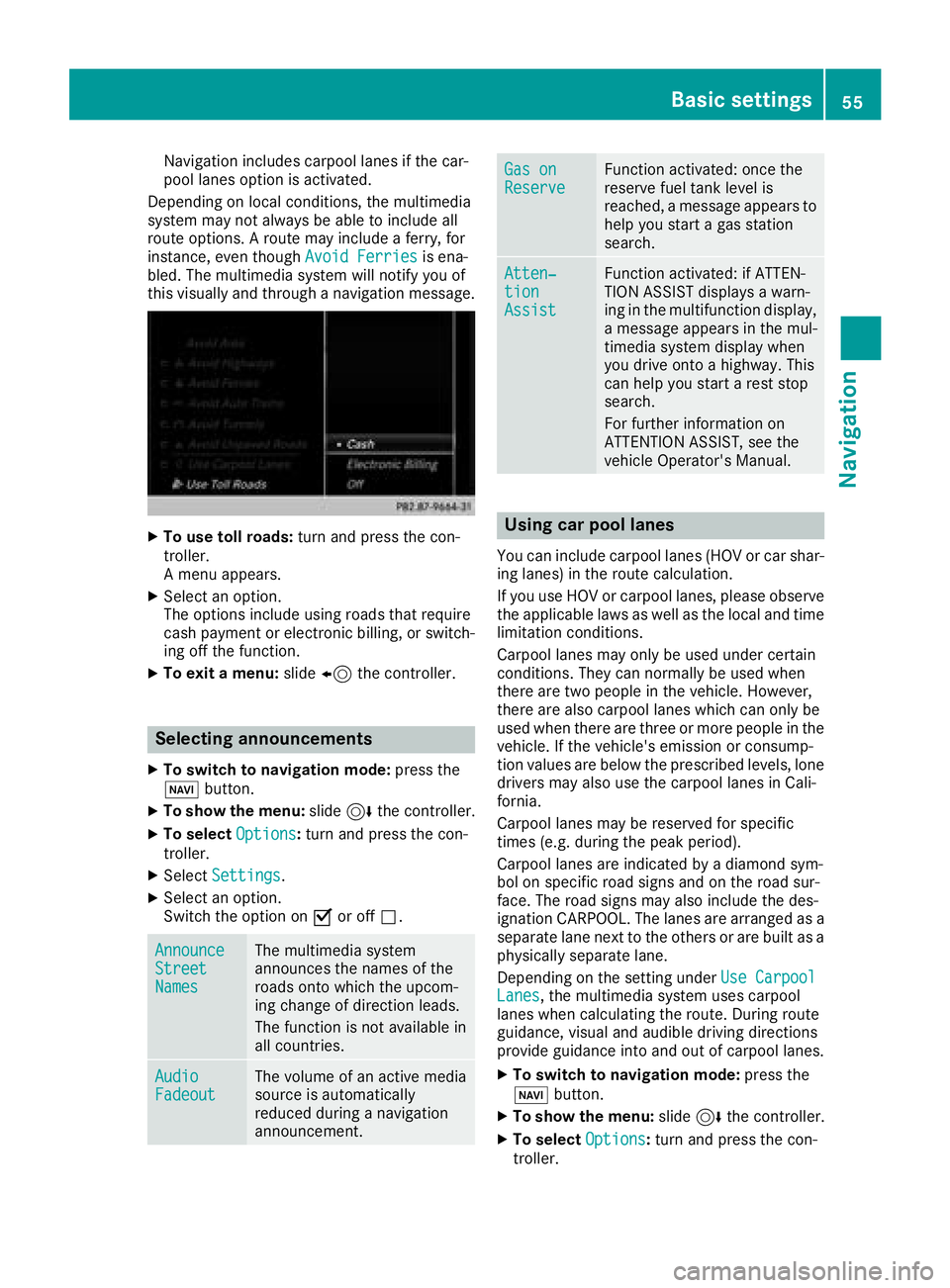
Navigation includes carpool lanes if the car-
pool lanes option is activated.
Depending on local conditions, the multimedia
system may not always be able to include all
route options. A route may include a ferry, for
instance, even though Avoid Ferries
is ena-
bled. The multimedia system will notify you of
this visually and through a navigation message.
XTo use toll roads: turn and press the con-
troller.
A menu appears.
XSelect an option.
The options include using roads that require
cash payment or electronic billing, or switch-
ing off the function.
XTo exit a menu: slide8 the controller.
Selecting announcements
XTo switch to navigation mode: press the
Ø button.
XTo show the menu: slide6the controller.
XTo select Options:turn and press the con-
troller.
XSelect Settings.
XSelect an option.
Switch the option on Oor off ª.
AnnounceStreetNames
The multimedia system
announces the names of the
roads onto which the upcom-
ing change of direction leads.
The function is not available in
all countries.
AudioFadeoutThe volume of an active media
source is automatically
reduced during a navigation
announcement.
Gas onReserveFunction activated: once the
reserve fuel tank level is
reached, a message appears to
help you start a gas station
search.
Atten‐tionAssist
Function activated: if ATTEN-
TION ASSIST displays a warn-
ing in the multifunction display,
a message appears in the mul-
timedia system display when
you drive onto a highway. This
can help you start a rest stop
search.
For further information on
ATTENTION ASSIST, see the
vehicle Operator's Manual.
Using car pool lanes
You can include carpool lanes (HOV or car shar-
ing lanes) in the route calculation.
If you use HOV or carpool lanes, please observe
the applicable laws as well as the local and time
limitation conditions.
Carpool lanes may only be used under certain
conditions. They can normally be used when
there are two people in the vehicle. However,
there are also carpool lanes which can only be
used when there are three or more people in the
vehicle. If the vehicle's emission or consump-
tion values are below the prescribed levels, lone
drivers may also use the carpool lanes in Cali-
fornia.
Carpool lanes may be reserved for specific
times (e.g. during the peak period).
Carpool lanes are indicated by a diamond sym-
bol on specific road signs and on the road sur-
face. The road signs may also include the des-
ignation CARPOOL. The lanes are arranged as a
separate lane next to the others or are built as a
physically separate lane.
Depending on the setting under Use Carpool
Lanes, the multimedia system uses carpool
lanes when calculating the route. During route
guidance, visual and audible driving directions
provide guidance into and out of carpool lanes.
XTo switch to navigation mode: press the
Ø button.
XTo show the menu: slide6the controller.
XTo select Options:turn and press the con-
troller.
Basic settings55
Navigation
Z
Page 71 of 170

XSelect personal POI or personal route
(Ypage 68).
XTo explore a personal POI or personal
route:turn and press the controller to select
Map
.
The map with the crosshair appears and
shows the destination.
XScroll the map (Ypage 53).
XSet the map scale (Ypage 81).
XTo switch to the menu: press the %button.
XTo call the personal POI: turn and press the
controller to select Call
.
If a mobile phone is connected to the multi-
media system and the telephone number is
available, the call is connected (
Ypage 97).
XTo save a personal POI: turn and press the
controller to select Save
.
XContinue saving (Ypage 79).
XTo edit the name and symbol: turn and
press the controller to select Edit
.
XSelectChange NameorEdit Icon.
XCharacter entry (Ypage 29).
XSelect a symbol.
XTo delete a personal POI or route: turn and
press the controller to select Delete
.
A prompt will appear.
XSelect YesorNo.
If you select Yes, the personal destination or
personal route is deleted.
XTo select the outward and return route:
select Swap
by turning and pressing the con-
troller.
The starting and destination positions of your
personal route, and thus the direction for
route guidance, are switched round. One-way
streets or restricted intersections are taken
into consideration. Therefore, the outward
and return routes may differ from each other.
XTo start route guidance: turn and press the
controller to select Start
.
Recording the route
General notes
Routes are recorded using the SD card.
Requirements: the SD card has the FAT data
system format (e.g. FAT32). When recording the route, bear in mind the fol-
lowing:
RIf the SD card is inserted, it must not be
removed during recording.
Rif route recording was started manually, it
must be finished manually before the multi-
media system is switched off.
RThe multimedia system minimizes the num-
ber of route points recorded. Therefore when
the recorded route is subsequently com-
menced, it may differ from the route that was
originally recorded.
Starting/finishing route recording
XInsert the SD memory card (Ypage 140).
XTo switch to navigation mode: press the
Ø button.
XTo show the menu: slide6the controller.
XTo select Destination: turn and press the
controller.
XSelect From Memory Card.
XSelectStart Route Recording.
The route is recorded and REC appears at the
bottom edge of the screen.
XTo stop recording, select End RouteRecordingfrom the menu.
The route is stored under Personal Routes.
Displaying/editing the recorded route
XInsert the SD memory card (Ypage 140).
XTo switch to navigation mode: press the
Ø button.
XTo show the menu: slide6the controller.
XTo select Destination: turn and press the
controller.
XSelect From Memory Card.
XSelectPersonal Routes.
Previously recorded routes are displayed.
XTo select a route, turn and press the control-
ler.
The map appears with a menu. The recorded
route is shown on the map in blue.
XTo calculate a route: selectStart.
XTo change the name and symbol: select
Edit
.
XSelect Change NameorEdit Icon.
XCharacter entry (Ypage 29).
XSelect a symbol.
Personal POIs and routes69
Navigation
Z
Page 89 of 170
XCallup the navigation menu (Ypage 86).
XTurn the controller unt ilDriveInformationis brought to the front.
XPress the controller.
The Starting Drive Information.
Please Wait...message appears.
You willthen see maps with the current veh i-
cle position and the vicinity of the destination
in diff erent scales, these are automatically
displ ayed one after another.
If mbrace isactivated for Internet access
(
Ypage 119), additional information can be
displ ayed, e.g. weather at the destination.
iAlternatively you can call up th isfunction
using the touchpad (Ypage 23).
XTo exit DriveInformation: press the controller.
XPress the %button.
Route flight
XCallup the navigation menu (Ypage 86).
XTurn the controller unt ilRoute Flightis
brought to the front.
XPress the controller.
iAlternatively you can call up this function
using the touchpad (Ypage 23 ).
XSelectÌ.
The route will beflown along from a helicopter
perspective.
XTo stop route flight:selectË.
XTo exit theroute flight: press the controller.
XPress the %button.
Info on navigation
XCall up the navigation menu (Ypage 86).
XTurn the controller until Info on Naviga‐tionisbrought to the front.
XPress the controller.
The Digital Operator's Manual is opened at
the section on navigation.
iAlternatively you can call up this function
using the touchpad (Ypage 23 ).
Problems with the navigation system
ProblemPossible causes/consequences and MSolutions
The multimedia system
does not resume route
guidance after the jour-
ney has been interrup-
te d.Route guidance iscanceled if you interrupt the journey for more than
two hours.
"In terrupting the journey" refers to stopping the vehicle.
"Con tinuing route guidance" refers to switching the multimedia sys-
tem back on and driving on.
XContinue route guidance (Ypage 73).
Problems with the navigation system87
Navigation
Z
Page 102 of 170
Starting the mobile phone voice recognition
XConnect the mobile phone to the multimedia
system (Ypage 91).
XPress and hold theóbutton on the multi-
function steering wheel for more than one
second.
You can now use the mobile phone voice rec-
ognition.
Ending the mobile phone voice recognition
XPress ñon the multifunction steering
wheel.
The mobile phone voice recognition is stop-
ped.
Phone book
Introduction
The phone book displays the contacts from the
address book which have a phone number.
The phone book of the mobile phone is auto-
matically displayed in the multimedia system
after the connection is established (default set-
ting). You can deactivate automatic calling up
(
Ypage 107).
In the phone book, you can:
RCreate new contacts (Ypage 101)
RAdd information to contacts (Ypage 101)
RSearch for contacts (Ypage 100)
RStore contacts (Ypage 102)
RDelete contacts (Ypage 102)
Further information on importing contacts
(
Ypage 108).
When you import, save, edit or add contacts,
they will be permanently saved in the multime-
dia system. These contacts will remain available
even when you connect the multimedia system
to a different mobile phone. You can view these contacts even without a mobile phone.
Calling up the phone book
XTo call up the telephone menu: press the
% button.
XTo select thesymbol in the telephone
menu: turn and press the controller.
If the phone book contains contacts, they will
be displayed in alphabetical order. The char-
acter bar at the bottom of the display is active. You can now search for a contact
(
Ypage 100).
Further information on the symbols shown
(
Ypage 100).
iYou can also call up the phone book with the
multifunction steering wheel; see the vehicle
Operator's Manual.
Symbol overview
Sym-
bolExplanation
ÆContact that has been entered, edi-
ted or saved in the multimedia sys-
tem
\Contact with voice tag
These contacts have also been
assigned a voice tag. For more infor-
mation, see the separate operating
instructions.
ÃContact that was called up from a
mobile phone
¯Contact imported from the SD mem-
ory card or USB device
®Contact imported via the Bluetooth®
interface
Searching for a contact
Using the character bar
You determine the first letter of the contact you
are looking for with the first character you enter.
XTo select characters: turn the controller and
press to confirm.
The first contact with the selected first char-
acter is highlighted in the phone book. If there
are similar contacts, the next different char-
acter is shown. For example, with contacts
such as Jana
andJohn, the beginnings of the
names are identical. The next different char-
acter A
andOare offered for selection.
XSelect the characters of the contact you are
searching for one by one, pressing and con-
firming with the controller each time.
100Phone book
Telephone
Page 150 of 170
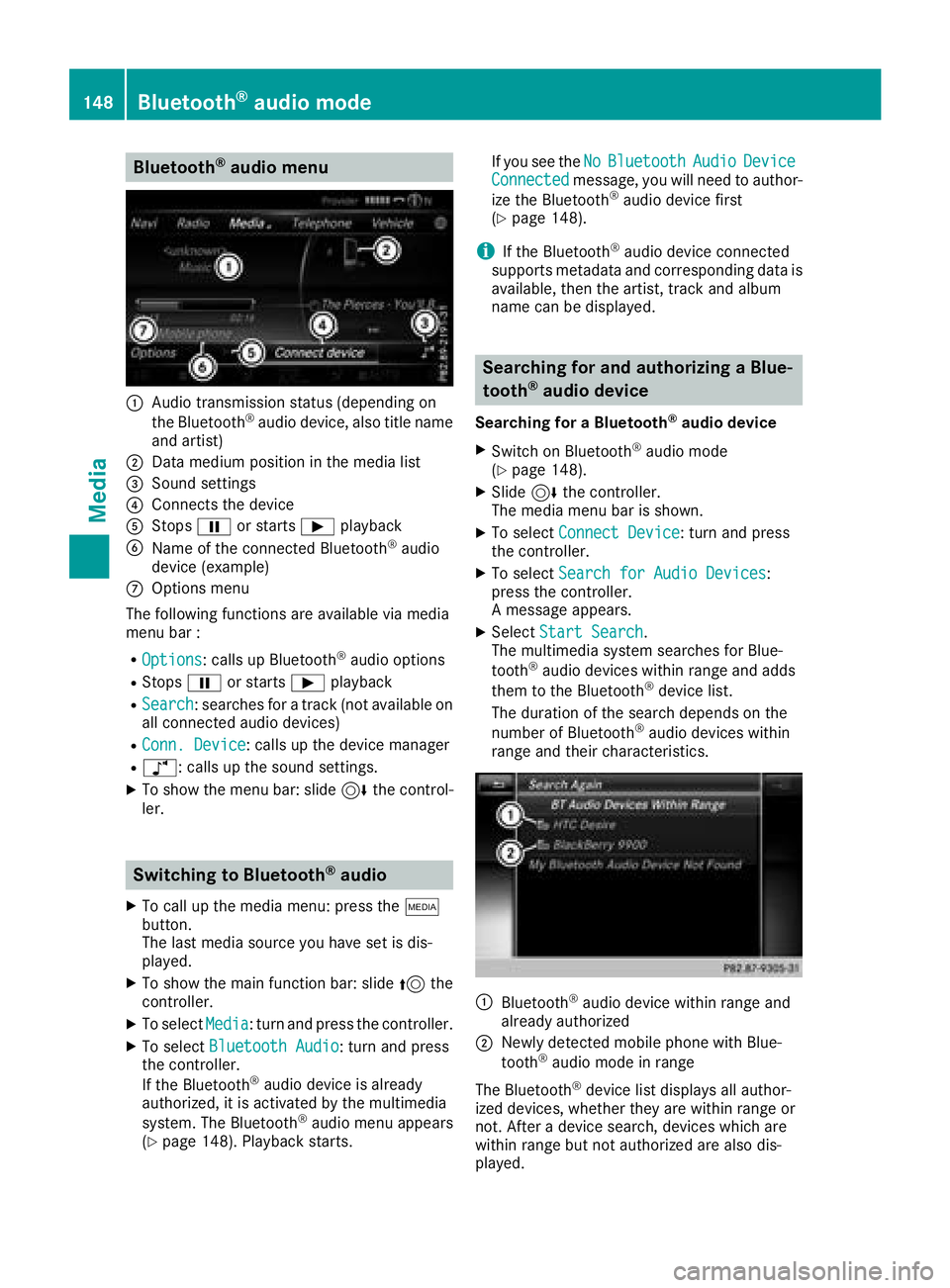
Bluetooth®audio menu
:Audio transmission status (depending on
the Bluetooth®audio device, also title name
and artist)
;Data medium position in the media list
=Sound settings
?Connects the device
AStops Ëor starts Ìplayback
BName of the connected Bluetooth®audio
device (example)
COptions menu
The following functions are available via media
menu bar :
ROptions: calls up Bluetooth®audio options
RStops Ëor starts Ìplayback
RSearch: searches for a track (not available on
all connected audio devices)
RConn. Device: calls up the device manager
Rà: calls up the sound settings.
XTo show the menu bar: slide 6the control-
ler.
Switching to Bluetooth®audio
XTo call up the media menu: press the Õ
button.
The last media source you have set is dis-
played.
XTo show the main function bar: slide 5the
controller.
XTo select Media: turn and press the controller.
XTo select Bluetooth Audio: turn and press
the controller.
If the Bluetooth
®audio device is already
authorized, it is activated by the multimedia
system. The Bluetooth
®audio menu appears
(Ypage 148). Playback starts. If you see the
No
BluetoothAudioDeviceConnectedmessage, you will need to author-
ize the Bluetooth®audio device first
(Ypage 148).
iIf the Bluetooth®audio device connected
supports metadata and corresponding data is
available, then the artist, track and album
name can be displayed.
Searching for and authorizing a Blue-
tooth®audio device
Searching for a Bluetooth®audio device
XSwitch on Bluetooth®audio mode
(Ypage 148).
XSlide 6the controller.
The media menu bar is shown.
XTo select Connect Device: turn and press
the controller.
XTo select Search for Audio Devices:
press the controller.
A message appears.
XSelect Start Search.
The multimedia system searches for Blue-
tooth
®audio devices within range and adds
them to the Bluetooth®device list.
The duration of the search depends on the
number of Bluetooth
®audio devices within
range and their characteristics.
:Bluetooth®audio device within range and
already authorized
;Newly detected mobile phone with Blue-
tooth®audio mode in range
The Bluetooth
®device list displays all author-
ized devices, whether they are within range or
not. After a device search, devices which are
within range but not authorized are also dis-
played.
148Bluetooth®audio mode
Media