ECU MERCEDES-BENZ GLC COUPE 2019 Manual PDF
[x] Cancel search | Manufacturer: MERCEDES-BENZ, Model Year: 2019, Model line: GLC COUPE, Model: MERCEDES-BENZ GLC COUPE 2019Pages: 657, PDF Size: 11.28 MB
Page 404 of 657
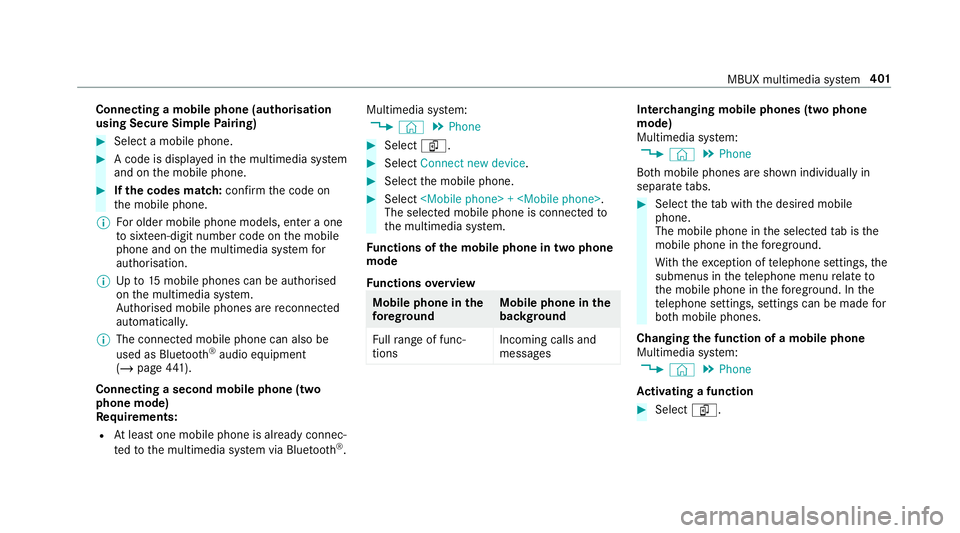
Connecting a mobile phone (au
thorisation
using Secure Simple Pairing) #
Select a mobile phone. #
A code is displa yed in the multimedia sy stem
and on the mobile phone. #
Ifth e codes match: confirm the code on
th e mobile phone.
% For older mobile phone models, enter a one
to sixteen-digit number code on the mobile
phone and on the multimedia sy stem for
authorisation.
% Upto15 mobile phones can be auth orised
on the multimedia sy stem.
Auth orised mobile phones are reconnected
au tomatical ly.
% The connected mobile phone can also be
used as Blue tooth®
audio equipment
(/ page 441).
Connecting a second mobile phone (two
phone mode)
Requ irements:
R Atleast one mobile phone is already connec‐
te dto the multimedia sy stem via Blue tooth®
. Multimedia sy
stem:
4 © 5
Phone #
Select í. #
Select Connect new device. #
Select the mobile phone. #
Select
The selected mobile phone is connected to
th e multimedia sy stem.
Fu nctions of the mobile phone in two phone
mode
Fu nctions overview Mobile phone in
the
fo re gr ound Mobile phone in
the
bac kground
Fu llra nge of func‐
tions Incoming calls and
messa ges Inter
changing mobile phones (two phone
mode)
Multimedia sy stem:
4 © 5
Phone
Bo th mobile phones are shown individually in
sepa rate tabs. #
Select theta b with the desired mobile
phone.
The mobile phone in the selected tab is the
mobile phone in thefo re ground.
Wi th th eexc eption of telephone settings, the
submenus in thete lephone menu relate to
th e mobile phone in thefo re ground. In the
te lephone settings, settings can be made for
bo th mobile phones.
Changing the function of a mobile phone
Multimedia sy stem:
4 © 5
Phone
Ac tivating a function #
Select í. MBUX multimedia sy
stem 401
Page 415 of 657
%
Please no tethat cer tain functions are only
av ailable when theve hicle is stationar y.
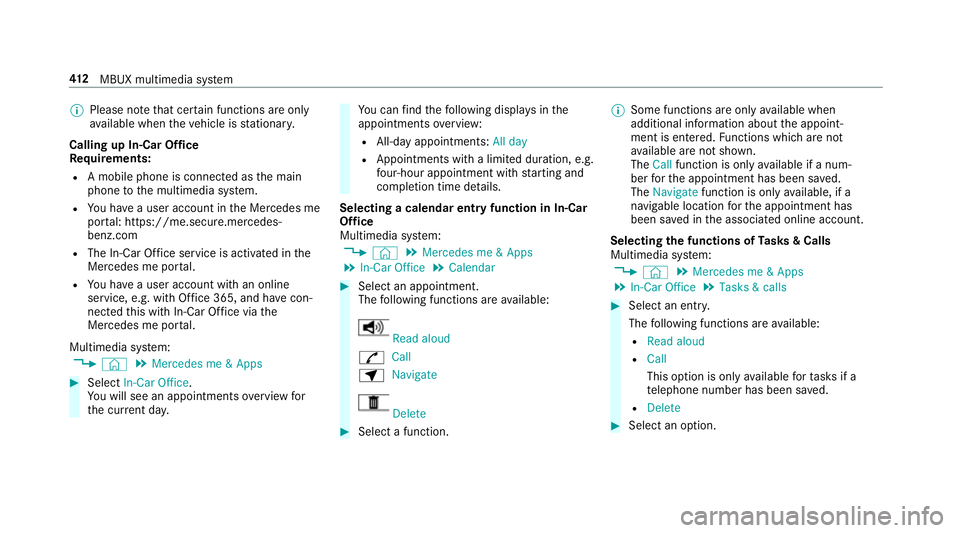
Calling up In-Car Of fice
Re quirements:
R A mobile phone is connec ted as the main
phone tothe multimedia sy stem.
R You ha vea user account in the Mercedes me
por tal: https://me.secure.mercedes-
benz.com
R The In-Car Of fice service is acti vated in the
Mercedes me por tal.
R You ha vea user account with an online
service, e.g. with Of fice 365, and ha vecon‐
nected this with In-Car Of fice via the
Mercedes me por tal.
Multimedia sy stem:
4 © 5
Mercedes me & Apps #
Select In-Car Office.
Yo u will see an appointments overview for
th e cur rent da y. Yo
u can find thefo llowing displa ysinthe
appointments overview:
R All-day appointments: All day
R Appointments with a limited duration, e.g.
four-hour appointment with starting and
completion time de tails.
Selecting a calendar entry function in In-Car
Of fice
Multimedia sy stem:
4 © 5
Mercedes me & Apps
5 In-Car Office 5
Calendar #
Select an appointment.
The following functions are available: Read aloud
R Call
Z Navigate Delete
#
Select a function. %
Some functions are on lyavailable when
additional information about the appoint‐
ment is entered. Functions which are not
av ailable are not shown.
The Call function is on lyavailable if a num‐
ber forth e appointment has been sa ved.
The Navigate function is only available, if a
navigable location forth e appointment has
been sa ved in the associated online account.
Selecting the functions of Tasks & Calls
Multimedia sy stem:
4 © 5
Mercedes me & Apps
5 In-Car Office 5
Tasks & calls #
Select an entry.
The following functions are available:
R Read aloud
R Call
This option is on lyavailable forta sks if a
te lephone number has been sa ved.
R Delete #
Select an option. 412
MBUX multimedia sy stem
Page 426 of 657
If a call is made
for a service appointment via
th e service reminder, thefo llowing data may be
transmitte d:
R Cur rent milea geand main tenance da ta
Tr ans fer is possible assuming therequ ired
data transfer tech nology is suppor tedby the
mobile service operator and thequ ality of
th e mobile connection is suf ficient.
If accident and breakdown mana gement is called
via thevo ice control sy stem and no service has
been activated, but the data pr otection query
has been confi rmed, thefo llowing data can also
be called up from theve hicle bythe Mercedes-
Benz Cus tomer Centre:
R Curr entvehicle location
% Atthe time of going topress, this function is
te ch nically not yetav ailable but can be sup‐
por ted in the future.
If th e data pr otection prom pthas been rejected
th efo llowing data is transmitted:
R Reason forth e initiation of the call
R Rejection of the data pr otection prom pt Mercedes me connect
Note
s on Mercedes me connect
% Mercedes me connect is not available in
eve rycountr y.Find out at a Mercedes-Benz
service centre if these functions are availa‐
ble in your count ry.
Mercedes me connect consists of multiple serv‐
ices.
Depending on whe ther the services are activated
and on theve hicle equipment, you can use the
fo llowing services via the multimedia sy stem and
th eove rhead control panel, forex ample:
R Accident and breakdown mana gement (me
button)
R Ifth e service is activated: Concier geService
(me button)
R Mercedes-Benz eme rgency call sy stem (auto‐
matic emer gency call or SOS button)
Mercedes me connect accident and breakdown
management, the Mercedes me connect Con‐
cier geService (if service is acti vated) and the
Mercedes-Benz emer gency call centre are availa‐
ble foryo u around the cloc k. The me button and
the SOS button can be found
on theve hicle's overhead control panel
(/ page 420).
Yo u can also call the Mercedes-Benz Cus tomer
Centre using the multimedia sy stem
(/ page 421).
Please no tethat Mercedes me connect is a
Mercedes-Benz service. In emer gencies, al ways
call the national emer gency services firs t using
th est andard national emer gency service phone
numbe rs. In eme rgencies, you can also use the
Mercedes-Benz emer gency call sy stem
(/ page 425).
Obser vethe conditions of use for Mercedes me
connect and other services. These can be
obtained in the Mercedes me por tal: https://
me.secure.mercedes-benz.com
Fu rther information on Mercedes me connect,
th e pr ovided service scope and operation:
http://manuals.daimler.com/baix/cars/
connectme/en_GB/index.html MBUX multimedia sy
stem 423
Page 427 of 657
Information on Mercedes me connect acci‐
dent and breakdown management
The accident and breakdown management can
include
thefo llowing functions:
R Supplement tothe Mercedes-Benz emer‐
ge ncy call sy stem (/ page 425)
If necessar y,the conta ct person at the
Mercedes-Benz emer gency call centre for‐
wa rdsth e call toMercedes me connect
breakdown and accident management. For‐
wa rding the call is ho wever not possible in all
countries.
R Breakdown assi stance bya mechanic on
location and/or theto wing away oftheve hi‐
cle tothe nearest Mercedes-Benz service
cent re
Yo u may be charge dfo rth ese services.
More information about Mercedes me connect
services can be obtained in the Mercedes me
por tal: https://me.secure.mercedes-benz.com Data transfer
red during Mercedes me con‐
nect call se rvices
The data transfer red during a Mercedes me call
depends on which service is selected in the
vo ice control sy stem and which Mercedes me
connect services are activated.
Which data is transfer redfo rth e services, can
be take n from the cur rently valid term s of use.
These can be obtained in the Mercedes me por‐
ta l: https://me.secure.mercedes-benz.com Mercedes me and apps
Information about Mercedes me
When
you log in with a user account tothe
Mercedes me por tal,th en services and of fers
from Mercedes-Benz will be available to you.
Av ailability is countr y-dependent.
Fo r more information consult a Mercedes-Benz
service centre or visit the Mercedes me por tal:
http://me.secure.mercedes-benz.com
% Make sure you alw ayske ep the Mercedes
me apps updated. Calling up
the Mercedes me user account
Multimedia sy stem:
4 © 5
Mercedes me & Apps
Yo ur vehicle is connected with a user
account #
Select Mercedes me.
Information about the connected user
account appears.
Yo ur vehicle is not yet connec ted with a user
account #
Select Mercedes me. #
The instructions for creating a user account
and connecting theve hicle with this follow
on the media displa y.
% Ifth e Mercedes me app is available on a
mobile phone, theve hicle connection can be
accomplished using the QR code shown.
Calling up the Mercedes me services
Re quirements:
R The vehicle is connected with the user
account. 424
MBUX multimedia sy stem
Page 484 of 657
Re
moving the fire extinguisher &
WARNING Risk of accident due toan
incor rectly secu redfire extinguisher in
th e driver's foot we ll
A fire extinguisher in the driver's foot we ll
may impede pedal tra vel or block a
depressed pedal.
This jeopardises the operating and road
saf ety of theve hicle.
Moreo ver,th efire extinguisher can be flung
around in the driver's foot we ll and injure the
driver or other vehicle occupants. #
Alw aysstow and secure thefire extin‐
guisher properly in the brac ket. #
Do not remo vethefire extinguisher
while driving. #
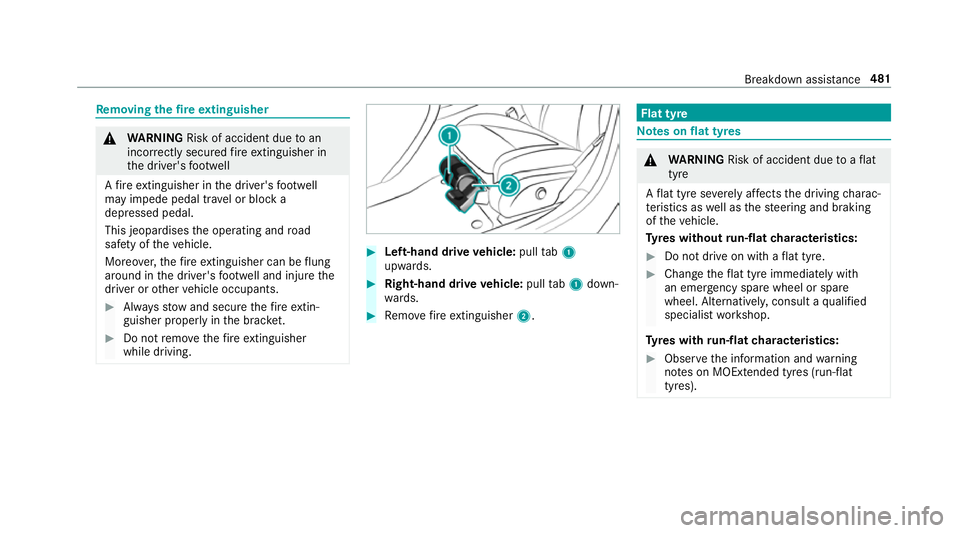
Left-hand drive vehicle: pulltab1
upwards. #
Right-hand drive vehicle: pulltab1 down‐
wa rds. #
Remo vefire extinguisher 2. Flat tyre
Note
s onflat tyres &
WARNING Risk of accident due toaflat
tyre
A flat tyre se verely affects the driving charac‐
te rist ics as well as thesteering and braking
of theve hicle.
Ty res without run-flat characteristics: #
Do not drive on with a flat tyre. #
Chan getheflat tyre immediately with
an emer gency spa rewheel or spare
wheel. Alternativel y,consult a qualified
specialist workshop.
Ty res with run-flat characteristics: #
Obse rveth e information and warning
no tes on MOExtended tyres (run-flat
tyres). Breakdown assis
tance 481
Page 494 of 657
Plug-in
hybrid: be sure toobser vethe no tes in
th e Supplement. Otherwise, you may failto rec‐
ognise dangers.
All vehicles
* NO
TEDama gecaused bynumerous or
ex tended attem ptsto start the engine Nume
rous or extended attem ptsto start the
engine may damage the catalytic con verter
due tonon-combu sted fuel. #
Avoid numerous and extended attem pts
to start the engine. Obser
vethefo llowing points during starting
assis tance and when charging the battery:
R Only use undamaged jump lead/charging
cables with a suf ficient cross-section and
insula tedte rm inal clamps.
R Non- insulated parts of thete rm inal clamps
must not come into con tact wi thother me tal
parts while the jump lead/charging cable is
connected tothe battery/jump-s tart connec‐
tion point. R
The jump lead/charging cable must not
come into contact wi thany parts which may
mo vewhen the engine is running.
R Alw ays make sure that nei ther you nor the
battery is elect rostatically charge d.
R Keep away from fire and naked flames.
R Do not lean overth e batter y.
Obser vethe additional following points when
ch arging the battery:
R Only use battery charge rs tested and
appr oved for Mercedes-Benz.
R Read the battery charge r's operating instruc‐
tions before charging the batter y.
Obser vethe additional following points during
st arting assis tance:
R Starting assis tance may only be pr ovided
using batteries with a nominal voltage of
12 V.
R The vehicles must not touch.
R Petrol engine: only acceptstarting assis‐
ta nce if the engine and exhaust sy stem are
cold. St
arting assi stance and charging the12 V
battery Re
quirements:
R The vehicle is secured with the electric park‐
ing brake.
R Vehicles with automatic transmission: the
transmission is in position j.
R The ignition and all electrical consumers are
switched off.
R The bonnet is open. Breakdown assi
stance 491
Page 499 of 657
&
WARNING Risk of accident due tolimi‐
te d saf ety-re lated functions during the
to wing process
Saf ety-re lated functions are limited or no lon‐
ge rav ailable in thefo llowing situations:
R the ignition is switched off.
R the brake sy stem or po werst eering sys‐
te m is malfunctioning.
R the energy supply or the on-board electri‐
cal sy stem is malfunctioning.
When your vehicle is then towe daw ay, signif‐
icantly more ef fort may be requ ired tosteer
and brake than is no rmally requ ired. #
Use a tow bar. #
Make sure that thesteering wheel can
mo vefreely, before towing theve hicle
aw ay. *
NO
TEDama gedue toexcessive tracti ve
po wer If
yo u pull away sharpl y,the tractive po wer
may be too high and theve hicles could be
damaged. #
Pull away slowly and smoo thly. Loading the
vehicle for transport #
Obser vethe no tes on towing away
( / page 494). #
Connect theto w bar totheto wing eye in
order toload theve hicle.
% You can also attach theto w bar tothe trailer
hitch. #
Vehicles with automatic transmission:
shift the automatic transmission toposition
i.
% Ve
hicles with automatic transmission:
th e automatic transmission may be loc ked in
position jintheeve nt of dama getothe
electrical sy stem. Toshift toi , pr ovide the on-board electrical sy
stem with po wer
( / page 491). #
Load theve hicle onto the transpor ter. #
Vehicles with automatic transmission:
shift the automatic transmission toposition
j. #
Use the electric parking brake tosecure the
ve hicle against rolling away. #
Only secure theve hicle bythe wheels.
AMG vehicles with ADS PLUS (Adaptive
Damping Sy stem PLUS) &
WARNING Risk of an accident when
transporting vehicles with Adaptive
Damping Sy stem PLUS
The reduced damping forc es on theve hicle
being transpor ted can cause theve hicle/
trailer combination tostart toswing.
As a result, when transporting vehicles with
th eAd aptive Damping Sy stem PLUS, the
ve hicle/trailer combination may start toskid.
Consequentl y,yo u could lose cont rol of your
ve hicle. 496
Breakdown assis tance
Page 500 of 657
#
When transporting, ensure that:
R theve hicle has been loaded onto
th e transpor ter cor rectly
R theve hicle is secured at all four
wheels with suitable tensioning
st ra ps
R the maximum permissible speed of
60 km/h is not exceeded when
transporting *
NO
TEDama getotheve hicle from secur‐
ing it incor rectly #
After loading, theve hicle must be
secured on all four wheels. Otherwise,
th eve hicle could be damaged. #
A minimum dis tance of 20 cm up wards
and 10cm down wards must be kept to
th e transport platform. #
Secure theve hicle on all four wheels af ter
loading. 4MATIC
vehicles/ vehicles with automatic
transmission #
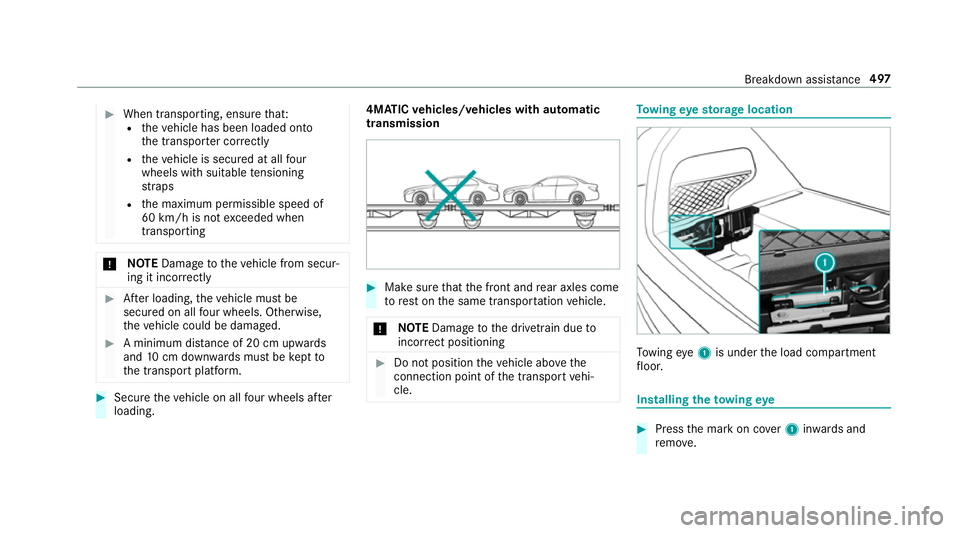
Make sure that the front and rear axles come
to rest on the same transpor tation vehicle.
* NO
TEDama getothe driv etra in due to
incor rect positioning #
Do not position theve hicle abo vethe
connection point of the transport vehi‐
cle. To
wing eyesto rage location To
wing eye1 is under the load compartment
fl oor. Installing
theto wing eye #
Press the mark on co ver1 inwa rds and
re mo ve. Breakdown assis
tance 497
Page 502 of 657
*
NO
TEDama geor malfunctions caused
by moisture Moisture may cause dama
getothe electrical
sy stem or cause it tomalfunction. #
When the fuse box is open, make sure
th at no moisture can enter the fuse
box. #
When closing the fuse box, make sure
th at the seal of the lid is positioned cor‐
re ctly on the fuse box. If
th e newly inser ted fuse also blo ws, ha vethe
cause traced and rectified at a qualified special‐
ist workshop.
Ensure thefo llowing before replacing a fuse:
R The vehicle is secured against rolling away.
R All electrical consumers are switched off.
R The ignition is switched off.
The electrical fuses are located in various fuse
bo xes:
R Fuse box in the engine compartment on the
driver's side (/ page 499) R
Fuse box on the driver's side of the cockpit
(/ page 500)
R Fuse box in the front passenger foot we ll
(/ page 500)
R Fuse box in the load compartment on the
ri ght-hand side of theve hicle, when vie wed
in the direction of tra vel (/ page 500) Opening and closing
the fuse box in the
engine compa rtment Re
quirements:
R A dry clo thand a sc rewdriver are available.
Obse rveth e no tes on electrical fuses
(/ page 498).
Opening &
WARNING Risk of inju ryfrom using the
windscreen wipers while the engine bon‐
net is open
When the engine bonn etis open, and the
windscreen wipers are set in motion, you can
be trapped bythe wiper linkage. #
Alw ays switch off the windscreen wip‐
ers and ignition before opening the
engine bonn et. #
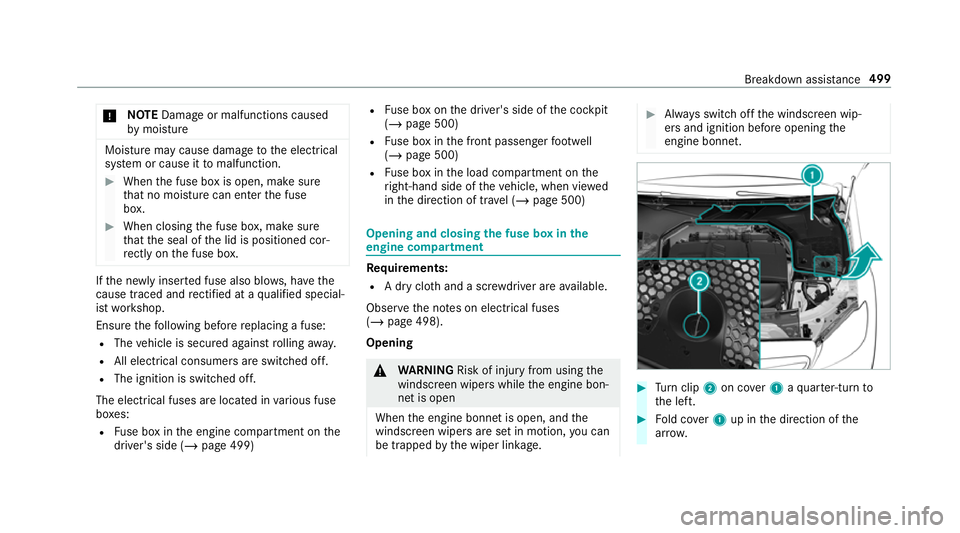
Turn clip 2on co ver1 aqu arter-turn to
th e left. #
Fold co ver1 up in the direction of the
ar row. Breakdown assis
tance 499
Page 510 of 657
Ra
dio-equipment appr oval of the ty repres‐
sure moni toring sy stem
Ra dio equipment appr oval numbers Countr
yRadio equipment appr oval
number
Ar ge ntina Schrader GG4T
Numero de Registro CNC
H-20495
Schrader DG6W2D4
Nume rode Registro CNC:
H-20959 Countr
yRadio equipment appr oval
number
Brazil MODELO: GG4T
AN
ATEL: 078 27-17-08001
MODELO:DG6W2D4
AN ATEL: 01455-18-08001
Es te equipamento opera em
caráter secundário, is toé, não
te m direito à pr oteção contrain‐
te rferência prejudicial, mesmo de
es tações do mesmo tipo e não
pode causar inter ferê ncia a si ste‐
mas operando em caráter pri‐
mário. Countr
yRadio equipment appr oval
number
European
Union Hereb
y,Schrader Electronics Ltd
declares that thera dio equip‐
ment type "GG4T", "DG6W2D4"
is in compliance with Directive
20 14 /53/EU.
The full text of the EU declaration
of confo rmity is available at the
fo llowing internet address:
http://www.tpmseuro‐
shop.com/documents/declara‐
tion_conformities
GG4T: 433.92MHz; Maximum
ef fective radiated po wer < 10mw
(e.r.p)
DG6W2D4: 433.92MHz; Maxi‐
mum ef fective radiated po wer <
10 mw (e.r.p) Wheels and tyres
507