climate control MERCEDES-BENZ GLC COUPE 2019 Owners Manual
[x] Cancel search | Manufacturer: MERCEDES-BENZ, Model Year: 2019, Model line: GLC COUPE, Model: MERCEDES-BENZ GLC COUPE 2019Pages: 657, PDF Size: 11.28 MB
Page 6 of 657
Climate control
........................................ 15 3
Overview of climate contro l systems ..........1 53
Operating the climate control sy stem ......... 154 Driving and pa
rking ................................. 16 5
Driving ........................................................ 16 5
DY NA MIC SELECT switch ............................1 77
Au tomatic transmission .............................. 17 9
Fu nction of the 4MATIC .............................. 184
Re fuelling .................................................... 184
Pa rking ...................................................... .190
Driving and driving saf ety sy stems .............1 99
Tr ailer hit ch................................................ 262
Bicycle rack function .................................. 267
Ve hicle towing instructions ........................ .269 Instrument Display and on-board
comp uter.................................................. 270
Instrument display overview ...................... .270
Overview of the buttons on thesteering
wheel ..........................................................2 71
Operating the on-board computer .............. 272
Setting the design ....................................... 273
Setting the area for additional values .......... 274Overview of displa
yson the multifunc‐
tion display .................................................2 74
Ad justing the instrument lighting ................2 75
Menus and submenus ................................. 275
Head-up Display ......................................... 282 LI
NG UATRONIC ........................................ 284
No tes on operating saf ety .......................... 284
Ope ration ................................................... 285
Using LINGU ATRO NIC ef fectively ................ 287
Essential voice commands ........................ .288 MBUX multimedia sy
stem ...................... 304
Overview and operation .............................. 304
Sy stem settings .......................................... 340
Fit & Healt hy............................................... 349
Na vigation .................................................. 354
Te lephone .................................................. .397
Online and Internet functions ..................... 428
Media ......................................................... 437
Ra dio .......................................................... 445
TV ............................................................... 448
Sound ......................................................... 456 Main
tenance and care ............................. 460
ASS YST PLUS service inter val display ........ 460
Engine compartment .................................. 461
Cleaning and care ...................................... .469 Breakdown assi
stance ............................ 47 9
Emergency ................................................. .479
Flat tyre ...................................................... 481
Battery (vehicle) ......................................... 487
To w- starting or towing away ....................... 493
Electrical fuses ........................................... 498 Wheels and tyres
..................................... 502
No tes on noise or unusual handling char‐
acteristics .................................................. .502
No tes on regular lyinspecting wheels and
tyres .......................................................... .502
No tes on snow chains ................................ 502
Ty re pressure .............................................. 503
Wheel change .............................................. 511
Emergency spare wheel .............................. 520 Contents
3
Page 10 of 657
1
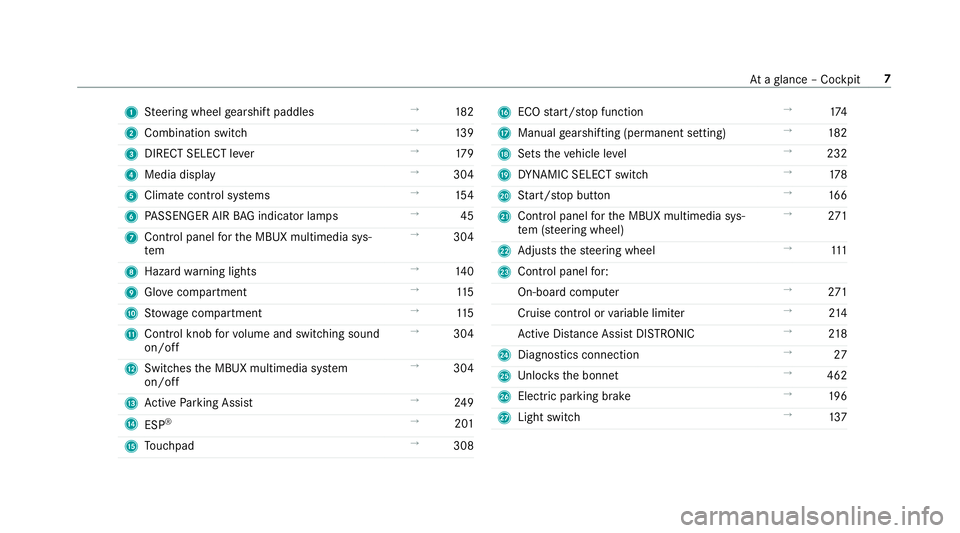
Steering wheel gearshift paddles →
182
2 Combination swit ch →
13 9
3 DIRECT SELECT le ver →
17 9
4 Media display →
304
5 Climate contro l systems →
154
6 PASSENGER AIR BAG indicator lamps →
45
7 Control panel forth e MBUX multimedia sys‐
tem →
304
8 Hazard warning lights →
14 0
9 Glovecompa rtment →
11 5
A Stow age compartment →
11 5
B Control knob forvo lume and switching sound
on/off →
304
C Swit ches the MBUX multimedia sy stem
on/off →
304
D Active Parking Assist →
24 9
E ESP®
→
201
F Touchpad →
308 G
ECO start/ stop function →
174
H Manual gearshifting (permanent setting) →
182
I Sets theve hicle le vel →
232
J DYNA MIC SELECT switch →
178
K Start/ stop button →
16 6
L Control panel forth e MBUX multimedia sys‐
te m (s teering wheel) →
271
M Adjusts thesteering wheel →
111
N Control panel for:
On-board computer →
271
Cruise cont rol or variable limiter →
214
Ac tive Dis tance Assi stDISTRONIC →
218
O Diagno stics connection →
27
P Unloc ksthe bonn et →
462
Q Electric parking brake →
19 6
R Light switch →
137 At
aglance – Cockpit 7
Page 34 of 657
R
entered navigation destinations
R data about the use of internet services
This data can be sa ved locally in theve hicle or it
is located on a device which you ha veconnected
to theve hicle (e.g. a smartphone, USB flash
drive or MP3 pla yer). If this data is stored in the
ve hicle, you can dele teit at any time. This data
is sent tothird parties only at your requ est, par‐
ticular lywhen you use online services in accord‐
ance with the settings that you ha veselected.
Yo u can store or change con venience settings/
individualisations in theve hicle at any time.
Depending on the equipment, this includes, for
ex ample:
R settings forth e seat and steering wheel posi‐
tions
R suspension and climate control settings
R customisations such as interior lighting
If yo ur vehicle is accordingly equipped, you can
connect your smartphone or ano ther mobile end
device totheve hicle. You can cont rolth is by
means of the control elements integrated in the
ve hicle. Images and audio from the smartphone can be output via
the multimedia sy stem. Cer‐
ta in information is simultaneously transfer redto
yo ur smartphone.
Depending on the type of integration, this can
include:
R general vehicle data
R position data
This allo wsyouto use selected apps on your
smartphone, such as navigation or music play‐
bac k.There is no fur ther interaction between the
smartphone and theve hicle; in particular, vehi‐
cle data is not directly accessible. Which type of
fur ther data processing occurs is de term ined by
th e pr ovider of the specific app used. Which set‐
tings you can make, if an y,depends on the spe‐
cific app and the operating sy stem of your
smartphone. Online services
Wire
less network connection
If yo ur vehicle has a wireless network connec‐
tion, it enables data tobe exc hanged between
yo ur vehicle and additional sy stems. The wire‐ less network connection is enabled via
theve hi‐
cle's transmission and reception unit or via con‐
nected mobile end devices (e.g. sma rtphones).
Online functions can be used via the wireless
network connection. This includes online serv‐
ices and applications/apps pr ovided bythe man‐
ufacturer or other pr oviders.
Manu factu rer's se rvices
Re garding online services of the manufacturer,
th e individual functions are described bythe
manufacturer in a suita ble place (e.g. Owner's
Manual, website of the manufacturer) along with
th ere leva nt da taprotection information. Per‐
sonal data may be used forth e pr ovision of
online services. Data is exchanged via a secure
connection, e.g. the manufacturer's designated
IT sy stems. Personal data is collected, pro‐
cessed and used via the pr ovision of services
ex clusively on the basis of legal permissions or
with prior consent.
The services and functions (sometimes subject
to afe e) can usually be activated or deactivated.
In some cases, this also applies tothe entire
ve hicle's data connection. This excludes, in par‐
ticular, legally prescribed functions and services. General no
tes31
Page 149 of 657
Control panel in
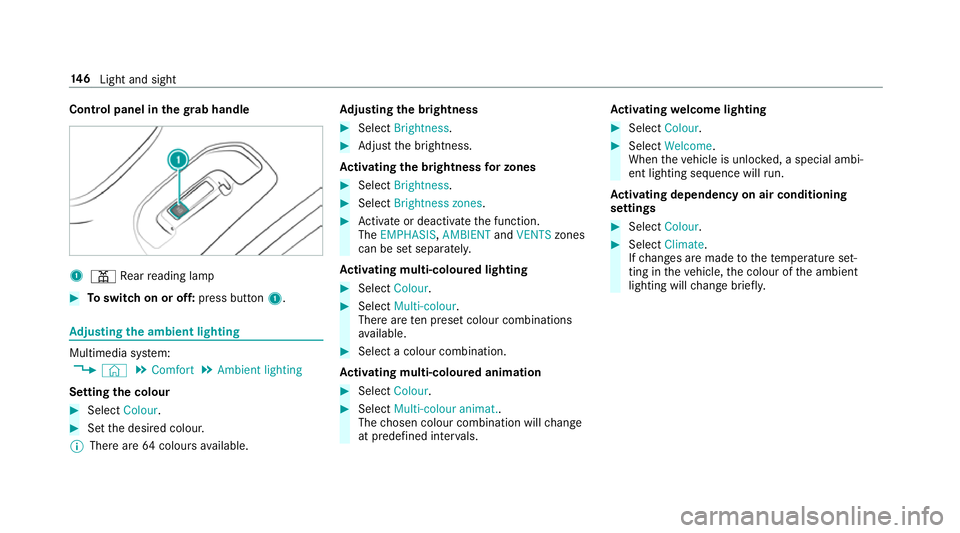
thegr ab handle 1
p Rear reading lamp #
Toswitch on or off: press button1. Ad
justing the ambient lighting Multimedia sy
stem:
4 © 5
Comfort 5
Ambient lighting
Setting the colour #
Select Colour. #
Set the desired colour.
% There are 64colours available. Ad
justing the brightness #
Select Brightness . #
Adjust the brightness.
Ac tivating the brightness for zones #
Select Brightness . #
Select Brightness zones . #
Activate or deacti vate the function.
The EMPHASIS, AMBIENTandVENTS zones
can be set separatel y.
Ac tivating multi-coloured lighting #
Select Colour. #
Select Multi-colour.
The reare ten preset colour combinations
av ailable. #
Select a colour combination.
Ac tivating multi-coloured animation #
Select Colour. #
Select Multi-colour animat..
The chosen colour combination will change
at predefined inter vals. Ac
tivating welcome lighting #
Select Colour. #
Select Welcome.
When theve hicle is unloc ked, a special ambi‐
ent lighting sequence will run.
Ac tivating dependency on air conditioning
settings #
Select Colour. #
Select Climate.
If ch anges are made tothete mp erature set‐
ting in theve hicle, the colour of the ambient
lighting will change brief ly. 14 6
Light and sight
Page 156 of 657
Overview of climate control sy
stems Note
s on climate control An interior air
filter in combination with the pre‐
fi lter in the engine compartment must alw ays be
used so that the air conditioning sy stem, pollu‐
tion lebutton vel monitoring and the air filtration
wo rkcor rectly. Ma kesure that thefilter is ins tal‐
led cor rectly and thefilter housing in the engine
compartment is closed cor rectly using the cap
and alw ays tightly sealed when in operation. Use
fi lters recommended and appr ovedby
Mercedes-Benz. Alw ays ha veservice workcar‐
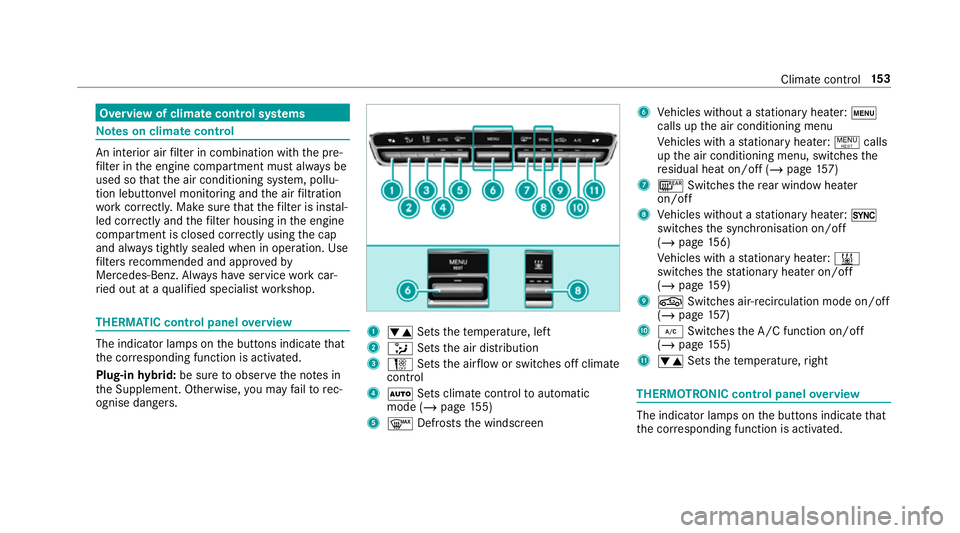
ri ed out at a qualified specialist workshop. THERMATIC control panel
overview The indicator lamps on
the buttons indicate that
th e cor responding function is activated.
Plug-in hybrid: be sure toobser vethe no tes in
th e Supplement. Otherwise, you may failto rec‐
ognise dangers. 1
w Setsthete mp erature, left
2 _ Setsthe air distribution
3 H Setsthe air flow or switches off climate
control
4 Ã Sets climate control toautomatic
mode (/ page155)
5 ¬ Defrosts the windscreen 6
Vehicles without a stationary heater: t
calls up the air conditioning menu
Ve hicles with a stationary heater: !calls
up the air conditioning menu, switches the
re sidual heat on/off (/ page157)
7 ¤ Switches there ar wind owheater
on/off
8 Vehicles without a stationary heater: 0
swit ches the synchronisation on/off
(/ page 156)
Ve hicles with a stationary heater: &
swit ches thest ationary heater on/off
(/ page 159)
9 g Switches ai r-re circulation mode on/off
(/ page 157)
A ¿ Switches the A/C function on/off
(/ page 155)
B w Setsthete mp erature, right THERMOT
RONIC control panel overview The indicator lamps on
the buttons indicate that
th e cor responding function is activated. Climate
control 15 3
Page 157 of 657
Plug-in
hybrid: be sure toobser vethe no tes in
th e Supplement. Otherwise, you may failto rec‐
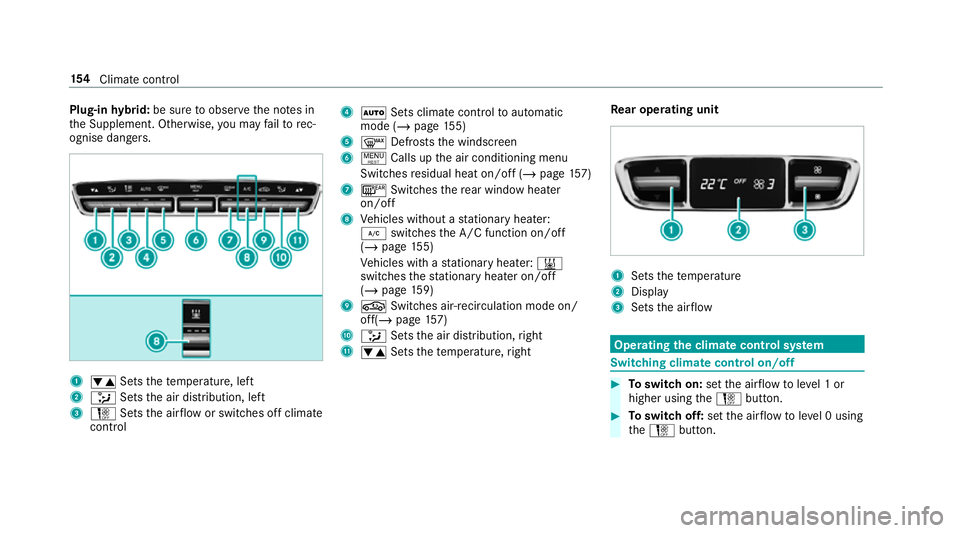
ognise dangers. 1
w Setsthete mp erature, left
2 _ Setsthe air distribution, left
3 H Setsthe air flow or switches off climate
control 4
à Sets climate control toautomatic
mode (/ page155)
5 ¬ Defrosts the windscreen
6 ! Calls up the air conditioning menu
Switches residual heat on/off (/ page157)
7 ¤ Switches there ar wind owheater
on/off
8 Vehicles without a stationary heater:
¿ switches the A/C function on/off
(/ page 155)
Ve hicles with a stationary heater: &
swit ches thest ationary heater on/off
(/ page 159)
9 g Switches ai r-re circulation mode on/
off(/ page 157)
A _ Setsthe air distribution, right
B w Setsthete mp erature, right Re
ar operating unit 1
Sets thete mp erature
2 Display
3 Sets the air flow Operating
the clima tecont rol sy stem Switching clima
tecont rol on/off #
Toswitch on: setthe air flow toleve l 1 or
higher using theH button. #
Toswitch off: setthe air flow toleve l 0 using
th eH button. 15 4
Climate cont rol
Page 158 of 657
%
If climate control is switched off, the win‐
do ws may mist up more quickl y.Switch off
climate control only brie fly. Switching
the A/C function on or off via the
cont rol panel The A/C function heats, cools and dehumidifies
th
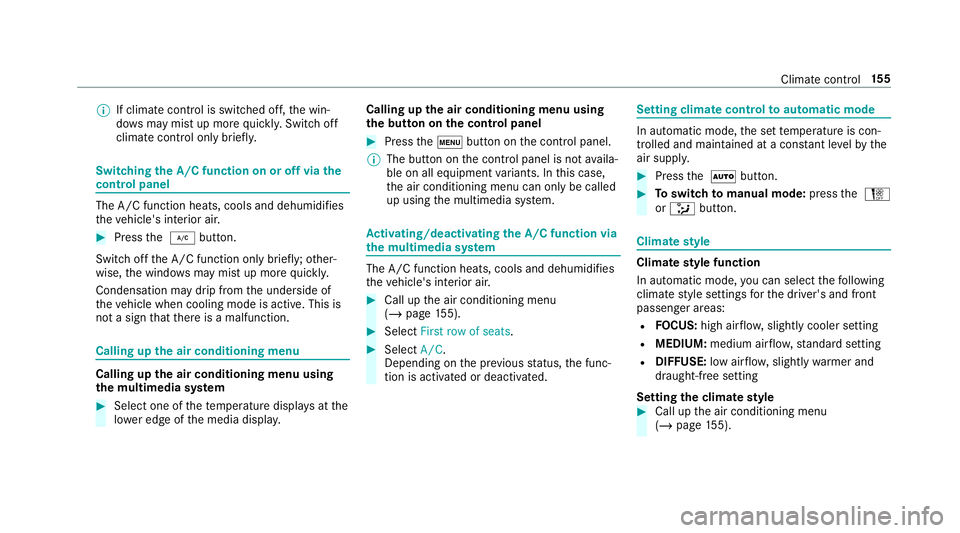
eve hicle's interior air. #
Press the ¿ button.
Switch off the A/C function only brief ly;ot her‐
wise, the windo wsmay mist up more quickl y.
Condensation may drip from the underside of
th eve hicle when cooling mode is active. This is
not a sign that there is a malfunction. Calling up
the air conditioning menu Calling up
the air conditioning menu using
th e multimedia sy stem #
Select one of thete mp erature displa ysatthe
lo we r edge of the media displa y. Calling up
the air conditioning menu using
th e but ton on the control panel #
Press thet button on the control panel.
% The button on the control panel is not availa‐
ble on all equipment variants. In this case,
th e air conditioning menu can only be called
up using the multimedia sy stem. Ac
tivating/deactivating the A/C function via
the multimedia sy stem The A/C function heats, cools and dehumidifies
th
eve hicle's interior air. #
Call up the air conditioning menu
(/ page 155). #
Select First row of seats . #
Select A/C.
Depending on the pr evious status, the func‐
tion is activated or deactivated. Setting climate control
toautomatic mode In auto
matic mode, the set temp erature is con‐
trolled and maintained at a const ant levelby the
air suppl y. #
Press the à button. #
Toswitch tomanual mode: pressthe H
or _ button. Climate
style Climate
style function
In automatic mode, you can select thefo llowing
climate style settings forth e driver's and front
passenger areas:
R FOCUS: high air flow , slightly cooler setting
R MEDIUM: medium air flow ,st andard setting
R DIFFUSE: low airflow , slightly warmer and
draught-f ree setting
Setting the clima testyle #
Call up the air conditioning menu
(/ page 155). Clima
tecontrol 15 5
Page 159 of 657
#
Select First row of seats orSecond row of
seats. #
Call up theCLIMATE MODE menu.#
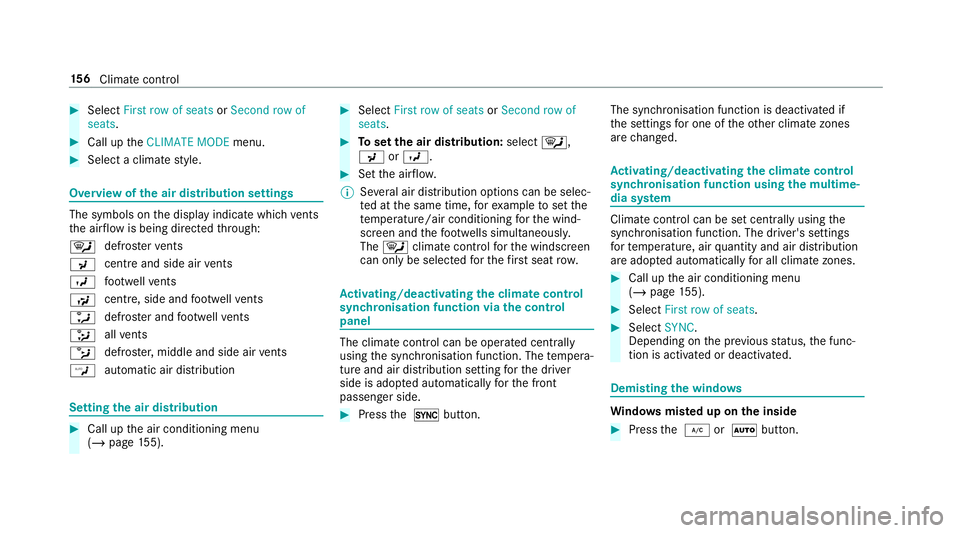
Select a climate style. Overview of
the air distribution settings The symbols on
the display indicate which vents
th e air flow is being directed thro ugh:
¯ def
rost ervents
P centre and side air
vents
O fo
ot we llve nts
S centre, side and
foot we llve nts
a defros
ter and foot we llve nts
_ all
vents
b defros
ter,middle and side air vents
W au
tomatic air distribution Setting
the air distribution #
Call up the air conditioning menu
(/ page 155). #
Select First row of seats orSecond row of
seats. #
Toset the air distribution: select¯,
P orO. #
Set the air flow.
% Several air distribution options can be selec‐
te d at the same time, forex ample toset the
te mp erature/air conditioning forth e wind‐
screen and thefo ot we lls simultaneousl y.
The ¯ climate contro lfo rth e windscreen
can only be selected forth efirs t seat row. Ac
tivating/deactivating the climate control
syn chro nisation function via the control
panel The climate control can be operated centrally
using
the synchronisation function. The temp era‐
ture and air distribution setting forth e driver
side is adop ted automatically forth e front
passenger side. #
Press the 0 button. The synchronisation function is deactivated if
th
e settings for one of theot her climate zones
are changed. Ac
tivating/deactivating the climate control
syn chro nisation function using the multime‐
dia sy stem Climate control can be set centrally using
the
synchronisation function. The driver's settings
fo rte mp erature, air quantity and air distribution
are adop ted automatically for all clima tezones. #
Call up the air conditioning menu
(/ page 155). #
Select First row of seats . #
Select SYNC.
Depending on the pr evious status, the func‐
tion is activated or deactivated. Demisting
the windo ws Wi
ndo wsmis ted up on the inside #
Press the ¿ orà button. 15 6
Climate cont rol
Page 160 of 657
#
Ifth e windo wscontinue tomist up: press the
¬ button.
Wi ndo wsmis ted up on the outside #
Switch on the windscreen wipers. #
Press button Ã. Switching air-recirculation mode on/off
#
Press theg button.
The interior air will be recirculated.
Air-reci rculation mode automatically swit ches to
fresh air mode af ter some time.
% If air-recirculation mode is switched on, the
windo wsmay mist up more quickl y.Switch
on ai r-re circulation mode only brie fly. Switching
there sidual heat on/off Re
quirements:
R The vehicle is par ked.
It is possible tomake use of there sidual heat
from the engine tocontinue heating or ventilat‐ ing
the front compartment of theve hicle for
appr oximately 30 minutes. #
Toswitch on: pressthe! button.
Re sidual heat is switched off automaticall y. Ac
tivating/deactivating ionisation The ionisation impr
oves thequ ality of theve hi‐
cle's interior air. The ionisation of the interior air
is odourless. #
Call up the air conditioning menu
(/ page 155). #
Select Air quality. #
Select IONISATION .
Depending on the pr evious status, the func‐
tion is activated or deactivated. Fr
ag rance sy stem Setting
the frag rance sy stem
Re quirements:
R Automatic clima tecontrol is acti vated.
R The glove box is closed. The fragrance sy
stem distributes a pleasant fra‐
grance thro ughout theve hicle interior from a fla‐
con located in theglov e box. #
Call up the air conditioning menu
(/ page 155). #
Select Air quality. #
Select AIR FRESHENER .
The frag rance sy stem begins at the highest
intensit y. #
Keep pressing until the desired intensity is
re ached.
% The intensity le vels can be selec ted in the
fo llowing order: Strong - Medium - Weak -
Off
Inserting or removing the flacon ofthe fra‐
gr ance sy stem &
WARNING Risk of inju ryfrom liquid per‐
fume
If ch ildren open theflacon, they could drink
th e liquid perfume or it could come into con‐
ta ct wi th theireyes. Climate control
157
Page 162 of 657
R
Ifth e outside temp erature changes, ventila‐
tion mode au tomatical lyswitches toheating
mode or heating mode automatically
switches toventilation mode.
The stationary heater and theex haust gas outlet
are situated at theright-hand front wheel.
Switching thest ationary heater / stationary
ve ntilation on/off via the control panel &
DANG ER Risk of fata l injury due topoi‐
sonous exhaust gases
If th eta ilpipe is bloc ked or suf ficient ventila‐
tion is not possible, poisonous exhaust gases
such as carbon monoxide may enter theve hi‐
cle. This is the case in enclosed spaces or if
th eve hicle gets stuck in sn ow,fo rex ample. #
Alw ays switch thest ationary heater off
in enclosed spaces without an air
ex traction sy stems, e.g. in garage s. #
Keep theta ilpipe and the area around
th eve hicle free from snow when the
engine or thest ationary heater are run‐
ning. #
Open a window on the windward side of
th eve hicle toensure an adequate sup‐
ply of fresh air. &
WARNING Risk offire due tohot station‐
ary heater components
When thest ationary heater is swit ched on,
parts of theve hicle can become very hot,
e.g. thest ationary heater exhaust sy stem.
Flammable materials such as lea ves, grass or
twigs may ignite if they come into contact
wi th:
R hot parts of thest ationary heater exhaust
sy stem
R theex haust gas itself
There is a risk of fire. #
When thest ationary heater is swit ched
on, make sure that:
R hot vehicle parts do not come into
contact with flammable materials. R
theex haust gas can flow out of the
st ationary heater exhaust pipe
unhindered.
R theex haust gas does not come into
contact with flammable materials. *
NO
TEBattery discharge caused bysta‐
tionary heater or stationary ventilation
operation Ope
rating thest ationary heater or stationary
ve ntilation drains the batter y. #
After heating or ventilating theve hicle
twice, drive for a longer period of time. Re
quirements:
R The fuel tank is filled toat least reser vefuel
le ve l. Climate control
15 9