tailgate MERCEDES-BENZ GLC COUPE 2021 User Guide
[x] Cancel search | Manufacturer: MERCEDES-BENZ, Model Year: 2021, Model line: GLC COUPE, Model: MERCEDES-BENZ GLC COUPE 2021Pages: 481, PDF Size: 9 MB
Page 230 of 481
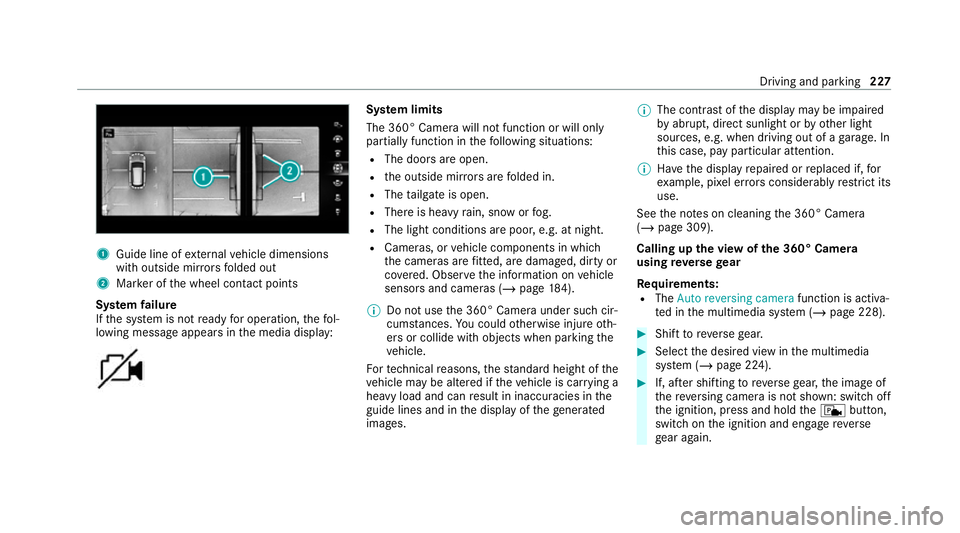
1
Guide line of extern al vehicle dimensions
with outside mir rors folded out
2 Marker of the wheel conta ct points
Sy stem failure
If th e sy stem is not ready for operation, thefo l‐
lowing message appears in the media display: Sy
stem limits
The 360° Camera will not function or will only
partially function in thefo llowing situations:
R The doors are open.
R the outside mir rors are folded in.
R The tailgate is open.
R There is heavy rain, snow or fog.
R The light conditions are poor, e.g. at night.
R Cameras, or vehicle components in which
th e cameras are fitted, are dama ged, dirty or
co vered. Obser vethe information on vehicle
sensors and cameras (/ page184).
% Do not use the 360° Camera under such cir‐
cums tances. You could otherwise injure oth‐
ers or collide with objects when parking the
ve hicle.
Fo rte ch nical reasons, thest andard height of the
ve hicle may be altered if theve hicle is car rying a
heavy load and can result in inaccuracies in the
guide lines and in the display of thege nerated
ima ges. %
The contra stof the display may be impaired
by abrupt, direct sunlight or by other light
sources, e.g. when driving out of a garage . In
th is case, pay particular attention.
% Have the display repaired or replaced if, for
ex ample, pixel er rors considerably restrict its
use.
See the no tes on cleaning the 360° Camera
(/ page 309).
Calling up the view of the 360° Camera
using reve rsege ar
Re quirements:
R The Auto reversing camera function is activa‐
te d in the multimedia sy stem (/ page 228). #
Shift toreve rsege ar. #
Select the desired view in the multimedia
sy stem (/ page 224). #
If, af ter shifting toreve rsege ar, the image of
th ere ve rsing camera is not shown: switch off
th e ignition, press and hold thec button,
switch on the ignition and engage reve rse
ge ar again. Driving and parking
227
Page 246 of 481
If
th e ball neck is not securely loc ked in place,
th eCheck trailer hitch lock message will appear
on the multifunction displa y.Coupling up/uncoupling a trailer
&
WARNING Risk of injury fromtheve hicle
le ve l being changed
Ve hicles with le vel control sy stem: the
ve hicle le vel may be changed unin tentional ly,
e.g. by ot her persons. You may become trap‐
ped if you couple up or uncouple a trailer
while theve hicle le vel is changing. In addi‐
tion, other people could become trapped if
th eir limbs are between theve hicle body and
th e tyres or underneath theve hicle.
When coupling up or uncoupling a trailer,
make sure that: #
The doors or tailgate are not opened or
closed. #
You do not initiate the le vel control sys‐
te m and do not operate theDY NA MIC
SELECT switch. #
Do not lock or unlock theve hicle. Re
quirements:
R The ball neck is extended and engaged in a
secu rely loc ked position.
Tr ailers with a 7-pin plug can be connec tedto
th eve hicle with thefo llowing adap ters:
R Adapter plug
R Adapter cable
The trailer will be cor rectly de tected bytheve hi‐
cle only if thefo llowing conditions are me t:
R The trailer is connected cor rectl y.
R The trailer lighting sy stem is in working
order.
The functions of thefo llowing sy stems will be
af fected bya cor rectly connected trailer:
R ESP ®
trailer stabilisation
R Trailer Manoeuvering Assist
R Active Lane Keeping Assist
R Parking Assist PARKTRONIC
R Active Parking Assist R
Blind Spot Assist or Active Blind Spot Assi st
R Drive AwayAssi st
R Cross Traf fic Alert
R Reversing camera
R 360° camera
R AIR BODY CONTROL
Coupling up a trailer
* NO
TEDama getothest ar ter battery due
to full dischar ge Charging
the trailer battery using the po wer
supply of the trailer can damage thest ar ter
batter y. #
Do not use theve hicle's po wer supply
to charge the trailer batter y. #
Remo vethe co ver cap from the ball head and
st ore it in a safe place. #
Position the trailer on a le vel sur face behind
th eve hicle and couple it up totheve hicle. Driving and parking
243
Page 387 of 481
Display messages
Possible causes/consequences and M MSolutions #
Consult a qualified specialist workshop. Active bonnet malfunction
See Owner's Manual
*T
he active bonnet (pedestrian pr otection) is malfunctioning or inoperative af ter having already been triggered. #
Consult a qualified specialist workshop.
C *A
t least one door is open. #
Close all doors.
? *T
he bonnet is open. &
WARNING Risk of accident due todriving with the bonn etunlo cked
The bonn etmay open and block your vie w. #
Neverre lease the bonn etwhen driving. #
Before every trip, ensure that the engine bonn etis loc ked. #
Stop theve hicle immediately in accordance with the traf fic conditions. #
Close the bonn et.
A *T
hetailgate is open. 384
Display messages and warning/indicator lamps
Page 446 of 481
Au
tomatic engine start (ECO start/
sto p function)............................................ 16 0
Au tomatic engine stop (ECO start/
sto p function)............................................ 16 0
Au tomatic front passen ger front air‐
bag deacti vation sy stem
see Automatic front passenger front
airbag shutoff
Au tomatic front passen ger front air‐
bag shu toff
Fu nction of the automatic front
passenger front airbag deactivation
sy stem..................................................... 47
PA SSENGER AIR BAG indicator lamp....... 49
Au tomatic mir rorfo lding function
Ac tivating/deactivating......................... 141
Au tomatic transmission
DIRECT SELECT le ver............................. 16 6
Drive program display............................ 16 5
Drive programs...................................... 16 4
DY NA MIC SELECT switch...................... 16 4
Engaging drive position........................ .168
Engaging neutral................................... .167
Engaging pa rkposition.......................... 16 8Engaging
reve rsege ar........................... 167
Kickdown............................................... 17 0
Manual gear changing.......................... .168
St eering wheel gearshift paddles.......... 16 8
Tr ansmission position displa y................ 16 6
Tr ansmission position s..........................16 6
Axle load Perm issible............................................ 355
Tr ailer operation.................................... 369 B
Bag hook .................................................... .115
Ball neck Extending/r etra cting............................ .240
Extending/r etra cting (MBUX multi‐
media sy stem)....................................... 24 2
BA S (Brake Assist Sy stem)....................... 186
Battery Remo tecontrol (s tationary heater)........ 14 9
Battery see Battery (vehicle)
Battery (k ey)
Re placing.................................................75 Battery (vehicle)
Charging................................................ 325
Charging (Remo teOnline)...................... 154
No tes..................................................... 321
No tes (s tarting assis tance and
ch arging)............................................... 323
Re placing.............................................. 326
St arting assis tance................................ 325
Belt see Seat belt
Bic ycle rack
Load capacity........................................ 368
Tr ailer operation.................................... 24 5
Blind Spot Assi st
Ac tivating/deactivating......................... 215
Fu nction................................................. 213
Sy stem limitations................................. 213
Blo wer
see Climate control
BlueTEC see AdBlue ®
Boot lid see Tailgate Index
443
Page 460 of 481
L
Lamp see In terior lighting
Lamp (instrument display) see Warning/indicator lamp
Lane de tection (au tomatic)
see Active Lane Keeping Assist
Lane Keeping Assist
see Active Lane Keeping Assist
LED light see Intelligent Light Sy stem
Le vel control sy stem
see AIR BODY CONTROL
Light adjustment Low beam (driving abroad).................... 127
Light switch Overview............................................... .127
Lighting see In terior lighting
see Lights
Lights Active headla mps.................................. 13 0Ad
aptive Highbeam Assist..................... 13 2
Ad aptive Highbeam Assist Plus............ .133
Au tomatic driving lights........................ .128
Combination switch.............................. .129
Cornering light....................................... 13 0
Driving ab road (low beam light
adjustment).......................................... .127
Fo g light (enhanced)..............................1 31
Haza rdwa rning light s............................ 12 9
Headla mpflashin g................................. 12 9
High beam............................................. 12 9
Intellige nt Light Sy stem......................... 13 0
Light switc h........................................... 127
Low beam..............................................1 27
Mo torw ay mode..................................... 131
Pa rking lights........................................ .127
Re ar fog light......................................... 127
Re sponsibility for lighting sy stems......... 127
Setting low beam................................... 13 4
Setting theex terior lighting switch-
off delay time........................................1 35
St anding lights....................................... 127
Switching the Intelligent Light Sys‐
te m on/of f............................................. 131
Switching the sur round lighting on/
off......................................................... .135 Tu
rn signal indicator.............................. 12 9
Limiter Activating.............................................. 194
Buttons.................................................. 194
Calling up a spee d................................. 194
Deactivating.......................................... 194
Fu nction................................................ 194
Pa ssive mode........................................ 194
Pe rm anent setting................................ .196
Re quirements........................................ 194
Selecting............................................... 194
Setting a speed...................................... 194
St oring a speed.............................. 194, 19 9
Switching off/deacti vating.................... 19 9
Switching on/activating........................ 19 9
Sy stem limitations................................. 194
Limiting speed see Limiter
Limiting the opening angle (tailgate) ........ 85
LINGU ATRO NIC
Fu nction................................................ 257
St arting................................................. 258 Index
457
Page 464 of 481
On-board computer
Displaying the service due dat e............. 297
Head-up displ aymenu........................... 253
Multifunction displa y............................. 251
Ope rating.............................................. 250
Overview of menus................................ 250
On-board diagnostics in terface
see Diagnostics connection
On-board electronics Engine electronics................................. 353
Notes....................................................3 53
Tw o-w ayradios...................................... 353
Online services Data storage............................................ 36
Online services see In-Car Of fice
Open-source soft ware................................ 37
Opening the tailgate using your foot
HANDS-FREE ACCES S............................. 84
Operating fluids
Ad Blue ®
................................................ 362
Ad ditives (fuel)...................................... 360
Brake fluid............................................ .364 Coolant (engine).................................... 365
Engine oil.............................................
.363
Fu el (diesel)...........................................3 60
Fu el (petrol)........................................... 359
No tes..................................................... 357
Wi ndsc reen washer fluid.......................3 65
Operating saf ety
48 V on-boa rdelectrical sy stem.............. 24
Declaration of conformity (electro‐
magnetic compatibility)........................... 26
Declaration of conformity (ja ck).............. 29
Declaration of conformity (TIREFIT kit).... 30
Declaration of conformity (wireless
ve hicle components)...............................26
EQ Boo sttech nology............................... 24
Information..............................................24
Operating sy stem
see On-board computer
Optimised acceleration Activating.............................................. 15 6
Outside mir rors
Anti-dazzle mode (automatic)................ 14 0
Au tomatic mir rorfo lding function......... .141
Fo lding in/out...................................... .139 Operating
the memory function............ 108
Pa rking position..................................... 14 0
Setting................................................... 13 9
Overhead control panel Overview................................................. 14
Owner's Manual Vehicle equipment................................... 24
Owner's Manual (digital)............................ 20 P
Pa int code.................................................. 355
Pa intwork (cleaning instructions) ...........307
Pa rk position
Inserting................................................ 16 8
Selecting au tomatical ly......................... 16 8
Pa rking
see Electric parking brake
Pa rking aid
see Parking Assist PARKTRONIC
Pa rking Assist PARKTRONIC
Ac tivating.............................................. 231
Ad justing warning tones........................ 232
Deactivating.......................................... 231 Index
461