warning MERCEDES-BENZ GLC COUPE 2021 Owners Manual
[x] Cancel search | Manufacturer: MERCEDES-BENZ, Model Year: 2021, Model line: GLC COUPE, Model: MERCEDES-BENZ GLC COUPE 2021Pages: 481, PDF Size: 9 MB
Page 4 of 481
Thank
youfo r pur chasing a Mercedes-Benz
Before youfirs t drive off, read this Owner's Man‐
ual carefully and familiarise yourself with your
ve hicle. Foryo ur ow n sa fety and a longer operat‐
ing li fespan of theve hicle, follow the instructions
and warning notices in this Owner's Manual. Dis‐
re ga rding them may lead todamage totheve hi‐
cle or injury topeople.
The standard equipment and product desc ript ion
of your vehicle may vary and depends on thefo l‐
lowing factors:
R Model
R order
R national version
R availability
The illustrations in this Owner's Manual show a
left-hand drive vehicle. On right-hand-drive vehi‐
cles, the la yout of car parts and cont rol ele‐
ments dif fers accordin gly.
Mercedes-Benz is cons tantly de veloping its vehi‐
cles fur ther. Mercedes-Benz
therefore reser vesth eright to
int roduce changes in thefo llowing areas:
R design
R equipment
R tech nical features
The equipment in your vehicle may therefore dif‐
fe r from that shown in the descriptions and illus‐
trations.
The following documents are integral parts of
th eve hicle:
R Digital Owner's Manual
R printed Owner's Manual
R service booklet
R equipment-dependent Supplements
Ke ep these documents in theve hicle at all
times. If you sell theve hicle, alw ays pass all of
th e documents on tothe new owner.
2535847514Z102
2535847514Z102
Page 5 of 481
Symbols
........................................................ 5At
agl ance .................................................... 6
Cockpit ........................................................... 6
Indica tor and warning lamps (s tandard) ........ 10
Indicator and warning lamps (widesc reen
cockpit) ......................................................... 12
Overhead contro l panel ................................ 14
Door operating unit and seat adjustment ..... 16
Emergencies and breakdowns ...................... 18Digital Owner's Manual
.............................20
Calling up the Digital Owner's Manual ..........20 Genera
l notes............................................. 22
Pr otection of the environment ......................22
Ta ke -ba ckof end-of-life vehicles ...................22
Mercedes-Benz GenuineParts ....................... 23
Owner's Manual ............................................ 24
Operating saf ety .......................................... .24
Declaration of conformity ............................. 26
Diagno stics connection ................................ 30
Qualified specialist workshop ....................... 31Ve
hicle registration ....................................... 32
Cor rect use of theve hicle ............................32
Information on the REA CHregulation ........... 32
No tesfo r persons with electronic medi‐
cal aids ......................................................... 33
Implied warranty .......................................... .33
QR code forre scue card ...............................33
Data storage .................................................34
Copyright ...................................................... 37 Occupant saf
ety......................................... 38
Re stra int sy stem ...........................................38
Seat belts ..................................................... 40
Airbags ......................................................... 44
PRE-SAFE ®
sy stem ....................................... 52
Safely transporting children in theve hi‐
cle ................................................................53
No tes on pets in theve hicle .........................72 Opening and closing
.................................. 73
Ke y .............................................................. .73
Doo rs............................................................ 76
Load compartment ....................................... 81
Side windo ws............................................... 86 Sliding sunroof ............................................. 89
Ro
ller sunblinds ............................................ 92
Anti-th eft protection .....................................93 Seats and
stowing ..................................... 96
No tes on the cor rect driver's seat posi‐
tion ............................................................... 96
Seats ............................................................ 97
St eering wheel ............................................ 104
Easy entry and exitfeature ........................ .106
Memory function ........................................ 107
St ow age areas ............................................ 108
Soc kets ....................................................... 121
Wi reless charging of the mobile phone
and connection with theex terior aerial ...... 12 3
Fitting/removing thefloor mats ................. 12 5 Light and sight
......................................... 127
Exterior lighting .......................................... 127
Interior lighting ........................................... 13 5
Wi ndsc reen wipers and windscreen
wa sher sy stem ............................................ 13 6
Mir rors ........................................................ 13 92
Contents
Page 7 of 481
Display messages and
warning/indi‐
cator lamps .............................................. 37 0
Displ aymessa ges ....................................... 370
Wa rning and indicator lamps ...................... 425 Index
......................................................... 4404
Contents
Page 10 of 481
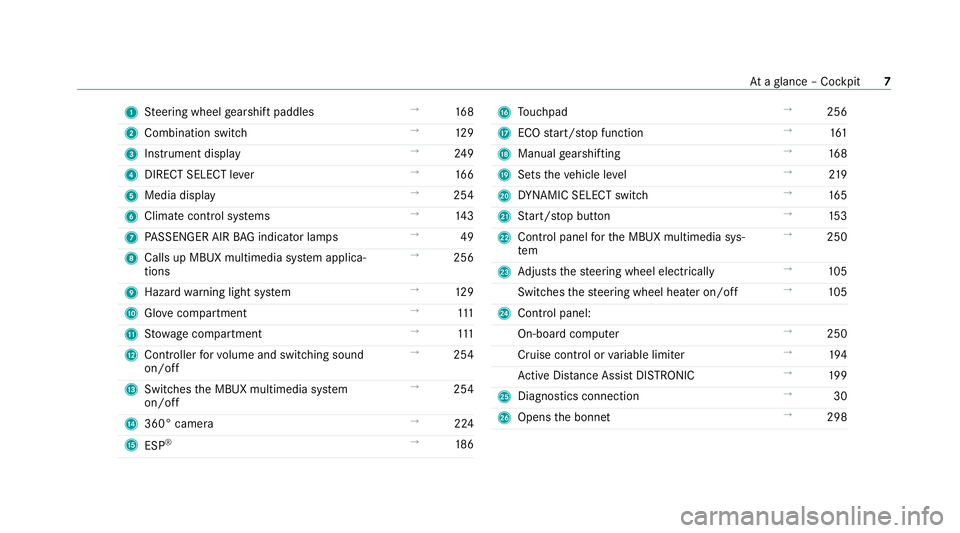
1
Steering wheel gearshift paddles →
16 8
2 Combination swit ch →
12 9
3 Instrument display →
24 9
4 DIRECT SELECT le ver →
16 6
5 Media display →
254
6 Climate contro l systems →
14 3
7 PASSENGER AIR BAG indicator lamps →
49
8 Calls up MBUX multimedia sy stem applica‐
tions →
256
9 Hazard warning light sy stem →
12 9
A Glovecompa rtment →
111
B Stow age compartment →
111
C Controller forvo lume and switching sound
on/off →
254
D Swit ches the MBUX multimedia sy stem
on/off →
254
E 360° camera →
224
F ESP®
→
186 G
Touchpad →
256
H ECO start/ stop function →
161
I Manual gearshifting →
16 8
J Sets theve hicle le vel →
219
K DYNA MIC SELECT switch →
16 5
L Start/ stop button →
15 3
M Control panel forth e MBUX multimedia sys‐
tem →
250
N Adjusts thesteering wheel electrically →
105
Switches thesteering wheel heater on/off →
105
O Control panel:
On-board co mputer →
250
Cruise contro l orvariable limiter →
194
Ac tive Dis tance Assi stDISTRONIC →
19 9
P Diagno stics connection →
30
Q Opens the bonn et →
298 At
aglance – Cockpit 7
Page 13 of 481
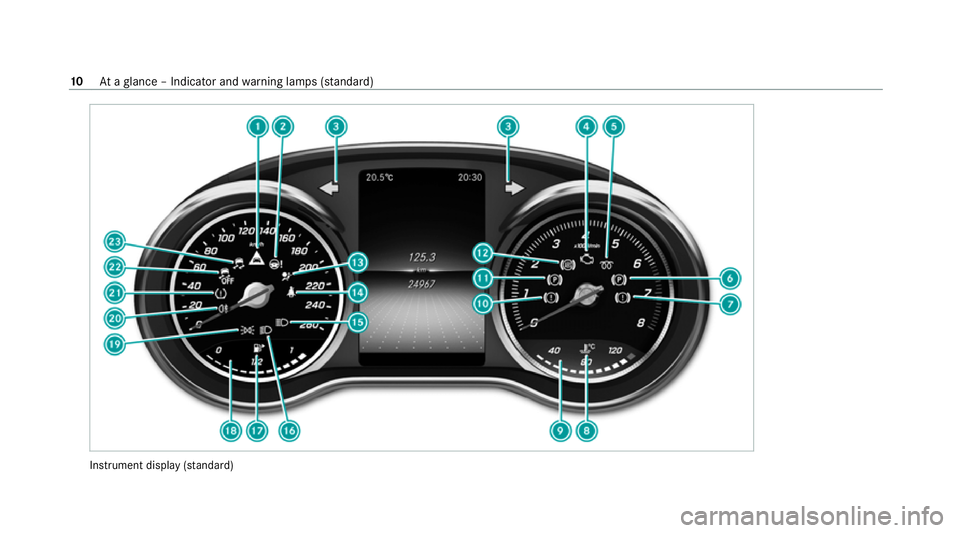
Instrument display
(sta nda rd) 10
Ataglance – Indicator and warning lamps (s tanda rd)
Page 14 of 481
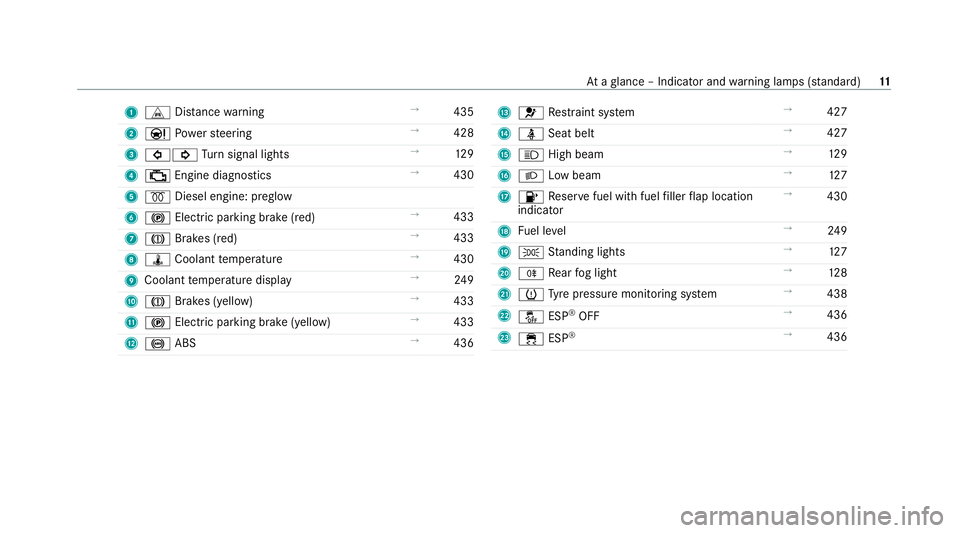
1
L Distance warning →
435
2 Ð Powe rst eering →
428
3 #! Turn signal lights →
12 9
4 ; Engine diagnostics →
430
5 % Diesel engine: preglow
6 ! Electric pa rking brake (red) →
433
7 J Brakes (red) →
433
8 ÿ Coolant temp erature →
430
9 Coolant temp erature display →
24 9
A J Brakes (yellow) →
433
B ! Electric parking brake (yell ow)→
433
C ! ABS →
436 D
6 Restra int sy stem →
427
E ü Seat belt →
427
F K High beam →
12 9
G L Low beam →
127
H 8 Reser vefuel with fuel filler flap location
indicator →
430
I Fuel le vel →
24 9
J T Standing lights →
127
K R Rear fog light →
12 8
L h Tyre pressure monitoring sy stem →
438
M å ESP®
OFF →
436
N ÷ ESP®
→
436 At
aglance – Indicator and warning lamps (s tanda rd) 11
Page 15 of 481
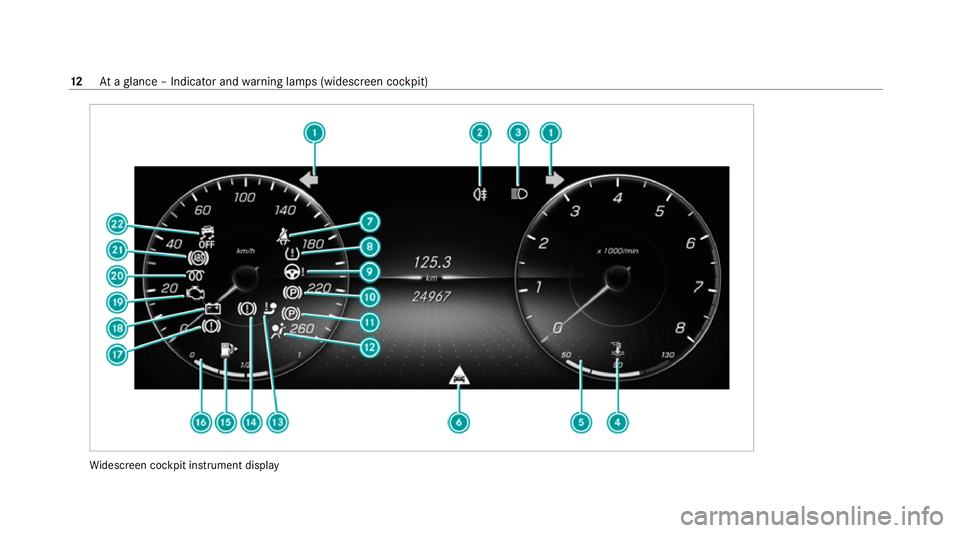
Wi
descreen cockpit instrument display 12
Ataglance – Indicator and warning lamps (widesc reen cockpit)
Page 16 of 481
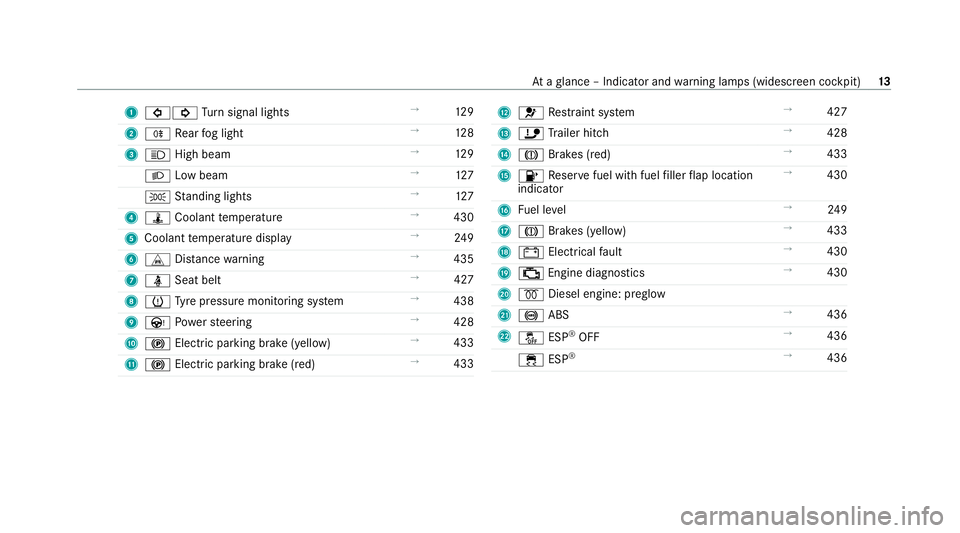
1
#! Turn signal lights →
12 9
2 R Rear fog light →
12 8
3 K High beam →
12 9
L Low beam →
127
T Standing lights →
127
4 ÿ Coolant temp erature →
430
5 Coolant temp erature display →
24 9
6 L Distance warning →
435
7 ü Seat belt →
427
8 h Tyre pressure monitoring sy stem →
438
9 Ù Powe rst eering →
428
A ! Electric pa rking brake (yellow) →
433
B ! Electric parking brake (red) →
433 C
6 Restra int sy stem →
427
D ï Trailer hit ch →
428
E J Brakes (red) →
433
F 8 Reser vefuel with fuel filler flap location
indicator →
430
G Fuel le vel →
24 9
H J Brakes (yellow) →
433
I # Electrical fault →
430
J ; Engine diagnostics →
430
K % Diesel engine: preglow
L ! ABS →
436
M å ESP®
OFF →
436
÷ ESP®
→
436 At
aglance – Indicator and warning lamps (widesc reen cockpit) 13
Page 22 of 481
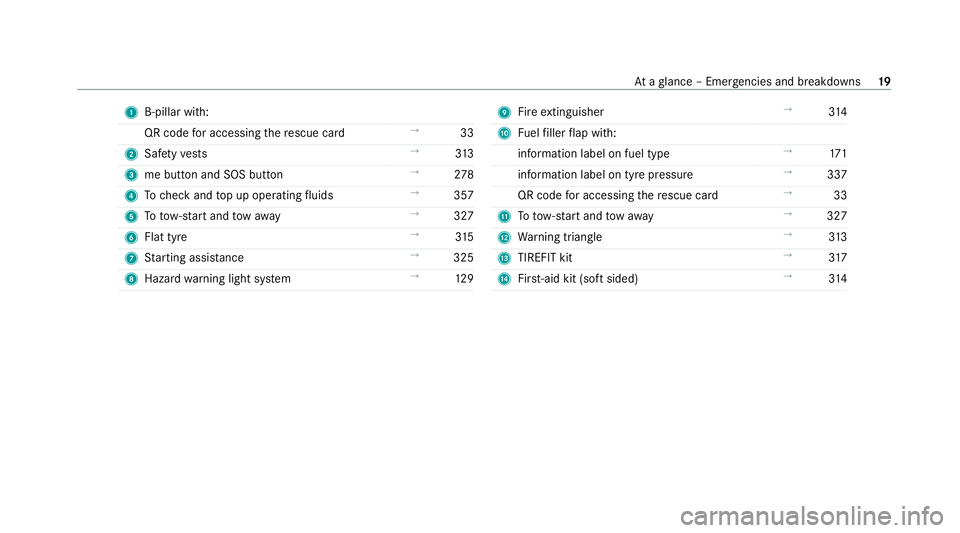
1
B-pillar with:
QR code for accessing there scue card →
33
2 Safetyve sts →
313
3 me button and SOS button →
278
4 Tocheck and top up operating fluids →
357
5 Totow- start and tow aw ay →
327
6 Flat tyre →
315
7 Starting assis tance →
325
8 Haza rdwa rning light sy stem →
12 9 9
Fire extinguisher →
314
A Fuelfiller flap with:
information label on fuel type →
171
information label on tyre pressure →
337
QR code for accessing there scue card →
33
B Totow- start and tow aw ay →
327
C Warning triangle →
313
D TIREFIT kit →
317
E First-aid kit (so ftsided) →
314 At
aglance – Emer gencies and breakdowns 19
Page 23 of 481
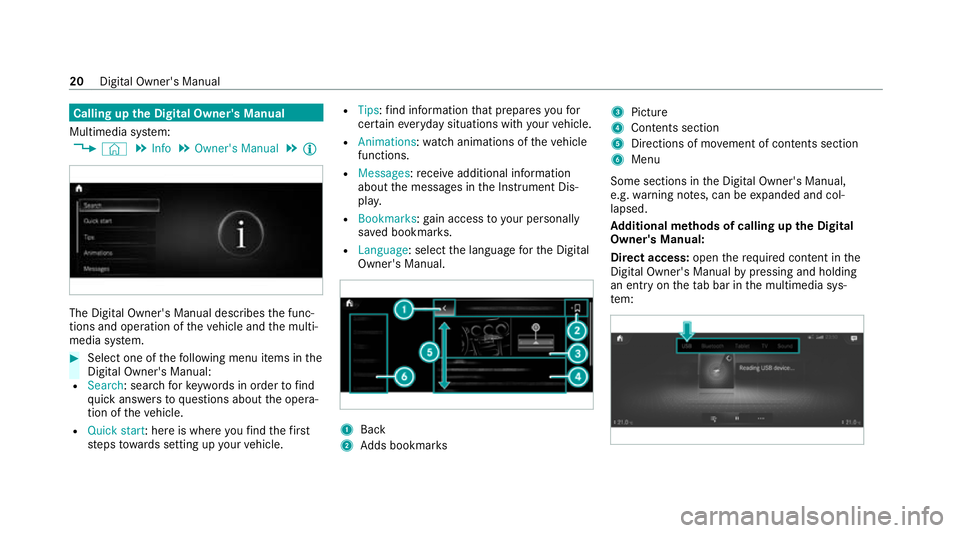
Calling up
the Digital Owner's Manual
Multimedia sy stem:
4 © 5
Info 5
Owner's Manual 5
Õ The Digital Owner's Manual describes
the func‐
tions and operation of theve hicle and the multi‐
media sy stem. #
Select one of thefo llowing menu items in the
Digital Owner's Manual:
R Search: sea rchfo rke ywords in order tofind
qu ick answers toquestions about the opera‐
tion of theve hicle.
R Quick start: here is where youfind thefirst
st eps towa rds setting up your vehicle. R
Tips: find information that prepares youfor
cer tain eve ryday situations with your vehicle.
R Animations: watch animations of theve hicle
functions.
R Messages: recei veadditional information
about the messages in the Instrument Dis‐
pla y.
R Bookmarks: gain access to your personally
sa ve d bookmar ks.
R Language: select the language forth e Digital
Owner's Manual. 1
Back
2 Adds bookmar ks 3
Picture
4 Contents section
5 Directions of mo vement of contents section
6 Menu
Some sections in the Digital Owner's Manual,
e.g. warning no tes, can be expanded and col‐
lapsed.
Ad ditional methods of calling up the Digital
Owner's Manual:
Di rect access: openthere qu ired conte nt inthe
Digital Owner's Manual bypressing and holding
an ent ryon theta b bar in the multimedia sys‐
te m: 20
Digital Owner's Manual