bulb MERCEDES-BENZ GLC SUV 2015 User Guide
[x] Cancel search | Manufacturer: MERCEDES-BENZ, Model Year: 2015, Model line: GLC SUV, Model: MERCEDES-BENZ GLC SUV 2015Pages: 497, PDF Size: 15.27 MB
Page 151 of 497
X
Insert the new bulb into bulb holder ;.
X Insert bulb holder ;into the groove with
the lug at the top.
X Push bulb holder ;down until it engages
audibly.
X Press on housing cover :and turn it to the
right.
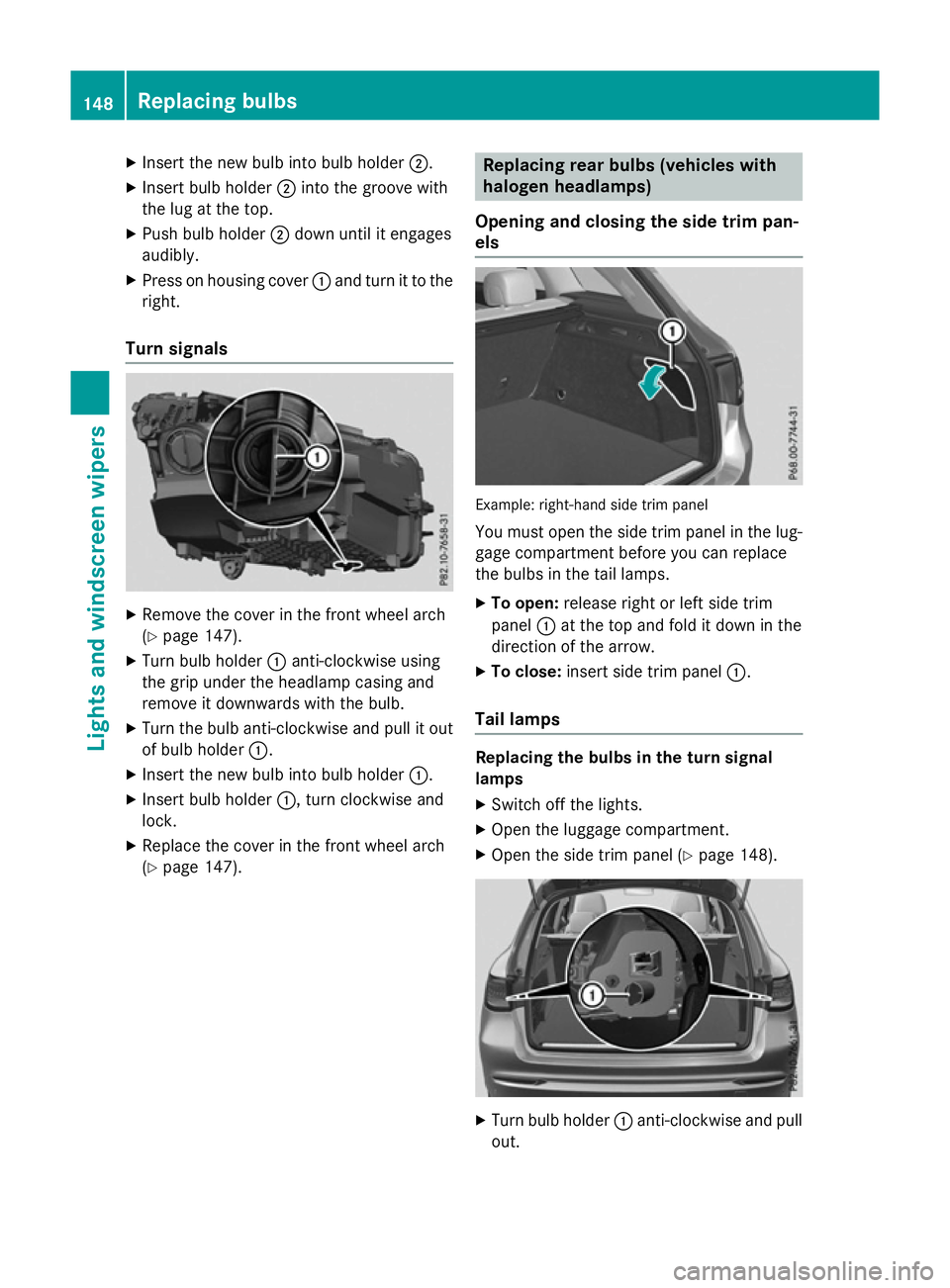
Turn signals X
Remove the cover in the front wheel arch
(Y page 147).
X Turn bulb holder :anti-clockwise using
the grip under the headlamp casing and
remove it downwards with the bulb.
X Turn the bulb anti-clockwise and pull it out
of bulb holder :.
X Insert the new bulb into bulb holder :.
X Insert bulb holder :, turn clockwise and
lock.
X Replace the cover in the front wheel arch
(Y page 147). Replacing rear bulbs (vehicles with
halogen headlamps)
Opening and closing the side trim pan-
els Example: right-hand side trim panel
You must open the side trim panel in the lug-gage compartment before you can replace
the bulbs in the tail lamps.
X To open: release right or left side trim
panel :at the top and fold it down in the
direction of the arrow.
X To close: insert side trim panel :.
Tail lamps Replacing the bulbs in the turn signal
lamps
X Switch off the lights.
X Open the luggage compartment.
X Open the side trim panel (Y page 148). X
Turn bulb holder :anti-clockwise and pull
out. 148
Replacing bulbsLights and windscreen wipers
Page 152 of 497
X
Turn the bulb anti-clockwise, applying
slight pressure, and remove it from the bulb
holder :.
X Insert the new bulb into bulb holder :and
turn it clockwise.
X Insert bulb holder :and turn it clockwise.
X Close the side trim panel (Y page 148).
Replacing reversing lamps
Due to their location, have the bulbs in the
reversing lamp in the tailgate replaced at a
qualified specialist workshop.
X Switch off the lights.
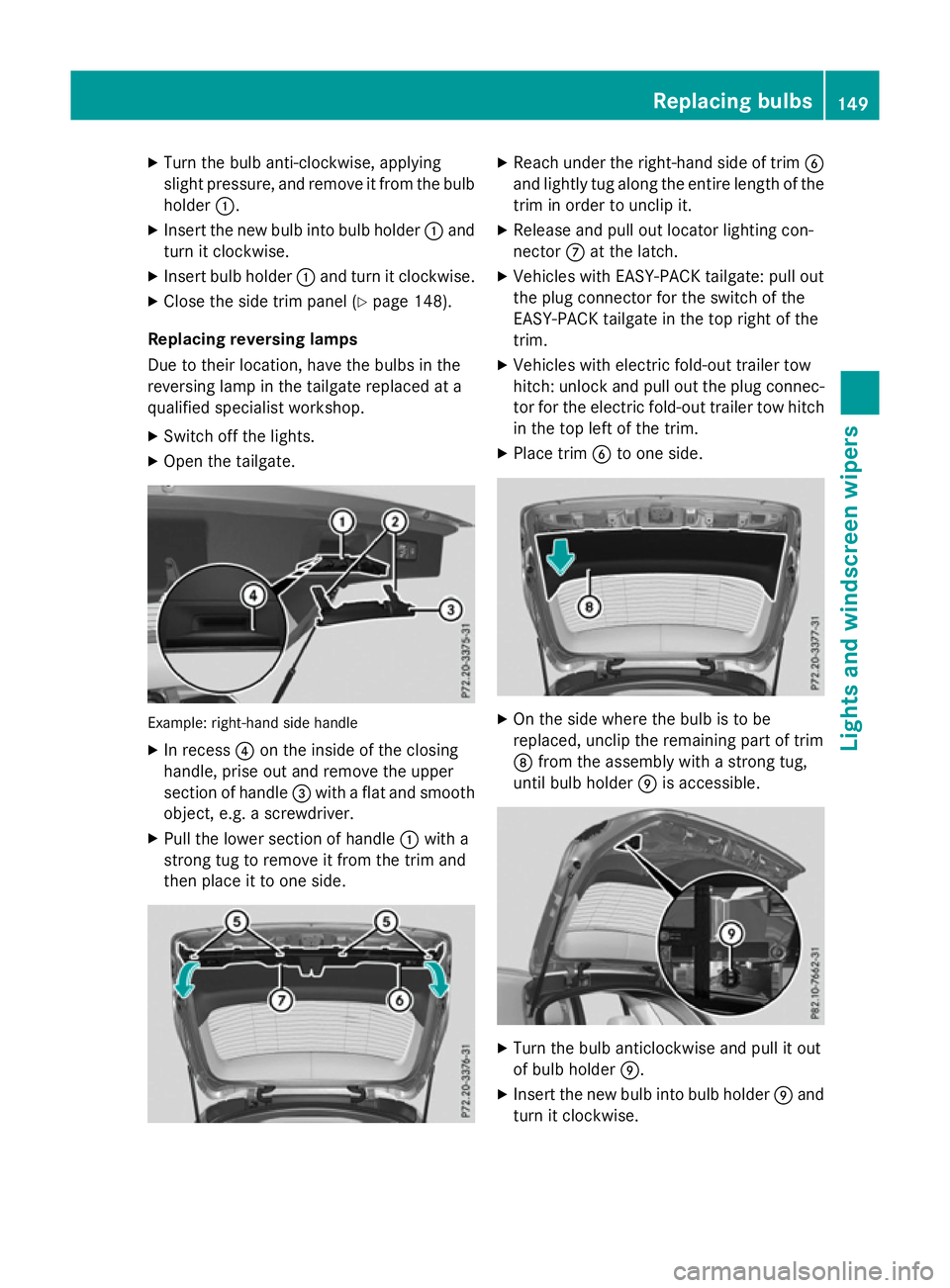
X Open the tailgate. Example: right-hand side handle
X In recess ?on the inside of the closing
handle, prise out and remove the upper
section of handle =with a flat and smooth
object, e.g. a screwdriver.
X Pull the lower section of handle :with a
strong tug to remove it from the trim and
then place it to one side. X
Reach under the right-hand side of trim B
and lightly tug along the entire length of the trim in order to unclip it.
X Release and pull out locator lighting con-
nector Cat the latch.
X Vehicles with EASY-PACK tailgate: pull out
the plug connector for the switch of the
EASY-PACK tailgate in the top right of the
trim.
X Vehicles with electric fold-out trailer tow
hitch: unlock and pull out the plug connec-
tor for the electric fold-out trailer tow hitch
in the top left of the trim.
X Place trim Bto one side. X
On the side where the bulb is to be
replaced, unclip the remaining part of trim
D from the assembly with a strong tug,
until bulb holder Eis accessible. X
Turn the bulb anticlockwise and pull it out
of bulb holder E.
X Insert the new bulb into bulb holder Eand
turn it clockwise. Replacing bulbs
149Lights and windscreen wipers Z
Page 265 of 497
R
you are driving faster than 10 km/h
R a wheel spins and ESP ®
intervenes or fails.
The ÷ warning lamp lights up in the
instrument cluster.
A warning tone sounds. The parking symbol
disappears and the multifunction display
shows the Park Assist cancelled Park Assist cancelled mes-
sage.
When Active Parking Assist is cancelled, you
must steer and brake again yourself.
If a system malfunction occurs, the vehicle is braked to a standstill. To drive on, depress the
accelerator pedal again. Reversing camera
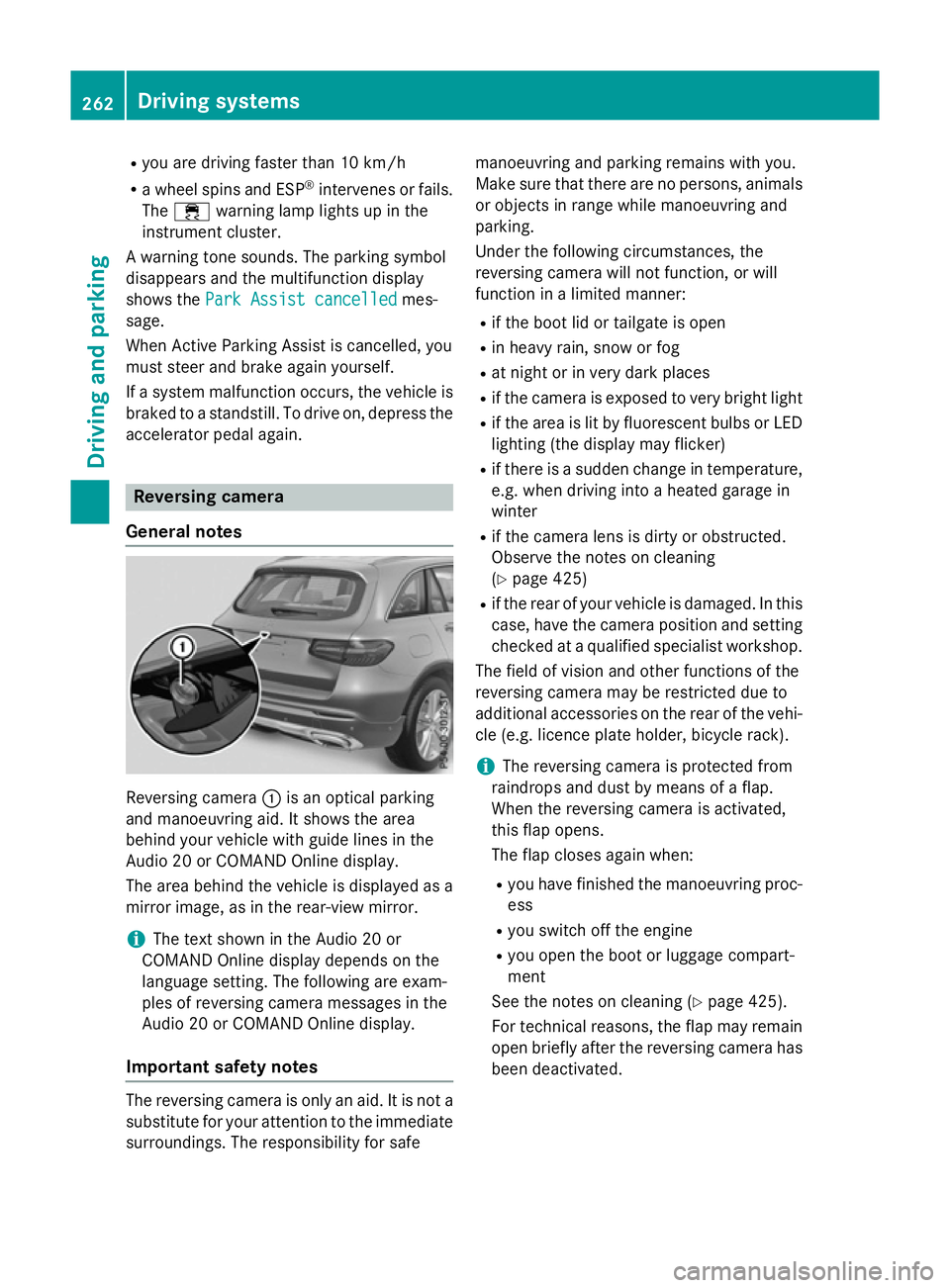
General notes Reversing camera
:is an optical parking
and manoeuvring aid. It shows the area
behind your vehicle with guide lines in the
Audio 20 or COMAND Online display.
The area behind the vehicle is displayed as a
mirror image, as in the rear-view mirror.
i The text shown in the Audio 20 or
COMAND Online display depends on the
language setting. The following are exam-
ples of reversing camera messages in the
Audio 20 or COMAND Online display.
Important safety notes The reversing camera is only an aid. It is not a
substitute for your attention to the immediate
surroundings. The responsibility for safe manoeuvring and parking remains with you.
Make sure that there are no persons, animals
or objects in range while manoeuvring and
parking.
Under the following circumstances, the
reversing camera will not function, or will
function in a limited manner:
R if the boot lid or tailgate is open
R in heavy rain, snow or fog
R at night or in very dark places
R if the camera is exposed to very bright light
R if the area is lit by fluorescent bulbs or LED
lighting (the display may flicker)
R if there is a sudden change in temperature,
e.g. when driving into a heated garage in
winter
R if the camera lens is dirty or obstructed.
Observe the notes on cleaning
(Y page 425)
R if the rear of your vehicle is damaged. In this
case, have the camera position and setting checked at a qualified specialist workshop.
The field of vision and other functions of the
reversing camera may be restricted due to
additional accessories on the rear of the vehi-
cle (e.g. licence plate holder, bicycle rack).
i The reversing camera is protected from
raindrops and dust by means of a flap.
When the reversing camera is activated,
this flap opens.
The flap closes again when:
R you have finished the manoeuvring proc-
ess
R you switch off the engine
R you open the boot or luggage compart-
ment
See the notes on cleaning (Y page 425).
For technical reasons, the flap may remain
open briefly after the reversing camera has been deactivated. 262
Driving syste
msDriving and parking
Page 271 of 497
applies to the areas behind, in front of and
beside the vehicle. You could otherwise
endanger yourself and others.
The 360° camera will not function or will
function only in a limited manner:
R if the doors are open
R if the exterior mirrors are folded in
R if the boot lid or tailgate is open
R in heavy rain, snow or fog
R at night or in very dark places
R if the cameras are exposed to very bright
light
R if the area is lit by fluorescent bulbs or LED
lighting (the display may flicker)
R if the camera lenses mist up, e.g. when
driving into a heated garage in winter, caus- ing a rapid change in temperature
R if the camera lenses are dirty or covered
R if the vehicle components in which the
cameras are fitted are damaged. In this
event, have the camera position and setting
checked at a qualified specialist workshop.
Do not use the 360° camera under such cir-
cumstances. You could otherwise injure oth-
ers or damage objects when parking the vehi- cle.
The guide lines in the COMAND display show
the distances to your vehicle. The distances
only apply to road level.
In trailer mode, the guide lines are shown at
the level of the trailer tow hitch.
The camera in the rear area is protected by
means of a flap. This flap opens when the
360° camera is activated. Observe the notes on cleaning (Y page 425). For technical rea-
sons, the flap may remain open briefly after
the 360° camera has been deactivated.
On vehicles with height-adjustable suspen-
sion, due to the technical conditions, leaving
the standard height can result in:
R inaccuracies in the guide lines
R inaccuracies in the display of generated
images (top view) Activation conditions The 360° camera image can be displayed if:
R Audio 20 or COMAND Online is switched on
(see the Digital Owner's Manual)
R the 360° camera 360° camera function is switched on
i If you are driving faster than at a moderate
speed and switch on the 360° camera, a
warning message appears.
The warning message disappears if:
R you are again driving at a moderate
speed. The 360° camera is then activa-
ted.
R the message is confirmed with the %
button.
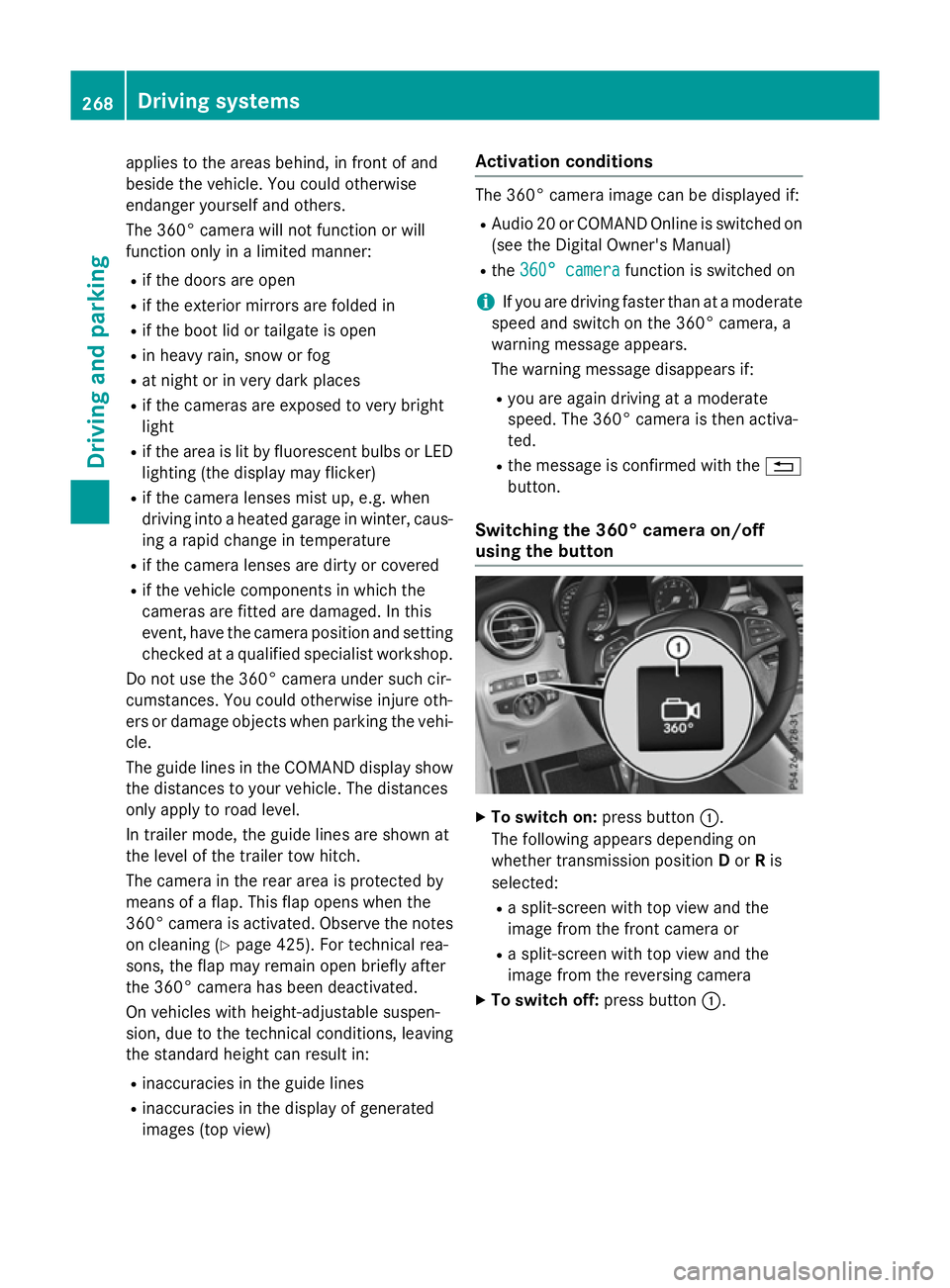
Switching the 360° camera on/off
using the button X
To switch on: press button:.
The following appears depending on
whether transmission position Dor Ris
selected:
R a split-screen with top view and the
image from the front camera or
R a split-screen with top view and the
image from the reversing camera
X To switch off: press button:.268
Driving systemsDriving and parking
Page 353 of 497
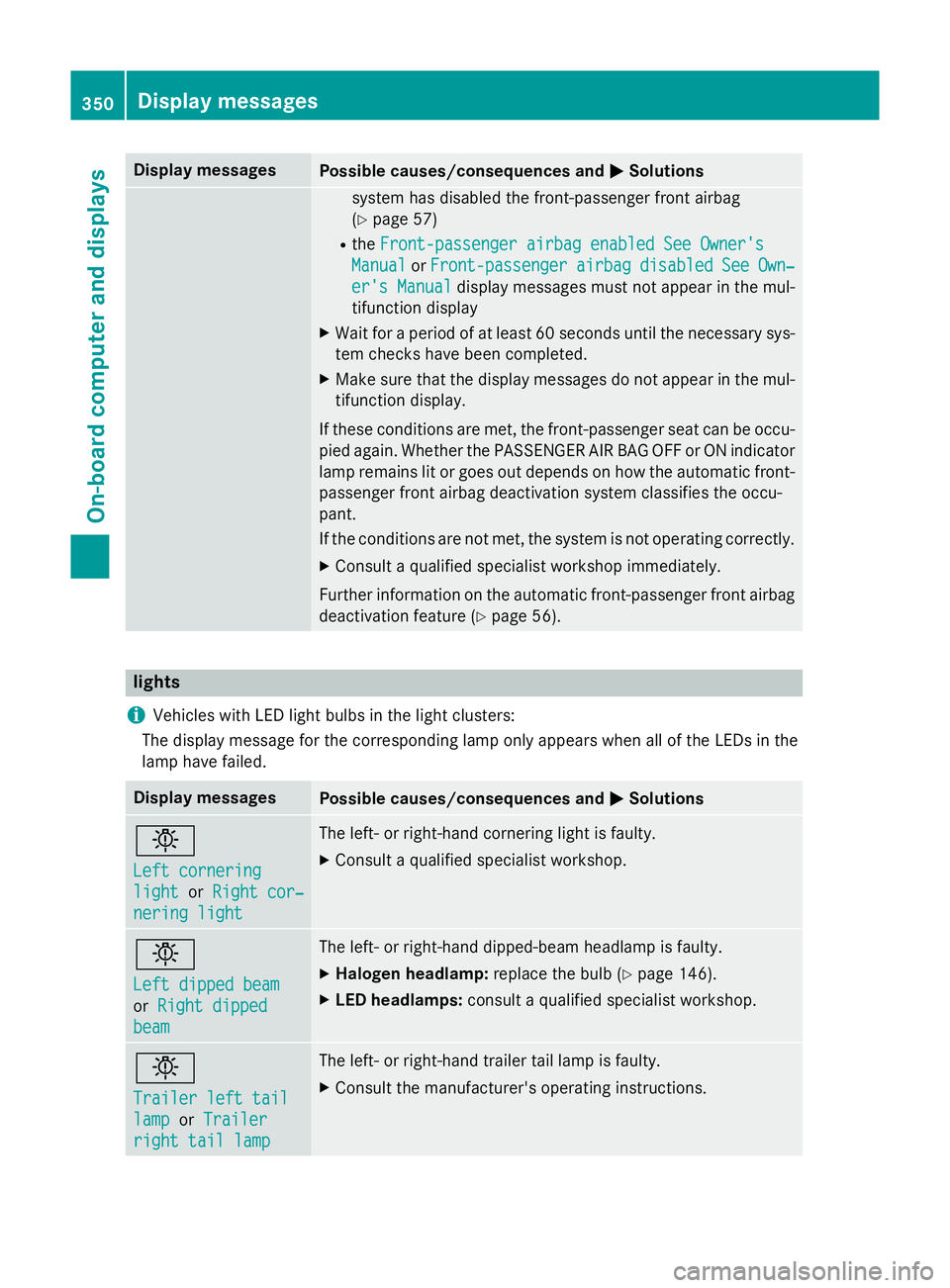
Display messages
Possible causes/consequences and
M
MSolutions system has disabled the front-passenger front airbag
(Y
page 57)
R the Front-passenger airbag enabled See Owner's Front-passenger airbag enabled See Owner's
Manual
Manual orFront-passenger
Front-passenger airbag
airbag disabled
disabled See
SeeOwn‐
Own‐
er's Manual
er's Manual display messages must not appear in the mul-
tifunction display
X Wait for a period of at least 60 seconds until the necessary sys-
tem checks have been completed.
X Make sure that the display messages do not appear in the mul-
tifunction display.
If these conditions are met, the front-passenger seat can be occu- pied again. Whether the PASSENGER AIR BAG OFF or ON indicator
lamp remains lit or goes out depends on how the automatic front- passenger front airbag deactivation system classifies the occu-
pant.
If the conditions are not met, the system is not operating correctly.
X Consult a qualified specialist workshop immediately.
Further information on the automatic front-passenger front airbag deactivation feature (Y page 56).lights
i Vehicles with LED light bulbs in the light clusters:
The display message for the corresponding lamp only appears when all of the LEDs in the
lamp have failed. Display messages
Possible causes/consequences and
M MSolutions b
Left cornering Left cornering
light light
orRight cor‐
Right cor‐
nering light
nering light The left- or right-hand cornering light is faulty.
X Consult a qualified specialist workshop. b
Left dipped beam Left dipped beam
or
Right dipped Right dipped
beam beam The left- or right-hand dipped-beam headlamp is faulty.
X Halogen headlamp: replace the bulb (Ypage 146).
X LED headlamps: consult a qualified specialist workshop. b
Trailer left tail Trailer left tail
lamp lamp
orTrailer Trailer
right tail lamp right tail lamp The left- or right-hand trailer tail lamp is faulty.
X Consult the manufacturer's operating instructions. 350
Display
messagesOn-board computer and displays
Page 354 of 497
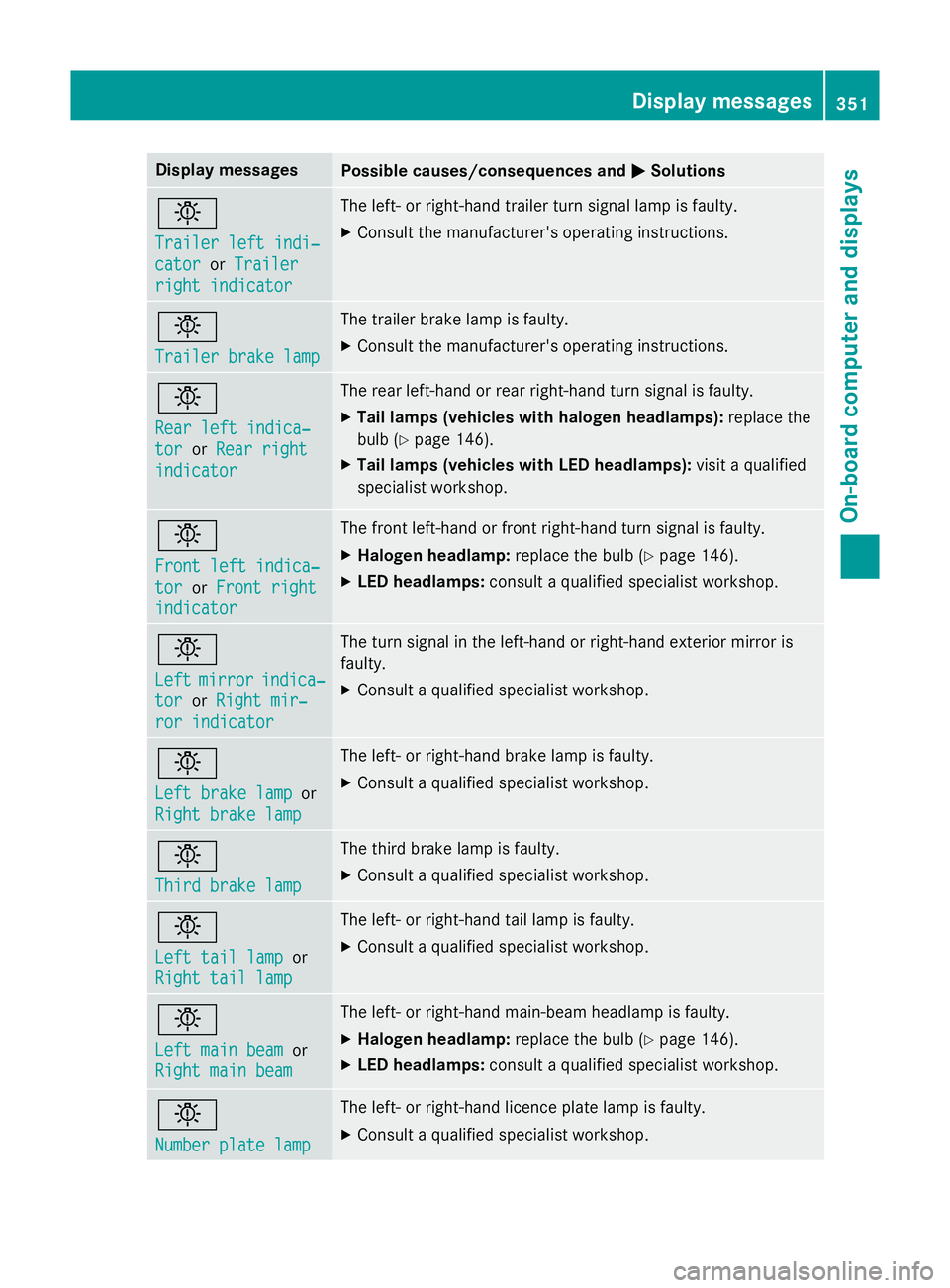
Display messages
Possible causes/consequences and
M
MSolutions b
Trailer left indi‐ Trailer left indi‐
cator cator
orTrailer
Trailer
right indicator
right indicator The left- or right-hand trailer turn signal lamp is faulty.
X Consult the manufacturer's operating instructions. b
Trailer brake lamp Trailer brake lamp The trailer brake lamp is faulty.
X Consult the manufacturer's operating instructions. b
Rear left indica‐ Rear left indica‐
tor tor
orRear right
Rear right
indicator
indicator The rear left-hand or rear right-hand turn signal is faulty.
X Tail lamps (vehicles with halogen headlamps): replace the
bulb (Y page 146).
X Tail lamps (vehicles with LED headlamps): visit a qualified
specialist workshop. b
Front left indica‐ Front left indica‐
tor tor
orFront right
Front right
indicator
indicator The front left-hand or front right-hand turn signal is faulty.
X Halogen headlamp: replace the bulb (Ypage 146).
X LED headlamps: consult a qualified specialist workshop. b
Left Left
mirror
mirror indica‐
indica‐
tor
tor orRight mir‐
Right mir‐
ror indicator
ror indicator The turn signal in the left-hand or right-hand exterior mirror is
faulty.
X Consult a qualified specialist workshop. b
Left brake lamp Left brake lamp
or
Right brake lamp
Right brake lamp The left- or right-hand brake lamp is faulty.
X Consult a qualified specialist workshop. b
Third brake lamp Third brake lamp The third brake lamp is faulty.
X Consult a qualified specialist workshop. b
Left tail lamp Left tail lamp
or
Right tail lamp
Right tail lamp The left- or right-hand tail lamp is faulty.
X Consult a qualified specialist workshop. b
Left main beam Left main beam
or
Right main beam
Right main beam The left- or right-hand main-beam headlamp is faulty.
X Halogen headlamp: replace the bulb (Ypage 146).
X LED headlamps: consult a qualified specialist workshop. b
Number plate lamp Number plate lamp The left- or right-hand licence plate lamp is faulty.
X Consult a qualified specialist workshop. Display
messages
351On-board computer and displays Z