check engine MERCEDES-BENZ GLC SUV 2015 Owner's Guide
[x] Cancel search | Manufacturer: MERCEDES-BENZ, Model Year: 2015, Model line: GLC SUV, Model: MERCEDES-BENZ GLC SUV 2015Pages: 497, PDF Size: 15.27 MB
Page 265 of 497
R
you are driving faster than 10 km/h
R a wheel spins and ESP ®
intervenes or fails.
The ÷ warning lamp lights up in the
instrument cluster.
A warning tone sounds. The parking symbol
disappears and the multifunction display
shows the Park Assist cancelled Park Assist cancelled mes-
sage.
When Active Parking Assist is cancelled, you
must steer and brake again yourself.
If a system malfunction occurs, the vehicle is braked to a standstill. To drive on, depress the
accelerator pedal again. Reversing camera
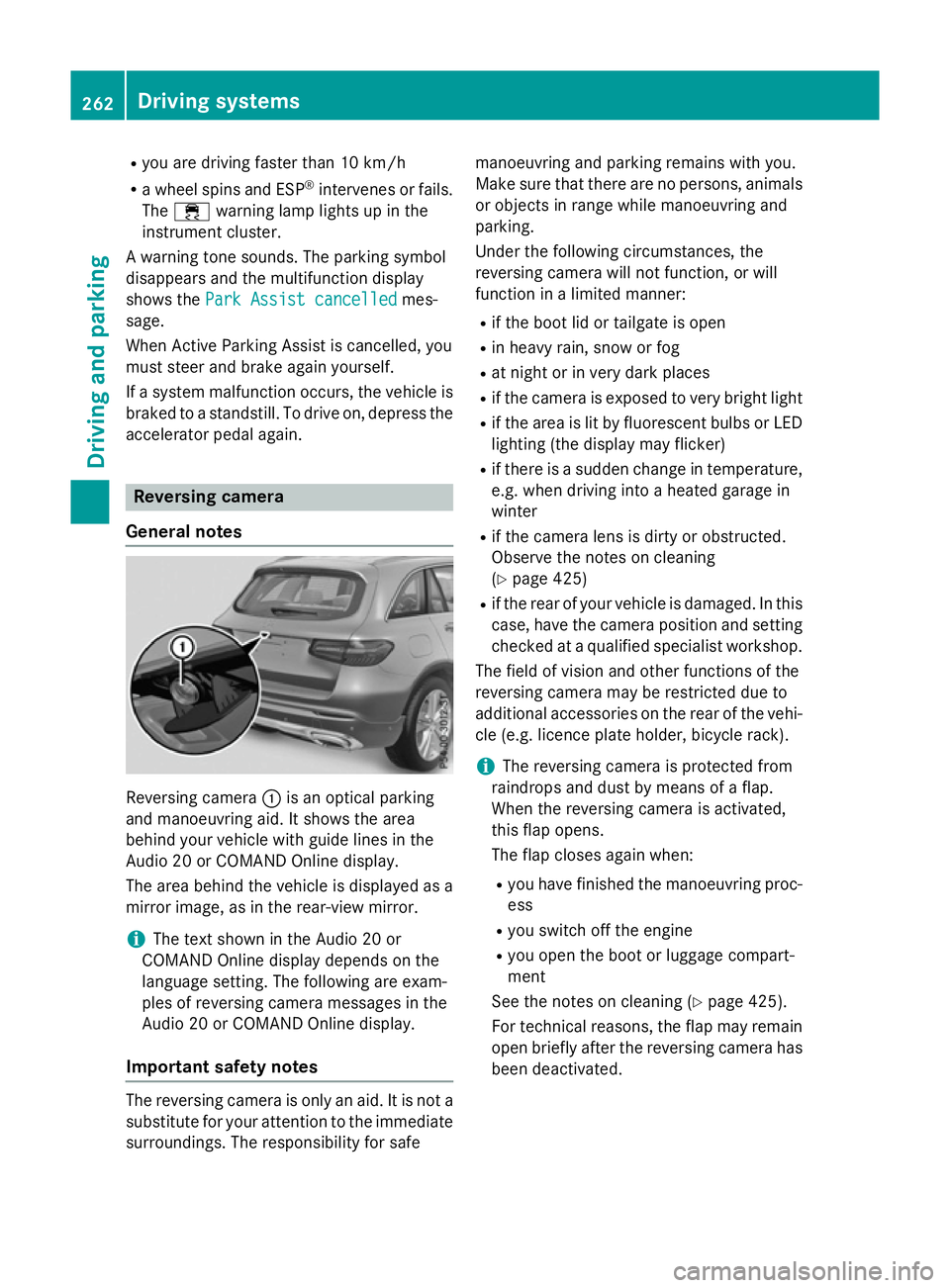
General notes Reversing camera
:is an optical parking
and manoeuvring aid. It shows the area
behind your vehicle with guide lines in the
Audio 20 or COMAND Online display.
The area behind the vehicle is displayed as a
mirror image, as in the rear-view mirror.
i The text shown in the Audio 20 or
COMAND Online display depends on the
language setting. The following are exam-
ples of reversing camera messages in the
Audio 20 or COMAND Online display.
Important safety notes The reversing camera is only an aid. It is not a
substitute for your attention to the immediate
surroundings. The responsibility for safe manoeuvring and parking remains with you.
Make sure that there are no persons, animals
or objects in range while manoeuvring and
parking.
Under the following circumstances, the
reversing camera will not function, or will
function in a limited manner:
R if the boot lid or tailgate is open
R in heavy rain, snow or fog
R at night or in very dark places
R if the camera is exposed to very bright light
R if the area is lit by fluorescent bulbs or LED
lighting (the display may flicker)
R if there is a sudden change in temperature,
e.g. when driving into a heated garage in
winter
R if the camera lens is dirty or obstructed.
Observe the notes on cleaning
(Y page 425)
R if the rear of your vehicle is damaged. In this
case, have the camera position and setting checked at a qualified specialist workshop.
The field of vision and other functions of the
reversing camera may be restricted due to
additional accessories on the rear of the vehi-
cle (e.g. licence plate holder, bicycle rack).
i The reversing camera is protected from
raindrops and dust by means of a flap.
When the reversing camera is activated,
this flap opens.
The flap closes again when:
R you have finished the manoeuvring proc-
ess
R you switch off the engine
R you open the boot or luggage compart-
ment
See the notes on cleaning (Y page 425).
For technical reasons, the flap may remain
open briefly after the reversing camera has been deactivated. 262
Driving syste
msDriving and parking
Page 281 of 497
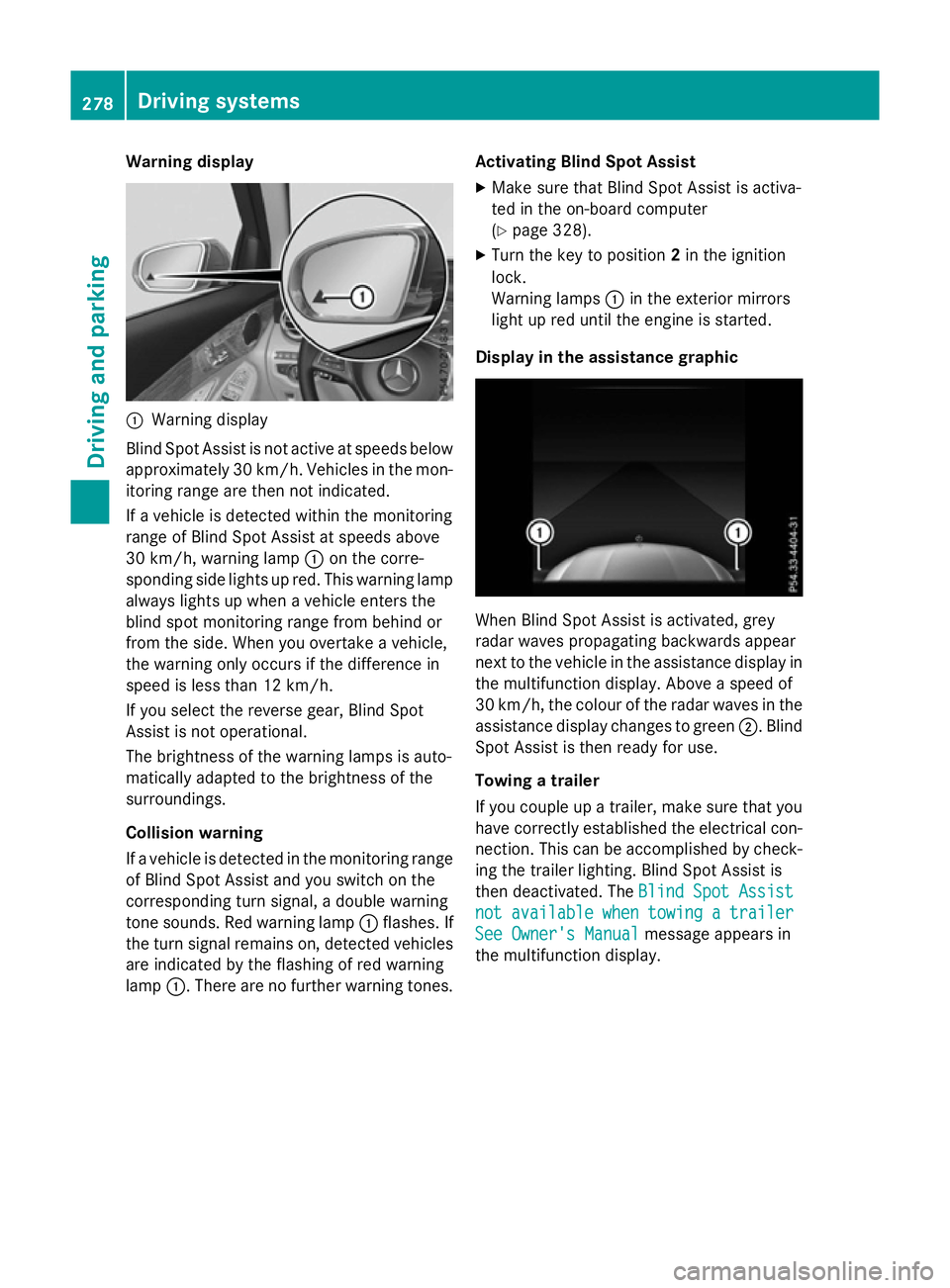
Warning display
:
Warning display
Blind Spot Assist is not active at speeds below approximately 30 km/h. Vehicles in the mon-itoring range are then not indicated.
If a vehicle is detected within the monitoring
range of Blind Spot Assist at speeds above
30 km/h, warning lamp :on the corre-
sponding side lights up red. This warning lamp
always lights up when a vehicle enters the
blind spot monitoring range from behind or
from the side. When you overtake a vehicle,
the warning only occurs if the difference in
speed is less than 12 km/h.
If you select the reverse gear, Blind Spot
Assist is not operational.
The brightness of the warning lamps is auto-
matically adapted to the brightness of the
surroundings.
Collision warning
If a vehicle is detected in the monitoring range
of Blind Spot Assist and you switch on the
corresponding turn signal, a double warning
tone sounds. Red warning lamp :flashes. If
the turn signal remains on, detected vehicles
are indicated by the flashing of red warning
lamp :. There are no further warning tones. Activating Blind Spot Assist
X Make sure that Blind Spot Assist is activa-
ted in the on-board computer
(Y page 328).
X Turn the key to position 2in the ignition
lock.
Warning lamps :in the exterior mirrors
light up red until the engine is started.
Display in the assistance graphic When Blind Spot Assist is activated, grey
radar waves propagating backwards appear
next to the vehicle in the assistance display in the multifunction display. Above a speed of
30 km/h, the colour of the radar waves in the
assistance display changes to green ;. Blind
Spot Assist is then ready for use.
Towing a trailer
If you couple up a trailer, make sure that you
have correctly established the electrical con- nection. This can be accomplished by check-ing the trailer lighting. Blind Spot Assist is
then deactivated. The Blind Spot Assist Blind Spot Assist
not
not available
available when
whentowing
towing a
atrailer
trailer
See Owner's Manual
See Owner's Manual message appears in
the multifunction display. 278
Driving systemsDriving and parking
Page 289 of 497
are shown in green. Active Lane Keeping
Assist is ready for use.
X To deactivate: press button;.
Indicator lamp :goes out. Active Lane
Keeping Assist is deactivated. The Lane
Lane
Keeping
Keeping Assist
Assistoff
offmessage appears in
the multifunction display.
Selecting Standard or Adaptive setting
X In the Assistance
Assistance menu on the on-board
computer, select the Active Lane Keep‐
Active Lane Keep‐
ing Assist
ing Assist function (Ypage 329).
X Select Standard
Standard orAdaptive
Adaptive.
When Standard
Standard is selected, no warning
vibration occurs if:
R you have switched on the turn signals. In
this event, the warnings are suppressed
for a certain period of time.
R a driving safety system intervenes, such
as ABS, BAS or ESP ®
.
When Adaptive
Adaptive is selected, no warning
vibration occurs if:
R you have switched on the turn signals. In
this event, the warnings are suppressed
for a certain period of time.
R a driving safety system intervenes, such
as ABS, BAS or ESP ®
.
R you accelerate hard, e.g. kickdown.
R you brake hard.
R you steer actively, e.g. swerve to avoid an
obstacle or change lane quickly.
R you cut the corner on a sharp bend.
In order that you are warned only when nec-
essary and in good time if you cross the lane marking, the system detects certain condi-
tions and warns you accordingly.
The warning vibration occurs earlier if:
R you approach the outer lane marking on a
bend
R the road has very wide lanes, e.g. a motor-
way
R the system detects solid lane markings The warning vibration occurs later if:
R the road has narrow lanes
R you cut the corner on a bend
Towing a trailer
If you couple up a trailer, make sure that you have correctly established the electrical con- nection. This can be accomplished by check-
ing the trailer lighting. PLUG
‑IN HYBRID operation Points to remember
General notes Hybrid technology combines a fuel efficient
internal combustion engine with a powerful
electric motor. In HYBRIDmode, the hybrid
drive system automatically selects the most
efficient operating mode for every driving sit-
uation. Drive the vehicle in the usual manner.
To save fuel in HYBRIDmode, the hybrid drive
system switches off the combustion engine
as often as possible during the journey when power output requirements are low. When
power output requirements are low, the elec-
tric motor powers the vehicle. When power
output requirements are high, the combus-
tion engine is automatically switched on.
When the vehicle is stationary, the combus-
tion engine is usually switched off. Conse-
quently, there is usually no engine idling as
with combustion engine vehicles.
For pulling away and accelerating, the electric
motor supports the internal combustion
engine using the power stored in the high-
voltage battery. In addition, the power is used
for partially electric driving, operation of the
electric coolant compressor and to support
the 12 V on-board electrical system. In this
way the hybrid drive helps to reduce your
vehicle's fuel consumption.
Observe the driving tips on plug-in hybrid
operation (Y page 297).286
PLUG‑
IN HYBRID operationDriving and parking
Page 305 of 497
Hybrid drive system
Problem
Possible causes/consequences and
M
MSolutions The hybrid drive system
has been switched off
automatically. You have been in an accident.
The hybrid drive system remains switched off if:
R the internal combustion engine cannot be restarted after a few
seconds.
R the red 6restraint system warning lamp in the instrument
cluster is lit.
X Consult a qualified specialist workshop. The hybrid drive system
has been switched off
automatically. The mul-
tifunction display also
shows a display mes-
sage. An electrical short circuit has occurred in the hybrid drive system
or an electrical connection has been disconnected.
X Observe the additional display messages in the multifunction
display (Y page 335).
X Consult a qualified specialist workshop. Towing a trailer
Important safety notes
G
WARNING
You could lose control of the vehicle/trailer
combination if it begins to swerve. The vehi-
cle/trailer combination could even overturn.
There is a risk of an accident.
On no account should you attempt to
straighten out the vehicle/trailer combina-
tion by increasing speed. Decrease your
speed and do not countersteer. Brake if nec-
essary. G
WARNING
If the maximum the permissible load for a car- rier system is exceeded, the carrier could
come loose from the vehicle and endanger
other road users. There is a risk of an accident and injury.
Never exceed the permissible noseweight
when using a carrier. Exceeding the maximum permissible nose-
weight of the trailer drawbar on the ball cou-
pling may cause damage to the following:
R your vehicle
R the trailer
R the ball coupling
R trailer tow hitch
The vehicle/trailer combination could
become unstable.
If the noseweight used is lower than the min- imum permissible noseweight, the vehicle/
trailer combination could also become unsta- ble.
To avoid hazardous situations:
R make sure to check the noseweight before
each journey
R use a drawbar noseweight as close as pos-
sible to the maximum noseweight
R do not exceed the maximum permissible
noseweight
R do not use a noseweight lower than the
minimum noseweight 302
Towing a trailerDriving and parking
Page 312 of 497
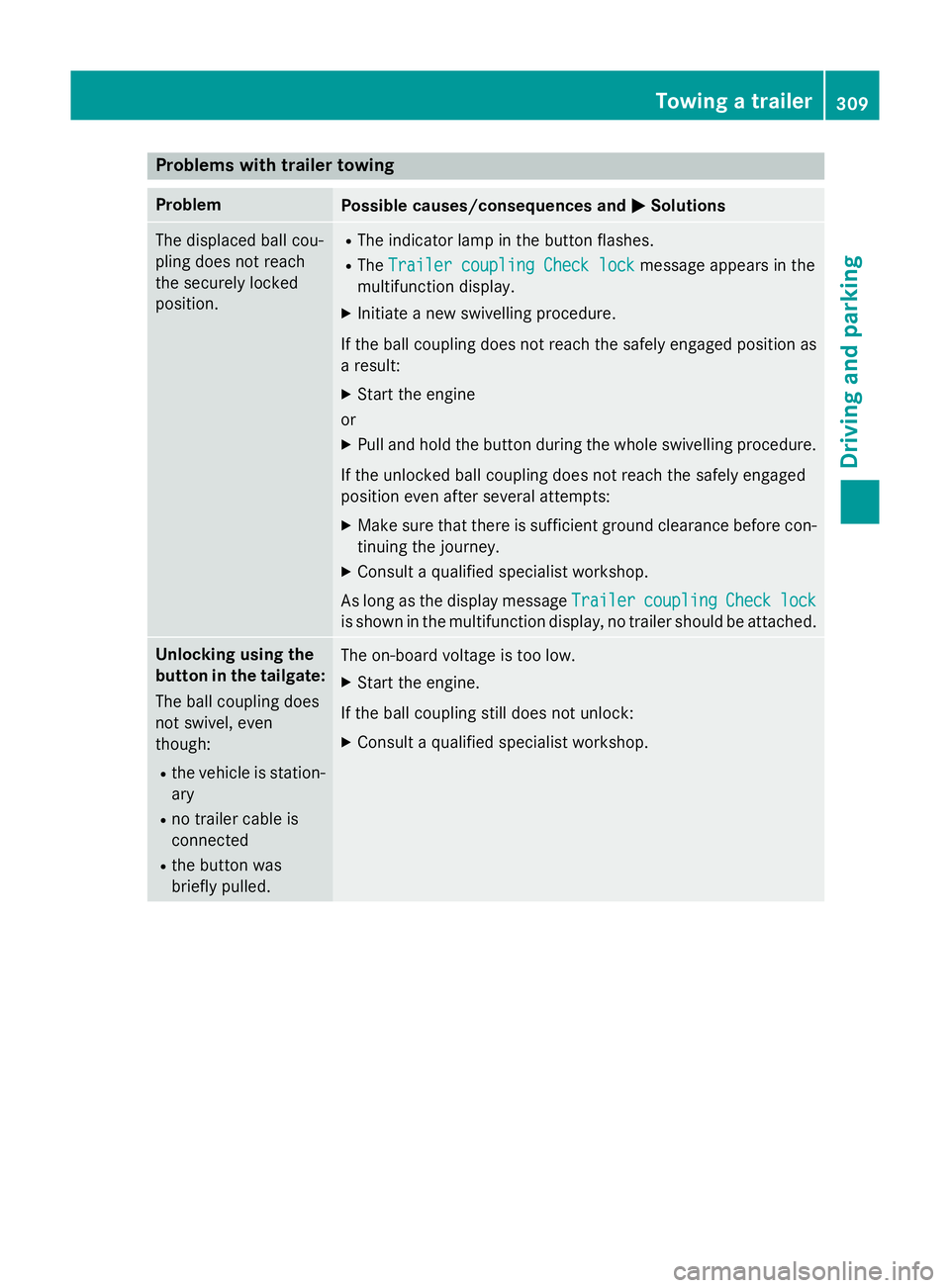
Problems with trailer towing
Problem
Possible causes/consequences and
M
MSolutions The displaced ball cou-
pling does not reach
the securely locked
position. R
The indicator lamp in the button flashes.
R The Trailer coupling Check lock Trailer coupling Check lock message appears in the
multifunction display.
X Initiate a new swivelling procedure.
If the ball coupling does not reach the safely engaged position as
a result:
X Start the engine
or
X Pull and hold the button during the whole swivelling procedure.
If the unlocked ball coupling does not reach the safely engaged
position even after several attempts:
X Make sure that there is sufficient ground clearance before con-
tinuing the journey.
X Consult a qualified specialist workshop.
As long as the display message Trailer
Trailercoupling
coupling Check
Checklock
lock
is shown in the multifunction display, no trailer should be attached. Unlocking using the
button in the tailgate:
The ball coupling does
not swivel, even
though:
R the vehicle is station-
ary
R no trailer cable is
connected
R the button was
briefly pulled. The on-board voltage is too low.
X Start the engine.
If the ball coupling still does not unlock:
X Consult a qualified specialist workshop. Towing a trailer
309Driving and parking Z
Page 313 of 497
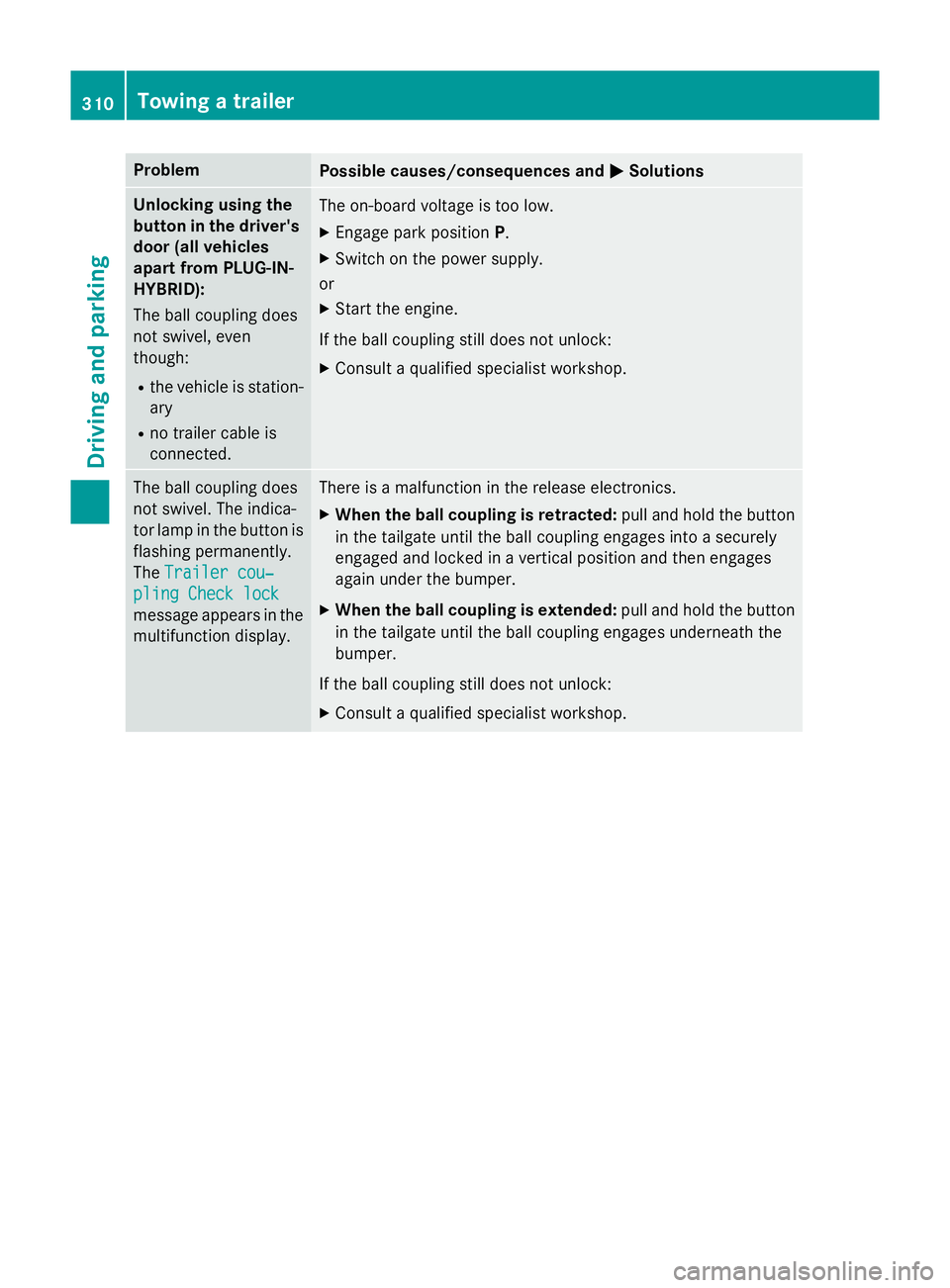
Problem
Possible causes/consequences and
M
MSolutions Unlocking using the
button in the driver's door (all vehicles
apart from PLUG-IN-
HYBRID):
The ball coupling does
not swivel, even
though:
R the vehicle is station-
ary
R no trailer cable is
connected. The on-board voltage is too low.
X Engage park position P.
X Switch on the power supply.
or
X Start the engine.
If the ball coupling still does not unlock:
X Consult a qualified specialist workshop. The ball coupling does
not swivel. The indica-
tor lamp in the button is flashing permanently.
The Trailer cou‐ Trailer cou‐
pling Check lock
pling Check lock
message appears in the
multifunction display. There is a malfunction in the release electronics.
X When the ball coupling is retracted: pull and hold the button
in the tailgate until the ball coupling engages into a securely
engaged and locked in a vertical position and then engages
again under the bumper.
X When the ball coupling is extended: pull and hold the button
in the tailgate until the ball coupling engages underneath the
bumper.
If the ball coupling still does not unlock:
X Consult a qualified specialist workshop. 310
Towing a trailerDriving and parking
Page 345 of 497
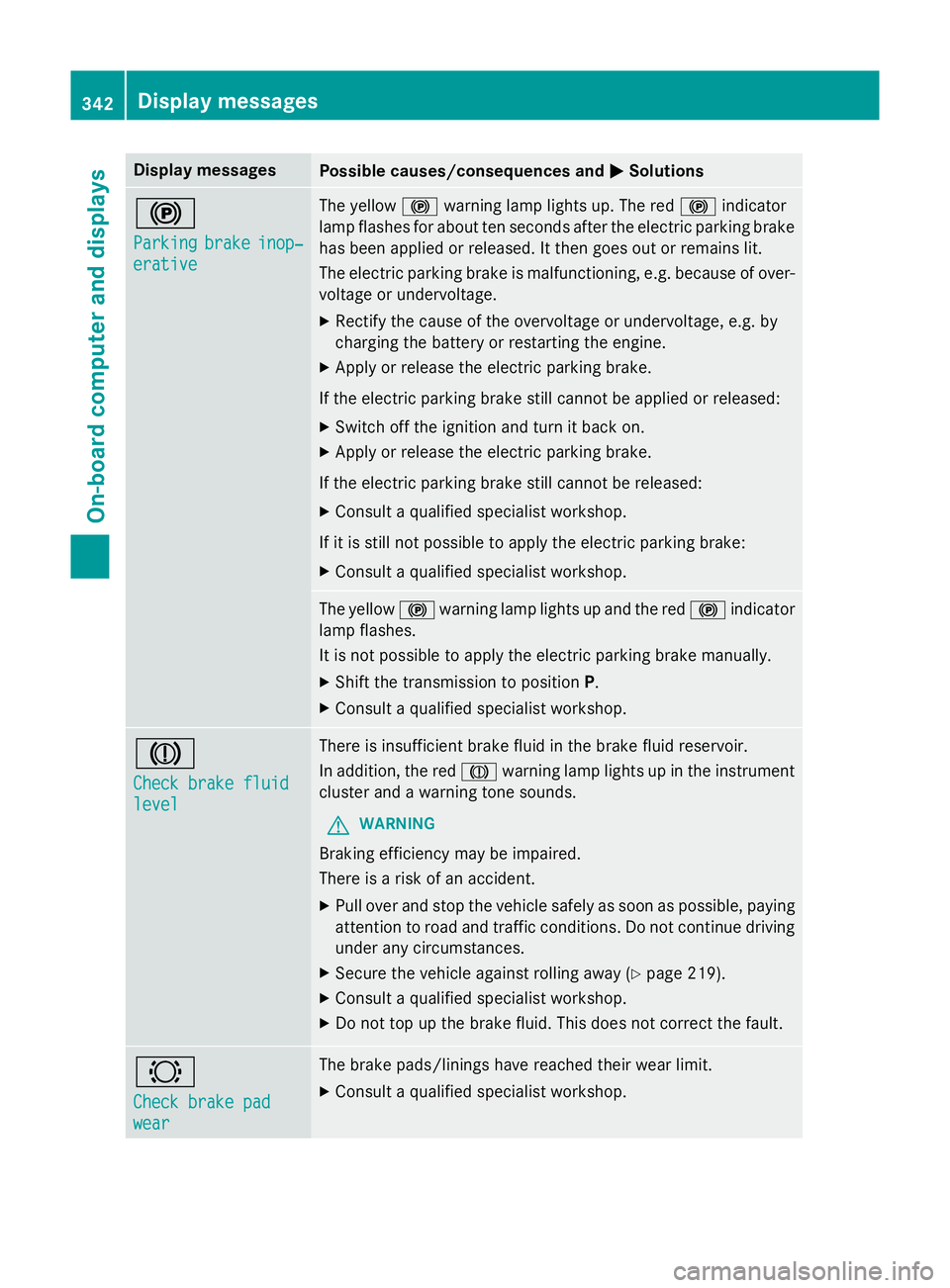
Display messages
Possible causes/consequences and
M
MSolutions !
Parking Parking
brake
brakeinop‐
inop‐
erative
erative The yellow
!warning lamp lights up. The red !indicator
lamp flashes for about ten seconds after the electric parking brake
has been applied or released. It then goes out or remains lit.
The electric parking brake is malfunctioning, e.g. because of over- voltage or undervoltage.
X Rectify the cause of the overvoltage or undervoltage, e.g. by
charging the battery or restarting the engine.
X Apply or release the electric parking brake.
If the electric parking brake still cannot be applied or released: X Switch off the ignition and turn it back on.
X Apply or release the electric parking brake.
If the electric parking brake still cannot be released: X Consult a qualified specialist workshop.
If it is still not possible to apply the electric parking brake: X Consult a qualified specialist workshop. The yellow
!warning lamp lights up and the red !indicator
lamp flashes.
It is not possible to apply the electric parking brake manually.
X Shift the transmission to position P.
X Consult a qualified specialist workshop. J
Check brake fluid Check brake fluid
level level There is insufficient brake fluid in the brake fluid reservoir.
In addition, the red Jwarning lamp lights up in the instrument
cluster and a warning tone sounds.
G WARNING
Braking efficiency may be impaired.
There is a risk of an accident. X Pull over and stop the vehicle safely as soon as possible, paying
attention to road and traffic conditions. Do not continue driving
under any circumstances.
X Secure the vehicle against rolling away (Y page 219).
X Consult a qualified specialist workshop.
X Do not top up the brake fluid. This does not correct the fault. #
Check brake pad Check brake pad
wear wear The brake pads/linings have reached their wear limit.
X Consult a qualified specialist workshop. 342
Display
messagesOn-board computer and displays
Page 356 of 497
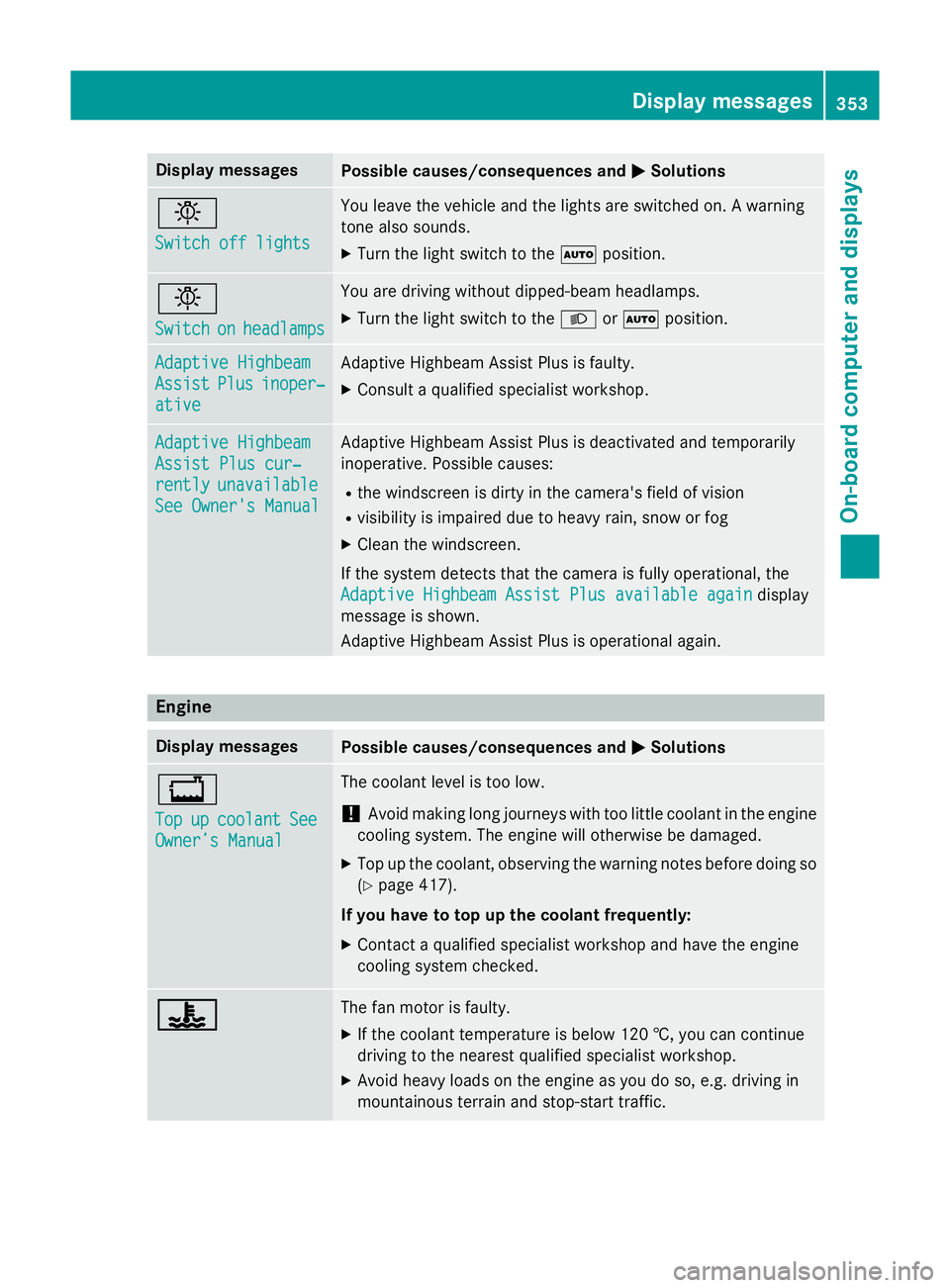
Display messages
Possible causes/consequences and
M
MSolutions b
Switch off lights Switch off lights You leave the vehicle and the lights are switched on. A warning
tone also sounds.
X Turn the light switch to the Ãposition. b
Switch Switch
on
onheadlamps
headlamps You are driving without dipped-beam headlamps.
X
Turn the light switch to the Lorà position. Adaptive Highbeam Adaptive Highbeam
Assist Assist
Plus
Plusinoper‐
inoper‐
ative
ative Adaptive Highbeam Assist Plus is faulty.
X Consult a qualified specialist workshop. Adaptive Highbeam
Adaptive Highbeam
Assist Plus cur‐ Assist Plus cur‐
rently rently
unavailable
unavailable
See Owner's Manual
See Owner's Manual Adaptive Highbeam Assist Plus is deactivated and temporarily
inoperative. Possible causes:
R the windscreen is dirty in the camera's field of vision
R visibility is impaired due to heavy rain, snow or fog
X Clean the windscreen.
If the system detects that the camera is fully operational, the
Adaptive Highbeam Assist Plus available again
Adaptive Highbeam Assist Plus available again display
message is shown.
Adaptive Highbeam Assist Plus is operational again. Engine
Display messages
Possible causes/consequences and
M MSolutions +
Top Top
up
upcoolant
coolant See
See
Owner’s Manual
Owner’s Manual The coolant level is too low.
! Avoid making long journeys with too little coolant in the engine
cooling system. The engine will otherwise be damaged.
X Top up the coolant, observing the warning notes before doing so
(Y page 417).
If you have to top up the coolant frequently:
X Contact a qualified specialist workshop and have the engine
cooling system checked. ? ? The fan motor is faulty.
X If the coolant temperature is below 120 †, you can continue
driving to the nearest qualified specialist workshop.
X Avoid heavy loads on the engine as you do so, e.g. driving in
mountainous terrain and stop-start traffic. Display
messages
353On-board computer and displays Z
Page 358 of 497
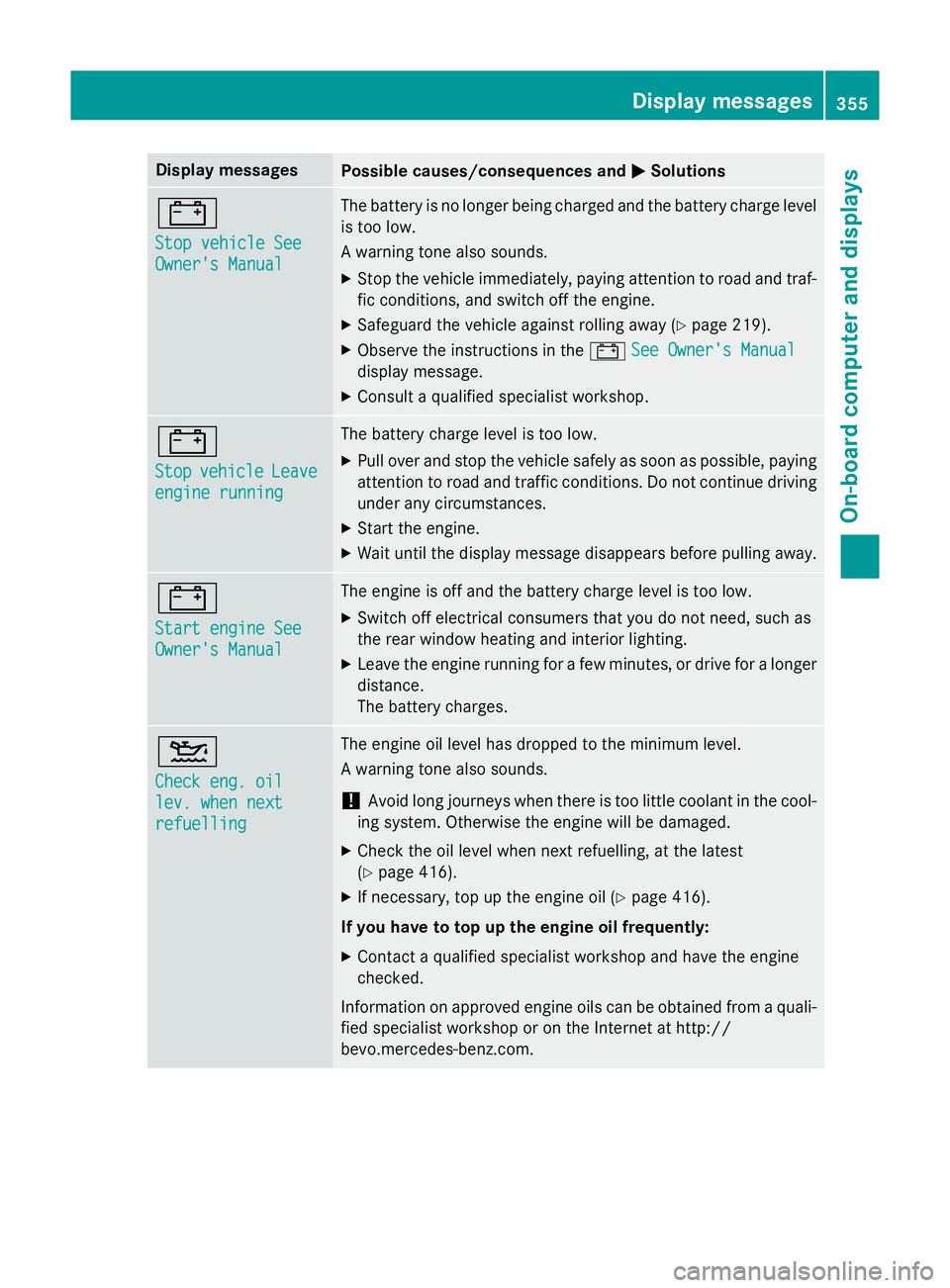
Display messages
Possible causes/consequences and
M
MSolutions #
Stop vehicle See Stop vehicle See
Owner's Manual Owner's Manual The battery is no longer being charged and the battery charge level
is too low.
A warning tone also sounds.
X Stop the vehicle immediately, paying attention to road and traf-
fic conditions, and switch off the engine.
X Safeguard the vehicle against rolling away (Y page 219).
X Observe the instructions in the #See Owner's Manual
See Owner's Manual
display message.
X Consult a qualified specialist workshop. #
Stop Stop
vehicle
vehicle Leave
Leave
engine running
engine running The battery charge level is too low.
X Pull over and stop the vehicle safely as soon as possible, paying
attention to road and traffic conditions. Do not continue driving
under any circumstances.
X Start the engine.
X Wait until the display message disappears before pulling away. #
Start engine See Start engine See
Owner's Manual Owner's Manual The engine is off and the battery charge level is too low.
X Switch off electrical consumers that you do not need, such as
the rear window heating and interior lighting.
X Leave the engine running for a few minutes, or drive for a longer
distance.
The battery charges. 4
Check eng. oil Check eng. oil
lev. when next lev. when next
refuelling refuelling The engine oil level has dropped to the minimum level.
A warning tone also sounds.
! Avoid long journeys when there is too little coolant in the cool-
ing system. Otherwise the engine will be damaged.
X Check the oil level when next refuelling, at the latest
(Y page 416).
X If necessary, top up the engine oil (Y page 416).
If you have to top up the engine oil frequently:
X Contact a qualified specialist workshop and have the engine
checked.
Information on approved engine oils can be obtained from a quali- fied specialist workshop or on the Internet at http://
bevo.mercedes-benz.co m. Display
messages
355On-board computer and displays Z
Page 359 of 497
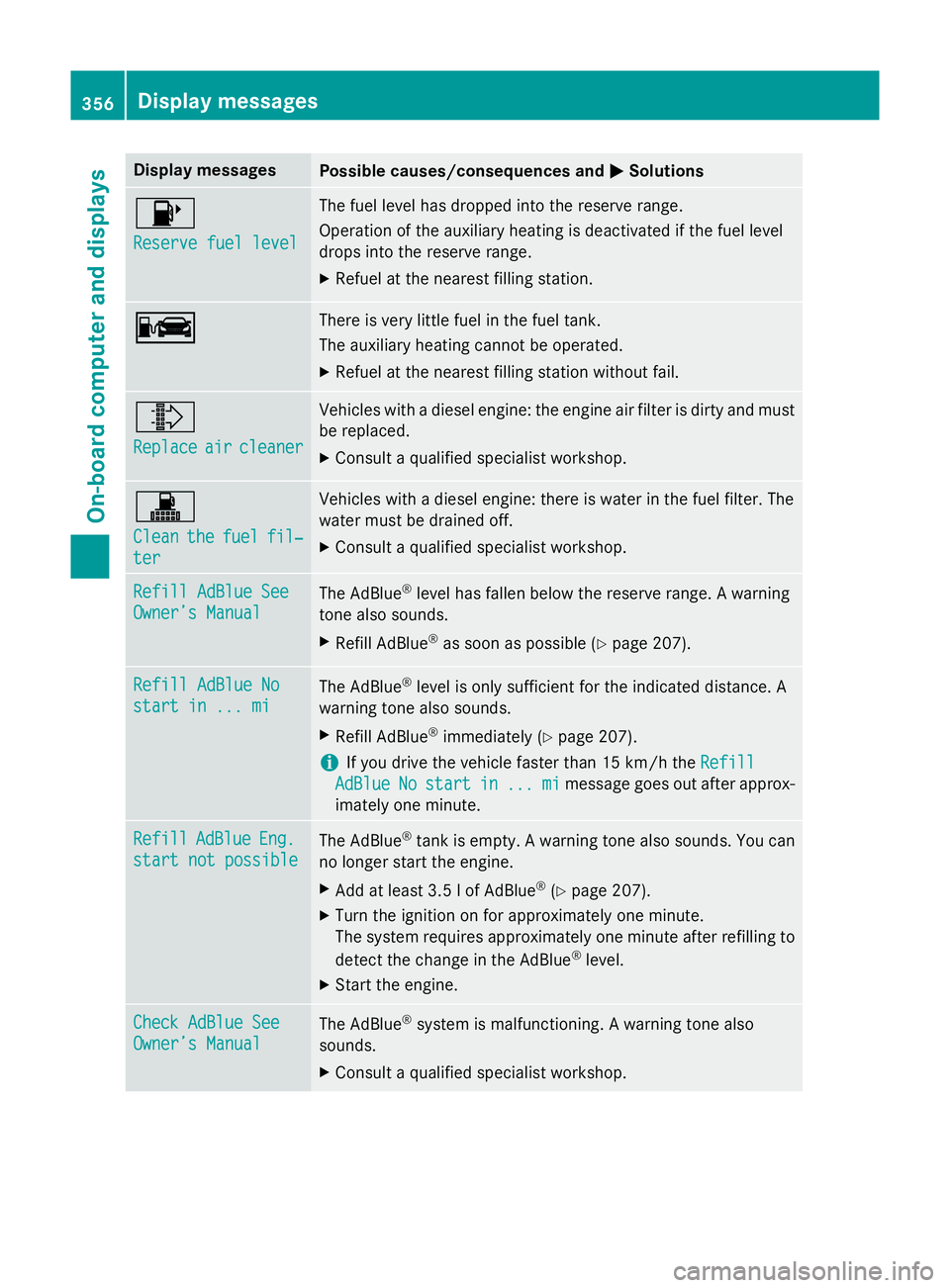
Display messages
Possible causes/consequences and
M
MSolutions 8
Reserve fuel level Reserve fuel level The fuel level has dropped into the reserve range.
Operation of the auxiliary heating is deactivated if the fuel level
drops into the reserve range.
X Refuel at the nearest filling station. C C There is very little fuel in the fuel tank.
The auxiliary heating cannot be operated.
X Refuel at the nearest filling station without fail. ¸
Replace Replace
air
aircleaner
cleaner Vehicles with a diesel engine: the engine air filter is dirty and must
be replaced.
X Consult a qualified specialist workshop. !
Clean Clean
the
thefuel
fuel fil‐
fil‐
ter
ter Vehicles with a diesel engine: there is water in the fuel filter. The
water must be drained off.
X Consult a qualified specialist workshop. Refill AdBlue See Refill AdBlue See
Owner’s Manual Owner’s Manual
The AdBlue
®
level has fallen below the reserve range. A warning
tone also sounds.
X Refill AdBlue ®
as soon as possible (Y page 207).Refill AdBlue No
Refill AdBlue No
start in ... mi start in ... mi
The AdBlue
®
level is only sufficient for the indicated distance. A
warning tone also sounds.
X Refill AdBlue ®
immediately (Y page 207).
i If you drive the vehicle faster than 15 km/h the
Refill
Refill
AdBlue
AdBlue No
Nostart
start in
in...
... mi
mimessage goes out after approx-
imately one minute. Refill
Refill
AdBlue
AdBlueEng.
Eng.
start not possible
start not possible The AdBlue
®
tank is empty. A warning tone also sounds. You can
no longer start the engine.
X Add at least 3.5 l of AdBlue ®
(Y page 207).
X Turn the ignition on for approximately one minute.
The system requires approximately one minute after refilling to
detect the change in the AdBlue ®
level.
X Start the engine. Check AdBlue See
Check AdBlue See
Owner’s Manual Owner’s Manual
The AdBlue
®
system is malfunctioning. A warning tone also
sounds.
X Consult a qualified specialist workshop. 356
Display
messagesOn-board computer and displays