ignition MERCEDES-BENZ GLC SUV 2015 Service Manual
[x] Cancel search | Manufacturer: MERCEDES-BENZ, Model Year: 2015, Model line: GLC SUV, Model: MERCEDES-BENZ GLC SUV 2015Pages: 497, PDF Size: 15.27 MB
Page 148 of 497
Interior lighting
Overview of interior lighting
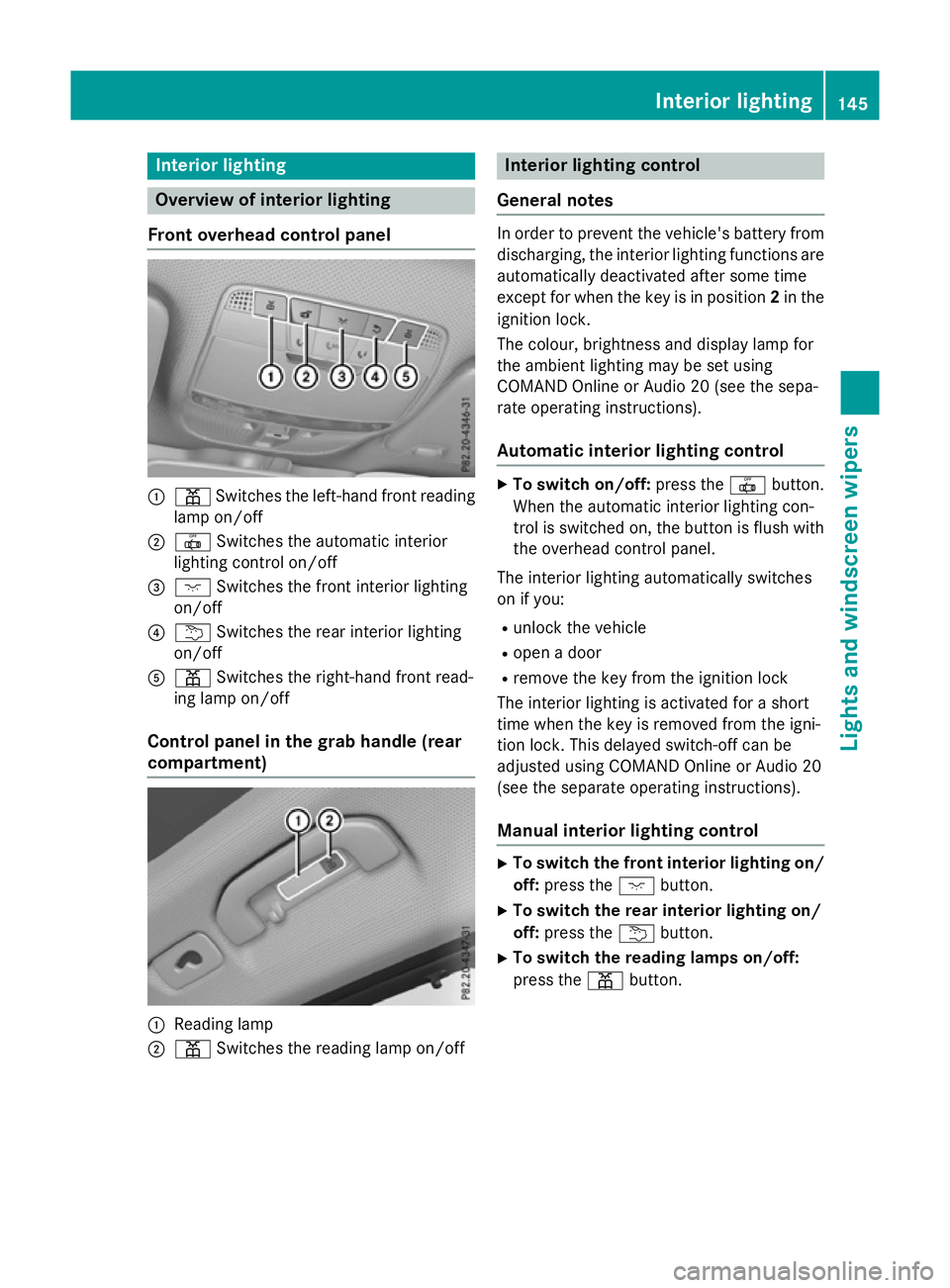
Front overhead control panel :
p Switches the left-hand front reading
lamp on/off
; | Switches the automatic interior
lighting control on/off
= c Switches the front interior lighting
on/off
? u Switches the rear interior lighting
on/off
A p Switches the right-hand front read-
ing lamp on/off
Control panel in the grab handle (rear
compartment) :
Reading lamp
; p Switches the reading lamp on/off Interior lighting control
General notes In order to prevent the vehicle's battery from
discharging, the interior lighting functions are
automatically deactivated after some time
except for when the key is in position 2in the
ignition lock.
The colour, brightness and display lamp for
the ambient lighting may be set using
COMAND Online or Audio 20 (see the sepa-
rate operating instructions).
Automatic interior lighting control X
To switch on/off: press the|button.
When the automatic interior lighting con-
trol is switched on, the button is flush with the overhead control panel.
The interior lighting automatically switches
on if you:
R unlock the vehicle
R open a door
R remove the key from the ignition lock
The interior lighting is activated for a short
time when the key is removed from the igni-
tion lock. This delayed switch-off can be
adjusted using COMAND Online or Audio 20
(see the separate operating instructions).
Manual interior lighting control X
To switch the front interior lighting on/
off: press the cbutton.
X To switch the rear interior lighting on/
off: press the ubutton.
X To switch the reading lamps on/off:
press the pbutton. Interior lighting
145Lights and windscreen wipers Z
Page 153 of 497
X
Position trim Dand engage it in place by
tapping it with your hand.
X Before beginning the installation, check
that all of the metal clips are inserted in the
parts which were placed on one side: 2
clips ;in the upper section of handle =
and 4 clips Ain trim B.
X If not, remove the missing metal clips from
the panel apertures in the tailgate and
insert them in the corresponding positions.
X Grasp trim Band connect plug connector
C to the surround lighting.
i The surround lighting only illuminates
when the tailgate has been shut and reop-
ened.
X Vehicles with EASY-PACK tailgate: push in
the plug connector for the switch of the
EASY-PACK tailgate in the top right of the
trim.
X Vehicles with electric fold-out trailer tow
hitch: push in the plug connector for the
electric fold-out trailer tow hitch in the top
left of the trim.
X Position trim Band engage it in place by
tapping it with your hand, starting from the
outside.
X Clip in the lower section of handle :again.
X Insert and engage the upper section of han-
dle =into lower section :.Windscreen wipers
Switching the windscreen wipers on/
off
! Do not operate the windscreen wipers
when the windscreen is dry, as this could
damage the wiper blades. Moreover, dust
that has collected on the windscreen can
scratch the glass if wiping takes place when the windscreen is dry.
If it is necessary to switch on the wind-
screen wipers in dry weather conditions,
always operate them using washer fluid. !
If the windscreen wipers leave smears on
the windscreen after the vehicle has been
washed in an automatic car wash, this may
be due to wax or other residue. Clean the
windscreen with washer fluid after an auto- matic car wash.
! Intermittent wiping with rain sensor: due
to optical influences and the windscreen
becoming dirty in dry weather conditions,
the windscreen wipers may be activated
inadvertently. This could damage the wind- screen wiper blades or scratch the wind-
screen.
For this reason, you should always switch
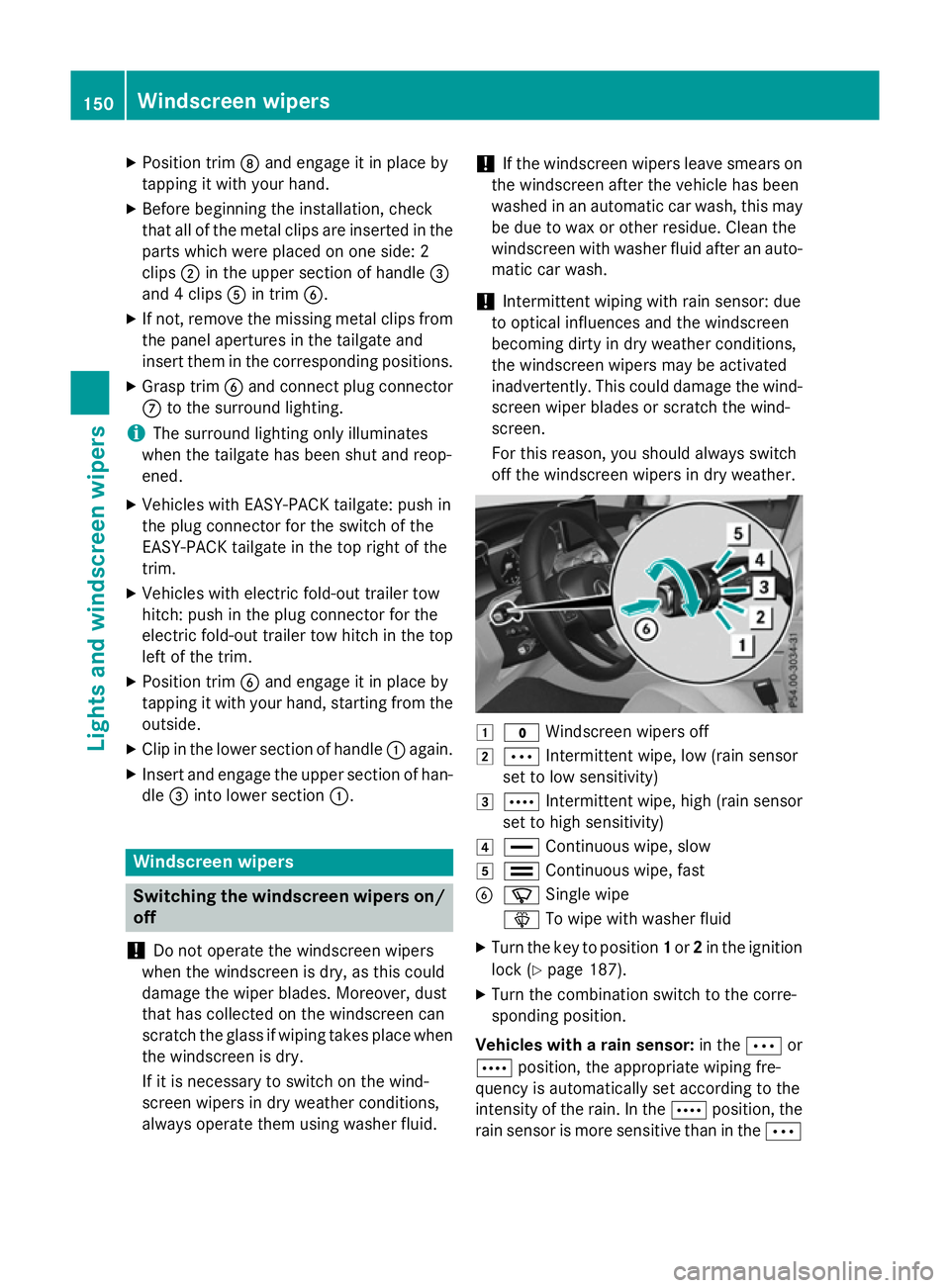
off the windscreen wipers in dry weather. 1
$ Windscreen wipers off
2 Ä Intermittent wipe, low (rain sensor
set to low sensitivity)
3 Å Intermittent wipe, high (rain sensor
set to high sensitivity)
4 ° Continuous wipe, slow
5 ¯ Continuous wipe, fast
B í Single wipe
î To wipe with washer fluid
X Turn the key to position 1or 2in the ignition
lock (Y page 187).
X Turn the combination switch to the corre-
sponding position.
Vehicles with a rain sensor: in theÄor
Å position, the appropriate wiping fre-
quency is automatically set according to the
intensity of the rain. In the Åposition, the
rain sensor is more sensitive than in the Ä150
Windscreen wipersLights and windscreen wipers
Page 154 of 497
position, causing the windscreen wiper to
wipe more frequently.
If the wiper blades are worn, the windscreen
will no longer be wiped properly. This could
prevent you from observing the traffic condi-
tions. Switching the rear window wiper on/
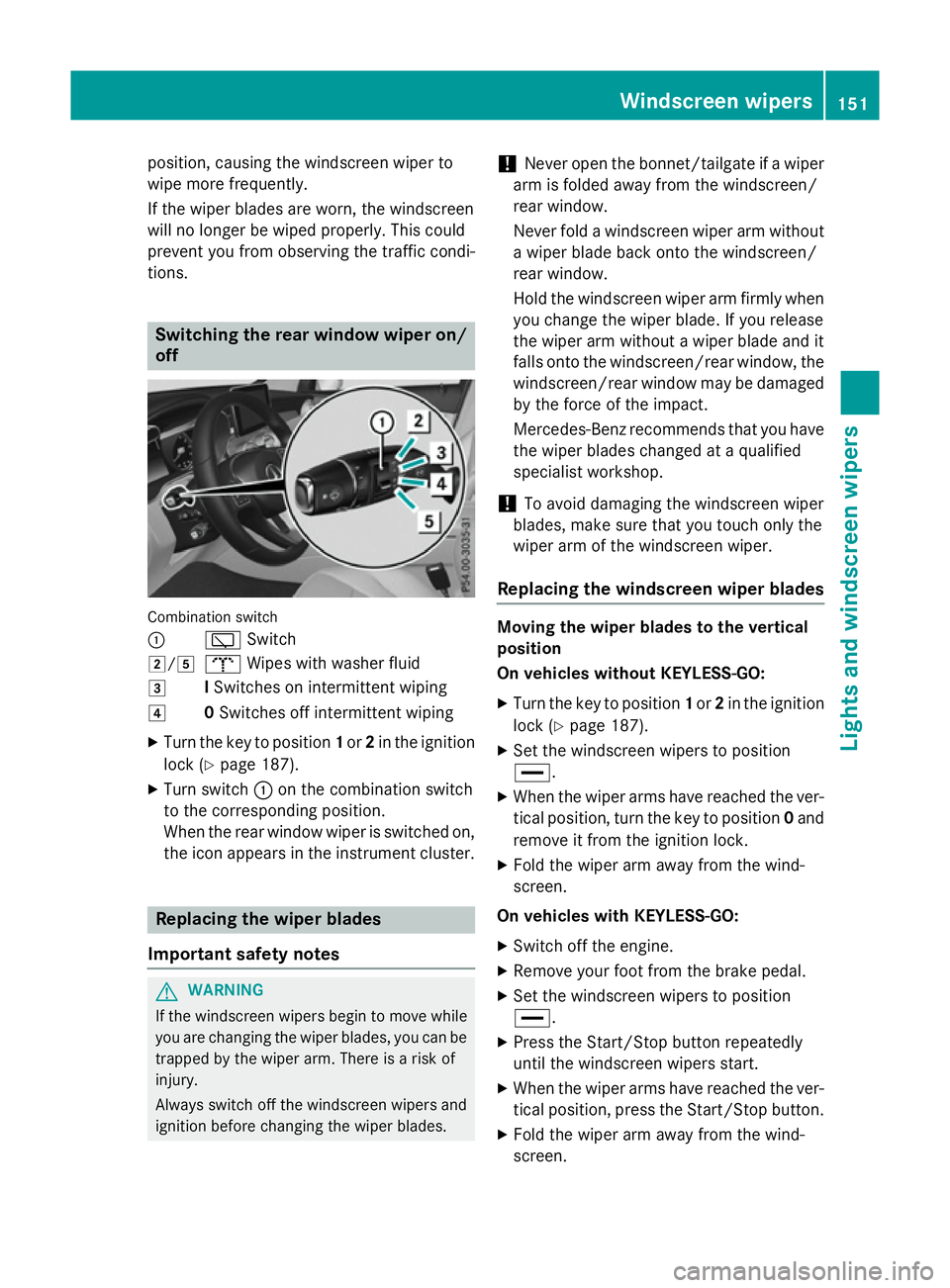
off Combination switch
:
èSwitch
2/5 bWipes with washer fluid
3 ISwitches on intermittent wiping
4 0Switches off intermittent wiping
X Turn the key to position 1or 2in the ignition
lock (Y page 187).
X Turn switch :on the combination switch
to the corresponding position.
When the rear window wiper is switched on,
the icon appears in the instrument cluster. Replacing the wiper blades
Important safety notes G
WARNING
If the windscreen wipers begin to move while
you are changing the wiper blades, you can be trapped by the wiper arm. There is a risk of
injury.
Always switch off the windscreen wipers and
ignition before changing the wiper blades. !
Never open the bonnet/tailgate if a wiper
arm is folded away from the windscreen/
rear window.
Never fold a windscreen wiper arm without a wiper blade back onto the windscreen/
rear window.
Hold the windscreen wiper arm firmly when
you change the wiper blade. If you release
the wiper arm without a wiper blade and it
falls onto the windscreen/rear window, the windscreen/rear window may be damaged
by the force of the impact.
Mercedes-Benz recommends that you have the wiper blades changed at a qualified
specialist workshop.
! To avoid damaging the windscreen wiper
blades, make sure that you touch only the
wiper arm of the windscreen wiper.
Replacing the windscreen wiper blades Moving the wiper blades to the vertical
position
On vehicles without KEYLESS-GO:
X Turn the key to position 1or 2in the ignition
lock (Y page 187).
X Set the windscreen wipers to position
°.
X When the wiper arms have reached the ver-
tical position, turn the key to position 0and
remove it from the ignition lock.
X Fold the wiper arm away from the wind-
screen.
On vehicles with KEYLESS-GO:
X Switch off the engine.
X Remove your foot from the brake pedal.
X Set the windscreen wipers to position
°.
X Press the Start/Stop button repeatedly
until the windscreen wipers start.
X When the wiper arms have reached the ver-
tical position, press the Start/Stop button.
X Fold the wiper arm away from the wind-
screen. Windscreen wipers
151Lights and windscreen wipers Z
Page 156 of 497
Replacing the rear window wiper blades
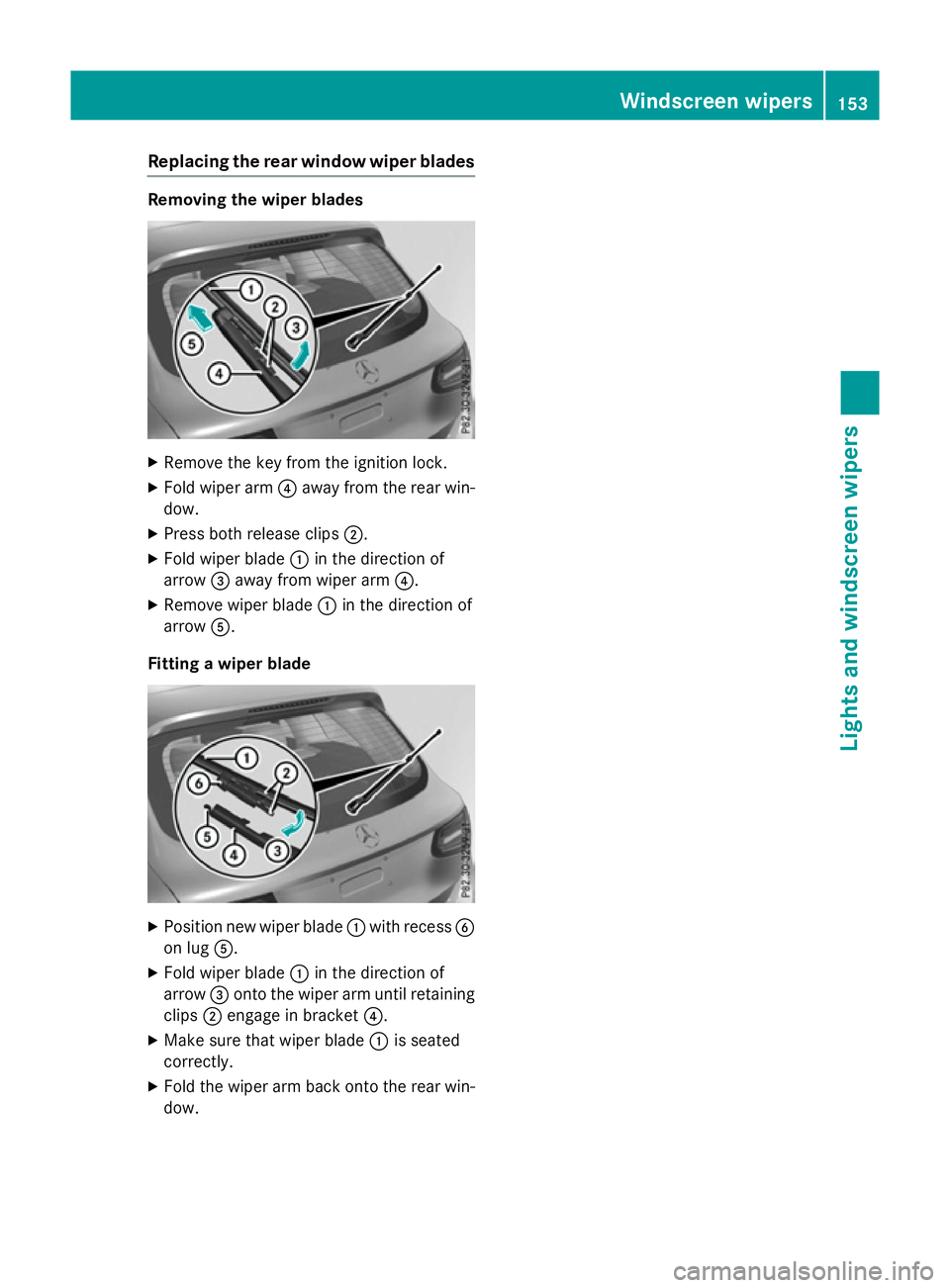
Removing the wiper blades
X
Remove the key from the ignition lock.
X Fold wiper arm ?away from the rear win-
dow.
X Press both release clips ;.
X Fold wiper blade :in the direction of
arrow =away from wiper arm ?.
X Remove wiper blade :in the direction of
arrow A.
Fitting a wiper blade X
Position new wiper blade :with recess B
on lug A.
X Fold wiper blade :in the direction of
arrow =onto the wiper arm until retaining
clips ;engage in bracket ?.
X Make sure that wiper blade :is seated
correctly.
X Fold the wiper arm back onto the rear win-
dow. Windscreen wipers
153Lights and windscreen wipers Z
Page 157 of 497
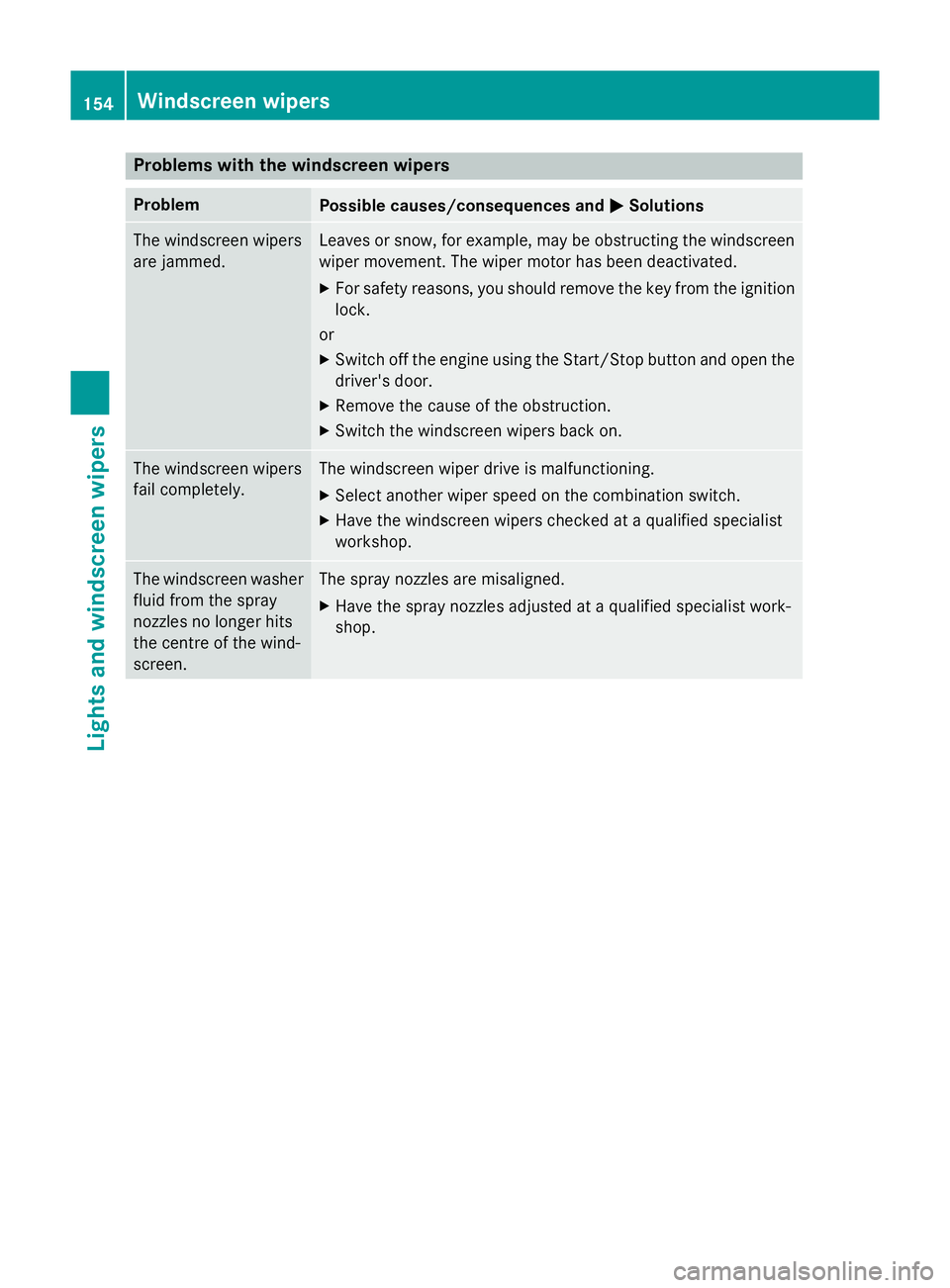
Problems with the windscreen wipers
Problem
Possible causes/consequences and
M
MSolutions The windscreen wipers
are jammed. Leaves or snow, for example, may be obstructing the windscreen
wiper movement. The wiper motor has been deactivated.
X For safety reasons, you should remove the key from the ignition
lock.
or
X Switch off the engine using the Start/Stop button and open the
driver's door.
X Remove the cause of the obstruction.
X Switch the windscreen wipers back on. The windscreen wipers
fail completely. The windscreen wiper drive is malfunctioning.
X Select another wiper speed on the combination switch.
X Have the windscreen wipers checked at a qualified specialist
workshop. The windscreen washer
fluid from the spray
nozzles no longer hits
the centre of the wind-
screen. The spray nozzles are misaligned.
X Have the spray nozzles adjusted at a qualified specialist work-
shop. 154
Windscreen wipersLights and windscreen wipers
Page 159 of 497
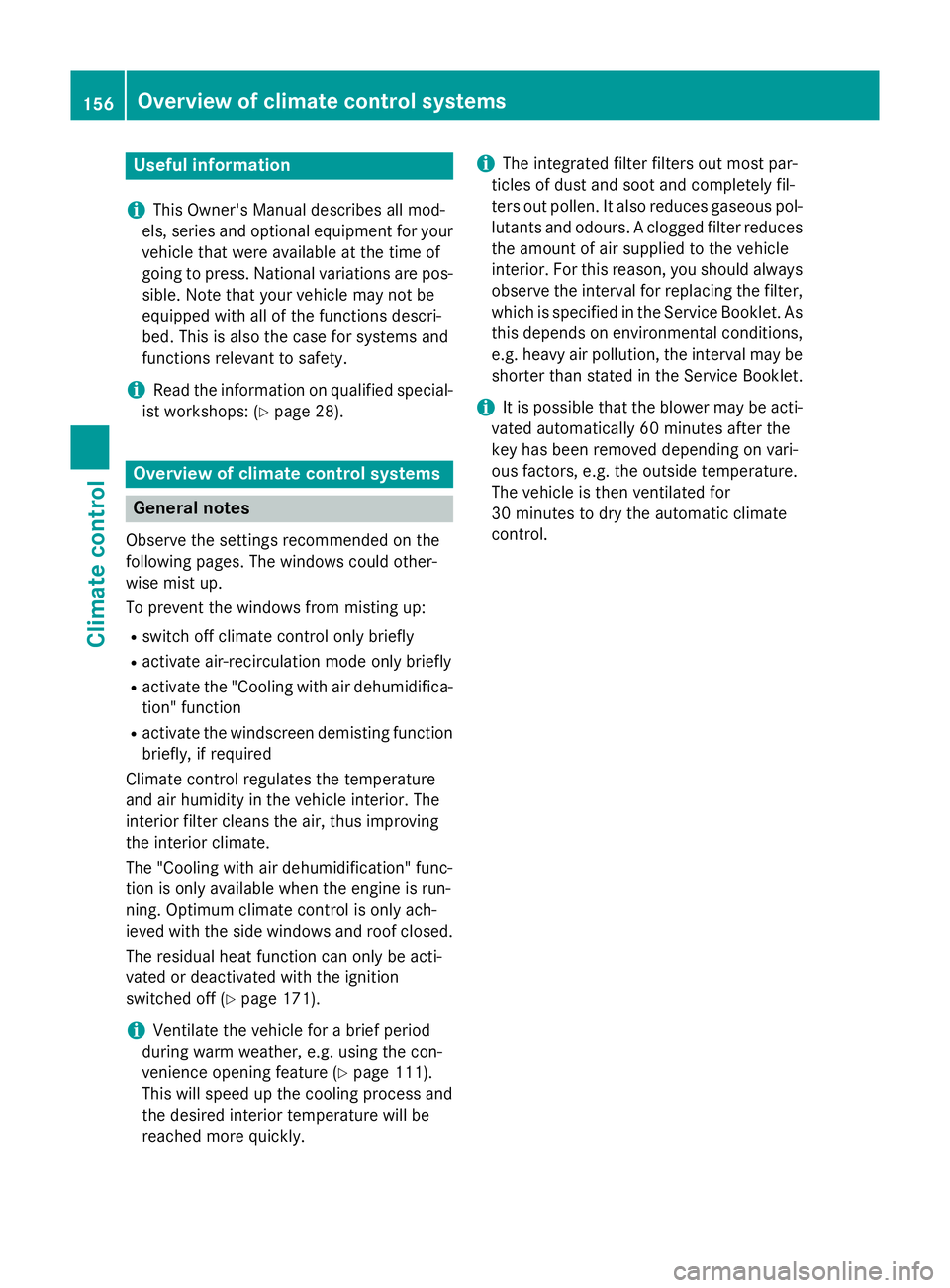
Useful information
i This Owner's Manual describes all mod-
els, series and optional equipment for your
vehicle that were available at the time of
going to press. National variations are pos- sible. Note that your vehicle may not be
equipped with all of the functions descri-
bed. This is also the case for systems and
functions relevant to safety.
i Read the information on qualified special-
ist workshops: (Y page 28). Overview of climate control systems
General notes
Observe the settings recommended on the
following pages. The windows could other-
wise mist up.
To prevent the windows from misting up:
R switch off climate control only briefly
R activate air-recirculation mode only briefly
R activate the "Cooling with air dehumidifica-
tion" function
R activate the windscreen demisting function
briefly, if required
Climate control regulates the temperature
and air humidity in the vehicle interior. The
interior filter cleans the air, thus improving
the interior climate.
The "Cooling with air dehumidification" func-
tion is only available when the engine is run-
ning. Optimum climate control is only ach-
ieved with the side windows and roof closed.
The residual heat function can only be acti-
vated or deactivated with the ignition
switched off (Y page 171).
i Ventilate the vehicle for a brief period
during warm weather, e.g. using the con-
venience opening feature (Y page 111).
This will speed up the cooling process and
the desired interior temperature will be
reached more quickly. i
The integrated filter filters out most par-
ticles of dust and soot and completely fil-
ters out pollen. It also reduces gaseous pol-
lutants and odours. A clogged filter reduces the amount of air supplied to the vehicle
interior. For this reason, you should alwaysobserve the interval for replacing the filter,
which is specified in the Service Booklet. As this depends on environmental conditions,
e.g. heavy air pollution, the interval may be shorter than stated in the Service Booklet.
i It is possible that the blower may be acti-
vated automatically 60 minutes after the
key has been removed depending on vari-
ous factors, e.g. the outside temperature.
The vehicle is then ventilated for
30 minutes to dry the automatic climate
control. 156
Overview of climate control systemsClimate control
Page 165 of 497
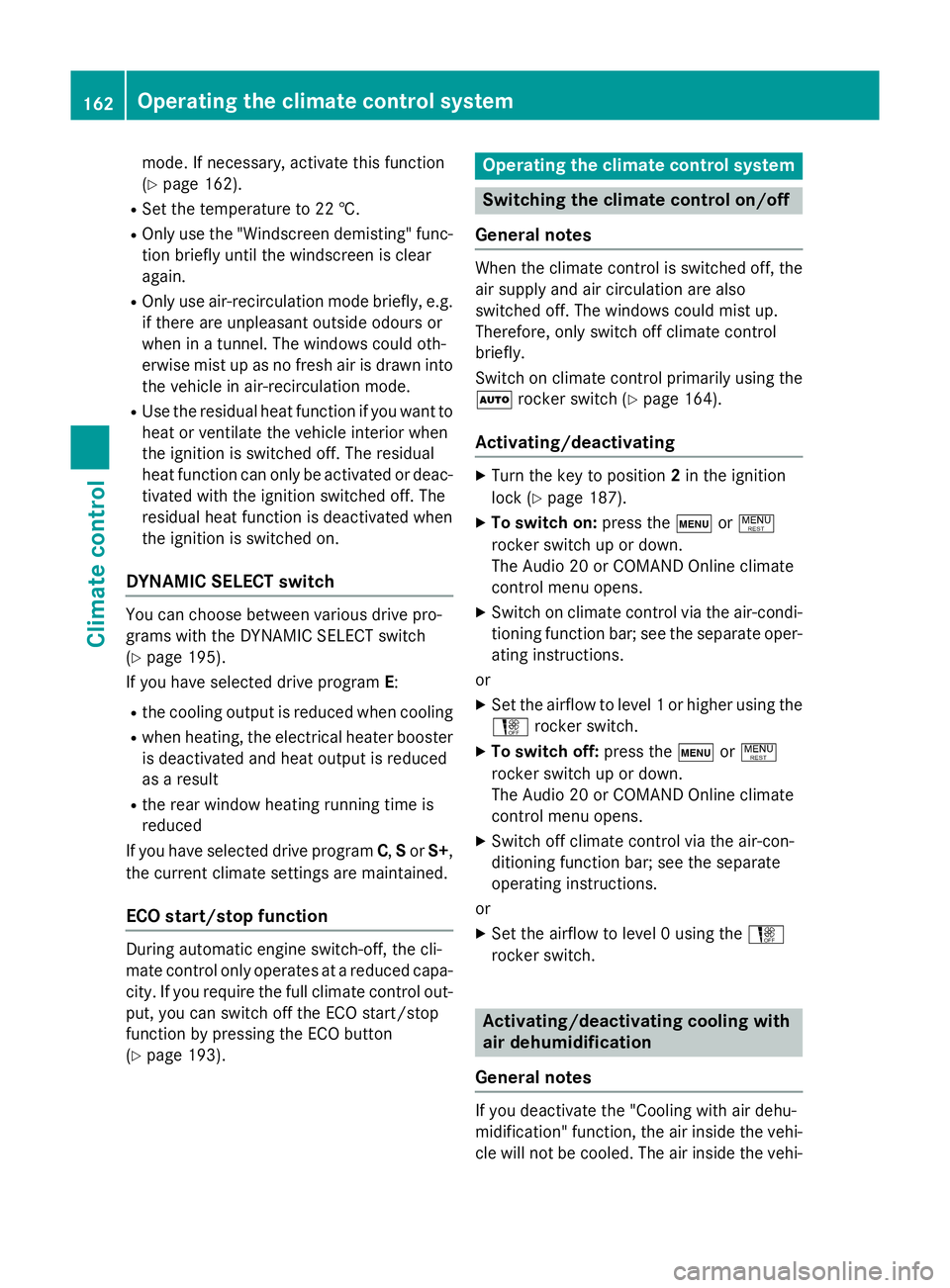
mode. If necessary, activate this function
(Y
page 162).
R Set the temperature to 22 †.
R Only use the "Windscreen demisting" func-
tion briefly until the windscreen is clear
again.
R Only use air-recirculation mode briefly, e.g.
if there are unpleasant outside odours or
when in a tunnel. The windows could oth-
erwise mist up as no fresh air is drawn into the vehicle in air-recirculation mode.
R Use the residual heat function if you want to
heat or ventilate the vehicle interior when
the ignition is switched off. The residual
heat function can only be activated or deac-
tivated with the ignition switched off. The
residual heat function is deactivated when
the ignition is switched on.
DYNAMIC SELECT switch You can choose between various drive pro-
grams with the DYNAMIC SELECT switch
(Y
page 195).
If you have selected drive program E:
R the cooling output is reduced when cooling
R when heating, the electrical heater booster
is deactivated and heat output is reduced
as a result
R the rear window heating running time is
reduced
If you have selected drive program C,Sor S+,
the current climate settings are maintained.
ECO start/stop function During automatic engine switch-off, the cli-
mate control only operates at a reduced capa-
city. If you require the full climate control out-
put, you can switch off the ECO start/stop
function by pressing the ECO button
(Y page 193). Operating the climate control system
Switching the climate control on/off
General notes When the climate control is switched off, the
air supply and air circulation are also
switched off. The windows could mist up.
Therefore, only switch off climate control
briefly.
Switch on climate control primarily using the à rocker switch (Y page 164).
Activating/deactivating X
Turn the key to position 2in the ignition
lock (Y page 187).
X To switch on: press thetor!
rocker switch up or down.
The Audio 20 or COMAND Online climate
control menu opens.
X Switch on climate control via the air-condi-
tioning function bar; see the separate oper- ating instructions.
or
X Set the airflow to level 1 or higher using the
H rocker switch.
X To switch off: press thetor!
rocker switch up or down.
The Audio 20 or COMAND Online climate
control menu opens.
X Switch off climate control via the air-con-
ditioning function bar; see the separate
operating instructions.
or
X Set the airflow to level 0 using the H
rocker switch. Activating/deactivating cooling with
air dehumidification
General notes If you deactivate the "Cooling with air dehu-
midification" function, the air inside the vehi- cle will not be cooled. The air inside the vehi- 162
Operating the climate control systemClimate control
Page 168 of 497
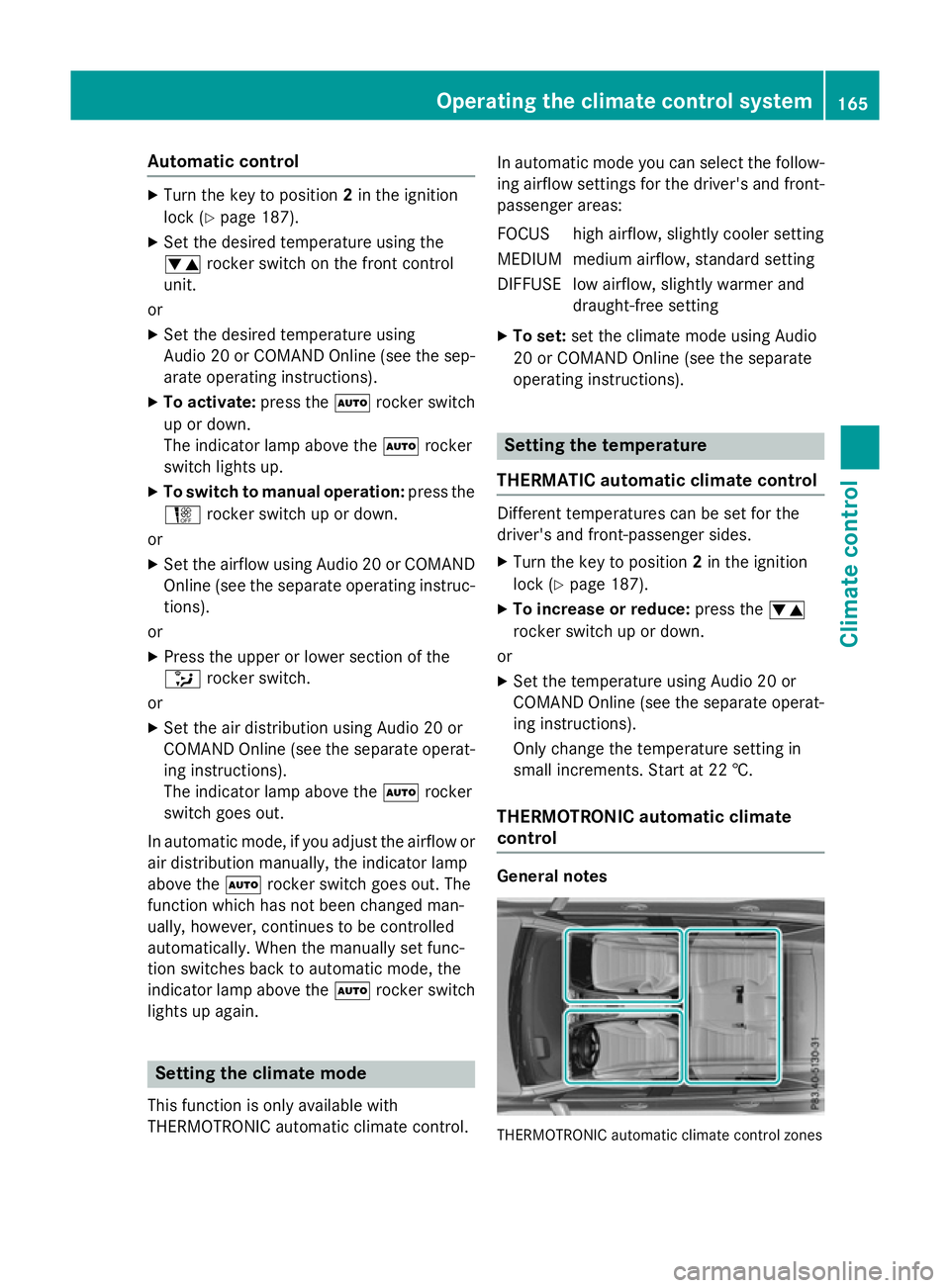
Automatic control
X
Turn the key to position 2in the ignition
lock (Y page 187).
X Set the desired temperature using the
w rocker switch on the front control
unit.
or X Set the desired temperature using
Audio 20 or COMAND Online (see the sep-
arate operating instructions).
X To activate: press theÃrocker switch
up or down.
The indicator lamp above the Ãrocker
switch lights up.
X To switch to manual operation: press the
H rocker switch up or down.
or X Set the airflow using Audio 20 or COMAND
Online (see the separate operating instruc-
tions).
or
X Press the upper or lower section of the
_ rocker switch.
or
X Set the air distribution using Audio 20 or
COMAND Online (see the separate operat- ing instructions).
The indicator lamp above the Ãrocker
switch goes out.
In automatic mode, if you adjust the airflow or air distribution manually, the indicator lamp
above the Ãrocker switch goes out. The
function which has not been changed man-
ually, however, continues to be controlled
automatically. When the manually set func-
tion switches back to automatic mode, the
indicator lamp above the Ãrocker switch
lights up again. Setting the climate mode
This function is only available with
THERMOTRONIC automatic climate control. In automatic mode you can select the follow-
ing airflow settings for the driver's and front-
passenger areas:
FOCUS high airflow, slightly cooler setting
MEDIUM medium airflow, standard setting
DIFFUS Elow airflow, slightly warmer and
draught-free setting
X To set: set the climate mode using Audio
20 or COMAND Online (see the separate
operating instructions). Setting the temperature
THERMATIC automatic climate control Different temperatures can be set for the
driver's and front-passenger sides.
X Turn the key to position 2in the ignition
lock (Y page 187).
X To increase or reduce: press thew
rocker switch up or down.
or
X Set the temperature using Audio 20 or
COMAND Online (see the separate operat-
ing instructions).
Only change the temperature setting in
small increments. Start at 22 †.
THERMOTRONIC automatic climate
control General notes
THERMOTRONIC automatic climate control zonesOperating the climate control system
165Climate control
Page 169 of 497
You can select different temperature settings
for the driver's and front-passenger sides as
well as for the rear compartment.
Setting the temperature in the front com-
partment using the front control panel
X Turn the key to position 2in the ignition
lock (Y page 187).
X To increase or reduce: press thew
rocker switch up or down.
or X Set the temperature using Audio 20 or
COMAND Online (see the separate operat- ing instructions).
Only change the temperature setting in
small increments. Start at 22 †.
Setting the temperature in the rear com-
partment using the front control panel
X Turn the key to position 2in the ignition
lock (Y page 187).
X Press the upper or lower section of
the ! rocker switch.
The climate control menu in Audio 20 or
COMAND Online opens.
X Select the "Synchronisation" function (see
separate operating instructions).
The temperature setting for the driver's
side is adopted for the front-passenger side
and the rear compartment.
X Set the temperature with the wrocker
switch on the front control panel.
or X Set the temperature using Audio 20 or
COMAND Online (see the separate operat- ing instructions).
Only change the temperature setting in
small increments. Start at 22 †.
Setting the temperature in the rear com-
partment using the rear control panel
X Turn the key to position 2in the ignition
lock (Y page 187).
X To increase or reduce: press the upper or
lower section of the wrocker switch on
the rear control panel (Y page 160).Only change the temperature setting in
small increments. Start at 22 †.
The set temperature appears on the rear-
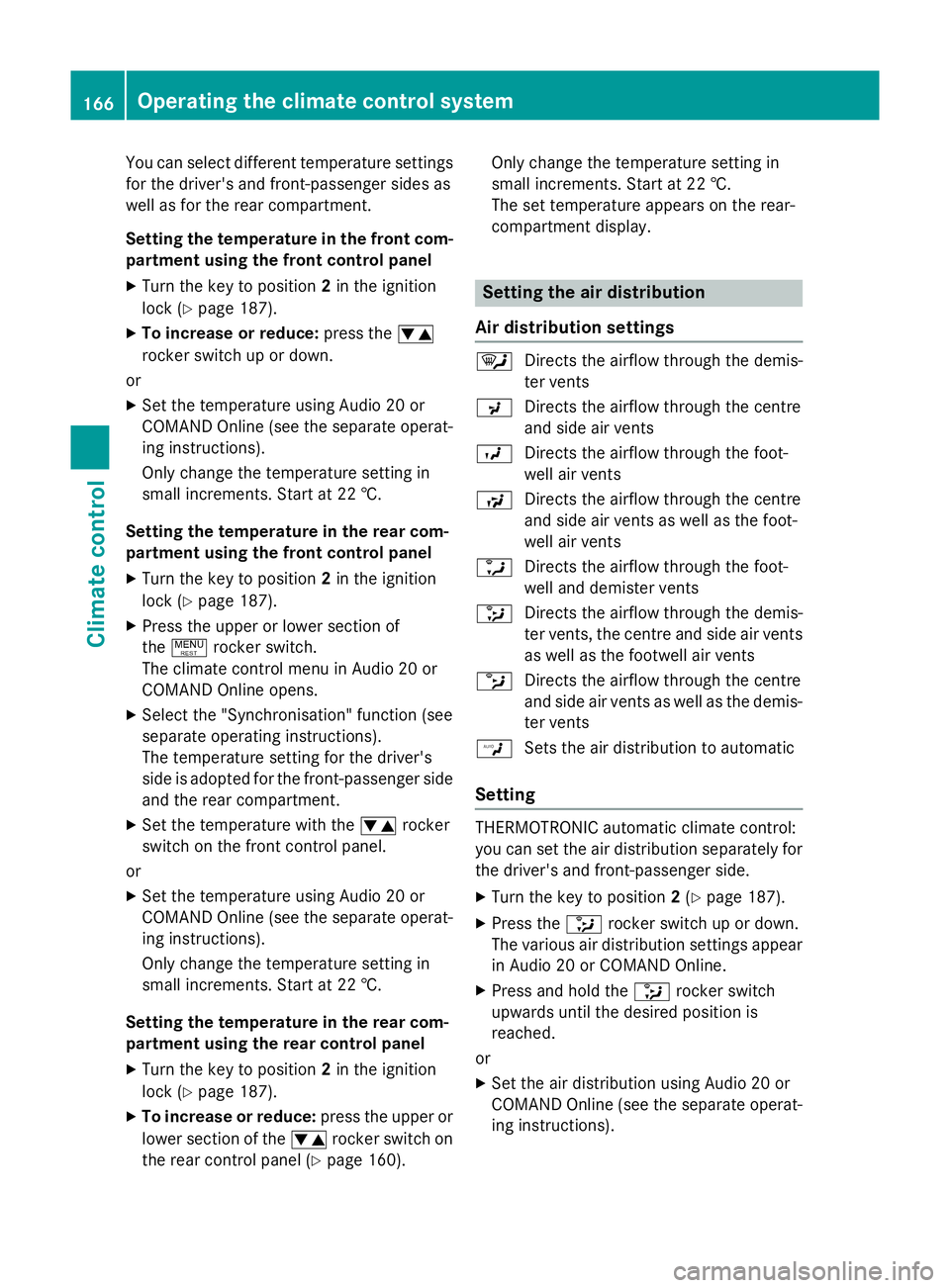
compartment display. Setting the air distribution
Air distribution settings ¯
Directs the airflow through the demis-
ter vents
P Directs the airflow through the centre
and side air vents
O Directs the airflow through the foot-
well air vents
S Directs the airflow through the centre
and side air vents as well as the foot-
well air vents
a Directs the airflow through the foot-
well and demister vents
_ Directs the airflow through the demis-
ter vents, the centre and side air vents as well as the footwell air vents
b Directs the airflow through the centre
and side air vents as well as the demis-
ter vents
W Sets the air distribution to automatic
Setting THERMOTRONIC automatic climate control:
you can set the air distribution separately for
the driver's and front-passenger side.
X Turn the key to position 2(Y page 187).
X Press the _rocker switch up or down.
The various air distribution settings appear in Audio 20 or COMAND Online.
X Press and hold the _rocker switch
upwards until the desired position is
reached.
or
X Set the air distribution using Audio 20 or
COMAND Online (see the separate operat- ing instructions). 166
Operating the climate control systemClimate control
Page 170 of 497
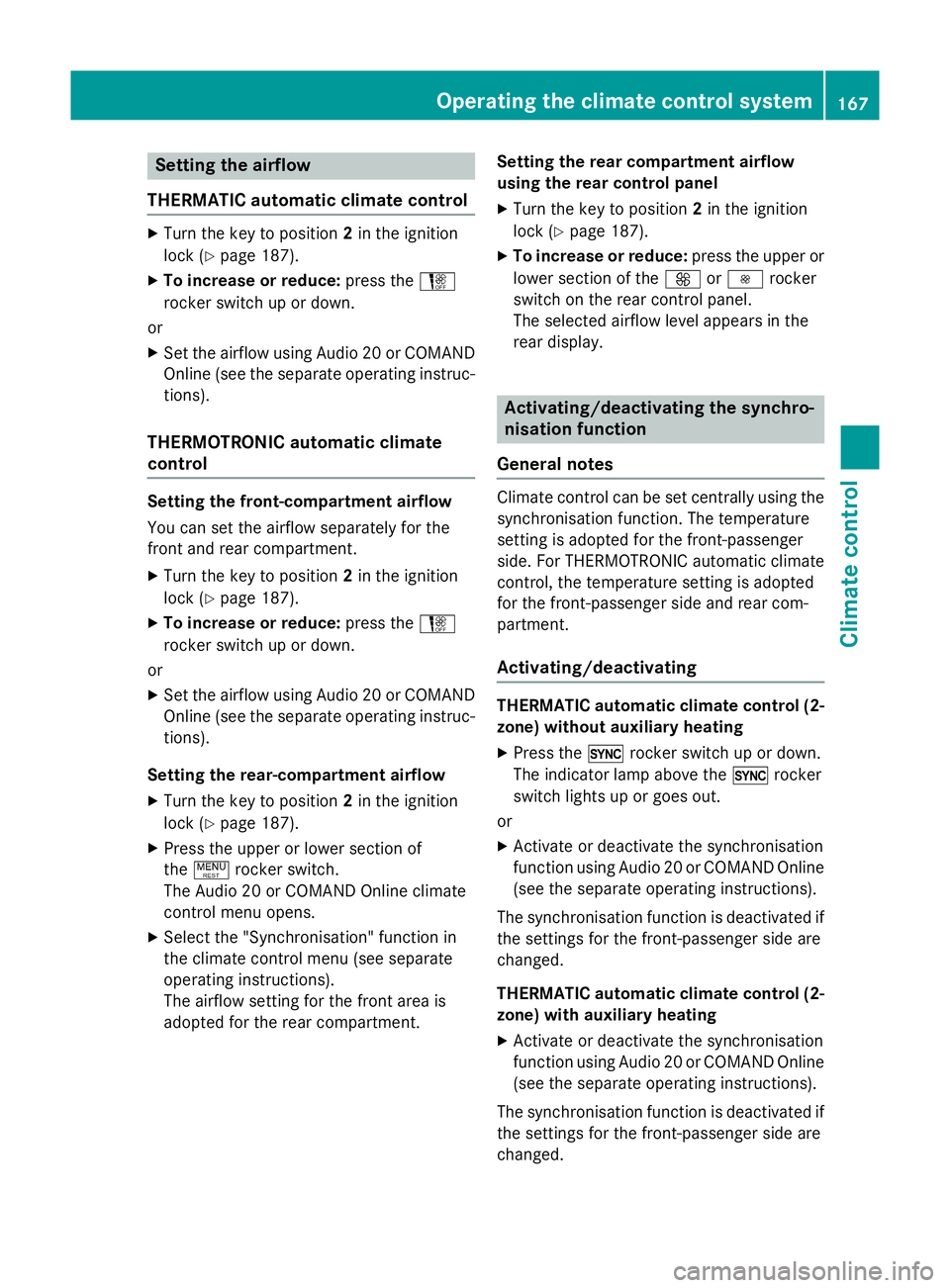
Setting the airflow
THERMATIC automatic climate control X
Turn the key to position 2in the ignition
lock (Y page 187).
X To increase or reduce: press theH
rocker switch up or down.
or
X Set the airflow using Audio 20 or COMAND
Online (see the separate operating instruc-
tions).
THERMOTRONIC automatic climate
control Setting the front-compartment airflow
You can set the airflow separately for the
front and rear compartment.
X Turn the key to position 2in the ignition
lock (Y page 187).
X To increase or reduce: press theH
rocker switch up or down.
or
X Set the airflow using Audio 20 or COMAND
Online (see the separate operating instruc-
tions).
Setting the rear-compartment airflow X Turn the key to position 2in the ignition
lock (Y page 187).
X Press the upper or lower section of
the ! rocker switch.
The Audio 20 or COMAND Online climate
control menu opens.
X Select the "Synchronisation" function in
the climate control menu (see separate
operating instructions).
The airflow setting for the front area is
adopted for the rear compartment. Setting the rear compartment airflow
using the rear control panel
X Turn the key to position 2in the ignition
lock (Y page 187).
X To increase or reduce: press the upper or
lower section of the KorI rocker
switch on the rear control panel.
The selected airflow level appears in the
rear display. Activating/deactivating the synchro-
nisation function
General notes Climate control can be set centrally using the
synchronisation function. The temperature
setting is adopted for the front-passenger
side. For THERMOTRONIC automatic climatecontrol, the temperature setting is adopted
for the front-passenger side and rear com-
partment.
Activating/deactivating THERMATIC automatic climate control (2-
zone) without auxiliary heating
X Press the 0rocker switch up or down.
The indicator lamp above the 0rocker
switch lights up or goes out.
or X Activate or deactivate the synchronisation
function using Audio 20 or COMAND Online
(see the separate operating instructions).
The synchronisation function is deactivated if the settings for the front-passenger side are
changed.
THERMATIC automatic climate control (2-
zone) with auxiliary heating
X Activate or deactivate the synchronisation
function using Audio 20 or COMAND Online
(see the separate operating instructions).
The synchronisation function is deactivated if
the settings for the front-passenger side are
changed. Operating the climate control system
167Climate control