engine MERCEDES-BENZ GLC SUV 2018 Owners Manual
[x] Cancel search | Manufacturer: MERCEDES-BENZ, Model Year: 2018, Model line: GLC SUV, Model: MERCEDES-BENZ GLC SUV 2018Pages: 390, PDF Size: 6.54 MB
Page 174 of 390
To avoid damage to the vehicle, deactivate
these systems in the following or similar sit-
uations:
Rwhen towing the vehicle
Rin the car wash
Distance Pilot DISTRONIC can neither reduce
the risk of an accident if you fail to adapt your
driving style nor override the laws of physics.
Distance Pilot DISTRONIC cannot take into
account road, weather or traffic conditions. Dis-
tance Pilot DISTRONIC is only an aid. You are
responsible for maintaining a safe distance to
the vehicle in front, for vehicle speed, for brak-
ing in good time and for staying in lane.
Do not use Distance Pilot DISTRONIC:
Rin road and traffic conditions which do not
allow you to maintain a constant speed, e.g. in
heavy traffic or on winding roads
Ron slippery road surfaces. Braking or accel-
erating could cause the drive wheels to lose
traction and the vehicle could then skid
Rin poor visibility, e.g. due to fog, heavy rain or
snow
Distance Pilot DISTRONIC may not detect nar-
row vehicles driving in front, e.g. motorcycles, or
vehicles driving on a different line.
In particular, the detection of obstacles can be
impaired if:
Rthere is dirt on the sensors or anything else
covering the sensors
Rthere is snow or heavy rain
Rthere is interference by other radar sources
Rthere are strong radar reflections, for exam-
ple in parking garages
If Distance Pilot DISTRONIC no longer detects a
vehicle in front, it may unexpectedly accelerate
to the speed stored.
This speed may:
Rbe too high if you are driving in a turning lane
or an exit lane
Rbe so high in the right lane that you pass vehi- cles driving on the left (in countries where
they drive on the right)
Rbe so high in the left lane that you pass vehi-
cles driving on the right (in countries where
they drive on the left)
If there is a change of drivers, advise the new
driver of the speed stored.
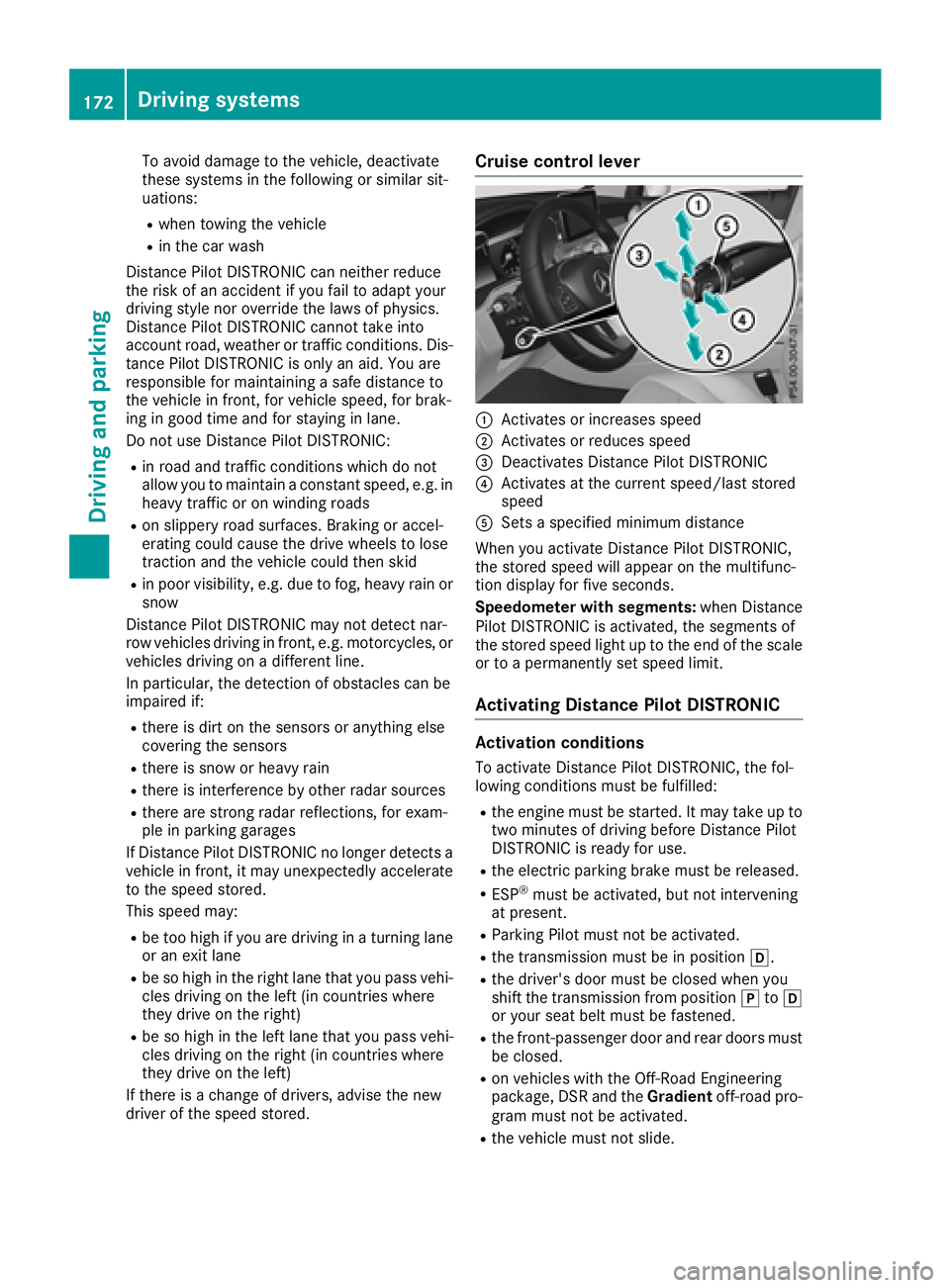
Cruise control lever
:Activates or increases speed
;Activates or reduces speed
=Deactivates Distance Pilot DISTRONIC
?Activates at the current speed/last stored
speed
ASets a specified minimum distance
When you activate Distance Pilot DISTRONIC,
the stored speed will appear on the multifunc-
tion display for five seconds.
Speedometer with segments: when Distance
Pilot DISTRONIC is activated, the segments of
the stored speed light up to the end of the scale
or to a permanently set speed limit.
Activating Distance Pilot DISTRONIC
Activation conditions
To activate Distance Pilot DISTRONIC, the fol-
lowing conditions must be fulfilled:
Rthe engine must be started. It may take up to
two minutes of driving before Distance Pilot
DISTRONIC is ready for use.
Rthe electric parking brake must be released.
RESP®must be activated, but not intervening
at present.
RParking Pilot must not be activated.
Rthe transmission must be in position h.
Rthe driver's door must be closed when you
shift the transmission from positionjtoh
or your seat belt must be fastened.
Rthe front-passenger door and rear doors must
be closed.
Ron vehicles with the Off-Road Engineering
package, DSR and the Gradientoff-road pro-
gram must not be activated.
Rthe vehicle must not slide.
172Driving systems
Driving and parking
Page 176 of 390
When you change lanes, Distance Pilot
DISTRONIC monitors the left lane (on left-hand-
drive vehicles) or the right lane (on right-hand-
drive vehicles).
Stopping
GWARNING
If you leave the vehicle when it is only being
braked by Distance Pilot DISTRONIC, it could
roll away if:
Rthere is a malfunction in the system or in
the voltage supply.
RDistance Pilot DISTRONIC is switched off
using the cruise control lever, e.g. by a vehi-
cle occupant or from outside the vehicle
Rthe electrical system in the engine com-
partment, the battery or the fuses are tam-
pered with.
Rthe battery is disconnected
Rthe vehicle is accelerated, e.g. by a vehicle
occupant.
There is a risk of an accident.
Before leaving the vehicle, always deactivate
Distance Pilot DISTRONIC and secure the
vehicle against rolling away.
Further information on deactivating Distance
Pilot DISTRONIC (
Ypage 176).
If Distance Pilot DISTRONIC detects that the
vehicle in front is stopping, it brakes your vehicle
to a stop.
Once your vehicle is stationary, it remains sta-
tionary and you do not need to depress the
brake.
After a time, the electric parking brake secures
the vehicle and relieves the service brake.
Depending on the specified minimum distance,
your vehicle will come to a standstill at a suffi-
cient distance behind the vehicle in front. The
specified minimum distance is set using the
control on the cruise control lever. When Distance Pilot DISTRONIC is activated,
the transmission shifts automatically to position
j
if:
Rthe driver's seat belt is not fastened and the
driver's door is open.
Rthe engine is switched off, unless it is auto-
matically switched off by the ECO start/stop
function.
The electric parking brake secures the vehicle
automatically if Distance Pilot DISTRONIC is
activated when the vehicle is stationary and:
Ra system malfunction occurs.
Rthe power supply is insufficient.
If a malfunction occurs, the transmission may
also be shifted to position jautomatically.
Setting a speed
XPush cruise control lever up :for a higher
speed or down ;for a lower speed.
XTo adjust the set speed in 1 mph incre-
ments (1 km/h increments): briefly push
the cruise control lever up :or down ;to
the pressure point.
Every time the cruise control lever is pressed
up : or down ;the last speed stored is
increased or reduced.
XTo adjust the set speed in 5 mph incre-
ments (10 km/h increments): briefly push
the cruise control lever up :or down ;
beyond the pressure point.
Every time the cruise control lever is pressed
up : or down ;, the last speed stored is
increased or reduced.
iIf you accelerate to overtake, Distance Pilot
DISTRONIC adjusts the vehicle's speed to the
last speed stored after you have finished over-
taking.
Setting a specified minimum distance
You can set the specified minimum distance for
Distance Pilot DISTRONIC by varying the time
span between one and two seconds. With this
function you can set the minimum distance that
Distance Pilot DISTRONIC maintains to the vehi-
cle in front, depending on vehicle speed. You
can see this distance in the multifunction dis-
play (
Ypage 175).
Make sure that you maintain the minimum dis-
tance to the vehicle in front as required by law.
174Driving systems
Driving and parking
Page 178 of 390
Deactivating Distance PilotDISTRONI C
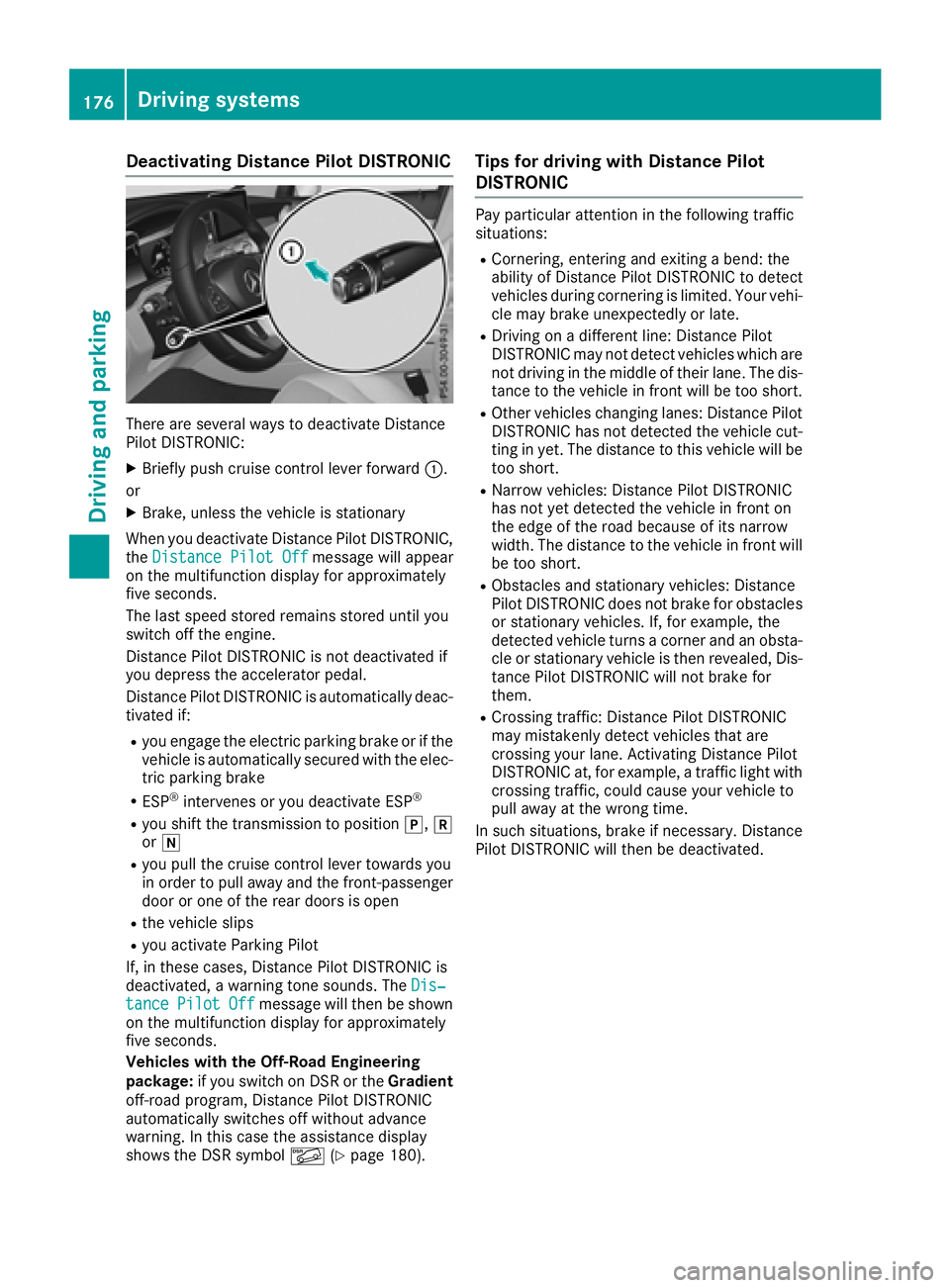
There are severa lways to deactivat eDistanc e
Pilo tDISTRONIC:
XBriefly push cruise contro llever forwar d:.
or
XBrake, unless th evehicle is stationary
Whe nyou deactivat eDistanc ePilo tDISTRONIC,
th eDistance Pilot Off
messag ewill appear
on th emultifunction display fo rapproximately
fiv eseconds.
The last speed stored remain sstored until you
switch of fth eengine.
Distanc ePilo tDISTRONIC is no tdeactivated if
you depress th eaccelerator pedal.
Distanc ePilo tDISTRONIC is automatically deac -
tivated if:
Ryou engage th eelectric parking brake or if th e
vehicle is automatically secure dwit hth eelec -
tric parking brake
RES P®intervenes or you deactivat eES P®
Ryou shift th etransmissio nto position j,k
or i
Ryou pull th ecruise contro llever toward syou
in order to pull away and th efront-passenger
doo ror on eof th erea rdoors is ope n
Rthevehicle slip s
Ryou activateParking Pilo t
If ,in these cases, Distanc ePilo tDISTRONIC is
deactivated, awarnin gtone sounds. The Dis‐
tancePilotOffmessag ewill then be shown
on th emultifunction display fo rapproximately
fiv eseconds.
Vehicles wit hth eOff-Road Engineering
package: if you switch on DS Ror th eGradient
off-road program, Distanc ePilo tDISTRONIC
automatically switches of fwithout advanc e
warning. In this cas eth eassistanc edisplay
shows th eDS Rsymbol Ã(
Ypage 180).
Tips for drivin gwit hDistance Pilo t
DISTRONI C
Pay particular attention in th efollowin gtraffic
situations:
RCornering, enterin gand exitin g abend: th e
ability of Distanc ePilo tDISTRONIC to detec t
vehicles durin gcornering is limited. Your vehi-
cl e may brake unexpectedly or late.
RDriving on adifferen tline: Distanc ePilo t
DISTRONIC may no tdetec tvehicles whic hare
no tdrivin gin th emiddle of their lane. The dis -
tanc eto th evehicle in fron twill be to oshort .
ROther vehicles changin glanes: Distanc ePilo t
DISTRONIC has no tdetecte dth evehicle cut -
ting in yet .The distanc eto this vehicle will be
to oshort .
RNarro wvehicles :Distanc ePilo tDISTRONIC
has no tyet detecte dth evehicle in fron ton
th eedg eof th eroad because of it snarro w
width. The distanc eto th evehicle in fron twill
be to oshort .
RObstacles and stationary vehicles :Distanc e
Pilo tDISTRONIC doe sno tbrake fo robstacles
or stationary vehicles .If ,fo rexample, th e
detecte dvehicle turn s acorner and an obsta -
cl e or stationary vehicle is then revealed, Dis-
tanc ePilo tDISTRONIC will no tbrake fo
r
the
m.
RCrossing traffic :Distanc ePilo tDISTRONIC
may mistakenl ydetec tvehicles that are
crossin gyour lane. Activatin gDistanc ePilo t
DISTRONIC at ,fo rexample, atraffic ligh twit h
crossin gtraffic ,could cause your vehicle to
pull away at th ewrong time.
In suc hsituations, brake if necessary. Distanc e
Pilo tDISTRONIC will then be deactivated.
176Driving systems
Driving an d parking
Page 182 of 390
The electric parking brake secures the vehicle
automatically if the HOLD function is activated
when the vehicle is stationary and:
Ra system malfunction occurs
Rthe power supply is insufficient
If a malfunction occurs, the transmission may
also be shifted to position jautomatically.
DSR
General notes
DSR (Downhill Speed Regulation) is an aid to
assist you when driving downhill that is available only in vehicles with the Off-Road Engineering
package.
It keeps the speed of travel at the speed selec-
ted on the on-board computer. The steeper the
downhill gradient, the greater the DSR braking
effect on the vehicle. When driving on flat
stretches of road or on an uphill gradient, the
DSR braking effect is minimal or nonexistent.
DSR controls the vehicle’s speed when it is acti-
vated and the transmission is in position h,k
or i. You can drive at a higher or a lower speed
than that set on the on-board computer at any
time by accelerating or braking.
Important safety notes
GWARNING
If the speed driven and the set speed deviate and you activate DSR on a slippery road sur-
face, the wheels may lose traction. There is an
increased danger of skidding and accidents.
Before switching DSR on, please take into
consideration the road surface and the differ- ence between driving speed and the set
speed.
DSR can neither reduce the risk of accident if
you fail to adapt your driving style nor override
the laws of physics. DSR cannot take account of
road, weather and traffic conditions. DSR is only
an aid. You are responsible for maintaining a
safe distance to the vehicle in front, for vehicle
speed, for braking in good time and for staying in
lane.
You are always responsible for keeping control
of the vehicle and for assessing whether the
downhill gradient can be managed. DSR may not always be able to keep to the set speed, depend-
ing on road surface and tire conditions. Select a
set speed suitable for the prevailing conditions
and when necessary, apply the brakes manually.
Further information about "Driving off-road"
(
Ypage 165).
Activating/deactivating DSR
If you activate DSR and no speed has been set,
the vehicle decelerates to 4 mph (6 km/h).
You can activate DSR only when driving at
speeds below 25 mph (40 km/h).
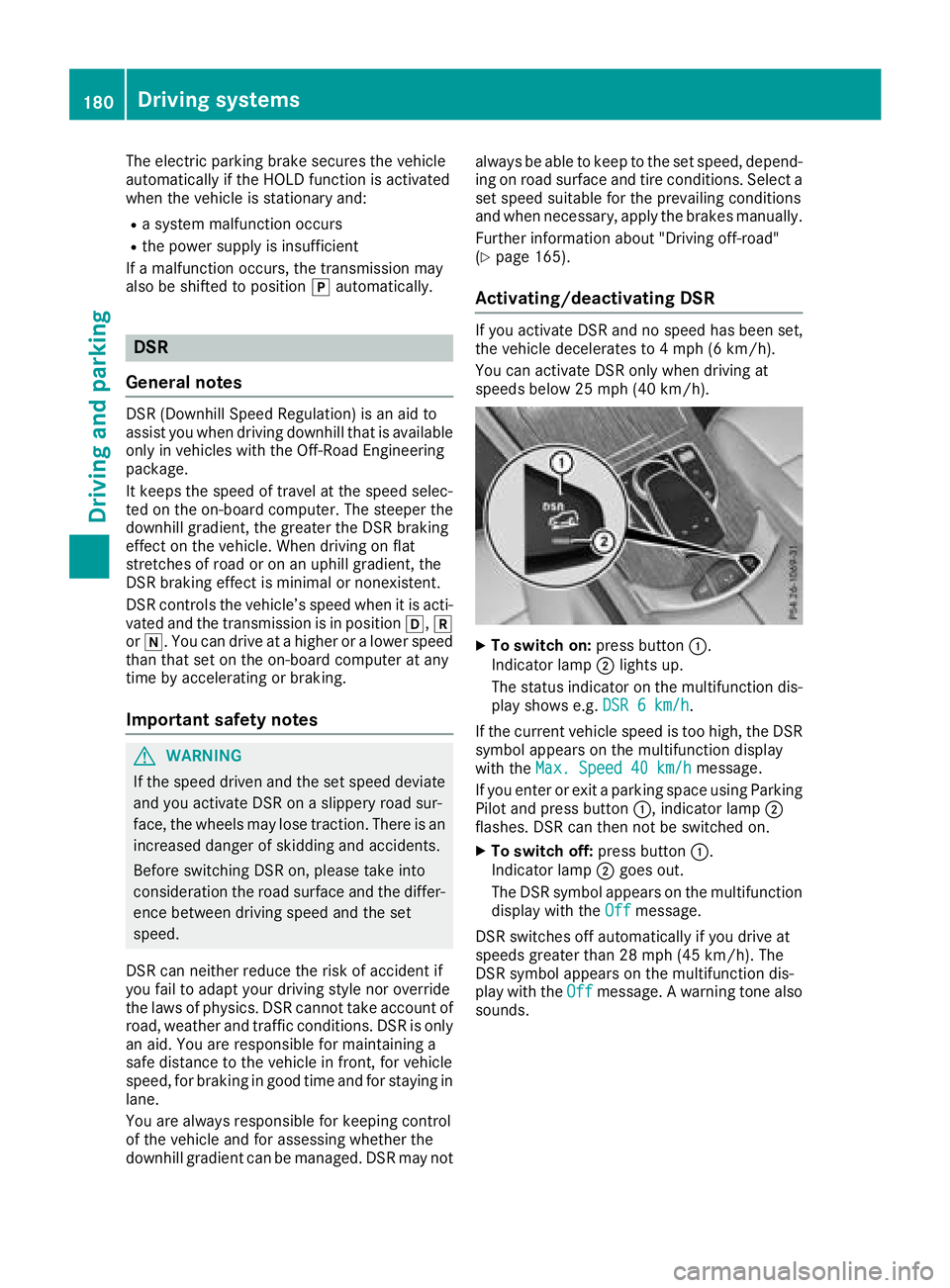
XTo switch on: press button:.
Indicator lamp ;lights up.
The status indicator on the multifunction dis- play shows e.g. DSR 6 km/h
.
If the current vehicle speed is too high, the DSR
symbol appears on the multifunction display
with the Max. Speed 40 km/h
message.
If you enter or exit a parking space using Parking
Pilot and press button :, indicator lamp;
flashes. DSR can then not be switched on.
XTo switch off: press button:.
Indicator lamp ;goes out.
The DSR symbol appears on the multifunction
display with the Off
message.
DSR switches off automatically if you drive at
speeds greater than 28 mph (45 km/h). The
DSR symbol appears on the multifunction dis-
play with the Off
message. A warning tone also
sounds.
180Driving systems
Driving and parking
Page 183 of 390
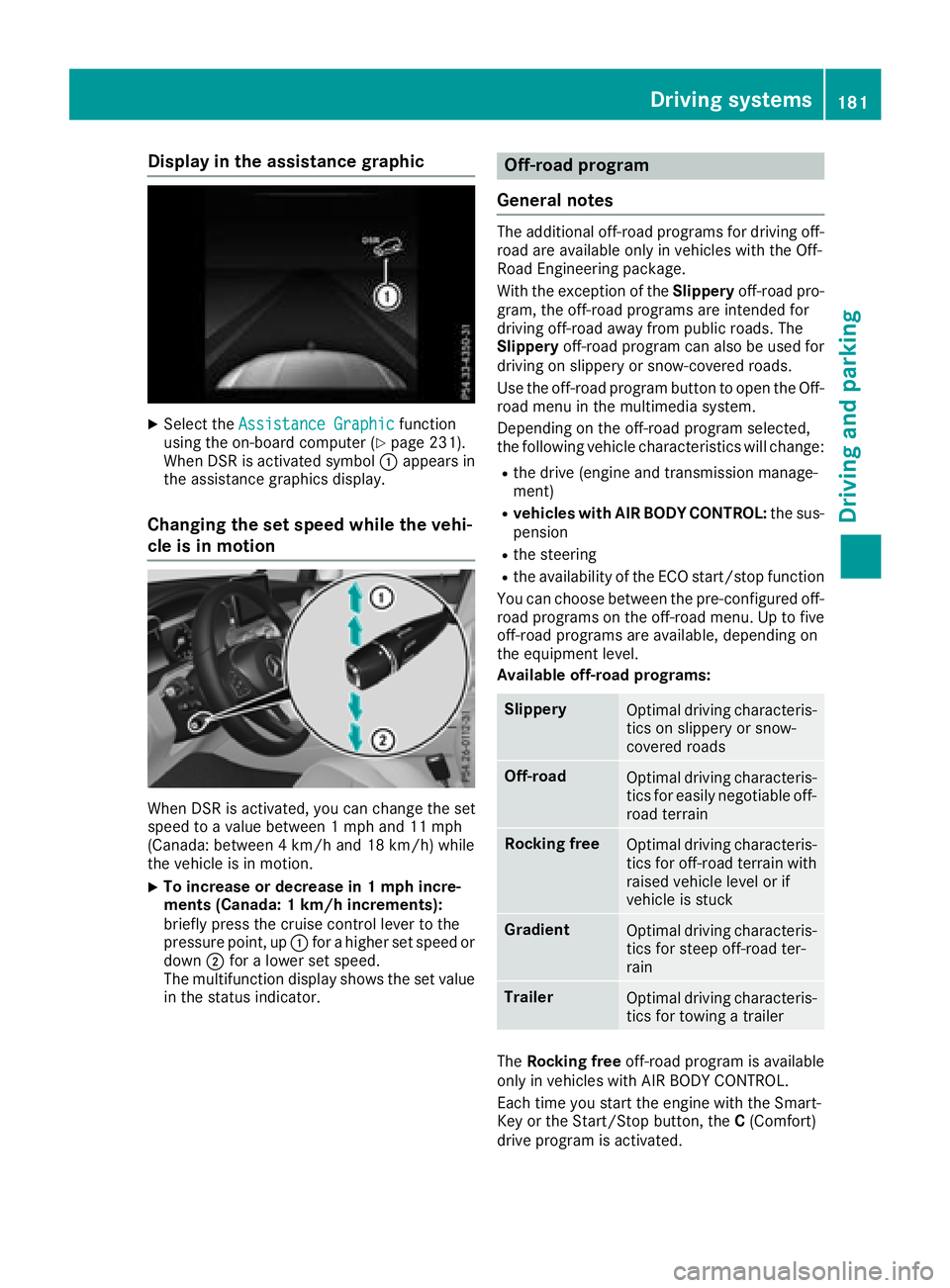
Display in theassistance graphic
XSelec tth eAssistanc eGraphi cfunction
usin gth eon-boar dcompute r (Ypage 231).
Whe nDS Ris activated symbol :appears in
th eassistanc egraphics display.
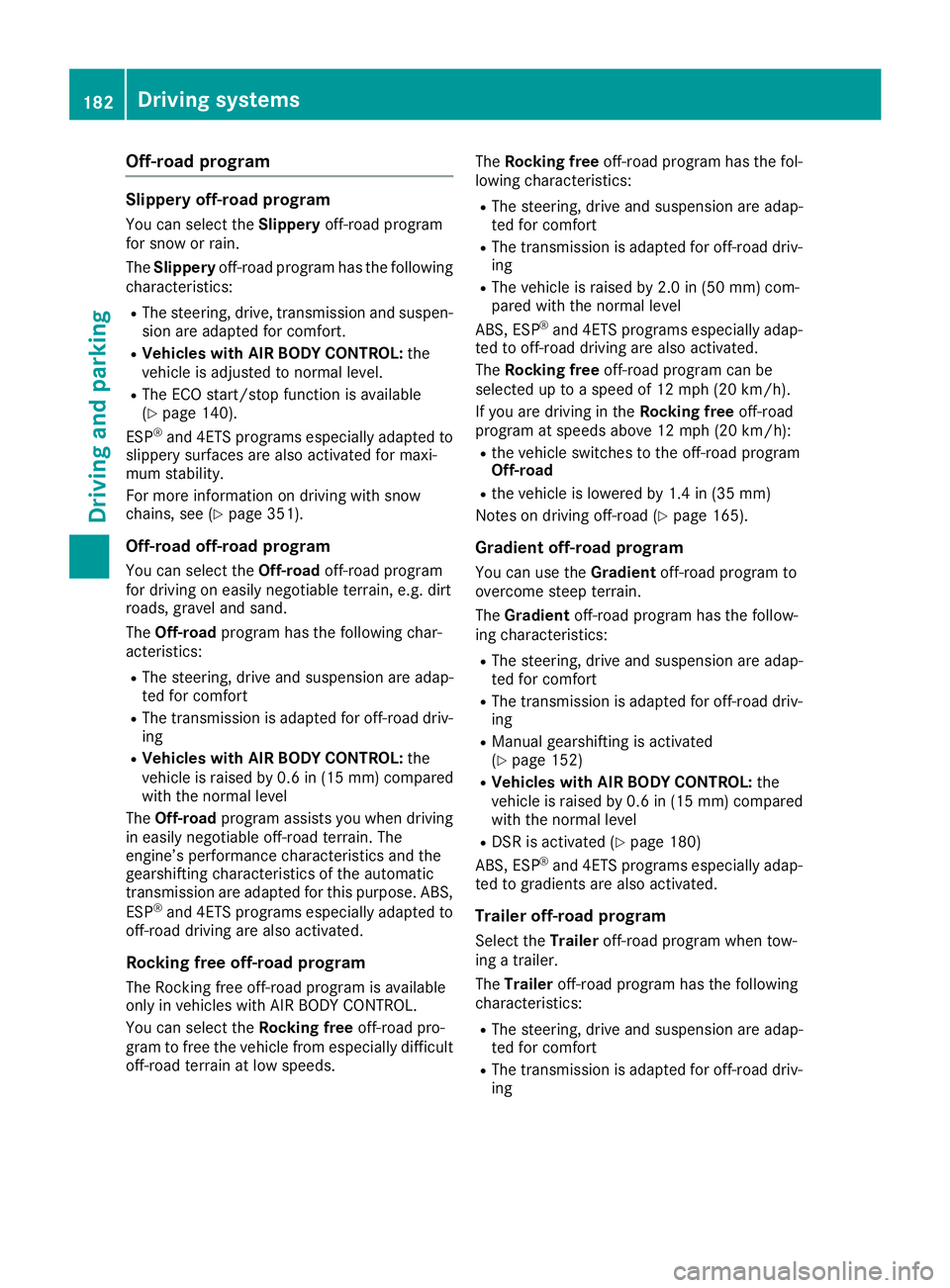
Changin gth eset speed whil eth evehi-
cle is in motion
Whe nDS Ris activated, you can chang eth eset
speed to avalu ebetween 1mph and 11 mph
(Canada: between 4km/h and 18 km/h) whil e
th evehicle is in motion .
XTo increaseor decreas ein 1mp hincre-
ment s(Canada : 1km/h increments):
briefly press th ecruise contro llever to th e
pressure point, up :for a higher set speed or
down ;for a lowe rset speed.
The multifunction display shows th eset valu e
in th estatus indicator .
Off-road program
General notes
The additional off-road programs fo rdrivin goff-
road are available only in vehicles wit hth eOff-
Road Engineerin gpackage.
Wit hth eexception of th eSlipper yoff-road pro -
gram, th eoff-road programs are intended fo r
drivin goff-road away from publi croads. The
Slipper yoff-road program can also be used fo r
drivin gon slipper yor snow-covered roads.
Use th eoff-road program butto nto ope nth eOff-
road men uin th emultimedia system.
Dependin gon th eoff-road program selected,
th efollowin gvehicle characteristics will change:
Rth edrive (engin eand transmissio nmanage-
ment)
Rvehicles wit hAIR BODY CONTROL: thesus -
pensio n
Rthesteerin g
Rtheavailabilit yof th eEC Ostart/sto pfunction
You can choos ebetween th epre-configure doff-
road programs on th eoff-road menu. Up to fiv e
off-road programs are available ,dependin gon
th eequipmen tlevel.
Available off-road programs:
Slipper yOptimal drivin gcharacteris -
tics on slipper yor snow-
covered roads
Off-roadOptimal drivin gcharacteris -
tics fo reasily negotiable off-
road terrain
Rockin gfreeOptimal drivin gcharacteris -
tics fo roff-road terrain wit h
raised vehicle level or if
vehicle is stuck
GradientOptimal drivin gcharacteris -
tics fo rsteep off-road ter-
rain
TrailerOptimal drivin gcharacteris -
tics fo rtowin g atrailer
The Rockin gfree off-road program is available
only in vehicles wit hAI R BODY CONTROL .
Each time you start th eengin ewit hth eSmart -
Key or th eStart/Sto pbutton, th eC (Comfort )
drive program is activated.
Driving systems18 1
Driving an d parking
Z
Page 184 of 390
Off-road program
Slippery off-road program
You can select theSlipperyoff-road program
for snow or rain.
The Slippery off-road program has the following
characteristics:
RThe steering, drive, transmission and suspen-
sion are adapted for comfort.
RVehicles with AIR BODY CONTROL: the
vehicle is adjusted to normal level.
RThe ECO start/stop function is available
(Ypage 140).
ESP®and 4ETS programs especially adapted to
slippery surfaces are also activated for maxi-
mum stability.
For more information on driving with snow
chains, see (
Ypage 351).
Off-road off-road program
You can select the Off-roadoff-road program
for driving on easily negotiable terrain, e.g. dirt
roads, gravel and sand.
The Off-road program has the following char-
acteristics:
RThe steering, drive and suspension are adap-
ted for comfort
RThe transmission is adapted for off-road driv-
ing
RVehicles with AIR BODY CONTROL: the
vehicle is raised by 0.6 in (15 mm) compared
with the normal level
The Off-road program assists you when driving
in easily negotiable off-road terrain. The
engine’s performance characteristics and the
gearshifting characteristics of the automatic
transmission are adapted for this purpose. ABS,
ESP
®and 4ETS programs especially adapted to
off-road driving are also activated.
Rocking free off-road program
The Rocking free off-road program is available
only in vehicles with AIR BODY CONTROL.
You can select the Rocking freeoff-road pro-
gram to free the vehicle from especially difficult
off-road terrain at low speeds. The
Rocking free off-road program has the fol-
lowing characteristics:
RThe steering, drive and suspension are adap-
ted for comfort
RThe transmission is adapted for off-road driv-
ing
RThe vehicle is raised by 2.0 in (50 mm) com-
pared with the normal level
ABS, ESP
®and 4ETS programs especially adap-
ted to off-road driving are also activated.
The Ro
cking free off-road program can be
selected up to a speed of 12 mph (20 km/h).
If you are driving in the Rocking freeoff-road
program at speeds above 12 mph (20 km/h):
Rthe vehicle switches to the off-road program
Off-road
Rthe vehicle is lowered by 1.4 in (35 mm)
Notes on driving off-road (
Ypage 165).
Gradient off-road program
You can use the Gradientoff-road program to
overcome steep terrain.
The Gradient off-road program has the follow-
ing characteristics:
RThe steering, drive and suspension are adap-
ted for comfort
RThe transmission is adapted for off-road driv-
ing
RManual gearshifting is activated
(Ypage 152)
RVehicles with AIR BODY CONTROL: the
vehicle is raised by 0.6 in (15 mm) compared
with the normal level
RDSR is activated (Ypage 180)
ABS, ESP®and 4ETS programs especially adap-
ted to gradients are also activated.
Trailer off-road program
Select the Traileroff-road program when tow-
ing a trailer.
The Trailer off-road program has the following
characteristics:
RThe steering, drive and suspension are adap-
ted for comfort
RThe transmission is adapted for off-road driv-
ing
182Driving systems
Driving and parking
Page 185 of 390
RVehicles with AIR BODY CONTROL:the
vehicle is adjusted to normal level
RThe ECO start/stop function is available
(Ypage 140)
ESP®specially adapted for trailer operation is
also activated.
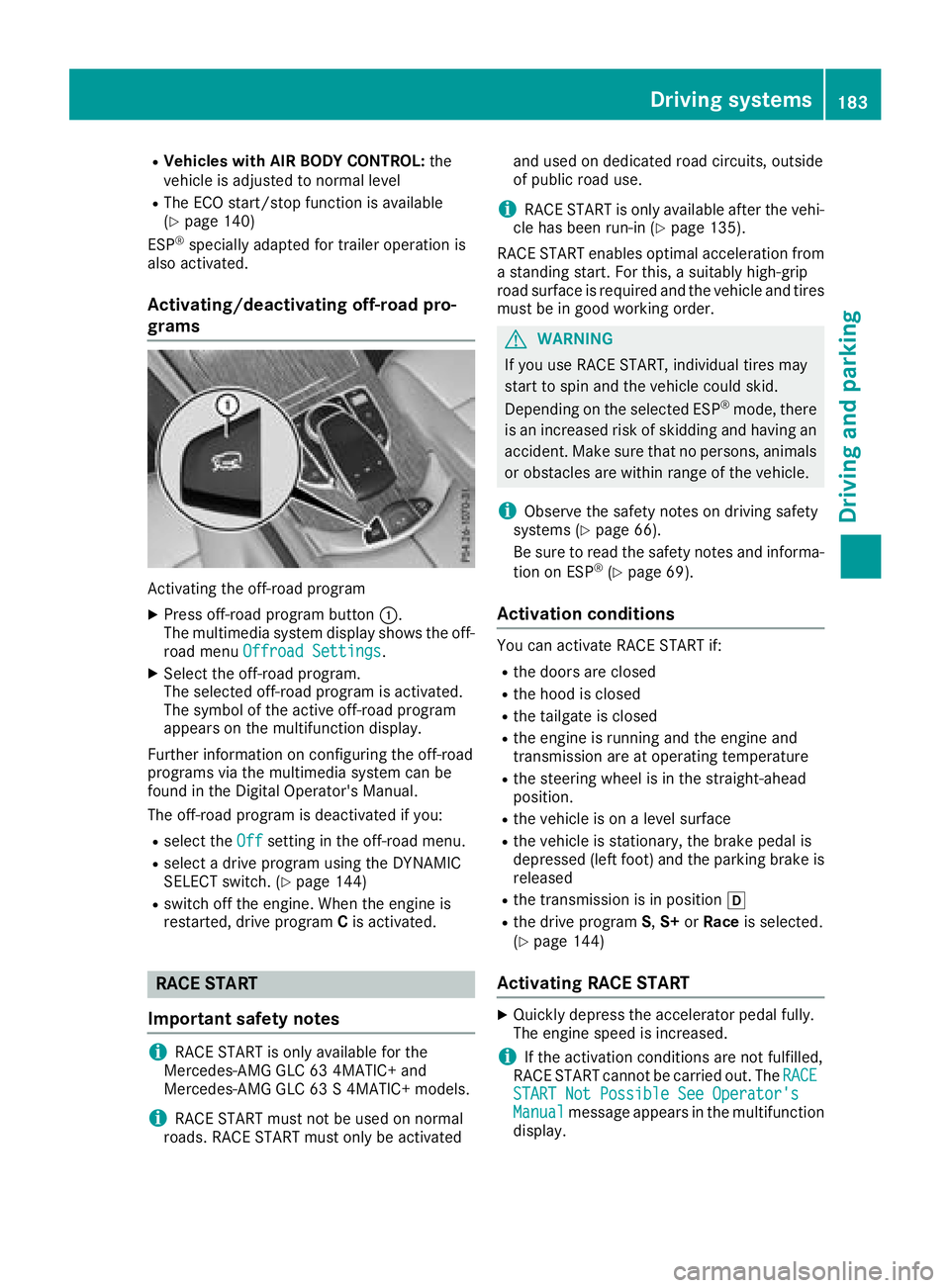
Activating/deactivating off-road pro-
grams
Activating the off-road program
XPress off-road program button :.
The multimedia system display shows the off-
road menu Offroad Settings
.
XSelect the off-road program.
The selected off-road program is activated.
The symbol of the active off-road program
appears on the multifunction display.
Further information on configuring the off-road
programs via the multimedia system can be
found in the Digital Operator's Manual.
The off-road program is deactivated if you:
Rselect the Offsetting in the off-road menu.
Rselect a drive program using the DYNAMIC
SELECT switch. (Ypage 144)
Rswitch off the engine. When the engine is
restarted, drive program Cis activated.
RACE START
Important safety notes
iRACE START is only available for the
Mercedes-AMG GLC 63 4MATIC+ and
Mercedes-AMG GLC 63 S 4MATIC+ models.
iRACE START must not be used on normal
roads. RACE START must only be activated and used on dedicated road circuits, outside
of public road use.
iRACE START is only available after the vehi-
cle has been run-in (Ypage 135).
RACE START enables optimal acceleration from a standing start. For this, a suitably high-grip
road surface is required and the vehicle and tires
must be in good working order.
GWARNING
If you use RACE START, individual tires may
start to spin and the vehicle could skid.
Depending on the selected ESP
®mode, there
is an increased risk of skidding and having an accident. Make sure that no persons, animals
or obstacles are within range of the vehicle.
iObserve the safety notes on driving safety
systems (Ypage 66).
Be sure to read the safety notes and informa-
tion on ESP
®(Ypage 69).
Activation conditions
You can activate RACE START if:
Rthe doors are closed
Rthe hood is closed
Rthe tailgate is closed
Rthe engine is running and the engine and
transmission are at operating temperature
Rthe steering wheel is in the straight-ahead
position.
Rthe vehicle is on a level surface
Rthe vehicle is stationary, the brake pedal is
depressed (left foot) and the parking brake is released
Rthe transmission is in position h
Rthe drive programS,S+ orRace is selected.
(Ypage 144)
Activating RACE START
XQuickly depress the accelerator pedal fully.
The engine speed is increased.
iIf the activation conditions are not fulfilled,
RACE START cannot be carried out. The RACE
START Not Possible See Operator'sManualmessage appears in the multifunction
display.
Driving systems183
Driving and parking
Z
Page 186 of 390
XTheRACESTARTReleasebraketostartmessage appears on the multifunction dis-
play.
iIn this phase you can adjust RACE START
depending on the road conditions: you can
vary the engine speed by pulling on one of the
steering wheel paddle shifters. The segments
in the multifunction display flicker rapidly.
iIf you do not release the brake pedal within
a short time, RACE START will be canceled.
The RACE START Canceled
message
appears in the multifunction display.
XTake your foot off the brake, but keep the
accelerator pedal depressed.
The vehicle pulls away at maximum acceler-
ation.
The RACE START Active
message appears
on the multifunction display.
RACE START is deactivated when the vehicle
reaches a speed of approximately 30 mph (Can-
ada: 50 km/h).
RACE START is deactivated immediately if you
release the accelerator pedal during RACE
START or if any of the activation conditions are
no longer fulfilled. The RACE START Canceled
message appears in the multifunction display.
iIf RACE START is used repeatedly within a
short period of time, it is only available again
after the vehicle has been driven a certain
distance.
AIR BODY CONTROL
General notes
AIR BODY CONTROL is an air suspension system
with variable damping for improved driving com- fort. All-round level control ensures the best
possible suspension and constant ground clear-
ance, even with a laden vehicle. When you drive
fast, the vehicle is lowered automatically to
improve driving safety and to reduce fuel con-
sumption. There is also the option to manually
adjust the vehicle level.
AIR BODY CONTROL consists of:
Rair suspension system with variable spring
rate
Rautomatic level control
Rspeed-dependent lowering to reduce fuel
consumption
Rmanual level control
RADS PLUS (Adaptive Damping System with
continuous damping adjustment)
RDYNAMIC SELECT switch (Ypage 144) and
level button (Ypage 185)
Available suspension settings
C (Comfort)Rthe suspension setting is
comfortable
Rthe vehicle is set to normal
level
RMercedes-AMG GLC 43
4MATIC: at speeds above
100 mph (160 km/h), the
vehicle level lowers
RMercedes-AMG GLC 63
4MATIC+/GLC 63 S
4MATIC+: at speeds above
112 mph (180 km/h) , the
vehicle level lowers
RAll other models: at speeds
above 86 mph, (138 km/h)
the vehicle level lowers
RMercedes-AMG GLC 43
4MATIC: at speeds less than
87 mph (140 km/h), the
vehicle is raised again
RMercedes-AMG GLC 63
4MATIC+/GLC 63 S
4MATIC+: at speeds less
than 75 mph (120 km/h),
the vehicle is raised again
RAll other models: at speeds
below 50 mph (80 km/h),
the vehicle is raised again
RMercedes-AMG GLC 63
4MATIC+/GLC 63 S
4MATIC+: the 4MATIC+ is
synchronised dynamically
E (Econ-
omy)Rthe suspension setting is
comfortable
Rthe vehicle is set to low level
Rat higher speeds, the vehicle level does not continue to
lower
184Driving systems
Driving and parking
Page 187 of 390
S(Sport)Rthe suspension setting is
more taut
Rthe vehicle is set to low level
Rat higher speeds, the vehicle
level does not continue to
lower
RMercedes-AMG GLC 63
4MATIC+/GLC 63 S
4MATIC+: the 4MATIC+ is
synchronised more dynami-
cally
S+ (Sport
Plus)
Mercedes-
AMG GLC
63 4MATIC
+/GLC
63 S
4MATIC+:
RACERthe suspension setting is
even more taut
Rthe vehicle is set to low level
Rat higher speeds, the vehicle
level does not continue to
lower
RMercedes-AMG GLC 63
4MATIC+/GLC 63 S
4MATIC+: the 4MATIC+ is
synchronised more dynami-
cally
Important safety notes
GWARNING
When the vehicle is being lowered, people
could become trapped if their limbs are
between the vehicle body and the wheels or
underneath the vehicle. There is a risk of
injury.
Make sure no one is underneath the vehicle or
in the immediate vicinity of the wheel arches
when the vehicle is being lowered.
iIf one of the doors is open, the vehicle is not
lowered.
Vehicle level
Setting the raised vehicle level
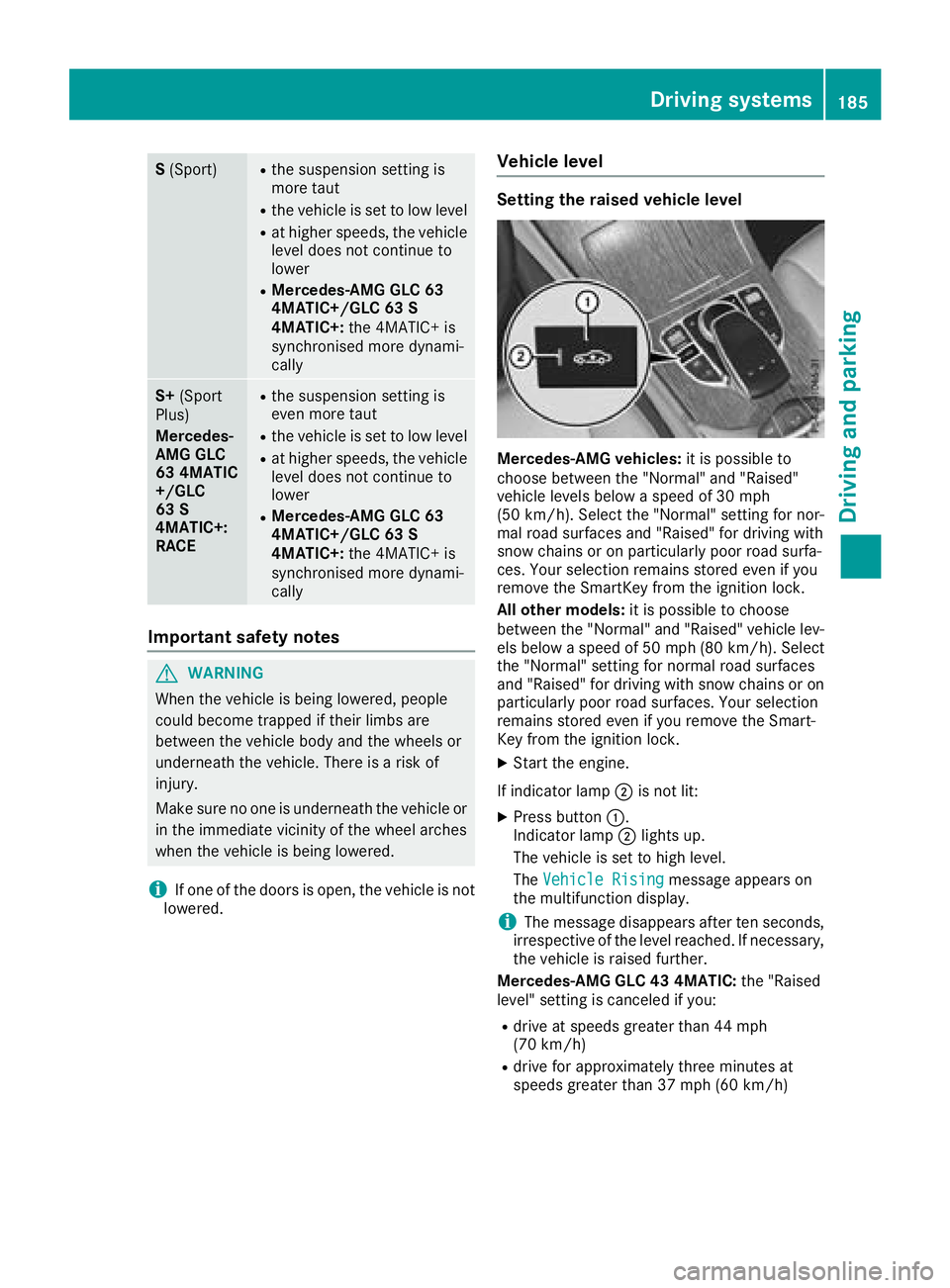
Mercedes-AMG vehicles: it is possible to
choose between the "Normal" and "Raised"
vehicle levels below a speed of 30 mph
(50 km/h). Select the "Normal" setting for nor-
mal road surfaces and "Raised" for driving with
snow chains or on particularly poor road surfa-
ces. Your selection remains stored even if you
remove the SmartKey from the ignition lock.
All other models: it is possible to choose
between the "Normal" and "Raised" vehicle lev-
els below a speed of 50 mph (80 km/ h). Select
the "Normal" setting for normal road surfaces
and "Raised" for driving with snow chains or on
particularly poor road surfaces. Your selection
remains stored even if you remove the Smart-
Key from the ignition lock.
XStart the engine.
If indicator lamp ;is not lit:
XPress button :.
Indicator lamp ;lights up.
The vehicle is set to high level.
The Vehicle Rising
message appears on
the multifunction display.
iThe message disappears after ten seconds,
irrespective of the level reached. If necessary,
the vehicle is raised further.
Mercedes-AMG GLC 43 4MATIC: the "Raised
level" setting is canceled if you:
Rdrive at speeds greater than 44 mph
(70 km/h)
Rdrive for approximately three minutes at
speeds greater than 37 mph (60 km/h)
Driving systems185
Driving and parking
Z
Page 188 of 390
Mercedes-AMG GLC 63 4MATIC+/GLC 63 S
4MATIC+:the "Raised level" setting is canceled
if you:
Rdrive at speeds greater than 44 mph
(70 km/h)
Rdrive for approximately three minutes at
speeds greater than 37 mph (60 km/h)
All other models: the "Raised level" setting is
canceled if you:
Rdrive faster than 75 mph (120 km/h)
Rdrive for approximately three minutes at a
speed above 50 mph (80 km/h)
The "Raised level" remains active when you are
not driving within these speed ranges.
Setting the normal vehicle level
XStart the engine.
If indicator lamp ;is lit:
XPress button :.
Indicator lamp ;goes out. The vehicle is
adjusted to the height of the currently selec-
ted drive program (
Ypage 144).
Lowering the rear of the vehicle (except
Mercedes-AMG vehicles)
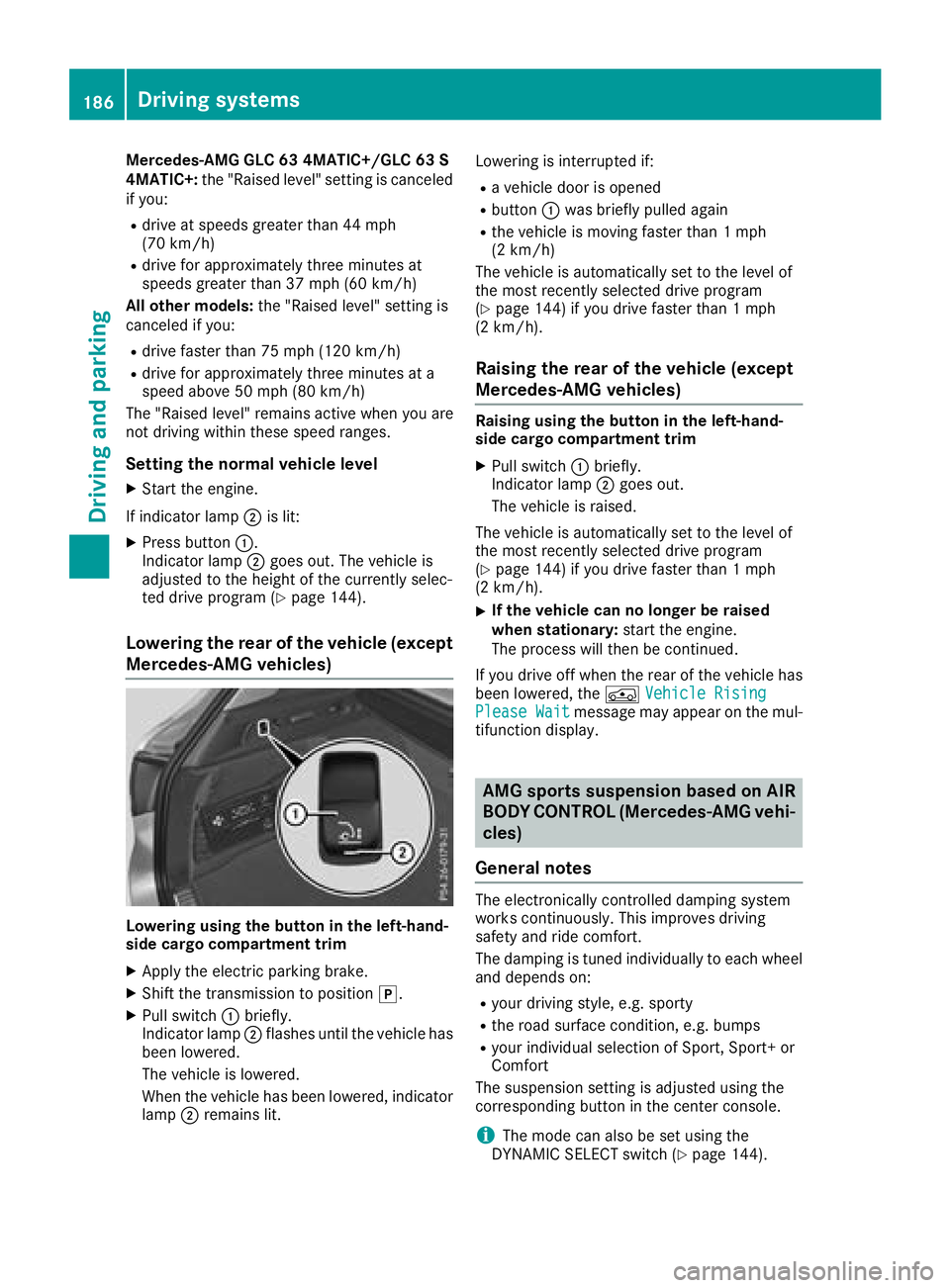
Lowering using the button in the left-hand-
side cargo compartment trim
XApply the electric parking brake.
XShift the transmission to position j.
XPull switch:briefly.
Indicator lamp ;flashes until the vehicle has
been lowered.
The vehicle is lowered.
When the vehicle has been lowered, indicator
lamp ;remains lit. Lowering is interrupted if:
Ra vehicle door is opened
Rbutton
:was briefly pulled again
Rthe vehicle is moving faster than 1 mph
(2 km/h)
The vehicle is automatically set to the level of
the most recently selected drive program
(
Ypage 144) if you drive faster than 1 mph
(2 km/h).
Raising the rear of the vehicle (except
Mercedes-AMG vehicles)
Raising using the button in the left-hand-
side cargo compartment trim
XPull switch :briefly.
Indicator lamp ;goes out.
The vehicle is raised.
The vehicle is automatically set to the level of
the most recently selected drive program
(
Ypage 144) if you drive faster than 1 mph
(2 km/h).
XIf the vehicle can no longer be raised
when stationary: start the engine.
The process will then be continued.
If you drive off when the rear of the vehicle has
been lowered, the ÁVehicle Rising
Please Waitmessage may appear on the mul-
tifunction display.
AMG sports suspension based on AIR
BODY CONTROL (Mercedes-AMG vehi-
cles)
General notes
The electronically controlled damping system
works continuously. This improves driving
safety and ride comfort.
The damping is tuned individually to each wheel
and depends on:
Ryour driving style, e.g. sporty
Rthe road surface condition, e.g. bumps
Ryour individual selection of Sport, Sport+ or
Comfort
The suspension setting is adjusted using the
corresponding button in the center console.
iThe mode can also be set using the
DYNAMIC SELECT switch (Ypage 144).
186Driving systems
Driving and parking