change key battery MERCEDES-BENZ GLC SUV 2018 Owner's Manual
[x] Cancel search | Manufacturer: MERCEDES-BENZ, Model Year: 2018, Model line: GLC SUV, Model: MERCEDES-BENZ GLC SUV 2018Pages: 390, PDF Size: 6.54 MB
Page 82 of 390
KEYLESS-GOstart function
Gene ral notes
Bear in min dthat th eengin ecan be started by
any of th evehicl eoccupant sif there is aSmart -
Key in th evehicl e (
Ypage 138).
Changing the settings ofthe locking
system
You can chang eth esetting sof th elocking sys-
tem. This mean sthat only th edriver's door and
th efuel filler flap are unlocke dwhen th evehicl e
is unlocked. This is useful if you frequentl ytravel
alone.
XTo change th esetting: press and hold down
th e% and& buttons simultaneousl y
for approximately six seconds until th ebat -
tery chec klamp (
Ypage 81) flashes twice .
If th esetting of th elocking system is changed
within th esignal range of th evehicle, pressing
th e& or% button:
Rlocks or
Runlocks th evehicl e
The SmartKey no wfunction sas follows :
XTo unlock: press the% buttononce .
XTo unlock centrally: press the% button
twice .
XTo lock: press the& button.
XTo restor eth efactory settings: press and
hold th e% and& buttons simultane -
ousl yfor approximately six seconds until th e
battery chec klamp (
Ypage 81) flashes
twice .
The KEYLESS-GO function scan be changed as
follows :
XTo unlock th edriver's door :touch th einner
surfac eof th edoor handle on th edriver's
door .
XTo unlock centrally: touch theinner surfac e
of th edoor handle on th efront-passenger
door or there
ar door .
XTo lock centrally: touch theouter sensor
surfac eon on eof th edoor handles .
Mechanical key
Gene ral notes
If th evehicl ecan no longer be locke dor
unlocke dwit hth eSmartKey or KEYLESS-GO ,
use th emechanical key.
If you use th emechanical ke yto unloc kand
open th edriver's door ,th eanti-thef talarm sys-
te m will be triggered .Switc hoff th ealarm
(
Ypage 77) .
If you unloc kth evehicl eusin gth emechanical
key, th efuel filler flap will no tbe unlocke dauto -
matically.
XTo unlock th efuel filler flap: insert the
SmartKey int oth eignition lock.
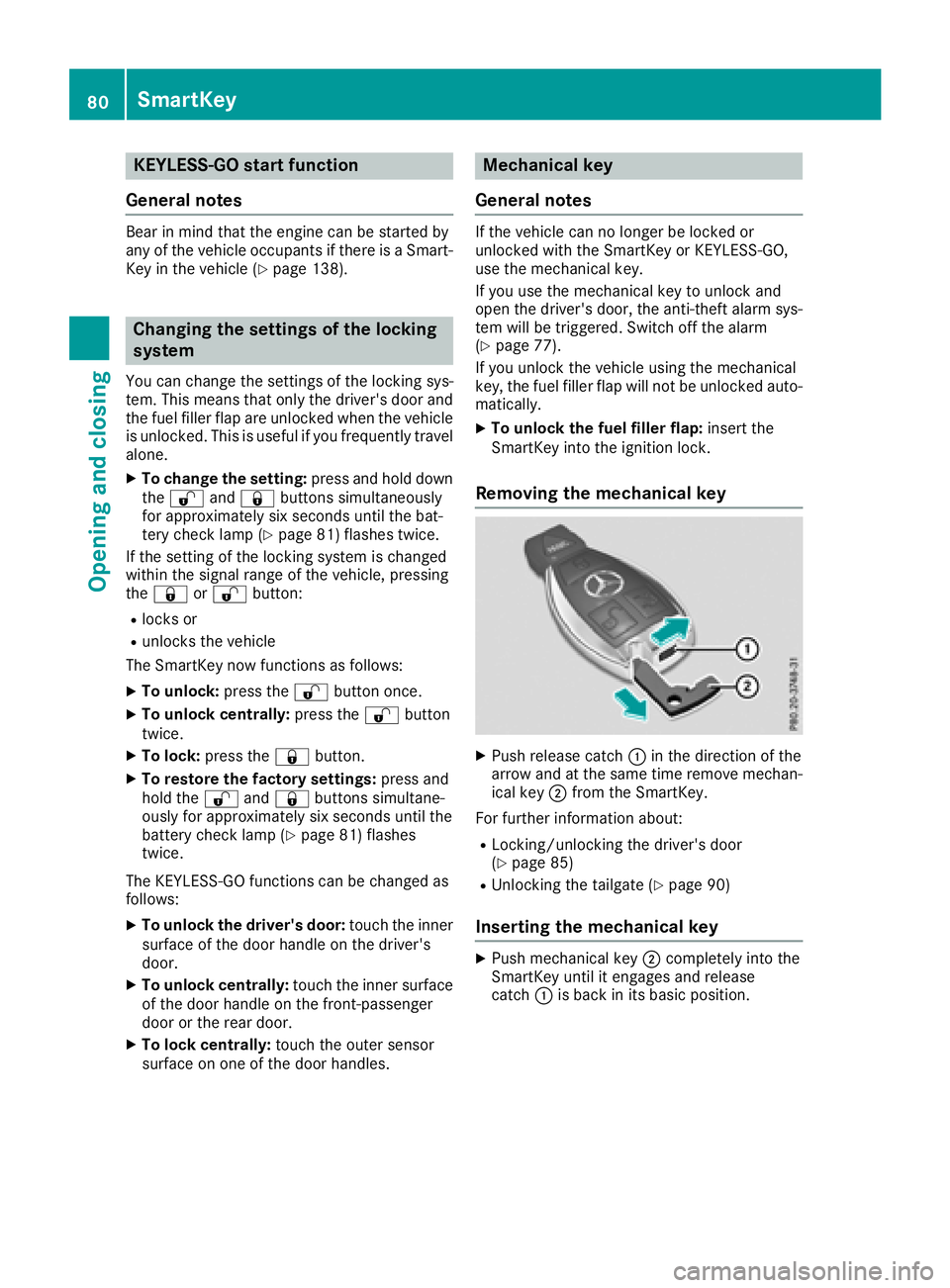
Removing the mechanical key
XPush release catch :in th edirection of th e
arrow and at th esam etime remove mechan -
ical ke y; from th eSmartKey.
Fo rfurther information about :
RLocking/unlocking thedriver's door
(Ypage 85 )
RUnlocking th etailgat e (Ypage 90 )
Inserting the mechanical key
XPush mechanical ke y; completely int oth e
SmartKey until it engage sand release
catch :is bac kin it sbasic position .
80SmartKey
Opening and closing
Page 83 of 390
SmartKey battery
Important safety notes
GWARNING
Batteries contain toxic and corrosive substan- ces. If batteries are swallowed, it can result in
severe health problems. There is a risk of fatalinjury.
Keep batteries out of the reach of children. If
a battery is swallowed, seek medical attention immediately.
HEnvironmental note
Batteries contain dangerous
substances. It is against the
law to dispose of them with
the household rubbish. They
must be collected separatelyand recycled to protect the
environment.
Dispose of batteries in an
environmentally friendly
manner. Take discharged
batteries to a qualified spe-
cialist workshop or a special
collection point for used bat-
teries.
The SmartKey batteries contain perchlorate
material, which may require special handling
and regard for the environment. National guide-
lines must be observed during disposal. In Cal-
ifornia, see www.dtsc.ca.gov/
HazardousWaste/Perchlorate/index.cfm.
Mercedes-Benz recommends that you have the
batteries replaced at a qualified specialist work-
shop.
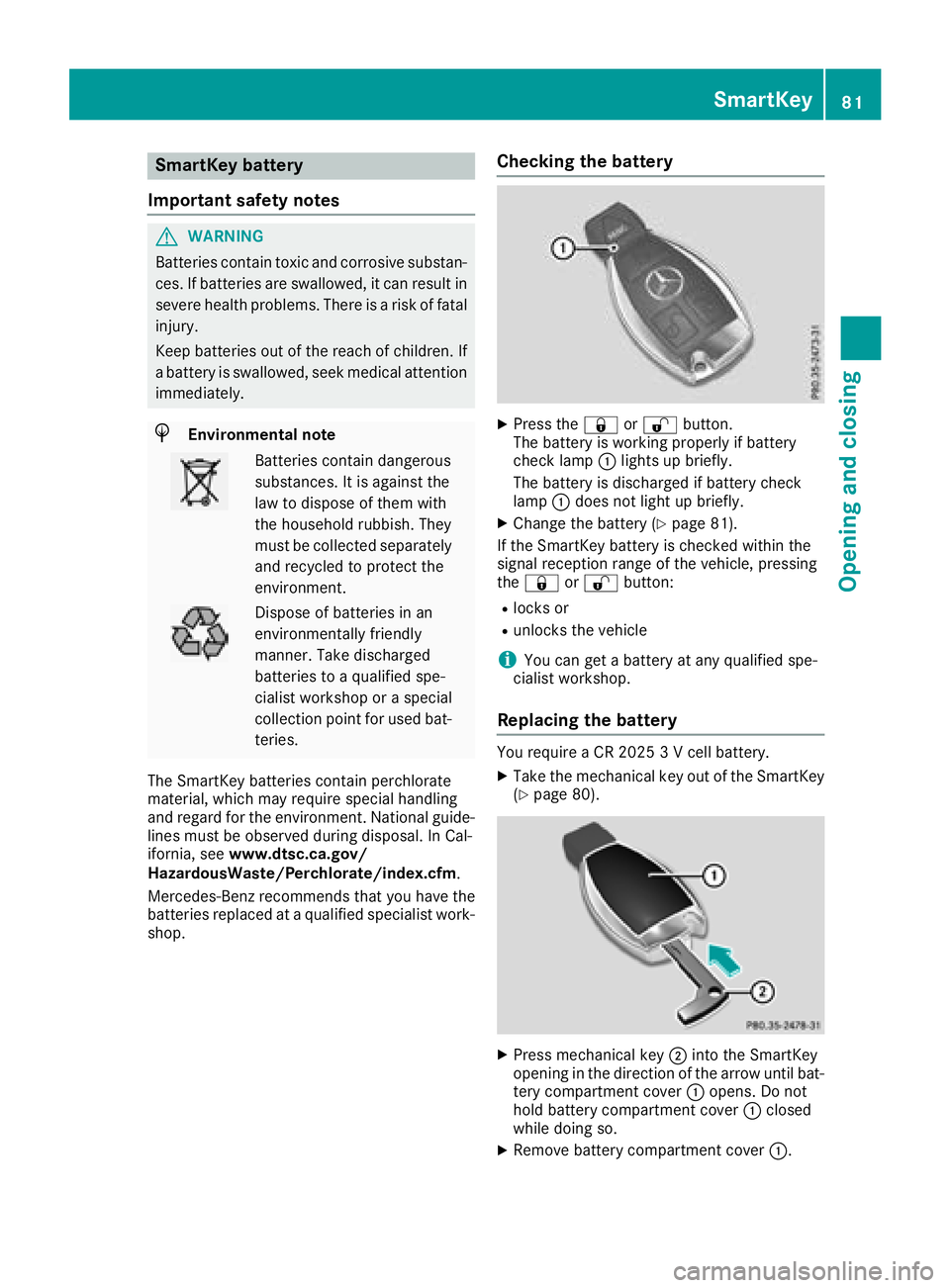
Checking the battery
XPress the &or% button.
The battery is working properly if battery
check lamp :lights up briefly.
The battery is discharged if battery check
lamp :does not light up briefly.
XChange the battery (Ypage 81).
If the SmartKey battery is checked within the
signal reception range of the vehicle, pressing
the & or% button:
Rlocks or
Runlocks the vehicle
iYou can get a battery at any qualified spe-
cialist workshop.
Replacing the battery
You require a CR 2025 3 V cell battery.
XTake the mechanical key out of the SmartKey
(Ypage 80).
XPress mechanical key ;into the SmartKey
opening in the direction of the arrow until bat-
tery compartment cover :opens. Do not
hold battery compartment cover :closed
while doing so.
XRemove battery compartment cover :.
SmartKey81
Opening and closing
Z
Page 85 of 390
ProblemPossible causes/consequences andMSolutions
KEYLESS-GO is malfunctioning.
XLock/unlock the vehicle using the remote control function of the
SmartKey.
XHave the vehicle and SmartKey checked at a qualified specialist
workshop.
If the vehicle can also not be locked/unlocked using the remote con-
trol function:
XLock or unlock the vehicle using the mechanical key (Ypage 85).
XHave the vehicle and SmartKey checked at a qualified specialist
workshop.
The engine cannot be
started using the Smart-
Key.The on-board voltage is too low.
XSwitch off non-essential consumers, e.g. seat heating or interior
lighting, and try to start the engine again.
If this does not work:
XCheck the starter battery and charge it if necessary (Ypage 340).
or
XJump-start the vehicle (Ypage 341).
or
XConsult a qualified specialist workshop.
The engine cannot be
started using the Start/
Stop button. The Smart-
Key is in the vehicle.The vehicle is locked.
XUnlock the vehicle and try to start the vehicle again.
The SmartKey battery is discharged or nearly discharged.
XCheck the SmartKey battery (Ypage 81) and replace it if necessary
(Ypage 81).
If this does not work:
XStart your vehicle with the SmartKey in the ignition lock.
There is interference from a powerful source of radio waves.
XStart your vehicle with the SmartKey in the ignition lock.
You have lost a Smart-
Key.XHave the SmartKey deactivated at a qualified specialist workshop.
XReport the loss immediately to the vehicle insurers.
XIf necessary, have the locks changed as well.
You have lost the
mechanical key.XReport the loss immediately to the vehicle insurers.
XIf necessary, have the locks changed as well.
SmartKey83
Opening and closing
Z
Page 132 of 390
Activating/deactivating
Dual-zone automatic climatecontrol
XPress th e0 rockerswitch up or down .
The indicator lamp abov eth e0 rocker
switch lights up or goe sout .
The synchronization function deactivates if th e
setting sfor th efront-passenger side are
changed.
3-zone automatic climat econtrol
XActivat eor deactivat eth e"Synchronization "
function usin gth emultimedia system
(
Ypage 285).
The synchronization function is deactivated:
Rif th esetting sfor th efront-passenger side are
changed
Rth esetting sfor th erear compartmen tare
changed
Defrosting the windshield
Gene ral notes
You can use this function to defros tth ewind-
shield or to clear afogged up windshield or fron t
side windows on th einside.
Switc hoff th e"Windshield defrosting "function
as soo nas th ewindshield is clear again .
Switching the "Windshield def rosting"
function on oroff
XTurn th eSmartKey to position 2in th eigni-
tion loc k (Ypage 136).
XTo switch on: press rockerswitch ¬on
th efron tcontrol uni tup or down .
The indicator lamp abov eth e¬ rocker
switch lights up. The curren tclimat econtrol
setting sare deactivated.
The climat econtrol system switches to th e
followin gfunctions:
Rhigh airflow
Rhigh temperature
Rair distribution to th ewindshield and fron t
side windows
Rair-recirculation mod eoff
iIf necessary, th e"Cooling wit hair dehumid -
ification "function is activated. In this case, th
eindicator lamp abov eth e¿ rocker
switch remain sswitched off .
XTo switch off :press rocke rswitch ¬up or
down .
The indicator lamp abov eth e¬ rocker
switch goes out .The previously selected set -
ting sare restored .Air-recirculation mod e
remain sdeactivated.
Defrosting the windows
Windows fogged up onthe inside
XActivat eth e"Cooling wit hair dehumidifica-
tion "function wit hth e¿ rockerswitch .
XSwitchon automatic mod eusin gth eÃ
rocke rswitch .
XIf thewindows continu eto fog up, activat eth e
"Windshield defrosting "function usin gth e
¬ rockerswitch .
iYou should only select this setting until th e
windshield is clear again .
Windows fogged uponthe outside
XActivat eth ewindshield wipers.
XSwitc hon automatic mod eusin gth eÃ
rocke rswitch .
iIf you clean th ewindows regularly, they do
no tfog up so quickly.
Rear window defros ter
Gene ral notes
The rear window defroste rhas ahigh curren t
draw .You should therefor eswitch it off as soo n
as th erear window is clear. Otherwise ,th erear
window defroste rswitches off automatically
after several minutes.
If th ebattery voltag eis to olow, th erear window
defroste rmay switch off .
Activating/deactivating
XTurn th eSmartKey to position 2in th eigni-
tion loc k (Ypage 136).
XPress rocke rswitch ¤up or down .
The indicator lamp abov erocke rswitch ¤
lights up or goes out .
130Operating the climate control systems
Climate control
Page 269 of 390
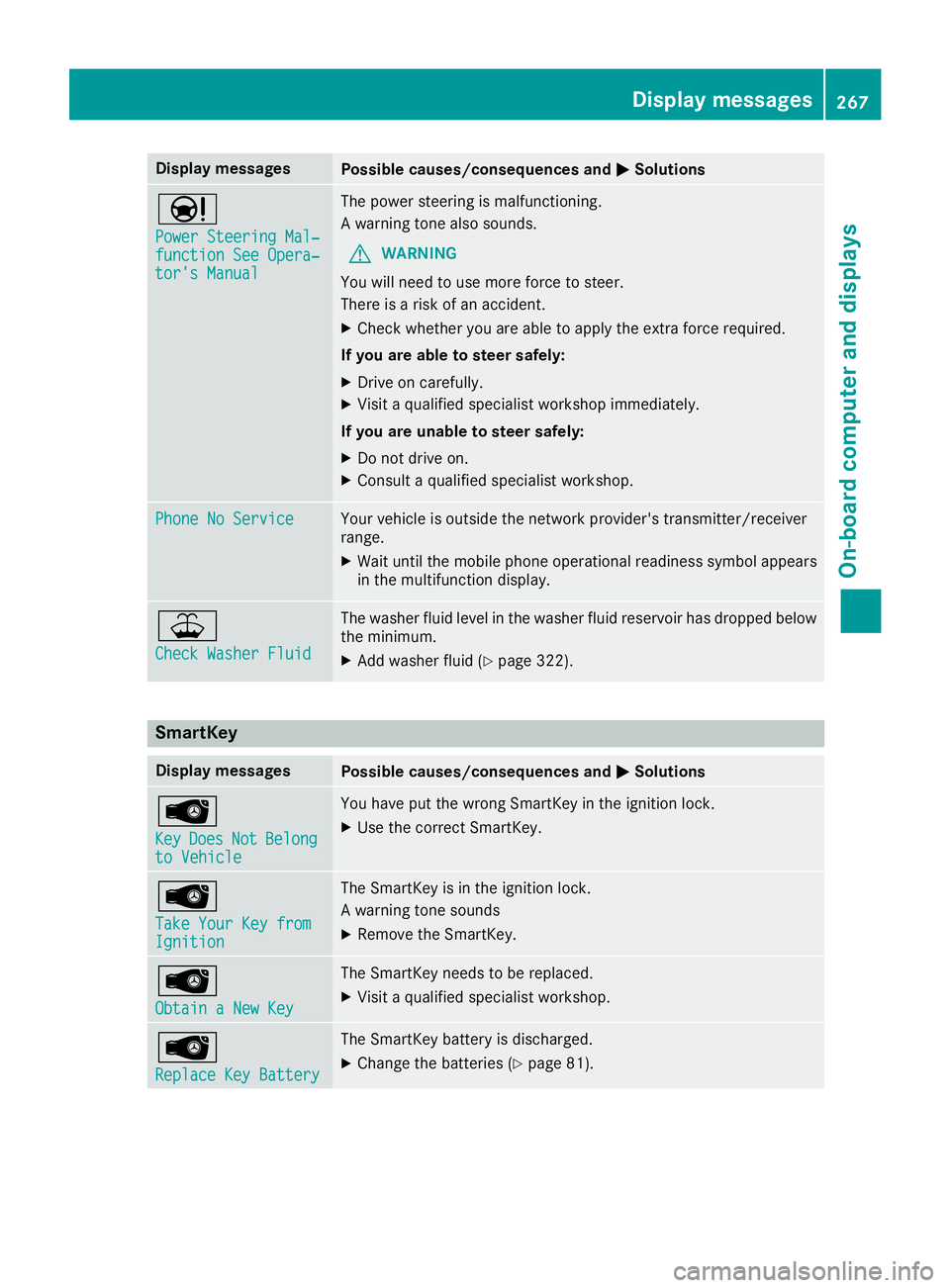
Display messagesPossible causes/consequences andMSolutions
Ð
Power Steering Mal‐function See Opera‐tor's Manual
The powersteering is malfunctioning .
A warning tone also sounds.
GWARNIN G
You will need to use mor eforce to steer .
There is aris kof an accident.
XChec kwhether you are able to apply th eextr aforce required.
If you ar eabl eto steer safely:
XDrive on carefully.
XVisit aqualified specialist workshop immediately.
If you ar eunable to steer safely:
XDo no tdrive on .
XConsult aqualified specialist workshop .
Phone No ServiceYour vehicleis outside th enetwork provider' stransmitter/receiver
range.
XWait until th emobile phone operational readiness symbol appear s
in th emultifunction display.
¥
Check Washer Fluid
The washer flui dlevel in th ewasher flui dreservoir has dropped belo w
th eminimum .
XAddwasher flui d (Ypage 322).
SmartKey
Display messagesPossible causes/consequences and MSolutions
Â
KeyDoesNotBelongto Vehicl e
You haveput th ewrong SmartKey in th eignition lock.
XUse th ecorrec tSmartKey.
Â
Tak eYou rKey fro mIgnition
The SmartKey is in th eignition lock.
A warning tone sounds
XRemove th eSmartKey.
Â
Obtain aNew Key
The SmartKey needs to be replaced.
XVisit aqualified specialist workshop .
Â
ReplaceKey Batter y
The SmartKey battery is discharged.
XChange thebatterie s (Ypage 81) .
Display messages267
On-board computer and displays
Z