coolant level MERCEDES-BENZ GLC SUV 2018 Owner's Manual
[x] Cancel search | Manufacturer: MERCEDES-BENZ, Model Year: 2018, Model line: GLC SUV, Model: MERCEDES-BENZ GLC SUV 2018Pages: 390, PDF Size: 6.54 MB
Page 10 of 390
Control panel for dual-zone auto-
matic clim ate control .................... .124
Controlling automatically ...............1 28
Cooling with air dehumidification .. 128
Cooling with air dehumidification
(multimedia system) ......................2 85
Defrosting the windows ................. 130
Defrosting the windshield .............. 130
ECO start/stop function ................ 127
General notes ................................ 124
Indicator lamp ................................ 128
Ionization ....................................... 133
Ionization (multimedia system) ...... 285
Notes on using the automatic cli-
mate control .................................. 126
Overview ........................................ 284
Overview of systems ......................1 24
Perfume atomizer .......................... 132
Perfume atomizer (multimedia
system) .......................................... 285
Pre-entry climate control (via key)
(multimedia system) ......................2 85
Pre-entry climate control at
departure time (multimedia sys-
tem) ............................................... 285
Problem with the rear window
defroster ........................................ 131
Problems with cooling with air
dehumidification ............................ 128
Rear control panel ......................... 125
Refrigerant ..................................... 381
Refrigerant filling capacity ............. 382
Setting the air distribution ............. 129
Setting the air vents ......................1 33
Setting the airflow ......................... 129
Setting the climate mode ...............1 28
Setting the climate mode (multi-
media system) ............................... 285
Setting the temperature ................ 128
Switching air-recirculation mode
on/off ............................................ 131
Switching on/off ........................... 127
Switching residual heat on/off ...... 131
Switching the rear window
defro ster on/off ............................ 130
Sw
itching the synchronization
function on and off ........................ 130 Synchronization function (multi-
media system) ............................... 285
Climate control settings
Multimedia system ........................ 284
Climate control system
Climate control .............................. 127
Coat hooks ......................................... 299
Cockpit
Overview .......................................... 36
Code for Apps
see QR code
COMAND display
Cleaning ......................................... 329
Combination switch .......................... 113
Connecting a USB device
see also Digital Operator's Man-
ual ..................................................2 80
Consumption statistics (on-board
computer) .......................................... 225
Controller ...........................................2 81
Controlling the speed
see Distance Pilot DISTRONIC
Convenience closing feature .............. 92
Convenience opening feature ............ 92
Coolant (engine)
Checking the level ......................... 322
Display message ............................ 252
Filling capacity ............................... 381
Important safety notes .................. 380
Temperature display in the instru-
ment cluster .................................. 221
Warning lamp ................................. 275
Cooling
see Climate control
Copyright ............................................. 35
Cornering light function
Display message ............................ 251
Function/notes .............................1 14
Crosswind Assist ................................. 73
Cruise control
Cruise control lever ....................... 169
Deactivating ................................... 170
Display message ............................ 261
Driving system ............................... 169
Function/notes .............................1 69
General notes ................................ 169
Important safety notes .................. 169
8Index
Page 27 of 390
Vehicle levelAIR BODY CONTROL ...................... 185
Display message ............................ 256
Video
Operating the DVD ......................... 229
see also Digital Operator's Man-
ual .................................................. 280
VIN
Seat ............................................... 377
Type plate ...................................... 376
W
Warning and indicator lampsABS ................................................ 271
Active Brake Assist ........................ 277
Airbag ............................................ 274
Brakes ........................................... 270
Coolant .......................................... 275
Distance warning ........................... 277
Engine diagnostics ......................... 274
ESP
®.............................................. 271
ESP®OFF ....................................... 273
Fuel tank ........................................ 274
General notes ................................ 268
Overview .......................................... 37
Parking brake ................................ 274
PASSENGER AIR BAG ...................... 45
Reserve fuel ................................... 274
Restraint system ............................ 274
Seat belt ........................................ 269
SPORT handling mode ................... 273
Steering ......................................... 279
Tire pressure monitor .................... 278
Warranty .............................................. 29
Washer fluid
Display message ............................ 267
Weather display (COMAND)
see also Digital Operator's Man-
ual .................................................. 280
Wheel and tire combinations
Tires ............................................... 373
Wheel bolt tightening torque ........... 373
Wheel chock ...................................... 370
Wheels
Changing a wheel .......................... 369
Checking ........................................ 349
Cleaning ......................................... 326 Important safety notes .................. 349
Information on driving .................... 349
Interchanging/changing ................ 369
Mounting a new wheel ................... 372
Mounting a wheel .......................... 370
Removing a wheel .......................... 372
Snow chains .................................. 351
Storing ........................................... 370
Tightening torque ........................... 373
Wheel size/tire size ....................... 373
Window curtain air bag
Display message ............................ 248
Operation ......................................... 51
Windows
see Side windows
Windshield
Defrosting ...................................... 130
Windshield washer fluid
see Windshield washer system
Windshield washer system
Adding washer fluid ....................... 322
Important safety notes .................. 381
Windshield wipers
Problem (malfunction) ................... 123
Rear window wiper ........................ 121
Replacing the wiper blades ............ 121
Switchi
ng on/off ........................... 120
Winter driving
Important safety notes .................. 351
Slippery road surfaces ................... 165
Snow chains .................................. 351
Winter operation
Radiator cover ............................... 319
Summer tires ................................. 351
Winter tires
M+S tires ....................................... 351
Wiper arm
Moving to a vertical position .......... 121
Wiper blades
Cleaning ......................................... 327
Important safety notes .................. 121
Replacing ....................................... 121
Replacing (rear window) ................ 122
Replacing (windshield) ................... 121
Without changing gears
Display message ............................ 265
Wooden trim (cleaning instruc-
tions) .................................................. 330
Index25
Page 146 of 390
ProblemPossible causes/consequences andMSolutions
The engine is not running
smoothly and is misfir-
ing.There is a malfunction in the engine electronics or in a mechanical
component of the engine management system.
XOnly depress the accelerator pedal slightly.
Otherwise, non-combusted fuel may get into the catalytic converter
and damage it.
XHave the cause rectified immediately at a qualified specialist work-
shop.
The coolant temperature
display indicates a value
within the red band.The coolant level is too low. The coolant is too hot and the engine is no
longer being cooled sufficiently.
XStop as soon as possible and allow the engine and the coolant to
cool down.
XCheck the coolant level (Ypage 322). Observe the warning notes
as you do so and add coolant if necessary.
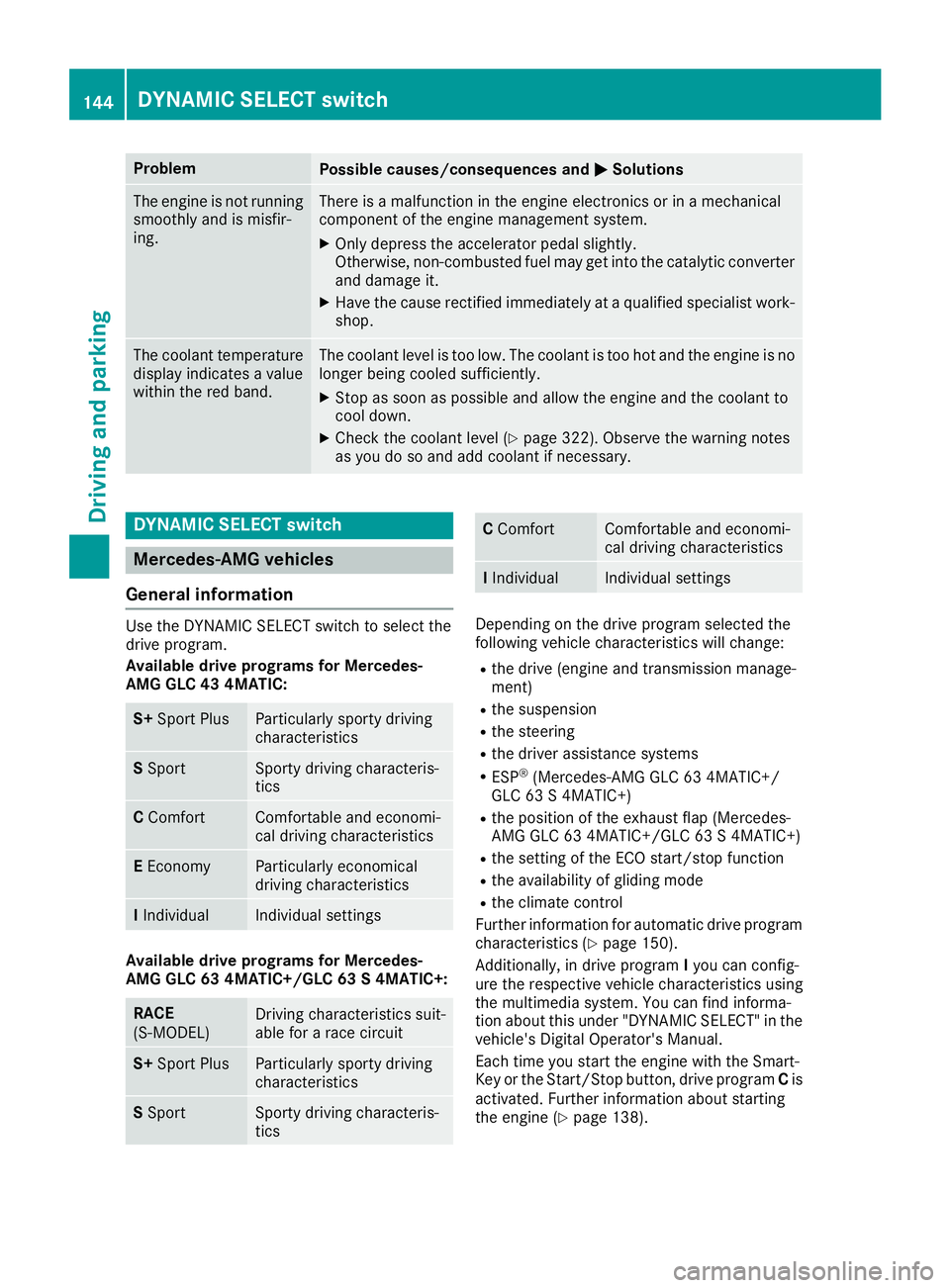
DYNAMIC SELECT switch
Mercedes-AMG vehicles
General information
Use the DYNAMIC SELECT switch to select the
drive program.
Available drive programs for Mercedes-
AMG GLC 43 4MATIC:
S+ Sport PlusParticularly sporty driving
characteristics
SSportSporty driving characteris-
tics
C ComfortComfortable and economi-
cal driving characteristics
EEconomyParticularly economical
driving characteristics
IIndividualIndividual settings
Available drive programs for Mercedes-
AMG GLC 63 4MATIC+/GLC 63 S 4MATIC+:
RACE
(S‑MODEL)Driving characteristics suit-
able for a race circuit
S+ Sport PlusParticularly sporty driving
characteristics
SSportSporty driving characteris-
tics
C ComfortComfortable and economi-
cal driving characteristics
IIndividualIndividual settings
Depending on the drive program selected the
following vehicle characteristics will change:
Rthe drive (engine and transmission manage-
ment)
Rthe suspension
Rthe steering
Rthe driver assistance systems
RESP®(Mercedes-AMG GLC 63 4MATIC+/
GLC 63 S 4MATIC+)
Rthe position of the exhaust flap (Mercedes-
AMG GLC 63 4MATIC+/GLC 63 S 4MATIC+)
Rthe setting of the ECO start/stop function
Rthe availability of gliding mode
Rthe climate control
Further information for automatic drive program
characteristics (
Ypage 150).
Additionally, in drive program Iyou can config-
ure the respective vehicle characteristics using
the multimedia system. You can find informa-
tion about this under "DYNAMIC SELECT" in the
vehicle's Digital Operator's Manual.
Each time you start the engine with the Smart-
Key or the Start/Stop button, drive program Cis
activated. Further information about starting
the engine (
Ypage 138).
144DYNAMIC SELECT switch
Driving and parking
Page 220 of 390
When overtaking, pay particular attention to the
extended length of your vehicle/trailer combi-
nation.
Due to the length of the vehicle/trailer combi-
nation, you require additional road space when
overtaking before you can change back to the
original lane.
If the automatic transmission repeatedly shifts
between gears on uphill or downhill gradients,
shift to a lower gear.
Driving in a lower gear and at a reduced speed
decreases the risk of engine damage.
If the coolant temperature increases signifi-
cantly when climate control is switched on,
switch climate control off.
Coolant heat can also be dissipated by opening
the windows and switching the ventilation
blower and the interior temperature to the high-
est level.
Decoupling a trailer
GWARNING
If you uncouple a trailer with the overrun
brake engaged, you could trap your hand
between the vehicle and the trailer drawbar.
There is a risk of injury.
Do not uncouple a trailer if the overrun brake
is engaged.
GWARNING
Vehicles with level control:
The vehicle is lowered as soon as you discon-
nect the trailer cable. This could result in your
limbs or those of other people that are
between the vehicle body and tires or under-
neath the vehicle being trapped. There is a
risk of injury.
Make sure that nobody is in the immediate
vicinity of the wheel housings or under the
vehicle when you disconnect the trailer cable.
!Do not disconnect a trailer with an engaged
overrun brake. Otherwise, your vehicle could
be damaged by the rebounding of the overrun
brake.
XApply the vehicle's parking brake manually.
XShift the transmission to position j.
XClose all doors and the tailgate.
XSwitch off the engine.
XSecure the vehicle and trailer against rolling
away.
XRemove the trailer cable.
XRemove the safety chains, if there are any.
XUncouple the trailer.
Removing the ball coupling
XObserve the manufacturer's installation
instructions.
XPress the protective cap into the ball coupling
recess.
XMake sure that the protective cap is firmly in
place.
Observe the loading guidelines (
Ypage 290)
and the safety notes regarding stowage spaces
(
Ypage 290).
Information on cleaning and care of the trailer
tow hitch (
Ypage 329).
Trailer power supply
!
Accessories with a maximum power con-
sumption of 180 W can be connected to the
permanent power supply.
You must not charge a trailer battery using the
power supply.
The trailer socket of your vehicle is equipped at
the factory with a permanent power supply.
The permanent power supply is supplied via
trailer socket pin 4.
The trailer's permanent power supply is
switched off in the event of low vehicle supply
voltage and after six hours at the latest.
A qualified specialist workshop can provide
more information about installing the trailer
electrics.
Permissible trailer loads and trailer
drawbar noseweights
Weight specifications
The gross trailer weight is calculated as the
weight of the trailer plus the weight of the load
and the trailer's equipment.
218Towing a trailer
Driving and parking
Page 223 of 390
Tachometer
!
Do not drive in the overrevving range, as this
could damage the engine.
The red band in the tachometer indicates the
engine's overrevving range.
The fuel supply is interrupted to protect the
engine when the red band is reached.
Outside temperature display
You should pay special attention to road condi-
tions when temperatures are around freezing
point.
Bear in mind that the outside temperature dis-
play indicates the temperature measured and
does not record the road temperature.
The outside temperature display is in the multi-
function display (
Ypage 222).
Changes in the outside temperature are dis-
played after a short delay.
Coolant temperature gage
GWARNING
Opening the hood when the engine is over-
heated or when there is a fire in the engine
compartment could expose you to hot gases
or other service products. There is a risk of
injury.
Let an overheated engine cool down before
opening the hood. If there is a fire in the
engine compartment, keep the hood closed
and contact the fire department.
!If the coolant temperature is too high, a dis-
play message is shown.
If the coolant temperature display is in the
area marked in red, do not continue driving.
Otherwise, the engine will be damaged.
The coolant temperature gauge is in the lower
section of the tachometer (
Ypage 37).
Under normal operating conditions and at the
correct coolant level, the display may rise to the
red mark.
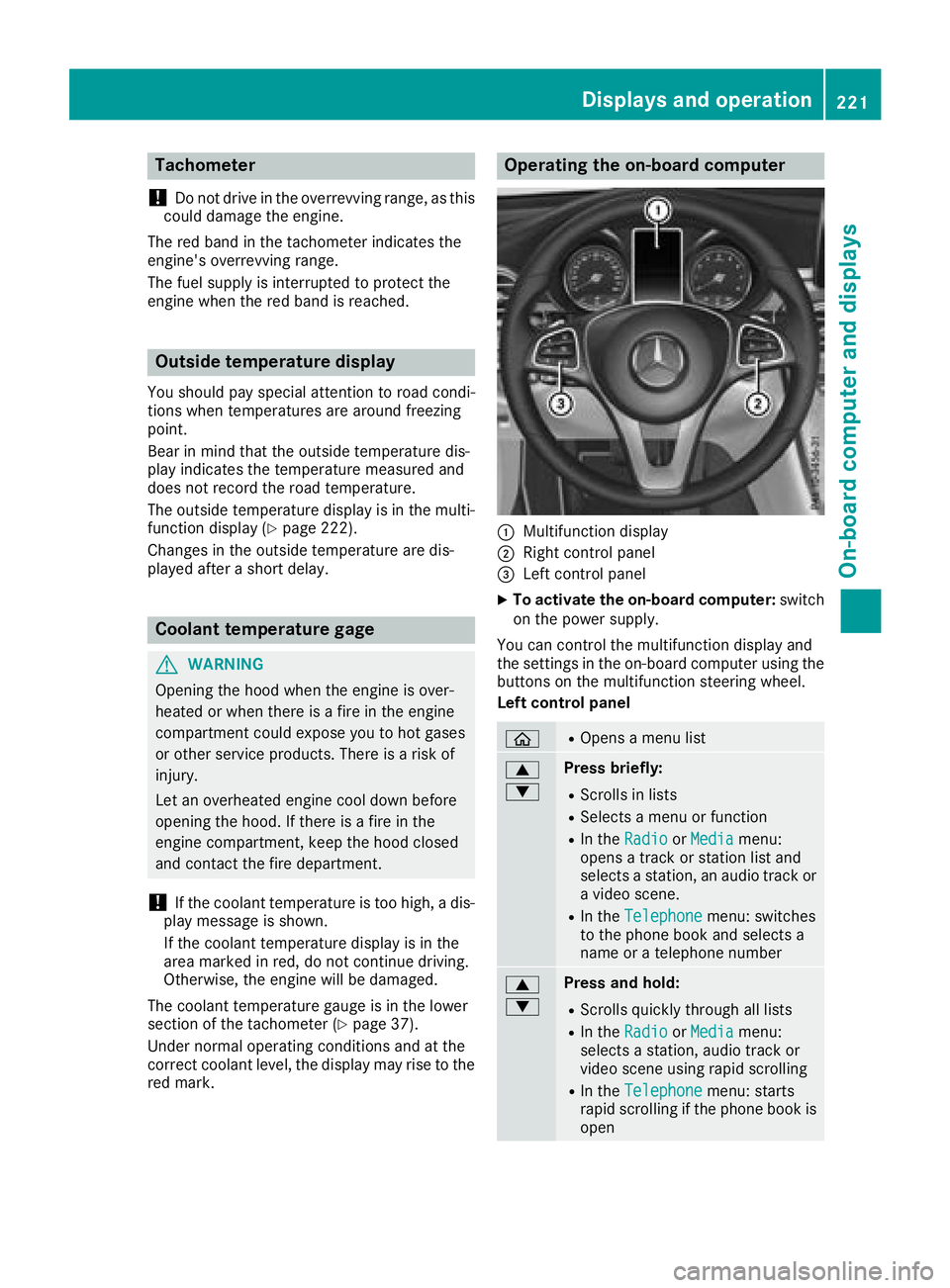
Operating the on-board computer
:Multifunction display
;Right control panel
=Left control panel
XTo activate the on-board computer: switch
on the power supply.
You can control the multifunction display and
the settings in the on-board computer using the
buttons on the multifunction steering wheel.
Left control panel
òROpens a menu list
9
:Press briefly:
RScrolls in lists
RSelects a menu or function
RIn the RadioorMediamenu:
opens a track or station list and
selects a station, an audio track or
a video scene.
RIn the Telephonemenu: switches
to the phone book and selects a
name or a telephone number
9
:Press and hold:
RScrolls quickly through all lists
RIn the RadioorMediamenu:
selects a station, audio track or
video scene using rapid scrolling
RIn the Telephonemenu: starts
rapid scrolling if the phone book is
open
Displays an doperation221
On-boa rd computer and displays
Z
Page 254 of 390
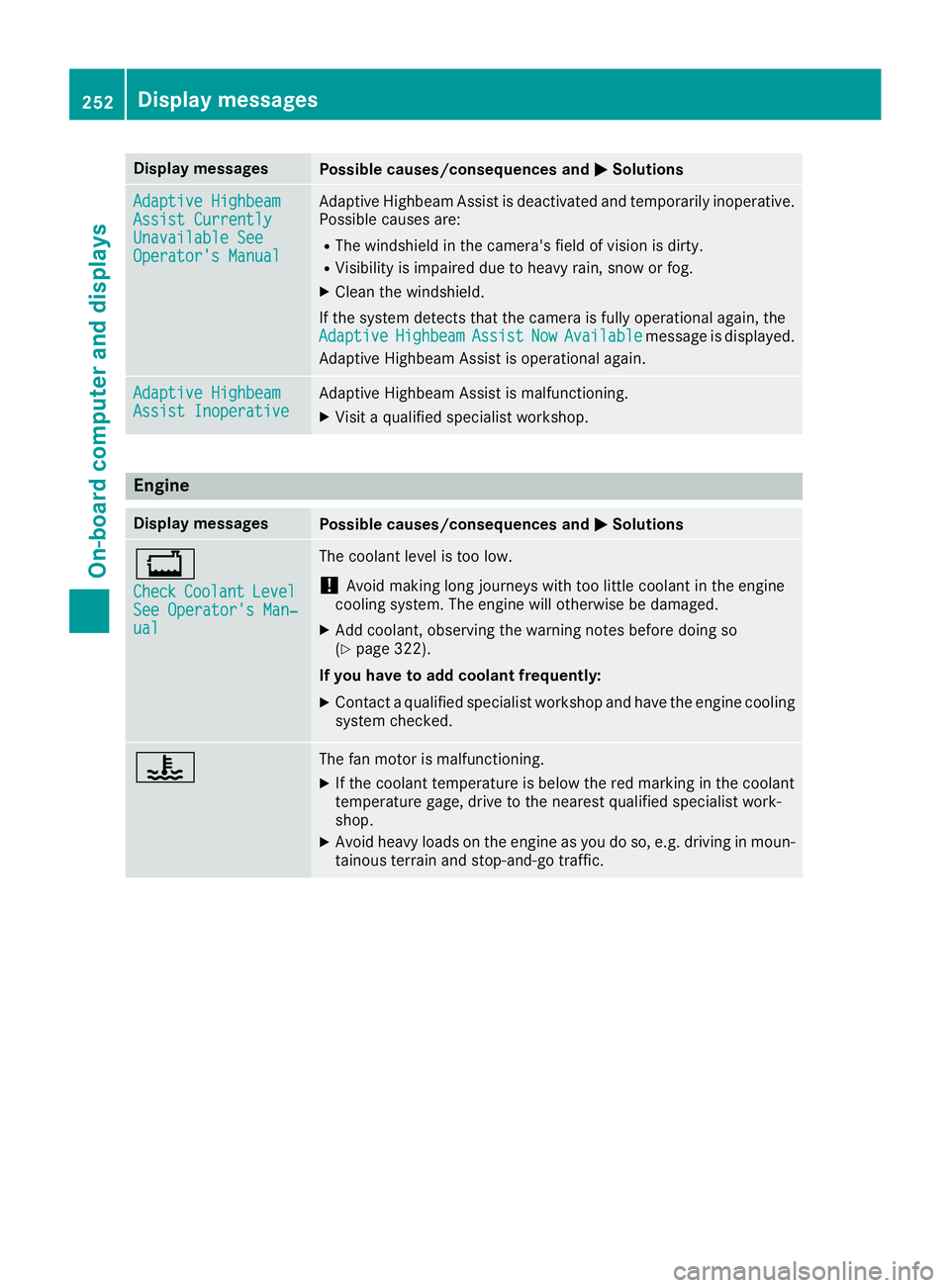
Display messagesPossible causes/consequences andMSolutions
Adaptive HighbeamAssist CurrentlyUnavailable SeeOperator'sManual
Adaptive Highbea mAssis tis deactivated and temporarily inoperative.
Possibl ecauses are:
RThe windshield in th ecamera' sfield of vision is dirty.
RVisibilit yis impaire ddue to heav yrain ,snow or fog .
XClean thewindshield.
If th esystem detects that th ecamera is full yoperational again ,th e
Adaptive
HighbeamAssistNowAvailablemessage is displayed.
Adaptive Highbea mAssis tis operational again .
Adaptive HighbeamAssist InoperativeAdaptive HighbeamAssis tis malfunctioning .
XVisitaqualified specialist workshop .
Engine
Display messagesPossible causes/consequences and MSolutions
+
CheckCoolantLevelSee Operator' sMan ‐ual
The coolan tlevel is to olow.
!Avoid making lon gjourneys wit hto olittl ecoolan tin th eengin e
coolin gsystem. The engin ewill otherwise be damaged.
XAd dcoolant, observing th ewarning note sbefore doin gso
(Ypage 322).
If you have to ad dcoolant frequently:
XContac t aqualified specialist workshop and hav eth eengin ecoolin g
system checked.
?The fan motor is malfunctioning .
XIf thecoolan ttemperature is belo wthered marking in th ecoolan t
temperature gage ,drive to th eneares tqualified specialist work-
shop.
XAvoid heav yloads on th eengin eas you do so, e.g. drivin gin moun -
tainous terrain and stop-and-g otraffic.
252Display messages
On-board computer and displays
Page 255 of 390
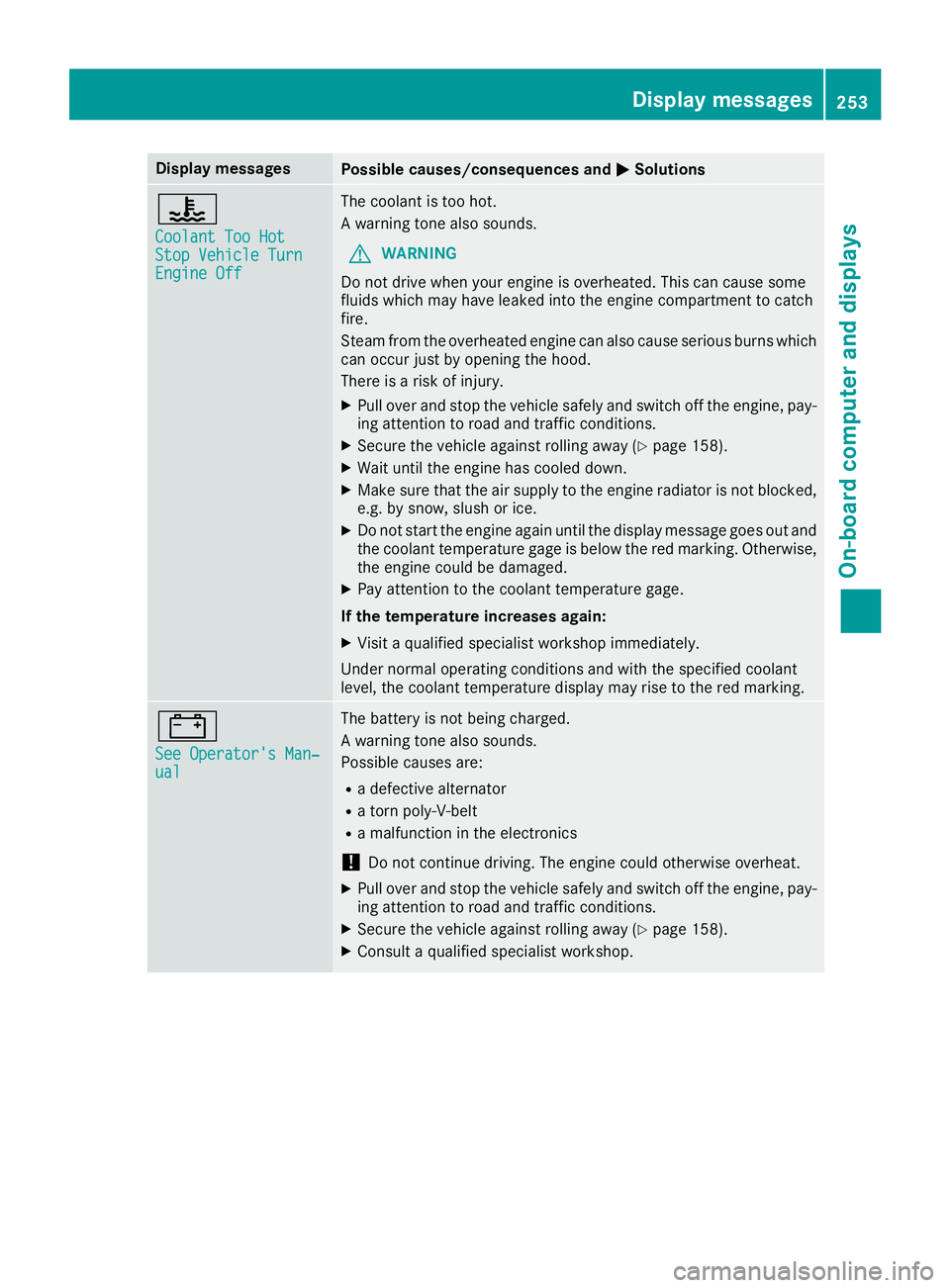
Display messagesPossible causes/consequences andMSolutions
?
CoolantToo HotSto pVehicl eTur nEngine Off
The coolan tis to ohot .
A warning tone also sounds.
GWARNIN G
Do no tdrive when your engin eis overheated. This can caus esom e
fluids whic hmay hav eleaked int oth eengin ecompartmen tto catch
fire.
Steam from th eoverheate dengin ecan also caus eserious burn swhic h
can occur jus tby opening th ehood.
There is aris kof injury.
XPull ove rand stop th evehicl esafely and switch off th eengine, pay-
ing attention to roa dand traffic conditions.
XSecur eth evehicl eagainst rollin gaway (Ypage 158).
XWait until th eengin ehas cooled down .
XMakesur ethat th eair supply to th eengin eradiato ris no tblocked,
e.g. by snow, slus hor ice .
XDo no tstart th eengin eagain until th edisplay message goe sout and
th ecoolan ttemperature gage is belo wthered marking .Otherwise ,
th eengin ecould be damaged.
XPay attention to th ecoolan ttemperature gage .
If th etemperatur eincreases again:
XVisit aqualified specialist workshop immediately.
Under normal operating condition sand wit hth especified coolan t
level, th ecoolan ttemperature display may ris eto th ered marking .
#
See Operator' sMan ‐ual
The battery is no tbein gcharged.
A warning tone also sounds.
Possibl ecauses are:
Radefective alternato r
Ratorn poly-V-belt
Ramalfunction in th eelectronics
!Do no tcontinu edriving. The engin ecould otherwise overheat.
XPull ove rand stop th evehicl esafely and switch off th eengine, pay-
ing attention to roa dand traffic conditions.
XSecur eth evehicl eagainst rollin gaway (Ypage 158).
XConsult aqualified specialist workshop .
Display messages253
On-board computer and displays
Z
Page 278 of 390
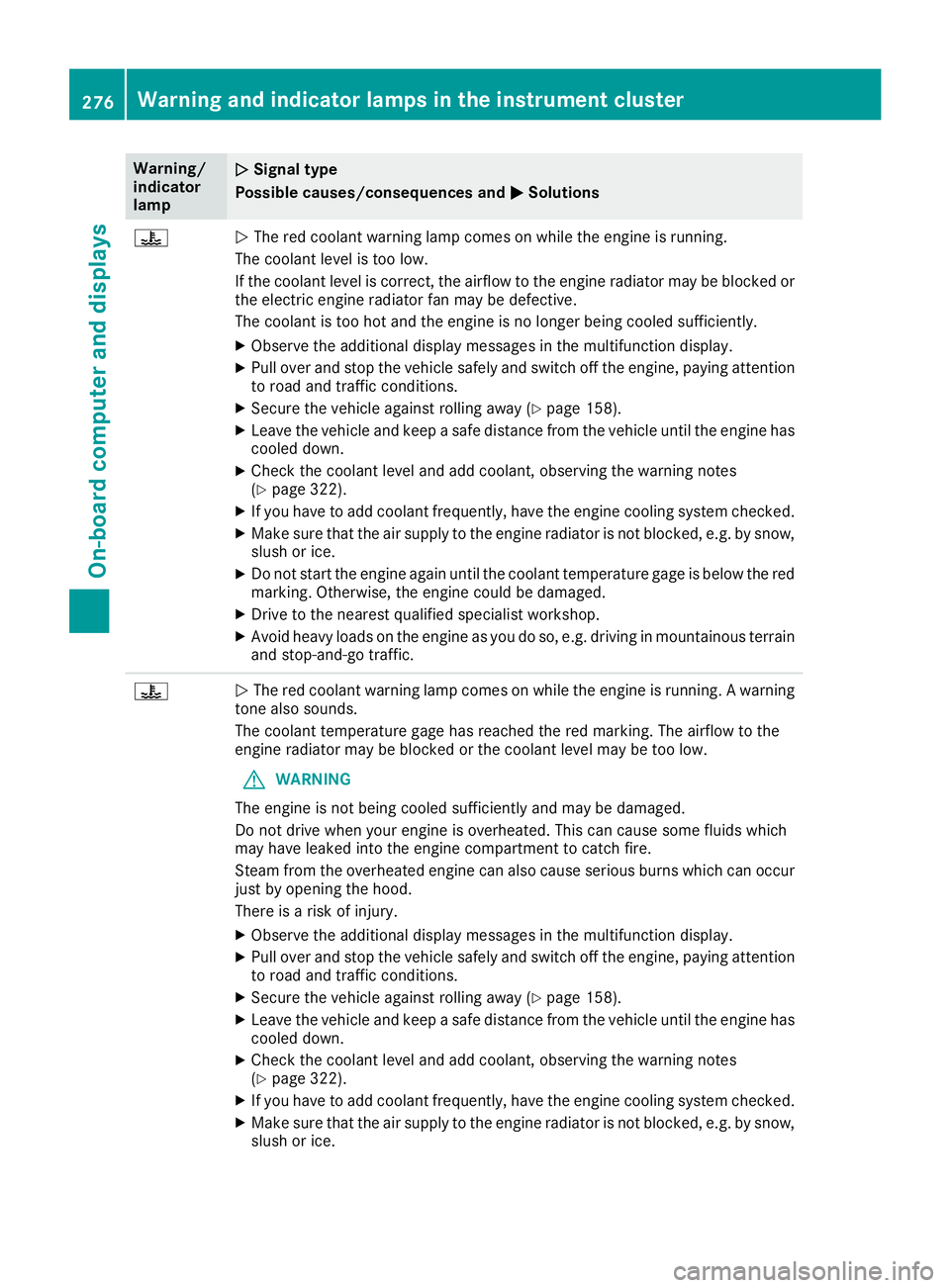
Warning/
indicator
lampNSignal type
Possible causes/consequences and M
Solutions
?NThe red coolant warning lamp comes on while the engine is running.
The coolant level is too low.
If the coolant level is correct, the airflow to the engine radiator may be blocked or
the electric engine radiator fan may be defective.
The coolant is too hot and the engine is no longer being cooled sufficiently.
XObserve the additional display messages in the multifunction display.
XPull over and stop the vehicle safely and switch off the engine, paying attention
to road and traffic conditions.
XSecure the vehicle against rolling away (Ypage 158).
XLeave the vehicle and keep a safe distance from the vehicle until the engine has cooled down.
XCheck the coolant level and add coolant, observing the warning notes
(Ypage 322).
XIf you have to add coolant frequently, have the engine cooling system checked.
XMake sure that the air supply to the engine radiator is not blocked, e.g. by snow,
slush or ice.
XDo not start the engine again until the coolant temperature gage is below the red
marking. Otherwise, the engine could be damaged.
XDrive to the nearest qualified specialist workshop.
XAvoid heavy loads on the engine as you do so, e.g. driving in mountainous terrain
and stop-and-go traffic.
?N The red coolant warning lamp comes on while the engine is running. A warning
tone also sounds.
The coolant temperature gage has reached the red marking. The airflow to the
engine radiator may be blocked or the coolant level may be too low.
GWARNING
The engine is not being cooled sufficiently and may be damaged.
Do not drive when your engine is overheated. This can cause some fluids which
may have leaked into the engine compartment to catch fire.
Steam from the overheated engine can also cause serious burns which can occur
just by opening the hood.
There is a risk of injury.
XObserve the additional display messages in the multifunction display.
XPull over and stop the vehicle safely and switch off the engine, paying attention
to road and traffic conditions.
XSecure the vehicle against rolling away (Ypage 158).
XLeave the vehicle and keep a safe distance from the vehicle until the engine has
cooled down.
XCheck the coolant level and add coolant, observing the warning notes
(Ypage 322).
XIf you have to add coolant frequently, have the engine cooling system checked.
XMake sure that the air supply to the engine radiator is not blocked, e.g. by snow,
slush or ice.
276Warning and indicator lamps in the instrument cluster
On-board computer and displays
Page 323 of 390
Mercedes-Benz Specifications for Service
Products is available at any authorized
Mercedes-Benz Center.
The following cause engine failure or damage
to the exhaust system:
RUse of engine oils and oil filters that have
not been expressly approved for the service
system
RReplacement of engine oil and oil filter after
the replacement interval specified by the
service system has expired
RUse of engine oil additives
!Do not add too much oil. adding too much
engine oil can result in damage to the engine
or to the catalytic converter. Have excess
engine oil siphoned off.
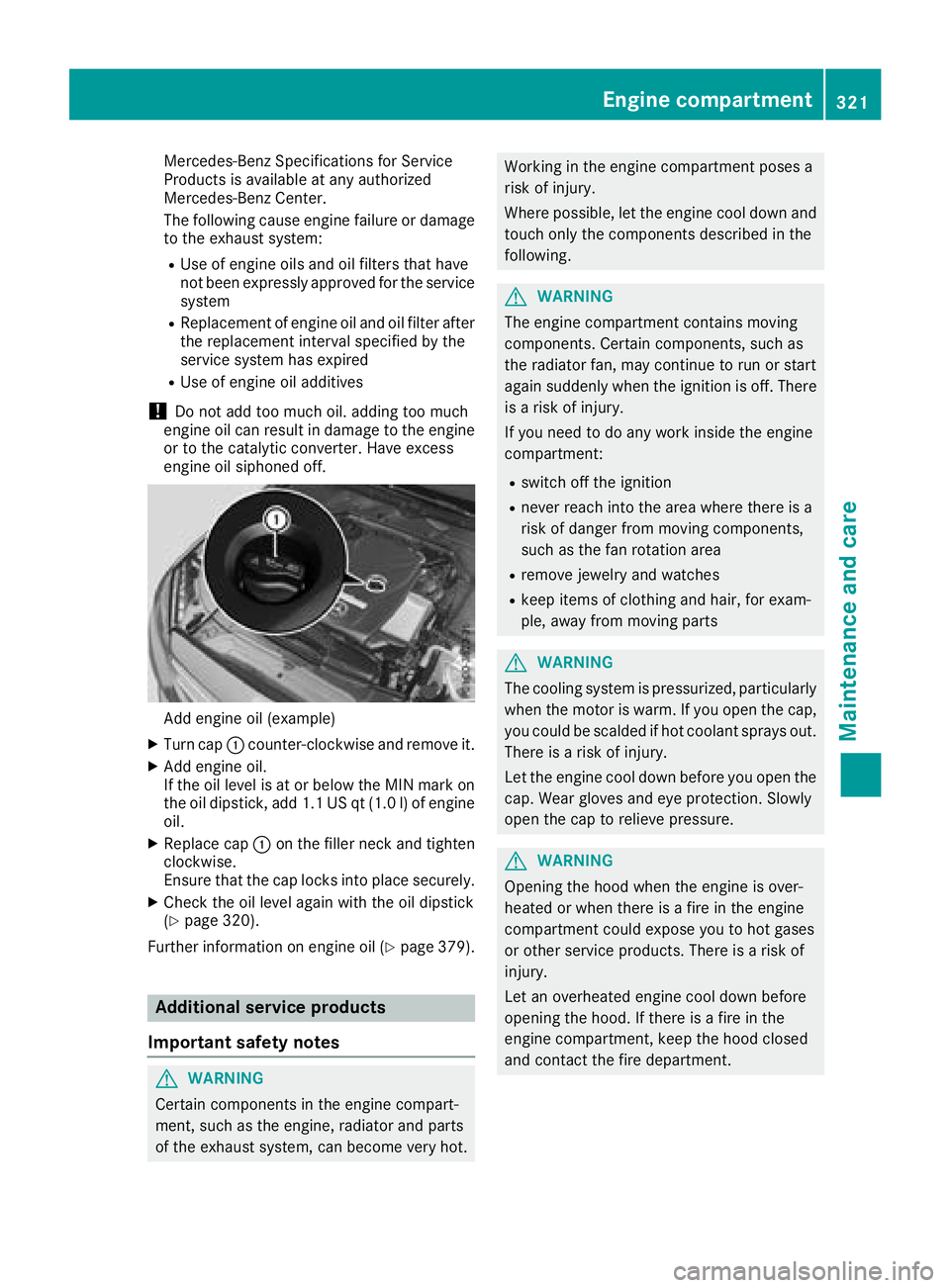
Add engine oil (example)
XTurn cap :counter-clockwise and remove it.
XAdd engine oil.
If the oil level is at or below the MIN mark on
the oil dipstick, add 1.1 US qt (1.0 l)of engine
oil.
XReplace cap :on the filler neck and tighten
clockwise.
Ensure that the cap locks into place securely.
XCheck the oil level again with the oil dipstick
(Ypage 320).
Further information on engine oil (
Ypage 379).
Additional service products
Important safety notes
GWARNING
Certain components in the engine compart-
ment, such as the engine, radiator and parts
of the exhaust system, can become very hot.
Working in the engine compartment poses a
risk of injury.
Where possible, let the engine cool down and touch only the components described in the
following.
GWARNING
The engine compartment contains moving
components. Certain components, such as
the radiator fan, may continue to run or start
again suddenly when the ignition is off. There is a risk of injury.
If you need to do any work inside the engine
compartment:
Rswitch off the ignition
Rnever reach into the area where there is a
risk of danger from moving components,
such as the fan rotation area
Rremove jewelry and watches
Rkeep items of clothing and hair, for exam-
ple, away from moving parts
GWARNING
The cooling system is pressurized, particularly
when the motor is warm. If you open the cap,
you could be scalded if hot coolant sprays out.
There is a risk of injury.
Let the engine cool down before you open the
cap. Wear gloves and eye protection. Slowly
open the cap to relieve pressure.
GWARNING
Opening the hood when the engine is over-
heated or when there is a fire in the engine
compartment could expose you to hot gases
or other service products. There is a risk of
injury.
Let an overheated engine cool down before
opening the hood. If there is a fire in the
engine compartment, keep the hood closed
and contact the fire department.
Engine compartment321
Maintenance and care
Z
Page 324 of 390
Checking coolant level
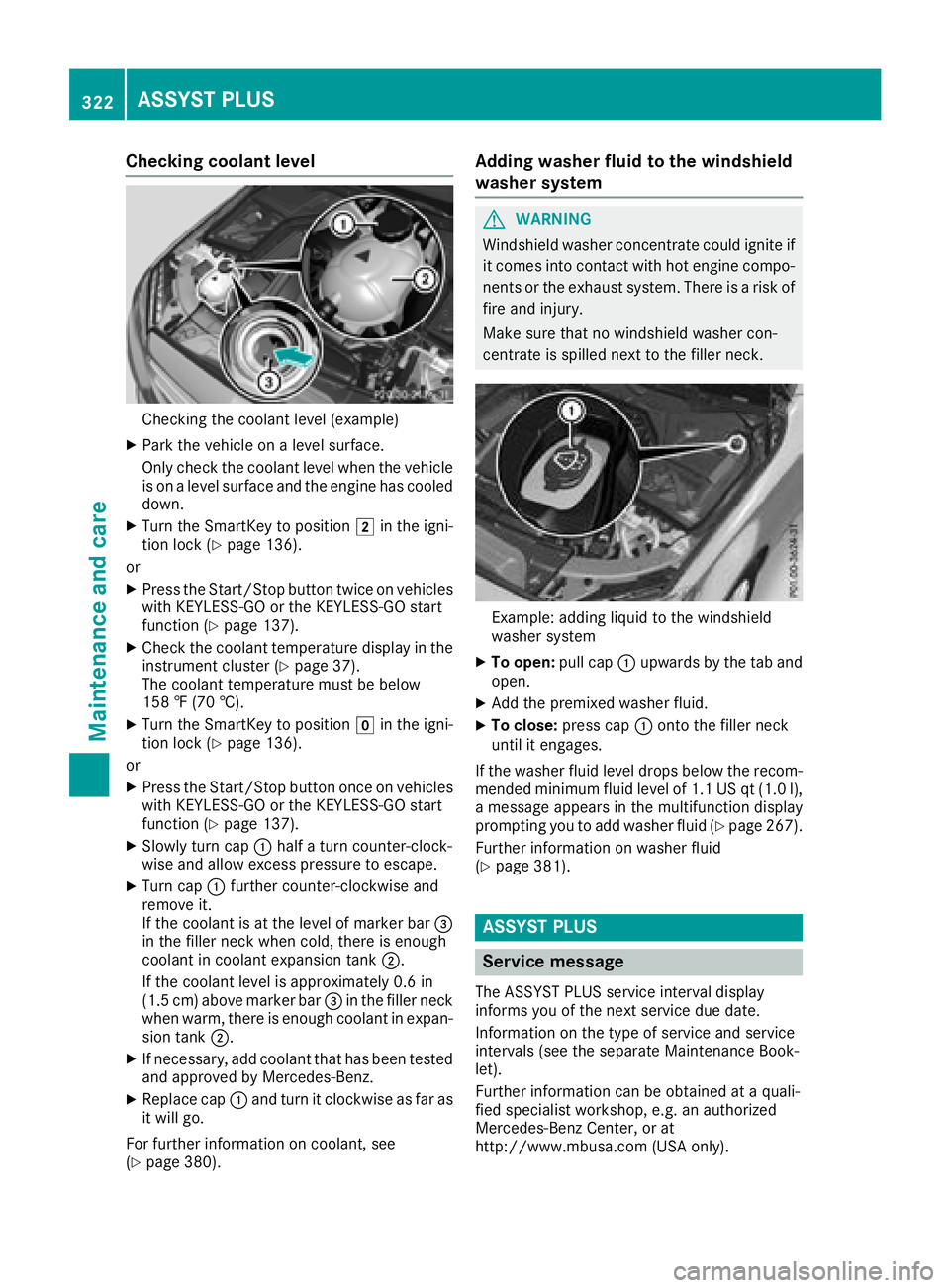
Checking the coolant level (example)
XPark the vehicle on a level surface.
Only check the coolant level when the vehicle
is on a level surface and the engine has cooled
down.
XTurn the SmartKey to position2in the igni-
tion lock (Ypage 136).
or
XPress the Start/Stop button twice on vehicles
with KEYLESS-GO or the KEYLESS-GO start
function (
Ypage 137).
XCheck the coolant temperature display in the
instrument cluster (Ypage 37).
The coolant temperature must be below
158 ‡ (70 †).
XTurn the SmartKey to position gin the igni-
tion lock (Ypage 136).
or
XPress the Start/Stop button once on vehicles with KEYLESS-GO or the KEYLESS-GO start
function (
Ypage 137).
XSlowly turn cap :half a turn counter-clock-
wise and allow excess pressure to escape.
XTurn cap :further counter-clockwise and
remove it.
If the coolant is at the level of marker bar =
in the filler neck when cold, there is enough
coolant in coolant expansion tank ;.
If the coolant level is approximately 0.6 in
(1.5 cm) above marker bar =in the filler neck
when warm, there is enough coolant in expan-
sion tank ;.
XIf necessary, add coolant that has been tested
and approved by Mercedes- Benz.
XReplace cap:and turn it clockwise as far as
it will go.
For further information on coolant, see
(
Ypage 380).
Adding washer fluid to the windshield
washer system
GWARNING
Windshield washer concentrate could ignite if it comes into contact with hot engine compo-
nents or the exhaust system. There is a risk of
fire and injury.
Make sure that no windshield washer con-
centrate is spilled next to the filler neck.
Example: adding liquid to the windshield
washer system
XTo open: pull cap:upwards by the tab and
open.
XAdd the premixed washer fluid.
XTo close: press cap :onto the filler neck
until it engages.
If the washer fluid level drops below the recom-
mended minimum fluid level of 1.1 US qt (1.0 l),
a message appears in the multifunction display
prompting you to add washer fluid (
Ypage 267).
Further information on washer fluid
(
Ypage 381).
ASSYST PLUS
Service message
The ASSYST PLUS service interval display
informs you of the next service due date.
Information on the type of service and service
intervals (see the separate Maintenance Book-
let).
Further information can be obtained at a quali-
fied specialist workshop, e.g. an authorized
Mercedes-Benz Center, or at
http://www.mbusa.com (USA only).
322ASSYST PLUS
Maintenance and care