climate control MERCEDES-BENZ GLC SUV 2019 User Guide
[x] Cancel search | Manufacturer: MERCEDES-BENZ, Model Year: 2019, Model line: GLC SUV, Model: MERCEDES-BENZ GLC SUV 2019Pages: 673, PDF Size: 11.51 MB
Page 171 of 673
Re
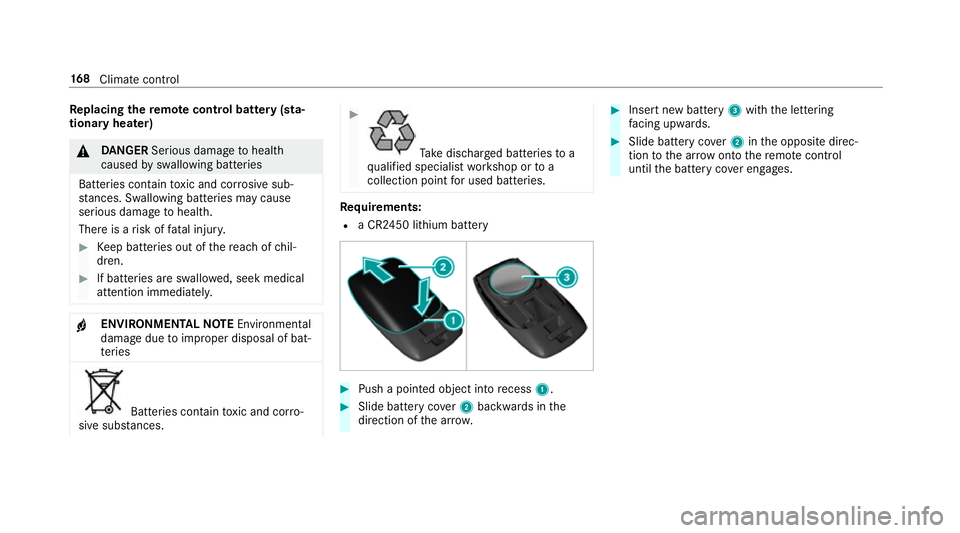
placing the remo tecont rol bat tery (sta‐
tiona ryheater) &
DANG ER Serious damage tohealth
caused byswallowing batteries
Batteries contain toxic and cor rosive sub‐
st ances. Swallowing bat teries may cause
serious damage tohealth.
There is a risk of fata l injur y. #
Keep batteries out of there ach of chil‐
dren. #
If batteries are swallo wed, seek medical
attention immediately. +
ENVIRONMEN
TALNO TEEnvironmental
dama gedue toimproper disposal of bat‐
te ries Batteries conta
intoxic and cor ro‐
sive subs tances. #
Ta
ke dischar ged batteries to a
qu alified specialist workshop or to a
collection point for used batteries. Re
quirements:
R a CR2450 lithium battery #
Push a pointed object into recess 1. #
Slide battery co ver2 backwards in the
direction of the ar row. #
Insert new battery 3with the lettering
fa cing up wards. #
Slide battery co ver2 inthe opposite direc‐
tion tothe ar row onto there mo tecontrol
until the battery co ver engages. 16 8
Climate cont rol
Page 172 of 673
Problems with
there mo tecont rolfo r the stationary heater/stationary ventilation Problem
Possible causes/consequences and M
MSolutions
FA IL¨ The signal transmission between
the transmit ter and theve hicle is faulty. #
Chan geyour position in relation totheve hicle, moving closer if necessar y.
FA IL The
star ter battery is not suf ficiently charge d. #
Char gethest ar ter batter y.
The fuel tank content is below there ser vefuel le vel. #
Refuel at the nearest filling station.
FA IL¯ The
stationary heater is malfunctioning. #
Have thest ationary heater checked at a qualified specialist workshop. Air
vents Ad
justing the front air vents &
WARNING ‑ Risk of bu rns/frostbite due
to not maintaining a su fficient dis tance
to the air vents
Ve ry hot or very cold air can flow from the air
ve nts. This could
result in burns or frostbite in the
immediate vicinity of the air vents. #
Alw ays ensure that all vehicle occu‐
pants maintain a suf ficient di stance to
th e air vents. #
If necessa ry,re direct the air flow to
ano ther area of theve hicle interior. To
guarantee theflow of fresh air thro ugh the air
ve nts into theve hicle interior, comply with the
fo llowing:
R Alw ayske ep theve nts and theve ntilation
grille in theve hicle interior free.
R Keep the air inlet free of deposits
(/ page 482). Climate control
16 9
Page 173 of 673
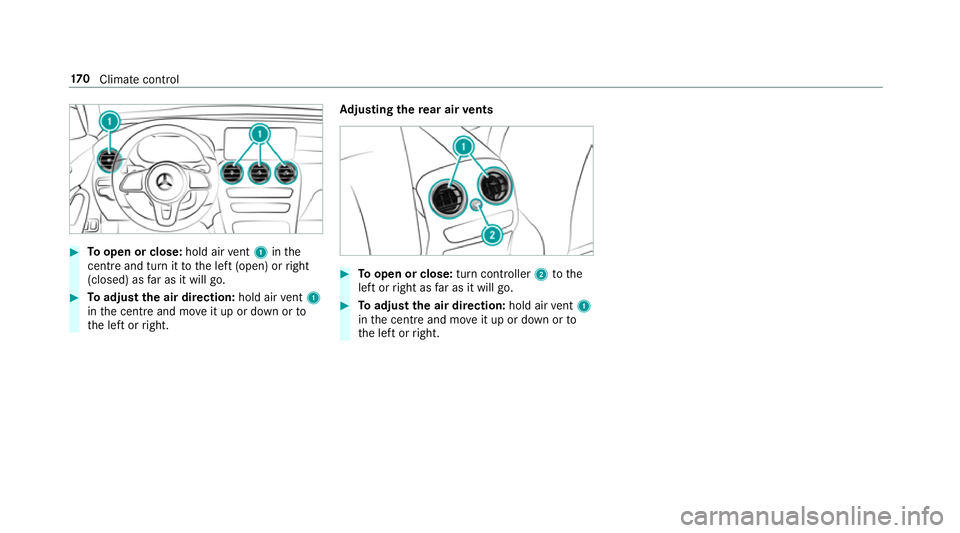
#
Toopen or close: hold airvent 1 inthe
centre and turn it tothe left (open) or right
(closed) as far as it will go. #
Toadjust the air direction: hold airvent 1
in the cent reand mo veit up or down or to
th e left or right. Ad
justing the rear air vents #
Toopen or close: turn controller2tothe
left or right as far as it will go. #
Toadjust the air direction: hold airvent 1
in the cent reand mo veit up or down or to
th e left or right. 17 0
Climate cont rol
Page 183 of 673
R
Obser vethe no tes on the cross-country ABS
(/ page 210).
R Ifnecessa ry, select theF orG drive
prog ram (vehicles with an Off-road pac kage)
before driving off-road (/ page187).
R Select a vehicle le vel suitable for off-road ter‐
ra in (/ page244). Toavo id damaging the
ve hicle, make sure there is alw ays suf ficient
ground clearance.
R Alw ayske ep the engine running and in gear
when driving on downhill gradients and
slopes. Obse rveth e no tes on driving in
mountainous terrain.
R Do not drive on unknown terrain that is not
easily visible and stay on mar kedro utes.
R Alw ayske ep the doors and windo wsclosed
while theve hicle is in motion.
R Deactivate Active Dis tance Assi st
DISTRONIC, cruise control and theva riable
limiter.
R Adapt your driving style to thete rrain. R
Do not use the HOLD function on steep
downhill or uphill gradients with slippery or
loose sur faces.
Driving on sand
When driving on sand, also obser vethefo llowing
instructions:
R Select theF drive prog ram.
R Select a higher vehicle le vel.
R Shift toa lo werge ar.
R Drive quickly toove rcome thero lling resist‐
ance, otherwise theve hicle may dig itself in.
R Drive in the trac ksofother vehicles if possi‐
ble. Make sure that thefo llowing prerequi‐
sites are me t:
- the tyre ruts are not too deep
- the sand is firm enough
- the ground clearance is suf ficient
Mercedes -AMG vehicles: observeth e no tes in
th e Supplement. Otherwise, you may failto rec‐
ognise dangers.
Fo rding Also obser
vethefo llowing information when
fo rd ing:
R Drive at no more than 10 km/h.
R Obser vethe maximum permissible ford ing
dep th (/ page 550).
R Switch off automatic climate control
(/ page 161).
R Vehicles with stationary heater/ventila‐
tion: switch thest ationary heater/ ventilation
off (/ page 165).
R Ensure that a bow wave does not form asyou
drive.
R Do not stop in thewa ter and do not switch
off the engine. Ensure the ECO start/ stop
function is switched off (/ page183).
Driving in mountainous terrain
Also obse rveth efo llowing information when
driving in moun tainous terrain:
R Obse rveth eva lues of the approach/depar‐
ture angle and of the maximum gradient
(/ page 550).
R Avoid high engine speeds. 18 0
Driving and pa rking
Page 317 of 673
%
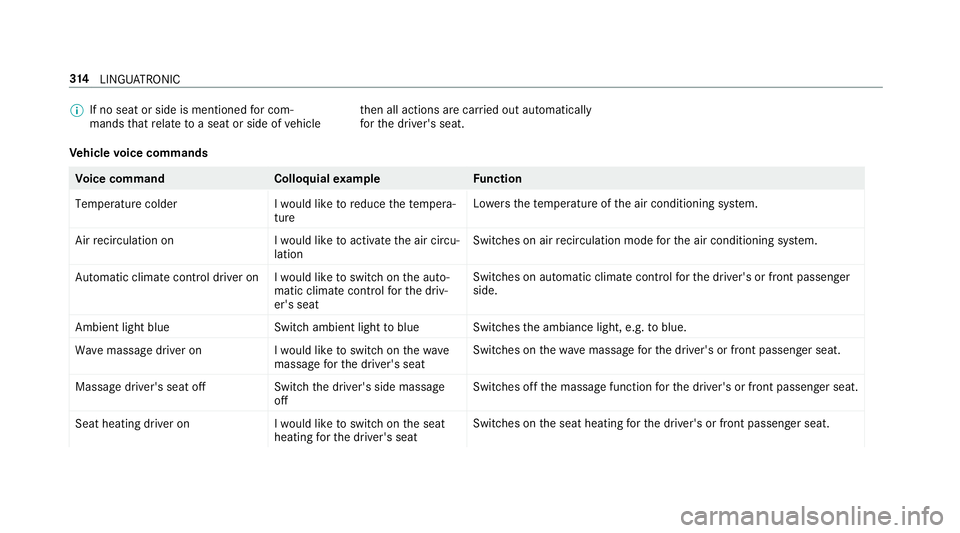
If no seat or side is mentioned for com‐
mands that relate toa seat or side of vehicle th
en all actions are car ried out automatically
fo rth e driver's seat.
Ve hicle voice commands Vo
ice command Colloquialexample Function
Temperature colder I would like to reduce the tempera-
tureLo
we rsthete mp erature of the air conditioning sy stem.
Air recirculation on I would like to activate the air circu-
lationSwitches on air
recirculation mode forth e air conditioning sy stem.
Automatic climate control driver on I would like to switch on the auto- matic climate control for the driv-
er's seatSwitches on automatic climate control
forth e driver's or front passenger
side.
Ambient light blue Switch ambient light to blueSwitches
the ambiance light, e.g. toblue.
Wave massage driver on I would like to switch on the wave
massage for the driver's seatSwitches on
thewav e massage forth e driver's or front passenger seat.
Massage driver's seat off Switch the driver's side massage
offSwitches off
the massage function forth e driver's or front passenger seat.
Seat heating driver on I would like to switch on the seat
heating for the driver's seatSwitches on
the seat heating forth e driver's or front passenger seat. 314
LINGU ATRO NIC
Page 318 of 673
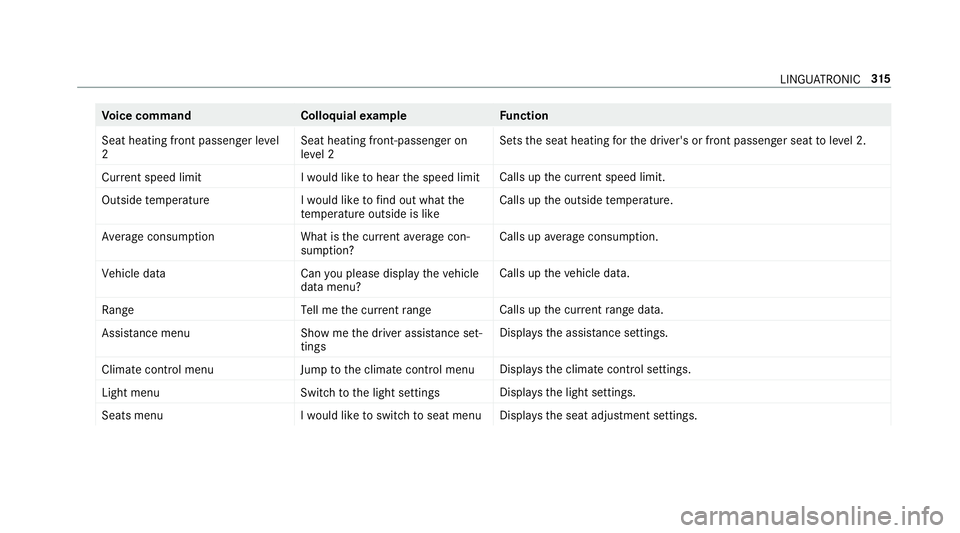
Vo
ice command Colloquialexample Function
Seat heating front passenger level
2 Seat heating front-passenger on
level 2Sets
the seat heating forth e driver's or front passenger seat toleve l 2.
Current speed limit I would like to hear the speed limitCalls up
the cur rent speed limit.
Outside temperature I would like to find out what the
temperature outside is likeCalls up
the outside temp erature.
Average consumption What is the current average con-
sumption?Calls up
average consu mption.
Vehicle data Can you please display the vehicle
data menu?Calls up
theve hicle data.
Range Tell me the current rangeCalls up
the cur rent range da ta.
Assistance menu Show me the driver assistance set-
tingsDispl
aysth e assis tance settings.
Climate control menu Jump to the climate control menuDispla
ys the climate control settings.
Light menu Switch to the light settingsDispla
ys the light settings.
Seats menu I would like to switch to seat menuDispla
ys the seat adjustment settings. LINGU
ATRO NIC 315
Page 331 of 673
Ac
tivating co verch ange in thera dio menu
and media menu
The MBUX Interior Assi stant reduces the number
of operating steps. #
Movea hand towa rdsth eto uchsc reen or
to uchpad.
The cur rent information, e.g. about thera dio
st ation, track and artist are hidden. Co ver
ch ange is activated. #
Continue operation and select a co ver. #
Asthe hand is mo vedaw ay from the
to uchsc reen or touchpad, the cur rent infor‐
mation is shown again.
% Further information on thera dio menu
(/ page 460) and the media menu
(/ page 454).
Showing the navigation menu on the map
The MBUX In terior Assis tant sho wsthe naviga‐
tion menu. #
Movea hand towa rdsth eto uchsc reen or
to uchpad.
The navigation menu is shown. #
Continue operation and select a symbol. #
Asthe hand is mo vedaw ay from the
to uchsc reen or touchpad, the media display
hides the navigation menu.
% Further information on the navigation menu
(/ page 367).
Showing operating symbols in theAc tive
Pa rking Assist camera ima ge(only from driv‐
er's seat)
The MBUX In terior Assis tant facilitates quick-
access forth e driver tovarious camera vie ws. #
With th eAc tive Parking Assist display active,
mo vethe hand in the direction of the
to uchsc reen.
The camera operation symbols are displa yed. #
Continue operation and display the desired
front, rear, left and right camera vie ws.
% Further information on Active Parking Assist
functions (/ page 260).
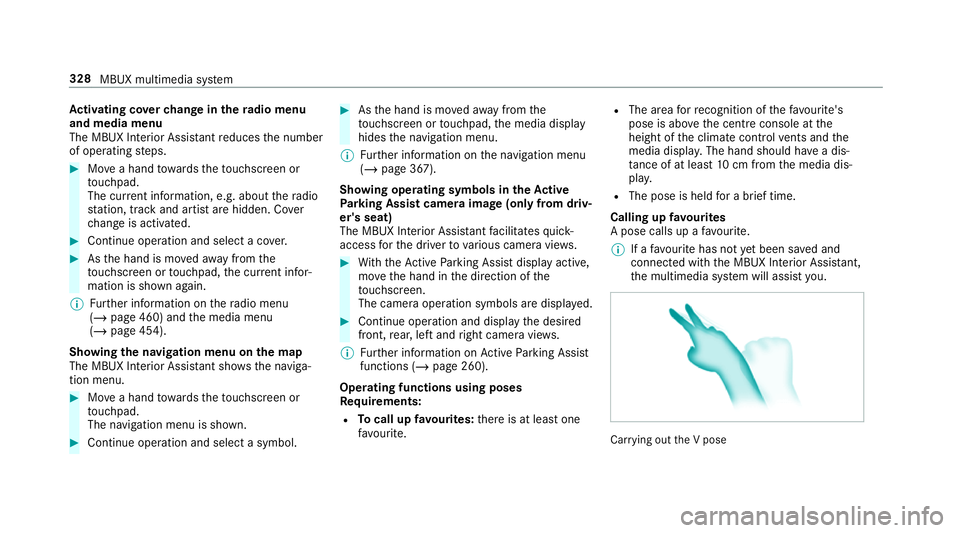
Operating functions using poses
Re quirements:
R Tocall up favo urites: there is at least one
fa vo urite. R
The area forre cognition of thefa vo urite's
pose is abo vethe cent reconsole at the
height of the climate control vents and the
media displa y.The hand should ha vea dis‐
ta nce of at least 10cm from the media dis‐
pla y.
R The pose is held for a brief time.
Calling up favo urites
A pose calls up a favo urite.
% If afavo urite has not yet been sa ved and
connec ted with the MBUX Interior Assis tant,
th e multimedia sy stem will assist you. Car
rying out the V pose 328
MBUX multimedia sy stem
Page 334 of 673
Profile
Note
s on profiles
The driver's seat is equipped with an anti-entra p‐
ment feature.
If th e driver's door is open, the driver's seat will
not be set af ter calling up the driver's profile.
Overview of profiles
Using the multimedia sy stem up toseven pro‐
fi les can be created in theve hicle.
Profiles store your personal vehicle settings and
settings forth e multimedia sy stem.
If th eve hicle is used byseveral drivers, the
driver can select their profile before the journe y,
without changing the settings of other drivers.
Yo u can select the profile:
R When entering (/ page 333)
R Using the home screen (/ page319)
The profile settings are activated as soon as a
profile is selected.
% Ifyo u call up your profile when driving then
th e driver's seat position will not be adjus‐
te d. Yo
u can cancel the setting process with the
fo llowing actions:
R Tap on thePositioning seat and steering
wheel. Please tap to cancel. warning on
th e media displa y.
R Press one of the seat operating buttons
in the driver's door.
Profile content
Depending on theve hicle equipment, thefo llow‐
ing settings can be stored in your profile, for
ex ample:
R Driver's seat memory
R Radio (including station list)
R Last destinations
R Climate control
R Ambient lighting
R DYNA MIC SELECT I (individual)
R Instrument Displa y,Head-up Display and
st yle (display style of the multimedia sy stem)
R Themes, suggestions and favo urites %
Settings for driver assi stance sy stems can‐
not be sa ved in the profile.
Mercedes me connect profile
If yo u use a profile from Mercedes me connect,
th efo llowing online functions are available, for
ex ample:
R You can configure the settings in theve hicle
using the Mercedes me app and the
Mercedes me por tal.
R You can syn chronise your profile on
Mercedes me connect with the profile in the
ve hicle (/ page 333).
R You can add a personal profile pho tothat is
shown in theve hicle.
R You can take your profile and some of your
settings with you in new vehicles.
Requ irements for using Me rcedes me con‐
nect profiles:
Fo rth eve hicle owner:
R You ha vea Mercedes me user account.
R The vehicle has been connected with the
user account. MBUX multimedia sy
stem 331
Page 629 of 673
Ad
justing treble, mid- range and bass
settings
Adva nced sound sy stem ......................4 73
Burmes ter®
sur round sound sy stem ....4 71
ADS PLUS da mping sy stem
see AIR BODY CONTROL
Ad vanced sound sy stem
Ac tivating/deactivating au tomatic
vo lume adjustment .............................. 473
Ad justing the balance/fader ................4 73
Ad justing treble, mid-range and bass
settings ................................................ 473
Calling up the sound menu .................. 472
Information .......................................... 472
Af ter-sales service centre
see ASS YST PLUS
AIR BODY CONT ROL................................ 24 2
Setting ................................................. 24 4
Suspension .......................................... 24 2
Air conditioning menu Calling up ............................................ .161
Air conditioning sy stem
see Climate control Air distribution
Setting ................................................ .159
Setting (multimedia sy stem) ................1 62
Air freshener sy stem
see Fragrance sy stem
Air inlet see Air-water duct
Air pressure see Tyre pressure
Air suspension see AIR BODY CONTROL
Air vents ................................................... 16 9
Ad justing (front) .................................. 16 9
Ad justing (rear) .................................... 17 0
Air vents
see Air vents
Ai r-re circulation mode ............................ 16 3
Air-water duct .......................................... 482
Ke eping free ........................................4 82
Airbag ........................................................ .40
Ac tivation .............................................. 34
Fr ont airbag (driver, front passenger) ....40
Ins tallation locations ............................ .40Knee airbag ........................................... 40
Overview ............................................... 40
PA SSENGER AIR BAG indicator lamp .... .45
Pr otection ..............................................41
Re duced pr otection ...............................42
Side impact airbag ................................ 40
Wi ndow airbag ....................................... 40
Ai rflow
Setting ................................................ .159
Alarm sy stem
see ATA (anti-theft alarm sy stem)
All-wheel drive see 4MATIC
Alternative route
see Route
Ambiance light Setting (multimedia sy stem) ................1 50
Android Auto ............................................ 431
Connecting a mobile phone ................. 432
Control using the application buttons
.............................................................4 33
Ending ................................................. 433
Information .......................................... 432
Overview .............................................. 431 626
Index
Page 631 of 673
Au
tomatic front passen ger front air‐
bag deacti vation sy stem
see Automatic front passenger front
airbag shutoff
Au tomatic front passen ger front air‐
bag shu toff .......................................... 43, 45
Fu nction of the automatic front
passenger front airbag deactivation
sy stem ................................................... 43
PA SSENGER AIR BAG indicator lamp .... .45
Au tomatic mir rorfo lding function
Ac tivating/deactivating ...................... .157
Au tomatic seat adjustment
Setting ................................................. 109
Au tomatic transmission
DIRECT SELECT le ver ........................... 188
Drive program display .......................... 187
Drive programs .................................... 186
DY NA MIC SELECT switch .................... 186
Engaging drive position ....................... 19 0
Engaging neutral .................................. 19 0
Engaging pa rkposition ........................ 19 0
Engaging reve rsege ar ........................ .190
Kickdown ............................................. 19 2Manual
gear changing .......................... 191
St eering wheel gearshift paddles ........ .191
Tr ansmission position display .............. 188
Tr ansmission positions ........................ 188
Axle load Perm issible .......................................... 539
Tr ailer operation .................................. 553 B
Bag hook .................................................. 12 6
Ball ne ck
Extending/r etra cting ........................... 276
BA S (Brake Assist Sy stem) .................... .210
Battery Charging (Remo teOnline) .................... 175
Ke y ........................................................ 76
Re mo tecontrol (s tationary heater) ...... 16 8
Battery see Battery (vehicle)
Battery (vehicle) ...................................... 507
Charging .............................................. 506
Charging (Remo teOnline) .................... 175
No tes .................................................. 502 No
tes (s tarting assis tance and
ch arging) ............................................ .504
Re placing .............................................5 07
St arting assis tance .............................. 506
Belt see Seat belt
Bic ycle rack
Tr ailer operation .................................. 279
Blind Spot Assi st..................................... 270
Ac tivating/deactivating ...................... .273
Fu nction .............................................. 270
Sy stem limitations ...............................2 70
Blo wer
see Climate control
BlueTEC see AdBlue ®
Blue tooth ®
............................................... 355
Information .......................................... 355
Setting up an Internet connection ....... 443
Switching on/off ................................. 355
Bonnet Resetting (active bonnet) ..................... 475628
Index