interior lights MERCEDES-BENZ GLC SUV 2019 Owners Manual
[x] Cancel search | Manufacturer: MERCEDES-BENZ, Model Year: 2019, Model line: GLC SUV, Model: MERCEDES-BENZ GLC SUV 2019Pages: 673, PDF Size: 11.51 MB
Page 50 of 673
If
th ePA SSENGER AIR BAG OFF indicator
lamp is lit continuousl y,an adult or person
with a build cor responding tothat of an adult
should not use the front passenger seat.
Ins tead, they should use a rear seat.
R Ifth e front passenger seat is occupied by a
person of smaller stature (e.g. a teenager or
small adult), thePA SSENGER AIR BAG OFF
indicator lamp either lights up continuously
or remains off, depending on there sult of the
classi fication.
- Ifth ePA SSENGER AIR BAG OFF indicator
lamp is off: mo vethe front passenger
seat as far back as possible, or the per‐
son of smaller stature should use a rear
seat.
- Ifth ePA SSENGER AIR BAG OFF indicator
lamp is lit continuously: the person of
smaller stature should not use the front
passenger seat. &
WARNING Risk of inju ryor death when
th ePA SSENGER AIR BAG OFF indicator
lamp is lit
If th ePA SSENGER AIR BAG OFF indicator
lamp remains lit af terth e sy stem self-test,
th e front passenger airbag is disabled. It will
not be deplo yed in theeve nt of an accident.
In this case, the front passenger airbag can‐
not per form its intended pr otective function,
e.g. when a person is seated in the front
passenger seat.
That person could, forex ample, come into
con tact wi th theve hicle interior, especially if
th e person is sitting too close tothe cockpit.
If th e front passenger seat is occupied,
alw ays ensure that:
R The classification of the person in the
front passenger seat is cor rect and the
front passenger airbag is enabled or disa‐
bled in accordance with the person in the
front passenger seat. R
The person is sea ted proper lywith a cor‐
re ctly fastened seat belt.
R The front passenger seat has been mo ved
as far back as possible. Be sure
toalso obse rveth efo llowing fur ther
re lated subjects:
R Child restra int sy stem on the front passenger
seat (/ page 70).
R Suitable positioning of thech ild restra int sys‐
te m (/ page 55). PRE-SAFE
®
sy stem PRE-
SAFE®
(anticipa tory occupant pr otec‐
tion) PRE-
SAFE®
is able todetect cer tain critical driv‐
ing situations and implement pre-em ptive meas‐
ures toprotect theve hicle occupants.
PRE-SAFE ®
can implement thefo llowing meas‐
ures independently of each other:
R Tightening the seat belts on the driver's seat
and front passenger seat. Occupant saf
ety47
Page 140 of 673
Re
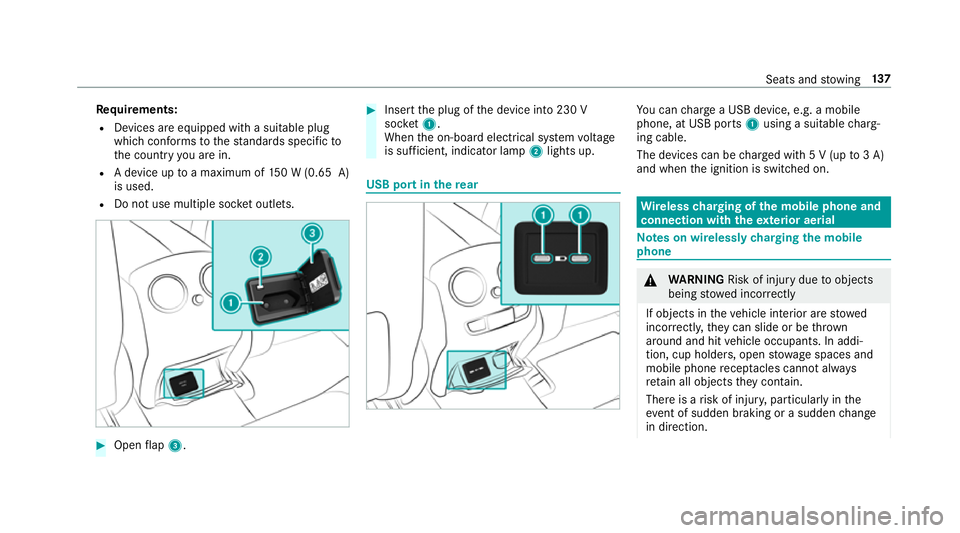
quirements:
R Devices are equipped with a suitable plug
which con form sto thest andards specific to
th e count ryyou are in.
R A device up toa maximum of 150 W (0.65 A)
is used.
R Do not use multiple soc ket outlets. #
Open flap 3. #
Insert the plug of the device into 230 V
soc ket1.
When the on-board electrical sy stem voltage
is suf ficient, indicator la mp2lights up. USB port in
there ar Yo
u can charge a USB device, e.g. a mobile
phone, at USB ports 1using a suitable charg‐
ing cable.
The devices can be charge d with 5 V (up to3 A)
and when the ignition is switched on. Wire
lesscharging of the mobile phone and
connection with theex terior aerial Note
s on wirelessly charging the mobile
phone &
WARNING Risk of inju rydue toobjects
being stowed inco rrectly
If objects in theve hicle interior are stowed
incor rectly, they can slide or be thrown
around and hit vehicle occupants. In addi‐
tion, cup holders, open stowage spaces and
mobile phone recep tacles cannot al ways
re tain all objects they contain.
The reis a risk of injur y,particularly in the
ev ent of sudden braking or a sudden change
in direction. Seats and
stowing 137
Page 152 of 673
Switching
Adaptive Highbeam Assist Plus
on/off #
Toswitch on: turnthe light switch tothe
à position. #
Switch on the main beam using the combina‐
tion switch.
When the main beam is switched on auto‐
matically in the dar k,the _ indicator
lamp on the multifunction display will light
up. #
Toswitch off: switch offthe main beam
using the combination switch. Setting
the dipped beam (only vehicles with
MULTIBEAM LED headlamps) Multimedia sy
stem:
4 © 5
Settings 5
Lights
5 Dipped-beams #
Select Right-side traffic, Left-side trafficor
Automatic. Setting
theex terior lighting switch-off delay
time Re
quirements:
R The light switch is in theà position.
Multimedia sy stem:
4 © 5
Settings 5
Lights
5 Ext. light. del. sw. off #
Set the switch-off delay time.
The exterior lighting is activated forth e set
time when theve hicle is par ked. Switching
the sur round lighting on/off Multimedia sy
stem:
4 © 5
Settings 5
Lights
5 Surround lighting
When Surround lighting is active,theex terior
lighting lights up for 40 seconds af terth eve hicle
is unloc ked. When youstart theve hicle, the sur‐
ro und lighting is deactivated and the automatic
driving lights are activated. #
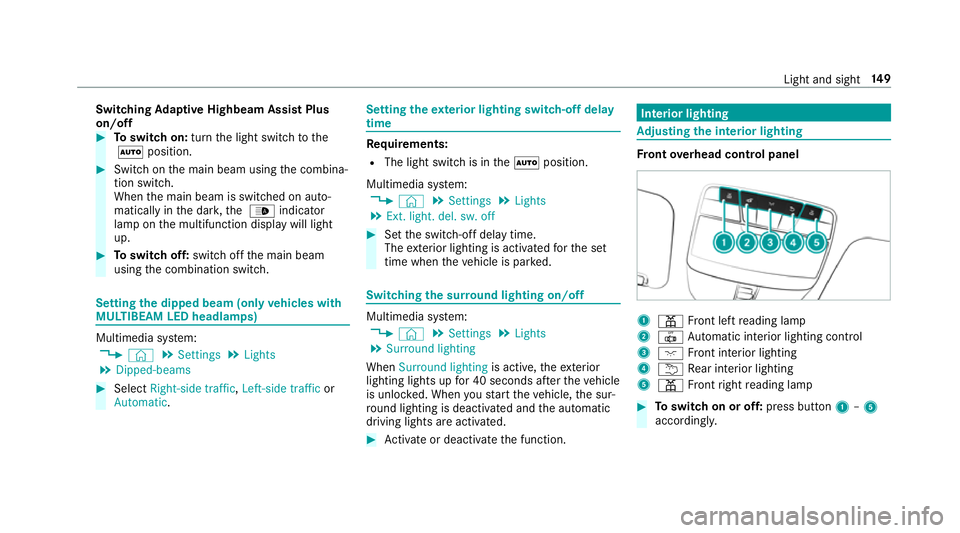
Activate or deacti vate the function. Interior lighting
Ad
justing the in terior lighting Fr
ont overhead control panel 1
p Front left reading lamp
2 | Automatic interior lighting control
3 c Front interior lighting
4 u Rear interior lighting
5 p Front right reading lamp #
Toswitch on or off: press button1–5
accordingly. Light and sight
14 9
Page 154 of 673
Switching
the interior lighting switch-off
delay time on/off Multimedia sy
stem:
4 © 5
Settings 5
Lights
5 Int. light. del. sw. off #
Switch the lighting switch-off delay time on
or off.
When this function is active, the interior light‐
ing is lit up for short time af terth eve hicle
has been loc ked. Wi
ndscreen wipers and windscreen washer
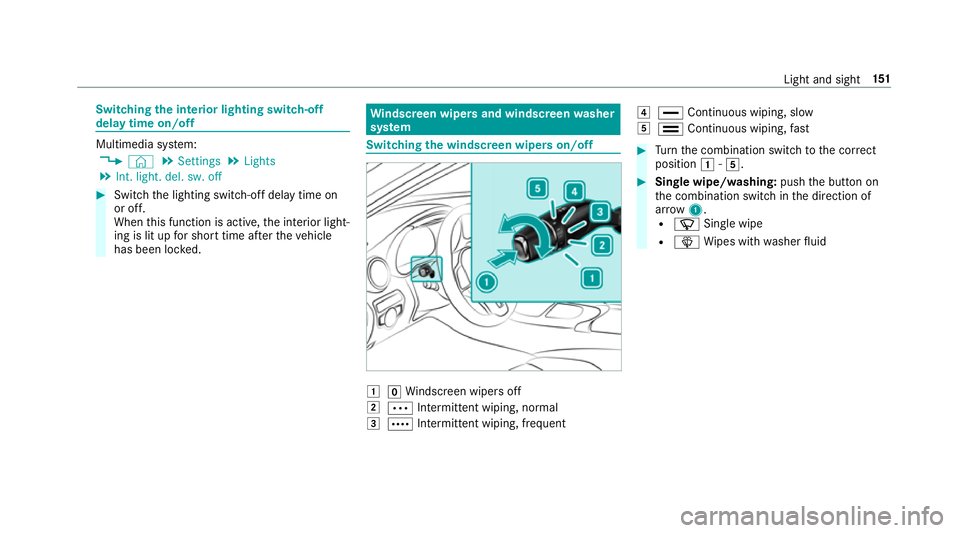
sy stem Switching
the windscreen wipers on/off 1
gWindsc reen wipers off
2 Ä Intermittent wiping, normal
3 Å Intermittent wiping, frequent 4
° Continuous wiping, slow
5 ¯ Continuous wiping, fast #
Turn the combination switch tothe cor rect
position 1-5. #
Single wipe/washing: pushthe button on
th e combination switch in the direction of
ar row 1.
R í Single wipe
R î Wipes with washer fluid Light and sight
151
Page 333 of 673
Settings
for the MBUX In terior Assistant
Multimedia sy stem:
4 © 5
Settings 5
System
5 Interior assistant #
Toswitch on full functionality of the
MBUX Interior Assistant: selectOn.
The option is activated #.#
Toactivate additional functions forre ad‐
ing and sear chlights: selectIncluding read-
ing light.
When the option is switched on, the display
button is activated.
The functions forth ere ading and sear ch
lights are activated in addition tothe pr oxim‐
ity functions. #
Toswitch off the MBUX Interior Assis‐
tant: select Off.
The option is activated #. Main functions
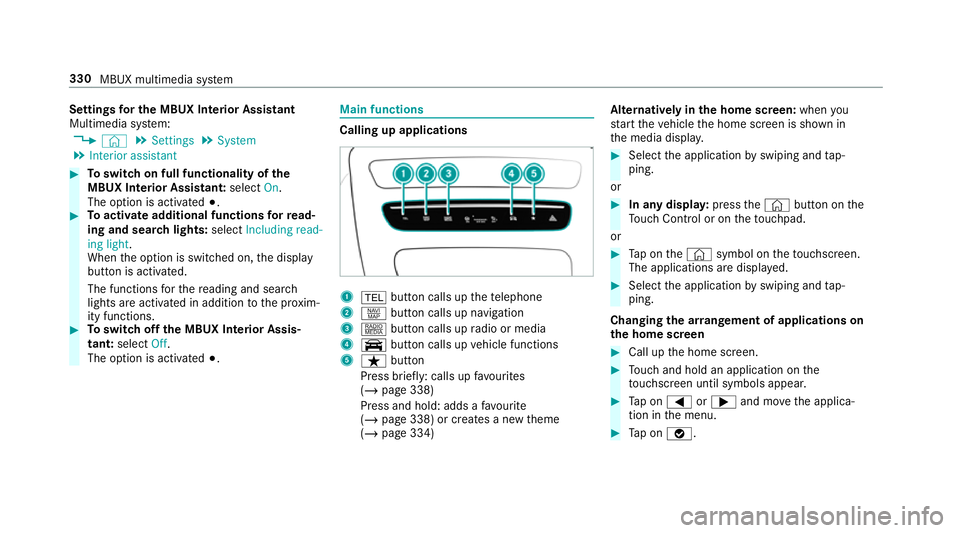
Calling up applications
1
% button calls up thete lephone
2 z button calls up navigation
3 | button calls up radio or media
4 y button calls up vehicle functions
5 ß button
Press brief ly: calls up favo urites
(/ page 338)
Press and hold: adds a favo urite
(/ page 338) or creates a new theme
(/ page 334) Alternatively in
the home screen: whenyou
st art theve hicle the home screen is shown in
th e media displa y. #
Select the application byswiping and tap‐
ping.
or #
In any displa y:press the© button on the
To uch Control or on theto uchpad.
or #
Tap on the© symbol on theto uchsc reen.
The applications are displa yed. #
Select the application byswiping and tap‐
ping.
Changing the ar rangement of applications on
th e home screen #
Call up the home screen. #
Touch and hold an application on the
to uchsc reen until symbols appear. #
Tap on = or; and mo vethe applica‐
tion in the menu. #
Tap on ø. 330
MBUX multimedia sy stem
Page 630 of 673
Sound settings .................................... 433
Tr ans ferred vehicle data ......................4 33
Animals Pets in theve hicle ................................. 73
Anti-lock braking sy stem
see ABS (Anti-lock Braking Sy stem)
Anti-skid chains
see Snow chains
Anti-theft ala rmsystem
see ATA (anti-theft alarm sy stem)
Anti-theft pr otection
Ad ditional door lock .............................. 78
Immobiliser .........................................1 00
Anti-theft pr otection
see ATA (anti-theft alarm sy stem)
Anticipatory occupant pr otection
see PRE- SAFE®
(anticipatory occu‐
pant pr otection)
see PRE-SAFE ®
PLUS (anticipatory
occupant pr otection plus)
Apple CarPlay ®
........................................4 29
Connecting an iPhone ®
....................... 430 Control using
the application buttons
.............................................................4 31
Ending ................................................. 431
No tes .................................................. 430
Overview ............................................. 429
Sound settings .....................................4 31
Tr ans ferred vehicle data ......................4 33
Ashtr ay
Fr ont centre console ........................... 13 4
Using ................................................... 13 4
Assistance Menu (on-board co mputer) .................. 289
Assistance sy stems
see Driving saf ety sy stem
ASS YST PLUS ............................................ 474
Battery disconnection periods ............. 475
Displ aying the service due date ........... 474
Fu nction/no tes .................................... 474
Re gular maintenance work .................. 474
Special service requirements .............. .474
ATA (anti-theft ala rmsystem) ................ .100
Deactivating the alarm .........................1 01
Fu nction .............................................. 100
Fu nction of interior pr otection .............1 01Priming/deactivating interior pr
otec‐
tion ...................................................... 102
Priming/deactivating tow- aw ay pro‐
te ction ................................................. 101
To w- aw ay protection function .............. 101
AT TENTION ASSI ST.......................... 266, 267
Fu nction .............................................. 266
Setting ................................................. 267
Sy stem limitations ...............................2 66
At tention assistant
see ATTENTION ASSIST
Au gmented reality
see Route guidance with augmented reality
Au thorised workshop
see Qualified specialist workshop
Au tomatic distance control
see Active Dis tance Assi stDISTRONIC
Au tomatic driving lights .........................14 2
Au tomatic engine start (ECO start/
sto p function) ........................................... 181
Au tomatic engine stop (ECO start/
sto p function) ........................................... 181 Index
627
Page 668 of 673
Ro
of load ............................................. 549
Tr ans ferring toAndroid Auto ............... 433
Tr ans ferring toApple CarPl ay®
............ 433
Ve hicle height ...................................... 549
Ve hicle length ...................................... 549
Ve hicle width ....................................... 549
Wheelbase ...........................................5 49
Ve hicle dimensions ................................. 549
Ve hicle identification number
see VIN
Ve hicle identification plate .................... 539
EU general operating pe rmit number .. 539
Pa int code .......................................... .539
Pe rm issible axle load .......................... .539
Pe rm issible gross mass ....................... 539
VIN ...................................................... 539
Ve hicle interior
Cooling or heating (Remo teOnline) ..... 174
Ve hicle key
see Key
Ve hicle maintenance
see ASS YST PLUS Ve
hicle position
Switching transmission on/off ............ 355
Ve hicle tool kit ........................................ .497
TIREFIT kit ...........................................4 97
To wing eye ...........................................5 11
Ve ntilating
Con venience opening ............................ 90
Ve ntilation
see Climate cont rol
Ve nts
see Air vents
VIN ............................................................ 539
Identification plate .............................. 539
Seat ..................................................... 539
Wi ndsc reen ......................................... 539
Vi sion
Demisting windo ws............................. 16 2
Vo ice control sy stem
see LINGU ATRO NIC W
Wa rning lamps
see Warning/indicator lamps Wa
rning sy stem
see ATA (anti-theft alarm sy stem)
Wa rning triangle
Re moving ............................................ 494
Setting up ............................................ 494
Wa rning/indicator lamp
!ABS warning lamp ........................ 61 0
J Brake sy stem warning lamp
(red) .................................................... .613
J Brake sy stem warning lamp
(yellow) ................................................ 61 3
? Coolant warning lamp .................. 61 9
# Electrical fault warning lamp ........ 61 8
; Engine diagnosis warning lamp .... 61 8
å ESP®
OFF warning lamp .............. 61 2
÷ ESP®
wa rning lamp flashes .......... 611
÷ ESP®
wa rning lamp lights up ........ 611
8 Fuelreser vewarning lamp .......... .618
! Red indicator lamp, elect ric
parking brake applied .......................... 61 5
6 Restra int sy stem warning lamp .... 61 5 Index
665