park assist MERCEDES-BENZ GLC SUV 2021 Service Manual
[x] Cancel search | Manufacturer: MERCEDES-BENZ, Model Year: 2021, Model line: GLC SUV, Model: MERCEDES-BENZ GLC SUV 2021Pages: 481, PDF Size: 9 MB
Page 241 of 481
Tr
ailer Manoeuvring Assist Fu
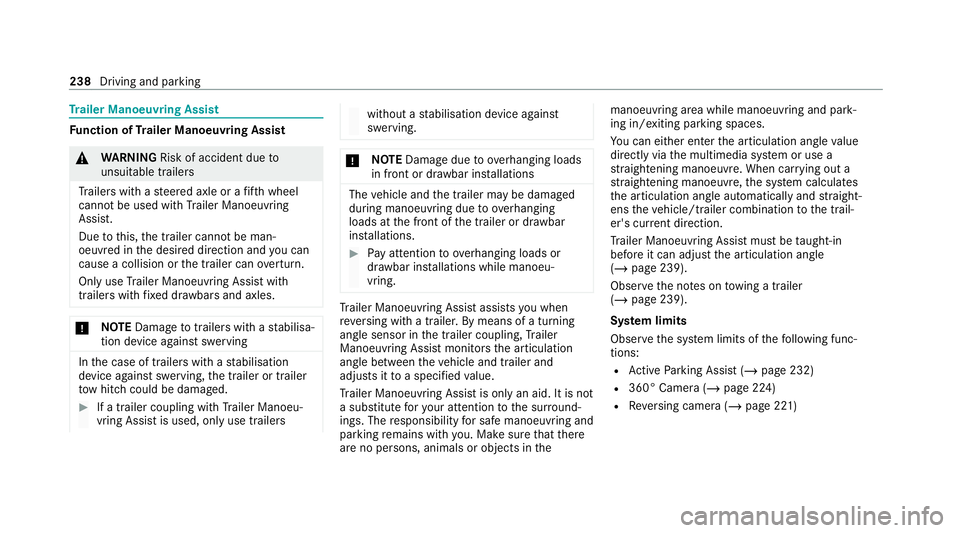
nction of Trailer Manoeuvring Assist &
WARNING Risk of accident due to
unsuitable trailers
Tr ailers with a steered axle or a fift h wheel
cannot be used with Trailer Manoeuv ring
Assi st.
Due tothis, the trailer cann otbe man‐
oeuvred in the desired direction and you can
cause a collision or the trailer can overturn.
On lyuse Trailer Manoeuv ring Assi stwith
trailers with fixe d dr awbars and axles. *
NO
TEDama getotraile rswith a stabilisa‐
tion device against swerving In
the case of trailers with a stabilisation
device against swerving, the trailer or trailer
to w hit chcould be damaged. #
If a trailer coupling with Trailer Manoeu‐
vring Assist is used, on lyuse trailers without a
stabilisation device against
swerving. *
NO
TEDama gedue to ov erhanging loads
in front or draw bar installations The
vehicle and the trailer may be damaged
during manoeuvring due toove rhanging
loads at the front of the trailer or dr awbar
ins tallations. #
Pay attention to overhanging loads or
dr aw bar ins tallations while manoeu‐
vring. Tr
ailer Manoeuv ring Assi stassists you when
re ve rsing with a trailer. By means of a turning
angle sensor in the trailer coupling, Trailer
Manoeuv ring Assi stmonitors the articulation
angle between theve hicle and trailer and
adjusts it toa specified value.
Tr ailer Manoeuv ring Assi stis only an aid. It is not
a substitute foryo ur attention tothe sur round‐
ings. The responsibility for safe manoeuvring and
parking remains with you. Make sure that there
are no persons, animals or objects in themanoeuvring area while manoeuvring and park‐
ing in/exiting parking spaces.
Yo
u can either en terth e articulation angle value
directly via the multimedia sy stem or use a
st ra ightening manoeuvre. When car rying out a
st ra ightening manoeuvre, the sy stem calculates
th e articulation angle automatically and stra ight‐
ens theve hicle/trailer combination tothe trail‐
er's cur rent di rection.
Tr ailer Manoeuv ring Assi stmust be taught-in
before it can adjust the articulation angle
(/ page 239).
Obser vethe no tes on towing a trailer
(/ page 239).
Sy stem limits
Obser vethe sy stem limits of thefo llowing func‐
tions:
R Active Parking Assist (/ page 232)
R 360° Camera (/ page 224)
R Reversing camera (/ page 221)238
Driving and parking
Page 242 of 481
The sy
stem may be impaired or may not function
in thefo llowing situations:
R The gradient is more than appr oximately
15 %.
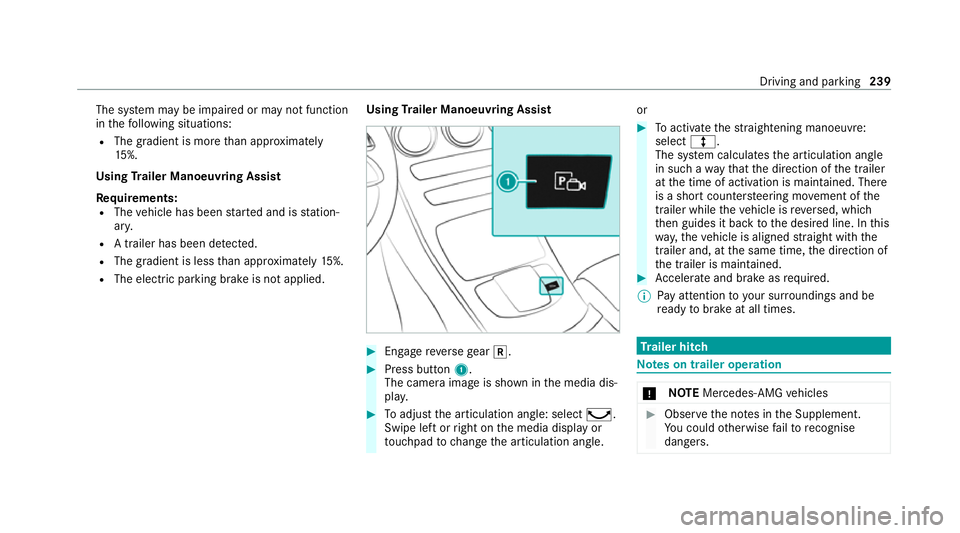
Using Trailer Manoeuvring Assist
Requ irements:
R The vehicle has been star ted and is station‐
ar y.
R A trailer has been de tected.
R The gradient is less than appr oximately 15%.
R The elect ric pa rking brake is not applied. Using
Trailer Manoeuvring Assist #
Engage reve rsege ar k. #
Press button 1.
The camera image is shown in the media dis‐
pla y. #
Toadjust the articulation angle: select ¸.
Swipe left or right on the media display or
to uchpad tochange the articulation angle. or #
Toactivate thest ra ightening manoeuvre:
select º.
The sy stem calculates the articulation angle
in such a wayth at the direction of the trailer
at the time of activation is maintained. There
is a short counter steering mo vement of the
trailer while theve hicle is reve rsed, which
th en guides it back tothe desired line. In this
wa y,theve hicle is aligned stra ight with the
trailer and, at the same time, the direction of
th e trailer is maintained. #
Accelerate and brake as requ ired.
% Pay attention toyour sur roundings and be
re ady tobrake at all times. Tr
ailer hitch Note
s on trailer operation *
NO
TEMercedes-AMG vehicles #
Obser vethe no tes in the Supplement.
Yo u could otherwise failto recognise
dangers. Driving and park
ing239
Page 246 of 481
If
th e ball neck is not securely loc ked in place,
th eCheck trailer hitch lock message will appear
on the multifunction displa y.Coupling up/uncoupling a trailer
&
WARNING Risk of injury fromtheve hicle
le ve l being changed
Ve hicles with le vel control sy stem: the
ve hicle le vel may be changed unin tentional ly,
e.g. by ot her persons. You may become trap‐
ped if you couple up or uncouple a trailer
while theve hicle le vel is changing. In addi‐
tion, other people could become trapped if
th eir limbs are between theve hicle body and
th e tyres or underneath theve hicle.
When coupling up or uncoupling a trailer,
make sure that: #
The doors or tailgate are not opened or
closed. #
You do not initiate the le vel control sys‐
te m and do not operate theDY NA MIC
SELECT switch. #
Do not lock or unlock theve hicle. Re
quirements:
R The ball neck is extended and engaged in a
secu rely loc ked position.
Tr ailers with a 7-pin plug can be connec tedto
th eve hicle with thefo llowing adap ters:
R Adapter plug
R Adapter cable
The trailer will be cor rectly de tected bytheve hi‐
cle only if thefo llowing conditions are me t:
R The trailer is connected cor rectl y.
R The trailer lighting sy stem is in working
order.
The functions of thefo llowing sy stems will be
af fected bya cor rectly connected trailer:
R ESP ®
trailer stabilisation
R Trailer Manoeuvering Assist
R Active Lane Keeping Assist
R Parking Assist PARKTRONIC
R Active Parking Assist R
Blind Spot Assist or Active Blind Spot Assi st
R Drive AwayAssi st
R Cross Traf fic Alert
R Reversing camera
R 360° camera
R AIR BODY CONTROL
Coupling up a trailer
* NO
TEDama getothest ar ter battery due
to full dischar ge Charging
the trailer battery using the po wer
supply of the trailer can damage thest ar ter
batter y. #
Do not use theve hicle's po wer supply
to charge the trailer batter y. #
Remo vethe co ver cap from the ball head and
st ore it in a safe place. #
Position the trailer on a le vel sur face behind
th eve hicle and couple it up totheve hicle. Driving and parking
243
Page 254 of 481
The on-board computer is operated using
the
left-hand Touch Control and the left-hand back/
home button.
When the on-board computer is being operated,
dif fere nt acoustic signals will sound as operating
fe edbac k,e.g. when the end of a list is reached
or when you are sc rolling thro ugh a list.
The following menus are available:
R Service
R Assistance
R Trip
R Navigation
R Radio
R Media
R Telephone
R HUD
R Vehicles with an instrument display in
th e widescreen cockpit: Design
% You can find information about the possible
settings and selections on the menus in the
Digital Owner's Manual. #
Tocall up the menu bar: pressthe left-hand
back button until the menu bar is displa yed.
% Press theò button tocall up the menu
bar of the on-board computer. #
Toscroll on the menu bar: swipe left or
ri ght on the left-hand Touch Control. #
Tocall up a menu, submenu or possible
settings on the menu, or confirm a selec‐
tion or setting: pressthe left-hand Touch
Control. #
Toscroll through displa ysor lists on the
menu, or select display content, a func‐
tion, an entry or a displa y:swipe upwards
or down wards on the left-hand Touch Con‐
trol. #
Toswitch between displa ys:swipe
upwards or down wards on the left-hand
To uch Control. #
Toexit a submenu: pressthe left-hand back
button. Overview of displa
yson the multifunction
display
Displa yson the multifunction display:
ë Active Parking Assist activated
(/ page 234)
é Parking Assist PARKTRONIC deacti vated
( / page 231)
¯ Cruise control (/
page193)
È Limi
ter (/ page194)
ç Active Dis tance Assi stDISTRONIC
(/ page 196)
æ Ac
tive Brake Assi st (/ page 210)
è Active Steering Assist (/ page 203)
à Ac
tive Lane Keeping Assist (/ page215)
è ECO
start/ stop function (/ page160)
ë HOLD fu
nction (/ page 190)
_ Ad
aptive Highbeam Assist (/ page132)
Ad aptive Highbeam Assist Plus
(/ page 133)
ð Maximum pe rmissible speed exceeded
(for cer tain countries only) Instrument display and on-board computer
251
Page 309 of 481
*
NO
TEDama gefrom auto matic braking If one of
thefo llowing functions is switched
on, theve hicle brakes automatically in cer‐
ta in situations:
R Active Brake Assi st
R Active Dis tance Assi stDISTRONIC
R HOLD function
R Active Parking Assist
To avo id damage totheve hicle, deactivate
th ese sy stems in thefo llowing or similar sit‐
uations: #
during towing #
in a car wash *
NO
TEDama gedue tounsuitable car
wa sh #
Before driving into a car wash make
sure that the car wash is suitable for
th eve hicle dimensions. #
Ensure there is suf ficient ground clear‐
ance between the underbody and the
guide rails of the car wash. #
Ensure that the clearance width of the
car wash, in particular the width of the
guide rails, is suf ficient. To
avo id damage to yourvehicle when using a
car wash, ensure thefo llowing beforehand:
R Active Dis tance Assi stDISTRONIC is deacti‐
va ted.
R The HOLD function is switched off.
R The 360° Camera or there ve rsing camera is
switched off.
R The side windo wsand sliding sun roof are
comple tely closed.
R The bl owerfo rth eve ntilation/heating is
switched off.
R The windsc reen wiper switch is in position
g.
R The key is at a minimum dis tance of 3 m
aw ay from theve hicle. Otherwise theta ilgate
could open unin tentional ly. R
In automatic car washes with con veyo r sys‐
te ms:
- Neutral iis engaged.
- Ifyo uwo uld like tolea vetheve hicle while
it is being washed, make sure theke y is
located in theve hicle. The park position
j isotherwise automatically engaged.
% If, af terth e car wash, youre mo vethewax
from the windscreen and wiper rubbers, this
will pr event smearing and reduce wiper
noise. Information on using a high-p
ressure cleaner &
WARNING Risk of an accident when
using high-pressure cleane rswith round-
spray nozzles
The wate r jet can cause extern ally invisible
damage.
Components damaged in this wa y may unex‐
pec tedly fail. 306
Maintenance and care
Page 328 of 481
Obser
vethe additional following points during
st arting assistance:
R Starting assis tance may only be pr ovided
using vehicles, batteries or other jump start
devices with a nominal voltage of 12V.
R The vehicles must not touch.
R Vehicles with a petrol engine: jump-start
th eve hicle only when the engine and exhaust
sy stem are cold. St
arting assi stance and charging the12 V
battery Requ
irements:
R The vehicle is secured with the electric park‐
ing brake.
R Vehicles with automatic transmission: the
transmission is in position j.
R The ignition and all electrical consumers are
switched off.
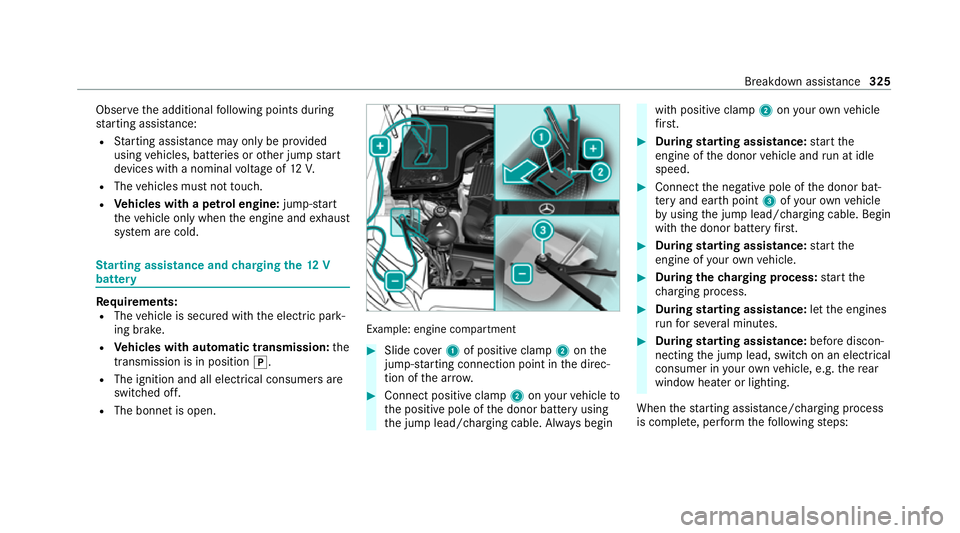
R The bonnet is open. Example: engine compartment
#
Slide co ver1 of positive clamp 2onthe
jump-s tarting connection point in the direc‐
tion of the ar row. #
Connect positive clamp 2onyour vehicle to
th e positive pole of the donor battery using
th e jump lead/charging cable. Alw ays begin with positive clamp
2onyour ow nve hicle
fi rs t. #
During starting assi stance: start the
engine of the donor vehicle and run at idle
speed. #
Connect the negative pole of the donor bat‐
te ry and ear thpoint 3ofyour ow nve hicle
by using the jump lead/charging cable. Begin
with the donor battery firs t. #
During starting assi stance: start the
engine of your ow nve hicle. #
During thech arging process: start the
ch arging process. #
During starting assi stance: letthe engines
ru nfo r se veral minutes. #
During starting assi stance: before discon‐
necting the jump lead, switch on an electrical
consumer in your ow nve hicle, e.g. there ar
wind owheater or lighting.
When thest arting assis tance/charging process
is compl ete, per form thefo llowing steps: Breakdown assis
tance 325
Page 329 of 481
#
First,re mo vethe jump lead/charging cable
from ear thpoint 3and the negative pole of
th e donor batter y,then from positive clamp
2 and the positive pole of the donor bat‐
te ry. Begin ea chtime wi th the conta cts on
yo ur ow nve hicle firs t. #
Afterre moving the jump lead/charging
cable, close co ver1 of positive clamp 2.
Fu rther information can be obtained at a quali‐
fi ed specialist workshop. Re
placing the 12V battery #
Obser vethe no tes on the12 V battery
(/ page 321).
Mercedes-Benz recommends that you ha vethe
12 V battery replaced at a qualified specialist
wo rkshop, e.g. at a Mercedes-Benz Service
Centre. Obser
vethefo llowing no tes if youwa ntto
re place the battery yourself:
R Alw aysre place a faulty bat tery with a battery
which meets the specific vehicle require‐
ments.
The vehicle is equipped with an AGMtech nol‐
ogy battery (Absorbent Glass Mat) or a li th‐
ium-ion batter y.Fu llve hicle functionality is
only guaranteed with an AGM battery or lith‐
ium-ion batter y.Fo r saf etyre asons,
Mercedes-Benz recommends that you on ly
use bat teries which ha vebeen tested and
appr ovedfo ryo ur vehicle byMercedes-Benz.
R Carryove r de tach able parts, such as vent
hoses, elbow fittings or term inal co vers from
th e battery being replaced.
R Make sure that theve nt hose is al ways con‐
nected tothe original opening on the side of
th e batter y.
Fit any existing or supplied cell caps.
Otherwise, gases or battery acid could
escape.
R Make sure that de tach able parts are recon‐
nected in the same way. To
w- starting or towing away Pe
rm itted towing me thods Plug-in
hybrid: be sure toobser vethe no tes in
th e Supplement. You could otherwise failto rec‐
ognise dangers.
* NO
TEDama gefrom auto matic braking If one of
thefo llowing functions is switched
on, theve hicle brakes automatically in cer‐
ta in situations:
R Active Brake Assi st
R Active Dis tance Assi stDISTRONIC
R HOLD function
R Active Parking Assist
To avo id damage totheve hicle, deactivate
th ese sy stems in thefo llowing or similar sit‐
uations: #
During towing #
In a car wash 326
Breakdown assis tance
Page 339 of 481
#
Neverfit snow chains on the front
wheels. #
Only fit snow chains on there ar wheels
in pairs. *
NO
TEDama getocomponents of the
ve hicle body or chassis due tofitted
snow chains If
yo ufit snow chains tothe front wheels of
4MATIC vehicles, you may damage co mpo‐
nents of theve hicle body or chassis. #
Onlyfit snow chains tothere ar wheels
of 4MATIC vehicles. Obser
vethefo llowing no tes when using snow
ch ains:
R Snow ch ains are on ly permissible for cer tain
wheel/tyre combinations. You can obtain
information about this from a Mercedes-Benz
Service Cent re.
R For saf etyre asons, only use snow chainsthat
ha ve been specifically appr ovedfo ryo ur ve
hicle byMercedes-Benz, or snow chains
with the same quality standard.
R If sn ow ch ains are fitted, the maximum per‐
missible speed is 50 km/h.
R Vehicles with Active Park ing Assis t:do
not use Active Parking Assist when snow
ch ains are fitted.
R Vehicles with le vel control: if snowchains
are fitted, only drive at raised vehicle le vel
( / page 219).
% You can permanently limit the maximum
ve hicle speed for driving with winter tyres
(/ page 196).
% You can deactivate ESP ®
to pull away
( / page 188). This allo ws the wheels to
spin, achieving an increased driving forc e. Ty
re pressure Note
s on tyre pressure &
WARNING Risk of accident due toinsuf‐
fi cient or excessive tyre pressure
Ty res with either too low or too high a pres‐
sure present thefo llowing hazards:
R the tyres could bur st
R the tyres could wearexcessively and/or
une venly
R the driving characteristics as well as
st eering and braking characteristics may
be se verely impaired #
Obse rveth ere commended tyre pres‐
su res and check the tyre pressures of
all tyres including the spare wheel:
R monthly
R if altering the load on theve hicle
R prior tolong journe ys
R ifth e operating conditions change, for
ex ample when driving off-ro ad336
Wheels and tyres
Page 409 of 481
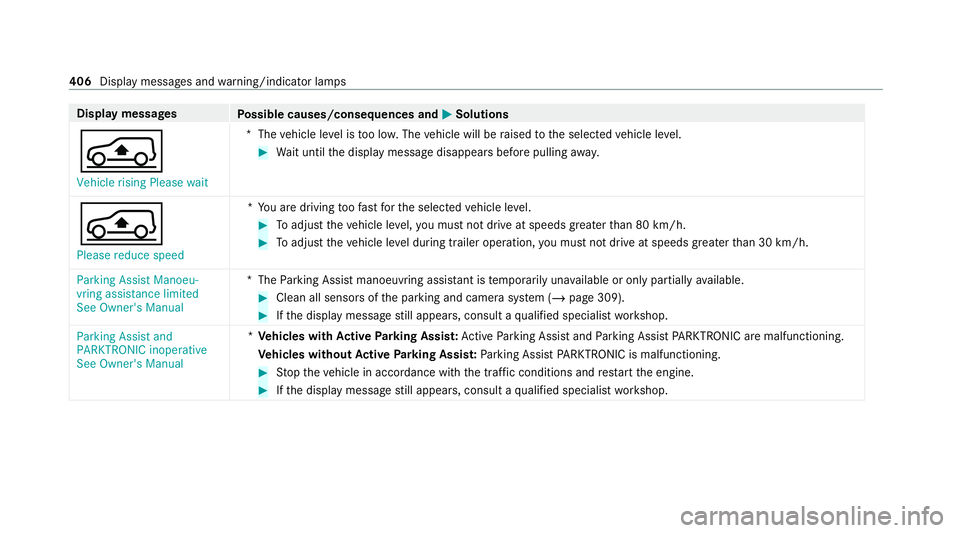
Display messages
Possible causes/consequences and M MSolutions
Á Vehicle rising Please wait *T
hevehicle le vel is too lo w.The vehicle will be raised tothe selected vehicle le vel. #
Wait until the display message disappears before pulling away.
Á Please reduce speed *Y
ou are driving toofast forth e selected vehicle le vel. #
Toadjust theve hicle le vel,yo u must not drive at speeds greaterth an 80 km/h. #
Toadjust theve hicle le vel during trailer operation, you must not drive at speeds greaterth an 30 km/h.
Parking Assist Manoeu-
vring assistance limited
See Owner's Manual *T
heParking Assist manoeuvring assis tant is temp orarily una vailable or only partially available. #
Clean all sensors of the parking and camera sy stem (/ page 309). #
Ifth e display message still appears, consult a qualified specialist workshop.
Parking Assist and
PARKTRONIC inoperative
See Owner's Manual *
Ve hicles with Active Parking Assis t:Ac tive Parking Assist and Parking Assist PARKTRONIC are malfunctioning.
Ve hicles without Active Parking Assis t:Pa rking Assist PARKTRONIC is malfunctioning. #
Stop theve hicle in accordance with the tra ffic conditions and restart the engine. #
Ifth e display message still appears, consult a qualified specialist workshop. 406
Display messages and warning/indicator lamps
Page 443 of 481
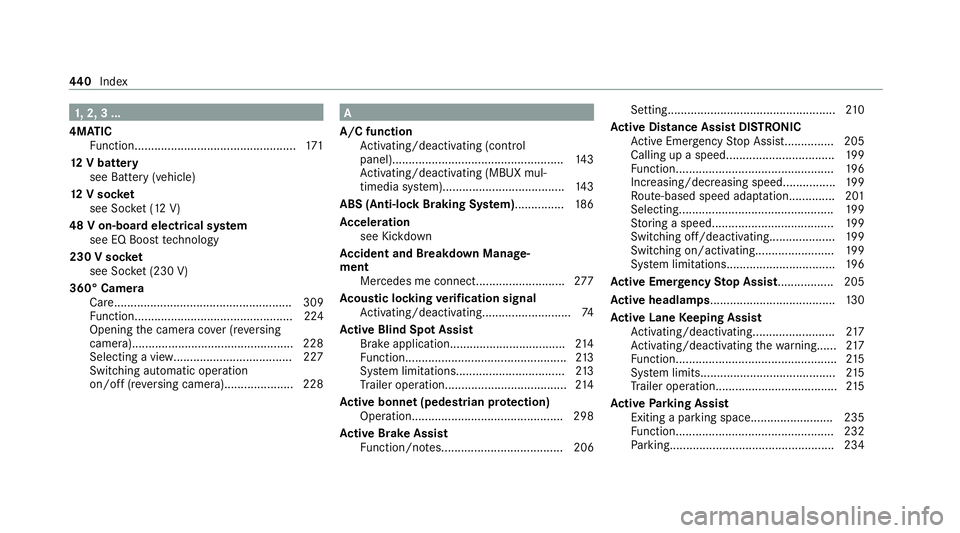
1,
2, 3 ...
4MATIC Function................................................. 171
12 V battery
see Battery (vehicle)
12 V so cket
see Soc ket (12 V)
48 V on-board electrical sy stem
see EQ Boo sttech nology
230 V so cket
see Soc ket (230 V)
360° Camera Care...................................................... 309
Fu nction................................................ 224
Opening the camera co ver (r eve rsing
camera)................................................. 228
Selecting a view................................... .227
Switching au tomatic operation
on/off (r eversing camera).................... .228 A
A/C function Activating/deactivating (control
panel).................................................... 14 3
Ac tivating/deactivating (MBUX mul‐
timedia sy stem).....................................1 43
ABS (Anti-lo ckBraking Sy stem) .............. .186
Ac celeration
see Kickdown
Ac cident and Breakdown Manage‐
ment
Mercedes me connect........................... 277
Ac oustic locking verification signal
Ac tivating/deactivating........................... 74
Ac tive Blind Spot Assi st
Brake application................................... 214
Fu nction................................................. 213
Sy stem limitations................................. 213
Tr ailer operation.................................... .214
Ac tive bonn et(pedestrian pr otection)
Operation............................................. .298
Ac tive Brake Assi st
Fu nction/no tes..................................... 206 Setting...................................................
210
Ac tive Di stance Assist DISTRO NIC
Ac tive Emergency Stop Assis t............... 205
Calling up a speed................................. 19 9
Fu nction................................................ 19 6
Increasing/decreasing speed................ 19 9
Ro ute-based speed adap tatio n.............. 201
Selecting............................................... 19 9
St oring a speed.....................................1 99
Switching off/deactivating.................... 19 9
Switching on/activating........................ 19 9
Sy stem limitations................................. 19 6
Ac tive Eme rgency Stop Assist ................ .205
Ac tive headlamps...................................... 13 0
Ac tive Lane Keeping Assist
Ac tivating/deactivating......................... 217
Ac tivating/deactivating thewa rning...... 217
Fu nction................................................. 215
Sy stem limits.........................................2 15
Tr ailer operation.................................... .215
Ac tive Parking Assist
Exiting a parking space......................... 235
Fu nction................................................ 232
Pa rking................................................. .234 440
Index