reset MERCEDES-BENZ GLE 2016 User Guide
[x] Cancel search | Manufacturer: MERCEDES-BENZ, Model Year: 2016, Model line: GLE, Model: MERCEDES-BENZ GLE 2016Pages: 450, PDF Size: 12.92 MB
Page 101 of 450
Problems with the sliding sunroof Your vehicle may be equipped with a sliding sunroof or a panorama roof with power tilt/sliding
panel. In the following section, the term "sliding sunroof" refers to both sliding sunroof variants.
G WARNING
If you close the sliding sunroof again immediately after it has been blocked or reset, the sliding
sunroof closes with increased or maximum force. The reversing feature is then not active. Parts
of the body could be trapped in the closing area in the process. This poses an increased risk of
injury or even fatal injury.
Make sure that no parts of the body are in the closing area.
If somebody becomes trapped: R
release the switch immediately, or R
press the switch in any direction during the automatic closing process
The closing process is stopped.
! If the sliding sunroof still cannot be opened or closed as a result of a malfunction, contact a
qualified specialist workshop.
Problem
Possible causes/consequences and P Solutions
The sliding sunroof can-
not be closed and you
cannot see the cause. If the sliding sunroof is obstructed during closing and reopens again
slightly: X
Immediately after the sliding sunroof blocks, pull the V switch in
the overhead control panel down to the point of resistance and hold
it until the sliding sunroof is closed.
The sliding sunroof is closed with increased force.
If the sliding sunroof is obstructed again during closing and then
reopens slightly: X
Immediately after the sliding sunroof blocks, pull the V switch in
the overhead control panel down to the point of resistance and hold
it until the sliding sunroof is closed.
The sliding sunroof is closed without the automatic reversing fea-
ture. Sliding sunroof 99
Opening and closing Z
Page 113 of 450
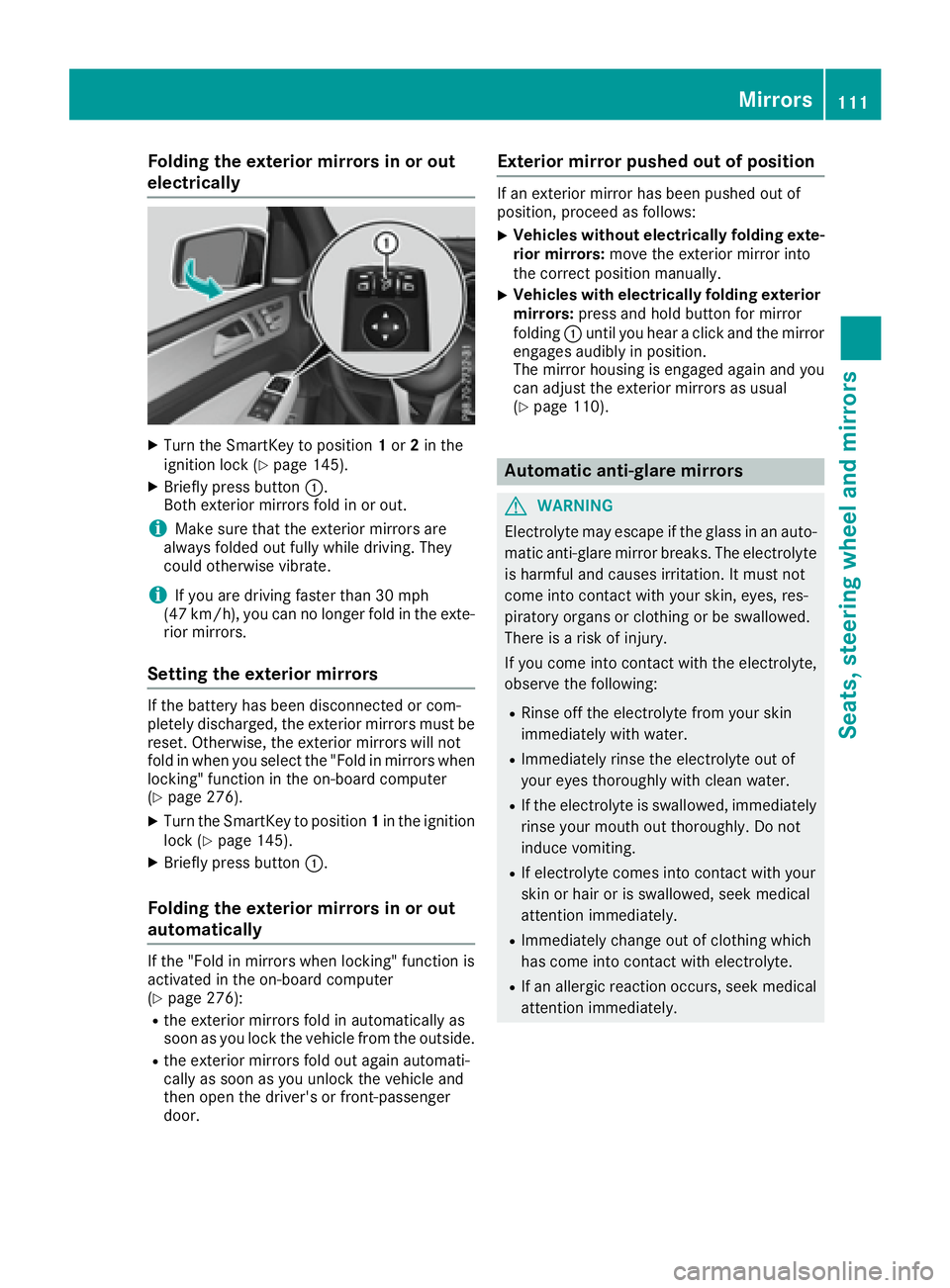
Folding the exterior mirrors in or out
electrically X
Turn th e SmartKey to position 1 or 2 in th e
ignition loc k ( Y
page 145).X
Briefly press butto n C .
Both exterio r mirror s fol d in or out .
i Mak e sure that th e exterio r mirror s are
always folded out fully while driving . They
could otherwise vibrate .
i If you are driving faste r than 30 mph
(47 km/h), you can no longer fol d in th e exte -
rio r mirrors.
Setting the exterior mirrors If th e battery has been disconnected or com-
pletely discharged, th e exterio r mirror s must be
reset . Otherwise, th e exterio r mirror s will no t
fol d in when you select th e "Fold in mirror s when
locking" function in th e on-board computer
( Y
page 276). X
Turn th e SmartKey to position 1 in th e ignition
loc k ( Y
page 145).X
Briefly press butto n C .
Folding the exterior mirrors in or out
automatically If th e "Fold in mirror s when locking" function is
activated in th e on-board computer
( Y
page 276): R
th e exterio r mirror s fol d in automatically as
soo n as you loc k th e vehicl e from th e outside .R
th e exterio r mirror s fol d out again automati-
call y as soo n as you unlock th e vehicl e and
then open th e driver' s or front-passenger
door . Exterior mirror pushed out of position If an exterio r mirror has been pushed out of
position , procee d as follows :X
Vehicles without electricall y folding exte-
rior mirrors : mov e th e exterio r mirror int o
th e correct position manually. X
Vehicles with electricall y folding exterior
mirrors : press and hold butto n for mirror
foldin g C until you hear a click and th e mirror
engage s audibly in position .
The mirror housing is engage d again and you
can adjust th e exterio r mirror s as usual
( Y
page 110).
Automatic anti-glare mirrors
G WARNIN G
Electrolyte may escape if th e glass in an auto -
matic anti-glare mirror breaks . The electrolyt e
is harmful and causes irritation . It must no t
come int o contact wit h your skin, eyes, res -
piratory organs or clothing or be swallowed.
Ther e is a ris k of injury.
If you come int o contact wit h th e electrolyte,
observ e th e following: R
Rins e off th e electrolyt e from your skin
immediately wit h water. R
Immediately rinse th e electrolyt e out of
your eyes thoroughly wit h clean water.R
If th e electrolyt e is swallowed, immediately
rinse your mout h out thoroughly. Do no t
induce vomiting . R
If electrolyt e comes int o contact wit h your
skin or hair or is swallowed, seek medical
attention immediately. R
Immediately chang e out of clothing whic h
has come int o contact wit h electrolyte.R
If an allergic reaction occurs, seek medical
attention immediately. Mirrors 111
Seats, steering wheel and mirrors Z
Page 115 of 450
Memory function
Storing settings
G WARNING
If you use the memory function on the driver's
side while driving, you could lose control of
the vehicle as a result of the adjustments
being made. There is a risk of an accident.
Only use the memory function on the driver's
side when the vehicle is stationary.
G WARNING
When the memory function adjusts the seat or
steering wheel, you and other vehicle occu-
pants – particularly children – could become
trapped. There is a risk of injury.
While the memory function is making adjust-
ments, make sure that no one has any body
parts in the sweep of the seat or steering
wheel. If somebody becomes trapped, imme-
diately release the memory function position
button. The adjustment process is stopped.
G WARNING
Children could become trapped if they acti-
vate the memory function, particularly when
unattended. There is a risk of injury.
When leaving the vehicle, always take the
SmartKey with you and lock the vehicle. Never
leave children unsupervised in the vehicle.
The memory function can be used at any time,
e.g. even when the SmartKey isn't in the ignition
lock.
With the memory function, you can store up to
three different settings, e.g. for three different
people.
The following settings are stored as a single
memory preset: R
position of the seat, backrest and head
restraint R
driver's side: steering wheel position R
driver's side: position of the exterior mirrors
on the driver's and front-passenger sides X
Adjust the seat ( Y
page 102).X
On the driver's side, adjust the steering wheel
( Y
page 108) and the exterior mirrors
( Y
page 110). X
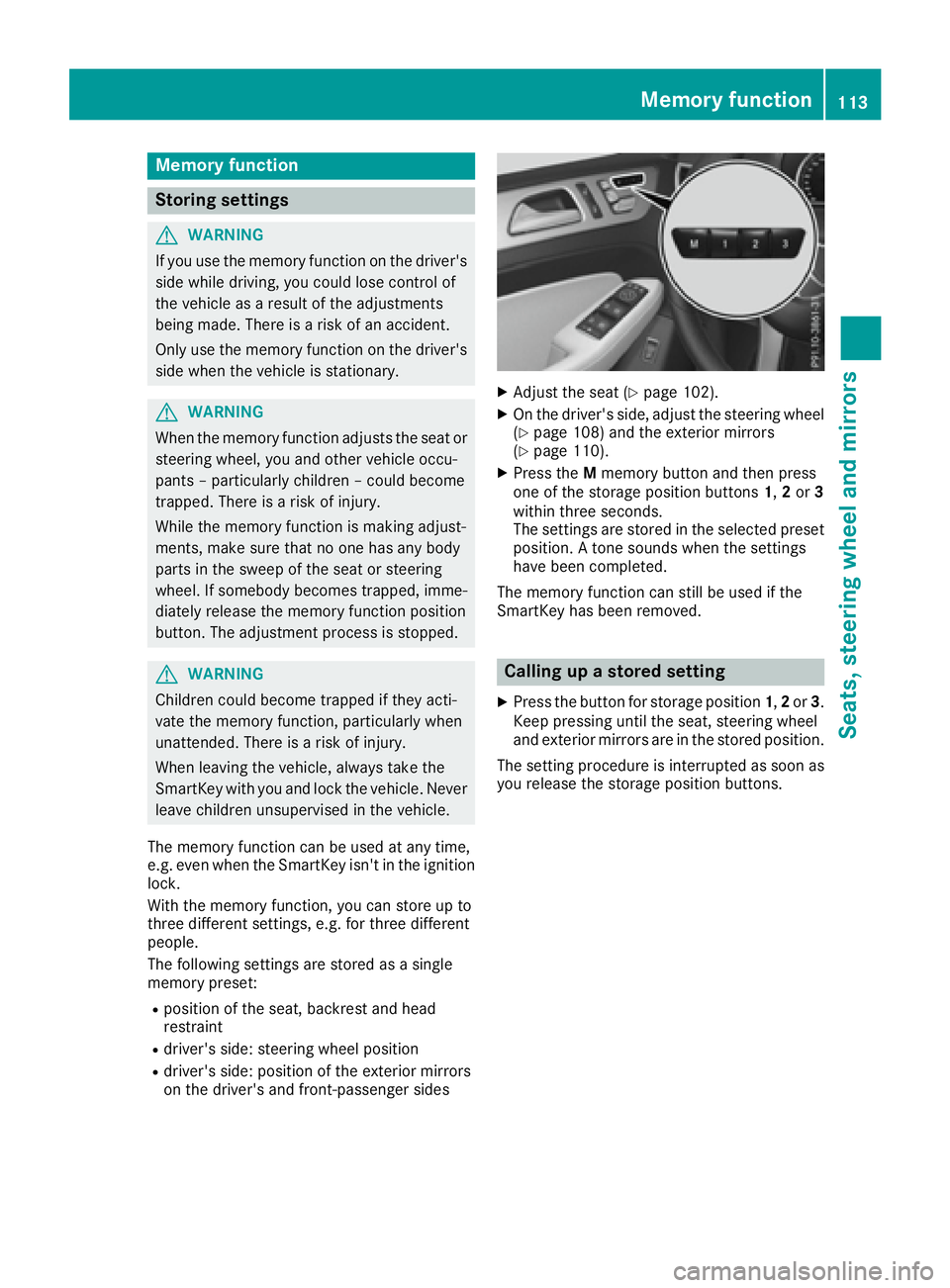
Press the M memory button and then press
one of the storage position buttons 1 , 2 or 3
within three seconds.
The settings are stored in the selected preset
position. A tone sounds when the settings
have been completed.
The memory function can still be used if the
SmartKey has been removed.
Calling up a stored setting X
Press the button for storage position 1 , 2 or 3 .
Keep pressing until the seat, steering wheel
and exterior mirrors are in the stored position.
The setting procedure is interrupted as soon as
you release the storage position buttons.Memory function 113
Seats, steering wheel and mirrors Z
Page 180 of 450
Every person who has access to the informa-
tion stated can use the functions of the online
access to the vehicle.
i Information when selling a vehicle or
buying a used vehicle: R
If you sell your vehicle, you are obliged to
delete the vehicle from your personal area
on the online access to the vehicle. R
If you have bought a used vehicle, it is pos-
sible that the previous owner still has
access to the online access to the vehicle.
Calling up functions The online access to the vehicle allows you
access to your vehicle's information and func-
tions using remote query and remote configu-
ration.
The following functions can be accessed: R
request the current condition of charge of the
high-voltage battery R
program the departure time ( Y
page 274)R
set or activate the "Pre-entry climate control
at departure time" function (see the separate
COMAND operating instructions)
Information on additional functions and operat-
ing instructions can be found within the online
access to the vehicle.
Connecting the vehicle to the Internet
i This function is not available in all countries
and requires activated access to the mbrace
emergency call system.
You can use the online access to the vehicle if
the vehicle has a connection to the Internet via a
mobile phone network. The necessary data is
transmitted by radio. The vehicle automatically
recognizes whether a connection to the Internet
is possible or not. No presets are necessary.
i Restrictions in reception are possible if the
vehicle is in an underground car park, for
example. Restrictions may also occur in areas
with poor mobile network coverage. Parking
Important safety notes
G WARNING
Flammable material such as leaves, grass or
twigs may ignite if they come into contact with
hot parts of the exhaust system or exhaust
gas flow. There is a risk of fire.
Park the vehicle so that no flammable mate-
rials come into contact with parts of the vehi-
cle which are hot. Take particular care not to
park on dry grassland or harvested grain
fields.
G WARNING
If you leave children unsupervised in the vehi-
cle, they could set it in motion by, for example: R
release the parking brake. R
shift the automatic transmission out of the
parking position P .R
start the engine.
In addition, they may operate vehicle equip-
ment and become trapped. There is a risk of
an accident and injury.
When leaving the vehicle, always take the
SmartKey with you and lock the vehicle. Never
leave children unsupervised in the vehicle.
! Always secure the vehicle correctly against
rolling away. Otherwise, the vehicle or its driv-
etrain could be damaged.
To ensure that the vehicle is secured against
rolling away unintentionally: R
the electric parking brake must be applied. R
the transmission must be in position P and the
SmartKey must be removed from the ignition
lock. R
the front wheels must be turned towards the
curb on steep uphill or downhill gradients. R
the empty vehicle must be secured at the
front axle with a wheel chock or similar, for
example, on uphill or downhill gradients. R
a laden vehicle must also be secured at the
rear axle with a wheel chock or s imilar, for
e xample, on uphill or downhill gradients.178
Parking
Driving an d parking
Page 252 of 450
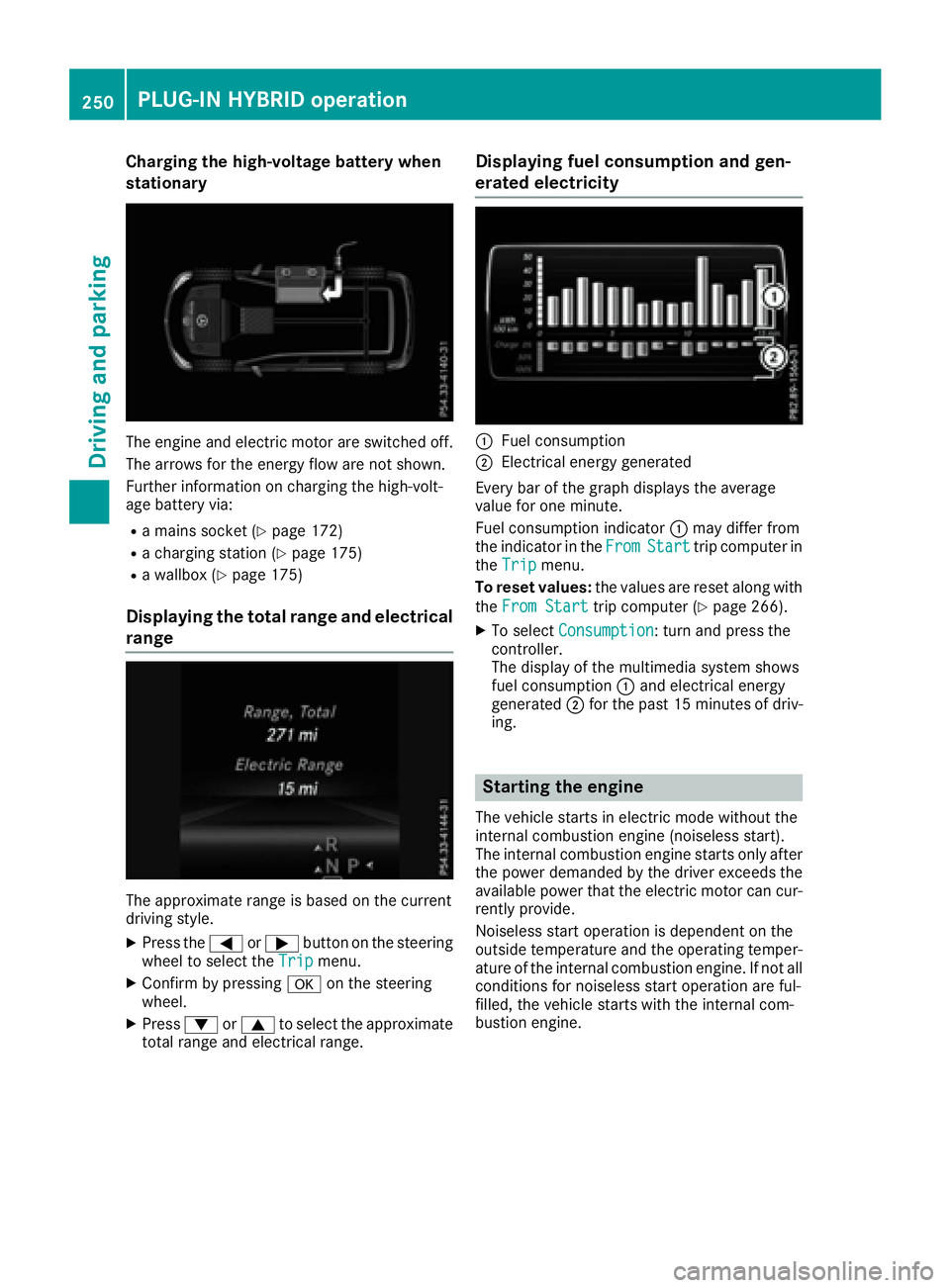
Charging the high-voltage battery when
stationary
The engine and electric motor are switched off.
The arrows for the energy flow are not shown.
Further information on charging the high-volt-
age battery via: R
a mains socket ( Y
page 172)R
a charging station ( Y
page 175)R
a wallbox ( Y
page 175)
Displaying the total range and electrical
range
The approximate range is based on the current
driving style. X
Press the Y or e button on the steering
wheel to select the Trip menu.X
Confirm by pressing v on the steering
wheel. X
Press d or c to select the approximate
total range and electrical range. Displaying fuel consumption and gen-
erated electricity
C
Fuel consumption D
Electrical energy generated
Every bar of the graph displays the average
value for one minute.
Fuel consumption indicator C may differ from
the indicator in the From Start trip computer in
the Trip menu.
To reset values: the values are reset along with
the From Start trip computer ( Y
page 266).X
To select Consumption : turn and press the
controller.
The display of the multimedia system shows
fuel consumption C and electrical energy
generated D for the past 15 minute so f driv-
ing.
Starting the engine The vehicle starts in electric mode without the
internal combustion engine (noiseless start).
The internal combustion engine starts only after
the power demanded by the driver exceeds the
available power that the electric motor can cur-
rently provide.
Noiseless start operation is dependent on the
outside temperature and the operating temper-
ature of the internal combustion engine. If not all
conditions for noiseless start operation are ful-
filled, the vehicle starts with the internal com-
bustion engine.250
PLUG-IN HYBRID operation
Driving and parking
Page 267 of 450

Left control panel Y
e R
Calls up the menu and menu bar
c
d Press briefly: R
Scrolls in lists R
Selects a submenu or function R
In the Audio menu: selects the
previous or next station, when the
preset list or station list is active,
or an audio track or video scene R
In the Tel (telephone) menu:
switches to the phone book and
selects a name or telephone num-
ber
c
d Press and hold: R
In the Audio menu: selects a pre-
set list or a station list in the
desired frequency range, or
selects an audio track or video
scene using rapid scrolling R
In the Tel (Telephone) menu:
starts rapid scrolling if the phone
book is open
v R
Confirms the selection or display
message R
In the Tel (Telephone) menu:
switches to the telephone book
and starts dialing the selected
number
8 Press briefly: R
Back R
Switches off voice-operated con-
trol for navigation or the Voice
Control System R
Hides display messages or calls up
the last Trip menu function usedR
Exits the telephone book/redial
memory
8 Press and hold: R
Calls up the standard display in the
Trip menu Right control panel v R
Rejects or ends a call R
Exits the telephone book/redial
memory
a R
Makes or accepts a call R
Switches to the redial memory
Page 269 of 450

ECO display
The ECO display is not available for Mercedes-
AMG vehicles. X
Press the Y or e button on the steering
wheel to select the Trip menu.X
Press the c or d button to select ECO
DISPLAY .
If the ignition remains switched off for longer
than four hours, the ECO display will be auto-
matically reset.
For more information on the ECO display, see
( Y
page 182).
Displaying the range and current fuel
consumption
Mercedes-AMG vehicles: the menu only dis-
plays approximate range C .
PLUG-IN HYBRID vehicles: the menu displays
current fuel consumption D . In the subsequent
message, the multifunction display shows the
approximate electrical range as well as the total
range ( Y
page 250).X
Press the Y or e button on the steering
wheel to select the Trip menu.X
Press the c or d button to select
approximate range C and current fuel con-
sumption D .
Approximate range C that can be covered is
calculated according to your current driving
style and the amount of fuel in the tank. If
there is only a small amount of fuel left in the
fuel tank, a vehicle being refueled
Page 270 of 450
If you reset the values in the ECO display, the
values in the "From Start" trip computer are also
reset. If you reset the values in the "From Start"
trip computer, the values in the ECO display are
also reset.
Navigation system menu
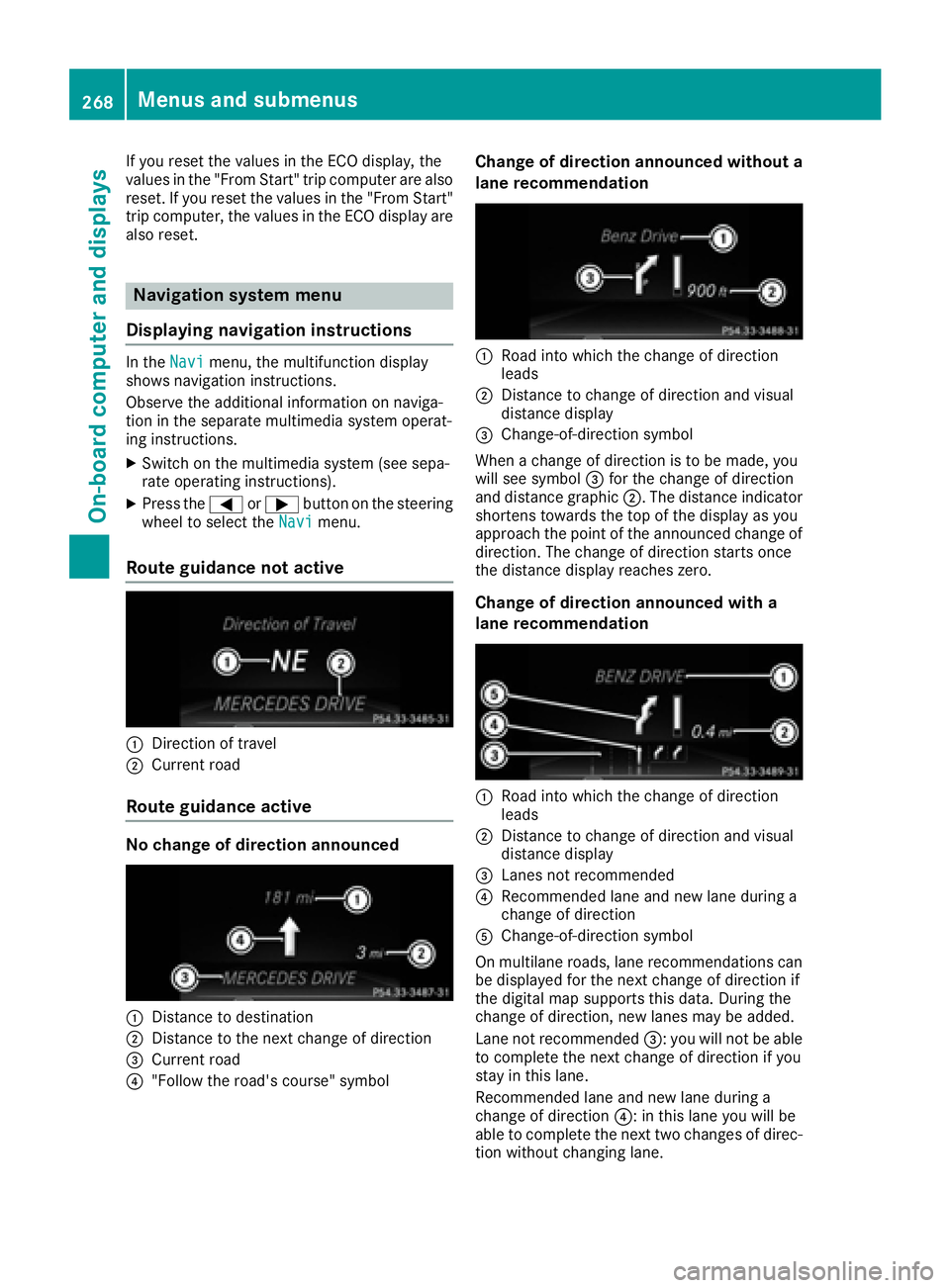
Displaying navigation instructions In the Navi menu, the multifunction display
shows navigation instructions.
Observe the additional information on naviga-
tion in the separate multimedia system operat-
ing instructions. X
Switch on the multimedia system (see sepa-
rate operating instructions). X
Press the Y or e button on the steering
wheel to select the Navi menu.
Route guidance not active
C
Direction of travelD
Current road
Route guidance active
No change of direction announced
C
Distance to destination
D
Distance to the next change of direction
Page 271 of 450

Other status indicators of the naviga-
tion system
The navigation system displays additional infor-
mation and the vehicle status.
Possible displays: R
New Route... or Calculating Route...
A new route is calculated. R
Road Not Mapped
The vehicle position is inside the area of the
digital map but the road is not recognized, e.g.
newly built streets, car parks or private land. R
No Route
No route could be calculated to the selected
destination. R
K
You have reached the destination or an inter-
mediate destination.
Audio menu
Selecting a radio station
C
Active station list
D
Station frequency with memory position
The multifunction display shows station D with
station frequency or station name. The preset
position is only displayed along with station D if
this has been stored. You can store TV chan-
nels D in the multimedia system.X
Switch on the multimedia system and select
radio; see the separate operating instruc-
tions. X
Press the Y or e button on the steering
wheel to select the Audio menu. X
To select a preset list or station list: press
and briefly hold the c or d button until
the preset list or station list in the desired
frequency range is shown in the multifunction
display. X
To select a station: briefly press c
or d .
i SIRIUS XM satellite radio functions like a
normal radio.
For more information on radio operation, see
"Satellite radio" in the separate operating
instructions.
Operating an audio player or audio
media
Audio data from various audio devices or media
can be played, depending on the equipment
installed in the vehicle. X
Switch on the multimedia system and select
audio CD or MP3 mode; see the separate
operating instructions. X
Press the Y or e button on the steering
wheel to select the Audio menu.X
To select the next/previous track: briefly
press the c or d button.X
To select a track from the track list (rapid
scrolling): press and hold the c or d
button until desired track C has been
reached.
If you press and hold c or d , the rapid
scrolling speed is increased. Not all audio
drives or data carriers support this function.
If track information is stored on the audio device
or medium, the multifunction display will show
the number and title of the track. The current
track does not appear in audio AUX mode
( Aux iliary audio mode: external audio source
connected).Menus and submenus 269
On-board computer and displays Z
Page 276 of 450
Before charging the high-voltage battery at a
wallbox or charging station, ensure that the
charging current is not limited by the function. If
charging at a wallbox or a charging station,
select the maximum value.
Further information on charging the high-volt-
age battery and setting the charge current
(PLUG-IN HYBRID vehicles) ( Y
page 170).X
Press the Y or e button on the steering
wheel to select the Sett. menu.X
Press the d or c button to select the
HYBRID PLUS submenu.X
Confirm by pressing v on the steering
wheel. X
Press the d or c button to select the
Maximum Charge Current: function.
You will see the selected setting. X
Press the v button to save the setting.
The maximum charge current values in the on-
board computer may deviate from the charg-
ing cable values.
Further information on charging the high-volt-
age battery (PLUG-IN HYBRID vehicles)
( Y
page 170).
Setting the departure time You can climatize the vehicle interior prior to
your departure with the "Set departure time"
function. Further information on pre-entry cli-
mate control ( Y
page 140).
If you recharge the high-voltage battery, the
function also displays the charging prediction. X
Press the Y or e button on the steering
wheel to select the Sett. menu.X
Press the d or c button to select the
HYBRID PLUS submenu.X
Confirm by pressing v on the steering
wheel. X
Press the d or c button to select the
Departure Time: function.
You will see the selected setting. X
To set no departure time: press the d or
c button to select No Preselection .X
Press v to confirm.
If you recharge the high-voltage battery, the
multifunction display also shows the time
when the high-voltage battery will be fully
charged.
or X
To set a departure time: press the d or
c A , B or C to select the desired preset. X
Press the v button to confirm the selec-
tion. X
Press d or c to set the hours.X
Press v to confirm. X
Press d or c to set the minutes.X
Press v to confirm.
If you recharge the high-voltage battery, the
multifunction display shows the expected
condition of charge of the high-voltage bat-
tery for the departure time set.
Further information on charging the high-volt-
age battery (PLUG-IN HYBRID vehicles)
( Y
page 170).
Instrument cluster submenu Selecting the distance unit The Display Unit Speedometer / Odome‐
ter: function allows you to choose whether
certain displays appear in kilometers or miles in
the multifunction display. X
Press the Y or e button on the steering
wheel to select the Sett. menu.X
Press the d or c button to select the
Instrument Cluster submenu.X
Press v to confirm. X
Press the d or c button to select the
Display Unit Speedometer / Odometer
function.
You will see the selected setting: km or miles .X
Press the v button to save the setting.
The selected unit of measurement for distance
applies to: R
Digital speedometer in the Trip menuR
Odometer and the trip odometer R
Trip computer R
Current consumption and the range R
Navigation instructions in the Navi menuR
Cruise control R
DISTRONIC PLUS R
ASSYST PLUS service interval display
Selecting permanent display
The Permanent Display: function allows you
to choose whether the multifunction display
always shows the outside temperature or the
speed.
The speed display is inverse to the speedome-
ter.274
Menus and submenus
On-board computer and displays