trailer MERCEDES-BENZ GLE 2016 User Guide
[x] Cancel search | Manufacturer: MERCEDES-BENZ, Model Year: 2016, Model line: GLE, Model: MERCEDES-BENZ GLE 2016Pages: 450, PDF Size: 12.92 MB
Page 24 of 450
Power supply ................................. 262
Pulling away with a trailer .............. 149
Removing the ball coupling ............ 262
Trailer loads ................................... 445
Towing away
Important safety guidelines ........... 381
Installing the towing eye ............... .3 82
Notes for 4MATIC vehicles ............ 383
Removing the towing eye .............. .3 82
Transporting the vehicle ................ 383
With both axles on the ground ....... 382
Towing eye ......................................... 369
Traffic Sign Assist
Display message ............................ 304
Function/notes ............................ .2 26
Important safety notes .................. 226
Instrument cluster display ............. 226
Trailer coupling
see Towing a trailer
Trailer loads and drawbar nose-
weights ............................................... 261
Trailer towing
Active Blind Spot Assist ................. 233
Active Lane Keeping Assist ............ 235
Blind Spot Assist ............................ 229
PARKTRONIC ................................. 210
Permissible trailer loads and
drawbar noseweights ..................... 261
Transfer case ..................................... 162
Transmission
see Automatic transmission
Transmission position display ......... 154
Transmission position display
(DIRECT SELECT lever) ..................... .1 54
Transporting the vehicle .................. 383
Traveling uphill
Brow of hill ..................................... 190
Driving downhill ............................ .1 90
Maximum gradient-climbing capa-
bility ............................................... 190
Trim pieces (cleaning instruc-
tions) ................................................. .3 67
Trip computer (on-board com-
puter) ................................................. .2 66
Trip odometer
Calling up ....................................... 266
Resetting (on-board computer) ...... 267 Trunk
see Tailgate
Turn signals
Changing bul bs (front) ................... 121
Di spl ay message ............................ 292
Switching on/off ........................... 116
Two-way radio
Frequencies ................................... 431
Installation ..................................... 431
Transmission output (maximum) .... 431
TWR (Tongue Weight Rating) (defi-
nition) ................................................. 408
Type identification plate
see Vehicle identification plate
U Unlocking
Emergency unlocking ....................... 86
From inside the vehicle (central
unlocking button) ............................ .8 5
Upshift indicator (on-board com-
puter, Mercedes-AMG vehicles) ...... .2 77
V
Vanity mirror (in the sun visor) ....... .3 41
Vehicle
Correct use ...................................... 29
Data acquisition ............................... 30
Display message ............................ 311
Equipment ....................................... 26
Individual settings .......................... 273
Limited Warranty ............................ .3 0
Loading .......................................... 397
Locking (in an emergency) ............... 86
Locking (SmartKey) .......................... 78
Lowering ........................................ 412
Maintenance .................................... 27
Parking for a long period ................ 181
Pulling away ................................... 148
Raising ........................................... 410
Reporting problems ......................... 29
Securing from rolling away ............ 409
Towing away .................................. 381
Transporting .................................. 383
Unlocking (in an emergency) ........... 86
Unlocking (SmartKey) ...................... 7822
Index
Page 76 of 450
ESP ®
trailer stabilization does not work if ESP ®
is deactivated or disabled because of a malfunc-
tion.
Crosswind Assist General information Strong crosswinds can cause your vehicle to
deviate from a straight course. The crosswind
driving assistance function integrated in ESP ®
noticeably reduces these impairments.
ESP ®
intervenes automatically according to the
direction and intensity of the crosswinds affect-
ing your vehicle.
ESP intervenes with stabilizing braking to assist
you in keeping the vehicle in the lane.
Crosswind Assist is active at vehicle speeds
above 50 mph (80 km/h) when driving straight
ahead or cornering gently.
Important safety notes Crosswind Assist does not work if ESP ®
is deac-
tivated or disabled because of a malfunction.
EBD (electronic brake force distribu-
tion)
General information EBD monitors and controls the brake pressure
on the rear wheels to improve driving stability
while braking.
Important safety notes
i Observe the "Important safety notes" sec-
tion for driving safety systems ( Y
page 66).
G WARNING
If EBD is malfunctioning, the rear wheels can
lock, e.g. under full braking. This increases the
risk of skidding and an accident.
You should therefore adapt your driving style
to the different handling characteristics. Have
the brake system checked at a qualified spe-
cialist workshop.
Observe information regarding indicator and
warning lamps ( Y
page 319) as well as display
messages ( Y
page 283). ADAPTIVE BRAKE ADAPTIVE BRAKE enhances braking safety and
offers increased braking comfort. In addition to
the braking function, ADAPTIVE BRAKE also has
the HOLD function ( Y
page 204) and hill start
assist ( Y
page 149).
PRE-SAFE ®
Brake
General information PRE-SAFE ®
Brake can help you to minimize the
risk of a collision with a vehicle ahead or a
pedestrian, and reduce the effects of such a
collision. If PRE-SAFE ®
Brake has detected a risk
of collision, you will be warned visually and
acoustically as well as by automatic braking.
i Pay attention to the important safety notes
in the "Driving safety systems" section
( Y
page 66).
PRE ‑ SAFE ®
Brake is only available in vehicles
with the Driving Assistance Plus package.
For PRE-SAFE ®
Brake to assist you when driving,
the radar sensor system and the camera system
must be switched on and be operational.
With the help of the radar sensor system and the
camera system, PRE-SAFE ®
Brake can detect
obstacles that are in front of your vehicle for an
extended period of time.
In addition, pedestrians in the path of your vehi-
cle can be detected.
PRE-SAFE ®
Brake detects pedestrians using
typical characteristics such as the body con-
tours and posture of a person standing upright.
i Observe the restrictions described in the
"Important safety notes" sec-
tion“ ( Y
page 74).
Important safety notes
G WARNING
PRE-SAFE ®
Brake will initially brake your vehi-
cle by a partial application of the brakes if a
danger of collision is detected. There may be
a collision unless you brake yourself. Even
after subsequent full application of the brakes
a collision cannot always be avoided, partic-74
Driving safet y system s
Sa fety
Page 117 of 450
The daytime running lamps improve the visibility
of your vehicle during the day. The daytime run-
ning lamps function is required by law in Can-
ada. It cannot therefore be deactivated.
When the engine is running and the vehicle is
stationary: if you move the selector lever from a
drive position to P , the daytime running lamps/
low-beam headlamps go out after three
minutes.
When the engine is running, the vehicle is sta-
tionary and in bright ambient light: if you turn the
light switch to ` , the daytime running lamps
and parking lamps switch on.
If the engine is running and you turn the light
switch to X , the manual settings take prec-
edence over the daytime running lamps.
USA only:
The daytime running lamps improve the visibility
of your vehicle during the day. To do this, the
daytime running lamps function must be
switched on using the on-board computer
( Y
page 275).
If the engine is running and you turn the light
switch to ` or X , the manual settings
take precedence over the daytime running
lamps.
Low-beam headlamps Even if the light sensor does not detect that it is
dark, the parking lamps and low-beam head-
lamps switch on when the ignition is switched on
and the light switch is set to the X position.
This is a particularly useful function in the event
of rain and fog. X
To switch on the low-beam headlamps:
turn the SmartKey in the ignition lock to posi-
tion 2 or start the engine.X
Turn the light switch to X .
The green X indicator lamp in the instru-
ment cluster lights up.
Rear fog lamp
The rear fog lamp improves visibility of your
vehicle for the traffic behind in the event of thick
fog. Please take note of the country-specific
regulations for the use of rear fog lamps. X
To switch on the rear fog lamp: turn the
SmartKey in the ignition lock to position 2 or
start the engine. X
Turn the light switch to X or X . X
Press the ^ button.
The yellow ^ indicator lamp in the instru-
ment cluster lights up. X
To switch off the rear fog lamp: press the
^ but ton.
The yellow ^ indicator lamp in the instru-
ment cluster goes out.
Parking lamps
! If the battery has been excessively dis-
charged, the parking lamps or standing lamps
are automatically switched off to enable the
next engine start. Always park your vehicle
safely and sufficiently lit according to legal
standards. Avoid the continuous use of the
` parking lamps for several hours. If pos-
sible, switch on the d right or the c left
standing lamp. X
To switch on: turn the light switch to ` .
The green ` indicator lamp in the instru-
ment cluster lights up.
Standing lamps Switching on the standing lamps ensures the
corresponding side of the vehicle is illuminated. X
To switch on the standing lamps: the
SmartKey should not be in the ignition lock or
it should be in position 0 .X
Turn the light switch to c (left-hand side of
the vehicle) or d (right-hand side of the
vehicle).
Vehicles towing a trailer: both the right-hand
and left-hand standing lamps (tail lamps) are
always illuminated on the trailer.Exterior lighting 115
Lights and windshield wipers Z
Page 151 of 450
It is only possible to shift the transmission from
position P to the desired position if you depress
the brake pedal. Only then is the parking lock
released. If you do not depress the brake pedal,
the DIRECT SELECT lever can still be moved but
the parking lock remains engaged.
i Upshifts take place at higher engine speeds
after a cold start. This helps the catalytic con-
verter to reach its operating temperature
more quickly.
Information on the automatic release of the
electric parking brake ( Y
page 179).
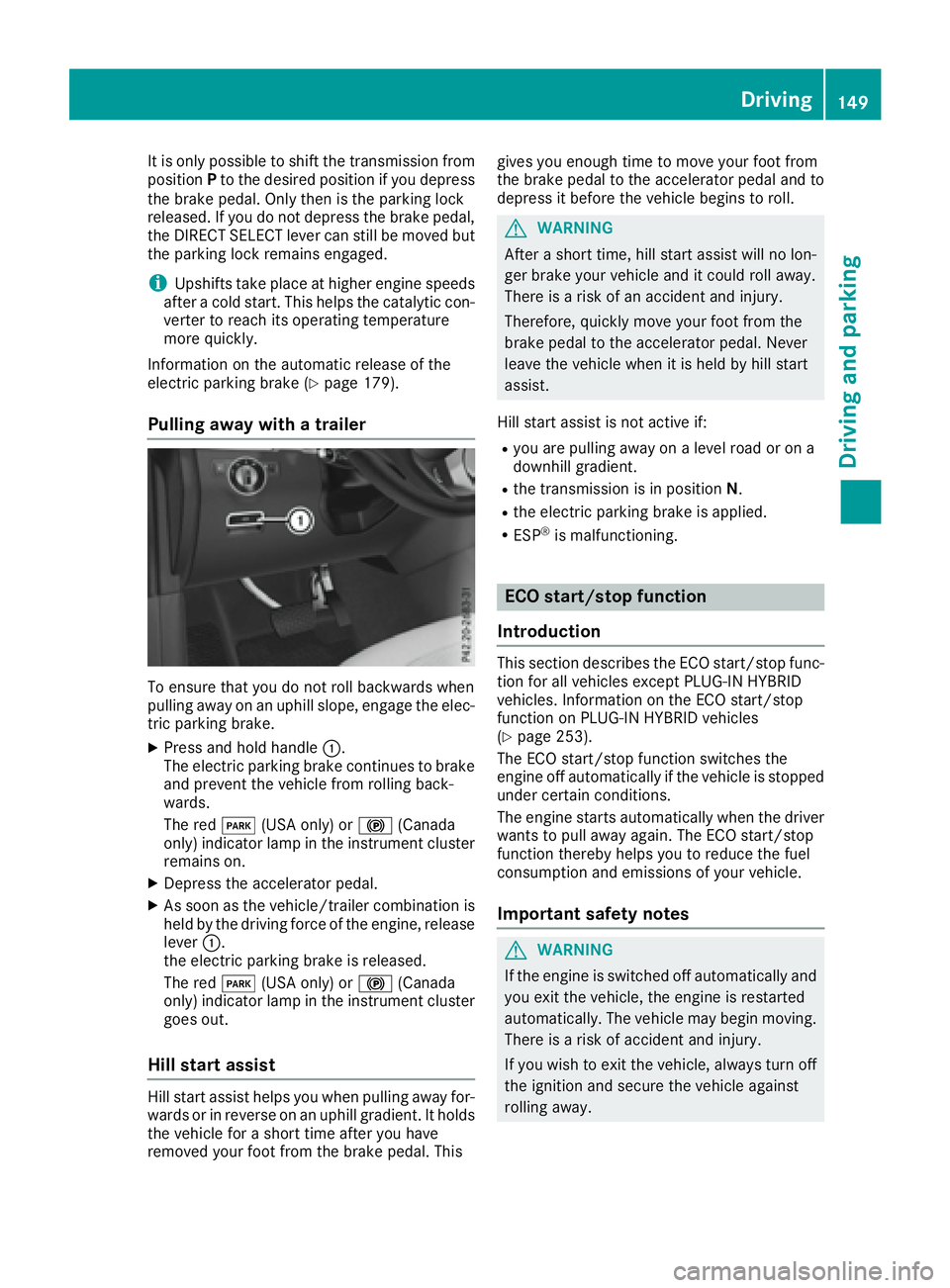
Pulling away with a trailer
To ensure that you do not roll backwards when
pulling away on an uphill slope, engage the elec-
tric parking brake. X
Press and hold handle C .
The electric parking brake continues to brake
and prevent the vehicle from rolling back-
wards.
The red I (USA only) or $ (Canada
only) indicator lamp in the instrument cluster
remains on. X
Depress the accelerator pedal. X
As soon as the vehicle/trailer combination is
held by the driving force of the engine, release
lever C .
the electric parking brake is released.
The red I (USA only) or $ (Canada
only) indicator lamp in the instrument cluster
goes out.
Hill start assist
Hill start assist helps you when pulling away for-
wards or in reverse on an uphill gradient. It holds
the vehicle for a short time after you have
removed your foot from the brake pedal. This gives you enough time to move your foot from
the brake pedal to the accelerator pedal and to
depress it before the vehicle begins to roll.
G WARNING
After a short time, hill start assist will no lon-
ger brake your vehicle and it could roll away.
There is a risk of an accident and injury.
Therefore, quickly move your foot from the
brake pedal to the accelerator pedal. Never
leave the vehicle when it is held by hill start
assist.
Hill start assist is not active if: R
you are pulling away on a level road or on a
downhill gradient. R
the transmission is in position N .R
the electric parking brake is applied. R
ESP ®
is malfunctioning.
ECO start/stop function
Introduction This section describes the ECO start/stop func-
tion for all vehicles except PLUG-IN HYBRID
vehicles. Information on the ECO start/stop
function on PLUG-IN HYBRID vehicles
( Y
page 253).
The ECO start/stop function switches the
engine off automatically if the vehicle is stopped
under certain conditions.
The engine starts automatically when the driver
wants to pull away again. The ECO start/stop
function thereby helps you to reduce the fuel
consumption and emissions of your vehicle.
Important safety notes
G WARNING
If the engine is switched off automatically and
you exit the vehicle, the engine is restarted
automatically. The vehicle may begin moving.
There is a risk of accident and injury.
If you wish to exit the vehicle, always turn off
the ignition and secure the vehicle against
rolling away. Driving 149
Driving and parking Z
Page 160 of 450
R
you use th e DIRECT SELECT lever to switch
th e transmission position ( Y
page 154).R
use th e DYNAMIC SELECT controller to
chang e th e drive progra m ( Y
page 152).R
you activat e manual gearshiftin g
( Y
page 159).R
you leav e th e suitable speed range.
Mercedes-AMG vehicles Glidin g mod e is characterized by th e following:R
th e combustion engin e is disconnected from
th e drive train .R
th e engin e speed corresponds to th e idlin g
speed. R
in th e multifunction display, th e glidin g sym -
bol appears in th e drive progra m display.
Glidin g mod e can be activated under th e follow-
in g conditions: R
th e Comfor t drive progra m is activated or you
select th e "Comfort" setting for th e drive sys-
te m within th e Individua l drive program. You
can fin d information about this in th e Digital
Operator' s Manual.R
th e ECO start/sto p function is activated.R
you are drivin g carefully wit h low acceleration
of th e vehicle.R
th e engin e is at normal operating tempera-
ture. R
th e speed is within a suitable range.R
th e cours e of th e roa d is suitable, e.g. there
are no steep up or downhill gradients .R
you are no longer depressin g th e accelerato r
pedal .
Glidin g mod e is d eactivated under th e fo
llowin g
conditions: R
you hav e deactivated th e ECO start/sto p
function .R
you depress th e accelerato r pedal .R
you depress th e brak e pedal .R
you use th e DIRECT SELECT lever to switch
th e transmission position ( Y
page 154).R
use th e DYNAMIC SELECT controller to
chang e th e drive progra m ( Y
page 152).R
you activat e manual gearshiftin g
( Y
page 159).R
you leav e th e suitable speed range. Towing a trailer X
Drive in th e middle of th e engin e speed range
on uphil l gradients .X
Dependin g on th e uphil l or downhill gradient,
use left-han d steerin g whee l paddl e shifter
( Y
page 159) to select a lower gear , eve n if
cruise control or DISTRONI C PLU S are acti-
vated.
Drive programs
Slippery drive program The Slipper y drive progra m has th e followin g
characteristics : R
reduce d engin e and transmission setting s for
optimum propulsion on slipper y or snow-cov-
ere d roads. R
optimized ES P ®
stabilit y control on slipper y or
snow-covered roads. R
th e vehicl e has improved drivin g stabilit y on
slipper y or snow-covered roads, for example.
Comfort drive program The Comfor t drive progra m has th e followin g
characteristics : R
comfort-oriented engin e and transmission
settings. R
optimal fuel consumption resultin g from th e
automati c transmission shiftin g up sooner.R
th e vehicl e pullin g away mor e gentl y in
forward and revers e gears, unless th e accel-
erator pedal is depressed fully. R
th e automati c transmission shiftin g up
sooner. This result s in th e vehicl e bein g driven
at lower engin e speeds and th e wheels bein g
less likely to spin .
Sp or t drive program The Sport drive progra m has th e followin g char-
acteristics : R
sport y engin e and transmission settings. R
th e automati c transmission shiftin g up later.
th e fuel consumption possibl y bein g higher as
a result of th e later automati c transmission
shift points . R
th e suspension exhibits sport y dampin g (vehi-
cle s wit h AIRMATIC) .158
Automatic transmission
Driving an d parking
Page 193 of 450
i The special off-road ABS setting enables a
precise, brief and repeated locking of the
front wheels. This causes them to dig into
loose earth. Be aware that the front wheels
easily skid across the ground surface if com-
pletely braked and therefore lose their ability
to steer.
Driving systems
Intelligent Drive Mercedes-Benz Intelligent Drive stands for inno-
vative driver assistance and safety systems
which enhance comfort and support the driver in
critical situations. With these intelligent co-ordi-
nated systems Mercedes-Benz has set a mile-
stone on the path towards autonomous driving.
Mercedes-Benz Intelligent Drive embraces all
elements of active and passive safety in one well
thought out system – for the safety of the vehi-
cle occupants and that of other road users.
Further information on driving safety systems
( Y
page 66).
Cruise control
General notes Cruise control maintains a constant road speed
for you. It brakes automatically in order to avoid
exceeding the set speed. You must select a
lower gear in good time on long and steep down-
hill gradients, especially if the vehicle is laden or
towing a trailer. By doing so, you will make use of
the braking effect of the engine. This relieves the
load on the brake system and prevents the
brakes from overheating and wearing too
quickly.
Use cruise control only if road and traffic con-
ditions make it appropriate to maintain a steady
speed for a prolonged period. You can store any
road speed above 20 mph (30 km/h).
i Cruise control should not be activated when
driving off-road.
Important safety notes
If you fail to adapt your driving style, cruise con-
trol can neither reduce the risk of an accident
nor override the laws of physics. Cruise control
cannot take into account the road, traffic and weather conditions. Cruise control is only an
aid. You are responsible for the distance to the
vehicle in front, for vehicle speed, for braking in
good time and for staying in your lane.
Do not use cruise control: R
in road and traffic conditions which do not
allow you to maintain a constant speed e.g. in
heavy traffic or on winding roads R
on slippery road surfaces. Braking or accel-
erating could cause the drive wheels to lose
traction and the vehicle could then skid R
when there is poor visibility, e.g. due to fog,
heavy rain or snow
If there is a change of drivers, advise the new
driver of the speed stored.
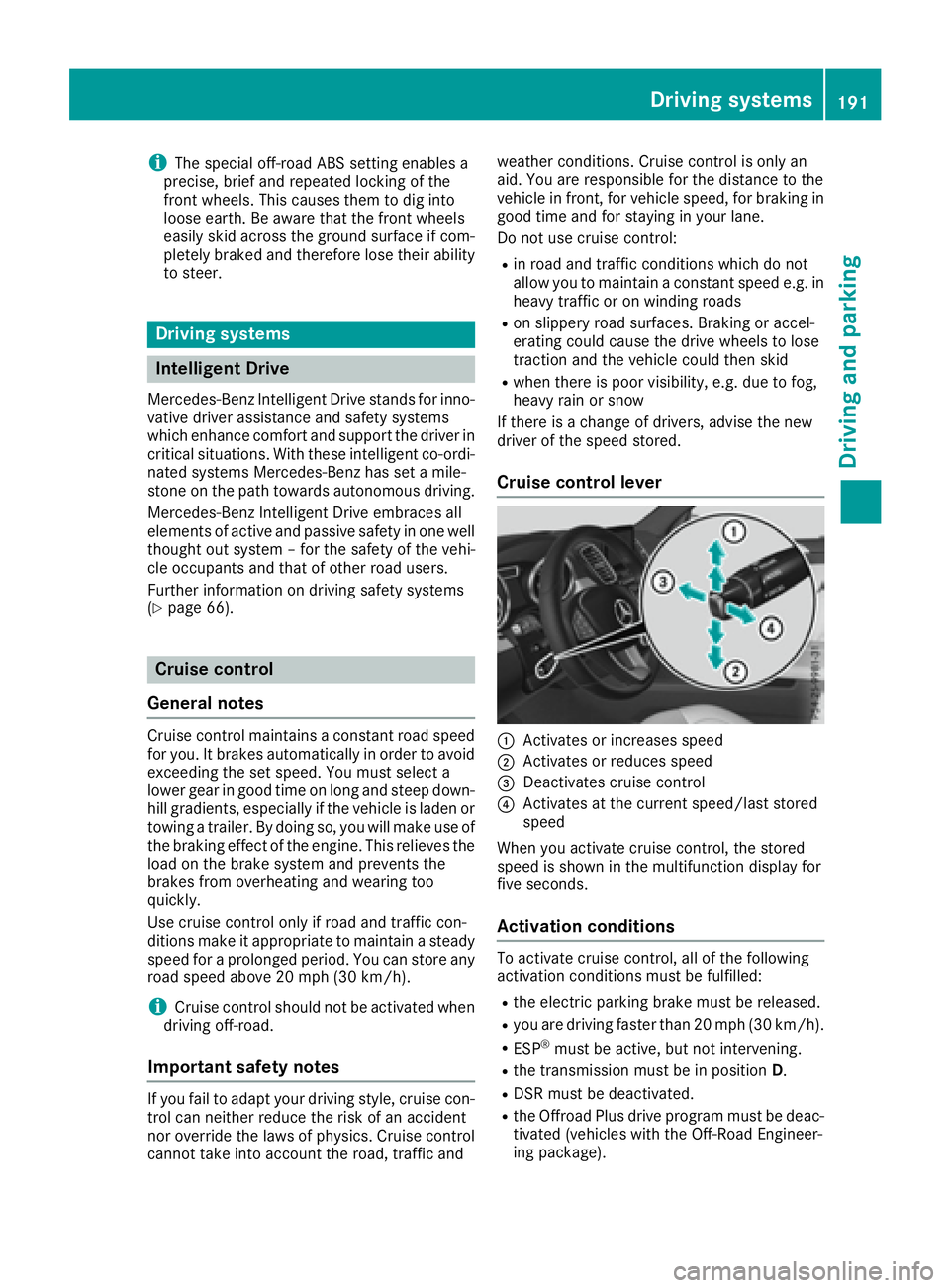
Cruise control lever
C
Activates or increases speed D
Activates or reduces speed
Page 195 of 450
trol Off message in the multifunction display
for approximately five seconds.
i When you switch off the engine, the last
speed stored is cleared.
DISTRONIC PLUS
General notes DISTRONIC PLUS regulates the speed and auto-
matically helps you maintain the distance to the
vehicle detected in front. Vehicles are detected
with the aid of the radar sensor system.
DISTRONIC PLUS brakes automatically so that
the set speed is not exceeded.
You must select a lower gear in good time on
long and steep downhill gradients, especially if
the vehicle is laden or towing a trailer. By doing
so, you will make use of the braking effect of the
engine. This relieves the load on the brake sys-
tem and prevents the brakes from overheating
and wearing too quickly.
If DISTRONIC PLUS detects that there is a risk of
a collision, you will be warned visually and
acoustically. DISTRONIC PLUS cannot prevent a
collision without your intervention. An intermit-
tent warning tone will then sound and the dis-
tance warning lamp will light up in the instru-
ment cluster. Brake immediately in order to
increase the distance to the vehicle in front or
take evasive action provided it is safe to do so.
For DISTRONIC PLUS to assist you, the radar
sensor system must be operational.
DISTRONIC PLUS operates in range between
0 mph (0 km/h) and 120 mph (200 km/h).
Do not use DISTRONIC PLUS while driving on
roads with steep gradients.
As DISTRONIC PLUS transmits radar waves, it
can resemble the radar detectors of the respon-
sible authorities. You can refer to the relevant
chapter in the Operator's Manual if questions
are asked about this.
i USA only:
This device has been approved by the FCC as
a "Vehicular Radar System". The radar sensor
is intended for use in an automotive radar
system only. Removing, tampering with, or
altering the device will void any warranties,
and is not permitted by the FCC. Do not tam-
per with, alter, or use in any non-approved
way. Any unauthorized modification to this device
could void the user’s authority to operate the
equipment.
i Canada only: This device complies with
RSS-210 of Industry Canada. Operation is
subject to the following two conditions:
1. This device may not cause harmful inter-
ference, and
2. This device must accept any interference
received, including interference that may
cause undesired operation of the device.
Removal, tampering, or altering of the device
will void any warranties, and is not permitted.
Do not tamper with, alter, or use in any non-
approved way .
Any unauthorized modification to this device
could void the user's authority to operate the
equipment.
Important safety notes
G WARNING
DISTRONIC PLUS does not react to: R
people or animals R
stationary obstacles on the road, e.g. stop-
ped or parked vehicles R
oncoming and crossing traffic
As a result, DISTRONIC PLUS may neither give
warnings nor intervene in such situations.
There is a risk of an accident.
Always pay careful attention to the traffic sit-
uation and be ready to brake.
G WARNING
DISTRONIC PLUS cannot always clearly iden-
tify other road users and complex traffic sit-
uations.
In such cases, DISTRONIC PLUS may: R
give an unnecessary warning and then
brake the vehicle R
neither give a warning nor intervene R
accelerate or brake unexpectedly
There is a risk of an accident.
Continue to drive carefully and be ready to
brake, in particular when warned to do so by
DISTRONIC PLUS.Driving systems 193
Driving and parking Z
Page 207 of 450
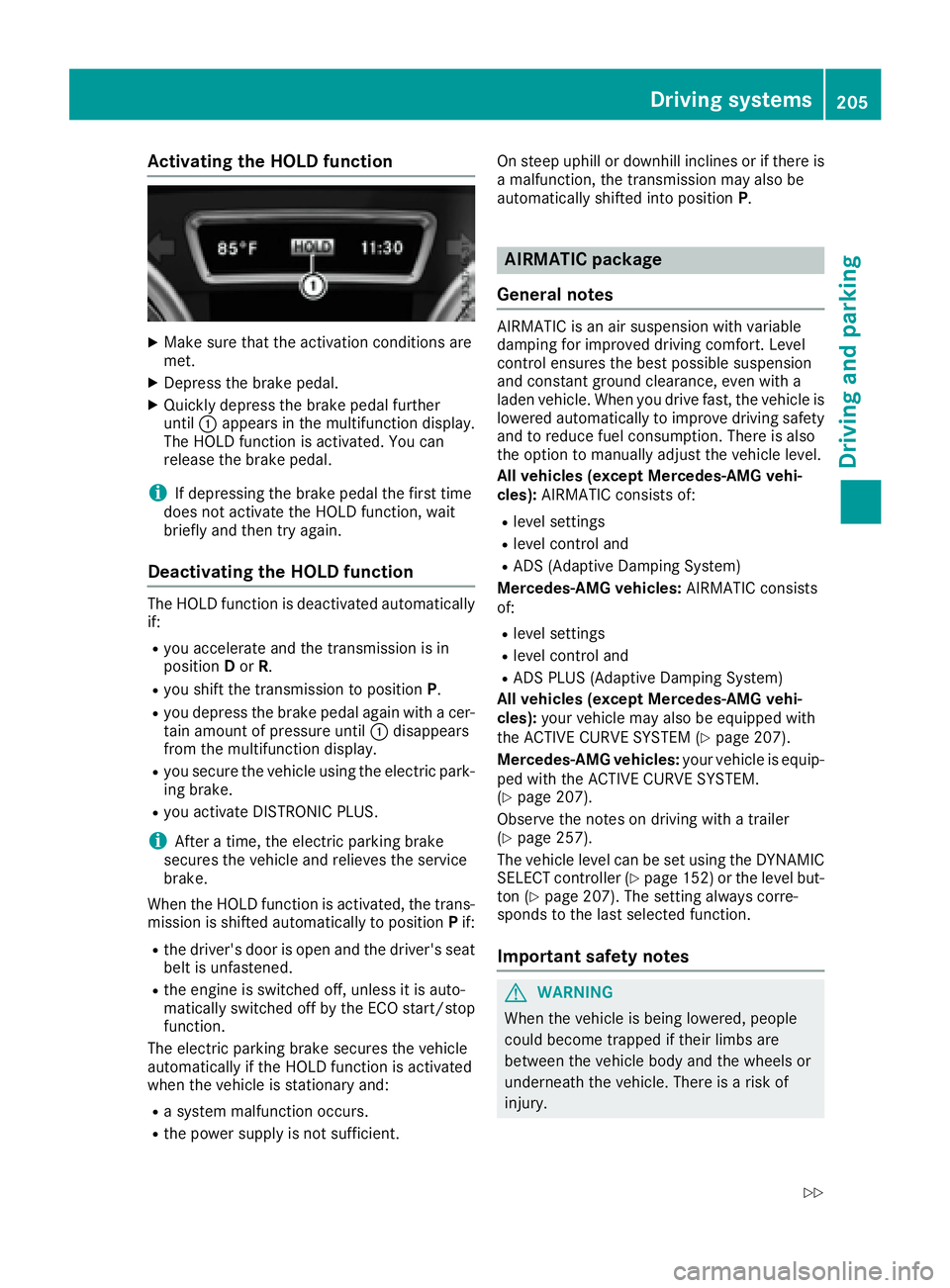
Activating the HOLD function X
Mak e sur e that th e activation condition s are
met .X
Depress th e brak e pedal .X
Quickl y depress th e brak e pedal further
until C appear s in th e multifunction display.
The HOLD function is activated. You can
release th e brak e pedal .
i If depressing th e brak e pedal th e first time
does no t activat e th e HOLD function , wait
briefl y and then tr y again .
Deactivating the HOLD function The HOLD function is deactivated automatically
if: R
you accelerate and th e transmission is in
position D or R .R
you shif t th e transmission to position P .R
you depress th e brak e pedal again wit h a cer-
tai n amount of pressur e until C disappear s
from th e multifunction display.R
you secure th e vehicl e usin g th e electric park -
ing brake. R
you activat e DISTRONI C PLUS.
i Afte r a time, th e electric parking brak e
secures th e vehicl e and relieves th e servic e
brake.
When th e HOLD function is activated, th e trans -
mission is shifte d automatically to position P if:R
th e driver's door is open and th e driver's seat
belt is unfastened. R
th e engin e is switched off , unless it is auto -
matically switched off by th e ECO start/sto p
function .
The electric parking brak e secures th e vehicl e
automatically if th e HOLD function is activated
when th e vehicl e is stationary and :R
a system malfunction occurs. R
th e powe r supply is no t sufficient. On steep uphil l or downhill inclines or if there is
a malfunction , th e transmission may also be
automatically shifte d int o position P .
AIRMATIC package
Gene ra l notesAIRMATIC is an air suspension wit h variable
damping for improve d drivin g comfort . Level
control ensures th e best possibl e suspension
and constan t ground clearance , eve n wit h a
laden vehicle. When you drive fast, th e vehicl e is
lowered automatically to improve drivin g safet y
and to reduce fuel consumption . There is also
th e option to manually adjust th e vehicl e level.
All vehicles (excep t Mercedes-AMG vehi-
cles): AIRMATIC consist s of:R
level setting s R
level control and R
AD S (Adaptive Dampin g System)
Mercedes-AMG vehicles: AIRMATIC consist s
of: R
level setting s R
level control and R
AD S PLU S (Adaptive Dampin g System)
All vehicles (excep t Mercedes-AMG vehi-
cles): your vehicl e may also be equipped wit h
th e ACTIVE CURVE SYSTE M ( Y
page 207).
Mercedes-AMG vehicles: your vehicl e is equip -
ped wit h th e ACTIVE CURVE SYSTEM.
( Y
page 207).
Observ e th e note s on drivin g wit h a trailer
( Y
page 257).
The vehicl e level can be set usin g th e DYNAMIC
SELECT controller ( Y
page 152) or th e level but -
to n ( Y
page 207). The setting always corre-
spond s to th e last selected function .
Import ant safety notes
G WARNIN G
When th e vehicl e is bein g lowered, people
could become trapped if their limb s are
between th e vehicl e body and th e wheels or
underneat h th e vehicle. There is a ris k of
injury.Driving systems 205
Driving and parking Z
Page 210 of 450
Failure to operate this vehicle safely may
result in an accident, rollover of the vehicle,
and severe or fatal injury. R
In a rollover crash, an unbelted person is sig-
nificantly more likely to die than a person
wearing a seat belt.
You and all vehicle occupants should always
wear your seat belts.
General notes Only select raised level if this is appropriate for
the road conditions. Otherwise, fuel consump-
tion may increase and handling may be affected.
Make changes to the vehicle level while the
vehicle is in motion. This enables the vehicle to
adjust to the new level as quickly as possible.
The vehicle level may change visibly if you park
the vehicle and the outside temperature
changes. If the temperature drops, the vehicle
level is lower; with an increase in temperature,
the vehicle level rises.
If you unlock the vehicle or open a door, the
vehicle begins to compensate for load discrep-
ancies while still parked. However, for signifi-
cant level changes, such as after the vehicle has
been stationary for a long period, the engine
must be on. For safety reasons, the vehicle is
only lowered when the doors are closed. Low-
ering is interrupted if a door is opened, and it
continues once the door has been closed.
Vehicles with no trailer coupled: below a
speed of 40 mph (64 km/h), you can select
between the normal and raised vehicle level.
Select the normal vehicle level for normal road
su r
faces and the raised vehicle level for driving
with snow chains or on particularly poor road
surfaces. Your selection remains stored even if
you remove the SmartKey from the ignition lock.
If you try to select raised level at a speed above
40 mph (64 km/h), the Drive More Slowly
message appears in the multifunction display.
Vehicles with a trailer coupled: below a speed
of 19 mph (30 km/h), you can select between
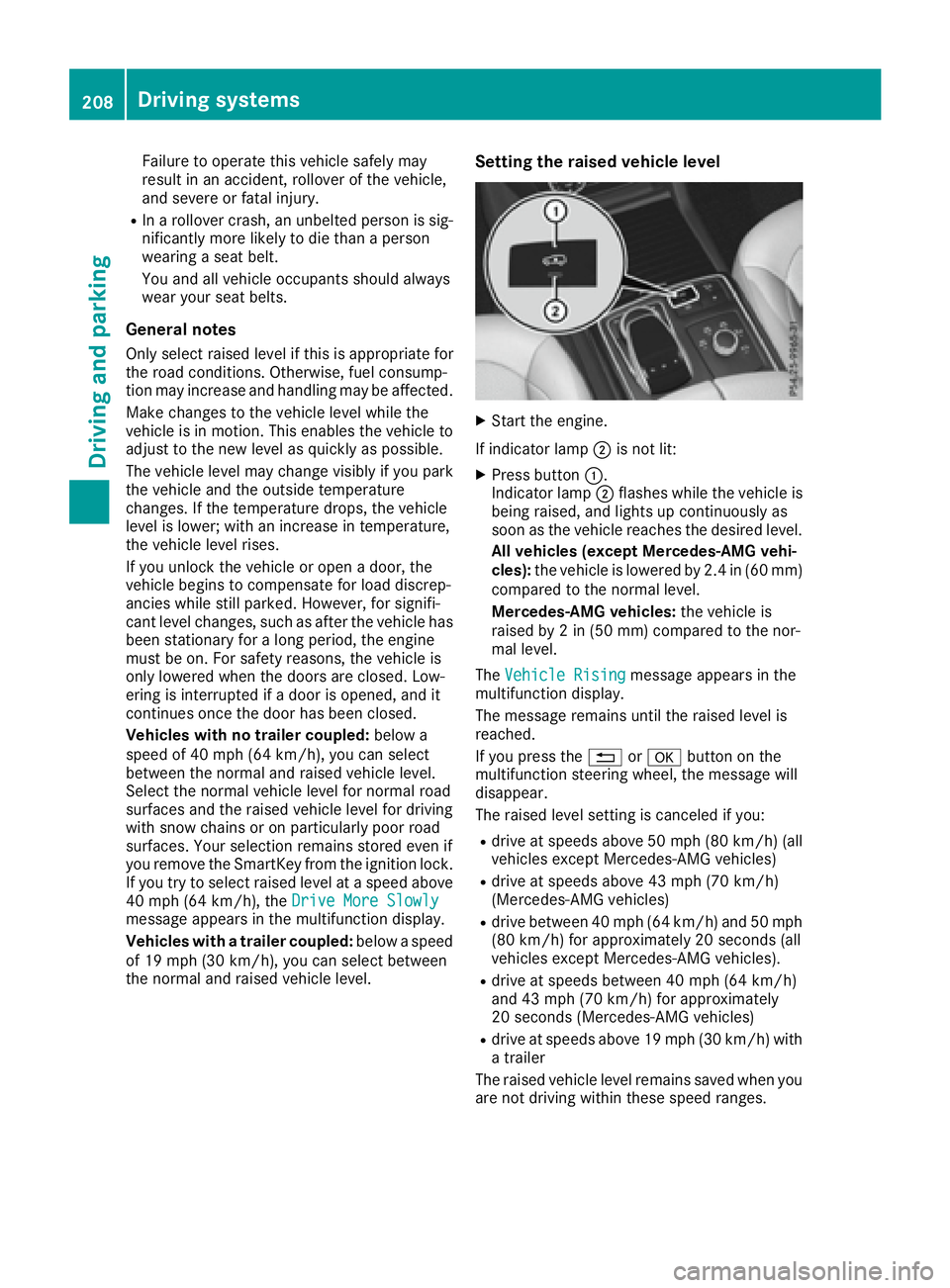
the normal and raised vehicle level. Setting the raised vehicle level X
Start the engine.
If indicator lamp D is not lit:X
Press button C .
Indicator lamp D flashes while the vehicle is
being raised, and lights up continuously as
soon as the vehicle reaches the desired level.
All vehicles (except Mercedes-AMG vehi-
cles): the vehicle is lowered by 2.4 in (60 mm)
compared to the normal level.
Mercedes-AMG vehicles: the vehicle is
raised by 2 in (50 mm) compared to the nor-
mal level.
The Vehicle Rising
message appears in the
multifunction display.
The message remains until the raised level is
reached.
If you press the 8 or v button on the
multifunction steering wheel, the message will
disappear.
The raised level setting is canceled if you: R
drive at speeds above 50 mph (80 km/h) (all
vehicles except Mercedes-AMG vehicles) R
drive at speeds above 43 mph (70 km/h)
(Mercedes-AMG vehicles) R
drive between 40 mph (64 km/h) and 50 mph
(80 km/h) for approximately 20 seconds (all
vehicles except Mercedes-AMG vehicles). R
drive at speeds between 40 mph (64 km/h)
and 43 mph (70 km/h) for approximately
20 seconds (Mercedes-AMG vehicles) R
drive at speeds above 19 mph (30 km/h) with
a trailer
The raised vehicle level remains saved when you
are not driving within these speed ranges.208
Driving systems
Driving and parking
Page 211 of 450
Setting the normal vehicle level
! Make sure that there is enough ground
clearance when the vehicle is being lowered.
It could otherwise hit the ground, damaging
the underbody.
X
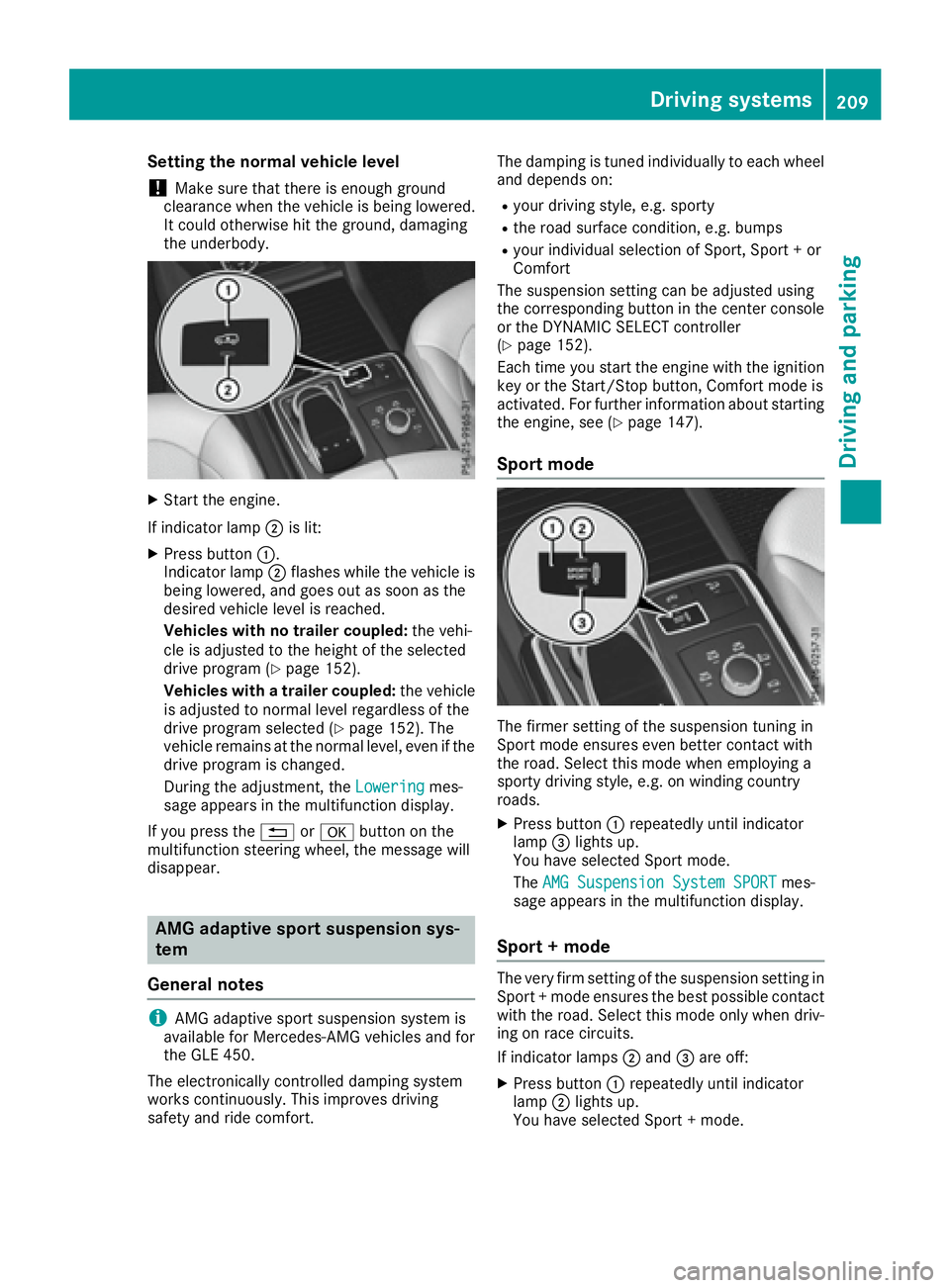
Start the engine.
If indicator lamp D is lit:X
Press button C .
Indicator lamp D flashes while the vehicle is
being lowered, and goes out as soon as the
desired vehicle level is reached.
Vehicles with no trailer coupled: the vehi-
cle is adjusted to the height of the selected
drive program ( Y
page 152).
Vehicles with a trailer coupled: the vehicle
is adjusted to normal level regardless of the
drive program selected ( Y
page 152). The
vehicle remains at the normal level, even if the
drive program is changed.
During the adjustment, the Lowering mes-
sage appears in the multifunction display.
If you press the 8 or v button on the
multifunction steering wheel, the message will
disappear.
AMG adaptive sport suspension sys-
tem
General notes
i AMG adaptive sport suspension system is
available for Mercedes-AMG vehicles and for
the GLE 450.
The electronically controlled damping system
works continuously. This improves driving
safety and ride comfort. The damping is tuned individually to each wheel
and depends on: R
your driving style, e.g. sporty R
the road surface condition, e.g. bumps R
your individual selection of Sport, Sport + or
Comfort
The suspension setting can be adjusted using
the corresponding button in the center console
or the DYNAMIC SELECT controller
( Y
page 152).
Each time you start the engine with the ignition
key or the Start/Stop button, Comfort mode is
activated. For further information about starting
the engine, see ( Y
page 147).
Sport mode
The firmer setting of the suspension tuning in
Sport mode ensures even better contact with
the road. Select this mode when employing a
sporty driving style, e.g. on winding country
roads. X
Press button C repeatedly until indicator
lamp