lock MERCEDES-BENZ GLE 2017 Manual Online
[x] Cancel search | Manufacturer: MERCEDES-BENZ, Model Year: 2017, Model line: GLE, Model: MERCEDES-BENZ GLE 2017Pages: 390, PDF Size: 11.63 MB
Page 179 of 390
R
offroad level 1 for driving on easily negotiable
off-road terrain R
offroad level 2 for driving on normal off-road
terrain R
offroad level 3 for freeing the vehicle in par-
ticularly rough terrain at low speeds only
The individual vehicle levels differ from the nor-
mal level as follows: R
–0.6 in (–15 mm) in the Sport drive programR
+/–0 in (+/–0 mm) in the Comfort drive pro-
gram R
+ 1.2 in (+ 30 mm) in the Offroad drive pro-
gram R
+ 2.4 in (+ 60 mm) in the Offroad Plus drive
program R
+ 1.2 in (+ 30 mm) in offroad level 1 R
+ 2.4 in (+ 60 mm) in offroad level 2 R
+ 3.5 in (+ 90 mm) in offroad level 3
Setting the vehicle level
! Make sure that there is enough ground
clearance when the vehicle is being lowered.
It could otherwise hit the ground, damaging
the underbody.
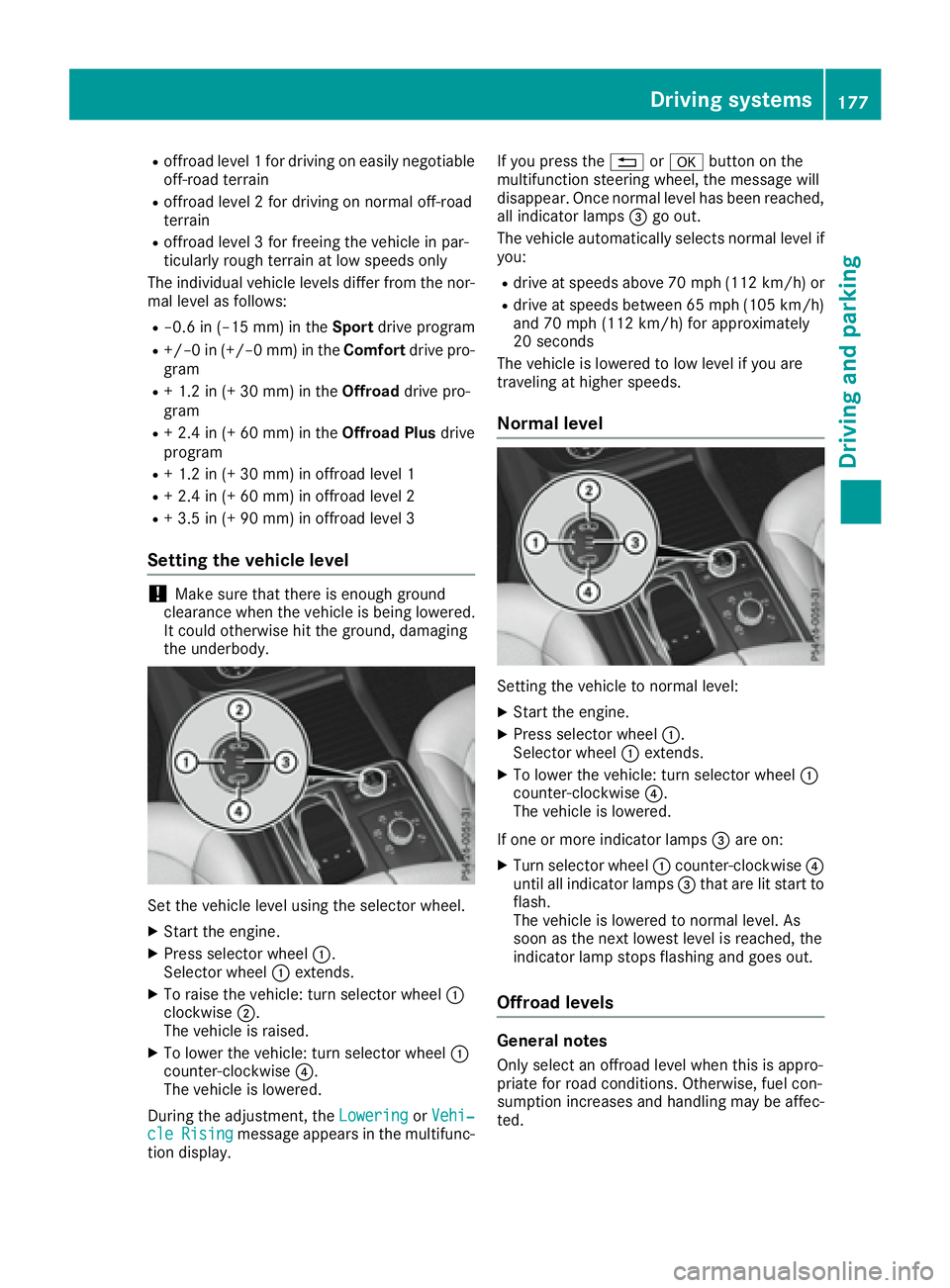
Set the vehicle level using the selector wheel. X
Start the engine. X
Press selector wheel C .
Selector wheel C extends.X
To raise the vehicle: turn selector wheel C
clockwise D .
The vehicle is raised. X
To lower the vehicle: turn selector wheel C
counter-clockwise
Page 182 of 390
When the HOLD function is activated, the trans-
mission is shifted automatically to position P if:R
the driver's door is open and the driver's seat
belt is unfastened. R
the engine is switched off, unless it is auto-
matically switched off by the ECO start/stop
function.
The electric parking brake secures the vehicle
automatically if the HOLD function is activated
when the vehicle is stationary and: R
a system malfunction occurs. R
the power supply is not sufficient.
On steep uphill or downhill inclines or if there is
a malfunction, the transmission may also be
automatically shifted into position P .
AIRMATIC package
General notes AIRMATIC is an air suspension system with var-
iable damping for improved driving comfort.
Level control ensures the best possible suspen-
sion and constant ground clearance, even with a
laden vehicle. When you drive fast, the vehicle is
lowered automatically to improve driving safety
and to reduce fuel consumption. There is also
the option to manually adjust the vehicle level.
All vehicles (except Mercedes-AMG vehi-
cles): AIRMATIC consists of:R
level settings R
level control and R
ADS (Adaptive Damping System)
Mercedes-AMG vehicles: AIRMATIC consists
of: R
level settings R
level control and R
ADS PLUS (Adaptive Damping System)
All vehicles (except Mercedes-AMG vehi-
cles): your vehicle may also be equipped with
the ACTIVE CURVE SYSTEM ( Y
page 182).
Mercedes-AMG vehicles: your vehicle is equip-
ped with the ACTIVE CURVE SYSTEM.
( Y
page 182).
Observe the notes on driving with a trailer
( Y
page 216).
The vehicle level can be set using the DYNAMIC
SELECT controller ( Y
page 139) or the level but- ton ( Y
page 182). The setting always corre-
sponds to the last selected function.
Important safety notes
G WARNING
When the vehicle is being lowered, people
could become trapped if their limbs are
between the vehicle body and the wheels or
underneath the vehicle. There is a risk of
injury.
Make sure no one is underneath the vehicle or
in the immediate vicinity of the wheel arches
when the vehicle is being lowered.
If you unlock the vehicle or open a door, the
vehicle begins to compensate for load discrep-
ancies while still parked. However, for signifi-
cant level changes, such as after the vehicle has
been stationary for a long period, the engine
must be on. For safety reasons, the vehicle is
only lowered when the doors are closed. Low-
ering is interrupted if a door is opened, and it
continues once the door has been closed.
ADS and ADS PLUS (Adaptive Damping
System)
General notes The Adaptive Damping System automatically
controls the calibration of the dampers. The
damping characteristics adapt to the current
operating and driving situation.
The damping is tuned individually to each wheel
and depends on: R
your driving style, e.g. sporty R
the road surface conditions R
the drive program selected R
the vehicle level setting180
Driving systems
Driving and parking
Page 185 of 390
If you unlock the vehicle or open a door, the
vehicle begins to compensate for load discrep-
ancies while still parked. However, for signifi-
cant level changes, such as after the vehicle has
been stationary for a long period, the engine
must be on. For safety reasons, the vehicle is
only lowered when the doors are closed. Low-
ering is interrupted if a door is opened, and it
continues once the door has been closed.
Vehicles with no trailer coupled: below a
speed of 40 mph (64 km/h), you can choose
between the normal and raised vehicle level.
Select the normal vehicle level for normal road
surfaces and the raised vehicle level for driving
with snow chains or on particularly poor road
surfaces. Your selection remains stored even if
you remove the SmartKey from the ignition lock.
If you try to select raised level at a speed above
40 mph (64 km/h), the Drive More Slowly
message appears in the multifunction display.
Vehicles with a trailer coupled: below a speed
of 19 mph (30 km/h), you can choose between
the normal and raised vehicle level.
Setting the raised vehicle level
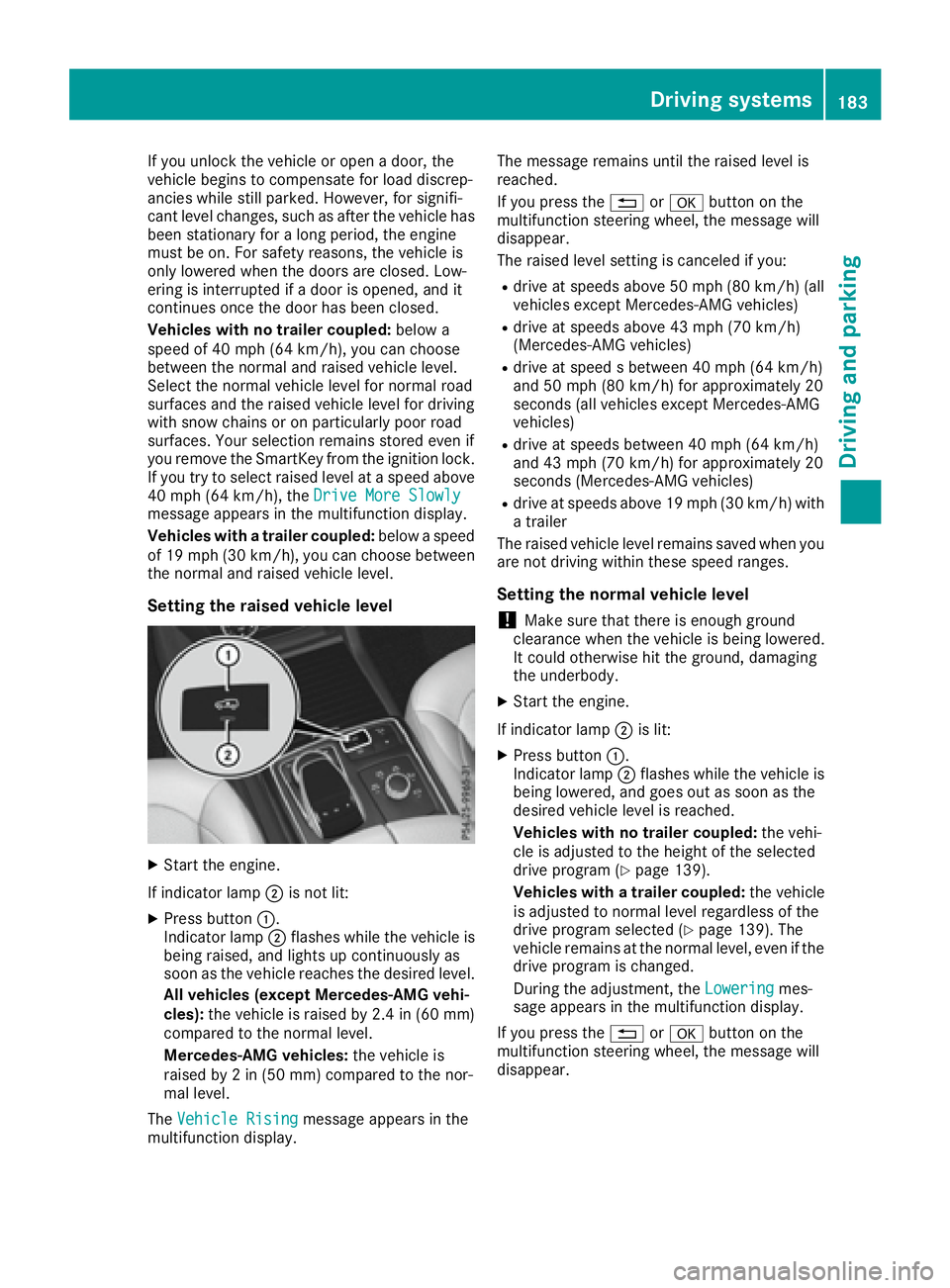
X
Start the engine.
If indicator lamp D is not lit:X
Press button C .
Indicator lamp D flashes while the vehicle is
being raised, and lights up continuously as
soon as the vehicle reaches the desired level.
All vehicles (except Mercedes-AMG vehi-
cles): the vehicle is raised by 2.4 in (60 mm)
compared to the normal level.
Mercedes-AMG vehicles: the vehicle is
raised by 2 in (50 mm) compared to the nor-
mal level.
The Vehicle Rising
message appears in the
multifunction display. The message remains until the raised level is
reached.
If you press the 8 or v button on the
multifunction steering wheel, the message will
disappear.
The raised level setting is canceled if you: R
drive at speeds above 50 mph (80 km/h) (all
vehicles except Mercedes-AMG vehicles) R
drive at speeds above 43 mph (70 km/h)
(Mercedes-AMG vehicles) R
drive at speed s between 40 mph (64 km/h)
and 50 mph (80 km/h) for approximately 20
seconds (all vehicles except Mercedes-AMG
vehicles) R
drive at speeds between 40 mph (64 km/h)
and 43 mph (70 km/h) for approximately 20
seconds (Mercedes-AMG vehicles) R
drive at speeds above 19 mph (30 km/h) with
a trailer
The raised vehicle level remains saved when you
are not driving within these speed ranges.
Setting the normal vehicle level
! Make sure that there is enough ground
clearance when the vehicle is being lowered.
It could otherwise hit the ground, damaging
the underbody. X
Start the engine.
If indicator lamp D is lit: X
Press button C .
Indicator lamp D flashes while the vehicle is
being lowered, and goes out as soon as the
desired vehicle level is reached.
Vehicles with no trailer coupled: the vehi-
cle is adjusted to the height of the selected
drive program ( Y
page 139).
Vehicles with a trailer coupled: the vehicle
is adjusted to normal level regardless of the
drive program selected ( Y
page 139). The
vehicle remains at the normal level, even if the
drive program is changed.
During the adjustment, the Lowering mes-
sage appears in the multifunction display.
If you press the 8 or v button on the
multifunction steering wheel, the message will
disappear.Driving systems 183
Driving and parking Z
Page 190 of 390
Parking tips: R
On narrow roads, drive as close to the parking
space as possible. R
Parking spaces that are littered or overgrown
might be identified or measured incorrectly. R
Parking spaces that are partially occupied by
trailer drawbars might not be identified as
such or be measured incorrectly. R
Snowfall or heavy rain may lead to a parking
space being measured inaccurately. R
Pay attention to the warning messages of
Parking Pilot PARKTRONIC during the parking
procedure ( Y
page 184)R
You can intervene in the steering procedure
to correct it at any time. Parking Pilot will then
be canceled. R
When transporting a load that protrudes from
your vehicle, you must not use Parking Pilot R
Never use Parking Pilot when snow chains are
installed. R
Make sure that the tire pressures are always
correct. This has a direct influence on the
parking characteristics of the vehicle.
Use Parking Pilot for parking spaces that are: R
parallel or at right angles to the direction of
travel R
that are on straight roads, not bends R
that are on the same level as the road, e.g. not
on the pavement
Detecting parking spaces Objects located above the detection range of
Parking Pilot will not be detected when the park-
ing space is measured. These are not taken into
account when the parking procedure is calcula-
ted, e.g. overhanging loads, tail sections or load-
ing ramps of trucks. Parking Pilot may therefore
guide you into the parking space too early.
G WARNING
If there are objects above the detection range: R
Active Park Assist may steer too early R
the vehicle may not stop in front of these
objects
You may cause a collision as a result. There is
a risk of an accident. If objects are located above the detection
range, stop and deactivate Active Parking
Assist.
For further information on the detection range
( Y
page 185).
Parking Pilot does not assist you parking in
spaces at a right angle to the direction of travel
if: R
two parking spaces are located directly next
to one another R
the parking space is directly next to a low
obstacle such as a low curb R
you park forwards
Parking Pilot does not assist you parking in
spaces parallel with or at a right angle to the
direction of travel if: R
the parking space is on a curb R
the system reads the parking space as being
blocked, for example by foliage or grass pav-
ing blocks R
the area is too small for the vehicle to maneu-
ver into R
the parking space is bordered by an obstacle,
e.g. a tree, a post or a trailer
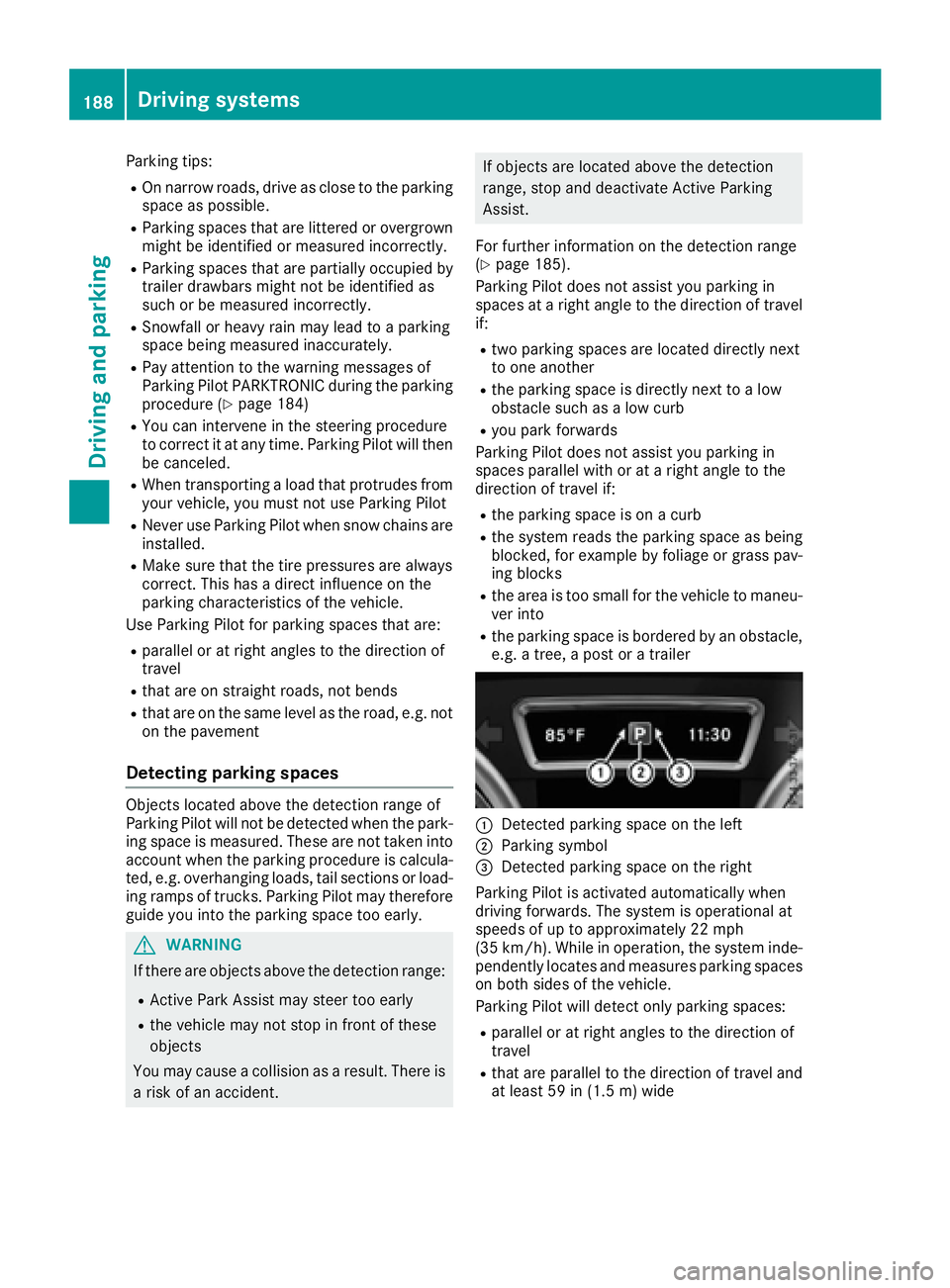
C
Detected parking space on the left D
Parking symbol
Page 194 of 390
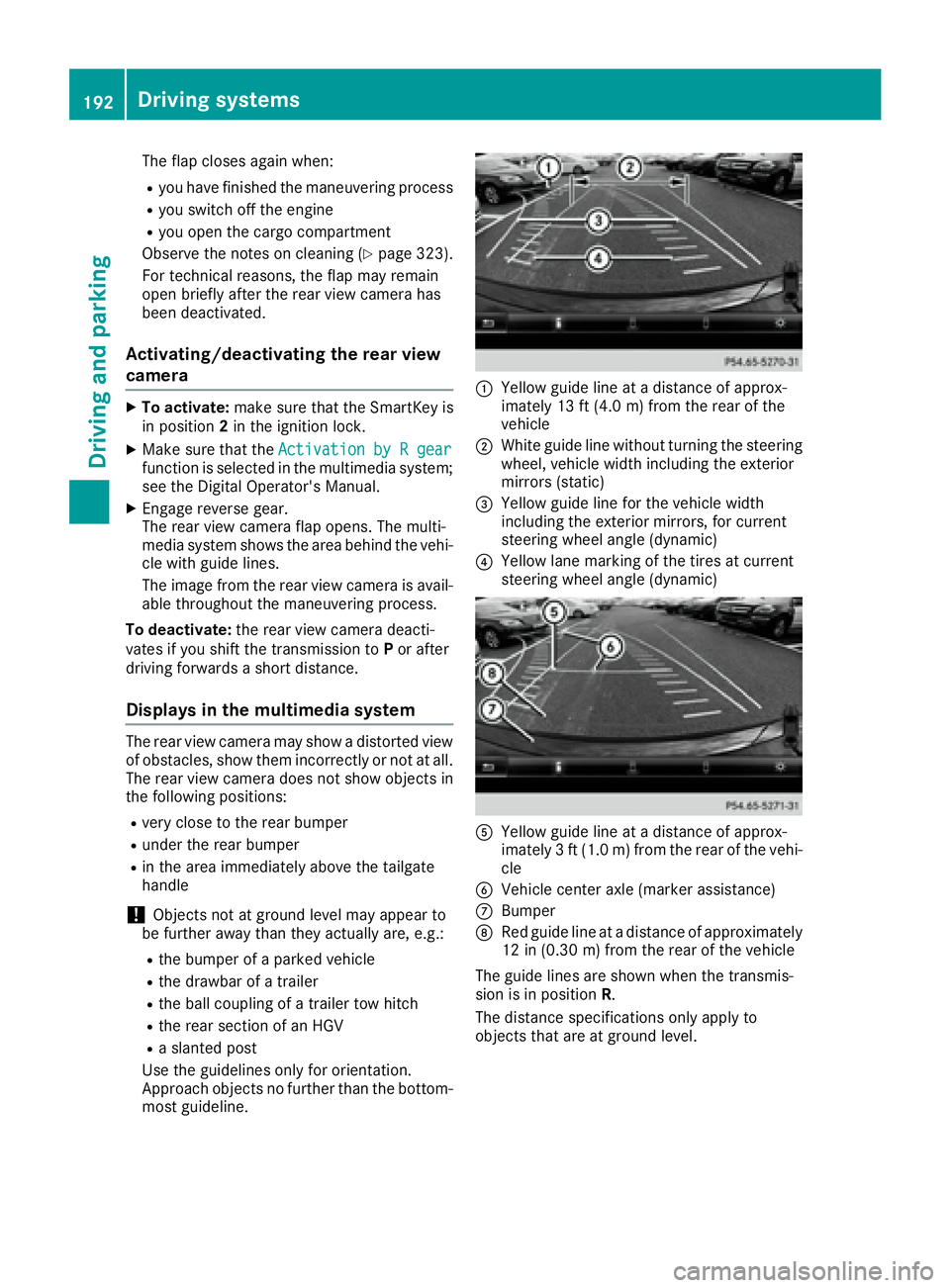
The flap closes again when: R
you have finished the maneuvering process R
you switch off the engine R
you open the cargo compartment
Observe the notes on cleaning ( Y
page 323).
For technical reasons, the flap may remain
open briefly after the rear view camera has
been deactivated.
Activating/deactivating the rear view
camera X
To activate: make sure that the SmartKey is
in position 2 in the ignition lock.X
Make sure that the Activation by R gear
function is selected in the multimedia system;
see the Digital Operator's Manual. X
Engage reverse gear.
The rear view camera flap opens. The multi-
media system shows the area behind the vehi-
cle with guide lines.
The image from the rear view camera is avail-
able throughout the maneuvering process.
To deactivate: the rear view camera deacti-
vates if you shift the transmission to P or after
driving forwards a short distance.
Displays in the multimedia system The rear view camera may show a distorted view
of obstacles, show them incorrectly or not at all.
The rear view camera does not show objects in
the following positions: R
very close to the rear bumper R
under the rear bumper R
in the area immediately above the tailgate
handle
! Objects not at ground level may appear to
be further away than they actually are, e.g.: R
the bumper of a parked vehicle R
the drawbar of a trailer R
the ball coupling of a trailer tow hitch R
the rear section of an HGV R
a slanted post
Use the guidelines only for orientation.
Approach objects no further than the bottom-
most guideline. C
Yellow guide line at a distance of approx-
imately 13 ft (4.0 m) from the rear of the
vehicle D
White guide line without turning the steering
wheel, vehicle width including the exterior
mirrors (static)
Page 198 of 390
R
if the camera lenses are dirty or covered R
if the vehicle components in which the cam-
eras are installed are damaged. In this event,
have the camera position and setting checked
at a qualified specialist workshop
Do not use the 360° camera in this case. You
can otherwise injure others or cause damage to
objects or the vehicle.
Guide lines are always shown at road level. In
trailer mode, the guide lines are shown at the
level of the trailer coupling.
The field of vision and other functions of the
camera system may be restricted due to addi-
tional accessories on the rear of the vehicle (e.g.
license plate holder, bicycle rack).
On vehicles with height-adjustable chassis,
depending on technical conditions, leaving the
standard height can result in: R
inaccuracies in the guide lines R
inaccuracies in the display of generated
images (top view)
Activation conditions The 360° camera image can be displayed if: R
your vehicle is equipped with a 360° camera R
the SmartKey is in position 2 in the ignition
lock R
the multimedia system is switched on
Switching on the 360° camera X
Press the
Page 204 of 390
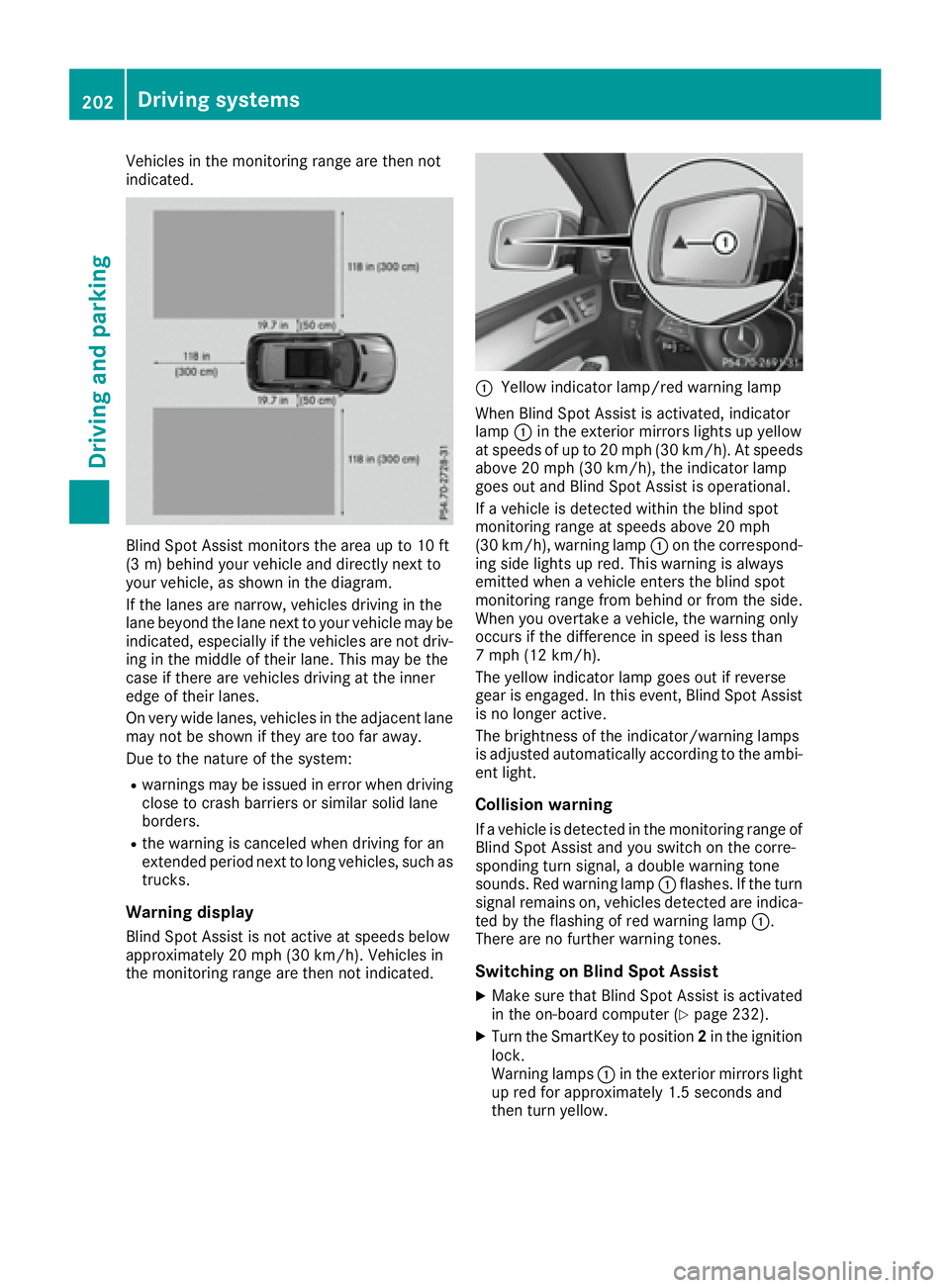
Vehicles in the monitoring range are then not
indicated.
Blind Spot Assist monitors the area up to 10 ft
(3 m) behind your vehicle and directly next to
your vehicle, as shown in the diagram.
If the lanes are narrow, vehicles driving in the
lane beyond the lane next to your vehicle may be
indicated, especially if the vehicles are not driv-
ing in the middle of their lane. This may be the
case if there are vehicles driving at the inner
edge of their lanes.
On very wide lanes, vehicles in the adjacent lane
may not be shown if they are too far away.
Due to the nature of the system: R
warnings may be issued in error when driving
close to crash barriers or similar solid lane
borders. R
the warning is canceled when driving for an
extended period next to long vehicles, such as
trucks.
Warning display
Blind Spot Assist is not active at speeds below
approximately 20 mph (30 km/h). Vehicles in
the monitoring range are then not indicated. C
Yellow indicator lamp/red warning lamp
When Blind Spot Assist is activated, indicator
lamp C in the exterior mirrors lights up yellow
at speeds of up to 20 mph (30 km/h). At speeds
above 20 mph (30 km/h), the indicator lamp
goes out and Blind Spot Assist is operational.
If a vehicle is detected within the blind spot
monitoring range at speeds above 20 mph
(30 km/h), warning lamp C on the correspond-
ing side lights up red. This warning is always
emitted when a vehicle enters the blind spot
monitoring range from behind or from the side.
When you overtake a vehicle, the warning only
occurs if the difference in speed is less than
7 mph (12 km/h).
The yellow indicator lamp goes out if reverse
gear is engaged. In this event, Blind Spot Assist
is no longer active.
The brightness of the indicator/warning lamps
is adjusted automatically according to the ambi-
ent light.
Collision warning If a vehicle is detected in the monitoring range of
Blind Spot Assist and you switch on the corre-
sponding turn signal, a double warning tone
sounds. Red warning lamp C flashes. If the turn
signal remains on, vehicles detected are indica-
ted by the flashing of red warning lamp C .
There are no further warning tones.
Switching on Blind Spot Assist X
Make sure that Blind Spot Assist is activated
in the on-board computer ( Y
page 232).X
Turn the SmartKey to position 2 in the ignition
lock.
Warning lamps C in the exterior mirrors light
up red for approximately 1.5 seconds and
then turn yellow.202
Driving systems
Driving and parking
Page 205 of 390
Towing a trailer When you attach a trailer, make sure you have
correctly established the electrical connection.
This can be accomplished by checking the trailer
lighting. In this event, Blind Spot Assist is deac-
tivated. The indicator lamp lights up yellow in
the exterior mirrors and the Blind Spot
Assist Not Available When Towing a
Trailer See Operator's Manual message
appears in the multifunction display.
i You can deactivate the indicator lamps in
the exterior mirrors.
To do so, switch off Blind Spot Assist when: R
the SmartKey is in position 2 in the ignition
lock R
the engine is not running
Lane Keeping Assist General notes
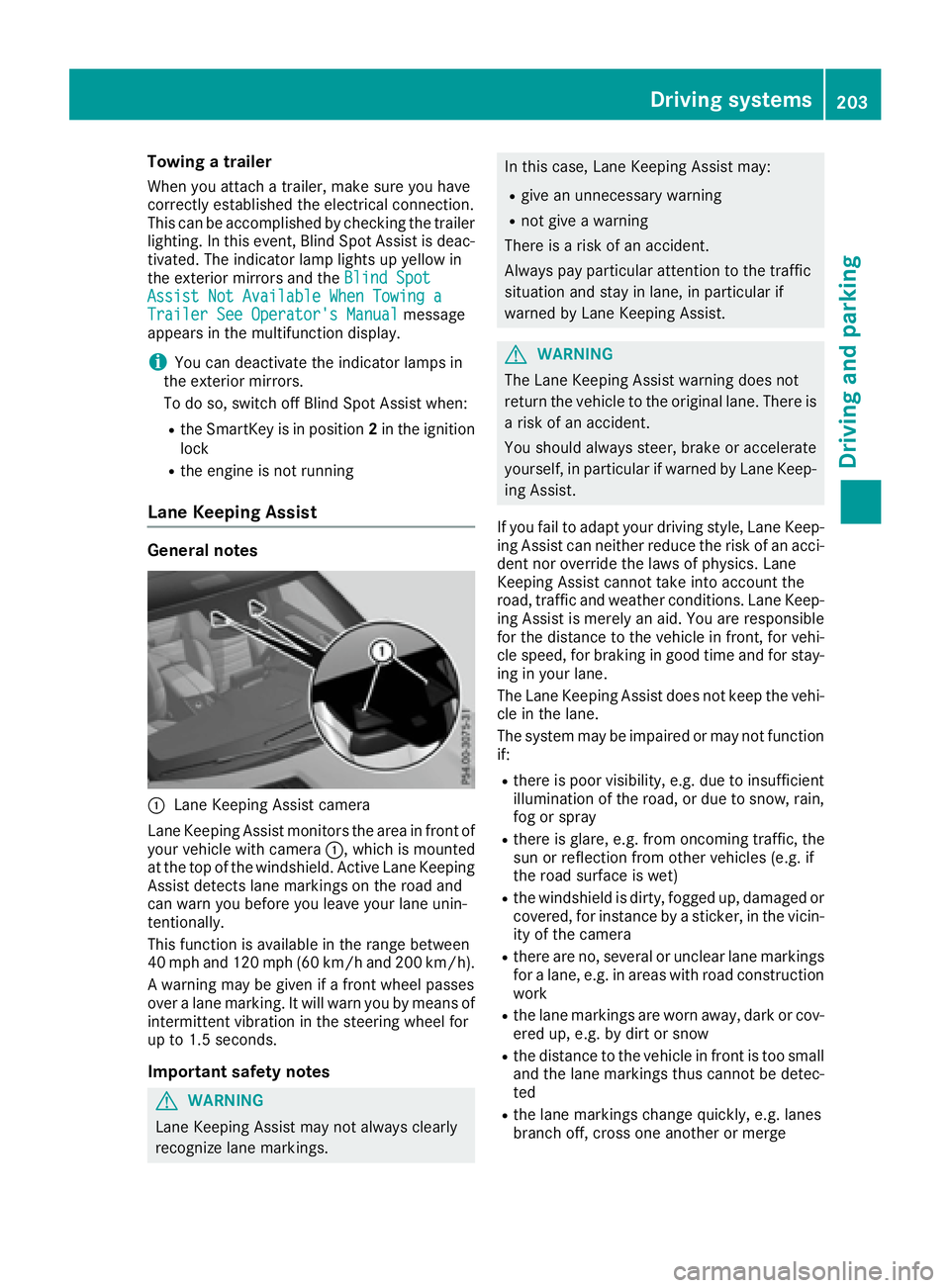
C
Lane Keeping Assist camera
Lane Keeping Assist monitors the area in front of
your vehicle with camera C , which is mounted
at the top of the windshield. Active Lane Keeping
Assist detects lane markings on the road and
can warn you before you leave your lane unin-
tentionally.
This function is available in the range between
40 mph and 120 mph (60 km/h and 200 km/h).
A warning may be given if a front wheel passes
over a lane marking. It will warn you by means of
intermittent vibration in the steering wheel for
up to 1.5 second s.
Im portant safety notes
G WARNING
Lane Keeping Assist may not always clearly
recognize lane markings. In this case, Lane Keeping Assist may: R
give an unnecessary warning R
not give a warning
There is a risk of an accident.
Always pay particular attention to the traffic
situation and stay in lane, in particular if
warned by Lane Keeping Assist.
G WARNING
The Lane Keeping Assist warning does not
return the vehicle to the original lane. There is
a risk of an accident.
You should always steer, brake or accelerate
yourself, in particular if warned by Lane Keep-
ing Assist.
If you fail to adapt your driving style, Lane Keep-
ing Assist can neither reduce the risk of an acci-
dent nor override the laws of physics. Lane
Keeping Assist cannot take into account the
road, traffic and weather conditions. Lane Keep-
ing Assist is merely an aid. You are responsible
for the distance to the vehicle in front, for vehi-
cle speed, for braking in good time and for stay-
ing in your lane.
The Lane Keeping Assist does not keep the vehi-
cle in the lane.
The system may be impaired or may not function
if: R
there is poor visibility, e.g. due to insufficient
illumination of the road, or due to snow, rain,
fog or spray R
there is glare, e.g. from oncoming traffic, the
sun or reflection from other vehicles (e.g. if
the road surface is wet) R
the windshield is dirty, fogged up, damaged or
covered, for instance by a sticker, in the vicin-
ity of the camera R
there are no, several or unclear lane markings
for a lane, e.g. in areas with road construction
work R
the lane markings are worn away, dark or cov-
ered up, e.g. by dirt or snow R
the distance to the vehicle in front is too small
a nd the lane markings thus cannot be detec-
ted R
the lane markings change quickly, e.g. lanes
branch off, cross one another or mergeDriving systems 203
Driving and parking Z
Page 209 of 390
R
the LOW RANGE offroad gear is activated
(vehicles with the Offroad Engineering pack-
age). R
a loss of tire pressure or a defective tire is
detected.
Switching on Active Blind Spot Assist X
Make sure that Active Blind Spot Assist is
activated in the on-board computer
( Y
page 232). X
Turn the SmartKey to position 2 in the ignition
lock.
Warning lamps C in the exterior mirrors light
up red for approximately 1.5 seconds an d
then turn yellow.
Towing a trailer When you attach a trailer, make sure you have
correctly established the electrical connection.
This can be accomplished by checking the trailer
lighting. Active Blind Spot Assist is then deacti-
vated. The indicator lamp lights up yellow in the
exterior mirrors and the Active Blind Spot
Asst. Not Available When Towing a
Trailer See Operator's Manual message
appears in the multifunction display.
Active Lane Keeping Assist
General notes
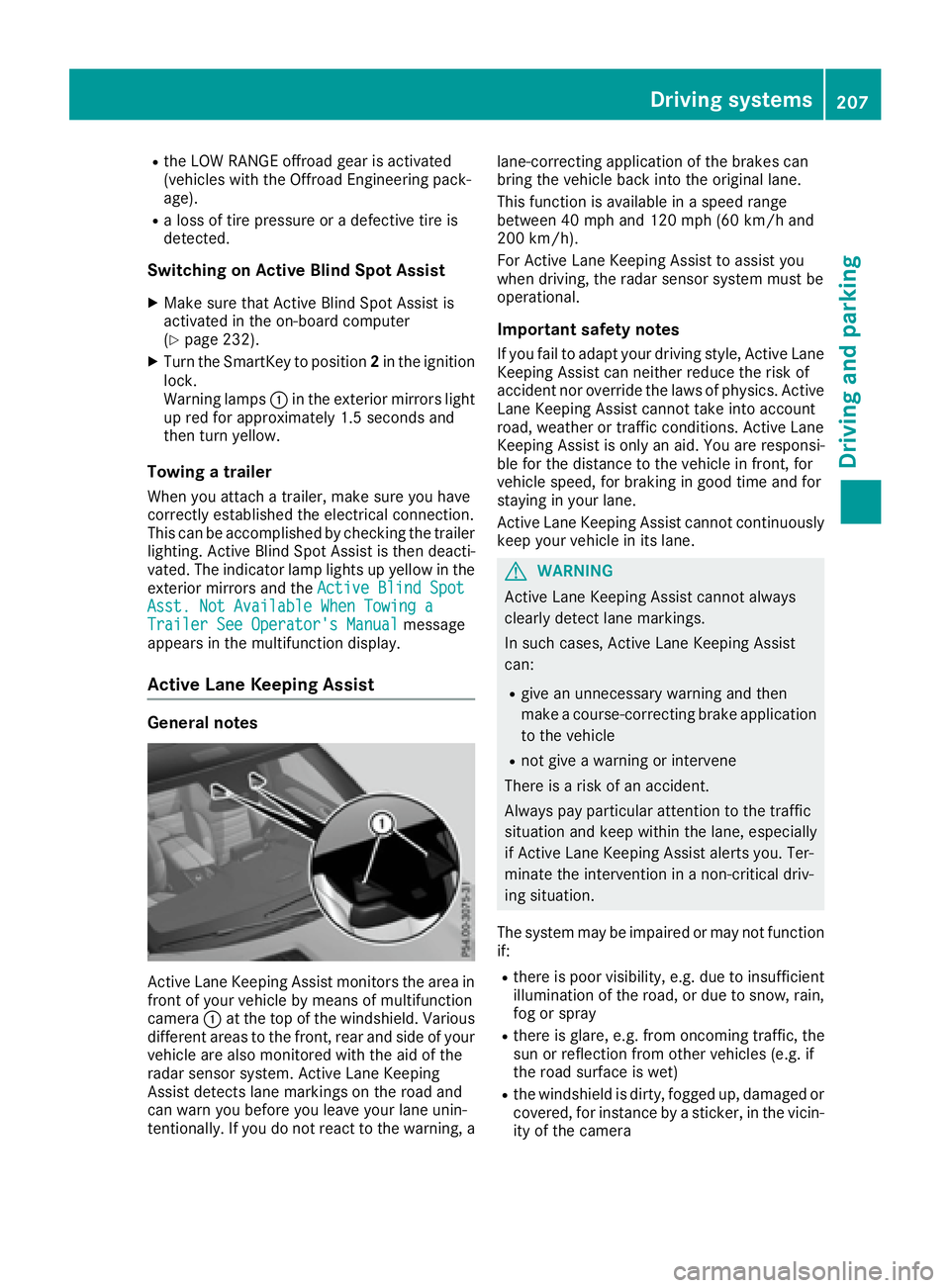
Active Lane Keeping Assist monitors the area in
front of your vehicle by means of multifunction
camera C at the top of the windshield. Various
different areas to the front, rear and side of your
vehicle are also monitored with the aid of the
radar sensor system. Active Lane Keeping
Assist detects lane markings on the road and
can warn you before you leave your lane unin-
tentionally. If you do not react to the warning, a lane-correcting application of the brakes can
bring the vehicle back into the original lane.
This function is available in a speed range
between 40 mph and 120 mph (60 km/h and
200 km/h).
For Active Lane Keeping Assist to assist you
when driving, the radar sensor system must be
operational.
Important safety notes If you fail to adapt your driving style, Active Lane
Keeping Assist can neither reduce the risk of
accident nor override the laws of physics. Active
Lane Keeping Assist cannot take into account
road, weather or traffic conditions. Active Lane
Keeping Assist is only an aid. You are responsi-
ble for the distance to the vehicle in front, for
vehicle speed, for braking in good time and for
staying in your lane.
Active Lane Ke eping Assist cannot continuously
ke
ep your vehicle in its lane.
G WARNING
Active Lane Keeping Assist cannot always
clearly detect lane markings.
In such cases, Active Lane Keeping Assist
can: R
give an unnecessary warning and then
make a course-correcting brake application
to the vehicle R
not give a warning or intervene
There is a risk of an accident.
Always pay particular attention to the traffic
situation and keep within the lane, especially
if Active Lane Keeping Assist alerts you. Ter-
minate the intervention in a non-critical driv-
ing situation.
The system may be impaired or may not function
if: R
there is poor visibility, e.g. due to insufficient
illumination of the road, or due to snow, rain,
fog or spray R
there is glare, e.g. from oncoming traffic, the
sun or reflection from other vehicles (e.g. if
the road surface is wet) R
the windshield is dirty, fogged up, damaged or
covered, for instance by a sticker, in the vicin-
ity of the cameraDriving system s 207
Dr ivi ng an d parking Z
Page 214 of 390
Offroad programs (vehicles with Off-
road Engineering package) General notes The Offroad and Offroad Plus drive programs
assist you when driving off-road. The engine's
performance characteristics and the gearshift-
ing characteristics of the automatic transmis-
sion are adapted for this purpose. ABS, ESP ®
and 4ETS programs especially adapted to off-
road driving are activated. An accelerator pedal
curve suitable for the terrain is selected, i.e. the
accelerator pedal must be depressed further to
accelerate.
Do not use the Offroad or Offroad Plus drive
programs on roads that are snow-covered or icy,
or if you have installed your vehicle with snow
chains.
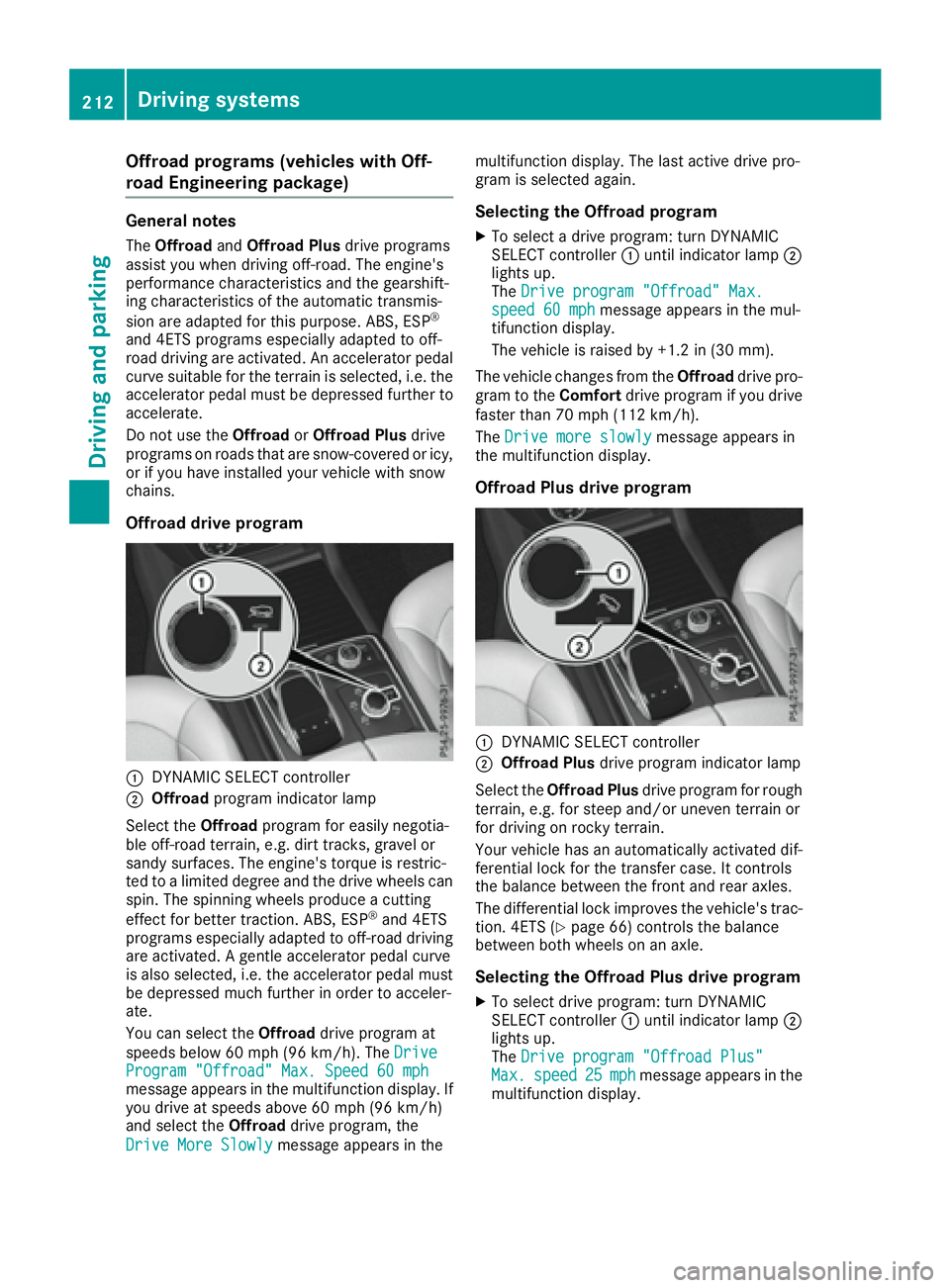
Offroad drive program
C
DYNAMIC SELECT controllerD
Offroad program indicator lamp
Select the Offroad program for easily negotia-
ble off-road terrain, e.g. dirt tracks, gravel or
sandy surfaces. The engine's torque is restric-
ted to a limited degree and the drive wheels can
spin. The spinning wheels produce a cutting
effect for better traction. ABS, ESP ®
and 4ETS
programs especially adapted to off-road driving
are activated. A gentle accelerator pedal curve
is also selected, i.e. the accelerator pedal must
be depressed much further in order to acceler-
ate.
You can select the Offroad drive program at
speeds below 60 mph (96 km/h). The Drive
Program "Offroad" Max. Speed 60 mph
message appears in the multifunction display. If
you drive at speeds above 60 mph (96 km/ h)
and select the Offroad drive program, the
Drive More Slowly message appears in the multifunction display. The last active drive pro-
gram is selected again.
Selecting the Offroad program X
To select a drive program: turn DYNAMIC
SELECT controller C until indicator lamp D
lights up.
The Drive program "Offroad" Max.
speed 60 mph message appears in the mul-
tifunction display.
The vehicle is raised by +1.2 in (30 mm).
The vehicle changes from the Offroad drive pro-
gram to the Comfort drive program if you drive
faster than 70 mph (11 2 km/ h) .
The Drive more slowly message appears in
the multifunction display.
Offroad Plus drive program
C
DYNAMIC SELECT controller D
Offroad Plus drive program indicator lamp
Select the Offroad Plus drive program for rough
terrain, e.g. for steep and/or uneven terrain or
for driving on rocky terrain.
Your vehicle has an automatically activated dif-
ferential lock for the transfer case. It controls
the balance between the front and rear axles.
The differential lock improves the vehicle's trac-
tion. 4ETS ( Y
page 66) controls the balance
between both wheels on an axle.
Selecting the Offroad Plus drive program X
To select drive program: turn DYNAMIC
SELECT controller C until indicator lamp D
lights up.
The Drive program "Offroad Plus"
Max. speed 25 mph message appears in the
multifunction display.212
Driving systems
Driving and parking